HOW TO USE GOOGLE DRIVE
Tutorial
WHAT IS GOOGLE DRIVE
 A virtual space on your google account
 Can save word documents, spreadsheets,
power points, and pdfs
 Use folders to organize files and information
THREE TIPS TO KEEP IN MIND WHEN USING
GOOGLE DRIVE
1. Every document needs to be labeled.
2. Every document belongs in a folder.
3. Regularly organize your digital files to
avoid ‘organization overwhelm’- when you
thought you remembered where you saved
a file and cannot locate it.
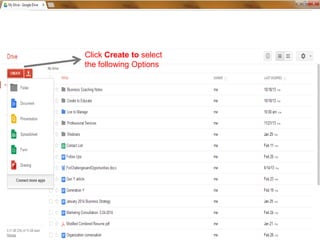
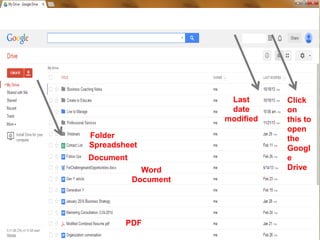
Click Create to select
the following Options
Click here
and select
Drive
Click
on
this to
open
the
Googl
e
Drive
Folder
Spreadsheet
Document
Last
date
modified
Word
Document
PDF
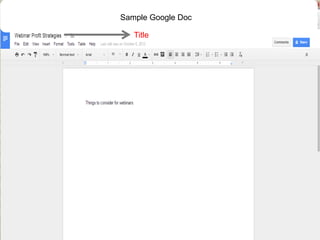
Title
Sample Google Doc
FOR MORE TRAINING…
 If you would like to learn more about how to
use google drive for YOUR personal and
organizational needs, please contact:
 mbennett@livetomanage.com
 Contact Hours: Mondays, Tuesdays, Thursdays-
5:30 p.m.-9:30 p.m.: 434-515-2313
Starting April 13th, there will be a Premium
Access to ALL Tutorials for 19.99 at
www.livetomanage.com

Google Drive Tutorial