Google Analytics
Best Practices for WCM
30/08/2012 – Joris Bekaert
                             1.
Table of contents

1.   “Google Analytics” a short history
2.   How does it work?
3.   Initial setup & deployment
4.   Advanced integration
5.   Points of attention for implementation


                                              2.
Google Analytics a short history

•   April 2005: Urchin acquired by Google
•   November 2005: First Rollout Google Analytics
•   August 2006: Second Rollout
•   April 2011: New version of interface
•   March 2012: End of sales standalone Urchin
•   June 2012: Mobile Google Analytics App


                                                    3.
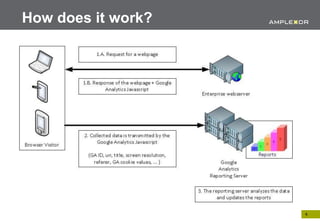
How does it work?


                    4.
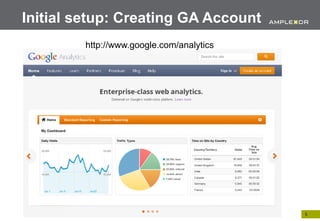
Initial setup: Creating GA Account
         http://www.google.com/analytics


                                           5.
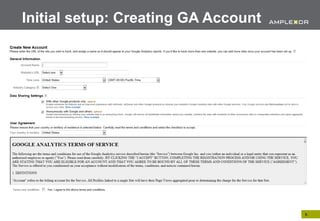
Initial setup: Creating GA Account


                                     6.
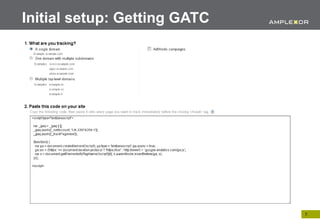
Initial setup: Getting GATC


                              7.
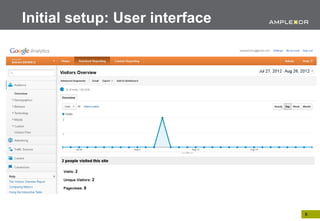
Initial setup: User interface


                                8.
The GATC explained

Google Analytics Tracking Code (GATC)


•   Asynchronous code
•   Downloads ga.js
•   Sets first party cookies
•   Gathers and transfers basic analytics data set


                                                     9.
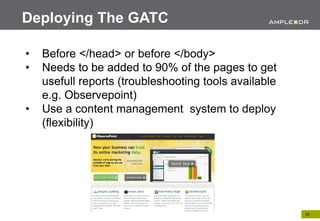
Deploying The GATC

•   Before </head> or before </body>
•   Needs to be added to 90% of the pages to get
    usefull reports (troubleshooting tools available
    e.g. Observepoint)
•   Use a content management system to deploy
    (flexibility)


                                                       10.
Advanced integration

1.   Tracking File Downloads
2.   Event tracking
3.   Tracking Search Results
4.   Tracking error pages and broken links
5.   Rollup reports


                                             11.
Tracking File Downloads

•   Virtual PageViews

    <a href=“mydoc.pdf”
    onclick=“_gaq.push(‘_trackPageview’,’/downloads
    /mydoc.pdf’);”>Download a pdf<a>

• Event Tracking


                                                      12.
Event Tracking

• Track in-page actions

  •   Flash movie player
  •   Exit links
  •   Ajax page elements (onClick, onSubmit, onReset, ...)
  •   File Downloads

• Event Tracking needs to be added in the HTML in a
  consistent way (CMS)

• _trackEvent function
                                                             13.
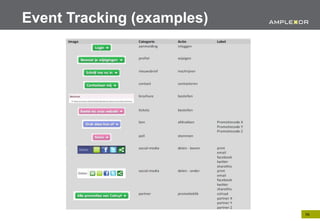
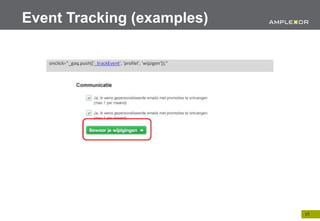
Event Tracking
    <a href=“#” onClick=“_gaq.push([‘_trackEvent’,
    ‘Category’, ‘Action’, ‘Label’]);”>Label Link</a>
Parameter                 Condition   Description

category                  Required    The name you supply to the objects you
                                      want to track
action                    Required    A string that is uniquely paired with each
                                      category and commonly used to define
                                      the type of user action for the web object
optional_label            Optional    A string to provide addtional dimensions
                                      to the event data.
optional_value            Optional    An integer that you can use to provide
                                      numerical data about the user event
                                      (time, amount)
optional_nonInteraction   Optional    The nonInteraction event is set to define
                                      wether an event is treated as a non-
                                      interaction.
                                                                                   14.
Event Tracking (examples)


gaq.push([‘_trackEvent’, ‘Video’, ‘Play’, ‘Alone in New York’]);”

gaq.push([‘_trackEvent’, ‘Video’, ‘Pause’, ‘Alone in New York’,
‘30’]);”
                                                                    15.
Event Tracking (examples)


                            16.
Event Tracking (examples)


                            17.
Event Tracking (examples)

• Tracking Mailto

  <a href=“mailto:info@amplexor.com”
  onClick=“_gaq.push([‘_trackEvent’,’Exit Points’,’Click
  - Email’, ‘info@amplexor.com’]);”>
  info@amplexor.com</a>

• Tracking embedded Video From Youtube

  -> attach events to Youtube Javascript API

                                                       18.
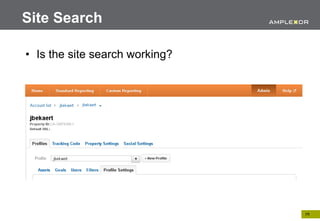
Site Search

• Is the site search working?


                                19.
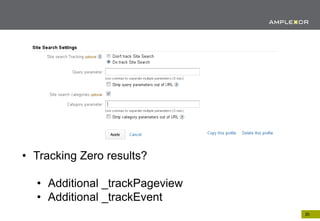
• Tracking Zero results?

  • Additional _trackPageview
  • Additional _trackEvent
                                20.
Error Pages & Broken Links

   • Add GATC to Error page templates
   • Add additional _trackPageview code
<script type="text/javascript">

 var _gaq = _gaq || [];
 _gaq.push(['_setAccount', 'UA-33974358-1']);
 _gaq.push(['_trackPageview‘, ‘/error 404/’ + document.location.pathname +
document.location.search’]);

 (function() {
   var ga = document.createElement('script'); ga.type = 'text/javascript'; ga.async = true;
   ga.src = ('https:' == document.location.protocol ? 'https://ssl' : 'http://www') + '.google-
analytics.com/ga.js';
   var s = document.getElementsByTagName('script')[0]; s.parentNode.insertBefore(ga, s);
 })();

</script>                                                                                    21.
Rollup Reports

•     Technique usefull for big companies with semi-
      autonomous country offices
<script type="text/javascript">

 var _gaq = _gaq || [];
 _gaq.push(['_setAccount', 'UA-33974358-1']);
 _gaq.push(['_trackPageview']);

_gaq.push([‘t2._setAccount', 'UA-22334567-1']);
_gaq.push([‘t2._trackPageview']);

 (function() {
   var ga = document.createElement('script'); ga.type = 'text/javascript'; ga.async = true;
   ga.src = ('https:' == document.location.protocol ? 'https://ssl' : 'http://www') + '.google-
analytics.com/ga.js';
   var s = document.getElementsByTagName('script')[0]; s.parentNode.insertBefore(ga, s);
 })();

</script>                                                                                         22.
Points of attention for implementation

• Implementing Google Analytics needs extra
  development

• Check Google Analytics features of the WCMS

• Create a tracking plan before the development
  starts

• It can save work if the web agency can create the
  tracking plan

                                                      23.
Further reading

http://www.advanced-web-metrics.com/


                                       24.

Google Analytics intro - Best practices for WCM

  • 1.
    Google Analytics Best Practicesfor WCM 30/08/2012 – Joris Bekaert 1.
  • 2.
    Table of contents 1. “Google Analytics” a short history 2. How does it work? 3. Initial setup & deployment 4. Advanced integration 5. Points of attention for implementation 2.
  • 3.
    Google Analytics ashort history • April 2005: Urchin acquired by Google • November 2005: First Rollout Google Analytics • August 2006: Second Rollout • April 2011: New version of interface • March 2012: End of sales standalone Urchin • June 2012: Mobile Google Analytics App 3.
  • 4.
    How does itwork? 4.
  • 5.
    Initial setup: CreatingGA Account http://www.google.com/analytics 5.
  • 6.
  • 7.
  • 8.
    Initial setup: Userinterface 8.
  • 9.
    The GATC explained GoogleAnalytics Tracking Code (GATC) • Asynchronous code • Downloads ga.js • Sets first party cookies • Gathers and transfers basic analytics data set 9.
  • 10.
    Deploying The GATC • Before </head> or before </body> • Needs to be added to 90% of the pages to get usefull reports (troubleshooting tools available e.g. Observepoint) • Use a content management system to deploy (flexibility) 10.
  • 11.
    Advanced integration 1. Tracking File Downloads 2. Event tracking 3. Tracking Search Results 4. Tracking error pages and broken links 5. Rollup reports 11.
  • 12.
    Tracking File Downloads • Virtual PageViews <a href=“mydoc.pdf” onclick=“_gaq.push(‘_trackPageview’,’/downloads /mydoc.pdf’);”>Download a pdf<a> • Event Tracking 12.
  • 13.
    Event Tracking • Trackin-page actions • Flash movie player • Exit links • Ajax page elements (onClick, onSubmit, onReset, ...) • File Downloads • Event Tracking needs to be added in the HTML in a consistent way (CMS) • _trackEvent function 13.
  • 14.
    Event Tracking <a href=“#” onClick=“_gaq.push([‘_trackEvent’, ‘Category’, ‘Action’, ‘Label’]);”>Label Link</a> Parameter Condition Description category Required The name you supply to the objects you want to track action Required A string that is uniquely paired with each category and commonly used to define the type of user action for the web object optional_label Optional A string to provide addtional dimensions to the event data. optional_value Optional An integer that you can use to provide numerical data about the user event (time, amount) optional_nonInteraction Optional The nonInteraction event is set to define wether an event is treated as a non- interaction. 14.
  • 15.
    Event Tracking (examples) gaq.push([‘_trackEvent’,‘Video’, ‘Play’, ‘Alone in New York’]);” gaq.push([‘_trackEvent’, ‘Video’, ‘Pause’, ‘Alone in New York’, ‘30’]);” 15.
  • 16.
  • 17.
  • 18.
    Event Tracking (examples) •Tracking Mailto <a href=“mailto:info@amplexor.com” onClick=“_gaq.push([‘_trackEvent’,’Exit Points’,’Click - Email’, ‘info@amplexor.com’]);”> info@amplexor.com</a> • Tracking embedded Video From Youtube -> attach events to Youtube Javascript API 18.
  • 19.
    Site Search • Isthe site search working? 19.
  • 20.
    • Tracking Zeroresults? • Additional _trackPageview • Additional _trackEvent 20.
  • 21.
    Error Pages &Broken Links • Add GATC to Error page templates • Add additional _trackPageview code <script type="text/javascript"> var _gaq = _gaq || []; _gaq.push(['_setAccount', 'UA-33974358-1']); _gaq.push(['_trackPageview‘, ‘/error 404/’ + document.location.pathname + document.location.search’]); (function() { var ga = document.createElement('script'); ga.type = 'text/javascript'; ga.async = true; ga.src = ('https:' == document.location.protocol ? 'https://ssl' : 'http://www') + '.google- analytics.com/ga.js'; var s = document.getElementsByTagName('script')[0]; s.parentNode.insertBefore(ga, s); })(); </script> 21.
  • 22.
    Rollup Reports • Technique usefull for big companies with semi- autonomous country offices <script type="text/javascript"> var _gaq = _gaq || []; _gaq.push(['_setAccount', 'UA-33974358-1']); _gaq.push(['_trackPageview']); _gaq.push([‘t2._setAccount', 'UA-22334567-1']); _gaq.push([‘t2._trackPageview']); (function() { var ga = document.createElement('script'); ga.type = 'text/javascript'; ga.async = true; ga.src = ('https:' == document.location.protocol ? 'https://ssl' : 'http://www') + '.google- analytics.com/ga.js'; var s = document.getElementsByTagName('script')[0]; s.parentNode.insertBefore(ga, s); })(); </script> 22.
  • 23.
    Points of attentionfor implementation • Implementing Google Analytics needs extra development • Check Google Analytics features of the WCMS • Create a tracking plan before the development starts • It can save work if the web agency can create the tracking plan 23.
  • 24.