Vue.jsVue.js
Reactive Components for Modern Web Interfaces
Vue.js highlightsVue.js highlights
Vue.js – Intro
View-layer library
Simple & beautiful API
Lightweight (~24kb min+gzip)
Fast
Reactive
Component based
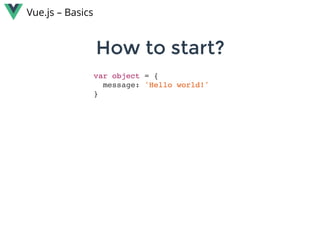
How to start?How to start?
Vue.js – Basics
var object = {
message: 'Hello world!'
}
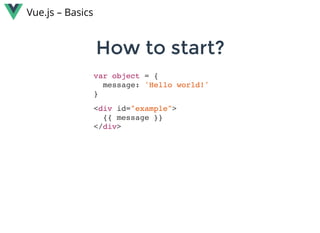
How to start?How to start?
Vue.js – Basics
var object = {
message: 'Hello world!'
}
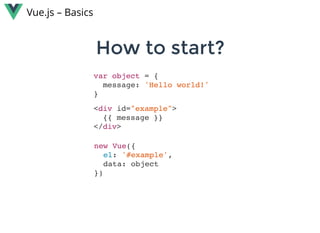
How to start?How to start?
Vue.js – Basics
<div id="example">
{{ message }}
</div>
var object = {
message: 'Hello world!'
}
How to start?How to start?
Vue.js – Basics
<div id="example">
{{ message }}
</div>
new Vue({
el: '#example',
data: object
})
var object = {
message: 'Hello world!'
}
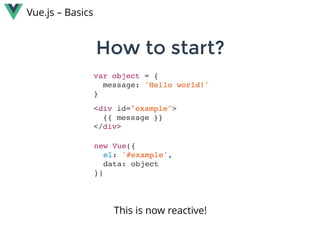
How to start?How to start?
Vue.js – Basics
<div id="example">
{{ message }}
</div>
new Vue({
el: '#example',
data: object
})
This is now reactive!
Reactivity - how does it work?Reactivity - how does it work?
Vue.js – Basics
When passing an object to the Vue instance as it’s data
property, Vue.js walks through all it’s properties
and converts them to getter/setters
 using  .Object.defineProperty
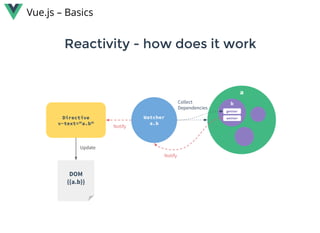
For every directive / data binding in the template, there will be a
corresponding watcher object. When a dependency’s setter is
called, it triggers the watcher to re-evaluate, and in turn causes its
associated directive to perform DOM updates.
Reactivity - how does it workReactivity - how does it work
Vue.js – Basics
Vue.js – Basics
You can use it „jQuery style”. Just add the library from the
CDN and you’re ready to go.
Simple to useSimple to use
No need for JSX, Webpack / Browserify, TypeScript or
silly React.createElement(). 
You can use it to enhance your old projects and keep
using all your favorite tools: Slim, Sass, CoffeeScript or
simply es5. Vue doesn’t care.
Vue.js – Basics
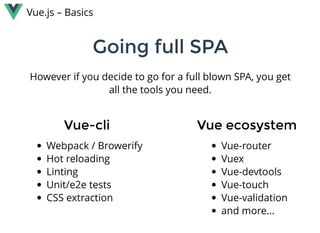
However if you decide to go for a full blown SPA, you get
all the tools you need.
Going full SPAGoing full SPA
Vue-cliVue-cli
Webpack / Browerify
Hot reloading
Linting
Unit/e2e tests
CSS extraction
Vue ecosystemVue ecosystem
Vue-router
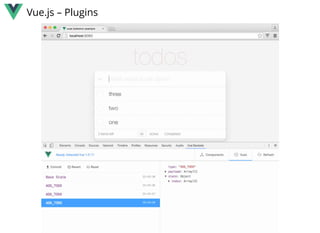
Vuex
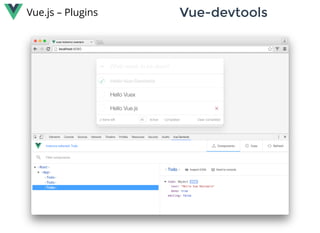
Vue-devtools
Vue-touch
Vue-validation
and more...
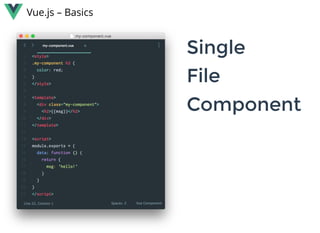
Vue.js – Basics
SingleSingle
FileFile
ComponentComponent
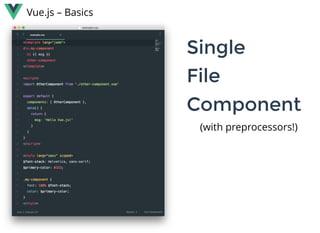
Vue.js – Basics
SingleSingle
FileFile
ComponentComponent
(with preprocessors!)
Vue.js – Basics
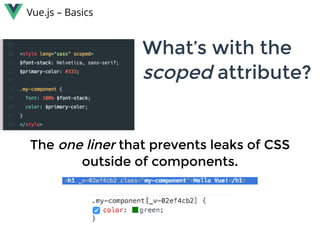
What’s with theWhat’s with the
scoped scoped attribute?attribute?
TheThe one linerone liner that prevents leaks of CSSthat prevents leaks of CSS
outside of components.outside of components.
Vue.js – Basics
VIRTUAL DOMVIRTUAL DOM
Hyperscript and JSX support
You can still use templates (those will
be converted to render functions)
Detects static class names and
attributes so they are never diffed after
initial render
Detects the maximum static sub trees
(with no dynamic bindings) and hoists
them out of the render function.
Vue.js – Basics
TWO AVAILABLETWO AVAILABLE
BUILDSBUILDS
THE COMPILER CAN NOW BETHE COMPILER CAN NOW BE
EXCLUDEDEXCLUDED
STANDALONE: Including the compiler and
the runtime.
 
RUNTIME ONLY: Not including the
compiler, which isn’t needed if you use a
webpack-loader or browserify transform
anyway (as you have a pre-compile step
then). Default build for NPM.
Vue.js – Basics
TWO AVAILABLETWO AVAILABLE
BUILDSBUILDS
THE COMPILER CAN NOW BETHE COMPILER CAN NOW BE
EXCLUDEDEXCLUDED
STANDALONE: Including the compiler and
the runtime.
 
RUNTIME ONLY: Not including the
compiler, which isn’t needed if you use a
webpack-loader or browserify transform
anyway (as you have a pre-compile step
then). Default build for NPM.
Vue.js – Basics
THINK REACT-NATIVETHINK REACT-NATIVE  FORFOR
VUE.JSVUE.JS
 
Opens the possibility to render to
mobile native interfaces.
 
Is using a port of Vue.js 2.0
Maintained by Alibaba Group
Already available at:
http://alibaba.github.io/weex/index.html
Vue.js – Basics
Try it out!Try it out!
webpackbin.herokuapp.com/vue
Similarities with AngularJSSimilarities with AngularJS
Vue.js – Similarities with AngularJS
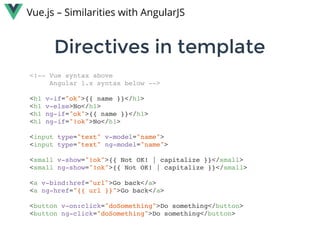
Directives in templateDirectives in template
Vue.js – Similarities with AngularJS
<!-- Vue syntax above
Angular 1.x syntax below -->
<h1 v-if="ok">{{ name }}</h1>
<h1 v-else>No</h1>
<h1 ng-if="ok">{{ name }}</h1>
<h1 ng-if="!ok">No</h1>
<input type="text" v-model="name">
<input type="text" ng-model="name">
<small v-show="!ok">{{ Not OK! | capitalize }}</small>
<small ng-show="!ok">{{ Not OK! | capitalize }}</small>
<a v-bind:href="url">Go back</a>
<a ng-href="{{ url }}">Go back</a>
<button v-on:click="doSomething">Do something</button>
<button ng-click="doSomething">Do something</button>
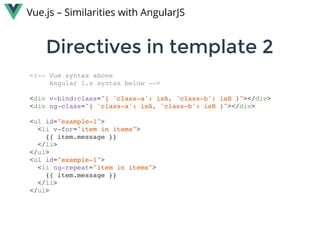
Directives in template 2Directives in template 2
Vue.js – Similarities with AngularJS
<!-- Vue syntax above
Angular 1.x syntax below -->
<div v-bind:class="{ 'class-a': isA, 'class-b': isB }"></div>
<div ng-class="{ 'class-a': isA, 'class-b': isB }"></div>
<ul id="example-1">
<li v-for="item in items">
{{ item.message }}
</li>
</ul>
<ul id="example-1">
<li ng-repeat="item in items">
{{ item.message }}
</li>
</ul>
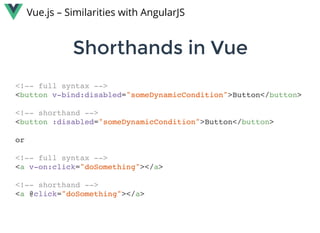
Shorthands in VueShorthands in Vue
Vue.js – Similarities with AngularJS
<!-- full syntax -->
<button v-bind:disabled="someDynamicCondition">Button</button>
<!-- shorthand -->
<button :disabled="someDynamicCondition">Button</button>
or
<!-- full syntax -->
<a v-on:click="doSomething"></a>
<!-- shorthand -->
<a @click="doSomething"></a>
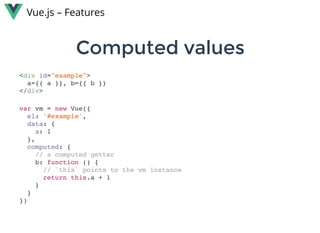
Computed valuesComputed values
Vue.js – Features
<div id="example">
a={{ a }}, b={{ b }}
</div>
var vm = new Vue({
el: '#example',
data: {
a: 1
},
computed: {
// a computed getter
b: function () {
// `this` points to the vm instance
return this.a + 1
}
}
})
Computed setterComputed setter
Vue.js – Features
// ...
computed: {
fullName: {
// getter
get: function () {
return this.firstName + ' ' + this.lastName
},
// setter
set: function (newValue) {
var names = newValue.split(' ')
this.firstName = names[0]
this.lastName = names[names.length - 1]
}
}
}
// ..
// When calling vm.fullName = 'John Doe', the setter will
// be invoked and vm.firstName and vm.lastName
// will be updated accordingly.
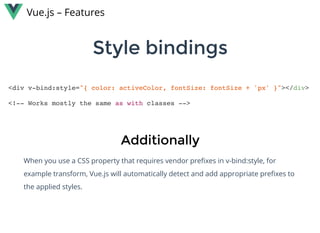
Style bindingsStyle bindings
Vue.js – Features
<div v-bind:style="{ color: activeColor, fontSize: fontSize + 'px' }"></div>
<!-- Works mostly the same as with classes -->
AdditionallyAdditionally
When you use a CSS property that requires vendor prefixes in v-bind:style, for
example transform, Vue.js will automatically detect and add appropriate prefixes to
the applied styles.
Vue.js – Features
List renderingList rendering
var example1 = new Vue({
el: '#example-1',
data: {
items: [
{ message: 'Foo' },
{ message: 'Bar' }
],
object: {
FirstName: 'John',
LastName: 'Doe',
Age: 30
}
}
})
<ul id="example-1">
<li v-for="item in items">
{{ $index }} – {{ item.message }}
</li>
</ul
or
<ul>
<template v-for="item in items">
<li>{{ item.msg }}</li>
<li class="divider"></li>
</template>
</ul>
<!-- Where the <template> element
won’t render -->
or
<div v-for="(key, val) in object">
{{ key }} {{ val }}
</div>
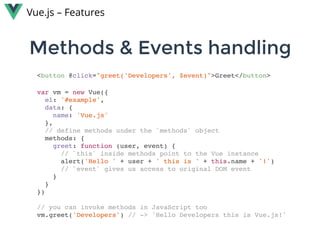
Methods & Events handlingMethods & Events handling
Vue.js – Features
var vm = new Vue({
el: '#example',
data: {
name: 'Vue.js'
},
// define methods under the `methods` object
methods: {
greet: function (user, event) {
// `this` inside methods point to the Vue instance
alert('Hello ' + user + ' this is ' + this.name + '!')
// `event` gives us access to original DOM event
}
}
})
// you can invoke methods in JavaScript too
vm.greet('Developers') // -> 'Hello Developers this is Vue.js!'
<button @click="greet('Developers', $event)">Greet</button>
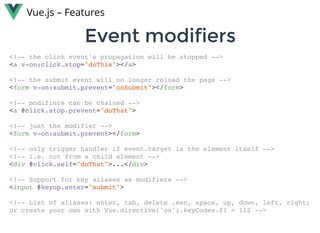
Event modifiersEvent modifiers
Vue.js – Features
<!-- the click event's propagation will be stopped -->
<a v-on:click.stop="doThis"></a>
<!-- the submit event will no longer reload the page -->
<form v-on:submit.prevent="onSubmit"></form>
<!-- modifiers can be chained -->
<a @click.stop.prevent="doThat">
<!-- just the modifier -->
<form v-on:submit.prevent></form>
<!-- only trigger handler if event.target is the element itself -->
<!-- i.e. not from a child element -->
<div @click.self="doThat">...</div>
<!-- Support for key aliases as modifiers -->
<input @keyup.enter="submit">
<!-- List of aliases: enter, tab, delete ,esc, space, up, down, left, right;
or create your own with Vue.directive('on').keyCodes.f1 = 112 -->
ComponentsComponents
Vue.js – Components
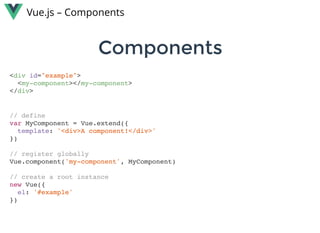
<div id="example">
<my-component></my-component>
</div>
// define
var MyComponent = Vue.extend({
template: '<div>A component!</div>'
})
// register globally
Vue.component('my-component', MyComponent)
// create a root instance
new Vue({
el: '#example'
})
ComponentsComponents
Vue.js – Components
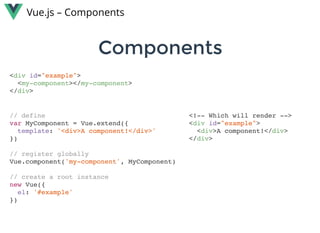
<div id="example">
<my-component></my-component>
</div>
// define
var MyComponent = Vue.extend({
template: '<div>A component!</div>'
})
// register globally
Vue.component('my-component', MyComponent)
// create a root instance
new Vue({
el: '#example'
})
<!-- Which will render -->
<div id="example">
<div>A component!</div>
</div>
Local registrationLocal registration
Vue.js – Components
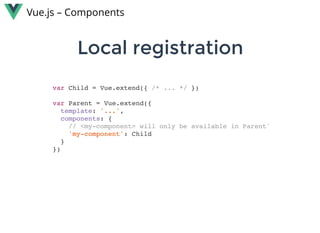
var Child = Vue.extend({ /* ... */ })
var Parent = Vue.extend({
template: '...',
components: {
// <my-component> will only be available in Parent'
'my-component': Child
}
})
PropsProps
Vue.js – Components
Vue.component('child', {
// declare the props
props: ['myProp'],
// the prop can be used inside templates, and will also
// be set as `this.msg`
template: '<span>{{ myProp }}</span>'
})
<child my-prop="hello!"></child>
<!-- The prop will be passed as string -->
Remember: When using camelCased prop names as
attributes, you need to use their kebab-case equivalents.
Dynamic propsDynamic props
Vue.js – Components
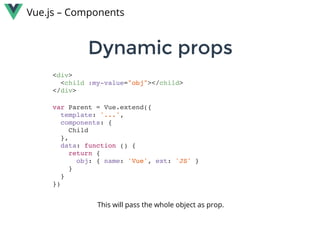
<div>
<child :my-value="obj"></child>
</div>
var Parent = Vue.extend({
template: '...',
components: {
Child
},
data: function () {
return {
obj: { name: 'Vue', ext: 'JS' }
}
}
})
This will pass the whole object as prop.
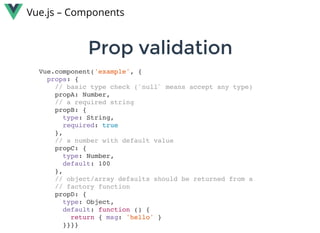
Prop validationProp validation
Vue.js – Components
Vue.component('example', {
props: {
// basic type check (`null` means accept any type)
propA: Number,
// a required string
propB: {
type: String,
required: true
},
// a number with default value
propC: {
type: Number,
default: 100
},
// object/array defaults should be returned from a
// factory function
propD: {
type: Object,
default: function () {
return { msg: 'hello' }
}}}}
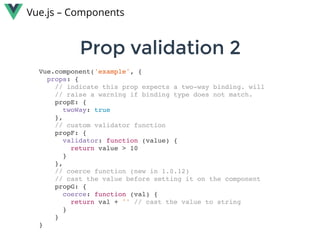
Prop validation 2Prop validation 2
Vue.js – Components
Vue.component('example', {
props: {
// indicate this prop expects a two-way binding. will
// raise a warning if binding type does not match.
propE: {
twoWay: true
},
// custom validator function
propF: {
validator: function (value) {
return value > 10
}
},
// coerce function (new in 1.0.12)
// cast the value before setting it on the component
propG: {
coerce: function (val) {
return val + '' // cast the value to string
}
}
}
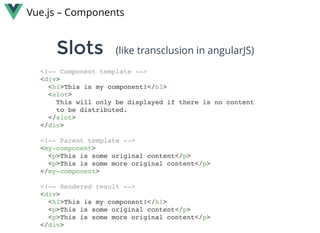
SlotsSlots
Vue.js – Components
<!-- Component template -->
<div>
<h1>This is my component!</h1>
<slot>
This will only be displayed if there is no content
to be distributed.
</slot>
</div>
<!-- Parent template -->
<my-component>
<p>This is some original content</p>
<p>This is some more original content</p>
</my-component>
<!-- Rendered result -->
<div>
<h1>This is my component!</h1>
<p>This is some original content</p>
<p>This is some more original content</p>
</div>
(like transclusion in angularJS)
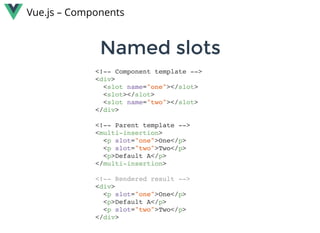
Named slotsNamed slots
Vue.js – Components
<!-- Component template -->
<div>
<slot name="one"></slot>
<slot></slot>
<slot name="two"></slot>
</div>
<!-- Parent template -->
<multi-insertion>
<p slot="one">One</p>
<p slot="two">Two</p>
<p>Default A</p>
</multi-insertion>
<!-- Rendered result -->
<div>
<p slot="one">One</p>
<p>Default A</p>
<p slot="two">Two</p>
</div>
MixinsMixins
Vue.js – Mixins
// define a mixin object
var myMixin = {
created: function () {
this.hello()
},
methods: {
hello: function () {
console.log('hello from mixin!')
}
}
}
// define a component that uses this mixin
var Component = Vue.extend({
mixins: [myMixin]
})
var component = new Component() // -> "hello from mixin!"
Mixing mixins Mixing mixins 
Vue.js – Mixins
var mixin = {
created: function () {
console.log('mixin hook called')
}
}
new Vue({
mixins: [mixin],
created: function () {
console.log('component hook called')
}
})
// -> "mixin hook called"
// -> "component hook called"
Mixing mixins Mixing mixins 
Vue.js – Mixins
var mixin = {
methods: {
foo: function () {
console.log('foo')
},
conflicting: function () {
console.log('from mixin')
}
}
}
var vm = new Vue({
mixins: [mixin],
methods: {
bar: function () {
console.log('bar')
},
conflicting: function () {
console.log('from self')
}
}
})
Mixing mixins Mixing mixins 
Vue.js – Mixins
var mixin = {
methods: {
foo: function () {
console.log('foo')
},
conflicting: function () {
console.log('from mixin')
}
}
}
var vm = new Vue({
mixins: [mixin],
methods: {
bar: function () {
console.log('bar')
},
conflicting: function () {
console.log('from self')
}
}
})
vm.foo() // -> "foo"
vm.bar() // -> "bar"
vm.conflicting() // -> "from self"
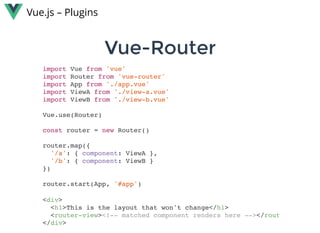
Vue-RouterVue-Router
Vue.js – Plugins
import Vue from 'vue'
import Router from 'vue-router'
import App from './app.vue'
import ViewA from './view-a.vue'
import ViewB from './view-b.vue'
Vue.use(Router)
const router = new Router()
router.map({
'/a': { component: ViewA },
'/b': { component: ViewB }
})
router.start(App, '#app')
<div>
<h1>This is the layout that won't change</h1>
<router-view><!-- matched component renders here --></rout
</div>
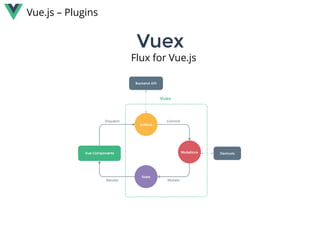
VuexVuex
Vue.js – Plugins
Flux for Vue.js
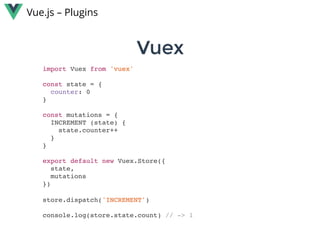
VuexVuex
Vue.js – Plugins
import Vuex from 'vuex'
const state = {
counter: 0
}
const mutations = {
INCREMENT (state) {
state.counter++
}
}
export default new Vuex.Store({
state,
mutations
})
store.dispatch('INCREMENT')
console.log(store.state.count) // -> 1
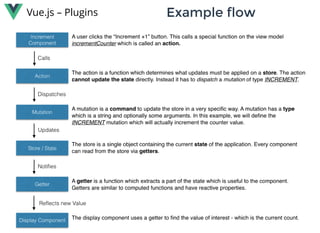
Vue.js – Plugins Example flowExample flow
Vue.js – Plugins Vue-devtoolsVue-devtools
Vue.js – Plugins
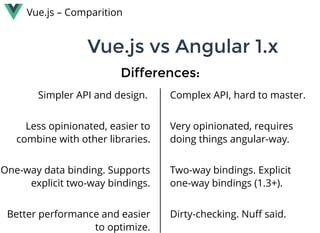
Vue.js vs Angular 1.xVue.js vs Angular 1.x
Vue.js – Comparition
Simpler API and design. 
 
Less opinionated, easier to
combine with other libraries.
 
One-way data binding. Supports
explicit two-way bindings.
 
Better performance and easier
to optimize.
Complex API, hard to master.
 
Very opinionated, requires
doing things angular-way.
 
Two-way bindings. Explicit
one-way bindings (1.3+).
 
Dirty-checking. Nuff said.
Differences:Differences:
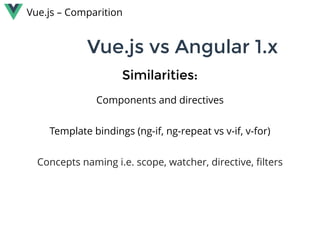
Vue.js vs Angular 1.xVue.js vs Angular 1.x
Components and directives
 
Template bindings (ng-if, ng-repeat vs v-if, v-for)
 
Concepts naming i.e. scope, watcher, directive, filters
Similarities:Similarities:
Vue.js – Comparition
Vue.js vs ReactVue.js vs React
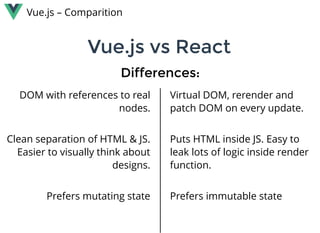
DOM with references to real
nodes.
 
Clean separation of HTML & JS.
Easier to visually think about
designs.
 
Prefers mutating state
Virtual DOM, rerender and
patch DOM on every update.
 
Puts HTML inside JS. Easy to
leak lots of logic inside render
function.
 
Prefers immutable state
Differences:Differences:
Vue.js – Comparition
Vue.js vs ReactVue.js vs React
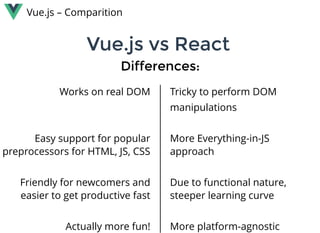
Works on real DOM
 
 
Easy support for popular
preprocessors for HTML, JS, CSS
 
Friendly for newcomers and
easier to get productive fast
 
Actually more fun!
Tricky to perform DOM 
manipulations
 
More Everything-in-JS
approach
 
Due to functional nature,
steeper learning curve
 
More platform-agnostic
Differences:Differences:
Vue.js – Comparition
Vue.js vs ReactVue.js vs React
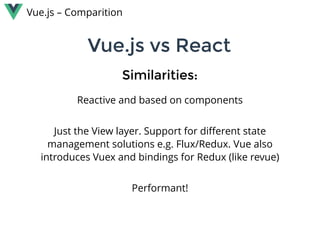
Reactive and based on components
 
Just the View layer. Support for different state
management solutions e.g. Flux/Redux. Vue also
introduces Vuex and bindings for Redux (like revue)
 
Performant!
Similarities:Similarities:
Vue.js – Comparition
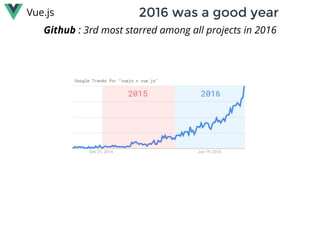
2016 was a good year2016 was a good yearVue.js
Github : 3rd most starred among all projects in 2016
Vue.js
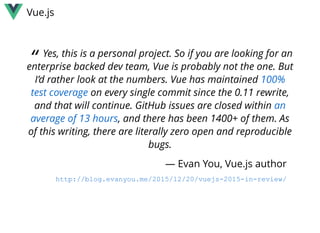
“ Yes, this is a personal project. So if you are looking for an
enterprise backed dev team, Vue is probably not the one. But
I’d rather look at the numbers. Vue has maintained 
 on every single commit since the 0.11 rewrite,
and that will continue. GitHub issues are closed within 
, and there has been 1400+ of them. As
of this writing, there are literally zero open and reproducible
bugs.
100%
test coverage
an
average of 13 hours
— Evan You, Vue.js author
http://blog.evanyou.me/2015/12/20/vuejs­2015­in­review/

Meet VueJs

  • 1.
  • 2.
    Vue.js highlightsVue.js highlights Vue.js– Intro View-layer library Simple & beautiful API Lightweight (~24kb min+gzip) Fast Reactive Component based
  • 3.
    How to start?Howto start? Vue.js – Basics
  • 4.
    var object ={ message: 'Hello world!' } How to start?How to start? Vue.js – Basics
  • 5.
    var object ={ message: 'Hello world!' } How to start?How to start? Vue.js – Basics <div id="example"> {{ message }} </div>
  • 6.
    var object ={ message: 'Hello world!' } How to start?How to start? Vue.js – Basics <div id="example"> {{ message }} </div> new Vue({ el: '#example', data: object })
  • 7.
    var object ={ message: 'Hello world!' } How to start?How to start? Vue.js – Basics <div id="example"> {{ message }} </div> new Vue({ el: '#example', data: object }) This is now reactive!
  • 8.
    Reactivity - howdoes it work?Reactivity - how does it work? Vue.js – Basics When passing an object to the Vue instance as it’s data property, Vue.js walks through all it’s properties and converts them to getter/setters  using  .Object.defineProperty For every directive / data binding in the template, there will be a corresponding watcher object. When a dependency’s setter is called, it triggers the watcher to re-evaluate, and in turn causes its associated directive to perform DOM updates.
  • 9.
    Reactivity - howdoes it workReactivity - how does it work Vue.js – Basics
  • 10.
    Vue.js – Basics You canuse it „jQuery style”. Just add the library from the CDN and you’re ready to go. Simple to useSimple to use No need for JSX, Webpack / Browserify, TypeScript or silly React.createElement().  You can use it to enhance your old projects and keep using all your favorite tools: Slim, Sass, CoffeeScript or simply es5. Vue doesn’t care.
  • 11.
    Vue.js – Basics However ifyou decide to go for a full blown SPA, you get all the tools you need. Going full SPAGoing full SPA Vue-cliVue-cli Webpack / Browerify Hot reloading Linting Unit/e2e tests CSS extraction Vue ecosystemVue ecosystem Vue-router Vuex Vue-devtools Vue-touch Vue-validation and more...
  • 12.
  • 13.
  • 14.
    Vue.js – Basics What’s withtheWhat’s with the scoped scoped attribute?attribute? TheThe one linerone liner that prevents leaks of CSSthat prevents leaks of CSS outside of components.outside of components.
  • 15.
    Vue.js – Basics VIRTUAL DOMVIRTUALDOM Hyperscript and JSX support You can still use templates (those will be converted to render functions) Detects static class names and attributes so they are never diffed after initial render Detects the maximum static sub trees (with no dynamic bindings) and hoists them out of the render function.
  • 16.
    Vue.js – Basics TWO AVAILABLETWOAVAILABLE BUILDSBUILDS THE COMPILER CAN NOW BETHE COMPILER CAN NOW BE EXCLUDEDEXCLUDED STANDALONE: Including the compiler and the runtime.   RUNTIME ONLY: Not including the compiler, which isn’t needed if you use a webpack-loader or browserify transform anyway (as you have a pre-compile step then). Default build for NPM.
  • 17.
    Vue.js – Basics TWO AVAILABLETWOAVAILABLE BUILDSBUILDS THE COMPILER CAN NOW BETHE COMPILER CAN NOW BE EXCLUDEDEXCLUDED STANDALONE: Including the compiler and the runtime.   RUNTIME ONLY: Not including the compiler, which isn’t needed if you use a webpack-loader or browserify transform anyway (as you have a pre-compile step then). Default build for NPM.
  • 18.
    Vue.js – Basics THINK REACT-NATIVETHINKREACT-NATIVE  FORFOR VUE.JSVUE.JS   Opens the possibility to render to mobile native interfaces.   Is using a port of Vue.js 2.0 Maintained by Alibaba Group Already available at: http://alibaba.github.io/weex/index.html
  • 19.
    Vue.js – Basics Try itout!Try it out! webpackbin.herokuapp.com/vue
  • 20.
    Similarities with AngularJSSimilaritieswith AngularJS Vue.js – Similarities with AngularJS
  • 21.
    Directives in templateDirectivesin template Vue.js – Similarities with AngularJS <!-- Vue syntax above Angular 1.x syntax below --> <h1 v-if="ok">{{ name }}</h1> <h1 v-else>No</h1> <h1 ng-if="ok">{{ name }}</h1> <h1 ng-if="!ok">No</h1> <input type="text" v-model="name"> <input type="text" ng-model="name"> <small v-show="!ok">{{ Not OK! | capitalize }}</small> <small ng-show="!ok">{{ Not OK! | capitalize }}</small> <a v-bind:href="url">Go back</a> <a ng-href="{{ url }}">Go back</a> <button v-on:click="doSomething">Do something</button> <button ng-click="doSomething">Do something</button>
  • 22.
    Directives in template2Directives in template 2 Vue.js – Similarities with AngularJS <!-- Vue syntax above Angular 1.x syntax below --> <div v-bind:class="{ 'class-a': isA, 'class-b': isB }"></div> <div ng-class="{ 'class-a': isA, 'class-b': isB }"></div> <ul id="example-1"> <li v-for="item in items"> {{ item.message }} </li> </ul> <ul id="example-1"> <li ng-repeat="item in items"> {{ item.message }} </li> </ul>
  • 23.
    Shorthands in VueShorthandsin Vue Vue.js – Similarities with AngularJS <!-- full syntax --> <button v-bind:disabled="someDynamicCondition">Button</button> <!-- shorthand --> <button :disabled="someDynamicCondition">Button</button> or <!-- full syntax --> <a v-on:click="doSomething"></a> <!-- shorthand --> <a @click="doSomething"></a>
  • 24.
    Computed valuesComputed values Vue.js– Features <div id="example"> a={{ a }}, b={{ b }} </div> var vm = new Vue({ el: '#example', data: { a: 1 }, computed: { // a computed getter b: function () { // `this` points to the vm instance return this.a + 1 } } })
  • 25.
    Computed setterComputed setter Vue.js– Features // ... computed: { fullName: { // getter get: function () { return this.firstName + ' ' + this.lastName }, // setter set: function (newValue) { var names = newValue.split(' ') this.firstName = names[0] this.lastName = names[names.length - 1] } } } // .. // When calling vm.fullName = 'John Doe', the setter will // be invoked and vm.firstName and vm.lastName // will be updated accordingly.
  • 26.
    Style bindingsStyle bindings Vue.js– Features <div v-bind:style="{ color: activeColor, fontSize: fontSize + 'px' }"></div> <!-- Works mostly the same as with classes --> AdditionallyAdditionally When you use a CSS property that requires vendor prefixes in v-bind:style, for example transform, Vue.js will automatically detect and add appropriate prefixes to the applied styles.
  • 27.
    Vue.js – Features List renderingListrendering var example1 = new Vue({ el: '#example-1', data: { items: [ { message: 'Foo' }, { message: 'Bar' } ], object: { FirstName: 'John', LastName: 'Doe', Age: 30 } } }) <ul id="example-1"> <li v-for="item in items"> {{ $index }} – {{ item.message }} </li> </ul or <ul> <template v-for="item in items"> <li>{{ item.msg }}</li> <li class="divider"></li> </template> </ul> <!-- Where the <template> element won’t render --> or <div v-for="(key, val) in object"> {{ key }} {{ val }} </div>
  • 28.
    Methods & EventshandlingMethods & Events handling Vue.js – Features var vm = new Vue({ el: '#example', data: { name: 'Vue.js' }, // define methods under the `methods` object methods: { greet: function (user, event) { // `this` inside methods point to the Vue instance alert('Hello ' + user + ' this is ' + this.name + '!') // `event` gives us access to original DOM event } } }) // you can invoke methods in JavaScript too vm.greet('Developers') // -> 'Hello Developers this is Vue.js!' <button @click="greet('Developers', $event)">Greet</button>
  • 29.
    Event modifiersEvent modifiers Vue.js– Features <!-- the click event's propagation will be stopped --> <a v-on:click.stop="doThis"></a> <!-- the submit event will no longer reload the page --> <form v-on:submit.prevent="onSubmit"></form> <!-- modifiers can be chained --> <a @click.stop.prevent="doThat"> <!-- just the modifier --> <form v-on:submit.prevent></form> <!-- only trigger handler if event.target is the element itself --> <!-- i.e. not from a child element --> <div @click.self="doThat">...</div> <!-- Support for key aliases as modifiers --> <input @keyup.enter="submit"> <!-- List of aliases: enter, tab, delete ,esc, space, up, down, left, right; or create your own with Vue.directive('on').keyCodes.f1 = 112 -->
  • 30.
    ComponentsComponents Vue.js – Components <div id="example"> <my-component></my-component> </div> //define var MyComponent = Vue.extend({ template: '<div>A component!</div>' }) // register globally Vue.component('my-component', MyComponent) // create a root instance new Vue({ el: '#example' })
  • 31.
    ComponentsComponents Vue.js – Components <div id="example"> <my-component></my-component> </div> //define var MyComponent = Vue.extend({ template: '<div>A component!</div>' }) // register globally Vue.component('my-component', MyComponent) // create a root instance new Vue({ el: '#example' }) <!-- Which will render --> <div id="example"> <div>A component!</div> </div>
  • 32.
    Local registrationLocal registration Vue.js– Components var Child = Vue.extend({ /* ... */ }) var Parent = Vue.extend({ template: '...', components: { // <my-component> will only be available in Parent' 'my-component': Child } })
  • 33.
    PropsProps Vue.js – Components Vue.component('child', { //declare the props props: ['myProp'], // the prop can be used inside templates, and will also // be set as `this.msg` template: '<span>{{ myProp }}</span>' }) <child my-prop="hello!"></child> <!-- The prop will be passed as string --> Remember: When using camelCased prop names as attributes, you need to use their kebab-case equivalents.
  • 34.
    Dynamic propsDynamic props Vue.js– Components <div> <child :my-value="obj"></child> </div> var Parent = Vue.extend({ template: '...', components: { Child }, data: function () { return { obj: { name: 'Vue', ext: 'JS' } } } }) This will pass the whole object as prop.
  • 35.
    Prop validationProp validation Vue.js– Components Vue.component('example', { props: { // basic type check (`null` means accept any type) propA: Number, // a required string propB: { type: String, required: true }, // a number with default value propC: { type: Number, default: 100 }, // object/array defaults should be returned from a // factory function propD: { type: Object, default: function () { return { msg: 'hello' } }}}}
  • 36.
    Prop validation 2Propvalidation 2 Vue.js – Components Vue.component('example', { props: { // indicate this prop expects a two-way binding. will // raise a warning if binding type does not match. propE: { twoWay: true }, // custom validator function propF: { validator: function (value) { return value > 10 } }, // coerce function (new in 1.0.12) // cast the value before setting it on the component propG: { coerce: function (val) { return val + '' // cast the value to string } } }
  • 37.
    SlotsSlots Vue.js – Components <!-- Componenttemplate --> <div> <h1>This is my component!</h1> <slot> This will only be displayed if there is no content to be distributed. </slot> </div> <!-- Parent template --> <my-component> <p>This is some original content</p> <p>This is some more original content</p> </my-component> <!-- Rendered result --> <div> <h1>This is my component!</h1> <p>This is some original content</p> <p>This is some more original content</p> </div> (like transclusion in angularJS)
  • 38.
    Named slotsNamed slots Vue.js– Components <!-- Component template --> <div> <slot name="one"></slot> <slot></slot> <slot name="two"></slot> </div> <!-- Parent template --> <multi-insertion> <p slot="one">One</p> <p slot="two">Two</p> <p>Default A</p> </multi-insertion> <!-- Rendered result --> <div> <p slot="one">One</p> <p>Default A</p> <p slot="two">Two</p> </div>
  • 39.
    MixinsMixins Vue.js – Mixins // definea mixin object var myMixin = { created: function () { this.hello() }, methods: { hello: function () { console.log('hello from mixin!') } } } // define a component that uses this mixin var Component = Vue.extend({ mixins: [myMixin] }) var component = new Component() // -> "hello from mixin!"
  • 40.
    Mixing mixins Mixing mixins  Vue.js– Mixins var mixin = { created: function () { console.log('mixin hook called') } } new Vue({ mixins: [mixin], created: function () { console.log('component hook called') } }) // -> "mixin hook called" // -> "component hook called"
  • 41.
    Mixing mixins Mixing mixins  Vue.js– Mixins var mixin = { methods: { foo: function () { console.log('foo') }, conflicting: function () { console.log('from mixin') } } } var vm = new Vue({ mixins: [mixin], methods: { bar: function () { console.log('bar') }, conflicting: function () { console.log('from self') } } })
  • 42.
    Mixing mixins Mixing mixins  Vue.js– Mixins var mixin = { methods: { foo: function () { console.log('foo') }, conflicting: function () { console.log('from mixin') } } } var vm = new Vue({ mixins: [mixin], methods: { bar: function () { console.log('bar') }, conflicting: function () { console.log('from self') } } }) vm.foo() // -> "foo" vm.bar() // -> "bar" vm.conflicting() // -> "from self"
  • 43.
    Vue-RouterVue-Router Vue.js – Plugins import Vuefrom 'vue' import Router from 'vue-router' import App from './app.vue' import ViewA from './view-a.vue' import ViewB from './view-b.vue' Vue.use(Router) const router = new Router() router.map({ '/a': { component: ViewA }, '/b': { component: ViewB } }) router.start(App, '#app') <div> <h1>This is the layout that won't change</h1> <router-view><!-- matched component renders here --></rout </div>
  • 44.
  • 45.
    VuexVuex Vue.js – Plugins import Vuexfrom 'vuex' const state = { counter: 0 } const mutations = { INCREMENT (state) { state.counter++ } } export default new Vuex.Store({ state, mutations }) store.dispatch('INCREMENT') console.log(store.state.count) // -> 1
  • 46.
  • 47.
  • 48.
  • 49.
    Vue.js vs Angular1.xVue.js vs Angular 1.x Vue.js – Comparition Simpler API and design.    Less opinionated, easier to combine with other libraries.   One-way data binding. Supports explicit two-way bindings.   Better performance and easier to optimize. Complex API, hard to master.   Very opinionated, requires doing things angular-way.   Two-way bindings. Explicit one-way bindings (1.3+).   Dirty-checking. Nuff said. Differences:Differences:
  • 50.
    Vue.js vs Angular1.xVue.js vs Angular 1.x Components and directives   Template bindings (ng-if, ng-repeat vs v-if, v-for)   Concepts naming i.e. scope, watcher, directive, filters Similarities:Similarities: Vue.js – Comparition
  • 51.
    Vue.js vs ReactVue.jsvs React DOM with references to real nodes.   Clean separation of HTML & JS. Easier to visually think about designs.   Prefers mutating state Virtual DOM, rerender and patch DOM on every update.   Puts HTML inside JS. Easy to leak lots of logic inside render function.   Prefers immutable state Differences:Differences: Vue.js – Comparition
  • 52.
    Vue.js vs ReactVue.jsvs React Works on real DOM     Easy support for popular preprocessors for HTML, JS, CSS   Friendly for newcomers and easier to get productive fast   Actually more fun! Tricky to perform DOM  manipulations   More Everything-in-JS approach   Due to functional nature, steeper learning curve   More platform-agnostic Differences:Differences: Vue.js – Comparition
  • 53.
    Vue.js vs ReactVue.jsvs React Reactive and based on components   Just the View layer. Support for different state management solutions e.g. Flux/Redux. Vue also introduces Vuex and bindings for Redux (like revue)   Performant! Similarities:Similarities: Vue.js – Comparition
  • 54.
    2016 was agood year2016 was a good yearVue.js Github : 3rd most starred among all projects in 2016
  • 55.
    Vue.js “ Yes, thisis a personal project. So if you are looking for an enterprise backed dev team, Vue is probably not the one. But I’d rather look at the numbers. Vue has maintained   on every single commit since the 0.11 rewrite, and that will continue. GitHub issues are closed within  , and there has been 1400+ of them. As of this writing, there are literally zero open and reproducible bugs. 100% test coverage an average of 13 hours — Evan You, Vue.js author http://blog.evanyou.me/2015/12/20/vuejs­2015­in­review/