Going Blended:
Training • Development • Assessment


                Sloan-C International Conference for Online Learning

                                                November 10, 2011
Presenters
Jeannette E. Riley
   Professor, English & Women's Studies
   Academic Director of Online Education

Tracey Russo
   Instructional Technology Manager
     CITS – Instructional Development

Damon N. Gatenby
   Instructional Technologist
     CITS – Instructional Development
Overview
Based on a grant funded project, this session discusses
the methodology for faculty blended learning training
and course (re)design and showcases representative
courses.

Presenters share assessment program and peer mentor
program designed to engage faculty in developing
effective blended learning experiences.
Implementation of Blended Learning for the
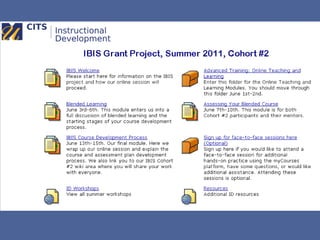
          Improvement of Student Learning (IBIS)
• 3-year project began in Summer 2010
• Davis Educational Foundation Grant
• Goals:
  – engage faculty in the development of effective
    blended courses
  – assist faculty in developing effective tools and
    methods to incorporate a culture of assessment
    and scholarly teaching into their practices
Project Plan
• Faculty training program

• Faculty program to develop faculty understanding
  of best practices in assessment

• Faculty peer mentorship program to facilitate
  culture of collaboration and reflection

• Dissemination of faculty experiences (“Blended
  Learning Impacting Student Learning;” Friday,
  Nov. 11th, 2:25pm; Asia 5)
Engaging the Faculty in Blended Course Design
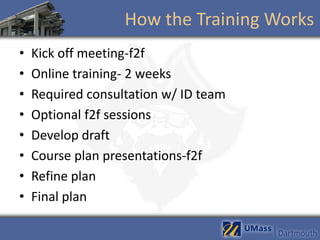
How the Training Works
•   Kick off meeting-f2f
•   Online training- 2 weeks
•   Required consultation w/ ID team
•   Optional f2f sessions
•   Develop draft
•   Course plan presentations-f2f
•   Refine plan
•   Final plan
Blended Training
• Review -- Online Teaching and Learning
  Strategies
• Blended Learning Module
• Assessment Module
• Developing Your Course Plan
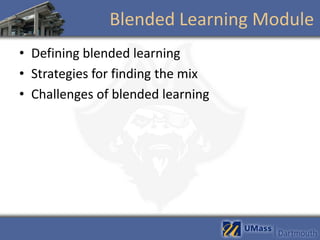
Blended Learning Module
• Defining blended learning
• Strategies for finding the mix
• Challenges of blended learning
Assessing Blend learning
•   Mentors intro
•   How do we measuring student learning
•   Backward design
•   SLO
•   Alignment
Developing Course Plan
• Mini-assessment plan for presentation
  – Select a central learning objective
  – Develop assignment(s)
  – Draft out assessment plan
• Final course design and assessment plan
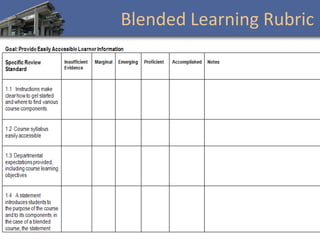
• Blended learning rubric
Blended Learning Rubric
How are faculty blending?
• Discussion forums based on readings and
  short online activities were incorporated into
  the blended course and were designed to
  replace some f2f class discussions.
• Online Essay Peer feedbacks within group
  discussion board.
How are faculty blending?
• Before-class online quizzes were completed
  after viewing the posted PowerPoint slides
  and textbook readings in preparation for f2f
  class.
• A course research project was facilitated via
  an online module with steps to follow
  throughout several weeks of the semester.
How are faculty blending?
• Students utilized a wiki used to post concepts
  and terminology from class.
• Students created individual wiki pages to
  create their semester project (writings,
  embedded images, and reflections) and
  allowed students to review and comment on
  each other’s work.
Training Best Practices
•   Model blended learning
•   Pedagogy first
•   Faculty/mentor participation key!
•   Incentives motivate
•   Utilize tools via LMS
•   Familiarity with instructional tools
Keys to Faculty Success
•   Start small and keeping it simple
•   Review of the training
•   Rethinking teaching strategies
•   Discussion/encouragement of colleagues
•   Better understanding of technologies
•   Having an experienced mentor
Lessons Learned
• Limiting to one SLO
• 1-2 technologies
• Required meeting with instructional staff
• Better understanding of blended learning for
  student
• Start early
• Instructional support staff... be nosey!
• Student support/training
Questions?
Technology used in the Blend
Instructional Technology Employed
• LMS (Blackboard Vista)
    – Quizzing
    – Discussion boards
•   Wikis (Wikispaces)
•   Blogs (Wordpress)
•   Wimba Classroom
•   Wimba Voice Tools
•   Personal Response Systems (iClicker)
•   Streaming Audio & Video
•   Learning Objects
•   Lecture Capture (Currently piloting)
Choosing the Right Tools
• Faculty has objective to be facilitated through
  technology.
• Instructional Development recommends a
  technology solution
  – Low barrier for student use.
  – Leverage existing, industry standard and best-in-
    class tools.
  – Provide support for faculty and students.
Using Synchronous Tools
                                in a Blended Format

Benefits                       Pitfalls
• Recreate classroom           • Expecting students to
  discussion experience.          attend live sessions at same
                                  time as the f2f class.
• Collaboratively work on
  graphs, documents and        • Does not replace well
                                  structured asynchronous
  presentations.                  assignments.
                               • Requires somewhat tech-
                                  savvy students or a robust
                                  support system.
                               • Using the tool for lecture
                                  capture only.
Using Asynchronous Tools
                                in a Blended Format

Benefits                          Pitfalls
• Enables flexible group          • Using asynchronous tools to
  communication.                     facilitate synchronous
   – Textual or audio                interaction.
• Allows learner to participate      – Use the right tool
  on their own time.              • Not providing enough
                                    guidance for students to
                                    work independently.
Faculty Support
• Workshops
  – Webinars
• 1 on 1 sessions
  – Drop-ins
• Technology Demos
  – Live
  – Video Tutorial
• Teaching and Technology Conference
Questions?
Does it Work: Implementing Assessment Practices
Close Up: The Assessment Module
Assessment

• Module designed to engage faculty in
  assessment practices

  – Discussion based

  – Collaborative exercises
Assessment
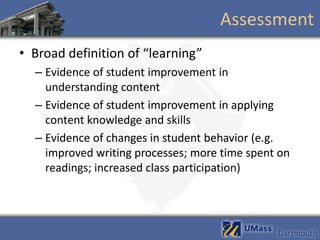
• Broad definition of “learning”
  – Evidence of student improvement in
    understanding content
  – Evidence of student improvement in applying
    content knowledge and skills
  – Evidence of changes in student behavior (e.g.
    improved writing processes; more time spent on
    readings; increased class participation)
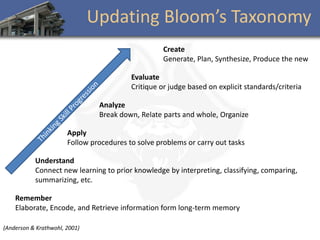
Updating Bloom’s Taxonomy
                                                    Create
                                                    Generate, Plan, Synthesize, Produce the new

                                          Evaluate
                                          Critique or judge based on explicit standards/criteria

                                Analyze
                                Break down, Relate parts and whole, Organize

                       Apply
                       Follow procedures to solve problems or carry out tasks

           Understand
           Connect new learning to prior knowledge by interpreting, classifying, comparing,
           summarizing, etc.

    Remember
    Elaborate, Encode, and Retrieve information form long-term memory

(Anderson & Krathwohl, 2001)
Developing Assessment Skills


• Focused on student learning objectives
  – Discussions to evaluate sample SLO
  – Presentation of targeted SLO

• Backward Design
Defining Terms
• Assessment = for example, a quiz or a
  composition that measures student
  accomplishment of one or more of your SLOs.

• Learning activity = an activity that facilitates
  student achievement of one or more of your
  SLOs by actively engaging the students with
  course content.
Suggested Strategies

• Compare test results of a face-to-face class
  with a blended class of the same course

• Compare writing results - using the same
  rubric of a face-to-face class with a blended
  class of the same course
More Suggested Strategies
• Pre/post testing of knowledge. Have students
  respond to a test of knowledge at the
  beginning of the semester and then have
  them answer same test at the end.

• Do a pre/post survey of student behavior
  patterns (e.g. ask students to self-assess their
  writing strategies and then re-assess at the
  end of the course)
Develop a Plan
• Development of Assessment Plan
  – Review and feedback from cohort and external
    reviewers
  – Mentor reviews course site and course plan using
    campus developed Blended Learning Quality
    Rubric
• Plans revised and resubmitted
  – Plans used for IRB approval
Post-Course
• Final project report from individual faculty
  – Provides overview of course and what you
    redesigned for the IBIS project
  – Explains data collected
  – Provides data analysis and conclusions about the
    course experience
  – Provides section outlining peer mentor experience
Peer Mentor Program
• Mentoring Goal: to develop a culture of
  collaborative exchange and open discussion
  about teaching practices

• There are four guiding points:
  – PEER mentoring. Mentor will not necessarily have
    more knowledge or experience than the mentee.
  – Focus is on student learning not instructor evaluation.
  – It is the responsibility of both parties to start and
    maintain the interaction.
  – Both the mentor and mentee will do a final report.
Mentoring Process

Mentor                         Mentee
• Determine whether the        • ID primary learning
  online tool being employed     objective enhanced through
  meets stated objective.        online process.
• Determine if the specific    • Explain how online tool will
  online tool(s) being           meet learning objective
  employed are the primary       (and enhance objective)
  means of achieving the          – Why online at all?
  intended goal.                  – Why specific online ‘tool’
   – Alternatives offered           chosen?
Implementation
• Mentee determines learning module to apply
  online tools
  – Includes both live (f2f) and online sessions
• Mentor appears at both live and online sessions
• Mentor assess interactions (experience)
  – ‘Should work’
• Mentor measures personal assessment with
  student interviews
  – Self-assessment of learning experience with use of
    online tool.
     • ‘Perception it worked’
Peer Mentor Program
• Faculty mentors:
  – Commit to two f2f class observations and two
    observations of course site/online sessions
  – Serve as sounding board for faculty engaged in
    blended course implementation


• Faculty mentees:
  – Write final report on course experience including
    comments on mentor-mentee experience
Mentor Final Report
• Provides an overview of the mentoring
  process you enacted with your mentee.

• Includes course observation notes (face to
  face and online)

• Analyzes the mentor-mentee experience.
  What worked well? What didn't work well?
Resources
UMassD Blended Learning Initiative
  http://www.umassd.edu/ofd/blendedlearninginitiative/


Blended Learning Resources
  http://instructionaldev.umassd.wikispaces.net/Blended+Learning


CITS/Instructional Development Team
  idteam@umassd.edu


Office of Faculty Development
  http://www.umassd.edu/ofd/
Questions?

Going Blended: Training, Development, Assessment

  • 1.
    Going Blended: Training •Development • Assessment Sloan-C International Conference for Online Learning November 10, 2011
  • 2.
    Presenters Jeannette E. Riley Professor, English & Women's Studies Academic Director of Online Education Tracey Russo Instructional Technology Manager CITS – Instructional Development Damon N. Gatenby Instructional Technologist CITS – Instructional Development
  • 3.
    Overview Based on agrant funded project, this session discusses the methodology for faculty blended learning training and course (re)design and showcases representative courses. Presenters share assessment program and peer mentor program designed to engage faculty in developing effective blended learning experiences.
  • 4.
    Implementation of BlendedLearning for the Improvement of Student Learning (IBIS) • 3-year project began in Summer 2010 • Davis Educational Foundation Grant • Goals: – engage faculty in the development of effective blended courses – assist faculty in developing effective tools and methods to incorporate a culture of assessment and scholarly teaching into their practices
  • 5.
    Project Plan • Facultytraining program • Faculty program to develop faculty understanding of best practices in assessment • Faculty peer mentorship program to facilitate culture of collaboration and reflection • Dissemination of faculty experiences (“Blended Learning Impacting Student Learning;” Friday, Nov. 11th, 2:25pm; Asia 5)
  • 6.
    Engaging the Facultyin Blended Course Design
  • 8.
    How the TrainingWorks • Kick off meeting-f2f • Online training- 2 weeks • Required consultation w/ ID team • Optional f2f sessions • Develop draft • Course plan presentations-f2f • Refine plan • Final plan
  • 9.
    Blended Training • Review-- Online Teaching and Learning Strategies • Blended Learning Module • Assessment Module • Developing Your Course Plan
  • 10.
    Blended Learning Module •Defining blended learning • Strategies for finding the mix • Challenges of blended learning
  • 11.
    Assessing Blend learning • Mentors intro • How do we measuring student learning • Backward design • SLO • Alignment
  • 12.
    Developing Course Plan •Mini-assessment plan for presentation – Select a central learning objective – Develop assignment(s) – Draft out assessment plan • Final course design and assessment plan • Blended learning rubric
  • 13.
  • 14.
    How are facultyblending? • Discussion forums based on readings and short online activities were incorporated into the blended course and were designed to replace some f2f class discussions. • Online Essay Peer feedbacks within group discussion board.
  • 15.
    How are facultyblending? • Before-class online quizzes were completed after viewing the posted PowerPoint slides and textbook readings in preparation for f2f class. • A course research project was facilitated via an online module with steps to follow throughout several weeks of the semester.
  • 16.
    How are facultyblending? • Students utilized a wiki used to post concepts and terminology from class. • Students created individual wiki pages to create their semester project (writings, embedded images, and reflections) and allowed students to review and comment on each other’s work.
  • 17.
    Training Best Practices • Model blended learning • Pedagogy first • Faculty/mentor participation key! • Incentives motivate • Utilize tools via LMS • Familiarity with instructional tools
  • 18.
    Keys to FacultySuccess • Start small and keeping it simple • Review of the training • Rethinking teaching strategies • Discussion/encouragement of colleagues • Better understanding of technologies • Having an experienced mentor
  • 19.
    Lessons Learned • Limitingto one SLO • 1-2 technologies • Required meeting with instructional staff • Better understanding of blended learning for student • Start early • Instructional support staff... be nosey! • Student support/training
  • 20.
  • 21.
  • 22.
    Instructional Technology Employed •LMS (Blackboard Vista) – Quizzing – Discussion boards • Wikis (Wikispaces) • Blogs (Wordpress) • Wimba Classroom • Wimba Voice Tools • Personal Response Systems (iClicker) • Streaming Audio & Video • Learning Objects • Lecture Capture (Currently piloting)
  • 23.
    Choosing the RightTools • Faculty has objective to be facilitated through technology. • Instructional Development recommends a technology solution – Low barrier for student use. – Leverage existing, industry standard and best-in- class tools. – Provide support for faculty and students.
  • 24.
    Using Synchronous Tools in a Blended Format Benefits Pitfalls • Recreate classroom • Expecting students to discussion experience. attend live sessions at same time as the f2f class. • Collaboratively work on graphs, documents and • Does not replace well structured asynchronous presentations. assignments. • Requires somewhat tech- savvy students or a robust support system. • Using the tool for lecture capture only.
  • 25.
    Using Asynchronous Tools in a Blended Format Benefits Pitfalls • Enables flexible group • Using asynchronous tools to communication. facilitate synchronous – Textual or audio interaction. • Allows learner to participate – Use the right tool on their own time. • Not providing enough guidance for students to work independently.
  • 26.
    Faculty Support • Workshops – Webinars • 1 on 1 sessions – Drop-ins • Technology Demos – Live – Video Tutorial • Teaching and Technology Conference
  • 27.
  • 28.
    Does it Work:Implementing Assessment Practices
  • 29.
    Close Up: TheAssessment Module
  • 30.
    Assessment • Module designedto engage faculty in assessment practices – Discussion based – Collaborative exercises
  • 31.
    Assessment • Broad definitionof “learning” – Evidence of student improvement in understanding content – Evidence of student improvement in applying content knowledge and skills – Evidence of changes in student behavior (e.g. improved writing processes; more time spent on readings; increased class participation)
  • 32.
    Updating Bloom’s Taxonomy Create Generate, Plan, Synthesize, Produce the new Evaluate Critique or judge based on explicit standards/criteria Analyze Break down, Relate parts and whole, Organize Apply Follow procedures to solve problems or carry out tasks Understand Connect new learning to prior knowledge by interpreting, classifying, comparing, summarizing, etc. Remember Elaborate, Encode, and Retrieve information form long-term memory (Anderson & Krathwohl, 2001)
  • 33.
    Developing Assessment Skills •Focused on student learning objectives – Discussions to evaluate sample SLO – Presentation of targeted SLO • Backward Design
  • 34.
    Defining Terms • Assessment= for example, a quiz or a composition that measures student accomplishment of one or more of your SLOs. • Learning activity = an activity that facilitates student achievement of one or more of your SLOs by actively engaging the students with course content.
  • 35.
    Suggested Strategies • Comparetest results of a face-to-face class with a blended class of the same course • Compare writing results - using the same rubric of a face-to-face class with a blended class of the same course
  • 36.
    More Suggested Strategies •Pre/post testing of knowledge. Have students respond to a test of knowledge at the beginning of the semester and then have them answer same test at the end. • Do a pre/post survey of student behavior patterns (e.g. ask students to self-assess their writing strategies and then re-assess at the end of the course)
  • 37.
    Develop a Plan •Development of Assessment Plan – Review and feedback from cohort and external reviewers – Mentor reviews course site and course plan using campus developed Blended Learning Quality Rubric • Plans revised and resubmitted – Plans used for IRB approval
  • 38.
    Post-Course • Final projectreport from individual faculty – Provides overview of course and what you redesigned for the IBIS project – Explains data collected – Provides data analysis and conclusions about the course experience – Provides section outlining peer mentor experience
  • 39.
    Peer Mentor Program •Mentoring Goal: to develop a culture of collaborative exchange and open discussion about teaching practices • There are four guiding points: – PEER mentoring. Mentor will not necessarily have more knowledge or experience than the mentee. – Focus is on student learning not instructor evaluation. – It is the responsibility of both parties to start and maintain the interaction. – Both the mentor and mentee will do a final report.
  • 40.
    Mentoring Process Mentor Mentee • Determine whether the • ID primary learning online tool being employed objective enhanced through meets stated objective. online process. • Determine if the specific • Explain how online tool will online tool(s) being meet learning objective employed are the primary (and enhance objective) means of achieving the – Why online at all? intended goal. – Why specific online ‘tool’ – Alternatives offered chosen?
  • 41.
    Implementation • Mentee determineslearning module to apply online tools – Includes both live (f2f) and online sessions • Mentor appears at both live and online sessions • Mentor assess interactions (experience) – ‘Should work’ • Mentor measures personal assessment with student interviews – Self-assessment of learning experience with use of online tool. • ‘Perception it worked’
  • 42.
    Peer Mentor Program •Faculty mentors: – Commit to two f2f class observations and two observations of course site/online sessions – Serve as sounding board for faculty engaged in blended course implementation • Faculty mentees: – Write final report on course experience including comments on mentor-mentee experience
  • 43.
    Mentor Final Report •Provides an overview of the mentoring process you enacted with your mentee. • Includes course observation notes (face to face and online) • Analyzes the mentor-mentee experience. What worked well? What didn't work well?
  • 44.
    Resources UMassD Blended LearningInitiative http://www.umassd.edu/ofd/blendedlearninginitiative/ Blended Learning Resources http://instructionaldev.umassd.wikispaces.net/Blended+Learning CITS/Instructional Development Team idteam@umassd.edu Office of Faculty Development http://www.umassd.edu/ofd/
  • 45.

Editor's Notes

  • #5 jen
  • #6 jen
  • #7 Tracey and Damonslides 5-28
  • #22 Jen
  • #29 Jen
  • #30 Should we ditch this???
  • #37 First bullett:Even better if this can be done with a "control" face-to-face class.Use a rubric for discussion boards all semester (tied to a SLO) aimed at identifying growth.
  • #38 Here are some key points to consider when you put together your course that are taken from the Quality Matters ™ Rubric: Do the types of assessment you chose measure your SLOs?Are the types of assessment (for example, a written essay) you chose consistent with course activities and resources?Do your course materials contribute to your SLOs at both the course and module level?Do your learning activities (for example, class debate) promote student achievement of yo
  • #39 The central question is did the blend positively or negatively or not at all affect student learning?