Sales Systems
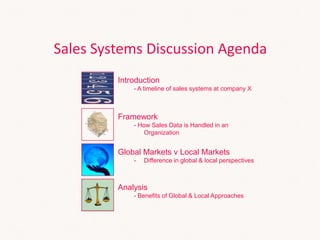
Sales Systems Discussion Agenda
Framework
- How Sales Data is Handled in an
Organization
Global Markets v Local Markets
- Difference in global & local perspectives
Analysis
- Benefits of Global & Local Approaches
Introduction
- A timeline of sales systems at company X
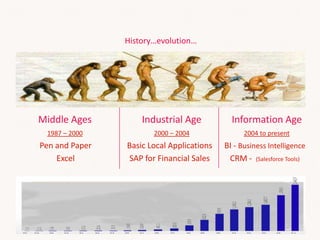
Middle Ages Industrial Age Information Age
1987 – 2000 2000 – 2004 2004 to present
Pen and Paper
Excel
Basic Local Applications
SAP for Financial Sales
BI - Business Intelligence
CRM - (Salesforce Tools)
History…evolution…
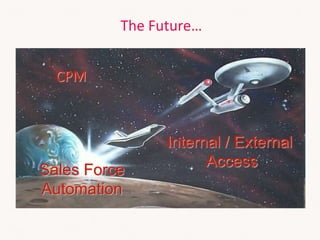
The Future…
CPM
Internal / External
Access
Sales Force
Automation
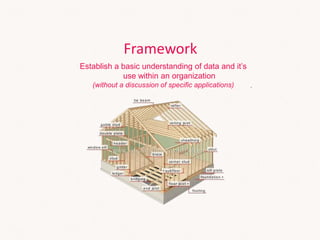
Framework
Establish a basic understanding of data and it’s
use within an organization
(without a discussion of specific applications)
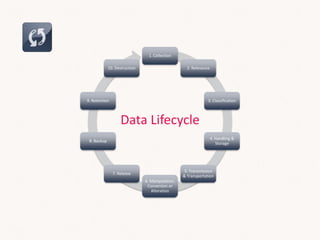
Data Lifecycle
1. Collection
2. Relevance
3. Classification
4. Handling &
Storage
5. Transmission
& Transportation
6. Manipulation,
Conversion or
Alteration
7. Release
8. Backup
9. Retention
10. Destruction
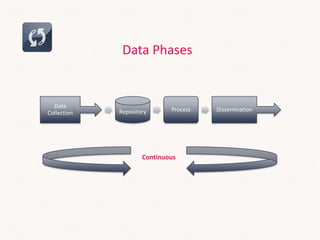
Data Phases
Data
Collection Repository Process Dissemination
Continuous
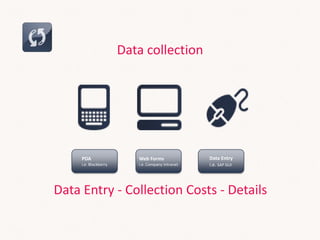
Data collection
Web Forms
i.e. Company Intranet
Data Entry
i.e. SAP GUI
PDA
i.e. Blackberry
Data Entry - Collection Costs - Details
Repository
Storage & Handling
Process
Taxonomy/Classification - Manipulation
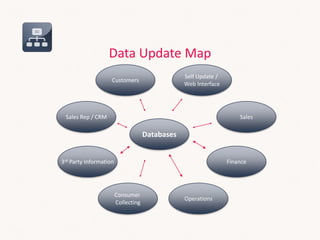
Data Update Map
Databases
Self Update /
Web Interface
3rd Party Information
Sales Rep / CRM Sales
Consumer
Collecting
Operations
Finance
Customers
Dissemination
Data Analysis - Reporting
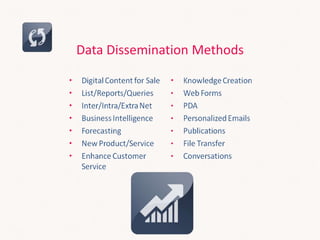
Data Dissemination Methods
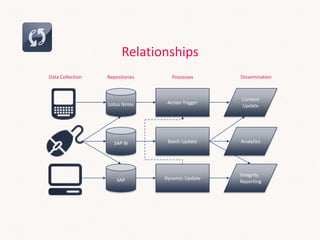
Relationships
Action Trigger
Content
Update
Batch Update Analytics
SAP Dynamic Update
Integrity
Reporting
Data Collection Repositories DisseminationProcesses
Lotus Notes
SAP BI
AGENDA
Common Drivers
Global – Regional - Local
At what level to collect sales data?
Less Granular ←→ More Granular
Global - Regional (Mgmt) - Local
Local Market Drivers
• Needs are typically single market focused
• Some markets have needs for Advanced/Global market topics
• Needs are typically immediate – cannot wait for global applications
Timing
• Acceptance of local vendors
• Perception of
• Understanding of local needs and requirements
• Greater control / Local responsiveness
• Greater flexibility
• Overall comfort level dealing with local vendor
• Local skills – staff with prior experience of other systems
Local…Local…Local
• Costs are fully born by local company
• Lower up-front costs
• Less investment capabilities
Costs
• Simple/single purpose data reporting
• Stand-alone systems
Dissemination
Global Market Drivers
• Needs are typically multi-market focused
• Need for advanced/global market topics – support for global
supply chains
Data Consistency
• Consistency and correlation of collected data
Global Vendors
• Look for vendors who can provide global support
• 24x7 to anywhere in the world
• Will be around for the long term – no orphan systems
Fit With Existing Global Systems
• Need for all systems to work together
• Sameness
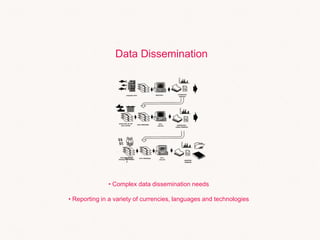
Data Dissemination
• Complex data dissemination needs
• Reporting in a variety of currencies, languages and technologies
Technology Influences
Analysis
Benefits of a local solution
Faster to start implementation
Faster for “low priority” or less sophisticate markets
Possible lower cost
Easier to meet unique requirements
Benefits of a global standard solution
Integrated view of business across markets
Leverage investment across all markets
Predictability for Costs, Requirements, Implementation (cookie cutter approach)
No need for local infrastructure management
Local skills focused to truly local needs
Risks of a local solution
Local vendor negotiations delay start
Not predictable for costs, requirements, implementation time
High costs for ongoing maintenance and enhancements
Unique requirements rarely “best practice”
Risks of a global standard solution
Lack of local support
Coordination/Communication issues
Too complex of a solution for less sophisticated markets
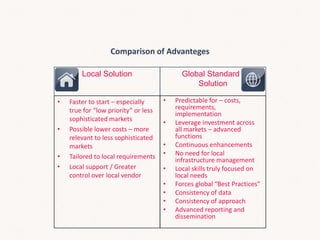
Comparison of Advanteges
Local Solution Global Standard .
Solution
• Faster to start – especially
true for “low priority” or less
sophisticated markets
• Possible lower costs – more
relevant to less sophisticated
markets
• Tailored to local requirements
• Local support / Greater
control over local vendor
• Predictable for – costs,
requirements,
implementation
• Leverage investment across
all markets – advanced
functions
• Continuous enhancements
• No need for local
infrastructure management
• Local skills truly focused on
local needs
• Forces global “Best Practices”
• Consistency of data
• Consistency of approach
• Advanced reporting and
dissemination
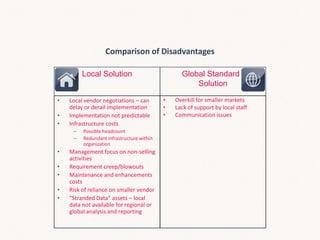
Comparison of Disadvantages
Local Solution Global Standard .
Solution
• Local vendor negotiations – can
delay or derail implementation
• Implementation not predictable
• Infrastructure costs
– Possible headcount
– Redundant infrastructure within
organization
• Management focus on non-selling
activities
• Requirement creep/blowouts
• Maintenance and enhancements
costs
• Risk of reliance on smaller vendor
• “Stranded Data” assets – local
data not available for regional or
global analysis and reporting
• Overkill for smaller markets
• Lack of support by local staff
• Communication issues
CLOSING DISCUSSION

Global regional-local sales systems

  • 1.
  • 2.
    Sales Systems DiscussionAgenda Framework - How Sales Data is Handled in an Organization Global Markets v Local Markets - Difference in global & local perspectives Analysis - Benefits of Global & Local Approaches Introduction - A timeline of sales systems at company X
  • 3.
    Middle Ages IndustrialAge Information Age 1987 – 2000 2000 – 2004 2004 to present Pen and Paper Excel Basic Local Applications SAP for Financial Sales BI - Business Intelligence CRM - (Salesforce Tools) History…evolution…
  • 4.
    The Future… CPM Internal /External Access Sales Force Automation
  • 6.
    Framework Establish a basicunderstanding of data and it’s use within an organization (without a discussion of specific applications)
  • 7.
    Data Lifecycle 1. Collection 2.Relevance 3. Classification 4. Handling & Storage 5. Transmission & Transportation 6. Manipulation, Conversion or Alteration 7. Release 8. Backup 9. Retention 10. Destruction
  • 8.
    Data Phases Data Collection RepositoryProcess Dissemination Continuous
  • 9.
    Data collection Web Forms i.e.Company Intranet Data Entry i.e. SAP GUI PDA i.e. Blackberry Data Entry - Collection Costs - Details
  • 10.
  • 11.
  • 12.
    Data Update Map Databases SelfUpdate / Web Interface 3rd Party Information Sales Rep / CRM Sales Consumer Collecting Operations Finance Customers
  • 13.
  • 14.
  • 15.
    Relationships Action Trigger Content Update Batch UpdateAnalytics SAP Dynamic Update Integrity Reporting Data Collection Repositories DisseminationProcesses Lotus Notes SAP BI
  • 17.
  • 18.
  • 19.
  • 20.
    At what levelto collect sales data? Less Granular ←→ More Granular Global - Regional (Mgmt) - Local
  • 21.
    Local Market Drivers •Needs are typically single market focused • Some markets have needs for Advanced/Global market topics
  • 22.
    • Needs aretypically immediate – cannot wait for global applications Timing
  • 23.
    • Acceptance oflocal vendors • Perception of • Understanding of local needs and requirements • Greater control / Local responsiveness • Greater flexibility • Overall comfort level dealing with local vendor • Local skills – staff with prior experience of other systems Local…Local…Local
  • 24.
    • Costs arefully born by local company • Lower up-front costs • Less investment capabilities Costs
  • 25.
    • Simple/single purposedata reporting • Stand-alone systems Dissemination
  • 26.
    Global Market Drivers •Needs are typically multi-market focused • Need for advanced/global market topics – support for global supply chains
  • 27.
    Data Consistency • Consistencyand correlation of collected data
  • 28.
    Global Vendors • Lookfor vendors who can provide global support • 24x7 to anywhere in the world • Will be around for the long term – no orphan systems
  • 29.
    Fit With ExistingGlobal Systems • Need for all systems to work together • Sameness
  • 30.
    Data Dissemination • Complexdata dissemination needs • Reporting in a variety of currencies, languages and technologies
  • 31.
  • 33.
  • 34.
    Benefits of alocal solution Faster to start implementation Faster for “low priority” or less sophisticate markets Possible lower cost Easier to meet unique requirements
  • 35.
    Benefits of aglobal standard solution Integrated view of business across markets Leverage investment across all markets Predictability for Costs, Requirements, Implementation (cookie cutter approach) No need for local infrastructure management Local skills focused to truly local needs
  • 36.
    Risks of alocal solution Local vendor negotiations delay start Not predictable for costs, requirements, implementation time High costs for ongoing maintenance and enhancements Unique requirements rarely “best practice”
  • 37.
    Risks of aglobal standard solution Lack of local support Coordination/Communication issues Too complex of a solution for less sophisticated markets
  • 38.
    Comparison of Advanteges LocalSolution Global Standard . Solution • Faster to start – especially true for “low priority” or less sophisticated markets • Possible lower costs – more relevant to less sophisticated markets • Tailored to local requirements • Local support / Greater control over local vendor • Predictable for – costs, requirements, implementation • Leverage investment across all markets – advanced functions • Continuous enhancements • No need for local infrastructure management • Local skills truly focused on local needs • Forces global “Best Practices” • Consistency of data • Consistency of approach • Advanced reporting and dissemination
  • 39.
    Comparison of Disadvantages LocalSolution Global Standard . Solution • Local vendor negotiations – can delay or derail implementation • Implementation not predictable • Infrastructure costs – Possible headcount – Redundant infrastructure within organization • Management focus on non-selling activities • Requirement creep/blowouts • Maintenance and enhancements costs • Risk of reliance on smaller vendor • “Stranded Data” assets – local data not available for regional or global analysis and reporting • Overkill for smaller markets • Lack of support by local staff • Communication issues
  • 40.