THAMARA HESSEL
I’m coder
GIT
Best Practices
3
Contents
▪ Commit - Best Practices
– The golden rules
– Good full example
▪ Rebase
– Rebase Interactive
▪ Merge
Commit
5
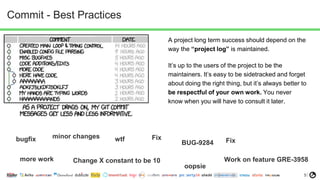
Commit - Best Practices
A project long term success should depend on the
way the “project log” is maintained.
It’s up to the users of the project to be the
maintainers. It’s easy to be sidetracked and forget
about doing the right thing, but it’s always better to
be respectful of your own work. You never
know when you will have to consult it later.
bugfix minor changes wtf
BUG-9284
more work Work on feature GRE-3958
Fix
Change X constant to be 10
Fix
oopsie
6
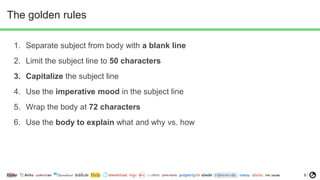
The golden rules
1. Separate subject from body with a blank line
2. Limit the subject line to 50 characters
3. Capitalize the subject line
4. Use the imperative mood in the subject line
5. Wrap the body at 72 characters
6. Use the body to explain what and why vs. how
7
1 - Separate subject from body with a blank line
git commit --help
Though not required, it’s a good idea to begin the commit message with a single short
(less than 50 character) line summarizing the change, followed by a blank line and then a more
thorough description
Sometimes there’s no need for a body in a commit, but only when the line you wrote is already specific
enough
For example:
➔ Fix typo in price list page
➔ Correct facebook redirect due to wrong token
8
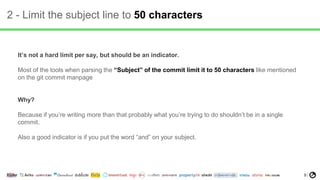
2 - Limit the subject line to 50 characters
It’s not a hard limit per say, but should be an indicator.
Most of the tools when parsing the “Subject” of the commit limit it to 50 characters like mentioned
on the git commit manpage
Why?
Because if you’re writing more than that probably what you’re trying to do shouldn’t be in a single
commit.
Also a good indicator is if you put the word “and” on your subject.
9
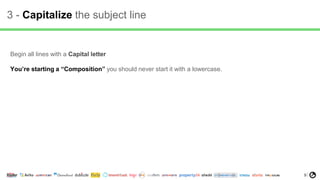
3 - Capitalize the subject line
Begin all lines with a Capital letter
You’re starting a “Composition” you should never start it with a lowercase.
10
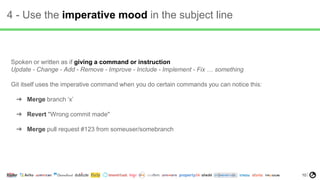
4 - Use the imperative mood in the subject line
Spoken or written as if giving a command or instruction
Update - Change - Add - Remove - Improve - Include - Implement - Fix … something
Git itself uses the imperative command when you do certain commands you can notice this:
➔ Merge branch ‘x’
➔ Revert "Wrong commit made"
➔ Merge pull request #123 from someuser/somebranch
11
4 - Use the imperative mood in the subject line - CONTINUE
For example
If applied, this commit will:
➔ refactor subsystem X for readability
➔ update getting started documentation
➔ remove deprecated methods
Notice how this doesn’t work for the other non-imperative forms. If applied, this commit will:
➔ fixed bug with Y
➔ changing behavior of X
➔ more fixes for broken stuff
➔ sweet new API methods
12
5 - Wrap the body at 72 characters
You should do 72 characters the same reason you do in the code to be easier to read.
Most log tools or viewing tools hard limit to 80 characters so with 72 and spaces you get
to that limit.
13
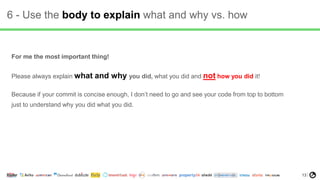
6 - Use the body to explain what and why vs. how
For me the most important thing!
Please always explain what and why you did, what you did and not how you did it!
Because if your commit is concise enough, I don’t need to go and see your code from top to bottom
just to understand why you did what you did.
14
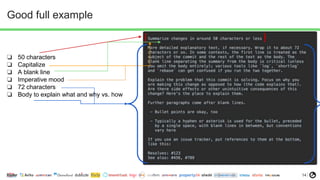
Good full example
❏ 50 characters
❏ Capitalize
❏ A blank line
❏ Imperative mood
❏ 72 characters
❏ Body to explain what and why vs. how
Rebase
16
Rebase
Why rebase? To maintain a clean log.
There’s no point to create useless merge commits when all you’re doing is updating your branch with the
one you want to merge unto later.
So a simple rule of thumb is to rebase with the target branch and rebase often. Everyday you’re working you
should rebase your branch into your target branch and one last target before merging into it.
17
Rebase Interactive
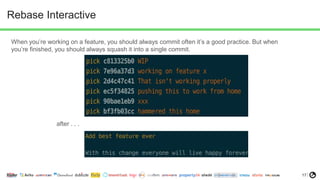
When you’re working on a feature, you should always commit often it’s a good practice. But when
you’re finished, you should always squash it into a single commit.
after . . .
18
Rebase Interactive - continued
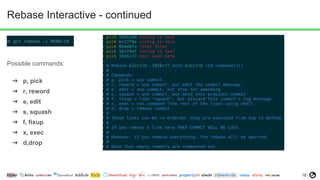
Possible commands:
➔ p, pick
➔ r, reword
➔ e, edit
➔ s, squash
➔ f, fixup
➔ x, exec
➔ d,drop
Merge
20
Merge
Merge is a great operation but it should be used correctly.
Please don’t merge directly into a feature branch from develop or master. Use rebase for it.
Merge is supposed to tell a story. It’s great when you want to make a release or a hotfix. In that way you
can identify exactly what you released by tagging the merge commit with a version
If you are consistently merging your “developing” code with a stable branch, it’s gonna do more harm
than good.
END (Q&A)
22

Git style best practices - OLX

  • 1.
  • 2.
  • 3.
    3 Contents ▪ Commit -Best Practices – The golden rules – Good full example ▪ Rebase – Rebase Interactive ▪ Merge
  • 4.
  • 5.
    5 Commit - BestPractices A project long term success should depend on the way the “project log” is maintained. It’s up to the users of the project to be the maintainers. It’s easy to be sidetracked and forget about doing the right thing, but it’s always better to be respectful of your own work. You never know when you will have to consult it later. bugfix minor changes wtf BUG-9284 more work Work on feature GRE-3958 Fix Change X constant to be 10 Fix oopsie
  • 6.
    6 The golden rules 1.Separate subject from body with a blank line 2. Limit the subject line to 50 characters 3. Capitalize the subject line 4. Use the imperative mood in the subject line 5. Wrap the body at 72 characters 6. Use the body to explain what and why vs. how
  • 7.
    7 1 - Separatesubject from body with a blank line git commit --help Though not required, it’s a good idea to begin the commit message with a single short (less than 50 character) line summarizing the change, followed by a blank line and then a more thorough description Sometimes there’s no need for a body in a commit, but only when the line you wrote is already specific enough For example: ➔ Fix typo in price list page ➔ Correct facebook redirect due to wrong token
  • 8.
    8 2 - Limitthe subject line to 50 characters It’s not a hard limit per say, but should be an indicator. Most of the tools when parsing the “Subject” of the commit limit it to 50 characters like mentioned on the git commit manpage Why? Because if you’re writing more than that probably what you’re trying to do shouldn’t be in a single commit. Also a good indicator is if you put the word “and” on your subject.
  • 9.
    9 3 - Capitalizethe subject line Begin all lines with a Capital letter You’re starting a “Composition” you should never start it with a lowercase.
  • 10.
    10 4 - Usethe imperative mood in the subject line Spoken or written as if giving a command or instruction Update - Change - Add - Remove - Improve - Include - Implement - Fix … something Git itself uses the imperative command when you do certain commands you can notice this: ➔ Merge branch ‘x’ ➔ Revert "Wrong commit made" ➔ Merge pull request #123 from someuser/somebranch
  • 11.
    11 4 - Usethe imperative mood in the subject line - CONTINUE For example If applied, this commit will: ➔ refactor subsystem X for readability ➔ update getting started documentation ➔ remove deprecated methods Notice how this doesn’t work for the other non-imperative forms. If applied, this commit will: ➔ fixed bug with Y ➔ changing behavior of X ➔ more fixes for broken stuff ➔ sweet new API methods
  • 12.
    12 5 - Wrapthe body at 72 characters You should do 72 characters the same reason you do in the code to be easier to read. Most log tools or viewing tools hard limit to 80 characters so with 72 and spaces you get to that limit.
  • 13.
    13 6 - Usethe body to explain what and why vs. how For me the most important thing! Please always explain what and why you did, what you did and not how you did it! Because if your commit is concise enough, I don’t need to go and see your code from top to bottom just to understand why you did what you did.
  • 14.
    14 Good full example ❏50 characters ❏ Capitalize ❏ A blank line ❏ Imperative mood ❏ 72 characters ❏ Body to explain what and why vs. how
  • 15.
  • 16.
    16 Rebase Why rebase? Tomaintain a clean log. There’s no point to create useless merge commits when all you’re doing is updating your branch with the one you want to merge unto later. So a simple rule of thumb is to rebase with the target branch and rebase often. Everyday you’re working you should rebase your branch into your target branch and one last target before merging into it.
  • 17.
    17 Rebase Interactive When you’reworking on a feature, you should always commit often it’s a good practice. But when you’re finished, you should always squash it into a single commit. after . . .
  • 18.
    18 Rebase Interactive -continued Possible commands: ➔ p, pick ➔ r, reword ➔ e, edit ➔ s, squash ➔ f, fixup ➔ x, exec ➔ d,drop
  • 19.
  • 20.
    20 Merge Merge is agreat operation but it should be used correctly. Please don’t merge directly into a feature branch from develop or master. Use rebase for it. Merge is supposed to tell a story. It’s great when you want to make a release or a hotfix. In that way you can identify exactly what you released by tagging the merge commit with a version If you are consistently merging your “developing” code with a stable branch, it’s gonna do more harm than good.
  • 21.
  • 22.