An Introduction on
Git and Github
Presenter: Prakhar Yadav
Topics to be covered
1. VCS
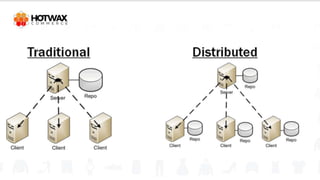
2. Centralized vs Distributed VCS.
3. What is git.
4. History of Git.
5. What is Github.
What is Version Control?
Why Version Control?
Why version control
● Managing and Protecting the Source Code
● Keeping Track of All the Modifications Made to the Code
● Comparing Earlier Versions of the Code
● Easier Collaboration
● Mostly Open Source
What is Version Control System?
A version control system is a software that records all the
changes made to a file or set of files, so a specific version
may be called later if needed.
This helps in collaboration with all the team members.
Centralized vs Decentralized
VCS
What is Git?
Presenter: Prakhar Yadav
What is Git?
Git is a version control system that is used for tracking
changes in computer files. It is used for coordinating work
among several people on a project and tracking progress
over time.
It is used for Source Code Management in the
implementation of a software.
History of Git
History of Git
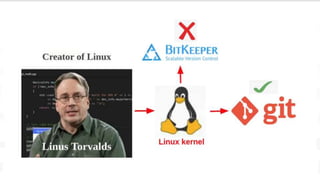
Git was created by Linus Torvalds, in April 2005.
It was a replacement for BitKeeper to manage Linux kernel
changes.
What is Github?
What is Github?
Github is a Git repository hosting service which provides a
web-based graphical interface.
Github helps every team member to work together on the
project from anywhere and makes it easy for them to
collaborate.
Workflow on Github
Workflow on Github
A repository is created, where files and all their versions will
be stored over time.
As changes are made to files that are stored in the repository,
they are automatically tracked so you can see what was
changed, when, and by whom.
Workflow on Github
If one team member wants to work on a file, they can check
out the file, make changes, and then commit those
changes/check them into the repository once they are done.
If a team member wants to experiment with a new feature
without impacting the work of other team members— they
can create a new branch.
Thank You

git Introduction.pptx

  • 2.
    An Introduction on Gitand Github Presenter: Prakhar Yadav
  • 3.
    Topics to becovered 1. VCS 2. Centralized vs Distributed VCS. 3. What is git. 4. History of Git. 5. What is Github.
  • 4.
  • 5.
  • 7.
    Why version control ●Managing and Protecting the Source Code ● Keeping Track of All the Modifications Made to the Code ● Comparing Earlier Versions of the Code ● Easier Collaboration ● Mostly Open Source
  • 8.
    What is VersionControl System? A version control system is a software that records all the changes made to a file or set of files, so a specific version may be called later if needed. This helps in collaboration with all the team members.
  • 9.
  • 11.
  • 12.
    What is Git? Gitis a version control system that is used for tracking changes in computer files. It is used for coordinating work among several people on a project and tracking progress over time. It is used for Source Code Management in the implementation of a software.
  • 13.
  • 15.
    History of Git Gitwas created by Linus Torvalds, in April 2005. It was a replacement for BitKeeper to manage Linux kernel changes.
  • 16.
  • 17.
    What is Github? Githubis a Git repository hosting service which provides a web-based graphical interface. Github helps every team member to work together on the project from anywhere and makes it easy for them to collaborate.
  • 18.
  • 19.
    Workflow on Github Arepository is created, where files and all their versions will be stored over time. As changes are made to files that are stored in the repository, they are automatically tracked so you can see what was changed, when, and by whom.
  • 20.
    Workflow on Github Ifone team member wants to work on a file, they can check out the file, make changes, and then commit those changes/check them into the repository once they are done. If a team member wants to experiment with a new feature without impacting the work of other team members— they can create a new branch.
  • 21.