Git, Fast and Distributed Version Control System Salimane Adjao Moustapha [email_address] http://theindexer.wordpress.com Ethos Technologies
Introduction
Summary What is git? Difference git and other SCMs Git Object Model Why git is better than X Benefits of using git for an engineer Benefits if using git repos in a company Sample git commands Conclusion
What is git? Distributed development. Strong support for non-linear development. Efficient handling of large projects.
Difference git and other SCMs Other SCMs - Delta Storage Systems - Tracking file permissions and ownership Git - Snapshot of what all the files in your project look like in this tree structure, each time you commit. Track changes of the tree through time. - Tracking the content of the file, not the container
Git Object Model The SHA All the information needed to represent the history of a project is stored in files referenced by a 40-digit "object name" that looks something like this: 6ff87c4664981e4397625791c8ea3bbb5f2279a3 This has a number of advantages among others: Git can quickly determine whether two objects are identical or not, just by comparing names.  Since object names are computed the same way in every repository, the same content stored in two repositories will always be stored under the same name.  Git can detect errors when it reads an object, by checking that the object's name is still the SHA1 hash of its contents.
The Objects  Every object consists of three things - a  type , a  size  and  content . The  size  is simply the size of the contents, the contents depend on what type of object it is, and there are four different types of objects:  A  "blob"  is used to store file data - it is generally a file.  A  "tree"  is basically like a directory - it references a bunch of other trees and/or blobs (i.e. files and sub-directories)  A  "commit"  points to a single tree, marking it as what the project looked like at a certain point in time. It contains meta-information about that point in time, such as a timestamp, the author of the changes since the last commit, a pointer to the previous commit(s), etc.  A  "tag"  is a way to mark a specific commit as special in some way. It is normally used to tag certain commits as specific releases or something along those lines.
Blob Object  A blob generally stores the contents of a file. git show 6ff87c466498...
Tree Object  A tree is a simple object that has a bunch of pointers to blobs and other trees - it generally represents the contents of a directory or subdirectory. git ls-tree 6ff87c466498...
Commit Object  The "commit" object links a physical state of a tree with a description of how we got there and why. git show -s --pretty=raw 6ff87c466498...
. -- README -- lib/ --inc/ --tricks.rb --mylib.rb
Why git is better than X Cheap local branching Complex merging Everything is Local Git is fast Git is small Easy to learn
Benefits of using git for an engineer You can work offline on your notebook and track every changes you're doing to the codes without anybody noticing anything. You can work in parrallel on many tasks. You can make mistakes and erase your mistakes. You can edit commit  and the commit will look like everything was done once. You can stash your local modifications and replay them later. You can pull from a collegue repo without the server and others being notified You become productive because instead wasting time copying, recoding, committing or updating codes, you can concentrate on changing the actual source codes. Intuitive commands. Creating patches easily (emailing patches easily). You can use git with subversion or cvs repositories. You don't have to have commit permissions to start making changes and tracking them. (patch, publish). One directory .git, no more deeper polluting directories like svn.
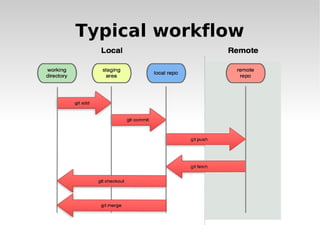
Typical workflow
Benefits of using git repos in a company Better impressions on clients / partners Easy management of your repositories Saving disk space on your servers Less load on your servers Get more productive time from your engineers Saving Money
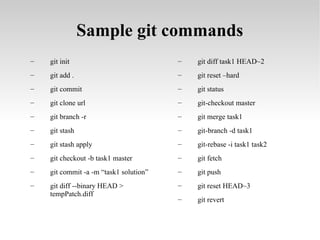
Sample git commands git init git add . git commit git clone url git branch -r git stash git stash apply git checkout -b task1 master git commit -a -m “task1 solution” git diff --binary HEAD > tempPatch.diff git diff task1 HEAD~2 git reset –hard git status git-checkout master git merge task1 git-branch -d task1 git-rebase -i task1 task2 git fetch git push git reset HEAD~3 git revert
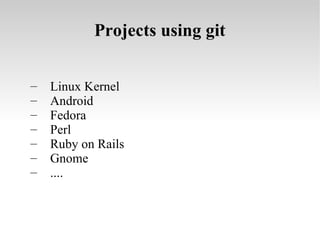
Projects using git Linux Kernel Android Fedora Perl Ruby on Rails Gnome ....
Tutorial http://www.kernel.org/pub/software/scm/git/docs/gittutorial.html http://git-scm.com/course/svn.html http://www.spheredev.org/wiki/Git_for_the_lazy http://excess.org/article/2008/07/ogre-git-tutorial/ http://gitcasts.com/ http://book.git-scm.com/5_git_and_email.html http://book.git-scm.com/5_customizing_git.html

Git, Fast and Distributed Source Code Management

  • 1.
    Git, Fast andDistributed Version Control System Salimane Adjao Moustapha [email_address] http://theindexer.wordpress.com Ethos Technologies
  • 2.
  • 3.
    Summary What isgit? Difference git and other SCMs Git Object Model Why git is better than X Benefits of using git for an engineer Benefits if using git repos in a company Sample git commands Conclusion
  • 4.
    What is git?Distributed development. Strong support for non-linear development. Efficient handling of large projects.
  • 5.
    Difference git andother SCMs Other SCMs - Delta Storage Systems - Tracking file permissions and ownership Git - Snapshot of what all the files in your project look like in this tree structure, each time you commit. Track changes of the tree through time. - Tracking the content of the file, not the container
  • 6.
    Git Object ModelThe SHA All the information needed to represent the history of a project is stored in files referenced by a 40-digit "object name" that looks something like this: 6ff87c4664981e4397625791c8ea3bbb5f2279a3 This has a number of advantages among others: Git can quickly determine whether two objects are identical or not, just by comparing names. Since object names are computed the same way in every repository, the same content stored in two repositories will always be stored under the same name. Git can detect errors when it reads an object, by checking that the object's name is still the SHA1 hash of its contents.
  • 7.
    The Objects Every object consists of three things - a type , a size and content . The size is simply the size of the contents, the contents depend on what type of object it is, and there are four different types of objects: A "blob" is used to store file data - it is generally a file. A "tree" is basically like a directory - it references a bunch of other trees and/or blobs (i.e. files and sub-directories) A "commit" points to a single tree, marking it as what the project looked like at a certain point in time. It contains meta-information about that point in time, such as a timestamp, the author of the changes since the last commit, a pointer to the previous commit(s), etc. A "tag" is a way to mark a specific commit as special in some way. It is normally used to tag certain commits as specific releases or something along those lines.
  • 8.
    Blob Object A blob generally stores the contents of a file. git show 6ff87c466498...
  • 9.
    Tree Object A tree is a simple object that has a bunch of pointers to blobs and other trees - it generally represents the contents of a directory or subdirectory. git ls-tree 6ff87c466498...
  • 10.
    Commit Object The "commit" object links a physical state of a tree with a description of how we got there and why. git show -s --pretty=raw 6ff87c466498...
  • 11.
    . -- README-- lib/ --inc/ --tricks.rb --mylib.rb
  • 12.
    Why git isbetter than X Cheap local branching Complex merging Everything is Local Git is fast Git is small Easy to learn
  • 13.
    Benefits of usinggit for an engineer You can work offline on your notebook and track every changes you're doing to the codes without anybody noticing anything. You can work in parrallel on many tasks. You can make mistakes and erase your mistakes. You can edit commit and the commit will look like everything was done once. You can stash your local modifications and replay them later. You can pull from a collegue repo without the server and others being notified You become productive because instead wasting time copying, recoding, committing or updating codes, you can concentrate on changing the actual source codes. Intuitive commands. Creating patches easily (emailing patches easily). You can use git with subversion or cvs repositories. You don't have to have commit permissions to start making changes and tracking them. (patch, publish). One directory .git, no more deeper polluting directories like svn.
  • 14.
  • 15.
    Benefits of usinggit repos in a company Better impressions on clients / partners Easy management of your repositories Saving disk space on your servers Less load on your servers Get more productive time from your engineers Saving Money
  • 16.
    Sample git commandsgit init git add . git commit git clone url git branch -r git stash git stash apply git checkout -b task1 master git commit -a -m “task1 solution” git diff --binary HEAD > tempPatch.diff git diff task1 HEAD~2 git reset –hard git status git-checkout master git merge task1 git-branch -d task1 git-rebase -i task1 task2 git fetch git push git reset HEAD~3 git revert
  • 17.
    Projects using gitLinux Kernel Android Fedora Perl Ruby on Rails Gnome ....
  • 18.
    Tutorial http://www.kernel.org/pub/software/scm/git/docs/gittutorial.html http://git-scm.com/course/svn.htmlhttp://www.spheredev.org/wiki/Git_for_the_lazy http://excess.org/article/2008/07/ogre-git-tutorial/ http://gitcasts.com/ http://book.git-scm.com/5_git_and_email.html http://book.git-scm.com/5_customizing_git.html