GIT-Basics
Ms.Rachana Pathak
(rachanarpathak@gmail.com)
Assistant Professor, Dept of Computer Science and Engineering
Walchand Institute of Technology, Solapur
(www.witsolapur.org)
Learning Outcome
2Walchand Institute of Technology, Solapur
At the end of this session,
Students will be able to explain the basic concepts of Git
Prerequisite
• Git is used to handle all levels of Java and non-Java projects.
• Exposure to software development life cycle.
• Knowledge of developing web-based and non-web-based applications.
Walchand Institute of Technology, Solapur 3
Question
4Walchand Institute of Technology, Solapur
Can Git be used for all types of projects?
Answer- Yes
Introduction
What is Git?
• Git is created by Linus Torvald.
• Git is merging of different source code from
different people and maintain.
• Git is a distributed version control system.
Walchand Institute of Technology, Solapur 5
Image source:https://git-scm.com/downloads/logos
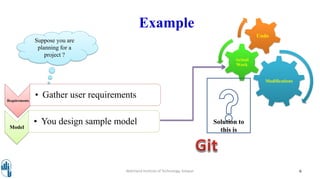
Example
Requirements
• Gather user requirements
Model
• You design sample model
Walchand Institute of Technology, Solapur 6
Suppose you are
planning for a
project ?
Modifications
Actual
Work
Undo
Solution to
this is
Walchand Institute of Technology, Solapur 7
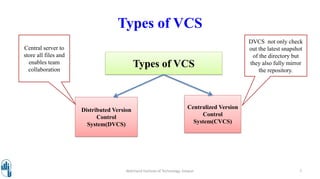
Types of VCS
Types of VCS
Distributed Version
Control
System(DVCS)
Centralized Version
Control
System(CVCS)
Central server to
store all files and
enables team
collaboration
DVCS not only check
out the latest snapshot
of the directory but
they also fully mirror
the repository.
• Free and open source
• Fast and small
• Implicit backup
• Security
• No need of powerful hardware
• Easier branching
Walchand Institute of Technology, Solapur 8
Advantages
Terminologies
• Local Repository-
• VCS tool provides a private workplace as a working copy.
• Changes become a part of the repository made by developers.
• Provides a private copy of the whole repository.
• Blobs-
• Blob stands for Binary Large Object.
• Each version of a file is represented by blob.
• A binary file and in Git database, named as SHA1 hash of that file.
Walchand Institute of Technology, Solapur 9
Terminologies
• Trees-
• Tree represents a directory.
• Tree is a binary file that stores references to blobs.
• Commits-
• Commit holds the current state of the repository.
• A commit is also named by SHA1 hash.
Walchand Institute of Technology, Solapur 10
Terminologies
• Branches-
• Branches are used to create another line of development.
• Git has a master branch, same as trunk in Subversion.
• Clone-
• Clone operation creates the instance of the repository.
• Clone operation checks out the working copy mirrors the complete repository.
• Users can perform many operations with this local repository.
Walchand Institute of Technology, Solapur 11
Terminologies
• Pull-
• Copies the changes from a remote repository instance to a local one.
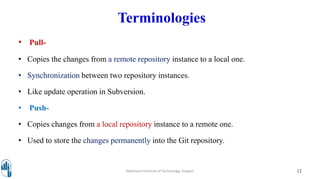
• Synchronization between two repository instances.
• Like update operation in Subversion.
• Push-
• Copies changes from a local repository instance to a remote one.
• Used to store the changes permanently into the Git repository.
Walchand Institute of Technology, Solapur 12
Terminologies
• Revision-
• Revision represents the version of the source
code.
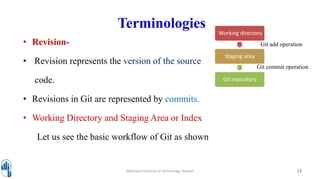
• Revisions in Git are represented by commits.
• Working Directory and Staging Area or Index
Let us see the basic workflow of Git as shown
Walchand Institute of Technology, Solapur 13
Working directory
Staging area
Git repository
Git add operation
Git commit operation
References
• Understanding Open Source and Free Software Licensing - By Andrew M. St.
Laurent, Oreily Media. e-Resource available at:
https://www.oreilly.com/openbook/osfreesoft/book/index.html
• Apache HTTP Server Documentation Version 2.2 by by Apache Software
Foundation
• Official Documentation of ATutor, Moodle, Drupal, Joomla, Wordpress, Liferay
Portal, Alfresco, Umbraco, Redmine, Nagios, Cacti, Icinga, OpenProject, LibrePlan
(eResources)
14Walchand Institute of Technology, Solapur
Thank You !!!
15Walchand Institute of Technology, Solapur

GIT

  • 1.
    GIT-Basics Ms.Rachana Pathak (rachanarpathak@gmail.com) Assistant Professor,Dept of Computer Science and Engineering Walchand Institute of Technology, Solapur (www.witsolapur.org)
  • 2.
    Learning Outcome 2Walchand Instituteof Technology, Solapur At the end of this session, Students will be able to explain the basic concepts of Git
  • 3.
    Prerequisite • Git isused to handle all levels of Java and non-Java projects. • Exposure to software development life cycle. • Knowledge of developing web-based and non-web-based applications. Walchand Institute of Technology, Solapur 3
  • 4.
    Question 4Walchand Institute ofTechnology, Solapur Can Git be used for all types of projects? Answer- Yes
  • 5.
    Introduction What is Git? •Git is created by Linus Torvald. • Git is merging of different source code from different people and maintain. • Git is a distributed version control system. Walchand Institute of Technology, Solapur 5 Image source:https://git-scm.com/downloads/logos
  • 6.
    Example Requirements • Gather userrequirements Model • You design sample model Walchand Institute of Technology, Solapur 6 Suppose you are planning for a project ? Modifications Actual Work Undo Solution to this is
  • 7.
    Walchand Institute ofTechnology, Solapur 7 Types of VCS Types of VCS Distributed Version Control System(DVCS) Centralized Version Control System(CVCS) Central server to store all files and enables team collaboration DVCS not only check out the latest snapshot of the directory but they also fully mirror the repository.
  • 8.
    • Free andopen source • Fast and small • Implicit backup • Security • No need of powerful hardware • Easier branching Walchand Institute of Technology, Solapur 8 Advantages
  • 9.
    Terminologies • Local Repository- •VCS tool provides a private workplace as a working copy. • Changes become a part of the repository made by developers. • Provides a private copy of the whole repository. • Blobs- • Blob stands for Binary Large Object. • Each version of a file is represented by blob. • A binary file and in Git database, named as SHA1 hash of that file. Walchand Institute of Technology, Solapur 9
  • 10.
    Terminologies • Trees- • Treerepresents a directory. • Tree is a binary file that stores references to blobs. • Commits- • Commit holds the current state of the repository. • A commit is also named by SHA1 hash. Walchand Institute of Technology, Solapur 10
  • 11.
    Terminologies • Branches- • Branchesare used to create another line of development. • Git has a master branch, same as trunk in Subversion. • Clone- • Clone operation creates the instance of the repository. • Clone operation checks out the working copy mirrors the complete repository. • Users can perform many operations with this local repository. Walchand Institute of Technology, Solapur 11
  • 12.
    Terminologies • Pull- • Copiesthe changes from a remote repository instance to a local one. • Synchronization between two repository instances. • Like update operation in Subversion. • Push- • Copies changes from a local repository instance to a remote one. • Used to store the changes permanently into the Git repository. Walchand Institute of Technology, Solapur 12
  • 13.
    Terminologies • Revision- • Revisionrepresents the version of the source code. • Revisions in Git are represented by commits. • Working Directory and Staging Area or Index Let us see the basic workflow of Git as shown Walchand Institute of Technology, Solapur 13 Working directory Staging area Git repository Git add operation Git commit operation
  • 14.
    References • Understanding OpenSource and Free Software Licensing - By Andrew M. St. Laurent, Oreily Media. e-Resource available at: https://www.oreilly.com/openbook/osfreesoft/book/index.html • Apache HTTP Server Documentation Version 2.2 by by Apache Software Foundation • Official Documentation of ATutor, Moodle, Drupal, Joomla, Wordpress, Liferay Portal, Alfresco, Umbraco, Redmine, Nagios, Cacti, Icinga, OpenProject, LibrePlan (eResources) 14Walchand Institute of Technology, Solapur
  • 15.
    Thank You !!! 15WalchandInstitute of Technology, Solapur