Hands-On Workshop
Department of Agriculture and Livestock
Port Moresby, PNG
2023
INTRODUCTION TO
GEOGRAPHIC INFORMATION SYSTEMS (GIS)
AND MAPPING AGRICULTURAL SYSTEM
• Principles of GIS
• Data formats and GIS
• Projections and GPS data
• Spatial data integration
• Population
• Agricultural system
Agenda for workshop
The Principles of Geographic
Information Systems (GIS)
• GIS stands for Geographic Information System
• GIS is a computer-based system that captures, stores,
manages, analyzes, and visualizes spatial data,
including maps, satellite imagery, and other geospatial
information
• GIS allows for the integration and analysis of data from
multiple sources, helping to understand patterns,
relationships, and trends in geographic data
Definition and importance of GIS
• Data: The foundation of GIS is data, including
• spatial data (e.g., geographic features, locations) and
• attribute data (e.g., characteristics, and attributes
associated with spatial data)
• Software: GIS software enables the creation,
management, analysis, and visualization of spatial data.
e.g., ArcGIS, QGIS, and Google Earth
• Hardware: GIS requires hardware, such as computers,
servers, and GPS devices, to process and store data
• People: Skilled GIS professionals are needed to operate
and analyze GIS data, interpret results, and make
informed decisions
Components of GIS
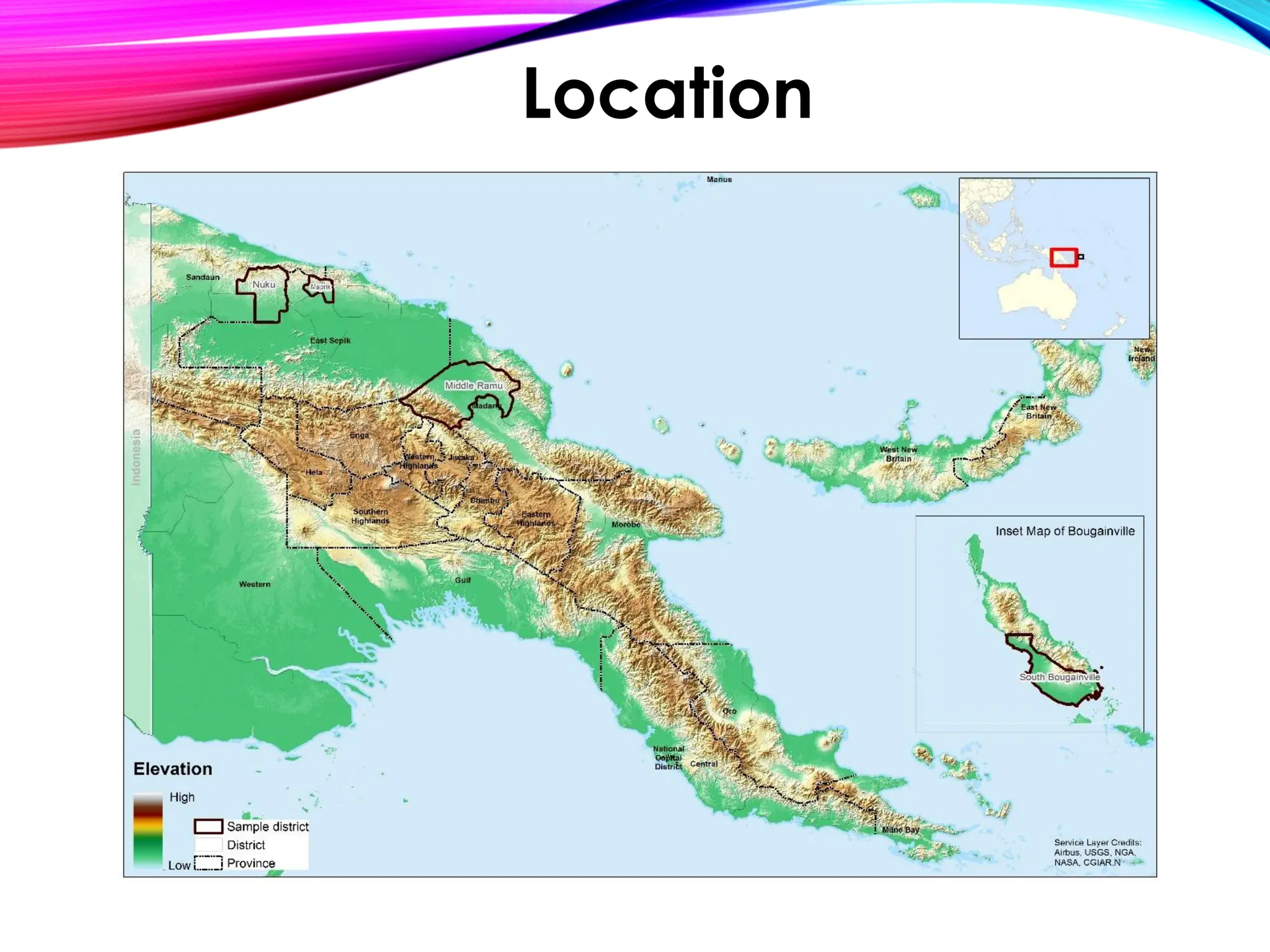
• Location
• Quantity (Measurement)
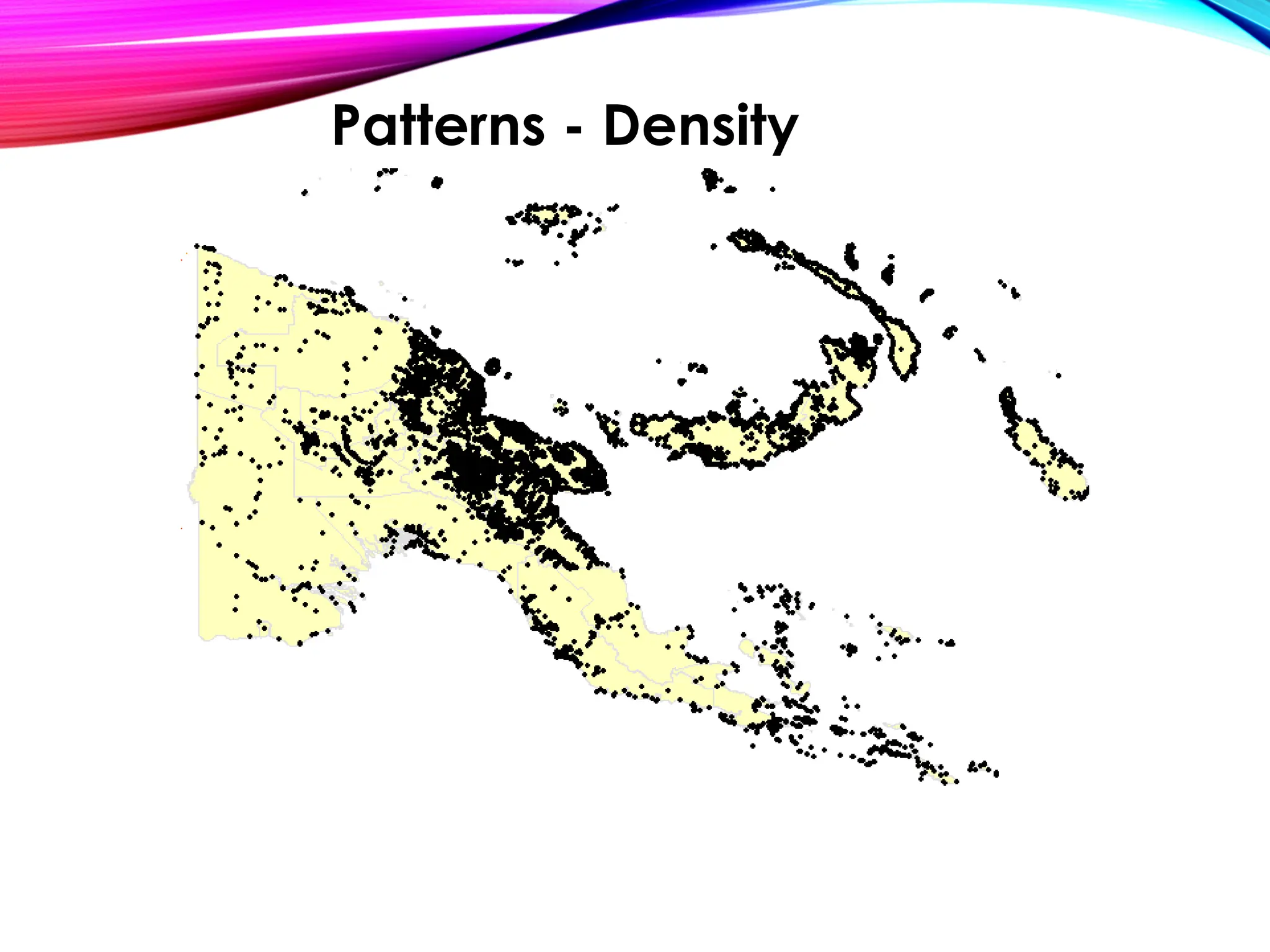
• Patterns
• Trends (Temporal Aspect)
• Surrounding Conditions & Relationships
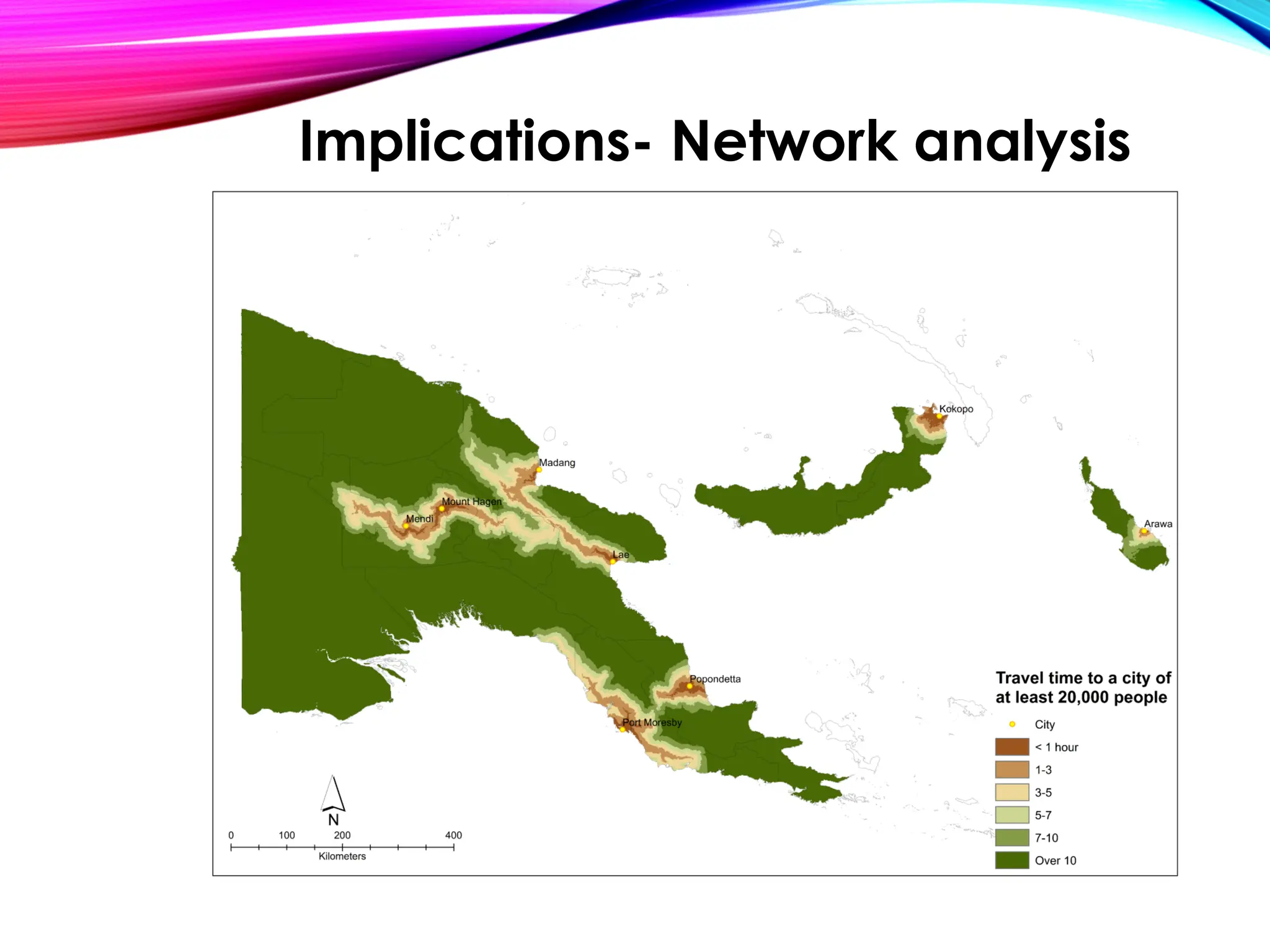
• Implications (Planning for the future)
What kind of questions can GIS
address?
• Improved Decision Making:
• by providing visualizations, analysis, and insights from spatial
data.
• Spatial Analysis and Modeling:
• overlay analysis, proximity analysis, and network analysis.
• Data Integration and Management:
• satellite imagery, aerial photography, GPS data, and other
spatial datasets.
• Visualization and Communication:
• maps, charts, and other graphical representations of spatial
data.
• Cost and Time Savings:
• GIS helps in optimizing resources, reducing costs
• Environmental and Social Impact Assessment:
• infrastructure development, land use planning, and natural
resource management.
Importance of GIS
• It involves using GIS tools and techniques to
analyze and interpret spatial data
• Include tasks such as overlay analysis, buffer
analysis, spatial query, spatial statistics, and
network analysis
• Helps in understanding spatial patterns,
relationships, and trends, and supports decision-
making in various fields
Geospatial Analysis
• Cartography is the science and art of creating
maps using GIS
• designing and creating visually appealing
maps that convey spatial information
effectively
• includes elements such as map layout,
symbology, scale, projection, and map design
principles
Cartography
Location
Implications- Network analysis
Quality - Trends
https://www.healthdata.org/papua-new-guinea
Patterns - Density
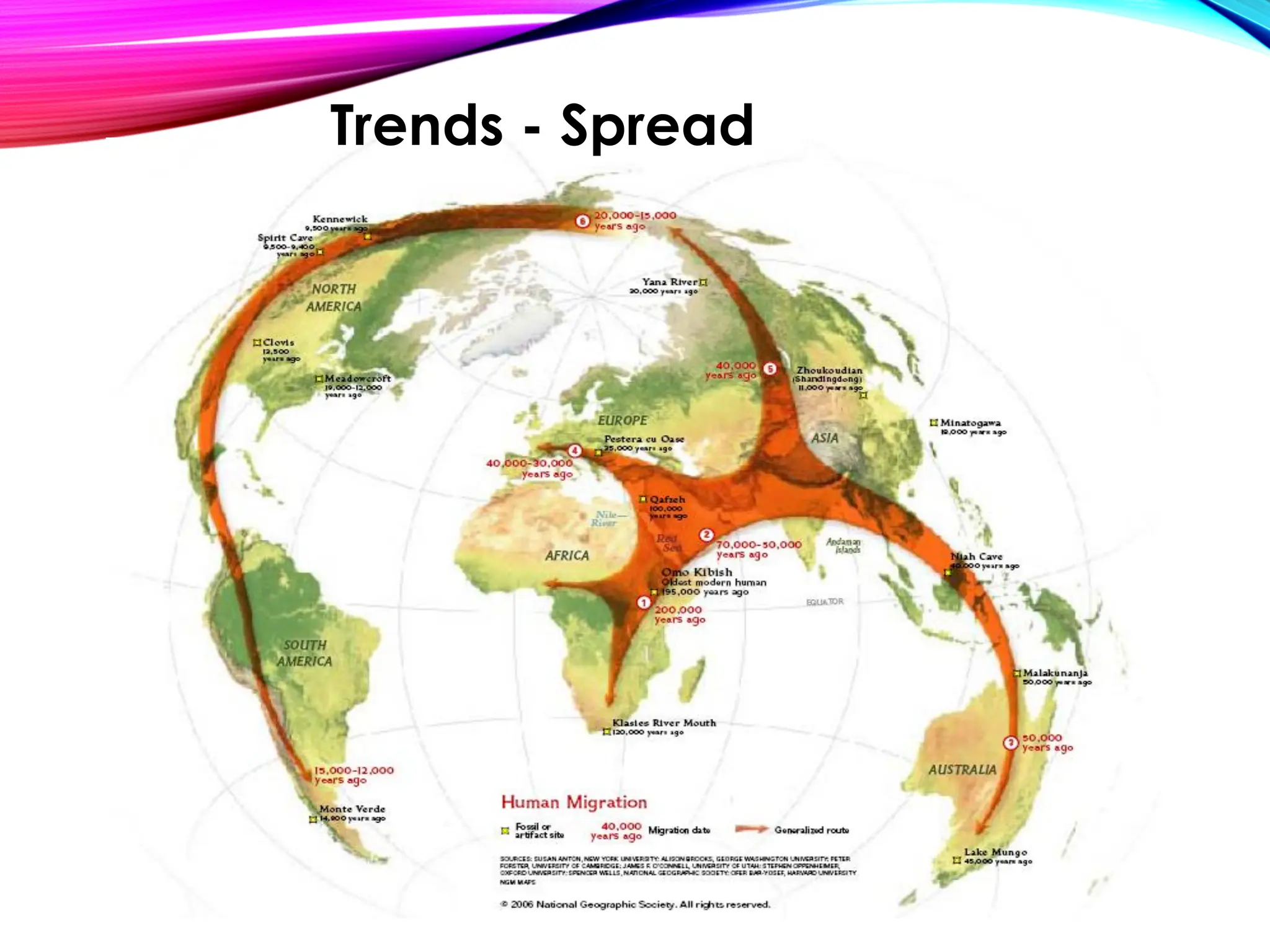
Trends - Spread
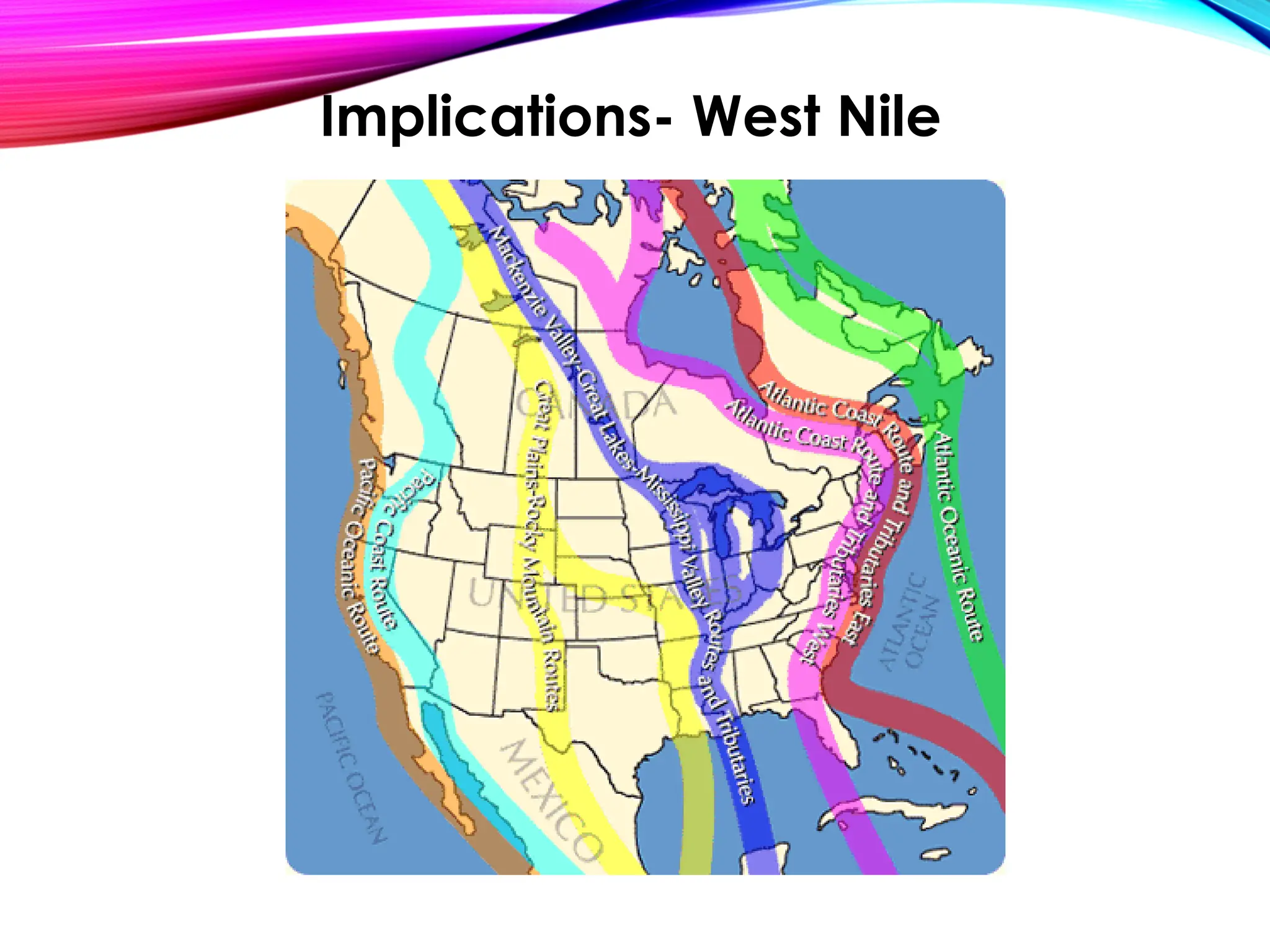
Implications- West Nile
• Spatial data refers to data that has a geographic
or spatial component, such as location, shape,
and attributes associated with geographic
features
• Spatial data can be represented as points, lines,
polygons, or raster images, and can be stored in
various formats, such as vector and raster
• Spatial data is the foundation of GIS, and it can be
collected, created, and analyzed using GIS tools
and techniques
Basic concepts: Spatial data
• GIS data can be categorized into two main types:
• vector data
• raster data
• Vector data represents geographic features as
points, lines, or polygons, and is used to represent
discrete and well-defined features such as roads,
buildings, and land parcels
• Raster data represents geographic features as a grid
of cells, where each cell contains a value that
represents an attribute or characteristic and is used
to represent continuous data such as elevation,
temperature, and precipitation
GIS Data Types and Sources
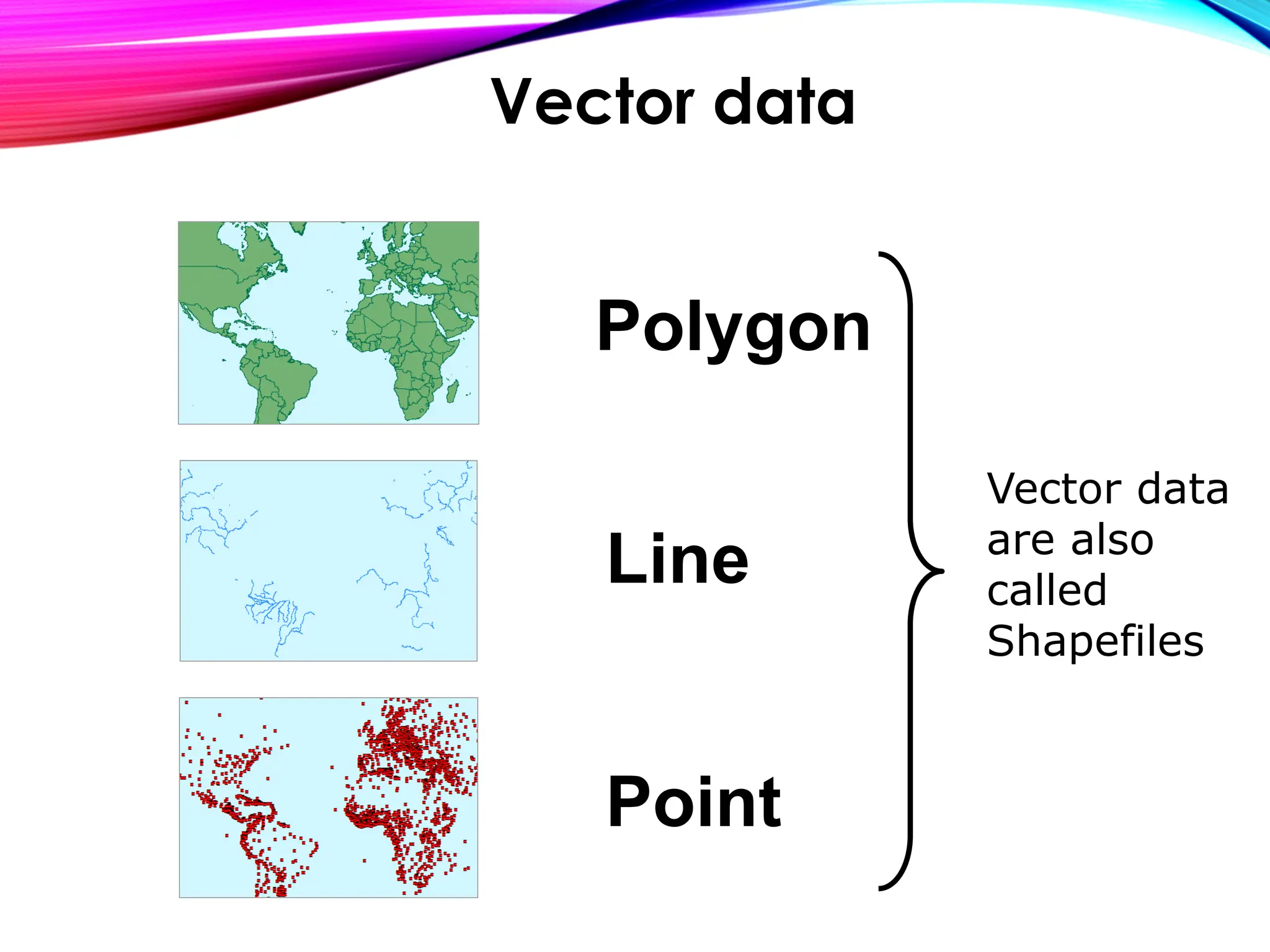
• Points represent a single location, such as a well or a
city center
• Lines represent linear features, such as roads, rivers,
or pipelines
• Polygons represent enclosed areas, such as land
parcels, administrative boundaries, or vegetation
cover
Vector Data
Polygon
Line
Point
Vector data
are also
called
Shapefiles
Vector data
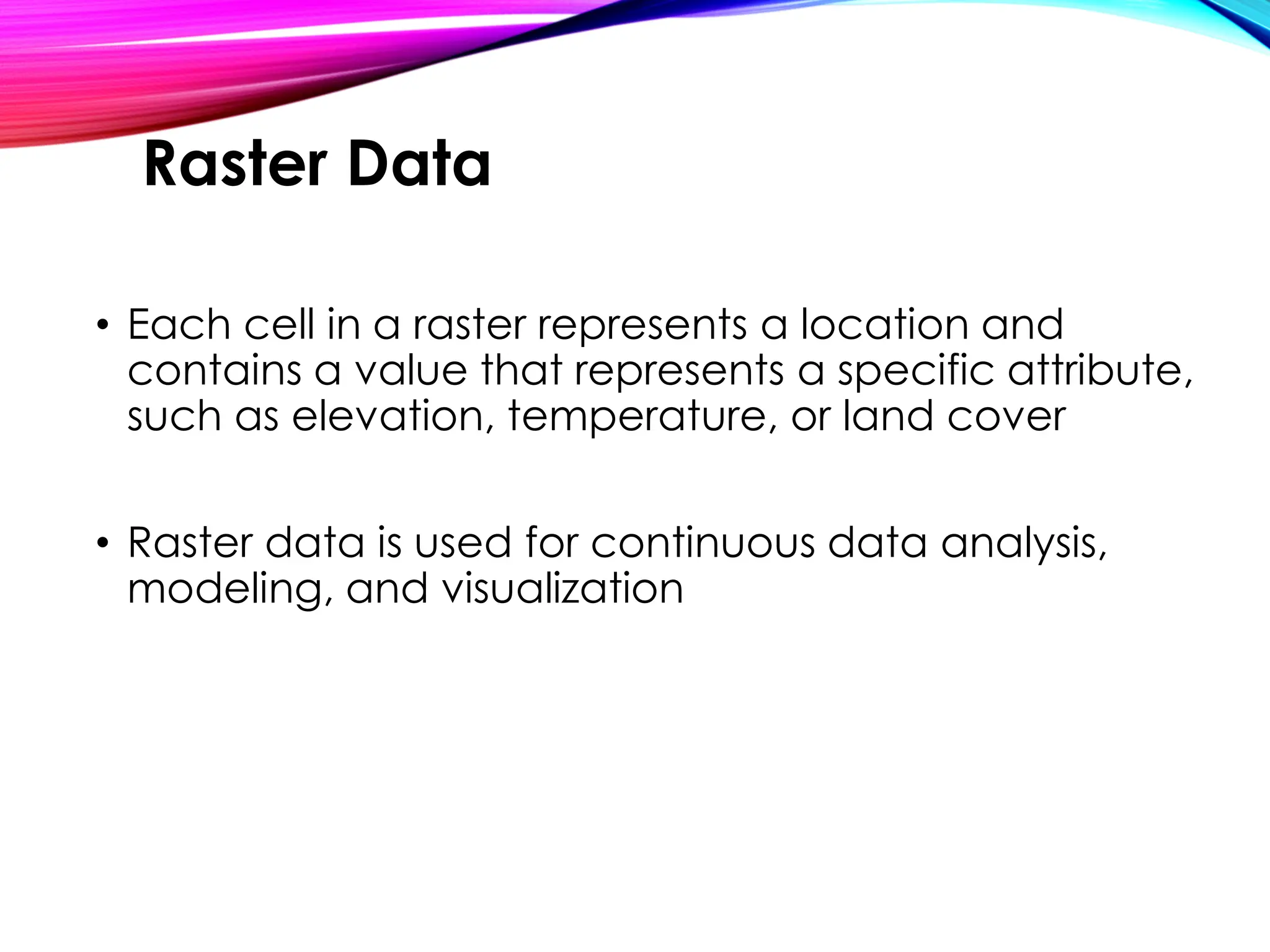
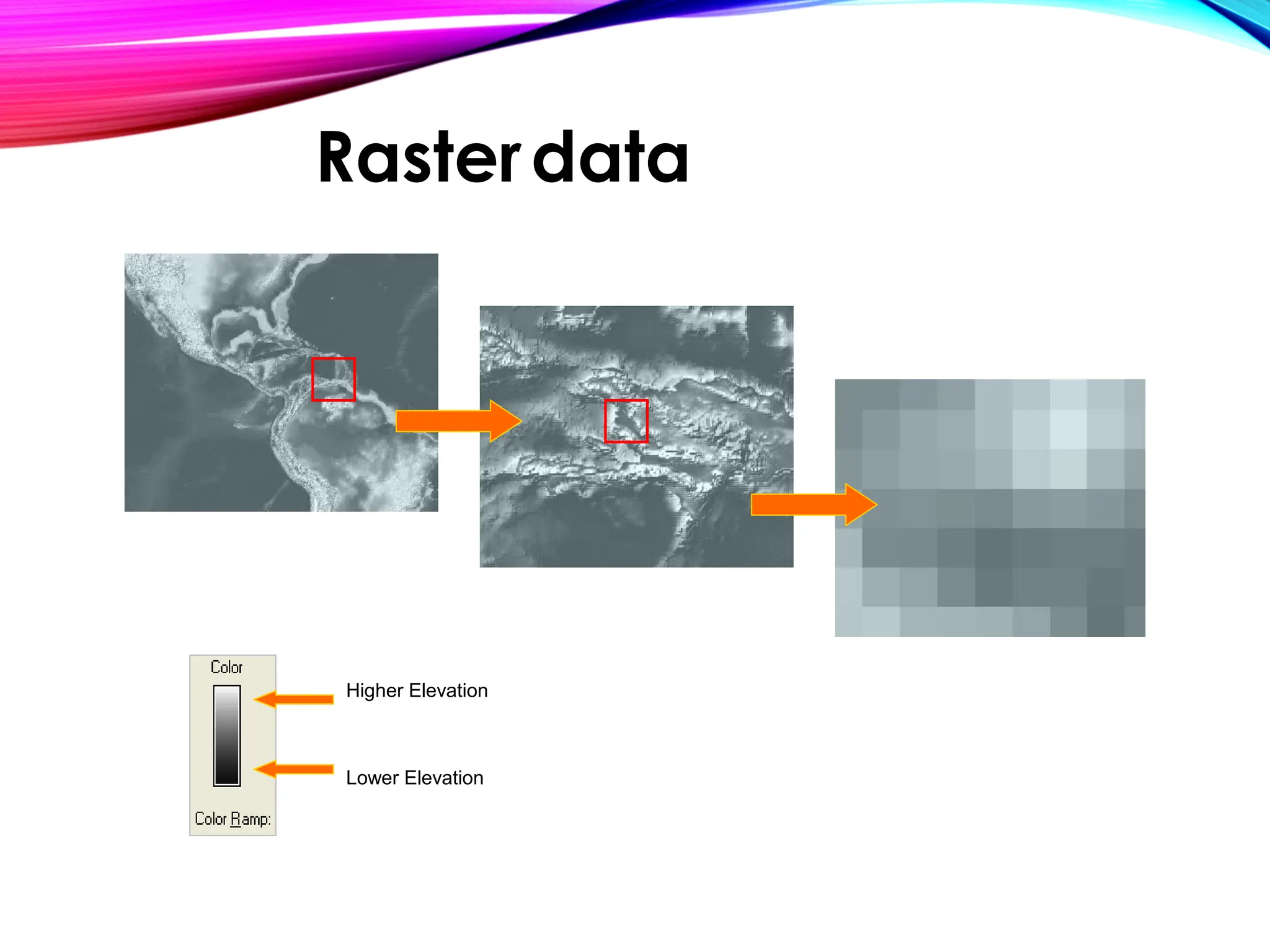
• Each cell in a raster represents a location and
contains a value that represents a specific attribute,
such as elevation, temperature, or land cover
• Raster data is used for continuous data analysis,
modeling, and visualization
Raster Data
Higher Elevation
Lower Elevation
Rasterdata
• Layers are the building blocks of GIS, and they
represent different thematic information that can
be stacked on top of each other to create a map
• Layers can include features such as roads,
buildings, rivers, and land parcels, each
represented as a separate layer with its own
attributes and properties
• Layers can be added, removed, and manipulated
in GIS software to create complex spatial analyses
and visualizations
Basic concepts: Layers
• A Map is made up of Layers or Shapefiles
• Layers contain Features
• Features can take the form of Points, Lines and
Polygons, and are known collectively as Vector
Data
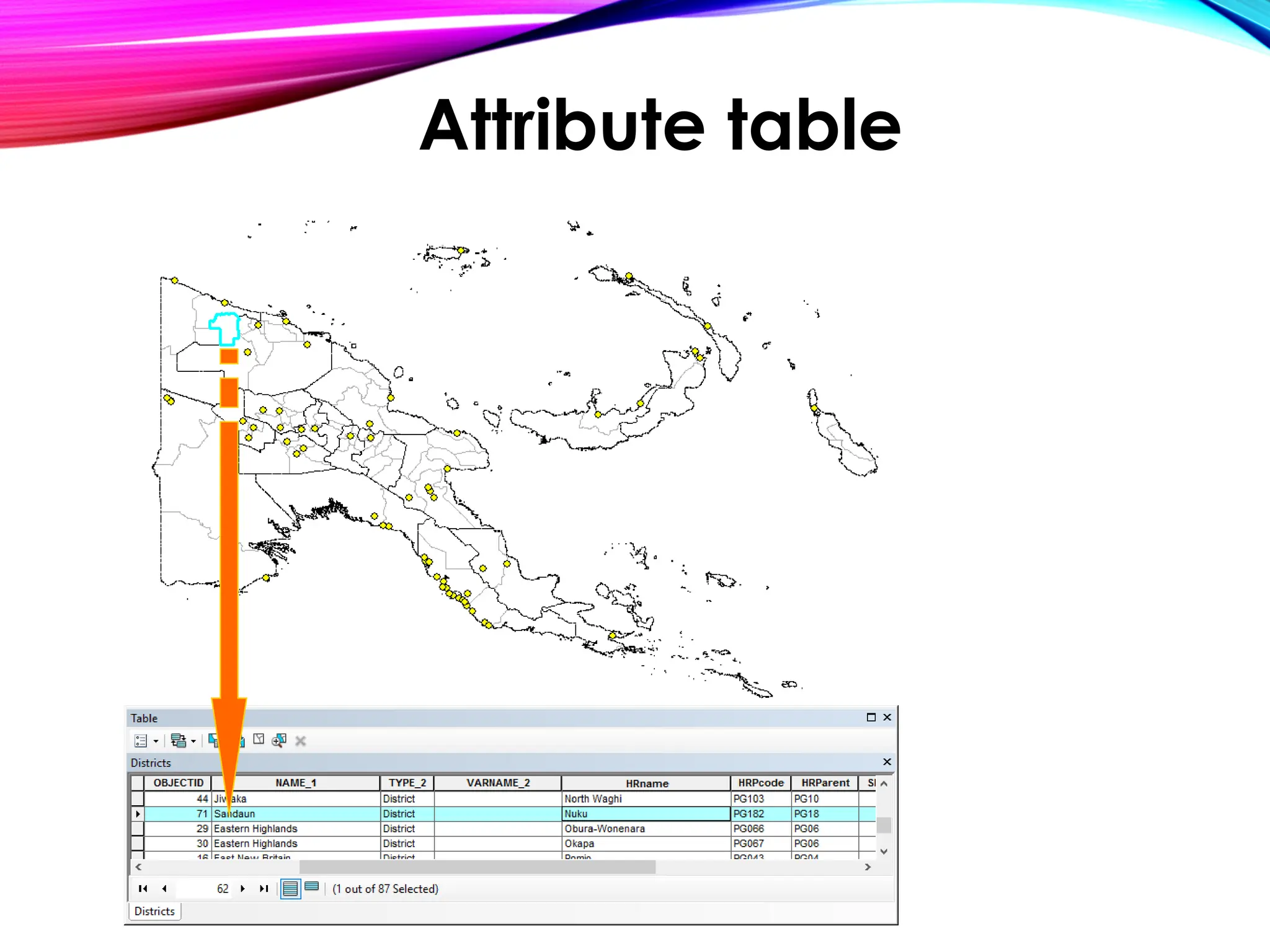
• Layers contain Features, and each Feature is linked
to a row of information in the Attribute table
GIS map components
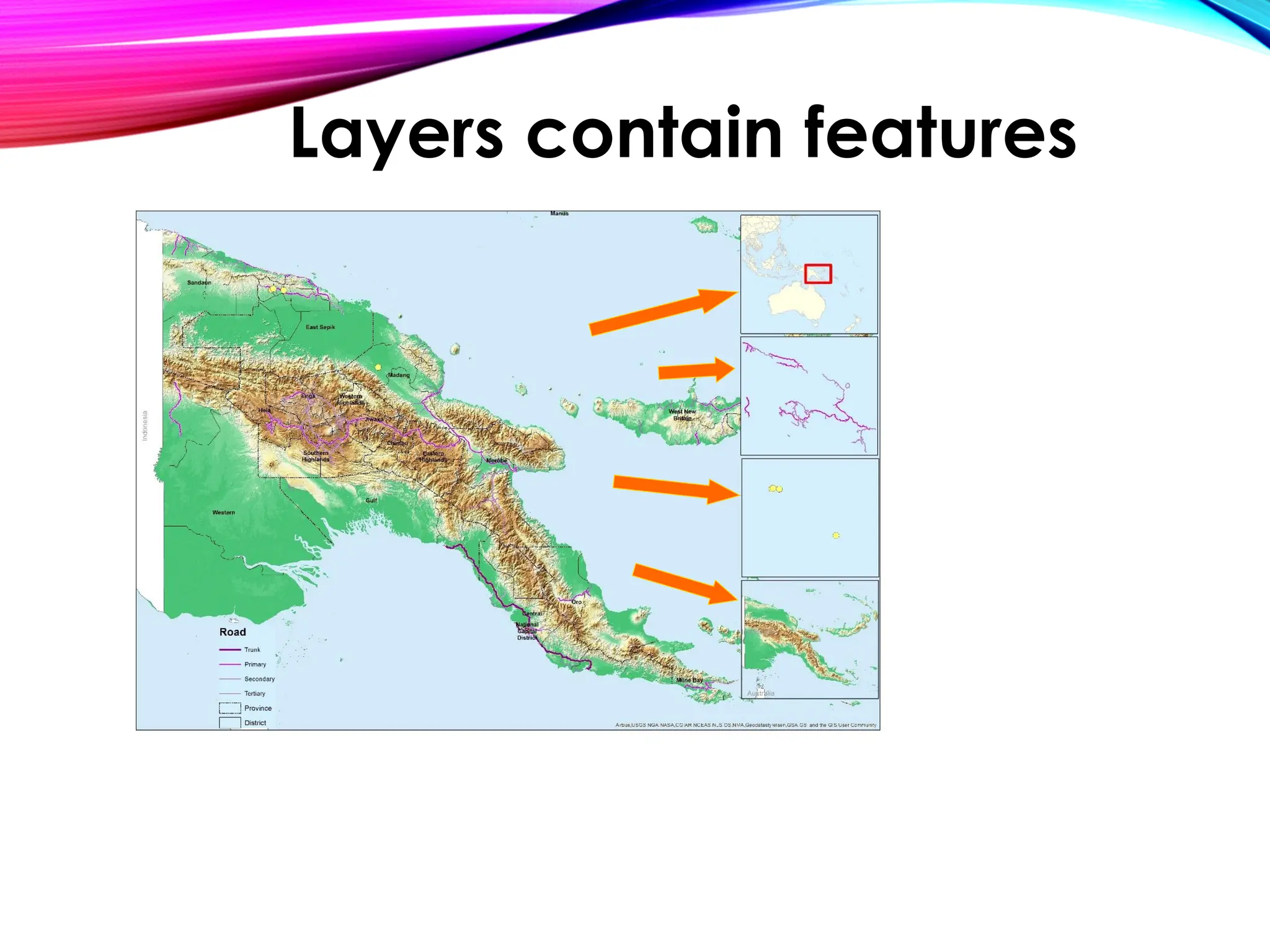
Layers contain features
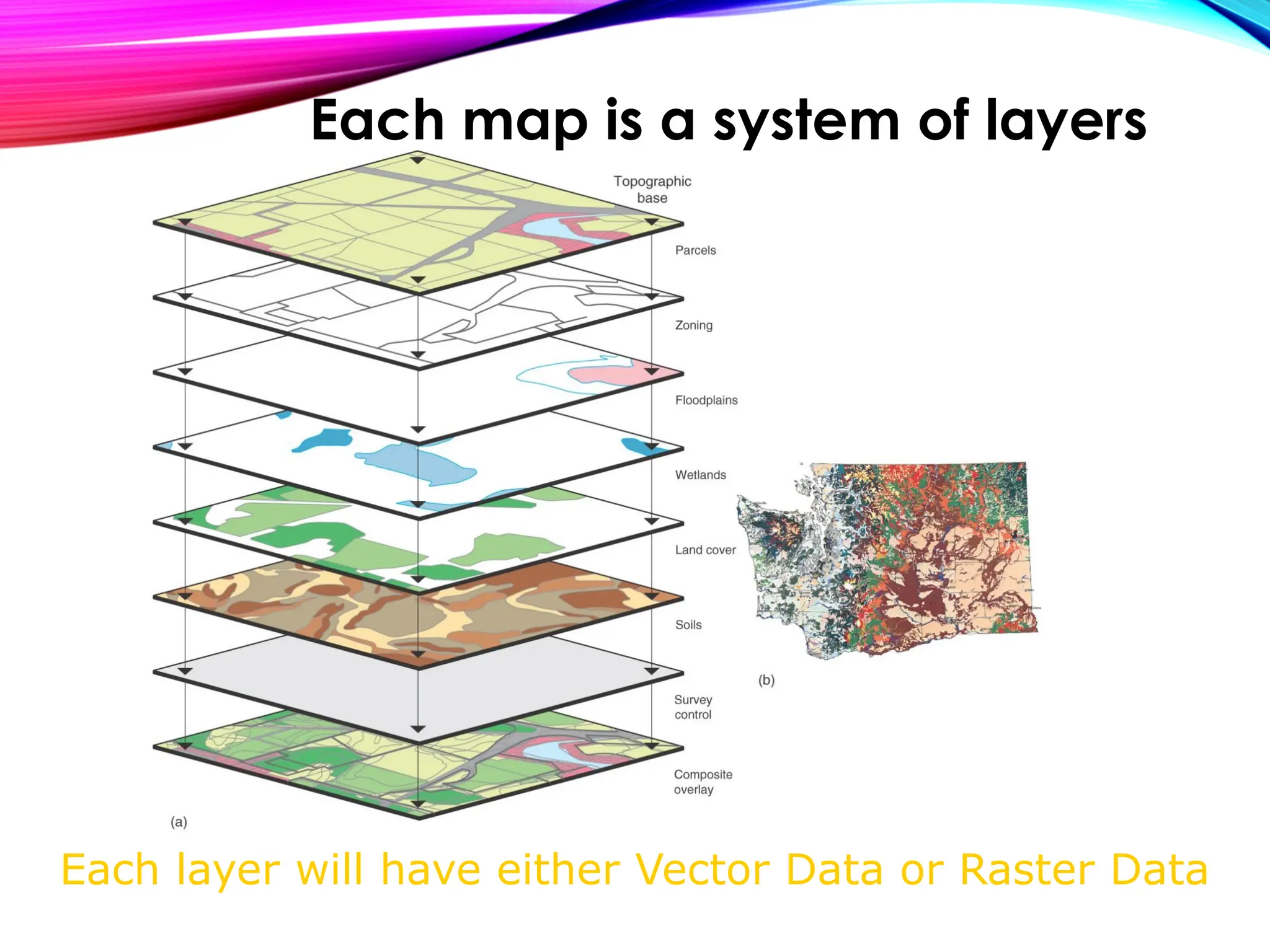
Each layer will have either Vector Data or Raster Data
Each map is a system of layers
• Refers to the non-spatial information associated
with spatial features, such as attributes or
characteristics of geographic features
e.g., name, population, elevation, land use,
and other relevant information
• Stored in tabular format and linked to spatial data
using unique identifiers, allowing for analysis and
querying of spatial and attribute data together
Basic concepts: Attribute Data
Attribute table
• GIS data can be obtained from various sources,
including:
• Publicly available data, such as government agencies,
academic institutions, and NGO
• Commercial data providers that offer specialized GIS
datasets for specific industries or applications
• Crowdsourced data collected by individuals or
communities, such as OpenStreetMap
• Field-collected data using GPS or other data collection
devices
• Remote sensing data, such as satellite imagery, aerial
photographs, and LiDAR data
Data sources
• Data quality refers to the accuracy, precision, and
completeness of the data
• Data accuracy refers to how closely the data
represents the real-world features
• Data scale refers to the level of detail or resolution of
the data
• Data relevance refers to how well the data meets the
needs of the specific GIS application
Data Consideration
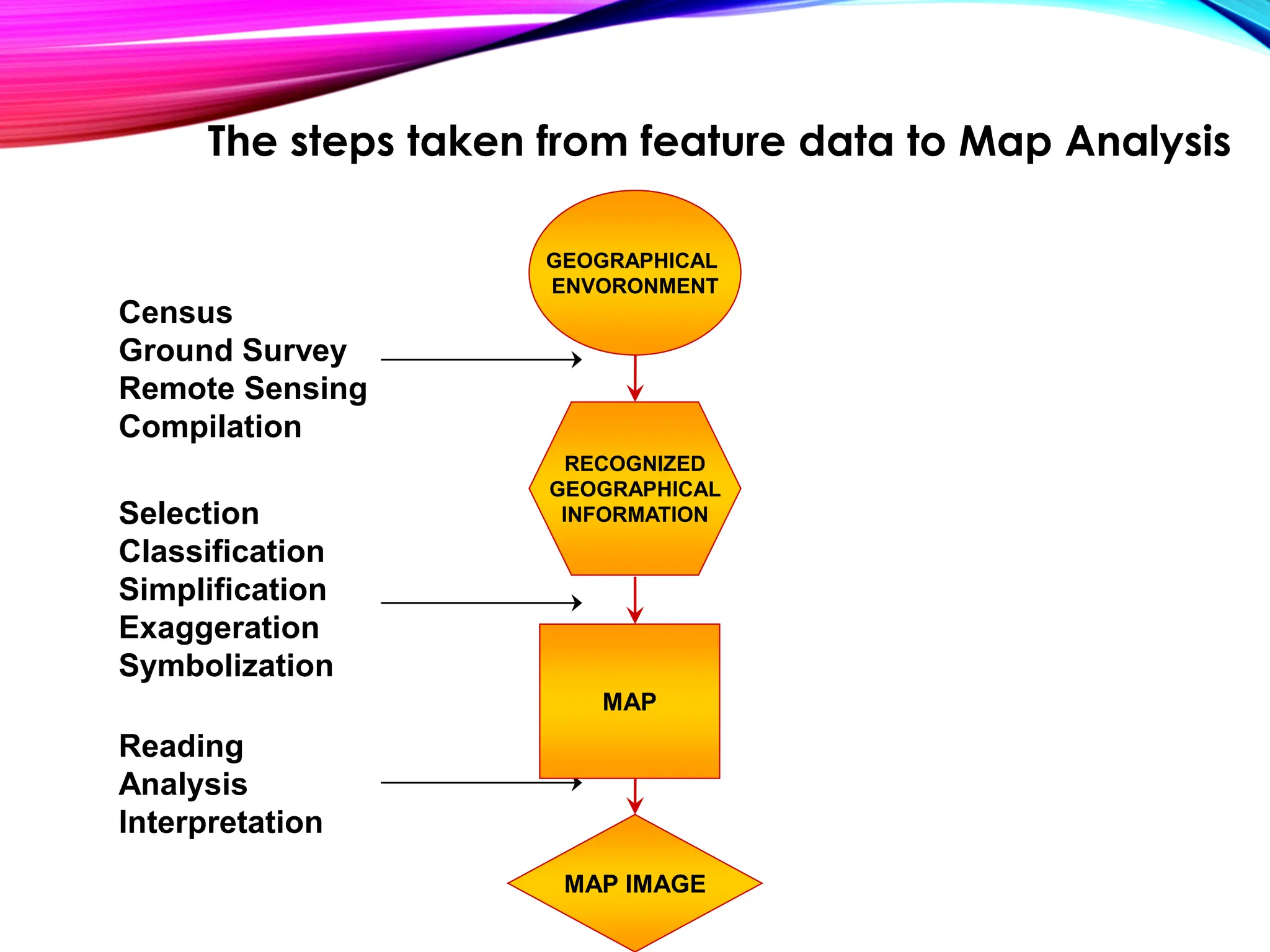
MAP IMAGE
The steps taken from feature data to Map Analysis
Census
Ground Survey
Remote Sensing
Compilation
Selection
Classification
Simplification
Exaggeration
Symbolization
Reading
Analysis
Interpretation
GEOGRAPHICAL
ENVORONMENT
RECOGNIZED
GEOGRAPHICAL
INFORMATION
MAP
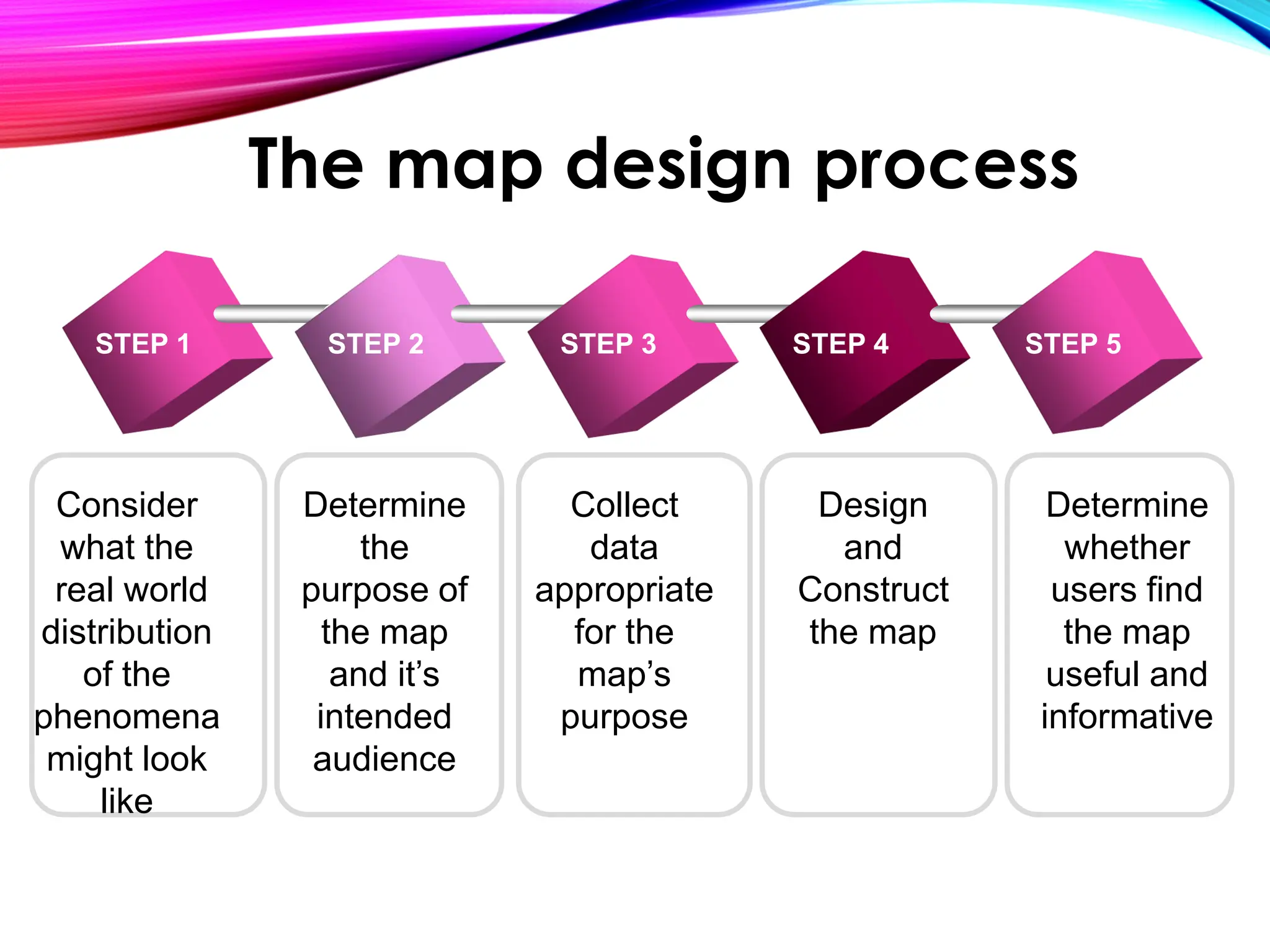
Consider
what the
real world
distribution
of the
phenomena
might look
like
Determine
the
purpose of
the map
and it’s
intended
audience
Collect
data
appropriate
for the
map’s
purpose
Design
and
Construct
the map
STEP 1 STEP 2 STEP 3 STEP 4 STEP 5
Determine
whether
users find
the map
useful and
informative
The map design process
• GIS software refers to the applications and tools used
for creating, managing, analyzing, and visualizing
geographic data
• Popular GIS software includes ArcGIS by Esri, QGIS,
MapInfo, and Google Earth Pro
• These software provide a wide range of
functionalities, such as data visualization, spatial
analysis, data editing, and map production
GIS Software and Tools
• GIS tools are specialized software or plugins that
extend the capabilities of GIS software
E.g., spatial analysis tools, data management
tools, geocoding tools, and remote sensing tools
• These tools enhance the functionality of GIS software
and enable users to perform specific tasks or analysis
on geographic data
GIS Tools
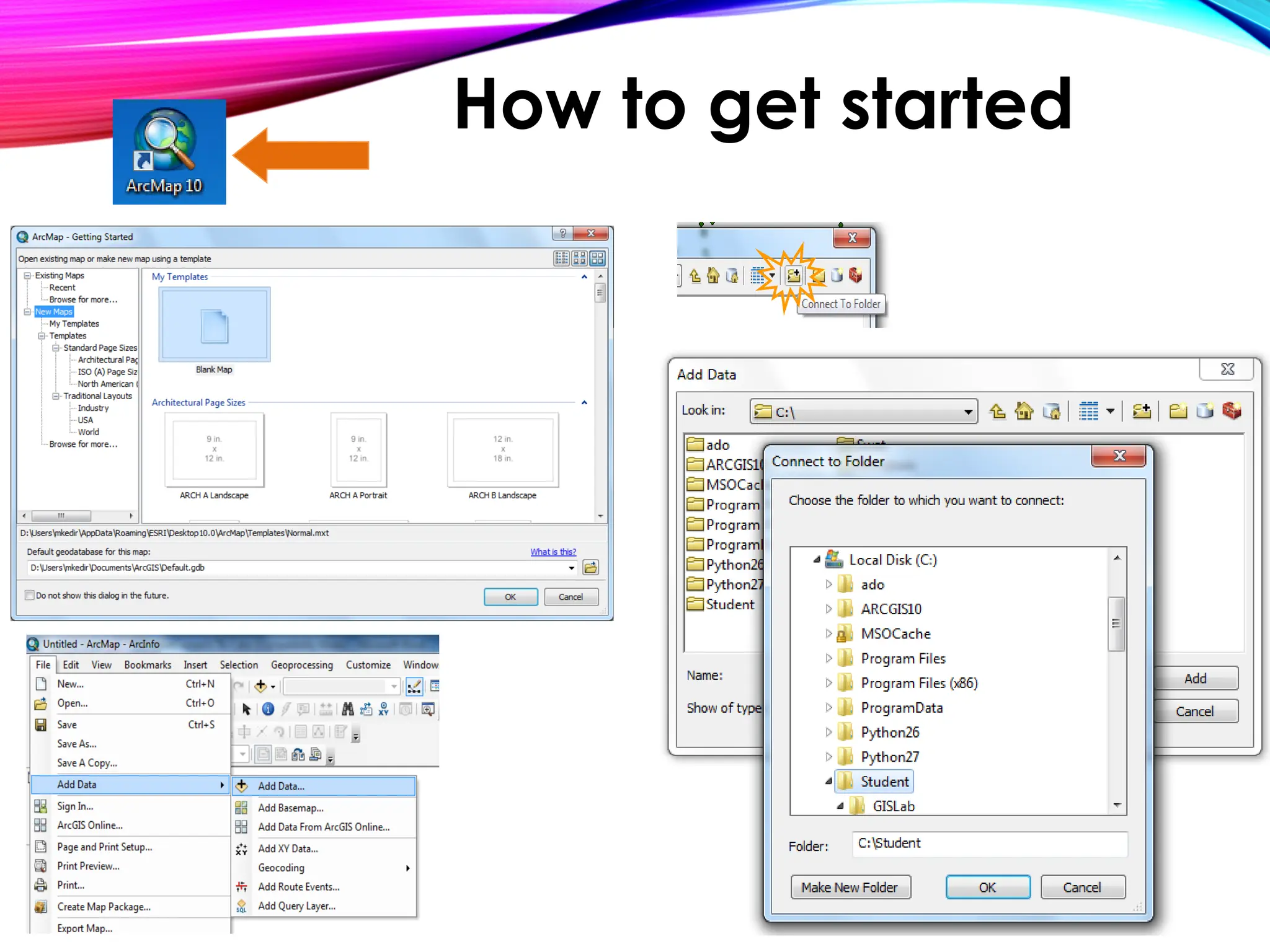
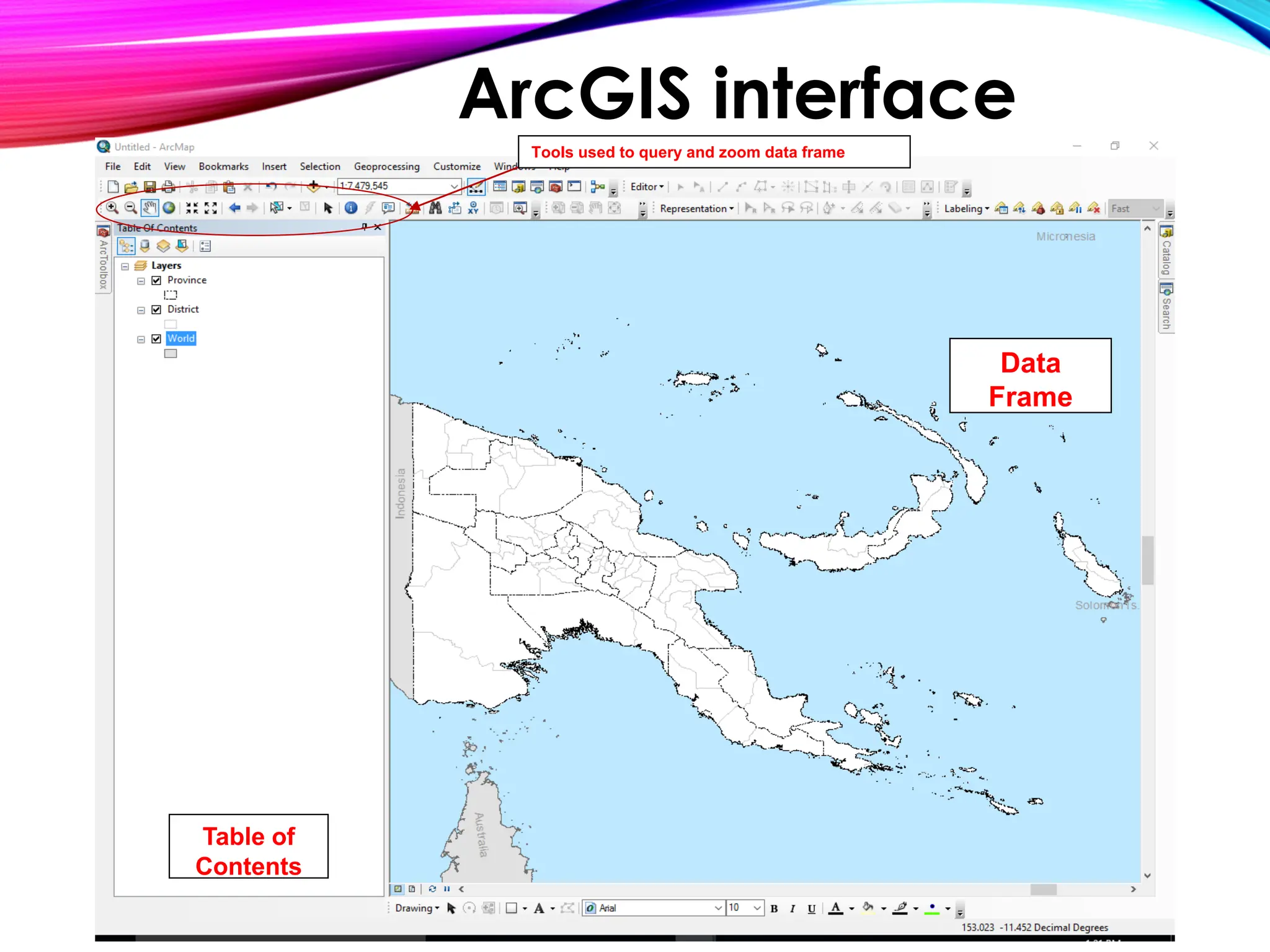
How to get started
Table of
Contents
Data
Frame
Tools used to query and zoom data frame
ArcGIS interface
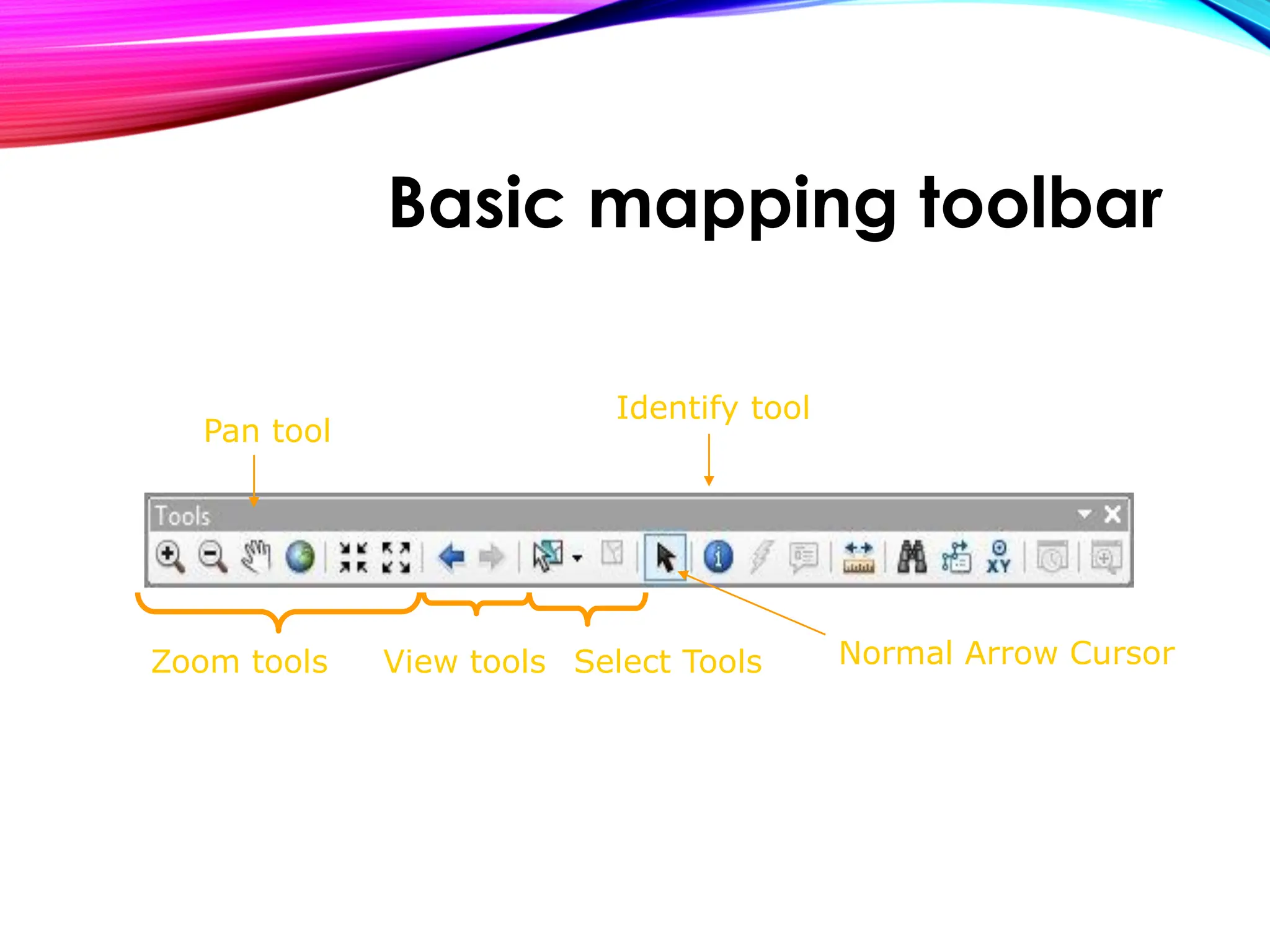
Zoom tools
Pan tool
Select Tools
View tools
Identify tool
Normal Arrow Cursor
Basic mapping toolbar
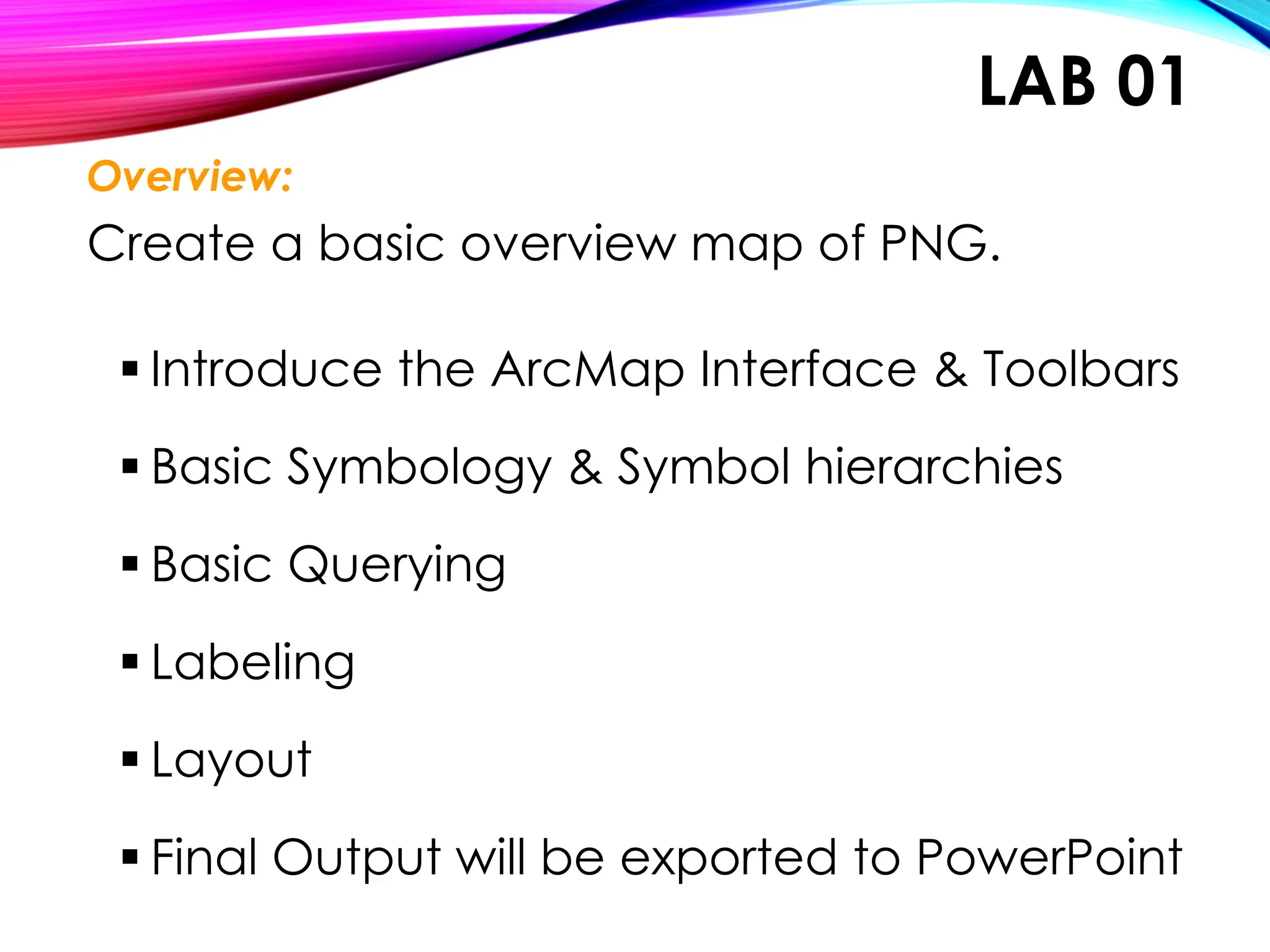
LAB 01
Overview:
Create a basic overview map of PNG.
▪ Introduce the ArcMap Interface & Toolbars
▪ Basic Symbology & Symbol hierarchies
▪ Basic Querying
▪ Labeling
▪ Layout
▪ Final Output will be exported to PowerPoint
Questions?
Let’s open up an ArcGIS session right now, and you can
begin working on the first exercise
Hands - On Workshop
Advanced Symbology- Lab02
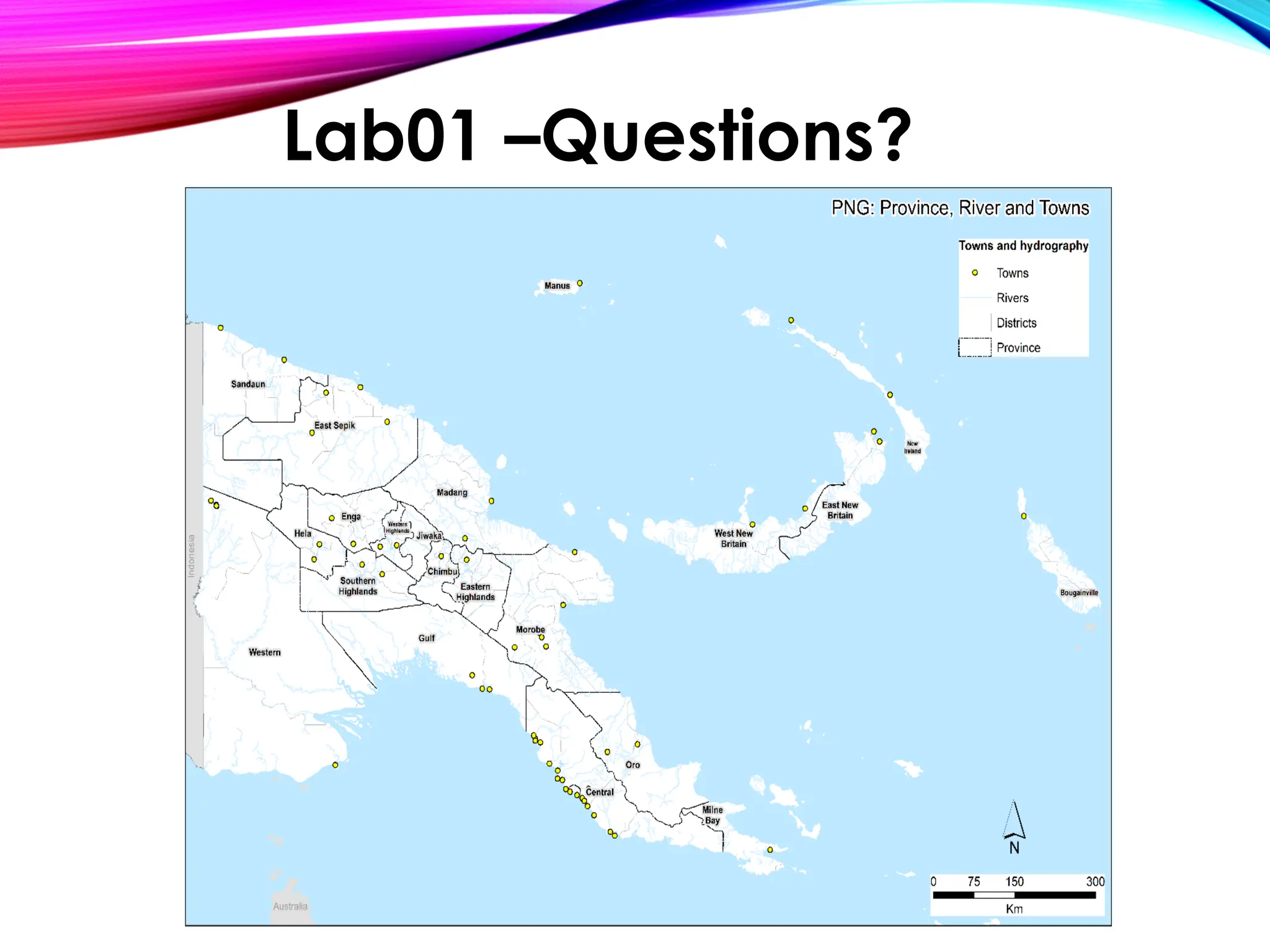
Lab01 –Questions?
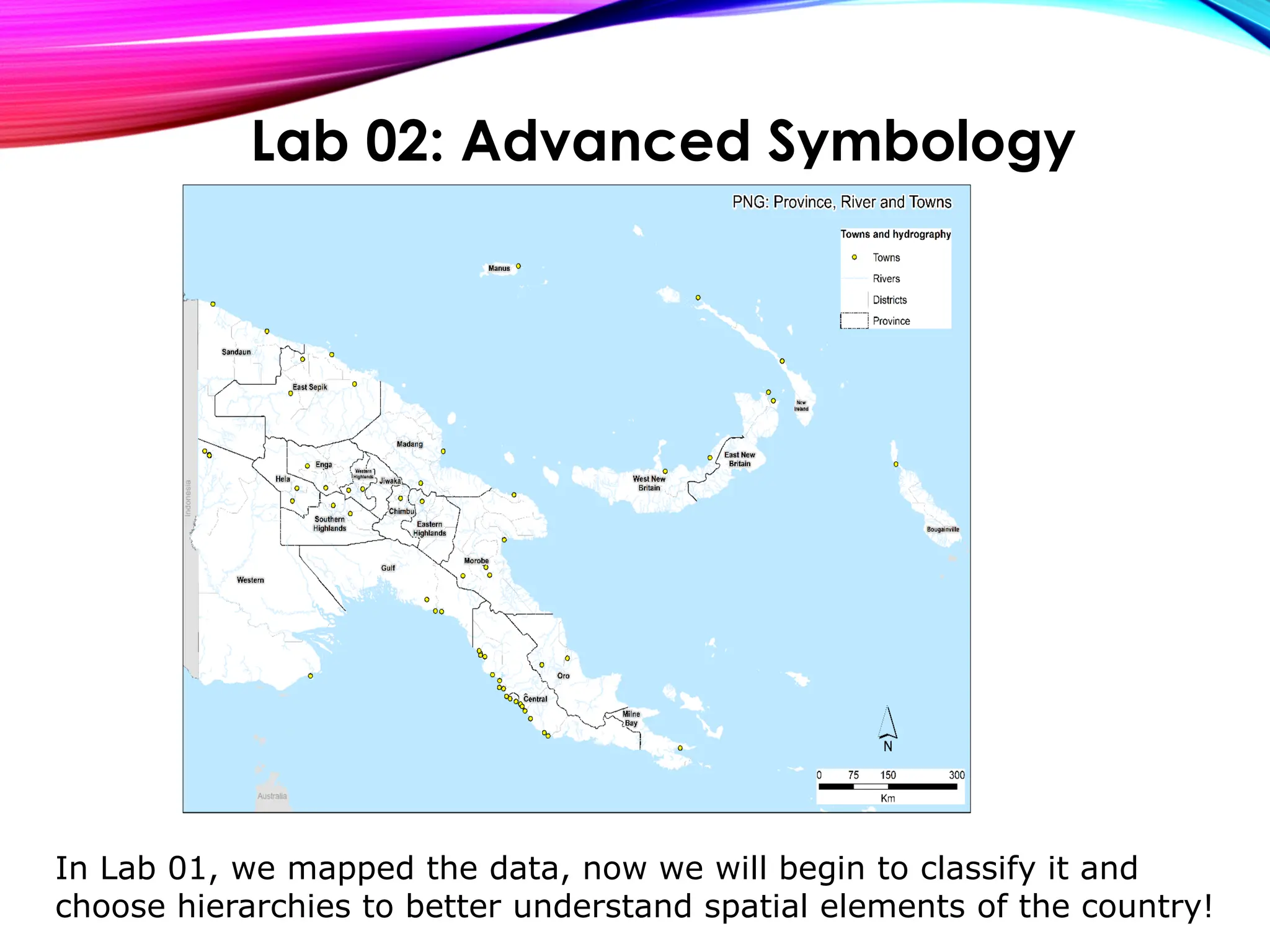
In Lab 01, we mapped the data, now we will begin to classify it and
choose hierarchies to better understand spatial elements of the country!
Lab 02: Advanced Symbology
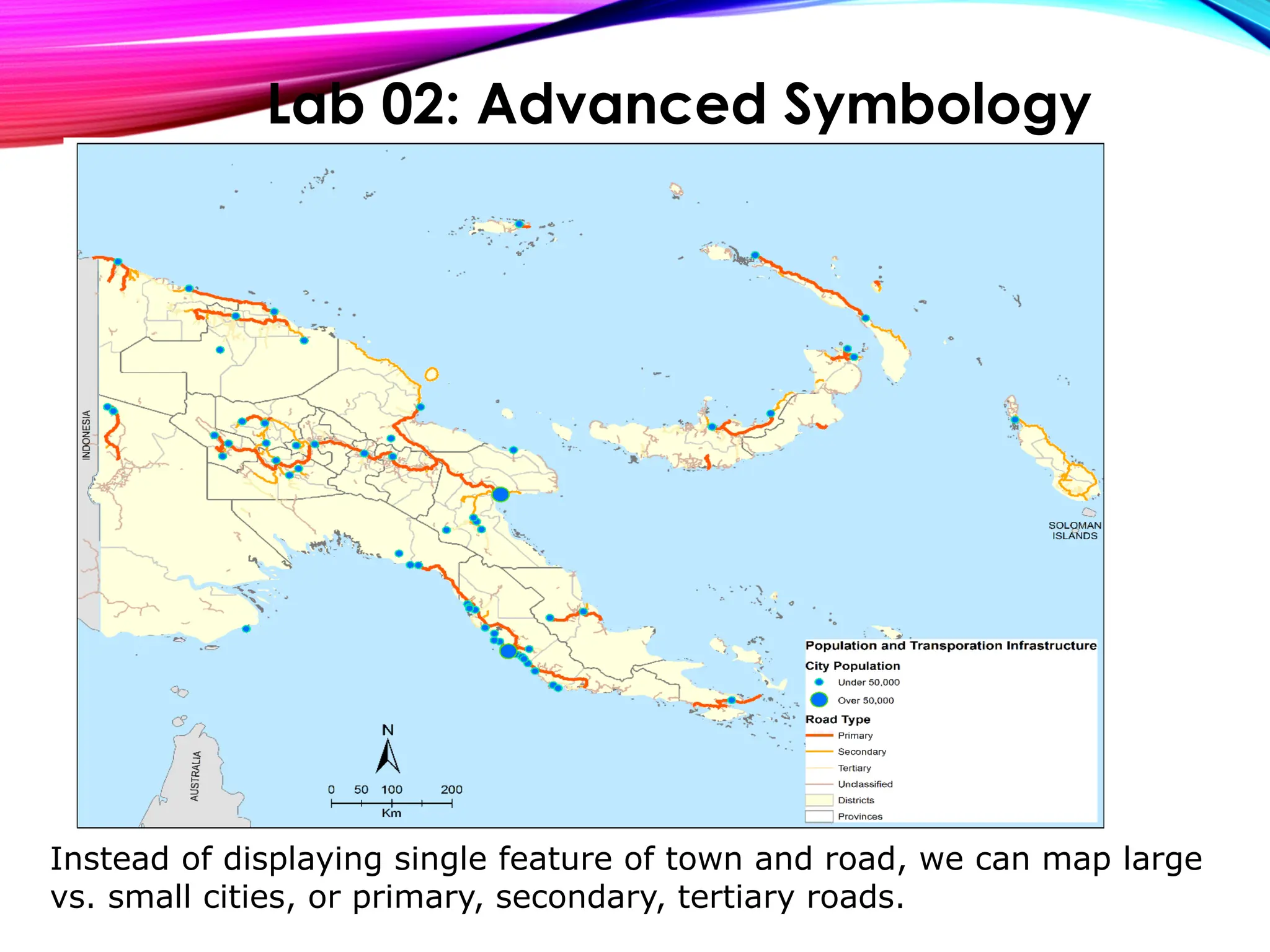
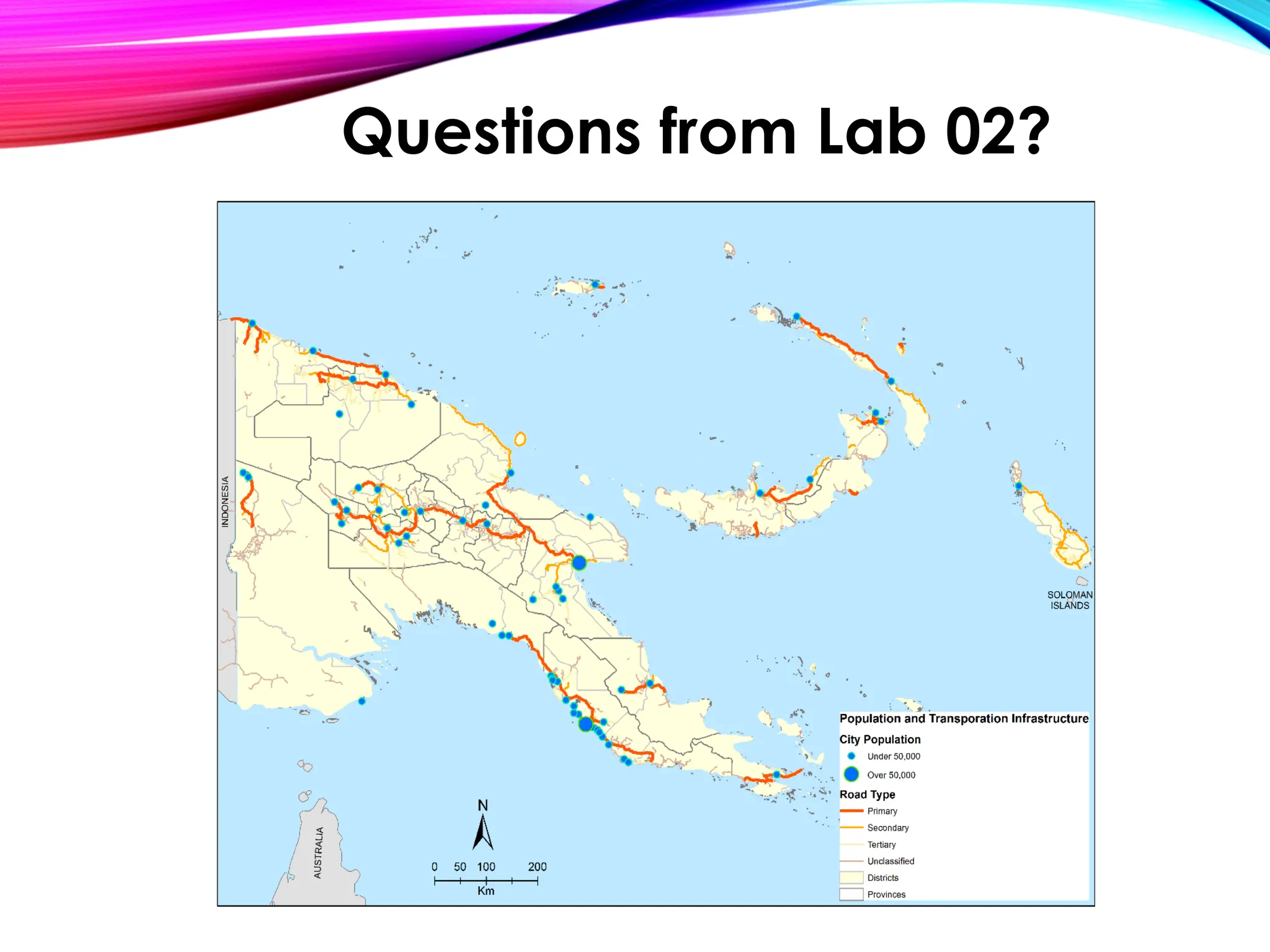
Instead of displaying single feature of town and road, we can map large
vs. small cities, or primary, secondary, tertiary roads.
Lab 02: Advanced Symbology
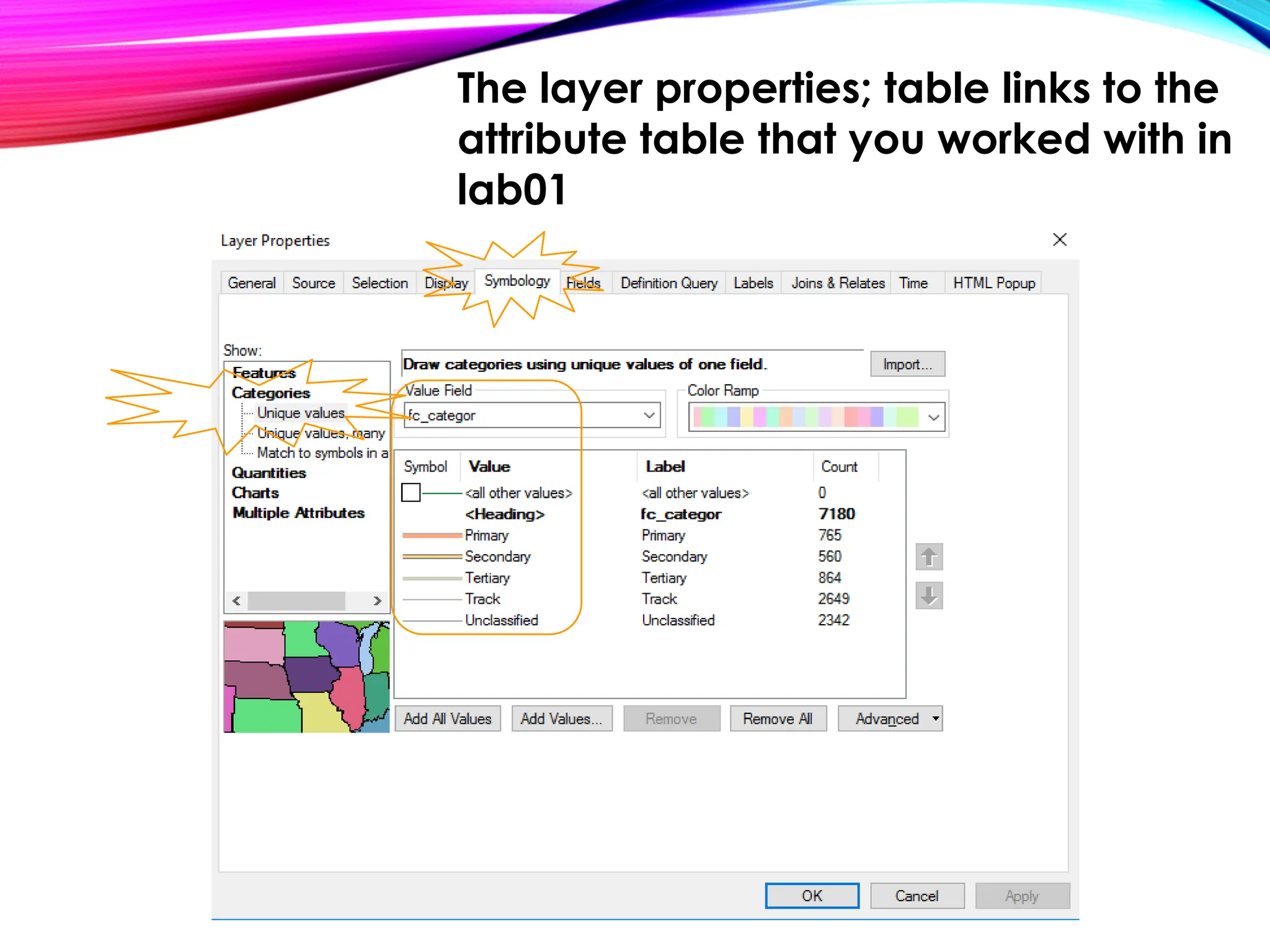
The layer properties; table links to the
attribute table that you worked with in
lab01
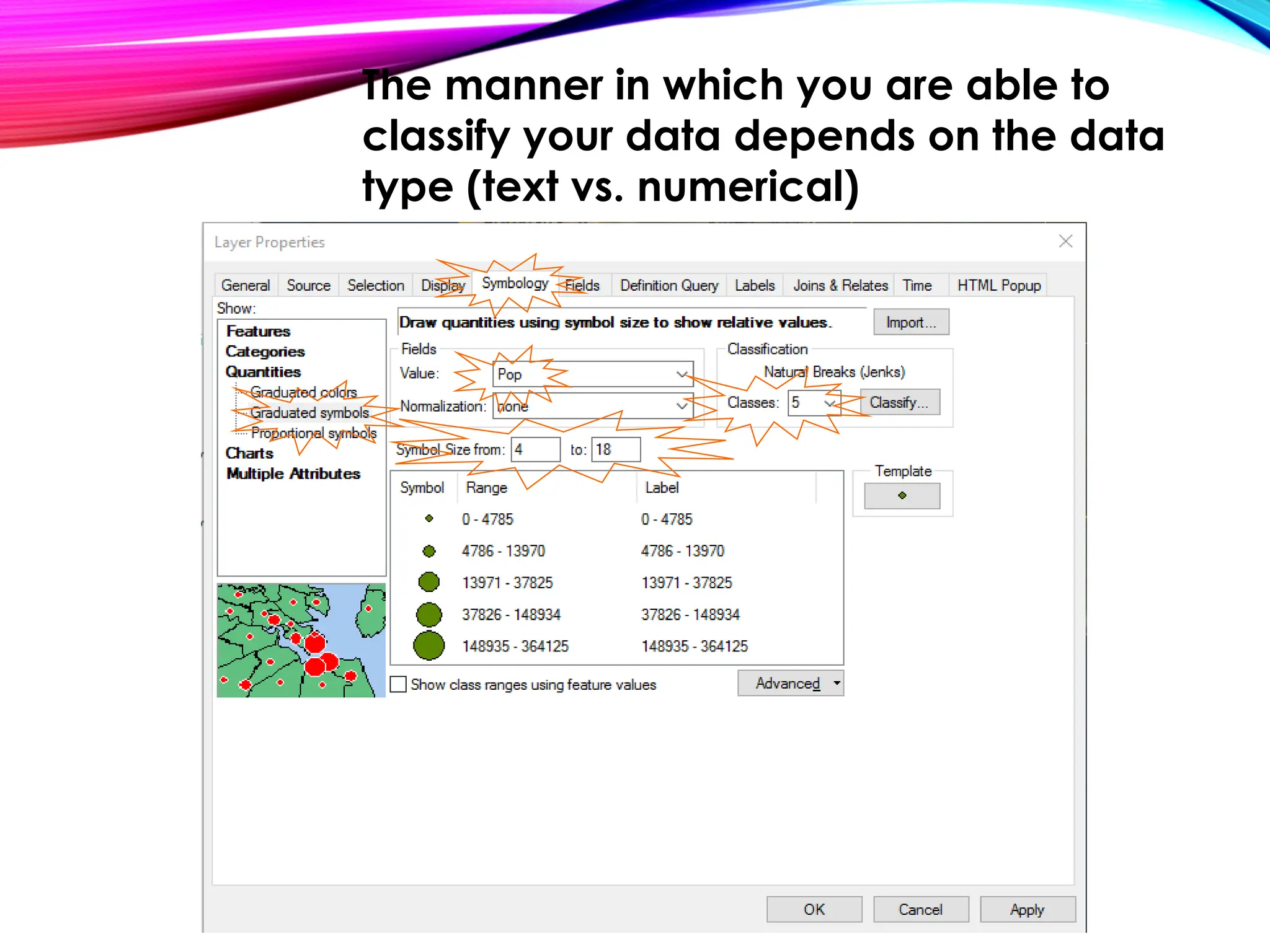
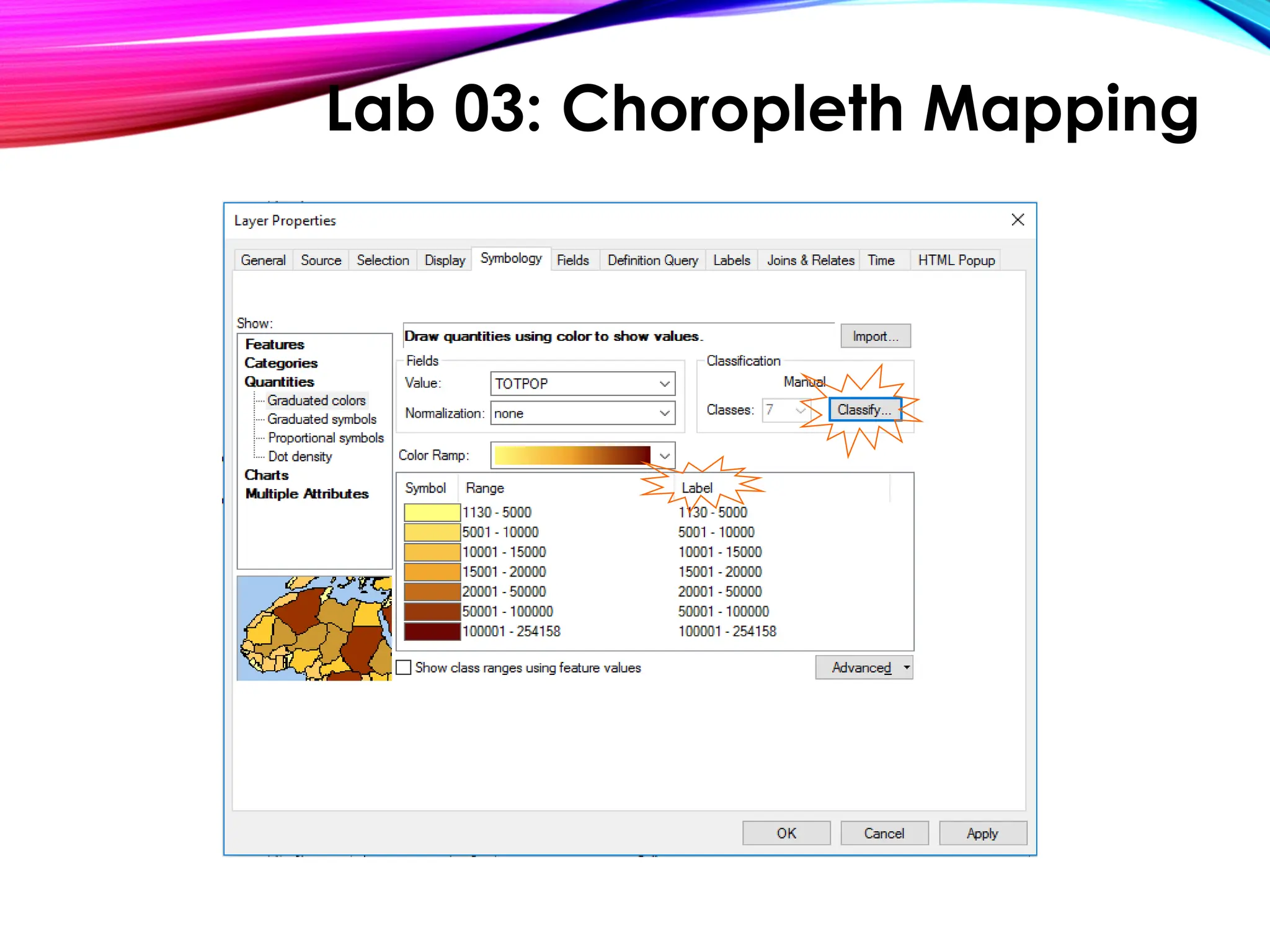
The manner in which you are able to
classify your data depends on the data
type (text vs. numerical)
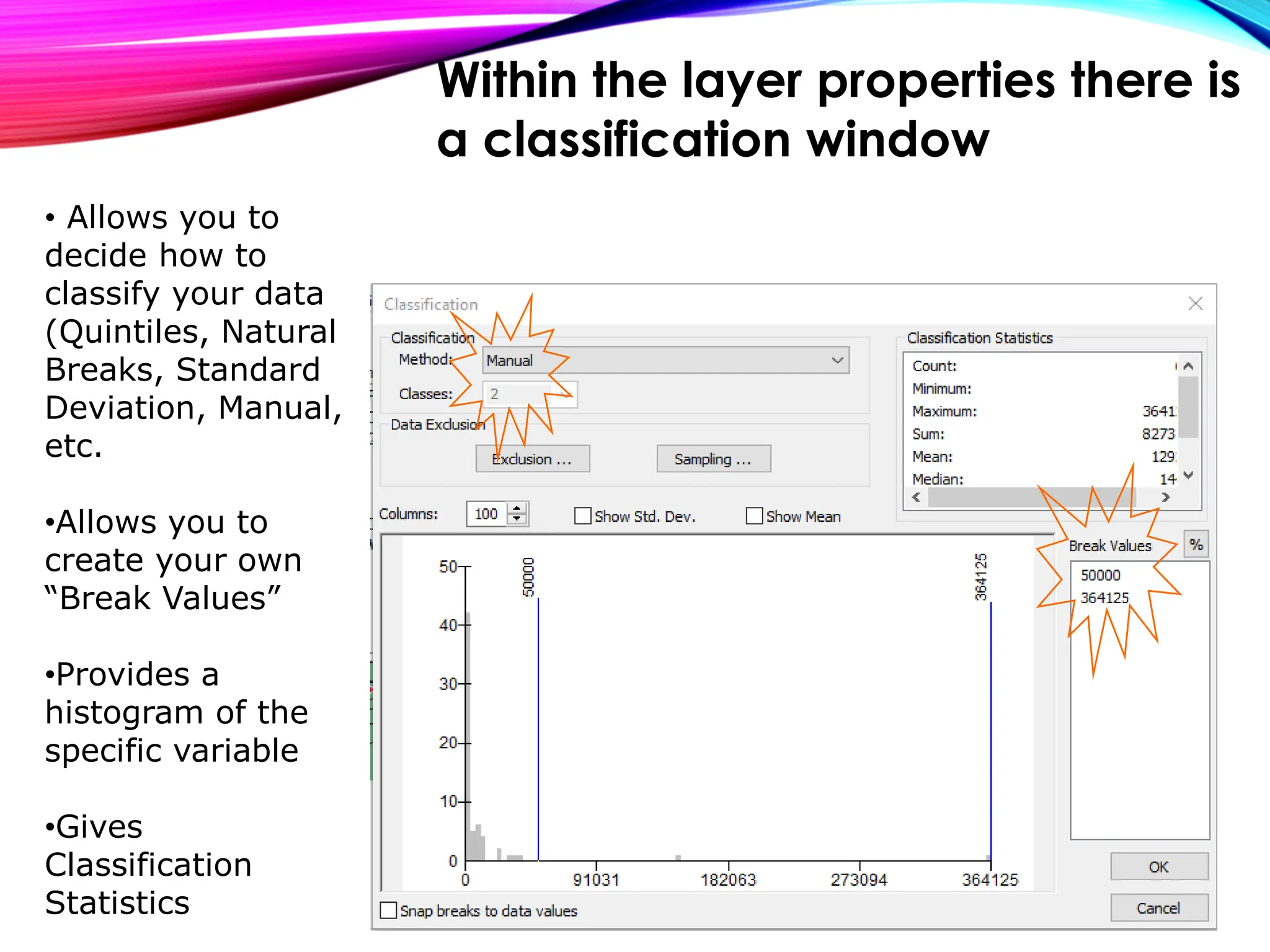
• Allows you to
decide how to
classify your data
(Quintiles, Natural
Breaks, Standard
Deviation, Manual,
etc.
•Allows you to
create your own
“Break Values”
•Provides a
histogram of the
specific variable
•Gives
Classification
Statistics
Within the layer properties there is
a classification window
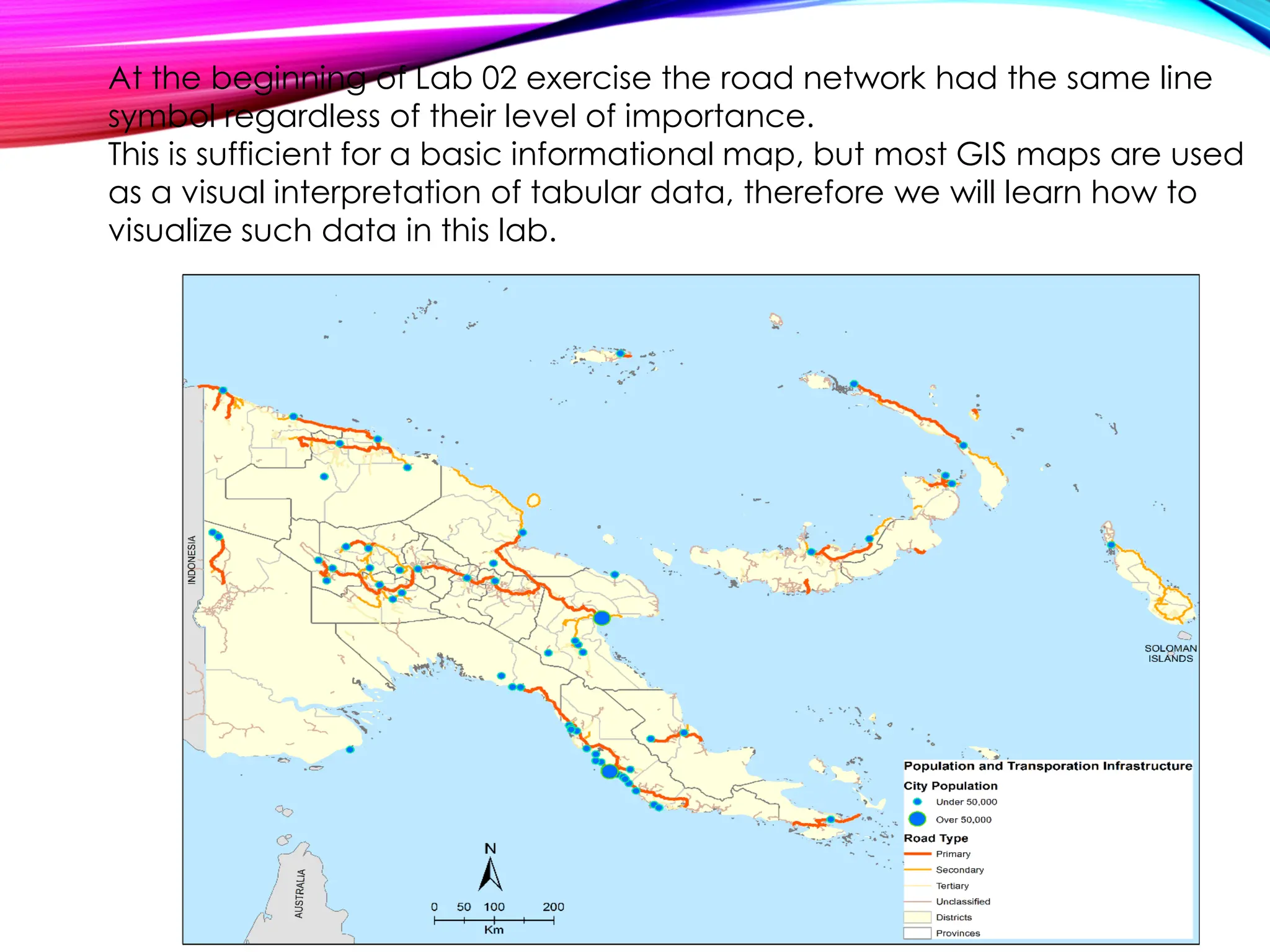
At the beginning of Lab 02 exercise the road network had the same line
symbol regardless of their level of importance.
This is sufficient for a basic informational map, but most GIS maps are used
as a visual interpretation of tabular data, therefore we will learn how to
visualize such data in this lab.
Questions?
Data formats and ArcCatalog
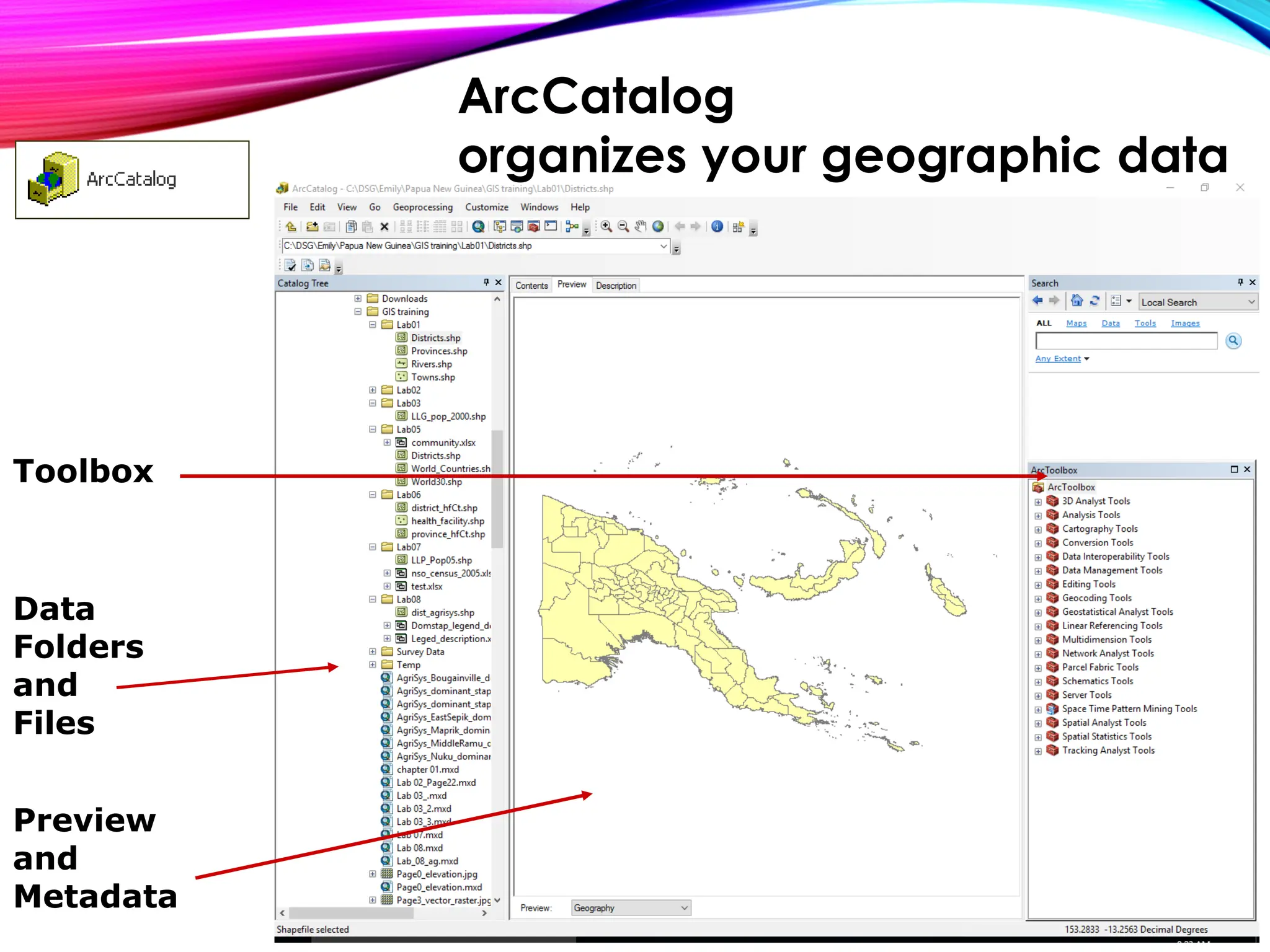
Toolbox
Data
Folders
and
Files
Preview
and
Metadata
ArcCatalog
organizes your geographic data
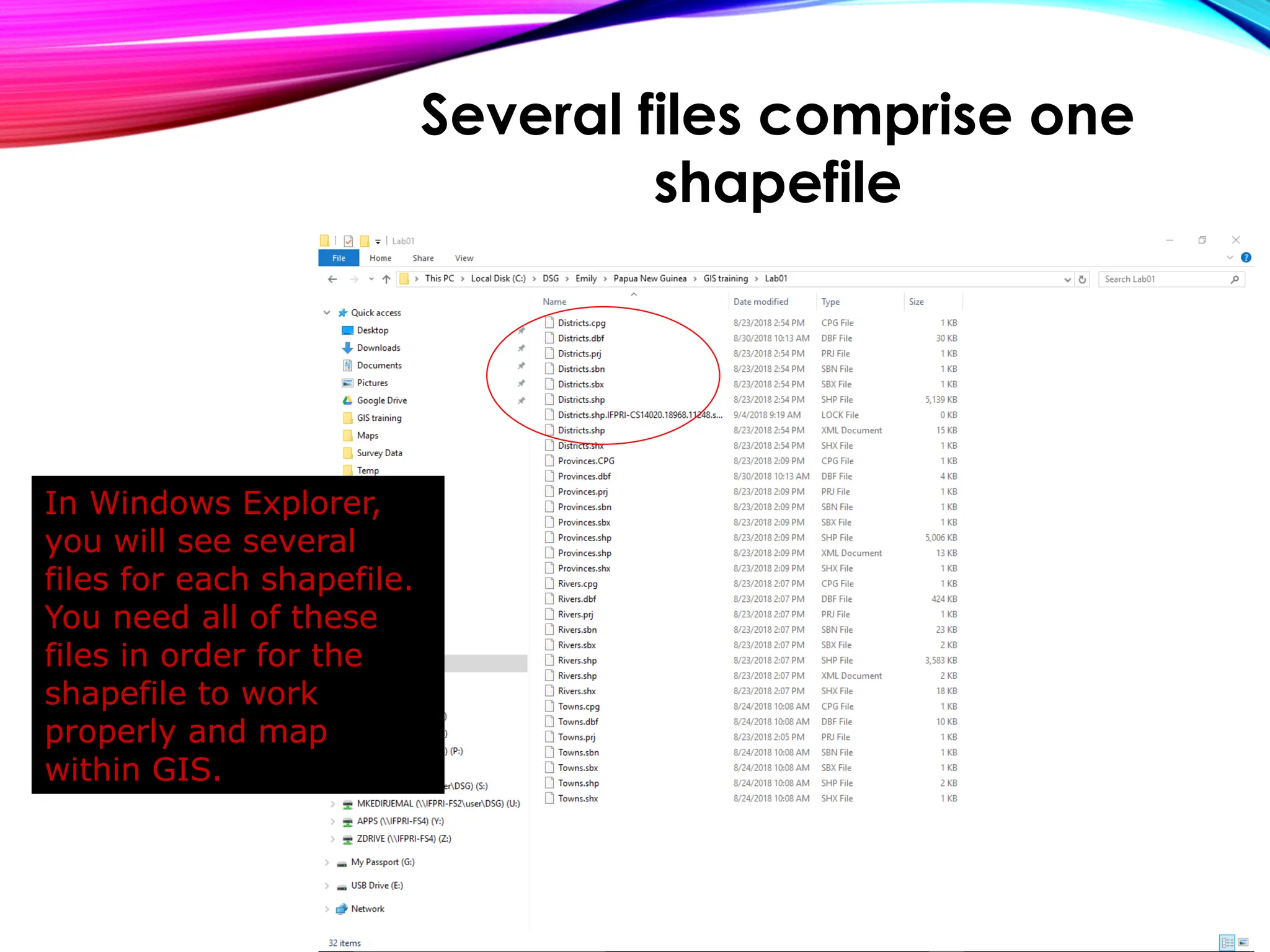
In Windows Explorer,
you will see several
files for each shapefile.
You need all of these
files in order for the
shapefile to work
properly and map
within GIS.
Several files comprise one
shapefile
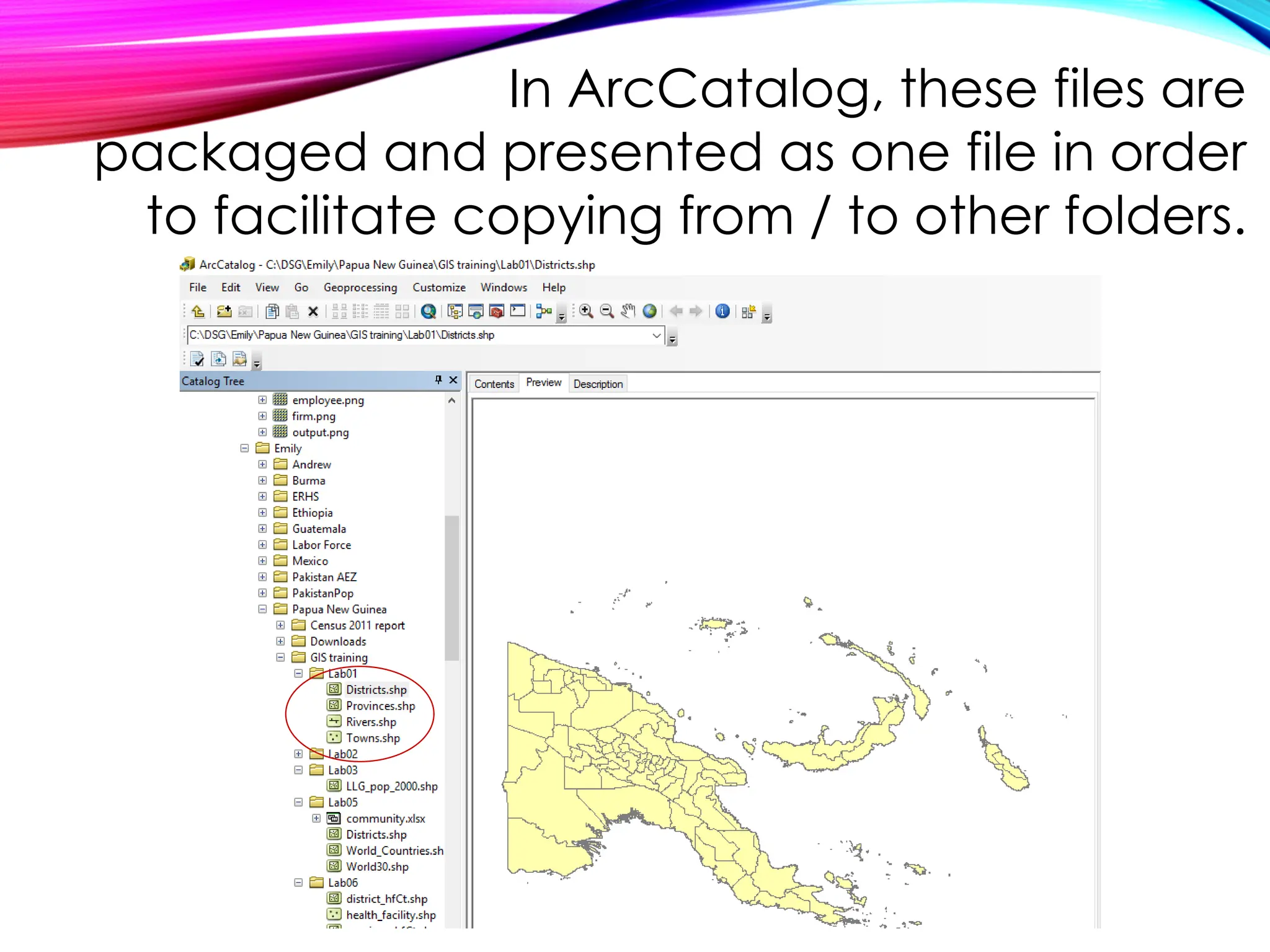
In ArcCatalog, these files are
packaged and presented as one file in order
to facilitate copying from / to other folders.
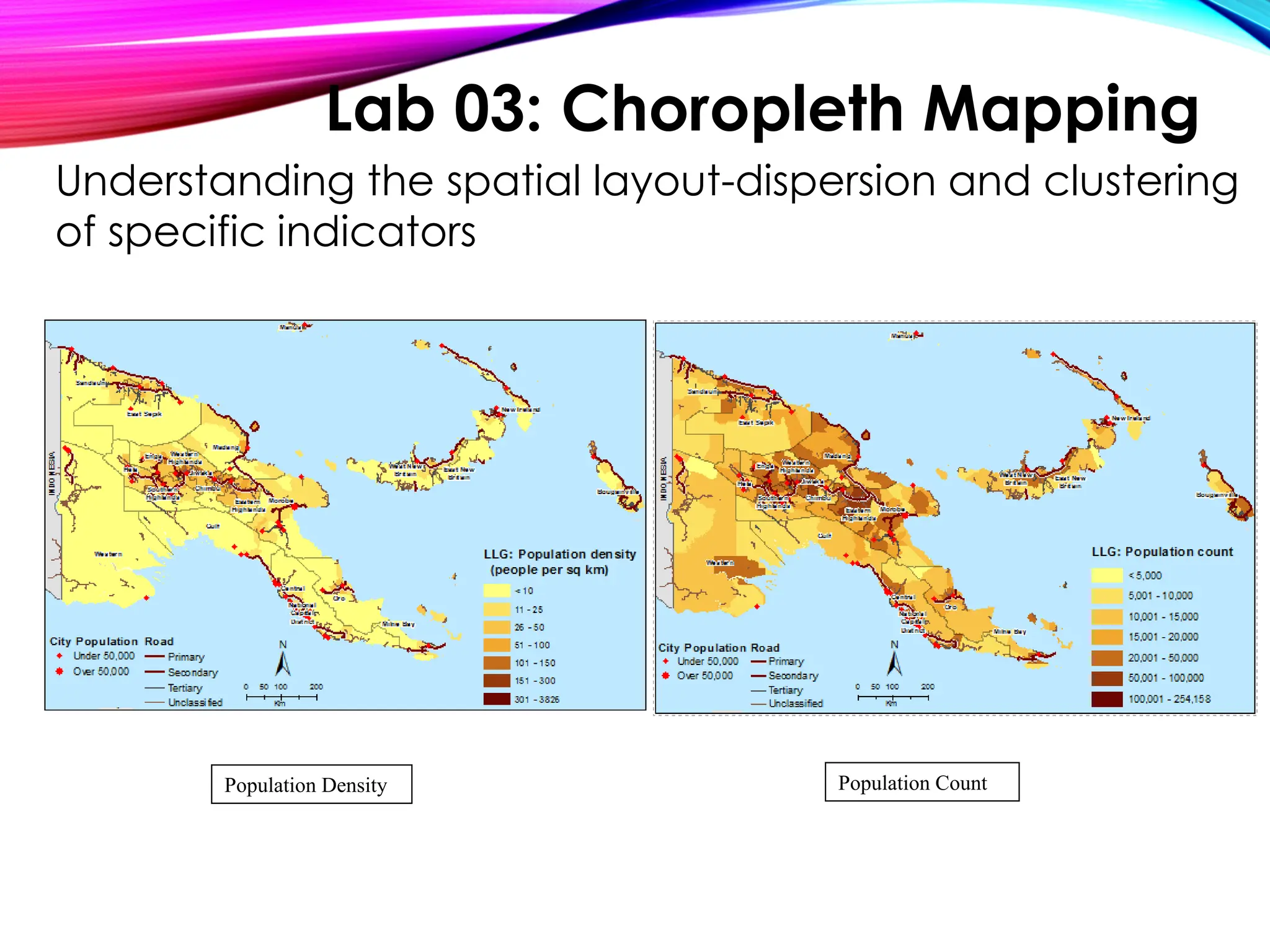
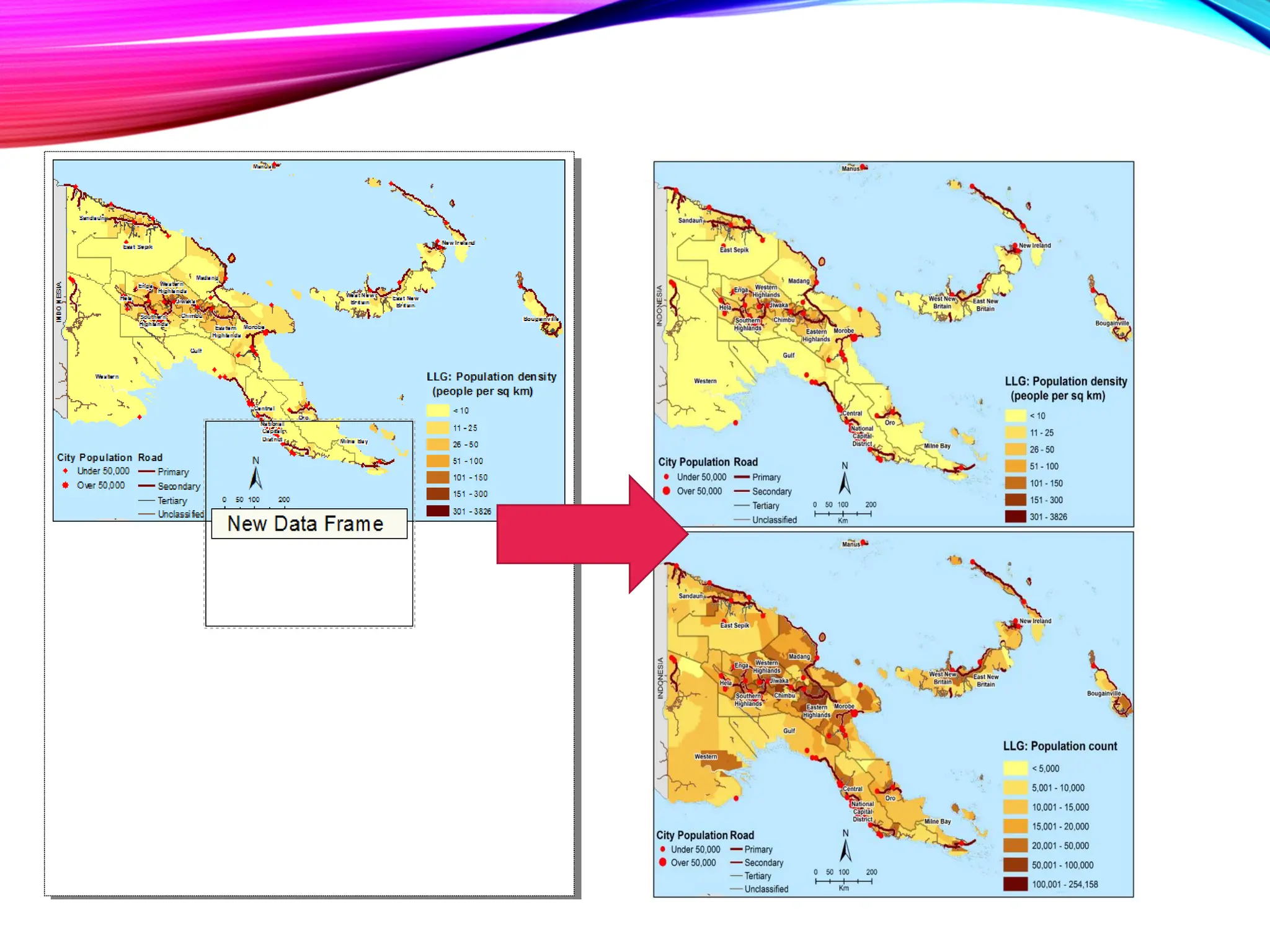
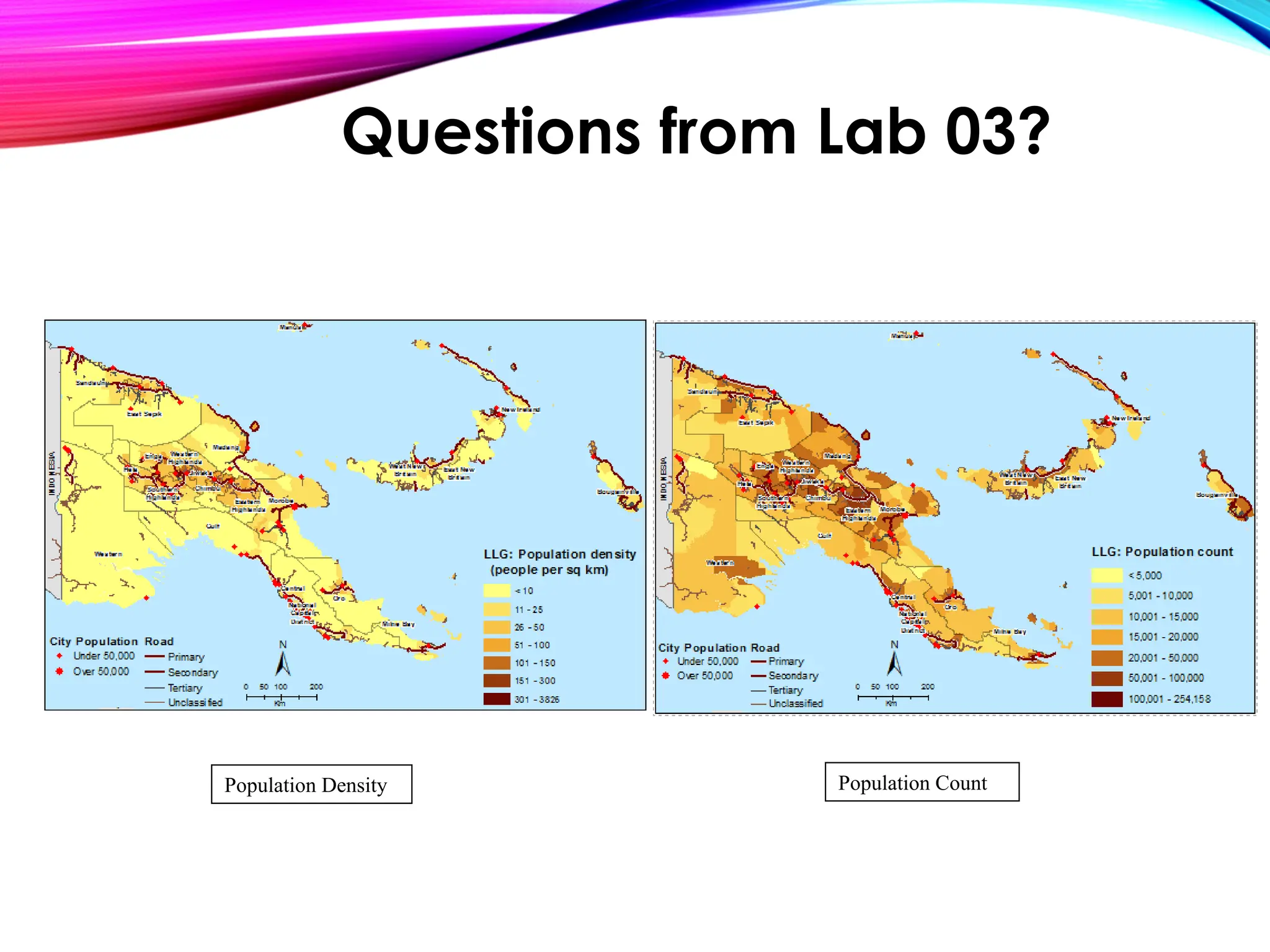
Population Density Population Count
Understanding the spatial layout-dispersion and clustering
of specific indicators
Lab 03: Choropleth Mapping
Questions?
GIS PART II
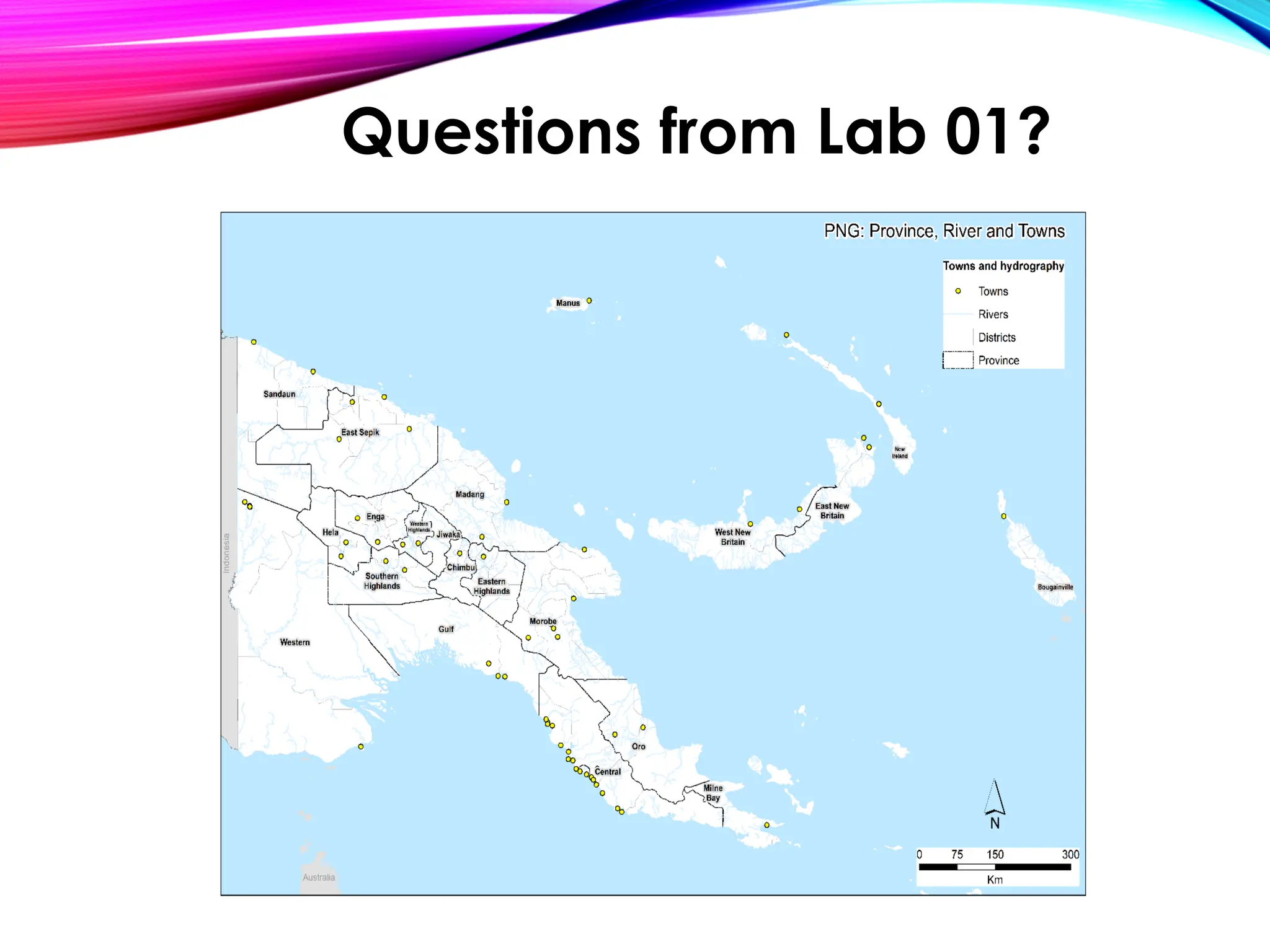
Questions from Lab 01?
Questions from Lab 02?
Population Density Population Count
Questions from Lab 03?
• Using Google Earth:convert layer(shapefile)/map to
KML
• Projections
• GPS data from the field
Moving Forward …
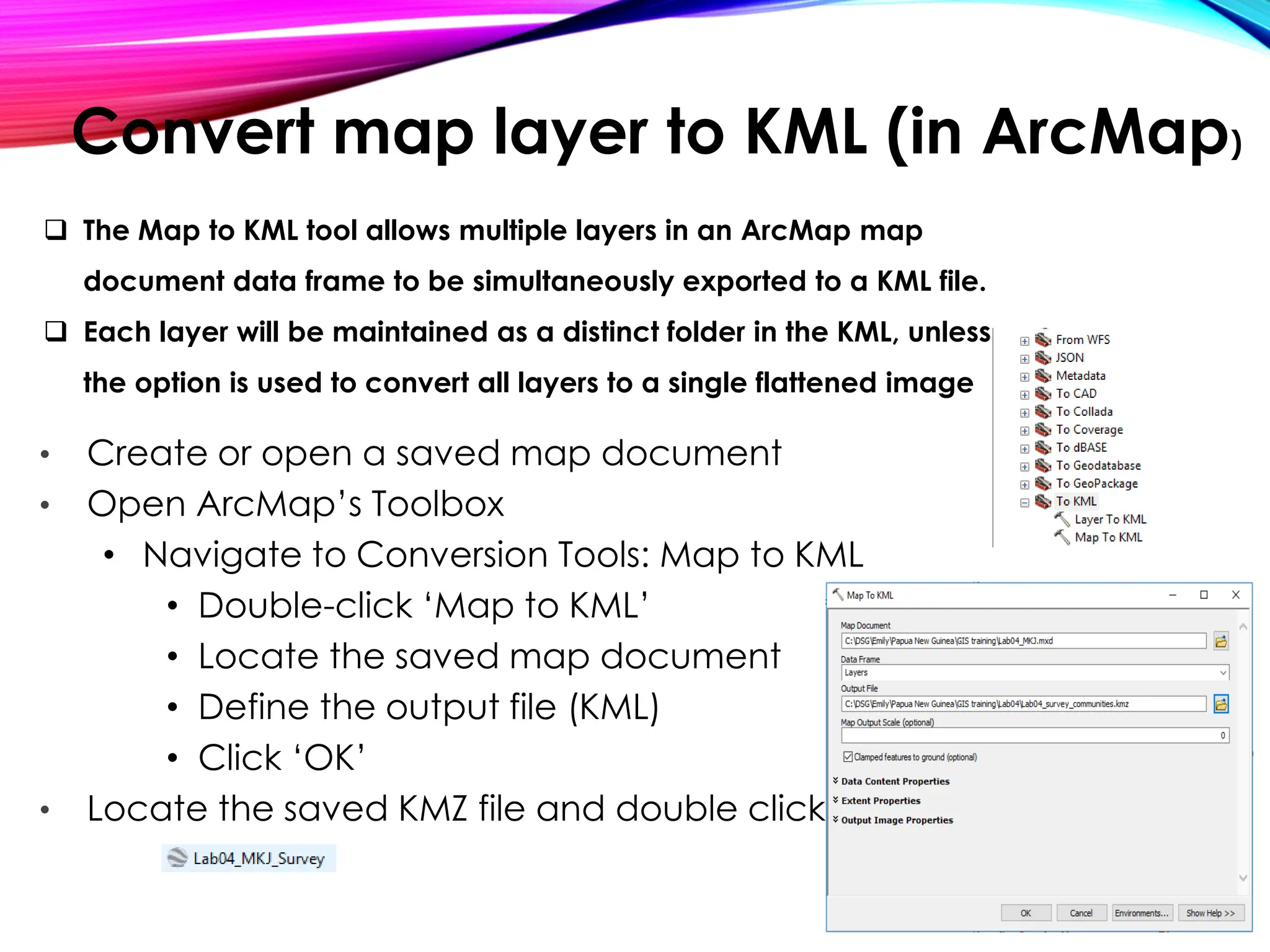
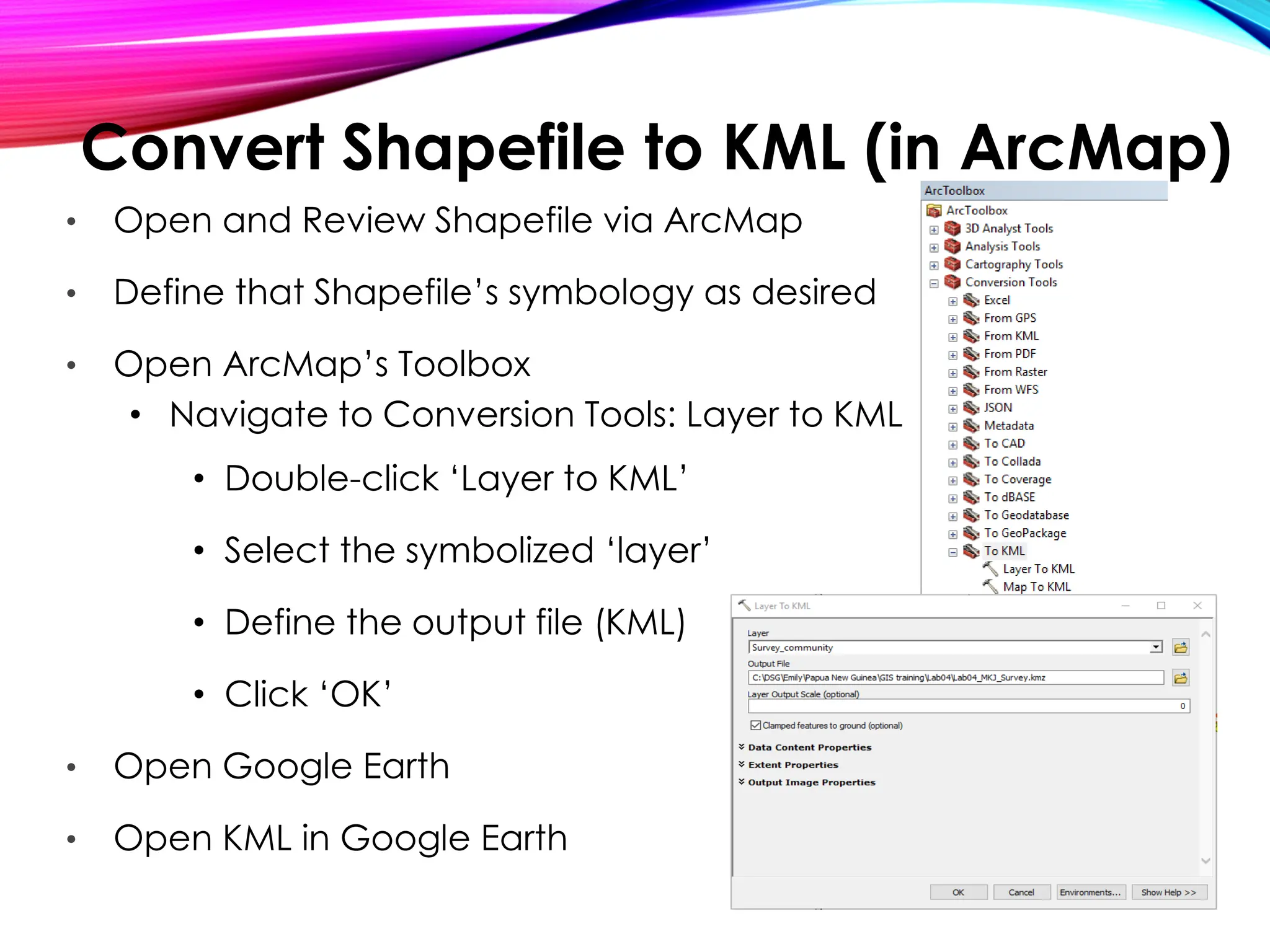
Convert map layer to KML (in ArcMap)
• Create or open a saved map document
• Open ArcMap’s Toolbox
• Navigate to Conversion Tools: Map to KML
• Double-click ‘Map to KML’
• Locate the saved map document
• Define the output file (KML)
• Click ‘OK’
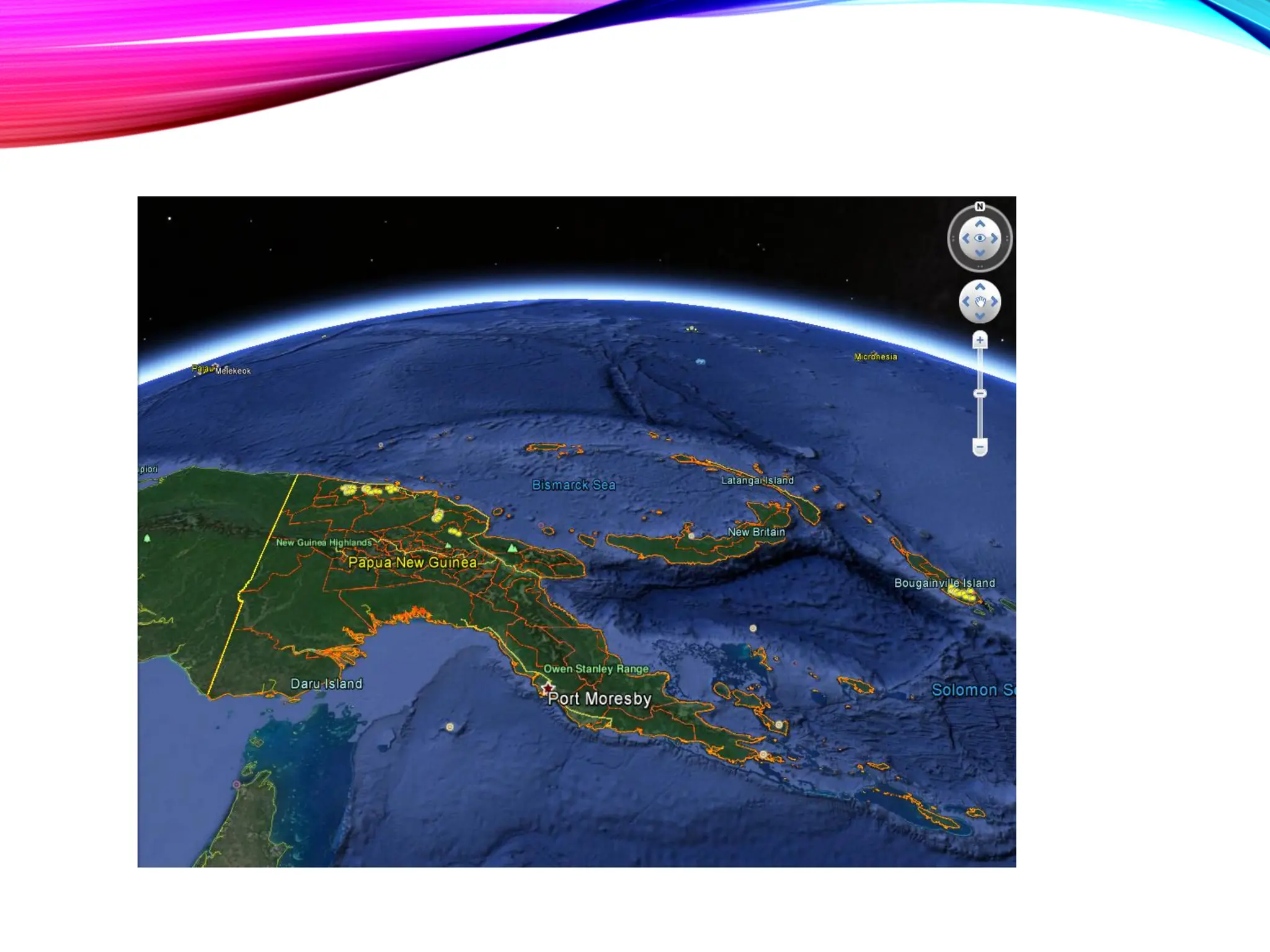
• Locate the saved KMZ file and double click
❑ The Map to KML tool allows multiple layers in an ArcMap map
document data frame to be simultaneously exported to a KML file.
❑ Each layer will be maintained as a distinct folder in the KML, unless
the option is used to convert all layers to a single flattened image
Convert Shapefile to KML (in ArcMap)
• Open and Review Shapefile via ArcMap
• Define that Shapefile’s symbology as desired
• Open ArcMap’s Toolbox
• Navigate to Conversion Tools: Layer to KML
• Double-click ‘Layer to KML’
• Select the symbolized ‘layer’
• Define the output file (KML)
• Click ‘OK’
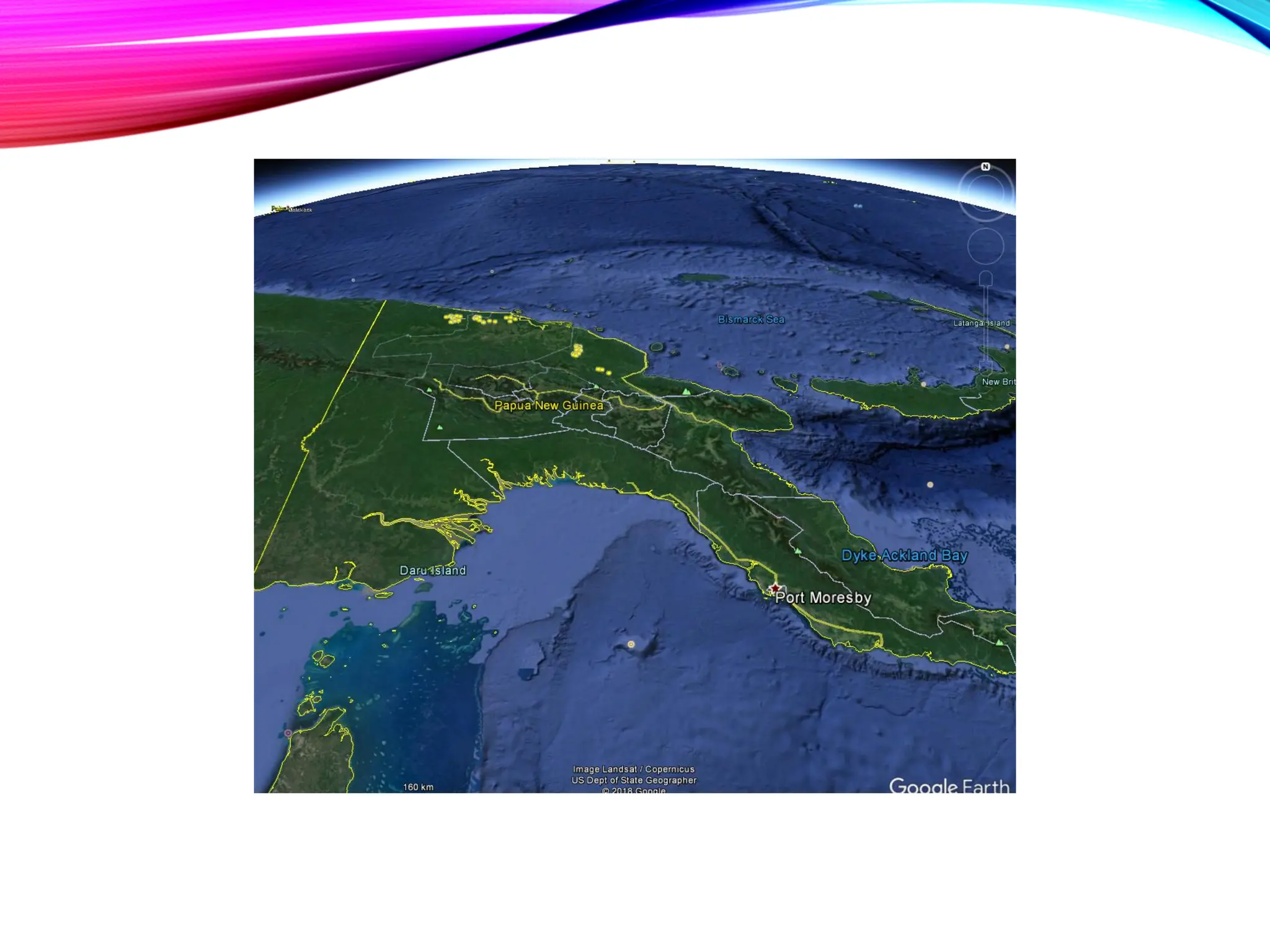
• Open Google Earth
• Open KML in Google Earth
Questions?
Geographic Projections
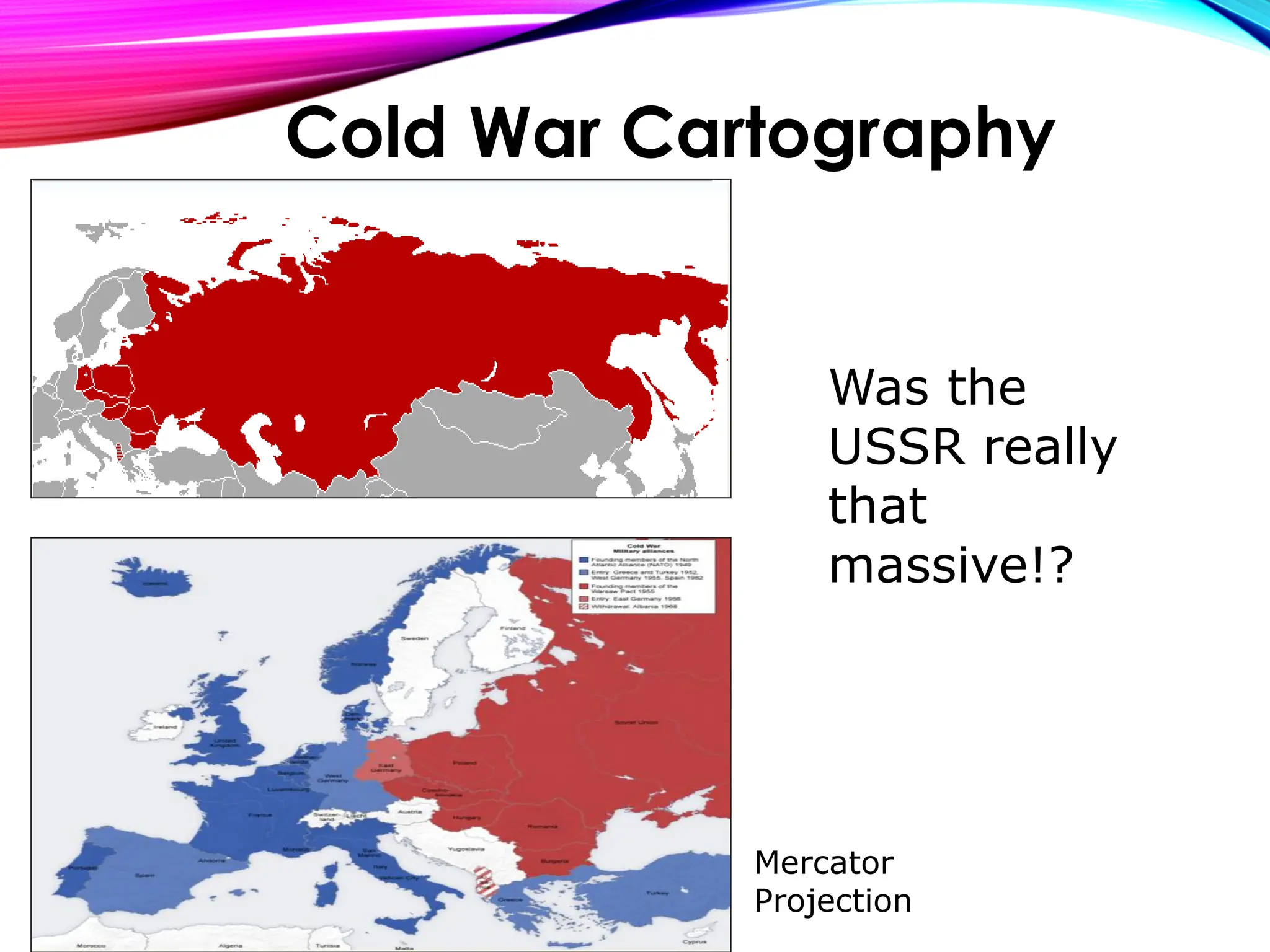
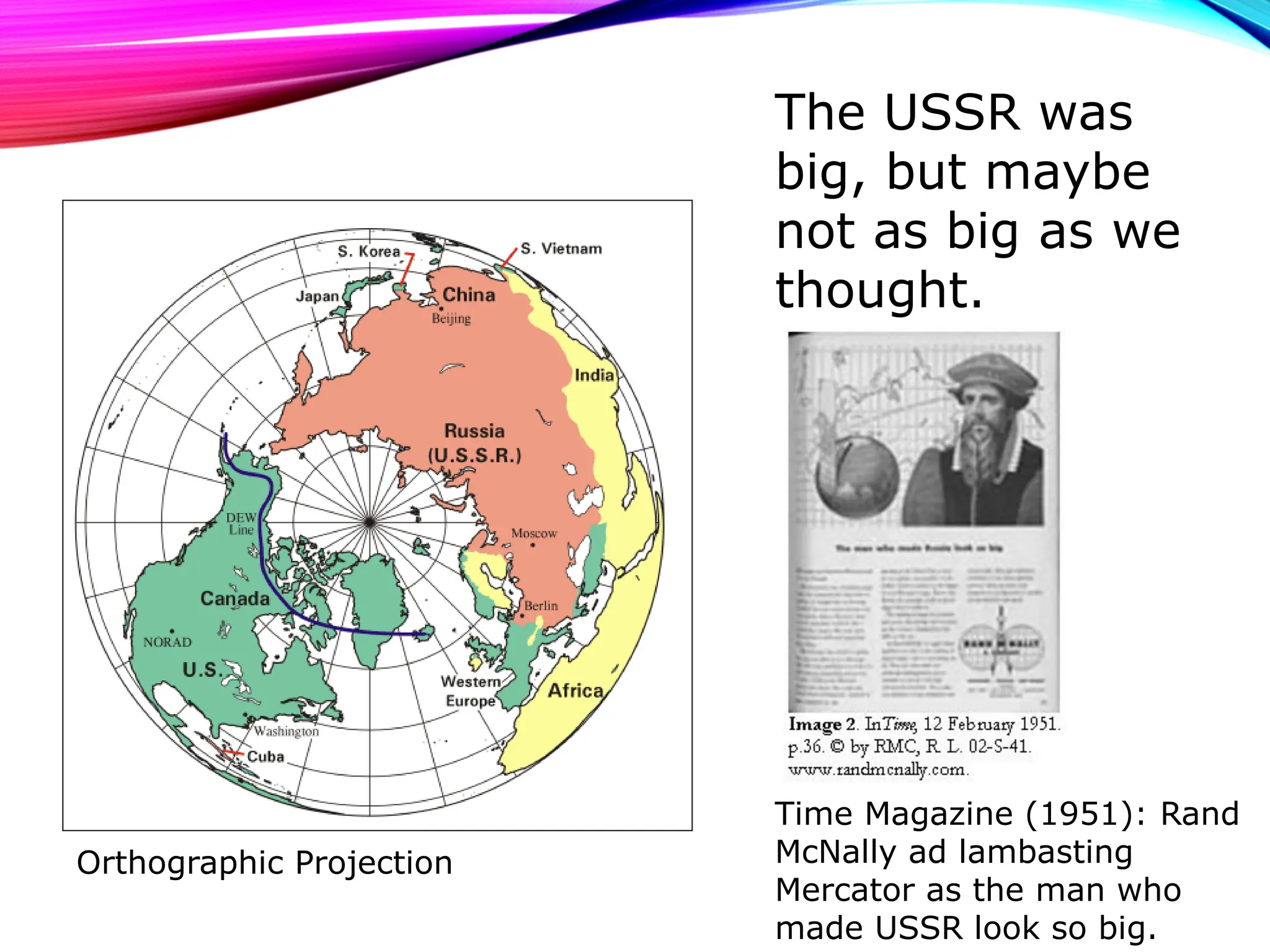
Was the
USSR really
that
massive!?
Mercator
Projection
Cold War Cartography
The USSR was
big, but maybe
not as big as we
thought.
Time Magazine (1951): Rand
McNally ad lambasting
Mercator as the man who
made USSR look so big.
Orthographic Projection
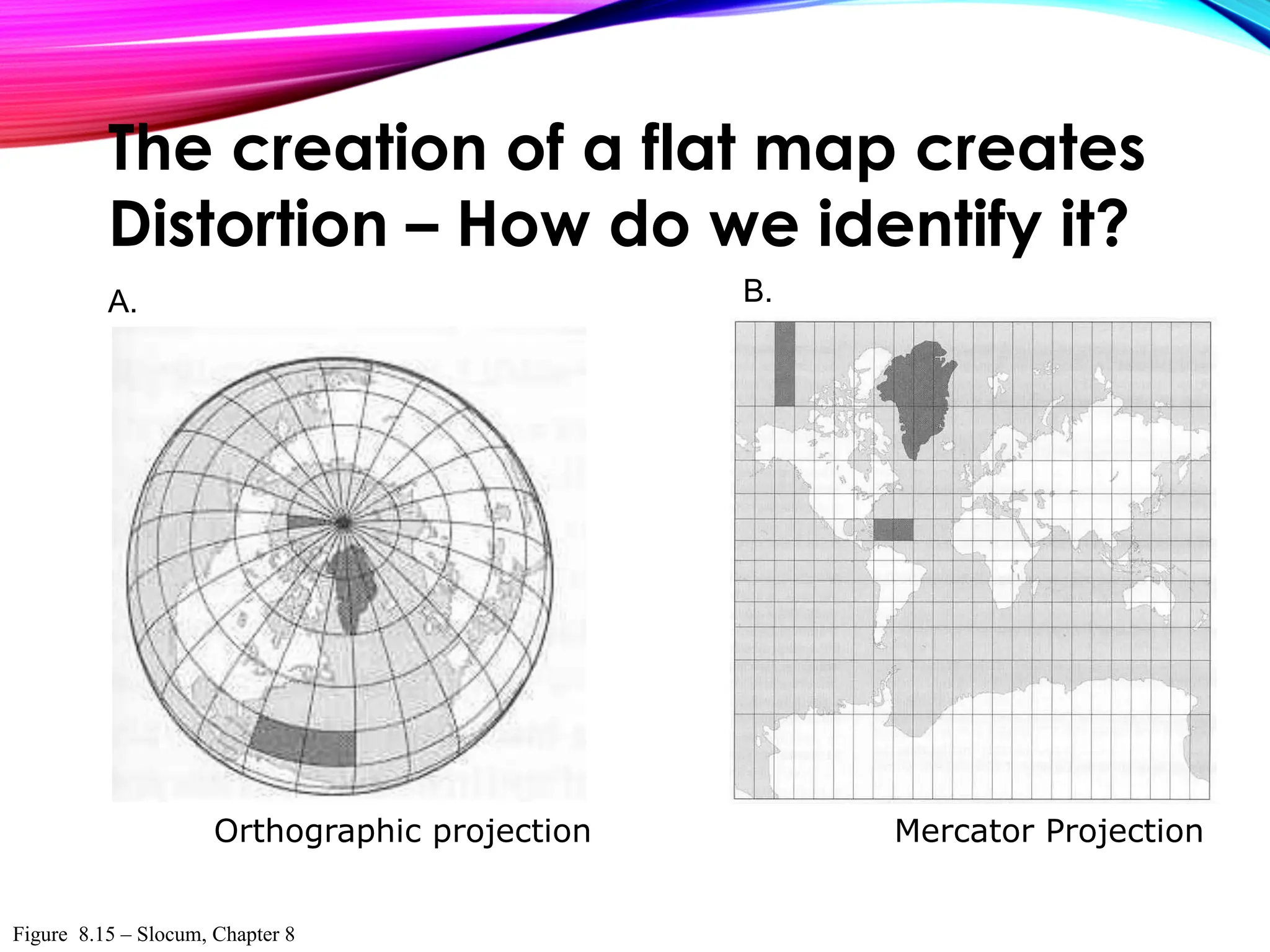
Figure 8.15 – Slocum, Chapter 8
A. B.
Orthographic projection Mercator Projection
The creation of a flat map creates
Distortion – How do we identify it?
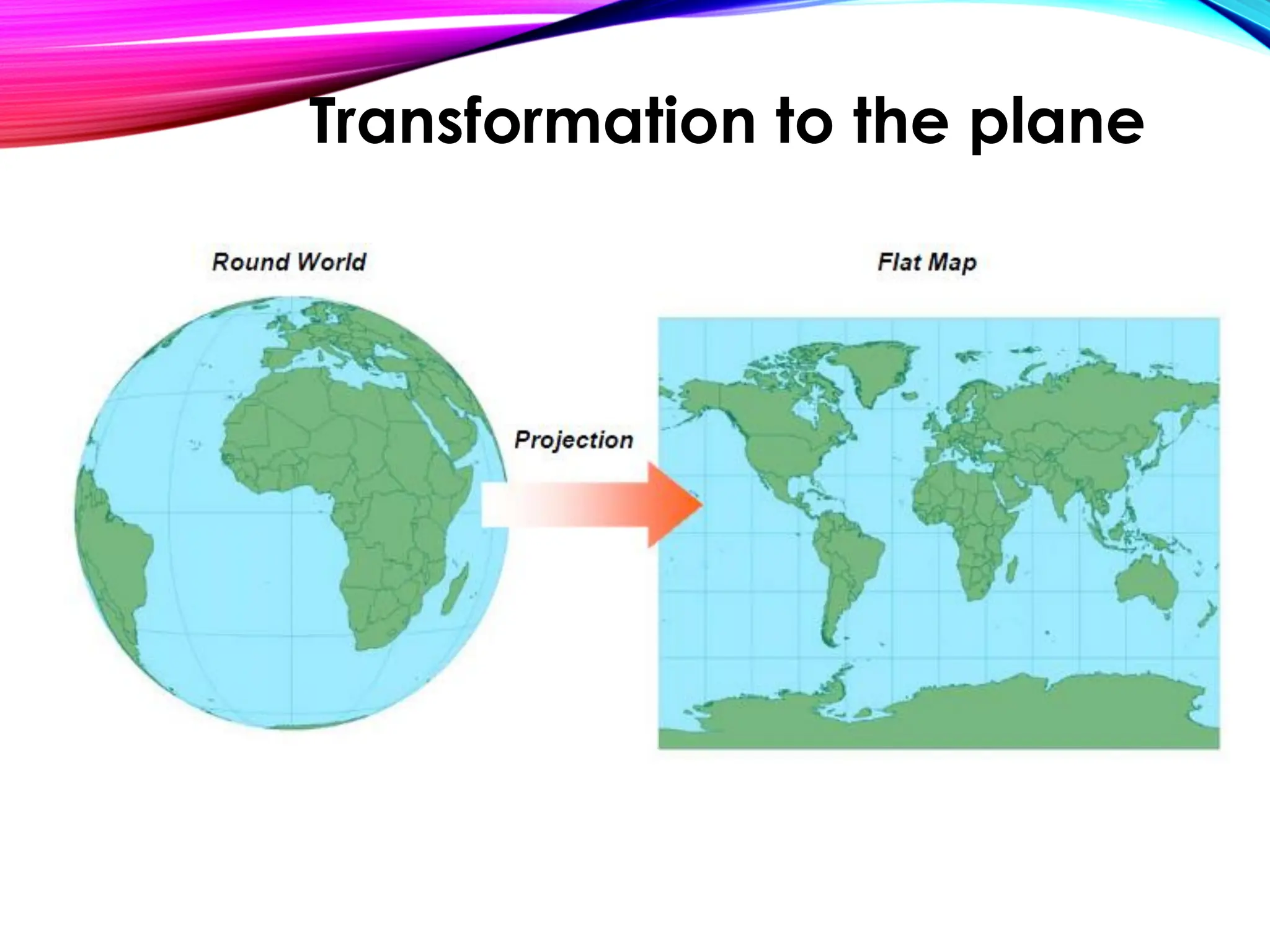
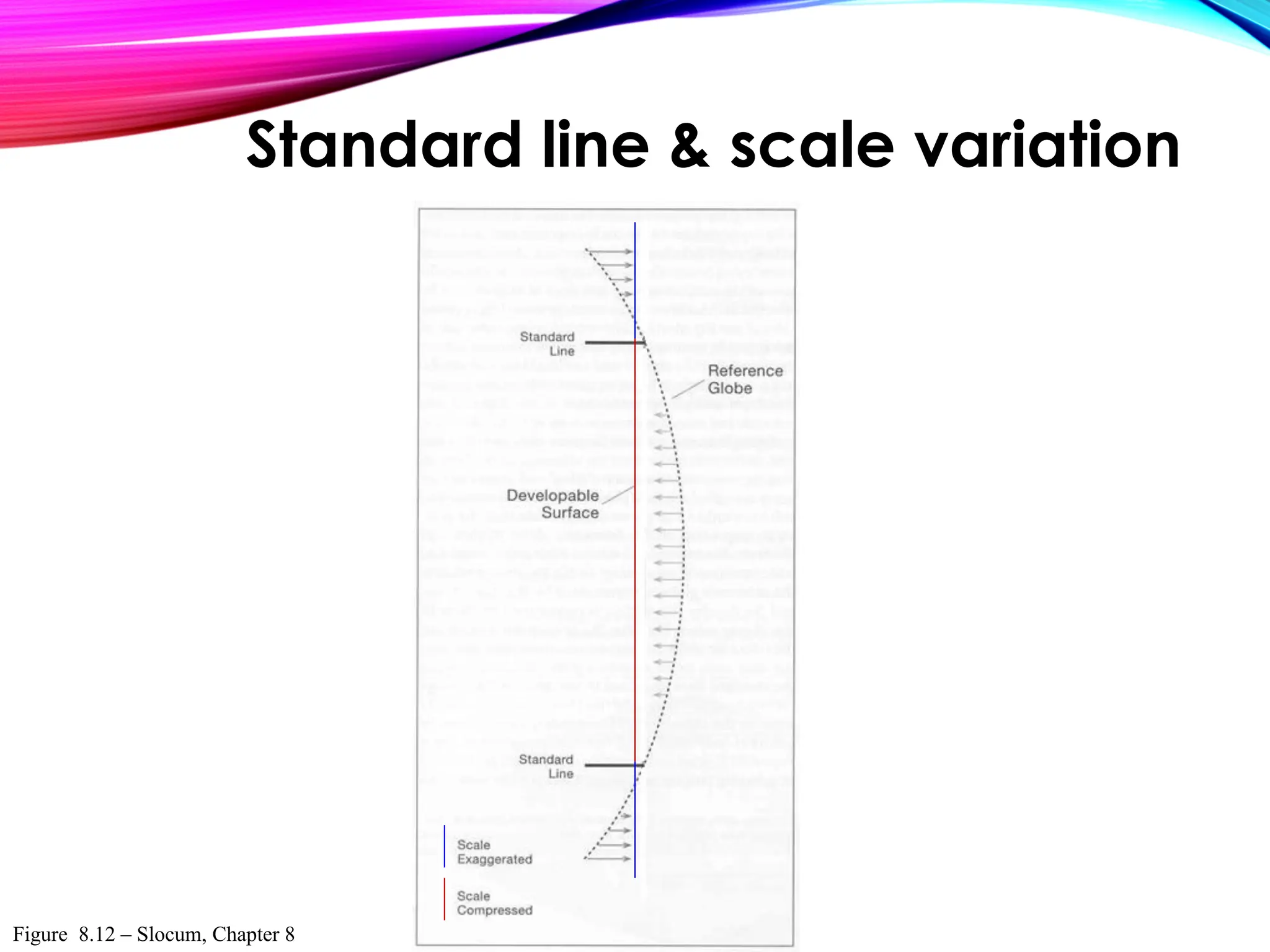
Transformation to the plane
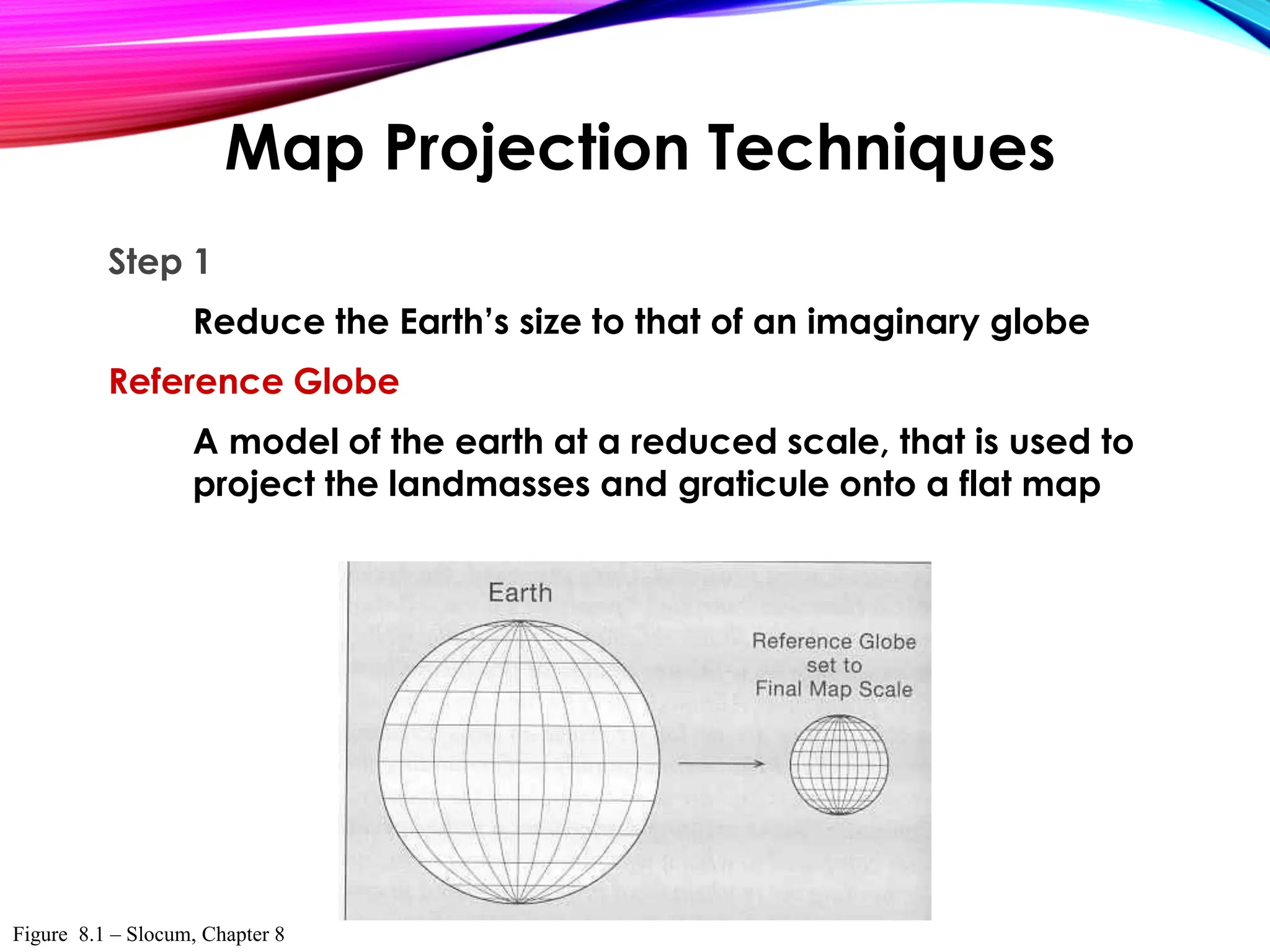
Step 1
Reduce the Earth’s size to that of an imaginary globe
Reference Globe
A model of the earth at a reduced scale, that is used to
project the landmasses and graticule onto a flat map
Map Projection Techniques
Figure 8.1 – Slocum, Chapter 8
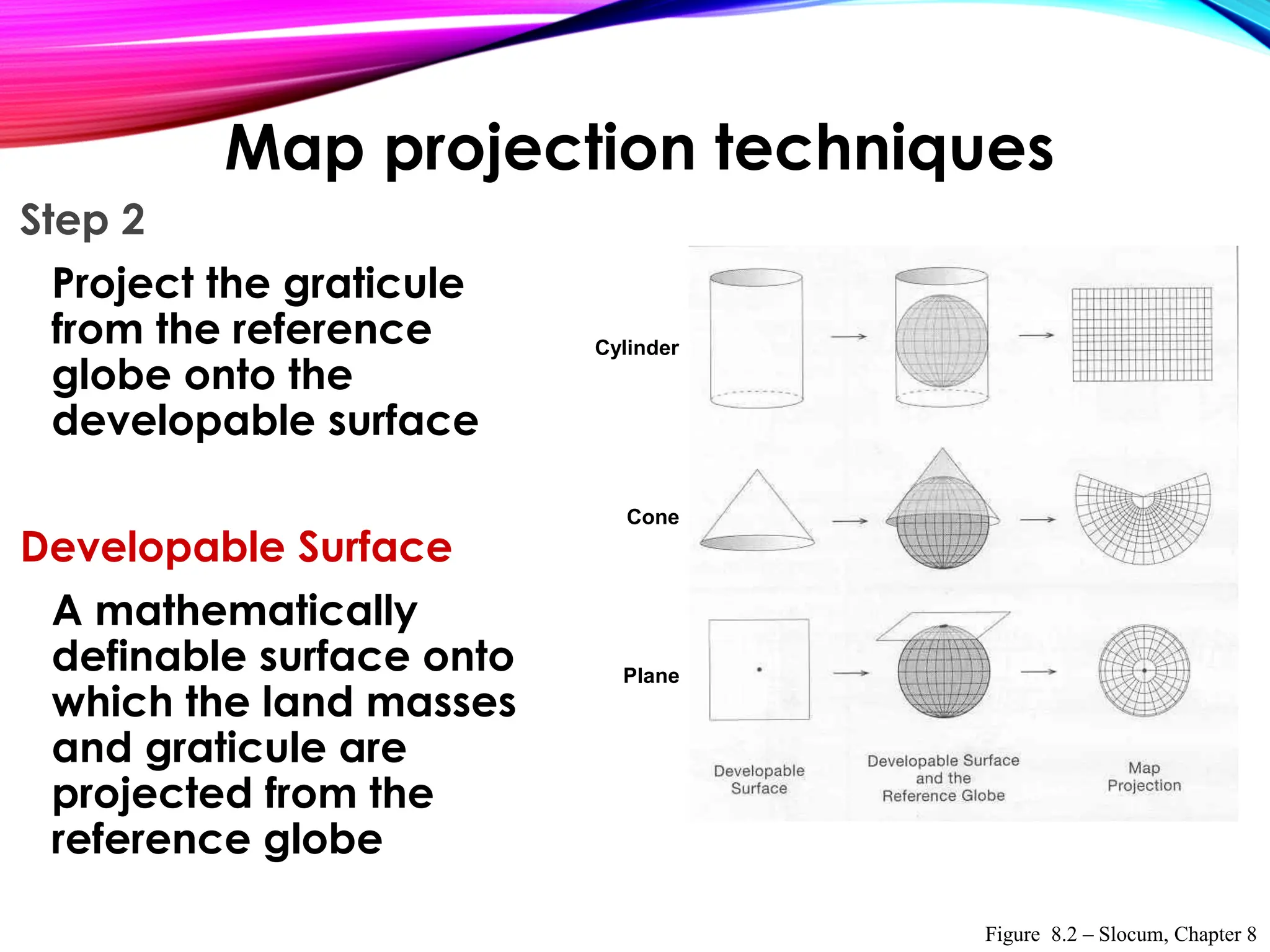
Step 2
Project the graticule
from the reference
globe onto the
developable surface
Developable Surface
A mathematically
definable surface onto
which the land masses
and graticule are
projected from the
reference globe
Cylinder
Cone
Plane
Figure 8.2 – Slocum, Chapter 8
Map projection techniques
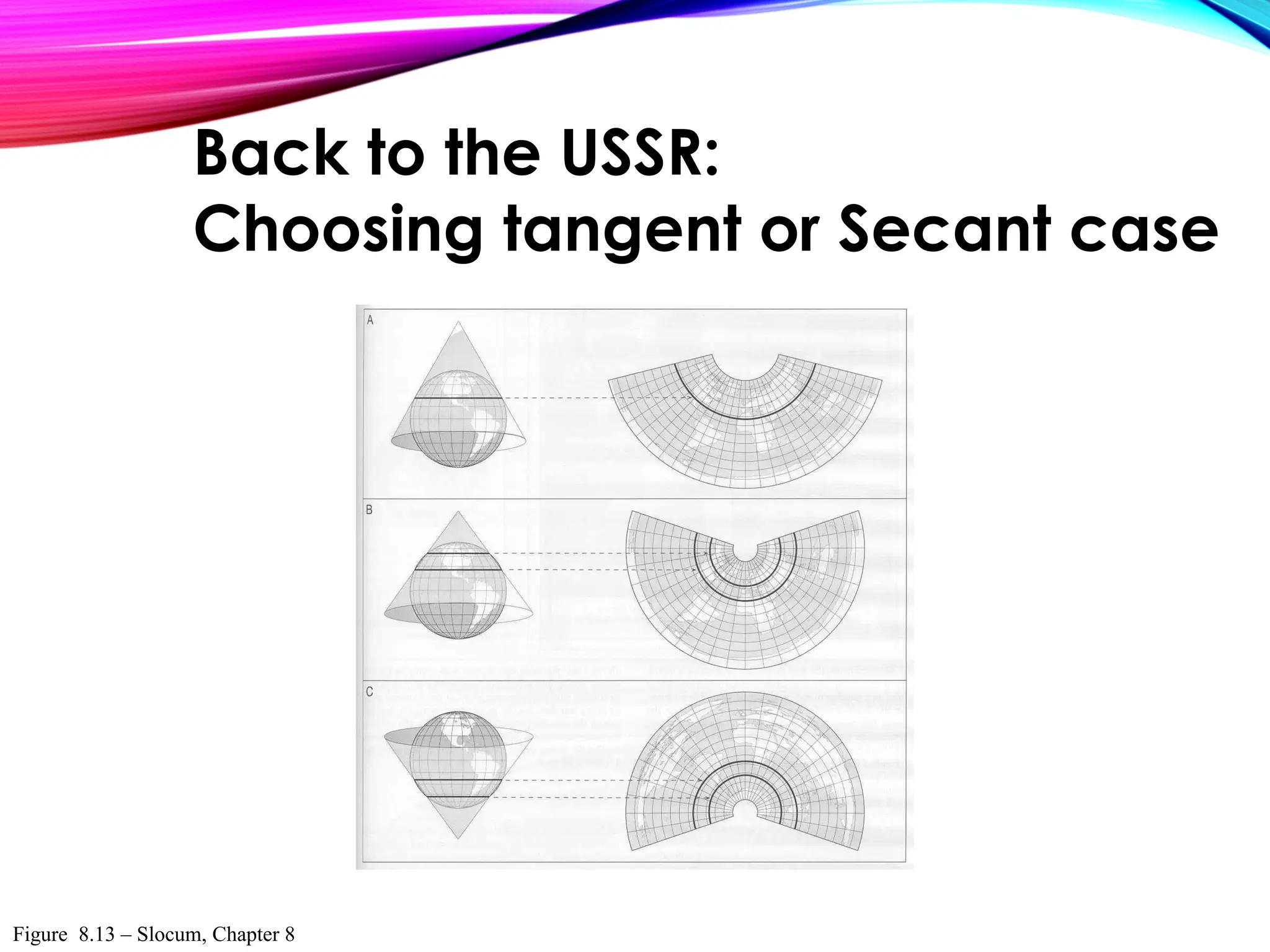
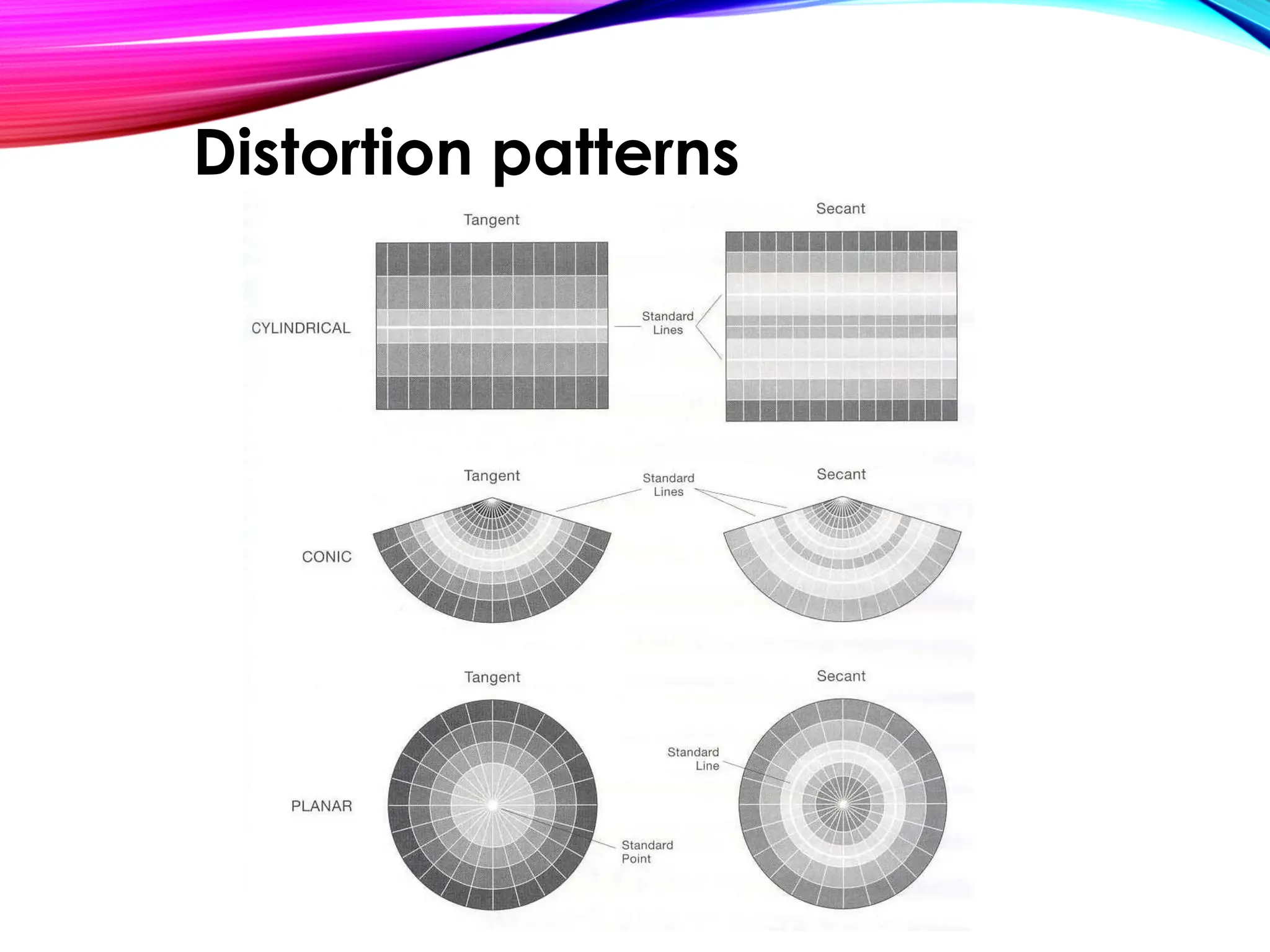
The Case of a projection relates to how
the developable surface is positioned
with respect to the reference globe
Case can be described as
• Tangent or
• Secant
Case
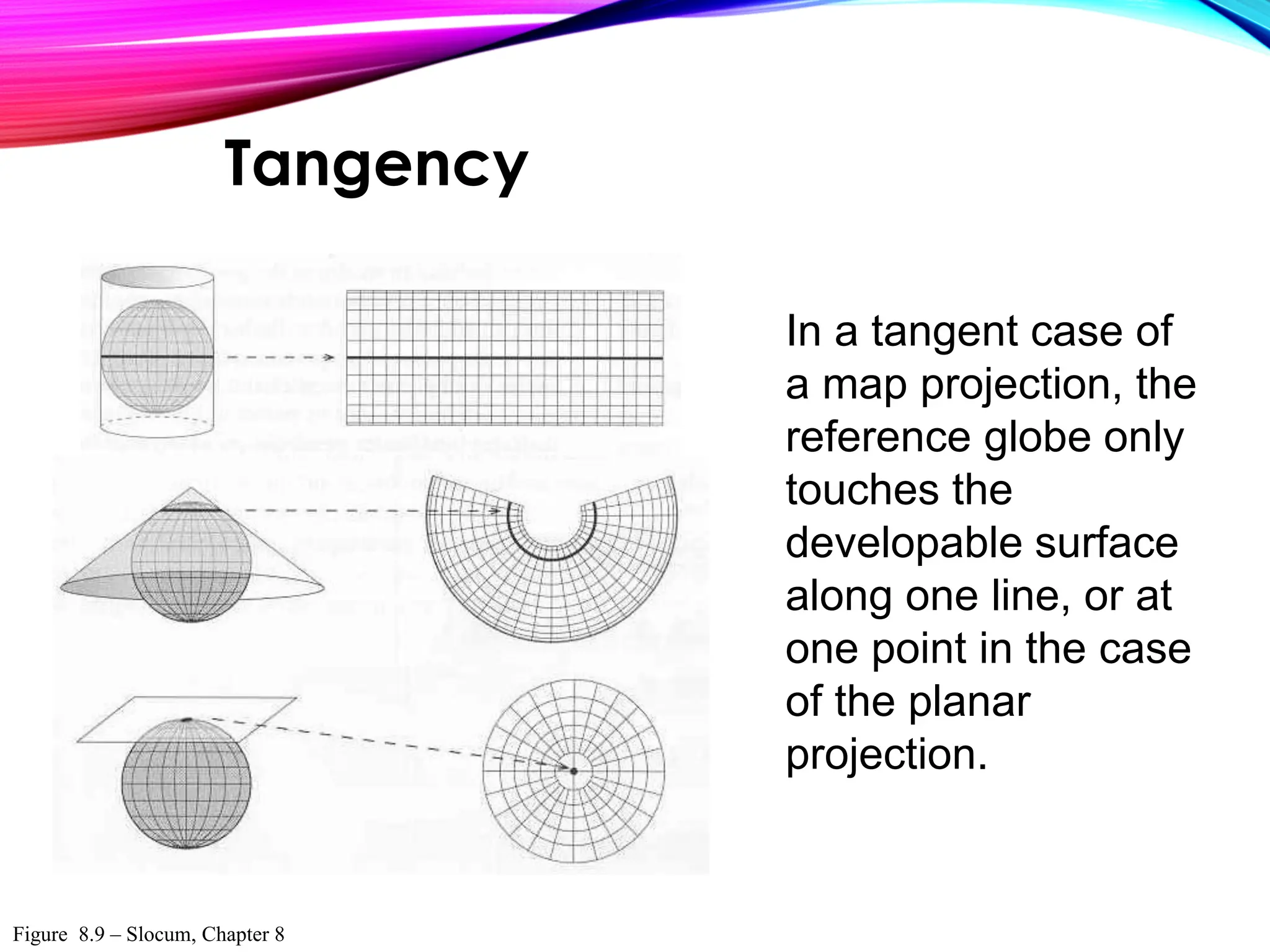
In a tangent case of
a map projection, the
reference globe only
touches the
developable surface
along one line, or at
one point in the case
of the planar
projection.
Figure 8.9 – Slocum, Chapter 8
Tangency
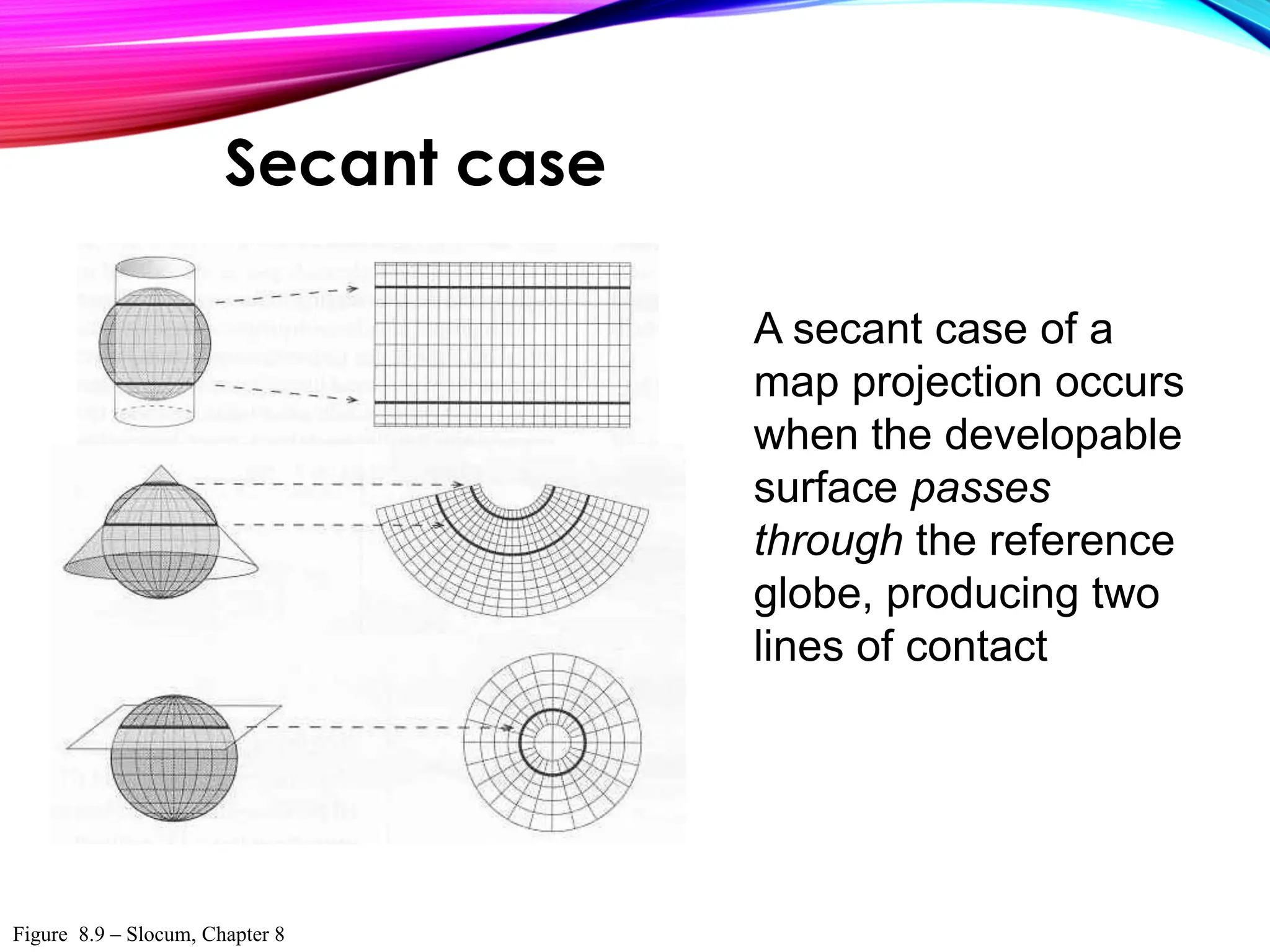
A secant case of a
map projection occurs
when the developable
surface passes
through the reference
globe, producing two
lines of contact
Figure 8.9 – Slocum, Chapter 8
Secant case
Figure 8.12 – Slocum, Chapter 8
Standard line & scale variation
Figure 8.13 – Slocum, Chapter 8
Back to the USSR:
Choosing tangent or Secant case
Distortion patterns
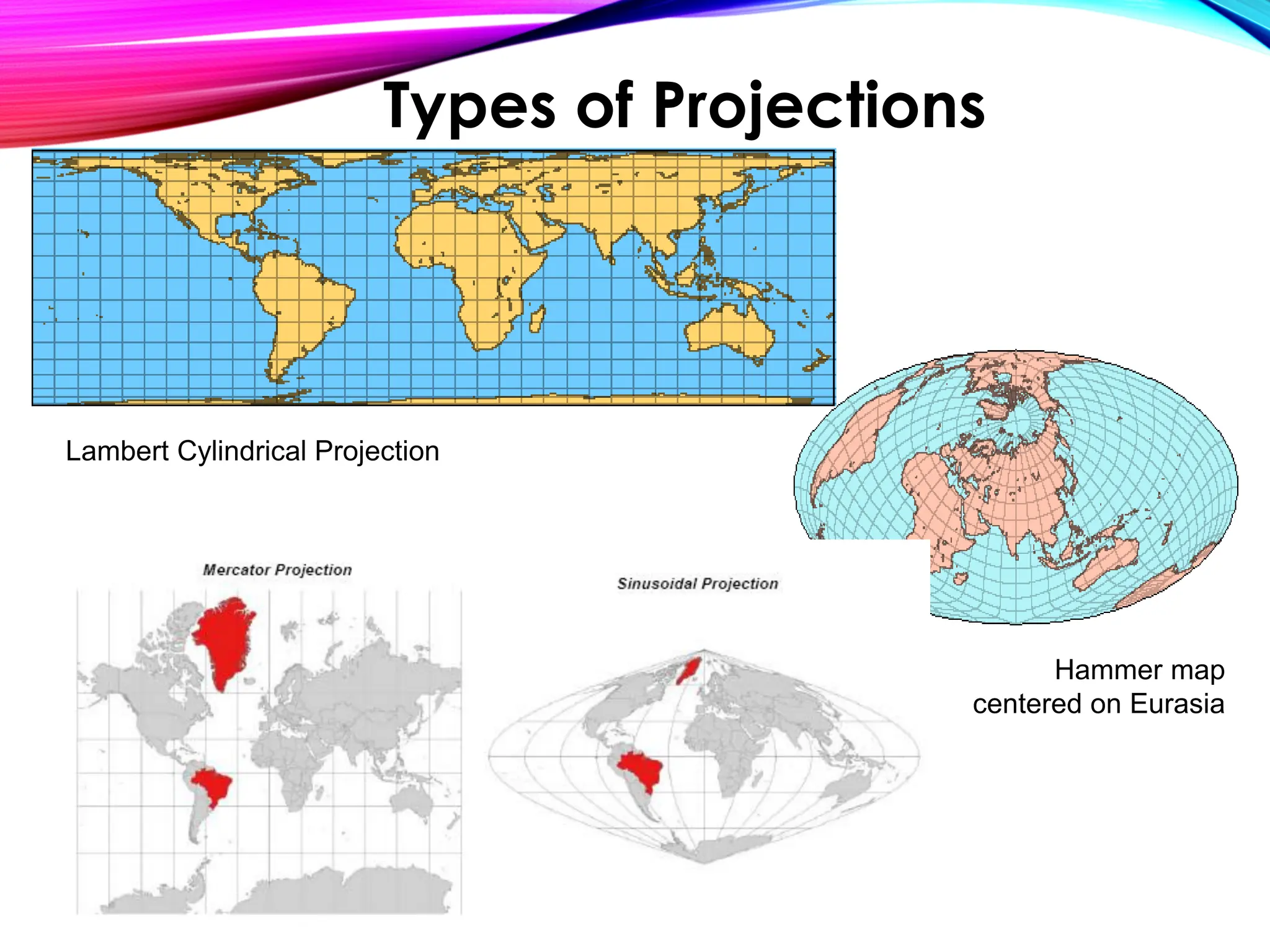
Hammer map
centered on Eurasia
Lambert Cylindrical Projection
Types of Projections
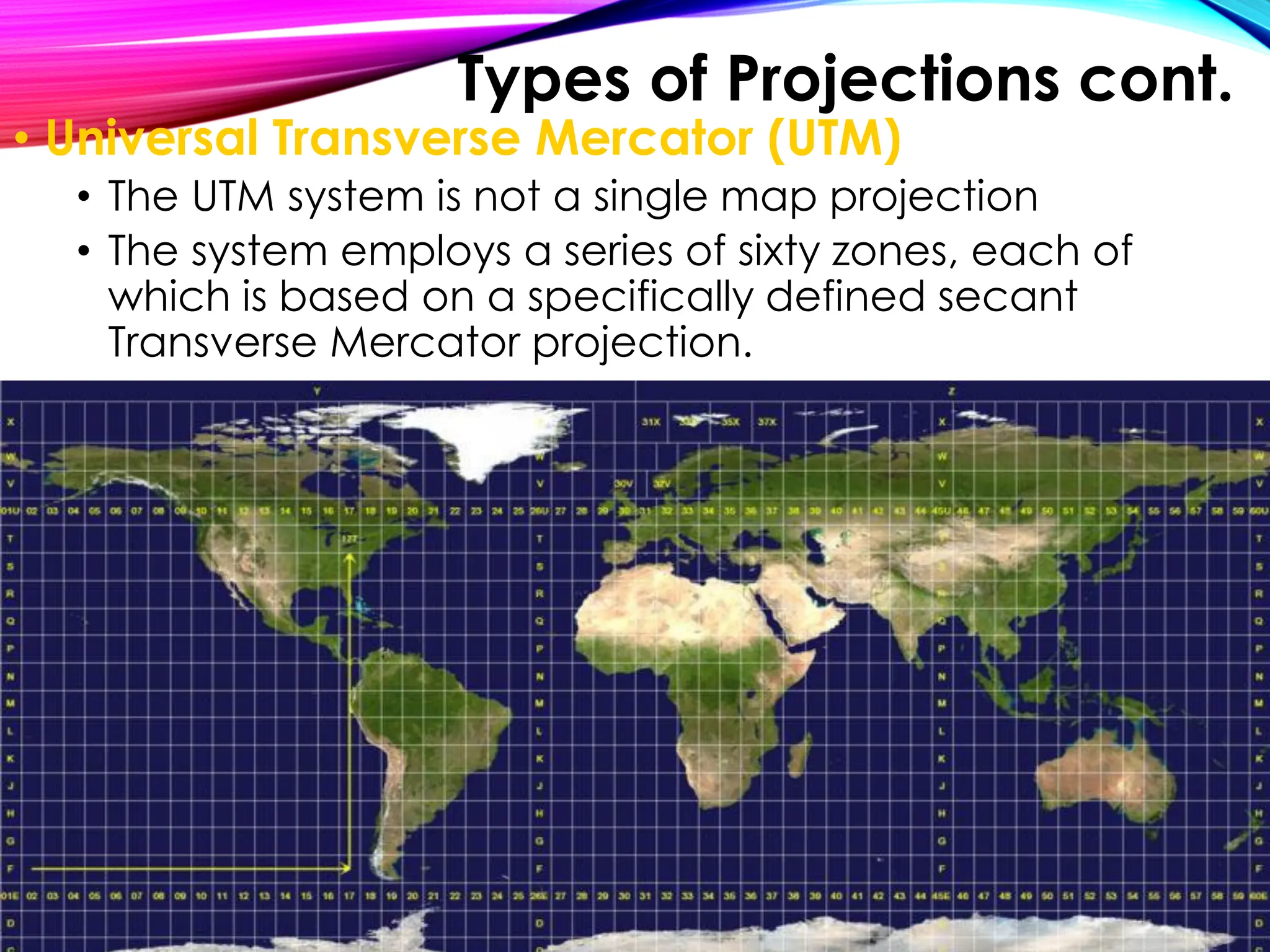
• Universal Transverse Mercator (UTM)
• The UTM system is not a single map projection
• The system employs a series of sixty zones, each of
which is based on a specifically defined secant
Transverse Mercator projection.
Image:Utm-zones.jpg
Types of Projections cont.
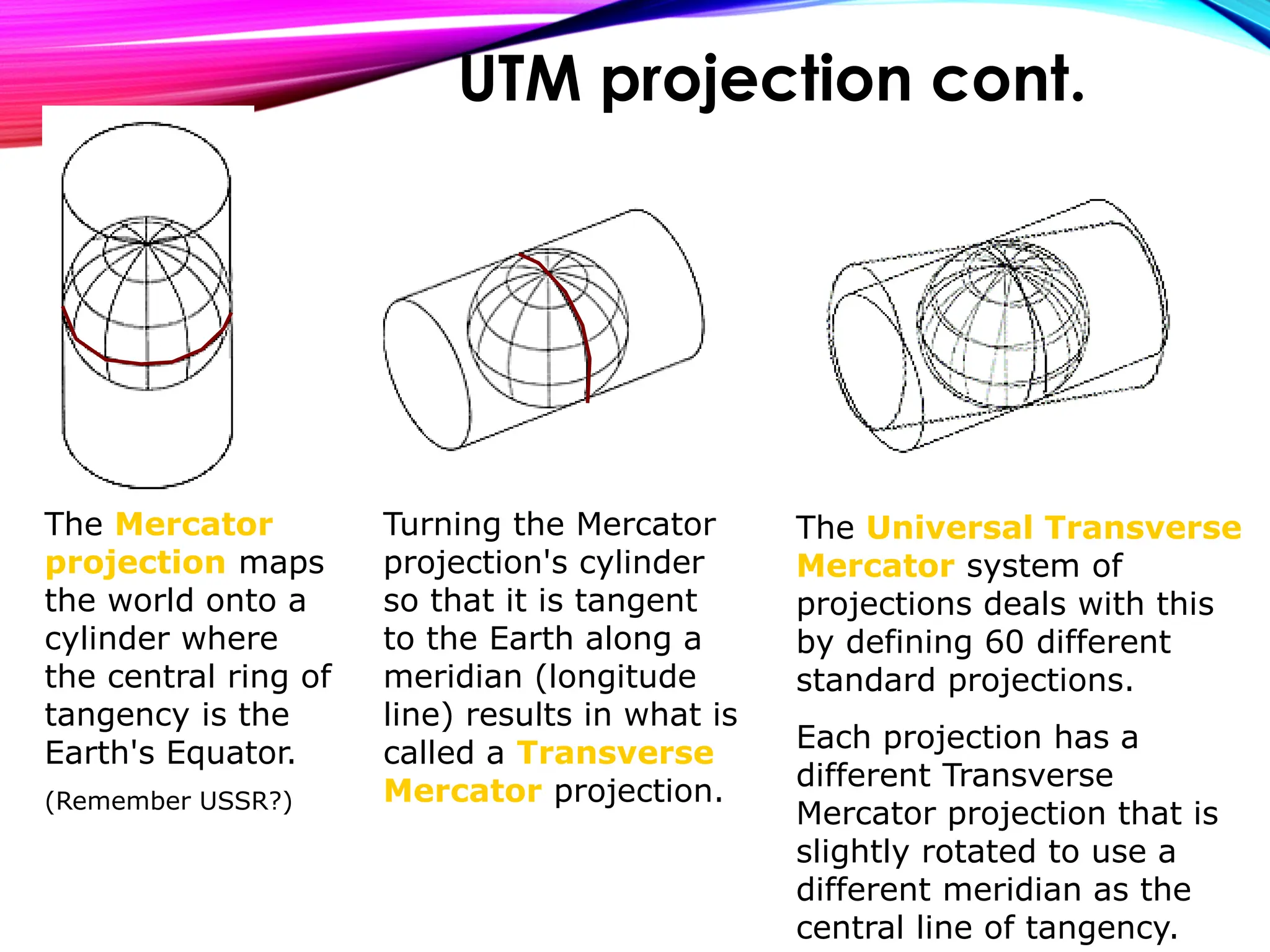
The Mercator
projection maps
the world onto a
cylinder where
the central ring of
tangency is the
Earth's Equator.
(Remember USSR?)
Turning the Mercator
projection's cylinder
so that it is tangent
to the Earth along a
meridian (longitude
line) results in what is
called a Transverse
Mercator projection.
The Universal Transverse
Mercator system of
projections deals with this
by defining 60 different
standard projections.
Each projection has a
different Transverse
Mercator projection that is
slightly rotated to use a
different meridian as the
central line of tangency.
UTM projection cont.
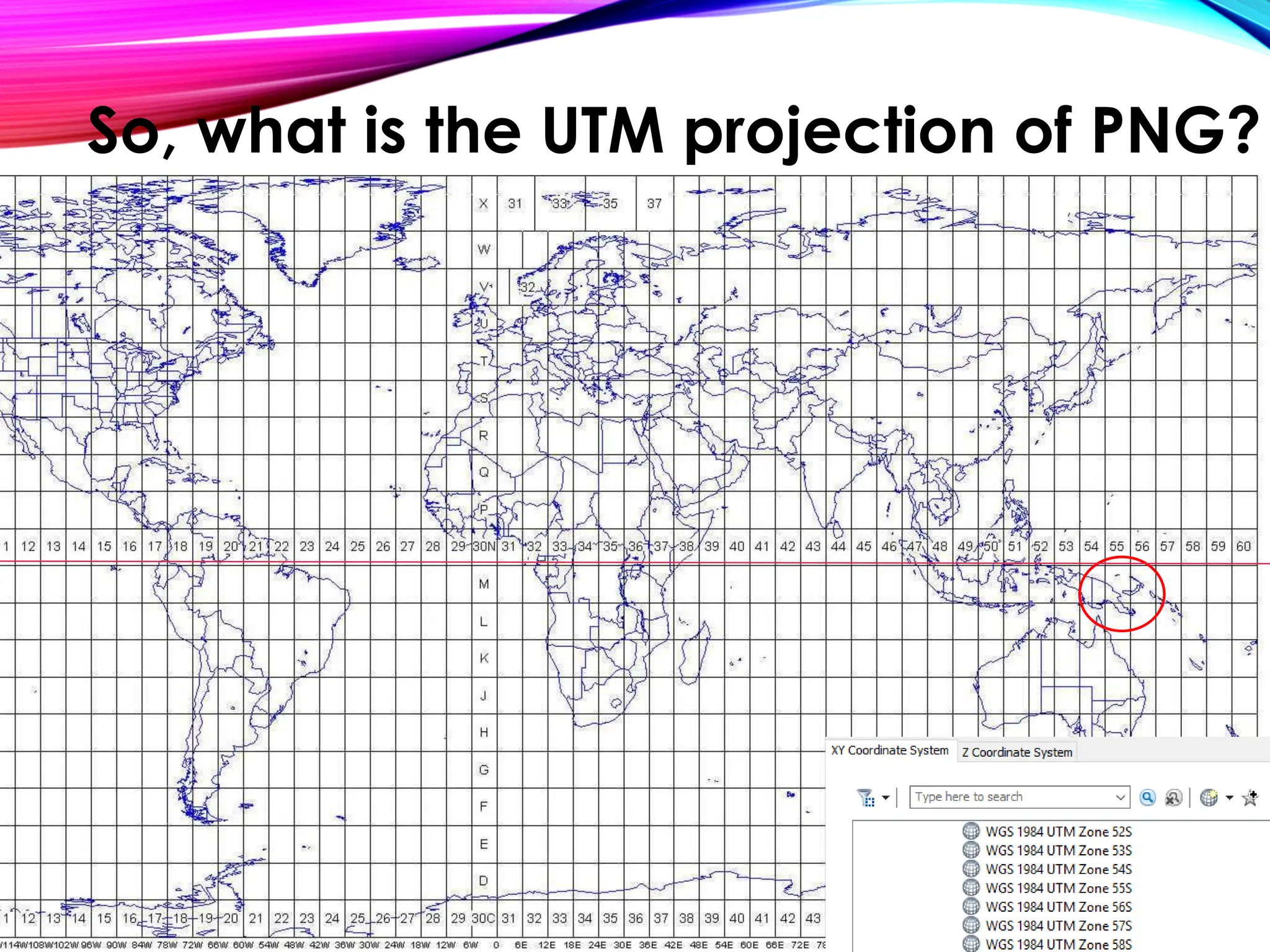
So, what is the UTM projection of PNG?
The first step in problem solving spatial data
is to check the projection.
If the projection is ‘undefined’ or is different
from the other ‘Layers’ in your Data Frame
it will not merge nicely and you will not be
able to do ANY spatial analysis!
So, what does this have to do with
your analysis?
You will experiment with different projections to
understand what can be preserved and what is
lost due to geographic projection decisions
You have been given detailed surveyed community
point information, which was collected using GPS
units in the field. Unfortunately, it is not displaying
correctly in the data frame. You will need to
project the data correctly and perform any
analysis.
Exercise 5
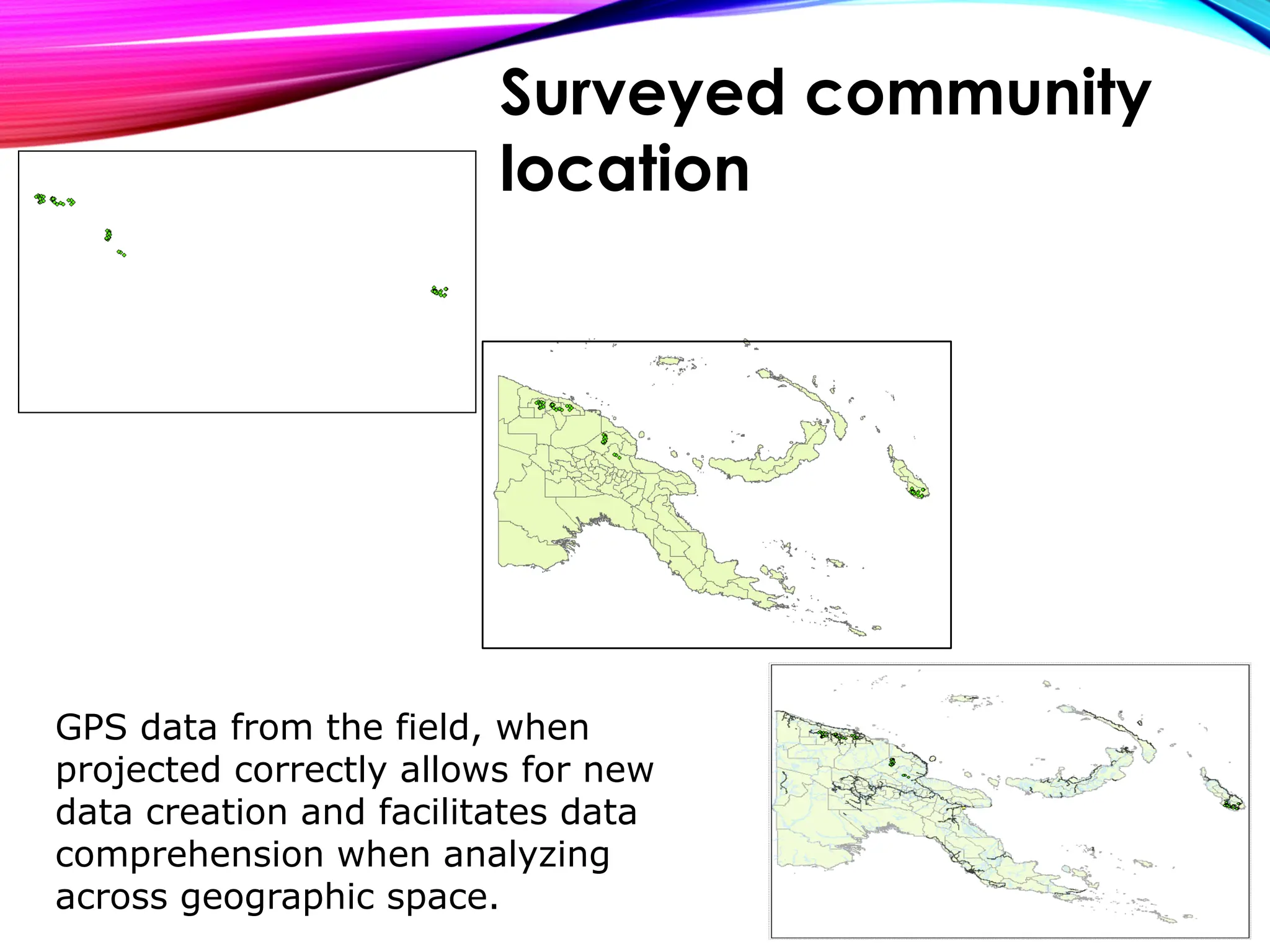
GPS data from the field, when
projected correctly allows for new
data creation and facilitates data
comprehension when analyzing
across geographic space.
Surveyed community
location
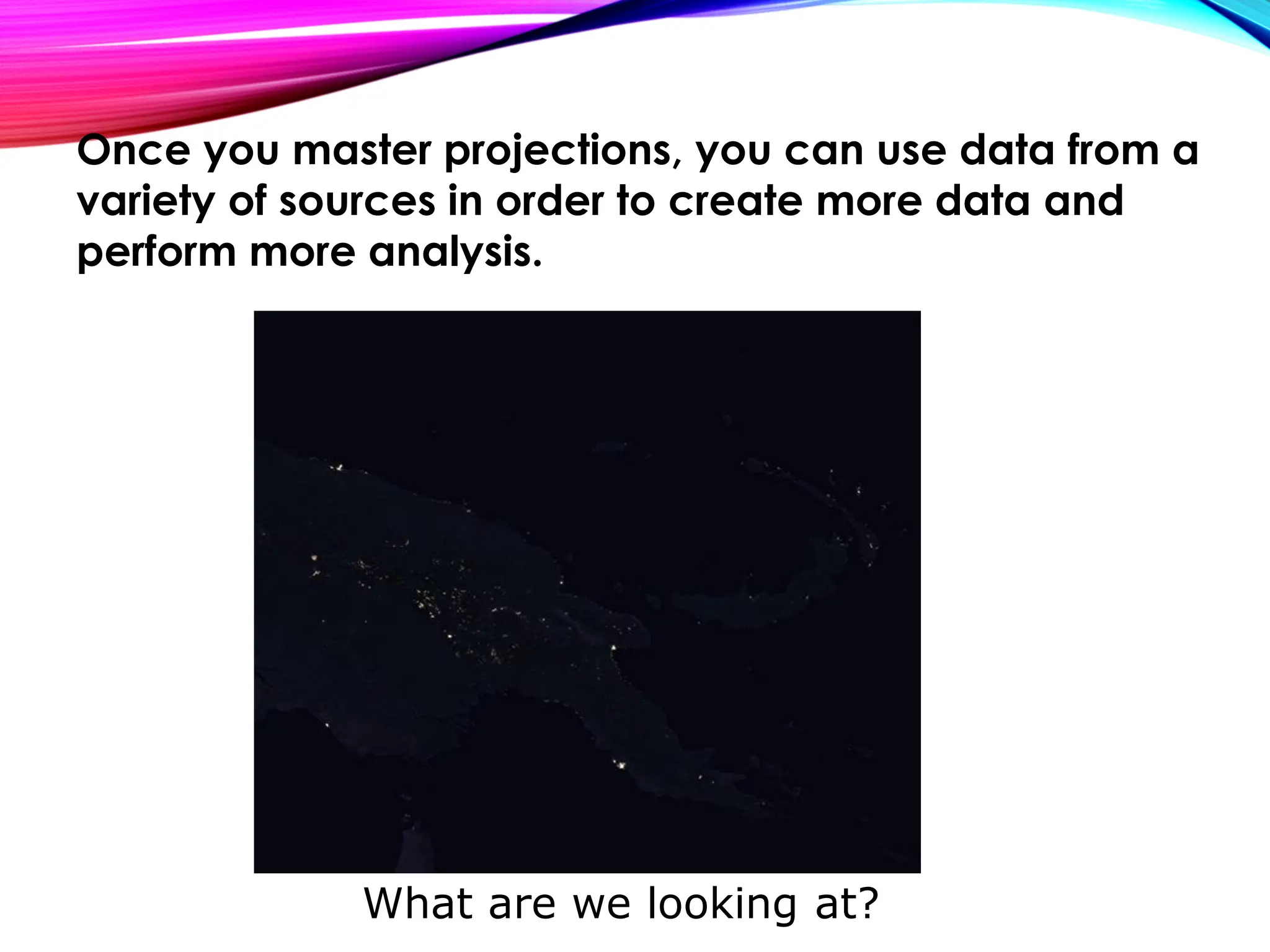
What are we looking at?
Once you master projections, you can use data from a
variety of sources in order to create more data and
perform more analysis.
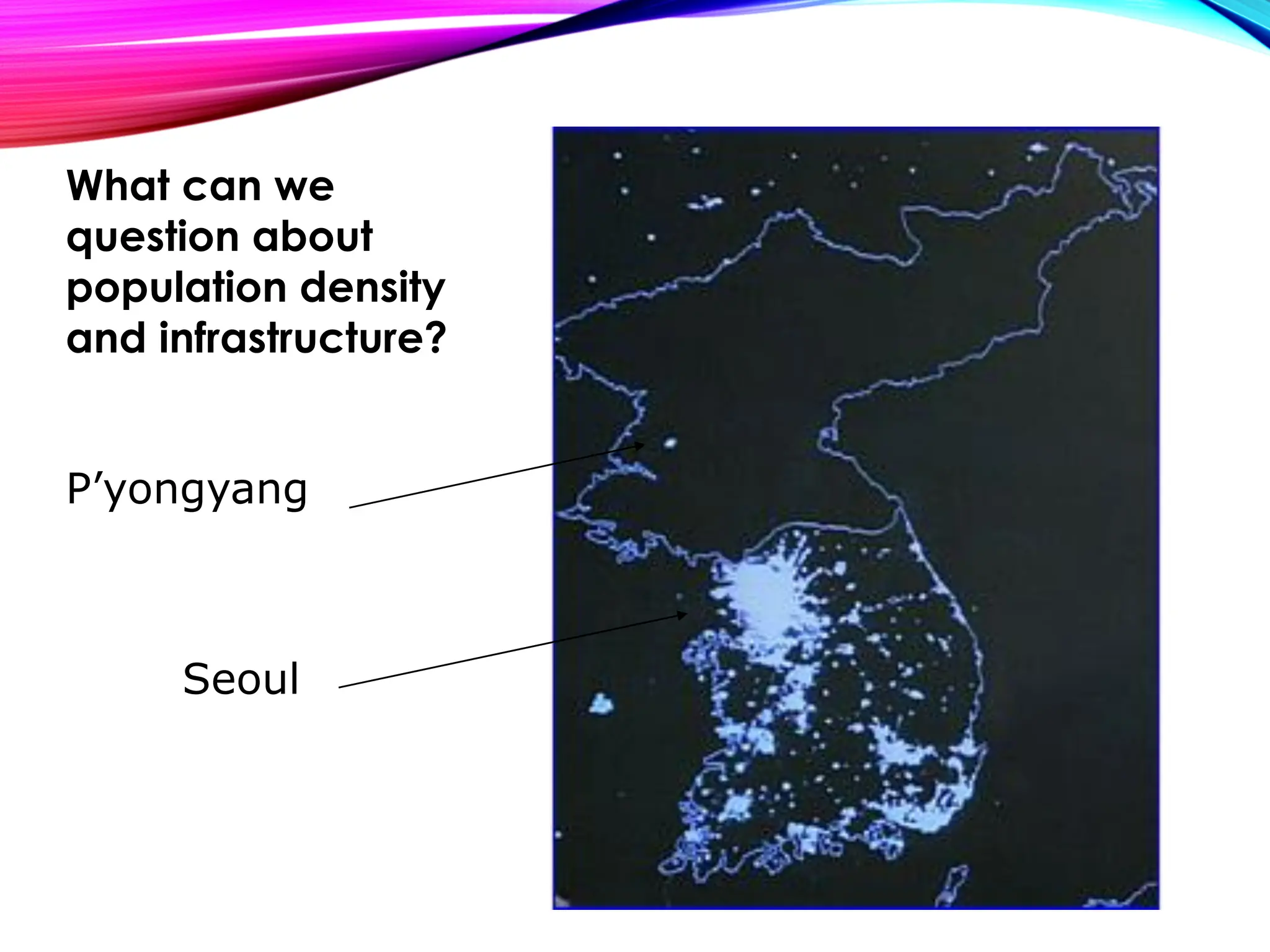
P’yongyang
Seoul
What can we
question about
population density
and infrastructure?
Questions?
Spatial Joins
• Spatial Data Integration
• Spatial Join
• Spatial Join with the health centers in PNG
• Tabular Join
Moving along …
Two Types of Data to be managed in GIS
• Spatial Data (Where things are)
• Tabular data (What things are)
Spatial data integration –Lab 06…
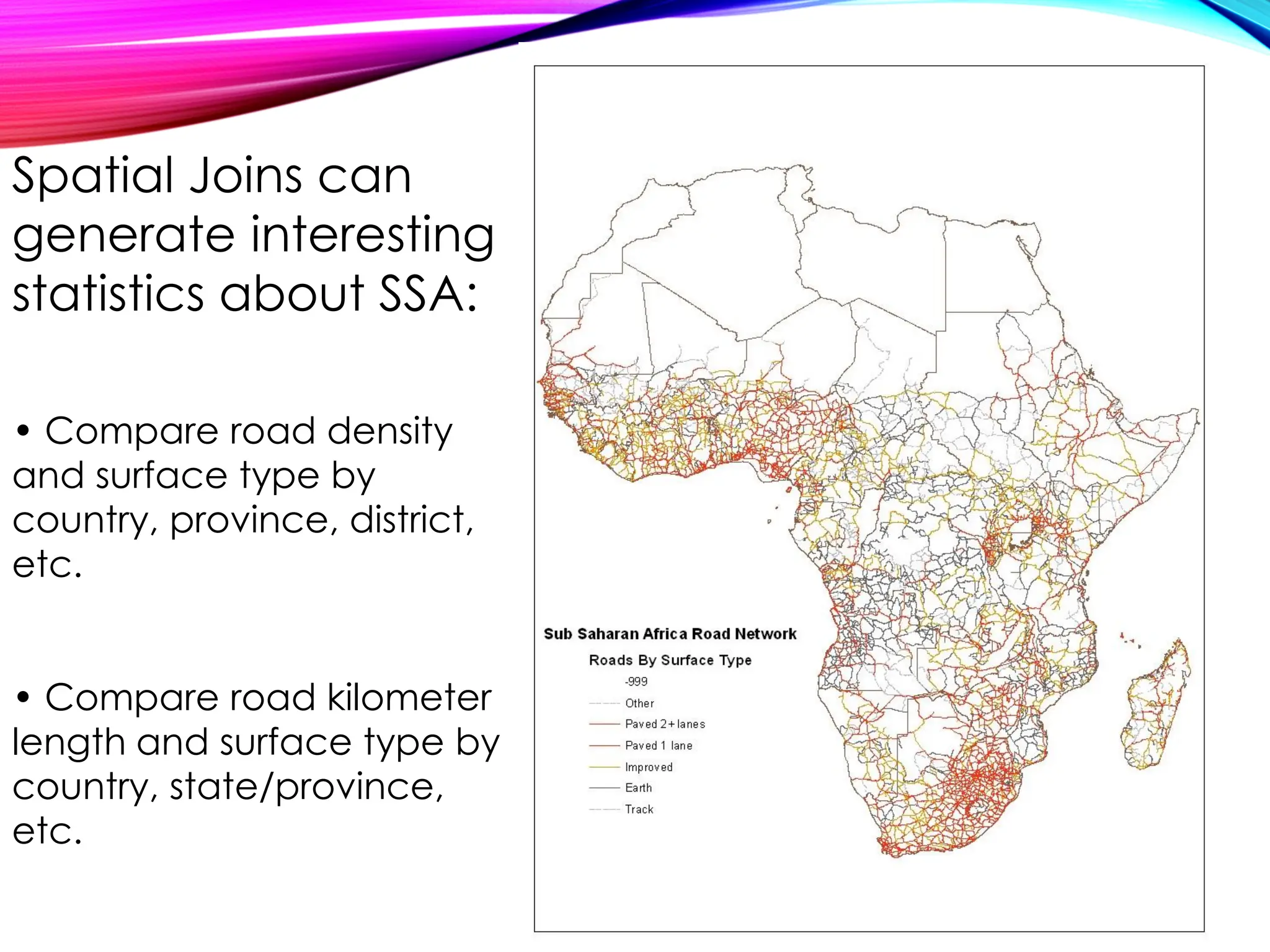
Spatial Joins can
generate interesting
statistics about SSA:
• Compare road density
and surface type by
country, province, district,
etc.
• Compare road kilometer
length and surface type by
country, state/province,
etc.
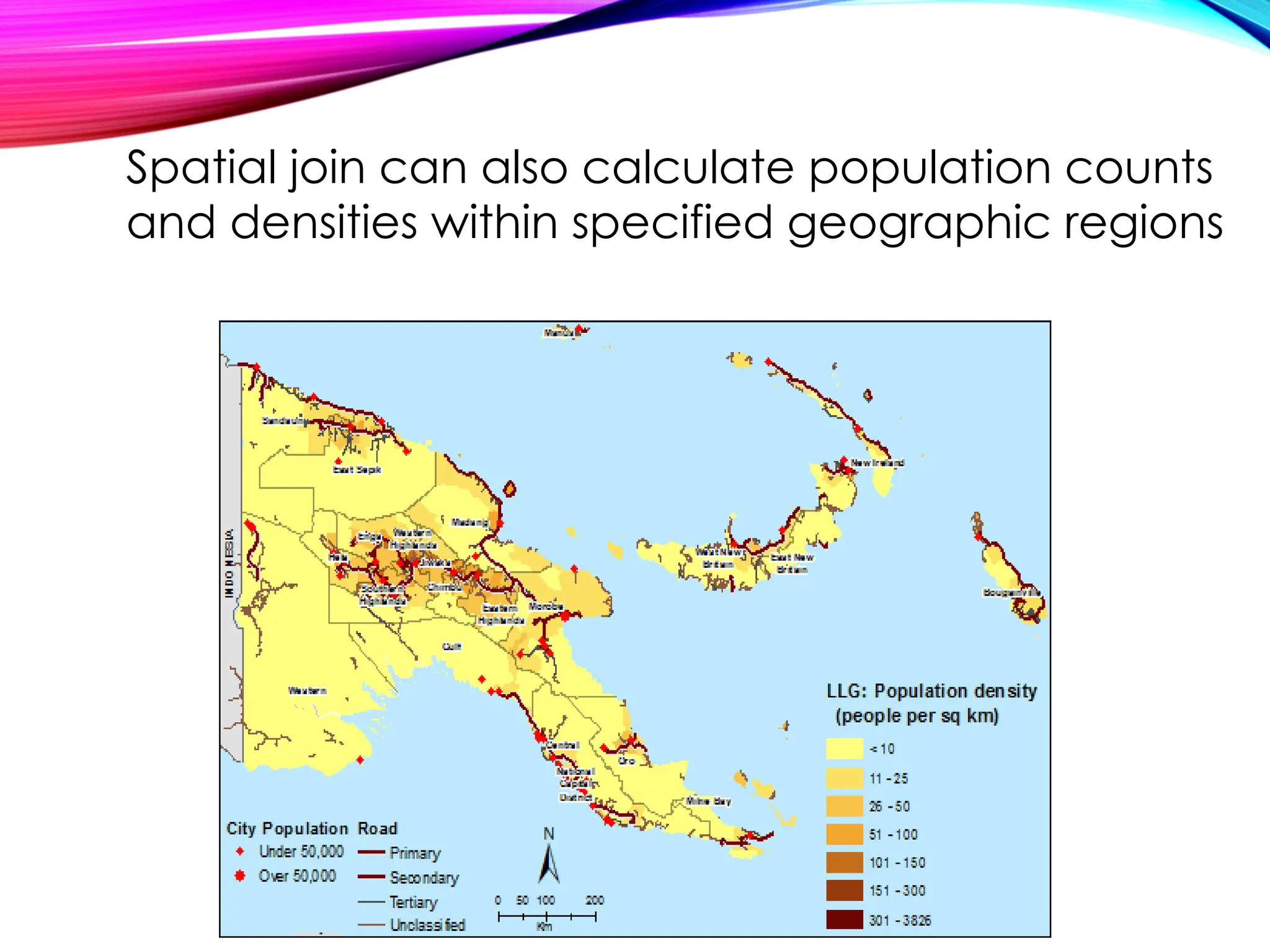
Spatial join can also calculate population counts
and densities within specified geographic regions
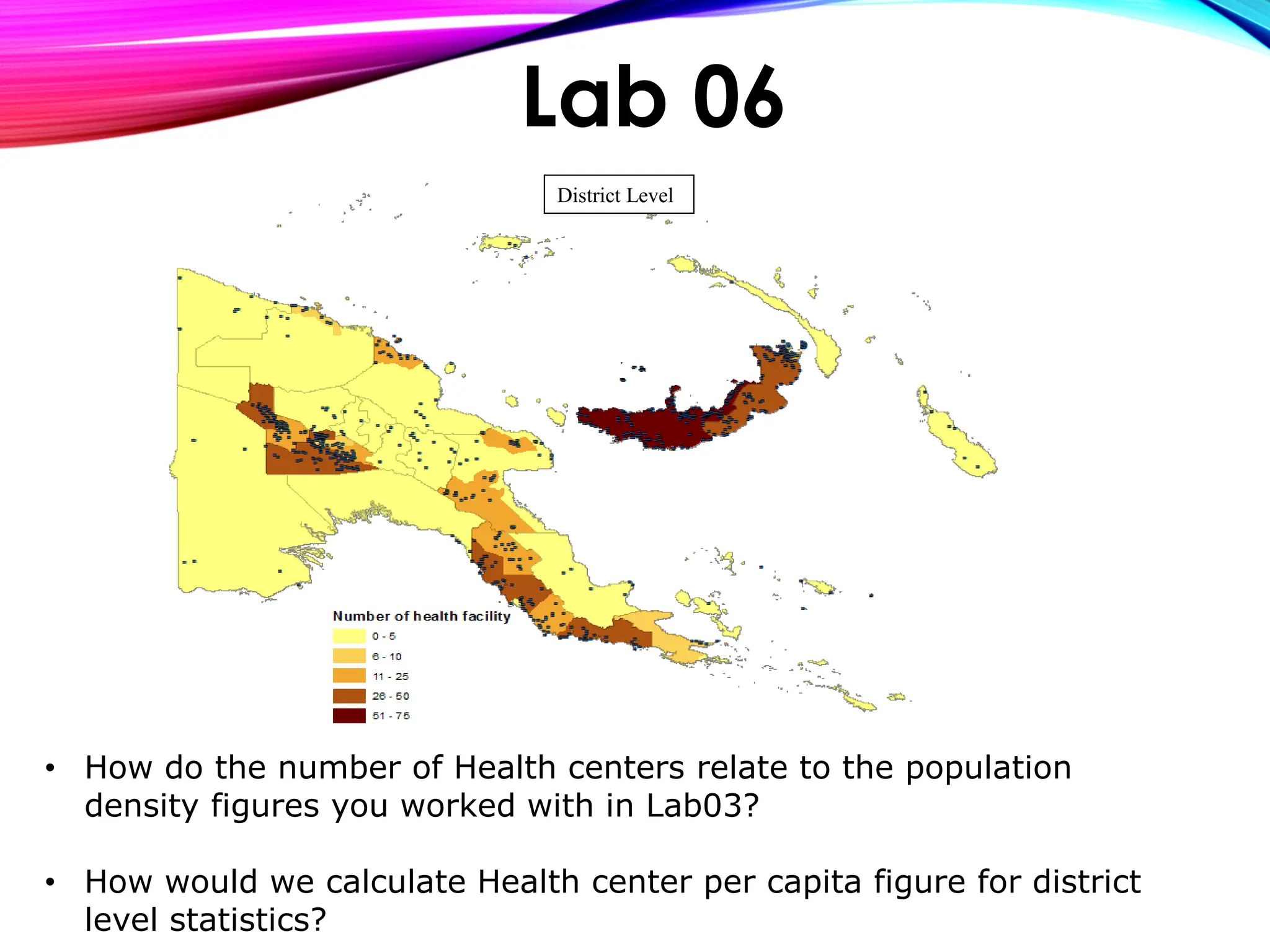
• How do the number of Health centers relate to the population
density figures you worked with in Lab03?
• How would we calculate Health center per capita figure for district
level statistics?
Lab 06
District Level
Tabular Joins
• Tabular Data
• Merging other datasets to GIS shapefiles
• Census
• HHS
• DHS
• Environmental
Surveys
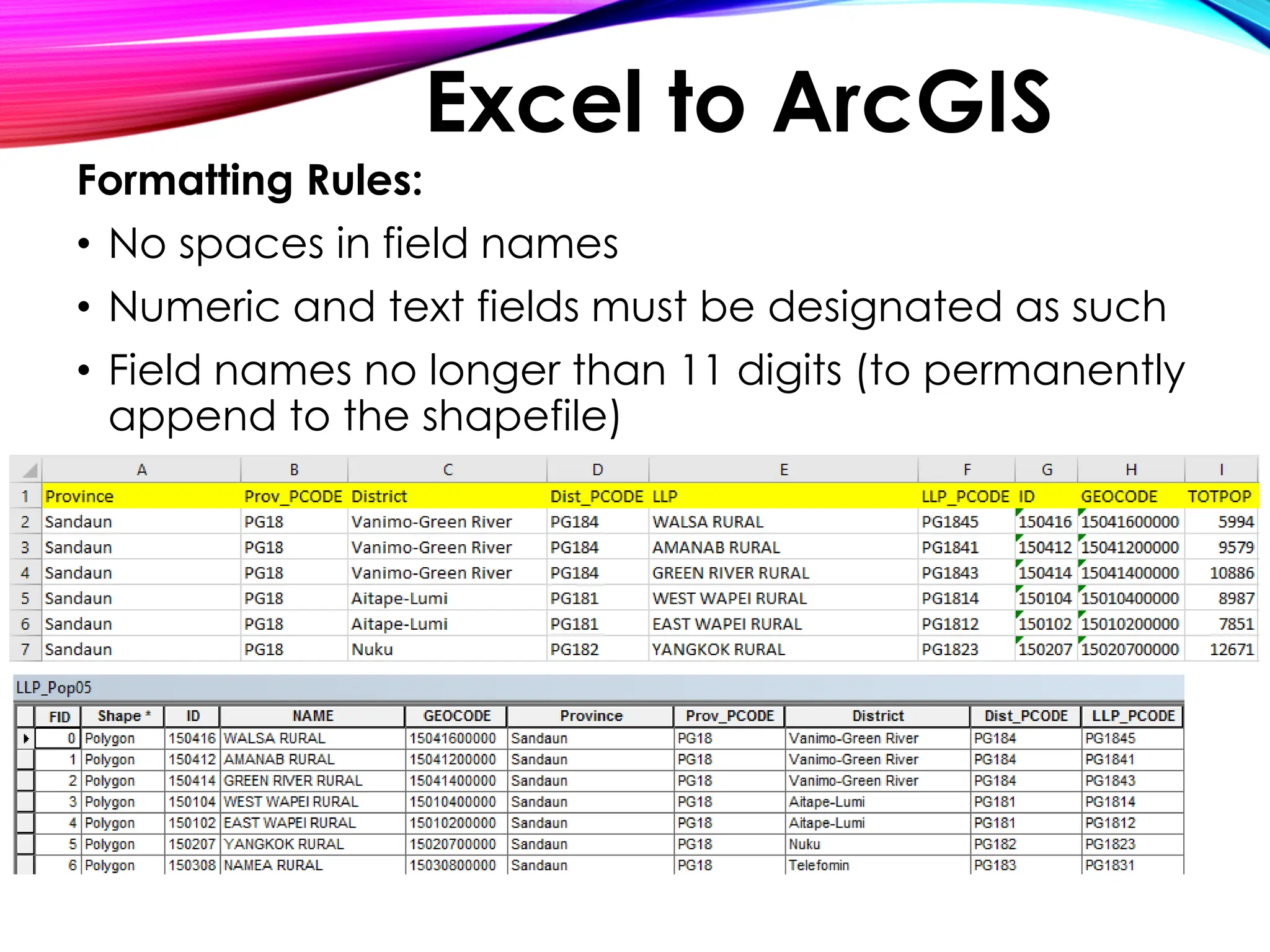
Formatting Rules:
• No spaces in field names
• Numeric and text fields must be designated as such
• Field names no longer than 11 digits (to permanently
append to the shapefile)
Excel to ArcGIS
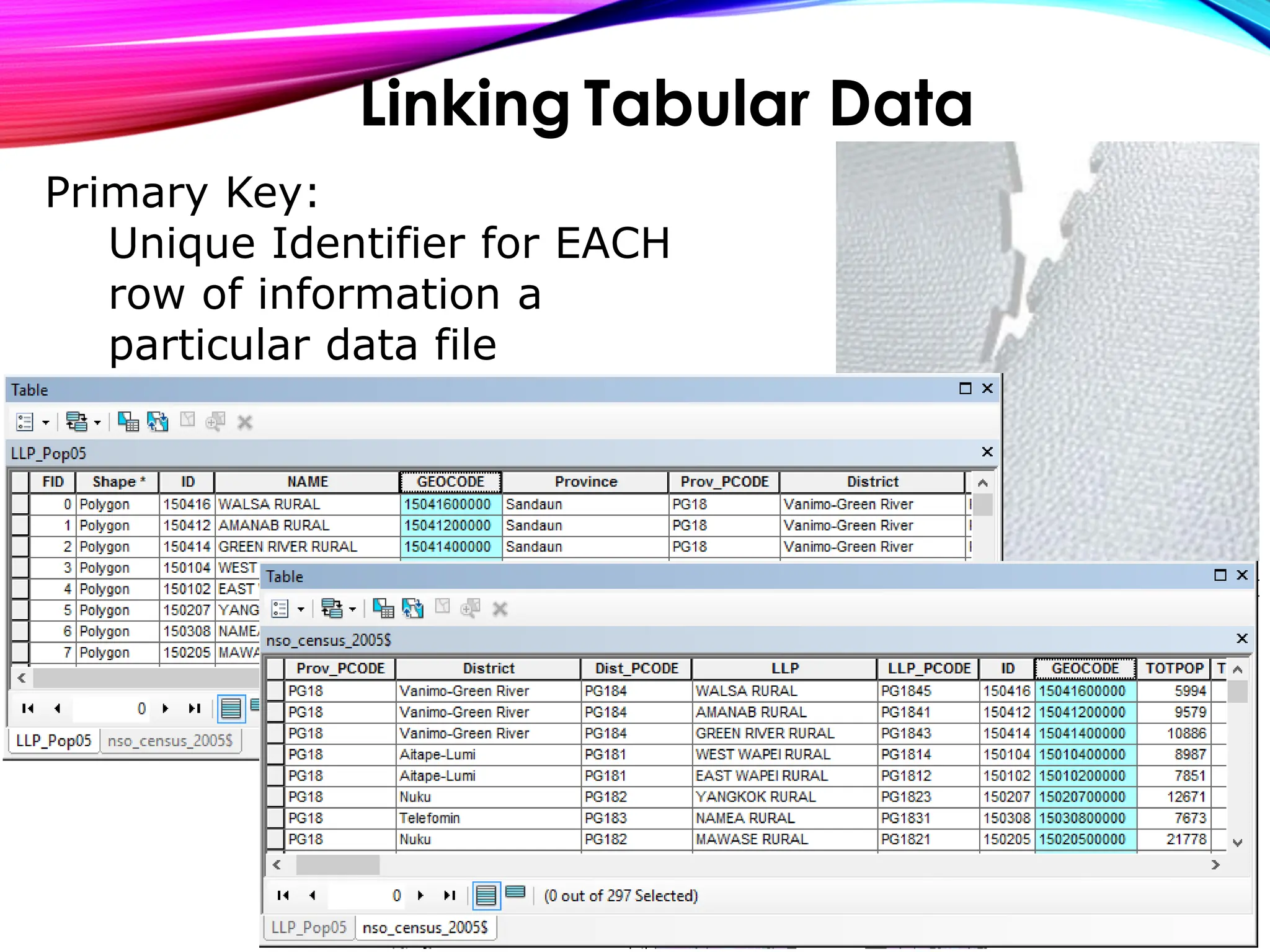
Linking Tabular Data
Primary Key:
Unique Identifier for EACH
row of information a
particular data file
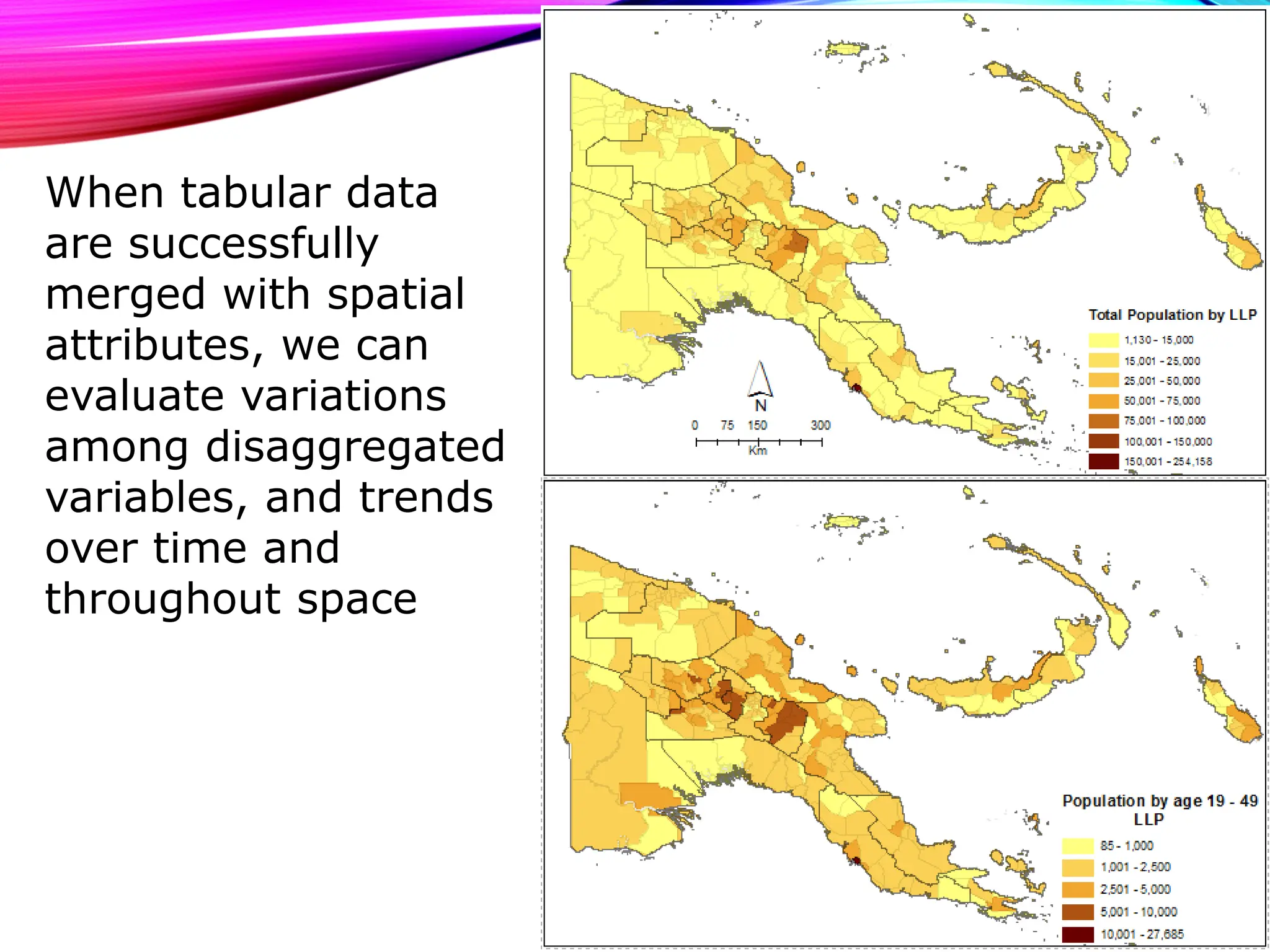
When tabular data
are successfully
merged with spatial
attributes, we can
evaluate variations
among disaggregated
variables, and trends
over time and
throughout space
Exercise Overview
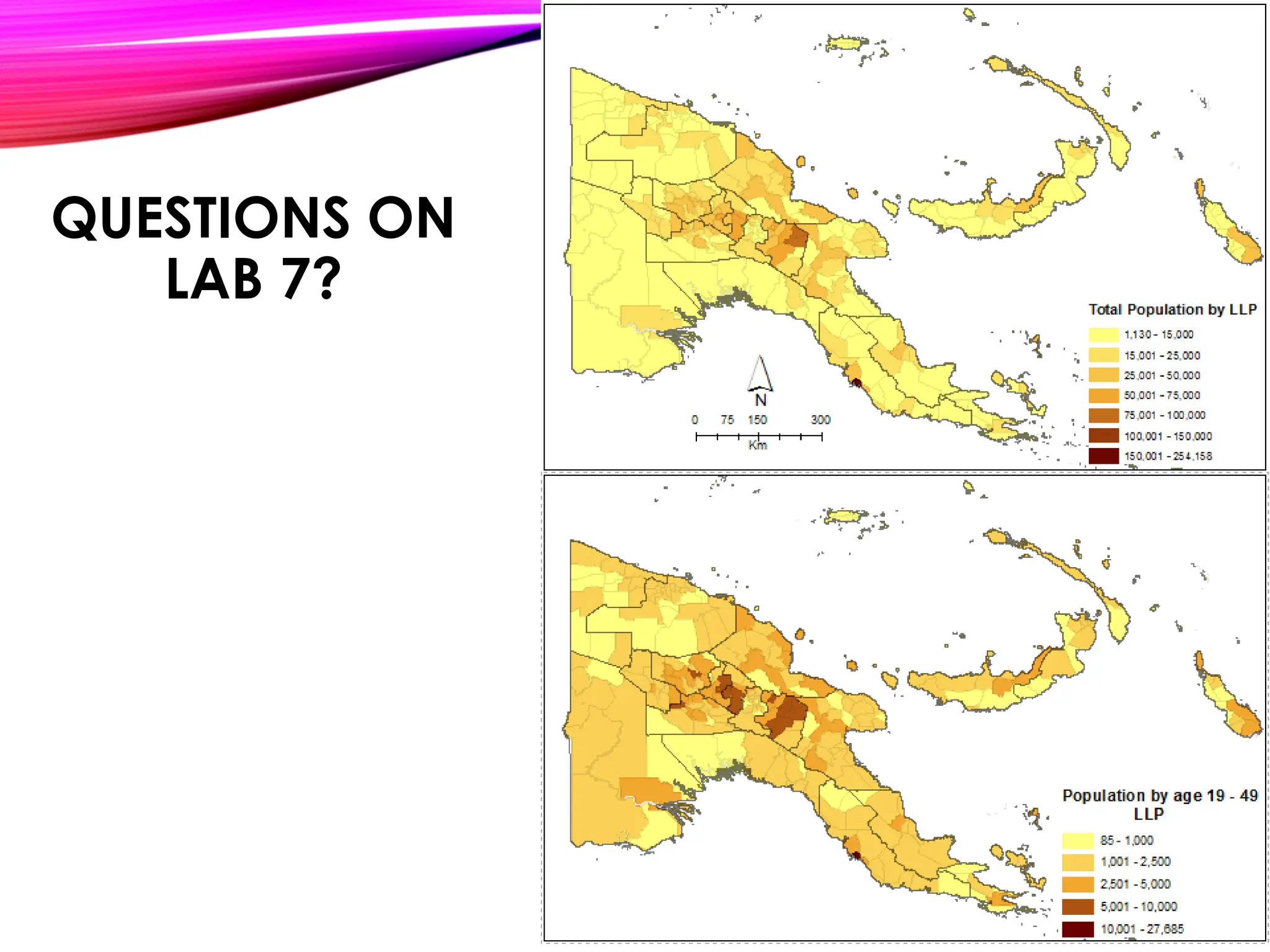
• You have received detailed Household Census
information from NSO-PNG. The data is in Microsoft
Excel format, and you need to integrate this
information into ArcMap to create a thematic map.
• To achieve this you must conduct a Table Join. A
table join appends attributes of a non-spatial table,
to the attributes of a map table. (Non-Spatial means
“without geography”, i.e.: without map attached). In
order for this join to be successful there must be a
way to match records in one table with appropriate
records in another.
Lab 07
Tabular Joins cont’d
Agricultural system mapping
QUESTIONS ON
LAB 7?
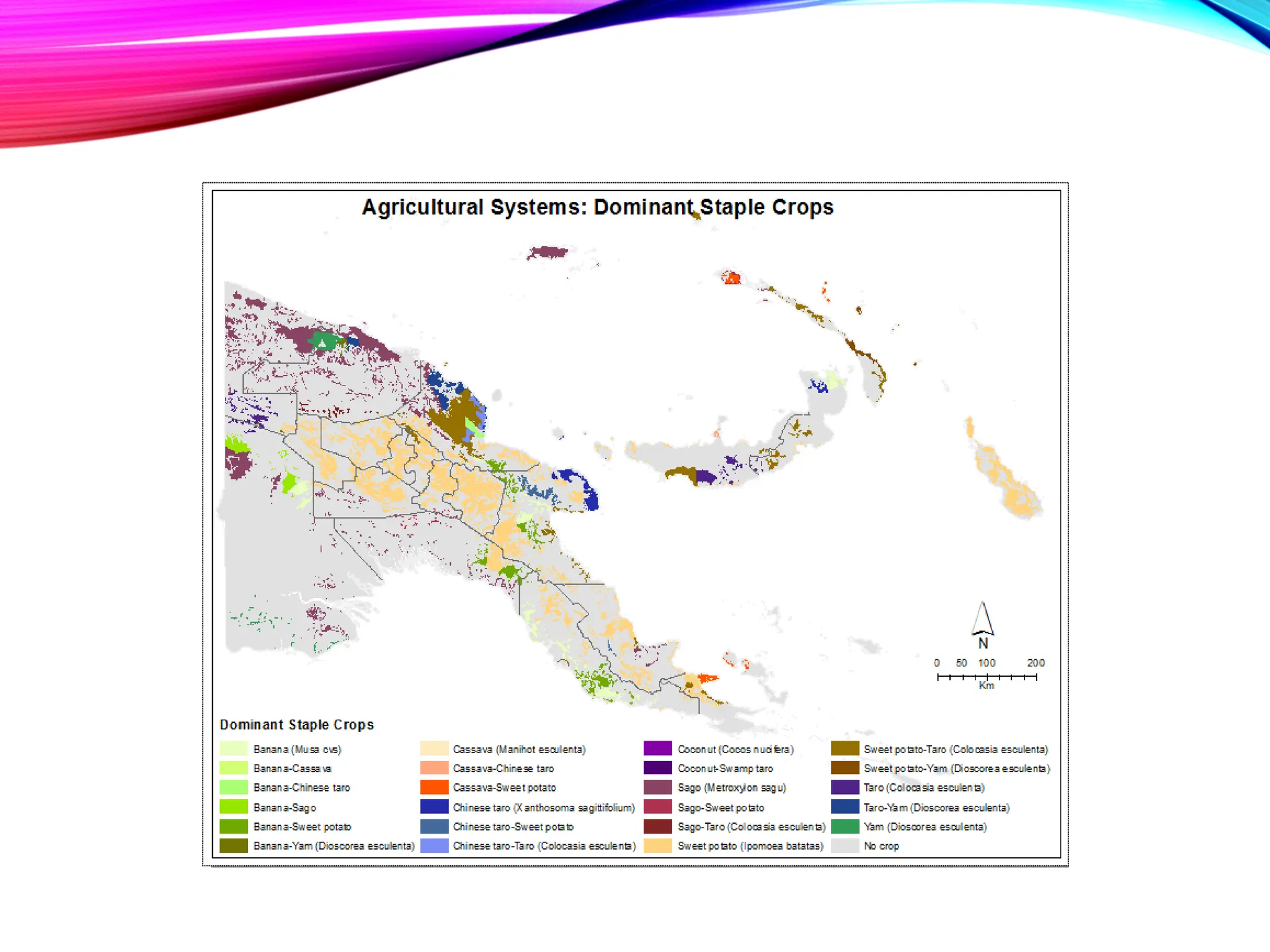
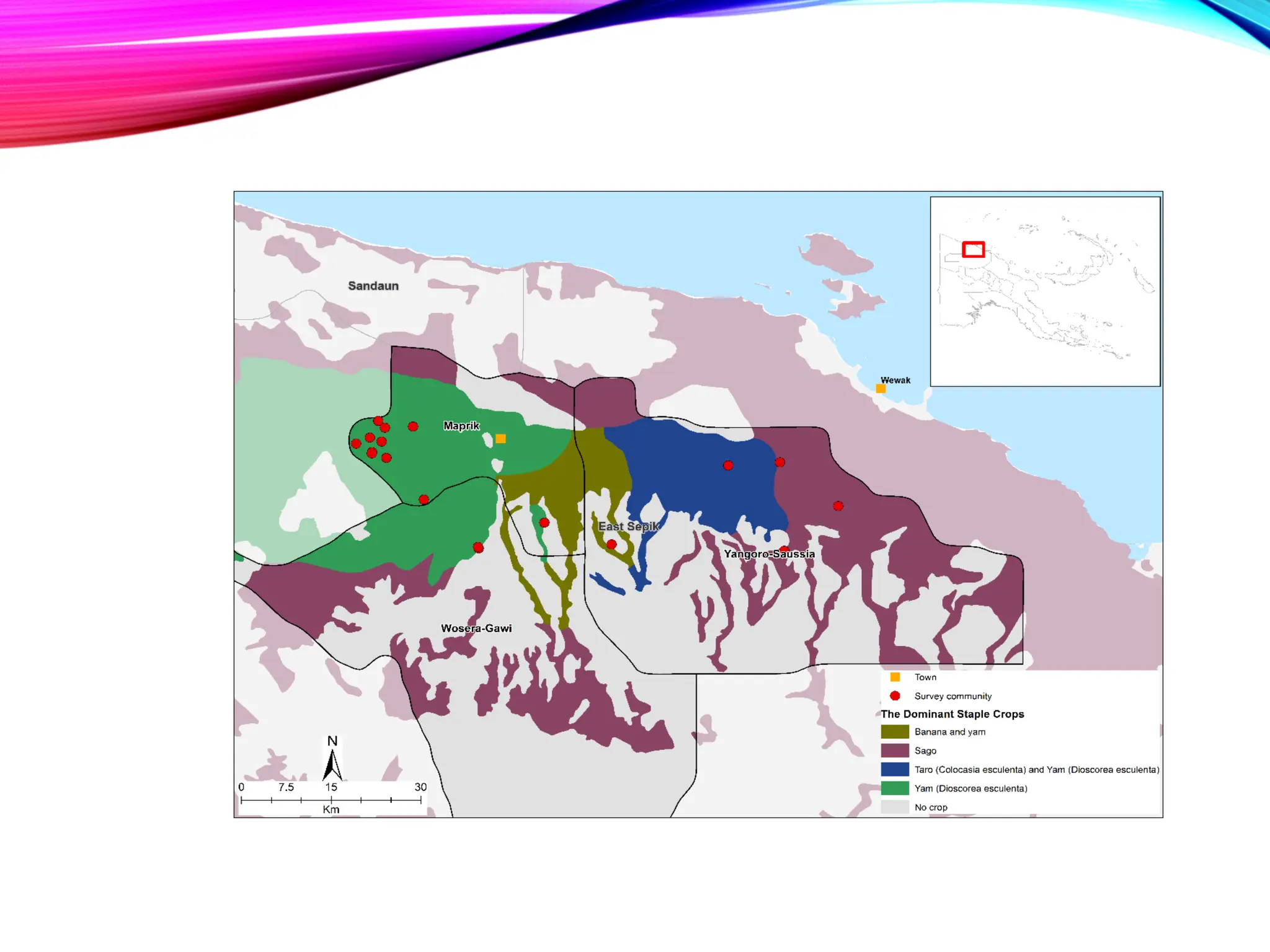
Now we will continue with agricultural system map:
• The Papua New Guinea Agricultural Systems Project
produced information on smallholder agriculture at
provincial and national levels.
• Information was collected by field observation, interviews
with villagers and reference to published and
unpublished documents.
• The projected identified 287 discrete agricultural systems.
In the last lab we merged census tabular data to
display in a more visual map format
Questions?

GIS Geographical Information System Basics.pdf

  • 1.
    Hands-On Workshop Department ofAgriculture and Livestock Port Moresby, PNG 2023 INTRODUCTION TO GEOGRAPHIC INFORMATION SYSTEMS (GIS) AND MAPPING AGRICULTURAL SYSTEM
  • 2.
    • Principles ofGIS • Data formats and GIS • Projections and GPS data • Spatial data integration • Population • Agricultural system Agenda for workshop
  • 3.
    The Principles ofGeographic Information Systems (GIS)
  • 4.
    • GIS standsfor Geographic Information System • GIS is a computer-based system that captures, stores, manages, analyzes, and visualizes spatial data, including maps, satellite imagery, and other geospatial information • GIS allows for the integration and analysis of data from multiple sources, helping to understand patterns, relationships, and trends in geographic data Definition and importance of GIS
  • 5.
    • Data: Thefoundation of GIS is data, including • spatial data (e.g., geographic features, locations) and • attribute data (e.g., characteristics, and attributes associated with spatial data) • Software: GIS software enables the creation, management, analysis, and visualization of spatial data. e.g., ArcGIS, QGIS, and Google Earth • Hardware: GIS requires hardware, such as computers, servers, and GPS devices, to process and store data • People: Skilled GIS professionals are needed to operate and analyze GIS data, interpret results, and make informed decisions Components of GIS
  • 6.
    • Location • Quantity(Measurement) • Patterns • Trends (Temporal Aspect) • Surrounding Conditions & Relationships • Implications (Planning for the future) What kind of questions can GIS address?
  • 7.
    • Improved DecisionMaking: • by providing visualizations, analysis, and insights from spatial data. • Spatial Analysis and Modeling: • overlay analysis, proximity analysis, and network analysis. • Data Integration and Management: • satellite imagery, aerial photography, GPS data, and other spatial datasets. • Visualization and Communication: • maps, charts, and other graphical representations of spatial data. • Cost and Time Savings: • GIS helps in optimizing resources, reducing costs • Environmental and Social Impact Assessment: • infrastructure development, land use planning, and natural resource management. Importance of GIS

  • 8.
    • It involvesusing GIS tools and techniques to analyze and interpret spatial data • Include tasks such as overlay analysis, buffer analysis, spatial query, spatial statistics, and network analysis • Helps in understanding spatial patterns, relationships, and trends, and supports decision- making in various fields Geospatial Analysis
  • 9.
    • Cartography isthe science and art of creating maps using GIS • designing and creating visually appealing maps that convey spatial information effectively • includes elements such as map layout, symbology, scale, projection, and map design principles Cartography
  • 10.
  • 11.
  • 12.
  • 13.
  • 14.
  • 15.
  • 16.
    • Spatial datarefers to data that has a geographic or spatial component, such as location, shape, and attributes associated with geographic features • Spatial data can be represented as points, lines, polygons, or raster images, and can be stored in various formats, such as vector and raster • Spatial data is the foundation of GIS, and it can be collected, created, and analyzed using GIS tools and techniques Basic concepts: Spatial data
  • 17.
    • GIS datacan be categorized into two main types: • vector data • raster data • Vector data represents geographic features as points, lines, or polygons, and is used to represent discrete and well-defined features such as roads, buildings, and land parcels • Raster data represents geographic features as a grid of cells, where each cell contains a value that represents an attribute or characteristic and is used to represent continuous data such as elevation, temperature, and precipitation GIS Data Types and Sources
  • 18.
    • Points representa single location, such as a well or a city center • Lines represent linear features, such as roads, rivers, or pipelines • Polygons represent enclosed areas, such as land parcels, administrative boundaries, or vegetation cover Vector Data
  • 19.
  • 20.
    • Each cellin a raster represents a location and contains a value that represents a specific attribute, such as elevation, temperature, or land cover • Raster data is used for continuous data analysis, modeling, and visualization Raster Data
  • 21.
  • 22.
    • Layers arethe building blocks of GIS, and they represent different thematic information that can be stacked on top of each other to create a map • Layers can include features such as roads, buildings, rivers, and land parcels, each represented as a separate layer with its own attributes and properties • Layers can be added, removed, and manipulated in GIS software to create complex spatial analyses and visualizations Basic concepts: Layers
  • 23.
    • A Mapis made up of Layers or Shapefiles • Layers contain Features • Features can take the form of Points, Lines and Polygons, and are known collectively as Vector Data • Layers contain Features, and each Feature is linked to a row of information in the Attribute table GIS map components
  • 24.
  • 25.
    Each layer willhave either Vector Data or Raster Data Each map is a system of layers
  • 26.
    • Refers tothe non-spatial information associated with spatial features, such as attributes or characteristics of geographic features e.g., name, population, elevation, land use, and other relevant information • Stored in tabular format and linked to spatial data using unique identifiers, allowing for analysis and querying of spatial and attribute data together Basic concepts: Attribute Data
  • 27.
  • 28.
    • GIS datacan be obtained from various sources, including: • Publicly available data, such as government agencies, academic institutions, and NGO • Commercial data providers that offer specialized GIS datasets for specific industries or applications • Crowdsourced data collected by individuals or communities, such as OpenStreetMap • Field-collected data using GPS or other data collection devices • Remote sensing data, such as satellite imagery, aerial photographs, and LiDAR data Data sources
  • 29.
    • Data qualityrefers to the accuracy, precision, and completeness of the data • Data accuracy refers to how closely the data represents the real-world features • Data scale refers to the level of detail or resolution of the data • Data relevance refers to how well the data meets the needs of the specific GIS application Data Consideration
  • 30.
    MAP IMAGE The stepstaken from feature data to Map Analysis Census Ground Survey Remote Sensing Compilation Selection Classification Simplification Exaggeration Symbolization Reading Analysis Interpretation GEOGRAPHICAL ENVORONMENT RECOGNIZED GEOGRAPHICAL INFORMATION MAP
  • 31.
    Consider what the real world distribution ofthe phenomena might look like Determine the purpose of the map and it’s intended audience Collect data appropriate for the map’s purpose Design and Construct the map STEP 1 STEP 2 STEP 3 STEP 4 STEP 5 Determine whether users find the map useful and informative The map design process
  • 33.
    • GIS softwarerefers to the applications and tools used for creating, managing, analyzing, and visualizing geographic data • Popular GIS software includes ArcGIS by Esri, QGIS, MapInfo, and Google Earth Pro • These software provide a wide range of functionalities, such as data visualization, spatial analysis, data editing, and map production GIS Software and Tools
  • 34.
    • GIS toolsare specialized software or plugins that extend the capabilities of GIS software E.g., spatial analysis tools, data management tools, geocoding tools, and remote sensing tools • These tools enhance the functionality of GIS software and enable users to perform specific tasks or analysis on geographic data GIS Tools
  • 35.
    How to getstarted
  • 36.
    Table of Contents Data Frame Tools usedto query and zoom data frame ArcGIS interface
  • 37.
    Zoom tools Pan tool SelectTools View tools Identify tool Normal Arrow Cursor Basic mapping toolbar
  • 38.
    LAB 01 Overview: Create abasic overview map of PNG. ▪ Introduce the ArcMap Interface & Toolbars ▪ Basic Symbology & Symbol hierarchies ▪ Basic Querying ▪ Labeling ▪ Layout ▪ Final Output will be exported to PowerPoint
  • 39.
  • 40.
    Let’s open upan ArcGIS session right now, and you can begin working on the first exercise
  • 41.
    Hands - OnWorkshop Advanced Symbology- Lab02
  • 42.
  • 43.
    In Lab 01,we mapped the data, now we will begin to classify it and choose hierarchies to better understand spatial elements of the country! Lab 02: Advanced Symbology
  • 44.
    Instead of displayingsingle feature of town and road, we can map large vs. small cities, or primary, secondary, tertiary roads. Lab 02: Advanced Symbology
  • 45.
    The layer properties;table links to the attribute table that you worked with in lab01
  • 46.
    The manner inwhich you are able to classify your data depends on the data type (text vs. numerical)
  • 47.
    • Allows youto decide how to classify your data (Quintiles, Natural Breaks, Standard Deviation, Manual, etc. •Allows you to create your own “Break Values” •Provides a histogram of the specific variable •Gives Classification Statistics Within the layer properties there is a classification window
  • 48.
    At the beginningof Lab 02 exercise the road network had the same line symbol regardless of their level of importance. This is sufficient for a basic informational map, but most GIS maps are used as a visual interpretation of tabular data, therefore we will learn how to visualize such data in this lab.
  • 49.
  • 50.
    Data formats andArcCatalog
  • 51.
  • 52.
    In Windows Explorer, youwill see several files for each shapefile. You need all of these files in order for the shapefile to work properly and map within GIS. Several files comprise one shapefile
  • 53.
    In ArcCatalog, thesefiles are packaged and presented as one file in order to facilitate copying from / to other folders.
  • 54.
    Population Density PopulationCount Understanding the spatial layout-dispersion and clustering of specific indicators Lab 03: Choropleth Mapping
  • 55.
  • 57.
  • 58.
  • 59.
  • 60.
  • 61.
    Population Density PopulationCount Questions from Lab 03?
  • 62.
    • Using GoogleEarth:convert layer(shapefile)/map to KML • Projections • GPS data from the field Moving Forward …
  • 63.
    Convert map layerto KML (in ArcMap) • Create or open a saved map document • Open ArcMap’s Toolbox • Navigate to Conversion Tools: Map to KML • Double-click ‘Map to KML’ • Locate the saved map document • Define the output file (KML) • Click ‘OK’ • Locate the saved KMZ file and double click ❑ The Map to KML tool allows multiple layers in an ArcMap map document data frame to be simultaneously exported to a KML file. ❑ Each layer will be maintained as a distinct folder in the KML, unless the option is used to convert all layers to a single flattened image
  • 65.
    Convert Shapefile toKML (in ArcMap) • Open and Review Shapefile via ArcMap • Define that Shapefile’s symbology as desired • Open ArcMap’s Toolbox • Navigate to Conversion Tools: Layer to KML • Double-click ‘Layer to KML’ • Select the symbolized ‘layer’ • Define the output file (KML) • Click ‘OK’ • Open Google Earth • Open KML in Google Earth
  • 67.
  • 68.
  • 69.
  • 70.
    The USSR was big,but maybe not as big as we thought. Time Magazine (1951): Rand McNally ad lambasting Mercator as the man who made USSR look so big. Orthographic Projection
  • 71.
    Figure 8.15 –Slocum, Chapter 8 A. B. Orthographic projection Mercator Projection The creation of a flat map creates Distortion – How do we identify it?
  • 72.
  • 73.
    Step 1 Reduce theEarth’s size to that of an imaginary globe Reference Globe A model of the earth at a reduced scale, that is used to project the landmasses and graticule onto a flat map Map Projection Techniques Figure 8.1 – Slocum, Chapter 8
  • 74.
    Step 2 Project thegraticule from the reference globe onto the developable surface Developable Surface A mathematically definable surface onto which the land masses and graticule are projected from the reference globe Cylinder Cone Plane Figure 8.2 – Slocum, Chapter 8 Map projection techniques
  • 75.
    The Case ofa projection relates to how the developable surface is positioned with respect to the reference globe Case can be described as • Tangent or • Secant Case
  • 76.
    In a tangentcase of a map projection, the reference globe only touches the developable surface along one line, or at one point in the case of the planar projection. Figure 8.9 – Slocum, Chapter 8 Tangency
  • 77.
    A secant caseof a map projection occurs when the developable surface passes through the reference globe, producing two lines of contact Figure 8.9 – Slocum, Chapter 8 Secant case
  • 78.
    Figure 8.12 –Slocum, Chapter 8 Standard line & scale variation
  • 79.
    Figure 8.13 –Slocum, Chapter 8 Back to the USSR: Choosing tangent or Secant case
  • 80.
  • 81.
    Hammer map centered onEurasia Lambert Cylindrical Projection Types of Projections
  • 82.
    • Universal TransverseMercator (UTM) • The UTM system is not a single map projection • The system employs a series of sixty zones, each of which is based on a specifically defined secant Transverse Mercator projection. Image:Utm-zones.jpg Types of Projections cont.
  • 83.
    The Mercator projection maps theworld onto a cylinder where the central ring of tangency is the Earth's Equator. (Remember USSR?) Turning the Mercator projection's cylinder so that it is tangent to the Earth along a meridian (longitude line) results in what is called a Transverse Mercator projection. The Universal Transverse Mercator system of projections deals with this by defining 60 different standard projections. Each projection has a different Transverse Mercator projection that is slightly rotated to use a different meridian as the central line of tangency. UTM projection cont.
  • 84.
    So, what isthe UTM projection of PNG?
  • 85.
    The first stepin problem solving spatial data is to check the projection. If the projection is ‘undefined’ or is different from the other ‘Layers’ in your Data Frame it will not merge nicely and you will not be able to do ANY spatial analysis! So, what does this have to do with your analysis?
  • 86.
    You will experimentwith different projections to understand what can be preserved and what is lost due to geographic projection decisions You have been given detailed surveyed community point information, which was collected using GPS units in the field. Unfortunately, it is not displaying correctly in the data frame. You will need to project the data correctly and perform any analysis. Exercise 5
  • 87.
    GPS data fromthe field, when projected correctly allows for new data creation and facilitates data comprehension when analyzing across geographic space. Surveyed community location
  • 88.
    What are welooking at? Once you master projections, you can use data from a variety of sources in order to create more data and perform more analysis.
  • 89.
    P’yongyang Seoul What can we questionabout population density and infrastructure?
  • 90.
  • 91.
  • 92.
    • Spatial DataIntegration • Spatial Join • Spatial Join with the health centers in PNG • Tabular Join Moving along …
  • 93.
    Two Types ofData to be managed in GIS • Spatial Data (Where things are) • Tabular data (What things are) Spatial data integration –Lab 06…
  • 94.
    Spatial Joins can generateinteresting statistics about SSA: • Compare road density and surface type by country, province, district, etc. • Compare road kilometer length and surface type by country, state/province, etc.
  • 95.
    Spatial join canalso calculate population counts and densities within specified geographic regions
  • 96.
    • How dothe number of Health centers relate to the population density figures you worked with in Lab03? • How would we calculate Health center per capita figure for district level statistics? Lab 06 District Level
  • 97.
  • 98.
    • Tabular Data •Merging other datasets to GIS shapefiles • Census • HHS • DHS • Environmental Surveys
  • 99.
    Formatting Rules: • Nospaces in field names • Numeric and text fields must be designated as such • Field names no longer than 11 digits (to permanently append to the shapefile) Excel to ArcGIS
  • 100.
    Linking Tabular Data PrimaryKey: Unique Identifier for EACH row of information a particular data file
  • 101.
    When tabular data aresuccessfully merged with spatial attributes, we can evaluate variations among disaggregated variables, and trends over time and throughout space
  • 102.
    Exercise Overview • Youhave received detailed Household Census information from NSO-PNG. The data is in Microsoft Excel format, and you need to integrate this information into ArcMap to create a thematic map. • To achieve this you must conduct a Table Join. A table join appends attributes of a non-spatial table, to the attributes of a map table. (Non-Spatial means “without geography”, i.e.: without map attached). In order for this join to be successful there must be a way to match records in one table with appropriate records in another. Lab 07
  • 103.
  • 104.
  • 105.
    Now we willcontinue with agricultural system map: • The Papua New Guinea Agricultural Systems Project produced information on smallholder agriculture at provincial and national levels. • Information was collected by field observation, interviews with villagers and reference to published and unpublished documents. • The projected identified 287 discrete agricultural systems. In the last lab we merged census tabular data to display in a more visual map format
  • 108.