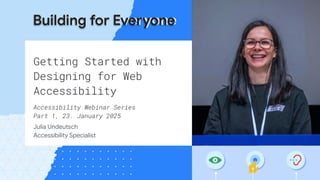
Getting Started with
Designing for Web
Accessibility
Accessibility Webinar Series
Part 1, 23. January 2025
Julia Undeutsch
Accessibility Specialist
Building for Everyone
● Introduction to Web Accessibility
● What is User Experience?
● Accessibility in UX design
● Key Concept: Visuals
○ Color Contrast
○ Color Independency
○ Typography
● Key concept: Comprehension
○ Descriptive Links
● Conclusion
Agenda
What is Accessibility?
Introduction in Web Accessibility
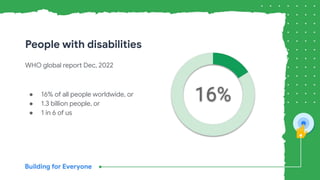
WHO global report Dec, 2022
● 16% of all people worldwide, or
● 1.3 billion people, or
● 1 in 6 of us
People with disabilities
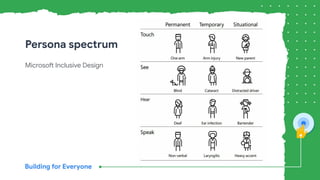
Microsoft Inclusive Design
Persona spectrum
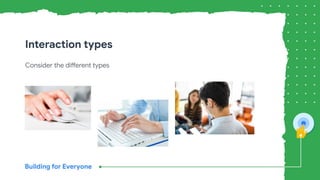
Consider the different types
Interaction types
What is UX?
Introduction in User Experience
Accessibility Principle 1: Perceivable, W3C
“All users, regardless of a disability, must
have equal access to the information.”
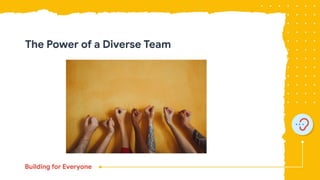
The Power of a Diverse Team
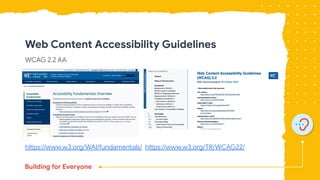
Web Content Accessibility Guidelines
WCAG 2.2 AA
https://www.w3.org/WAI/fundamentals/ https://www.w3.org/TR/WCAG22/
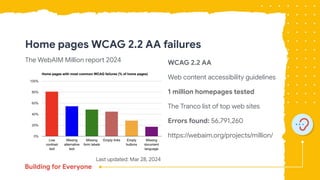
Home pages WCAG 2.2 AA failures
The WebAIM Million report 2024 WCAG 2.2 AA
Web content accessibility guidelines
1 million homepages tested
The Tranco list of top web sites
Errors found: 56,791,260
https://webaim.org/projects/million/
Last updated: Mar 28, 2024
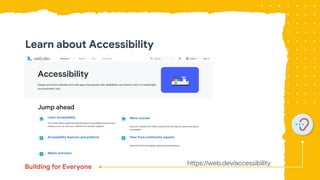
https://web.dev/accessibility
Learn about Accessibility
Key concept: Visuals
Color Contrast
Color Independency
Typography
Color Contrast
Key concept: Visuals
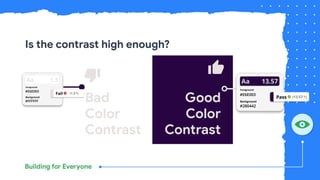
Is the contrast high enough?
Bad
Color
Contrast
Good
Color
Contrast
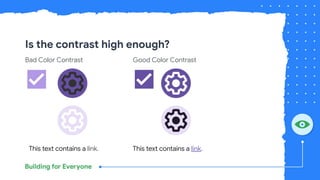
Is the contrast high enough?
Bad Color Contrast Good Color Contrast
This text contains a link. This text contains a link.
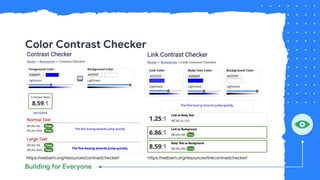
Color Contrast Checker
https://webaim.org/resources/contrastchecker/ https://webaim.org/resources/linkcontrastchecker/
Color Independency
Key concept: Visuals
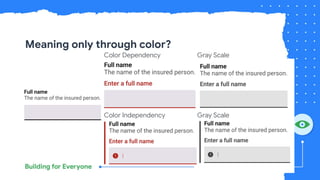
Meaning only through color?
Color Dependency Gray Scale
Color Independency Gray Scale
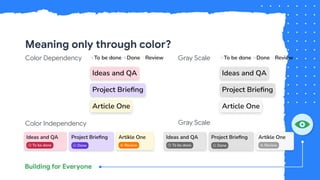
Meaning only through color?
Color Dependency Gray Scale
Color Independency Gray Scale
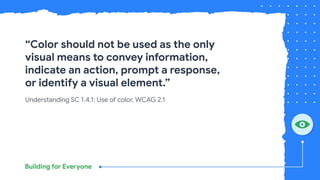
Understanding SC 1.4.1: Use of color, WCAG 2.1
“Color should not be used as the only
visual means to convey information,
indicate an action, prompt a response,
or identify a visual element.”
Typography
Key concept: Visuals
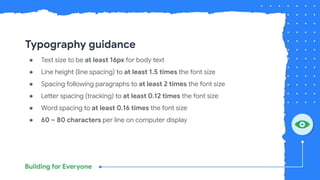
Typography guidance
● Text size to be at least 16px for body text
● Line height (line spacing) to at least 1.5 times the font size
● Spacing following paragraphs to at least 2 times the font size
● Letter spacing (tracking) to at least 0.12 times the font size
● Word spacing to at least 0.16 times the font size
● 60 – 80 characters per line on computer display
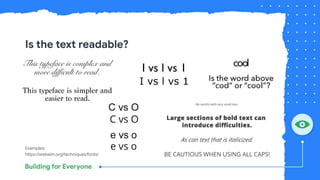
Is the text readable?
Examples:
https://webaim.org/techniques/fonts/
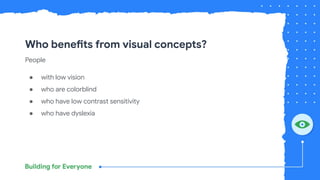
Who benefits from visual concepts?
People
● with low vision
● who are colorblind
● who have low contrast sensitivity
● who have dyslexia
Key concept:
Comprehension
Descriptive links text
Link text
Key concept: Comprehension
Descriptive Links
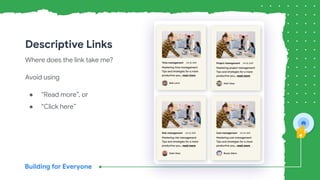
Where does the link take me?
Avoid using
● “Read more”, or
● “Click here”
Descriptive Links
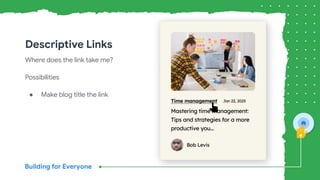
Where does the link take me?
Possibilities
● Make blog title the link
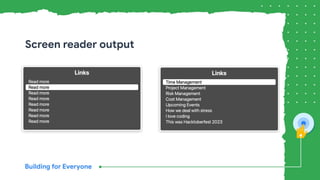
Screen reader output
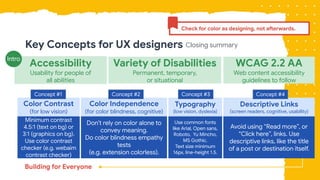
Key Concepts for UX designers
Accessibility
Usability for people of
all abilities
Variety of Disabilities
Permanent, temporary,
or situational
WCAG 2.2 AA
Web content accessibility
guidelines to follow
Intro
Color Contrast
(for low vision)
Color Independence
(for color blindness, cognitive)
Typography
(low vision, dyslexia)
Descriptive Links
(screen readers, cognitive, usability)
Concept #1 Concept #2 Concept #3 Concept #4
Minimum contrast
4.5:1 (text on bg) or
3:1 (graphics on bg).
Use color contrast
checker (e.g. webaim
contrast checker)
Don’t rely on color alone to
convey meaning.
Do color blindness empathy
tests
(e.g. extension colorless).
Use common fonts
like Arial, Open sans,
Roboto, Yu Mincho,
MS Gothic.
Text size minimum
16px, line-height 1.5.
Avoid using “Read more”, or
“Click here”, links. Use
descriptive links, like the title
of a post or destination itself.
Check for color as designing, not afterwards.
Closing summary
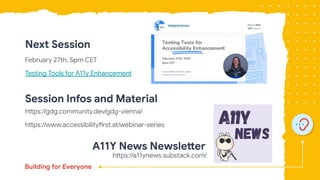
Next Session
February 27th, 5pm CET
Testing Tools for A11y Enhancement
Session Infos and Material
https://gdg.community.dev/gdg-vienna/
https://www.accessibilityfirst.at/webinar-series
https://a11ynews.substack.com/
A11Y News Newsletter
Q&A
Ressources
● https://www.who.int/teams/noncommunicable-diseases/sensory-functions-disabilit
y-and-rehabilitation/global-report-on-health-equity-for-persons-with-disabilities
● https://www.w3.org/WAI/fundamentals/accessibility-principles/#perceivable
● https://webaim.org/projects/million/
● https://inclusive.microsoft.design/
● https://m3.material.io/
● https://webaim.org/resources/contrastchecker/
● Browser extensions: Colorless, A11Y -A11Y - Color blindness empathy test Color
blindness empathy test
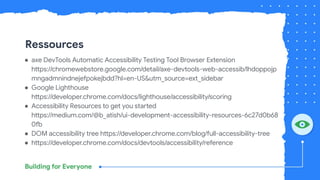
Ressources
● axe DevTools Automatic Accessibility Testing Tool Browser Extension
https://chromewebstore.google.com/detail/axe-devtools-web-accessib/lhdoppojp
mngadmnindnejefpokejbdd?hl=en-US&utm_source=ext_sidebar
● Google Lighthouse
https://developer.chrome.com/docs/lighthouse/accessibility/scoring
● Accessibility Resources to get you started
https://medium.com/@b_atish/ui-development-accessibility-resources-6c27d0b68
0fb
● DOM accessibility tree https://developer.chrome.com/blog/full-accessibility-tree
● https://developer.chrome.com/docs/devtools/accessibility/reference
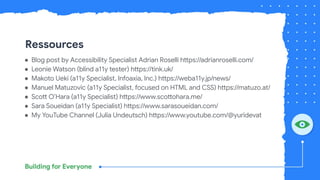
Ressources
● Blog post by Accessibility Specialist Adrian Roselli https://adrianroselli.com/
● Leonie Watson (blind a11y tester) https://tink.uk/
● Makoto Ueki (a11y Specialist, Infoaxia, Inc.) https://weba11y.jp/news/
● Manuel Matuzovic (a11y Specialist, focused on HTML and CSS) https://matuzo.at/
● Scott O’Hara (a11y Specialist) https://www.scottohara.me/
● Sara Soueidan (a11y Specialist) https://www.sarasoueidan.com/
● My YouTube Channel (Julia Undeutsch) https://www.youtube.com/@yuridevat

Getting started with designing for Web Accessibility - Accessibility Webinar Series

  • 1.
    Getting Started with Designingfor Web Accessibility Accessibility Webinar Series Part 1, 23. January 2025 Julia Undeutsch Accessibility Specialist Building for Everyone
  • 2.
    ● Introduction toWeb Accessibility ● What is User Experience? ● Accessibility in UX design ● Key Concept: Visuals ○ Color Contrast ○ Color Independency ○ Typography ● Key concept: Comprehension ○ Descriptive Links ● Conclusion Agenda
  • 3.
  • 5.
    WHO global reportDec, 2022 ● 16% of all people worldwide, or ● 1.3 billion people, or ● 1 in 6 of us People with disabilities
  • 6.
  • 7.
    Consider the differenttypes Interaction types
  • 8.
    What is UX? Introductionin User Experience
  • 9.
    Accessibility Principle 1:Perceivable, W3C “All users, regardless of a disability, must have equal access to the information.”
  • 10.
    The Power ofa Diverse Team
  • 11.
    Web Content AccessibilityGuidelines WCAG 2.2 AA https://www.w3.org/WAI/fundamentals/ https://www.w3.org/TR/WCAG22/
  • 12.
    Home pages WCAG2.2 AA failures The WebAIM Million report 2024 WCAG 2.2 AA Web content accessibility guidelines 1 million homepages tested The Tranco list of top web sites Errors found: 56,791,260 https://webaim.org/projects/million/ Last updated: Mar 28, 2024
  • 13.
  • 14.
    Key concept: Visuals ColorContrast Color Independency Typography
  • 16.
  • 17.
    Is the contrasthigh enough? Bad Color Contrast Good Color Contrast
  • 18.
    Is the contrasthigh enough? Bad Color Contrast Good Color Contrast This text contains a link. This text contains a link.
  • 19.
    Color Contrast Checker https://webaim.org/resources/contrastchecker/https://webaim.org/resources/linkcontrastchecker/
  • 20.
  • 21.
    Meaning only throughcolor? Color Dependency Gray Scale Color Independency Gray Scale
  • 22.
    Meaning only throughcolor? Color Dependency Gray Scale Color Independency Gray Scale
  • 23.
    Understanding SC 1.4.1:Use of color, WCAG 2.1 “Color should not be used as the only visual means to convey information, indicate an action, prompt a response, or identify a visual element.”
  • 24.
  • 25.
    Typography guidance ● Textsize to be at least 16px for body text ● Line height (line spacing) to at least 1.5 times the font size ● Spacing following paragraphs to at least 2 times the font size ● Letter spacing (tracking) to at least 0.12 times the font size ● Word spacing to at least 0.16 times the font size ● 60 – 80 characters per line on computer display
  • 26.
    Is the textreadable? Examples: https://webaim.org/techniques/fonts/
  • 27.
    Who benefits fromvisual concepts? People ● with low vision ● who are colorblind ● who have low contrast sensitivity ● who have dyslexia
  • 28.
  • 29.
  • 30.
    Descriptive Links Where doesthe link take me? Avoid using ● “Read more”, or ● “Click here”
  • 31.
    Descriptive Links Where doesthe link take me? Possibilities ● Make blog title the link
  • 32.
  • 33.
    Key Concepts forUX designers Accessibility Usability for people of all abilities Variety of Disabilities Permanent, temporary, or situational WCAG 2.2 AA Web content accessibility guidelines to follow Intro Color Contrast (for low vision) Color Independence (for color blindness, cognitive) Typography (low vision, dyslexia) Descriptive Links (screen readers, cognitive, usability) Concept #1 Concept #2 Concept #3 Concept #4 Minimum contrast 4.5:1 (text on bg) or 3:1 (graphics on bg). Use color contrast checker (e.g. webaim contrast checker) Don’t rely on color alone to convey meaning. Do color blindness empathy tests (e.g. extension colorless). Use common fonts like Arial, Open sans, Roboto, Yu Mincho, MS Gothic. Text size minimum 16px, line-height 1.5. Avoid using “Read more”, or “Click here”, links. Use descriptive links, like the title of a post or destination itself. Check for color as designing, not afterwards. Closing summary
  • 34.
    Next Session February 27th,5pm CET Testing Tools for A11y Enhancement Session Infos and Material https://gdg.community.dev/gdg-vienna/ https://www.accessibilityfirst.at/webinar-series https://a11ynews.substack.com/ A11Y News Newsletter
  • 35.
  • 36.
    Ressources ● https://www.who.int/teams/noncommunicable-diseases/sensory-functions-disabilit y-and-rehabilitation/global-report-on-health-equity-for-persons-with-disabilities ● https://www.w3.org/WAI/fundamentals/accessibility-principles/#perceivable ●https://webaim.org/projects/million/ ● https://inclusive.microsoft.design/ ● https://m3.material.io/ ● https://webaim.org/resources/contrastchecker/ ● Browser extensions: Colorless, A11Y -A11Y - Color blindness empathy test Color blindness empathy test
  • 37.
    Ressources ● axe DevToolsAutomatic Accessibility Testing Tool Browser Extension https://chromewebstore.google.com/detail/axe-devtools-web-accessib/lhdoppojp mngadmnindnejefpokejbdd?hl=en-US&utm_source=ext_sidebar ● Google Lighthouse https://developer.chrome.com/docs/lighthouse/accessibility/scoring ● Accessibility Resources to get you started https://medium.com/@b_atish/ui-development-accessibility-resources-6c27d0b68 0fb ● DOM accessibility tree https://developer.chrome.com/blog/full-accessibility-tree ● https://developer.chrome.com/docs/devtools/accessibility/reference
  • 38.
    Ressources ● Blog postby Accessibility Specialist Adrian Roselli https://adrianroselli.com/ ● Leonie Watson (blind a11y tester) https://tink.uk/ ● Makoto Ueki (a11y Specialist, Infoaxia, Inc.) https://weba11y.jp/news/ ● Manuel Matuzovic (a11y Specialist, focused on HTML and CSS) https://matuzo.at/ ● Scott O’Hara (a11y Specialist) https://www.scottohara.me/ ● Sara Soueidan (a11y Specialist) https://www.sarasoueidan.com/ ● My YouTube Channel (Julia Undeutsch) https://www.youtube.com/@yuridevat