GET THINGS DONE WITH

 QUICKLY BUILD A WEBAPP USING YII


  GIULIANO IACOBELLI - @Giuliano84 - me@giulianoiacobelli.com
WEB IS FULL OF AMAZING TOOLS
USUALLY EVERYTHING STARTS
      FROM AN IDEA
IF IT’S THE RIGHT ONE
AND IS WELL EXECUTED..
IF YOU HAVE GOOD IDEA, DO IT.
MOVE FAST AND
BREAK THINGS
SO LET ME INTRODUCE YOU TO
WHAT IS IT?

Yii is a high-performance component-based
PHP framework for developing large-scale
Webapplications. It enables maximum
reusability in Web programming and can
significantly accelerate the development
process.
IT’S EASY?
IT’S RAPID?
IT’S SECURE?

         YES IT IS (YII) !!!
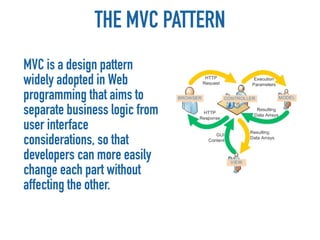
THE MVC PATTERN
MVC is a design pattern
widely adopted in Web
programming that aims to
separate business logic from
user interface
considerations, so that
developers can more easily
change each part without
affecting the other.
THE MVC PATTERN
 Assume a Web application consists of several sub-
 applications:

• Front end: a public-facing website for normal end users;
• Back end: a website that exposes administrative
  functionality for managing the application.
• Console: an application consisting of console commands
  to be run in a terminal window or as scheduled jobs to
  support the whole application;
• Web API: providing interfaces to third parties for
  integrating with the application.
M for MODEL
 Models are used to keep data and their relevant business rules. A
 model represents a single data object that could be a row in a
 database table or a form of user inputs.


• should contain properties to represent specific data;
• should contain business logic (e.g. validation rules) to ensure
  the represented data fulfills the design requirement;
• may contain code for manipulating data. For example, a
  SearchForm model, besides representing the search input data,
  may contain a search method to implement the actual search.
C for CONTROLLER

Controllers are the glue that binds models, views and other
components together into a runnable application. They are
responsible for dealing directly with end user requests.

• may access $_GET, $_POST and other PHP variables that
  represent user requests;
• may create model instances and manage their life cycles.
• should avoid containing embedded SQL statements, which are
  better kept in models.
• should avoid containing any HTML or any other presentational
  markup. This is better kept in views.
V for VIEW

A view is a PHP script consisting of mainly elements of user interface
the spirit of seperation of logic and presentation, large chunk of logic
should be placed in controller or model instead of view.

• should mainly contain presentational code, such as HTML, and
  simple PHP code to traverse, format and render data;
• should avoid containing code that performs explicit DB queries.
  Such code is better placed in models.
• should avoid direct access to $_GET, $_POST, or other similar
  variables that represent the end user request. This is the
  controller's job.
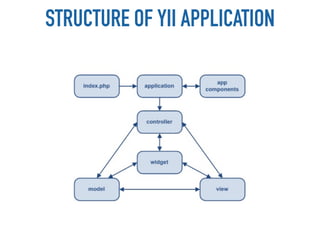
STRUCTURE OF YII APPLICATION
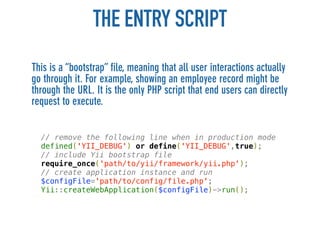
THE ENTRY SCRIPT
This is a “bootstrap” file, meaning that all user interactions actually
go through it. For example, showing an employee record might be
through the URL. It is the only PHP script that end users can directly
request to execute.


  // remove the following line when in production mode
  defined('YII_DEBUG') or define('YII_DEBUG',true);
  // include Yii bootstrap file
  require_once('path/to/yii/framework/yii.php');
  // create application instance and run
  $configFile='path/to/config/file.php';
  Yii::createWebApplication($configFile)->run();
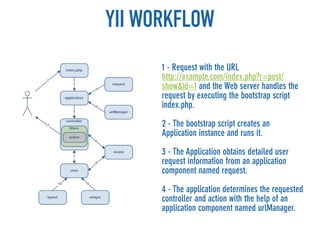
YII WORKFLOW
      1 - Request with the URL
      http://example.com/index.php?r=post/
      show&id=1 and the Web server handles the
      request by executing the bootstrap script
      index.php.

      2 - The bootstrap script creates an
      Application instance and runs it.

      3 - The Application obtains detailed user
      request information from an application
      component named request.

      4 - The application determines the requested
      controller and action with the help of an
      application component named urlManager.
YII WORKFLOW
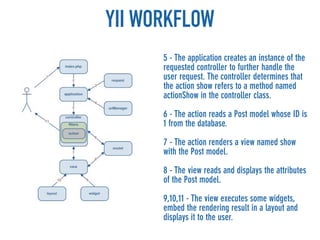
      5 - The application creates an instance of the
      requested controller to further handle the
      user request. The controller determines that
      the action show refers to a method named
      actionShow in the controller class.

      6 - The action reads a Post model whose ID is
      1 from the database.

      7 - The action renders a view named show
      with the Post model.

      8 - The view reads and displays the attributes
      of the Post model.

      9,10,11 - The view executes some widgets,
      embed the rendering result in a layout and
      displays it to the user.
OK, OK, I GOT IT, TOO MUCH TALK..


LET’S HAVE AN IDEA TO BUILD..
AND THE AMAZING IDEA IS..
A BLOG!
OK, IT’S NOT THAT AMAZING BUT IN THIS
WAY I’M PRETTY SURE THAT ALL OF YOU
 KNOW WHAT WE ARE GOIN TO BUILD
WARM UP

 • CREATE A “BLOGDEMO” FOLDER
   IN YOUR APACHE DOCUMENT
   ROOT DIRECTORY
 • DOWNLOAD YiiBlogDemo.zip FILE
   FROM http://goo.gl/nOqef AND
   UNZIP IT
 • OPEN FRAMEWORK.ZIP AND
   PLACE ITS CONTENT IN YOUR
   “BLOGDEMO” FOLDER
YII PREPARATION

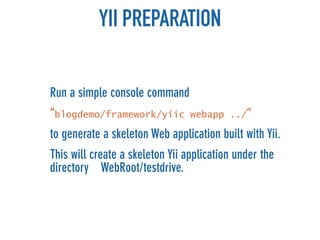
Run a simple console command
“blogdemo/framework/yiic         webapp ../“

to generate a skeleton Web application built with Yii.
This will create a skeleton Yii application under the
directory WebRoot/testdrive.
THE WEB APPLICATION


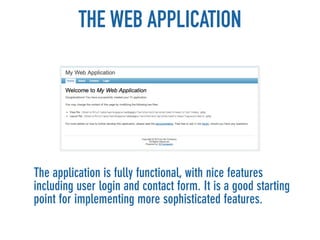
The application is fully functional, with nice features
including user login and contact form. It is a good starting
point for implementing more sophisticated features.
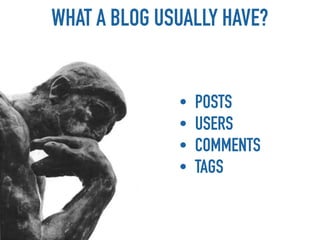
WHAT A BLOG USUALLY HAVE?


              •   POSTS
              •   USERS
              •   COMMENTS
              •   TAGS
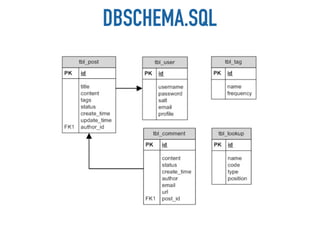
DBSCHEMA.SQL
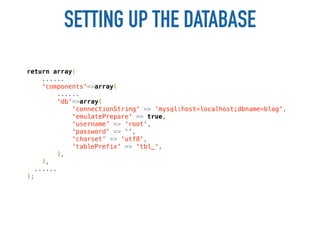
SETTING UP THE DATABASE
return array(
     ......
     'components'=>array(
          ......
         'db'=>array(
              'connectionString' => 'mysql:host=localhost;dbname=blog',
              'emulatePrepare' => true,
              'username' => 'root',
              'password' => '',
              'charset' => 'utf8',
              'tablePrefix' => 'tbl_',
         ),
     ),
   ......
);
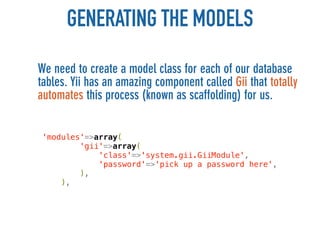
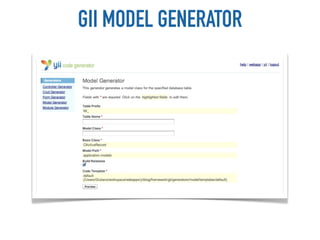
GENERATING THE MODELS
We need to create a model class for each of our database
tables. Yii has an amazing component called Gii that totally
automates this process (known as scaffolding) for us.


 'modules'=>array(
         'gii'=>array(
             'class'=>'system.gii.GiiModule',
             'password'=>'pick up a password here',
         ),
     ),
GII MODEL GENERATOR
OUR MODELS
• User.php contains the User class and can be used to access
  the tbl_user database table;
• Post.php contains the Post class and can be used to access
  the tbl_post database table;
• Tag.php contains the Tag class and can be used to access the
  tbl_tag database table;
• Comment.php contains the Comment class and can be used
  to access the tbl_comment database table;
• Lookup.php contains the Lookup class and can be used to
  access the tbl_lookup database table.
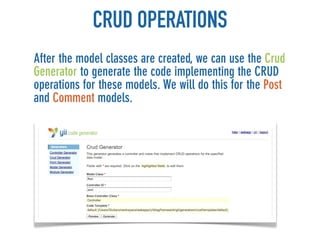
CRUD OPERATIONS
After the model classes are created, we can use the Crud
Generator to generate the code implementing the CRUD
operations for these models. We will do this for the Post
and Comment models.
AUTHENTICATING USER

Our blog application needs to differentiate between
the system owner and guest users. Therefore, we need
to implement the user authentication feature
User authentication is performed in a class
implementing the IUserIdentity interface. The skeleton
application uses the UserIdentity class for this
purpose.

The class is stored in the file /wwwroot/blogdemo/
protected/components/UserIdentity.php.
AUTHENTICATING USER


Application already provides user authentication
by checking if the username and password are
both demo or admin.
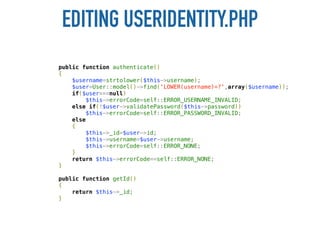
Now we will modify the corresponding code so
that the authentication is done against the User
database table.
EDITING USERIDENTITY.PHP
public function authenticate()
{
    $username=strtolower($this->username);
    $user=User::model()->find('LOWER(username)=?',array($username));
    if($user===null)
        $this->errorCode=self::ERROR_USERNAME_INVALID;
    else if(!$user->validatePassword($this->password))
        $this->errorCode=self::ERROR_PASSWORD_INVALID;
    else
    {
        $this->_id=$user->id;
        $this->username=$user->username;
        $this->errorCode=self::ERROR_NONE;
    }
    return $this->errorCode==self::ERROR_NONE;
}

public function getId()
{
    return $this->_id;
}
RECAP
• Identified the requirements to be fulfilled;
• We installed the Yii framework and created a skeleton
  application;
• We designed and created the blog database;
• We generated basic CRUD operations;
• We modified the authentication method to check
  against the tbl_user table.
CUSTOMIZING POST MODEL
Post model generated is fine but now we need to specify
validation rules and related objects
• Validation rules ensure the attribute values entered by
  users are correct before they are saved to the database.
  For example, the status attribute of Post should be an
  integer 1, 2 or 3.
• Customizing the relations we can exploit the powerful
  Relational ActiveRecord (RAR) feature to access the
  related object information of a post, such as its author
  and comments, without the need to write complex SQL
  statements.
VALIDATION RULES
Based on the requirement analysis, we modify the
rules() method as follows:

public function rules()
{
    return array(
        array('title, content, status', 'required'),
        array('title', 'length', 'max'=>128),
        array('status', 'in', 'range'=>array(1,2,3)),
        array('tags', 'match', 'pattern'=>'/^[ws,]+$/',
            'message'=>'Tags can only contain word characters.'),
        array('tags', 'normalizeTags'),

         array('title, status', 'safe', 'on'=>'search'),
    );
}
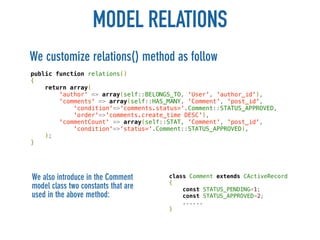
MODEL RELATIONS
We customize relations() method as follow
public function relations()
{
    return array(
        'author' => array(self::BELONGS_TO, 'User', 'author_id'),
        'comments' => array(self::HAS_MANY, 'Comment', 'post_id',
            'condition'=>'comments.status='.Comment::STATUS_APPROVED,
            'order'=>'comments.create_time DESC'),
        'commentCount' => array(self::STAT, 'Comment', 'post_id',
            'condition'=>'status='.Comment::STATUS_APPROVED),
    );
}


We also introduce in the Comment      class Comment extends CActiveRecord
                                      {
model class two constants that are        const STATUS_PENDING=1;
used in the above method:                 const STATUS_APPROVED=2;
                                          ......
                                      }
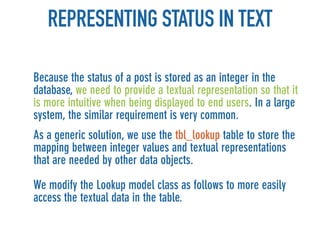
REPRESENTING STATUS IN TEXT

Because the status of a post is stored as an integer in the
database, we need to provide a textual representation so that it
is more intuitive when being displayed to end users. In a large
system, the similar requirement is very common.
As a generic solution, we use the tbl_lookup table to store the
mapping between integer values and textual representations
that are needed by other data objects.

We modify the Lookup model class as follows to more easily
access the textual data in the table.
LOOKUP.PHP
class Lookup extends CActiveRecord
{
    private static $_items=array();
    public static function items($type)
    {
        if(!isset(self::$_items[$type]))
            self::loadItems($type);
        return self::$_items[$type];
    }

    public static function item($type,$code)
    {
        if(!isset(self::$_items[$type]))
            self::loadItems($type);
        return isset(self::$_items[$type][$code]) ? self::$_items[$type][$code] : false;
    }

    private static function loadItems($type)
    {
        self::$_items[$type]=array();
        $models=self::model()->findAll(array(
            'condition'=>'type=:type',
            'params'=>array(':type'=>$type),
            'order'=>'position',
        ));
        foreach($models as $model)
            self::$_items[$type][$model->code]=$model->name;
    }
}
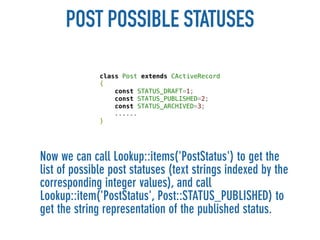
POST POSSIBLE STATUSES

              class Post extends CActiveRecord
              {
                  const STATUS_DRAFT=1;
                  const STATUS_PUBLISHED=2;
                  const STATUS_ARCHIVED=3;
                  ......
              }


Now we can call Lookup::items('PostStatus') to get the
list of possible post statuses (text strings indexed by the
corresponding integer values), and call
Lookup::item('PostStatus', Post::STATUS_PUBLISHED) to
get the string representation of the published status.
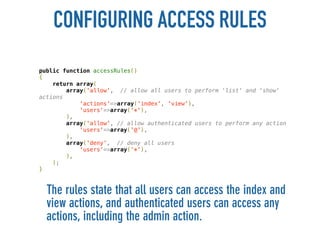
CONFIGURING ACCESS RULES
public function accessRules()
{
    return array(
        array('allow', // allow all users to perform 'list' and 'show'
actions
            'actions'=>array('index', 'view'),
            'users'=>array('*'),
        ),
        array('allow', // allow authenticated users to perform any action
            'users'=>array('@'),
        ),
        array('deny', // deny all users
            'users'=>array('*'),
        ),
    );
}


  The rules state that all users can access the index and
  view actions, and authenticated users can access any
  actions, including the admin action.
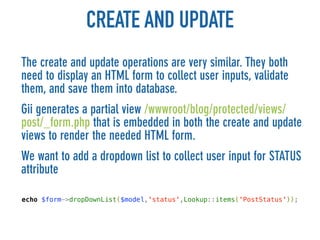
CREATE AND UPDATE
The create and update operations are very similar. They both
need to display an HTML form to collect user inputs, validate
them, and save them into database.
Gii generates a partial view /wwwroot/blog/protected/views/
post/_form.php that is embedded in both the create and update
views to render the needed HTML form.
We want to add a dropdown list to collect user input for STATUS
attribute

echo $form->dropDownList($model,'status',Lookup::items('PostStatus'));
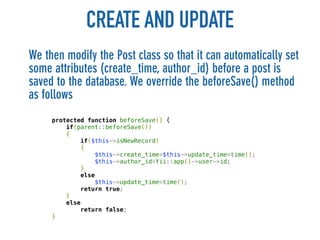
CREATE AND UPDATE
We then modify the Post class so that it can automatically set
some attributes (create_time, author_id) before a post is
saved to the database. We override the beforeSave() method
as follows
     protected function beforeSave() {
         if(parent::beforeSave())
         {
             if($this->isNewRecord)
             {
                 $this->create_time=$this->update_time=time();
                 $this->author_id=Yii::app()->user->id;
             }
             else
                 $this->update_time=time();
             return true;
         }
         else
             return false;
     }
STYLE MATTERS
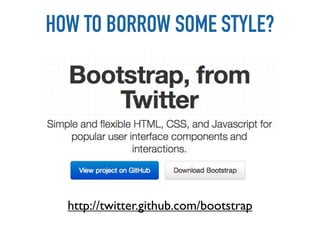
HOW TO BORROW SOME STYLE?


  http://twitter.github.com/bootstrap
QUICKLY BUILD A NICE UI
WEB AS CONCEPT IS REALLY WIDE
MOBILE
FIRST!
LOOK AT THE NUMBERS


 http://www.phonecount.com/pc/count.jsp
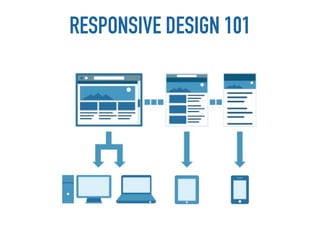
RESPONSIVE DESIGN 101
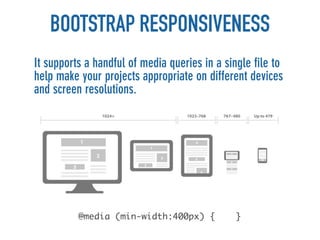
BOOTSTRAP RESPONSIVENESS
It supports a handful of media queries in a single file to
help make your projects appropriate on different devices
and screen resolutions.


          @media (min-width:400px) {           }
Thanks

                                    Giuliano Iacobelli
                                         giuliano.iacobelli
                                         me@giulianoiacobelli.com
                                         http://giulianoiacobelli.com

                                     Connect with me:


Ps: slide 47 and 48 were borrowed from this amazing presentation of Brad Frost

Get things done with Yii - quickly build webapplications

  • 1.
    GET THINGS DONEWITH QUICKLY BUILD A WEBAPP USING YII GIULIANO IACOBELLI - @Giuliano84 - me@giulianoiacobelli.com
  • 2.
    WEB IS FULLOF AMAZING TOOLS
  • 3.
  • 4.
    IF IT’S THERIGHT ONE AND IS WELL EXECUTED..
  • 5.
    IF YOU HAVEGOOD IDEA, DO IT. MOVE FAST AND BREAK THINGS
  • 6.
    SO LET MEINTRODUCE YOU TO
  • 7.
    WHAT IS IT? Yiiis a high-performance component-based PHP framework for developing large-scale Webapplications. It enables maximum reusability in Web programming and can significantly accelerate the development process.
  • 8.
    IT’S EASY? IT’S RAPID? IT’SSECURE? YES IT IS (YII) !!!
  • 9.
    THE MVC PATTERN MVCis a design pattern widely adopted in Web programming that aims to separate business logic from user interface considerations, so that developers can more easily change each part without affecting the other.
  • 10.
    THE MVC PATTERN Assume a Web application consists of several sub- applications: • Front end: a public-facing website for normal end users; • Back end: a website that exposes administrative functionality for managing the application. • Console: an application consisting of console commands to be run in a terminal window or as scheduled jobs to support the whole application; • Web API: providing interfaces to third parties for integrating with the application.
  • 11.
    M for MODEL Models are used to keep data and their relevant business rules. A model represents a single data object that could be a row in a database table or a form of user inputs. • should contain properties to represent specific data; • should contain business logic (e.g. validation rules) to ensure the represented data fulfills the design requirement; • may contain code for manipulating data. For example, a SearchForm model, besides representing the search input data, may contain a search method to implement the actual search.
  • 12.
    C for CONTROLLER Controllersare the glue that binds models, views and other components together into a runnable application. They are responsible for dealing directly with end user requests. • may access $_GET, $_POST and other PHP variables that represent user requests; • may create model instances and manage their life cycles. • should avoid containing embedded SQL statements, which are better kept in models. • should avoid containing any HTML or any other presentational markup. This is better kept in views.
  • 13.
    V for VIEW Aview is a PHP script consisting of mainly elements of user interface the spirit of seperation of logic and presentation, large chunk of logic should be placed in controller or model instead of view. • should mainly contain presentational code, such as HTML, and simple PHP code to traverse, format and render data; • should avoid containing code that performs explicit DB queries. Such code is better placed in models. • should avoid direct access to $_GET, $_POST, or other similar variables that represent the end user request. This is the controller's job.
  • 14.
    STRUCTURE OF YIIAPPLICATION
  • 15.
    THE ENTRY SCRIPT Thisis a “bootstrap” file, meaning that all user interactions actually go through it. For example, showing an employee record might be through the URL. It is the only PHP script that end users can directly request to execute. // remove the following line when in production mode defined('YII_DEBUG') or define('YII_DEBUG',true); // include Yii bootstrap file require_once('path/to/yii/framework/yii.php'); // create application instance and run $configFile='path/to/config/file.php'; Yii::createWebApplication($configFile)->run();
  • 16.
    YII WORKFLOW 1 - Request with the URL http://example.com/index.php?r=post/ show&id=1 and the Web server handles the request by executing the bootstrap script index.php. 2 - The bootstrap script creates an Application instance and runs it. 3 - The Application obtains detailed user request information from an application component named request. 4 - The application determines the requested controller and action with the help of an application component named urlManager.
  • 17.
    YII WORKFLOW 5 - The application creates an instance of the requested controller to further handle the user request. The controller determines that the action show refers to a method named actionShow in the controller class. 6 - The action reads a Post model whose ID is 1 from the database. 7 - The action renders a view named show with the Post model. 8 - The view reads and displays the attributes of the Post model. 9,10,11 - The view executes some widgets, embed the rendering result in a layout and displays it to the user.
  • 18.
    OK, OK, IGOT IT, TOO MUCH TALK.. LET’S HAVE AN IDEA TO BUILD..
  • 19.
    AND THE AMAZINGIDEA IS..
  • 20.
    A BLOG! OK, IT’SNOT THAT AMAZING BUT IN THIS WAY I’M PRETTY SURE THAT ALL OF YOU KNOW WHAT WE ARE GOIN TO BUILD
  • 21.
    WARM UP •CREATE A “BLOGDEMO” FOLDER IN YOUR APACHE DOCUMENT ROOT DIRECTORY • DOWNLOAD YiiBlogDemo.zip FILE FROM http://goo.gl/nOqef AND UNZIP IT • OPEN FRAMEWORK.ZIP AND PLACE ITS CONTENT IN YOUR “BLOGDEMO” FOLDER
  • 22.
    YII PREPARATION Run asimple console command “blogdemo/framework/yiic webapp ../“ to generate a skeleton Web application built with Yii. This will create a skeleton Yii application under the directory WebRoot/testdrive.
  • 23.
    THE WEB APPLICATION Theapplication is fully functional, with nice features including user login and contact form. It is a good starting point for implementing more sophisticated features.
  • 24.
    WHAT A BLOGUSUALLY HAVE? • POSTS • USERS • COMMENTS • TAGS
  • 25.
  • 26.
    SETTING UP THEDATABASE return array( ...... 'components'=>array( ...... 'db'=>array( 'connectionString' => 'mysql:host=localhost;dbname=blog', 'emulatePrepare' => true, 'username' => 'root', 'password' => '', 'charset' => 'utf8', 'tablePrefix' => 'tbl_', ), ), ...... );
  • 27.
    GENERATING THE MODELS Weneed to create a model class for each of our database tables. Yii has an amazing component called Gii that totally automates this process (known as scaffolding) for us. 'modules'=>array( 'gii'=>array( 'class'=>'system.gii.GiiModule', 'password'=>'pick up a password here', ), ),
  • 28.
  • 29.
    OUR MODELS • User.phpcontains the User class and can be used to access the tbl_user database table; • Post.php contains the Post class and can be used to access the tbl_post database table; • Tag.php contains the Tag class and can be used to access the tbl_tag database table; • Comment.php contains the Comment class and can be used to access the tbl_comment database table; • Lookup.php contains the Lookup class and can be used to access the tbl_lookup database table.
  • 30.
    CRUD OPERATIONS After themodel classes are created, we can use the Crud Generator to generate the code implementing the CRUD operations for these models. We will do this for the Post and Comment models.
  • 31.
    AUTHENTICATING USER Our blogapplication needs to differentiate between the system owner and guest users. Therefore, we need to implement the user authentication feature User authentication is performed in a class implementing the IUserIdentity interface. The skeleton application uses the UserIdentity class for this purpose. The class is stored in the file /wwwroot/blogdemo/ protected/components/UserIdentity.php.
  • 32.
    AUTHENTICATING USER Application alreadyprovides user authentication by checking if the username and password are both demo or admin. Now we will modify the corresponding code so that the authentication is done against the User database table.
  • 33.
    EDITING USERIDENTITY.PHP public functionauthenticate() { $username=strtolower($this->username); $user=User::model()->find('LOWER(username)=?',array($username)); if($user===null) $this->errorCode=self::ERROR_USERNAME_INVALID; else if(!$user->validatePassword($this->password)) $this->errorCode=self::ERROR_PASSWORD_INVALID; else { $this->_id=$user->id; $this->username=$user->username; $this->errorCode=self::ERROR_NONE; } return $this->errorCode==self::ERROR_NONE; } public function getId() { return $this->_id; }
  • 34.
    RECAP • Identified therequirements to be fulfilled; • We installed the Yii framework and created a skeleton application; • We designed and created the blog database; • We generated basic CRUD operations; • We modified the authentication method to check against the tbl_user table.
  • 35.
    CUSTOMIZING POST MODEL Postmodel generated is fine but now we need to specify validation rules and related objects • Validation rules ensure the attribute values entered by users are correct before they are saved to the database. For example, the status attribute of Post should be an integer 1, 2 or 3. • Customizing the relations we can exploit the powerful Relational ActiveRecord (RAR) feature to access the related object information of a post, such as its author and comments, without the need to write complex SQL statements.
  • 36.
    VALIDATION RULES Based onthe requirement analysis, we modify the rules() method as follows: public function rules() { return array( array('title, content, status', 'required'), array('title', 'length', 'max'=>128), array('status', 'in', 'range'=>array(1,2,3)), array('tags', 'match', 'pattern'=>'/^[ws,]+$/', 'message'=>'Tags can only contain word characters.'), array('tags', 'normalizeTags'), array('title, status', 'safe', 'on'=>'search'), ); }
  • 37.
    MODEL RELATIONS We customizerelations() method as follow public function relations() { return array( 'author' => array(self::BELONGS_TO, 'User', 'author_id'), 'comments' => array(self::HAS_MANY, 'Comment', 'post_id', 'condition'=>'comments.status='.Comment::STATUS_APPROVED, 'order'=>'comments.create_time DESC'), 'commentCount' => array(self::STAT, 'Comment', 'post_id', 'condition'=>'status='.Comment::STATUS_APPROVED), ); } We also introduce in the Comment class Comment extends CActiveRecord { model class two constants that are const STATUS_PENDING=1; used in the above method: const STATUS_APPROVED=2; ...... }
  • 38.
    REPRESENTING STATUS INTEXT Because the status of a post is stored as an integer in the database, we need to provide a textual representation so that it is more intuitive when being displayed to end users. In a large system, the similar requirement is very common. As a generic solution, we use the tbl_lookup table to store the mapping between integer values and textual representations that are needed by other data objects. We modify the Lookup model class as follows to more easily access the textual data in the table.
  • 39.
    LOOKUP.PHP class Lookup extendsCActiveRecord { private static $_items=array(); public static function items($type) { if(!isset(self::$_items[$type])) self::loadItems($type); return self::$_items[$type]; } public static function item($type,$code) { if(!isset(self::$_items[$type])) self::loadItems($type); return isset(self::$_items[$type][$code]) ? self::$_items[$type][$code] : false; } private static function loadItems($type) { self::$_items[$type]=array(); $models=self::model()->findAll(array( 'condition'=>'type=:type', 'params'=>array(':type'=>$type), 'order'=>'position', )); foreach($models as $model) self::$_items[$type][$model->code]=$model->name; } }
  • 40.
    POST POSSIBLE STATUSES class Post extends CActiveRecord { const STATUS_DRAFT=1; const STATUS_PUBLISHED=2; const STATUS_ARCHIVED=3; ...... } Now we can call Lookup::items('PostStatus') to get the list of possible post statuses (text strings indexed by the corresponding integer values), and call Lookup::item('PostStatus', Post::STATUS_PUBLISHED) to get the string representation of the published status.
  • 41.
    CONFIGURING ACCESS RULES publicfunction accessRules() { return array( array('allow', // allow all users to perform 'list' and 'show' actions 'actions'=>array('index', 'view'), 'users'=>array('*'), ), array('allow', // allow authenticated users to perform any action 'users'=>array('@'), ), array('deny', // deny all users 'users'=>array('*'), ), ); } The rules state that all users can access the index and view actions, and authenticated users can access any actions, including the admin action.
  • 42.
    CREATE AND UPDATE Thecreate and update operations are very similar. They both need to display an HTML form to collect user inputs, validate them, and save them into database. Gii generates a partial view /wwwroot/blog/protected/views/ post/_form.php that is embedded in both the create and update views to render the needed HTML form. We want to add a dropdown list to collect user input for STATUS attribute echo $form->dropDownList($model,'status',Lookup::items('PostStatus'));
  • 43.
    CREATE AND UPDATE Wethen modify the Post class so that it can automatically set some attributes (create_time, author_id) before a post is saved to the database. We override the beforeSave() method as follows protected function beforeSave() { if(parent::beforeSave()) { if($this->isNewRecord) { $this->create_time=$this->update_time=time(); $this->author_id=Yii::app()->user->id; } else $this->update_time=time(); return true; } else return false; }
  • 44.
  • 45.
    HOW TO BORROWSOME STYLE? http://twitter.github.com/bootstrap
  • 46.
  • 47.
    WEB AS CONCEPTIS REALLY WIDE
  • 49.
  • 50.
    LOOK AT THENUMBERS http://www.phonecount.com/pc/count.jsp
  • 51.
  • 52.
    BOOTSTRAP RESPONSIVENESS It supportsa handful of media queries in a single file to help make your projects appropriate on different devices and screen resolutions. @media (min-width:400px) { }
  • 53.
    Thanks Giuliano Iacobelli giuliano.iacobelli me@giulianoiacobelli.com http://giulianoiacobelli.com Connect with me: Ps: slide 47 and 48 were borrowed from this amazing presentation of Brad Frost