

The Rocky
Cloud Road
Gert Drapers (#DataDude)
Principle Software Design Engineer
Copyright: Clouds, Trail Ridge Road, Rocky Mountains National Park (Miriam_Berlin, Oct 2009)
Disclaimer
What follows is a simplified view of some complex
trends
Like any simplification is it both correct and incorrect
It will give you a framework to work from
Driven by TCO, OPEX and CAPEX…
The Drive to the Cloud…
Utility Based Computing…
Are your Engineering
Systems & Practices Ready?
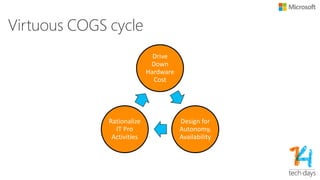
Virtuous COGS cycle
Drive
Down
Hardware
Cost
Design for
Autonomy,
Availability
Rationalize
IT Pro
Activities
The Funny Thing That Happened on the
Way to the Search Engine…
• Those guys built on some really big expensive
Alpha boxes.
But… search is embarrassingly parallel, so why not throw lots of
cheap hardware at it?
• But then you have a serious ops problem. To fix that, you have
to:
• Design software that self assembles into large farms
… and fails fast on failure
… and re-executes / rebalances work as systems come and go
… and monitors itself effectively, so it can pull systems that don’t work
… and partitions & replicates storage so it can ride through failures
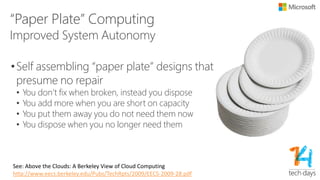
“Paper Plate” Computing
•Self assembling “paper plate” designs that
presume no repair
• You don’t fix when broken, instead you dispose
• You add more when you are short on capacity
• You put them away you do not need them now
• You dispose when you no longer need them
Improved System Autonomy
See: Above the Clouds: A Berkeley View of Cloud Computing
http://www.eecs.berkeley.edu/Pubs/TechRpts/2009/EECS-2009-28.pdf
The Basics
“The characteristics of a software system that
we consider non-negotiable.”
•A few key points as preface:
• Design for “simplicity”
• Design for “good enough”
• Understand the true minimum shipping point
• Long term plans will often be wrong
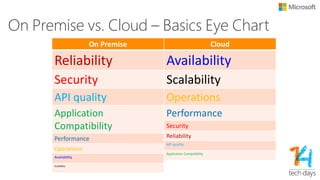
On Premise vs. Cloud – Basics Eye
Chart On Premise
Reliability
Security
API quality
Application
Compatibility
Performance
Operations
Availability
Scalability
Cloud
Availability
Scalability
Operations
Performance
Security
Reliability
API quality
Application Compatibility
Reality check
• Some things we know don’t carry forward
• A lot of what we know is still useful
• There are tools to make all of this easier
Availability
“The ability to provide continuous service, despite
partial transient failures”
• Focus on overall application availability, not one
resource
• Scale horizontally across regions for durability
• Replace instead of repair; start replacement
instances, don’t save dying ones
• Design for eliminating the need for maintenance
windowsSource: Architecting for the Cloud: Best Practices
Scalability
•Characteristics of Truly Scalable Service
• Increasing resources results in a proportional increase in
performance
• A scalable service is capable of handling heterogeneity
• A scalable service is operationally efficient
• A scalable service is resilient
• A scalable service becomes more cost effective when it grows
A scalable architecture is critical to take
advantage of a scalable infrastructure
Source: Architecting for the Cloud: Best Practices
Reliability
“The characteristics that ensure that the system
behaves deterministically”
• Meta
• Recovery-oriented computing
• Concrete
• General: standard reliability analysis remains relevant
• Deployment: never repair: restart, reboot, reinstall, replace
• Design: invariant checks, hang and timeout detection, failfast, strict
exception contracts
• Design: single “rude” shutdown path, boot-time recovery, self-verification
• Design: failure modeling, negative case testing
Source: Architecting for the Cloud: Best Practices
Operations
“The characteristics that allow the system to be easily
deployed, configured and diagnosed”
• Meta
• Build self-assembling systems, with no individualized configuration
• Design software that self-monitors and self-heals
• Practice efficient offline diagnostics
• Concrete
• Deployment: automated provisioning, role discovery and configuration
• Design: universal configuration file for all nodes
• Design: instrument code to generate tracing, usage and health information
• Deployment: gather, aggregate, understand, use telemetry data
• Test: zero-repro engineering
Engineering Processes
“The rules we create to build software systems
that embody our basics”
Live the Dream 
Service Isolation
•Public Service Contract
• Versioned
• Loosely coupled, no type sharing
•Different services do not share persisted state
with other services
•Services are:
• Developed independently
• Deployed independently
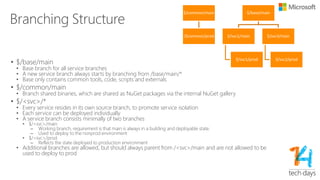
Branching Structure
• $/base/main
• Base branch for all service branches
• A new service branch always starts by branching from /base/main/*
• Base only contains common tools, code, scripts and externals
• $/common/main
• Branch shared binaries, which are shared as NuGet packages via the internal NuGet gallery
• $/<svc>/*
• Every service resides in its own source branch, to promote service isolation
• Each service can be deployed individually
• A service branch consists minimally of two branches
• $/<svc>/main
– Working branch, requirement is that main is always in a building and deployable state.
– Used to deploy to the nonprod environment
• $/<svc>/prod
– Reflects the state deployed to production environment
• Additional branches are allowed, but should always parent from /<svc>/main and are not allowed
to be used to deploy to prod
$/common/main
/$common/prod
$/base/main
$/svc1/main
$/svc1/prod
$/svc3/main
$/svc2/prod
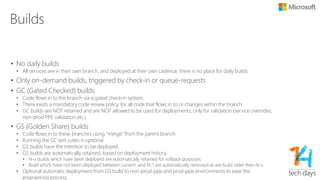
Builds
• No daily builds
• All services are in their own branch, and deployed at their own cadence, there is no place for daily builds
• Only on-demand builds, triggered by check-in or queue-requests
• GC (Gated Checked) builds
• Code flows in to the branch via a gated check-in system.
• There exists a mandatory code review policy, for all code that flows in to or changes within the branch
• GC builds are NOT retained and are NOT allowed to be used for deployments, only for validation (service
overrides, non-prod PPE validation etc.)
• GS (Golden Share) builds
• Code flows in to these branches using “merge” from the parent branch
• Running the GC test suites is optional
• GS builds have the intention to be deployed
• GS builds are automatically retained, based on deployment history.
• N-x builds which have been deployed are automatically retained for rollback purposes
• Build which have not been deployed between current and N-1 are automatically removed as are build older then
N-x
• Optional automatic deployment from GS build to non-prod-ppe and prod-ppe environments to ease the
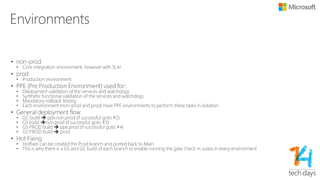
Environments
• non-prod
• Core integration environment, however with SLA!
• prod
• Production environment
• PPE (Pre Production Environment) used for:
• Deployment validation of the services and watchdogs
• Synthetic functional validation of the services and watchdogs
• Mandatory rollback testing
• Each environment (non-prod and prod) have PPE environments to perform these tasks in isolation
• General deployment flow:
• GC build  ppe.non.prod (if successful goto #2)
• GS build non.prod (if successful goto #3)
• GS PROD build  ppe.prod (if successful goto #4)
• GS PROD build  prod
• Hot Fixing
• Hotfixes can be created the Prod branch and ported back to Main
• This is why there is a GS and GC build of each branch to enable running the gate check-in suites in every
environment
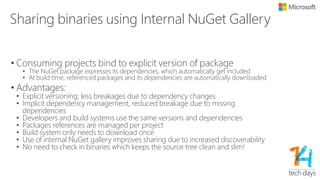
Sharing binaries using Internal NuGet
Gallery
• Consuming projects bind to explicit version of package
• The NuGet package expresses its dependencies, which automatically get included
• At build time, referenced packages and its dependencies are automatically
downloaded
• Advantages:
• Explicit versioning; less breakages due to dependency changes
• Implicit dependency management, reduced breakage due to missing
dependencies
• Developers and build systems use the same versions and dependencies
• Packages references are managed per project
• Build system only needs to download once
• Use of internal NuGet gallery improves sharing due to increased
discoverability
• No need to check in binaries which keeps the source tree clean and slim!
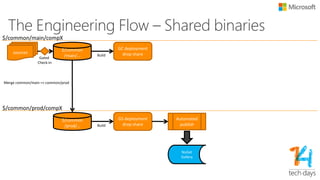
The Engineering Flow – Shared
binaries
$/common
/main/…
sources
GC deployment
drop share
$/common/main/compX
$/common
/prod/…
GS deployment
drop share
Automated
publish
$/common/prod/compX
Merge common/main => common/prod
Gated
Check-in
Build
Build
NuGet
Gallery
Environment <svc A>
Scale Units <1..N>
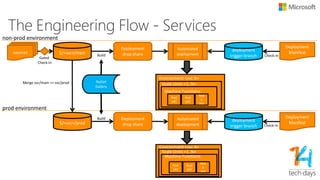
The Engineering Flow - Services
$/<svc>/mainsources
deployment
trigger branch
Deployment
Manifest
Deployment
drop share
Machine Functions
Automated
deployment
Nod
e#1
Nod
e#2
Nod
e
#M
non-prod environment
Environment <svc A>
Scale Units <1..N>
$/<svc>/prod
deployment
trigger branch
Deployment
Manifest
Deployment
drop share
Machine Functions
Automated
deployment
Nod
e#1
Nod
e#2
Nod
e
#M
prod environment
Merge svc/main => svc/prod
Gated
Check-in
Build
Build
Check-in
Check-in
NuGet
Gallery
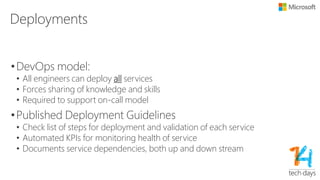
Deployments
•DevOps model:
• All engineers can deploy all services
• Forces sharing of knowledge and skills
• Required to support on-call model
•Published Deployment Guidelines
• Check list of steps for deployment and validation of each
service
• Automated KPIs for monitoring health of service
• Documents service dependencies, both up and down stream
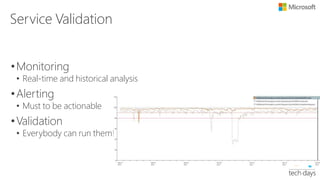
Service Validation
•Monitoring
• Real-time and historical analysis
•Alerting
• Must to be actionable
•Validation
• Everybody can run them!
Testing using PowerShell
•Everybody should be able to run tests
•Re-usable atoms
•Composition of atoms
•Target all environment
•Outside-In testing vs. Inside-In Testing
Point Developer / Pager Duty 
•Rotation based (4 weeks, 4 people)
• Separate interrupt driven from schedule driven work
• Provides focus
•Pager Duty
• Automatic escalation
• Complete management chain is involved in incidents
•RCA (Root Cause Analysis)
• You must be pedantic about RCAs and action them!
Availability is King
Versioning & Deployment Ordering
•The service must support running multiple
versions side-by-side!
• Required during deployment, service overrides, A-B testing,…
•Deploy stateful services before stateless services
• Service must be able to support schema versions N, N-1 and
N+1
Data Layer
•Evolves to a document/resource centric model
• Schema owned by middle tier services
• Chunky, cacheable, partitionable
•Schema changes:
• Owned by service layer
• By default: fault-in model, you update to new version when
written, optionally write is triggered by reading older version.
Amortizes cost of schema update over time.
• Optionally trigger update using a crawler process
Best Practices
•Design for Failure
•Loose Coupling
•Implement Elasticity
•Think Asynchronous and Parallel
Design for Failure
• Avoid single points of failure
• Assume everything fails, and design backwards
• Goal: Applications should continue to function even if the underlying
physical hardware fails or is removed or replaced.
• Best practices
• Use multiple regions
• Use Virtual IP addresses (VIP)
• Use Load Balancers
• Real-time monitoring
• Leverage Auto Scaling groups
• Practice failures/recovery
Always Assume Each Call is your Last
Call!
Loose Coupling
•Independent components
•Design everything as a Black Box
•De-coupling for Hybrid models
•Load-balance clusters
The lesser coupling, the higher the scale factor
Implement Elasticity
•Use designs that are resilient to reboot and re-
launch
•Enable dynamic configuration
•Self discovery and join: instance discovers it own
role
Horizontal Scaling is the Only Option
Think Asynchronous and Parallel
• Only make non-blocking async x-service calls!
• Use load balancing to distribute load across multiple
servers
• Decompose a tasks into their simplest form
• Multi-treading and concurrent requests to cloud
services
• Leverage parallel MR task when appropriate and
possible
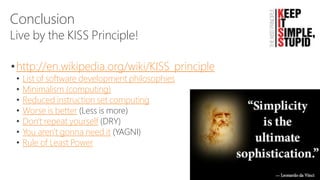
Conclusion
•http://en.wikipedia.org/wiki/KISS_principle
• List of software development philosophies
• Minimalism (computing)
• Reduced instruction set computing
• Worse is better (Less is more)
• Don't repeat yourself (DRY)
• You aren't gonna need it (YAGNI)
• Rule of Least Power
Live by the KISS Principle!
https://www.pinterest.com
Source: http://chromblog.thermoscientific.com/blog/bid/85450/GC-MS-MS-Software-Applies-the-KISS-Principle
Resources
• Cloud Design Patterns: Prescriptive Architecture Guidance for Cloud
Applications
• http://msdn.microsoft.com/en-us/library/dn568099.aspx
• Private Cloud Principles, Concepts, and Patterns
• http://social.technet.microsoft.com/wiki/contents/articles/4346.private-cloud-principles-
concepts-and-patterns.aspx
• Cloud Services Foundation Reference Architecture - Principles,
Concepts, and Patterns
• http://blogs.technet.com/b/cloudsolutions/archive/2013/08/15/cloud-services-foundation-
reference-architecture-principles-concepts-and-patterns.aspx
Laat ons weten wat u vindt van deze sessie! Vul de evaluatie
in via www.techdaysapp.nl en maak kans op een van de 20
prijzen*. Prijswinnaars worden bekend gemaakt via Twitter
(#TechDaysNL). Gebruik hiervoor de code op uw badge.
Let us know how you feel about this session! Give your
feedback via www.techdaysapp.nl and possibly win one of
the 20 prices*. Winners will be announced via Twitter
(#TechDaysNL). Use your personal code on your badge.
* Over de uitslag kan niet worden gecorrespondeerd, prijzen zijn voorbeelden – All results are final, prices are
examples
The Rocky Cloud Road

The Rocky Cloud Road

  • 1.
    The Rocky Cloud Road GertDrapers (#DataDude) Principle Software Design Engineer Copyright: Clouds, Trail Ridge Road, Rocky Mountains National Park (Miriam_Berlin, Oct 2009)
  • 2.
    Disclaimer What follows isa simplified view of some complex trends Like any simplification is it both correct and incorrect It will give you a framework to work from
  • 3.
    Driven by TCO,OPEX and CAPEX… The Drive to the Cloud… Utility Based Computing… Are your Engineering Systems & Practices Ready?
  • 4.
    Virtuous COGS cycle Drive Down Hardware Cost Designfor Autonomy, Availability Rationalize IT Pro Activities
  • 5.
    The Funny ThingThat Happened on the Way to the Search Engine… • Those guys built on some really big expensive Alpha boxes. But… search is embarrassingly parallel, so why not throw lots of cheap hardware at it? • But then you have a serious ops problem. To fix that, you have to: • Design software that self assembles into large farms … and fails fast on failure … and re-executes / rebalances work as systems come and go … and monitors itself effectively, so it can pull systems that don’t work … and partitions & replicates storage so it can ride through failures
  • 6.
    “Paper Plate” Computing •Selfassembling “paper plate” designs that presume no repair • You don’t fix when broken, instead you dispose • You add more when you are short on capacity • You put them away you do not need them now • You dispose when you no longer need them Improved System Autonomy See: Above the Clouds: A Berkeley View of Cloud Computing http://www.eecs.berkeley.edu/Pubs/TechRpts/2009/EECS-2009-28.pdf
  • 7.
    The Basics “The characteristicsof a software system that we consider non-negotiable.” •A few key points as preface: • Design for “simplicity” • Design for “good enough” • Understand the true minimum shipping point • Long term plans will often be wrong
  • 8.
    On Premise vs.Cloud – Basics Eye Chart On Premise Reliability Security API quality Application Compatibility Performance Operations Availability Scalability Cloud Availability Scalability Operations Performance Security Reliability API quality Application Compatibility
  • 9.
    Reality check • Somethings we know don’t carry forward • A lot of what we know is still useful • There are tools to make all of this easier
  • 10.
    Availability “The ability toprovide continuous service, despite partial transient failures” • Focus on overall application availability, not one resource • Scale horizontally across regions for durability • Replace instead of repair; start replacement instances, don’t save dying ones • Design for eliminating the need for maintenance windowsSource: Architecting for the Cloud: Best Practices
  • 11.
    Scalability •Characteristics of TrulyScalable Service • Increasing resources results in a proportional increase in performance • A scalable service is capable of handling heterogeneity • A scalable service is operationally efficient • A scalable service is resilient • A scalable service becomes more cost effective when it grows A scalable architecture is critical to take advantage of a scalable infrastructure Source: Architecting for the Cloud: Best Practices
  • 12.
    Reliability “The characteristics thatensure that the system behaves deterministically” • Meta • Recovery-oriented computing • Concrete • General: standard reliability analysis remains relevant • Deployment: never repair: restart, reboot, reinstall, replace • Design: invariant checks, hang and timeout detection, failfast, strict exception contracts • Design: single “rude” shutdown path, boot-time recovery, self-verification • Design: failure modeling, negative case testing Source: Architecting for the Cloud: Best Practices
  • 13.
    Operations “The characteristics thatallow the system to be easily deployed, configured and diagnosed” • Meta • Build self-assembling systems, with no individualized configuration • Design software that self-monitors and self-heals • Practice efficient offline diagnostics • Concrete • Deployment: automated provisioning, role discovery and configuration • Design: universal configuration file for all nodes • Design: instrument code to generate tracing, usage and health information • Deployment: gather, aggregate, understand, use telemetry data • Test: zero-repro engineering
  • 14.
    Engineering Processes “The ruleswe create to build software systems that embody our basics” Live the Dream 
  • 15.
    Service Isolation •Public ServiceContract • Versioned • Loosely coupled, no type sharing •Different services do not share persisted state with other services •Services are: • Developed independently • Deployed independently
  • 16.
    Branching Structure • $/base/main •Base branch for all service branches • A new service branch always starts by branching from /base/main/* • Base only contains common tools, code, scripts and externals • $/common/main • Branch shared binaries, which are shared as NuGet packages via the internal NuGet gallery • $/<svc>/* • Every service resides in its own source branch, to promote service isolation • Each service can be deployed individually • A service branch consists minimally of two branches • $/<svc>/main – Working branch, requirement is that main is always in a building and deployable state. – Used to deploy to the nonprod environment • $/<svc>/prod – Reflects the state deployed to production environment • Additional branches are allowed, but should always parent from /<svc>/main and are not allowed to be used to deploy to prod $/common/main /$common/prod $/base/main $/svc1/main $/svc1/prod $/svc3/main $/svc2/prod
  • 17.
    Builds • No dailybuilds • All services are in their own branch, and deployed at their own cadence, there is no place for daily builds • Only on-demand builds, triggered by check-in or queue-requests • GC (Gated Checked) builds • Code flows in to the branch via a gated check-in system. • There exists a mandatory code review policy, for all code that flows in to or changes within the branch • GC builds are NOT retained and are NOT allowed to be used for deployments, only for validation (service overrides, non-prod PPE validation etc.) • GS (Golden Share) builds • Code flows in to these branches using “merge” from the parent branch • Running the GC test suites is optional • GS builds have the intention to be deployed • GS builds are automatically retained, based on deployment history. • N-x builds which have been deployed are automatically retained for rollback purposes • Build which have not been deployed between current and N-1 are automatically removed as are build older then N-x • Optional automatic deployment from GS build to non-prod-ppe and prod-ppe environments to ease the
  • 18.
    Environments • non-prod • Coreintegration environment, however with SLA! • prod • Production environment • PPE (Pre Production Environment) used for: • Deployment validation of the services and watchdogs • Synthetic functional validation of the services and watchdogs • Mandatory rollback testing • Each environment (non-prod and prod) have PPE environments to perform these tasks in isolation • General deployment flow: • GC build  ppe.non.prod (if successful goto #2) • GS build non.prod (if successful goto #3) • GS PROD build  ppe.prod (if successful goto #4) • GS PROD build  prod • Hot Fixing • Hotfixes can be created the Prod branch and ported back to Main • This is why there is a GS and GC build of each branch to enable running the gate check-in suites in every environment
  • 19.
    Sharing binaries usingInternal NuGet Gallery • Consuming projects bind to explicit version of package • The NuGet package expresses its dependencies, which automatically get included • At build time, referenced packages and its dependencies are automatically downloaded • Advantages: • Explicit versioning; less breakages due to dependency changes • Implicit dependency management, reduced breakage due to missing dependencies • Developers and build systems use the same versions and dependencies • Packages references are managed per project • Build system only needs to download once • Use of internal NuGet gallery improves sharing due to increased discoverability • No need to check in binaries which keeps the source tree clean and slim!
  • 20.
    The Engineering Flow– Shared binaries $/common /main/… sources GC deployment drop share $/common/main/compX $/common /prod/… GS deployment drop share Automated publish $/common/prod/compX Merge common/main => common/prod Gated Check-in Build Build NuGet Gallery
  • 21.
    Environment <svc A> ScaleUnits <1..N> The Engineering Flow - Services $/<svc>/mainsources deployment trigger branch Deployment Manifest Deployment drop share Machine Functions Automated deployment Nod e#1 Nod e#2 Nod e #M non-prod environment Environment <svc A> Scale Units <1..N> $/<svc>/prod deployment trigger branch Deployment Manifest Deployment drop share Machine Functions Automated deployment Nod e#1 Nod e#2 Nod e #M prod environment Merge svc/main => svc/prod Gated Check-in Build Build Check-in Check-in NuGet Gallery
  • 22.
    Deployments •DevOps model: • Allengineers can deploy all services • Forces sharing of knowledge and skills • Required to support on-call model •Published Deployment Guidelines • Check list of steps for deployment and validation of each service • Automated KPIs for monitoring health of service • Documents service dependencies, both up and down stream
  • 23.
    Service Validation •Monitoring • Real-timeand historical analysis •Alerting • Must to be actionable •Validation • Everybody can run them!
  • 24.
    Testing using PowerShell •Everybodyshould be able to run tests •Re-usable atoms •Composition of atoms •Target all environment •Outside-In testing vs. Inside-In Testing
  • 25.
    Point Developer /Pager Duty  •Rotation based (4 weeks, 4 people) • Separate interrupt driven from schedule driven work • Provides focus •Pager Duty • Automatic escalation • Complete management chain is involved in incidents •RCA (Root Cause Analysis) • You must be pedantic about RCAs and action them! Availability is King
  • 26.
    Versioning & DeploymentOrdering •The service must support running multiple versions side-by-side! • Required during deployment, service overrides, A-B testing,… •Deploy stateful services before stateless services • Service must be able to support schema versions N, N-1 and N+1
  • 27.
    Data Layer •Evolves toa document/resource centric model • Schema owned by middle tier services • Chunky, cacheable, partitionable •Schema changes: • Owned by service layer • By default: fault-in model, you update to new version when written, optionally write is triggered by reading older version. Amortizes cost of schema update over time. • Optionally trigger update using a crawler process
  • 28.
    Best Practices •Design forFailure •Loose Coupling •Implement Elasticity •Think Asynchronous and Parallel
  • 29.
    Design for Failure •Avoid single points of failure • Assume everything fails, and design backwards • Goal: Applications should continue to function even if the underlying physical hardware fails or is removed or replaced. • Best practices • Use multiple regions • Use Virtual IP addresses (VIP) • Use Load Balancers • Real-time monitoring • Leverage Auto Scaling groups • Practice failures/recovery Always Assume Each Call is your Last Call!
  • 30.
    Loose Coupling •Independent components •Designeverything as a Black Box •De-coupling for Hybrid models •Load-balance clusters The lesser coupling, the higher the scale factor
  • 31.
    Implement Elasticity •Use designsthat are resilient to reboot and re- launch •Enable dynamic configuration •Self discovery and join: instance discovers it own role Horizontal Scaling is the Only Option
  • 32.
    Think Asynchronous andParallel • Only make non-blocking async x-service calls! • Use load balancing to distribute load across multiple servers • Decompose a tasks into their simplest form • Multi-treading and concurrent requests to cloud services • Leverage parallel MR task when appropriate and possible
  • 33.
    Conclusion •http://en.wikipedia.org/wiki/KISS_principle • List ofsoftware development philosophies • Minimalism (computing) • Reduced instruction set computing • Worse is better (Less is more) • Don't repeat yourself (DRY) • You aren't gonna need it (YAGNI) • Rule of Least Power Live by the KISS Principle! https://www.pinterest.com Source: http://chromblog.thermoscientific.com/blog/bid/85450/GC-MS-MS-Software-Applies-the-KISS-Principle
  • 34.
    Resources • Cloud DesignPatterns: Prescriptive Architecture Guidance for Cloud Applications • http://msdn.microsoft.com/en-us/library/dn568099.aspx • Private Cloud Principles, Concepts, and Patterns • http://social.technet.microsoft.com/wiki/contents/articles/4346.private-cloud-principles- concepts-and-patterns.aspx • Cloud Services Foundation Reference Architecture - Principles, Concepts, and Patterns • http://blogs.technet.com/b/cloudsolutions/archive/2013/08/15/cloud-services-foundation- reference-architecture-principles-concepts-and-patterns.aspx
  • 35.
    Laat ons wetenwat u vindt van deze sessie! Vul de evaluatie in via www.techdaysapp.nl en maak kans op een van de 20 prijzen*. Prijswinnaars worden bekend gemaakt via Twitter (#TechDaysNL). Gebruik hiervoor de code op uw badge. Let us know how you feel about this session! Give your feedback via www.techdaysapp.nl and possibly win one of the 20 prices*. Winners will be announced via Twitter (#TechDaysNL). Use your personal code on your badge. * Over de uitslag kan niet worden gecorrespondeerd, prijzen zijn voorbeelden – All results are final, prices are examples

Editor's Notes

  • #4 EconomicsTechnology changes are transforming operations efficiencySupporting workload amortization for large hosting companiesChanging RelationshipsPurchasing patterns are changing, friction is no longer toleratedVendors are responsible for much more of the software lifecycleCadenceExecution cadence greatly increased due to delivery mechanisms
  • #34 http://chromblog.thermoscientific.com/blog/bid/85450/GC-MS-MS-Software-Applies-the-KISS-Principlehttp://www.anwarbosbool.com/2012/06/kiss-principle/