Micro Services
Intro & implementation of a microservices
architecture
Docker Athens Spyros Lambrinidis @slambrinidis CTO
18 Feb 2014 Panagiotis Moustafellos @pmoust DevOps
What is a MicroService
“approach to developing a single application as
a suite of small services”
“designing software applications as suites of
independently deployable services”
What is a MicroService
● Each service is loosely coupled /
independently deployable
○ Changes made only to this service
● Each service has a bounded context
○ Service should not know about surrounding service
(domain driven design)
Characteristics
● Services
● Products vs Projects
● Smart endpoints / dumb pipes
● Decentralized governance
● Decentralised data management
● Automation
● Design for failure
● Evolutionary design
Simple Blog Example
ELB
WebServer / FE
WebServer / FE
Comments
Service
Pages
Service
Posts
Service
Redis
MySql
MySql
Mongo
Redis
SOLR
Advantages
● Small code base / easier to test / maintain
● Easy to scale - clone
● Easy to throw away
● Easy to deploy and track errors
● Freedom to switch tech stack
● Maximise team agility
● Maximise resource utilisation
Disadvantages
● Devops challenge on multiple fronts
● Complexity in messaging and front end
● Most container technologies still new
● Freedom of tech stack not always good
news (for the future and for the CTO)
Micro Service and agility
● Modern agile practice can not ignore tech
● No modern tech = no absolute agility
● Micro services enable agility in a special way
○ Enforce team creation
○ Enforce faster deployments / better & easier tests
○ CI / CD
○ Easier communication flow methods (APIs)
○ Each service = small scale product
Container Technology in micros
● Containers assist micro architecture in
○ Visualising services
○ Building / sharing services between coders
○ Deploying services
○ Utilising server resources to run containers
irrespective of underlying tech
● Popular container technologies
○ Docker
○ Rocket
Container Management
● Used to maintain and utilize containers /
services
○ Make sure all services up and running
○ Make sure server utilisation is maxed out
● Popular container management technologies
○ CoreOS fleet
○ Docker-machine
○ Mesos
○ Kubernetes
○ AWS ECS / Google Container Engine
PPH Specifics
● Architecture history
○ 2008 shared server – outsourced code – raw php
○ 2010 more servers on peer1 and standalone mysql
○ 2010 move to aws
○ 2011 move to yii framework (not 100% complete)
○ Multiple features and optimisation since then
○ 2014 – supertasker.com launch
● Present
○ Monolithic app
○ Multiple db tech (sql, dynamo, mongo, memcache)
○ Search through SOLR
○ Traffic on supertasker.com
PPH Challenges
● Constantly Growing load (data + traffic)
○ 160GB db
○ 1300 rpm avg
○ 35k uniques / day (55k sessions)
● Code complexity from multiple features
● Usage of yii v1.6 – difficult to change. Not exciting for
devs to work on it
● Code tightly coupled in many ways
● More products evolving and needing similar features –
supertasker.com
PPH Future
● Minimise core db - micros use their own
● Ability to scale to amazing level - scale out
○ design to clone things (clone dbs / web servers)
○ design to split things (one core vs many small ones)
○ design to split similar things (shard / partition)
● Absolute resource utilisation
● Devs playground (use desired tech – within limits)
PPH Future
● Utilisation of communities through container sharing –
no need to share apps
● Service sharing between products
● Fully tested / API enabled services
● Gradually decrease power or core db and machines
○ never reach maximum of scaliong up ability
PPH Micro Internals
● Container technology
○ Docker
○ Docker-compose
● Preferred micro language
○ Php using yii v2 which is REST API enabled
● REST API
○ Communication only through well defined APIs
● Full tested Services
○ Each service to have full test coverage (unit & integration & contract)
PPH Micro Internals
● Data
○ Each service to be tied to its own data
● Container Management
○ CoreOS fleet
● Deployment
● CI tool
○ shippable
Workflow: PPH Metrics
● planning the ecosystem
● keeping it simple
● describing the infrastructure plan under version control
● describing the API
● opting for identical D-S-P environments
● enforcing testing (make everything fail)
● deploying seamlessly (as possible)
● applying Continuous Integration & Continuous Delivery
PPH Metrics: Planning
Goals:
● Scalable
● Self-contained
● Interoperable
● Proven in production
● Cost effective
PPH preference:
AWS EC2 AutoScaling + CoreOS (stable channel)
PPH Metrics: defining an API
● Lots of tools (Swagger, RAML, etc)
● Well defined entities - check out schema.org
● Discussion amongst dev team for internal API usage
● Join Athens API Meetup :)
We were lazy - no excuses - moving on
PPH Metrics: KISS
● Single node definition
● Single scaling up/down strategy
● Platform agnostic (if possible)
● Human readable Configuration Management and IaC
● DevOps friendly (bridge the gap between Dev & Ops)
● API matters - Preferred Stack does not (or does it?)
● Bring up dev environment in seconds
PPH Metrics: Describing it whole
● Infrastructure as Code
Terraform
● Configuration Management
CoreOS Cloud-config + Fleet Services
● Linking Containers
docker-compose / swarm
PPH Metrics: Terraform
Why Terraform?
● Ops make mistakes
● Many environments, many resources, too much room for error, too little time for documenting changes and
current state
● Awesome human readable DSL
● Easy to maintain infrastructure state
● Multiple providers (we just needed AWS)
● Developers understand it
● Still very fresh, but well tested
● Created by Hashicorp
Version 0.3.7 meets our needs
We made small contributions that we needed to have upstream
Terraform DSL - defining an AWS autoscaling group behind a Load Balancer
PPH Metrics: CoreOS
Why CoreOS?
● Built with application containers in mind
● Built for scale
● Fleet - manages nodes and services in a cluster
● Etcd - distributed key-value store
● [Unit] - [Service] - [Timer]
● fleetctl - the cli tool to manage Fleet
● etcdctl - the cli tool to manage Etcd
Hands-on example: Cloud-config
#cloud-config
coreos:
etcd:
discovery: https://discovery.etcd.io/<YOUR_TOKEN>
addr: $private_ipv4:4001
peer-addr: $private_ipv4:7001
fleet:
public-ip: $private_ipv4
metadata: role=microservices
update:
group: stable
reboot-strategy: etcd-lock
users:
- name: pmoust
coreos-ssh-import-github: pmoust
groups:
- sudo
- docker
ssh_authorized_keys:
- ssh-rsa AAAAB3NzaC1….
manage_etc_hosts: localhost
units:
- name: etcd.service
runtime: true
command: start
- name: fleet.service
runtime: true
command: start
- name: metrics.service
command: start
content: |
[Unit]
Description=Metrics
Author=pmoust
After=docker.service
[Service]
Restart=always
ExecStartPre=/usr/bin/docker kill metrics
ExecStartPre=/usr/bin/docker rm metrics
ExecStartPre=/usr/bin/docker pull peopleperhour/metrics
ExecStart=/usr/bin/docker run --rm --name metrics peopleperhour/metrics
ExecStop=/usr/bin/docker stop -t 5 metrics
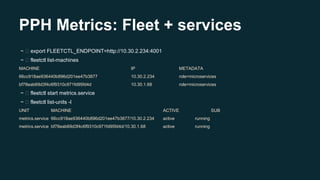
PPH Metrics: Fleet + services
~ export FLEETCTL_ENDPOINT=http://10.30.2.234:4001
~ fleetctl list-machines
MACHINE IP METADATA
66cc918ae936440b896d201ee47b3877 10.30.2.234 role=microservices
bf78eab69d3f4c6f9310c971fd95fd4d 10.30.1.68 role=microservices
~ fleetctl start metrics.service
~ fleetctl list-units -l
UNIT MACHINE ACTIVE SUB
metrics.service 66cc918ae936440b896d201ee47b3877/10.30.2.234 active running
metrics.service bf78eab69d3f4c6f9310c971fd95fd4d/10.30.1.68 active running
PPH Metrics: etcd
Used for service discovery and generating configuration files (via confd or other methods)
~ etcdctl ls --recursive /
/microservices
/microservices/metrics/10.30.2.234:6000
/microservices/metrics/10.30.1.68:6000
/microservices/metrics/version/ffa2eeb4
/microservices/metrics/db/host/metrics.db.peopleperhour.com
/microservices/metrics/db/name/metrics
/microservices/metrics/db/user/awsdbuser
/microservices/metrics/db/pass/youwish
/microservices/metrics/aws/access_key/KEY
/microservices/metrics/aws/secret_key/SECRET_KEY
/microservices/metrics/google/adwords/clientId/CLIENT_ID
…...
PPH Metrics: Keeping envs identical
The Stack
● MySQL
● Nginx
● PHP (in FastCGI)
● Memcached
● Metrics (our Yii2 framework app (with its dependencies))
In Staging and Production environments most of the stack is out of container scope
MySQL -> AWS RDS HTTP LoadBalancing -> AWS ELB Memcached - AWS ElasticCache
Etcd holds their endpoints and connection credentials
How do we link all these in a Development environment (and remain sane)?
PPH Metrics: docker-compose
Fast, isolated development environments using Docker.
Simple YAML syntax to link containers, container volumes, expose ports & link hosts.
● Deployment (strive for seamless updates)
● Continuous Integration
● Continuous Delivery
TBD in an upcoming Docker Athens Meetup
PPH Metrics: Ship it!
Thank you!
Questions?

introduction to micro services

  • 1.
    Micro Services Intro &implementation of a microservices architecture Docker Athens Spyros Lambrinidis @slambrinidis CTO 18 Feb 2014 Panagiotis Moustafellos @pmoust DevOps
  • 2.
    What is aMicroService “approach to developing a single application as a suite of small services” “designing software applications as suites of independently deployable services”
  • 3.
    What is aMicroService
  • 4.
    What is aMicroService ● Each service is loosely coupled / independently deployable ○ Changes made only to this service ● Each service has a bounded context ○ Service should not know about surrounding service (domain driven design)
  • 5.
    Characteristics ● Services ● Productsvs Projects ● Smart endpoints / dumb pipes ● Decentralized governance ● Decentralised data management ● Automation ● Design for failure ● Evolutionary design
  • 6.
    Simple Blog Example ELB WebServer/ FE WebServer / FE Comments Service Pages Service Posts Service Redis MySql MySql Mongo Redis SOLR
  • 7.
    Advantages ● Small codebase / easier to test / maintain ● Easy to scale - clone ● Easy to throw away ● Easy to deploy and track errors ● Freedom to switch tech stack ● Maximise team agility ● Maximise resource utilisation
  • 8.
    Disadvantages ● Devops challengeon multiple fronts ● Complexity in messaging and front end ● Most container technologies still new ● Freedom of tech stack not always good news (for the future and for the CTO)
  • 9.
    Micro Service andagility ● Modern agile practice can not ignore tech ● No modern tech = no absolute agility ● Micro services enable agility in a special way ○ Enforce team creation ○ Enforce faster deployments / better & easier tests ○ CI / CD ○ Easier communication flow methods (APIs) ○ Each service = small scale product
  • 10.
    Container Technology inmicros ● Containers assist micro architecture in ○ Visualising services ○ Building / sharing services between coders ○ Deploying services ○ Utilising server resources to run containers irrespective of underlying tech ● Popular container technologies ○ Docker ○ Rocket
  • 11.
    Container Management ● Usedto maintain and utilize containers / services ○ Make sure all services up and running ○ Make sure server utilisation is maxed out ● Popular container management technologies ○ CoreOS fleet ○ Docker-machine ○ Mesos ○ Kubernetes ○ AWS ECS / Google Container Engine
  • 12.
    PPH Specifics ● Architecturehistory ○ 2008 shared server – outsourced code – raw php ○ 2010 more servers on peer1 and standalone mysql ○ 2010 move to aws ○ 2011 move to yii framework (not 100% complete) ○ Multiple features and optimisation since then ○ 2014 – supertasker.com launch ● Present ○ Monolithic app ○ Multiple db tech (sql, dynamo, mongo, memcache) ○ Search through SOLR ○ Traffic on supertasker.com
  • 13.
    PPH Challenges ● ConstantlyGrowing load (data + traffic) ○ 160GB db ○ 1300 rpm avg ○ 35k uniques / day (55k sessions) ● Code complexity from multiple features ● Usage of yii v1.6 – difficult to change. Not exciting for devs to work on it ● Code tightly coupled in many ways ● More products evolving and needing similar features – supertasker.com
  • 14.
    PPH Future ● Minimisecore db - micros use their own ● Ability to scale to amazing level - scale out ○ design to clone things (clone dbs / web servers) ○ design to split things (one core vs many small ones) ○ design to split similar things (shard / partition) ● Absolute resource utilisation ● Devs playground (use desired tech – within limits)
  • 15.
    PPH Future ● Utilisationof communities through container sharing – no need to share apps ● Service sharing between products ● Fully tested / API enabled services ● Gradually decrease power or core db and machines ○ never reach maximum of scaliong up ability
  • 16.
    PPH Micro Internals ●Container technology ○ Docker ○ Docker-compose ● Preferred micro language ○ Php using yii v2 which is REST API enabled ● REST API ○ Communication only through well defined APIs ● Full tested Services ○ Each service to have full test coverage (unit & integration & contract)
  • 17.
    PPH Micro Internals ●Data ○ Each service to be tied to its own data ● Container Management ○ CoreOS fleet ● Deployment ● CI tool ○ shippable
  • 18.
    Workflow: PPH Metrics ●planning the ecosystem ● keeping it simple ● describing the infrastructure plan under version control ● describing the API ● opting for identical D-S-P environments ● enforcing testing (make everything fail) ● deploying seamlessly (as possible) ● applying Continuous Integration & Continuous Delivery
  • 19.
    PPH Metrics: Planning Goals: ●Scalable ● Self-contained ● Interoperable ● Proven in production ● Cost effective PPH preference: AWS EC2 AutoScaling + CoreOS (stable channel)
  • 20.
    PPH Metrics: definingan API ● Lots of tools (Swagger, RAML, etc) ● Well defined entities - check out schema.org ● Discussion amongst dev team for internal API usage ● Join Athens API Meetup :) We were lazy - no excuses - moving on
  • 21.
    PPH Metrics: KISS ●Single node definition ● Single scaling up/down strategy ● Platform agnostic (if possible) ● Human readable Configuration Management and IaC ● DevOps friendly (bridge the gap between Dev & Ops) ● API matters - Preferred Stack does not (or does it?) ● Bring up dev environment in seconds
  • 22.
    PPH Metrics: Describingit whole ● Infrastructure as Code Terraform ● Configuration Management CoreOS Cloud-config + Fleet Services ● Linking Containers docker-compose / swarm
  • 23.
    PPH Metrics: Terraform WhyTerraform? ● Ops make mistakes ● Many environments, many resources, too much room for error, too little time for documenting changes and current state ● Awesome human readable DSL ● Easy to maintain infrastructure state ● Multiple providers (we just needed AWS) ● Developers understand it ● Still very fresh, but well tested ● Created by Hashicorp Version 0.3.7 meets our needs We made small contributions that we needed to have upstream
  • 24.
    Terraform DSL -defining an AWS autoscaling group behind a Load Balancer
  • 25.
    PPH Metrics: CoreOS WhyCoreOS? ● Built with application containers in mind ● Built for scale ● Fleet - manages nodes and services in a cluster ● Etcd - distributed key-value store ● [Unit] - [Service] - [Timer] ● fleetctl - the cli tool to manage Fleet ● etcdctl - the cli tool to manage Etcd
  • 26.
    Hands-on example: Cloud-config #cloud-config coreos: etcd: discovery:https://discovery.etcd.io/<YOUR_TOKEN> addr: $private_ipv4:4001 peer-addr: $private_ipv4:7001 fleet: public-ip: $private_ipv4 metadata: role=microservices update: group: stable reboot-strategy: etcd-lock users: - name: pmoust coreos-ssh-import-github: pmoust groups: - sudo - docker ssh_authorized_keys: - ssh-rsa AAAAB3NzaC1…. manage_etc_hosts: localhost units: - name: etcd.service runtime: true command: start - name: fleet.service runtime: true command: start - name: metrics.service command: start content: | [Unit] Description=Metrics Author=pmoust After=docker.service [Service] Restart=always ExecStartPre=/usr/bin/docker kill metrics ExecStartPre=/usr/bin/docker rm metrics ExecStartPre=/usr/bin/docker pull peopleperhour/metrics ExecStart=/usr/bin/docker run --rm --name metrics peopleperhour/metrics ExecStop=/usr/bin/docker stop -t 5 metrics
  • 27.
    PPH Metrics: Fleet+ services ~ export FLEETCTL_ENDPOINT=http://10.30.2.234:4001 ~ fleetctl list-machines MACHINE IP METADATA 66cc918ae936440b896d201ee47b3877 10.30.2.234 role=microservices bf78eab69d3f4c6f9310c971fd95fd4d 10.30.1.68 role=microservices ~ fleetctl start metrics.service ~ fleetctl list-units -l UNIT MACHINE ACTIVE SUB metrics.service 66cc918ae936440b896d201ee47b3877/10.30.2.234 active running metrics.service bf78eab69d3f4c6f9310c971fd95fd4d/10.30.1.68 active running
  • 28.
    PPH Metrics: etcd Usedfor service discovery and generating configuration files (via confd or other methods) ~ etcdctl ls --recursive / /microservices /microservices/metrics/10.30.2.234:6000 /microservices/metrics/10.30.1.68:6000 /microservices/metrics/version/ffa2eeb4 /microservices/metrics/db/host/metrics.db.peopleperhour.com /microservices/metrics/db/name/metrics /microservices/metrics/db/user/awsdbuser /microservices/metrics/db/pass/youwish /microservices/metrics/aws/access_key/KEY /microservices/metrics/aws/secret_key/SECRET_KEY /microservices/metrics/google/adwords/clientId/CLIENT_ID …...
  • 29.
    PPH Metrics: Keepingenvs identical The Stack ● MySQL ● Nginx ● PHP (in FastCGI) ● Memcached ● Metrics (our Yii2 framework app (with its dependencies)) In Staging and Production environments most of the stack is out of container scope MySQL -> AWS RDS HTTP LoadBalancing -> AWS ELB Memcached - AWS ElasticCache Etcd holds their endpoints and connection credentials How do we link all these in a Development environment (and remain sane)?
  • 30.
    PPH Metrics: docker-compose Fast,isolated development environments using Docker. Simple YAML syntax to link containers, container volumes, expose ports & link hosts.
  • 31.
    ● Deployment (strivefor seamless updates) ● Continuous Integration ● Continuous Delivery TBD in an upcoming Docker Athens Meetup PPH Metrics: Ship it!
  • 32.