GDD Model
專案中常遇到的問題 需求不明確 需求變動 開發人力不足 時間延遲 超出預算 產出不符合需求
Feature 明確標準的開發流程 透過高階商業需求模型,建立專案背景 採用使用案例 (Use Case) 描述商業需求 以視覺化塑模 (Visual Modeling) 來描繪設計 迭代式增量開發 (Iterative & Increment development) 、架構優先 整合式的開發合作平台
明確標準的開發流程  [1/3] Picoway Offshore Partner Customer Business Requirement Business Analysis Model SRS (Draft, Final version) User, Tech Requirement Architecture POC SRS (Key Scenario) Business Analysis Model Design Model Source Code SRS (Final Version) SRS (Updated) Change Request Debug System Test Debug Acceptance Test Debug Acceptance Test Development Context Diagram
明確標準的開發流程  [2/3] Developer Leader Offshore Partner Project Team PM Biz User Business Analyst Tech User Customer Project Team  Architecture Review Design Review Code Review Picoway Project Team  System Analyst PM Development Reviewer Tester Project Management (Weekly Review,  Iteration Assessment)  Requirement Development Tester Configuration Manager AR, SD Requirement Demonstration SIT, UAT,  Bug Tracing Project Review Release Management Release Management Configuration Manager Build Review Programmer Participant Co-Working Model SIT, UAT,  Bug Tracing
明確標準的開發流程  [3/3] Role Responsibility Player PM Project Management Picoway, Customer BA/Biz User Business Analysis & Design User Requirement Customer Tech User Tech Requirement Customer SA Requirement Analysis & Design Picoway Developer Leader Outsourcing Window Offshore Partner AR, SD System Analysis & Design Offshore Partner Programmer Coding & UT Offshore Partner Reviewer Arch, Design & Code Review Picoway Tester Integration Test Picoway,  Offshore Partner CM Configuration Management Version Control Workspace Management Release Management Picoway,  Offshore Partner
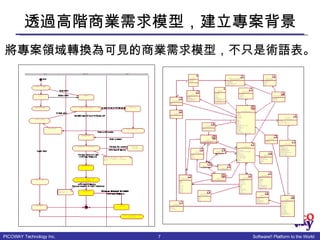
透過高階商業需求模型,建立專案背景 將專案領域轉換為可見的商業需求模型,不只是術語表。
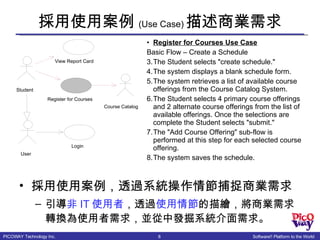
採用使用案例 (Use Case) 描述商業需求 採用使用案例,透過系統操作情節捕捉商業需求 引導 非 IT 使用者 ,透過 使用情節 的描繪,將商業需求轉換為使用者需求,並從中發掘系統介面需求。 Register for Courses Use Case Basic Flow – Create a Schedule The Student selects "create schedule." The system displays a blank schedule form. The system retrieves a list of available course offerings from the Course Catalog System. The Student selects 4 primary course offerings and 2 alternate course offerings from the list of available offerings. Once the selections are complete the Student selects "submit." The "Add Course Offering" sub-flow is performed at this step for each selected course offering. The system saves the schedule. View Report Card Student Register for Courses Course Catalog Login User
以視覺化塑模 (Visual Modeling) 來描繪設計 [1/2] 用豐富的圖文設計標示來描繪軟體設計 視覺化塑模可使設計與實作變得 透明化 有助於複雜系統的了解 BillingSystem <<legacy>> CourseCatalog  System <<legacy>> Desktop PC StudentApplication RegistrarApplication RegistrationS erver CourseCatalogSystemAccess CourseRegistrationProcess CloseRegistrationProcess BillingSystemAccess <<Campus LAN>> <<Campus LAN>> <<Campus LAN>> <<Campus LAN>> External  Desktop PC StudentApplication <<Internet>>
以視覺化塑模 (Visual Modeling) 來描繪設計 [2/2] Register for Courses (Use Case) Basic Flow – Create a Schedule The Student selects &quot;create schedule.&quot; The system displays a blank schedule form. The system retrieves a list of available course offerings from the  Course Catalog System . The Student selects 4 primary course offerings and 2 alternate course offerings from the list of available offerings. Once the selections are complete the Student selects &quot;submit.&quot; The &quot;Add Course Offering&quot; sub-flow is performed at this step for each selected course offering. The system saves the  schedule . 準確回應需求 形成實作基礎 : Student : Student :RegisterForCoursesForm : RegistrationController : Schedule : Schedule :  ICourseCatalogSystem :  ICourseCatalogSystem A list of the available  course offerings for  this semester ... Student wishes  to create a new  schedule At this, point the Submit Schedule subflow is executed. Sequence Diagram: Register for  Courses (with Persistency) / Register  for Courses - Basic Flow - Sub... A blank schedule  is displayed for  the students to  select offerings This flow is inserted after the Register for Courses - Basic Flow (with Persistency) Sequence Diagram: University  ... 1. createSchedule( ) 1.2. displayCourseOfferings( ) 1.3. displayBlankSchedule( ) 2. select 4 primary and 2 alternate()( ) 1.1. getCourseOfferings( ) 2.1. create schedule with offerings(CourseOfferingList, CourseOfferingList) 2.1.1. new(forSemester, withPrimaryOfferings, withAlternateOfferings) 1.1.1. getCourseOfferings(forSemester) Controller knows what  semester it is Pass the list of primary  course offerings and the  list of alternate course  offerings
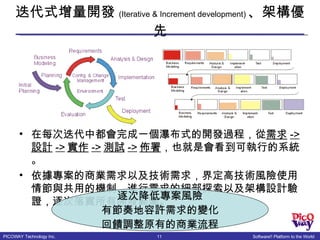
迭代式增量開發 (Iterative & Increment development) 、架構優先 在每次迭代中都會完成一個瀑布式的開發過程,從 需求 -> 設計 -> 實作 -> 測試 -> 佈署 ,也就是會看到可執行的系統。 依據專案的商業需求以及技術需求,界定高技術風險使用情節與共用的機制,進行需求的細部探索以及架構設計驗證,逐次落實所有開發範圍。 逐次降低專案風險 有節奏地容許需求的變化 回饋調整原有的商業流程
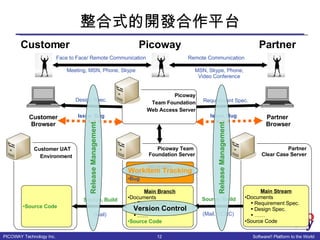
整合式的開發合作平台 Picoway Team  Foundation Server Partner Clear Case Server Main Branch Documents Requirement Spec. Design Spec. …… Source Code Customer UAT  Environment Requirement Spec. Source, Build (Mail, CCRC) Picoway Team Foundation Web Access Server Partner  Browser Main Stream Documents Requirement Spec. Design Spec. …… Source Code Design Spec. Customer Browser Source, Build (Mail) Remote Communication Face to Face/ Remote Communication MSN, Skype, Phone, Video Conference Meeting, MSN, Phone, Skype Partner Picoway Customer Source Code Version Control Workitem Tracking Workitem Issue Bug Issue, Bug Issue, Bug Release Management Release Management
Advantage 明確標準的開發流程 工作流程的明確分工,標準的合作界面,可使各面向的專業人員分別參與在需求、設計、實作各面向 透過高階商業需求模型,建立專案背景 一致的專案領域背景,可使專案團隊減少溝通的隔閡與誤差,加強溝通的效率與效能 採用使用案例 (Use Case) 描述商業需求 可使非  IT  使用者參與需求發展作業,減少需求的誤差 比傳統只有  UI  介面的需求發展方式,能更快更清楚的辨識出需求範圍 以視覺化塑模 (Visual Modeling) 來描繪設計 可提升系統的透明度,並能準確回應與回饋需求 迭代式增量開發 (Iterative & Increment development) 、架構優先 漸次處理專案範圍,有效降低專案風險,提升品質 容許需求變化、提升需求可見性與穩定性 整合式的開發合作平台 清楚一致的專案開發環境,透過平台統一資訊的取得與更新,提升專案的透明化與準確性

GDD Model

  • 1.
  • 2.
    專案中常遇到的問題 需求不明確 需求變動開發人力不足 時間延遲 超出預算 產出不符合需求
  • 3.
    Feature 明確標準的開發流程 透過高階商業需求模型,建立專案背景採用使用案例 (Use Case) 描述商業需求 以視覺化塑模 (Visual Modeling) 來描繪設計 迭代式增量開發 (Iterative & Increment development) 、架構優先 整合式的開發合作平台
  • 4.
    明確標準的開發流程 [1/3]Picoway Offshore Partner Customer Business Requirement Business Analysis Model SRS (Draft, Final version) User, Tech Requirement Architecture POC SRS (Key Scenario) Business Analysis Model Design Model Source Code SRS (Final Version) SRS (Updated) Change Request Debug System Test Debug Acceptance Test Debug Acceptance Test Development Context Diagram
  • 5.
    明確標準的開發流程 [2/3]Developer Leader Offshore Partner Project Team PM Biz User Business Analyst Tech User Customer Project Team Architecture Review Design Review Code Review Picoway Project Team System Analyst PM Development Reviewer Tester Project Management (Weekly Review, Iteration Assessment) Requirement Development Tester Configuration Manager AR, SD Requirement Demonstration SIT, UAT, Bug Tracing Project Review Release Management Release Management Configuration Manager Build Review Programmer Participant Co-Working Model SIT, UAT, Bug Tracing
  • 6.
    明確標準的開發流程 [3/3]Role Responsibility Player PM Project Management Picoway, Customer BA/Biz User Business Analysis & Design User Requirement Customer Tech User Tech Requirement Customer SA Requirement Analysis & Design Picoway Developer Leader Outsourcing Window Offshore Partner AR, SD System Analysis & Design Offshore Partner Programmer Coding & UT Offshore Partner Reviewer Arch, Design & Code Review Picoway Tester Integration Test Picoway, Offshore Partner CM Configuration Management Version Control Workspace Management Release Management Picoway, Offshore Partner
  • 7.
  • 8.
    採用使用案例 (Use Case)描述商業需求 採用使用案例,透過系統操作情節捕捉商業需求 引導 非 IT 使用者 ,透過 使用情節 的描繪,將商業需求轉換為使用者需求,並從中發掘系統介面需求。 Register for Courses Use Case Basic Flow – Create a Schedule The Student selects &quot;create schedule.&quot; The system displays a blank schedule form. The system retrieves a list of available course offerings from the Course Catalog System. The Student selects 4 primary course offerings and 2 alternate course offerings from the list of available offerings. Once the selections are complete the Student selects &quot;submit.&quot; The &quot;Add Course Offering&quot; sub-flow is performed at this step for each selected course offering. The system saves the schedule. View Report Card Student Register for Courses Course Catalog Login User
  • 9.
    以視覺化塑模 (Visual Modeling)來描繪設計 [1/2] 用豐富的圖文設計標示來描繪軟體設計 視覺化塑模可使設計與實作變得 透明化 有助於複雜系統的了解 BillingSystem <<legacy>> CourseCatalog System <<legacy>> Desktop PC StudentApplication RegistrarApplication RegistrationS erver CourseCatalogSystemAccess CourseRegistrationProcess CloseRegistrationProcess BillingSystemAccess <<Campus LAN>> <<Campus LAN>> <<Campus LAN>> <<Campus LAN>> External Desktop PC StudentApplication <<Internet>>
  • 10.
    以視覺化塑模 (Visual Modeling)來描繪設計 [2/2] Register for Courses (Use Case) Basic Flow – Create a Schedule The Student selects &quot;create schedule.&quot; The system displays a blank schedule form. The system retrieves a list of available course offerings from the Course Catalog System . The Student selects 4 primary course offerings and 2 alternate course offerings from the list of available offerings. Once the selections are complete the Student selects &quot;submit.&quot; The &quot;Add Course Offering&quot; sub-flow is performed at this step for each selected course offering. The system saves the schedule . 準確回應需求 形成實作基礎 : Student : Student :RegisterForCoursesForm : RegistrationController : Schedule : Schedule : ICourseCatalogSystem : ICourseCatalogSystem A list of the available course offerings for this semester ... Student wishes to create a new schedule At this, point the Submit Schedule subflow is executed. Sequence Diagram: Register for Courses (with Persistency) / Register for Courses - Basic Flow - Sub... A blank schedule is displayed for the students to select offerings This flow is inserted after the Register for Courses - Basic Flow (with Persistency) Sequence Diagram: University ... 1. createSchedule( ) 1.2. displayCourseOfferings( ) 1.3. displayBlankSchedule( ) 2. select 4 primary and 2 alternate()( ) 1.1. getCourseOfferings( ) 2.1. create schedule with offerings(CourseOfferingList, CourseOfferingList) 2.1.1. new(forSemester, withPrimaryOfferings, withAlternateOfferings) 1.1.1. getCourseOfferings(forSemester) Controller knows what semester it is Pass the list of primary course offerings and the list of alternate course offerings
  • 11.
    迭代式增量開發 (Iterative &Increment development) 、架構優先 在每次迭代中都會完成一個瀑布式的開發過程,從 需求 -> 設計 -> 實作 -> 測試 -> 佈署 ,也就是會看到可執行的系統。 依據專案的商業需求以及技術需求,界定高技術風險使用情節與共用的機制,進行需求的細部探索以及架構設計驗證,逐次落實所有開發範圍。 逐次降低專案風險 有節奏地容許需求的變化 回饋調整原有的商業流程
  • 12.
    整合式的開發合作平台 Picoway Team Foundation Server Partner Clear Case Server Main Branch Documents Requirement Spec. Design Spec. …… Source Code Customer UAT Environment Requirement Spec. Source, Build (Mail, CCRC) Picoway Team Foundation Web Access Server Partner Browser Main Stream Documents Requirement Spec. Design Spec. …… Source Code Design Spec. Customer Browser Source, Build (Mail) Remote Communication Face to Face/ Remote Communication MSN, Skype, Phone, Video Conference Meeting, MSN, Phone, Skype Partner Picoway Customer Source Code Version Control Workitem Tracking Workitem Issue Bug Issue, Bug Issue, Bug Release Management Release Management
  • 13.
    Advantage 明確標準的開發流程 工作流程的明確分工,標準的合作界面,可使各面向的專業人員分別參與在需求、設計、實作各面向透過高階商業需求模型,建立專案背景 一致的專案領域背景,可使專案團隊減少溝通的隔閡與誤差,加強溝通的效率與效能 採用使用案例 (Use Case) 描述商業需求 可使非 IT 使用者參與需求發展作業,減少需求的誤差 比傳統只有 UI 介面的需求發展方式,能更快更清楚的辨識出需求範圍 以視覺化塑模 (Visual Modeling) 來描繪設計 可提升系統的透明度,並能準確回應與回饋需求 迭代式增量開發 (Iterative & Increment development) 、架構優先 漸次處理專案範圍,有效降低專案風險,提升品質 容許需求變化、提升需求可見性與穩定性 整合式的開發合作平台 清楚一致的專案開發環境,透過平台統一資訊的取得與更新,提升專案的透明化與準確性