I don’t know anything about
wood carving, but…
Different problems,
different scales,
different tools.
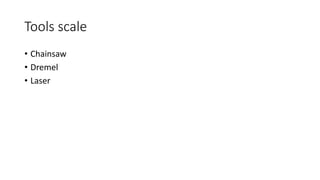
Tools scale
• Chainsaw
• Dremel
• Laser
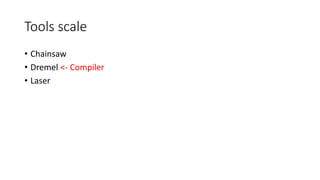
Tools scale
• Chainsaw
• Dremel <- Compiler
• Laser
To make best use of a tool (e.g. compiler)
• Solve the part of the problem the tool can’t help with.
• Prepare the area that the tool can help with.
• Solve details missed by using the tool as intended.
Part 1:
Solve the part of the problem
the tool can’t help with.
Approaches…
Approach #1
• Estimate resources available
• Triage based on cost and value estimates
• Collect data
• Adapt as cost and/or value predictions change
• AKA Engineering
Approach #2
• Don’t worry about resources
• Desperately scramble to fix when running out.
• Generously described as irrational
• Desperate scramble != “optimization”
The problems are there even
if you ignore them.
Estimate resources available
• What are the bottlenecks? i.e. most insufficient for the demand
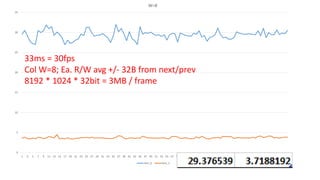
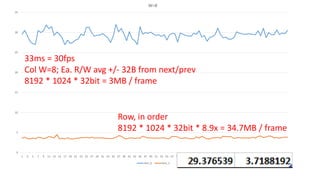
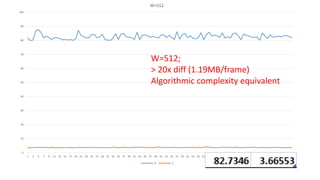
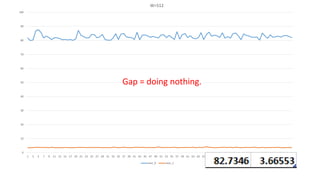
Shell + Excel: test_0 vs. test_1 (W=2 -> W=512)
What can we infer?
0
5
10
15
20
25
30
35
1 3 5 7 9 11 13 15 17 19 21 23 25 27 29 31 33 35 37 39 41 43 45 47 49 51 53 55 57 59 61 63 65 67 69 71 73 75 77 79 81 83 85 87 89 91 93 95 97 99
W=8
test_0 test_1
33ms = 30fps
Col W=8; Ea. R/W avg +/- 32B from next/prev
8192 * 1024 * 32bit = 3MB / frame
0
5
10
15
20
25
30
35
1 3 5 7 9 11 13 15 17 19 21 23 25 27 29 31 33 35 37 39 41 43 45 47 49 51 53 55 57 59 61 63 65 67 69 71 73 75 77 79 81 83 85 87 89 91 93 95 97 99
W=8
test_0 test_1
33ms = 30fps
Col W=8; Ea. R/W avg +/- 32B from next/prev
8192 * 1024 * 32bit = 3MB / frame
Row, in order
8192 * 1024 * 32bit * 8.9x = 34.7MB / frame
0
10
20
30
40
50
60
70
80
90
100
1 3 5 7 9 11 13 15 17 19 21 23 25 27 29 31 33 35 37 39 41 43 45 47 49 51 53 55 57 59 61 63 65 67 69 71 73 75 77 79 81 83 85 87 89 91 93 95 97 99
W=512
test_0 test_1
W=512;
> 20x diff (1.19MB/frame)
Algorithmic complexity equivalent
0
10
20
30
40
50
60
70
80
90
100
1 3 5 7 9 11 13 15 17 19 21 23 25 27 29 31 33 35 37 39 41 43 45 47 49 51 53 55 57 59 61 63 65 67 69 71 73 75 77 79 81 83 85 87 89 91 93 95 97 99
W=512
test_0 test_1
Gap = doing nothing.
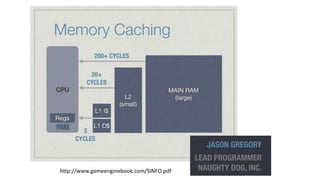
Why?
http://www.gameenginebook.com/SINFO.pdf
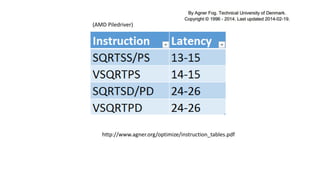
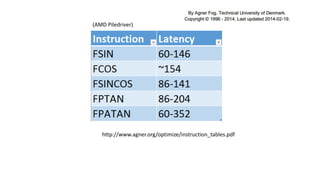
By comparison…
http://www.agner.org/optimize/instruction_tables.pdf
(AMD Piledriver)
http://www.agner.org/optimize/instruction_tables.pdf
(AMD Piledriver)
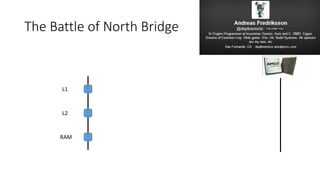
The Battle of North Bridge
L1
L2
RAM
Verify data…
Excel: W=64 (int32_t; mod 8)
0
10
20
30
40
50
60
70
80
90
100
1 3 5 7 9 11 13 15 17 19 21 23 25 27 29 31 33 35 37 39 41 43 45 47 49 51 53 55 57 59 61 63 65 67 69 71 73 75 77 79 81 83 85 87 89 91 93 95 97 99
W=512
test_0 test_1
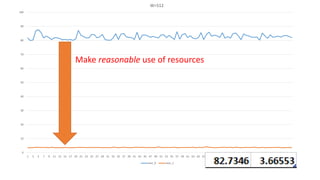
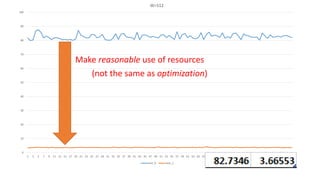
Make reasonable use of resources
0
10
20
30
40
50
60
70
80
90
100
1 3 5 7 9 11 13 15 17 19 21 23 25 27 29 31 33 35 37 39 41 43 45 47 49 51 53 55 57 59 61 63 65 67 69 71 73 75 77 79 81 83 85 87 89 91 93 95 97 99
W=512
test_0 test_1
Make reasonable use of resources
(not the same as optimization)
Memory access is the most
significant component.
Bottleneck: most insufficient for the demand
• Q: Is everything always all about memory access / cache?
• A: No. It’s about whatever the most scarce resources are.
• E.g. Disk access seeks; GPU draw counts; etc.
Let’s look at it another way…
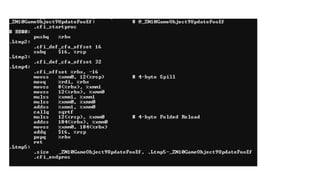
Simple, obvious things to look for
+ Back of the envelope calculations
= Substantial wins
http://deplinenoise.wordpress.com/2013/12/28/optimizable-code/
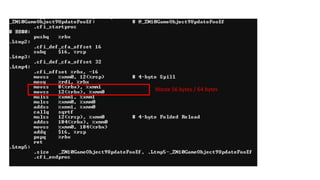
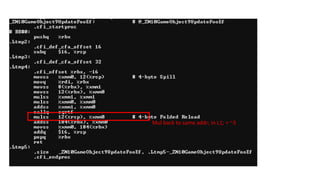
2 x 32bit read; same cache line = ~200
Waste 56 bytes / 64 bytes
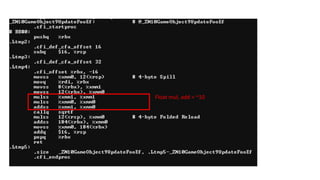
Float mul, add = ~10
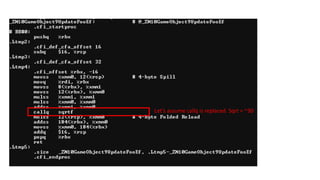
Let’s assume callq is replaced. Sqrt = ~30
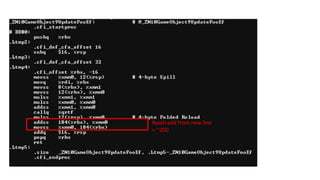
Mul back to same addr; in L1; = ~3
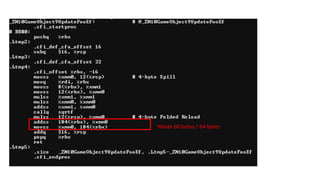
Read+add from new line
= ~200
Waste 60 bytes / 64 bytes
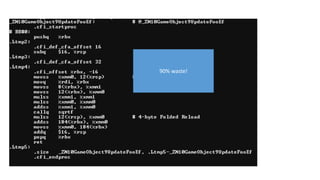
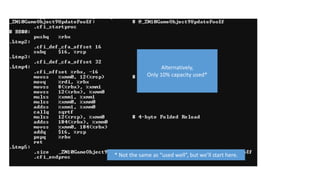
90% waste!
Alternatively,
Only 10% capacity used*
* Not the same as “used well”, but we’ll start here.
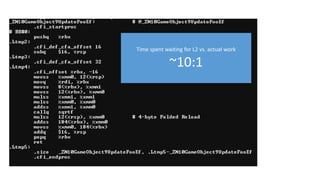
Time spent waiting for L2 vs. actual work
~10:1
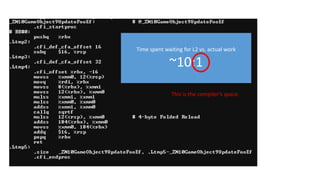
Time spent waiting for L2 vs. actual work
~10:1
This is the compiler’s space.
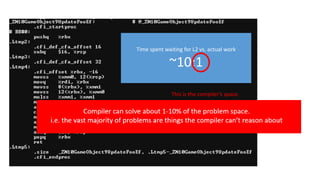
Time spent waiting for L2 vs. actual work
~10:1
This is the compiler’s space.
Compiler cannot solve the most
significant problems.
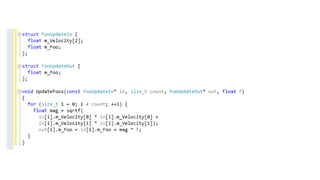
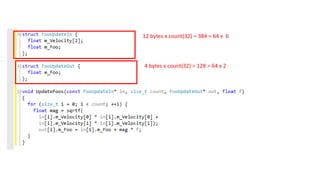
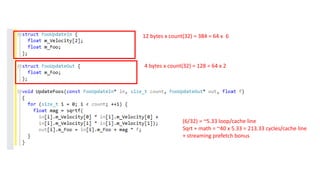
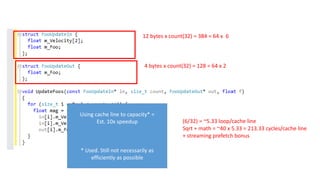
12 bytes x count(32) = 384 = 64 x 6
4 bytes x count(32) = 128 = 64 x 2
12 bytes x count(32) = 384 = 64 x 6
4 bytes x count(32) = 128 = 64 x 2
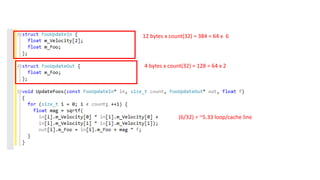
(6/32) = ~5.33 loop/cache line
12 bytes x count(32) = 384 = 64 x 6
4 bytes x count(32) = 128 = 64 x 2
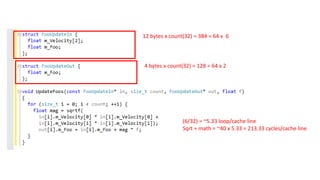
Sqrt + math = ~40 x 5.33 = 213.33 cycles/cache line
(6/32) = ~5.33 loop/cache line
12 bytes x count(32) = 384 = 64 x 6
4 bytes x count(32) = 128 = 64 x 2
Sqrt + math = ~40 x 5.33 = 213.33 cycles/cache line
(6/32) = ~5.33 loop/cache line
+ streaming prefetch bonus
12 bytes x count(32) = 384 = 64 x 6
4 bytes x count(32) = 128 = 64 x 2
Sqrt + math = ~40 x 5.33 = 213.33 cycles/cache line
(6/32) = ~5.33 loop/cache line
+ streaming prefetch bonus
Using cache line to capacity* =
Est. 10x speedup
* Used. Still not necessarily as
efficiently as possible
0
0.5
1
1.5
2
2.5
1 3 5 7 9 11 13 15 17 19 21 23 25 27 29 31 33 35 37 39 41 43 45 47 49 51 53 55 57 59 61 63 65 67 69 71 73 75 77 79 81 83 85 87 89 91 93 95 97 99
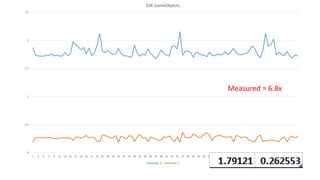
32K GameObjects
test_0 test_1
Measured = 6.8x
Part 2:
Prepare the area that the tool
can help with.
“The high-level design of the code generator”
• http://llvm.org/docs/CodeGenerator.html
• Instruction Selection
• Map data/code to instructions that exist
• Scheduling and Formation
• Give opportunity to schedule / estimate against data access latency
• SSA-based Machine Code Optimizations
• Manual SSA form
• Register Allocation
• Copy to/from locals in register size/types
• Prolog/Epilog Code Insertion
• Late Machine Code Optimizations
• Pay careful attention to inlining
• Code Emission
• Verify asm output regularly
“Compilers are good at applying
mediocre optimizations
hundreds of times.”
- @deplinenoise
Three easy tips to help compiler
• #1 Analyze one value
• #2 Hoist all loop-invariant reads and branches
• #3 Remove redundant transform redundancy
#1 Analyze one value
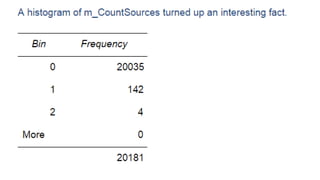
• Find any one value (or implicit value) you’re interested in, anywhere.
• Printf it out over time. (Helps if you tag it so you can find it.)
• Grep your tty and paste into excel. (Sometimes a quick and dirty

script is useful to convert to a more complex piece of data.)
• See what you see. You’re bound to be surprised by something.
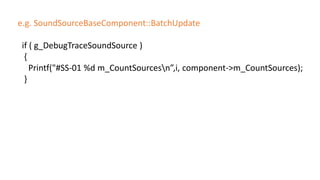
e.g. SoundSourceBaseComponent::BatchUpdate
if ( g_DebugTraceSoundSource )
{
Printf("#SS-01 %d m_CountSourcesn”,i, component->m_CountSources);
}
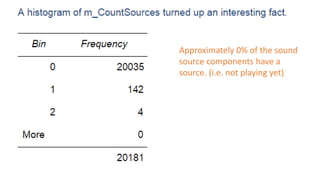
Approximately 0% of the sound
source components have a
source. (i.e. not playing yet)
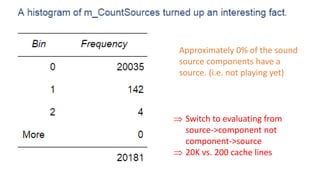
Approximately 0% of the sound
source components have a
source. (i.e. not playing yet)
 Switch to evaluating from
source->component not
component->source
 20K vs. 200 cache lines
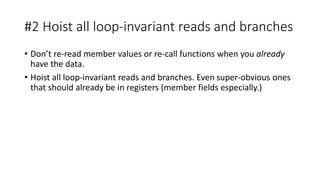
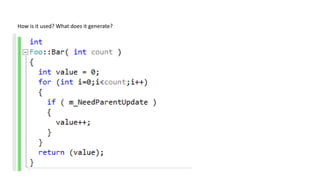
#2 Hoist all loop-invariant reads and branches
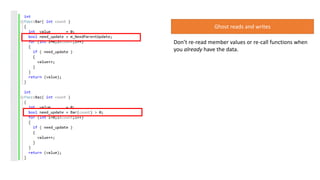
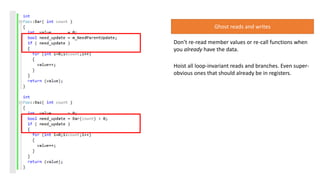
• Don’t re-read member values or re-call functions when you already
have the data.
• Hoist all loop-invariant reads and branches. Even super-obvious ones
that should already be in registers (member fields especially.)
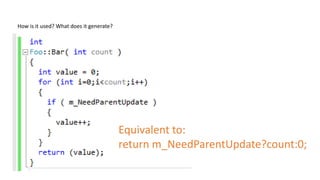
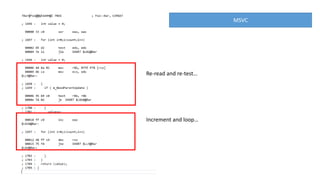
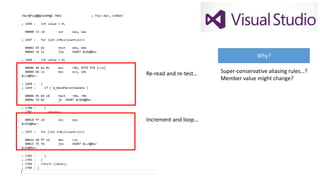
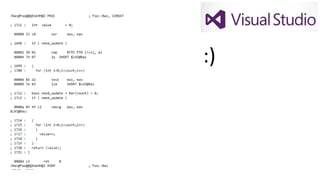
How is it used? What does it generate?
Equivalent to:
return m_NeedParentUpdate?count:0;
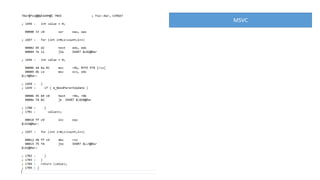
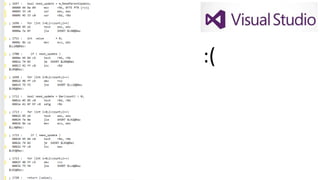
MSVC
MSVC
Re-read and re-test…
Increment and loop…
Re-read and re-test…
Increment and loop…
Why?
Super-conservative aliasing rules…?
Member value might change?
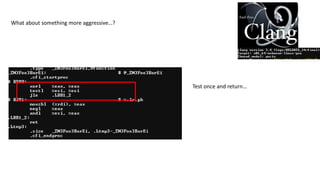
What about something more aggressive…?
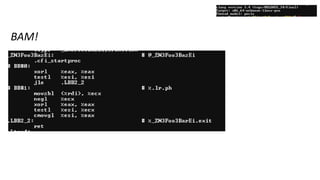
Test once and return…
What about something more aggressive…?
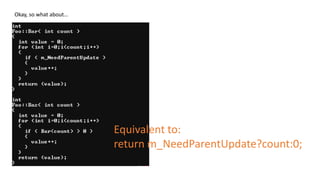
Okay, so what about…
Equivalent to:
return m_NeedParentUpdate?count:0;
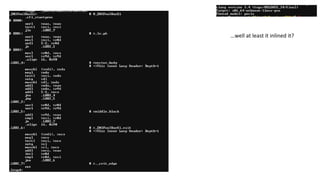
…well at least it inlined it?
MSVC doesn’t fare any better…
Don’t re-read member values or re-call functions when
you already have the data.
Ghost reads and writes
BAM!
:(
Ghost reads and writes
Don’t re-read member values or re-call functions when
you already have the data.
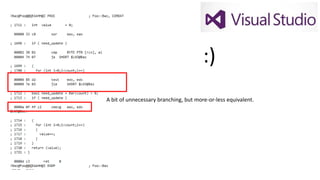
Hoist all loop-invariant reads and branches. Even super-
obvious ones that should already be in registers.
:)
:)
A bit of unnecessary branching, but more-or-less equivalent.
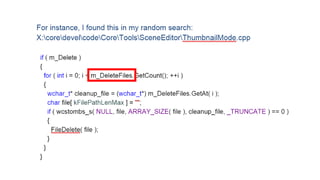
#3 Remove redundant transform redundancy
• Often, especially with small functions, there is not enough context to
know when and under what conditions a transform will happen.
• It’s easy to fall into the over-generalization trap
• It’s only real cases, with real data, we’re concerned with.
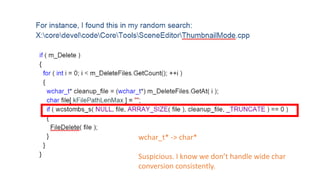
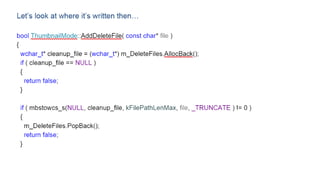
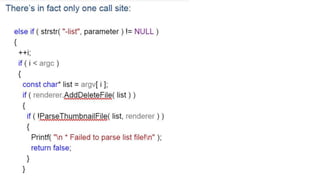
A little gem…
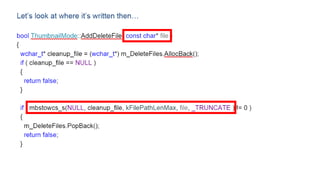
wchar_t* -> char*
Suspicious. I know we don’t handle wide char
conversion consistently.
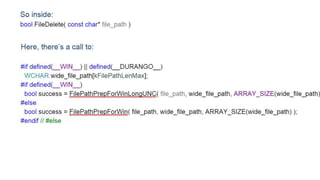
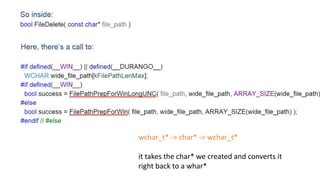
wchar_t* -> char* -> wchar_t*
it takes the char* we created and converts it
right back to a whar*
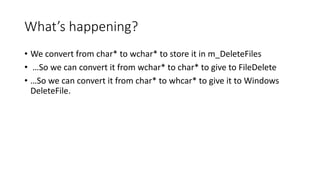
What’s happening?
• We convert from char* to wchar* to store it in m_DeleteFiles
• …So we can convert it from wchar* to char* to give to FileDelete
• …So we can convert it from char* to whcar* to give it to Windows
DeleteFile.
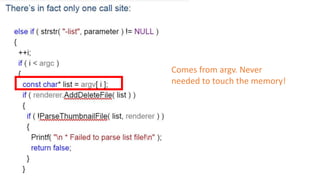
Where does the char* come
from in the first place?
Comes from argv. Never

needed to touch the memory!
Which turned out to be a
command line parameter that
was never used, anywhere.
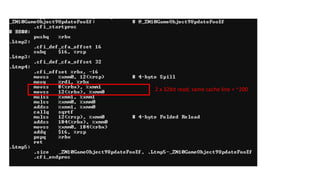
Which brings us back to the
wood carving analogy…
Part 3:
Solve details missed by using
the tool as intended.
Optimization begins.
See: e.g.
Part 4: Practice
If you don’t practice,
you can’t do it when it matters.
Practice
https://oeis.org/A000081
What’s the cause?
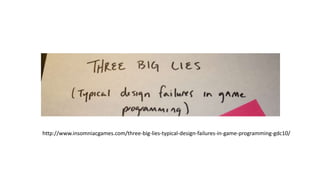
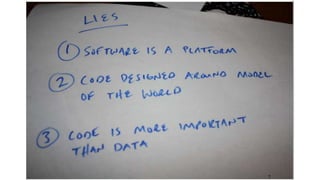
http://www.insomniacgames.com/three-big-lies-typical-design-failures-in-game-programming-gdc10/
#GDC15 Code Clinic

#GDC15 Code Clinic