

METROLAB         Instruments SA


                       User's Manual


                             Version 2.01

                            (Revision 1.4)

                           September 1997


   110 ch. du Pont-du-Centenaire, CH-1228 GENEVA (SWITZERLAND)

        TEL. +41 (22) 884 33 11        FAX. +41 (22) 884 33 10

                    e-mail : contacts@metrolab.ch
THM 7025 User's Manual


INDEX

Conventions ......................................................................................................................1

1. GENERAL DESCRIPTION............................................................................................3

2. SPECIFICATIONS ........................................................................................................5

3. SAFETY ........................................................................................................................7

4. PRINCIPLE OF OPERATIONS.....................................................................................9
        4.1. Operating procedure .........................................................................................9
        4.2. ON/OFF ............................................................................................................9
        4.3. RANGE ...........................................................................................................10
        4.4. Bz (B on Z axis) ..............................................................................................10
        4.5. HOLD ..............................................................................................................11
        4.6. ZERO ..............................................................................................................11

5. INTERFACE RS 232c COMMANDS...........................................................................13
        5.1. INTRODUCTION ............................................................................................13
        5.2. ENQ (ENQuire displayed value) .....................................................................13
        5.3. RNG (RaNGe).................................................................................................14
        5.4. HLD (HoLD) ....................................................................................................14
        5.5. MAP ................................................................................................................14
        5.6. STZ (Set To Zero)...........................................................................................15
        5.7. BZA (B on single Axis) ....................................................................................15
        5.8. VER (firmware VERsion) ................................................................................15
        5.9. ST1 (STatus register 1)...................................................................................15
        5.10. ST2 (STatus register 2).................................................................................17
        5.11. OFF (auto OFF) ............................................................................................18
        5.12. BAT (BATtery Level) .....................................................................................18
        5.13. RST (ReSeT) ................................................................................................18
        5.14. LLO (Local LockOut).....................................................................................18
        5.15. ERR (ERRor) ................................................................................................18
        5.16. CLE (CLear Error).........................................................................................19

6. APPENDIX A: THM 7025's display .............................................................................21

7. APPENDIX B: WARRANTY .......................................................................................23

8. APPENDIX C: Summary of the RS 232c commands.................................................24


METROLAB Instruments SA                                                                                                           I
THM 7025 User's Manual


II                       METROLAB Instruments SA
THM 7025 User's Manual


Conventions

This manual uses the following conventions:


           <HOLD>       : name of a keyboard button.


             [ENQ]      : a RS 232c command.


             "BAT"      : an indication in the display.


                 '1'    : a parameter or option.


                200     : a string of characters returned by the THM 7025.


METROLAB Instruments SA                                                           1
THM 7025 User's Manual


2                        METROLAB Instruments SA
THM 7025 User's Manual


1.     GENERAL DESCRIPTION


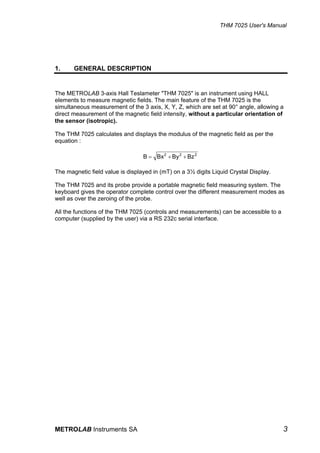
The METROLAB 3-axis Hall Teslameter "THM 7025" is an instrument using HALL
elements to measure magnetic fields. The main feature of the THM 7025 is the
simultaneous measurement of the 3 axis, X, Y, Z, which are set at 90° angle, allowing a
direct measurement of the magnetic field intensity, without a particular orientation of
the sensor (isotropic).

The THM 7025 calculates and displays the modulus of the magnetic field as per the
equation :

                                  B = Bx 2 + By 2 + Bz 2

The magnetic field value is displayed in (mT) on a 3½ digits Liquid Crystal Display.

The THM 7025 and its probe provide a portable magnetic field measuring system. The
keyboard gives the operator complete control over the different measurement modes as
well as over the zeroing of the probe.

All the functions of the THM 7025 (controls and measurements) can be accessible to a
computer (supplied by the user) via a RS 232c serial interface.


METROLAB Instruments SA                                                                3
THM 7025 User's Manual


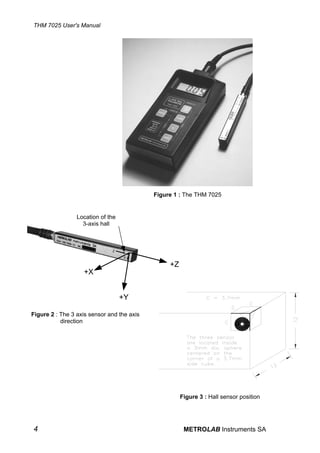
                                            Figure 1 : The THM 7025


                 Location of the
                   3-axis hall


                                                 +Z
                   +X


                                   +Y

Figure 2 : The 3 axis sensor and the axis
           direction


                                                      Figure 3 : Hall sensor position


4                                                      METROLAB Instruments SA
THM 7025 User's Manual


2.     SPECIFICATIONS


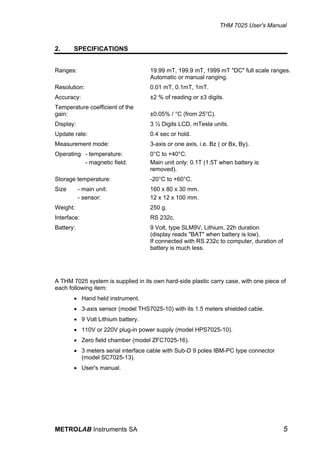
Ranges:                             19.99 mT, 199.9 mT, 1999 mT "DC" full scale ranges.
                                    Automatic or manual ranging.
Resolution:                         0.01 mT, 0.1mT, 1mT.
Accuracy:                           ±2 % of reading or ±3 digits.
Temperature coefficient of the
gain:                               ±0.05% / °C (from 25°C).
Display:                            3 ½ Digits LCD, mTesla units.
Update rate:                        0.4 sec or hold.
Measurement mode:                   3-axis or one axis, i.e. Bz ( or Bx, By).
Operating - temperature:            0°C to +40°C.
          - magnetic field:         Main unit only: 0.1T (1.5T when battery is
                                    removed).
Storage temperature:                -20°C to +60°C.
Size       - main unit:             160 x 80 x 30 mm.
           - sensor:                12 x 12 x 100 mm.
Weight:                             250 g.
Interface:                          RS 232c.
Battery:                            9 Volt, type SLM9V, Lithium, 22h duration
                                    (display reads "BAT" when battery is low).
                                    If connected with RS 232c to computer, duration of
                                    battery is much less.


A THM 7025 system is supplied in its own hard-side plastic carry case, with one piece of
each following item:
       • Hand held instrument.
       • 3-axis sensor (model THS7025-10) with its 1.5 meters shielded cable.
       • 9 Volt Lithium battery.
       • 110V or 220V plug-in power supply (model HPS7025-10).
       • Zero field chamber (model ZFC7025-16).
       • 3 meters serial interface cable with Sub-D 9 poles IBM-PC type connector
         (model SC7025-13).
       • User's manual.


METROLAB Instruments SA                                                                  5
THM 7025 User's Manual


6                        METROLAB Instruments SA
THM 7025 User's Manual


3.     SAFETY


The THM 7025 can measure magnetic field up to 2 Tesla.

We strongly WARN and URGE the user to take into consideration the effects of such
strong magnetic fields.

The THM 7025 unit is powered by a 9 Volt battery which is partly made out of iron.
Meaning that strong mechanical forces are applied to the battery and therefore to the
THM 7025 unit.

The main unit, WITH THE BATTERY INSIDE, should not be exposed to magnetic
field stronger than 0.1 Tesla.

By neglecting this warning, the THM 7025 might be pulled away from the hands'user.

EVEN WHEN BATTERY IS REMOVED, the main unit should not be exposed to
magnetic fields stronger than 1.5 Tesla.

The operation and the accuracy of the THM 7025 cannot be guaranteed as long as it
remains in the magnetic field. Without excluding that permanent damage can occur to
the instrument.

When battery is removed and the plug-in power supply is being used, be aware of the
similar danger, since the transformer of the power supply contains a mass of iron.
Therefore the plug-in power supply should never by exposed to magnetic field stronger
than 0.1 Tesla.

METROLAB Instrument SA cannot be hold responsible for any accident occurred
by the misuse of the THM 7025 or by none-respect of the present warning.


METROLAB Instruments SA                                                                 7
THM 7025 User's Manual


8                        METROLAB Instruments SA
THM 7025 User's Manual


4.   PRINCIPLE OF OPERATIONS


     4.1.     Operating procedure

     • Slide the battery door at the back of the unit. Install the 9V battery and replace
       the battery door.
     • Plug the sensor into the connector at the top of the unit.
     • Turn on the THM 7025 by pressing the ON/OFF switch for at least 1 sec.


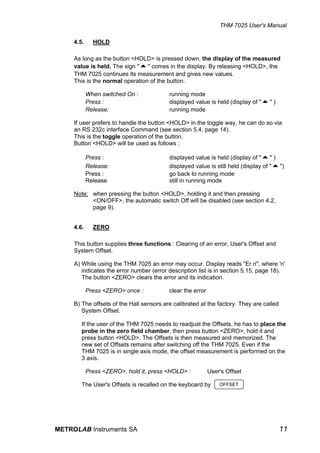
     The THM 7025 is being manually operated by 5 switches.

                                                                       Section 4.2


     Section 4.5
                                                                       Section 4.3


                                                                       Section 4.4


                                                                       Section 4.6


                                Figure 4 : keyboard view


     4.2.     ON/OFF

     On and Off switch.

            Press once for at least 1 sec : instrument is On.
            Press again :                   instrument is Off.

     If the <ON/OFF> switch of the THM 7025 is not being used or if no RS 232c
     command is sent, the THM 7025 switches off automatically after ~ 3 minutes.

     To disable the automatic switch Off, press the button <HOLD>, hold it and then
     press <ON/OFF>. The display shows "On" for about 0.4s to indicate that the
     instruments is now On until you turn it Off by using the <ON/OFF> button.


METROLAB Instruments SA                                                                9
THM 7025 User's Manual

      This function is recalled on the keyboard by ALWAYS ON

      The [OFF] command can cancel or enable the automatic switch Off.(See section
      5.11, page 18.)

      Also, when the battery is too low, the display indicates "BAT" and a few minutes
      later, the THM 7025 switches Off by itself.


      4.3.     RANGE

      The values of measurement are displayed in three ranges :

             1. 19.99 mT
             2. 199.9 mT
             3. 1999 mT.

      When the THM 7025 is switched On, it is set on autoranging mode and it
      displays the measurement in the most appropriate range. By pressing
      <RANGE>, it switches from Autoranging to 1999, by second pressing to 199.9,
      by third pressing to 19.99 and then switches back to autoranging mode. Before
      displaying the value of the magnetic field, the THM 7025 displays the selected
      range for a half second. Refer to the following chart:


                   Pressure on        Range of        Range indication in
                    <RANGE>          measurement         the display

                 When switched On     Autoranging

                       1st            up to 1999              0

                       2nd            up to 199.9             0.0

                       3rd            up to 19.99            0.00

                       4th            Autoranging            Aut.

                       ...


      4.4.     Bz (B on Z axis)

      The <Bz> button toggles between 3 and single axis measurements. To
      distinguish between these two modes, the sign "+" or "-" is displayed with the
      magnetic field value in single axis mode. Otherwise no sign is displayed.

      By default, the chosen axis is 'Z'. The access to another axis is possible via the
      RS 232c command [BZA] (see section 5.7, page 15).


             When switched On :     3 Axis measurement
             Press once :           measurement of a single axis (Z) (display of "+" or "-")
             Press again :          comes back to 3 Axis measurement


10                                                       METROLAB Instruments SA
THM 7025 User's Manual

     4.5.     HOLD

     As long as the button <HOLD> is pressed down, the display of the measured
     value is held. The sign "5" comes in the display. By releasing <HOLD>, the
     THM 7025 continues its measurement and gives new values.
     This is the normal operation of the button.

            When switched On :            running mode
            Press :                       displayed value is held (display of "5" )
            Release:                      running mode

     If user prefers to handle the button <HOLD> in the toggle way, he can do so via
     an RS 232c interface Command (see section 5.4, page 14).
     This is the toggle operation of the button.
     Button <HOLD> will be used as follows :

            Press :                       displayed value is held (display of "5" )
            Release:                      displayed value is still held (display of "5")
            Press :                       go back to running mode
            Release                       still in running mode

     Note: when pressing the button <HOLD>, holding it and then pressing
           <ON/OFF>, the automatic switch Off will be disabled (see section 4.2,
           page 9).


     4.6.     ZERO

     This button supplies three functions : Clearing of an error, User's Offset and
     System Offset.

     A) While using the THM 7025 an error may occur. Display reads "Er.n", where 'n'
        indicates the error number (error description list is in section 5.15, page 18).
        The button <ZERO> clears the error and its indication.

            Press <ZERO> once :           clear the error

     B) The offsets of the Hall sensors are calibrated at the factory. They are called
        System Offset.

        If the user of the THM 7025 needs to readjust the Offsets, he has to place the
        probe in the zero field chamber, then press button <ZERO>, hold it and
        press button <HOLD>. The Offsets is then measured and memorized. The
        new set of Offsets remains after switching off the THM 7025. Even if the
        THM 7025 is in single axis mode, the offset measurement is performed on the
        3 axis.

            Press <ZERO>, hold it, press <HOLD> :           User's Offset

        The User's Offsets is recalled on the keyboard by       OFFSET


METROLAB Instruments SA                                                                  11
THM 7025 User's Manual


        Warning: because the THM 7025 is an instrument measuring 3 axis, the
                 User's Offset cannot be used to offset the display when the sensor
                 is in a given magnetic field (i.e. relative measurements) otherwise
                 the measurements will be dependent on the sensor orientation !

      C) To restore the System Offset defined at the factory, the user will press
         <ZERO>, hold the button and press <ON/OFF>. This action resets the default
         parameters, including that the Z axis will be the default axis when pressing the
         <Bz> button.

          Press <ZERO>, hold it, press <ON/OFF> :         System Offset

        The System Offset is recalled on the keyboard by       RESET


12                                                       METROLAB Instruments SA
THM 7025 User's Manual


5.   INTERFACE RS 232c COMMANDS


     5.1.      INTRODUCTION

     Ensure the instrument is Off before connecting the supplied RS 232c cable from
     the THM 7025 to the serial port of the computer.
     Set the computer with the following RS 232c parameters :
                     9600 bauds, 8 bits, no parity, 1 stop bit, No XON/OFF.

     The control of the THM 7025 through the serial interface is made with a set of
     commands. Every command consist of a string of ASCII characters using the
     following syntax: a root of 3 mnemonic characters then one or zero parameters,
     then the characters 'carriage-return' (ASCII 13) and 'Line-feed' (ASCII 10).
     The root and the parameter are separated by a comma.

     Note: the characters 'carriage-return' - 'line-feed' are mandatory for any
           command, as well as they are returned at the end of any string of
           characters sent by the THM 7025. However, to clarify the text, they have
           been omitted in the command description.

     Some commands are 'read only' (ex: [ENQ]), or 'write only' (ex: [CLE]). The
     others are 'read and write' commands. They are used to set a parameter or an
     option. In 'write' mode these commands include the parameter (ex: [RNG,2]) and
     in 'read' mode these commands have no parameter (ex: [RNG]) and the present
     parameter value is returned by the THM 7025.

     The set of commands is described in the following sections.


     5.2.      ENQ (ENQuire displayed value)

     The [ENQ] Command returns the value of the magnetic field.

     The returned string of characters corresponds to the display. This command will
     return the field value presently displayed. If the THM 7025 is overloaded, the
     [ENQ] Command will return: O.L.
     If the [ENQ] Command is sent when the THM 7025 is changing the range of
     measurement (display reads " - - - "), the returned string of characters will be: !

     The [ENQ,n] Command gives the value of the magnetic field of the individual
     axis, where :

            n = 1 for X Axis
            n = 2 for Y Axis
            n = 3 for Z Axis

     Note: if the THM 7025 is in single axis mode, [ENQ] will return the magnetic field
           value of this axis only. Whereas [ENQ,n] will return 0 if 'n' refers to one of
           the none-selected axis.


METROLAB Instruments SA                                                                13
THM 7025 User's Manual

      5.3.      RNG (RaNGe)

      The [RNG,n] Command modifies the ranges of measurement where :

             n = 1 or    20          sets 19.99 mT range
             n = 2 or    200         sets 199.9 mT range
             n = 3 or    2000        sets 1999. mT range
             n=0                     sets in autoranging mode.

      The [RNG] Command returns the current status of range in a string of characters
      which has the following meaning :

             0          for the autoranging mode
             20         for the 19.99 mT range
             200        for the 199.9 mT range
             2000       for the 1999. mT range.


      5.4.      HLD (HoLD)

      The [HLD,n] Command holds or releases the display where :

             n = 1,     display is held
             n = 0,     display is running.

      The [HLD] Command returns the current status of Hold mode.

      The [HLD,n] Command alternates normal and toggle operation of the button,
      where :

             n = 2,     button <HOLD> is in toggle operation
             n = 3,     button <HOLD> is in normal operation.

      (see section 4.5 at page 11 on how to use button <HOLD>).

      Note : The selected operation, normal or toggle, is memorised. The chosen
             operation remains after switching off the THM 7025.


      5.5.      MAP

      The [MAP,n] Command sends to RS 232c the displayed value where :

             n = 1,     at each press of button <HOLD> the displayed value is sent to
                        RS 232c
             n = 0,     release MAP function.

      Note : Thanks to the RS 232c interface, the mapping of a field is very convenient.
             The THM 7025 is positioned where a measurement of the field has to be
             taken. When the user is pressing the button <HOLD>, the displayed value
             is sent to the computer, thus allowing easy acquisition of magnetic field
             values.


14                                                        METROLAB Instruments SA
THM 7025 User's Manual

     5.6.      STZ (Set To Zero)

     The [STZ,n] Command deals with the sensor offsets, where:

            n = 1,   measures and memorizes the User's Offset on the three axis.

     This Command has the same result as by pressing down the buttons <ZERO>
     and <HOLD> (See section 4.6, page 11)

     WARNING : to measure the User's Offset, the user has to place the probe in the
               zero field chamber which itself must be in a magnetic environment
               below 0.15 mT (1.5 Gauss or about ~3 time the Earth magnetic field
               strength).

            n = 0,   reverts to System Offset.

     This Command has the same result as by pressing down the buttons <ZERO>
     and <ON/OFF>. (See section 4.6, page 11)

     The [STZ] Command returns 0 if THM 7025 is being used with System Offset or
     returns 1 if it is being used with User's Offset.


     5.7.      BZA (B on single Axis)

     This command allows the user to select any of the three single axis or the 3 axis
     mode.

     The [BZA,n] Command sets the Axis mode where :

            n = 1,   for the X axis
            n = 2,   for the Y axis
            n = 3,   for the Z axis
            n = 0,   for the 3 axis mode.

     Note: by pressing the <Bz> button, the display indicates the magnetic field
           measured with the last single axis selected by the [BZA] Command.

     The [BZA] Command returns the current status of the axis mode.


     5.8.      VER (firmware VERsion)

     The [VER] Command returns the firmware version in the following string of
     characters.

            METROLAB SA, THM 7025, Ver X.XX


     5.9.      ST1 (STatus register 1)

     The [ST1] Command returns the Status Register 1


METROLAB Instruments SA                                                             15
THM 7025 User's Manual

      The Status Register 1 is returned in a string of 8 ASCII characters 0 or 1 followed
      by 'CR' 'LF'; the first character received is the most significant bit (bit 7).

      The [ST1,n] Command clears the bits of the Status Register 1

      Where 'n' is a decimal value from 0 to 255 which allows to write zeroes in Status
      Register 1: i.e. '0' clears all bits of the Status Register 1; '255' doesn't clear any
      bits of the Status Register 1; '9' clears all bits except the bits 3 and 0 of the
      Status Register 1.

      Meaning of the status register 1:


           7        6      5         4            3            2              1            0

       Reset or     0      0     EEPROM        Battery     Overload      Command          Data
       power on                    R/W          low                       or Com.        ready
                                   Error                                   Error

      Bit 7: reset or power on
      This bit is set to 1 at power on or by a reset of the instrument using the [RST]
      Command.

      Bit 6: always 0

      Bit 5: always 0

      Bit 4: EEPROM Read/Write error
      This bit is set to 1 to indicate that there is an error in reading or writing
      parameters in the none-volatile memory (EEPROM). This is a fatal error which
      cannot be cleared. The instrument needs to be repaired.

      Bit 3: Battery low
      This bit is set to 1 to indicate that the battery level is too low and thus the battery
      needs to be changed. The display reads "BAT".

      Bit 2: Overload
      This bit is set to 1 to indicate that the range is overloaded. The display reads
      "O.L." . The user can select a higher range, if it is possible.

      Bit 1: Command or communication error
      This bit is set to 1 to indicate that the syntax of a command was wrong. The last
      command which gave the error is returned by the [ERR] Command.
      This bit is also set in case of an error in the communication with the RS 232c
      interface.

      Bit 0: Data ready
      This bit is set to 1 to indicate that a value is available for reading. The update
      interval is about 0.4 sec.


16                                                          METROLAB Instruments SA
THM 7025 User's Manual


     5.10. ST2 (STatus register 2)

     The [ST2] Command returns the Status Register 2.

     The Status Register 2 is returned in a string of 8 ASCII characters 0 or 1 followed
     by 'CR' 'LF'; the first character is the most significant bit (bit 7). The bit of the
     Status Register 2 indicate the state of the instrument at the moment of the reading.
     They cannot be cleared by the user.

     Meaning of the status register 2:


          7          6            5            4          3              2        1        0

      Reserved      0       Local         User's        Hold           Single   Range    Range
                    or     LockOut       Offset is                      Axis     (h)       (l)
                    1                     used

     Bit 7: Reserved

     Bit 6: 0 or 1
     Can be 0 or 1. Information used at the factory only (test and diagnostic purposes).

     Bit 5: Local LockOut
     This bit is set to 1 when the keyboard is locked.
     It is cleared to 0 when it is in operation.

     Bit 4: User's Offset
     This bit is set to 1 when the THM 7025 is used with the User's Offset.
     It is cleared to 0 when it is used with the System Offset.

     Bit 3: Hold
     This bit is set to 1 when the display is held.
     It is cleared to 0 when the display is running.

     Bit 2: Single axis
     This bit is set to 1 when the THM 7025 is used in single axis mode.
     It is cleared to 0 when the 3 axis mode is activated.

     Bits 1 and 0: Ranges
     These bit indicate the range:


                          Bit 1        Bit 0            RANGE

                            0            0           not available *

                            0            1             20.00 mT

                            1            0             200.0 mT

                            1            1             2000. mT


     * Combination of 0 and 0 cannot occur.


METROLAB Instruments SA                                                                   17
THM 7025 User's Manual

      5.11. OFF (auto OFF)

      The [OFF,n] Command controls the automatic switch Off function:

          n = 0,     mode auto-OFF is canceled. The THM 7025 is On until it is
                     switched Off by using the button <ON/OFF> or the [OFF,2]
                     Command. The display reads " On " for ~0.4 sec.
          n = 1,     mode auto-OFF is enabled, meaning that the THM 7025 will be
                     automatically switched Off by itself after 3 minutes when unused.
                     The display reads " OFF " for ~0.4 sec.
          n = 2,     the THM 7025 is switched Off !


      5.12.   BAT (BATtery Level)

      The [BAT] Command returns the current battery level in 1/10 of Volts.

      Example : 92 indicates 9.2 V


      5.13.   RST (ReSeT)

      The [RST] Command resets the THM 7025.

      The THM 7025 returns to the same status as when it has been switched On.


      5.14. LLO (Local LockOut)

      The [LLO,n] Command blocks or releases the keyboard.

      It presents a safety if the user does not want to loose the parameters which he
      has modified, by touching accidentally the keyboard of the unit.

          n = 1,     the keyboard is locked
          n = 0,     the keyboard is in operation.


      5.15. ERR (ERRor)

      The [ERR] Command returns the first 3 digits of the last command which gave a
      syntax error.

      The syntax error is indicated by bit 1 of status register 1.


18                                                         METROLAB Instruments SA
THM 7025 User's Manual

     5.16. CLE (CLear Error)

     The [CLE] Command clears an eventual error.

     i.e. : when the display reads "Er.2" or "Er.3"

     Errors description:

     If a fault is detected, the Display or the returned string of characters of the [ENQ]
     command indicates "Er.n", where :

     n = 1,       This is an error in reading or writing the parameters in the none-
                  volatile memory (EEPROM).
                  This is a fatal error which cannot be cleared and the instrument
                  needs to be repaired.

     n = 2,       This error arises when there is a fault in the RS 232c communication
                  or the reading of the keyboard.
                  This error can be cleared by either pressing button <ZERO> or
                  by using the [CLE] Command.

     n = 3,       This error occurs either during a User's Offset measurement, when
                  the residual magnetic field is too high to be nulled.
                   The error 3 can be cleared by either pressing button <ZERO>
                  or by using the [CLE] Command.


METROLAB Instruments SA                                                                19
THM 7025 User's Manual


20                       METROLAB Instruments SA
THM 7025 User's Manual


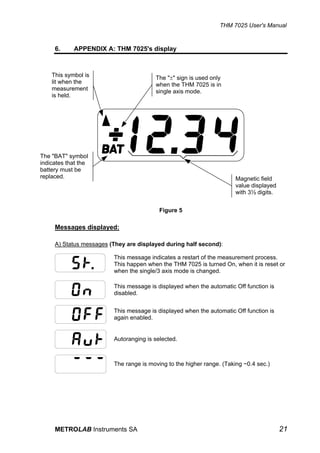
     6.     APPENDIX A: THM 7025's display


    This symbol is                      The "±" sign is used only
    lit when the                        when the THM 7025 is in
    measurement                         single axis mode.
    is held.


The "BAT" symbol
indicates that the
battery must be
replaced.                                                              Magnetic field
                                                                       value displayed
                                                                       with 3½ digits.


                                          Figure 5

     Messages displayed:

     A) Status messages (They are displayed during half second):

                         This message indicates a restart of the measurement process.
                         This happen when the THM 7025 is turned On, when it is reset or
                         when the single/3 axis mode is changed.

                         This message is displayed when the automatic Off function is
                         disabled.

                         This message is displayed when the automatic Off function is
                         again enabled.


                         Autoranging is selected.


                         The range is moving to the higher range. (Taking ~0.4 sec.)


     METROLAB Instruments SA                                                             21
THM 7025 User's Manual


                     The range 1999 mT is selected.


                     The range 199.9 mT is selected.


                     The range 19.99 mT is selected.


                     The THM 7025 returns to the System Offset.


                     The User's Offset is being measured and memorized.


B) Error messages (They are displayed until the error condition is cleared):

                     The range is overloaded, the user can select the higher range, if
                     it is possible.

                     This is an error in reading or writing the parameters in the none-
                     volatile memory (EEPROM).
                     This is a fatal error which cannot be cleared and the
                     instrument needs to be repaired.

                     This error arises when there is a fault in the RS 232
                     communication or the reading of the keyboard. It can be cleared
                     by either pressing button <ZERO> or by using the command
                     [CLE].

                     This error occurs either during a User's Offset measurement,
                     when the residual magnetic field is too high to be nulled,
                     or during regular measurements, when the internal memory is
                     saturated. However, the latter should never occur in normal
                     operation. This error can be cleared by either pressing button
                     <ZERO> or by using the [CLE] Command.


22                                                      METROLAB Instruments SA
THM 7025 User's Manual


7.     APPENDIX B: WARRANTY


METROLAB Instruments SA warrants each instrument of its manufacture to be free from
defects in material and workmanship. Our obligation under this warranty is limited to
servicing or adjusting free of charge any THM 7025 system returned to our factory for
that purpose. This warranty covers the THM 7025 and its accessories which, within one
year after delivery to the original purchaser, shall be returned with transportation
charges prepaid by the original purchaser, and which upon examination shall disclose to
our satisfaction to be defective. If it is determined that the defect has been caused by
misuse or abnormal conditions of operation, repairs will be billed at cost after submitting
an estimate to the purchaser.

METROLAB Instruments SA reserves the right to make changes in design at any time
without incurring any obligations to install same changes on units previously purchased.

This warranty is expressly in lieu of all other obligations or liabilities on the part of
METROLAB Instruments SA, and METROLAB Instruments SA neither assumes nor
authorizes any other person to assume for them any other liability in connection with the
sales of the THM 7025.


DAMAGE IN SHIPMENT:

The instrument should be examined and tested as soon as it is received. If it does not
operate properly, or is damaged in any way, immediately file a claim with the carrier.
The claim agent will provide report forms. A copy of the completed form should be
forwarded to us. We will then make necessary arrangements for repair or replacement.


METROLAB Instruments SA                                                                 23
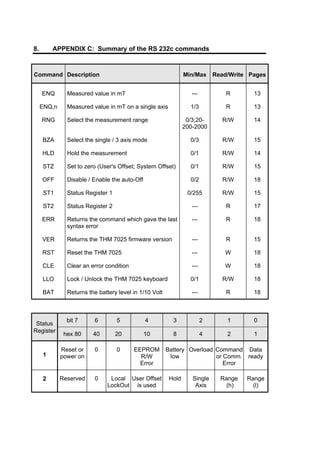
8.       APPENDIX C: Summary of the RS 232c commands


Command Description                                             Min/Max      Read/Write Pages


     ENQ       Measured value in mT                                ---           R       13

     ENQ,n     Measured value in mT on a single axis              1/3            R       13

     RNG       Select the measurement range                      0/3;20-       R/W       14
                                                                200-2000

     BZA       Select the single / 3 axis mode                    0/3          R/W       15

     HLD       Hold the measurement                               0/1          R/W       14

     STZ       Set to zero (User's Offset; System Offset)         0/1          R/W       15

     OFF       Disable / Enable the auto-Off                      0/2          R/W       18

     ST1       Status Register 1                                 0/255         R/W       15

     ST2       Status Register 2                                   ---           R       17

     ERR       Returns the command which gave the last             ---           R       18
               syntax error

     VER       Returns the THM 7025 firmware version               ---           R       15

     RST       Reset the THM 7025                                  ---          W        18

     CLE       Clear an error condition                            ---          W        18

     LLO       Lock / Unlock the THM 7025 keyboard                0/1          R/W       18

     BAT       Returns the battery level in 1/10 Volt              ---           R       18


               bit 7      6        5           4          3              2       1       0
 Status
Register
              hex 80     40        20          10         8              4       2       1

             Reset or     0        0      EEPROM        Battery Overload Command Data
     1       power on                       R/W          low             or Comm. ready
                                            Error                           Error

     2       Reserved     0     Local User Offset        Hold      Single      Range   Range
                               LockOut is used                      Axis         (h)     (l)

Gaussmetro thm7025 user manual

  • 1.
    METROLAB Instruments SA User's Manual Version 2.01 (Revision 1.4) September 1997 110 ch. du Pont-du-Centenaire, CH-1228 GENEVA (SWITZERLAND) TEL. +41 (22) 884 33 11 FAX. +41 (22) 884 33 10 e-mail : contacts@metrolab.ch
  • 3.
    THM 7025 User'sManual INDEX Conventions ......................................................................................................................1 1. GENERAL DESCRIPTION............................................................................................3 2. SPECIFICATIONS ........................................................................................................5 3. SAFETY ........................................................................................................................7 4. PRINCIPLE OF OPERATIONS.....................................................................................9 4.1. Operating procedure .........................................................................................9 4.2. ON/OFF ............................................................................................................9 4.3. RANGE ...........................................................................................................10 4.4. Bz (B on Z axis) ..............................................................................................10 4.5. HOLD ..............................................................................................................11 4.6. ZERO ..............................................................................................................11 5. INTERFACE RS 232c COMMANDS...........................................................................13 5.1. INTRODUCTION ............................................................................................13 5.2. ENQ (ENQuire displayed value) .....................................................................13 5.3. RNG (RaNGe).................................................................................................14 5.4. HLD (HoLD) ....................................................................................................14 5.5. MAP ................................................................................................................14 5.6. STZ (Set To Zero)...........................................................................................15 5.7. BZA (B on single Axis) ....................................................................................15 5.8. VER (firmware VERsion) ................................................................................15 5.9. ST1 (STatus register 1)...................................................................................15 5.10. ST2 (STatus register 2).................................................................................17 5.11. OFF (auto OFF) ............................................................................................18 5.12. BAT (BATtery Level) .....................................................................................18 5.13. RST (ReSeT) ................................................................................................18 5.14. LLO (Local LockOut).....................................................................................18 5.15. ERR (ERRor) ................................................................................................18 5.16. CLE (CLear Error).........................................................................................19 6. APPENDIX A: THM 7025's display .............................................................................21 7. APPENDIX B: WARRANTY .......................................................................................23 8. APPENDIX C: Summary of the RS 232c commands.................................................24 METROLAB Instruments SA I
  • 4.
    THM 7025 User'sManual II METROLAB Instruments SA
  • 5.
    THM 7025 User'sManual Conventions This manual uses the following conventions: <HOLD> : name of a keyboard button. [ENQ] : a RS 232c command. "BAT" : an indication in the display. '1' : a parameter or option. 200 : a string of characters returned by the THM 7025. METROLAB Instruments SA 1
  • 6.
    THM 7025 User'sManual 2 METROLAB Instruments SA
  • 7.
    THM 7025 User'sManual 1. GENERAL DESCRIPTION The METROLAB 3-axis Hall Teslameter "THM 7025" is an instrument using HALL elements to measure magnetic fields. The main feature of the THM 7025 is the simultaneous measurement of the 3 axis, X, Y, Z, which are set at 90° angle, allowing a direct measurement of the magnetic field intensity, without a particular orientation of the sensor (isotropic). The THM 7025 calculates and displays the modulus of the magnetic field as per the equation : B = Bx 2 + By 2 + Bz 2 The magnetic field value is displayed in (mT) on a 3½ digits Liquid Crystal Display. The THM 7025 and its probe provide a portable magnetic field measuring system. The keyboard gives the operator complete control over the different measurement modes as well as over the zeroing of the probe. All the functions of the THM 7025 (controls and measurements) can be accessible to a computer (supplied by the user) via a RS 232c serial interface. METROLAB Instruments SA 3
  • 8.
    THM 7025 User'sManual Figure 1 : The THM 7025 Location of the 3-axis hall +Z +X +Y Figure 2 : The 3 axis sensor and the axis direction Figure 3 : Hall sensor position 4 METROLAB Instruments SA
  • 9.
    THM 7025 User'sManual 2. SPECIFICATIONS Ranges: 19.99 mT, 199.9 mT, 1999 mT "DC" full scale ranges. Automatic or manual ranging. Resolution: 0.01 mT, 0.1mT, 1mT. Accuracy: ±2 % of reading or ±3 digits. Temperature coefficient of the gain: ±0.05% / °C (from 25°C). Display: 3 ½ Digits LCD, mTesla units. Update rate: 0.4 sec or hold. Measurement mode: 3-axis or one axis, i.e. Bz ( or Bx, By). Operating - temperature: 0°C to +40°C. - magnetic field: Main unit only: 0.1T (1.5T when battery is removed). Storage temperature: -20°C to +60°C. Size - main unit: 160 x 80 x 30 mm. - sensor: 12 x 12 x 100 mm. Weight: 250 g. Interface: RS 232c. Battery: 9 Volt, type SLM9V, Lithium, 22h duration (display reads "BAT" when battery is low). If connected with RS 232c to computer, duration of battery is much less. A THM 7025 system is supplied in its own hard-side plastic carry case, with one piece of each following item: • Hand held instrument. • 3-axis sensor (model THS7025-10) with its 1.5 meters shielded cable. • 9 Volt Lithium battery. • 110V or 220V plug-in power supply (model HPS7025-10). • Zero field chamber (model ZFC7025-16). • 3 meters serial interface cable with Sub-D 9 poles IBM-PC type connector (model SC7025-13). • User's manual. METROLAB Instruments SA 5
  • 10.
    THM 7025 User'sManual 6 METROLAB Instruments SA
  • 11.
    THM 7025 User'sManual 3. SAFETY The THM 7025 can measure magnetic field up to 2 Tesla. We strongly WARN and URGE the user to take into consideration the effects of such strong magnetic fields. The THM 7025 unit is powered by a 9 Volt battery which is partly made out of iron. Meaning that strong mechanical forces are applied to the battery and therefore to the THM 7025 unit. The main unit, WITH THE BATTERY INSIDE, should not be exposed to magnetic field stronger than 0.1 Tesla. By neglecting this warning, the THM 7025 might be pulled away from the hands'user. EVEN WHEN BATTERY IS REMOVED, the main unit should not be exposed to magnetic fields stronger than 1.5 Tesla. The operation and the accuracy of the THM 7025 cannot be guaranteed as long as it remains in the magnetic field. Without excluding that permanent damage can occur to the instrument. When battery is removed and the plug-in power supply is being used, be aware of the similar danger, since the transformer of the power supply contains a mass of iron. Therefore the plug-in power supply should never by exposed to magnetic field stronger than 0.1 Tesla. METROLAB Instrument SA cannot be hold responsible for any accident occurred by the misuse of the THM 7025 or by none-respect of the present warning. METROLAB Instruments SA 7
  • 12.
    THM 7025 User'sManual 8 METROLAB Instruments SA
  • 13.
    THM 7025 User'sManual 4. PRINCIPLE OF OPERATIONS 4.1. Operating procedure • Slide the battery door at the back of the unit. Install the 9V battery and replace the battery door. • Plug the sensor into the connector at the top of the unit. • Turn on the THM 7025 by pressing the ON/OFF switch for at least 1 sec. The THM 7025 is being manually operated by 5 switches. Section 4.2 Section 4.5 Section 4.3 Section 4.4 Section 4.6 Figure 4 : keyboard view 4.2. ON/OFF On and Off switch. Press once for at least 1 sec : instrument is On. Press again : instrument is Off. If the <ON/OFF> switch of the THM 7025 is not being used or if no RS 232c command is sent, the THM 7025 switches off automatically after ~ 3 minutes. To disable the automatic switch Off, press the button <HOLD>, hold it and then press <ON/OFF>. The display shows "On" for about 0.4s to indicate that the instruments is now On until you turn it Off by using the <ON/OFF> button. METROLAB Instruments SA 9
  • 14.
    THM 7025 User'sManual This function is recalled on the keyboard by ALWAYS ON The [OFF] command can cancel or enable the automatic switch Off.(See section 5.11, page 18.) Also, when the battery is too low, the display indicates "BAT" and a few minutes later, the THM 7025 switches Off by itself. 4.3. RANGE The values of measurement are displayed in three ranges : 1. 19.99 mT 2. 199.9 mT 3. 1999 mT. When the THM 7025 is switched On, it is set on autoranging mode and it displays the measurement in the most appropriate range. By pressing <RANGE>, it switches from Autoranging to 1999, by second pressing to 199.9, by third pressing to 19.99 and then switches back to autoranging mode. Before displaying the value of the magnetic field, the THM 7025 displays the selected range for a half second. Refer to the following chart: Pressure on Range of Range indication in <RANGE> measurement the display When switched On Autoranging 1st up to 1999 0 2nd up to 199.9 0.0 3rd up to 19.99 0.00 4th Autoranging Aut. ... 4.4. Bz (B on Z axis) The <Bz> button toggles between 3 and single axis measurements. To distinguish between these two modes, the sign "+" or "-" is displayed with the magnetic field value in single axis mode. Otherwise no sign is displayed. By default, the chosen axis is 'Z'. The access to another axis is possible via the RS 232c command [BZA] (see section 5.7, page 15). When switched On : 3 Axis measurement Press once : measurement of a single axis (Z) (display of "+" or "-") Press again : comes back to 3 Axis measurement 10 METROLAB Instruments SA
  • 15.
    THM 7025 User'sManual 4.5. HOLD As long as the button <HOLD> is pressed down, the display of the measured value is held. The sign "5" comes in the display. By releasing <HOLD>, the THM 7025 continues its measurement and gives new values. This is the normal operation of the button. When switched On : running mode Press : displayed value is held (display of "5" ) Release: running mode If user prefers to handle the button <HOLD> in the toggle way, he can do so via an RS 232c interface Command (see section 5.4, page 14). This is the toggle operation of the button. Button <HOLD> will be used as follows : Press : displayed value is held (display of "5" ) Release: displayed value is still held (display of "5") Press : go back to running mode Release still in running mode Note: when pressing the button <HOLD>, holding it and then pressing <ON/OFF>, the automatic switch Off will be disabled (see section 4.2, page 9). 4.6. ZERO This button supplies three functions : Clearing of an error, User's Offset and System Offset. A) While using the THM 7025 an error may occur. Display reads "Er.n", where 'n' indicates the error number (error description list is in section 5.15, page 18). The button <ZERO> clears the error and its indication. Press <ZERO> once : clear the error B) The offsets of the Hall sensors are calibrated at the factory. They are called System Offset. If the user of the THM 7025 needs to readjust the Offsets, he has to place the probe in the zero field chamber, then press button <ZERO>, hold it and press button <HOLD>. The Offsets is then measured and memorized. The new set of Offsets remains after switching off the THM 7025. Even if the THM 7025 is in single axis mode, the offset measurement is performed on the 3 axis. Press <ZERO>, hold it, press <HOLD> : User's Offset The User's Offsets is recalled on the keyboard by OFFSET METROLAB Instruments SA 11
  • 16.
    THM 7025 User'sManual Warning: because the THM 7025 is an instrument measuring 3 axis, the User's Offset cannot be used to offset the display when the sensor is in a given magnetic field (i.e. relative measurements) otherwise the measurements will be dependent on the sensor orientation ! C) To restore the System Offset defined at the factory, the user will press <ZERO>, hold the button and press <ON/OFF>. This action resets the default parameters, including that the Z axis will be the default axis when pressing the <Bz> button. Press <ZERO>, hold it, press <ON/OFF> : System Offset The System Offset is recalled on the keyboard by RESET 12 METROLAB Instruments SA
  • 17.
    THM 7025 User'sManual 5. INTERFACE RS 232c COMMANDS 5.1. INTRODUCTION Ensure the instrument is Off before connecting the supplied RS 232c cable from the THM 7025 to the serial port of the computer. Set the computer with the following RS 232c parameters : 9600 bauds, 8 bits, no parity, 1 stop bit, No XON/OFF. The control of the THM 7025 through the serial interface is made with a set of commands. Every command consist of a string of ASCII characters using the following syntax: a root of 3 mnemonic characters then one or zero parameters, then the characters 'carriage-return' (ASCII 13) and 'Line-feed' (ASCII 10). The root and the parameter are separated by a comma. Note: the characters 'carriage-return' - 'line-feed' are mandatory for any command, as well as they are returned at the end of any string of characters sent by the THM 7025. However, to clarify the text, they have been omitted in the command description. Some commands are 'read only' (ex: [ENQ]), or 'write only' (ex: [CLE]). The others are 'read and write' commands. They are used to set a parameter or an option. In 'write' mode these commands include the parameter (ex: [RNG,2]) and in 'read' mode these commands have no parameter (ex: [RNG]) and the present parameter value is returned by the THM 7025. The set of commands is described in the following sections. 5.2. ENQ (ENQuire displayed value) The [ENQ] Command returns the value of the magnetic field. The returned string of characters corresponds to the display. This command will return the field value presently displayed. If the THM 7025 is overloaded, the [ENQ] Command will return: O.L. If the [ENQ] Command is sent when the THM 7025 is changing the range of measurement (display reads " - - - "), the returned string of characters will be: ! The [ENQ,n] Command gives the value of the magnetic field of the individual axis, where : n = 1 for X Axis n = 2 for Y Axis n = 3 for Z Axis Note: if the THM 7025 is in single axis mode, [ENQ] will return the magnetic field value of this axis only. Whereas [ENQ,n] will return 0 if 'n' refers to one of the none-selected axis. METROLAB Instruments SA 13
  • 18.
    THM 7025 User'sManual 5.3. RNG (RaNGe) The [RNG,n] Command modifies the ranges of measurement where : n = 1 or 20 sets 19.99 mT range n = 2 or 200 sets 199.9 mT range n = 3 or 2000 sets 1999. mT range n=0 sets in autoranging mode. The [RNG] Command returns the current status of range in a string of characters which has the following meaning : 0 for the autoranging mode 20 for the 19.99 mT range 200 for the 199.9 mT range 2000 for the 1999. mT range. 5.4. HLD (HoLD) The [HLD,n] Command holds or releases the display where : n = 1, display is held n = 0, display is running. The [HLD] Command returns the current status of Hold mode. The [HLD,n] Command alternates normal and toggle operation of the button, where : n = 2, button <HOLD> is in toggle operation n = 3, button <HOLD> is in normal operation. (see section 4.5 at page 11 on how to use button <HOLD>). Note : The selected operation, normal or toggle, is memorised. The chosen operation remains after switching off the THM 7025. 5.5. MAP The [MAP,n] Command sends to RS 232c the displayed value where : n = 1, at each press of button <HOLD> the displayed value is sent to RS 232c n = 0, release MAP function. Note : Thanks to the RS 232c interface, the mapping of a field is very convenient. The THM 7025 is positioned where a measurement of the field has to be taken. When the user is pressing the button <HOLD>, the displayed value is sent to the computer, thus allowing easy acquisition of magnetic field values. 14 METROLAB Instruments SA
  • 19.
    THM 7025 User'sManual 5.6. STZ (Set To Zero) The [STZ,n] Command deals with the sensor offsets, where: n = 1, measures and memorizes the User's Offset on the three axis. This Command has the same result as by pressing down the buttons <ZERO> and <HOLD> (See section 4.6, page 11) WARNING : to measure the User's Offset, the user has to place the probe in the zero field chamber which itself must be in a magnetic environment below 0.15 mT (1.5 Gauss or about ~3 time the Earth magnetic field strength). n = 0, reverts to System Offset. This Command has the same result as by pressing down the buttons <ZERO> and <ON/OFF>. (See section 4.6, page 11) The [STZ] Command returns 0 if THM 7025 is being used with System Offset or returns 1 if it is being used with User's Offset. 5.7. BZA (B on single Axis) This command allows the user to select any of the three single axis or the 3 axis mode. The [BZA,n] Command sets the Axis mode where : n = 1, for the X axis n = 2, for the Y axis n = 3, for the Z axis n = 0, for the 3 axis mode. Note: by pressing the <Bz> button, the display indicates the magnetic field measured with the last single axis selected by the [BZA] Command. The [BZA] Command returns the current status of the axis mode. 5.8. VER (firmware VERsion) The [VER] Command returns the firmware version in the following string of characters. METROLAB SA, THM 7025, Ver X.XX 5.9. ST1 (STatus register 1) The [ST1] Command returns the Status Register 1 METROLAB Instruments SA 15
  • 20.
    THM 7025 User'sManual The Status Register 1 is returned in a string of 8 ASCII characters 0 or 1 followed by 'CR' 'LF'; the first character received is the most significant bit (bit 7). The [ST1,n] Command clears the bits of the Status Register 1 Where 'n' is a decimal value from 0 to 255 which allows to write zeroes in Status Register 1: i.e. '0' clears all bits of the Status Register 1; '255' doesn't clear any bits of the Status Register 1; '9' clears all bits except the bits 3 and 0 of the Status Register 1. Meaning of the status register 1: 7 6 5 4 3 2 1 0 Reset or 0 0 EEPROM Battery Overload Command Data power on R/W low or Com. ready Error Error Bit 7: reset or power on This bit is set to 1 at power on or by a reset of the instrument using the [RST] Command. Bit 6: always 0 Bit 5: always 0 Bit 4: EEPROM Read/Write error This bit is set to 1 to indicate that there is an error in reading or writing parameters in the none-volatile memory (EEPROM). This is a fatal error which cannot be cleared. The instrument needs to be repaired. Bit 3: Battery low This bit is set to 1 to indicate that the battery level is too low and thus the battery needs to be changed. The display reads "BAT". Bit 2: Overload This bit is set to 1 to indicate that the range is overloaded. The display reads "O.L." . The user can select a higher range, if it is possible. Bit 1: Command or communication error This bit is set to 1 to indicate that the syntax of a command was wrong. The last command which gave the error is returned by the [ERR] Command. This bit is also set in case of an error in the communication with the RS 232c interface. Bit 0: Data ready This bit is set to 1 to indicate that a value is available for reading. The update interval is about 0.4 sec. 16 METROLAB Instruments SA
  • 21.
    THM 7025 User'sManual 5.10. ST2 (STatus register 2) The [ST2] Command returns the Status Register 2. The Status Register 2 is returned in a string of 8 ASCII characters 0 or 1 followed by 'CR' 'LF'; the first character is the most significant bit (bit 7). The bit of the Status Register 2 indicate the state of the instrument at the moment of the reading. They cannot be cleared by the user. Meaning of the status register 2: 7 6 5 4 3 2 1 0 Reserved 0 Local User's Hold Single Range Range or LockOut Offset is Axis (h) (l) 1 used Bit 7: Reserved Bit 6: 0 or 1 Can be 0 or 1. Information used at the factory only (test and diagnostic purposes). Bit 5: Local LockOut This bit is set to 1 when the keyboard is locked. It is cleared to 0 when it is in operation. Bit 4: User's Offset This bit is set to 1 when the THM 7025 is used with the User's Offset. It is cleared to 0 when it is used with the System Offset. Bit 3: Hold This bit is set to 1 when the display is held. It is cleared to 0 when the display is running. Bit 2: Single axis This bit is set to 1 when the THM 7025 is used in single axis mode. It is cleared to 0 when the 3 axis mode is activated. Bits 1 and 0: Ranges These bit indicate the range: Bit 1 Bit 0 RANGE 0 0 not available * 0 1 20.00 mT 1 0 200.0 mT 1 1 2000. mT * Combination of 0 and 0 cannot occur. METROLAB Instruments SA 17
  • 22.
    THM 7025 User'sManual 5.11. OFF (auto OFF) The [OFF,n] Command controls the automatic switch Off function: n = 0, mode auto-OFF is canceled. The THM 7025 is On until it is switched Off by using the button <ON/OFF> or the [OFF,2] Command. The display reads " On " for ~0.4 sec. n = 1, mode auto-OFF is enabled, meaning that the THM 7025 will be automatically switched Off by itself after 3 minutes when unused. The display reads " OFF " for ~0.4 sec. n = 2, the THM 7025 is switched Off ! 5.12. BAT (BATtery Level) The [BAT] Command returns the current battery level in 1/10 of Volts. Example : 92 indicates 9.2 V 5.13. RST (ReSeT) The [RST] Command resets the THM 7025. The THM 7025 returns to the same status as when it has been switched On. 5.14. LLO (Local LockOut) The [LLO,n] Command blocks or releases the keyboard. It presents a safety if the user does not want to loose the parameters which he has modified, by touching accidentally the keyboard of the unit. n = 1, the keyboard is locked n = 0, the keyboard is in operation. 5.15. ERR (ERRor) The [ERR] Command returns the first 3 digits of the last command which gave a syntax error. The syntax error is indicated by bit 1 of status register 1. 18 METROLAB Instruments SA
  • 23.
    THM 7025 User'sManual 5.16. CLE (CLear Error) The [CLE] Command clears an eventual error. i.e. : when the display reads "Er.2" or "Er.3" Errors description: If a fault is detected, the Display or the returned string of characters of the [ENQ] command indicates "Er.n", where : n = 1, This is an error in reading or writing the parameters in the none- volatile memory (EEPROM). This is a fatal error which cannot be cleared and the instrument needs to be repaired. n = 2, This error arises when there is a fault in the RS 232c communication or the reading of the keyboard. This error can be cleared by either pressing button <ZERO> or by using the [CLE] Command. n = 3, This error occurs either during a User's Offset measurement, when the residual magnetic field is too high to be nulled. The error 3 can be cleared by either pressing button <ZERO> or by using the [CLE] Command. METROLAB Instruments SA 19
  • 24.
    THM 7025 User'sManual 20 METROLAB Instruments SA
  • 25.
    THM 7025 User'sManual 6. APPENDIX A: THM 7025's display This symbol is The "±" sign is used only lit when the when the THM 7025 is in measurement single axis mode. is held. The "BAT" symbol indicates that the battery must be replaced. Magnetic field value displayed with 3½ digits. Figure 5 Messages displayed: A) Status messages (They are displayed during half second): This message indicates a restart of the measurement process. This happen when the THM 7025 is turned On, when it is reset or when the single/3 axis mode is changed. This message is displayed when the automatic Off function is disabled. This message is displayed when the automatic Off function is again enabled. Autoranging is selected. The range is moving to the higher range. (Taking ~0.4 sec.) METROLAB Instruments SA 21
  • 26.
    THM 7025 User'sManual The range 1999 mT is selected. The range 199.9 mT is selected. The range 19.99 mT is selected. The THM 7025 returns to the System Offset. The User's Offset is being measured and memorized. B) Error messages (They are displayed until the error condition is cleared): The range is overloaded, the user can select the higher range, if it is possible. This is an error in reading or writing the parameters in the none- volatile memory (EEPROM). This is a fatal error which cannot be cleared and the instrument needs to be repaired. This error arises when there is a fault in the RS 232 communication or the reading of the keyboard. It can be cleared by either pressing button <ZERO> or by using the command [CLE]. This error occurs either during a User's Offset measurement, when the residual magnetic field is too high to be nulled, or during regular measurements, when the internal memory is saturated. However, the latter should never occur in normal operation. This error can be cleared by either pressing button <ZERO> or by using the [CLE] Command. 22 METROLAB Instruments SA
  • 27.
    THM 7025 User'sManual 7. APPENDIX B: WARRANTY METROLAB Instruments SA warrants each instrument of its manufacture to be free from defects in material and workmanship. Our obligation under this warranty is limited to servicing or adjusting free of charge any THM 7025 system returned to our factory for that purpose. This warranty covers the THM 7025 and its accessories which, within one year after delivery to the original purchaser, shall be returned with transportation charges prepaid by the original purchaser, and which upon examination shall disclose to our satisfaction to be defective. If it is determined that the defect has been caused by misuse or abnormal conditions of operation, repairs will be billed at cost after submitting an estimate to the purchaser. METROLAB Instruments SA reserves the right to make changes in design at any time without incurring any obligations to install same changes on units previously purchased. This warranty is expressly in lieu of all other obligations or liabilities on the part of METROLAB Instruments SA, and METROLAB Instruments SA neither assumes nor authorizes any other person to assume for them any other liability in connection with the sales of the THM 7025. DAMAGE IN SHIPMENT: The instrument should be examined and tested as soon as it is received. If it does not operate properly, or is damaged in any way, immediately file a claim with the carrier. The claim agent will provide report forms. A copy of the completed form should be forwarded to us. We will then make necessary arrangements for repair or replacement. METROLAB Instruments SA 23
  • 28.
    8. APPENDIX C: Summary of the RS 232c commands Command Description Min/Max Read/Write Pages ENQ Measured value in mT --- R 13 ENQ,n Measured value in mT on a single axis 1/3 R 13 RNG Select the measurement range 0/3;20- R/W 14 200-2000 BZA Select the single / 3 axis mode 0/3 R/W 15 HLD Hold the measurement 0/1 R/W 14 STZ Set to zero (User's Offset; System Offset) 0/1 R/W 15 OFF Disable / Enable the auto-Off 0/2 R/W 18 ST1 Status Register 1 0/255 R/W 15 ST2 Status Register 2 --- R 17 ERR Returns the command which gave the last --- R 18 syntax error VER Returns the THM 7025 firmware version --- R 15 RST Reset the THM 7025 --- W 18 CLE Clear an error condition --- W 18 LLO Lock / Unlock the THM 7025 keyboard 0/1 R/W 18 BAT Returns the battery level in 1/10 Volt --- R 18 bit 7 6 5 4 3 2 1 0 Status Register hex 80 40 20 10 8 4 2 1 Reset or 0 0 EEPROM Battery Overload Command Data 1 power on R/W low or Comm. ready Error Error 2 Reserved 0 Local User Offset Hold Single Range Range LockOut is used Axis (h) (l)