GARUDA OS
Group members:
Rishabh Joshi: 78
Vraj Pandya: 89
Salman Shaikh: 118
Professor: Dinesh Kalal
GARUDA OS
Garuda Stands for(Global access to resources using
distributed architecture)
It is develop by “Shrinivas Kumbhar” Lead founder of
“GARUDA linux” He is full time student interested in
technology
Garuda Linux is a rolling release distro based on Arch Linux, which
ensures always getting the latest software updates. We only use one
extra repo on top of Arch Linux repos, placing us very close to Arch
Linux without having to install the system via command line.
FEATURES OF GARUDA LINUX
➔ B(Tree file system)
Btrfs (B-Tree Filesystem) is a modern copy-on-write
(CoW) filesystem for Linux. Btrfs aims to implement many
advanced filesystem features while focusing on fault
tolerance, repair, and easy administration. The btrfs
filesystem is designed to support the requirement of high
performance and large storage servers.
FEATURES OF GARUDA LINUX
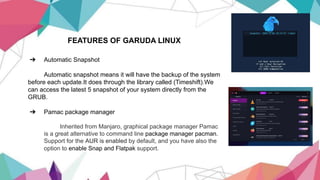
➔ Automatic Snapshot
Automatic snapshot means it will have the backup of the system
before each update.It does through the library called (Timeshift).We
can access the latest 5 snapshot of your system directly from the
GRUB.
➔ Pamac package manager
Inherited from Manjaro, graphical package manager Pamac
is a great alternative to command line package manager pacman.
Support for the AUR is enabled by default, and you have also the
option to enable Snap and Flatpak support.
FEATURES OF GARUDA LINUX
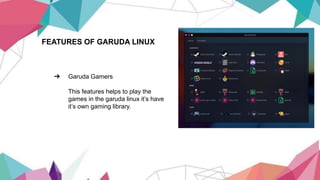
➔ Garuda Gamers
This features helps to play the
games in the garuda linux it’s have
it’s own gaming library.
Desktop environment of Garuda linux
➔ KDE Plasma
➔ Xfce (xform common environment)
➔ GNOME(GNU Network object
model)
➔ UKUI(Ubuntu kylin user Interface)
➔ Wayfire
➔ MATE
Garuda GNOME(environment)
GNOME is a modern desktop environment
which is both clean and beautiful. It is focused
on ease of use.
GNOME
is a free and open-source desktop environment for Unix-like operating systems. GNOME was
originally an acronym for GNU Network Object Model Environment, but the acronym was dropped
because it no longer reflected the vision of the GNOME project.gnome is developed by The “GNOME
Project” which is composed of both volunteers and paid contributors, the largest corporate contributor
being Red Hat.It is an international project that aims to develop software frameworks for the
development of software, to program end-user applications based on these frameworks, and to
coordinate efforts for internationalization and localization and accessibility of that software.
GNOME
Basically,Gnome have also 4 subparts as follows:
➔ GNOME 1
➔ GNOME 2
➔ GNOME 3
➔ GNOME 4
GNOME 1
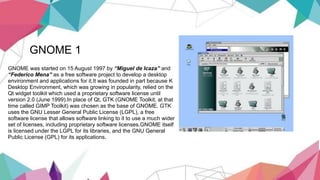
GNOME was started on 15 August 1997 by “Miguel de Icaza” and
“Federico Mena” as a free software project to develop a desktop
environment and applications for it.It was founded in part because K
Desktop Environment, which was growing in popularity, relied on the
Qt widget toolkit which used a proprietary software license until
version 2.0 (June 1999).In place of Qt, GTK (GNOME Toolkit, at that
time called GIMP Toolkit) was chosen as the base of GNOME. GTK
uses the GNU Lesser General Public License (LGPL), a free
software license that allows software linking to it to use a much wider
set of licenses, including proprietary software licenses.GNOME itself
is licensed under the LGPL for its libraries, and the GNU General
Public License (GPL) for its applications.
GNOME 2
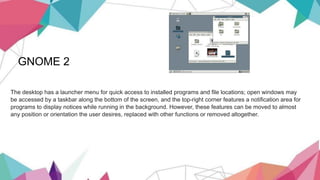
The desktop has a launcher menu for quick access to installed programs and file locations; open windows may
be accessed by a taskbar along the bottom of the screen, and the top-right corner features a notification area for
programs to display notices while running in the background. However, these features can be moved to almost
any position or orientation the user desires, replaced with other functions or removed altogether.
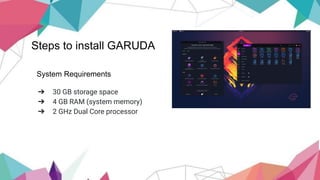
Steps to install GARUDA
System Requirements
➔ 30 GB storage space
➔ 4 GB RAM (system memory)
➔ 2 GHz Dual Core processor
Steps to install GARUDA
➔ Partition Hard Disk for installing Garuda linux.
➔ Download Garuda iso file.
➔ Making USB drive Bootable.(download rufus)
➔ Disable secure boot in BIOS.
➔ Boot with USB drive to install Garuda Linux.
➔ Verify authentication for
use(username,password,region,select garuda partition then
install and last install and reboot now you in garuda
Thank you

Garuda OS

  • 1.
    GARUDA OS Group members: RishabhJoshi: 78 Vraj Pandya: 89 Salman Shaikh: 118 Professor: Dinesh Kalal
  • 2.
    GARUDA OS Garuda Standsfor(Global access to resources using distributed architecture) It is develop by “Shrinivas Kumbhar” Lead founder of “GARUDA linux” He is full time student interested in technology Garuda Linux is a rolling release distro based on Arch Linux, which ensures always getting the latest software updates. We only use one extra repo on top of Arch Linux repos, placing us very close to Arch Linux without having to install the system via command line.
  • 3.
    FEATURES OF GARUDALINUX ➔ B(Tree file system) Btrfs (B-Tree Filesystem) is a modern copy-on-write (CoW) filesystem for Linux. Btrfs aims to implement many advanced filesystem features while focusing on fault tolerance, repair, and easy administration. The btrfs filesystem is designed to support the requirement of high performance and large storage servers.
  • 4.
    FEATURES OF GARUDALINUX ➔ Automatic Snapshot Automatic snapshot means it will have the backup of the system before each update.It does through the library called (Timeshift).We can access the latest 5 snapshot of your system directly from the GRUB. ➔ Pamac package manager Inherited from Manjaro, graphical package manager Pamac is a great alternative to command line package manager pacman. Support for the AUR is enabled by default, and you have also the option to enable Snap and Flatpak support.
  • 5.
    FEATURES OF GARUDALINUX ➔ Garuda Gamers This features helps to play the games in the garuda linux it’s have it’s own gaming library.
  • 6.
    Desktop environment ofGaruda linux ➔ KDE Plasma ➔ Xfce (xform common environment) ➔ GNOME(GNU Network object model) ➔ UKUI(Ubuntu kylin user Interface) ➔ Wayfire ➔ MATE
  • 7.
    Garuda GNOME(environment) GNOME isa modern desktop environment which is both clean and beautiful. It is focused on ease of use.
  • 8.
    GNOME is a freeand open-source desktop environment for Unix-like operating systems. GNOME was originally an acronym for GNU Network Object Model Environment, but the acronym was dropped because it no longer reflected the vision of the GNOME project.gnome is developed by The “GNOME Project” which is composed of both volunteers and paid contributors, the largest corporate contributor being Red Hat.It is an international project that aims to develop software frameworks for the development of software, to program end-user applications based on these frameworks, and to coordinate efforts for internationalization and localization and accessibility of that software.
  • 9.
    GNOME Basically,Gnome have also4 subparts as follows: ➔ GNOME 1 ➔ GNOME 2 ➔ GNOME 3 ➔ GNOME 4
  • 10.
    GNOME 1 GNOME wasstarted on 15 August 1997 by “Miguel de Icaza” and “Federico Mena” as a free software project to develop a desktop environment and applications for it.It was founded in part because K Desktop Environment, which was growing in popularity, relied on the Qt widget toolkit which used a proprietary software license until version 2.0 (June 1999).In place of Qt, GTK (GNOME Toolkit, at that time called GIMP Toolkit) was chosen as the base of GNOME. GTK uses the GNU Lesser General Public License (LGPL), a free software license that allows software linking to it to use a much wider set of licenses, including proprietary software licenses.GNOME itself is licensed under the LGPL for its libraries, and the GNU General Public License (GPL) for its applications.
  • 11.
    GNOME 2 The desktophas a launcher menu for quick access to installed programs and file locations; open windows may be accessed by a taskbar along the bottom of the screen, and the top-right corner features a notification area for programs to display notices while running in the background. However, these features can be moved to almost any position or orientation the user desires, replaced with other functions or removed altogether.
  • 12.
    Steps to installGARUDA System Requirements ➔ 30 GB storage space ➔ 4 GB RAM (system memory) ➔ 2 GHz Dual Core processor
  • 13.
    Steps to installGARUDA ➔ Partition Hard Disk for installing Garuda linux. ➔ Download Garuda iso file. ➔ Making USB drive Bootable.(download rufus) ➔ Disable secure boot in BIOS. ➔ Boot with USB drive to install Garuda Linux. ➔ Verify authentication for use(username,password,region,select garuda partition then install and last install and reboot now you in garuda
  • 14.