




Manfred Rätzmann
Clinton De Young


        Galileo Computing

Software Testing
    and Internationalization


•   In real-world implementations
•   For agile, risk-driven testing
•   Internationalization of software applications
•   Localization testing
About Lemoine International
Established in 1997, Lemoine International is an IT services company
which provides multilingual translation and software localization services.
In addition, it also provides professional project management, UI, I18N,
functionality testing, and internationalization consulting services. With its
headquarters in Salt Lake City, Lemoine International has production cen-
ters throughout Europe and Asia. In its international software testing facility
in Ireland the company carries out multilingual and cross-platform testing
for numerous well-known IT companies.

For more information, please visit www.lemoine-international.com.


About LISA
Founded in 1990 as a non-profit association, LISA is the premier organi-
zation for the GILT (Globalization, Internationalization, Localization, and
Translation) business communities. Over 400 leading IT manufacturers
and solutions providers, along with industry professionals and an increas-
ing number of vertical market corporations with an internationally focused
strategy, have helped establish LISA best practice, business guidelines, and
language-technology standards for enterprise globalization.

For more information on LISA, please visit www.lisa.org.


This PDF version of Galileo Computing Software Testing and International-
ization is provided free of charge by Lemoine International and LISA. It is a
full version of the book and there are no limits on your use of the PDF, but
it may not be printed.

If you are interested in obtaining a hard copy of the book, please e-mail
TeriR@lemoine-international.com.


Galileo Computing Software Testing and Internationalization
© 2003 Lemoine International and the Localization Industry Standards
Association (LISA)
Manfred Rätzmann
        Clinton De Young

Software Testing
 and Internationalization


            lemoineinternational
Chapters 1 through 5 initially published in German as
Software-Testing
ISBN 3-89842-271-2
© Galileo Press GmbH, Bonn 2002


English Edition published by Lemoine International, Inc.
Salt Lake City 2003


Established in 1997, Lemoine International           All parts of this book are protected by
is an IT services company which provides             copyright. All rights reserved, in particular the
multilingual translation and software                right to translate, present, reproduce whether
localization services. In addition, it also          by photomechanical or other means or to
provides professional project management,            store on electronic media.
UI, I18N, functionality testing, and                 Regardless of the care given to creating the
internationalization consulting services.            text, illustrations and programs used, neither
With its headquarters in Salt Lake City,             the publisher nor the author, editor or
Lemoine International has production centers         translator can be held in any way legally liable
throughout Europe and Asia. In its                   for possible errors or their consequences.
international software testing facility in Ireland   Names of objects, trademarks, product
the company carries out multilingual and             descriptions etc. can be trademarks without
cross-platform testing for numerous well-            being marked in any way and as such are
known IT companies.                                  subject to applicable law.
For more information, visit
www.lemoine-international.com


Chapters 1 to 5 written by Manfred Rätzmann
Chapter 6 written by Clinton De Young


Translation from the German of chapters 1 to 5
Matthew Harris for Lemoine International Inc.,
Salt Lake City Cover photo Photonica Cover
design Barbara Thoben, Cologne Typesetting
Lemoine International Inc. Printing and
binding Bercker Graphischer Betrieb, Kevelaer
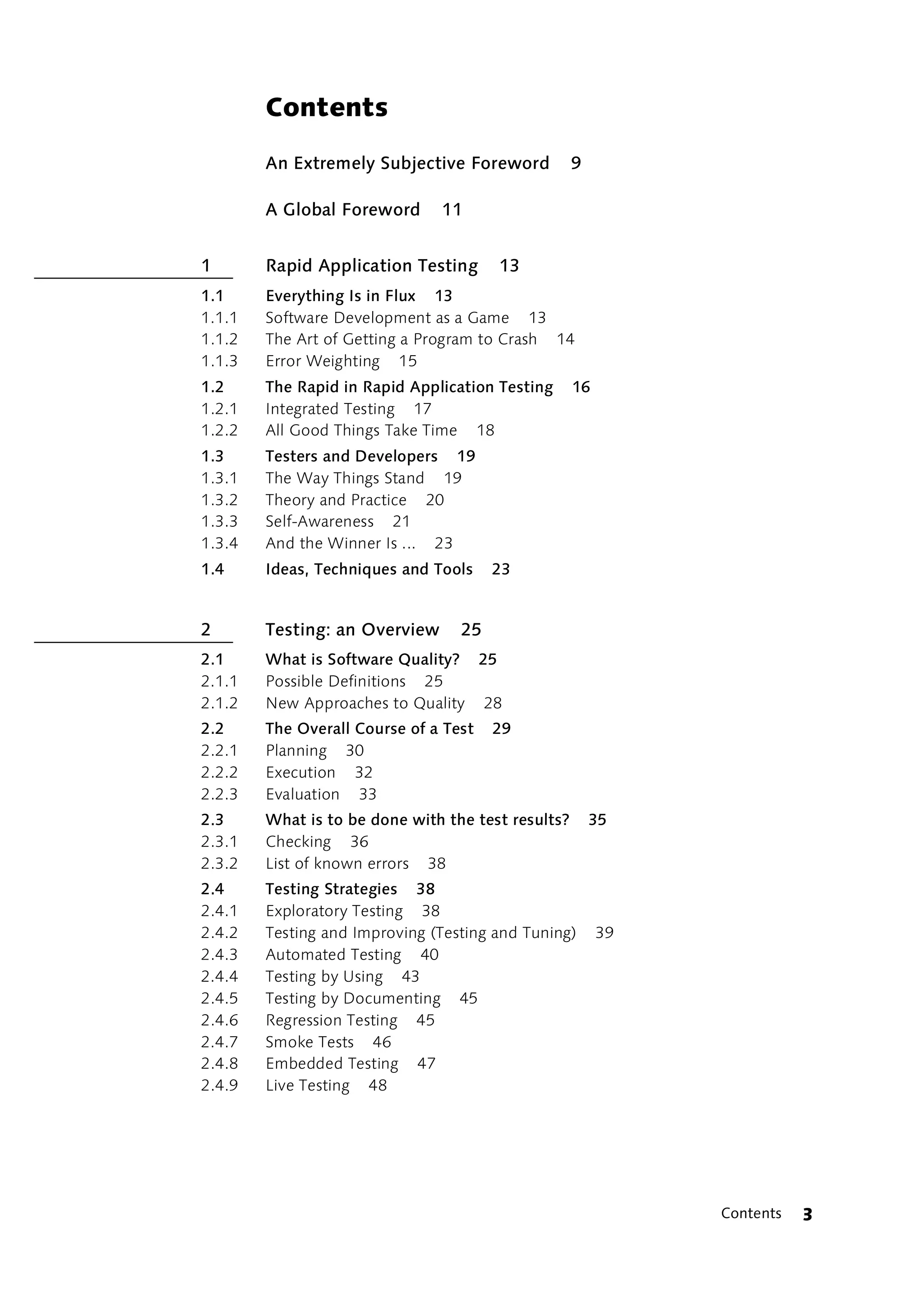
Contents

        An Extremely Subjective Foreword            9

        A Global Foreword      11


1       Rapid Application Testing      13
1.1     Everything Is in Flux 13
1.1.1   Software Development as a Game 13
1.1.2   The Art of Getting a Program to Crash 14
1.1.3   Error Weighting 15
1.2     The Rapid in Rapid Application Testing      16
1.2.1   Integrated Testing 17
1.2.2   All Good Things Take Time 18
1.3     Testers and Developers 19
1.3.1   The Way Things Stand 19
1.3.2   Theory and Practice 20
1.3.3   Self-Awareness 21
1.3.4   And the Winner Is ... 23
1.4     Ideas, Techniques and Tools    23


2       Testing: an Overview      25
2.1     What is Software Quality? 25
2.1.1   Possible Definitions 25
2.1.2   New Approaches to Quality 28
2.2     The Overall Course of a Test   29
2.2.1   Planning 30
2.2.2   Execution 32
2.2.3   Evaluation 33
2.3     What is to be done with the test results?       35
2.3.1   Checking 36
2.3.2   List of known errors 38
2.4     Testing Strategies 38
2.4.1   Exploratory Testing 38
2.4.2   Testing and Improving (Testing and Tuning)       39
2.4.3   Automated Testing 40
2.4.4   Testing by Using 43
2.4.5   Testing by Documenting 45
2.4.6   Regression Testing 45
2.4.7   Smoke Tests 46
2.4.8   Embedded Testing 47
2.4.9   Live Testing 48


                                                              Contents   3
2.5        Testing Methods 49
    2.5.1      Black Box Testing 49
    2.5.2      White Box Testing 50
    2.5.3      Gray Box tests 50
    2.6        Types of Functional and Structural Tests    51
    2.6.1      Requirements-Based Testing 51
    2.6.2      Design-Based Testing 53
    2.6.3      Code-Based Testing 53
    2.6.4      Performance Testing 54
    2.6.5      Stress Testing 54
    2.6.6      Robustness Testing 54
    2.6.7      Long-term Testing 55
    2.6.8      Installation Testing 55
    2.6.9      Security Testing 55
    2.7        Testing Types with Various Input Data      56
    2.7.1      Random Data Testing 56
    2.7.2      Spot Check Testing 56
    2.7.3      Boundary Value Testing 57
    2.8        Phases of Testing 58
    2.8.1      The Classic Test Planning Model 59
    2.8.2      Integration of Phases in Rapid Application Testing   64
    2.9        Other Quality Assurance Methods       68
    2.9.1      Design and Code Reviews 68
    2.9.2      Static Code Analysis 69
    2.9.3      Model Validation 70


    3          Testing in the Real World       71
    3.1        Developing and Testing     71
    3.1.1      A case study 71
    3.2        Risk assessment 84
    3.2.1      Setting Priorities 84
    3.2.2      Various Risk Types 85
    3.2.3      Risk Assessment Based on User Priorities   87
    3.2.4      Function/risk matrix 90
    3.3        Testing Patterns, Patterns for Debugging 92
    3.3.1      Best, Minimal, Maximal and Error Case 92
    3.3.2      Equivalence classes 94
    3.3.3      Boundary Values 95
    3.3.4      Cause and Effect Diagrams, Decision Trees 96
    3.4        Unit testing 97
    3.4.1      Functional testing 98
    3.4.2      Structure testing 104


4   Contents
3.5     Integration Testing 108
3.5.1   Transactions 108
3.5.2   Linking to the Interface 111
3.5.3   Synchronization 111
3.6     System Testing 113
3.6.1   Functional completeness 113
3.6.2   Run-time Behavior 115
3.6.3   Installation 117
3.6.4   Capacity Limitations 119
3.6.5   System problems 120
3.6.6   System Security 121
3.7     Performance Testing 123
3.7.1   System Parameters 123
3.7.2   The Quadratic Effect 125
3.7.3   Stress Testing for Middleware   127
3.7.4   Database Access 129
3.8     Test Coverage 130
3.8.1   Classic Coverage Indices 130
3.8.2   What Information Do Code Coverage Indices Contain?    132
3.8.3   Function Coverage 134
3.8.4   Generating Test Cases on the Basis of Use Cases 135
3.8.5   Test Coverage and Object-Oriented Languages 138
3.8.6   Coverage of System Scenarios 141


4       Methodologies and Tools         147
4.1     Debugging—Another Use Case       147
4.1.1   The Test Case 148
4.1.2   Detecting Bugs 149
4.1.3   Error Accumulation 151
4.1.4   Isolating Bugs 152
4.1.5   Creating Bug Reports 154
4.1.6   Bug fixing 155
4.1.7   Verification 157
4.1.8   Regression Testing 157
4.2     Automating Testing Procedures 158
4.2.1   Integration and Systems Testing 159
4.2.2   Scripting under Windows 162
4.2.3   Unit Test Frameworks 179
4.2.4   Application Interface Testing 189
4.3     Test-driven Application Development 191
4.3.1   Separation of Interface and Implementation 193
4.3.2   Handling Printouts 195
4.3.3   Interface-centric design 196
4.3.4   Design by Contract 197


                                                                    Contents   5
4.3.5      Test Code 204
    4.3.6      Code Instrumentation    205
    4.3.7      Audit Trail 206
    4.4        Tools 207
    4.4.1      File comparison tools, Diff, XML Diff 207
    4.4.2      Data Access and Evaluation 208
    4.4.3      COM Interactive 210
    4.4.4      Code Coverage, Logging, Tracing and Profiling   211
    4.4.5      Design by Contract 212
    4.4.6      Load and Performance Tests 213
    4.4.7      GUI Test Automation 214
    4.4.8      Testing Distributed Systems 216


    5          Agile Quality Management          217
    5.1        Keep It Flexible 217
    5.1.1      Individuals and Interactions 218
    5.1.2      Working Software 219
    5.1.3      Collaboration with the Customer 220
    5.1.4      Reaction to Changes 223
    5.2        Estimates of Effort 224
    5.2.1      Evaluating One’s Own Projects     225
    5.2.2      Software Risk Classes 226
    5.3        The Test Machine 227
    5.3.1      Cloning Hard Drives 227
    5.3.2      Virtual Machines 227
    5.4        Administering Test Data    228
    5.5        Quality Metrics 229
    5.5.1      Errors per Area 229
    5.5.2      Errors According to Error Type    230
    5.5.3      Errors per Unit of Time 230
    5.6        Quality Control 231
    5.6.1      Bug Tracking Database 231
    5.6.2      Bug Reporting 233
    5.6.3      Test Case Tracking 233
    5.6.4      Test Scripts 236
    5.7        Criteria for Concluding Testing   236


    6          Internationalization and Localization Testing         239
    6.1        Localization and Internationalization   239
    6.2        International Planning and Architecture 241
    6.2.1      Lack of International Focus in Project Plans 242
    6.2.2      Why Native Language Centric Plans are an Issue in Development   243
    6.2.3      Why Native Language Centric Plans are an Issue in Testing 244
    6.2.4      What the Plan Should Look Like 245


6   Contents
6.3      International Development Issues 247
6.3.1    Problems Working With Strings 247
6.3.2    Problems Working With Dialogs – String Expansion 257
6.3.3    Builds and Installers 261
6.3.4    Achieving Success through Proper Planning and Architecting   267
6.4      Internationalization Testing 271
6.4.1    Start Testing from Day One 271
6.4.2    Testing Your Program’s Installation 273
6.4.3    Testing for Localizable Strings 274
6.4.4    Testing With Foreign Characters 276
6.4.5    Double-Byte Overlapping Characters 280
6.4.6    Keyboards 283
6.4.7    Printing and Paper Sizes 284
6.4.8    Sorting 284
6.4.9    Filtering and Searching functionality 290
6.4.10   Shortcut Keys and Mnemonics 290
6.4.11   Date and Time 292
6.4.12   Currency 294
6.4.13   Numbers 295
6.4.14   Addresses, Postal Codes and Phone Numbers 295
6.4.15   Spelling, Grammar and Other Language Considerations    296
6.4.16   Brand Names and Terminology 298
6.4.17   Asian Text in Programs 299
6.4.18   Databases 300
6.4.19   Seasons 301
6.4.20   Measurements 302
6.4.21   Signs, Symbols and Colors 302
6.5      Conclusion    304


         Bibliography    307

         Index   315


                                                                      Contents   7
An Extremely Subjective Foreword
              by Manfred Rätzmann


When I began to take a more intense interest in software testing a
number of years ago, the first thing I felt was a great deal of uncertainty.
On the one hand, I had always tested my own programs carefully or done
“test drives” and had never been faced with a quality disaster. I had to
admit that there were always a few bugs after completion ... Sure, a
whole string of unique situations hadn’t really been covered ... But by and
large the software programs worked pretty well. On the other hand, fairly
soon I had this creepy feeling that the approach I was taking when testing
software did not have all that much in common with what was described
or expected of testers in books published on the subject. I partly
attributed that to the difference in scope of the projects described in the
books or to the academic background of the authors, but my journeyman
effort wasn’t insignificant at the time either – around 20 programmers
had worked on developing the software. I went through three phases.
First I would say to myself “I’ve got to radically change how I’m doing
things.” Then, “Now I see how it works, but I won’t do it myself yet.” Until
finally, I was saying “That’s out of the questions – that won’t ever work!”
My daily grind had a hold of me again.

What I’ve learned in the meantime is to trust my experience and
judgment. What you do and don’t do in software development, what
priorities you set and what order you do things in – all these things
emerge based on experience gathered in projects over time; your own
ideas and those of others, discussions, reading material, trying and failing
– in short, by constantly dealing with the issue. This almost inevitably
leads to the emergence of certain preferences. I have a lot more fun
finding out what causes a software bug than I do retesting functions after
each change in code. That’s why I immediately try to automate tasks like
that. After all, I’m a software developer, and software developers always
want to automate anything which is a pain!


                                             An Extremely Subjective Foreword   9
I think software testers and developers are becoming more and more
     similar – developers test and testers develop. The idea that testing
     automation is the same as software development (a highly fascinating
     concept), will be making the rounds in the years to come. Quality
     assurance will become more tightly integrated within the software
     development process, causing testers and developers to draw even closer
     together. The qualification required for both specialists is the same; their
     points of view, however, are different. That is where I’ll go out on a limb,
     we’ll get to that a little later on.

     I wrote this book by myself, but I’m not the only one living on this planet.
     There are always people on the sidelines who are also affected when one
     takes on a project of this type. I would like to express my thanks to these
     people for the support and tolerance they have shown over the past six
     months. Thank you, Moni, for making it possible for me to drop out of
     sight. Thanks, Wolfgang, for carrying on a dialogue with me over the years
     on software development (and reining me back in at times). Thanks, Jan,
     for your unstinting proofing and many helpful comments. Thanks, Alf, for
     providing the impetus which led to writing this book. Thank you, Judith,
     for the trust your have placed in me and your commitment to this book.
     I want to express my gratitude to all the people who have helped me.
     Thanks for being there!


10   An Extremely Subjective Foreword
A Global Foreword
             by Clinton De Young


In the early 90’s, during a trip to Japan, I received my first non-English
versions of DOS, Windows, and a handful of software titles. I was excited
to have Japanese versions of these programs until I installed them and
was met with missing features, poor translations, and an underwhelming
level of quality.   Soon after this disappointing experience, I began
working with contacts in Japan and the US in an effort to improve the
quality of Japanese translations in software and documentation.

After working on several translations I still wasn’t satisfied with the
functionality of the software I was translating. Too often features were
left out of the Japanese versions of software, and the quality was
somewhat diminished.       My interests evolved from translations to
internationalization and localization testing, and then finally into
internationalization engineering.

During the years, I have worked on many projects and seen many
successes, and even a few failures. My desire in this book is to share
some of my experiences and to discuss aspects of testing global software
that will help you successfully ship quality products to all of your
international customers.

The tools available to developers for creating international products have
improved, as has the overall quality of localized software during the last
10 years; however, there are still areas that need work. Hopefully, once
you have completed this book, you will be able to improve the quality of
the software you work on, and help others do the same.

I have enjoyed the internationalization and localization aspects of
development and testing over the years. It has provided me with a
unique opportunity to get to know people from all over the world, and
make friends I never would have otherwise. I have been able to travel to
many countries and experience many different cultures. It is a path in my
life that I am very glad I traveled. I hope you have an equally enjoyable
experience as you work with global software.


                                                         A Global Foreword   11
There have been many who have helped make my experiences in
     international software good ones, and people who have taught me along
     the way.    To show my gratitude, I would like to acknowledge their
     contributions here. I would like to thank my wife Hiromi and my children
     for their support in all I do. I would like to thank my friend David Stones
     for taking a chance on me when I lacked experience so many years ago.
     Thanks to Guenter and Teri at Lemoine International for making my
     contributions to this book possible. I also offer my thanks to my dear
     departed friend Craig Adams (to whom I still owe a lunch) for his
     mentoring and unparalleled friendship. Finally, I would like to thank my
     parents for the life I have to live.


12   A Global Foreword
1     Rapid Application Testing
              “There is something fishy about this!” shouted the hare:
              “Let’s do it again—turn around and go back!” And he rushed
              off like the wind, his ears flying behind his head. As he
              approached the top of the field again, the hedgehog called
              over to him: “Beat ya!”
              (Adapted from [Schröder1840], “The Hare and the
              Hedgehog”)


1.1     Everything Is in Flux
Times change. Particularly in the software development world, everything
is always changing. Not only are customer requirements undergoing
constant transformation, but so are the limits of technology, software
user interfaces, and the ways humans and computers interact. This has an
effect on how software is built. Since the environment is constantly
changing, software that constitutes an obstacle to change should not be
built. In the age of the Internet, every type of bureaucratic overhead
related to software development is being questioned.

Software testing is not immune to all these changes. For a long time, the         Testing on
                                                                                  internet time
basis for generating test plans and metrics was coverage of functional
properties and coverage of specifications (see the section “Test Coverage”
on page 130.) After it was realized that not everything can be tested,
methods were developed to uncover redundancies within test cases and
test data. In addition, methods were also developed for evaluating the
risks of testing certain parts of the software less intensively than others.
However, because all this still did not keep pace with the increasing speed
of software development, people began to question more and more the
aspects of their own methodology.


1.1.1   Software Development as a Game

Ever since the overwhelming victory of the object-oriented paradigm in
software development, few other issues have excited more controversy
than changes in software development methodology.


                                                      Rapid Application Testing   13
Ten years ago, the prevalent view was that Computer Aided Software
                    Engineering, or CASE, was the answer to every problem (perhaps
                    primarily because of the expensive tools involved). People like Alistair
                    Cockburn [Cockburn, 2002] now describe software development as a
                    cooperative game, bounded by its specific content, which moves toward
                    a specific endpoint over a given period of time. The cooperative group is
                    made up of project sponsors, managers, specialists, technicians,
                    designers, programmers, testers, and in short, everyone who has an
                    interest in the success of the project. In most cases, the endpoint of the
                    game is to deliver the required system as quickly as possible. Sometimes
                    the focus is placed on other software endpoints: easy to use, bug-free, or
                    safe from possible third-party liability claims.

  Agile processes   This view of the activities involved in the software development process,
                    as elaborated and justified by Cockburn, dovetails perfectly with the
                    current debate on software development methodologies. Agile processes
                    are in demand: processes which can adapt quickly to changes and rely
                    more on communication, self-organization and the delivery of real-world
                    software than on the planning, monitoring and documentation of the
                    development process [Fowler and Highsmith, 2001].


                    1.1.2    The Art of Getting a Program to Crash

                    The game between the software tester and software developer is
                    reminiscent of the race between the tortoise and the hare.

      The games     The rules of the game are simple: The testers try to find the most
     testers play
                    important errors as quickly as possible. In other words, they try to prove
                    that the program will fail under certain conditions. The most obvious
                    indication of failure is the common crash: a general protection fault or the
                    program freezing ("Nothing is happening"). In this sense, rapid
                    application testing can certainly be described as the art of getting a
                    program to crash.

      The games     Programmers do everything they can to deny the testers the thrill of
programmers play
                    victory. The developers win if they can say, every time the testers run into
                    a critical performance issue with a program, "Beat ya!" —like the tortoise.
                    This does not mean that a program must perform faultlessly in every
                    imaginable situation. However, the program must respond in a


              14    Everything Is in Flux
predictable and stable manner—for example by generating an error
message and instructions for how to resolve the error—no matter what
nasty tricks the tester employs.


1.1.3     Error Weighting

Program failures do not always reveal themselves as blatantly as with a
crash. More subtle failures range from processing or output errors to
computing errors and usability flaws, all the way to inadequate care in the
treatment of confidential data. Because not all errors are equally
important, a rank order for error weighting should be set up based on the
agreed-upon rules of the game. The following is a proposed four-level
scale for generic error weighting developed with software end users in
mind. Using this scale, errors are ranked by their importance within four
groups:

1. Errors that render the program inoperable

2. Errors that make it impossible to use the program as planned unless
  workarounds are used

3. Errors that cause annoying and unnecessary effort while using the
  program

4. Errors adversely affecting the software's user interface.

In this context, use refers to the user's entire experience with the
program, and therefore also includes installation and administration.

The most serious errors on this scale are those which prevent users and
administrators of the program from working and cannot be worked
around. Anything that forces the user or administrator to resort to a
workaround to accomplish a given task is ranked second. The next level
down is anything which is annoying and inconvenient. Inconsistencies in
the look and feel of the software are placed in the final category.

The scale assumes that the prescribed use of the program has been
defined somewhere, for example in use cases, functionality specifications
or in menu item descriptions. The mere desire for a particular use
(“I should also be able to do this...”) is not sufficient grounds for reporting
an error.


                                                       Rapid Application Testing   15
Adhering to    In the end, rules for ranking errors by importance will be determined by
project goals
                the project goals and the project stakeholders. For example, market
                competition may make a software product’s graphical user interface
                vitally important. In this case, factors such as whether the product
                appeals to younger or older users, whether it is "hip" or corporate, or
                whether it comes across as conversational or professional make
                inconsistencies in the GUI more important than missing functionality.


                1.2      The Rapid in Rapid Application Testing
                The objective of Rapid Application Testing is to find the most serious
                defects in a software product as quickly as possible. That is why the
                approach is called Rapid Application Testing rather than Total Application
                Testing. Finding all the errors can also be an intriguing game—but the
                question almost always arises of who will pay for it.

                On the Web site of his software testing company Satisfice [Satisfice],
                James Bach, author of several books on software testing, distinguishes
                between his approach, which he calls “rapid testing,” and standard
                testing methodologies. He lists the following ways in which Rapid Testing
                differs from the formal testing methods traditionally used:

                ̈ Mission
                   Rapid testing does not begin with a task like “create test cases.” Instead,
                   it begins with a mission such as: “Find the most important errors—fast.”
                   Which tasks are necessary to complete the mission successfully? That
                   depends on the nature of the mission. No activity considered necessary
                   under the formal testing approach is indispensable; all activities must
                   prove their utility in relation to the mission.

                ̈ Capabilities
                   The conventional testing approach underestimates the significance of
                   the tester's ability, knowledge and skills. Rapid Testing requires
                   knowledge of the application being tested and the potential problems
                   which may arise during deployment, as well as the ability to draw
                   logical conclusions and devise tests that produce meaningful results.

                ̈ Risk
                   The traditional testing approach attempts to cover as many functional
                   properties and structural components as possible. Rapid Testing


          16    The Rapid in Rapid Application Testing
focuses on the most important problems first. To do this, testers
  develop an understanding of what can happen and what results when
  it does happen. Afterwards, potential problem areas are explored in
  order of their importance.

̈ Experience
  In order to avoid descending into “analysis paralysis,” Rapid Testing
  recommends that testers rely on past experience. In conventional,
  formal testing methods, tester experience usually enters into the work
  unconsciously and is therefore unexamined.         Testers using Rapid
  Testing, however, should collect and record their experiences and
  validate them through systematic application.

̈ Research
  “Rapid Testing is also rapid learning,” says James Bach [Bach, 2001]. The
  application under test (AUT) is investigated and defined during testing.
  The next test always derives from the results of the preceding tests.
  Exploratory testing goes straight to the core problems of the software
  more quickly than scripted testing.

̈ Collaboration
  Testing can often become a lonely undertaking if you follow
  conventional methods. One important technique used in Rapid Testing
  is pair testing—i.e. two testers on one computer. This technique was
  adopted from eXtreme Programming and, according to James Bach,
  also works very well in Rapid Testing.

Above all, Rapid Testing is exploratory testing (see the section “Testing
Strategies” on page 38). For professional testers who must test programs
"cold," exploratory testing is often the only way to get control of a
demanding work project. The general procedures for testing functionality
and stability that back up the “Certified for Microsoft Windows" logo
were developed by Bach based on the exploratory testing approach
[Microsoft, 1999].


1.2.1   Integrated Testing

James Bach describes Rapid Testing from the viewpoint of a professional
tester. I have inserted the word “application” and produced the term
Rapid Application Testing (RAT) in order to emphasize its similarity to


                                                    Rapid Application Testing   17
Rapid Application Development (RAD). Both are concerned with the
     entire development process—RAT does not exclusively focus on testing,
     and RAD does not exclusively focus on the user interface, as some
     descriptions imply. Both efforts have the same goal—not to waste time.

     Rapid Application Testing is integrated testing. In other words, it is
     integral to the software development process and not a secondary,
     ancillary software validation process. Just as tasting is an integral part of
     cooking, testing is always part and parcel of the software development
     process that leads to a product or an intermediate engineering product.

     Rapid Application Testing provides various strategies and techniques for
     doing this. Important strategies include “testing by using” and embedded
     testing. For more information on this area, see Chapter 2, “Testing: An
     Overview,” and its section on testing strategies. All strategies and
     techniques have one thing in common: they focus on the risk that each
     (intermediate) product may pose to the success of the entire software
     development process.


     1.2.2 All Good Things Take Time

     Did Rapid Application Testing get its name because software errors and
     behaviors that are only annoying, superfluous or unpleasant are not
     found and corrected? Or because bugs will remain inside programs
     forever merely because some are not that critical? Or because nobody is
     willing to deal with spelling errors in screen forms?

     This is not what the term means. Rapid Application Testing simply
     indicates what testers should pay attention to first. It does not imply that
     the effort to enhance quality should fall by the wayside after testers have
     found all the bugs in the “Crash” and “Workaround Required” categories.
     The most important principles of Rapid Application Testing, such as goal
     orientation and trust in the creativity, ability and experience of those
     involved—rather than rigid reliance on formal procedures—are fully
     applicable to tracking down bugs that are only a nuisance. It is precisely
     this type of interference with workflow, caused by inconsistencies in the
     program’s look and feel, user interface design flaws, or poorly designed
     input dialogs, that will almost never be found using prescribed test cases.


18   The Rapid in Rapid Application Testing
One should not of course be overly optimistic and assume that such goals
can be achieved as rapidly as the most serious software errors are
discovered. Some things take time. That includes, among other things,
allowing software to become "fat" and “sleek" in development.

Rapid Application Testing must mean getting the software ready for
market. That not all software introduced to the market is “robust” or
"sleek" or even "mature"—and that it neither can nor must be—is
something I probably do not need to tell you.


1.3     Testers and Developers

1.3.1   The Way Things Stand

Why is knowledge of testing strategies, techniques and basics so
important for developers, software architects, analysts and designers, i.e.
for everyone involved in the software development process? Isn’t it
enough if the testers know their way around testing? The answer is as
simple as it is compelling: Because many projects do not include a tester.
If those involved in a project still want to deliver high-quality software,
then they will have to test it themselves.

Currently, “tester” is predominantly viewed as a role that anyone can fill      Everyone tests
when called upon to do so. After completion of development tasks or at
convenient points in a project, a software developer may slip into the role
of tester and give the application a "once over." In most projects someone
has designed the software and makes the final decision on changes and
extensions. This someone typically watches with eagle eyes to make sure
that the original design is preserved and that "his" or "her" program does
what he or she intended it to do. Sometimes the project manager does
not want to put his or her name on the line for the next release version
without testing the program first. All of these persons had better get a
grasp of the topic quickly. Formal specifications of test activities, which
are reasonable enough for well-funded projects with relaxed schedules,
are more of a hindrance under these circumstances.

The gap between formal requirements and real world practice (but not            Rapid does not
                                                                                mean ad hoc
only in testing) has been around for a long time, probably since software
has been around and since people recognized the need for testing.


                                                    Rapid Application Testing   19
“Ad hoc” testing is standard practice on underfunded projects where the
     focus is necessarily on the most important features due to budget or time
     constraints. This type of improvised testing often makes everyone on the
     project queasy. So much hasn't been tested—but really—shouldn’t
     everything be tested?! This uncertainty arises when people do not realize
     that they are participating in a “software development” game—a.k.a. a
     mission—and thus do not understand the object of that game. Their own
     role in the game and the duties attached to that role also remain unclear.

     Testing is not viewed as a means of minimizing risk; instead it is seen as an
     imposition. The rationale for and scope of testing remain vague. One has
     a vague sense that expectations will never be met. This produces
     uncertainty about what should be tested first. Those involved try to
     master their insecurity by going back to the book—taking formal
     methods straight out of textbooks. However, there is not even enough
     time to properly develop the documents specified by the “IEEE Standard
     for Software Test Documentation” [IEEE829]: test plan, test design, test
     case specification, test procedures, test item transmittal report, test log, test
     incident report and test summary report. The testers (if there is a budget for
     them at all) test “something, anything.” The developers get annoyed
     because the testers report more or less marginal problems (“I’m glad the
     test is working and then he starts bugging me with stuff like that!”). In
     the end, the team trusts in the Almighty and delivers the application.


     1.3.2 Theory and Practice

     In their standard work Testing Computer Software [Kaner, 1999], Cem
     Kaner et al. compare software testing with the experimental testing of
     scientific theories. On development teams, testers are the practitioners.
     They set up test procedures with which to confirm their paradigm of the
     program. Or they intend to prove that the program fails under certain
     conditions. Testers are skeptics. They see the program from a user
     perspective and ferret out the practical uses of the programmers’
     theories.

     In this analogy, the developers are the theorists. They conceptualize and
     envision only with great difficulty where their ideal world might clash
     with harsh reality. Developers like to believe that the whole world works


20   Testers and Developers
the way they imagine it working. They view programs—and software
bugs—as interesting assignments and intriguing challenges. Usability is
less important to them unless they have to use their application
themselves.1

This characterization may seem a little extreme, but it gets to the heart of
the issue. Anyone who has done both jobs—developing software and
testing unknown software—knows that as a tester or developer, you can
easily get to feeling what Kaner describes.

If one sticks to the principle that software developers and testers must be
different people, this will usually not help much with real-world software
development projects. In many projects, the developers are the only ones
who try out the program before it is released. This can hardly be called
testing; it would be more accurate to describe it as confirming the validity
of their theories (see above).

To ignore this situation and the factors behind it, and to insist on a formal
division between testing and development, is no solution. For many
projects which privilege direct contact with the customer and flexible
response to customer change requests and bug reports, a formalistic
approach of this kind would be fatal. It is better to accept the situation as
it is and provide project members with the techniques and tools they
need: not only take control of the situation, but also to extend their
competitive advantage by producing high quality products.


1.3.3 Self-Awareness
How do people feel when somebody finds an error in their program?                       How do you feel?
Especially if the program is your own work or built by your team—and
the release date is bearing down on you? There are many different
reactions to this kind of pressure. Some people knew all along (they say)
that the developers for this particular module couldn't cut it—they didn't
even think to check such an obvious feature (“This would never happen
to me, because ...”). Others would rather look the other way because
they know that the error—there for all to see in its gory detail—will only
lead to another project delay (“We’re behind schedule already as it is!”).

1 If a developer creates programs for his or her own use, then ease-of-use is usually
  their weak point.


                                                           Rapid Application Testing    21
Yet another group will simply think it is a pain to consider a minor issue
                    like that an error, because they know that they will have to test the
                    revised code after the bug has been fixed.

Mission possible    Sure—you can’t help having these feelings. Maybe such feelings should
                    not be stated so clearly to avoid demoralizing others in the group. But a
                    tester of a product or program component could also clarify for himself or
                    herself, in one or two sentences, his or her own role, the object of the
                    game, and the mission. It is worth a try.

                    Certain tests are designed to find errors. Other tests are intended to show
                    that certain requirements have been met by the program. The following
                    applies in both cases: the sooner the better. The sooner an error is found,
                    the sooner it can be eliminated. The sooner you discover something is
                    missing, the sooner you can add what is needed. Ignoring the issue or
                    procrastinating does not help in either case.

                    When I discover an error, I have done a good deed for the project. If the
                    error is grievous, I have really done well. I say this because a project will
                    stand or fall based on early detection of show stoppers.

Two pairs of eyes   A developer who tests his or her own program is in a certain way
  are better than
                    handicapped. Subconscious fears may keep the developer from carefully
              one
                    checking certain parts of the program. Some burned-out programmers
                    will stare at their own source code for several minutes without seeing the
                    error that is hidden there. More often than not, unexamined convictions
                    will also blind a programmer to possible sources of errors.

                    Things look different if software developers review their colleagues’
                    programs, for example during pair programming, or serve as an auditor
                    during peer or group reviews, or take on the role of the end user. If asked
                    to use an unknown module, even normal developers will respond with
                    the “let's just have a look” reflex. The module's GUI is experienced as
                    what it is: an interface. The developer will distrust it instinctively, check
                    the claims made in the interface description (if it exists) for accuracy, and
                    so on.


              22    Testers and Developers
1.3.4 And the Winner Is ...

Testers and developers must realize that they both have a role in a game.
Many feel very uncomfortable taking on the apparently aggressive or
destructive role of the tester, especially if the roles of developer and
tester are combined in one person or group.

However, one can make a virtue of this necessity if both roles in the game
are seriously acted out, if the objective of the game is known, and if the
rules of the game are followed. The testers know their mission and plunge
into their work without reservations, even if they were still developers
only moments before. The developers know what testing means and take
appropriate proactive steps. Later, they utilize their experience when
acting as testers on more demanding tests. Everyone knows that the only
good error is a known error and nobody gets bent out of shape. If feelings
do get hurt, it helps to exchange roles from time to time and have candid
team discussions. If the developer says this to the tester: “Hey, thanks for
your error report. I would never have thought of that!” then both of them
are on the right track.

The winner of the game is always the program being tested. The other
winner is the team of people that creates this program; they get a bigger
part in the larger game played within the company or on the market. In
his excellent article, Alistair Cockburn says: “The project has two goals: to
deliver the software and to create an advantageous position for the next
game. If the primary goal isn’t met, the next game may be canceled.”
[Cockburn, 2002]


1.4     Ideas, Techniques and Tools
This book is intended to introduce ideas, techniques and tools which can
be used for Rapid Application Testing: ideas for determining the right
questions to ask; techniques for devising a testing cycle that can answer
them; and tools for recording, interpreting and managing the test results.
The most important link in this chain is the first one: asking the right
questions. If your testing criteria are the wrong ones, even the most
ingenious testing cycle and the most sensitive measuring tools will not
help you a bit.


                                                     Rapid Application Testing   23
Ideas, techniques and tools are needed to:

                   ̈ Detect errors

                   ̈ Find the source of the error(s)

                   ̈ Manage the testing process

                   Not all of these ideas will be applied to the same extent by both testers
                   and developers. In order to detect errors, testers require tools and
                   techniques to monitor programs and compare execution results;
                   developers on the other hand need tools and techniques for analyzing
                   how the program behaves. Both the tester and developer need to get an
                   idea of what could go wrong with the program.

                   Project managers and people with responsibility on the project need
                   techniques for assessing risk and tracking the current status of the project,
                   as well as numbers to use for decision-making and comparison with
                   reference data from other projects.

Two-fold benefit   Many of the ideas proposed here can be beneficial in two ways. To get a
                   two-fold benefit means to carry out an activity which delivers a primary
                   and a secondary benefit. In our case, the secondary benefit is ongoing
                   quality assurance and control.

                   Because the line between developers and testers is becoming more and
                   more blurred in the real world, this book is not written for testers only.
                   Nor is it a manual on debugging for developers. Whenever it makes
                   sense, both perspectives should be addressed and various approaches
                   should be presented together.

                   In general, this book is not aimed at specialists buried in a particular field,
                   but rather professionals who can look outside their discipline regardless
                   of how specialized they are. Rapid Application Testing has a lot to do with
                   the fact that team members must play disparate roles in nearly every
                   small or medium-sized project. Large-scale projects definitely follow their
                   own rules—which have more to do with politics than with getting results.

                   Rapid Application Testers know their role in the game, understand their
                   significance to the project, and have recourse to every useful tool
                   available to plan, execute and analyze their test activities.


             24    Ideas, Techniques and Tools
2     Testing: an Overview
              Quality means that the customer keeps coming back, not the
              product.
              (Herrmann Titz, founder of the Hertie department stores)


This book presents various techniques for testing software, evaluating
prototypes during software development, retesting functionality after
software has been modified or enhanced, and so on. These techniques
were developed for various purposes, but in pursuit of one goal: to
maximize the quality of the software product.


2.1     What is Software Quality?
Quality assurance is generally broken down into productive and analytical
quality assurance. Productive quality assurance includes all activities that
improve the product, while analytical quality assurance comprises
activities which ascertain its level of quality.

Within this schema, software testing belongs to analytical quality
assurance and falls within the subcategory called dynamic testing. The
most important statistical tests within analytical quality assurance are
reviews, code analysis and model validation. Tests alone do not improve
the quality of software. That would be like losing weight simply by
standing on the bathroom scale once a day. Tests and other analyses can
only reveal where there is a problem. Quality has not been assured until
the reported problems have also been eliminated.


2.1.1   Possible Definitions

There have been many attempts to interpret or define the term quality,
for example the definition given in the German industry standard
DIN 55350:

  “Quality is the aggregate of all characteristics and properties of a product
  or activity that relate to its suitability for meeting specified
  requirements.”


                                                          Testing: an Overview   25
As obscure as this definition may appear at first glance, it provides some
     important pointers for answering the question: What is software?

        “Quality is the aggregate ...”

     means that all characteristics and properties of the software are included
     in the term quality, not merely requirements specified somewhere in
     writing. Software can therefore meet all written requirements and still be
     of low quality. The desired “look and feel” of a program or a consistent
     user interface across all its modules is often left out of system or business
     requirements. However, the quality of the software would be significantly
     lowered if the design kept changing completely from screen form to
     screen form, or if the meaning of function and shortcut keys kept
     changing, and so on. A large number of informal quality characteristics
     always accompany the formal ones.

        "... that relate to its suitability for meeting specified requirements.”

     Here is where the requirements for the program come into play. In this
     context, "requirements" comprises more than the explicit requirements
     included in a written specification. Equally important are the implicit
     requirements generated by the product environment and the end user.
     Kaner et al. list possible sources of such implicit requirements [Kaner
     et. al., 2002]:

     ̈ Competing products

     ̈ Products from the same series

     ̈ Older versions of the product

     ̈ Internal project discussions

     ̈ Customer feedback

     ̈ Articles and books in specialized or technical fields

     ̈ Internal and general style guides for the user interface

     ̈ Compatibility with the operating system or IT environment

     ̈ Personal experience

     Applications are not tested (or evaluated) against implicit requirements
     most of the time. Nevertheless, implicit requirements should not be


26   What is Software Quality?
neglected. When implicit requirements are not met, software quality will
suffer—just as it will when explicit requirements are disregarded. In some
cases—especially when the user is directly affected—legal action may
even be taken to ensure fulfillment of implicit requirements.

What is missing from the DIN 55350 definition of quality is any reference
to the user. Features which “meet specified requirements” for an
experienced user may be useless to an inexperienced one—because they
are beyond him.

The IEEE standard on software quality (ANSI/IEEE Standard 729-1983)
includes a section on user requirements. According to the IEEE Computer
Society glossary [IEEE Glossary], software quality is:

1. The totality of features and characteristics of a software product that bear
  on its ability to satisfy given needs; for example, conform to specifications.

2. The degree to which software possesses a desired combination of
  attributes.

3. The degree to which a customer or a user perceives that software meets
  his or her composite expectations.

4. The composite characteristics of software that determine the degree to
  which the software in use will meet the expectations of the customer.

5. Attributes of software that affect its perceived value, for example,
  correctness, reliability, maintainability, and portability.

6. Software quality includes fitness for purpose, reasonable cost, reliability,
  ease of use in relation to those who use it, design of maintenance and
  upgrade characteristics, and compares well against reliable products.

It is noteworthy that the IEEE Computer Society includes reasonable cost
among the quality characteristics of software. In a testing context, this
means that testing cannot go on forever—no more no less. At some point
(and that means pretty quickly), excessive testing will no longer enhance
the quality of the software, but rather diminish it—because it runs up
costs without achieving any corresponding improvement in quality.


                                                            Testing: an Overview   27
2.1.2    New Approaches to Quality

                    In his book Process and Product Orientation in Software Development
                    and their Effect on Software Quality Management, W. Mellis presents
                    two different notions of quality derived from different             software
                    development models [Wiecz and Meyerh, 2001]. These contrasting
                    concepts imply very different testing strategies and methods.

   Transformative   Transformative software development migrates a well-defined, clearly
         software
                    understood and relatively stable process to an automated environment.
     development
                    The process to be automated can also be precisely analyzed and modeled.
                    Requirements defined through analysis form the basis of software
                    development. The resulting software is high quality when it behaves
                    correctly and meets all requirements, and when its intended users can use
                    it without experiencing major problems. These days, transformative
                    development projects are very often in-house projects carried out by
                    large corporations to develop custom solutions. Customized software can
                    be built around a particular process with no ifs, ands or buts. Flexibility is
                    priority two, almost always substantially reducing the complexity of the
                    software. In this kind of project, tests based on system requirements and
                    system design can be planned well in advance. Chaos usually creeps into
                    this type of project only when a lot of users come forward with special
                    wish lists. This chaos can be contained if a formal requirements and
                    change management system is in place.

Adaptive software   In contrast to transformative software development, there is no clear-cut,
    development
                    easily automated process of adaptive software development. This can be
                    due to several factors: The software is so innovative that potential system
                    requirements and user issues have yet to be researched. The software’s
                    area of application—its domain—is so chaotic that a process suitable for
                    automation cannot be identified. There are many processes which
                    conform to each other on a high level but vary in detail and must be
                    harmonized. This last is probably the most common reason. This usually
                    happens when off-the-shelf software is developed to please many diverse
                    customers and be compatible with their workflows.

                    Adaptive software development often starts with a vision. At the
                    conceptual stage, everything still fits together because "it just does." Then
                    the detail work begins. Developing a vision requires abstract thinking and


              28    What is Software Quality?
creativity. The software kernel, which represents the least common
denominator of the process being modeled, must be made flexible
enough to allow the finished program to be adapted as closely as possible
to still unknown environmental conditions.

Here quality has little to do with correct behavior (nobody knows what
“correct behavior” would be in this case). Fulfillment of requirements
also drops out as a quality characteristic because the key characteristics
have not yet been formulated in a detailed functional specification (or
because the next customer has already specified different requirements).

Naturally, underlying concepts behind quality, such as accuracy,                Underlying
                                                                                concepts
robustness, speed and fulfillment of the implicit requirements of the
application area also apply. The term quality has much more to do with
content in an adaptive software development process than it does in a
transformative one. Here high quality means that the software is generally
useful (or is fun to use or “cool”); that the abstract model works; that the
software is flexible and can be adapted to the unknown requirements of
the customer; that it supports rather than obstructs workflow; and that it
hits the bulls-eye and is a hit with users. These are all things which
become apparent only after the software has been released. Tests with
these criteria can hardly be planned ahead of time because adaptive
software development remains essentially an R&D project long after the
program has been rolled out.


2.2     The Overall Course of a Test
Before we jump into testing practices, I would like to present a brief
overview of what actually constitutes a test, of current general test
procedures and current types of testing, of how test phases are broken
down within a project, and of how and when other quality assurance
methods can be used.

A single test normally includes three steps.

̈ Planning

̈ Execution

̈ Evaluation


                                                         Testing: an Overview   29
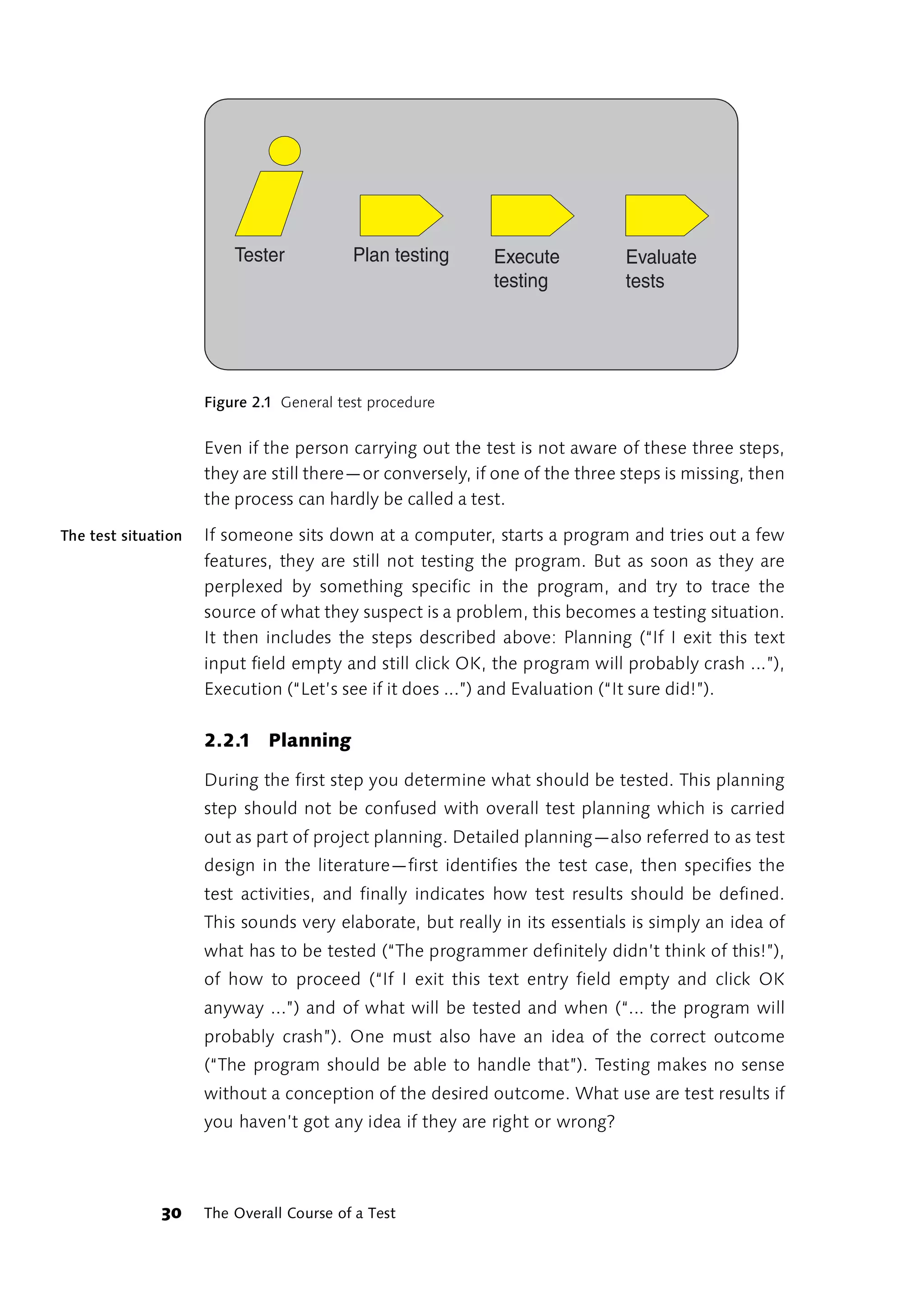
Tester           Plan testing     Execute           Evaluate
                                                           testing           tests


                     Figure 2.1 General test procedure


                     Even if the person carrying out the test is not aware of these three steps,
                     they are still there—or conversely, if one of the three steps is missing, then
                     the process can hardly be called a test.

The test situation   If someone sits down at a computer, starts a program and tries out a few
                     features, they are still not testing the program. But as soon as they are
                     perplexed by something specific in the program, and try to trace the
                     source of what they suspect is a problem, this becomes a testing situation.
                     It then includes the steps described above: Planning (“If I exit this text
                     input field empty and still click OK, the program will probably crash ...”),
                     Execution (“Let’s see if it does ...”) and Evaluation (“It sure did!”).

                     2.2.1 Planning

                     During the first step you determine what should be tested. This planning
                     step should not be confused with overall test planning which is carried
                     out as part of project planning. Detailed planning—also referred to as test
                     design in the literature—first identifies the test case, then specifies the
                     test activities, and finally indicates how test results should be defined.
                     This sounds very elaborate, but really in its essentials is simply an idea of
                     what has to be tested (“The programmer definitely didn’t think of this!”),
                     of how to proceed (“If I exit this text entry field empty and click OK
                     anyway ...”) and of what will be tested and when (“... the program will
                     probably crash”). One must also have an idea of the correct outcome
                     (“The program should be able to handle that”). Testing makes no sense
                     without a conception of the desired outcome. What use are test results if
                     you haven’t got any idea if they are right or wrong?


              30     The Overall Course of a Test
Rapid Application Testing is risk-based testing. In Chapter 3, “Testing in       Risk-based testing
the Real World,” I have provided a description of risk assessment
methods that will help you determine your testing priorities based on
acceptance risks and technical risks. However, reliance on intuition as
well as method is an important part of testing practice. The ability of an
experienced tester to divine a program’s weak points is called “error
guessing.”

Always try to plan your tests so that they cover the widest area of risk
possible. At the same time, stay focussed on the single most important
risk: that the program will not work at all. You should always start with
the assumption that the program will be used in an optimal operational
environment—the so-called best case. Only after you have checked this
off your list can you begin to consider alternative scenarios.

Organize your test planning around the program features. Break the               Key features
features down into key features and supporting features. An example of a
key feature is that the user can save his or her work as a file to the hard
disk at a certain point in the program. A related supporting feature would
enable the user to select the directory path for saving work via a Browse
or Search button. Focus first on the key features. A key feature which is
buggy or does not work will be unacceptable to most users. The user can
usually find a work-around for errors in the supporting features.

Tests can only prove that errors exist, not that a program is free of errors.    Error frequency
Just because 100 errors have already been found, that doesn’t mean that
1,000 more errors aren't waiting to be discovered. If you can’t find any
more errors, this could mean that the program is free of errors (this is
rarely the case). It could also just as easily mean that your test procedures
and cases are not up to finding the errors that are still there.

As a rule of thumb: Where there is one error, there are more. This is why
the results of previous tests should be taken into consideration during
test planning. This rule may apply to a module which has proven to be
particularly buggy, or to insufficiently secure access to resources such as
files, printers or modems. Or it may apply to specific workflows which are
inadequately or improperly supported by the program.


                                                          Testing: an Overview   31
Test planning   Test planning for Rapid Application Testing does not mean planning and
                formulating every single test case in advance. This method is not
                particularly effective in most cases because it shifts you from risk-based
                testing to a formal approach. It is more important that the overall testing
                plan concentrate on key risk areas and provide possible testing strategies.
                Detailed planning should remain flexible and take previous test outcomes
                into consideration.

                In addition, planning all test cases in advance is not an option when you
                are getting to know the program to be tested through the testing itself.
                During exploratory testing (see below), additions to the test plan are
                always made based on the results of previous tests.

                Your test plan will look very different depending on whether you know
                the application under test from the inside out, or if you are only familiar
                with its GUI. Hence the difference between White Box and Black Box
                testing. Neither technique is better or worse than the other. Not only do
                their requirements differ, but also their objectives. For a detailed
                discussion of this issue, see “Testing Methods” on page 49.


                2.2.2 Execution

                The execution of a test is also a three-step process:

                1. Preparing the testing environment

                2. Completing the test

                3. Determining test results

                Special test data types may form a part of the testing environment as well
                as metadata used to control the software being tested. In subsequent test
                phases, the complete hardware environment may also be included.

                The testing environment is a important factor for whether or not a test
                can be reproduced. If a test must be repeated frequently, for example in
                order to check performance improvements after program tuning, it
                makes a lot of sense to automate preparation of the required testing
                environment. Not only does this save time, it ensures that you won't
                forget anything important.


          32    The Overall Course of a Test
How a test is executed very much depends on whether a test interface is         Test interface
available for the program or component under testing. If this is the case,
the test interface can either be used to conduct the test interactively, or,
if the test is to be automated, to write a program which executes the test.
Test frameworks are available for this purpose for almost every
programming language. For more information on test frameworks and
how to use them, see Chapter 4, “Methodologies and Tools.” For more
discussion of test interfaces, see the section “Test-driven Application
Development” on page 191.

If no test interface is available, you have no other option than to test the
program or program unit using the end-user interface. Interactive testing
is only possible via the GUI in many cases, but this can be a real problem
in automated testing. For that you need a support tool that will record
and play back end-user inputs and mouse actions. See the section
“Automating Testing Procedures” on page 158 for an exhaustive
discussion of potential areas for automation.

Often, one is also dependent on a support tool when determining test            Tool support
results. For programs which work in conjunction with a database, for
example, the database must be accessible without having to use the
program. Systems with a distributed architecture may require tools that
can log and graphically display network traffic. Performance tests may call
for tools that can record the program’s response time.

Simple tests are normally all that is needed to reach a quick verdict on a
program's reliability and robustness. Bear in mind that a test is designed
to reveal problem areas. It is not the tester’s job to track down the source
of the problem—that is the task of the developer.


2.2.3 Evaluation

To evaluate a test session means to compare the actual test outcome with
what the correct outcome should have been. The expected (correct)
outcome should be easy to record for this purpose. You cannot test
whether a program output is correct or not if you have no idea what a
correct result looks like.


                                                         Testing: an Overview   33
If documentation exists, this is naturally the first place to go for
                    information on correct program behavior. Documented specifications
                    include development task descriptions and business models, application
                    flowcharts and text-based descriptions of application scenarios, GUI
                    design specifications, printouts of sample reports, Online Help, user
                    manuals, installation manuals and other related material. Whatever
                    behavior is documented there can be tested directly.

Considerations      If accuracy in the context of a specialized field requires checking, then the
for specialized
                    requisite knowledge must be made available for this purpose. Specialized
      software
                    aspects may be mentioned in task descriptions, Online Help or user
                    manuals, but are rarely discussed in detail. The user manual for a financial
                    accounting software product is not designed to teach the user financial
                    accounting, but rather the use of this special application. As a tester, you
                    must usually rely on an expert in a case like this.

      Validation    You may be fortunate enough to have another program available to
       program
                    validate results produced by the program being tested. This is always the
                    case when the application under test outputs data which is required for
                    subsequent processing (or used by another program). If the program
                    under test creates an XML file, you won't necessarily have to eyeball the
                    file for correct content and format. The XML document can also be
                    opened in a program able to output XML files in order to verify that it is
                    well-formed (at the very least). Bear in mind, however, that the validation
                    program must not be too tolerant. If an error in the document being
                    tested is tolerated or overlooked, this will cloud the evaluation of your
                    testing results.

Verification test   You should generally be skeptical if the evaluation of the test session only
                    includes outputs from the program being tested. You will frequently find
                    that faulty program behavior is hidden behind another set of errors which
                    behave similarly. For example, bad database field updates may be
                    overlooked if the developer simultaneously forgets to export the new
                    field to a linked report. Therefore, always try to validate results by using a
                    different tool. To verify the real result generated by a program which
                    writes data to a database, access that database directly with another tool.


             34     The Overall Course of a Test
2.3     What is to be done with the test results?
The test result should be recorded in a “suitable form.” Easy to say, but
wait a minute: Which forms are suitable and which are not? This depends
on what you want to do with the test documentation. If the test runs
smoothly and no new errors are discovered, in most cases it is enough
just to record what was tested and when. Perhaps the program version
should also be stated.

If an error is discovered and included in a program modification (testing
and tuning), a short note is sufficient—in other cases, the result should be
recorded more formally, e.g. in a database of completed tests and
outcomes. You will find one suggestion for how to organize such a
database in the section “Quality Control” on page 231.

In addition to general information (name of the tester[s], date of the test,    Error report
program tested, program version), the test document—the error report—
should document the three stages of the test, i.e. planning (what is
actually being tested), execution (how it was tested) and assessment
(what should have been the correct result, what was the actual result).
This entails as pragmatic an approach as possible. The following sample
report contains all three points in abridged form. “When the pickup table
is empty, a message box appears briefly when the program is started with
the missing text ‘[ERR] PickupTableEmpty’. When this happens, a default
sentence should be entered.”

The environmental conditions under which the test was performed also
belong in the test documentation if they are relevant to the test result.
They are of particular interest if the error cannot be tracked down in the
development environment. In this case, changes in the application's
behavior under various operational conditions often provide the
information essential for localizing the error.

It is also important that when a test is repeated after the error has been
corrected, the original conditions can be reproduced. For this reason, the
tester must have the detailed specifications he needs to reproduce the
test environment.


                                                         Testing: an Overview   35
2.3.1 Checking

               The outcome of a test normally leads to modification of the application
               and error correction. After this is done, the same test should be carried
               out again to make sure that: 1. The error was corrected in the right way;
               and 2. The right error was corrected. Since checking error correction is
               very time-consuming and provides no new information, the tester often
               prefers to leave out this compulsory check.

Don’t turn a   When testing, you often find errors you were not looking for. In other
  blind eye
               words, even if the testing is risk-based, it can produce test outcomes
               related to less risky program behaviors. These outcomes are simply the
               many small errors that an attentive tester notices in passing. These errors
               should not be ignored—but rather reported. However, these less
               important test results need not be checked. Checking should also be
               geared toward the level of risk associated with a given program behavior.
               As a tester, you should not waste time correcting incidental errors.


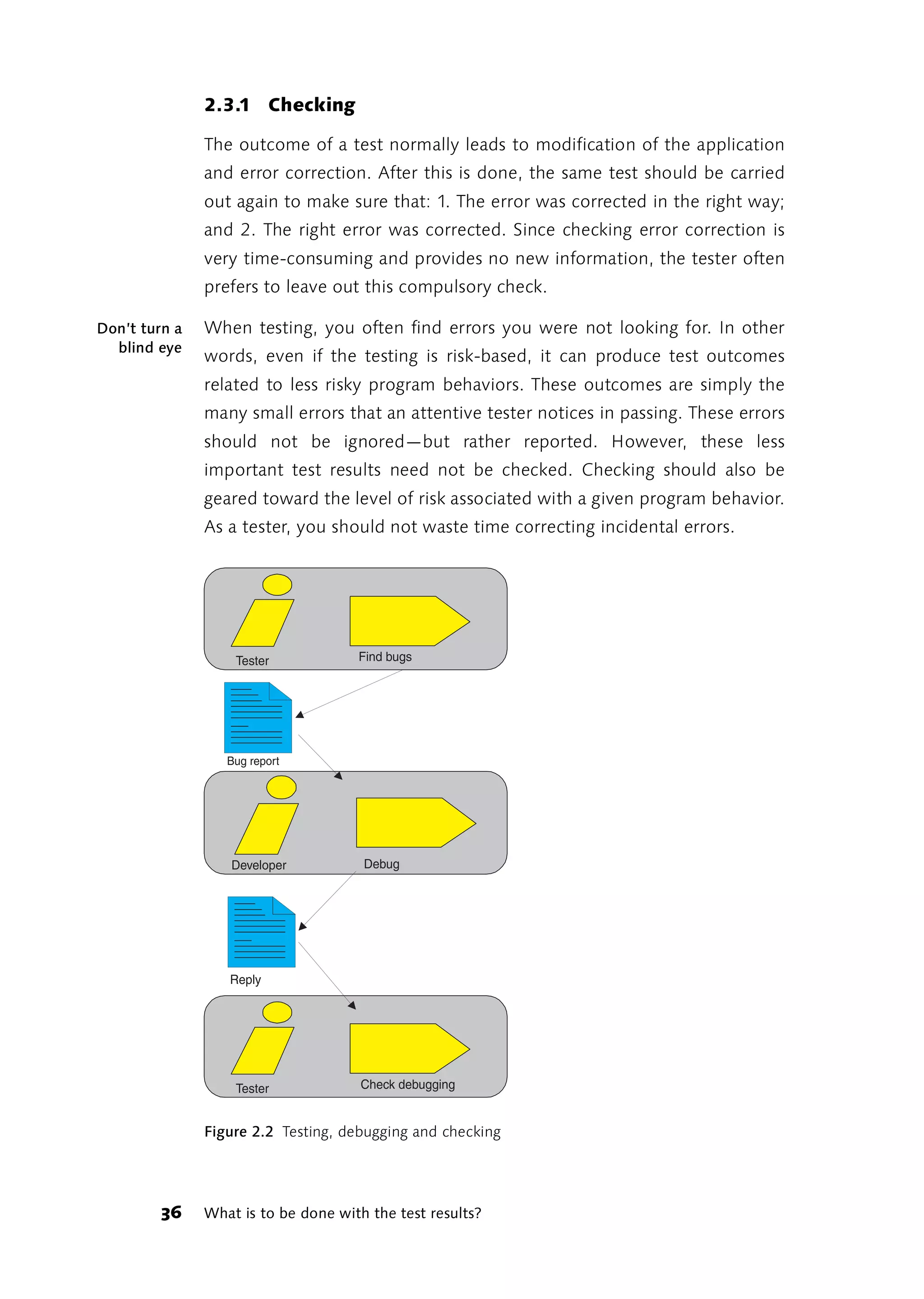
                   Tester            Find bugs


                  Bug report


                   Developer          Debug


                  Reply


                   Tester             Check debugging


               Figure 2.2 Testing, debugging and checking


         36    What is to be done with the test results?
Accordingly, the procedure shown in Figure 2.2 should only be followed
when error reports and corrections are sufficiently important. The direct
path shown is only recommended if the number of error reports is low—
for instance in the final phase of a software product’s life cycle. In all
other cases, error reports are first collected. When the next program
version is released, the issues that have been dealt with are reported back
in one block. A central database is normally used for this. If the testers are
not members of the development team, someone on the team should be
given the job of screening and prioritizing the incoming error reports and
checking the outgoing replies.

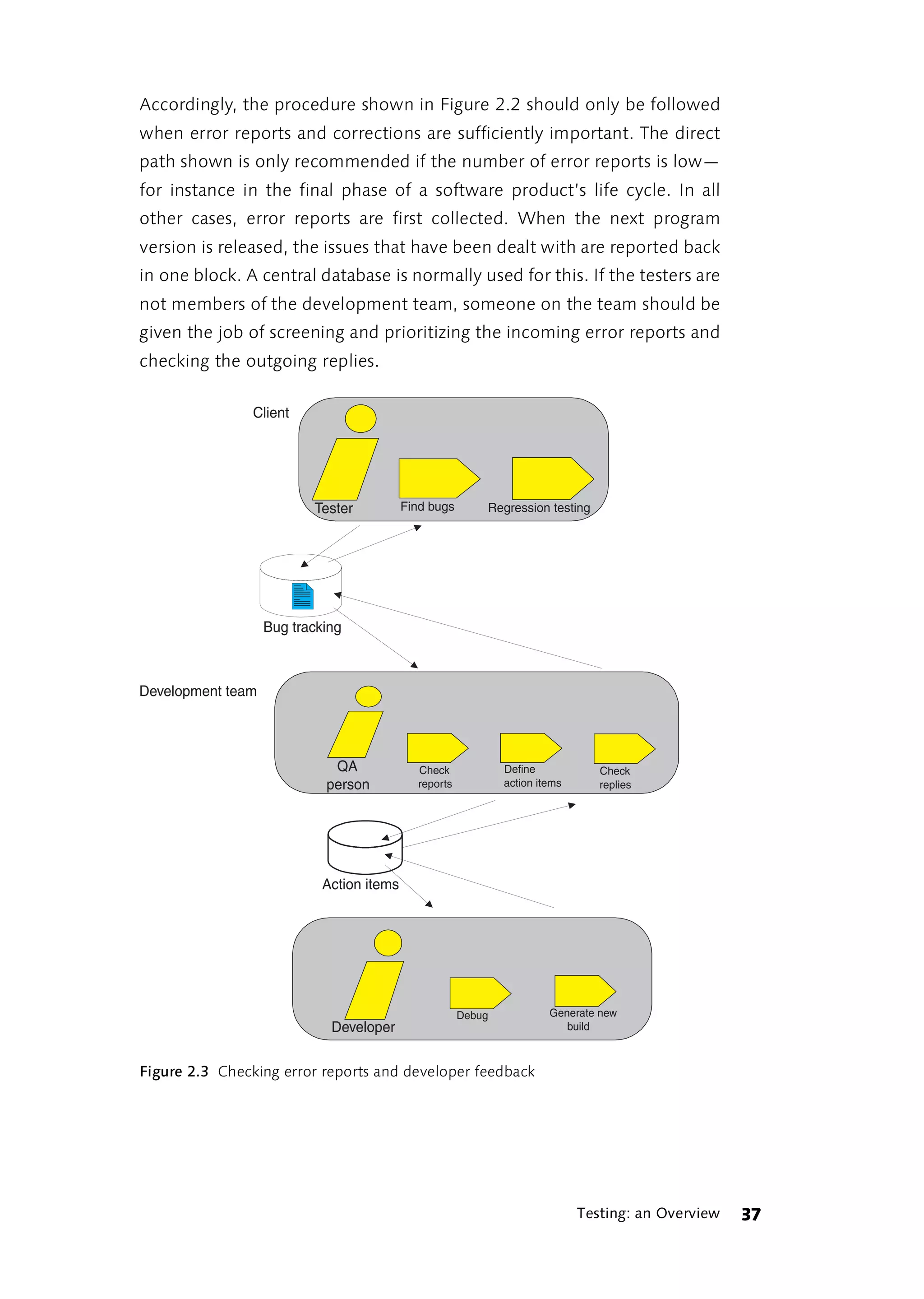
                Client


                          Tester           Find bugs       Regression testing


                   Bug tracking


Development team


                             QA              Check             Define            Check
                            person           reports           action items      replies


                            Action items


                                                       Debug            Generate new
                             Developer                                     build


Figure 2.3 Checking error reports and developer feedback


                                                                              Testing: an Overview   37
It also makes sense to add change management to the responsibilities of
     the QA officer described in Figure 2.3 (see “Test Case Tracking” on
     page 233). But make sure that there are sufficient resources available for
     this role to avoid creating a new bottleneck at this position. During hectic
     periods, a QA officer is working flat out—pulling along two to three
     testers on his left and three to four busy developers on his right.


     2.3.2 List of known errors

     If for any reason it is impossible to correct an error, the test results still
     generate a list that tells you how reliably the software works in certain
     situations. Such a list can, for example, be included in the manual under
     the heading “known errors.” Moreover, it is always worth taking the
     trouble to find out which mistakes were made most frequently during the
     development. This kind of information will help you decide what
     continuing education and advanced training your people need. Or it will
     help you decide whether to change your software development process,
     use different tools etc.


     2.4      Testing Strategies
     The strategy you should adopt for testing basically depends on whether
     you are a program developer or an external program tester. In other
     words, it depends on whether testing is integrated into the development
     process or conducted independently. In addition, the level of resources
     allocated to testing is obviously a crucial factor.


     2.4.1 Exploratory Testing

     If you aren’t familiar with the program to be tested, then you may want to
     opt for a method called “exploratory testing.” When exploratory testing is
     performed, the test cases are developed during testing, not before. The
     results obtained from the first test cases help define subsequent test
     cases.

     The objective of this method is to reach the critical failure points in the
     software as quickly as possible. It would be extremely time-consuming,
     and above all a waste of time, if your first step was to get to know the
     program, your second step was to plan your test cases, and your final step


38   Testing Strategies
was to execute each test case one after the other. By the time you had
become expert enough to find and write down all the necessary test
cases, the next version of the program would already be out and the
software provider would have hired another tester.

If you do not know the program you have to test, then you are in an ideal        Ideal testing
                                                                                 situations
testing situation. In this situation, the program makes the same
impression on you as it will later on the user who opens the program for
the first time. Everything that you do not understand intuitively, or at
least after a reasonable amount of effort, points to a possible defect in the
user interface. Data processing problems and “roadblocks” in program
flow are most apparent when you are first getting to know the program.
Later, this awareness will be “dulled” as you get used to the program's
“quirks” and learn to avoid them.

A subset of exploratory testing is so-called guerilla testing. This involves
short but intensive testing of a limited section of a program by an
experienced tester. The objective is to ascertain the degree of risk posed
by this program unit. Using the most extreme means available, the tester
attempts to make the program fail in this area or crash. If the program
weathers the attack reasonably well, the unit “attacked” can be put on
the back burner for further testing or completely dropped from the test
plan.

You will find helpful links on the topic of “exploratory testing” in [Kaner]
and [Satisfice].


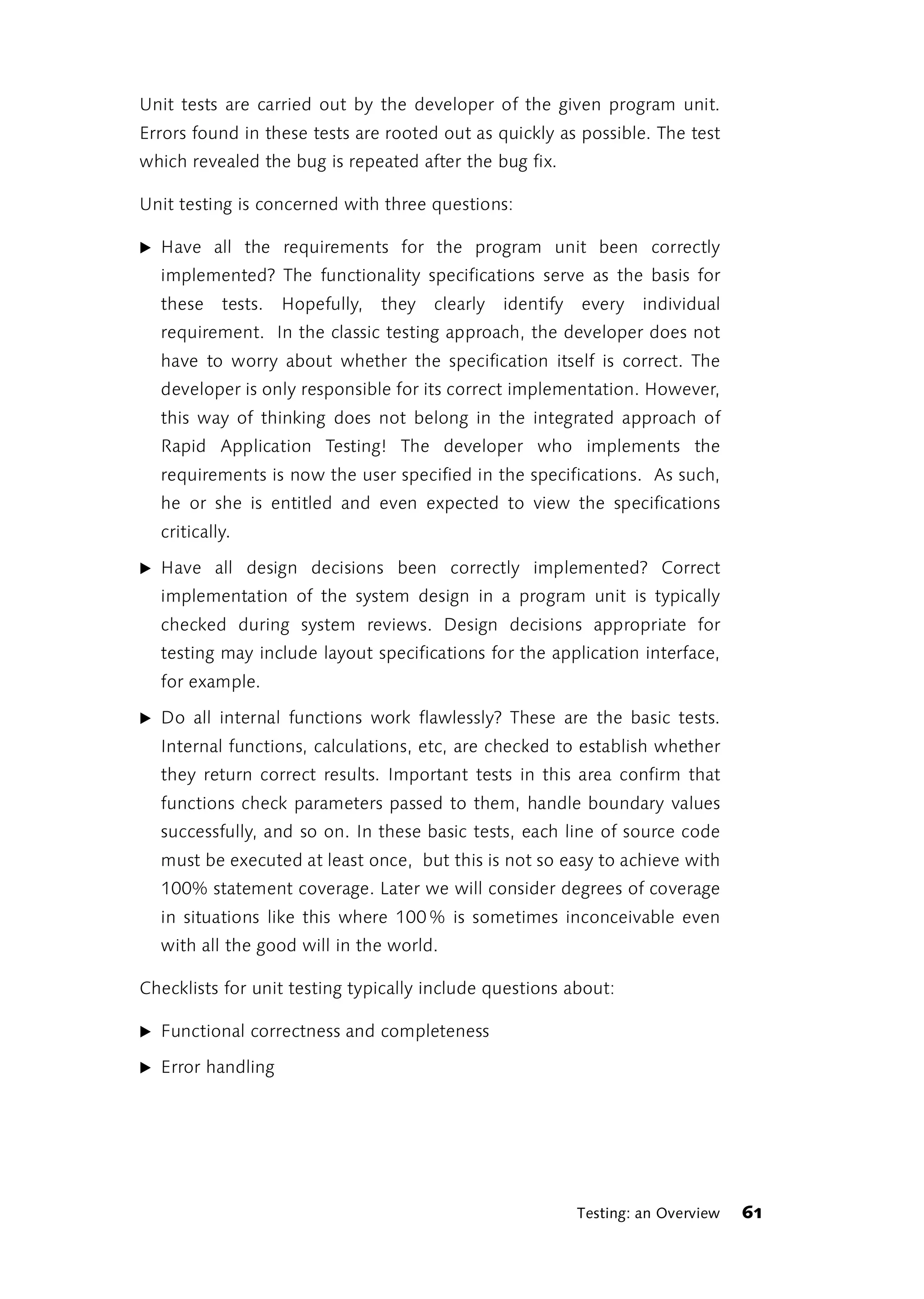
2.4.2 Testing and Improving (Testing and Tuning)

The most widely used strategy for testing within the development process
is probably simultaneous software testing and improvement. Testing and
error correction are not separated in this strategy. Testing is primarily seen
as “ground work”: a necessary step toward fixing parts of the program
that don't yet work very well. Testing and tuning of this type is a classic
developer strategy. Before a program module is released, the developer
tests whether everything is running smoothly and immediately corrects
any errors she finds. In this phase, the developer is also more concerned
with catching potential problem situations not dealt with during
development than with completing deliverables on schedule.


                                                          Testing: an Overview   39
The Test Maturity Model (TMM) developed by the Illinois Institute of
              Technology [IIT] unfairly labels this strategy as TMM Level 1: a default
              testing approach to be “surmounted.” Nobody should still expect
              developers to refrain from testing their modules before they are released.
              Especially when you reflect that approximately ¾ of all code exists to
              react to exceptions and errors, leaving only a quarter for the actual
              processing instructions (many estimates even give a figure of only 10 %
              for processing code). It is precisely this strategy of trial and error,
              correction and repetition that works best for dealing with exceptions and
              errors.

Testing and   Therefore, testing and improving is in reality an important phase of
 improving
              software development and the Test Maturity Model can be used to build
              on this basic strategy. The first three stages in particular indicate how to
              proceed. With level 1 as the point of departure (the testing process is
              either completely undefined, or badly and chaotically structured and
              overlaps with debugging), level 2 testing may be understood as a separate
              phase in the development process which is typically carried out after
              coding. Level 3 testing is then implemented as an independent activity in
              the overall development process. In level 3, testing is now no longer a
              phase after coding, but an integral part of analyzing, designing, coding,
              integrating and distributing software.

              Once testing is integrated into the development process, testers also
              become members of the development team. In many projects, it is
              standard practice for testers and developers to switch places. You test my
              module and I’ll test yours.


              2.4.3 Automated Testing

              The importance of testing and automating tools has increased
              tremendously as applications and system environments have grown more
              complex. In most cases, currently available tools have their own
              programming language for creating test scripts. The latest trend is toward
              employing widely used script languages which can also be used for
              software development itself, such as Perl or TCL, JavaScript, Visual Basic,
              or similar languages. The job of creating automated tests is frequently
              given to a programmer.


       40     Testing Strategies
The tools used in testing usually do more than find errors. The same tools
are also used to trace the source of the errors. There is no clear-cut
difference between testing and analyzing functions either.

In principle though, test automation does not require the deployment of         Low cost
                                                                                automation
expensive tools. A great deal can be checked automatically using tests
embedded in the source code (see below). Test frameworks for
programming and managing unit tests can be downloaded from the
Internet [xProgramming]. Scripts can also be created using tools and
script languages which are either provided with the operating system or
available as freeware on the Internet.

Despite everything that automated tests can do to make your life easier,        Please note!
you must not lose sight of a few realities:

1. Test automation has to be learned
  Creating automated tests is initially very time-consuming. The
  demanding learning curve must not be underestimated. If you only
  have a little time for testing, it is not a good idea to count on test
  automation. It is better to take your first tentative steps toward
  automation in early project phases or during projects without time
  pressure (if there is such a thing) and commit to slow, steady
  improvement in your automation concept. Begin by automating only
  simple (but important) tests. Alternatively, automate only portions of
  the test procedure such as the preparation of the necessary test
  environment. Over time, as you become more experienced, you will
  also be able to automate more complex test scenarios.

2. Testing tools are no replacement for testing staff
  Testing tools are only effective in the hands of a trained tester. These
  tools are not machines—you cannot feed them the program and
  expect them to spit out a tested program complete with a test
  summary report. Risk assessment and test planning, preparation and
  testing of scripts that specify how the test will be conducted, and
  interpretation of the recorded results are all activities that no tool can
  do for you.

3. Not everything can be tested, even with automation
  As a tester or testing manager, you will have to accept the fact that not
  everything can be tested. Implementing tools that automate testing


                                                         Testing: an Overview   41
won't make any difference here. When planning an automated test,
        focus on the risks associated with the program module to be tested,
        just as you would for a manual test. Concentrate on technical risks and
        place less emphasis on acceptance risks (for more information, see the
        section “Risk assessment” on page 84). Technical risks associated with
        the system environment provide the most fertile ground for automated
        testing. If you have to test your software and all subsequent
        modifications across several platforms, well-planned test automation
        can save you a lot of work. By contrast, automated tests which
        repeatedly check the same program feature in the same environment
        will rarely turn up new errors. As a general rule, tests which are
        designed to prove that a program works—referred to as positive tests—
        lend themselves more readily to automation than tests intended to find
        previously unreported errors (see the section “Smoke Tests” on
        page 46).

     4. Automated tests must be continuously updated
        The process of creating an automated test often uncovers more errors
        than the finished automated test script finds later.1 And just because
        the scripts are finished does not mean that the work of testing is over.
        If an automated test fails, the causes must be investigated. In many
        cases, the test script no longer matches the software after
        modifications or enhancements have been made. An automated test
        does not distinguish between a program enhancement and an error. As
        far as the test is concerned, anything which is different from last time
        is going to be wrong. If the change is indeed not an error, then the
        script must be modified accordingly. New scripts may eventually be
        needed to test possible new scenarios generated by program
        enhancements. Some routine automated tests may also persist long
        after changes to system requirements have made them irrelevant.
        Whatever the case may be, proceed on the assumption that automated
        tests will have to be continuously developed and updated along with
        the software. Increased focus on testing and continuous refinements to
        test activities make for better quality software, but naturally at a cost.


     1 Unfortunately, most of the errors that interfere with automated tests have no effect
       on normal program use.


42   Testing Strategies
5. Automating tests costs time and money
  Kaner et al. [Kaner et. al., 2002] estimate the cost of creating an
  automated test at ten times the cost of equivalent manual testing. My
  own experience confirms this assessment. It takes approximately half a
  day to automate a test procedure that can be done manually in 15 to
  20 minutes. One tester will barely be able to automate more than two
  such test cases a day. If you have identified several dozen (or even a
  hundred) important test cases, you can easily calculate how long it will
  take to automate all of them. The first scripts will probably be obsolete
  by the time the last scripts have been created.

  To expenses related to the creation and maintenance of scripts must be
  added the price of testing tools. These vary from a few thousand
  dollars for GUI testing tools to many tens of thousands of dollars for
  stress testing and performance testing tools.


2.4.4 Testing by Using

One of the most fruitful testing strategies is called testing by using. This
strategy is especially well suited for testing quality characteristics within
an adaptive software development process (see the above section “What
is Software Quality?” on page 25).

As explained above, the quality characteristics of an adaptive                   Testing content
                                                                                 aspects
development process are largely determined by content aspects. The
strategies used to test content aspects of the software differ from those
used to test formal aspects. Once the software has been pronounced
relatively robust and error-free, it must be used. Only through usage can
crucial questions raised during an adaptive process be answered:

̈ Is the software really useful? How could usability be improved? What
  features are missing that would make the software really rock?

̈ Does the software support all (or at least the most important) user
  workflows? Does the program enhance or impede workflow?

̈ Do the users see themselves and their domain of work reflected in the
  software? Are the specialized terms correct, are the abstractions
  logical?


                                                          Testing: an Overview   43
̈ Is it fun to work with the software, or is it tiresome and annoying? Do
                        users feel overwhelmed or are they bored?

                     Testing by using must take place in a normal operational environment,
                     not in a usability lab. On large-scale or high-risk projects, a live testing or
                     beta testing phase is normally planned prior to product launch. On more
                     modest projects, but still risky ones for the developers, the software has
                     been known to remain perpetually in beta testing. You can use the
                     “testing by using” approach during your project at the module or
                     component level as well.

     Modularizing    Modularizing the program, i.e. breaking the required programming work
                     down into different levels (layers) or working with a modular component
                     architecture, is almost always a good idea these days. It is almost the only
                     way to cope with the complexity of modern software.

                     If your project has no formal budget for testing, or if nobody can be
                     spared from development to concentrate completely on testing,
                     following this approach will help you secure or improve the quality of
                     your    software.    Through   modularization,    layering   or   component
                     architecture, "real-world use" conditions are built into the development
                     process right from the start.      They do not appear at the end after
                     development is over. Developers should be able to use each other's
                     modules, components, classes and features—preferably without looking
                     at the source code.

                     On some projects, all the developers are expected to own the source
                     code, meaning that they should all know their way around the source
                     code equally well. When following the testing by using approach,
                     however, it is better if the tester's familiarity with the program is
                     restricted to the GUI, the problem description, and a general statement
                     of the software solution.

A fresh point of     The tester should not be too familiar with how the software under test
view is important!
                     has been developed. To evaluate an idea, one needs a perspective
                     different from the one present at its creation. That’s why it is simply
                     better—safer and more effective—to have people on the project focussed
                     primarily on testing. This does not mean that testers cannot have other
                     roles on the project. Analysis and customer relations are responsibilities


              44     Testing Strategies
which overlap nicely with the duties of a tester. On the other hand, they
should distance themselves as much as possible from the design and
coding of the product. If you want to be a tester who programs, specialize
in the development of test scripts.


2.4.5 Testing by Documenting

Writing user documentation provides another opportunity to apply
testing by using. User documentation should not be handed over to a
developer—or at least not to someone involved in the development of
the program module in question—but rather to someone who has
actually experienced the program like a user. Doing this increases the
chances that the user documentation will answer questions that actually
interest users. On the internal side, whoever writes the documentation
must get to know the program before writing the user manual—and get
help from the developers as needed. This process closely resembles
exploratory testing, assuming that the documentation is not based merely
on task descriptions or other analysis documents. Instead, the writer of
the documentation should ask the same question every time he or she
writes a sentence: “Does it really work the way I say it does?” The writer
must also be able to execute a complete series of commands. This boils
down to making a working version of the software available to
documentation specialists rather than making them work with
screenshots. They need to be able to recognize problems and be allowed
to investigate them. In addition to having direct access to developers,
they should also have a say whenever the program they have
documented is being assessed. In other words, they must be the kind of
people who can tell developers: "Hey! Why didn't you make CTRL+C the
shortcut key for copying text?"


2.4.6 Regression Testing

When the behavior of a program changes for the worse after a
modification or addition, this is called regression. The goal of regression
testing is to bring a change for the worse to light. Regression testing’s
primary objective is to ensure that all bugfree features stay that way (also
see the next section on smoke tests). In addition, bugs which have been
fixed once should not turn up again in subsequent program versions.


                                                         Testing: an Overview   45
Because regression testing should be repeated after every software
                  modification, or at the latest before the next product release, the desire
                  to automate these tests is particularly strong. Cem Kaner and others point
                  out, in Lessons Learned in Software Testing [Kaner et. al., 2002], that
                  automated regression tests quickly become obsolete (Lesson 117:
                  Automated regression tests die).

                  Because of the considerable expense, it is not a good idea to promote all
                  tests which have ever uncovered an error to the level of a regression test.
                  An easier and better way to reduce the risk of an error recurring in a later
                  version is to use Source Code Control Systems (SCCS).

Broad coverage    Good regression tests include a lot. In other words, they cover a large
        testing
                  number of internal and external program features. Spot check tests (see
                  below) work well as regression tests when they cover a wide range of
                  validated input data. If data types processed without difficulty by earlier
                  program versions are now causing problems, this behavior provides
                  valuable clues for finding potential program errors.

                  Performance tests also lend themselves well to regression testing. If the
                  execution time of a transaction on the same computer significantly
                  deviates (by a factor of two or three) upward or downward in the new
                  program version, i.e. when the software has become dramatically faster
                  or slower in performing a particular step, then this behavior should be
                  looked into and the cause investigated.


                  2.4.7 Smoke Tests

                  Smoke tests are a battery of tests which check basic program
                  functionality. Smoke tests got their name from the smoke that rises
                  (metaphorically) from the computer when the software fails one of these
                  tests. We are thus concerned with a limited set of regression tests which
                  zero in on basic functional properties. If the software build fails smoke
                  tests, it is not acceptable and is not released for any further testing.

                  Smoke tests are frequently automated. They belong in the category of
                  positive tests—they aim to prove that a specific functional property exists
                  and that no errors crop up.


           46     Testing Strategies
One approach which is becoming more popular is the "nightly" build.
Every day, all the source code released by developers is combined into
one build and subjected to an automated smoke test.

Another variant is to give the developers smoke tests and make them use
them before releasing code to each other. This approach is always
attractive when the development team is dispersed across several
locations.


2.4.8 Embedded Testing

Smoke tests—or more generally regression tests—can be directly
embedded in the source code. In many programming languages, ASSERT
statements (or similar ones) are available for testing the preconditions of
a routine or a class method. This concept is known as “Design by
Contract” in the Eiffel language. In this case, the tests are directly
integrated into the language. When the keyword “require” appears at the
beginning of a method, a list of assertions is given that introduces the
preconditions. After an “ensure” keyword at the end of a method, there
follows a list of assertions introducing postconditions. After the keyword
“invariant,” additional conditions can be specified that are always true for
all objects of a class (invariants). The Eiffel compiler makes sure that all of
the assertions are executed, or none of them, or only the preconditions,
or the pre- and postconditions. A discussion of the “Design by Contract”
concept can be found under [ISEDbC]. Attempts to duplicate this
concept in C++ and Java are discussed in [Maley and Spence, 2001] and
in [Völter, 2001]. Java Version 1.4 and higher includes an assertion facility.
The documentation for Java 1.4 also provides some instructions and tips
for reproducing Design by Contract through assertions [JavaSun].

In most programming languages, preconditions can be evaluated without             Permanent
                                                                                  regression test
too much difficulty before a method executes. ASSERT statements or
simple IF statements at the beginning of a method ensure that all
assumptions for the start of a method are available. Checking
preconditions (Eiffel compiler’s default setting) is sufficient for our testing
purposes. When the postconditions of a method or the invariants of a
class do not hold, this becomes apparent at the latest when they are
evaluated as preconditions for the next method. If certain postconditions


                                                           Testing: an Overview   47
or invariants are not used anywhere as preconditions, they probably are
     not all that important.

     Carefully testing the preconditions of all routines or methods is
     equivalent to conducting a permanent regression. Test drivers are used to
     make sure that all the functions under test have been invoked. The test
     drivers record the return values or catch exceptions. In an object-oriented
     programming language, test drivers can be stored as test code methods in
     an abstract class. The advantage of this is that you save effort by managing
     the code under test and the corresponding test driver together. They are
     kept in the same physical location (most often in a source code file). This
     “one source” principal has proven value in documentation and also makes
     sense when working with code and test drivers, at least at the unit testing
     level.

     Speaking of documentation: Testing preconditions at the beginning of a
     function has the pleasant side effect that the function’s preconditions are
     correctly documented. Text descriptions of preconditions in function
     headers or as constraints in a class model have an unpleasant habit of
     becoming unreliable over time. When the preconditions for ASSERT or IF
     statements at the beginning of a function are tested, the results are more
     than comments. They describe real program behavior. Moreover, they
     are actually readable, at least for software developers.


     2.4.9 Live Testing

     Live testing of a system is conducted by prospective users, initial users,
     experts, fellow developers interested in the software, and so on. The
     most well-known form of live testing is the beta-testing done prior to a
     product’s official release. Given the ways products are released these
     days, however, it is fair to include the first official versions in the live
     testing phase.

     As described in the “Testing by Using” section above, lives tests measure
     software quality differently from formal tests. In addition, live testing
     “thrives” on variety—variety in the ways the product is used, in the
     ambient conditions, and in the potential operating failures that users can
     contrive. This level of variety can hardly be achieved in testing labs.


48   Testing Strategies
Results from live testing are often very vague. You might even receive
some pointless bug reports. However, live testing often yields surprising
and important information, for example that the program is being used in
ways not planned by the developers. One of the most important results
of live testing is the reconciliation of actual use with the expected user
priorities defined during risk assessment (see Chapter 3). In order to get a
picture of the software that is as valid as possible, it is important to recruit
users for live testing who resemble future customers as closely as
possible.


2.5      Testing Methods
Test procedures often differ greatly between functional and structural
tests. Traditionally, functional tests have been termed Black Box tests, and
structural tests White Box tests. Between the two, one finds a large group
of tests which do not fit into either category. These tests employ both
functional and structural approaches as needed for test case selection and
for developing test procedures. These increasingly important methods are
called Gray Box tests.


 Function                                                      Structure

 Black box                       Gray box                    White box

Figure 2.4 An overview of testing methods


2.5.1 Black Box Testing

With the Black Box method, the outside world comes into contact with
the test item—a program or program unit—only through a specified
interface. This interface can be the application interface, an internal
module interface, or the INPUT/OUTPUT description of a batch process.
Black Box tests check whether interface definitions are adhered to in all
situations. Product acceptance tests completed by the customer are also
Black Box tests. They test whether the product conforms to all fixed
requirements. Test cases are created based on the task descriptions.


                                                            Testing: an Overview   49
Naturally, it behooves the developer to conduct these tests prior to the
                    product’s release. That way she has a chance to find mistakes before the
                    customer does.


                    2.5.2 White Box Testing

                    In the case of the White Box method, the inner workings of the test item
                    are known. The test cases are created based on this knowledge. White
                    Box tests are thus developer tests. They ensure that each implemented
                    function is executed at least once and checked for correct behavior.
                    Examination of White Box testing results can be done with the system
                    specifications in mind. For example, the success of a transaction need not
                    be verified by checking a printout or an account balance displayed in the
                    program interface, but instead can be directly verified by reviewing the
                    resulting data since the data structure of the account is known. The
                    accuracy of the journal entry and the displayed account balance must still
                    be checked of course. White Box tests, therefore, do not replace Black
                    Box tests—they only ruin the suspense.


                    2.5.3 Gray Box tests

                    Hung Q. Nguyen [Nguyen, 2001] defines Gray Box testing as follows:

                      “Gray-Box-Testing consists of methods and tools derived from the
                      knowledge of the applications internals [sic] and the environment with
                      whitch [sic] it interacts, that can be applied in Black-Box-Testing to
                      enhance productivity, bug finding, and bug analyzing efficiency.”

                    Gray Box testing, like Black Box testing, is concerned with the accuracy
                    and dependability of the input and output of the program or module.
                    However, the test cases, risk assessments, and test methods involved in
                    Gray Box testing are developed based on knowledge of internal data
                    flows and structures. Gray Box tests often use the same tools to find
                    errors that software developers use to uncover the causes of errors, i.e.,
                    tools that let you directly observe the software's internal operations.

Component-based     Gray Box testing rapidly acquires importance in a component-based IT
     IT structure
                    structure. This occurs because the notion of a component does not quite
                    fit either the Black Box or the White Box testing paradigm. The efficiency


              50    Testing Methods
of a test depends on our mental model of the application under test. If
we think of a piece of software as a monolithic block, we will use the
Black Box testing method. If we are familiar with a program at the source
code level, and our mental model is composed of statements to be
processed, branches, nested elements, loops, and so on, then we will
lean toward White Box testing. However, if we view software as the
interplay of many components, we will develop test cases for risky
components and leave out components that are less fault-prone. We will
have a sense of how the components communicate and exchange
information, and use it to come up with ideas for tests.

Imagine that you were supposed to test a Web application and you were           Background
                                                                                knowledge
completely ignorant of browsers, clients, and servers, as well as of the
necessity of connecting them. You would have viewed the Web
application like a desktop application. The test cases you would have
derived from this mental model would certainly have been different had
you been able to incorporate background knowledge of Web applications
into your model. You would probably have found errors for which the
browser vendor or Internet service provider was responsible. The
awareness of the distances involved in Internet communication is enough
to make us tolerate response times that we would never accept from a
desktop application.

Gray Box testing is also the method of choice for Rapid Application
Testing. Due to time constraints, we will limit ourselves here to functional
tests, where availability, reliability, performance, and robustness are seen
as software functions. However, we will get ideas for effective test cases
wherever we can find them—mostly from our knowledge of internal
structures and their inherent risks.


2.6     Types of Functional and Structural Tests

2.6.1 Requirements-Based Testing

As the name suggests, requirements-based tests are tests created using
functional specifications. These tests check whether the program is doing
what it is supposed to do. Requirements-based tests are often acceptance
tests. Acceptance tests differ from other types of tests in that they do not


                                                         Testing: an Overview   51
try to find errors. Instead they aim to prove that all requirements have
                 been met. This makes them positive tests. Test cases for acceptance tests
                 are most often structured in such a way that they cover the fulfillment of
                 a single acceptance criterion.

                 Sometimes, this is easier said than done. If an acceptance criterion states
                 that a search for a customer in a database of customers should last no
                 longer than five seconds, irrespective of the search criteria, should the
                 corresponding acceptance test actually build queries to the customer
                 database covering all combinations of all search criteria and test the
                 duration of each query? A set of 10 search criteria would already generate
                 1023 combinations. This procedure is so time-consuming that only a
                 program can do it. Therefore, acceptance tests with criteria like these are
                 sometimes executed in spot check testing. Alternatively, an extended
                 testing period is arranged to get people using the program earlier. The
                 hope is that any critical requirements gone astray will be found in this
                 phase.

      Implicit   As outlined above in the section “What is Software Quality," there are not
requirements
                 only explicitly formulated and documented requirements, but also de
                 facto requirements derived from the software type and software
                 environment. These implicit requirements are not dealt with in
                 acceptance tests, but they can provide important test cases, especially for
                 evaluating the design of the user interface.

                 Whatever is not explicitly stated in the functional specifications is also not
                 a contractual acceptance test item. If the functional specifications
                 indicate that a data entry field should accept date values equal to or
                 greater than the current date, and if nothing is specified for date values in
                 the past, then the current date and a later date can be entered in an
                 approval test, but never an earlier date. However, if you want to deliver
                 high-quality software, you won't be able to stop yourself from entering a
                 date value less than the current date just to see what happens. Not only
                 that, the integrated quality assurance process should have uncovered this
                 flaw in the requirements specification well before acceptance testing (see
                 the section “Integration of Phases in Rapid Application Testing” on
                 page 64, and Chapter 5, “Agile Quality Management”).


           52    Types of Functional and Structural Tests
2.6.2 Design-Based Testing

These tests check adherence to design specifications. The most obvious
example are GUI specifications. Using this method, one can check
compliance with layout specifications. This will ensure that the entire
program has a consistent look and feel. Possible test fields include font
size and type, button size, label location and so forth. Many of these
items can be checked with automated tests. In most cases, however, you
will have to write a program to test adherence to your design
specifications.

Other design specifications may also affect workflow. For example, if
users are required to confirm all their deletions, this is definitely a design
feature that should be tested. This is also true for design specifications
that affect implementation, such as coding guidelines, naming
conventions and database design requirements. Requirements like these
are usually reviewed rather than tested.


2.6.3 Code-Based Testing

Code-based tests deal directly with the source code. This is always White
Box testing. For one thing, code-based tests should check whether
program code is generating run-time errors. Code-based tests are also
used to assess the efficiency of algorithms.

Code-based testing is more important (and resource-intensive) when
interpreter programming languages are involved.            Unlike compiler
languages, these are not highly-typed. If highly-typed language is not
used, then a compiler will not be able to catch assignment errors because
most value types are only implemented at runtime. This flaw can be
spotted with code-based testing. Other sources of run-time errors, which
also apply to compiler languages, include accessing database fields based
on field name, accessing dynamic memory, pointer calculations etc. These
are all things whose results only become known at runtime.

In order to minimize runtime errors, code-based testing activities attempt       Runtime errors
to cover as much of the program as possible. Each line of source code
should be gone over at least once. Along with this statement coverage,
there are other degrees of coverage which we will discuss in more detail
later on.


                                                          Testing: an Overview   53
Code-based tests are normally run by the developers themselves. Their
     most important tool is a state-of-the-art source code debugger. It is a
     good (and profitable) habit to begin your examination of a new program
     function by completing a walkthrough using a debugger. Many special
     situations, oversights, or things which developers like to skip over during
     coding will often strike you immediately.


     2.6.4 Performance Testing

     Performance testing is designed to measure how quickly the program
     completes a given task. The primary objective is to determine whether
     the processing speed is acceptable in all parts of the program. If explicit
     requirements specify program performance, then performance tests are
     often performed as acceptance tests.

     Performance tests are also suitable for regression testing (see “Testing
     Strategies” on page 38).

     As a rule, performance tests are easy to automate. This makes sense
     above all when you want to make a performance comparison of different
     system conditions while using the user interface. The capture and
     automatic replay of user actions during testing eliminates variations in
     response times.


     2.6.5 Stress Testing

     Stress testing is a form of performance testing which measures program
     processing speed as system load is increased. System load typically means
     the number of concurrent program users (clients). It may also refer to the
     volume of data to be processed, the number of data records in a
     database, the frequency of incoming messages or similar factors.


     2.6.6 Robustness Testing

     Robustness or stress testing determines the conditions under which the
     program will fail. To do this, system load is increased (see “Stress Testing”)
     in order to determine the point at which the load can no longer be
     processed.      The program's behavior in this situation is observed.


54   Types of Functional and Structural Tests
Alternatively, resources are successively removed from the program in
order to reach the minimum resource requirement level and to determine
how the software behaves after resources fall below this point.


2.6.7 Long-term Testing

The objective of long-term testing is to determine that software does not
become faulty after prolonged use, i.e., that it does not eat memory,
significantly alter its processing speed, or flood disk space with temporary
files, or that internal stacks do not overflow or other similar problems
occur. Long-term testing may take hours, days or even weeks.


2.6.8 Installation Testing

Installation testing establishes that a program can be installed and
uninstalled on the various target platforms that it was designed to
support. This includes testing of both clean installs and updates of
currently installed software.

If necessary, older program versions that are still in use are installed.
These are then updated to the most recent version. The expectation is
that data created by the older version will be correctly updated and that
the software is still problem-free when fired up immediately after the
update.

An additional topic related to installation testing is user permission.
What rights does a user need to install the program? If administrator
rights are required for installation, for example, a check is made of what
happens when a user without administrator rights tries to install the
program.


2.6.9 Security Testing

Security testing determines whether the program and its data are
protected from hostile access. A distinction is made between external
attacks, via the file system for example, and internal attacks, in which
users attempt to access information without proper authorization.


                                                         Testing: an Overview   55
2.7      Testing Types with Various Input Data
                  An entirely different way of distinguishing among testing types is to look
                  at the range of possible input data.


                  2.7.1    Random Data Testing

                  Random data tests confront the application under test with input data
                  generated at random. Typically, testers pay no attention to expected data
                  types. They feed a random sequence of numbers, letters and characters
                  into numeric data fields.

                  Documenting test activities and recording results can be a problem with
                  this type of test. Little is gained by simply starting the test and noticing
                  after a while that the program has crashed. The sequence of characters
                  fed to the program must be recorded in order to determine which
                  sequence of input data caused the program to misbehave.

Area of testing   Furthermore, it is usually not possible to thoroughly check the state of
                  the program after each random operation. So you have to concentrate on
                  one area of testing. Candidates are: robustness (the program should not
                  crash), data integrity (the database should remain consistent), as well as
                  operational integrity (the program should always be in a controlled state
                  and not run into deadlock situations etc.).

                  Random workflow testing is a subset of random data testing. In this type
                  of testing, input data is limited to control commands and mouse clicks.
                  Every button you can get to is clicked, menu items are selected, windows
                  are closed and so on. The same rule about recording results applies here:
                  Record the random sequence of mouse clicks or control commands to be
                  able to reproduce the test procedure later.

                  The point of doing random testing—or live testing—is to generate variety
                  which cannot be achieved using a deliberate, planned approach. This is
                  how a bug was found in VI, for example, even after the Unix editor was
                  considered a classic, completely bug-free program for years.


                  2.7.2 Spot Check Testing

                  Spot check testing resembles random data testing—they both have a
                  random component. But in this approach, input data is selected from a


           56     Testing Types with Various Input Data
mass of real data that the software will encounter in its future area of use. To
make this approach work, you need the largest quantity of “real world” data
possible. Ask one of your customers (or better still, several) to provide you
with real-world data. The more data you have and the more heterogeneous
it is the better. Using a random algorithm, select a manageable subset from
this pool of data. Then feed the data to the system.

Again, the problem here is to define the expected outcome. If the
number of spot checks is small, you could come up with probable results
for each individual test. This becomes difficult when the number of spot
checks is great. If you want to make a preliminary determination of the
expected outcome of thousands of data inputs, your budget will
disappear fast. What does one do in this case? First, set a legitimate global
objective. If you have a posting program that you want to test with a large
quantity of real batch records, the first test goal should be smooth
processing of all correct records. If the posting program rejects particular
records, investigate these processing problems more closely.

If the set of test data corresponds to an exact time period, reference data        Reference data
may also be available with final values or results for that period. In our
posting program example, a completed posting period would constitute
such a timeframe—perhaps a month. In a basic scenario, you would enter
the opening balances at the beginning of the month, feed the entire
month of posting records into the program, and compare the closing
balances with the known values held in the reference program.

One goal of spot-check testing, as well as of random data testing, is to
verify the integrity of the data after processing.

On database development projects, it is always advisable to deploy a
program for checking database integrity as soon as possible.


2.7.3 Boundary Value Testing

Boundary value tests are specific tests which check the most extreme
values of input data. A boundary value test checks how the program reacts
to entries in a two-digit whole number field between 0 (zero) and 99, as
well as to entries outside this range—e.g. from -1 to 100. Text fields are
filled in completely, left empty, or overfilled by entering an extra character.


                                                            Testing: an Overview   57
Boundary value tests are always individual tests with expected outcomes
     that can be precisely specified and checked.

     For applications which write data to a database, it is a good policy to run
     a boundary value test on the application interface. This way you can
     ensure that data entry field lengths in the user interface correspond to
     field length limits in the database. A common mistake is to change the
     size of data fields during development and then forget to modify data
     entry fields in the interface. However, this kind of test takes a lot of time
     and effort. Assess the risk you are taking if the user enters an incorrect
     maximum value into a specific data field in the database. Boundary value
     testing should be automated for high-risk entry fields. Your best option is
     to employ a program which identifies the entry fields in screen forms and
     fills them with valid maximum values. Finally, directly access the database
     to determine whether all completed fields actually contain the maximum
     values.

     When conducting a boundary value test of the application interface
     (going in the other direction), directly access the database to fill the entry
     fields in the GUI with maximum values. The interface is subsequently
     checked to determine if all maximum values have been correctly
     displayed.


     2.8       Phases of Testing
     Now that we have taken a close look at testing per se, and contrasted
     different testing strategies, methodologies, test case types and input data,
     the last question is when a given test should be carried out in the
     development process. In the following section, we will turn our attention
     to the timing and sequence of various phases of testing. Here we must
     make a distinction between conventional test planning models and
     production-oriented approaches within Rapid Application Testing. The
     way in which testing activities are distributed within the development
     process is often precisely what distinguishes Rapid Application Testing
     from conventional approaches.


58   Phases of Testing
2.8.1 The Classic Test Planning Model

The classic test planning model breaks the testing process down into
three phases:

1. Unit, module and component testing

2. Integration testing

3. System testing

4. Acceptance testing

Regression testing is special because it is not a testing phase, but rather an
ongoing activity in phases 1 through 3.


                    V model for planning and testing


   Feasibility study                                      Operational testing


Requirements analysis                                Acceptance testing


             System design                        System testing


                Module design                  Integration testing


                             Coding        Unit testing

Figure 2.5 Classic test planning model


The classic test planning model is often depicted as a V to more clearly
illustrate the relationship between development and testing. According
to this model, the test cases executed during the testing phases on the
right are planned during the development phases on the left. The
feasibility study furnishes test cases for operational testing, the
requirements analysis provides test cases for acceptance testing, and
system testing takes its cue from the system design. The module design
specifies the interfaces to be included in integration testing. After coding
is underway, test cases can be prioritized for unit testing based on the
feature set and the structure of particular units (classes, methods,


                                                           Testing: an Overview   59
functions, etc.).   This diagram is not meant to imply a "Big Bang"
     development project. Given current development practices, the
     development and testing phases shown here more likely represent the
     flow of a single iteration.

     Incremental? Iterative? Evolutionary?

     If you are not familiar with the term iterative software development, see
     below for a brief explanation of this approach. For an in-depth treatment
     of incremental and iterative processes, you can consult the work of Beck
     [Beck, 1999], Kruchten [Kruchten, 1999], Dröschel [VMOD, 1997] and
     many other writers.

     The incremental approach involves step-by-step development of a
     complete system. The complete system is designed as a whole and then
     built in steps. Each iteration adds more functional properties to the
     system, but in a purely incremental approach the overall objective of the
     system is clear from the start.

     An iterative procedure entails breaking down the entire development
     process into a series of like steps. Each iteration or step involves the same
     set of activities: analysis of requirements, system design, construction and
     testing. Before development begins, core requirements (only) are
     specified and project parameters are defined.

     The standard approach to software development nowadays is incremental.
     In the case of object-oriented system development, projects are
     frequently iterative as well.

     In addition, there is the evolutionary approach. Here developers have the
     opportunity to modify core requirements and product limitations every
     time they start on a new product version. As a result of this, the new version
     might not simply extend the previous one, but completely replace it.

     Unit, Module or Component Testing

     This category comprises all tests carried out at the program unit level. A
     program unit may be an individual function or class method, or an entire
     module or class in objected-oriented programming. In the following
     section, we will use the commonly accepted term "unit testing."


60   Phases of Testing
Unit tests are carried out by the developer of the given program unit.
Errors found in these tests are rooted out as quickly as possible. The test
which revealed the bug is repeated after the bug fix.

Unit testing is concerned with three questions:

̈ Have all the requirements for the program unit been correctly
  implemented? The functionality specifications serve as the basis for
  these    tests.   Hopefully,   they   clearly   identify   every    individual
  requirement. In the classic testing approach, the developer does not
  have to worry about whether the specification itself is correct. The
  developer is only responsible for its correct implementation. However,
  this way of thinking does not belong in the integrated approach of
  Rapid Application Testing! The developer who implements the
  requirements is now the user specified in the specifications. As such,
  he or she is entitled and even expected to view the specifications
  critically.

̈ Have all design decisions been correctly implemented? Correct
  implementation of the system design in a program unit is typically
  checked during system reviews. Design decisions appropriate for
  testing may include layout specifications for the application interface,
  for example.

̈ Do all internal functions work flawlessly? These are the basic tests.
  Internal functions, calculations, etc, are checked to establish whether
  they return correct results. Important tests in this area confirm that
  functions check parameters passed to them, handle boundary values
  successfully, and so on. In these basic tests, each line of source code
  must be executed at least once, but this is not so easy to achieve with
  100% statement coverage. Later we will consider degrees of coverage
  in situations like this where 100 % is sometimes inconceivable even
  with all the good will in the world.

Checklists for unit testing typically include questions about:

̈ Functional correctness and completeness

̈ Error handling


                                                             Testing: an Overview   61
̈ Checking input values (parameters)

     ̈ Correctness of output data (return values)

     ̈ Optimizing algorithms, performance


     Integration Testing

     Integration testing checks whether program components interact
     correctly. Program units previously tested at the unit level are assembled
     into larger components. When testing involves multiple functions in a
     single module, or integrated methods in a single class, this is still
     considered part of unit testing. The interaction of modules with other
     modules is the domain of integration testing.

     Integration testing is thus not concerned with the implementation details
     of individual units, but rather with the requirements and design decisions
     that apply to their interaction. These might be requirements related to
     response times, for example, or to workflow between individual
     modules, access protection during multiple user operation, or individual
     access rights, etc.

     Depending on the size of the organization and the resources available,
     integration testing is performed either by the responsible developer (or
     development team), or by a separate testing group.

     Checklists for integration testing include these items:

     ̈ Functional correctness of transactions across several modules

     ̈ Interaction of menus, toolbars, function keys and called program units

     ̈ Interaction of processing and interface modules

     ̈ Response of program components to system events


     System Testing

     When complete systems or add-on modules are deployed, system testing
     is performed. System testing deals with questions like completeness,
     performance under heavy system load, security, integration in the system
     environment and so on.


62   Phases of Testing
When system tests are performed, they are often assigned to a separate
testing group.

System testing checklists include questions about:

̈ Functional completeness of the system or the add-on module

̈ Runtime behavior on various operating systems or different hardware
  configurations.

̈ Installability and configurability on various systems

̈ Capacity limitations (maximum file size, number of records, maximum
  number of concurrent users, etc.)

̈ Behavior in response to problems in the programming environment
  (system crash, unavailable network, full hard-disk, printer not ready)

̈ Protection against unauthorized access to data and programs


Regression Testing

Regression testing does not constitute a single testing phase. Instead, it
involves repeating tests from the first three phases to test specific features
or subfeatures.

If any part of the program is modified or enhanced, it should be subjected
to a new unit test by the developer. It is not sufficient to limit the testing
to new functionality. The developer should also ensure that the
modification does not interfere with existing functionality. This can best
be achieved through the use of embedded tests (see “Testing Strategies”
on page 38) in combination with test frameworks.

Every part of the program which is supposed to work with the modified
or enhanced unit should be subjected to integration testing. System
testing should also be repeated prior to release of new software versions.

Because of their high cost, basic integration and system regression tests
are done as automated smoke tests (see “Testing Strategies” on page 38).
Extensive regression testing is only carried out in preparation for a new
release.


                                                          Testing: an Overview   63
Acceptance Testing

                    Acceptance testing takes place after the development team has released
                    the program. These tests are performed by the customer (or
                    representative of the customer). The operational conditions are defined
                    as the normal installation conditions.

                    If a formal acceptance test is part of the contract, you as the software
                    vendor should develop the test cases yourself whenever possible. Base
                    them on the requirements specification and guidance from the customer.
                    This way you prevent a contractual acceptance test from becoming an
                    acid test of the software’s usability.

                    In the context of agile project management and integrated quality
                    management, acceptance testing is synonymous with collaboration
                    between the customer and the development team. Even at this late stage,
                    there is a real possibility that hidden bugs may crop up when using the
                    application under real-world conditions. Change requests should always
                    be welcomed by an agile project team after all, there is no way to avoid
                    them.

                    For more information on agile quality management, see Chapter 5.


                    2.8.2 Integration of Phases in Rapid Application Testing

                    The classic test planning model is based on the software production
                    process.

                    If you flatten the V from Figure 2.5, you get a timeline of production and
                    testing phases. The sequence of phases is reminiscent of the waterfall
                    model. Advocates of structured processes argue that the waterfall model
                    can still work for single, manageable iterations.

Problems with the   The problems of a process-oriented approach to testing are made
 process-oriented
                    abundantly clear in Figure 2.6. Errors originating in any production phase
        approach
                    may surface in any testing phase. If test cases are developed in the
                    analysis phase or at the latest in the design phase as specified in the V
                    model they will probably find bugs generated during analysis and design.
                    As a result, the potentially most serious bugs will be discovered during
                    the last phase of testing before delivery. Whoopee!


             64     Phases of Testing
Iteration 1 ... N

                                      Analysis


                                       Design


                                   Implementation


                                     Unit testing


                                  Integration testing


                                   System testing


                                      Delivery


Figure 2.6 Classic production and testing phases


Rapid Application Testing is Integrated Testing. It is not organized around
production phases, but rather around software products (or intermediate
engineering products).


                                                        Testing: an Overview   65
Iteration 1 ... N

                         Production                                             Check
                                                    Business model


                         Analysis                     Use cases               Review

                           Design
                                                     Requirements             Walk through
                          Implementation
                                                                                       Testing
                                                      Interface
                                    Integration
                                                                                             Use
                                                    Design model
                                                                                                 Delivery

                                                     Source code


                                                       Modules


                Figure 2.7 Building and Testing Products


                Products of software development exist as soon as someone uses them.
                Once products exist, they should be tested ASAP. It doesn’t really matter
                which product was built in which phase. What is important is which
                testing method suits which product. The question of whether a user
                interface prototype will be available during analysis or design, or later
                during clarification of implementation details, is secondary. It is more
                important that developers, designers and system architects have the right
                idea at the right time: "Product XYZ (a model, prototype, use case, source
                code, . . .) would help us here, and I or somebody else could check it with
                method ABC (review, walk-through, test, using the app, . . .)."

"Impromptu"     Rapid Application Testing is essentially "impromptu" testing. Production
      testing
                and testing phases alternate as products or intermediate products
                become available during development. Once a software analysis
                document has been created, it is reviewed. Design decisions are checked
                as soon as possible against a model.                  As soon as a class is fully
                programmed, it is tested and then used. When the team follows a
                strategy of "early integration," integration tests are also performed on an
                improvised schedule. In extreme cases, a general build is created several
                times a day and automatically run through the most important integration
                tests.


         66     Phases of Testing
(Sub) System


                Production


                      Check


                                    Production
   Production
                  Production
                                       Check
      Check
                     Check             Module 3
    Module 1
                    Module 2

Figure 2.8 Yin and Yang in Software Development


Although Rapid Application Testing neither requires nor implements a
progression of testing phases for software development, we can still use
the phase of testing concept and the well-established terms “unit
testing”, “integration testing”, “systems testing” and “acceptance testing."
From a product-oriented perspective, these phases are tied to a product's
(or intermediary product's) journey through the development process.
The modules and subsystems indicated in Figure 2.8 are only examples.
In the development of products of any magnitude, there is an inseparable
link between building and testing.

Production and continual testing of software products form an integral
part of any development process. Ideally, each activity checks the quality
of its own input variables. This requires critical thinking and good
communication from everyone involved on the project. Specialists give
seminars to share their knowledge, architectures are discussed and
compared, design decisions take software testability into account,
programmers know how to test, and testers concentrate on system-
dependent weak points.


                                                         Testing: an Overview   67
2.9      Other Quality Assurance Methods
                For a long time, testing was the most commonly employed method to
                assure software quality. In some cases it was the only method. This was
                unfortunate. Timely reviews during product development, for example,
                could have found many more bugs and different ones than testing alone.
                Reviews are usually cheaper than tests, and reviews of existing programs
                and projects are an excellent way to learn from past mistakes. The results
                of a review can find their way into the next project's analysis and design
                templates, coding guidelines and process improvements.

                Of course, no one can afford to dispense with testing simply because
                regular reviews have taken place. The number of retests conducted after
                bug-fixes can be reduced dramatically, however, if there are fewer bugs to
                fix. Static code analysis and model validation methods also provide a
                similar benefit (see below).


                2.9.1 Design and Code Reviews

                There are two types of reviews: peer reviews and group reviews.

 Peer reviews   Peer review means that one developer takes a good look at another
                developer's code. The reviewer should have at least the same level of
                expertise as the reviewee. Naturally, the process works better if the
                reviewer has more experience and better qualifications. Peer review can
                happen informally at any time. Or it can become de rigueur prior to first
                releases and the integration of new modules. Peer reviews are the most
                frequent type of review in Rapid Application Testing.

Group reviews   The second type of review is a group review. In this case a developer
                presents his module to the group and the group asks questions (“"Why do
                you use PRIVATE here instead of PROTECTED?"”), makes suggestions for
                improvement (“This loop could be optimized by doing this ...”) or turns up
                weak spots (“That won’t work there because...”). This type of review is
                something like an oral defense in graduate school. Group reviews are
                important at very critical stages in development and as post mortems
                after iterations.

   Combining    The two types of review can also be combined. In this case, each member
     the two
                of the group takes a section of code or a specific feature, method or sub-


         68     Other Quality Assurance Methods
module and examines it alone. The results are summarized as bullet
points and then discussed within the group. This combination approach
makes it possible to review larger program components than is possible
with pure group review a big advantage. At the same time, each
participating developer gets an opportunity to learn something from the
discussion and to share his opinion on a section of code.

For document reviews the procedure is the same. However, different
questions are raised here. For example, when reviewing a requirements
specification, team members might focus on whether each requirement
has a testable acceptance criterion, or whether specifications are
technically feasible at all, or whether they are unambiguously worded, or
whether two specifications contradict each other.

When reviewing a class model, attention should be given to whether
class assignments are correctly distributed, whether the visibility of class
attributes is specified correctly, whether the class methods and attributes
have been uniquely named in each case, etc.

For group reviews that take place frequently, it is advisable to compile
checklists. These are first distributed to reviewers along with the object
under review. Next, the reviewers go down their lists. Finally, each
reviewer presents his points in the group session.


2.9.2 Static Code Analysis

Static code analysis does not observe software during runtime (as testing
methods do), but instead analyzes source code directly. Through analysis
structural errors are hunted and caught. These may include:

̈ Unused variables

̈ Unreachable code

̈ Missing return values

̈ Language dependent errors such as

  ̈ Invalid nesting

  ̈ Invalid allocations of values

  ̈ Calling non-existent procedures


                                                         Testing: an Overview   69
This type of statistical code analysis is built into most modern compilers
     and produces error messages and warnings.

     More extensive code analyses check for adherence to coding rules. In
     general, this requires an add-in tool for each programming language.
     Most analysis tools on the market also allow you to specify your own
     coding rules and even have them checked as well.


     2.9.3 Model Validation

     Modern modeling tools designed for database modeling, or for creating
     class and object models for applications, also use validation methods. For
     example, database models created with state-of-the-art modeling tools
     can be automatically analyzed for redundant or missing indices,
     consistency of external and primary keys, tables without fields, etc. In
     addition, it is possible to make a reconciliation between the model and
     the database.

     Model validation can only be used if the model is exact and sufficiently
     detailed. This is frequently the case when modeling databases, however,
     because complete databases can now be created directly from models
     without any further operations. In principle, this is also possible for
     modeling classes and objects, but this approach is very seldom taken.
     Class and object models are usually only sketches which facilitate an
     exchange of ideas. Whether formally correct class and object models will
     one day replace programming in high-level languages, or whether
     programs will one day be generated using only models, remain hotly
     debated issues.


70   Other Quality Assurance Methods
3       Testing in the Real World
                 Each day is 24 hours in length, but the width varies.
                 (Wolfgang Neuss, cabaret artist and philosopher)


3.1        Developing and Testing
Rapid Application Testing focuses less on the phases of software
development and more on the products or intermediate products of each
phase.       Products and intermediate products of development are also
referred to as “artifacts” in the Unified Process Model [UPM]. In Rapid
Application Testing, each artifact is tested explicitly or implicitly: explicitly
when implementing test procedures tailored to the special product type,
and implicitly when using artifacts critically in the continuing development
process.

Testing procedures can only determine product quality or the lack thereof.          Manufacturing
                                                                                    quality
They cannot manufacture quality.           Therefore, product development
approaches and testing procedures must be complementary. Ideally,
development will be strengthened by parallel quality testing of all
preliminary products that flow into the final product. This sounds harder
than it is. What you need are committed and interested team members; a
project environment conducive to the exchange of ideas; and a simple
process that avoids unnecessary formalism and permits substantive
changes at any time.


3.1.1      A case study

The following case study presents some possible testing procedures for
typical products and intermediate products of software development.

It is not limited to testing in the classical sense, but also includes different    Not just testing
types of testing such as document reviews, walkthroughs, prototyping
and model validation. Concrete examples from actual practice better
reveal how all these procedures can be combined into one approach that,
in addition to rapid application development, also achieves permanent
quality control and expeditious discovery of the most important errors, a


                                                        Testing in the Real World   71
kind of Rapid Application Testing. Kent Beck writes in the conclusion of
     eXtreme Programming explained [Beck, 1999]: ”I am afraid of doing work
     that doesn’t matter.” Anyone who has tried to deliver a product he can
     stand behind with a typically inadequate budget for software
     development can relate to this.

     The example considered here is a software module used for licensing a
     data analysis program and monitoring compliance with the contractual
     terms of the license. The documents provided are based on original
     project documents. The development process essentially unfolded as
     presented here. The licensing module has been in use since the end of
     1999. No modifications or corrections have been required since the
     release of the first version.

     In cases where a procedure did not produce any meaningful documents,
     I have brought in samples from other projects.

     Task description, software development task description

     Usually, the first document created when developing new software is
     some kind of a task description. In this case, the license module was
     defined as a subtask in the course of preparing the overall project task
     description. From the very beginning, the licensing process was
     designated as a “module” without specifying any particular program
     structure to make it work.

     Task Description for the Licensing Module

     The licensing module should ensure that the XYZ system can only be used
     on workstations stipulated by the terms of the license. Licenses were
     issued:

     ̈ For each workstation

     ̈ With and without expiration date

     ̈ For each database to be analyzed

     ̈ For a set number of analyses per analysis type


72   Developing and Testing
Compliance with these licensing terms must be monitored by the
licensing module.

...

The task description was approved and endorsed by the customer.                    Specifying tasks in
                                                                                   writing
The following items are relevant to QA:

̈ The tasks to be performed by the program are specified in writing.
      If a written analysis is required, one is forced to think more deeply
      about a topic. In addition, a document is created that can be checked
      and which serves as an aid to memory later on.

̈ The task description will be subject to a review which involves the
      customer.
      Even if you have received only one call from the customer requesting
      a special program feature, you should document that telephone
      conversation and submit a summary to your customer.

̈ The task description is signed off by the customer.
      This can be done formally (with a signed contract) or verbally. If the
      customer does not explicitly request any changes to the last telephone
      conversation report, you can usually assume that you have correctly
      understood and described the task. Work can proceed on this basis.

Developing a concept

Initial conceptual work on the system design included an analysis of the           Working closely
                                                                                   with the customer
situations the program had to guard against. For example, the user of the
analysis program might try to hack his way around the licensing system
and the program had to be able to react effectively. The project team
prepared a document laying out various security solutions and associated
(developmental and administrative) costs and went over it with the
customer.

With the aid of these written system design proposals, the customer was
able to decide what level of protection he wanted against software
pirates and fraudulent users.


                                                       Testing in the Real World   73
...

                    If the passwords are permanently stored within the program itself (such as the
                    xyz password), a hacker who is able to crack the ... algorithm and successfully
                    decompile the program will have gained access to the passwords.
                    Furthermore, the passwords could only then be modified by the developer.
                    This is why we are proposing adoption of the ... solution.

                    Implementation and administration expenses:

                    1. The least expensive implementation can be achieved by adopting the
                       software design approach using xxx because the in-house activation of
                       workstations and external program licensing follow the same procedure.
                       Only the contents of the license file vary. The license file and the INI file can
                       be created and maintained using the administration program for the
                       program licenses. No dongle administration is required.

                    2.Compared to Solution 1, dongle-based activation requires slightly more
                      implementation effort because the license file must be used in conjunction
                      with the dongle. Additionally, a procedure for deactivation must also be
                      provided for in the program.

                    ...

                   Figure 3.1 Excerpt from the system design proposal

      Assigning    System design was identified as a high-risk step, because the
resources based
                   development team would not have time to learn important lessons from
         on risk
                   the module's initial use. If at all possible, the licensing system was
                   supposed to meet the customer's security requirements right off the bat.
                   It was unlikely that bug reports would come in from hackers who cracked
                   the licensing system.

                   That’s why extra effort went into quality assurance during drafting of
                   system design recommendations:

                   ̈ Brainstorming and review
                      Several developers met and came up with attack scenarios and
                      possible safeguards, which they discussed in depth. The developer in
                      charge of the licensing module summarized the discussion points into
                      a recommendation which he circulated within the team for review.

                   ̈ Feasibility testing
                      In order to be able to make an informed estimate of pending
                      development costs and subsequent administrative costs related to


            74     Developing and Testing
deployment of the licensing system, the build and maintenance of
   licensing files and dongle programming and other options were tested
   in advance.

̈ The system’s limitations were clearly stated
   The system design recommendation also covered scenarios which had
   not been safeguarded against. It described in detail a scenario which
   could only be prevented using an external system that compared
   system date and time. This gave the customer the possibility of
   choosing whether to guard against this potential scenario.

̈ Involving the customer
   The system design recommendations were fully discussed with the
   customer. Examples of potential risks were used to illustrate the pros
   and cons of each security procedure. The development team's
   recommendation reflected the known requirements of the customer
   up to that point and was accepted by him.

Use case analysis

Using the approved system design, a brief use case analysis was                                      Use cases are
                                                                                                     requirements
performed in order to determine where in the complete program the user
would come into contact with the licensing system.


                                                        Activate
                                                       workstation
                              {first call}


                                         {expired}       Increase
              Program start                                                              Run
                                                      expiration date
                                                                                     authorization

                              {system date changed}
                                                         Correct
                                                       control date
                         {data source changed}


                                                          Correct
                                                         checksum
User


              Program end


Figure 3.2 Use cases of the licensing module


                                                                        Testing in the Real World    75
Each use case in Figure 3.2 was discussed in an accompanying text file.

                Test Cases for Later System Testing

                Later on in the project, a table of individual requirements and
                corresponding test cases was prepared based on the text descriptions of
                the use cases.

                No.     Requirement                          Test cases
                                                             (expected result)

                1       Activating a workstation

                1.1     An activation code must be           1. Boot WS (workstation) using the valid
                        requested when booting the system       activation code (valid program start)
                        on a deactivated workstation.

                1.1.1   The activation code must be unique   2. Activating WS1, then activating WS2
                        for that workstation. In order to       using the same key (WS2 cannot be
                        activate two workstations, two          activated)
                        different activation keys must be    3. Verification test: Activating WS2 with
                        required.                               the valid activation key (WS2 can be
                                                                activated)

                1.1.2 Program startup must be rejected if    4. Attempt to start using invalid
                      the valid activation key is not           activation key (program start not
                      entered.                                  possible)
                                                             5. Attempt to start without activation
                                                                key (program start not possible)


                Figure 3.3 Test cases for individual requirements


                GUI prototype

 Generating     Using a GUI prototype, the customer was given a demo of the steps to be
multiple uses
                completed by the user in the individual use cases. The GUI prototype
                consisted of fully implemented screen forms with no functionality. The
                prototype already incorporated the GUI element classes intended for
                actual use. Thus there was no additional cost for building the GUI
                prototype because the forms were reusable.

                The build of the GUI prototype is the first opportunity for the developer
                to test system design ideas using a concrete procedure, and to think
                about functions needed later. At the same time, the GUI prototype
                represents the first visible "product" the customer can evaluate and
                approve. Very early on, the customer gets a good idea of what the


          76    Developing and Testing
program is going to be like to use in our example, of what the licensing
module will look like to future licensees.

System Design

Before coding starts, important processes are modeled in activity                            Modeling means
                                                                                             simplifying
flowcharts. This helps make the rather opaque internal processes and
relationships of individual use cases more understandable.


                             Start


                          LibraryTest


                             {OK}


                       Open license file


    License file                                                 Activate
                        Check activation   [not activated]                          {Canc
{open, nHandle > 0}                                             workstation


                          {activated}
                                                 {OK}


                         Check system        [changed]
                                                             Correct environment    {Canc
                          environment                             checksum


Figure 3.4 Activity flowchart of program start


Each individual activity is represented in the diagram by a rounded
rectangle. If an activity in the diagram casts a shadow, this indicates that
the details of the activity are illustrated in an additional activity flowchart.
The arrows between activities represent the paths the program takes if
the conditions specified in brackets are met. For some activities, dashed
arrows indicate status changes in individual objects called by the activity.
The example depicted in Figure 3.4 shows that the activity “open license
file” changes the status of the object “license file” to “open,” which
corresponds to a value greater than zero in the “nHandle” attribute.


                                                                 Testing in the Real World   77
At this stage, activity flowcharts do not document actual, existing
                systems. Rather, they serve as tools for developers to formulate more
                detailed concepts of the program they are building. Many developers use
                this method to model only parts of the system, if at all. They model
                complex components that they cannot design in their head. Modeling
                becomes a creative process using pen and paper, or mouse and screen.

Going through   An activity flowchart for acting out various scenarios helps to check
    scenarios
                whether the modeled activities actually produce the desired system state.

                Program walkthroughs can take place even before the first line of code is
                written. Regardless, the scenarios can be acted out very realistically using
                the activity flowchart, and the results can be checked and reconciled with
                the desired results.

                To determine a testable result, current values of individual attributes are
                tabulated. Figure 3.5 shows an excerpt of a table from a model
                walkthrough. First, the scenario to be checked is described. At this point,
                one defines only the context that should apply to the walkthrough. In
                the "results" field of the table, a detailed description of the results from
                individual activities is entered.

                 2.1 Scenario: Starting and Exiting a Program, Best Case
                 The license file has been correctly installed, the workstation has been activated, the
                 expiration date has not expired and neither the system environment nor the system
                 date has been changed. The license file is stored in the program directory. The
                 program is started, the program is used and the program is subsequently exited.
                 2.2 Sequence:
                  Step         Activity       Result        NHandle        IValid         License file
                                                                                          status
                  1            Program                      0              .F.            closed
                               start
                  2            Library test   OK
                  3            -> Open
                               license file
                  3.1          Search for     Program
                               license file   directory
                  3.2          PP_LFOPEN                    >0                            open
                               license file
                  3.3          Check          WS is
                               activation     activated


                Figure 3.5 Table of activities in a model walkthrough


          78    Developing and Testing
Steps are serially numbered so that the branch level can be immediately
identified, even in longer tables. In Step 3 of the figure, the program
branches out to the activity “Open license file,” which is described in its
own activity diagram. The subsequent steps (Steps 3.1, 3.2, etc.) are
atomic activities within the “Open license file” sub-activity.

In Step 3.2, a function is invoked from one of the DLL files used to run
the encryption system. The results of this invocation are then recorded in
the attribute fields “nHandle” and “License file status.”

If you want to test an activity flowchart in this manner, it is best to create
a unique field for each object or attribute whose condition is to be
tabulated in the walkthrough. This is where every change in value
resulting from an activity should be recorded. At the end of the
walkthrough, all objects and attributes should match the predefined
description of a correct result.

A program model walkthrough allows the designer to check the design’s             Testing design
validity. Acting out processes using scenarios and activity or sequence
diagrams is always advisable for cases where relationships are not
straightforward. Here are a few more tips on using models for quality
assurance:

̈ Use models for important program aspects. Mandatory use of models
  makes little sense. If you want to use models as technical
  documentation for your program, the source code should be able to
  produce the models automatically.

̈ Models are abstractions. Do not attempt to reproduce every single
  detail in the model. Concentrate on the essentials. Specify only the
  attributes, methods, and links that are important for the activity
  depicted.

̈ Using the model, check your own understanding of each task and its
  solution. The need to flesh out ideas on paper textually or graphically
  often helps indicate weak points in the concept or where something is
  not one hundred percent understood.


                                                      Testing in the Real World   79
̈ Do not lose sight of the big picture. Any good diagram fits on a single
                      physical page. If your diagram runs over, combine the interrelated
                      areas into sub-diagrams, minimize details, or rethink the program
                      architecture being displayed.

                    ̈ Use    the communication possibilities afforded by models. All
                      development team members should at least have a basic mastery of
                      Unified Modeling Language (UML). UML allows ideas, analyses, and
                      concepts to be easily incorporated into an ongoing review process.

       Everything   One key characteristic of the method described above is that none of the
       that helps
                    steps are mandatory. Thus, the development of the licensing module did
                    not involve preparation of every possible document, model, or diagram,
                    but rather only those that proved helpful in a particular situation. By
                    helpful, we mean facilitating a broader understanding of the task at hand
                    or providing means of communication or testing.

                    The two methods that follow were not applied in the licensing module.

                    Business model

                    For task analysis, it is important to understand the commercial
                    environment of the software in production. The program must fit into this
                    environment and add value, for an improved environment produces
                    better data for processing. The best way to test your own understanding
                    of the commercial environment is to produce a business model that
                    furnishes the necessary explanations and present it to the customer for
                    evaluation.

                    In our licensing module case, a business model would not have been
                    much help. That is why we need an example from another project (see
                    figure 3.6).

Checking analyses   Business models are produced as entity-relationship diagrams or as class
                    diagrams without methods. Core data from previous analysis discussions
                    should already have been assigned as attributes to entities (classes). Thus,
                    the customer can recognize whether you have correctly understood the
                    origin and meaning of the information occurring in the commercial
                    environment. Since in most cases diagrams mean nothing to the
                    customer, an explanatory text is both sensible and necessary.


              80    Developing and Testing
Example of a Business Model
 ...

 Payment Reminders
             Customer account
                                               Language         Payment reminder form
       Customer number
       Send reminder statement yes/no                           Dunning level
       Correspondence in : Language                             Language


                               Payment
                        Seq. number
                        Ref. : Indicator
                        Time limits : Months + Amount due        Reminder statement
                        Date due                                 Date
                        Amount
                        Reminder level
                        Balanced yes/no


 Reminder statement
 Reminder statements are generated based on payments which are overdue and not
 yet paid. The billed amount becomes the accounts receivable balance.

 Reminder statement
 The reminder statement to be used is determined based on the dunning level and the
 language ID set for correspondence with that particular customer. The current dunning
 level is recorded in the payment total.

Figure 3.6 Excerpt from a business model with comments


Of all of the models, business models have the longest shelf life. If
significant changes occur in the commercial environment, you will most
likely need to change the program as well. Creating and maintaining a
business model is always useful if the commercial environment exerts
significant influence on the processes of a program.

Providing details on use cases

Providing detailed descriptions of use cases using a GUI prototype is
another method for checking your own understanding, for discovering
potential problems early on, or for sharing your thoughts with others or
submitting them to testing. Here is another example that does not come
from the licensing module.

Complex procedures are best outlined in activity flowcharts or sequence
diagrams, and are best checked with scenario walkthroughs (see above).


                                                            Testing in the Real World    81
Complex interfaces are best depicted in a detailed GUI prototype. The
             best way to check the logic of the interface and the efficiency of the
             workflow it controls is to describe all inputs, mouse clicks, and program
             responses in detail. The best place for such a detailed description of the
             GUI prototype is the use case’s textual description. Since it is no secret
             that the devil is in the details, providing details on the use cases brings
             you a step closer to all the ifs, ands and buts of the development work to
             come. To be sure, you haven't yet had to grapple with coded legacies.
             Here, you can still change everything without a lot of effort by adapting
             the GUI prototype as you acquire new knowledge.


             Figure 3.7 Screen form from the GUI prototype

  Checking   Like the scenario walkthrough, providing detail on more important or
procedures
             difficult use cases is one possible form of testing within the development
             process. This type of test can be conducted long before the application
             under test actually exists. You can already use some of the test models
             described below when describing possible inputs and the program
             responses they produce. For example, you can focus on lowest and
             highest possible inputs, required fields, optional inputs, and so on. This
             way, you get a much clearer picture of the required program functions
             than you would solely from the use case analysis.


       82    Developing and Testing
Outstanding, Payment, Balance
 The outstanding amount on the invoice, the assigned payment amount and the remaining amount
 are displayed in the currency selected for transactions (see “Settings”).
 Payment
 When an invoice is selected from the list, the invoice’s data is displayed in the editing window below
 the list. All the fields are write-protected except for the “Payment” field. Here, the amount can be
 entered that has been assigned to the invoice as payment.
 “Balanced” check box
 This check box is automatically activated when the payment amount assigned to the invoice
 balances the outstanding amount completely and/or within the set tolerance (the tolerance setting
 can be found under “Settings,” “Transactions”). Users can also activate the control box manually
 when no reminders are to be sent concerning the outstanding amount on the invoice.
 “Assign” Button
 Assigns the amount displayed in the “Payment” field to the invoice selected.
 “Assign Automatically” Button
 When the “Assign Automatically” button is clicked, the payment amount assigned is automatically
 assigned to those customer invoices that have not been settled. Assignment takes place according
 to invoice numbers in ascending order, meaning the invoice with the lowest number is settled first.
 “Undo Assignments” Button
 Undoes all assignments that have already been made. This function can be used to cancel a
 payment amount that has been incorrectly assigned.
 Save Payment
 The payment and the assignments shown can be saved by clicking the “Save” button on the
 toolbar.
 Cancelling the Payments Entered
 If the “Cancel” button on the toolbar is clicked, the payments entered and the assignments
 displayed are cancelled without being saved. Once the data has been saved, it is no longer
 possible to cancel the entries. However, a saved payment and its assignments can be deleted at
 any time.

Figure 3.8 Detailed description of a use case in the text document

By creating detailed descriptions of program sequences for individual test                                Involving users
                                                                                                          early on
cases, you have simultaneously drafted the most important (or most
difficult) parts of the user manual. The idea of creating the user’s guide
before creating the program is certainly not new. If you provide users
with the de facto user’s guide together with the GUI prototype, you give
them a chance to get to know the program’s most important interfaces—
the user interfaces. They can "get it" and then give feedback.

The first units

Once you have described tasks, developed concepts for solutions,
clarified use cases, and set the most important parts of the interface, the
hard part is already behind you. Now, you “only” need to program the
functions that can be invoked by the interface and all the invisible little
helpers that work away behind the scenes.


                                                                        Testing in the Real World         83
Top-down    The top-down approach described here begins with analysis, proceeds to
 approach
            the GUI and then focuses on functions invoked by the interface. I am
            certain that the approach taken in this test case is not suitable for all task
            groupings. I have previously found this approach very helpful for avoiding
            serious errors in analysis or in design, or for discovering them in a timely
            manner.

            Before we tackle the big topic of unit testing below, I would like to touch
            on two further preliminary aspects: risk assessment and patterns in
            debugging.


            3.2     Risk assessment
            Risks were already mentioned in the use case. Testing deals with risks in
            many places. Certain aspects of a program may be so important to the
            customer that messy programming would pose quite a risk in these areas.
            A program must be safeguarded against quirks in the technical
            environment such as communication routes posing specific problems.
            Errors that emerge in truly unproblematic areas can provide important
            clues to risks which have not yet been recognized. The selection of
            program segments to be covered by regression testing is also a risk
            assessment issue.


            3.2.1 Setting Priorities

            Except for very trivial programs, it is no longer possible to test a program
            completely. The issue is not just cost or the limited time allowed by the
            project plan. The number of possible paths and input combinations in an
            event-driven program with a graphic interface is simply too great. Even
            with the best will in the world, nobody could check the billions of
            possible combinations.

            Priorities must therefore be set. But how does one procede? Which
            criteria should be used to set the right priorities? Setting priorities always
            means assigning importance to things. The most important test cases
            should always be checked, and the less important ones as thoroughly as
            possible. Unimportant test cases are never checked. But what is an
            important case? Does everybody use the same criteria, or are different
            approaches used within the project team?


      84    Risk assessment
Rapid Application Testing is risk-oriented testing. The program segments          Identifying risks
that pose the highest risk should be checked most intensively. First of all,
the risks that particular program segments or constellations of hardware
or software may harbor must be identified, particularly when it comes to
requirements and use cases needed. We will also need a method that
enables us to sort and evaluate the risks we find. Our goal is to assign
testing priorities in a transparent, testable way.

It is certainly not equally important on all projects to perform a formal risk
assessment. Often, one has a “gut feeling” about what must be done and
where the greatest risks lurk. However, testers or QA officers should
know about and have experience with formal methods, at least in order
to hone their sense of possible risks and corresponding testing priorities.


3.2.2 Various Risk Types

Before we begin evaluating risks, we need to be clear about the types of
risks that exist. Risks can take various shapes:

1. Contract risks

  ̈ Contractual partners can interpret ambiguous and unclear task
     descriptions differently.

  ̈ Unrealistic timeframes can cause the entire project to fail.

  ̈ Misunderstood requirements can lead to a conflict with the
     customer.

  ̈ Leaving a requirement unfulfilled can also lead to a contract penalty
     or even a lawsuit.

2. User satisfaction

  ̈ When a functional property is missing or faulty, this could
     significantly disrupt the prospective user’s workflow.

  ̈ Inadequate usability or a departure from the system environment’s
     informal user standards can cause the user to reject the program.

  ̈ Confusing error messages and a missing or inadequate Online Help
     function can lead to user frustration and can ruin the program’s
     reputation among users.


                                                      Testing in the Real World   85
3. Image risks

       ̈ An obsolete interface can have harmful effects on the customer’s
          and on the software vendor’s image.

       ̈ Outdated program architecture can damage the reputation of a
          vendor or a project team, at least in the eyes of the customer's IT
          specialists.

       ̈ Failure to comply with implicit requirements can damage your
          image (see the section “What is Software Quality?” on page 25), and
          potentially lead to a conflict with the customer.

     4. Complexity risks

       ̈ A calculation can be so complex that the risk of error is great.

       ̈ A multitude of rules can lead to a lack of clarity and make it difficult
          to see through the program's behavior.

       ̈ Parameterization can make installation, support, and maintenance
          more complex.

     5. Integration and configuration risks

       ̈ The interaction between multiple components can create interface
          problems and cause configuration errors.

       ̈ The impact of disparate hardware resources and operating systems
          can also cause problems.

     6. I/O risks

       ̈ Input data may be unreliable.

       ̈ The input and output channels (printer, E-mail server, network
          connection) may be intermittently unavailable or prove unstable.

     7. Time and synchronization risks

       ̈ Some workflows may have to be completed within a certain period
          of time.

       ̈ Different areas of the program may have to be activated separately.

       ̈ Access to common data by multiple users must be secure and
          synchronized.


86   Risk assessment
8. Quantity risks

  ̈ Certain data can accumulate in very large quantities.

  ̈ Procedures must be executable within a certain timeframe (i.e., the
     workday) at a pre-defined rate (i.e., per unit of material).

  ̈ There are times during the day when many users access the
     program. During these periods, system response times must remain
     acceptable.

9. Security risks

  ̈ Certain data may only be accessed or modified by authorized users.

  ̈ Hostile attacks on the system must be anticipated.

This list is certainly incomplete. When you assess the risk of your current        Project-specific
                                                                                   risks
project, you will probably have to add specific risks. But the list does
make clear that we must distinguish between acceptance and technical
risk. Acceptance risks are primarily contract risks, risks related to usability
and image risks.


3.2.3 Risk Assessment Based on User Priorities

This approach may be used when establishing testing priorities based on
user acceptance risk. A comprehensive presentation of this method can
be found in [McGregor et. al., 2000]. The authors assume that users will
be more disturbed by errors in frequently used functions than by errors in
lesser used functions. Thus, frequency of use should be factored into
testing priorities along with the combined degree of user acceptance risk.

To do this we need information about the prospective users and the                 Frequency of use
program features they would use most. We can get this information from
the use case analysis. This document lists all prospective users (actors)
and the program features they will use (use cases). Usually, the textual
descriptions of the use cases also provide information on frequency of
use. However, they frequently fail to indicate what influence an individual
use case might have on user satisfaction and contract compliance. If no
information is available anywhere (for example, in the functionality
specifications), we will have to make do with estimates.


                                                       Testing in the Real World   87
Consistent scale   Both the frequency of use and the risk of acceptance (user satisfaction,
                   contract risk) will be graded using a scale. We will use the same scale later
                   on in the second step to establish priorities for testing technical risks. The
                   scales that we use to measure the degree of frequency and risk, as well as
                   the resulting levels of priority, should all have the same granularity. The
                   following six-point scale has proven useful:


                   Level     Frequency                  Risk                 Priority

                   0         Never                      Not available        None

                   1         Seldom                     Very low             Very low

                   2         Seldom                     Low                  Low

                   3         Sometimes                  Medium risk          Medium

                   4         Frequently                 High                 High

                   5         Very frequently            Very high            Very high

                   Table 3.1 Six-point scale for frequency, risk, priority


                   Using a scale with fewer levels often produces imprecise test priorities.
                   The addition of more categories makes classification more difficult
                   without adding much significance.

                   In the example below, the program has been divided into very broad
                   functions: Data collection, user administration, data backup, and reports
                   are more like function modules than individual use cases. However, it still
                   makes sense to establish testing priorities at this level. High-priority
                   function modules can be divided still further into individual use cases as
                   needed. To keep things simple, we will stay at the higher level.

                   First, the users and the program features they use are summarized in a
                   table indicating the degree of frequency. The degree of frequency is
                   assigned a number from the six-point scale above; this indicates how
                   often a given feature or feature module is executed by each individual
                   user group (or role).


            88     Risk assessment
Function        Data collection User           Data backup    Reports
User                            administration

Operator        5               1             1               3

Administrator   0               2             5               0

Management      2               1             1               5

Executive       1               0             0               2
management

Table 3.2 Frequency of program use


To make the information in the table clearer, here is a summary.

̈ Operator
  Operators will collect data very frequently and sometimes generate
  reports. Operators will very rarely use administrative functions, i.e.
  only to change their password or user profile. Only in exceptional cases
  will operators also complete a data backup.

̈ Administrator
  Administrators never come into contact with data collection or
  reporting features (at least not in their role as administrator). They
  seldom access user administration, for example to add or delete a new
  user account. Data backups occur frequently, that is, twice a day.

̈ Management
  A management level employee frequently generates reports, but is
  seldom involved in data collection and completes user administration
  tasks or carries out backups only in exceptional cases.

̈ Executive management
  The data collection and report features could both be accessed by
  executive management, but direct involvement occurs only seldom if
  ever. Executive management are never involved in user administration
  or data backup.

The second step is the determination of average degrees of frequency for         Determining
                                                                                 average scores
each program feature and the degree of risk in relation to user acceptance
risks. The average of these two figures allows you to prioritize test cases
based on acceptance risks. All average scores are rounded up to the
closest half unit.


                                                     Testing in the Real World   89
Function            Data           User           Data backup   Reports
              User                collection     administration

              Operator            5              1             1              3

              Administrator       0              2             4              0

              Management          2              1             1              5

              Executive           1              0             0              2
              management

              Average             2              1             2              3

              Degree of risk      3              1             2              5

              Testing priority    3              1             2              4
              (acceptance)

              Table 3.3 Average frequency and degree of risk


              In this risk assessment step, all user acceptance risks are combined into a
              general valuation of risk. But that is also this method’s Achilles heel. If no
              explicit individual risks for software acceptance can be determined, or if
              the individual risks are in general not very great, a combined degree of
              risk could adequately represent all user acceptance risks. But if the user
              acceptance risk for a function module is "very high," as is the case for
              reporting in our example, it would be worth knowing more precisely
              where the risk lies in order to concentrate on this point during testing.

              It is also doubtful whether the feature’s frequency of use plays any
              significant role when the risk is "high" or "very high." For example, an
              annual financial statement must still add up, even though it is produced
              only once a year.

 Individual   When individual user acceptance risks can be identified, or when the user
assessment
              acceptance risk in individual cases is above average, it is advisable to
              conduct an individual assessment of the applicable degree of risk.


              3.2.4 Function/risk matrix

              We always conduct individual assessments of technical risks. It is
              important to use the same functional categories as were used in assessing
              user acceptance risks. In functional testing, we incorporate the testing
              priority established by user assessment testing as an individual risk called
              “Acceptance.” We should also stick to the established six-point scale to


       90     Risk assessment
make sure the risk assessments are comparable. We record the
assessment results in a function/risk matrix.


Function         Data collection User           Data backup     Reports
User                             administration

Algorithm        1               1              2               4

Integration      2               2              2               3

I/O              2               1              3               1

Performance      3               1              2               4

Workflow         3               1              1               1

Security         2               5              2               5

Acceptance       3               1              2               4

Table 3.4 Function/risk matrix


To decide which risk groups belong in the matrix, we first assess all
possible risks. It is always best to start with a matrix that specifies all the
risks that come to mind. If a couple of risk types produce an entire row
full of 0s and 1s, these can always be deleted from the matrix later.

Since we are estimating degrees of risk as an exercise in order to identify
the most important test cases, it does not make much sense to calculate
averages at this point. Using the matrix, we simply observe that we
should test the reporting module most intensively, and in particular the
security aspect the risk of users gaining unauthorized access to reporting
data. The same risk (level 5) applies to security of user administration. If a
user manages to manipulate his access rights using administrative
functions, then obviously reporting data is also no longer secure.

Risk assessment provides an initial approximation of what we need to               Test results
                                                                                   influence risk
concentrate on during testing. But keep in mind that the test results also
                                                                                   assessment
bias the risk assessment. In extreme cases, a single test result can mess up
the entire risk assessment. This happens when an unsuspected error
reveals that we have underestimated an entire risk type.


                                                       Testing in the Real World   91
3.3      Testing Patterns, Patterns for Debugging
  Informative test    The risk assessment results indicate what we should test first. But how we
            cases
                      approach the tests is still unclear. What we need are ideas on individual,
                      concrete test cases. Regardless of the test item, there are some models
                      that frequently produce informative test cases. Several authors propose
                      and discuss models for test case selection or test implementation. Delano
                      and Rising present general models for system testing [Delano and Rising,
                      2002]; Binder devotes an entire chapter to patterns in his comprehensive
                      volume on testing object-oriented systems [Binder, 2000].              Bret
                      Pettichord’s testing hotlist [Hotlist] includes numerous articles containing
                      models for test design and implementation, as well as best practices, tips
                      and tricks.


                      3.3.1 Best, Minimal, Maximal and Error Case

                      A useful model for finding concrete test cases is the specification of each

                      ̈ Best case

                      ̈ Minimal case

                      ̈ Maximal case

                      ̈ Error case

                      test item or test scenario.

                      Best case

    Best case first   “Best Case” is the case in which all of the conditions needed to run the
                      program apply, and in which all parameter values are available and valid.
                      All other conditions (such as open files) are also met. Conditions are
                      normal—no stress—life is good. Your function should work without a
                      hitch and return the proper results. Always check the best case first,
                      because it does not make much sense to tackle other cases when even
                      the best case does not work.

                      Minimal case

What happens if...    In the "minimal case," you are checking your program's minimum
                      conditions. When calling a function, specify only the parameters that are
                      absolutely necessary and leave out all others. Choose minimal values for


               92     Testing Patterns, Patterns for Debugging
parameters that must be passed. For example, if your function expects a
date value that is not limited in the past, try entering January 1 of the year
1! If that is nonsensical, it is worth considering whether this parameter
should in fact be restricted in your function’s interface description.

All required files should also be closed in the minimal case. That is, unless
the interface description for the function explicitly specifies that certain
files are expected to be open.

The questions that generate "minimal case" test cases for application
analysis and design usually sound like this: »What happens when that isn't
there?” What should the program do when data is missing? What are the
default values?

Maximal case

The maximal case executes the program to be tested with maximal values.
These values can be parameter values, records in database tables, file
sizes, string lengths, and many others. In our date example above, the
maximum value would be December 31 of the year 9999 (which raises
the next millennium10 problem). Maximal case usually finds fewer and
less important errors than minimal case.

Error case

In error case testing, tests are conducted with missing or invalid values, or
under invalid circumstances. Crucial parameters are omitted, or more
parameters are passed than the function expects (if at all possible).
Parameters of the wrong data type are passed (if permitted in the
programming language) or parameters that contain invalid values.
Required files are not found, access to required drives is denied, and so
on.

Testers really get to use their imagination in error case testing.                Imagination
                                                                                  wanted
Experienced developers have an easier time because they have already
made many mistakes themselves. They can tap that store of experience
and try to imagine the kinds of errors that might have slipped past the
developers of the program under test. This method is known as “error
guessing.” Error guessing is a completely legitimate tool for assembling
test cases.


                                                      Testing in the Real World   93
3.3.2 Equivalence classes
     Analysis of   Test cases can also be found by examining input data. Input data is
     input data
                   subdivided into so-called equivalent classes (equivalent partitioning). An
                   equivalence class is a set of values for which is posited that any value in
                   the set will invoke the same program behavior and thus expose the same
                   errors. For example, take a function which is expecting one or more
                   words as input values. If the function is expected to handle all words and
                   recognize them in context, without any errors, then we have a quantity
                   problem.

                   Words can be combinations of any of the 26 letters in the alphabet. In
                   addition to letters, there are other characters used to abbreviate,
                   punctuate, or combine words (among other things), all of which must be
                   interpreted. It is clearly way beyond the scope of a test project to test all
                   the combinations of letters. After completing an equivalence class
                   analysis, it is probably also unnecessary. After analyzing the program, one
                   can categorize the input characters at issue into the following equivalence
                   classes:

                   ̈ Letter (A to Z, a to z)

                   ̈ Punctuation      marks and special characters (comma, semicolon,
                      hyphens, etc.)

                   ̈ Apostrophe and hyphen characters

                   ̈ Numbers (0 to 9)

                   ̈ Control codes (ESC, CR, LF, etc.)

                   This method limits testing to combinations that represent an equivalence
                   class, rather than an endless series of combinations. If you want to test
                   how the program responds to a shortened or compound word, it is
                   therefore sufficient to combine any string of letters with an apostrophe or
                   dash. According to our equivalence class analysis, it is immaterial which
                   letters are used or whether words contain an apostrophe or a hyphen.

Pay attention to   An equivalence class analysis can only be completed by examining the
the source code
                   source code underlying the function. That is the one and only way to find
                   out whether an apostrophe and hyphen are equivalent input values, or
                   whether the two are handled in two different branches of a CASE


            94     Testing Patterns, Patterns for Debugging
statement which can lead to differing results. This makes equivalence
class analysis a classic example of the Gray Box testing approach. The
interface is tested based on public interface inputs, but the required test
cases are generated based on knowledge of internal structures. In this
approach, of course, there is always the danger that test cases will no
longer fit if the internal structure changes. When documenting test cases
generated through equivalence class analysis, you should make a note of
this. That way test cases can be checked if the program is modified.


3.3.3 Boundary Values
One further method for determining relevant input values is boundary-           Boundaries are
                                                                                laden with errors
value analysis. Experience has shown that errors frequently occur when a
program processes boundary values. In boundary-value analysis, one
selects the following critical input values:

̈ A value just below the lower boundary value

̈ The lower boundary value itself

̈ A value just above the lower boundary value

̈ A value just below the upper boundary value

̈ The upper boundary value itself and

̈ A value just above the upper boundary value

and generates the required test cases. Here is a classic example of a
boundary-value test case: salary tax brackets. If reported income of
50,000 is taxed at 20%, and at 15% below that level, while a reported
income of 100,000 or above is taxed at 30%, then the boundary values
matching this breakdown are:

̈ 49,999

̈ 50,000

̈ 50,001

̈ 99,999

̈ 100,000

̈ 100,001


                                                    Testing in the Real World   95
This example also clearly illustrates why boundary-value analysis
                     frequently does not generate fixed values for test cases. The boundaries
                     for the income tax brackets are in all probability stored in parameter
                     tables and written into the program code. Changes to these program
                     parameters will also change the boundary values required for the test
                     cases. This must be considered during boundary-value analysis.


                     3.3.4 Cause and Effect Diagrams, Decision Trees

                     Cause and effect diagrams convert specifications into graphics which
                     depict the nodes that indicate cause and effect in the specification. The
                     lines running between the nodes illustrate the cause and effect
                     relationships. This diagram is later converted into a decision tree.

Analyzing complex    The point of this approach is to subject complex specifications to
    specifications
                     systematic analysis in order to determine which test cases cover all
                     requirements and specifications. For complex specifications, it is pretty
                     hard even to produce a cause and effect diagram. It is also easy to make
                     mistakes. Because those of us who design tests do not want to
                     unnecessarily add errors, we do without cause and effect diagrams.
                     However, the decision trees derived from them can be put to good use.

                     If the values A0 to A9 and B0 to B9 are allowed in a two-digit input field,
                     the field validation rules can be illustrated using the following decision
                     tree:


                     Rule                               1       2    3     4      5         6
                     Condition
                     Activity

                     Character1 = A                     0       0    0     1      0         1

                     Character1 = B                     0       0    1     0      1         0

                     Character2 = digit                 0       1    0     0      1         1

                     Accept field                       -       -    -     -      X         X

                     Error message 1                    X       X    -     -      -         -

                     Error message 2                    X       -    X     X      -         -

                     Table 3.5 Decision tree with system responses


              96     Testing Patterns, Patterns for Debugging
This decision tree tells us that we have to create six test cases and gives us
expected outcomes.

Decision trees are well-suited for the review of more complex relations in
the application specification. System responses should be clearly defined
for each combination of conditions in the decision tree.

Incidentally:

If, after consulting the source code, we notice that when characters A and
B are in the first position, they are treated in the same way and thus form
an equivalence class, this reduces the number of required test cases to
four.


Rule                                      1           2          3          4
Condition
Activity

Character1 = A or B                       0           0          1          1

Character2 = digit                        0           1          0          1

Accept field                              -           -          -          X

Error message 1                           X           X          -          -

Error message 2                           X           -          X          -

Table 3.6 Decision tree after an equivalence class analysis


3.4      Unit testing
Now we turn to unit testing. Unit testing is primarily carried out by
developers themselves. Therefore, when discussing possible test cases for
unit testing, I assume that you are the developer of the unit under test.

Unit testing is concerned with functional correctness and completeness
of individual program units, e.g. of functions, procedures or class
methods, and classes or system components. Units can be of any size.
They are continually produced in the course of a project, meaning that
completed, discrete program segments will usually be available for unit
testing. In the IT environment of some organizations, a completed
program is also a unit.


                                                              Testing in the Real World   97
Unit requirements    Unit testing is not a project phase. It is a perspective from which to
                     evaluate and test software components. Unit testing is concerned with
                     the unit requirements. It does not deal with how units interact that is an
                     integration testing issue. Nor does it check how the unit is imbedded in
                     the system environment or how it interacts with the system this is the
                     province of system testing.


                     3.4.1 Functional testing

                     Unit testing cases cover the functional correctness and completeness of
                     the unit as well as proper error handling, testing of input values (passing
                     parameters), correctness of output data (return values) and component
                     performance.

                     These types of tests fall into the category of Gray Box testing, meaning
                     they cover unit functionality (the “black” aspect). However, in order to
                     locate and assess the test cases, source code may be accessed (the
                     “white” aspect).

                     Functions

       Identifying   Functions provide a return value. Therefore, they are the easiest to cover
 influence factors
                     in unit testing. The test cases derive from the combination of all input
                     parameters. Input parameters include anything that has an impact on the
                     output of a function. This means parameters that are passed when the
                     function is called, but also factors such as system settings (date format,
                     decimal separator, user rights, etc.). When devising useful test cases, start
                     by tracking down all these influence factors.

                     In principle, we could calculate the expected result for any combination
                     of input parameters. The return value of a function with a given
                     combination of input parameters is the actual function output and this
                     should match the expected output.

 Volume problem      Difficulties which crop up in real projects are almost always related to an
                     excessive number of potential input parameter combinations. Testing
                     approaches discussed above such as equivalent partitioning and
                     boundary value analysis, as well as the teaming approach discussed below
                     in the section “Test Coverage” on page 130, all attempt to deal with these
                     issues.


              98     Unit testing
Any quick initial test of a function would definitely include the best case.
Find out the minimum or maximum values of certain input parameters
and ask yourself whether they could lead to problems. If you encounter a
critical situation when considering the respective minimal or maximal
case check it. This does not always need to take the form of a test. One
look at the code will often tell you that something cannot possibly work.
The most important thing is to hit upon the idea of examining the source
code with this particular question in mind. Thinking in terms of minimal
and maximal cases helps.

Also make sure that the function responds in a stable manner to error             The proof of the
                                                                                  pudding is in the
conditions. The rule of thumb here is: If it isn’t obvious, it is worth
                                                                                  eating
checking. “Obviously” should mean just that. If a particular function
behavior is not immediately clear from the source code, when you have
to rack your brains about a function will behave in a fairly complex
situation, it is always safer to test this behavior than it is to dream up a
solution.

The best tool for this is a source code debugger. If you observe how the
computer proceeds through a function step by step, periodically checking
the values for local variables and executing branches, you will usually get
a different perspective on the function than if you examine the source
text in an editor.

Procedures

Procedures do not return a value, they do something. They change the
underlying system data, send signals to other units which in turn trigger
other events, or output data to a screen or printer, to name but a few
examples.

Test cases for procedures generally have more complex expected                    Knowledge of
                                                                                  procedure effects
outcomes than do functional test cases. As is the case with functions, test
cases for procedures derive from input parameters. The expected outcome
for a test case comprises all the effects of a procedure call with current
input values. Thus a procedure named “PrintConsolidatedInvoice” can just
as easily produce a pile of printouts as a series of data records with a date
set to "ConsolidatedInvoicePrintedOn." When choosing test cases for
procedures, just like with functions, you should determine all factors


                                                      Testing in the Real World   99
which may have an impact on the procedure. However, you must also be
                     aware of all the procedure's effects.

Direct data access   If you want to compare the actual outcome and the expected outcome of
                     a procedure, you need the technical capability to capture and analyze its
                     intended effects. In order to find errors, you must at least have the
                     capability to capture unintended effects. This all sounds rather expensive,
                     but in practice it often means that you just need direct access to the
                     application’s system data.

                     How thoroughly the procedure outcomes should be tested is another
                     question altogether. Does each and every consolidated invoice record
                     require a check for the “PrintConsolidatedInvoice” procedure? In other
                     words, do all items have to be totaled and the result compared with the
                     net sum? Do VAT and gross sums have to be calculated and checked for
                     each consolidated invoice? As is often true, the answer is a simple: “It
                     depends.”

  Keep an eye on     Each procedure should be checked to see if it completes its intended
    specific tasks
                     task. The “PrintConsolidatedInvoice” procedure’s task is to create a
                     summary of trade accounts receivable for a given period and to invoice
                     these. Testing should focus on whether time periods are correctly
                     processed, whether transitions between months and years (leap years)
                     are handled correctly, whether previously billed periods are carried over
                     properly, and so on. Other critical situations could occur if a customer
                     receives goods or services on the exact cut-off date for consolidated
                     invoicing; if the customer is entered into the system for the first time on
                     or just prior to the cut-off date; or if deliveries straddle a period cut-off
                     date. These are all scenarios related to consolidated invoicing and have
                     less to do with invoicing.

     Architecture    The program probably also lets the user print out single invoices. When
  determines test
                     testing the generation of a single invoice, one should check all computing
            cases
                     operations and other algorithms that apply to each and every invoice.
                     Correct generation and output of consolidated invoices should be a
                     function of correct generation and output of single invoices. I said
                     “should” on purpose! Because the validity of this assumption is
                     completely dependent on the application architecture. This is a further
                     example of the importance of Gray Box testing in Rapid Application


             100     Unit testing
Testing. If you cannot confirm your assumption by examining the
program or talking with the developers, you can only guess that the
consolidated invoice will be calculated correctly. It should be checked for
accuracy in any case.

This example also shows that the application architecture has a decisive          Component
                                                                                  architecture
effect on the quality of the application and the effort required to
                                                                                  reduces testing
complete testing. In particular, the component architecture reduces the           effort
testing paths needed to cover programs to the point where testing of
component interfaces can be considered complete.

Methods

Methods are also classified as functions or procedures; effective input
parameters and intended effects must also be identified when picking test
cases for class methods. In contrast to “free” functions and procedures,
methods are provided for objects at run time when objects have a status
attached.

The current status of the object containing the method is also always             Focus on the
                                                                                  status of an object
included among the input parameters of a method call. The status or state
of an object is determined by the values of the object’s internal variables.
The values of these variables may be changed at each method call. The
order in which the calls are made thus plays a role. However, the risk of
an unintentional method call sequence is only relevant if the class
contained in the method's source code has been released for use by other
developers. As long as a class is used only by you or your core project
team, you (the developer) can point out that certain things just aren't
done—for example, calling a method at an inappropriate time.

Classes

If the release of a class involves unit testing of an entire class and not an
individual method, testing will focus on the public interface, i.e. the class
interface. Class testing is a form of Black Box testing. It checks the class
interface methods as opposed to directly checking internal methods. For
example, the interface methods must be callable in any order without any
problems. If the object under test is in a state which prevents any
meaningful execution of the method when called, the object must


                                                      Testing in the Real World   101
demonstrate a controlled response such as invoking exception handling,
                      returning a bad value, and so on. The status of the object under test must
                      not be changed by this response.

Setting properties    If the interface of the class includes properties, i.e. class attributes which
                      are accessed directly and not by using setXXX and getXXX methods, then
                      setting and retrieving these properties will lead to separate test cases.
                      Unlike allocating values, setting and extracting class attributes can cause
                      internal methods to be called that are attached to properties. Invoking
                      these methods may of course lead to a number of other errors. That is
                      why separate tests must be run on setting and retrieving properties.

                      Setting and extracting properties directly may tempt you to neglect the
                      changing status of the object under test. To bring this point home, here is
                      another short example from the area of trade receivables. In this example,
                      a planned delivery of goods should be considered open as soon as a
                      delivery note number is generated to enable the delivery.

                      Imagine        that   the   delivery   object   includes   a   method   called
                      “SetDeliveredStatus(<DeliveryNoteNo.>)” which expects the delivery
                      note number to be the call parameter. This will generate several test
                      cases. The best case is that the delivery object has the correct status when
                      called and that a valid delivery note number is passed. Minimal and
                      maximal cases can be derived from the format or value range of the
                      delivery note number. Error cases might involve situations where the
                      delivery object does not have a deliverable status or where the delivery
                      note number is wrong. All test cases derive from the purpose of the
                      method and test against the expected outcome or desired effect of calling
                      it. The danger of calling the method by accident or in the wrong context
                      is fairly slim. If the delivery note number for a “delivery” class object can
                      be directly set as a property, then developers have a lot more latitude.
                      However, the odds also increase that the property will be erroneously or
                      accidentally set somewhere in the program where it should not be.

       Setting the    In other words: If you (the developer) set a property directly yourself, you
   property for an
                      have changed the status of that object. The risk here is that the change in
object will change
         its status   status is not currently allowed. Setting a property directly can only be
                      considered safe if an internal set method is attached to the property. The


              102     Unit testing
method validates the status change and possibly triggers any required
activities that may come next.

When considering this issue, keep in mind who will use the class. If you
(the developer) can look over the user's shoulder, many of the safeguards
are not required. However, they will be needed for inexperienced,
uninformed or even hostile users of your class. If you dispense with
safeguards, you also do away with the tests that check them.

Test cases for directly set (attribute/property) values are very difficult to     Avoid global
                                                                                  values
cover by using external test cases. If at all possible, avoid global values
which can be modified directly, such as global variables or structures or
values in open files or local tables. These values are in constant danger of
being inadvertently overwritten as a result of some action. Tests for such
unintended changes are best deployed as embedded tests (see the
section “Testing Strategies” on page 38). You can save yourself extra
coding work by leaving global values out of the program design.

Required resources

The costs of unit testing should depend on the unit's degree of risk.
However, subsequent use of the unit should also be considered. If you
have developed a function which you will use many times over in the
program, you may be able to do without an individual function test and
simply trust that subsequent use of the function will expose any errors. As
long as you are not required to release the function separately, it remains
in a sort of internal beta testing.

Each unit (function, procedure, class, etc.) that you make available to           Unit testing
                                                                                  reduces
users should have gone through all functional beta case testing, as well as
                                                                                  integration testing
minimal, maximal, and error case testing of direct input parameters. No
function is so unimportant that you can live without it. Functions that
return critical values and those you are not prepared to treat as buggy
should be subjected to comprehensive unit testing. As a general rule of
thumb, careful unit testing will cut down on the test cases required to
cover integration.


                                                      Testing in the Real World   103
3.4.2 Structure testing
                      Source code validation

                      Source code validation, alluded to in our example test cases, is a
                      completely different aspect of unit testing. The necessary test cases are
                      derived from the source code structure and not from unit functionality.
                      These are strictly structure tests of the unit.

Errors only visible   What does source code validation mean? Specifically in the case of
       at run-time
                      interpreted languages which are not highly typed, typing errors in variable
                      or function names may creep in that will not be discovered until run-
                      time. Bear in mind, however, that highly typed languages also include
                      expressions which use names that only become valid at run-time. This
                      happens for example when accessing database fields, external files, and
                      so on. Typographical mistakes may lurk in the names of external resources
                      (and paths to these resources) which are not noticed while coding. They
                      are only exposed when this part of the program is given a walkthrough.
                      Source code validation thus means ensuring that every line of code is
                      executed at least once during a test.

                      Structured basis testing

                      Structured basis testing is a relatively simple method for determining the
                      test cases needed to validate source code. In this methodology, the
                      source code structure is used to determine test cases. When generating
                      test cases, the objective is to use the function to determine all possible
                      source code branches.

Complete branch       The test cases must ensure that each branch is covered at least once. All
       coverage
                      points at which the program’s control flow graph branches will produce
                      at least one new branch that does not form a part of the standard or ideal
                      path. Each new branch will require a new test case which covers precisely
                      this branch.

                      1. Best Case
                         The first test case is, as always, the best case, i.e. all tests made in the
                         function were passed and the ideal path has been covered in the
                         function.


              104     Unit testing
2. Conditions
   Every condition in the function generates at least one additional test
   case. This test case covers the situation when conditions deviate from
   the ones found in the ideal condition path.
   The same applies to FOR and WHILE loops. If one of these loops is
   covered in the best case at least once, then another test case is required
   for the variant which does not include the loop.
   REPEAT ... UNTIL loops are always covered at least once. Where the
   loop is only executed once, this is a special case. One should check
   whether the loop can always be exited, in other words, whether the
   UNTIL condition can always be accessed.
   You should pay especially close attention to combined conditions.
   When optimizing the compiler, it may happen that coverage of part of
   a condition expression is lost because the outcome of the total
   expression already exists. Here is a code example illustrating this:


 IF    type("Alias") <> "C""
   or empty(Alias)
    or Alias = 1234
 THEN
      ...
 ELSE
      ...
 ENDIF
Listing 3.1 Run-time errors caused by expression analysis


   The code in listing 3.1 causes a run-time type mismatch error if “Alias”
   is of type “C” and not empty. If your "best case" test case does not
   expect “Alias” to be of type “C,” and in a variant test case the ELSE
   branch "Alias" is of type "C" but empty, then the third part of the
   expression will never be calculated. Either the first or the second part
   has already returned a TRUE result. This causes the entire expression to
   be returned as TRUE and therefore prevents further processing.

   This is a frequent source of errors in programming languages that are
   not strongly typed. But strongly typed languages may also produce a
   run-time error with such a construct. All you have to do is picture a
   database field being accessed whose name has been spelled wrong.


                                                            Testing in the Real World   105
3. CASE Constructs
                   In addition to the best-case CASE construct, a separate case must be
                   generated for each CASE branch. The same is true for instances of ELSE
                   and OTHERWISE, regardless of whether they are explicitly executed in
                   the source code or not. When a CASE condition is combined, then
                   watch out for potential optimization of the compiler.

   Schematic    With structured basis test cases, you can be sure that all lines of source
generation of
                code have been executed once. Creating structured basis test cases is
   test cases
                fairly easy because conditions that deviate from best case scenarios can
                subsequently be recorded schematically for test case generation. We
                should give a source code example of this.


                 ...
                 with THIS


                      *--------------------------------------------------
                      * check parameter
                      *---------------------------------------------------
                      IF NOT(
                                  type("tnFlags") = "N"

                                  and (tnFlags = LF_CREATE_MISSING
                                  or tnFlags = LF_CREATE_NORMAL)
                                  )
                      ERROR __OCF_ErrWrongParameter
                      RETURN .FALSE.
                      ENDIF


                      *--------------------------------------------------
                      * control file must be closed
                      *---------------------------------------------------
                      IF NOT(.nControlHandle = 0)
                      ERROR __OCF_ErrControlFileOpen
                      RETURN .FALSE.
                      ENDIF


        106     Unit testing
*--------------------------------------------------
     * license file must be open already
     *---------------------------------------------------
     IF NOT(.nHandle <> 0)
     ERROR __OCF_ErrLfClosed
     RETURN .FALSE.
     ENDIF
     ...

Listing 3.2 An example of a simple source code structure


For our best-case scenario, we set conditions that ensure that all
parameters and preconditions are okay and debugging is not executed in
the respective IF branches.

We therefore determine:

    type("tnFlags") =          "N"
    tnFlags = LF_CREATE_MISSING
    nControlHandle = 0
    nHandle <> 0

These are the values for the first test case.

In order to enter the first IF branch, you have to cause the IF condition
to be true. The easiest way to do this is to ensure that type("tnFlags")
<> "N" apply. But since you want to evaluate the combined expression as
a whole, we decide that tnFlags have a value assigned, not equal to LF_
CREATE_MISSING and not equal to LF_CREATE_NORMAL. That is the
second test case.

The third test case is that the nControlHandle               <equals> 0. This
ensures that the branch of the second IF statement is covered.

The fourth test case leaves the ideal path at the third IF statement by
setting the handle to nHandle = 0.

This process then carries on through the entire code structure ...


                                                           Testing in the Real World   107
Very high cost   This example demonstrates where problems arise in structured basis
                 testing.

                 ̈ The approach generates a large number of test cases.

                 ̈ If conditions branch down to three or more levels, it becomes very
                    difficult to create the testing environment that covers a particular
                    branch.

                 ̈ If a condition is based on the return value of a different function, this
                    function must be made to return exactly the value needed. The worst
                    case would be that the called function is replaced by a function stub
                    which returns the desired value during testing.

                 Complications of this kind cause testers to dispense with exhaustive
                 source code validation on many projects.


                 3.5        Integration Testing
                 If you are grouping several program units into a larger module, risks can
                 arise related to the arrangement itself. These issues are dealt with in
                 integration testing.

                 Integration testing is different from unit testing of the next larger program
                 unit. Integration testing is less concerned with what the new, combined
                 unit does than with whether the individual parts work together smoothly.
                 The interaction of the individual parts of a unit or subsystem pose larger
                 risks if the parts are physically separated, for example in different .exe and
                 .dll files. If parts of a system are combined in an executable file, interface
                 incompatibilities, missing files and        other   problems     will   appear
                 immediately. If the parts of the program are physically separated, the first
                 check of a component will be made only when it is called. The correct
                 component version is checked, as well as the match between the
                 interface and the function call, and so on.


                 3.5.1 Transactions

                 The functional correctness of transactions across multiple modules should
                 always be tested first. These represent the best cases in integration
                 testing. All components are present, correctly initialized and available. In
                 a typical 3-tier architecture, this consists of the interface, processing logic


         108     Integration Testing
and data storage. Best case testing checks if use cases are correctly
handled across all three tiers.

Other constellations are also conceivable, such as program chains which
include: a form editor, an application which prepares data for printing,
and a printing program that merges the data with the forms and prints.

In addition to best cases, it also makes sense to carry out maximal case            Maximal case
tests.   These are tests which pass maximum values through all data
channels. Try entering maximum values in the input fields of the
application interface, for example. When entering numerical values, use
the maximum number of digits but vary the values. Here are useful
entries for fields with six places before the decimal point and two after:

1. 123456.78

2. 234567.89

3. 345678.90

and so on. Use them only to the extent that the program accepts these
values, of course. Having 999999.99 in all fields would exhaust the
maximum planned capacity this would certainly be a meaningful unit test
case if two of these values were multiplied together. But integration
testing is more concerned with interaction. In our example, the question
is whether all values are being passed through the various modules and
tiers correctly. It is vital that the input values at one end of the transaction
chain can be readily associated with output values at the other end. If you
had the same maximum values in all the inputs, you would not notice if
two values had been accidentally switched somewhere along the line.

Assuming the input does not exceed the required field length, we can
work with alphanumeric input data using the name of the data field and
a character that signifies the end of the field. Here is reasonable input
data of 40 characters in length for three address lines:

Address1------------------------------->
Address2------------------------------->
Address3------------------------------->

At the end of the processing chain, you can recognize whether all the
input data has the correct length in the correct field.


                                                        Testing in the Real World   109
Minimal case    Minimal cases can also make sense for integration testing, but these deal
                more with user-friendly behavior and minimal configuration than with
                data loss.

                One example of user-friendly program behavior would be that the
                interface already “knows” what the application layer needs. Each time a
                user enters information, or at the latest submits it, a plausibility check is
                carried out automatically. If the user tries to enter or submit incomplete
                or faulty information, he or she is immediately notified instead of
                receiving an error message later from the server. Sometimes this level of
                plausibility checking cannot be maintained for more complex validations
                that also have to access the application’s data pool. But there are still
                some Web sites that do not check simple required fields, which forces the
                user to reenter an entire set of information after an error message from
                the server. Here, minimal case test cases verify whether the obvious input
                data required to begin a transaction chain is also sufficient to complete
                processing.

     Minimal    Another type of minimal test case checks whether the application can get
configuration
                by with a minimum of installed components. For example, third-party
                products may have been installed that are required to perform certain
                functions, such as report generation, outputting graphics, compression
                tools, e-mail clients, and the like. What happens when one of these
                products is not installed? Could it be that the program does not even
                start? Even though the user could work reasonably well without the
                uninstalled components? Or does the program act as though everything is
                just fine, and then crash when you click the right button? The anticipated
                result of such a test would be that the program functions even without
                the third party components, but that the functions dependent on these
                components are clearly deactivated in the interface.

   Error case   When error-case testing is included in integration testing, it checks how
                the program reacts when one of the components it always needs is
                unavailable or faulty.

                ̈ Does the program check for the strictly required components when
                   started? When launched, the program probably cannot check whether
                   all required components function properly. However, it can certainly


         110    Integration Testing
check whether the components are available and whether the
  minimally required version is installed.

̈ Can transactions be properly cancelled if processing is interrupted at
  some point along the chain? Or, if so intended, can a transaction be
  resumed where it left off after the error has been fixed?


3.5.2 Linking to the Interface

A special kind of integration testing, which also makes sense for single-
layer applications, checks the interplay between menus, toolbars,
function keys and the program units they call.

̈ Are currently unusable menu items and toolbar buttons shaded in
  gray?

̈ Is the widget’s display range sufficient to display all values?

̈ Are all error messages received during processing correctly passed on
  to the interface? Does the user understand the message when it
  appears?1

̈ By the same token, only the error messages meant for the user should
  be passed along to the interface. The message “OLE Error Code
  0x8000ffff: Unexpected Error.” means precious little to most users.


3.5.3 Synchronization

Further integration testing may be required to test how a particular
program segment responds to events in other program segments.

For example, one segment could modify or delete data which is being                 Multi-user
                                                                                    operation
used by another segment or displayed in a list. Here, the anticipated
program behavior depends on the locking mechanism used. Pessimistic
table or record locking means no data can be edited as long as other
program segments are using the data. However, if the data is only being
displayed in a read-only list, the list should be updated once the data has
been modified. With optimistic locking, modifications can take place
even if the data is in use somewhere else. The question of whether or not


1 At the start of a well-known financial accounting software program, the message
  “This is a duplicate check number. Are you sure?” appears without any
  accompanying information.


                                                        Testing in the Real World   111
to update the data being used must be answered separately for each
                   individual case. Information in a voucher should not be changed after it is
                   created, otherwise the voucher is no longer a voucher. If a given
                   document must be recreated, however, it makes a lot of sense to pass
                   modifications such as address corrections.

     Referential   Deleting data that is simultaneously being used elsewhere should be a
       integrity
                   no-no. When using relational database systems, synchronization that
                   takes place during data deletion is most often governed by referential
                   integrity (RI) rules stored directly in the database. RI rules dictate what
                   should happen if a linked data set is modified or deleted. The rules can be
                   set to allow modifications to be passed along to linked sets or to prevent
                   modifications to the database if linked sets exist. The same is true for
                   deleting. Deleting a data set can also cause linked sets to be deleted as
                   well. For example, if header information in a voucher is deleted, in most
                   cases the line-item data will be automatically deleted as well. One
                   alternative would be to prevent the deletion of header information as
                   long as line item data is present.

                   The database design determines which RI rules apply. If RI rules are stored
                   in the database, they must also be tested. Here, we do not check whether
                   the database will adhere to its set rules. We can and do assume that the
                   relational databases now on the market will do this. More importantly,
                   the tests must ensure that all rules are set correctly and completely.

Synchronization    Test cases for data synchronization, as well as data processing across
   often affects
                   multiple program segments or layers, depend significantly on the
         quality
                   application’s design. At the same time, these questions are often not
                   addressed in the analysis because, after all, they are obvious to everyone.
                   If a customer record is deleted, the customer's outstanding items must
                   certainly also be deleted, right? Or is it better to prevent the deletion of
                   customers if outstanding items exist? Does that always work? Must the
                   user be able to override this?

                   As you can see in these simple examples, it is precisely questions of data
                   and process synchronization that often determine the perceived quality
                   of a program. If you are looking for test cases to analyze documents or
                   design decisions, or to test integration, pose these questions of
                   dependence and necessary synchronization to yourself or to others.


            112    Integration Testing
3.6     System Testing
System tests deal with issues related to the complete system. Finding test
cases for system testing is easiest if you think of software as something in
a box that gets sold somewhere.

“Can the software do everything I need it to do? Is it compatible with my
hardware and operating system? How do I install it? How much space
does it use up on the hard drive? Can other users get access to my data?”

These are the questions that produce test cases for system testing. Of
course, the questions will not sound quite so casual or personal (you are
not comparing online banking tools). But the gist is about the same.


3.6.1 Functional completeness

What interests the customer most about the system as a whole? Whether
the program's (or add-on module's) functionality is actually there.
Therefore, the first system tests or checks should answer this question if
nothing else: “Have we thought of everything?” This question generates
the best-case test cases for system testing. If parts of the system or add-
on modules are missing, it is difficult to test the system as a whole.

How can we determine whether the system or the particular add-on                 Are the
                                                                                 requirements
module functions as required? By using the requirements specification, of
                                                                                 satisfied?
course—assuming one exists and is up-to-date. If you have reliably
managed requirements and modifications all along, you can possibly skip
the testing for functional completeness. If not, you must find some other
way to detect the explicit and implicit requirements of your system.

Use Cases and Scenarios

The systems’ requirements can be derived from the description of use
cases and scenarios, if such a description exists. If no use cases and
scenario descriptions exist because, for example, the nature and scope of
the task analysis only became clear during development then it is
advisable to create a short, ad hoc description of use cases to prepare for
system testing. For one thing, you can use this description to check
whether    every   feature   categorized    as   useful,   or   marked    for
implementation, was actually built successfully. In addition, you can use


                                                     Testing in the Real World   113
this description as a starting point for regression testing of the next round
      of program enhancements or modifications.

      Implicit requirements

      Correspondence, including e-mail, often contains implicit requirements
      that one has agreed to implement during the course of the project. These
      requirements tend to get lost. Discussion notes are also a rich source of
      functionality ideas that somehow never quite get implemented. Search
      through your inventories for such broken promises, at the latest during
      system testing. This gives the customer confidence in your organization’s
      reliability even if you did not quite manage to do everything that you
      promised.

      Menu items, buttons, check boxes

      The program itself should also be fine-tuned for functional completeness.
      Menu items that call nothing, buttons that do not react or are always
      deactivated, and check boxes that do not noticeably affect program
      behavior when selected, are all signs of missing functionality. Perhaps
      something is not absent, but rather superfluous. These interface items
      could be hold-overs from prototypes or call functions that will not exist
      until the next release version.

      User manual

      The user manual must satisfy two general requirements. It should be a)
      available   and   b)   accurate.   Therefore,   checking    the   functional
      completeness of an add-on module also includes checking the program
      against the user manual. Is everything important covered? Has everything
      described in the user manual actually been implemented?

      Has everything been tested?

      The correct implementation of requirements should be checked during
      unit and integration testing. During system testing, you must ask whether
      the requirements defined for your specific add-on module are
      completely implemented. Here implementation means: Solutions for all
      requirements have been programmed and tested! In this sense, system
      testing also confirms the completeness of the functional tests.


114   System Testing
Software     normally   has   points   of   contact   with   real   life,   and
“completeness” is very hard to achieve at these points. Use cases describe
a best case; executable alternatives or alternate scenarios describe cases
that diverge from the best case. The best case and each separate scenario
should (in theory) get an individual test case. However, with scenarios we
once again quickly encounter a volume problem. As long as you have no
reliable information about actual use, you must use your imagination and
your experience to figure out which scenarios are important and should
therefore be tested.

In the case study at the beginning of this chapter, a use analysis was            Describing use
                                                                                  cases in detail
conducted which GUI prototypes later fleshed out. If you have
completed these sorts of tasks, you have already contemplated
fundamental scenarios. You can now take advantage of all that by
checking whether these scenarios have yet been covered during testing.
If not, you can now make up for the missing tests during system testing.


3.6.2 Run-time Behavior

If the program should run on various operating systems, system testing
will obviously evaluate the software’s run-time behavior on these
systems. Normally, no new test cases will be needed for this. Instead,
appropriate unit, integration, and system tests are performed on all target
platforms. Which test cases these are depends on the influence factors for
the operating system (also see “Coverage of System Scenarios” on
page 141).

System versions

Program behavior does not only vary across operating systems which
belong to different system families such as Unix, Linux, Windows, DOS or
Mac OS. There are also serious differences between versions in a system
family. These can still have an effect on your program’s behavior, even if
you use a programming language that is supposed to protect you from
such version differences. This is largely due to the system components
that your program uses. Statements in your code might call the system
interface directly, constituting an explicit use. Or the use could be
implicit: The operating system interface is called from your language's
run-time system or the code produced by your compiler.


                                                      Testing in the Real World   115
Effects of the   In the event of explicit use of operating system interfaces, you can
operating system
                    determine which operating system components might be influencing
                    your program by inspecting your code. This is not so easy for implicit uses
                    of operating system interfaces from the run-time system or from
                    compiler-generated code. The run-time system version and the compiler
                    version are also important here, along with the OS version. Even the
                    compiler status that translated the run-time system can be a decisive
                    factor. For example, code produced by older compilers often cannot deal
                    with today’s standard processor speeds.

                    So far we have been discussing various OS versions, run-time systems or
                    compilers, and we do not mean program versions with varying version
                    numbers. Software vendors and development tools do not increase the
                    version number with each modification. The deciding factor is always the
                    number of the so-called “build.” Builds can be performed as often as
                    several times a day. One of these builds then makes it onto the next CD
                    or into the next service pack. By contrast, new version numbers are set by
                    the marketing department in cycles.

Keep smoke tests    By making only controlled upgrades and installing service packs only
       in reserve
                    when needed, you gain some protection against modifications in the
                    development environment. In most cases you cannot do anything about
                    a customer’s chaotic operating system environment. Therefore, you
                    should compile a series of smoke tests that you can perform on each new
                    operating system version as needed. These smoke tests should cover the
                    basic functionality of your software. Accordingly, they do not discover
                    involved problems with a specific OS state, but they do indicate whether
                    the software’s basic features function correctly.

                    Hardware resources

                    Hardware may also have an effect and must be checked during system
                    testing. The user manual for your software might provide instructions on
                    the minimal configuration required. Check these instructions at least with
                    each major upgrade.

          Drivers   Drivers fill the gap between hardware and operating systems. When
                    errors occur that cannot be reproduced, the drivers used should be
                    examined more closely. Drivers are always of interest in system testing if


            116     System Testing
your program communicates with a hardware component more
intensively than required for normal use. For example, the driver can
have a decisive effect if communication protocols are used, if status
information is called, or if outputs must be precisely positioned.

Timing problems

The ever-increasing speed of today’s computers can lead to timing
problems. If your program uses timer objects, needs wait cycles, or even
uses its own timeout control system with “FOR” loops, you should
conduct system tests on the fastest computers available. Timeouts which
were adequate in the past may very well no longer work for the newest
computers.


3.6.3 Installation

Test cases that evaluate installability and configurability should also be
included in system testing. When conducting installation tests, it is
important to use a testing system unrelated to the system under
development. That is the only way to ensure that the development
environment does not exert any influence on the installation process.

Test the best case here as well using a properly configured “bare bones”        Minimal system
                                                                                requirements
target machine. “Bare bones” means that no other software is installed
besides the operating system. If absent, all components required by the
program should be automatically installed during installation. Testing can
only be done reliably if the target machine has had a clean install with
minimum system requirements. The best case here is also the minimal
case.

Conflicting components

Sometimes the installation best case is the one that never occurs in the
real world. "Out there" installation conditions can be quite the opposite:
chaotic, or even disastrous. Though rare, it does happen that two
programs from different vendors cannot be installed at the same time.
This is most likely to happen when both vendors use the same
components from the development system or the same software from
third-party vendors but in different release versions. Unfortunately, not


                                                    Testing in the Real World   117
all of these components are upwardly compatible. It is also unfortunate
                     that the installation check in the operating system sometimes does not
                     function correctly with component versions. Many vendors have tried to
                     bypass conflicting versions by using a rigid installation configuration, by
                     tweaking general Registry information, by configuring paths to their
                     version or by other contrivances. Browsers, data access components, and
                     graphics libraries are well-known examples of this highway to DLL hell.

The usual suspects   If your program utilizes such risky components, you should look into
                     using maximal case along with best case. This could consist of trying to
                     install your program on a computer where all the usual suspects are
                     already installed. However, it is not always so easy to identify them. For
                     this particular type of test, it would be worthwhile to join various user
                     groups, discussion forums. Conduct a compatibility test at the earliest
                     opportunity as soon as you suspect a source of problems. If you notice for
                     the first time during system testing that your program cannot be installed
                     alongside another widely used program, it is probably too late to do
                     anything about it in the current version.

                     Upgrading previous versions

                     Along with reinstallation, upgrades of earlier program versions may also
                     have to go through system testing. Which of the many outdated versions
                     are upgradable? This can only be decided on a project-specific basis.

   Configurations    Highly configurable programs also run into a volume problem when
                     testing upgrades to prior versions. Which program configurations should
                     be checked? Must all upgradable versions be tested in every possible
                     configuration? Precise analysis of various configurations and their effects
                     can save a great deal of work here. Perhaps a reasonable compromise
                     would be to limit testing to scenarios that are also used elsewhere. Check
                     if the various configurations of your program are already available for
                     smoke or regression testing before updating them manually. The test
                     scenarios used prior to releasing the last version can thus be reused when
                     testing upgrades. The best approach is to record all test scenarios in your
                     source code control system or configuration management from the start.


              118    System Testing
At the same time, do not be too extravagant with installation options.            Installation
                                                                                  options
Each installation option is a factor in the number of required test cases
and these add up. If you count the large number of supported operating
systems, the number of upgradable prior versions of your program, and a
handful of various installation options, you will quickly come up with
dozens of installation tests that really ought to be performed. The
“Coverage of System Scenarios” section below offers some tips for how to
combat this kind of exponential surge in testing without sacrificing too
much security.

Uninstallability

Installation and deinstallation programs are rarely made for specific
applications these days. Instead, people fall back on ready-made installer
programs. These programs are able to cleanly install and uninstall
software packages. The current general policy is not to delete altered files,
but to advise the user that the files must be manually deleted.

If you rely on a common installer program to perform your installation            Using an installer
routine, you will not, in most cases, need to worry about being able to
uninstall your software.


3.6.4 Capacity Limitations

Further system test issues include potential capacity limitations and
overall system performance. Do you know the maximum file sizes
allowed by your program? Or the maximum number of data records,
simultaneous users, and the like? Probably not. These limitations are
probably not very critical in many cases.

That is, unless you are required or want to provide this information in the       Warranted
                                                                                  characteristics
software manual, PR material, or on the packaging. You would be well-
advised in this case to regularly verify this information using system tests.
Otherwise, you run the risk that such a warranted characteristic becomes
unrealistic. Upshot: this can be construed as a serious flaw and can even
lead to your being sued. Key test cases for system testing in this case are:
stress testing and robustness or capacity testing.


                                                      Testing in the Real World   119
Stress testing   It is now common practice to test high-traffic Web applications by using
                 stress testing. The fundamental approach to this method is described
                 in the section below on performance testing. For a systematic approach
                 to    stress   testing   an   application’s   individual   components,   see
                 [FröhlichVogel01]. [Nguyen01] offers a comprehensive introduction to
                 Web application testing.


                 3.6.5 System problems

                 The next category of test cases for system testing centers on how an
                 application under test responds to problems in the programming
                 environment, when the system crashes, network access is unavailable,
                 the disk is full, or the printer is not ready or possibly even non-existent.

System errors    By combining the operating system, the programming language being
                 used and its methods of dealing with problems, the application
                 programmer should have enough resources to at least catch unexpected
                 system failures before data gets lost and enable the application to be
                 restarted in a controlled manner. In many applications, the error handling
                 routines for this are more likely the subject of design reviews rather than
                 explicit testing. In most cases, you can limit system testing for one of the
                 first versions to a single test that generally checks for the proper
                 interception of system errors. These general tests can be left out of
                 system testing on subsequent versions. However, this presupposes that
                 source code reviews are regularly conducted to ensure that the
                 developers are sticking to the stipulated error handling strategy.

   Impact on     Yet it’s a whole different story if a hardware component has more than
    workflow
                 the usual impact on the workflow. To find relevant test cases for this,
                 locate situations in the program where the workflow depends on
                 flawlessly functioning hardware. For example, ask yourself the following
                 questions:

                 ̈ Are there places in the program flow where something is outputted
                      that cannot be repeated as such?

                 ̈ Was data altered after an output operation without the user having
                      approved the correct output?


         120     System Testing
̈ Does the workflow specify somewhere that data be fetched by another
   computer over the network? What happens if the network is
   unavailable?

̈ Do steps in the workflow depend on data being saved, e.g. on
   removable data media?

Generally speaking, all places in the workflow are considered critical that       Is repetition
                                                                                  possible?
cannot automatically be replicated when a failure occurs. Examples of this
are: importing data, end-of-the-day routines, print job page numbering
and the like, any type of automatic number assignment, and reading from
or writing to removable media such as floppies, CDs, or tape.

If you have identified places like these in the workflow, during system
testing you should check that the program enables the operation to be
repeated if a hardware error occurs.


3.6.6 System Security

The final group of test cases for system testing consists of prevention
against a hostile attack on data and the program. These tests cannot, and
should not, answer the question of whether the user’s IT environment is
sufficiently safeguarded against hackers, viruses, data theft, sabotage, and
the like. This is the responsibility of a company’s security experts, network
administrations, and IT managers. The application-based tests for security
should therefore be limited to aspects of the application and the data used
by it.

User authentication

When an application performs user authentication, the test cases
generated for the application can only be used once the system is
complete:

̈ How many failed login attempts does the system allow? What happens
   then?

̈ Is a password required? Does a password have to be changed at regular
   intervals?

̈ Can a password be changed and then changed right back to the
   previous one?


                                                      Testing in the Real World   121
̈ Do users adhere to password specifications such as length and
        characters contained, etc?

      ̈ Is a user account disabled if a password has been entered incorrectly
        several times? Who can re-enable the account?

      ̈ Does changing the password make the old password invalid?

      ̈ Does changing the user ID make the old user ID invalid?

      ̈ Are deleted user accounts safely removed from the system?

      ̈ Are user IDs and/or passwords saved without encryption or sent over
        the Net?

      ̈ Is an account cancelled after being inactive for a certain amount of
        time?

      Data security

      Further test cases cover instances where protected data is accessed.

      ̈ Have access rights been assigned consistently throughout? Is access to
        restricted data via detours through other modules also prevented?

      ̈ Do products and add-ons purchased additionally also comply with the
        assigned rights?

      ̈ Can the database be accessed directly, e.g. using report generators,
        system tools, or other tools from the database vendor?

      ̈ Which data is deleted? Is data actually deleted, or does it simply end
        up in the system’s Recycle bin? Who has access to the contents of the
        Recycle bin?

      ̈ Is critical data overwritten when deleted? Or is it simply flagged as
        deleted, yet can still be detected in the disk image?

      ̈ Who can modify the database being used? Who can save or modify
        stored procedures?

      Targeted Attacks

      The knowledge and tools required for a targeted attack on a system via
      the Internet or an intranet generally exceed the resources available to
      developers and testers. Knowledge of this kind is seldom learned—it is
      more likely to be gained through trial-and-error practice instead. If you


122   System Testing
want or need to conduct penetration testing, you should get help from an
expert.

An enormous increase in these types of attacks has gone hand in hand
with the Internet’s resounding success, with the potential for security
breaches having grown to such an extent that several universities and
other public institutions have now also taken up the issue of Internet
security. A good introduction to Web sites on this subject can be found in
German in [TUBerlinSecurity] and in English in [Cert].


3.7       Performance Testing
The most important tests come last. There is one situation that frequently
leads to delivery deadlines not being met or programs being supplied
that, although they contain all the requisite functions, cause problems in
real-world use or are unusable for all intents and purposes. It is poor
performance under heavy loading.

The performance of individual program parts, assembled modules, and              Predictable
                                                                                 maximum load
entire systems or enhancements should be checked in the course of unit,
integration and system testing. Performance or load tests check whether
the program can handle the anticipated or predicted maximum load. This
means whether the program functions reliably and at an acceptable speed
under maximum load. Load or stress testing goes beyond the maximum
load to the point where the program or one of its components ceases
functioning. The component that failed is then investigated in order to
identify possibilities for optimizing its performance or for early detection
of the overload situation.


3.7.1     System Parameters

Performance and stress testing is carried out using the minimum
recommended hardware configuration. In so doing, the following system
parameters are taken to their design limits or beyond, either in real-world
or simulation testing:

̈ Number of concurrent users
  The number of concurrent users of an application is systematically
  increased particularly in the case of client/server or Web-based


                                                     Testing in the Real World   123
systems. The section “Stress Testing for Middleware” on page 127
        contains an introduction to the technical background of such tests and
        the procedures used.

      ̈ Memory use
        Physical, virtual and temporary memory is artificially reduced by
        running other programs or stubs, thus reducing available memory. If
        possible, multiple instances of programs requiring large amounts of
        memory are created. Functions are repeated or carried out
        continuously to check that memory is released properly so as to test its
        availability. In Windows operating systems starting with Windows NT
        (NT, 2000, XP), the /maxmem switch in boot.ini can be used to reduce
        the amount of RAM used by Windows. For details, refer to [MSDN].

      ̈ Computing time
        Here, too, an artificial shortage is created by the use of other programs
        or stubs. Where possible, processes are carried out in parallel in order
        to trigger deadlock situations.

      ̈ Network capacity
        The network is operated at the minimum recommended bandwidth.
        Available network capacity is reduced on the hardware side or
        artificially by running competing programs.

      ̈ Data access
        The number of competing data requests is increased. Here, too,
        continuous testing is useful for detecting deadlocks.

      ̈ Data volume
        The size of the entire database or the amount of material requested in
        database queries is increased.

      Performance and stress testing performed by reducing system resources
      mainly checks response times and the robustness of the program under
      load conditions. The simplest tool used for this is a stopwatch that
      measures the response times of the program being tested. However, a
      number of very effective (and expensive) testing tools have been
      developed for this job.


124   Performance Testing
3.7.2 The Quadratic Effect

Another quasi-predictive type of performance testing focuses on the
“quadratic behavior” of programs. These tests can be carried out at any
time without much effort.

What is the quadratic effect?

The time needed by a part of a program to complete a task can often be
expressed as a polynomial. A polynomial is an equation with only one
variable of the following form:

  k0 + k 1n +k2 n2 ... + kmnm

k0 to km are constants. The subscript m indicates the degree of the
polynomial. For the purposes of performance testing, n is equal to the
amount of input data.

If, for example, we first consider a program that always takes
400 milliseconds for a particular action (k0=400) plus an additional
100 msec. for each block of input data (k1 =100), the total time for
10 data blocks is:

  400 + 100 x 10 = 1400 msecs. = 1.4 secs.

A different algorithm for the same task might require only one tenth of
the time for k0 and k1 (k0=40, k 1=10), but an additional 1 msec. for the
square of the number of input data elements. For 10 data blocks the
processing time is calculated as follows:

  40 + 10 x 10 + 1 x 102 = 240 msecs. = 0.24 secs.

For 10 data blocks the second algorithm (A2) is thus significantly faster
than the first (A1). It is also faster for 20 data blocks:

  A1: 400 + 100 x 20 = 2400 msecs. = 2.4 secs.

  A2: 40 + 10 x 20 + 1 x 202 = 640 msecs. = 0.64 secs.

For 100 data blocks, however, the situation looks different:

  A1: 400 + 100 x 100 = 10,400 msecs. = 10.4 secs.

  A2: 40 + 10 x 100 + 1 x 1002 = 11,400 msecs. = 11.04 secs.


                                                        Testing in the Real World   125
The fact is that with a sufficiently large data set a program whose
      processing time is represented by a polynomial of degree m (in the case
      of A2 m = 2) is always slower than a program whose processing time is
      derived from a polynomial of degree m – 1. To be sure, the constants k0,
      k1, k2 influence the size of the data set required to confirm this fact, but
      not the fact itself.

      Revealing the Quadratic Effect

      How can this relationship be utilized in performance testing? Should we
      determine the appropriate polynomial for every program in order to
      determine its degree? No. There are simpler ways to identify programs
      whose performance corresponds to a polynomial of the second degree
      and which consequently exhibit the quadratic performance effect.

      The first example above was based on 10 data blocks, the second on 20.
      In other words, the amount of data was doubled. However, the
      processing time was more than doubled — from 0.24 secs. to 0.64 secs.
      Whenever you observe this phenomenon you have most likely
      discovered a program exhibiting the quadratic effect.

      Thus, you should always carry out at least two performance tests, in the
      second test increasing the data input by a factor of X big enough to yield
      significantly different results. If the processing time increases by more
      than a factor of X, you have landed your fish.

      But why is the quadratic effect so dangerous? What is the situation with
      third or fourth degree polynomials?

      Programs whose performance reflects a higher degree polynomial (m > 2)
      are already so slow, even with small amounts of data, that the program
      developers themselves usually notice that something is wrong. However,
      when only a single test is carried out the program developers frequently
      fail to notice the quadratic effect because they are only working with
      small or minute amounts of data in this case.

      How does the quadratic effect occur?

      When part of a program requires a processing time that is proportional to
      the amount of input data n, and this part is activated n times, a quadratic


126   Performance Testing
effect occurs in the whole program. An example is an array to which
elements are added in a loop which are inserted at the beginning of the
array. The time needed for the insertion of an element at the beginning of
the array depends on how many elements the array already contains.
Consequently, the entire loop exhibits a quadratic effect. If the individual
elements are appended at the end of the array the quadratic effect does
not occur since the addition of each new element involves the same
amount of time, regardless of the number of elements in the array. A
similar situation applies when new records are added to database tables
with existing indices. When the number of new records to be added is
sufficiently large, inserting new indices into the existing structure will
always be slower than deleting existing ones and starting over.

For a detailed discussion of the quadratic effect in C++, refer to
[KoeMo00].


3.7.3 Stress Testing for Middleware

When users concurrently work with the same program, the issue of
where the program of an individual user is executed has to be dealt with.
There are basically two possibilities (with as many classifications in-
between as you like):

The program runs entirely in the memory of the user’s workstation and
only accesses the data it needs from a server (fat client).

The program runs entirely on an application server, with the user’s
workstation only providing the GUI (thin client)

Middleware refers to applications running on the application server              Middleware
between the GUI unit (the user’s workstation) and the data storage unit
(the database server).

The performance of applications using thin clients (typical Web
applications are the best example) depends on the crucial question of
how many concurrent users the application can support without being
overloaded. Or, to put it differently, what effect an increase in the
number of concurrent users has on the program’s performance.


                                                     Testing in the Real World   127
Applications are considered well scaled if they demonstrate performance
                    only marginally affected by the number of concurrent users or are
                    completely unaffected by user numbers.

      Scalability   How can the scalability of an application be tested? The answer is actually
                    very straightforward: start the application on an application server and
                    allow a number of users to work with it. Measure the response times of
                    the application. Increase the number of users by a factor of X and
                    measure the response times once again. If an application scales well, the
                    response times should increase by a factor less than X (see also the
                    previous section on the quadratic effect). The best outcome is when there
                    is no increase in response times whatsoever.

    User profiles   In order to obtain a realistic impression of the behavior of an application
                    in real time, users should not be carrying out the same action at the same
                    time. It is better to distribute the actions of the users in the way this
                    normally occurs. If no previous knowledge about this is available,
                    estimates have to be used. If 20% of the users of your Web application
                    will be submitting orders, 40% examining the price list, and the others
                    simply browsing the site and looking at banner ads, divide up your virtual
                    users in the same way during the load test.

                    A further comment is made here regarding the underlying technology:

State-dependent     The scalability of an application depends strongly on using as few state-
       vs. state-
                    dependent objects as possible. State-dependent objects are those that
    independent
                    maintain an internal status that has to be preserved between two uses of
                    the procedure. This necessity means that a dedicated area of memory in
                    which the actual state of the object is stored has to be set aside for every
                    such object. State-independent objects, on the other hand, store all
                    values that have to be retained in a database as soon as they complete a
                    task. As a result they do not possess any variables of their own for which
                    an area of memory would have to be reserved when the object is loaded
                    into RAM. They operate in their methods with local variables only. Since
                    the code of objects of the same class in RAM is normally present only
                    once, only a minimal amount of RAM is occupied when objects are state-
                    independent, i.e., do not require their own address in RAM.


            128     Performance Testing
The question as to how many state-dependent and state-independent
objects are used can be answered in a review. In so doing, it is possible to
work out the application’s scalability by examining the application design.

I said that scalability testing is “actually very straightforward”. Why this       Implementation
qualification? Problems that arise during the load testing of middleware
are mostly connected to the implementation of the test environment.
The application server has to be equipped approximately the same as the
server that is actually used later on. In order to test concurrent access by
1000 clients, 1000 PCs would be needed that are simultaneously
connected to the application server, something that would be unrealistic
(at the very least in the case of the second test with 10,000 clients). That
is why it is necessary to simulate a large number of users on a single
computer. Of course, this computer also has to be appropriately
configured to accommodate a large number of processes concurrently.
Different drivers have to be written for the various user profiles, and so
on.

Tools are now available which support test procedures of this kind,
especially the simulation of a large number of concurrent users.


3.7.4 Database Access

The performance of procedures for obtaining access to relational
databases is highly dependent upon whether the database search engine
is capable of optimizing access or not. Today’s databases possess various
possibilities for optimization, consequently the design decisions that
support or hinder access optimization are in turn dependent upon the
particular database being used. Generally speaking, access procedures
that can be carried via indices perform significantly better than those that
operate without an index.

Many databases nowadays offer the possibility of checking the level of             Querying the level
                                                                                   of optimization
optimization achievable (completely, partly, or not at all). It is advisable to
subject all access procedures used by your application to this simple test
in order to be certain that all the necessary indices are available and that
nothing else is standing in the way of optimization.


                                                       Testing in the Real World   129
Two variables have to be taken into consideration when testing a
                   database’s performance. The first is the size of the database, i.e., the
                   number of stored records. The other is the number of competing access
                   attempts, i.e., how many other users are concurrently trying to access the
                   database. Both variables influence system performance.

Data generation    In database performance testing, a data generation tool that generates
          tools
                   the desired number of records is very useful. You can create this tool
                   yourself. If you need test data only for a special application or a special
                   table within the application, writing your own small program is usually
                   sufficient to generate the necessary data. If you frequently need test data
                   of varying structures or quantities, it is advisable to buy a tool specifically
                   designed for the job.

   Virtual users   For database performance testing you also need drivers that act as virtual
                   users accessing the database. As in the case of stress testing middleware,
                   when selecting a driver it is advisable to ensure, if possible, that all the
                   different kinds of access (insert, update, delete, select) are carried out at
                   realistic frequency levels.


                   3.8     Test Coverage
                   In selecting test cases for unit, integration and system testing, you will
                   want to avoid unnecessarily testing the same procedure more than once.
                   You’ll also want to be certain that as many of the procedures as possible
                   occurring in the program are tested. This leads to the problem of test
                   coverage. Many authors addressed this issue early on in discussions of
                   software quality assurance and testing. Five indices are commonly found
                   in the literature, C0 to C4. The C stands for “coverage.”


                   3.8.1 Classic Coverage Indices

                   The level of coverage achieved with structured basis testing is referred to
                   as C0 statement coverage. C0 is the ratio of the number of statements
                   tested by the procedure to the total number of statements. Additional
                   indices are:

                   ̈ C1 branch coverage: the ratio of the number of branches tested to the
                     total number of branches.


           130     Test Coverage
̈ C2 Condition coverage: the ratio of the evaluated expressions in
   conditions to the total number of expressions in conditions (see the
   coding example in the discussion of structured basis testing in the
   section “Structure testing” on page 104).

̈ C3 Combinations of conditions coverage: ratio of the number of
   combinations of conditions to the total number of possible
   combinations.

̈ C4 path coverage: Ratio of the tested paths to the total number of
   possible paths.

The difference between branch coverage and path coverage is illustrated                               Branches and
                                                                                                      paths
by the following activity flowchart:

                                  Call: State, Zip code, City


                                   [Zip code not empty]
                                                             Look for Zip code area


                      [Zip code empty]
                                           [not found]


                                                                                            [found]
                                  [City not empty]
                                                          Look for the city


                        [City empty]
                                                                                      [found]


                                                           [not found]
                                   Error


Figure 3.9 Activity flowchart for finding a destination


The flowchart above shows an extract from the activities for reaching a
particular airport with the help of specified state, zip code and/or city
names. Only the section up to the activity “Look for the city” or up to
detection of an error is of interest here.


                                                                     Testing in the Real World        131
Two paths are sufficient if complete coverage of the branches in this area
                   is required:

                   1. Zip code not empty/zip code not found/city not empty

                   2. Zip code empty/city empty

                   For complete path coverage, however, it is also necessary to test the
                   following paths:

                   3. Zip code not empty/zip code not found/city empty

                   4. Zip code empty/city not empty

                   It is obvious that the number of possible combinations of conditions or
                   paths in particular can quickly become very large. As a result, a 100%
                   coverage of C3 and C4 cannot be achieved in most cases. Consequently,
                   the task of test management is to specify realistic values for the indices
                   that need to be attained.


                   3.8.2 What Information Do Code Coverage Indices
                         Contain?
Coverage indices   Classic coverage indices focus strongly on internal program structures
  are snapshots
                   right down to the source code structure. This closely correlates with the
                   idea that testing begins when the program has been written. However,
                   this notion no longer applies today. Today’s approaches places more
                   emphasis on the alterability of software. The program organization and
                   the source code structure can be changed at any time via refactoring
                   measures. That is why the classic coverage indices are regarded nowadays
                   merely as snapshots of specific sections of the software and the test
                   situation.

                   Of course, it is always interesting to see what percentage of the source
                   code is even covered by testing, especially in the case of regression
                   testing. When a tester notices that a particular routine is covered only to
                   a small degree by testing, or not at all, it is probably a good idea to check
                   out what this routine actually does. Every unchecked line of source code
                   can contain a more or less serious error. However, whether undetected
                   errors are more or less serious is not indicated by the coverage indices. A
                   risk analysis is required for this.


            132    Test Coverage
The classic coverage indices provide hints about untested code. As long as        Coverage indices
                                                                                  are deceiving
the test coverage remains below 50% the tester is right to feel uneasy.
But what is the situation when testing reaches a coverage level of 90% or
more (extremely unlikely in the case of C3 and C4)? Does this make you,
the tester, feel better? Don’t kid yourself! How do you know that the
program is doing everything it is supposed to? Coverage indices refer only
to the code that’s there, yet say nothing about missing code.

Take a simple example from [Marick97]. Let’s assume that a certain
function contains the following section of code:


 return_Value = doThisAndThat()
 IF (return_Value == FATAL_FERROR)
     EXIT(3)         // exit with error message 3
 ELSE
     // everything OK
 ENDIF
Listing 3.3 Example of missing code


If tests are carried out that cover both the IF branch and the ELSE branch,
we have done everything that is required from the point of view of code
coverage. However, we have not identified the real error. This code is,
quite simply, incorrect. Actually it should be like this:


 return_Value = doThisAndThat()
 IF (return_Value == FATAL_FERROR)
     EXIT(3)         // exit with error message 3
 ELSE IF (return_Value == RECOVERABLE_ERROR)
     // eliminate error cause,
 // new attempt
 ELSE
     // everything OK, continue
 ENDIF
Listing 3.4 Completed code


                                                      Testing in the Real World   133
Errors of omission like this are not discovered when the focus is
                     exclusively on code coverage indices. Source code reviews are the best
                     way to find such errors. When doing this, the most common errors
                     should be checked off using a checklist.

                     Errors of omission can occur in the course of analysis, design, and coding.
                     They affect documents, models, and source code, and manifest
                     themselves in missing code, an excessively simple view of things, failure
                     to take account of real situations, etc. Anybody involved in the creation
                     or usage of a document, model or section of source code in the course of
                     software development can contribute to the detection of such errors.
                     Always ask things like:

                     ̈ Are these all possible variants or aspects of the problem?

                     ̈ What possible special cases are there? What would happen if …

                     ̈ Is there a different way of looking at this? Could someone come up
                       with the idea of doing it quite differently?


                     3.8.3 Function Coverage

                     When it comes to questions of coverage and risk estimation, rapid
                     application testing focuses on the functions of the program being tested.
                     The first and decisive question is always: “What is the program actually
                     doing?”

                     Function coverage involves the ratio of number of functions tested to the
                     total number of functions. However, this doesn’t refer to functions within
                     the programming language. As was pointed out above, these internal
                     functions are either the subject of specific unit tests or are tested
                     implicitly on account of their use in other functions.

       Outwardly     In the case of function coverage, the functions are examined that the
oriented functions
                     program offers when viewed from the outside. The level of function
                     coverage is derived from the total number of such functions in relation to
                     the number that have already been tested. Of course, the ideal is a value
                     of 100%; however, this value is seldom reached due to cost or time
                     considerations, meaning priorities have to be set. The criteria to be taken
                     into account in deciding these priorities are discussed above in
                     Section 3.2 on Risk Assessment.


             134     Test Coverage
When the function coverage of actual or planned testing is examined, the          Determining
                                                                                  granularity
question soon arises of which functions are to be covered. What
granularity forms the basis of testing? Is it better to look at large function
blocks or modules or remain at the level of small individual functions?
Where are the functions located that are relevant for determining the
degree of function coverage? These questions can be most readily
answered by referring to any analysis and design documents you might
have. As soon as you have specified the required program capabilities in
the form of a use case analysis, you have a good basis for determining the
functions to be covered by testing. Use case analysis is confronted with
the same granularity problem. For more detailed descriptions of use case
analysis and tips for determining granularity in use case analyses, refer to
[Oesterreich98] and [Borrmann+Al01], for example.


3.8.4 Generating Test Cases on the Basis of Use Cases

The use cases derived from object-oriented analyses provide a highly
suitable basis for case testing. Every use case describes a form of
application of the program. Since the use cases are part of the analysis
and design documents to be agreed upon with the customer, they are
much the same as the program specifications. If the program functions
differently from the description in the use case the customer is justified in
lodging a complaint.

Test cases constructed from use cases are based on the program                    Positive tests
specifications and are thus positive tests. They show that the program is
functioning in the way described in the use case. If this is not the case,
either the program or the use case is altered.

Use cases and the people applying them are summarized in diagrams or
flowcharts. However, the use cases rendered as oval symbols in the
diagrams aren’t the functions for which complete test coverage is
required.


                                                      Testing in the Real World   135
Create quote


                    Sales

                   Figure 3.10 Extract from a use case diagram

The normal case    In order to determine the functions to be covered it is necessary to
  and variations
                   consult the written descriptions of the use cases and, where possible, the
        thereof
                   activity flowchart produced for the use case. The procedure for the use
                   case under typical and atypical conditions is laid down in the written
                   description at minimum. The normal situation and the variations on it
                   define the desired functions of the program that need to be covered by
                   the planned test cases or those actually performed. The normal case
                   defines the best case path through the use case. Every variation produces
                   a new path. The paths that a use case can follow are more obvious when
                   an activity flowchart is constructed.


                                              Determine
                                              total costs


                      [Costs > Limit]


                        Payment                      [Costs <= Limit]
                       on account


                   Figure 3.11 Extract from an activity flowchart


           136     Test Coverage
Viewing the activity flowchart enables the possible paths to be discerned
directly and the program functions to be identified. If the section above is
regarded as part of the “Create quote” use case, we see that the program
provides an additional function in one special situation, namely when
costs exceed the allowable limit. In this case, payment conditions specify
a payment on account.

Function/ Test Case Matrix

Since a test case frequently covers several functions simultaneously, it is
interesting to see which test cases need to be carried out at minimum in
order to cover all functions. This is what the function or test case matrix
does.


                                                                        Delete
                                      Paste


Test case
                                                     Copy
                              New


                                              Edit


                                                              Cut
Function

Create record                  X      X

Save record                    X      X       X

Delete record                                                  X         x

Record                         X              X
editing

Copy/cut record to                                   X         X
Clipboard

Paste record from                     X
Clipboard

Table 3.7 Function/test case matrix


Table 3.7 shows a simple function/test case matrix. This matrix shows that
the “Edit” test case is also covered by the “New” test case if it is assumed
that “New” does not cause an empty record to be saved but rather a new
record containing data. Likewise, the test cases “Copy” and “Delete” can
be omitted when the “Cut” test case is executed.

In real life such comparisons between identified program functions and
planned or already completed test cases are somewhat more complex.


                                                     Testing in the Real World   137
Figure 3.12 Function/test case matrix of the licensing module

   Redundancies    The function/test case matrix of the licensing module from the case study
and shortcomings
                   at the beginning of this chapter depicted in Figure 3.13 not only shows
                   which test cases are superfluous with regard to use cases, but also that
                   one use case has not been considered. The use case “Correct checksum”
                   was not covered by any of the test cases in the test plan derived from the
                   requirements analysis.


                   3.8.5 Test Coverage and Object-Oriented Languages

                   The classic test coverage indices are more difficult to work out for systems
                   developed with an object orientation than for those with a procedural
                   orientation. This is due mainly to the mechanisms of inheritance and
                   polymorphism of object-oriented languages.

   Polymorphism    In object-oriented languages branching occurs not only by virtue of
  and delegation
                   structural commands such as IF – THEN – ELSE, but also by virtue of
                   polymorphy. In addition, programs designed with an object orientation
                   can change their behavior during run time through the delegation of
                   tasks.

                   For instance, when the “Save” method of object A is activated a
                   completely different code can be put into operation as compared to the
                   “save” method of object B. Which of the two objects is activated in a
                   particular situation may only be decided at run time. Consequently, in
                   order to determine the degree of path coverage C1 it is necessary to
                   check which classes offer the “save” method, whether the “save” method


            138    Test Coverage
was inherited from a higher class, and whether it might have been
overwritten.

The coverage indices C0 statement coverage to C 4 path coverage are also        Basic and
                                                                                framework classes
significantly affected by whether or not the basic or framework classes
used are considered. Basic and framework classes can be:

̈ Used without specific testing (no effort)

̈ Subjected to a code review (low effort)

̈ Present in integration testing by virtue of specific tests (moderate
  effort) or

̈ Tested by means of individual tests (considerable effort)

Here, too, the decision on the testing approach depends upon a risk             Reusability
analysis. Apart from the acceptance risks and technical risks described
above, reusability also plays a role. In most cases additionally purchased
class libraries and frameworks are not tested separately—unless as part of
the evaluation prior to the decision to purchase. The higher the assumed
number of users of these libraries and frameworks, the lower the
probability that serious errors have not yet been detected.

State-based Path Coverage

The methods of a class can only be tested by creating an object of this
class. By creating such an object, however, processes occur that
determine the state of the object and can impact the test results.

In the same way, the order in which methods are called changes the state
of an object in a known way. If the methods of an object are called in a
somewhat different order a completely different state can result.
However, as was shown above, the current state of an object is always
one of the preconditions for testing a specific method.

In object-oriented analysis the confusing multiplicity of different states,     State flowcharts
method calls, preconditions, and changes of state is depicted in state
flowcharts.

The state changes brought about by the various method calls are
described in a state flowchart.


                                                    Testing in the Real World   139
Voucher


                                                                    Create


                                                                being processed

                                                                   Add item
                                                                                  Add item


                                                Print
                                                                  processed


                                                                     Save


                                                        Print
                                      printed                    ready to print


                Figure 3.13 State flowchart for a voucher


                Figure 3.13 shows that the voucher object is in the state “being
                processed” after being created. If the “add item” method is called, the
                voucher object switches its state to “processed”. Subsequent calling of
                the “add item” method doesn’t produce a new state and the voucher
                remains in the “processed” state. Not until the “print” or “save” methods
                are activated does the voucher move into the “printed” or “ready to
                print” state. In the same way, activation of the “print” method moves the
                voucher into the “printed” state.

One test case   In order to determine the test cases, the possible paths are established
    per path
                and the test cases designed that correspond to these paths. An individual
                test case then no longer involves running a single method, but rather
                consists of a series of methods whose activation results in the object
                assuming the states corresponding to the path to be tested.

                Such a test case is most readily comparable to a workflow test case of a
                procedurally developed program. This means that testing doesn’t merely
                involve a single step, but a series of steps, i.e. a work process.


        140     Test Coverage
Object-oriented analysis and design methods thus offer the test planner
the opportunity of structuring the set of possible work processes and
making a sensible choice based on the state changes of an object or a
group of objects. Once a state flowchart describing the way an object
functions is available it can be used to establish the test cases and the
state-related path coverage for the object.


3.8.6 Coverage of System Scenarios

Apart from the issue of function coverage, the question as to which
system scenarios have to be covered is very important in rapid application
testing. As was mentioned above in the discussion of the possible test
cases in system testing, system scenarios are a factor that can quickly
drive up the number of tests required, especially when it comes to
heterogeneous system structures as commonly seen in Web applications.
That is why, as a rule, it is not enough to test Web applications in the
uniform environment found on a company intranet. Testing often has to
be conducted under real-life circumstances with firewalls, differing
browser types, different Java Virtual Machines (JVM), and other
components. This leads to a large number of possible combinations. One
way of reducing this number to a manageable level is setting up pairs.

Teaming

Setting up pairs can be done when combining the current values of
influence factors is restricted to pairs in order to obtain a manageable
number of combinations. “Restricted to pairs” means that, of all possible
combinations, only those are selected that guarantee that all pairs of
influence factors appear once. Are you with me?

An example shows most clearly what this is all about.                          An example of
                                                                               pair setup
Let’s take another look at the licensing model used in the case study at
the beginning of this chapter.

In case you’ve forgotten: the licensing module was concerned with
software licensing and the detection of unauthorized use. The first time
the licensed program was loaded its use could be authorized for a limited
period only or permanently by entering an activator key for its use with


                                                   Testing in the Real World   141
the current workstation involved. At the end of the licensing period this
                    could be extended, and so on.

Influence factors   The licensing module makes use of a control file that can be stored in a
                    dongle or under a hidden key in the Registry. For your testing of the
                    activation of the software when started for the first time, two important
                    influence factors were established, namely the operating system and the
                    memory size of the control file. Since we are concerned with a Windows
                    program for professional users, we want to restrict use to the Windows
                    98, NT, 2000 and XP operating systems. As a result, the following
                    scenarios have to be tested:


                    Number                       System                       File

                    1                            Win 98                       Dongle

                    2                            Win 98                       Registry

                    3                            Win NT                       Dongle

                    4                            Win NT                       Registry

                    5                            Win 2000                     Dongle

                    6                            Win 2000                     Registry

                    7                            Win XP                       Dongle

                    8                            Win XP                       Registry

                    Table 3.8 All combinations of two determining factors


                    As along as you are only dealing with two factors, the total number of
                    pairs of influence values is equal to the total number of all combinations
                    of possible values. Starting with the third factor, however, the situation is
                    different:


                    Number               System                File                  Time limit

                    1                    Win 98                Dongle                Y

                    2                    Win 98                Dongle                N

                    3                    Win 98                Registry              Y

                    4                    Win 98                Registry              N

                    Table 3.9 All combinations of three determining factors


            142     Test Coverage
5                     Win NT               Dongle                 Y

6                     Win NT               Dongle                 N

7                     Win NT               Registry               Y

8                     Win NT               Registry               N

9                     Win 2000             Dongle                 Y

10                    Win 2000             Dongle                 N

11                    Win 2000             Registry               Y

12                    Win 2000             Dongle                 N

13                    Win XP               Dongle                 Y

14                    Win XP               Dongle                 N

15                    Win XP               Registry               Y

16                    Win XP               Registry               N

Table 3.9 All combinations of three determining factors (cont.)


The new factor “time limit”, which distinguishes between limited and                    Combinations and
                                                                                        pairs
unlimited activation, causes the total number of combinations to rise to
16. However, the total number of value pairs is only 8, as the following
table shows:


Number                System               File                   Time limit

1                     Win 98               Dongle                 Y

2                     Win 98               Registry               N

3                     Win NT               Dongle                 N

4                     Win NT               Registry               Y

5                     Win 2000             Dongle                 Y

6                     Win 2000             Registry               N

7                     Win XP               Dongle                 Y

8                     Win XP               Registry               N

Table 3.10 Reduced combinations of three determining factors


Consequently, restricting combinations to value pairs substantially
reduces the number of scenarios to be tested. When the number of
factors and their possible values increases, the effect quickly becomes


                                                            Testing in the Real World   143
overwhelming. Under [Pairs] you will find a small Perl script that contains
                    a table showing all the value pairs of the influence factors in a given table
                    of influence factors and their possible values. In his documentation,
                    James Bach, the author of the program, states that with 10 influence
                    factors, each with 26 possible values, his program can extract 1,094 pair
                    combinations from the 141,167,095,653,376 possible.

                    Influence Factors, Test Cases, and Test Scenarios

                    Nonetheless, 1,094 test scenarios is still a large number that can scarcely
                    be dealt with. That is why it is very important to recognize which
                    influence factors really exist and which test cases can be influenced by
                    them. In the example of the licensing module, two factors were sufficient.
                    However, only the one test case “Activation of the software upon
                    launching it for the first time” was dealt with, whereas the range of
                    functions of the licensing module suggests many further test cases that
                    also have to be run. The question is: Do they really? Do the operating
                    system and the way the control file is stored really have a different effect
                    on the test case “Activating the software” than on the test case
                    “Reactivation of the software after expiry of the license”? Or does the
                    operating system even have a different effect on every single test case?
                    Where exactly are the differences? It isn’t necessary to put both test cases
                    through all the scenarios unless the effect can be expected to be different
                    in two different test cases. Consequently, it is well worth taking the time
                    to closely examine the exact kind of effect.

Analyzing effects   In the example of the licensing module, the effects of the operating
                    system and storage location for the control file result from the fact that
                    each operating system uses a different .dll file. When the control file is
                    stored in a dongle a different system-specific DLL procedure is used than
                    when the data is stored in the Registry.

                    All program functions that use a system-specific DLL procedure are
                    affected by a change of the operating system, not just the storage of the
                    control file. As a consequence, of the two influence factors for which we
                    want to cover all variants, the operating system has four variants, the DLL
                    procedure 19. When combined this yields 4 * 19 = 76 test scenarios that
                    have to be covered.


            144     Test Coverage
There is no need for further analysis if full coverage of functions using 19                          Checking function
                                                                                                      coverage
or fewer test cases is the objective. In this case, all that needs to be done
is to carry out all the test cases in the four scenarios resulting from the
four operating systems. However, when full function coverage can only
be achieved with substantially more than 19 test cases, it is worthwhile
taking the time to conduct an analysis based on the DLL functions that
actually occur.

In order to decide which test cases should be carried out on the different
operating systems, a function/test case matrix indicating which DLL
function is covered by which test case has to be constructed.


 DLL function                         Test case from specifications analysis

                1 2   3   4 5     6 7      8   9 1    1 1     1 1     1   1 1      1 1     2   etc.
                                                 0    1 2     3 4     5   6 7      8 9     0

Checksum          X           X                    X X X                           X       X

CeNum                 X       X                              X       X

CompNo          X X X             X                X X                         X

CopyAdd                   X            X       X      X          X                     X

etc.

Table 3.11 Function/test case matrix


In this matrix we look for the minimum combination of columns
sufficient to yield an X in every line. If you can’t work out the minimum
combination immediately, use this easy procedure:

1. Mark the column that currently has the most X’s, e.g. in color.

2. Delete the X’s that are in the marked column(s) from all the other
   (unmarked) columns.

3. Find the unmarked column that now has the most X’s and mark it as
   well. Return to step 2 and continue repeating the procedure.

When all columns are either marked or empty, the marked columns show
the minimum combination of columns. This way you have located all the
test cases that need to be carried out to guarantee a satisfactory level of
coverage.


                                                                     Testing in the Real World        145
4   Methodologies and Tools
             A fool with a tool still remains a fool.
             (R. Buckminster Fuller, inventor, engineer,
             philosopher, and poet)


4.1      Debugging—Another Use Case
After covering the range of potential test cases for unit, integration,
system and performance testing and considering the coverage possible,
we may be able to get a firmer grasp of the issues by exploring an
additional use case.

The following sections discuss finding bugs (as many as possible),
eliminating these and ensuring that they are in fact removed from the
system. The use case also demonstrates how bugs are located exactly,
isolated and described in order for them to be forwarded to the
development team. The process as a whole is called debugging.
Debugging is not just tracking down bugs by using a debugger.
Debugging consists of more than this and can be broken down into these
steps:

1. Performing a test case where a bug is pinpointed

2. Isolating the bug

3. Documenting the bug

4. Fixing the bug

5. Verifying that the bug has been properly removed

These steps in the process are not necessarily divided up between tester
and developer. Even when the developer has checked a module prior to
release, he or she carries out these steps—mostly without any
superfluous formalities and, more often than not, in a woefully haphazard
way. When “testing and improving” (see Chapter 2, “Testing: an
Overview”), documentation may be limited to a brief remark or an entry
in the development environment’s ToDo list.


                                                        Methodologies and Tools   147
Systematic   The formalities concerning documenting bugs and the test cases
debugging
             performed are set by those running the project. This chapter will be
             devoted to considerations surrounding systematic debugging.

             The following use case provides a simple illustration of the process of
             debugging, from first detecting a given bug to checking that it is eliminated:

             Test case: Stock Transaction Posting with Printout of a Delivery Note

             Expected outcome: Delivered quantity is withdrawn from warehouse stock


             4.1.1    The Test Case

             It is probably clear to most people what a stock withdrawal or posting is
             as well as what a delivery note has to do with this type of warehouse
             transaction. That is why I will only provide a brief description of what
             happens in the test case.

                                                                               Stock transaction
                                 Delivery note                Stock                                Item
                                                                                    posting


                       print()

                                                 post()

                                                                      new()


                                                   per item
             User

                                                                              reduceInventory()


             Figure 4.1 Warehouse transaction posting with printout of a delivery note


             The user calls an as yet unprinted delivery note and begins the print job.
             One posting is made by the stock transaction module for each item on
             the delivery note, resulting in the creation of a new posting record and a
             reduction of inventory for that item. (Even if this is a redundant approach,
             it is often handled this way due to performance issues.)


     148     Debugging—Another Use Case
We are already in the midst of daily testing routines and are testing a
stock transaction posting accompanied by a printed delivery note. When
a test case is performed, the expected outcome is compared with the real
outcome. To be able to draw this comparison, you need a specified
original state and some way of analyzing the final state. But, let’s start at
the beginning:

You complete the test case, i.e. you print out a newly created delivery          Performing the
                                                                                 test
note. Then you start the materials management program and check your
inventory level for the item on the delivery note. But, because you forgot
to make a note of your inventory before printing out the delivery note,
you make a note of it now and then perform the test again. While
checking the inventory of that item on your second try, it occurs to you
that the posting record in the inventory ledger should match the
expected outcome for “quantity delivered has been withdrawn from
stock”. The inventory ledger can only be printed out and not displayed on
screen. So you print out the inventory ledger and notice that the ledger
only prints out using whole numbers without decimal places. You had
entered a quantity of 1.5 KG on the delivery note. At the same time you
notice that there are no totals included in the inventory ledger.
Congratulations, you found two bugs with a single test!


4.1.2   Detecting Bugs

This simple yet realistic example provides ample evidence of what is
needed for successfully detecting bugs:

A Specified Original State

The system state prior to the test must be known (item inventory level
prior to the posting). Only then can you see what changes have been
made to the system when conducting the test case—in other words, what
the actual result of your test is. The actual result of the test includes all
changes to the state of the system!

If you want to rerun your tests, you must be able to return the system to
the same state as it was prior to the test. This applies to all aspects of the
system that can influence the outcome of the test. In our example this
primarily concerns restoring the data. It is important to create a data set


                                                      Methodologies and Tools    149
outside the programming environment to be used for testing purposes
      only. This data should also be included in your version control system
      where possible. As a developer occupied with testing and improving the
      system under development you probably do not have to resort to the
      backed up database every time. However, you should make a point of
      keeping a complete backup of the verified dataset somewhere nearby.
      Just in case that a test destroys part of the data by accident.

      Of course your system state involves many ancillary conditions which
      have no effect on test results. But a caveat must be included here: “... will
      presumably have no effect!” Many times it is possible to know what
      factors impacted the outcome only after finding out the cause for the
      error. Be prepared to completely restore the system to its original state
      when carrying out critical tests—this will include hardware and operating
      system specifications, hard-disk partitioning, and so on.

      Appropriate Methods of Analysis

      In the example above, the error was discovered on the inventory ledger
      printout. The inventory ledger may be home to even more bugs you have
      simply overlooked. In your pursuit of bugs, an analysis of the data the
      inventory ledger is based on provides a greater sense of security and
      efficiency than merely carrying out visual checks. You need tools which
      allow you to access return values such as a database interfaces or
      programming environment enabling you to create programs for analyzing
      return values.

      If you choose to automate or partially automate your test runs, you need
      to be able to view the result from within your testing script. This is not
      just a question of having the right tool, but also of designing your
      application to be test-friendly. For a detailed discussion of this aspect, see
      “Test-driven Application Development” on page 191.

      Attentiveness

      The total quantities missing in the inventory ledger do not really have
      anything to do with the test that was run.

      It is frequently the case that anomalies crop up during testing which are
      not related to the test being performed. Sometimes these are minor


150   Debugging—Another Use Case
things which catch eye as you are completing a given test. You should be
on the lookout for signs like this. Do not ignore these signs just because
they may be unimportant at the current time. Make a note of the
anomaly and pursue the matter after you have completed running the
test you were working on. Along with strategic thinking and taking a
systematic approach, attentiveness is also the sign of a successful tester.

Self-confidence

You have a mental picture of what the program does. And then the
program goes and does something completely different! “Oh, so that’s
why,” you say. “What I was imagining was not true—I’ll try to change how
I view the program.”

Stop for a second! You may be in the process of overlooking an error.
What did this false conception trigger in you? Was it a program name,
function name or menu item? Or was it the layout of entry fields on the
screen, an icon or a combination of these? There was something funny
which meant you had the wrong mental image of what the software
does. This is what you need to pin down. Because whatever it was, the
next user will also be led to thinking the wrong thing.


4.1.3   Error Accumulation

As a rule of thumb: if you’ve found one error, there are likely more. In
most cases it’s worthwhile to carefully review the circumstances of a
randomly detected error later on. But, as I said. Later. First, complete the
current test your are running. You should try to avoid working against
your own risk assessment. If there is an overall test plan identifying
certain parts of the program over others as especially in need of testing,
then these critical areas of the program should continue to have priority.
On the other hand, errors which turn up unexpectedly may also lead you
to reconsider the assumptions you made in your risk assessment. This is
especially true if the error is exposed in a part of the program which you
had previously considered non-critical.

A case in point: A cursor-based record (local table with the result of a
database query) in a program is passed through various independent
modules, each of which makes specific changes to the record and writes
the updated version to a system log. When testing one of these modules,


                                                     Methodologies and Tools   151
you notice inconsistencies in the system log entries. In some cases the
               changes to the record made by the previous module are missing. The
               error is attributed to a refresh problem in the data access layer when the
               record is positioned in the cursor in a certain way. Clearly, once you have
               become aware of this issue, this will easily shift the distribution of risk,
               because now you have to find out which parts of the program may also
               be affected by this refresh problem.


               4.1.4   Isolating Bugs

               Isolating bugs means determining the factors which produce the bug. The
               first step is being able to reproduce the error. After this, you begin to
               eliminate those things which could not have contributed to occurrences
               of the error.

               If you are a tester and have to forward a found bug to the developers, you
               can certainly make the programmers’ lives easier by providing specifics on
               how to reproduce and isolate the bug. You are then protecting yourself
               from the favorite response to bug reports: “Not reproducible.” Do not
               mix up the process of isolating bugs with the process of finding out what
               caused it. Any information provided on isolating bugs can be of help
               when trying to find out what is causing them. This information is primarily
               used to isolate bugs, enabling them to be recorded and described more
               precisely.

               If you are both a developer and tester, isolating bugs is often the first step
               when investigating the cause of errors. The more precisely you can
               localize an error and the more confidently it can be reproduced, the
               easier it will be to determine its cause.

Reproducing    In order to isolate and pinpoint where a bug is, you must try to reproduce
      errors
               it. You should make a note of how the bug can be reproduced and what
               needs to be taken into account. Something like:

               1. Enter delivery note, enter the quantity using decimal places.

               2. Print the delivery note.

               3. Print the inventory ledger; the quantity is output with no decimal
                 places.


        152    Debugging—Another Use Case
As you can see, the step where the item inventory level was checked has
been omitted. This step does not have anything to do with reproducing
the bug and can therefore be left out.

If a bug cannot be reproduced, this may be because the initial situation
has changed from the time it first occurred to subsequent attempts to
repeat it. Perhaps the totals in the inventory ledger are only left out when
there is only one posting record in the ledger.

Or there may be something wrong with your test evaluation. Pursue this
matter in any case—the first faulty inventory ledger is right in front of
you. There’s got to be something wrong somewhere.

In our case example, the inventory ledger had to be printed out because             Recording bugs
displaying it on screen was not possible. Even if this restriction were not
imposed, it would still be better not to limit investigation of a document
or report to the print preview but also to print it out. For one thing, the
print job forms a part of the workflow; on top of that, this print out is
documentary evidence of the bug. This is also shows that it is not you
who has made a mistake if it turns out that the bug cannot be
reproduced. In other cases, screenshots have been of help in pinpointing
the source of the error.1

You have reproduced the error and determined that the same behavior is              Localizing errors
also present when other stock items are used. It is apparently enough to
enter a quantity including decimal places.

Could it also be a problem with the stock transaction module and not
related in any way to the printout of the delivery note?

In order to find out, start the stock transaction module and create a posting
record directly in the module. You will, of course, enter a quantity with
decimal places. After printing out the inventory ledger again, you note that
the decimal places are still missing in this posting record. But since you
have a tool for accessing the underlying data in the database, you can then
check the stock posting table. There the decimal places are still present.
You may be getting on to something ... could it be a print output issue?


1 If you want to save paper, it may be worth spending some money on a PDF printer
  driver.


                                                        Methodologies and Tools     153
You’re done. You’ve localized the bug. You shouldn’t assign any special
                   meaning to the fact that you discovered a bug in a module you were not
                   even testing. After all, a test case in later testing phases rarely focuses on
                   only one module.

Completing test    But what about our original test case Stock Transaction Posting with
         cases
                   Printout of a Delivery Note? If you do not have enough ways to analyze
                   the case, there is no way for you to judge this test case. You have noted
                   that printouts of the inventory ledger have something wrong with them.
                   The inventory ledger must be omitted from the evaluation of your
                   original test case.

                   This leads us to a very useful insight: You should not rely on the output
                   of programs you are testing to evaluate test cases! You must have an
                   independent means of checking the application being tested in order to
                   safely determine what the real outcome of the test is.

                   By analyzing stock item data and the stock transaction data at the
                   database level, you can state that all the data has been correctly posted
                   after the printout of the delivery note. You should therefore finalize this
                   test case, by giving it your OK.


                   4.1.5   Creating Bug Reports

                   Once bugs have been found and isolated, they are normally forwarded to
                   the development group. This means you have to write a bug report.

      Minimum      There is a minimum level of detail required when submitting a bug report.
    information
        required   ̈ A description of the bug

                   ̈ Steps required to reproduce the bug

                   Any knowledge gained while producing the error must be included where
                   possible. Even if you are not sure how the bug was produced, any
                   information about the current system environment or other factors of
                   potential importance will be helpful to the developer when fixing the
                   bug.


           154     Debugging—Another Use Case
A bug report for the bug discussed above could look like this:


 Description:
 The inventory ledger does not output decimal places for stock posting
 quantities.
 Can be reproduced by:
 1. Starting the stock posting program
 2. Entering a posting record including a quantity with decimal places
 3. Saving the posting record
 4. Printing the inventory ledger
 5. The quantity in the inventory ledger is output without any decimal
    places
 The error was reproduced five times in five attempts.
 Isolation:
 The decimal places are still present in the stock posting table. The error
 occurs for all posting types. Decimal places are also not output when
 the inventory journal is summarized and output by stock item groups.

Figure 4.2 Sample bug report


If necessary, include the program version and your name and telephone
number in case there are any questions.

If you are the development team yourself or the person responsible for         Keeping bug
                                                                               reports
bug fixing, should you still write a bug report? Yes—provided you cannot
fix the bug immediately. It is often enough to write a brief note of this
during the testing and improving phase. I have made it a habit to keep
notes in my project folder even if all recorded bugs recorded have been
dealt with. It provides me with a record of what I have checked already
and where I may need to run a further test.


4.1.6   Bug fixing

We now reverse roles and step into the role of the developer who
receives the bug report. As a developer you will initially attempt to
reproduce the bug. This will ensure that you aren’t tracking down bugs
which for one reason or other do not occur in your development


                                                     Methodologies and Tools   155
environment. If the error cannot be reproduced, then sit down with the
                     tester and try to establish what differences there are between your
                     system and the test system. This exercise may provide insight on what
                     types of things can affect the way software works.

Working from the     Once you have reproduced the error, you can then begin to search for
  inside out—or
                     what caused it. From the outside in or from the inside out. “Outside” is
       vice versa
                     the inventory ledger, “inside” would be the last place you are aware of in
                     the program workflow where the data is still correct, the stock posting
                     table. The bug has to be located somewhere between these two points.

                     We’ll start on the “outside” and take a look at the inventory ledger first.
                     The ledger is created by a report writer tool. There is a formatting
                     function linked to the quantity field preventing whole-number values
                     with zeroes after the decimal to be output. For example, the value 1.23 is
                     output in the report by this formatting function as 1.23, whereas the
                     value 1.00 is displayed as 1. This formatting function appears to be
                     working correctly. You check it one more time by using a single test
                     record containing a quantity with decimal places you have entered
                     manually.

                     The inventory ledger is printed from a temporary table holding the values
                     ready for the print queue. This table is automatically deleted after the
                     print job, so you set a breakpoint in your debugger right after print
                     formatting is complete to allow you to check this table after printing.
                     Then you start the program in debugging mode, complete the posting
                     and call the inventory ledger. After the program stops at the breakpoint,
                     you take a look at the temporary table. Here the decimal places are
                     missing. The bug must be located in print formatting.

    Is everything    You have isolated the bug to print formatting and can now fix it. When
          alright?
                     you start your program in debugging mode again and stop after print
                     formatting, you will see the temporary table now has the correct decimal
                     places in the quantity field.

                     Is everything alright? Probably. To be safe, you should repeat the entire
                     process up to where the ledger has been printed out. The spot between
                     print formatting and the printout itself may include additional bugs which
                     have eluded you thus far, because the print formatting already had bugs.


             156     Debugging—Another Use Case
4.1.7   Verification

After the bug has been fixed, the new version of the program is
resubmitted for testing. The tester is now expected to verify that the bug
has been fixed. The test which uncovered the bug is repeated.

As experienced testers, we must be able to ensure that a test can be              Repeating tests
repeated. You are in a position to recreate the test environment and
complete all steps in the correct order because you have closely tracked
the procedures used during the first test and have kept a record of all
steps required to reproduce the bug.

If the error has occurred during an automated or partially automated test,
then you’re sitting pretty. In this case all you have to do is restart the test
in question and check the result.

So, you repeat the test and note that the bug no longer occurs. Decimal
places are now being output correctly.

What about the other tests you carried out to produce the error? As can           Do not repeat
                                                                                  isolation tests
be seen in the bug report, you tried performing various stock postings for
different posting types (stock putaway, stock withdrawal, breakage, etc.)
but found no differences. Should these tests also be repeated? No, there
is no need for this. Tests carried out to produce an error are too vague and
unstructured to merit being repeated. You could just as easily have tried
out different posting types (which would have been a good idea) and
different stock item groups and quantities. There are just too many
possible combinations—which was clearly evident earlier in the chapter.
Do not undermine test management decisions made for your test case
priorities when finding a bug or verifying that it has been fixed.


4.1.8   Regression Testing

After all the bugs found to date have been fixed, development of the
software can go on. Months down the road, you get a bug report from
your hotline saying that the inventory ledger does not have decimal
places! What happened?

It could be this easy: A developer may have inadvertently linked the
buggy print formatting module into a subsequent version of the program.


                                                       Methodologies and Tools    157
These things happen. However, the use of source code control systems
                     are designed to safeguard against this and can be relied upon to do so in
                     almost all cases.

                     Regression testing is needed to detect such lapses. Regression testing
                     should not only check if bugs previously fixed show up again. This type of
                     testing should also verify that functions which worked correctly in the
                     past are also working correctly in the new version.

                     Generally speaking, all completed test cases are likely candidates for
                     regression testing. Much like bug fix verification, the goal of regression
                     testing is to repeat a test which has already been performed. This often
                     leads to cries for automating most testing procedures. Do not
                     underestimate the effort required to set up and maintain automated
                     tests. Including all test cases in regression testing is very likely to make
                     any testing or development go over budget. Specific advice on regression
                     testing and the selection of appropriate test cases is covered in Chapter 2,
                     “Testing: an Overview.” I take a closer look at Automating Testing
                     Procedures in everyday testing in the following section.

Introduce a source   As a general rule, when using source code control systems the risk
      code control
                     involved is so minimal that it is not a good idea to use regression testing
           system!
                     for all bugs fixed. Introducing a source code control system is a key step
                     towards achieving higher software quality. This is true not only because of
                     the regression avoided when obsolete sections of code are used. It is also
                     a smart move because it allows differing versions of source code,
                     documents, models, test scripts and test data to be managed
                     systematically.


                     4.2     Automating Testing Procedures
                     There are different methods used for automating testing, as well as
                     differing degrees of complexity. The possibilities range from simple scripts
                     created by a tester for frequently repeated tasks, to test frameworks
                     facilitating unit testing, all the way to completely automated test case
                     generation based on a formal requirements specification.


             158     Automating Testing Procedures
4.2.1 Integration and Systems Testing

When looking at automation techniques, a distinction needs to be made
from the very start between integration and systems testing on the one
hand and automated unit testing on the other. Automated unit tests are
written by the developer of the respective unit. The same programming
language is generally used for both the test and the application. The test
procedures are called from within the development environment or from
the interface of a specialized testing tool or testing framework. For more
information on unit testing, see Section 4.2.3.

Integration and system tests are not necessarily created and carried out
by programmers. That is why in the past a market has sprung up offering
tools for automated testing which do not require any programming
expertise. According to a number of testing experts, this approach has
failed   (among     other   authors,    see    [Bach99],    [Pettichord01],
[KanerBachPetti02], and [Zambelich98]). However, many tool vendors
continue to push this approach, perhaps because so much money can be
made with it.

Should I use capture and replay?

Testing automation is frequently misunderstood to be primarily
concerned with recording user actions and playing them back using the
scripts created in the process. Test automation tool vendors are glad to
lend credence to this fiction—it is a way to pitch to decision-makers and
demonstrate well-prepared sample applications as they magically pass all
test runs with flying colors. There is a fitting description of the record/
playback myth found in [Zambelich98].

Recording and playing back user actions (Capture & Replay) was an
approach used in automated testing dating back to when testers could
only use the GUI of applications being tested to control them. That is a far
cry from what we have today—modular architectures and automated
interfaces. A program developed today that does not have an automation
interface already has major deficiencies because of this. That is why
recording and playing back user actions is only necessary and should only
be used if the application must be controlled from the GUI during the
test. Automated testing is often much simpler and more effective if the


                                                     Methodologies and Tools   159
application being tested can be controlled by a second program without
      requiring use of the GUI. If you are seriously considering automating
      program testing in the future, you should first say farewell to the idea of
      recording and playing back test scripts.

      Test automation is software development!

      Test automation is a programming activity. The execution of a test is
      recorded in a test script. To do this it is best to use one of the scripting
      languages currently available such as VBScript, JScript, Perl, Python, Rexx
      or something similar. The test script is loaded either at the system level or
      from   a   test   management     environment.     The   test   management
      environment must be able to administer and start test scripts and obtain
      and record the results. The actions programmed in a test script are, in
      general:

      1. Setting up the environment needed for the test

      2. Executing the test by calling and controlling the application under test

      3. Evaluating and recording the result of the test

      A test script thus saves you from having to complete the unchanging and
      repetitious steps of setting up the necessary test environment and
      evaluating the results. In the case of repeated tests a great deal can thus
      be gained through automation. It is also a good idea to note down in a
      script how you set up the test environment for your individual tests—so
      that nothing is forgotten.

      With a script that recreates the situation at the start of the testing from
      stored scenarios, you can simply return to “Start” at any time. This may
      necessitate copying the files you need into the appropriate directories or
      deleting any remainders of previous testing or even the alteration of
      system settings such as default printer, date or time of day and the like.

      In the same way, the test script can spare testers the arduous task of
      checking repetitious test results by, for instance, comparing certain values
      in the database of the application with stored reference values or
      checking the correctness of the contents of newly created files.


160   Automating Testing Procedures
Between these steps lies the actual execution of the test. When the                  Automated
                                                                                     execution
interface of the application under test is needed for this, a recording and
reporting tool that is started by the script will come in handy. However, a
prerequisite for this is that actions at the interface must always be the
same. Instead of setting down the required steps to be followed in a
detailed flow chart or test plan (“File Menu - > New -> Customer,
Customer No. = 4711, Customer Name = “Smith” etc), in this case an
automatic recall from previously stored user inputs is certainly better. The
tester dispenses with repetitive work that can become an onerous
burden, and errors in entering data are avoided.

However, where the actions that have to be carried out at the interface              Semi-automated
                                                                                     tests
are not the same in every case, it is often simpler as well as more effective
to entrust the carrying out of the actions to the tester. It is simpler
because the script of a semi-automated test does not have to be modified
to reflect each minor change in the user interface, and more effective
because differences in execution offer a chance to discover errors that do
not occur when the procedure is altered slightly. Semi-automatic tests are
particularly appropriate for checking complete use cases. In this case the
script serves as a checklist that uses Message Boxes and the like to call for
certain user actions as well as checking and recording the success or
failure of the test. The advantage of semi-automatic testing is that the
preparation and evaluation of the test with its routine questions and
schematic checks can be programmed, while the tester is guided through
the actual execution and does not overlook any steps. During the
process, the attention of the tester does not stray, something that is quite
different when the complete test is carried out automatically.


Figure 4.3 User interaction in a semi-automated test run


                                                           Methodologies and Tools   161
Scripting language

                Because setting up the test environment as well as evaluating and logging
                the test results are tasks carried out by programmers, make sure you use
                a comprehensive and commonly used programming language. This can
                be a scripting language such as JavaScript (JScript) or the language you
                used in developing the application. Test frameworks for automated
                testing are always language-specific. As a developer you will probably be
                inclined to use your favorite programming language for preparing test
                scripts beyond unit testing. However, using a scripting language is often
                more effective because it involves less overhead. Overall, scripting
                languages are interpreted languages and less formal than compiled
                languages. However, modern scripting languages are almost as powerful
                as compiled languages.

Test-friendly   Test automation is only truly effective when testers and developers work
      design
                together. This cooperation should begin as early as possible. This is why
                Section 4.3 of this chapter is dedicated to test-friendly use design. By
                means of a test-friendly architecture and integration of interfaces
                required for testing (hooks), test automation can make significant
                contributions to increasing quality and productivity.

                Because I mainly use Windows in my work, I will restrict myself to this
                operation system in my description of scripting and other operating
                system-related activities involved in test automation. Even if you work
                with a different operating system you should easily be able to apply these
                concepts and procedures.


                4.2.2 Scripting under Windows

                For a long time the situation for automated system-level scripting under
                Windows left a lot to be desired. The only option was using MS DOS
                batch files (.BAT). Compared to shell scripting on UNIX systems, scripting
                on Windows just didn’t exist. Windows Scripting Host (WSH) now
                provides Windows with a scripting mechanism that can carry out
                common tasks such as copying files, cleaning up directories and much
                more.


        162     Automating Testing Procedures
The Windows Script Host is a language-independent scripting shell. WSH
does not interpret the scripts themselves, but hands them off to a
specialized interpreter instead. Scripts written in Visual Basic Scripting
Edition (VBScript) and Java Script (JScript) are completely supported.
Compatible interpreters for other scripting languages such as Perl, TCL,
Rexx or Python can be added. Starting with Windows 98, WSH is
provided as a standard feature of the operating system. Updated versions
and detailed documentation can be downloaded at [MSScripting].

WSH uses the filename extension to determine the scripting language to
use. Files with a .VBS extension are interpreted as VBScript files and those
ending in .JS are interpreted as JScript files.

To create your first script, simply create a text file, using Notepad for
instance, and give it a .VBS or .JS filename extension, depending upon
which scripting language you want to use.

The popular Hello World! as a VBScript:


 Dim WSHShell
 Set WSHShell = WScript.CreateObject("WScript.Shell")
 WSHShell.Popup "Hello World!"
Listing 4.1 Hello World in VBScript


And here’s Hello World! in JScript:


    var WSHShell = WScript.CreateObject("WScript.Shell")
 WSHShell.Popup("Hello World!")
Listing 4.2 Hello World in JScript


Scripts like this can be run by simply double-clicking on a file with a script
filename extension.

Beginning with WSH 2.0, several jobs written in different languages can
be consolidated into a single .WSF file. Job and language codes are
entered as XML tags. Several jobs in a WSF file can be bundled into a
package:


                                                      Methodologies and Tools    163
<package>
             <job id="DoneInVBS">
             <?job debug="true"?>
                   <script language="VBScript">
                       WScript.Echo "This is VBScript"
                   </script>
             </job>
             <job id="DoneInJS">
             <?job debug="true"?>
                   <script language="JScript">
                       WScript.Echo("This is JScript");
                   </script>
             </job>
       </package>
      Listing 4.3 Jobs in one package


      When run, the job ID is entered as a command line parameter. Assuming
      that the lines above are written in a file called MultipleHello.wsf, starting
      MultipleHello //job:DoneInJS would run the second job, which is
      written in JScript. If several jobs are run, WSH executes them in the order
      they appear.

      Test Preparation

      The VBScript and JScript scripting languages do not provide any methods
      or procedures potentially required for setting up a test on the system
      level. These tasks are delegated to objects provided by the Scripting Host.

      The most important object for working with the Windows file system is
      FileSystemObject. FileSystemObject is a COM object that is provided
      by the run-time environment in the Windows Script Host, the Scripting
      Automation Server. In a VBScript, COM objects can be created by simply
      using createObject(<Servername.classname>). In JScript you can create a
      new ActiveXObject with a line like:

      var fso = new ActiveXObject(“Scripting.FileSystemObject“)

      Scripting is the name used by the server for FileSystemObject. When the
      line in Listing 4.6 is run, thefso variable provides you with a reference to


164   Automating Testing Procedures
FileSystemObject. Its methods can now be used for copying files, etc. For
example, the following line copies all TIF files from a test scenario 1 into
the tmp directory on the C drive:

fso.CopyFile("c:TestsScenario1*.tif", "c:tmp")

You can just as easily copy or move complete directory trees, delete or
create files or directories, or create text files for logging test activities and
results.

The following JavaScript creates a text file that can be written and names
it testlog.txt and enters the time the test began:


// Create FileSystemObject
var fso = new ActiveXObject("Scripting.FileSystemObject");
// Create TextStreamObject
var a = fso.CreateTextFile("c:testlog.txt", true);
// Variables for the line of text and time
var d, s = "Test started at: ";
var c = ":";
// Get system date
d = new Date();
// Prepare line of text
s += d.getHours() + c;
s += d.getMinutes() + c;
s += d.getSeconds() + c;
s += d.getMilliseconds();
// Write line of text
a.WriteLine(s);
// Close file
a.Close();
Listing 4.4 Creating a log file in JScript


The procedure for preparing lines of text also shows the automatic
transformation of data types which is carried out by Jscript. The
getHours() method returns a whole number (integer) that can be used
in carrying out normal calculations. However, when such a whole number
is assigned to a text variable, JScript automatically converts it into text.


                                                        Methodologies and Tools     165
Scripting.FileSystemObject provides the most frequently needed
      functions for preparing a test and setting up the test environment. In
      addition, the WScript.Network object provides access to attached
      network drives and printers. Registry entries can be read and modified
      with the WScript.Shell object. We also need the WScript.Shell
      object to control the program being tested.

      Performing the test

      Windows Scripting may also be used when running tests. The program
      being tested must be a working application or exist as a COM object. A
      working program can be started using the run method of the
      WScript.Shell object. The following sample VBScript starts the
      Windows machine and sends a sequence of keystrokes to the running
      program.


       // Construct shell object
       Dim WSHShell
       Set WSHShell = WScript.CreateObject("WScript.Shell")
       // Start program
       WshShell.Run "calc"
       WScript.Sleep 100
       // Activate program
       WshShell.AppActivate "Calculator"
       WScript.Sleep 100
       // Emulate keyboard entry
       WshShell.SendKeys "1{+}"
       WScript.Sleep 500
       WshShell.SendKeys "2"
       WScript.Sleep 500
       WshShell.SendKeys "~"
       WScript.Sleep 500
       WshShell.SendKeys "*3"
       WScript.Sleep 500
       WshShell.SendKeys "~"
       WScript.Sleep 2500
      Listing 4.5 Sending keyboard inputs from a VBScript


166   Automating Testing Procedures
Complete control of the program via the keyboard is useful for
automatically running tests that carry out actions on the interface of the
program. If this is not possible, an additional tool is required that can
capture and replay mouse clicks. As in the example listing above, the
SendKeys method of the Shell object can be used to send keystrokes to
the program being controlled. In addition to letters and numbers, all
function and control keys, except for the Print and PrtScreen keys, can be
sent to an application. They can also be used in combination with the
Ctrl, Alt and/or Shift keys.

If the test can or should be run without the program interface, you need          Testing COM
                                                                                  objects
a driver that can call the object or function being tested. If the object being
tested is a COM object, this task can be accomplished by a WSH script.
For the following example I developed a small Automation Server .dll file
called   XmlTools, which contains a class called                XmlString.
Among other things the XmlString class provides the methods
setContent(<Element>,<Content>),                getContent(<Element>)
and countElements().

To test this class, I wrote a JavaScript combining all scripting options
mentioned previously.


<job id="Test_setContent">
<?job debug="true"?>
<script language="JScript">
// Create FileSystemObject
var fso = new ActiveXObject("Scripting.FileSystemObject")
// Create TextStream object
var a = fso.CreateTextFile("testlog.txt", true);
// Variables for the line of text and time
var d, s = "Test run on: ";
// Get system date
d = new Date();
// Prepare date
s += d.getDate() + ".";
s += (d.getMonth()+1) + ".";
s += d.getYear() + " ";


                                                       Methodologies and Tools    167
s += d.getHours() + ":";
       s += d.getMinutes();
       // Write line of text
       a.WriteLine(s);
       // Create test object
       var XmlString = new
       ActiveXObject("XmlTools.XmlString");
       XmlString.setContent("Test","This is a test");
       // Check if saved correctly
       if (XmlString.getContent("Test") == "This is a test")
       {
            a.WriteLine("setContent and getContent ok");
       }else
       {
            a.WriteLine("setContent or getContent failed");
       }
       // Check for correct count
       if (XmlString.countElements() == 1)
       {
            a.WriteLine("setContent and countElements ok");
       }
       else
       {
            a.WriteLine("setContent or countElements failed");
       }
       // Clean up
       a.Close();
       </script>
       </job>
      Listing 4.6 Xmltest.wsf file using JavaScript


      The script is saved in a .WSF file, allowing me to use the XML extension to
      designate a job ID, the language to be used and to turn the Script
      Debugger on and off.


168   Automating Testing Procedures
First, a text file is created and the date of the test is logged.

s += (d.getMonth()+1) + ".";

The getMonth() method returns a whole number between 0 and 11, so
1 must be added here.2

// Create test object
var XmlString = new ActiveXObject("XmlTools.XmlString");
XmlString.setContent("Test","This is a test");

This is where the test object is created. Finally, the setContent()
method is called to place the “This is a test” value under the “Test”
element name in the XmlString object.

if (XmlString.getContent("Test") == "This is a test")
{
    a.WriteLine("setContent and getContent ok");
}
else
{
    a.WriteLine("setContent or getContent failed");
}

The getContent() method is used to check the content of the “Test”
element by retrieving it and then comparing it to the expected result. The
results of this comparison are then recorded in the test log file. Because
two methods are participating in this test section, first setContent()
and then getContent(), we can’t know which one has failed without
additional information. But this is usually not a big problem. If an
automatic test like this fails, most of the time you can quickly determine
which of the two modules is not okay.

// Check if count is correct
if (XmlString.countElements() == 1)
{
    a.WriteLine("setContent and countElements ok");
}

2 Because the year begins with month 0 and ends with month 11 (Oh, these
  programmers!).


                                                       Methodologies and Tools   169
else
                   {
                       a.WriteLine("setContent or countElements failed");
                   }
                   // Clean up
                   a.Close();
                   </script>
                   </job>

                   Furthermore, the value returned by countElements() is checked, the
                   log file is closed, writing the contents of the buffer to disk, and the script
                   and job are completed with closing tags. You can see the contents of the
                   test log file in Figure 4.43.


                   Figure 4.4 Testlog.txt


                   Note the doubled equals sign at the comparision point of the script. In
                   JScript a doubled equals sign is a comparison operator and a single equals
                   sign is an assignment operator.

Enter the Script   If you should forget this, the Script Debugger is useful for finding the
      Debugger
                   mistake. <?job debug="true"?> at the beginning of the file tells the
                   Scripting Host to start the Script Debugger when an uncaught exception
                   occurs.

                   You already have the Script Debugger if Microsoft’s Visual Studio
                   development environment is installed on your computer. If not, you can
                   download it for free from [MSScripting].


                   3 As you can see in Testlog.txt writing books also involves working at strange hours


           170     Automating Testing Procedures
Figure 4.5 Script Debugger with faulty scripting code


Evaluating the Test

Automating the evaluation of test results can make testing far easier.
Nothing is more tedious than having to do things like going through the
same printouts again and again, comparing numbers and checking
records. Automatic evaluation of test results conceals the danger that
comparisons are always made with a reference value. This reference value
must be a 100% match—otherwise, the entire evaluation of the test
would no longer correct without anybody noticing it.

When evaluating and recording test results you must be able to access             Checking
                                                                                  properties
the values that test results are based on. As shown in the previous
example, it is no problem to query the properties of a COM object by
using a WSH script, if the object provides a get method for this. In most
cases, it is very difficult to access the values of internal object variables.
The encapsulation mechanism prevents outside access to the internal
values of an object. For this reason, the developer should always add
functions to the program or object which enable such test results to be
accessed. You can find more on this topic in the section “Test-driven
Application Development” on page 191.

If values important for evaluation are stored in a database, you can use an       Database queries
                                                                                  using ADO
ADO object in a WSH script to access it.


                                                        Methodologies and Tools   171
// Create required ADO connection and RecordSet objects
      var oConn = new ActiveXObject("ADODB.Connection");
      var oRS       = new ActiveXObject("ADODB.Recordset");
      /*
      The connection string declares the OLE DB provider
      and the data source
      */
      var sConnString =
        "Provider=vfpoledb.1;Data Source=.Datatestdata.dbc";
      // Open connection
      oConn.Open(sConnString);
      // Open RecordSet
      oRS.Open(
        "select * from customer "+
        "where cust_id='CACTU'"
        ,oConn,3,3
      // Get customer.company field
      var sBuffer = "";
      sBuffer = oRS.Fields('Company').value;
      // and output
      var WSHShell = WScript.CreateObject("WScript.Shell");
      WSHShell.Popup(sBuffer);
      // Close RecordSet
      oRS.Close();
      // Close connection
      oConn.Close();
      Listing 4.7 Using ADO to access a database


      You can see how this is done in Listing 4.7. For ADO access you need a
      connection object and a RecordSet object. The connection object
      initiates the connection to the OLE DB provider. This is a driver program
      similar to the popular ODBC drivers. However, OLE DB technology is
      newer and according to Microsoft will be replacing ODBC technology in
      the long term. It hasn’t reached that point yet, but OLE DB providers are
      available for most databases. In addition, an ODBC OLE DB provider is
      available for ADO access to databases that do not have their own OLE DB
      providers but probaby only an ODBC driver.


172   Automating Testing Procedures
When the connection to the data source is open, you can open the
RecordSet by using an SQL statement which specifies the connection to
be used and thus gain access to the data you need to evaluate test results.

Working with ADO objects in a Windows script is relatively
uncomplicated. However, you still need a basic knowledge of SQL and
access rights to the database to be able to evaluate tests by accessing data
directly.

Data State

One difficulty in analyzing automated (and manual) tests is that there is
often no way for you to know what things to check. There’s more to a
best-case test run than having it work perfectly and produce the desired
results. It is also important that such a test run has no undesirable side
effects. As we saw in the case study at the beginning of this chapter,
printing out a delivery note should trigger a stock transaction with the
implicit requirement being that all other data remain unchanged. A bug in
printing delivery notes that causes a customer’s address to be changed is
probably not very easy to discover, because you would never anticipate a
connection here and set up a test case for it.

How can such unanticipated side effects be discovered anyway? If the
bug shows up somewhere in the data, you can track it down by
comparing the state of the tested data with a data state that was backed
up and verified beforehand. The data state is created by saving the
current values for all data needed by the program

A saved and verified data state is needed to compare the data state after
a test. This means that the data state matching the expected result must
be accessible. Such a data state can be created manually or saved once a
test of the program is completed successfully. Comparing saved data
states is also particularly useful for automating the analysis of regression
tests, because regression tests are typically performed after it is already
possible to run the program successfully.

The data state should be saved as an XML file. XML provides a data
format that contains both the contents of data and its structure. This
allows visualization of component-container relationships on the object
level and parent-child relationships in relational databases.


                                                     Methodologies and Tools   173
Many databases today can return query results in XML format without
      having to rely on a separate program to handle the conversion. A special
      program to compare the current data state with the saved data state is
      normally still required, because all values that depend on the system
      clock cannot be directly compared with one another.


      Figure 4.6 Sample data state


      In Figure 4.6 you can see a part of the resulting data state after a test was
      run using the highest possible values. The data state saved here is in XML
      format and contains data from the tables of a relational database. The
      first level below the “snapshot” root-level element is composed of the
      RecordSet. This is called AWB in this example. The second level consists
      of records from the recordset. And finally, the third level contains the
      fields for each record with the field names from the table used as the
      names for the elements.

      Using a script such a data snapshot can be created and saved at any point
      while running the test. The next time the test is run you compare the
      current data state with the saved snapshot. The comparison should


174   Automating Testing Procedures
actually take place on the field level so that you can determine exactly
which table, record and field has values which deviate from the saved
value if there are any discrepancies.

Tools exist that create, save and compare data state files. With a little
programming experience you can create such a data state tool on your
own and place it in your testing toolbox.

Masked file comparisons

Another useful tool would be a maskable DIFF utility. This means a file
comparison tool that you can tell which part of the file to ignore when
carrying out a comparison. Files in text format are often output during a
test run. These outputs should not vary between two runs of the same
test—in reality they do, but only in the parts of the file containing the
system date and time. A file comparison utility can be used to assign
comparison masks that hide certain parts (date and time information) of
an output text file. Text outputs of this kind could very well be used for
automating the analysis of test runs.

On my search for such a tool I have come across various versions of DIFF
for Unix/Linux and MS Windows and enhancements for WinDiff (see
section 4.4, “Tools”). I couldn’t find a maskable version of DIFF. Perhaps
this gap has already been filled—it’s likely that you’ll have to write your
own file comparison tool.

XML Diff

In addition to tools for text file comparison, there are now programs that
can compare XML files and are aware of XML elements. To provide an
illustration of what this means, let’s have another look at the previous
data state example. You can see that XML elements corresponding to the
fields in individual records are not sorted. The order simply reflects the
physical sequence of the fields in the record. But the physical sequence of
the fields in a record is not a factor to be considered during a comparison.
Using our example, this means that if, for some reason, in a new data
state the “Awb_TotDwg” field appears before the the “Awb_TotRwg” field
instead of after it, then the comparison of the data state with the saved


                                                     Methodologies and Tools   175
version should not fail due to this change in sequence. What’s important
      here are the contents of the fields, not their order in the record.

      A program that compares XML files should also include an option for
      ignoring such changes in sequence on the same structural level. Even
      missing or “white space” between individual elements should be ignored,
      as well as carriage returns and interspersed tabs.

      The last thing to ask for in an XML Diff tool used for automating test
      analysis would be the possibility of hiding individual elements from the
      comparison—for the same reasons stated previously for file comparisons.

      Data Integrity Tests

      Checking data integrity can be easily automated by a program as well. In
      addition to referencial integrity, checks of fields and records can also be
      carried out. Rules for validating the saved data by field or record can be
      created in many databases. The database checks these rules before saving
      and refuses to save data that contradict these rules.

      Rules for field validation check the validity of each field. Typical examples
      are for date fields whose values may precede a certain starting date or
      fields containing prices that may not be less than zero. Rules for record
      validation check the validity of each record. Record validation is always
      important when the valid values for the fields in a record are
      interdependent. An example of this would be an order item where the
      discount and minimum quantity surcharge exclude one another.

      This is also a way of preventing records from being created that have
      invalid references to other records or for preventing records from being
      deleted that are referenced by other records. This is prevented by the
      rules imposed to maintain referential integrity.

      The rules set up in the database may be faulty or incomplete. So it makes
      sense to check the integrity of the data by using a separate program.

      Reuse

      There are some passages in the previous XmlTest.wsf sample script which
      are independent of the object being tested. Wherever possible, the parts
      of the script used for creating test log files and for logging results should


176   Automating Testing Procedures
be made reusable. These tasks can be moved to a separate script that can
be embedded into a WSF file using a line like this:

<script language="JScript" src="createTestlog.js"/>

A script embedded in this way is run when the main script is interpreted.
Embedding script files like this allows you to add additional functions to
your main script. In the following example two functions from an
embedded JScript are called in one VBScript.


 <job id="HelloGoodBye">
 <script language="JScript" src="WorldFunctions.js"/>
 <script language="VBScript">
     hello()
     GoodBye()
 </script>
 </job>
Listing 4.8 The controlling VBScript


 function hello()
 {
     var WSHShell = WScript.CreateObject("WScript.Shell")
     WSHShell.Popup("Hello!")
 }
 function GoodBye()
 {
     var WSHShell = WScript.CreateObject("WScript.Shell")
     WSHShell.Popup("... see you later!")
 }
Listing 4.9 The JScript with functions


Scripting languages supported by Windows Scripting Host can thus be
combined. A single job in a .WSF file can be composed of entirely
different scripts in different languages. Scripting development on
Windows has become a very good option for completely or partially
automating tests. But you should be aware that this has to do with
software development project. If you want to do more than just


                                                      Methodologies and Tools   177
automate a testing task now and then, you should plan this out carefully.
      Test support libraries should be created and maintained for use across all
      parts of the projects and the infrastructure of your test environment
      should be set up with the entire project in mind. This involves
      considerations about where and when individual test cases are filed,
      where the test log files go, how to determine which tests were last carried
      out on which version, etc.

      Test Cases and Test Suites

      One way to organize individual test cases in WSH scripts is to create a job
      for each test case in a WSF file. When several test cases are joined
      together this combination is called a test suite. So, a WSF file containing
      several test cases makes up a test suite. If the test cases in the suite build
      upon one another, meaning that if the following test expects the test
      object to be in the state that was produced by the previous test, the test
      suite should be regarded as a unit, even when in reality it consists of
      individual test cases. You can no longer run individual test cases in such a
      test suite, because the test object is only in its proper state when all
      previous tests in the suite have been run. When possible, try to avoid
      suites which combine linked tests and initialize each test case one at a
      time, to also make single tests repeatable.

      There is only one job in the previous XmlTest.wsf example and this is:

      <job id="Test_setContent">

      even if several values are being checked. This job should afterwards be
      regarded as a test case and not as a suite made up of a setContent() test
      case followed by getContent() and countElements() test cases.

      Scripting Alternatives

      If in real life you don’t just test software but also write it, then you
      probably prefer to use a specific programming language in a specific
      development environment, and even use a favorite editor. So why learn
      an extra scripting language to automate integration and system tests? You
      can use one of the language-specific test frameworks for unit testing that
      I will describe in the next section. When doing unit testing there is often


178   Automating Testing Procedures
no need to make extensive preparations at the system level. Analyses are
also frequently limited to checking the return values of a method call.

The power of scripting languages lies in their simplicity and above all their
easy use.    Nothing has to be compiled, most scripting langauges are
interpreted and they are not strongly typed. This means that you simply
declare a variable and give it a value, setting its type. Type transformations
are often carried out automatically. This is a nightmare for developers who
want every last bit under their control, but scripting languages are more
suitable than compiled languages for automating test runs.

Using a single tool vendor’s proprietary scripting language is not a viable
option. Many vendors still base their testing tool on a “capture & replay”
feature. A vendor-specific scripting language can be used to add process
control, error and exception handling and similar things to the recorded
script. But by doing this they are turning testing on its head.           The
interface-oriented “capture & replay” script should not control the test
and provide additional scripting options. Instead, a scripting language
that is not vendor-specific should take over control of the test and if
necessary call a “capture & replay” tool.


4.2.3 Unit Test Frameworks

Unit tests are conducted by the software developers themselves. If
testing processes can be automated, developers naturally fall back on the
programming language in which the application itself is programmed.
Using this procedure is tempting for unit tests since the unit being tested
(class, function, procedure) must be embedded in a run-time system.
Calling a single program function on the operating system level or from a
script is not all that easy. Only a few development environments allow
you to work directly and interactively with objects, functions, and
procedures. In most cases, for testing to take place, the function being
tested must be compiled with a test driver program in a testing
environment. The testing environment starts the test and then invokes
the test driver. In addition, the testing environment records the results of
the test. The test driver invokes the units to be tested with all the variants
and parameters that constitute the test case.


                                                      Methodologies and Tools    179
Test environment                       Test driver                  Unit_being_tested


                                        testXYZ()

                                                                           doThis()

                                     checkResult()

                                                                           doThat()

                                     checkResult()


                  Figure 4.7 Sequence of calls in automated unit testing


                  The flowchart in Figure 4.7 illustrates the sequence normally used in an
                  automated unit test. The test driver contains the actual test cases in the
                  form of functions or methods that can be called. For example, the
                  “testXYZ()” function represents a test case. The test case consists of calling
                  one or more functions, procedures, or methods of the unit being tested.
                  The results returned are transferred from the test driver to the test
                  environment for checking. The test environment can then record these
                  results.

                  Test drivers are written by the unit tester—that is, in most cases by the
                  developer of the unit being tested. This leaves the test environment
                  universally valid and usable for any kind of project. In addition to
                  supporting embedded test drivers, most environments can also handle
                  the creation of test suites, i.e. by combining test cases into a group that
                  can then run at the same time.

eXtreme testing   With the rise of the eXtreme Programming movement, automated unit
                  testing has gained a lot of attention in the developer community. It’s true
                  that there have been many previous attempts to automate testing and to
                  get developers to conduct unit tests on a regular basis. But it was eXtreme


          180     Automating Testing Procedures
Programming (XP) that first made automated unit testing a key element in
programming work.       In an XP project, developers write tests before
writing the actual method code. In this approach, unit tests are essentially
the same as the final specification.

The first person to use this approach was Kent Beck, who put together a
test framework for Smalltalk programs [Testframe]. The JUnit [JUnit] test
framework for Java unit testing developed by Kent Beck and Erich
Gamma has since been adapted by other developers for use with
additional programming languages.

An up-to-date list of free test frameworks is available for download at
[xProgramming].

A DUnit Example

A test framework provides classes that can be used to create unit tests
and test suites. The tests are processed by a TestRunner object. Test
results are separated into successful tests, failures (deviation from
expected and actual result) and errors (unanticipated errors during
testing). A GUI is used to display and manage results in the test
framework.

All XUnit test frameworks are structured like the original JUnit                XUnit
framework. X is the language identifier, thus “J” for Java, “C” for C and
“Cpp” for C++ and so on. Figure 4.6 shows the graphical interface for the
DUnit Delphi test framework. The test hierarchy can be seen in the top
section of the window. Test cases (e.g. TTestCaseFirst) and test suites (e.g.
XMLString Tests) can be included in the test project. If the second level is
a test suite, any number of test cases may be grouped within it. A test
case can comprise as many testing methods as desired. In this example,
the three test methods of the test case are “testFirst”, “testSecond” and
“testThird.” Any of the levels in the test hierarchy can be included or
excluded. In the next test run only selected tests are carried out.

Test results are displayed in the bottom section of the window. The types
of results are “failures” and “errors.”


                                                      Methodologies and Tools   181
Figure 4.8 DUnit TestRunner interface


      Test frameworks can be easily integrated because they are written for
      specific programming languages and development environments. The
      following examples use Delphi and DUnit code. Since all adaptations of
      XUnit are highly similar, transferring them into your language should be
      easy.

      First, a separate project for unit testing is created. The test framework is
      integrated into the project as a unit or package. Naturally, this includes
      every unit or package containing finished unit tests.


182   Automating Testing Procedures
program Project1Test;
 uses
    Forms,
    Test framework,
    GUITestRunner,
    Project1Testcases in 'Project1Testcases.pas',
    XMLStringTestcases in 'XMLStringTestcases.pas';
Listing 4.10 The uses clause integrates all required units in Pascal.


All test cases used are derived from the test case class provided by the
framework.


 type
    TTestXmlString = class(TTestCase)
    private
       TestObject : TXMLString;
    protected
       procedure SetUp; override;
       procedure TearDown; override;
    published
       procedure testSetContent;
       procedure testGetContent;
    end;
Listing 4.11 Declaring a specific test case in DUnit


The TTestCase class contains two virtual methods called SetUp and
TearDown. For each test case, these methods are overwritten and are
used to make the necessary preparations for a test run. In most cases, an
object of the class being tested is created in the SetUp method and
cleared by the TearDown method.


                                                               Methodologies and Tools   183
procedure TTestXmlString.SetUp;
       begin
         TestObject := TXMLString.Create;
       end;
       procedure TTestXmlString.TearDown;
       begin
         TestObject.free;
       end;
      Listing 4.12 SeatUp and TearDown methods for each test case


      The allocation of a new test case to a test suite is handled differently
      depending upon options available in the language used. In Delphi, this
      takes place in the initialization segment of the unit.


       initialization
       begin
         Test-Framework.RegisterTest('XMLString Tests',
                                      TTestXmlString.suite);
       end;
      Listing 4.13 Assigning to a test suite


      Finally, testing methods are populated for each test case. This is where
      the    actual     test    code      is.   In   the   following   example,   the
      setContentAsString method of the test object is called using an empty
      string as its first parameter. The method expects the name of an element
      here and it cannot be empty. If it is empty, an exception is triggered by
      the method. The calling method, here the test method from the
      TtestXmlString test case, must catch and handle the exception. As shown
      in the example, this is done in Delphi using a try ... except block. If
      the exception is not caught, we have an “error” result type (see
      Figure 4.8), meaning that the test has failed, even though the method
      being tested behaved properly.


       procedure TTestXmlString.testSetContent;
       begin
       ...
         // Error Case, no name specified


184   Automating Testing Procedures
try
     TestObject.SetContentAsString('','Testtext');
   except
   on e: EXMLNoElementName do
begin
        check(TestObject.getContentAsString('Testelement1')
          = 'Testtext');
        check(TestObject.getContentAsString('Testelement2')
           = '');
end;
   on e: Exception do fail('Unexpected exception type: '
                                  + e.ClassName );
end;
end;
Listing 4.14 Exception handling in a test case


Checking the anticipated results occurs by calling the check...             or
assert... methods inherited from the test case class.

Advantages

Developers often search for a quick and easy way of testing freshly
programmed functions. To do this, first create an object in the class that
provides the function. Then, use a snippet of some sort of source code that
calls the function. And finally, review the results. Because the infrastructure
for this is not provided in most development environments, it is usually left
out; the new functionality is tested only in conjunction with the use of this
class. A test framework provides a ready-made infrastructure for unit
testing.

If, as required by eXtreme Programming, the unit tests are written first and
only then is the tested function coded, the function itself is viewed from
a different perspective, from its interface and/or the specification. Unit
tests represent the current status of the specification. The developer thinks
about the specification first and only afterwards about its implementation.


                                                       Methodologies and Tools    185
The accumulated unit tests provide a sense of security should changes be
      made.4 A function’s internal structure can be revised and worked over as
      much as needed as long as its interface remains constant. Refactoring,
      continuous maintenance of and improvements to the structure of the
      source code, would be a very risky exercise without automated regression
      tests. Where in the unit hierarchy these regression tests are to take place
      depends on risk assessments, degree of reuse, test coverage through
      intensive usage of a function, and so on.

      Limitations

      Other methods from the same test object are often used to check results
      of unit testing. For this reason, it is not always clear what is actually being
      tested. In automated unit testing, far more effort is needed to satisfy the
      expectation that you are not relying on test object output when
      determining test results.

      The amount of effort also increases considerably if external data is
      involved. External data must then be provided in a variety of potential
      scenarios with strongly divergent content. Plus, external test data must be
      maintained. If there is a change to the data structure, all external data
      scenarios must be modified to reflect this, otherwise there is no way that
      unit testing can be performed without errors. This is why it is highly
      advisable to avoid using external data wherever possible in unit testing, to
      have the test create the data and limit its use to a standard scenario.

      The same is true for all required system resources. The developer’s
      computer is rarely configured exactly like the target computer—if that
      decision has even been made yet. The developer’s computer
      configuration may also be modified at one point or other. Who can claim
      to always bear in mind that a unit test uses specifically this or that temp
      directory? If the directory is then removed during the next big clean-up,
      and the test cycle suddenly fails to work, then a lot of time is wasting
      looking for the reason why.

      Developers are often pressed for time. That is why unit testing is almost
      never conducted beyond the best case and one or two error cases. Once


      4 However, this sense of security can also be deceptive.


186   Automating Testing Procedures
they are ready to be performed, the resulting tests normally catch only a
few new errors. You quickly end up with a large number of fully
automated, executed tests; unfortunately, they must be maintained and
are mostly of little help. On the other hand, automated unit tests are
generated without giving consideration to risk assessment. Many a Junit
fan preaches test cases even for set- and get-methods that do nothing but
conduct a value allocation.

Alternatives to Automated Unit Testing

Interactive unit tests, embedded tests, and testing by using constitute
alternatives to      automated unit testing. Can           your   development
environment call a single function or method interactively or catch and
provide a graphical display of a return value? If so, you should take
advantage of this opportunity to perform interactive unit testing. If your
development environment cannot do this, you may want to use wizards
to quickly devise a test application that can help enter parameter values,
call functions or methods, and display return values.5


Figure 4.9 Utility program for interactive unit testing


Figure 4.9 shows an example of a utility program for interactive unit
testing that allows files to be written to various media (diskette, hard
drive, network device, etc.) with simultaneous space availability
verification, non-compulsory diskette formatting and other functions.

5 If neither of these options are available to you, your development environment
  doubtlessly has an abundance of other features going for it.


                                                          Methodologies and Tools   187
Theoretically, the number of test cases which can be derived goes into the
                      hundreds. Not only must varying types of media be considered, but also
                      the various operating systems, marginal cases, whether sufficient space is
                      still available for the first copied file and directory entry but not for the
                      next one, access rights, path expressions in UNC notation (Universal
                      Naming Convention: ServerShare) or the drive letter, and so on. Nor
                      can all these system conditions be ensured for the foreseeable future
                      (Will the target computer still be networked? Does the test computer
                      always have a B: drive?). This is compounded by the fact that the user
                      interface must also be used with the system dialog when formatting
                      floppies.

 Interactive unit     Thus, the example above shows that automated unit testing is unfeasible,
          testing
                      even for this relatively simple use case.6 In such settings, there are
                      definite advantages to performing semi-automated interactive testing for
                      Rapid Application Testing. You should combine interactive unit testing
                      with embedded tests in cases like these (see Design by Contract below),
                      bearing in mind that certain subfeatures are automatically tested with the
                      key features.

                      Conclusions

It’s all in the mix   “There is no silver bullet!”, wrote Frederick P. Brooks, Jr. in “The Mythical
                      Man-Month” [Brooks95]. What he meant is that there is no “miracle”
                      methodology that can provide a solution to every problem. The same
                      holds true for automated unit testing and interactive testing, embedded
                      tests, and testing by using. The key to a solution lies in using a mix of
                      simpler     but   more      effective    techniques.      Collaboration      between
                      developers and testers can yield highly effective results, particularly when
                      it comes to unit testing. Here, integration and system testing tools can
                      perhaps be useful in unit testing as well. By the same token, developers
                      surely have a few tricks up their sleeve that might come in handy for
                      testers.


                      6 If only interactive unit testing was as easy as fanatical purveyors of eXtreme Testing
                        would have them be.


              188     Automating Testing Procedures
Conducting unit testing with the complete application only, however, is        Decoupling units
not an option. If you’re having to start the entire application every time
you test individual units, you should try to further decouple the
individual parts of the application. In the latter stages of the development
process, the presence of units that were inadequately encapsulated
earlier on can lead to a situation in which the application can be tested
from that point forward only as a “whole”— because somehow
“everything” is implicated. When designing applications, bear in mind the
importance of greater encapsulation; this will make your life easier during
testing. Alternatively, tell your developers that they should provide unit
tests for each unit they release. This can lead even the most prolix of
software developers to start thinking in a terms of greater encapsulation.


4.2.4 Application Interface Testing

Testing an application interface should not be confused with functional
tests, in which the application interface is used simply to control a
procedure. Application interface tests are less concerned with flows than
they are with determining the robustness of the interface. Some basic
technical knowledge goes a long way when it comes to understanding the
importance of GUI testing.

Event control

Nowadays graphic program interfaces are built with the help of event-
driven programming. When the user clicks on a button, an event is
triggered within the program. The developer can respond to this event by
linking the event with a button’s method. This link is already hard-wired
in some development environments. The code contained in the linked
method is run every time the event occurs (event handling). The most
prevalent interface errors are attributable to event handling that is
successful in most settings but fails in certain others. The developer needs
to consider these exceptions when handling a given event. Settings in
which three or more “ifs” occur can easily confuse the software, inducing
an erroneous program response.


                                                     Methodologies and Tools   189
An example   I would like to illustrate this point with a brief example:


             Figure 4.10 Excerpt from a ship-to address dialog


             An excerpt from a dialog for gathering address information is shown in
             Figure 4.10. In the normal procedure, the “Consignee” address is
             displayed after a key is entered in the “Code” field. The Ship-to page is
             not yet displayed at this point. Only when the user activates the “Use
             different Ship-to address” checkbox is the Ship-to page displayed,
             allowing the ship-to address to be modified. An error would have
             occurred if a) a new entry was active b) the cursor was inadvertently
             placed in the “Code” field after an address was called and the “Ship-to”
             page was displayed, and if the user then c) clicked on the Ship-to tab.

             The error occurred in handling the “Code” field’s “OnExit” event. Here,
             the software failed to detect an exception when the record was
             reentered. As a result, the “Consignee” data record was read in anew and
             the “Ship-to” address, which may already have been edited, disappeared.

             The most prevalent events of this type include "OnExit,” “OnEntry,”
             “Click,” and “KeyPress.” Some developers deal with these events by
             writing several pages of processing code. Inasmuch as this code is also
             required at a later time by other events, several events are simply linked
             to the same method or the method is called by the program. This and
             other similar horrors happen without the event ever occurring explicitly.
             Nor are development environments totally immune to error. For


      190    Automating Testing Procedures
instance, in certain settings the program might call a method linked to an
“OnExit” event for an entry field either twice or not at all.

Error diffusion

What does this example show? In my view, it elucidates four key points:

1. In addition to synchronization and display errors, combinations of
  events during interface development (regardless of their degree of
  complexity) give rise to the most egregious problems. The errors they
  cause are scattered randomly throughout the program and often lie
  outside normal procedure paths. The program responds erroneously
  only when certain sets of conditions coincide.

2. You can find these bugs by using planned test cases. If the situations
  that cause the program to act incorrectly could be anticipated, the bugs
  would probably be caught. The most productive technique is to click or
  type “all over the place” without any regard for processes while
  consciously recording and analyzing all points where the program
  diverges from what is considered correct behavior. This is why tests are
  so difficult to automate properly.

3. Having a firm grasp of a program’s internal processes greatly simplifies
  the task of ferreting out, isolating and describing any errors. If you
  know that successful execution of a broad range of code snippets
  depends upon whether you exit an input box with the return key, the
  tab key or a mouse click, it’s much easier to reproduce and isolate an
  error that you happen upon.

4. The approach to programming and application design adopated plays a
  pivotal role in the common GUI errors described here. This is why tests
  on up and running graphic interfaces are “too little too late.”
  Standardized, mandatory programming guidelines do far more for
  quality assurance than any testing of finished software.


4.3     Test-driven Application Development
Why should developers want to make life easier for testers? Because
developers are themselves testers, because testers make a positive
contribution to developers’ work, because the whole project team wants


                                                     Methodologies and Tools   191
to win the big game, because if testers have an easier time of it,
                    debugging and even development are simplified, and so on.

                    Although there are at least a dozen or more good reasons for allowing for
                    testing already in the application design phase, one of these reasons
                    crowds all others off the playing field: money. In May, 2002 the National
                    Institute of Standards and Technology released a study on the economic
                    consequences of inadequate software testing [NIST] showing that
                    software design errors, bugs, and other product defects cost $59.5 billion
                    annually in the USA alone. The authors of the study assign a fair amount
                    of blame for these economic losses to the vendors of software testing
                    tools. The study advocates the institution of binding software testing
                    standards, which ideally would be monitored by a federal software
                    quality assurance agency. Would this help?

Paying attention    The software industry likes to draw comparisons between itself and other
   to testability
                    sectors, particularly the auto industry7. But when it comes to testability,
                    software products clearly lag far behind automobiles. While the
                    diagnostic options and special tools that make life easier for service
                    technicians are taken into account in the design of a new car, many
                    software vendors pay precious little attention to the needs of their service
                    staffs (testers, support staff, administrators) and customers. As a result,
                    their work still must be performed manually,         since most software
                    products provide little in the way of diagnostic options, technical
                    documentation, self-testing routines, online help or proprietary data
                    formats.

     Test-driven    This is mainly the province of software designers and architects, who
     application
                    should be endowing software with greater testability in the software
   development
                    architecture stage. If an application misbehaves, even the best testing
                    tool in the world won’t be able to fix it. The following elements come into
                    play in test-driven application development:

                    ̈ Ensuring the complete application can be operated without the
                        interface

                    ̈ Integrating functions that can supply a testing tool or script with the
                        requisite information during run time

                    7   If Microsoft built cars…


            192     Test-driven Application Development
̈ Providing self-tests during operation

̈ Providing a debugging mode with advanced event logging

̈ Using conventional data formats that are understood by a wide variety
  of tools

̈ Separating the application into components that communicate with
  one another using documented interfaces

̈ Providing add-ins and hooks for diagnostic tools for monitoring
  program operations

̈ Systematically prioritizing testability and developing innovative ways
  of achieving this.


4.3.1 Separation of Interface and Implementation

One design decision that can streamline the process of software testing
and   development      is   the   clear   separation    of    interface   from
implementation.     This    makes    it   possible     to    completely   test
implementation functions using code. The interface then only needs to
be tested for proper display, workflow and the complex event control
errors mentioned previously.

When xUnit testing frameworks (see unit testing frameworks) are used,
the separation of interface and implementation basically becomes
mandatory, because such frameworks provide objects, call the methods
being tested and evaluate the results. Launching an application (normally
a prerequisite for correctly drawing an interface) and then controlling the
application using a capture & replay tool is scarcely possible within such a
framework.

Inasmuch as program functionality tests that employ the program’s
interface are in fact integration tests, it follows that unit tests cannot be
performed without separating the interface and the implementation.

The practice of separating interface from implementation unfortunately           Programming
                                                                                 guidelines
has not yet found broad acceptance among many developers, nor have
development environment vendors been much help in this arena. It’s
generally a relatively simple matter to cobble together an application by
conjuring it into graphical existence with a grid and a handful of entry


                                                       Methodologies and Tools   193
fields, buttons and checkboxes that are then yoked to a database. But as
               soon as the application grows more complex, the simple implementation
               of the base application (which is of course retained in all instances)
               crumbles before your eyes. Coherent unit testing simply cannot be
               performed on an application design distributed across hundreds of Click,
               OnExit and LostFocus events. In such settings, quality assurance involves
               setting clear, timely programming guidelines which must be checked
               during review sessions.


                  «subsystem»                       «subsystem»           «subsystem»
                   interface          XML           processing    XML     data storage
                                                        logic


               Figure 4.11 Classic 3-layer separation


               Figure 4.11 shows the classic 3-tier separation of interface, processing
               logic, and data storage. Enabling communication between individual
               subsystems using XML structures is advantantageous from the standpoint
               of system architecture in that subsystems become more strongly
               decoupled. XML communication constitutes the optimal solution for
               automated testing because XML structures are composed of plain text
               only, which allows them to be scrutinized, saved and edited. The
               anticipated communication content can be compared with the actual
               content using XML DIFF tools. Standards such as SOAP (Simple Object
               Access Protocol), WSDL (Web Services Description Language) and UDDI
               (Universal Description, Discovery and Integration) are now available for
               such XML-based communication. Below you will find a case study on the
               use of SOAP, WSDL and UDDI at a financial computer center
               [DostalRieck]. But the use of XML for communication on a lesser scale,
               such as between the modules of an application also makes good sense.

Test adapter   If you are unable or don’t want to port everything over to Web Services
               right away, a clean separation of interface and implementation still
               enables you to interpose a test adapter between the various subsystems
               for testing purposes.


       194     Test-driven Application Development
adapter
   «subsystem»                          «subsystem»                «subsystem»
    interface                           processing                 data storage
                                           logic


                         «utility»
                       testing tool


Figure 4.12 Inserted test adapter


Figure 4.12 shows such an adapter, which during the testing phase routes
communication between interface and implementation via an attached
testing tool. The adapter             has   two   interfaces.   It supplies   the
implementation interface with an interface subsystem (or a portion of it),
while at the same time acting as an interface to the implementation
subsystem. The communication data relevant to the test is directed to the
testing tool between these two interface views. Commands that control
processing can also be sent from the testing tool to the adapter. The
interface subsystem can thus be omitted from the test if it is not needed.


4.3.2 Handling Printouts

Hard copy reports created by a report generator provide a special
example of separating interface from implementation concerns. Report
generators nowadays offer a wide range of options for making selections
and doing calculations based on formulas which use their own
programming language within the report generator.                  These report
generator programming options should not be used to prepare reports
based on underlying, normalized8 basic data. Instead, the data for the
report should be obtained from the processing layer and placed in
temporary tables. This can then be denormalized (i.e. categorized by


8 Normalizing data involves eliminating redundancy from the data. Certain set
  procedures are used for this.


                                                          Methodologies and Tools   195
content) and can also be redundant if necessary. Machine-specific data
               types can be formatted for printing. Whether all data is completely
               denormalized of if, for instance two temporary tables (separated by
               header and item information) are created for a typical voucher structure,
               is not an overriding concern.

Checking the   The design decision to always output reports from temporary tables
      layout
               means that manual test evaluations can be limited to checking the print
               layout. The correctness of the output results can then be checked
               automatically by analyzing the temporary tables.9

               Instead of temporary tables, you can use XML tables for the output data
               and XSL stylesheets for the layout. This solution is best for documents
               that are to be printed, but is less suitable for extremely long reports
               because the resulting XML file quickly becomes unmanageably large. The
               use of XML and XSL for reporting and printing documents is still in its
               infancy. Users currently have to develop their own general printing
               engine for XML data.

               Another option is to use a printer driver that can create PDF files
               (Adobe’s Portable Document Format). In some instances this can cut
               down on paper consumption and simplify the archiving of test results.
               PDF printer drivers are available from [Zeon]. The latest version of
               Acrobat Reader is available for free from [Adobe].


               4.3.3 Interface-centric design

               “Program to an interface, not an implementation” has become a
               watchword of object-oriented application design—and with good reason.
               For the more your classes are decoupled from your application and the
               less a class “knows” about the implementation of other classes, the more
               options you will have for testing such classes. Even in the early stages of
               software development, when some classes are still unavailable, the
               missing classes or the objects instantiated from them must often be
               replaced with placeholders called stubs. Outwardly a placeholder
               provides the interface to the class it represents. An implementation that

               9 One advantage of denormalized data is that users generally have an easier time
                 dealing with it. Trained users can create their own reports from the data provided
                 in the temporary tables.


       196     Test-driven Application Development
references a class to be tested does not even exist in this case. In order to
use placeholders it is therefore absolutely necessary that classes
communicate with one another via their defined interfaces only.

Unit testing supported by testing frameworks or testing codes (see
below) constitutes black box testing in every instance. Such testing
accesses the unit to be tested via its public interface only. If this does not
occur, each refactoring operation within the unit will almost always result
in a test that can no longer be run, meaning the test must also be
modified.

In application design, interface-centric design and modularization               Modularizing
basically amount to the same thing. Applications should be based on
components, regardless of whether they are called COM objects, Beans
or (as more recently) .NET assemblies. Components can be tested
separately. However, this does not mean that an application composed of
a constellation of individually tested components will necessarily work as
a whole. To ensure that the application does in fact work, tests are still
needed that encompass the entire processing chain, from the interface
through the network to the different application layers, up to and
including data management and back A testing chain that tests each
component individually in advance will be far less prone to error.


4.3.4 Design by Contract

As described in the section “Embedded Testing” on page 47, the “Eiffel”
programming language offers a design by contract approach that contains
language constructs for testing preconditions, postconditions and
invariant (always applicable) conditions for classes and class methods. If
you program in Eiffel, you are certainly familiar with the use of the terms
“require”, “ensure” and “invariant” as they are used to define pre-, post-,
and invariant conditions.

If you program in another language, you can emulate design by contract
by using ASSERT and IF statements.

                                                                                 Assert statements
 ASSERT !empty(This.cAlias) ;
    MESSAGE "XmlRecordSet._load: No Alias set!"


                                                      Methodologies and Tools    197
ASSERT statements check a Boolean expression and output a message if
                    this expression is returned as FALSE. In the example given above, the
                    cAlias class variable is checked to ensure that it is not empty. If it is found
                    to be empty, a message is displayed indicating that no alias has been
                    defined.

                    An IF statement can be used to achieve almost the same behavior:


                     IF empty(This.cAlias)
                         ERROR "XmlRecordSet._load: Alias not set!"
                         RETURN .FALSE.
                     ENDIF

                    The differences between these two kinds of checks vary from language to
                    language. However, a common property of all ASSERT implementations is
                    that ASSERT statements can be suppressed in compiled code and ignored
                    outside of the development environment.

An example in MS    ASSERTs in Microsoft Visual FoxPro stop the program after unsuccessful
    Visual FoxPro
                    tests and offer the developer the option of switching to debugging mode.
                    But because this behavior is only valid in the development environment,
                    ASSERT     statements    are   automatically   ignored    in   the   run-time
                    environment. If the bugs caught by ASSERT statements in the
                    development phase can also occur in the run-time version of the code, an
                    additional IF statement is always required.

   An example in    ASSERTs are integrated into the exception handling methods of other
         Delphi
                    languages such as Delphi. A call of the ASSERT function in Delphi
                    generates an exception when the Boolean statement transferred is
                    assessed as FALSE. These exceptions can be intercepted and handled like
                    other exceptions. If you want the program to stop in the development
                    environment when an assertion fails, you first have to set Delphi’s
                    debugger options to interrupt a program when exceptions in Delphi
                    occur.


            198     Test-driven Application Development
begin
   try
         doSomething;
   except
         application.MessageBox(
         'It didn’t work!','Too bad',0);
    end;
end;
...
procedure TMyClass.doSomething;
begin
    assert(Weekday() <> ‘Sunday’,'Today is a day of
rest.');
end;
Listing 4.15 Assert statements in Delphi trigger exceptions.


When setting ASSERTs in languages that act similar to the Delphi example
above, you should protect each call of a function, procedure or method
using try ... except. Only by doing this can you ensure that your
program will successfully catch built-in run-time tests.

Preconditions

Use ASSERT statements to check all preconditions that must be met for
each method. Apart from serving your own testing purposes, an
additional benefit of doing this is that all preconditions for the method
are documented.

Both ASSERTs and IF statements should be used to ensure that
parameters have been passed correctly to a public method. Checking
passed parameters is a mandatory task of every public method and should
therefore not be deactivated during run time, as is usually done when
ASSERTs are used.

The same holds true when an object must be in a defined state in order to
carry out a certain method. If a voucher must be completed to printing,
do not check this with ASSERTs when the print() method is called.


                                                               Methodologies and Tools   199
ASSERTs check preconditions that indicate an error in the program when
      preconditions are not met. In doing this the program of course must also
      be able to respond to any unanticipated errors that may arise. In the code
      examples given above, the program making the call must interpret a
      return value of .FALSE. as an error and catch and appropriately handle the
      exception thrown. If, having detected all bugs during the development
      phase, you are absolutely certain that the run-time error has been
      eliminated and will not recur, you can forego these additional checks.
      However, it is still advisable to leave ASSERT statements in the program
      outside of the development environment, even during run time . Bear in
      mind that there is a trade-off between achieving optimal operational
      integrity and losses in productivity engendered by numerous additional
      follow-up checks.

      Postconditions

      Except in the case of Eiffel, assertions are always used to check
      postconditions. While a method cannot be assigned the task of correctly
      passing parameters (this task falls to the method making the call), the
      actual idea behind this method is to always get a correct return value or,
      more generally, adhering to the postconditions specified. Anything that
      deviates from this can only be a bug in the program.

      Postconditions are checked before the return from the method. If the
      method returns a calculated value, the latter can be verified by carrying
      out a reverse calculation. When data is changed, the data state can be
      checked using an alternative method or an access check.

      Postconditions are preconditions for subsequent dependent functions.
      Ensure uses a somewhat different technique by consistently using a
      function in a precondition in place of ASSERTs. The function doesn’t just
      passively assert that something is true so that it will work. It actively
      ensures this and assigns objects to do it. The source code then looks
      something like Listing 4.16.


200   Test-driven Application Development
Function startPreview(tcReport)
 ensureReportingDate
 ensureDatabase
 report form tcReport preview
 ...
Listing 4.16 Using ensure to ensure the preconditions


This technique has several advantages over conventional ASSERT
techniques. Programming for purposes of creating and checking a state
used by several functions needs to be performed in one place only. To test
the startPreview() function, only those constituents of the application
have to be started that ensure the availability of ReportingDate and the
database. Any changes that occur in database availability and the criteria
used for checking likewise need to be realized in one place only.

Invariants

There are frequently many places in the source code where a state is
checked, but the alternative state is not. For example, if the value of
variable i resulting from previous processing can only be 1 or 2, hooks are
frequently used with IF statements such as:

 IF i = 1
    ...
 ELSE   //        i = 2
    ...
 ENDIF

The fact that i = 2 must always be true in the ELSE branch is termed an
internal invariant of the method. Such internal invariants can be very
easily checked using short ASSERTs:

 IF i = 1
    ...
 ELSE
    ASSERT        i = 2
    ...
 ENDIF
Listing 4.17 Internal invariants


                                                        Methodologies and Tools   201
Assumptions about the control flow in the program can easily be verified
      using a similar approach: Instead of


       void doSomething() {
          for (…) {
             if (…)
                return;
          }
          // the program should never get here
       }

      it’s better to write:


       void doSomething() {
          for (...) {
             if (...)
                return;
          }
          assert false;
       }
      Listing 4.18 Checks in the control flow


      Class invariants are implemented as testing methods outside of Eiffel. The
      methods in this class have no processing function and merely check the
      current status of the class. This checking method should simply return
      TRUE if everything is okay and FALSE otherwise.

      A transaction posting class whose objects must always be balanced
      (regardless of the method used) can verify this state using an appropriate
      method:


       // Returns TRUE, if balanced
       Private Boolean balanced()
       {
          ...
       }


202   Test-driven Application Development
This method can be viewed as a class invariant. All other methods can use


     Assert balanced();

to check that the invariant states are maintained before and after
processing.

Side effects

When using ASSERTs, you must make absolutely certain that no side
effects occur adventitiously. The balanced() method from the example
above should not be allowed to change the status of the class. If ASSERTs
are removed from the final version of the program in the run-time
environment, balanced() is not executed and the status of the class
differs from what it would be in a walkthrough in the development
environment.

Sometimes side effects are introduced intentionally—for example, when
a comparative value is needed to check a postcondition no longer
required in the absence of ASSERTs. To do this, simply create a) a local
function or an internal class that saves the comparative value and b)
perhaps a second function or method in the internal class that performs
the comparison later on. In Delphi it could take this form:


 procedure TMyClass.myMethod();
 var cTmp:string;
 cString: string;
 // local function
 function tmpCopy(a:string):boolean;
 begin
   cTmp := a;
   result := TRUE;
 end;
 // Method code begins here
 begin
 cString := 'abcdefg';


                                                   Methodologies and Tools   203
// Assert with side effect, cString is saved
               temporarily
               assert(tmpCopy(cString));
               // additional processing ...
               // Comparison with saved string
               assert(cTmp = cString);
               end;
              Listing 4.19 Assert statement with side effect


              Temporary storage of the string is also carried out in an ASSERT call,
              thereby also suppressing this line once all ASSERTs have been removed
              from the code. During code optimization the compiler then automatically
              removes the local tmpCopy() function because it is no longer being
              called.


              4.3.5 Test Code

              Object-oriented languages offer developers the option of encapsulating
              object attributes. But using this seemingly quite helpful option may
              hinder comprehensive checking of the state of an object from the
              outside, e.g. preculde use of a test script. In some development
              environments, encapsulation is so extensive that protected attributes can
              only be accessed, even from the debugger, when you are directly within
              a method belonging to the class being tested.

              You can circumvent this restriction in the class design stage by including
              one or more methods in each class whose sole purpose is to test the
              other methods in the class (test code procedure). Because all class-
              specific tests are carried out by a method in the class, all protected
              attributes in the class can also be analyzed during the test.

    Naming    The test code procedure is especially suitable as an alternative or
conventions
              enhancement to test frameworks for unit testing. One great advantage of
              the test code method is that the writing of test drivers only involves
              instantiating an object for each class, calling the test code method and
              writing each result returned by the tests into a log file. The testing
              environment and test driver can be combined because class-specific test
              methods are kept within the class. The test driver can locate the test


      204     Test-driven Application Development
method via a naming convention, as is done nowadays in some Xunit
frameworks. Many programming languages provide mechanisms for
querying the names of methods offered by a class. If each test method
begins, say, with testing, the test driver can be set to call each
testing… method in order.

A class in integration tests can include a dump method that returns the           Dump method
values of all protected attributes or writes the current state into a log file.
XML is a suitable format for such files. This method allows for generic
representation of container hierarchies in an object dump.

The above-mentioned testing methods for class invariants can also be
regarded as test code that can be called from the test driver when
needed. Each of these testing methods should be removed from the
production code using conditional compiling. The current test code is
automatically administered and distributed with the class and is also
automatically integrated into the source code control system.


4.3.6 Code Instrumentation

If your classes or the functions of your application recognize a debugging
or tracing mode, you can easily trace the paths that run through an
application being tested. This is a useful error analysis method for the
testing phase. Here is an example of a homemade variant (pseudo code):


 #ifdef DEBUG_CODE
 if <ObjectName> in DebugTrace
    debugoutput <Object+MethodName>
 endif
 #endif

At the beginning of each method, such pieces of code write into a
debugging output file or a window the name of the object or another
identifying feature, plus the name of the method. It should be possible to
confine this to individual objects in accordance with the IF statement.

Depending on whether the DEBUG_CODE constant is defined, the                      Tracing code
logging in the pseudo code example is either compiled or not. In some
instances it is best to leave tracing code in the release version. Of course


                                                       Methodologies and Tools    205
this is only an option if the tracing code does not slow the performance of
      a time-critical application. Using tracing code that can be activated and
      deactivated from the outside allows for the detection of bugs, even at the
      customer site.

      A somewhat more elegant variant can be realized in languages that
      support try ... finally constructs and similar features. The try
      keyword can be used to introduce a block of statements that is closed by
      a finally block, regardless of whether the try block ends in an error or
      anything else via return or exit.

      Try ... finally constructs are generally used for blocks of code that
      absolutely must be cleaned up after they are executed. Such constructs
      can also be used for code instrumentation, as the following example
      shows:


       function TMyClass.doSomething(): boolean;
       begin
       {>>Profile} ProfilerEnterProc(N); try {Profile>>}
           // ... Method code
       {>>Profile}finally ProfilerExitProc(N); end;{Profile>>}
       end;

      In   this   case   tracing   is   delegated   to   a   profiler   class.   The
      ProfilerEnterProc call is inserted before the actual method code. It
      informs the profiler that procedure or function number N has just been
      accessed. The actual method code follows try, which is also inserted. The
      finally block is inserted after the method code. It calls the profiler again
      and informs it that procedure number N is now being exited.

      Each add-in is indicated by begin and end tags, thus enabling add-ins that
      are added automatically to be removed automatically as well.


      4.3.7 Audit Trail

      An “audit trail” is also a form of logging involving logging changes to data
      only. Databases often contain trigger mechanisms that allow certain
      procedures to be started when records are updated, inserted or deleted.
      You can log changes to data in these procedures.


206   Test-driven Application Development
Audit trail logs are used to track and assess changes to data that occur
during non-transparent, nested transactions. They are particularly helpful
when they log the procedure or method that made the change to each
record. They allow tracing procedures to be tracked via code
instrumentation and non-reproducible errors to be detected.


4.4     Tools
I will not attempt to cover all available testing tools in the following
section; instead I will only indicate the wide range of tools available—or
not available—as well as giving some pointers on how to use several of
them.

An exhaustive, but partly outdated list of testing tools is available at
[QAResource]. This page is certainly a good place to begin your search for
the right tool. A list of affordable development tools in German, which
also includes one or two testing tools, can be downloaded from [ZDNet].
[Sourceforge] is a central directory for a variety of open source projects.

German university home pages also offer an overview of a variety of
program tools, among others [UniPassau].


4.4.1 File comparison tools, Diff, XML Diff

GNU Diffutils from the Free Software Foundation is available for
download at [DiffUtils]. It is distributed as C source code, Makefiles, etc.
for compiling Diffutils on Unix/Linux. Specialized Makefiles and .bat files
are provided for MS Windows and DOS. A binary version of Diffutils (and
a great deal more) for MS Windows can be found at [Sourceforge] as part
of the GnuWin32 project.

The current version of the Diffutils cmp program can skip a specified
number of bytes at the beginning of files being compared and can also be
set to stop after a given number of bytes have been compared. By
repeatedly running cmp, a developer of test scripts can exclude sections
of the files from being compared in diff analysis.

If you want to use Diffutils or other GNU programs in WSH scripts you
can use the Exec method of the Wscript.Shell object to do this. The
following JScript example shows how you can access the cmp program.


                                                     Methodologies and Tools   207
// execute cmp with StdOut access
       var Shell = new ActiveXObject("WScript.Shell");
       var Pipe = Shell.Exec("cmp file_1 file_2");
       // create results file
       var fso = new
       ActiveXObject("Scripting.FileSystemObject")
       var a = fso.CreateTextFile("results.txt", true);
       // read StdOut and write to the results file
       while(!Pipe.StdOut.AtEndOfStream)
              a.WriteLine(Pipe.StdOut.ReadLine());
       // close results file
       a.Close()
      Listing 4.20 JScript with StdOut access


      Impressware [Snap] offers a tool by the name SNAP that can carry out
      masked file comparisons. In addition, SNAP is able to compare database
      tables or individual records directly or with the contents of data saved
      offline. SNAP is available for COBOL and Natural development
      environments.

      A program for searching for and reporting differences between XML files
      is available at [XmlDiff1]. XMLDIFF is written in Python and can be
      downloaded and distributed for free under the GNU Public License
      (GPL).

      An implementation of XMLDIFF in Perl can be found at [XmlDiff2].


      4.4.2 Data Access and Evaluation

      Database interfaces can easily be found on the Web. Simply enter
      “Database Desktop” in your favorite search engine and you will probably
      get two or three dozen hits. Some development environments come with
      their own database desktop, while database developers usually offer an
      interactive interface for their database.

      All these interfaces offer interactive access to databases, and the better
      ones also offer the opportunity to search for or alter table structures or
      field types, if this is allowed. Access is obtained either by means of a


208   Tools
native driver or via an ODBC driver. In most cases the database interfaces
are only used interactively and cannot be programmed.

If you have to test in your MS Windows client a data intensive application
that stores your data in a relational database that you can access via
ODBC and you have no fear of programming in an xBase language, you
should have a look at Microsoft Visual FoxPro (MS-VFP). You will not be
able to find a better “data shovel” in MS Windows. VFP 6.0 ist part of
Microsoft Visual Studio 6.0, but was not incorporated into Visual Studio
.NET because this would have required replacing VFP’s own database
engine. You can obtain more information on the current VFP Version 7
under [MSVFP.]

VFP is a fully mature development environment and is also very useful for    Data access with
                                                                             VFP
testing data intensive applications. The programing language is an object
oriented extension of the widely known dBase langauge. All data can be
manipulated and evaluated with xBase commands or in SQL syntax. The
SQL commands are directly integrated into the language, but do not have
to be set up as a string and entered as parameters of the loading
procedure, as is otherwise usually the case. The results of an SQL search
are stored in a local cursor that can in turn be searched and evaluated
with xBase commands. With a single command CursorToXml you can
convert the result of an SQL search into XML format (and with
XmlToCursor back again), and so on.

For test purposes you can create your own views that do not put a load
on the database or you can communicate with the target database with
its own SQL syntax using SQL Pass Through technology.

VFP uses a non-typed, interpretative language that is well suited to         Scripting with VFP
creating test scripts. A simple call is possible if the Windows Scripting
Host is needed for system-level tasks. The “Hello World” example in the
section “Scripting under Windows” on page 162 looks like this in VFP:


 WSHShell = CreateObject("WScript.Shell")
 WSHShell.Popup("Hello World")


                                                   Methodologies and Tools   209
It’s just as easy as JScript or VBScript. In addition, VFP has very powerful
      and fast string processing functions that make it possible to use a test
      script to analyze even large text files simply and quickly.

      CAL in Munich [CAL] offers “FoxRunner”, a program that uses VFP as a test
      platform for data-intensive applications on MS Windows. FoxRunner also
      permits the automatic generation of test data and the creation, storage
      and comparison of data snapshots for all ODBC-compatible databases.


      4.4.3 COM Interactive

      Microsoft Visual FoxPro 7 (VFP) is also suitable for interactively testing
      COM interfaces. The VFP interface permits interactive instantiation and
      manipulation of COM objects.

      Figure 4.13 shows the Command window on the VFP desktop in which a
      Word.Document object has just been created for a test. This object can
      already be used in the second line, because every line in the Command
      window of VFP is executed immediately once it is closed by the Enter key.
      It is possible to navigate freely in the command window. Even command
      lines that have already been entered can be edited and repeated
      individually or in groups, and the return values of the method called can
      be shown on the VFP desktop.

      In addition, the methods, properties, interfaces, etc. of a COM object can
      be examined using the Object Browser that is integrated into VFP7.


      Figure 4.13 Command window of the VFP desktop


210   Tools
Figure 4.14 The VFP Object Browser


Figure 4.14 shows the methods of MS Internet Explorer as depicted in the
VFP Object Browser.


4.4.4 Code Coverage, Logging, Tracing and Profiling

Code coverage tools can recognize which sections of source code were
tested in a test run. Simple tools are limited to the statement coverage
(C0), whereas more demanding tools also deliver information on branch
coverage (C1) and coverage of conditions (C2). The significance of the
coverage indices was spelled out in the section “Classic Coverage Indices”
on page 130.

Logging and tracing both mean that log information from the program is
recorded at run time. In the case of logging this frequently involves both
contextual and technical information, whereas tracing generally involves
debugging information only.


                                                   Methodologies and Tools   211
Profiling   Profiling tools independently collect and log system information during a
            program run. This can involve different kinds of information. This
            frequently includes the time taken by individual commands or
            procedures, memory use, processor times for individual tasks, etc.

            A continuously updated list of      code coverage, logging, tracing und
            profiling tools can be found at [TestEvaluation].

            Brian Marick [Marick] publishes a number of articles on code coverage
            and tracing on his Web site. You can also find download links on his site
            for freeware tools that he has written.

            JProf is a Java profiler, written in C++, that traces memory use,
            synchronization and processor use. It can be downloaded for free at
            [jProf].

            At [log4j] you can find the Logging Framework for Java from the Apache
            Foundation’s Jakarta project.

            GpProfile is a freeware profiler for Delphi [gpProfile]. The try ... finally
            example in the previous Code Instrumentation section comes from a
            project that was carried out using gpProfile. The output of the profiler is
            suitable for analyzing calling sequences and the times required per
            function.

            Coverage and profiling tools are already integrated into some
            development systems. The current version of Borland’s Jbuilder contains
            the OptimizeIt suite, consisting of code coverage, profiler und thread
            debugger [JBuilder]. Microsoft Visual FoxPro [MSVFP] also includes a
            simple coverage profiler.


            4.4.5 Design by Contract

            Here are two tools that implement design-by-contract procedures (see
            above) in Java.

            Reliable Systems offers a free pre-processor at [iContract] that
            instruments Java sources with code for checking invariants, preconditions
            and postconditions.


    212     Tools
ParaSoft has a tool called Jcontract that also makes design by contract
possible in Java [ParaSoft]. It enters the conditions to be tested as
invariants, preconditions and postconditions in comments similar to
JavaDoc tags. A special compiler uses these to make the required Java
code.


 Public class example
 {
        /** @pre month >= 1 && month <= 12 */
        static void setMonth (int month) {
             // ...
        }
        //////////
        public static void main (String[] args)
        {
             setMonth (13);
        }
 }
Listing 4.21 Example of a Java class using Jcontract conditions


4.4.6 Load and Performance Tests

The list of stress and performance testing tools for is now almost as long
as the one for GUI test automation (see below). A continously updated
list can be found at [Stress]. Virtually all major GUI test automation tool
vendors have enhanced their tools to include Web applications and
provide integrated stress and performance testing tools or integration of
tools that can be bought separately. See the section on GUI Test
Automation below for more information.

Microsoft offers a free Web Application Stress Tool (WAS) for Win NT 4.0
and Windows 2000 at [MSWas]. Microsoft Visual Studio .NET contains a
new Web Stress tool (no longer free).

PushToTest [PushToTest] offers free open source tools for testing,
monitoring und automating Web Services systems. TestMaker 3.0 is a
tool that tests Web Services for scalability and performance. It creates
test agents that simulate real-world Web Services environments.


                                                            Methodologies and Tools   213
TestMaker 3.0 is written in Java and uses Python as its scripting language.
                  Program and source code are available under the Apache Open Source
                  License.

                  Red Gate [RedGate] offers ANTS, an “Advanced .NET Testing System”.
                  ANTS is used for stress testing Web applications that were created using
                  Microsoft’s .NET technology.

                  Scapa Technologies [Scapa] has a performance testing tool that is
                  specialized for Citrix Metaframe environments. Scapa StressTest works
                  together with other scripting environments and testing tools such as
                  WinRunner and SilkTest.

                  Paessler Co Ltd [Paessler] is a German firm that offers a Web server stress
                  tool at markedly lower prices than its larger competitors.

                  Applied Computer Techologie [Acomtech] is one of several vendors
                  offering network performance testing tools.


                  4.4.7 GUI Test Automation

                  The largest number of test automation tool vendors is still to be found in
                  this group. The majority of the tools permit interactive displays of user
                  actions linked to editing and extending of the scripts that are created,
                  mostly in proprietary scripting languages. A criticism of this approach
                  from the standpoint of rapid application testing is to be found above in
                  the section “Automating Testing Procedures” on page 158.

                  Many suppliers integrate additional load testing procedures for client/
                  server and Web applications into their automation tools as well as
                  management functions for the administration and automatic repetition of
                  test sessions. The tools are too varied in their level of performance and
                  too focused on certain details for a simple and unequivocal evaluation.
                  However, a certain degree of classification into tools that mainly support
                  testers and those that give more support to developers is possible.
                  [Mercury] and [Segue], for instance, are certainly more tester oriented,
                  whereas [ParaSoft] is mainly intended for developers and integrators.

Isolation layer   GUI test automation tool vendors attempt to master the problem of
                  constantly and rapidly changing user interfaces by inserting or making


          214     Tools
possible an isolation layer between the test script and the application
under test. Most tools have long since distanced themselves from the
pixel oriented approach involving mouse clicks and so on, and are able to
directly address the controls making up the the graphical interface. In the
scripts it is not necessary to use only the object names that the
developers gave the controls, but logical names that are assigned to the
“physical” names via one or more mapping tables can also be used.

At [Nagle] you can find an interesting design for a “Test Automation
Framework” that is “keyword and data driven” and uses the mapping
tables from GUI test automation tools to develop a tool-independent
framework for describing test cases. According to the author,
construction of the frameworks took 18 months. The article shows clearly
and unmistakably the large quantity of both conceptual and financial
resources that is necessary for the automation of testing.

A number of GUI test automating tools are listed here alphabetically with
explanatory comments.

̈ Android [Android] is an open source record and playback tool for the
  Unix/Linux environment.

̈ What does this example show?

̈ The Mercury Interactive Corporation [Mercury] offers “WinRunner”
  and “Xrunner”, test automation tools for MS Windows and X-
  Windows interfaces respectively. “Astra Quick Test” and “Quick Test
  Professional” are offered for Web interfaces.

̈ PARASOFT Corporation [ParaSoft] offers a tool called “WebKing” that
  designed to support development and testing of dynamic Web sites.

̈ The firm Rational [Rational] offers “Visual Test” (acquired from
  Microsoft), a test automation tool for MS Windows programs that is
  closely integrated into the development environment of MS Visual
  Studio 6. Für die Steuerung von Web-Sites wird »Rational Robot«
  angeboten, das auch in die umfassenderen Pakete »Rational Test
  Suite« und »Rational Team Test« integriert ist.

̈ Segue Software [Segue] offers SilkTest für desktop, client/server and
  Web applications.


                                                    Methodologies and Tools   215
I have not succeeded in finding a simple Capture & Replay tool for MS
      Windows that does without its own scripting and can therefore be simply
      and effectively integrated into general scripting environments. [Unisyn]
      offers a bargain-priced tool for automating testing in Windows (starting
      with Windows 98) that also features Capture & Replay. If you operate
      your test automation with the help of the Windows Scripting Host and
      need Capture & Replay capability from time to time, a tool like this
      certainly sufficient.


      4.4.8 Testing Distributed Systems

      In testing distributed systems it is necessary to take the time required for
      transactions between a number of clients and one or more servers into
      consideration. Because in situations like this different processes with
      different speeds are constantly running, differences can occur in the
      sequence of events for clients and servers that only produce an error in
      special circumstances.    In other situations with a somewhat different
      sequence of events the error may not occur at all. On the one hand this
      makes finding and reproducing errors difficult, on the other it means that
      close attention must be paid to seeing that the sequence of events is
      identical to the initial testing when the test is repeated.

      A trace-based test method for distributed systems developed by a team
      headed by E. Reyzl at Siemens is described at [TMT01]. This method
      traces the exchange of information between distributed components and
      evaluates it. Recording is carried out either by monitoring network
      communication using a packet sniffer or by instrumentation software
      under observation. The message exchanges are graphically represented
      on sequence diagrams following the style used for UML sequence
      diagrams.


216   Tools
5      Agile Quality Management
             The best laid plans of mice and men often go astray.
             (paraphrased from “To a Mouse, On Turning up her
             Nest with a Plough” by Robert Burns [Burns])


5.1     Keep It Flexible
Everybody is talking about agile methods. But what exactly does this
mean? Agile methods are first and foremost the proven survival strategies
of small, successful teams. Their secret of success is simple: Keep it
flexible! The most important thing is benefiting the customer. It’s not the
plan, model or method which is important to the customer at the end of
the day but rather the product. The software has to adapt to the
conditions under which the customer works, not the other way around.
Yet these conditions may be subject to constant change. That’s why the
key ingredient of a successful project is being able to react to these
changes quickly.

For a long time an attempt was made to overcome the software                  Counter-
                                                                              movement
development “crisis” by employing increasingly detailed and rigid soft
development methodologies. A countermovement sprang up whose
members were successful, however they no longer wanted their success to
be discounted just because they didn’t follow a plan. In February of 2001,
17 of these “anarchists” got together and tried to synthesize their
experience and principles. The result was The Manifesto for Agile Software
Development [AgileManifesto].

The Manifesto consists of four declarations and a series of principles
derived from them. Quote from the Agile Manifesto Web site (http://
agilemanifesto.org/):

  “We are uncovering better ways of developing software by doing it and
  helping others to do it. Through this work we have come to value:
  – Individuals and interactions over processes and tools
  – Working software over comprehensive documentation


                                                   Agile Quality Management   217
– Customer collaboration over contract negotiation
                         – Responding to change over following a plan
                         That is, while there is value in the items on the right, we value the items
                         on the left more.

                      Now let’s try to apply these principles to testing and other quality
                      assurance methods for the purpose of achieving agile quality
                      management.


                      5.1.1    Individuals and Interactions

                      If we value individuals and interactions more highly than processes and
                      tools, we will have to let go of the notion that there is someone in our
                      project who assumes the burden of testing and is responsible for testing
                      quality into the product. There also won’t be a quality assurance group at
                      the end of the line who decides on the fate of the finished product (i.e.
                      deliver or not deliver). To be sure, everyone involved in the development
                      process is responsible for the quality of their part of the product. In other
                      words, quality management means ensuring that the necessary time,
                      infrastructure and knowledge are available. All the team members should
                      know the quality objective and current project risks. Everyone should be
                      trained for their role as specialist, architect, developer or support
                      engineer in testing techniques or—expressed in more general terms—
                      quality assurance techniques.

        Identifying   Working autonomously is predicated on a clear-cut identification of the
individual areas of
                      individual areas of responsibility and those in charge of them, e.g. by
     responsibility
                      modularizing software and allocating tasks in the team. Chaos can be
                      virtually precluded if a project is organized and carried out as follows:
                      motivated, capable individuals; a team which is self-organized; and full
                      support by management trusting that all participants will do their best.
                      Added to which: a realistic schedule with short iteration cycles, regular
                      reviews of what has been achieved, and the availability of knowledgeable
                      contacts at the customer’s or users’ end.

                      An interaction occurs when someone uses someone else’s product for his
                      own work and doesn’t simply have to accept it as is but may criticize it.
                      Using the product in a real-world context enables most errors to be


              218     Keep It Flexible
detected. The feasibility of a vision or the quality of an analysis of the
proposed use can be best checked by attempting to transform them into
a software architecture. The architecture ideas in turn can probably be
best assessed by implementing them and deploying the resulting
software. That’s why short interaction cycles and frequent deliveries are a
very effective quality assurance instrument. The completeness of the
product is less important in this context. If creating the full-fledged
functionality takes too long, produce a prototype first.

An interaction also occurs through reviews of documents, schedules and                 Joint assessment
completed program components; joint evaluation of intermediate work
products; agreeing on the next steps to be taken; analyzing errors; and
making suggestions for improving the process. Individual system
components are subjected to more in-depth testing whenever this is
suggested by the risk analysis. Interactions can’t take place unless at least
two individuals are involved in testing or a review. The individual who has
engineered the product should be allowed to ask any other team member
to review or countertest the product. The decisive thing is only the
competence required for the test or review. The developer might say to
the architect, “Why don’t you take a look at this procedure and see if you
see anything that might go wrong.” By the same token, any team member
can ask another member for intermediate results or meet in one-on-one
talks for deciding on how to proceed further. There aren’t any prescribed
procedures or information channels, the team organizes itself. Any
conflicts arising in the process are resolved in a personal exchange,
whether one-on-one or in a group. In the process, the project manager
frequently assumes the role of moderator.1


5.1.2    Working Software

It should come as no surprise that the real goal of a software
development project is not a cupboard stuffed full of documents,
schedules and models, but rather working software. That is why working
software is the key yardstick of project progress. The authors of the Agile
Manifesto include an example in their Principles: “Too often, we’ve seen

1 At the present writing, I am working as an architect in a team of about ten people
  spread across the country. In most cases phone conferences suffice for self-
  organizing the team.


                                                         Agile Quality Management      219
project teams who don’t realize they’re in trouble until a short time before
      delivery. They did the requirements on time, the design on time, maybe even
      the code on time, but testing and integration took much longer than they
      thought.” [FowlerHighsmith01] If a bottleneck is to be avoided at the end
      of the development process, quality assurance has to be integrated in that
      process. Each product or intermediate product in the process has to be
      linked to a quality assurance method.

      ̈ Documents and models are best linked via reviews. They can be
         ongoing reviews by working in teams of two, informal reviews through
         proofing by another team member, group reviews of central design
         decisions, analysis reviews by specialists, etc.

      ̈ Functions, procedures, classes, modules, components—all units of the
         program are integrated through automated or interactive unit testing
         or through embedded testing of the run-time conditions with the use
         of design-by-contract constructs.

      ̈ The assembly of components to form a complete product (build) is
         linked to smoke testing and automated regression testing.

      The creation of a product or intermediate product is immediately
      followed by the process prescribed by the associated quality assurance
      method, meaning quality assurance occurs in-process and not right
      before delivery is due to take place. Of course, this takes time—just
      exactly the time you might otherwise not have right before you are due to
      deliver. It might even take less time since waiting to perform it right
      before delivery probably means having to get your mind back around
      individual program components.


      5.1.3    Collaboration with the Customer

      A new species — the software architect — has recently sprung up
      between the manager, programmer and user. In his book Effektive
      Software-Architekturen (“Effective Software Architectures”) [Starke],
      Gernot Starke describes the role of the software architect as follows:
      “Software architects form the interface between software analysis, design,
      implementation, management and operation.” Although not appropriately
      cast or not cast at all in many projects, this new role is of central
      importance for the success of a project. The architect is essentially


220   Keep It Flexible
responsible for the proper functioning of the overall system. Since he acts
as the “customer’s advocate” [Starke], he is also responsible for the
feasibility of the customer’s requirements.


                              Collaboration


    Developer                      Architect                    User


Figure 5.1 Collaboration with the customer


Agile quality management takes into account the growing significance of
the software architect by appropriately casting this role in the project. Of
course, the project risks always determine the appropriate role. In mini-
projects the only analyst, programmer, documentor, and tester is
probably also the architect. When projects become larger, the architect
role very soon becomes a full-time job. Very large projects sometimes
have to be divided among several architects.

The architect forms the interface between the development team and the             Interface between
                                                                                   the customer and
customer. The most important thing to the authors of the Agile Manifesto
                                                                                   development
was that there be collaboration with the customer in a project. Agile              team
projects should no longer be handled in the same old way with the
customer not hearing or seeing anything for a long time after the analysis
phase until someone all of a sudden appears at the door with the finished
software    product.    To    be   sure,     customer   collaboration    means
collaboration on an ongoing basis. When the project has kicked off,
someone has to be designated as the contact or liaison at the customer’s
end. During the project, this contact always has to be available and be
able to provide information as needed. The contact should be a specialist
and, if possible, a future user of the program being designed and
engineered; in other words, the contact shouldn’t be someone in
purchasing who is in charge of software procurement. The reason for this
requirement is that the contact also assumes a key role in agile quality


                                                        Agile Quality Management   221
management. This should be the individual who essentially assumes and/
               or supervises user testing.


                                         Division of labor


                     Developer                       Architect                 User
                    Unit testing                 Integration and         Usability testing
                                                 system testing


               Figure 5.2 Division of labor during testing


               According to this division of labor, the developer handles unit testing, the
               architect does integration and system testing, and the user carries out
               usability testing.

               In so doing, the roles and tasks are to be understood in a very general
               sense:

               A developer is anyone who produces a product or intermediate product
               of software development. This includes not only programmers but also
               team members in charge of analysis, design and documentation. For the
               sake of simplicity, “unit testing” refers to all testing impacting the finished
               product.

      Sound    Integration and system testing is the job of the architect in as much as the
architecture
               architect checks for the correct implementation and structural soundness
               of his own architecture. Of course, assigning this task to the architect
               doesn’t mean that he is responsible for performing all integration and
               system testing by himself. This is hardly possible in a sizable project. In
               any event, he should monitor testing. This means first and foremost
               assessing the risk analysis, test plan and test design and contributing to
               laying them out.

               Testing is concluded by the user’s representative checking for compliance
               with the customer’s requirements and usability of the program as a
               whole. Here, too, the task should be assigned to this individual on


        222    Keep It Flexible
account of its content. In common practice in large-size projects,
however, this task is subdivided into subtasks which can be delegated.


5.1.4   Reaction to Changes

Risk-oriented and agile procedures don’t mean that planning can be
dispensed with completely. It should basically be understood that no plan
is written in stone but rather it applies as long as its basic premises apply.

The most important effect of planning is thinking about something in
depth. The second most important effect is that there is an intention of
doing something and possibly being able to estimate whether that
intention is realistic. However, reality frequently gets in the way when it
comes to this second aspect.

It is useful to frequently think about the following early on:

̈ What are the greatest risks, and how will we deal with them? One rule
  of thumb is to deal with the items posing the greatest risk first.

̈ Which system environment or scenarios have to be considered?
  Examples of this are the various operating system configurations which
  have to be included in testing, and others which can be discounted.

̈ Which processes does the program model? What are the application
  scenarios, and how can they be tested?

̈ Which quality assurance techniques are to be applied? Should we use
  a test framework? Or design by contract? Or both?

̈ Which types of tests are to be automated, which are to be performed
  manually? How can automated testing be supported? Which scripting
  environment should we use?

̈ Do we have the qualified people we need on the project? Do we need
  someone who is specialized in testing tools? Should a part of testing be
  farmed out to external testing contractors?

̈ What hardware is needed? How many and which workstations or PCs,
  printers, network hardware, cabling, phone lines are needed?

̈ Which tools are to be used? Is a bug tracking database to be sourced or
  developed in house? How is test case tracking structured, how are bug
  reports written and distributed? How is bug fixing reported?


                                                     Agile Quality Management    223
A whole series of questions needs to be considered early on. However,
      very rarely does a detailed written plan need to be drafted. Many answers
      will change in the course of the project; risks constantly have to undergo
      reassessment. Any plan made soon has to be discarded. The fact that we
      haven’t succeeded in keeping all the project records up to date for the
      umpteenth time is a source of frustration and dissatisfaction. That’s why it
      makes more sense to internalize the principles of agile quality
      management and make them a cornerstone of everyday project work
      rather than write them down neatly and file them away in the nearest
      project folder.


      5.2      Estimates of Effort
      The general effort allocated to testing and reviewing (documentation,
      models, concepts) is put at between 30 % and 90 % of the overall project
      effort, a tendency which is on the rise [NIST]. Let’s assume some value in-
      between and put the effort for testing and reviewing at 50 % of the
      overall project effort. Now let’s combine the effort allocated to analysis,
      design, coding and documentation. You now have half of the project
      effort. The other half is spent on testing and reviewing.

      Unit Testing

      How much should the effort allocated to unit testing be in relation to the
      overall project effort? In his book Code Complete [McConnell93], Steve
      McConnel speaks of 8 % to 35 %, depending on the overall complexity.
      The share devoted to unit testing increases with increasing complexity.

      Integration Testing

      The effort allocated to integration testing increases with the increasing
      complexity of the overall system in relation to the overall effort. In most
      cases, it is put at between 5 % of the overall project effort for simple
      systems and 30 % for complex systems.

      System Testing

      Like integration testing, the effort allocated to system testing increases
      with the increasing complexity of the overall system, ranging between
      5 % – 25 % of the overall project effort.


224   Estimates of Effort
Regression Testing

The effort allocated to regression testing correlates closely to the test
methods employed. If regression testing is exclusively manual, it can
easily comprise 100 % of initial testing for each major release. According
to [KanerBachPetti02], automating testing involves ten times the effort of
manual testing. In my own experience, the effort required for the
maintenance of automated regression testing steps amounts to an
average of 30 % of the manual testing effort of the program components
involved per major release. This value can be reduced substantially by
employing a test-oriented design of the program components.

User Testing, Acceptance Testing

The effort required for user testing may amount to between 10 % and
30 % of the overall project effort. It increases in keeping with the growing
complexity of the project.


5.2.1 Evaluating One’s Own Projects

The above figures should not be understood as absolutely reliable limits
in themselves, but rather simply as empirical values derived from
evaluation of a series of projects. Try to evaluate your own projects and
use the findings as a guideline for calculating the numbers for your next
project.

The following breakdown might be applicable to a project with low to
moderate system complexity, numerous individual modules, and high
technical complexity:

̈ 5 % of overall effort for unit testing

̈ 15 % for integration testing

̈ 10 % for system testing

̈ 20 % for user testing

Of course, this effort can be dispensed with if you develop disposable
software that no one seriously uses. If you intend to or must deliver a
quality program, however, it is well to include testing and reviewing costs
in your estimates. Otherwise a development period of one year can


                                                   Agile Quality Management    225
quickly turn into two or three years until the product is actually “ready for
      prime time”, with no one really understanding why.


      5.2.2 Software Risk Classes

      Whereas we have made a flip distinction above between disposable
      software and quality software, the German Technical Control Association
      (TÜV) has published a classification scheme for software according to risk
      classes (quoted from [Wallmüller90]). Five classes are distinguished:

      ̈ Class A: no risk

      ̈ Class B: low risk, e.g. image loss

      ̈ Class C: moderate risk, e.g. financial loss

      ̈ Class D: high risk, high financial loss possible

      ̈ Class E: very high risk, personal injury possible

      ̈ The testing costs corresponding to the various risk classes are specified
         as follows:

      ̈ Class A: no effort

      ̈ Class B: only black box testing

      ̈ Class C: black box testing and usability testing, statistical program
         analysis (reviews, code checker, etc.)

      ̈ Class D: black box testing, white box testing, usability testing,
         statistical program analysis

      ̈ Class E: black box testing, white box testing, usability testing,
         statistical program analysis, additional risk assessments of the overall
         system such as environmental impact, organizational operations, etc.

      Although this classification is not new it is remarkable that the TÜV
      association took such a forward-looking approach back then by thinking
      in terms of risk. Of course, “high financial loss” is very relative.
      Consequently, classifying your product according to one of the above
      categories is more or less subjective. Yet however you classify your
      product, decide what effort you want to spend on quality assurance.


226   Estimates of Effort
5.3     The Test Machine
If at all possible, don’t use the development system as your test system.
Even if you install the program to be tested in a separate directory on
another hard drive, the fact that the development environment is also
installed on the machine will have serious consequences (Registry
entries).

The test machine(s) should only be used for testing purposes. If various
printer drivers, graphic cards, ISDN cards, etc. are to be tested, it is
advisable to reinstall the entire machine without having to expend much
time or effort.


5.3.1 Cloning Hard Drives

Cloning hard drives is much easier if you use the right software tool for
the job. These tools enable the entire contents of a hard drive to be
written to a file (i.e. cloned or mirrored). This hard drive image can then
be burned onto a CD, for example. Together with the accompanying boot
diskette you can copy the hard drive image on to the hard drive and thus
avoid time-consuming installation work. A leading tool for cloning hard
drives is Norton Ghost [Ghost].


5.3.2 Virtual Machines

An alternative to cloning hard drives is using virtual machines. Virtual
machines are set up on your host operating system as guests. The current
version of VMware [VMware] supports Windows (from Windows 2000)
and Linux. Various operating systems and versions can then be installed
on the guest systems. At present you can install the entire range of
Microsoft OS versions as a guest system under VMware: from MS-DOS to
Windows 3.1 to Windows .NET Enterprise Server (experimental). In
addition, VMware Workstation 3.1 also supports all standard Linux
distributions, FreeBSD and Netware 6.0 (experiments). The only
prerequisite is that you have installable versions of these operating
systems.

VMware uses virtual disks which can be stored as files on the hard drive
of the host system. These files can be included in the normal backup


                                                   Agile Quality Management   227
process. It goes without saying that you can also back up the files of a
      virtual machine according to the basic OS setup and thus always be able
      to revert to this status. Virtual machines have become a highly
      recommended alternative to individual test machines when it comes to
      testing, particularly of various system configurations and installation
      procedures.


      5.4      Administering Test Data
      In some of the examples given in this book we have seen how important
      it is to run testing on secured data capable of being reproduced at any
      time. This data has to be organized and administered. The ideal thing is to
      do all testing using the same test data. This way, you only need one copy
      of your original test data which you can load into your test environment
      before testing. It is hard to put yourself in this position however. The data
      which influences testing also includes control data used by the
      application (parameter tables, INI files, etc.) or metadata (format
      descriptions, data dictionary, etc.). If your application uses control data
      and/or metadata, you will probably not be able to get around
      administering several versions of this data for different tests, with each
      version corresponding to a test scenario.

      It is relatively easy to model the various test scenarios in the directory
      structure of your test environment. The structure might look like this:


      Figure 5.3 Directory structure with test scenarios


      Prior to testing, the data of the respective scenario is copied into the data
      directory. The procedure of switching over the data directory to the
      required scenario by switching over the program parameters is not
      advisable. The test may undergo modification, making the initial test data
      unavailable for retesting.


228   Administering Test Data
When your test data reside in a server database, the various scenarios are
either constructed as different databases whose data is then copied into
the working database of the test environment prior to testing; or
administered using only the SQL scripts that are required to create the
initial test data. The copy method is the easier variant of the two.
Changing or adjusting the initial test data can be done via the database
user interface. If your test scenarios are only available as SQL scripts, you
would have to run the script every time there is a change in order to
determine whether the change is correct.


5.5      Quality Metrics
Like other software metrics, test metrics have gotten somewhat of a bad
rap. There is hardly an article around in which details relating to lines of
codes or function points are to be found.2 However, if the figures
collected in a project are not viewed as absolute values unto themselves
but rather in relation to one’s own experience, estimates and goals, they
are sure to be of use in project management.

I have titled this section “Quality Metrics” because, in the context of
integrated and product-oriented quality assurance, the figures given here
do not provide information on how far along we are with testing (=
process-oriented view), but rather where the project as a whole stands in
relation to the quality attained.

Don't attempt to use these figures in assessing the productivity of testers
and developers. Very soon, they will no longer tell you where the project
stands, but rather how your people react to productivity measurements.
If a team member makes finding as many bugs as possible his top priority,
the task of ferreting out the most egregious errors is sure to get the short
end of the stick.


5.5.1 Errors per Area

Errors per area is probably the most important metric. This figure can be
directly correlated to the assumptions made in the risk assessment.
Consequently, you should use the same breakdown for errors per area as


2 Or I haven’t been reading the right articles.


                                                    Agile Quality Management    229
you did for the risk analysis. In the example of risk assessment given in
      chapter 3, this was the functional breakdown into data collection, user
      administration, data backup, and reports. And also a technical breakdown
      into algorithm integration, input/output, and workflow.

      If you are able to add up the errors detected according to this breakdown,
      you will know how prone to error individual modules or be able to gauge
      how critical technical conditions are. These findings can flow into the risk
      assessment for the test runs of the next program version.

      By the way, the rule is that the number of errors detected is directly
      proportional to the number of errors not yet detected. If you have
      detected a particularly high number of errors in a module, this means that
      this module probably contains more undetected errors than the modules
      in which you have detected fewer errors.


      5.5.2 Errors According to Error Type

      Another breakdown classifies errors according to various error types.
      Here an attempt is made to give the reason for the error. The reasons for
      errors can lie in the analysis, design, programming, database, operating
      system, development environment, etc. Draw up a list of error reasons
      which are of interest to you, reasons which may be interesting because
      you see possibilities for remedying the source of the error. If the design is
      causing most of the errors, perhaps you need an experienced architect for
      your team. If it’s the development environment, perhaps you should
      change vendors.


      5.5.3 Errors per Unit of Time

      The time can be indicated in your test evaluations via two particulars.
      First, via the date on which the error was detected, and secondly via the
      date on which the error was fixed. If you record the date on which an
      error occurred, you can perform an evaluation at any time of the number
      of errors detected per day or week. This is just one possible criterion for
      determining when testing can be concluded (see below). Discontinuing
      testing is a tricky matter as long as the number of errors detected per
      week increases or remains constant. When the number of errors detected
      is on the decline, you can decide whether there has been enough testing


230   Quality Metrics
or whether the test method is to be changed in order to enhance testing
efficiency again, or whether you should turn to testing other program
components.

The date on which an error is fixed is needed in order to track the period
between error detection and fixing. This period shows how quickly the
developer team is able to respond to bug reports. If the periods between
the detection and fixing of errors increase, this might be a sign that your
developer team is overworked or it might point to shortcomings in the
bug reports. Pursuing the causes is well worth the effort in any case.


5.6     Quality Control

5.6.1 Bug Tracking Database

The quality metrics described above are most easily derived from a
database into which you enter all the errors detected. If the developers
also have access to this database, it will soon become the most important
communication tool between testers and developers.

Each error is entered in this database with a unique ID. The entry should
contain the following information: project ID, name and/or e-mail
address of the individual who located the error the date on which the
error was detected, a description of the error, the steps for reproducing
the error, and particulars pertaining to isolating the error, in addition to
indicating the severity of the error and the priority given to resolving it.
The severity of the error and the priority of fixing it are not entered by the
individual reporting the error but rather by the team member who is in
charge of incoming bug reports and reviewing and evaluating them. The
idea of combining these two particulars into one is not so good because
it can’t be said whether a less serious error should also receive a lower
priority when it comes to error fixing. Sometimes it is important to know
who reported the error. In any event, old errors should have a higher
priority as they increasingly become annoying to the user and the fact
that they still haven’t been fixed in the latest version does little to
enhance the reputation of the developer team.


                                                     Agile Quality Management    231
Look-up lists   Developers can enter the date on which the error was fixed, the module
                allocation, and type of error in the same database. When making entries,
                it is advisable to use lookup lists with a module breakdown where the
                types of errors which may be entered are specified. In so doing, you
                facilitate data evaluation considerably, as variations in spellings, wordings,
                etc. are precluded.

                An error table might be structured like this:


                Field             Description                                           Data type

                ID                Unique ID, e.g. consecutive number                    integer

                Project           Name of the project (or key)                          string

                Module            Name of the module, e.g. “data capturing”, “user      string
                                  administration”, etc.

                Area              Technical area, e.g. “algorithm”, “integration”,      string
                                  “input/output”, etc.

                Who               Name or e-mail address of the individual reporting    string
                                  the error

                When              Date on which the error was detected                  date

                What              Description of the error                              text

                Reproduction      Steps for reproducing the error (optional)            text

                Isolation         Instructions for narrowing down the problem           text
                                  (optional)

                Type              Type of error, e.g. “analysis”, “design”, “coding”,   string
                                  etc.

                Severity          Severity of the error, e.g. on a scale of 4 (see      integer
                                  Chapter 1)

                Priority          Priority of fixing the error                          integer

                Done              Date on which error was fixed                         date

                By                Name or e-mail address of the individual who fixed    string
                                  the error, in the event of queries

                Table 5.1 Fields of an error tracking record


                Of course, lots of other particulars might also be conceivable. However,
                error capturing and tracking should remain as easy and effortless as
                possible. The name of the game is detecting errors and fixing them.


         232    Quality Control
5.6.2 Bug Reporting

For an example of error reporting, see the debugging example given in
chapter 4. When you use an error tracking database, the steps for
reproducing the error and the isolation instructions are entered in the
database at the same time. This eliminates the need to fill out another
form.

You should agree on a simple enumeration system if several people are           Enumeration
                                                                                system
manually capturing bug reports. An easy-to-decipher notation has been
shown to be useful, for example the initials of the tester, date (YYMMDD)
and time (HHmm). The log report number generated for a bug report
from 5:30 PM on April 25, 2002 entered by the tester would be:
MR020425-1730. Since there is little probability that the same tester will
enter two bug reports in the space of one minute, this gives you a simple
system for generating unique bug report numbers.

One last remark about the content of bug reports: State as concisely and
precisely as you can what the error is and how it can be reproduced.
Developers tend to have very little time.


5.6.3 Test Case Tracking

The status of the individual test cases should also be tracked. A
spreadsheet suffices as long as the number of test cases remains
manageable (< 50). The alternative would be to also use a database for test
case tracking. The advantage of this is that the individual test cases can be
more easily linked to the errors detected while running the test cases.

The following details should be logged for a test case: unique ID, brief
designation, status (OK, failed, system error, not conducted), date,
version number (build) of the (last) test run, entry of the test script used,
name or initials of the tester, and a comment. Listing hardware and
system equipment, driver versions, etc. is also useful but can be done in
a comments field. Although making the proper data scenario available is
one of the main tasks of the script, the data scenario needn’t be explicitly
listed in the table. It can be derived from the script. However, the data
scenario should also be indicated in the comments field when no script
has been allocated to a purely manual test case.


                                                    Agile Quality Management    233
A test case table might be structured like this:


      Field             Description                                          Data type

      ID                Unique ID, e.g. consecutive number                   integer

      Description       Short designation of the test case, e.g. “test for   string
                        multi-user capability”

      Project           Name of the project (or key)                         string

      Module            Name of the module, e.g. “data capturing”, “user     string
                        administration”, etc.

      Area              Technical area, e.g. “algorithm”, “integration”,     string
                        “input/output”, etc.

      Tester            Name or e-mail address of the individual who         string
                        conducted the test

      When run          Date and time of the test run                        date

      Status            OK, failed, system error,                            string or
                        not conducted                                        integer

      Plan              Test design                                          text

      Script            Name of the associated test script                   string

      Comment           Remarks by the tester                                text

      Table 5.2 Fields of a test case record


      As you can see, the test case table contains some particulars which are
      also contained in the table of errors reported. If you set up tables for the
      requirements analysis and change management in the same manner, the
      redundancy of these details will continue to increase. Consequently a
      suggestion is made in Figure 5.4 for integrated test case tracking.

      In the UML class diagram in Figure 5.4, I have attempted to integrate the
      requirements analysis, change and error management with test case
      tracking. The main idea behind this diagram is that the original
      requirements along with the components or steps required to implement
      them have to be checked including the requisite actions. The result is test
      cases at all three levels which can also be designated as functional tests
      (for requirements), integration tests (for implementation steps), and unit
      tests (for actions).


234   Quality Control
Error report
              Basic requirement            Change request
                                                                Reproduction
                                                                Isolation
                                                                Degree


                       1
    Use case                                                1
                                            Requirement
Project                                                                                          1
Actor                             1..*   Who
Description                              When                             Implementation step
Variations                               What
                                         Priority                 1..*    Module                                     Action
                                                                          Area
                                                                          Effort                       1..*   Type
                                                                                                              done
                                               1                                                              by
                                                                                                              time
                                                                               1

                                                                                      1..*
                                                                                                                     1


                                                                               Test case

                                                                          Plan
                                                                   1..*   Run                   1..*
                                                                          Tester
                                                                          Status
                                                                          Script
                                                                          Comment


Figure 5.4 Integrated test case tracking

During the analysis phase, individual application scenarios are found                                                         Implementation
                                                                                                                              steps and
which are designed to cover the program, thus resulting in the basic
                                                                                                                              individual actions
requirements. Over time, these requirements are supplemented by
incoming change requests and error reports. These requests and reports
can be understood as requirements to be satisfied by the program and
incorporated in integrated test case tracking by way of this generalization
step. Requirements are resolved into implementation steps which are
performed in parallel or in sequence. In turn, implementation steps are
subdivided into individual actions which can be allocated directly to a
team member. Generally speaking, a workload estimate is made at the
implementation step level. The actual times required are captured for the
individual actions.

I purposely used the field names of the error and test case tables in the
class diagram for the class attributes. This is designed to show where the
information incorporated in the tables can be found in the class models.
However, no 1-to-1 projection is possible between the tables and the
class model. For example, the “done” field of the error table is resolved
into a list of all “done” actions pertaining to the implementation steps
allocated to the error report. There is no 1-to-1 projection unless the


                                                                                    Agile Quality Management                  235
error report is processed in an implementation step and this step requires
      only one action.

      By the same token, test cases allocated directly to a requirement don’t
      feature any details on “module” and “area”. That makes sense as the
      requirement impacts several modules and areas for the most part. If you
      go in the other direction, however, and look for all the test cases that
      belong to a given requirement, additionally, you get the (integration) test
      cases and (unit) test cases of individual actions along with the directly
      allocated (functional) test cases.


      5.6.4 Test Scripts

      The various versions of test scripts are also an integral part of test
      documentation and tracking. A test script details the steps in which an
      automatic or semi-automatic test is conducted.

      If a test script has to be modified because the new program version
      requires a different procedure, information on the test conducted thus far
      is lost. If you still need this information to document test runs, you should
      archive the test script in its previous form or print it out. If you continue
      to maintain the older program status, it is advisable to create a new test
      script. When modifying the older program status, you need the
      associated test scripts again to perform regression testing.

      In order to keep administration effort within reasonable bounds I
      recommend that you also transfer the test scripts into the source code
      control system.


      5.7      Criteria for Concluding Testing
      There are no generally applicable criteria for concluding testing when
      quality assurance is integrated in the development process and linked to
      existing products (as described above in the section “Working Software”
      on page 219). This is because concluding testing is equivalent to
      concluding development. Up until then, everything which is produced is
      subjected to verification or testing. The team member in charge of quality
      decides when an individual product has undergoing “enough” testing.


236   Criteria for Concluding Testing
Which criteria does this team member have in this case? The key aspect in
making this decision is again the risk associated with the individual
features of the product. The risk assessment conducted for the entire
system also affects each and every resulting product. By the same token,
every team member contributes to the ongoing risk assessment of the
system as a whole through risk assessment of his own products. Here,
too, there are interactions which should be utilized.

The fear and loathing of a looming deadline will probably quickly be seen    Frequent
                                                                             deliveries
in perspective when a software update is supplied to the customer every
one to two months. Show stoppers — or category 1 errors which bring
everything to a screeching halt — detected right before delivery are
minimized or remedied completely, because 1) all products being
developed are tested immediately and not right before they are due to be
delivered and 2) searching for the most severe bugs is done on the basis
of a risk analysis which is constantly updated.

So frequent deliveries means updating the list of known errors frequently,   List of known
                                                                             bugs
which should be included with every deliverable. A bug tracking database
can be very helpful if not indispensable here. If you follow the advice
given above for the integrated test case tracking model and enter and
administer the basic requirements, change requests and bug reports as
they are—i.e. as requirements to be satisfied by your program—you are
not only able to supply a list of known bugs with a deliverable but also a
list of the items that have been fixed.


                                                  Agile Quality Management   237
6      Internationalization and
             Localization Testing
             “Think like a wise man but communicate in the language of
             the people.”
             (William Butler Yeats, Irish Poet)


There are many software companies in the world who have produced
software products for a long time. Some of these companies realized
long ago that they could increase revenue by expanding their business
outside the realm of their native language and country, so they began
offering their products to the rest of the world. Unfortunately, creating
software for many different languages isn’t as simple as having your
product translated by somebody familiar with the source and target
languages.   There are many other facets of developing and testing
international software applications that need to be considered and
addressed.

In this chapter I will attempt to illuminate the dark recesses of
international software development and testing and help you avoid some
of the more common pitfalls that companies run into when trying to
create software for the global market.

In order to help you better test international products, I think it is
important to understand some of the underlying issues that exist when
planning, architecting and programming software for the international
market. By understanding a little bit about the underlying structure and
development of a program, I believe you can better test the program and
increase the quality of your foreign language products.


6.1     Localization and Internationalization
Before we proceed, let me define some terms that will be used                       Term definitions
throughout this discussion on international software. I have worked at
many software companies, and it seems that each of them used various
definitions for these terms. Over the years, however, I have found the


                                    Internationalization and Localization Testing   239
following definitions to be the easiest to work with and probably the
      most accurate.

      ̈ Localization

         The aspect of development and testing relating to the translation of
         the software and its presentation to the end user. This includes
         translating the program, choosing appropriate icons and graphics, and
         other cultural considerations. It also may include translating the
         program’s help files and the documentation. You could think of
         localization as pertaining to the presentation of your program; the
         things the user sees.
      ̈ Internationalization

         The aspect of development and testing relating to handling foreign text
         and data within a program. This would include sorting, importing and
         exporting text and data, correct handling of currency and date and
         time formats, string parsing, upper and lower case handling, and so
         forth. It also includes the task of separating strings (or user interface
         text) from the source code, and making sure that the foreign language
         strings have enough space in your user interface to be displayed
         correctly. You could think of internationalization as pertaining to the
         underlying functionality and workings of your program.
      ̈ Localized

         During the course of this discussion, when I use this term, I am
         referring to programs, documentation, etc. that have been translated
         into a foreign language.
      ̈ Internationalized

         I use this term to refer to programs that have been prepared at the
         code level to properly handle international data. An internationalized
         program is one that will work everywhere, regardless of language and
         the myriad data formats.
      ̈ I18N and L10N

         These two abbreviations mean internationalization and localization
         respectively. You may already be familiar with these abbreviations, but
         I will explain them for those who aren’t.
         Using the word “internationalization” as an example; here is how these
         abbreviations are derived. First, you take the first letter of the word
         you want to abbreviate; in this case the letter ‘I’. Next, you take the


240   Localization and Internationalization
last letter in the word; in this case the letter ‘N’. These become the
  first and last letters in the abbreviation. Finally, you count the
  remaining letters in the word between the first and last letter. In this
  case, “nternationalizatio” has 18 characters in it, so we will plug the
  number 18 between the ‘I’ and the ‘N’; thus I18N. This may not be
  the prettiest way to abbreviate a really long word, but these
  abbreviations are used throughout the industry and are much easier to
  type than the two words they are derived from.

If the above definitions are not extremely clear right now, don’t worry.
We will discuss them in detail through this chapter.          I will take you
through all the concepts you need to understand in order to effectively
test global software products. Also, the things you will learn here are not
only applicable to Windows desktop applications, but can be applied to
applications on other platforms as well as, web sites, PDA applications,
operating systems, and any other computer related testing you may do.

In the following pages I will discuss some of the issues that people
encounter when planning and developing international software, and
show you how to avoid them. Please note that some of the examples we
will look at are worst case scenarios. I bring them up here since I have
personally experienced several projects where companies were using
these unproductive methods and wasting a lot of time and money, and I
want to help you avoid these problems.

Many companies fall somewhere in the middle of the spectrum between
these worst case scenarios and the best methods for creating
international software.     Some companies do better than others.
Hopefully, after you finish this book, you will be able to help move your
company into the best-practices section of the spectrum. You will help
them make better products and save them money in the long run; and
that is always a good thing to have on your resume.


6.2     International Planning and Architecture
As I said earlier, I think it is important to understand some of the issues
that engineers and developers face when creating international software
in order to better test international applications. As with any kind of
development, global software development can be done in many


                                    Internationalization and Localization Testing   241
different ways. Some of these methods will cause developers and testers
                     large headaches and cost the company a lot of money. Other methods
                     will be much easier to maintain and cost the company significantly less.

        Create a     The first step to creating any software is to create a project plan. You
     project plan
                     need to know what you are going to create, how you are going to create
                     it, and how long it will take. Planning is a crucial first step to creating any
                     project, so let’s start by looking at some of the issues with planning an
                     international software program.


                     6.2.1 Lack of International Focus in Project Plans

                     One of the biggest and most costly mistakes companies make is they plan
                     and architect their products thoroughly, but they only take their native
                     language into consideration during this critical phase of the product
                     development cycle. These companies plan to develop their software
                     natively and then later alter their software so it will run in foreign
                     environments.      Often times they don’t even begin working on the
                     international versions of their product until they are only a month or two
                     away from releasing their native language version. This causes delays in
                     their international product releases and usually results in multiple code
                     bases, which are prone to error and costly to maintain.

Separate program     With a little proper planning up front, these mistakes can easily be
functionality from
                     avoided. If companies will plan to code and test for international markets
    user interface
                     from the outset, it will make a huge difference in the quality of their
                     product and the final cost will be significantly less. If companies separate
                     the functionality of their program from the user interface and
                     presentation the end user sees, they can eliminate most, if not all, of the
                     mistakes that lead to costly international software that is difficult to
                     maintain. If companies will look at their native language and all the
                     foreign languages that they are planning to support as modules that will
                     be inserted into their core product instead of trying to tweak a native
                     language product to create a foreign language version, they would be
                     much better off.


             242     International Planning and Architecture
6.2.2 Why Native Language Centric Plans are an Issue in
      Development

As I mentioned previously, project plans often focus exclusively on the
native language version of the software until about the time the code is
deemed code complete.          At this point, they start working on
internationalizing their source code so it will work on various language
platforms. Under this type of a project plan, developers often fail to
consider international characters, data formats, and many other things
relating to international software. For instance, they may hard code their
time and date formats, or base their data handling of these time and date
objects on a specific, usually native, format. When they do this, their
code will be broken when the software is run on a foreign operating
system. Fixing these issues takes time, and is one of the reasons that
international software products usually ship two to three months after
their native language counterparts.

Above, I mentioned time and date formats, so I will use them here to                  Time and date
                                                                                      formats
illustrate why failing to consider internationalization from the beginning
of a project will be a problem. First let me explain the date formats used
in a few different countries so my example will make sense, then I will
narrate a simple example of code that fails to take foreign date formats
into consideration.

In the United States, we use the short date format “month/day/year”.
Therefore, the short date for Christmas in the year 2010 would be written
12/25/2010.     In    Germany,    however,        they     use     the     format
“day.month.year”. Therefore, the short date for Christmas in Germany
would be 25.12.2010. Finally, in Japan, they use the format “year/month/
day”, so our Christmas date is Japan would be written 2010/12/25.

Now, imagine that we have a program that keeps track of user’s
birthdays, and we are going to sell this program internationally. In our
database, we are storing dates based on the format used in the United
States. If a new customer from Germany installs our program and enters
his birthday, February 10, 1969, in the short date format used in
Germany (10.2.1969), our program will think he was born on October 2,
1969.    It gets even worse.     What if our customer was born on
February 23, 1969 (23.2.1969)? Then our program will think he was


                                      Internationalization and Localization Testing   243
born on the second day of the 23rd month of 1969. Of course this date
                 is invalid and will be rejected by our program. Either way, our new
                 German customers will want their money back; a practice which is not
                 conducive to increased revenue and employee bonuses.

                 There are many other areas of development where a lack of proper
                 international planning can cause issues. We will go over several of them
                 in the next section.


                 6.2.3 Why Native Language Centric Plans are an Issue in
                       Testing

                 A lack of proper international focus in a project plan also negatively
                 affects testing. If the testing team has only planned to test the product in
                 their native language until localized builds have been created, which is
                 often times the case, they don’t have enough time to properly ensure
                 that the program works correctly in foreign languages. This is another
                 reason why international versions of a product are usually delayed for up
                 to 90 days after the native language product is released.

                 Even if testing does want to test for internationalization issues from the
                 outset    of   the   project,    they     can’t    do    it   unless   an    effective
                 internationalization plan is created and they have the support of project
                 managers and development. Without the support of all departments
                 working     on    the   project,    testing       will   be   doomed        to   doing
                 internationalization testing towards the end of the product cycle; a time
                 when they should only have to focus on localization issues.

Avoid multiple   One negative side effect of this late-in-the-game testing practice for
   code bases
                 international software is multiple code bases. The English product usually
                 ships well before the international product, and inevitably the testing
                 department finds defects in the international builds once the native
                 language product has shipped. To fix these defects, developers often
                 times choose to branch the code. As I mentioned before, multiple code
                 bases are costly and difficult to maintain. We will discuss these things in
                 greater detail in the next section.


         244     International Planning and Architecture
6.2.4 What the Plan Should Look Like

Below is a diagram that depicts the project plan that many companies
tend to follow when creating software (Figure 6.1).


Figure 6.1 Traditional Software Development Schedule


Notice how development begins programming a little before testing. This
is not related per se to internationalization, but when we talk about
international testing in detail, I will discuss some testing practices that will
allow the testers to begin work on the same day as development; if not
earlier.

Now let’s look at the internationalization aspects of this plan and discuss
what is wrong with them.

First of all, notice how development switches into I18N mode after code
complete (where all features in the program have been developed and no
new features will be added to the program). It is this switch that can
cause multiple code bases, and almost always causes international
products to ship later than the native language products. Another thing
to note regarding development, I have used a bar with hash lines that
begins at the “Development Begins Next Version” step of the plan. This


                                       Internationalization and Localization Testing   245
is meant to indicate that development will not be available full time to
      work on bug fixes for the international releases of your software. This is
      the part of the plan that causes features to be left out of international
      versions of your software.

      In regards to testing, I used a bar with a square hashing pattern to indicate
      that testing would be working with development on internationalization,
      but not full time, since they still are working on the native language
      release. Testing must work part time on internationalization testing while
      still testing the native product until it ships. Once the native language
      version of the product ships, testing can begin testing the international
      versions full time.

      Another thing of note is that testing does not begin testing international
      products until after localization has started and they have localized builds
      available. Testing should be done much earlier in the product cycle than
      this.

      The biggest thing to note regarding this type of plan or schedule is that
      the international products ship later than the English ones. Wouldn’t it
      be better if you could ship all of your products on the same day? Of
      course it would.

      Now let’s look at what a schedule might look like when proper
      consideration is given to internationalization and localization (Figure 6.2).


      Figure 6.2 Ideal Software Development Schedule


      This schedule looks a lot simpler, doesn’t it? Of course these examples
      are both simplified, but the principles are the same. Your real plans will


246   International Planning and Architecture
be smaller, too, with a little alteration to your software development and
testing paradigms.

The first things you will notice in the diagram is that testing begins at the
same time as development and internationalization is no longer a
separate task, as it was in our previous example. Another good benefit is
that testing for localization issues begins before the software has been
localized. This is done using a pseudo build, which we will discuss later.

Regarding localization, notice how it is shorter in this graph than in the
previous one. This is because testing and development will have flushed
out most of the localization issues before the software is even translated.
This makes localization much easier for you and the localization vendor.

Most importantly, notice that there isn’t a separate native language
release and international release.     Under this plan, all languages are
shipped at the same time. They use the same code and all versions have
the exact same functionality. This should really please your international
customers.

Planning is an integral part of software development and development
can’t effectively begin without a plan, however, the plan is not a magic
spell for success. Proper planning alone cannot solve your international
issues. There must be a change in the way you are developing and testing
your software, and a good plan can facilitate this change.

Let’s move on now and talk in detail about some of the software
development aspects of international software that can be problematic
and then let’s look at some solutions. Hopefully, as we discuss these
issues, you will see that you can plan for them and eliminate many of
them in advance.


6.3     International Development Issues

6.3.1 Problems Working With Strings
For those who do not have any experience in programming, let me first                Variables
mention variables. A variable is a place in the computer’s memory that a
developer creates to store information. A programmer can also retrieve
that information at a later time, or manipulate it as he or she sees fit.


                                     Internationalization and Localization Testing   247
A variable is kind of like your bank account. You can go to the bank and
                  create a space, or an account, for yourself that you can store money in.
                  Once you have created that space, or account, you can deposit money
                  into it whenever you want to. You can also go back to that account and
                  get money out. You can manipulate the account by adding or subtracting
                  funds from the account. Another thing to note is that you can only store
                  one kind of thing in your bank account; money. If you try to store
                  sandwiches in your account, the bank teller will tell you in no uncertain
                  terms that you cannot do that.

                  Variables work the same way in many languages. You can insert data,
                  extract data, manipulate data, and you can only store one kind of data in
                  that variable. If you create a variable to store numbers, for instance, then
                  you cannot store a sentence within that variable. If you try to store data
                  of the wrong type into a variable, the compiler, much like our chimerical
                  bank teller, will tell you in no uncertain terms that you cannot do that.

                  So how can variables be a problem when creating global software? Well,
                  it isn’t so much the variables as what the programmer does with them.
                  For example, if I have a variable called PromptForName that is supposed
                  to hold the string “Please Enter Your Name:”, and I write the variable
                  assignment like this in my code:

                  PromptForName = “Please Enter Your Name:”

     Problems     Then every time I compile my code, the string becomes part of the
resulting from
                  executable. This is what is called a hard coded string.
   hard coded
        strings
                  Hard coded strings are the bane of global software for several reasons.
                  First of all, if I have hard coded all of my program’s strings, it is going to
                  be much more difficult for a translator to translate my software into other
                  languages, and the translator will be much more likely to miss something
                  since they have to rummage around in my source code. I also run the risk
                  of a translator accidentally translating portions of my code, which may
                  cause it not to compile anymore.

                  An even bigger problem is that I will have one version of my code for
                  each language that I want to produce. Let’s say that I want to support
                  English, the most common Western European languages, German,
                  French, Spanish, Portuguese, and Italian, as well as the Asian languages


          248     International Development Issues
Chinese, Japanese and Korean. Since there are two different versions of
Chinese (Traditional and Simplified), I now have to manage ten different
code bases.

You may be asking why localizing my software in this manner is a
problem. There are a few reasons. Let’s go over them.

̈ Compile Time

  The first problem you will run into is compile time and the costs
  associated with it. I have worked on large programs that can take
  many hours to compile. If I only have one build machine to use, I may
  have to spend days compiling my program ten times for all the
  different markets. If I choose to buy a different machine for each
  language so I can build all the languages at the same time, then I have
  the cost of each machine plus the cost of maintaining build
  environments on ten different machines; which can be quite
  expensive.
̈ Defects

  Fixing defects can be quite costly if I have hard coded all my strings and
  have a different code base per language. Imagine this scenario. A
  tester has been testing and has found a severe bug in the English
  product. Development debugs the problem and fixes it in the English
  code base. Now, the developer also has to go into the remaining nine
  code bases for the foreign language builds and fix the same bug in each
  of those. Then, the build master must go and rebuild all ten languages
  again. This can be very costly.
  Imagine if the programmer makes a mistake and forgets to fix the bug
  in the German code base. When internationalization testers look at
  the program, they will log the same defect again; only this time against
  the German code base. If another developer is assigned to fix the
  defect, or the original developer forgets that he has already fixed the
  defect elsewhere, someone in development will debug the issue in the
  German code base, and have to go once again into the other code
  bases to make sure that the bug has been fixed everywhere.
  This is one of the most frustrating scenarios that developers must deal
  with when using multiple code bases.
̈ Debugging

  If you are maintaining ten different code bases for all of your language
  builds, you are more prone to make mistakes in one of the code bases.


                                    Internationalization and Localization Testing   249
Therefore, during the testing process, if a defect is found in one
                      language you have to debug the defect in all the languages to ensure
                      the bug doesn’t exist in any of them. This also is very costly.
                   ̈ Testing

                      Testing is also greatly affected by hard coded strings and multiple code
                      bases. The testing department now has to run full test suites on each
                      and every language. The testing department must not only ensure
                      proper localization, but also must ensure the program’s core
                      functionality in ten different language environments. Therefore, the
                      work load of the test department has suddenly increased ten fold over
                      what it should have been. This results in either longer work hours and
                      weekend work, or hiring temporary contract testers to help during the
                      localization test cycle. This extra work can be quite frustrating and
                      costly.

                   As you can see, dealing with ten different code bases can become quite a
                   costly task.    It is unfortunate, but many companies create localized
                   products using these methods. By hard coding all of their strings, they
                   subject themselves to guaranteed delays in their releases and vastly
                   increased development costs.

Separate strings   So, what can be done to make things easier and more cost effective? The
     from code
                   most important thing is to separate the strings in your program from the
                   rest of the code. This will be a huge benefit because now we only need
                   one code base and we can still produce the ten different languages we
                   mentioned earlier.

                   There are several different ways of separating strings from code.          The
                   basic idea is that you put all of your strings in one or more files that are
                   separate from your code base.             These are often called string tables,
                   message files, properties files, etc. depending on which method of string
                   separation you are using and which programming language you are using.
                   Sometimes these files are compiled into libraries that can be linked into
                   your code dynamically when you run the program, and other times these
                   files are standard text files, which are parsed by your program at run time
                   and loaded into the program dynamically. This method is a little less
                   efficient, but it is still very usable.


           250     International Development Issues
Before we go on, let me illustrate one mistake that companies often make
when they try to separate their strings from their code. Sometimes they
will put the strings in a separate C or C++ header file and then compile
the strings into the program’s executable. This method is better than
having your strings hard coded in your program code, and it does make
localization easy because the translator doesn’t need to rummage around
in your source code, but it does not eliminate the need to recompile your
program once for every language. Also, although you do not necessarily
need to have multiple code bases if you use this method, for some reason
it usually works out that you do. I would avoid using this method of
separating strings from your source code. It does solve the translation
issue, but usually doesn’t solve any of the other issues that we have
discussed so far.

Now, to get back to our discussion, it is best to either compile your                Dynamic libaries
                                                                                     and text files
strings into separate dynamic libraries, one for each language, or to have
a text file for each language that can be parsed by your program during
run time in order to present the correct user interface language to the
user.    Let’s take a moment and look at the structure of these language
files.

Usually, the file with the strings in it consists of two values for each string      Key-value pairs or
                                                                                     hash tables
entry. One value is the string itself, and the other value is a key to access
the string. This combination is called a key-value pair or a hash table. A
file containing these key-value pairs could look something like this:

MLoginMessage=“Good Morning”
NLoginMessage=“Good Afternoon”
ELoginMessage=“Good Evening”
Prompt         = “Please enter your name: ”

Let’s consider this file format example and the variable assignment
example we saw a few pages back, when we demonstrated a hard coded
string. Now that the strings are in a separate file, the developer no longer
needs to hard code them in the program’s code. Instead of typing the
following line in the code, which is a hard coded string:

PromptForName = “Please Enter Your Name: ”


                                     Internationalization and Localization Testing   251
The developer would instead access the string from the remote file or
               library using its key, which in this case is called “Prompt”. The same line
               of code would now look like this:

               PromptForName = Prompt

Load strings   The string will now be loaded dynamically from the correct language
dynamically
               string file when the program runs, and the correct language version of the
               string will be displayed to the user. There will be one language file for
               every language that you want to support and the key to the string “Please
               Enter Your Name:” will be the same in each file; Prompt. Only the actual
               string value will be translated into each language, so all the program has
               to do is determine which file it needs to pull the string from.

               In reality, it isn’t as simple as creating these language files.         The
               programmer must include logic in either the setup program or his
               program that will detect the locale (or language) of the operating system
               that the program is running on, and then load the appropriate language
               file or dynamic library to pull the string from. However, creating this logic
               isn’t very difficult.   In fact, programming environments like Java and
               Microsoft’s VisualStudio .NET make it quite easy.

               Let’s compare the benefits of writing code in this manner as opposed to
               using hard coded strings in our programs.

               ̈ Compile Time is Reduced

                 Our compile time is significantly reduced because we no longer have
                 to recompile our program once for every language that we want to
                 support.

                 If we are using text-based message or properties files, we only need to
                 compile our main code base and then tell the installer to put the
                 language text files in the appropriate locations to achieve support for
                 our ten different languages.

                 If we are using compiled dynamic libraries to store our strings, then we
                 need to compile one dynamic library for each language, but these
                 libraries will be small and will compile in a matter of minutes, as
                 opposed to possibly hours if we compiled ten different code bases.


        252    International Development Issues
̈ Testing Time is Reduced

  We can test our code base on multiple language platforms a long time
  before localization has been completed to ensure that our software
  handles foreign text, currency, date and time formats, parsing, etc.
  correctly.

  Another benefit is that if a defect is found during testing, development
  only has to fix that defect in one place, and testing only has to validate
  the fix in one place as opposed to testing ten different code bases to
  make sure the defect has been fixed in each one.

̈ Localization Testing is Easier

  Under the hard coded string method, if a localization defect is found,
  meaning that testing has uncovered a string that wasn’t translated or is
  incorrect in some way, the string must be fixed in the code base,
  another build must be produced, and testing must at least perform an
  acceptance test pass on the code to make sure nothing was broken
  during the simple fixing of a string.

  Using the method of separating strings into different files, the string is
  either changed in a simple text file, or changed in the dynamic library’s
  string table and then recompiled. Either way, the entire program does
  not need to be recompiled in order to test the fix; thus saving a lot of
  time. Also, the code base has not been touched, so an acceptance test
  is not required; although it is always a good idea if you have the time.
  You can never over test a product.

̈ Shipping Costs are Reduced

  If you can get all your languages into small text files or small dynamic
  libraries, you can usually ship all of your language versions on one CD,
  or at least have one CD for English and European languages and one
  for Asian languages. This is more cost effective that creating different
  CDs for each language.

̈ Shipping Products Simultaneously

  By separating your strings from the source code, you can begin testing
  for language issues much earlier in the development cycle.               With
  proper planning, this can result in the ability to ship all of your
  language versions simultaneously, instead of shipping the localized


                                    Internationalization and Localization Testing   253
versions of your software sixty to ninety days after your native version;
        as is done all too frequently. The benefit is that you can begin realizing
        the revenue of foreign markets at the same time as your native market,
        instead of two to three months later.

      ̈ Program Functionality is Equal across Language Products

        When utilizing the error prone traditional software development
        method, what usually happens is some functionality is left out of at
        least some of the foreign language builds due do defects and time
        constraints.

        The problem is that localization happens towards the end of a
        product’s development cycle. Unfortunately, when there are multiple
        code bases, proper internationalization development and testing also
        happens towards the end of the product development cycle. Because
        of this, testers don’t get to test the foreign language products until
        localization has taken place and internationalized foreign language
        builds have been created. Inevitably, about the time the test team
        finishes their first test pass on the foreign language builds, the native
        language product has been shipped and developers have been moved
        off of the project to work on the next release and are often times
        unwilling or unavailable to work on the foreign language products.

        Since developers often do not have the time to fix defects as diligently
        as they did during the native language product cycle, the foreign
        products usually suffer. Functionality is often times sacrificed to meet
        deadlines and accommodate developers’ schedules under the
        traditional software development method.

        Under this multiple-code-base method of software development,
        foreign language versions are almost always created as an afterthought,
        which often times leads to inferior international products.

        On the other hand, by separating strings and using only one code base,
        testers can begin testing for foreign language defects from the very
        outset of their test cycle. There is no longer any need to have a
        separate test cycle for the native language product and the localized
        products. They are all the same product now. They are the same code
        base.


254   International Development Issues
Since there is only going to be one code base, then all language issues
  must be addressed in that code base and these issues should be
  identified as early in the development cycle as possible. At the end of
  the product cycle, when localization is usually done, testers have
  already flushed out all the internationalization issues and development
  has hopefully fixed them. This leaves only the need to check the
  translations; not the whole product.

̈ Pseudo Language Builds

  Another benefit of separating strings from the rest of the code is that
  testers can create what is called a pseudo language build. What this
  means is that the native language string files are run through a parser
  that changes them in some way so they can easily be identified by the
  testing department. Next a build is created using these strings so they
  show up in the user interface instead of the English strings. This helps
  find strings that haven’t been put into separate string files, problems
  with displaying foreign text, and problems with string expansion
  (which we will talk about later) where foreign strings will be truncated
  if an insufficient amount of space has been allocated for the strings.

  Ideally, the altered strings are still readable to the native language
  speakers, but they account in some way for string expansion and also
  foreign text. For example, a pseudo language version of this string:

      This is an example string.

  Would look something like this:

      Thîs îs än êxämplê strîng]]]]]]]]]]]]]]]]]]]]]]*.

  Notice how the string is still readable to English speakers, but it shows
  testing early on that the program can correctly display foreign text and
  it also shows testers that the space allocated to hold this string in the
  user interface is sufficient to hold the foreign versions of the string
  once translation has taken place. If the asterisk at the end of the string
  is not visible during testing, then testers will know that the space
  allocated to hold that string is too small and the string has been
  truncated. They can log defects against this and fix the problem early
  on so that when it comes time to translate the software, these sizing


                                    Internationalization and Localization Testing   255
issues have already been taken care of. Also, if testing finds a string
        that is not in this format, they know that the string is hard coded and
        has not been separated into a different file.

        Pseudo language builds are a key part of creating quality localized
        software. The help testing to identify defects early in the development
        cycle, and get them fixed. When it comes time to localize the product,
        these internationalization issues have already been taken care of.
        Usually, most, if not all of the defects that are found in the localized
        products are mistranslations and can be fixed by the localization
        vendor.

      ̈ Customer Service and Technical Support Benefits

        Customer Service and Technical Support departments will also benefit
        from the company writing international code correctly. They will no
        longer have to worry about issues that are language specific in your
        software.     They also won’t have to deal with complaints from
        international companies who buy your product and are upset because
        it doesn’t work the same for their Japanese office as is does for their
        U.S. offices because some features had to be cut for the Asian language
        releases.

      As you can see, there are a lot of benefits to architecting and writing code
      using separate language resource files instead of incorporating strings into
      your source code. Your code will be more stable, easier to maintain, and
      will be globally consistent. You will have faster times to market for your
      international products and be able to realize the revenue from your
      efforts much sooner. Operating costs will also be reduced significantly
      since you only have to focus on one code base.

      Coding and architecting your software correctly for an international
      market is somewhat different from the standard paradigm of software
      development. Sometimes there is a little more work involved up front,
      especially when there is already some existing code, but believe me, it
      isn’t that hard to do things right, and the benefits far outweigh the small
      amount of extra effort.


256   International Development Issues
6.3.2 Problems Working With Dialogs – String Expansion

I briefly mentioned this earlier, but I would like to discuss in greater detail
the problems of string expansion.

When words or sentences are translated into other languages, most of
the time the resulting string will be either longer or shorter than the
native language version of the string. To illustrate this, please look at the
following two images. The first image (Figure 6.3) shows a dialog in
English, which allows a user to select an Authorized User List from the
drop down. This dialog looks fine in English.


Figure 6.3 English example dialog


Let’s see what happens, however, when we translate the string
“Authorized User List:” into German (Figure 6.4). I have placed a lighter
version of the German translation for this string under the combo box in
order to show just how much of it has been cut off.


Figure 6.4 String expansion in German version


Notice that the last letter of the third word and the entire forth word
have been truncated because I didn’t leave enough room for the German
version of the string. You will also run into the same or similar problems
in other languages as well

There are two solutions to this problem. You can either take into account              Adjusting the
                                                                                       layout vs. using
the space needed for string expansion, adjusting the layout of your dialog
                                                                                       separate resources
accordingly, or you can separate your dialog resources into separate
dynamic libraries in much the same way we talked about earlier regarding


                                       Internationalization and Localization Testing   257
strings. In fact, you can even place the dialog sizing information in the
      same files as your string resources if you are using dynamic libraries. Let’s
      talk about the plusses and minuses of each method.

      Accounting for String Expansion via Layout

      A long time ago, IBM came up with a very simple standard for estimating
      the space required for string expansion when creating user interfaces.
      Here is a simple table (Table 6.1), which is one of the many variations
      based upon IBM’s standard and illustrates the string expansion guidelines
      you should follow when determining the space needed to accommodate
      string expansion.      This table uses English as the base language and
      calculates the space requirements for other languages. There are other
      tables that are similar but slightly different, but these are the guidelines I
      usually use.

      Number of Characters in the             Amount of Space Required to
      English String                          Accommodate String Expansion

      1 to 6                                  15 Characters

      7 to 25                                 2.2 times the number of characters

      26 to 40                                1.9 times the number of characters

      41 to 70                                1.7 times the number of characters

      More than 70                            1.5 times the number of characters

      Table 6.1 String Expansion Guidelines


      Using the information on this table, let’s revisit the strings in Figure 6.1
      and Figure 6.2.      Remembering to count all the characters, including
      spaces and the colon, the original English string (“Authorized User List:”)
      is 21 characters in length, and the German version of the string (“Liste
      der berechtigten Benutzer:”) is 32 characters in length. If we calculate
      21 * 2.2 and round the result to the nearest whole number, we get 46. As
      you can see, 46 characters are plenty to accommodate the translated
      German string. You may be thinking that 46 characters is overkill since
      the German string only needs 32; and you’d be right. However, you need
      to remember that this formula takes into account all languages. You may
      translate your product into a language that needs all 46 characters.


258   International Development Issues
The idea behind using formulas to estimate the space necessary to
accommodate string expansion in your user interface is that you would
create your dialogs so that all languages will comfortably fit without you
having to adjust the dialog size and recompile your program for each
language. Some languages and environments don’t support extracting
dialog size information into separate resources, so the generic, one-size-
fits-all layout method is all that is available to some programmers (this is
not the case most of the time).           This method of dealing with string
expansion can be effective, but also frustrating if you don’t create your
dialogs correctly to begin with.

Let’s look again at the German version of our example dialog (Figure 6.5).
This time, however, we have taken into account the amount of space
needed to accommodate the entire German string.


Figure 6.5 String expansion taken into account


As you can see, there is approximately 46 characters worth of space
available to my German string, so there is plenty of room for it to be
displayed. It is almost too much room, but not really that bad. However,
if we look now at the English version of this dialog (Figure 6.6), we are
going to want to start logging some bugs.


Figure 6.6 English dialog with room for string expansion


There is still 46 characters worth of space available to my English string,
but my English string needs less than half of that space. Since there is
only one stand alone string and one stand alone combo box on the page,


                                        Internationalization and Localization Testing   259
I suppose it is easy to determine that they go together, but the dialog just
                    looks stupid.

                    When using a single layout to accommodate all the different language
                    versions of your program, you will want to come up with a layout that is
                    not going to be affected as much by string sizes. One thing you don’t
                    want to do is place labels to the left of text boxes, combo boxes or other
                    controls. Instead place them above.

                    Let’s look at another example of our dialog (Figure 6.7) and see if this
                    layout works a little better. In this example, I am going to use a pseudo
                    language string to show what they would look like if you were testing a
                    build created with them, and also to show the length of the English string
                    and also the maximum length of the allocated space, which is 46 in this
                    case.


                    Figure 6.7 Pseudo language dialog


                    As you can see, the length of the string becomes a non-issue when the
                    dialog is laid out in this manner. Any length of language string should fit
                    quite nicely above the combo box, and the dialog will still look nice.

Design dialogs to   This example is kind of a trivial one. Most dialogs and user interfaces that
   accommodate
                    you test will have multiple user interface elements on them. It can be
       expansion
                    tricky sometimes to construct a dialog that will accommodate any length
                    of string and still look nice. This is the drawback to creating international
                    software using a single layout that takes string expansion into
                    consideration; attractive user interfaces can be difficult to create. The
                    plus side of this method is that you only have one dialog to worry about
                    and you can test and fix sizing problems with the dialog very early in the
                    development cycle.

                    If your software product is going to use this method for laying out your
                    user interface, either out of necessity or choice, it is absolutely imperative
                    that you create pseudo language builds.           You must identify string


            260     International Development Issues
expansion issues such as truncation or inelegant interfaces early in the
development cycle so they can be fixed effectively. If you wait until the
end, when you have actual localized builds to test, I guarantee these
layout problems will cause your product to ship late.

Accounting for String Expansion via Separate Resources

Another method that can be used to accommodate string Expansion is
separating your dialog resources into separate dynamic libraries.
Microsoft’s development tools make this easy to do, so if your company
writes Windows applications they can easily use this method to create
their user interfaces.   Other languages, tools and environments also
support creating interfaces this way.

Just as we talked about doing with the strings in our program, it is
possible to put your dialog information in a separate dynamic library that
is loaded into your program at run time. Also, just like with the program’s
strings, you need to create a separate library for each language. This
means that each language’s user interface can be sized differently.

The positive side of creating dialogs and user interfaces using this method          Separate dynamic
                                                                                     libraries allow
is that you can customize each language’s layout; making each language
                                                                                     custom dialogs for
version of your software look as elegant as possible. The drawbacks to               each language
doing your user interface this way is that you have to resize one set of
dialogs for each language that you want to create, and you can’t really
make the dialogs look their best until after the first drop from localization
has been finished since you don’t know exactly how long the strings are
going to be for each language. This method takes a little bit more effort
sometimes, but I think your dialogs end up looking better. If you test
your program for internationalization issues from the outset, you should
have plenty of time to deal with resizing these dialogs towards the end of
the development cycle, when localization usually takes place.


6.3.3 Builds and Installers

Another important aspect of developing international software is having a
build environment set up to support it.         What this usually entails is
creating an environment that supports a single version of your code, and
multiple versions of the language files; whether they be dynamic libraries


                                     Internationalization and Localization Testing   261
or standard text files. Every time a new build is created, the code base
                  along with all the language files should be created.

Design of setup   The setup program should also be designed to support these files, and
       program
                  should either automatically detect which language file should be installed
                  based on the user’s operating system’s language settings, or the installer
                  should install all the language files and the program itself should decide
                  which resources to load when the program runs.

                  The language files can all be in your native language or pseudo code to
                  begin with, but as a tester, you should test the product on all the
                  language platforms you plan to support and make sure that the dynamic
                  resources are loaded correctly.

                  If your build master or the maintainer of your setup scripts fails to create
                  a build environment and installer that will handle multiple language
                  resources, then your build process will be broken, and you should log a
                  defect against the build environment.

                  A proper build environment and installer are things that should be
                  planned for from the outset of the development cycle.

                  Before we go on, just for the sake of clarity, let’s look at an example of a
                  Windows directory structure (Figure 6.8) that we might find on an
                  installation CD for a product that has been correctly built using the
                  methods of string extraction that we have discussed so far. Also note that
                  the build environment itself may have a similar directory structure.


                  Figure 6.8 Directory Structures and Language Codes


          262     International Development Issues
Given this structure, here is what should happen during the installation
process.   The installation program would detect the user’s operating
system’s language settings and then get the correct language files from
the appropriate language directory (such as FRA for French). The setup
program would then install these language files along with the rest of the
program on the user’s computer. This is all done automatically by the
installer and the user only sees the localized version of your software in
the same language as their operating system.

Another option that I sometimes see used, especially on programs that
run from a server, is to install all the different language files onto the
computer instead of just installing one language. Then, the language is
either selected automatically by the program based on the locale of the
client machine, or there may be an option screen built into the software
that allows users to select which language they wish to use. In this case,
the language selection logic is done by the program itself and not by the
setup script.

Before continuing, you may be wondering about the three letter codes I                   Language codes
used in the example directory structure above. They are language codes
that are commonly used by Microsoft.                      Other languages and
environments may use different codes.

Below are two tables that illustrate both the Microsoft standard language
codes (Table 6.2) and the Java standard language codes (Table 6.3). I am
only including codes for the languages you most often will localize
products into. There are many other language codes available to you as
well. If you are planning to support a language that is not in the list, such
as Arabic, Hebrew, or Russian, and are unfamiliar with the language
codes, you can find them by visiting Microsoft’s website, Sun’s Java web
site, or by searching on the internet.

CHS                 Chinese Simplified

CHT                 Chinese Traditional (Taiwan)

DEU                 German (Germany)

ENU                 English (United States)

ESM                 Spanish (Mexico)

Table 6.2 Microsoft language codes


                                         Internationalization and Localization Testing   263
ESN                 Spanish (Spain - International Sort)

      ESP                 Spanish (Spain - Traditional Sort)

      FRA                 French (France)

      JPN                 Japanese

      ITA                 Italian

      KOR                 Korean

      PTB                 Portuguese (Brazil)

      PTG                 Portuguese (Portugal)

      Table 6.2 Microsoft language codes (cont.)


      de or de_DE          German (Germany)

      en or en_US          English (United States)

      es_ES                Spanish (Spain)

      es_MX                Spanish (Mexico)

      fr or fr_FR          French (France)

      it or it_IT          Italian (Italy)

      ja or ja_JP          Japanese

      ko or ko_KR          Korean

      pt_PT                Portuguese (Portugal)

      pt_BR                Portuguese (Brazil)

      zh_CN                Chinese Simplified

      zh_TW                Chinese Traditional (Taiwan)

      Table 6.3 Java languages codes


      Notice that Microsoft has built language and country codes into their
      three letter language code scheme and Java has separated the country
      from the language code by an underscore. In fact, in Java you can leave
      the country codes off all together and only use the two character
      language code if you would like to.              For example, if you are only
      concerned with the Spanish and German languages and don’t care about
      the country differences, you only have to use the first two letters “es” for
      Spanish, “de” for German, and so on.


264   International Development Issues
Java also has one more level of lingual granularity called a region code.            Region codes
These are useful if you are supporting different dialects that exist in a
single country. Personally, I have never seen programs written with this
level of locale awareness built into them, so you will probably never see
or use the region codes available in Java.

Character Sets and Codepages

Character sets and codepages are another bothersome aspect of creating
international software. If you have been testing long, I’m sure you have
seen strings that look like blocks, ticks, and smiley faces. This happens
when you try to view the characters from one language’s character set
when your machine is using a character set for another language.

In the United States, we use a single byte codepage. Japan uses a double-            Single-byte vs.
                                                                                     double-byte
byte codepage.     Single-byte codepages can hold a maximum of 256
different characters. Asian languages, such as Japanese, have far more
than 256 characters. To support these languages, the codepages must use
two bytes to represent one character. By using this double-byte method,
the Japanese codepage can support up to 65,536 different code points.

Because different countries and languages use different code pages, it is
sometimes difficult to share data between different languages. If my
Japanese friend writes me a letter in a codepage based program, even if I
have the same program on my English machine, I most likely will not be
able to read what my friend has written.

Asian languages in particular can be problematic, especially if                      5C characters
programmers are trying to write their own routines for handling the
double-byte characters that are used in Asian languages. One problem
that programmers run into sometimes is with what are called 5C
characters.   5C is the hexadecimal value of a backslash character in
English.   Unfortunately, several Asian language characters end in the
hexadecimal value 5C. What happens is that programmers will be parsing
an Asian string, they will run into the hexadecimal value 5C, and the
program will think it has hit a backslash and will destroy the rest of the
string. This is not as big an issue if you are using a language library created
by a third party. These issues have usually been taken care of for you. It
is something that you, as a tester, will want to look out for though. If you


                                     Internationalization and Localization Testing   265
see a string that looks fine until half way through, you will know what has
                   most likely happened to it.

                   Another problem that can look the same from a testing point of view is
                   where the programmer is deleting the last character in a string and forgets
                   to check whether it is the first or last byte of a double-byte character, and
                   only deletes the trailing byte. This will cause garbage to be displayed on
                   your screen. Most libraries handle this automatically, so you will most
                   likely only see it when programmers try to handle double-byte text in
                   their own custom libraries.

Unicode standard   There is a method that gets around a lot of the issues with codepages and
                   Asian languages. This standard is called Unicode. Unicode supports
                   many different written languages in the world all in a single character
                   encoding. In fact, it even supports some fake languages such as Klingon.

                   Depending on what language and programming environment you are
                   using, writing a program so it supports Unicode instead of codepages is
                   fairly easy. In Visual C++, for instance, it is simply a matter of setting a
                   compiler flag and using certain string handling macros. These are well
                   documented in the Microsoft Developer Network documentation, and
                   are fairly easy to use.

                   Unicode is a very useful standard since it will probably support all the
                   languages you want to translate your software into, however it can cause
                   some problems in the Asian languages if it is not used correctly. I work a
                   lot with Japanese (both the language and the people) and programmers
                   in Japan hate Unicode because they find it hard to deal with. However,
                   there are many excellent Unicode programs used in Japan that have not
                   caused anybody major problems. An example of this would be Java. Java
                   is quite popular in Japan, and it uses Unicode by default.

                   There are several reasons the Japanese, and probably other Asian
                   programmers, have this acrimony towards Unicode.            First of all, the
                   number of characters that Unicode can support is limited and the Asian
                   languages are quite vast. Since China, Japan and Korea all use what the
                   Japanese call Kanji, the Unicode standard, to save space and
                   accommodate many languages, has the characters from all three
                   languages lumped into one section of the Unicode encoding. This is a


           266     International Development Issues
problem because the characters in these three languages are sorted
differently and sometimes the characters are written differently,
therefore, a character can be displayed that doesn’t look quite right. This
unification of the languages causes other concerns in Asia as well, but
these are beyond the scope of this book.

Another problem occurs if you are converting from the local codepage to
Unicode and back. Sometimes this round trip conversion will change one
character into a different one. I remember one time seeing the Japanese
word for “view” change into the word “boil”; which didn’t really convey
the appropriate meaning in the program at all.

One of the reasons people convert between local codepage and Unicode
is because of the way networking works. Networking packets are sent
using single byte streams and Unicode doesn’t fit too well into that mold.
But as we can see, this conversion between codepage and Unicode has
the potential to be a problem for Asian languages.

There is a solution to this problem that you may have run across if you             UTF8
have used the internet to any degree. This solution is called UTF8. UTF8
is a variable length encoding of Unicode that can be easily sent through
the network via single byte streams.       If you are creating a network
program that must pass data between clients and servers on a network, it
is better to convert from Unicode to UTF8 than to convert from Unicode
to codepage. This doesn’t solve the problem of a few characters being
written a little differently than people are used to, but it does solve the
problem of characters magically changing into something else.

I know I have mentioned some of the foibles of Unicode here, but please
don’t misunderstand, it really is a great encoding to use if you want to
create international software; especially international software that can
easily share data between disparate languages.


6.3.4 Achieving Success through Proper Planning and
      Architecting

Okay, we have discussed in detail a few of the issues that companies can
run into when creating international software from an architectural and
development point of view. We have focused mainly on the separation


                                    Internationalization and Localization Testing   267
of strings from the rest of the source code, dealing with string expansion
                     in the user interface, and build and installation issues. I have also shared
                     several solutions to these issues throughout the last several pages. Now
                     I would like to put everything together and summarize several steps you
                     can use when planning a project on your own or within your company
                     that   will   help   overcome      many   of the   common        obstacles   of
                     internationalizing and localizing your code.

                     Before listing all the areas that testers can help, let me mention that you
                     are no longer just responsible for testing the software. You should test
                     the project plan to ensure it has all the internationalization elements
                     needed for a successful global release. Log defects against the project
                     plan if you need to and have those responsible for the faulty plan make
                     the appropriate adjustments. By becoming involved with the project
                     prior to the first build, you can make internationalizing and localizing you
                     product easier and cheaper.

                     Planning

I18N integral part   This part is crucial.      No matter how willing and diligent a testing
  of development
                     department is in following these internationalization practices, if the
              plan
                     project    and   product    managers,     development    team,    and   other
                     stakeholders in the project don’t cooperate, your project is destined to
                     fail; or at least not go very smoothly. Everyone that works on the project
                     must make the commitment to make internationalization and localization
                     efforts a standard part of the development cycle. It can no longer be an
                     afterthought.    It needs to be discussed in core team meeting, test
                     meetings, status reports, etc.          and   managers   need     to   manage
                     internationalization the same as they manage other aspects of the
                     project.

                     My experience has been that the development managers and
                     development teams are the hardest to convince.           They are used to
                     programming in a monoglot, or single language, environment. It may be
                     hard to convince them to make changes to their process to support a
                     polyglot development paradigm, but it is well worth the battle if they
                     come around.


             268     International Development Issues
Build Environment

As I mentioned earlier, your build environment must support an
international build. If the build environment doesn’t support this in the
first build of the product you receive, log a defect against it.             An
internationalized build environment should be a priority in the product
development lifecycle.

Internationalized Installer

Remember, your installer needs to be internationalized. It needs to be
able to either detect what the user’s language is, and install the correct
language and user interface resources, or it needs to install all language
related files and let the program decide which resources get loaded.

Sometimes the second approach is not possible. I have seen language                 Consider size
                                                                                    of language
resources get quite large.    A user may not want to install 300 extra
                                                                                    resources
megabytes of language information that they may never use.                      I
recommend considering the size of your language resources before
dumping them all on a user’s hard drive.

Development

The development team needs to commit to extract their strings from the
core program from a very early stage; preferably from the first line of code
they write. They also need to consider string expansion, codepages,
Unicode, and all the other programming and architectural issues we have
discussed so far.

Development should also look at their native language as being just
another language module that will be plugged into the core product.
They should never treat their native language as part of the core program.

Development should also be committed to fixing all internationalization             Internationa-
                                                                                    lization
defects from the outset. Internationalization is an integral part of coding
if you are writing for a global market. It is as essential as functions,
methods, classes, objects, variables, libraries, etc.       Just as a native
language program isn’t much without these things, a global product isn’t
much without attention given to internationalization. Remember, no
procrastinating!


                                    Internationalization and Localization Testing   269
Testing

                   Testing should test the software on localized environments from the
                   moment they receive their first build. In fact, I would recommend that
                   the majority of your testing takes place on European and Asian language
                   environments. English is supported on every language platform available,
                   so you can rest assured if your program runs in European and Asian
                   language environments, it will run correctly in English. It is always good
                   to do at least some testing in English though, just to be sure.

                   We will go over all the aspects of testing internationalized and localized
                   programs in the next section.

                   Localization

Different types    Once the programs user interface has been frozen, it is time to send
 of localization
                   strings to a localization vendor for translation; unless your company has
       vendors
                   their own translators.     There are many localization companies in the
                   world. Some of them are content to receive strings from you, translate
                   them, and then give them back; others want to partner with you and
                   become an extension of your company. It is up to your company the
                   level of help that they need.       I like to be in complete control of
                   internationalization and localization efforts at my company, so we use the
                   former type of translation vendor. Your company may require a lot more
                   help; especially if you are just starting to tread out into the global market.
                   In this case you may want to work with a vendor who provides a deeper
                   level of service.

                   No matter which type of vendor you choose, make sure that you use
                   vendors who use native speakers to do translations. It is preferable too if
                   the translator lives in their native country. Sometimes people’s language
                   becomes corrupt after living in a foreign country for a while; I know mine
                   did. It is important to use native speakers, since that is really the only way
                   to ensure quality translations.

                   I have worked at several large and well-known companies who have
                   produced atrocious Japanese translations and products. I’m sure their
                   other language translations were odd too, but Japanese is the only foreign
                   language that I can understand. If you do a search on any book at
                   Amazon.com that has some negative ratings, nine times out of ten, the


           270     International Development Issues
low rating was given due to spelling or grammatical errors. I think this
effectively illustrates how important a correct, quality translation is to the
success of an international software product.

Another thing I highly recommend is requiring your localization vendor to             Quality assurance
come in after the language builds have been completed and do a quality
check of the translation in the context of the software. I also highly
recommend that the person doing the review is not the same person who
did the translation. You should have these localization quality assurance
checks once after the initial translation and localize builds are complete,
and then have them come in again after all the translation errors, if there
are any, have been fixed. This will cost a little bit, but it will ensure quality
and quality could bring you more customers.


6.4      Internationalization Testing
I think we have covered plenty of information to help you understand
some of the issues that plague international software projects.               This
should help you better understand the rest of this chapter, where we will
cover internationalization testing tasks in detail. You may also notice that
in the realm of international software testing, in order to reduce costs and
make the process go smoothly, testing is not just limited to running the
compiled program and logging bugs.           There are other aspects where
testing should become involved, such as the build layout, installation file
structure, product localizability, etc. We will talk about all of these things
in the following pages.


6.4.1 Start Testing from Day One

If you will recall, I mentioned in the previous section that the traditional
project schedule usually has testing start work after the first build of the
product is created. I also said you should not wait that long to begin
testing. There is more to a product cycle than just the software you are
creating. Traditionally, it has been this myopic focus on the product itself
that has caused some important aspects of international software
development to be neglected.


                                      Internationalization and Localization Testing   271
At many places I have worked, testers are often treated in much the same
                     way one might treat a peanut butter and salmon sandwich. Nobody
                     wants to deal with them. However, testers can be very effective at a
                     much earlier stage in the development cycle if they are allowed to
                     become involved.

Involve testers in   In order for this to work, testers must become an integral part of the
  planning stage
                     planning stage of the software. Frequently, testers are left out of this
                     phase of the product cycle and only become involved once there is a
                     tangible build for them to work with. However, there is a lot to do when
                     you are making international software, so testers might as well jump in
                     and get started. Here are a few things that testing can work on prior to
                     receiving a build:

                     Planning

                     During the planning phase of the product cycle, testing can test the plan
                     itself. The plan is a very important aspect of developing international
                     software since all of the teams involved must support internationalization
                     completely for it to work.             If the plan does not account for
                     internationalization properly, then testing should log a defect against the
                     plan, and the product should not continue until the plan has been
                     corrected and ratified.

                     This is why I think it is so important for testers to understand the
                     underlying     issues    of    international   software   development.   By
                     understanding the issues we have talked about, and will talk about, you
                     can help your company plan their international products correctly in
                     advance. A well thought out and supported international plan up front
                     will save you a lot of time and effort during the product cycle.

                     Build Environments

                     Testing should be aware of the languages your company plans to support.
                     Once you know the languages, you can work with the build master to
                     ensure the build is able to create all languages you need to support. If the
                     build environment isn’t adequate, then you should log a defect against it
                     and make sure it gets fixed.


             272     Internationalization Testing
Architecture

Testing can be involved at the architecture stage of the product cycle and
log defects against parts of the planned architecture that are not going to
work correctly in an international environment.

For example, if your company is planning to support Unicode in their
products, and in a design document somebody has suggested converting
from Unicode to codepage when transferring data across the network,
and then converting back to Unicode once the data has arrived at its
destination, you could bring up the issues that such a conversion causes
in the Asian languages, and suggest they convert to UTF8 instead. Again,
by planning correctly up front, you will save time later on because
developers won’t have to rewrite this portion of their code and you wont
have to run a regression test on it.

Once all the plans and architecture issues are worked out, and a build has
been created, it’s time to do what you do best. Test.


6.4.2 Testing Your Program’s Installation

Of course, in order to test your program in any environment, you must
install it. There are some things you need to watch out for, however,
when testing the installation in foreign languages.

You will want to check the default directory you are installing to. Using              Check default
                                                                                       install directory
Windows 95 and up as an example, in some countries, like English and
Japanese, the directory structure contains a “Program Files” directory
(which is where most Windows programs install to by default), however,
the same directory is called “Archivos de programa” in Spanish. You want
to make sure the developers are using the Windows alias for the Program
Files directory instead of trying to hard code “Program Files” into their
install scripts.

This next item is becoming less and less of an issue since the Japanese
NEC PC-98 machines are finally being phased out. However, if you have
one to test on, you need to make sure your program will even install on
the PC-98. Unlike every other PC in the world, the PC-98’s first hard
drive is A: instead of C: (there are other architectural differences as well).
If your software is going to support the PC-98, you need to make sure to


                                       Internationalization and Localization Testing   273
test the installer on it since most programs aren’t accustomed to running
                    on what looks to them like a floppy disk.

Check uninstaller   This should be a part of your standard testing, but to be thorough, make
                    sure you check the uninstaller for your program too. I have on occasion
                    run into cases where the uninstall program failed on foreign machines.


                    6.4.3 Testing for Localizable Strings

                    Localizable strings are strings that are no longer hard coded and compiled
                    directly into the programs executable files. As I mentioned earlier, these
                    strings should be pulled out of the code and placed into either dynamic
                    libraries or language text files.

                    There are a few ways you can test for this. Some methods focus on the
                    source code and other ways focus on the resource files.

                    First of all, you can obtain the source code for your project and manually
                    go through looking for strings. The downside to this method is that you
                    have to be somewhat familiar with programming in order to do it, and it
                    is sometimes hard to determine if something is a localizable string or not.
                    There are several tools on the market that will help you do this type of
                    testing, but they are usually not very effective. I used one of these
                    programs on some code I was working on a few years ago. I received over
                    a thousand warnings regarding hard coded strings. Only two of them
                    were valid.

 Create a pseudo    An easier method for testers is to create a pseudo build as described in
            build
                    the previous section. This method focuses only on the resource files, not
                    the code. The most difficult part about it is that you have to run a full test
                    suite against your code to make sure you test all the strings, but if you
                    schedule this task simultaneously with a scheduled top-down test, it
                    should be very easy. Also, please remember that you must check all error
                    message dialogs for hard coded strings as well. Testers often forget to
                    perform this step.

                    You can create this pseudo build manually or automatically using a small
                    tool, which your company will probably have to create. To create this
                    build manually, make a copy of your string table and edit it so that all of
                    the strings contain at least a few foreign letters inside of them. This can


            274     Internationalization Testing
be very time consuming. A better option is to have a developer write a
simple utility to do this for you. A developer shouldn’t have too much
trouble writing a utility that will extract strings from a string table or
language text file and convert them into foreign characters that can still
be read and understood by a tester. The developer should also add
functionality to account for string expansion as outlined in Table 6.1,
“String Expansion Guidelines,” on page 258.

Once you have a string table or file that has been modified with these
pseudo language strings, have the build master create a new build for you
with these strings in it. When this build is available, perform a complete
test pass on the code using your test suites or test cases. Log a defect
against any string that does not show up in this pseudo language. If a
string is not in the pseudo language, then you know it is not contained in
the resource file and is therefore hard coded into the program.

By periodically creating this pseudo language build and testing against it,
you will ensure that all of your program’s strings are separated out into
resource files instead of being hard coded in an executable. This will
make localization a lot simpler since you know where all the strings are,
and you have also accounted for strings expansion by using a pseudo
build and resizing your dialogs and user interface where necessary.

Sometimes developers will need to keep strings inside of the executable.
For example, if I had a string in my program that warned the user of a file
I/O error on his hard drive, I wouldn’t want to have to read that message
from a separate dynamic library file. It wouldn’t work. If a file I/O error
is occurring on my hard drive, how am I going to access a dynamic library
file to extract the error message?

There are a couple of ways to have these critical message strings compiled
into the executable and still maintain the separation of strings and code
that we want (although to a lesser extent). We mentioned this earlier
when we talked about placing strings in a header file and compiling them
into the executable. Developers should only do this when absolutely
necessary. From the testing aspect, however, the program should look
the same either way. You will just need to make sure to run these strings
through a pseudo language tool so they will show up correctly during
your tests.


                                     Internationalization and Localization Testing   275
6.4.4 Testing With Foreign Characters

      We talked a little bit about the way character sets work before, and you
      may be asking yourself how you test them. It’s really quite easy.

      The best way to test various character sets is to test your program on
      localized platforms for each locale you plan to support.          On these
      platforms, make sure you enter foreign characters into every part of your
      program that accepts textual data. Test the data handling capabilities of
      your program using these characters. For instance, if you have a program
      that requires a username and password, enter foreign text for both and
      make sure that functionally everything works.

      Entering European or Latin characters is quite easy on Windows. You can
      either do it by searching for these characters in Windows’ Character Map
      tool, or you can enter them via escape sequences.

      The first method, using the Character map, simply involves opening the
      tool, which is located either in the Accessories menu or the System Tools
      menu inside the Accessories menu, and searching for foreign characters
      that you want to insert in your program. Once you find a character you
      wish to use, you must click on the Select button to grab it, and then click
      on the Copy button to copy it to the clipboard. Now you can paste it into
      the program you are testing. This can become tedious since there is a lot
      of work involved to get each individual character.

      The second way, which I find easier to use once you get used to it, is to
      use escape sequences to input these foreign characters. You do this by
      holding down the ALT key and typing in certain decimal values using the
      number pad. Here are two tables containing sequences you can use to
      input upper ASCII characters.

      ALT + Number          Result          ALT + Number       Result

      ALT + 128             Ç               ALT + 148          ö

      ALT + 129             ü               ALT + 149          ò

      ALT + 130             é               ALT + 150          û

      ALT + 131             â               ALT + 151          ù

      Table 6.4 DOS Codepage Values


276   Internationalization Testing
ALT + 132           ä                     ALT + 152             ÿ

ALT + 133           à                     ALT + 153             Ö

ALT + 134           å                     ALT + 154             Ü

ALT + 135           ç                     ALT + 155             ¢

ALT + 136           ê                     ALT + 156             £

ALT + 137           ë                     ALT + 157             ¥

ALT + 138           è                     ALT + 158             _

ALT + 139           ï                     ALT + 159             ƒ

ALT + 140           î                     ALT + 160             á

ALT + 141           ì                     ALT + 161             í

ALT + 142           Ä                     ALT + 162             ó

ALT + 143           Å                     ALT + 163             ú

ALT + 144           É                     ALT + 164             ñ

ALT + 145           æ                     ALT + 165             Ñ

ALT + 146           Æ                     ALT + 166             ª

ALT + 147           ô                     ALT + 167             º

Table 6.4 DOS Codepage Values (cont.)


ALT + Number        Result                ALT + Number          Result

ALT + 0128          €                     ALT + 0210            Ò

ALT + 0191          ¿                     ALT + 0211            Ó

ALT + 0192          À                     ALT + 0212            Ô

ALT + 0193          Á                     ALT + 0213            Õ

ALT + 0194          Â                     ALT + 0214            Ö

ALT + 0195          Ã                     ALT + 0215            ×

ALT + 0196          Ä                     ALT + 0216            Ø

ALT + 0197          Å                     ALT + 0217            Ù

ALT + 0198          Æ                     ALT + 0218            Ú

ALT + 0199          Ç                     ALT + 0219            Û

ALT + 0200          È                     ALT + 0220            Ü

Table 6.5 Windows Codepage Values


                                        Internationalization and Localization Testing   277
ALT + 0201            É                 ALT + 0221      Ý

      ALT + 0202            Ê                 ALT + 0222      Þ

      ALT + 0203            Ë                 ALT + 0223      ß

      ALT + 0204            Ì                 ALT + 0224      à

      ALT + 0205            Í                 ALT + 0225      á

      ALT + 0206            Î                 ALT + 0226      â

      ALT + 0207            Ï                 ALT + 0227      ã

      ALT + 0208            Ð                 ALT + 0228      ä

      ALT + 0209            Ñ                 ALT + 0229      å

      Table 6.5 Windows Codepage Values (cont.)


      I haven’t provided every possible ALT + Number Combination possible in
      these codepages, but this should be enough to get you started. Also,
      notice that the only difference between the ALT + Number combinations
      for the DOS codepage and the Windows codepage is that the numbers
      used to input Windows codepage characters have a zero at the beginning
      of the number. This may seem hard to you at first, but I guarantee, after
      you enter a few characters, you will remember the ALT + Number
      combinations and will find it easier to input characters this way than to
      use the Character Map tool.

      If you are testing a program on AIX, then you can input accented
      characters in the same way you do on Windows. On Solaris, you must
      use the Compose key instead of the ALT key. On Linux platforms, you
      must set up your system to support Dead Keys. This is fairly easy to do
      with distributions such as Red Hat and SuSE. Other Linux distributions
      require you manually set up Dead Keys functionality. Please consult the
      documentation for your flavor of Linux for information on setting up
      Dead Keys.

      Before we continue, please note that simply displaying foreign text in
      your program’s input fields is not enough. For data entry fields, you will
      need to make sure that the data you entered is not only displayed on the
      screen correctly, but also that the data has been transported correctly to
      the database or other storage mechanism. You can do this by looking at
      the database directly, or by viewing portions of your program that will


278   Internationalization Testing
pull data from the database and display it on the screen. A good place to
look to verify that your foreign data has successfully made the round trip
to and from your database is in reports, if your program supports them,
since they nearly always pull data from a database and display it to the
user.

NOTE: Sometimes You Don’t Want Certain Characters to Work

The example of the login dialog I mentioned a while ago brings up a very
interesting point. There is at least one case where you absolutely do not
want certain foreign text to be accepted by your program. This is when
you are using masked fields, such as the password section of a login
prompt, with Asian languages.       The reason is due to the way Asian
languages input their characters.

Asian languages use what is usually called an IME (Input Method Editor),             IME and FEP
or sometimes a FEP (Front End Processor). An IME accepts roman text as
input, and then uses a dictionary to create the characters used in Asian
languages. I will use Japanese to demonstrate how IMEs work, and then
explain why you do not want to support them in the instance of
passwords and other masked fields.

Let’s say I wanted to enter the name Miko as a password in Japanese.
With the IME set to input Japanese, I would type the roman characters
“mi”, which would give me the character      み   , and then I would type the
roman characters “ko”, which would give me the character        こ   . These two
Japanese Hiragana characters will be displayed either in the password text
field, or in an IME text area somewhere on the screen. Once I have the
Hiragana displayed, I need hit the space bar to bring up a Kanji
combination.    Since there are usually several combinations of Kanji
available, I will need to select the appropriate writing or spelling if you
will, of the name I am trying to enter from a list in the IME. Using the
IME that comes with Windows 2000, if I enter the name Miko, I will
receive the following character combinations to choose from:
        ,
女皇 子皇 子御 女巫 ,     ,     , and   子神   .

Finally, I select the correct writing for Miko from the list and press the
enter key to input it into my password field. However, as you can see, the
characters I would be trying to enter into my masked field are displayed


                                     Internationalization and Localization Testing   279
plainly on my screen in order for me to determine the correct characters
      to input into the password field. Since the whole idea behind a masked
      field is that people can’t read your password over your shoulder, you
      don’t want to allow masked fields to accept Asian characters that must be
      entered via an IME or similar mechanism.

      If you have masked text fields in your program, you want to make sure
      the IME is disabled when the cursor is inside the field. If it is not, then
      you should log a defect against your program. Also, remember that
      English, European languages and other single byte languages don’t use
      IMEs so you will want to test password fields using these characters.


      6.4.5 Double-Byte Overlapping Characters

      Double-byte languages tend to be more challenging for developers than
      single-byte languages are, so there are some tests you will need to
      perform on double-byte languages that you don’t need to worry about in
      single-byte environments. One of the things that you need to test when
      using double-byte languages is overlapping characters.          In order to
      explain how to test them, I first need to explain what they are.

      Previously, I mentioned that the ASCII value for a backslash character is
      0x5C. There are several Japanese characters that use this hexadecimal
      value in the trailing byte of a two-byte character. This is what I am talking
      about when I say overlapping characters. They are values that can be
      mapped to more than one character depending on the context in which
      they are used (single-byte or double-byte).       0x5C is mapped to the
      backslash when it is not part of a double-byte value, but it can be used to
      display any number of characters that use the 0x5C value as part of a
      double-byte character.

         NOTE: The Japanese representation of a backslash is a YEN sign ( ¥ )
         instead of the backslash character (  ) that you are probably used to.
         Therefore, do not be alarmed if you type a backslash and get a YEN
         symbol when using a Japanese machine. It is supposed to work that
         way.

      This can cause problems in programs if the program recognizes the 0x5C
      value as a backslash when it really is part of a different character. For
      example, let’s assume that the program you are testing is a Windows


280   Internationalization Testing
program with a custom dialog that lets users save files to the hard drive.
We will also assume this program has not been properly internationalized
and does not support overlapping characters correctly.

If a Japanese user were to open this program’s custom file dialog, and
enter a string containing a 0x5C character, the file would fail to save since
the dialog would interpret the last byte of the character as a backslash
and Windows doesn’t support the use of the backslash character in a file
name.

Although you don’t run into problems with these characters as much as
you used to, I still recommend checking for them. The best way to enter
these characters into your program on Windows is to open the Character
Map tool (Figure 6.9), which is located either in the Accessories menu or
the System Tools menu that resides in the Accessories menu.


Figure 6.9 Character Map tool


Open the Advanced View by checking the “Advanced view” checkbox,
and make sure to set your Character set to “Windows: Japanese” as is


                                     Internationalization and Localization Testing   281
shown in Figure 6.9. This will use the Japanese codepage values instead
               of the default Unicode values, which are different.

               The character that is shown bigger than the rest is displayed that way
               because I clicked it with my mouse. If you look at the status bar area of
               the dialog, you will see the text “U+80FD (0x945C): CJK Unified
               Ideograph”. The number you want to check is the one in parenthesis.
               Notice how the last two digits are 5C?

Finding a 5C   You may be wondering how to find a 5C number in this sea of characters.
     number
               It is actually quite easy since the characters are in numerical order. All you
               have to do is scroll to a place where the Kanji characters begin, hold the
               primary button down on your mouse, and move it through the characters
               until you hit a character where the second to the last digit of the
               hexadecimal number is a 5. Now you just need to move your mouse
               horizontally to the right (or down a row if you are already on the right
               column) until the last digit is a C.

               Once you have the character you want to use in your tests, press the
               Select button to place that character in the “Characters to copy” field, and
               then press the Copy button to copy that character to the clipboard. Once
               you have done all this, simply paste the character into your program and
               run your tests to see if the program will properly handle the character.

               0x5C is not the only overlapping value; however, it probably causes the
               most problems on Windows systems because when they do get
               misinterpreted as a backslash they cause not only display problems, but
               functionality problems as well. The “#” character (0x23) character can
               cause problems on platforms such as Linux, *BSD, and UNIX because the
               “#” character is used to indicate comments.

               If you are testing Japanese, one of the best places on the internet to get
               Japanese strings for use in your testing is Jim Breen’s web site at Monash
               University.       The     URL   is:    http://www.csse.monash.edu.au/~jwb/
               wwwjdic.html. If you click on the “Search for Words in the Dictionary”
               link, you can enter English sentences into the text field and the web site
               will provide you with Japanese translations of the string, which you can
               copy into the program you are testing.           For the other languages, I
               recommend using Babelfish. It isn’t as good as Jim Breen’s site, but works


       282     Internationalization Testing
well enough. I am not providing a link for Babelfish, since there are many
different locations that offer Babelfish services.     Just do a search for
Babelfish using your favorite internet search engine and select one of the
myriad Babelfish sites available.

For those of you who don’t speak an Asian language, or are not familiar
with the IME, you will find that cut, copy and paste can be three of your
best friends.


6.4.6 Keyboards

If you are going to support international platforms with your software,
you should also test using international keyboards. Some international
keyboards have functionality that is not found on English keyboards. The
Japanese keyboard has several buttons that provide functionality
exclusive to their language; such as allowing the user to switch input
modes between the four different writing systems commonly used in
Japan.

Since many foreign keyboards have functionality that may not be
available on your native language keyboard, I recommend getting at least
one keyboard from each locale you plan to support and testing your
product using them.

I have seen a program in the past where foreign data was able to be
entered correctly using an English keyboard on a Portuguese system, so
the product was shipped. However, when the program was installed by
people in Brazil, who were using a Portuguese keyboard, they were not
able to enter the C Cedilla character (Ç).

I have only worked for one company that was willing to provide the
budget necessary to buy foreign keyboards. Interestingly enough, it was
the same company that shipped the product mentioned above, and the
budget came after this defect was discovered. I suppose they found
buying a few keyboards cheaper than developing and distributing a patch
to their Portuguese customers.

Another reason to get a few foreign keyboards is convenience. Foreign
language keyboards often times have different layouts than those used in
English speaking areas. One point of frustration I have seen with many


                                    Internationalization and Localization Testing   283
testers is when they try to type a password on a German language OS
      using an English language keyboard, where the password contains either
      a ‘Y’ or a ‘Z’. On German keyboards, the ‘Y’ and ‘Z’ are in reversed
      positions compared to an English keyboard. Also, to add to the problem,
      password fields are masked so you cannot see what you are typing.
      Therefore, instead of typing the password “B-e-l-L-y-2-4”, which is what
      they are typing according to the layout on the English keyboard, they are
      actually entering “B-e-l-L-z-2-4” on the German machine, which of
      course won’t work.

      Foreign language keyboards have the correct layout printed on their keys,
      so you can avoid this kind of frustration.        You can also avoid it by
      changing the keyboard layout used by the German OS from German to
      English; however, this makes entering some German characters a little
      more difficult (See the section titled “Testing With Foreign Characters” on
      page 276 for information on entering accented characters using an
      English keyboard).


      6.4.7 Printing and Paper Sizes

      Different countries use different paper sizes. The most common used
      paper size in the United States is “Letter”, which refers to 8½” X 11”
      sheets of paper. In many other countries the most common size of paper
      is the ISO size A4, which has slightly different dimensions.       If your
      program contains the ability to print things like reports, you should make
      sure you test the reporting functionality by printing to commonly used
      paper sizes in the locales you plan to support.

      One problem with printing that sometimes occurs is programmers will
      create reports with beautiful borders and layouts, but they will only take
      into consideration the paper size commonly used in their country. When
      you print your program’s reports out on other paper sizes, they suddenly
      stop looking pretty and professional.


      6.4.8 Sorting

      Foreign languages are collated using different sorting rules than those
      employed in English. In German, for example, the letter ö is sorted so
      that the letters ö and o would appear next to each other. In Sweden,


284   Internationalization Testing
however, ö is sorted at the very end of the alphabet; a couple of letters
after the letter z.

Working with disparate collation rules in different languages can be
interesting to say the least. Sometimes, however, you will encounter
multiple collation rules within the same language. Spanish and German
are examples of these.

Spanish has four more letters than English, for a total of 30 (although they
only use 29 of them in Spanish. The W is only used for foreign words).
These extra letters are ‘CH’, ‘LL’, ‘RR’, and Ñ. ‘CH’, for example, looks
like the English letters ‘C’ and ‘H’, but in Spanish ‘CH’ is considered a
single letter; not two individual letters.

It is with three of these four extra letters that the two different sorting
rules are concerned. The first rule, which is commonly referred to as
Traditional Sort, sorts the letters ‘CH’, ‘LL’, ‘RR’, and ‘Ñ’ as though they
were individual letters. This is probably the sorting order that you were
taught in Spanish class when you attended high school.              The newer
collation standard, which is commonly referred to as International Sort or
Modern Sort, treats the letters ‘CH’, ‘LL’, and ‘RR’ as two separate letters
instead of a single letter; the same way we do in English.

To give an example of the differences between the traditional and
international sorting rules used in Spanish, let’s use the ‘CH’ character
and the names Cecil, Charles, and Cynthia.           If we were to use the
traditional sorting rules, the names would appear in this order:

   Cecil
   Cynthia
   Charles

Using the newer sorting rules, initiated by an organization called “la
Asociación de Academias de la Lengua Española”, the names would
appear in this order:

   Cecil
   Charles
   Cynthia


                                     Internationalization and Localization Testing   285
Most of the time, companies will only offer the International, or Modern
      Sort collation.      However, some choose to extend Traditional Sort
      functionality to their customers living in Spain; since Spain still uses the
      Traditional Sort standard of collation. If your company decides to support
      the Traditional Sort standard, you will need to test the sorting
      functionality as described above.

      Here are the sort orders for both Traditional and International, or
      Modern, collation methods.

      A              E               J             N            R              V

      B              F               K             Ñ            RR             W

      C              G               L             O            S              X

      CH             H               LL            P            T              Y

      D              I               M             Q            U              Z

      Table 6.6 Spanish Sort Order (Traditional)


      A              F               K             O            T              Y

      B              G               L             P            U              Z

      C              H               M             Q            V

      D              I               N             R            W

      E              J               Ñ             S            X

      Table 6.7 Spanish Sort Order (International or Modern – ‘CH’, ‘LL’, and ‘RR’ are
      ignored)


      German, like Spanish, also has multiple collation rules. There are three of
      them, but you will usually only see the first one used; unless you are
      sorting peoples names, as in a phonebook program. I will touch on each
      of these rules briefly.

      In the first rule, called DIN-1, the umlauted characters are sorted the same
      as their unaccented equivalents. Therefore, Ä = A, Ö = O, and so on.
      DIN-1 is the sort order used in dictionaries and other word lists. It is the
      sort order you will work with nearly always.


286   Internationalization Testing
In the second rule, called DIN-2, the umlauted characters are sorted the
same as their unaccented equivalents plus the letter E. Therefore, Ä = AE,
Ö = OE, and so on. DIN-2 is the sort order used for lists of names. It is
the sort order used in phonebooks in Germany.

The last sort order, called Austrian, was used in Austrian phonebooks, but
I believe they have switched over to DIN-2. You will never use this sort
order since most software libraries and databases don’t support it.

Here is the sort order that you should use when testing German
applications. Remember, usually the umlauted characters are sorted with
the same weight as their unaccented counterparts. If you are planning to
support the DIN-2 collation, just replace the umlauted characters in the
table with their unaccented counterparts plus an E as described above.

A             E              J              O              S             V

Ä             F              K              Ö              ß             W

B             G              L              P              T             X

C             H              M              Q              U             Y

D             I              N              R              Ü             Z

Table 6.8 German Sort Order


Spanish and German look complicated perhaps, but they really aren’t that
hard to test. French makes it nice by sorting the same way we do in
English. The most difficult languages to work with are the Asian ones due
to the sheer number of characters involved. In order to give you an idea
of how Asian language sorting works, I will use Japanese as an example.

Japan uses the following four “alphabets”:

Kanji             These are Chinese characters and constitute the largest of the four
                  writing systems.
                  Example:   字漢
Hiragana          This is a phonetic alphabet that is used for native words and
                  grammar.
                  Example:   ながらひ
Table 6.9 Japanese Writing Systems


                                         Internationalization and Localization Testing   287
Katakana            This is a phonetic alphabet similar to Hiragana, only this alphabet is
                          used mostly for foreign words.
                          Example:   ナカタカ
      Romaji              These are roman characters and are often used when referring to
                          foreign proper nouns; with the exception of people’s names, which
                          are usually translated into Katakana.
                          When testing software in Japanese, it is acceptable to leave your
                          company name, trademarked names, and product names in English.
                          I have seen the name Microsoft and Windows translated into
                          Katakana, but usually this is not done.

      Table 6.9 Japanese Writing Systems (cont.)


      In the case of Japanese, the sort order is done by phonetics regardless of
      which writing system is being used.                  Here is a table showing the
      Romanization of the Japanese phonetics, and their sort order.

      A              KA               SA             TA             NA             HA

      I              KI               SHI            CHI            NI             HI

      U              KU               SU             TSU            NU             FU

      E              KE               SE             TE             NE             HE

      O              KO               SO             TO             NO             HO

      MA             YA               RA             WA             N

      MI                              RI

      MU             YU               RU

      ME                              RE

      MO             YO               RO             WO

      Table 6.10 Japanese Phonetic Sort Order


      Therefore, if I had the words:

                  (Kurosawa Akira)
                明澤黒
           るのにまるぐちく              (Kuchiguruma ni noru)
          んゃちんしンヨレク                  (Kureyon Shinchan)
          Clint Eastwood (which is pronounced Kurinto Iisutouddo in Japan)


288   Internationalization Testing
They would be sorted in this order based on the phonetic table listed
above:

  るのにまるぐちく            (Kuchiguruma ni noru)
  Clint Eastwood (which is pronounced Kurinto Iisutouddo in Japan)
  んゃちんしンヨレク              (Kureyon Shinchan)
          (Kurosawa Akira)
        明澤黒
Japan has another sorting method that is used only in Kanji dictionaries.
This is based on the concept of radicals (common segments of Kanji
characters), and the number of lines it takes to draw both the radical and
the entire character. Since this is not a book on Japanese, and since you
probably are not writing a Japanese Kanji dictionary program, I will refrain
from delving into these concepts since they would require me teaching
you Kanji. You will most likely never have to test this sorting method.

Most people in America cannot read Asian text, so usually companies will
not test sort orders in Asian languages. Without years of language study,
it would be difficult to do this particular test, so it’s best to find a work
around. For example, on my projects I usually ask the Asian language
translators we hire to quickly check the sorting capabilities for us. While
this is not as thorough a test as I would like, it is better than nothing.

Asian languages are difficult to check even if you can speak the language
because there are so many characters. It is virtually impossible to check
the sort order of tens of thousands of characters during a product test
cycle, so just do a reasonable sample and move on.

In this section, I have provided you with detailed sorting information for
three of the most popular target languages, and also mentioned French.
This should give you an idea of what you need to look for when testing
sorting on international platforms.

Because different countries and languages sort their alphabets differently,
you will need to ensure that databases and other data storage
mechanisms in your program present sorted data to your international
customers according to the rules of collocation used in each locale.


                                      Internationalization and Localization Testing   289
6.4.9 Filtering and Searching functionality

      Programs that are used to collect and manipulate data usually provide the
      user with a mechanism for searching and filtering that data. As a global
      software tester, you need to make sure that the filtering and searching
      capabilities of your program work correctly with foreign text.

      The problem that I see most often with filtering and sorting capabilities in
      a program is they will ignore the accent marks used in foreign text.
      Therefore, if a user performs a search on the database for the word
      “Wörd”, the search feature will return not only the word “Wörd,” but also
      the words “Word”, “Wórd”, and “Wõrd”, which is probably not what the
      user had in mind.

      Filtering works in much the same way as a search does, only it usually is
      a more permanent aspect of data manipulation. Searches usually have to
      be performed manually each time. In counterpoint to searches, filters are
      usually saved within the program so that by clicking a button or
      performing some other non-trivial task, you can apply a saved filter on
      your data, which will disregard any data that doesn’t mean the criteria
      defined by the filter.

      Most programs that support filters have a few predefined ones built into
      the program itself. While it is, of course, important to test custom filters
      that you build and save manually, it is very important to check the filters
      that may be built into your program. Quite often, developers forget to
      include support for international characters in these predefined filters, so
      they must be checked.


      6.4.10 Shortcut Keys and Mnemonics

      Shortcut keys are function keys or key combinations that perform certain
      tasks within a program without having to use the mouse to click on menu
      items. An example of a shortcut key is the F7 key in Microsoft Word,
      which brings up the spelling and grammar checker. Another example in
      Word is SHIFT + F7, which brings up the Thesaurus.

      Shortcut keys are usually noted to the right of the menu item to which
      they are bound. For example, in Microsoft Word if you open the file
      menu, you will see shortcut keys listed for the New, Open and Save menu


290   Internationalization Testing
items (Figure 6.10). These shortcuts are listed as Ctrl + N, Ctrl + O, and
Ctrl + S respectively.


Figure 6.10 Menu item shortcuts


Notice how the key that is combined with the CTRL key is the first letter
of the menu item to which it is bound? When testing international
software, you will want to make sure that these letters are updated so
they match the localized word. It wouldn’t make much sense in English
if the shortcut key for the “New” menu item was CTRL+J, so you will want
to make sure that foreign users don’t see a shortcut that doesn’t make
sense either.

Mnemonics are kind of like shortcuts, but they differ a little bit.
Mnemonics are the underlined letter of a menu item (Figure 6.10),
button, or other window control. For example, in the Microsoft Word
File menu example listed above, the ‘N’ in “New” is the mnemonic, as is
the ‘C’ in “Close”. To access a mnemonic, you press the ALT key together
with the underlined letter in the menu command, button, etc. you wish
to activate.

Mnemonics differ slightly from shortcuts not only in appearance, as we
just discussed, but also in functionality. Shortcuts can be activated from
anywhere in the program simply by pressing the right key combination.
The key combinations are usually listed in the menu system as shown
above, but this is only to help you if you forgot what the shortcut is. The
menu does not have to be open in order to execute the shortcut. Menu
mnemonics, on the other hand, cannot be activated unless the menu
containing them is open. Mnemonics can also appear on buttons, list
boxes, combo boxes, and almost any other window control you can
imagine. A simple way to think about them is Shortcuts are tied to a
specific function in the program and Mnemonics are tied to the user
interface.


                                    Internationalization and Localization Testing   291
If you think about it, both mnemonics and shortcuts are strings, and as
      such are contained in your resource file (or at least they should be).
      Because of their inclusion into localizable resource files, translators can
      change the shortcuts and mnemonics in your program to match foreign
      strings. This can sometimes cause an issue in your program that you will
      need to watch for.

      On occasion, translators have been known to assign the same mnemonic
      to two different menu items in the same menu. This causes a problem.
      When you execute the mnemonic, which one of the menu items will be
      called?   If you find this has occurred, log a defect against it so the
      localization vendor can fix it.

      There is one more distinction that needs to be made regarding
      mnemonics and shortcuts. Localization vendors can change a mnemonic
      by simply changing which character in the menu string is underlined. The
      same is not true of shortcuts. The reason is that mnemonics are tied to a
      specific menu item and the operating system will recognize them
      regardless of which letter you choose to make your mnemonic. Shortcut
      key strings, on the other hand, can be changed by the localization vendor,
      but then a developer also needs to make a change to the ID associated
      with that shortcut key. Because of this, it is possible to have a shortcut
      key and its ID out of sync. This is a problem that cannot occur with
      mnemonics.

      Since localization can cause problems with mnemonics and shortcut keys,
      and usually does, it is always a good idea to meticulously test your
      programs menu system and interface for these mnemonic and shortcut
      related issues.


      6.4.11 Date and Time

      Date and time formats were discussed previously in the section where we
      talked about internationalization development issues.      However, let’s
      discuss them again from a testing centric aspect.


292   Internationalization Testing
As we discussed earlier, different countries use different date and time
formats.     Here is a table showing the different formats for several
countries.

Country              Short Date          Before Noon           After Noon

United States        Month/Day/Year      11:45 AM              1:30 PM

France               Day/Month/Year      11:45                 13:30

Germany              Day.Month.Year      11:45 Uhr             13:30 Uhr

Japan                Year/Month/Day      11:45                 13:30

Sweden               Year/Month/Day      11.45                 13.30

Table 6.11 Different Date and Time Formats


You need to test all time and date fields in your international programs
and make sure when a German user enters the date 13.05.03, that your
program doesn’t interpret that to mean the fifth day of the thirteenth
month of the year 2003, but rather May 13, 2003.

Another thing that you need to test is the format of calendars if your
program contains them. In the United States, they format their calendars
with Sunday being the first day of the week. Sunday therefore appears in
the leftmost column in the calendar. Other countries consider Monday
to be the first day of the week. In these countries, Monday should be the
leftmost column and Sunday should be in the rightmost position.

Time format is usually not a big issue. Some countries may prefer the
12 hour clock to the 24 hour clock, and visa versa, but people
everywhere can work with either clock (although it may take some
counting on their fingers) and the computer really isn’t going to care
which format is used. The time format is more a cultural convenience
than a computer stability issue.        Time formatting won’t crash your
program the way that incorrect date formatting will.

Having said that, notice how the time format for Sweden uses a period
instead of a colon to distinguish hours from minutes? It is possible that
this delimiting token between hours and minutes could cause a problem
within your program. If you are planning to sell your product in Sweden,
you will want to make sure your program accepts alternate delimiters


                                       Internationalization and Localization Testing   293
rather than only recognizing the colon. Most modern operating systems
      handle these delimiters for you, but it is always a good thing to check.


      6.4.12 Currency

      As you are probably aware, most countries and currencies have their own
      monetary symbol. Here is a table showing the currency symbols used in
      several countries.

      Country                               Currency

      United States                         $

      Germany                               DM

      France                                FR

      Euro                                  €

      Japan                                 ¥

      England                               £

      Table 6.12 Currency Symbols


      Most of these monetary symbols are fairly easy to deal with. The Euro (€)
      can be the exception. The Euro symbol is a fairly recent addition to the
      financial monikers of the world. As such, it is a new addition to the
      myriad codepages and encodings used throughout the world.           Some
      platforms and programs support the Euro fine, but others fail miserably.

      It is always a good idea to test you program for Euro support. You should
      not limit these tests to places in your program that accept monetary input
      either.   It is a good idea to use the Euro character as part of your
      passwords, and anywhere else you can input data. Since somebody in
      Europe is likely to use the Euro symbol in passwords, descriptions, etc.
      you need to make sure your program supports it everywhere.

      One more thing regarding the Euro; it is entirely possible for your
      program to support it, but still not display it properly. You need to test
      both aspects when testing for Euro support. I remember working on a
      console based CIFS product a couple of years ago which allowed us to
      share files between Netware and Windows platforms easily.


294   Internationalization Testing
6.4.13 Numbers

There is another aspect to testing currency beyond which symbol is used
to specify a country’s monetary system. This aspect of testing also applies
to numbers in general. This aspect is the symbols used to delineate
thousands and decimal values. In the United States, the number one
million would be written like this: 1,000,000.00. However, in Germany
and France, the same number would be written like this: 1.000.000,00.
Notice how the meaning of the periods and commas is reversed?

During your testing, you need to make sure that any numerical or
currency value is written correctly according to which language you are
validating. You also need to make sure your programs work correctly
with numbers formatted in different ways.


6.4.14 Addresses, Postal Codes and Phone Numbers

Addresses and postal codes are another fun aspect of creating
international software. In the United States, the address format is usually:

  Name
  Street Number
  Extra line for apartment numbers, Suites, Buildings, etc.
  City, State Zip Code (Zip Codes are either five or nine digits long)

Other countries have different ways of formatting their addresses. Japan,
for example, formats their addresses like this:

  Postal Code (postal codes in Japan used to be three digits, but now
  they are seven)
  Prefecture
  Town
  Street Number
  Name

As you are testing software, you need to make sure foreign addresses can
be entered into your software and retrieved from the database if your
program includes this functionality.


                                    Internationalization and Localization Testing   295
There are several ways a program can support foreign address data. For
      example, just use a single text field for address information and allow the
      user to enter address strings in any format they choose. This approach
      will not work very well, however, if you need to retrieve individual
      portions of the addresses to run database queries; for example, listing all
      of your customers who live in Florida.

      One good way to overcome the limitations imposed by a single text area
      input field is to have a different address dialog for each language. You
      would then pull that dialog from the appropriate dynamic resource library
      along with the foreign strings. There are other ways to solve this problem
      as well.

      Phone numbers are another thing that can different from locale to locale.
      In the United States, we use a three digit area code, followed by a seven
      digit phone number (i.e. 1 (555) 555-5555). In parts of India, they use
      the format (55) 55 555 55555. Japan uses either (55) 55-5555-5555 or
      (55) 55-55-5555 depending on the size of the town you live in (although
      I have heard they may standardize on the first format).

      Often times, programmers place masks on their input fields to limit a
      phone number’s length, and to automatically provide the hyphen and
      parenthesis characters so the user doesn’t need to type them. This is
      great functionality, but doesn’t work well internationally. Therefore, you
      need to test you program with various phone number formats to ensure
      international functionality and quality.


      6.4.15 Spelling, Grammar and Other Language
             Considerations

      Usually you don’t have to worry about spelling for two reasons. First of
      all, the likelihood that you speak a foreign language well enough to be
      well versed in spelling and grammar constructs is quite low. Secondly,
      you usually hire or contract with linguists who will test the spelling and
      grammar of the translations used in your program.

      What if you are shipping your product to English speaking countries who
      spell words differently than you do in your country? For example, people
      living in England tend to beautify and flower words like Color and


296   Internationalization Testing
Behavior with extraneous ‘u’s; such as colour and behaviour. On the
other hand, people living in the United States tend to like their words
clinical and to the point, so we leave out the ‘u’s in color and behavior. If
I were writing this book in England, I would spell the word
“internationalization” “internationalisation” instead; with an ‘s’ instead of
a ‘z’.

The truth of the matter is that nobody localizes software into variations of
their own language unless the variations are quite extreme; such as the
difference between Chinese Simplified and Chinese Traditional. While
there are locale identifiers available so you could localize your product
into US English, Australian English, Canadian English, and UK English, I
have never seen a program that actually did that. The costs are too
significant and the benefits too minute.

Just because companies don’t localize their products into various dialects          Cultural
                                                                                    differences and
doesn’t mean that there isn’t something for you to test. Let me use
                                                                                    idiomatic phrase
British Comedies as an example. Have you ever watched an episode of
Red Dwarf, The Black Adder, A Bit of Fry and Laurie, etc. and noticed that
the laugh track is laughing but you are not? This is either because you
don’t find British humor funny, or because you don’t understand the
British culture enough to understand the joke.

This can happen in software as well. If your program makes heavy use of
idioms or colloquial phrases that are specific to your culture, people in
other countries who speak the same language you do still may not
understand.    As you test your software, look for colloquialisms and
idioms, especially in help files, that might be difficult for others to
understand.

The problem of idiomatic phrases is exacerbated when you try to
translate your software into other languages. Phrases like “shoot the
breeze”, “for all of me” and “putting the cart before the horse” will not
translate very well into other languages.      At least with other English
speaking countries, you could explain the colloquialism or idiom to them
and they would most likely understand. These are difficult to translate
into other languages though. For example, there is an old Japanese idiom
“where have you been selling oil”. It basically means “where have you


                                    Internationalization and Localization Testing   297
been wasting time”, but I have no idea how it was derived. It is best to
                avoid slang, idioms, puns, and other culturally specific terminology.

       Use of   Another thing you need to watch out for is abbreviations and acronyms.
abbreviations
                Since you are testing software, I recommend you particularly watch out
and acronyms
                for acronyms. I cannot imagine another group on Earth that has made
                such heavy use of acronyms as the computer industry. It’s almost to the
                point that technical conversations are nothing but acronyms. If your
                software does use abbreviations and acronyms, make sure that they are
                explained well so others will know what you are talking about.

                Acronyms are derived from the first letter of each word in multi-word
                phrases. “Domain Name Server”, for instance, is shortened using the
                acronym DNS.         When testing international software, remember that
                acronyms are derived from your language, not somebody else’s. This may
                make it difficult for foreign users to decipher the meaning of your
                acronyms. As you test, try to look at abbreviations and acronyms through
                the eyes of a non-English speaker, and then log defects against the
                product if you believe it will be confusing.


                6.4.16 Brand Names and Terminology

                The computer industry, being fairly new in comparison to other
                industries, probably hasn’t been around long enough to develop a wide
                vocabulary of its own. Therefore, most companies hijack existing words,
                or piece together odd phrases, to describe their program’s innovation or
                technology.

                In English, these words and phrases make sense to some degree, but
                when translated literally they can be confusing and sometimes
                nonsensical. For this reason, it is usually best to leave these specialty
                words in English and then explain what they mean in your
                documentation.

                The made-up words and phrases that we trademark and pepper our
                products with can easily be compared to humor in foreign languages. Let
                me use a simple Japanese joke as an example (by simple I mean it is a joke
                of the same caliber as Why did the man throw his clock out the window? –
                He wanted to see time fly.) Here’s the joke: There is a tall building. A man


        298     Internationalization Testing
walks out of the front door. What is his name? The puzzling punch line is
Devilman.

Now you are probably not laughing, mainly because it is a dumb joke, but
unlike the clock joke, you likely cannot fathom how the Japanese joke
could be considered a joke at any level; dumb or otherwise. The same is
often true of proprietary technical terms and phrases. People from other
countries will understand each of the words in your technical term, but
they may not be in any order or combination that makes sense.

As you test, be mindful of this. It is a good idea to write a defect against
proprietary words that have been translated. This is also something that
should be discussed during the planning stages of development.

Ideally, your company should create a document outlining these
technical and proprietary terms, and you should make this glossary
available to your localization vendor before they start translating your
software. The vendor will be very pleased with you if you provide them
with this information.


6.4.17 Asian Text in Programs

We have already discussed Asian text a little bit when we talked about
testing with foreign characters. However, there are a few more points
regarding these topics that I feel are important to discuss.

Remember in the beginning portion of this chapter where we talked
about variables and how you can usually only store one kind of data in a
variable? This restriction to a certain data type can cause problems when
working with Asian characters. To explain the issue, let me illustrate using
the C programming language.

Unlike some languages, C does not have a “string” data type. Instead
string variables in C are stored inside of character arrays. So, if I want to
store the ubiquitous programming phrase “Hello World” in a C variable, I
cannot declare a single string variable and put “Hello World” into it as
illustrated below.

 String Variable

 Hello World


                                    Internationalization and Localization Testing   299
Instead, I must declare an array of characters and store each individual
      character in the phrase “Hello World” in a separate component of the
      array as shown here (note the ‘0’ character in the last column. This is the
      null terminator, which indicates the end of the string in C).

       Character Array

       H       e      l      l       o        W     o     r      l     d      0


      The problem lies not in the fact that C doesn’t have a string variable type,
      but in that C’s character data type (char), and therefore array elements
      created using the char variable type, are only a single byte in size. This
      means that each element, or cell, of this array can only contain one byte.

      As we have discussed several times in this chapter, Asian characters
      require two bytes per character instead of just one. If we were to try and
      force an Asian string in our “Hello World” array, it would destroy our
      string. The array treats a double-byte string in the same way our faux
      bank teller at the beginning of the chapter would treat a tuna fish
      sandwich being proffered for deposit.

      Many developers are aware of this issue, and many programming tools
      provide good mechanisms to avoid the problems introduced by double-
      byte characters. However, if you are testing your product on an Asian
      language and the text you are working with is not displayed correctly, but
      rather looks like garbage characters, the problem may be that your
      program is using char arrays to store strings.

      Always test Asian strings wherever you can in your program and make
      sure they are displayed correctly. Nothing makes a customer more upset
      than seeing their data turn into squares, blocks and other meaningless
      characters.


      6.4.18 Databases

      In the previous section, we talked about variables and data types in
      programming languages. Databases have a similar concept in regards to
      data fields as well. You can set a field so that it will only accept one kind
      of data.


300   Internationalization Testing
Occasionally, programmers will either not pass data to the database
correctly, or the database field type itself will not correctly handle foreign
data. If you have access to the database, meaning it is not stored on a
remote server that is inaccessible to you, you can open the database and
test the validity of your foreign data directly. Of course, this approach
requires that you are familiar with SQL or some other querying
mechanism.

You can also perform tests on your data from within your program using
the data retrieval mechanisms built within.         Whichever method you
choose to use, make sure that foreign date formats, strings, addresses,
etc. are all supported by your database and that they are being
transported to and from the program correctly.

I have worked on projects where the data was being handled correctly by
the program, but the database was not configured correctly to handle
certain foreign data. Once the data entered the database, it became
corrupt.


6.4.19 Seasons

I have come across many excellent testers who are surprised when I bring
up seasons as an international software issue. The thought of seasons
being related to software never occurred to them.               It never really
occurred to me until I made my first trip to India.

I traveled to Bangalore, India from Japan in the heat of a wet Tokyo
summer a few years ago. Nobody told me what to expect, so I packed my
luggage in preparation for a hot two weeks in India. To my complete
befuddlement, it was actually cool in Bangalore. When I talked to the taxi
driver, who hardly left my side during my stay, he told me it was actually
wintertime in India.

When I returned, I spoke to a friend from Brazil to explain this new found
nugget of trivia I had found. My friend just looked at me as if I were as
dumb as a bag of particularly un-insightful rocks. It was at that moment
that I realized seasons occurred at different times in different parts of the
world.


                                     Internationalization and Localization Testing   301
Once I made this brilliant discovery, I realized that I had worked on
      software in the past that represented different months in the calendar
      using seasonal icons such as kids playing on a sunny day to represent July,
      or Snowmen and scarves to represent December. From that moment on,
      I’ve been conscious of the icons and graphics which are specific to the
      seasons in my part of the world.

      Most software does not include graphics and icons that are chosen based
      on the weather, but if the software you are testing does, you will want to
      work out these issues before you ship your product. It doesn’t snow in
      December in many parts of the world.


      6.4.20 Measurements

      When I first went to live in Japan, I had a really hard time figuring out my
      height in centimeters. This was slightly discouraging since I was a good
      head taller than everybody else, and was constantly being asked how tall
      I was. I would try to explain my height using feet and inches, as I was
      accustomed to doing, but was usually met with a polite change of
      subject.

      When you ship software, you don’t want customers to change the subject
      since that means a change in product. During your testing, make sure
      that measurements are displayed in the correct standards used in foreign
      markets. For example, if you are displaying a temperature, make sure it is
      either displayed in both Celsius and Fahrenheit, or displayed correctly
      based on the machine locale.


      6.4.21 Signs, Symbols and Colors

      Sometimes companies are tempted to use signs and symbols in their
      software as icons for toolbar buttons, images for wizards, and graphics to
      depict certain functionality. One educational software product I worked
      on a few years ago used a speed limit sign to indicate that you were really
      starting to learn quickly and a stop sign at the end of each lesson.

      The first thing I did was removed the traffic sign based graphics since they
      don’t mean anything in Japan. Japan’s stop sign is an inversed triangle


302   Internationalization Testing
and their speed limit sign is a circle. When you are testing software, look
for graphics in your program that are specific to your country or culture.

To give another example, there was a sever product I worked on several
years ago that used a red circle to indicate that an error had occurred and
a green ‘X’ mark to indicate that everything had worked correctly. This
makes sense in the United States since the colors are based on traffic
lights. Red meaning that something stopped or failed to work, and green
indicating that everything was a go.

This color scheme based visual representation of success and failure was a
big problem for Japan since red and green are not associated with success
or failure. The circle and ‘X’ shape, however, are. In Japan, an ‘X’ shape
signifies a failure. In fact, you will often see Japanese people make an ‘X’
mark by crossing their arms when an answer is incorrect or a suggestion
distasteful to them. They call this mark a batsu. The circle mark, on the
other hand, is called a maru and is used to signify success, or a correct
answer or suggestion. You will often see these two shapes used on
Japanese game shows, for instance, to signify a correct or incorrect
answer.

Because of the cultural use of the ‘X’ mark and circle in Japan, the server
product I worked on was, at least to the Japanese, reporting all the
successes as failures and all the failures as successes.

Another funny graphic I saw before was included in a recipe program. It
was of a bowl of rice with two chop sticks sticking up out of it. This
would probably be a nice graphic for an oriental food section of a recipe
program; however, this is a very rude thing to do in Japan since it is part
of their funeral ceremony. No one would ever leave their chopsticks
sticking up out of their food in Japan.

It is a good idea to understand signs, symbols and colors and the various
meaning they have in different cultures. However, it would require a lot
of study on any individual’s part to know and understand all the
implications of signs, symbols and colors in a wide range of cultures. For
this reason, I would recommend discussing these concerns with your
localization vendor and requesting that they look over your graphics and
suggest changes where the graphics carry no meaning in a foreign market.


                                     Internationalization and Localization Testing   303
If they find any problems, then you can log a defect against the product
      and have the graphic changed.

      Above all else, you do not want to confuse or insult foreign customers
      through the use of inappropriate graphics. The entire purpose of graphics
      in a program is to convey meaning and help the customer easily work
      with your product. If you confuse or insult the customer, your product
      will not be very successful internationally.


      6.5     Conclusion
      I hope this chapter has given you an idea of the many issues you need to test
      for as you work with international software. We have discussed many topics
      during this chapter. Here is a summary of the things we have discussed:

      ̈ We defined internationalization and localization and discussed some
        of the benefits of producing international software.

      ̈ We discussed the importance of planning your software products to
        include a focus on international issues.

      ̈ We discussed some of the problems that occur when a good
        international plan is not in effect.

      ̈ We discussed the problems of using the traditional software approach,
        which is to create a native language version of your software and then
        try and tweak it at a later time to work internationally.         We also
        discussed the negative effects such a plan would have on
        development, testing, and the overall cost of the project.

      ̈ We discussed what an internationalization-centric plan should look like.

      ̈ We talked about testing getting involved at the beginning of the
        project by testing the project plan, the build environment, and so on.

      ̈ We discussed the issues development must deal with when working
        with foreign text, especially double-byte Asian text.

      ̈ We illustrated what hard coded strings were and why they have a
        negative impact on international software.

      ̈ We learned why multiple code bases are costly and prone to errors.
        We also learned that maintaining multiple code bases usually leads to
        features being left out of international versions of the software.


304   Conclusion
̈ We discussed the benefits to our company’s budget and time to
  market if we follow a good international plan and focus on
  internationalization from the very beginning of each project.

̈ We discussed pseudo language builds and how to use them. We also
  mentioned that by using a pseudo language build and always testing
  on    foreign    platforms,    we       would      be    able     to    eliminate
  internationalization and localization defects at an early stage.

̈ We discussed string expansion and learned some methods to eliminate
  string expansion issues in our dialogs using a pseudo language build.
  We also learned some strategies development can use to provide room
  for foreign strings on their dialogs.

̈ We discussed separating our strings into separate resources, and
  making all languages, including our native language, modules that plug
  into our core product.

̈ We talked about builds and installer programs and how they should
  handle multiple languages.

̈ We discussed character sets, codepages and encodings and some of
  the issues surrounding them.

̈ We learned how double-byte character sets work and discussed many
  of the problems that they cause in software.

̈ We talked about testing with foreign characters and how to input them
  into your program.

̈ Finally, we discussed the international issues you need to watch for
  when testing products. This included printing, dates, times, seasons,
  currency, numbers, spelling and grammar, measurements, vernacular,
  sorting, searching, filtering, etc.

As you learn to use the concepts outlined in this chapter, testing for
international issues will become second nature to you. I think you will
also find that by planning projects better and testing in a slightly different
paradigm than you are used to, the international product will not be the
only products that benefit from your efforts. I think you will also find that
the quality of your native language products will increase as well.


                                        Internationalization and Localization Testing   305
Bibliography
This book refers to the following documents and links.


[Acomtech]            http://www.acomtech.com

[Adobe]               http://www.adobe.com

[AGCS02]              DeLano, D. / Rising, L.: System Test Pattern Language
                      AG Communication Systems
                      http://www.agcs.com/supportv2/techpapers/patterns/
                      papers/systestp.htm

[AgileManifesto]      http://www.agilemanifesto.org

[Ambler99]            Ambler,S.: Object Testing Patterns
                      Software Development, 7/1999

[Android]             http://www.wildopensource.com/larry-projects/
                      android.html

[b-Agile]             http://www.b-agile.de/de

[Balzert00]           Balzert, H.: Objektorientierung in 7 Tagen
                      Spektrum Akademischer Verlag, 2000

[Bach01]              Bach, J.: What is exploratory testing?
                      http://www.satisfice.com/articles/what_is_et.htm

[Bach99]              Bach, J.: test Automation Snake Oil
                      http://www.jamesbach.com/articles/test_automation_
                      snake_oil.pdf

[Beck99]              Beck, K.: Extreme Programming Explained
                      Addison-Wesley, 1999

[BeckJos99]           Beck, K. and Josuttis, N.: eXtreme Programming
                      Objektspektrum No. 4/1999

[Binder00]            Binder, Robert: Testing object-oriented systems: models,
                      patterns and tools
                      Addison-Wesley, 2000

[Black99]             Black, R.: Managing the Testing Process
                      Microsoft Press 1999

[BlahaPremerlani98]   Blaha, M./Premerlani, W.: Object-oriented Modeling and
                      Design for Database Applications
                      Prentice Hall, 1998


                                                                       Bibliography   307
[Booch94]              Booch, G.: Objektorientierte Analyse und Design
                             Addison-Wesley, 1994

      [Borrmann+Al01]        Borrmann, A./Komnick, S./Landgrebe, G./Matèrne, J./
                             Rätzmann, M./Sauer, J.: Rational Rose und UML, Anleitung
                             zum Praxiseinsatz
                             Galileo Computing, 2001

      [Brooks95]             Brooks, F.P., Jr.: The mythical man-month: essays on
                             software engineering, 1995 edition
                             Addison-Wesley, 1995

      [Burns00]              Burns, D.: The Mental Game of Debugging
                             Software Development, 3/2000

      [Burns]                Burns, R.: To a Mouse, On Turning Up Her Nest with the
                             Plough
                             November 1785
                             http://eir.library.utoronto.ca/rpo/display/poem337.html

      [CAL]                  Computer Aided Logistics GmbH, München
                             http://www.cal.de

      [Cert]                 CERT Coordination Center
                             Carnegie Mellon Software Engineering Institute
                             http://www.cert.org/nav/index.html

      [Cockburn02]           Cockburn, Alistair: games programmers play
                             software development, February 2002

      [Compuware]            Compuware Corporation
                             http://www.compuware.com/products/qacenter

      [ConstantLockw99]      Constantine, L./Lockwood, L.: Software for Use
                             Addison-Wesley, 1999

      [Cooper95]             Cooper, A.: About Face: The Essentials of User Interface
                             Design
                             IDG Books, 1995

      [DiffUtils]            http://www.gnu.org/software/diffutils/diffutils.html

      [DostalRieck]          Dostal, W./Rieck, M.: Web-Services in der Praxis – eine
                             Fallstudie
                             OBJEKTspektrum, No. 4, July/August 2002

      [DustinRashkaPaul01]   Dustin, E./Rashka, J./Paul, J.: Software automatisch testen
                             Springer, 2001


308   Bibliography
[EdwardsDeVoe97]      Edwards, J./DeVoe, D.: 3-Tier Client/Server At Work
                      Wiley, 1997

[FowlerHighsmith01]   Martin Fowler and Jim Highsmith: The Agile Manifesto
                      software development, August 2001

[FröhlichVogel01]     Fröhlich, H.J./Vogel, H.: Systematische Lasttests für
                      Komponenten: Eine Fallstudie
                      Objektspektrum No. 6, 2001
                      http://www.objektspektrum.de

[Ghost]               http://www.symantec.com

[gpProfile]           http://eccentrica.org/gabr/gpprofile

[Hotlist]             Software testing Hotlist, Resources for Professional
                      Software Testers
                      Bret Pettichord, Editor
                      http://www.testinghotlist.com

[iContract]           http://www.reliable-systems.com/tools

[IEEE829]             IEEE: Standard for Software Test Documentation, ANSI/IEEE
                      Standard 829-1998
                      IEEE Computer Society Press, New York, 1998

[IEEEGlossar]         http://computer.org/certification/csdpprep/Glossary.htm

[IIT]                 Illinois Institute of Technologie:
                      http://www.iit.edu

[ISEDbC]              http://www.eiffel.com/doc/manuals/technology/contract/
                      page.html

[JavaSun]             http://java.sun.com/j2se/1.4/download.html

[JBuilder]            http://www.borland.com/jbuilder

[jProf]               http://starship.python.net/crew/garyp/jProf.html

[JUnit]               http://www.junit.org/index.htm

[Kaner]               http://www.kaner.com

[Kaner99]             Kaner, C.: Recruiting Software Testers
                      Software Development, 12/1999 and 1/2000

[KanerFalkNguyen99]   Cem Kaner, Jack Falk, Hung Quoc Nguyen: Testing
                      Computer Software, Second Edition
                      Wiley, 1999


                                                                       Bibliography   309
[KanerBachPetti02]   Cem Kaner, James Bach, Bret Pettichord: Lessons Learned in
                           Software Testing
                           Wiley, 2002

      [Keuffel99]          Keuffel, W.: Extreme Programming
                           Software Development 2/2000

      [KoeMo00]            Koenig, A. and Moo, B.: C++ Performance
                           JOOP 1/2000

      [Kruchten99]         Kruchten, P.: The Rational Unified Process, An Introduction
                           Addison-Wesley, 1999

      [LoadRunner]         http://www-svca.mercuryinteractive.com/products/
                           loadrunner

      [log4j]              http://jakarta.apache.org/log4j/docs

      [MaleySpence01]      Maley, D./Spence, I.: Supporting Design by Contract in C++
                           Journal of Object-Oriented Programming, August/
                           September 2001

      [Marick]             Brian Marick, Testing Foundations
                           http://www.testing.com

      [Marick97]           Marick, B.: How to misuse code coverage
                           http://www.testing.com/writings/coverage.pdf

      [McConnell93]        McConnell, S.: Code Complete
                           Microsoft Press 1993

      [McConnell98]        McConnell, S.: Software Project Survival Guide
                           Microsoft Press, 1998

      [McGregor399]        McGregor, J.: Instrumentation for Class Testing
                           JOOP 3/1999

      [McGregor699]        McGregor, J.: Test Patterns
                           JOOP 6/1999

      [McGregor799]        McGregor, J.: Validating Domain Models
                           JOOP 7/1999

      [McGreMaj00]         McGregor, J. and Major, M.: Selecting Test Cases Based on
                           User Priorities
                           Software Development, 3/2000

      [Mercury]            Mercury Interactive Corporation
                           http://www-heva.mercuryinteractive.com


310   Bibliography
[Microsoft99]         General Functionality and Stability Test Procedure
                      for Certified for Microsoft Windows Logo
                      Desktop Applications Edition
                      http://msdn.microsoft.com/certification/downloads/
                      GenFSTest.doc

[MSDN]                Microsoft Developer Network
                      http://msdn.microsoft.com/default.asp

[MSScripting]         http://www.microsoft.com/germany/scripting

[MSTechnetSecurity]   http://www.microsoft.com/technet/security

[MSVFP]               http://www.microsoft.com/germany/ms/
                      entwicklerprodukte/vfoxpro7

[MSWas]               http://webtool.rte.microsoft.com

[Nagle]               Test Automation Framework
                      http://members.aol.com/sascanagl/
                      FRAMESDataDrivenTestAutomationFrameworks.htm

[NIST]                The Economic Impacts of Inadequate Infrastructure for
                      Software Testing
                      NIST, 2002
                      http://www.nist.gov/director/prog-ofc/report02-3.pdf

[Nguyen01]            Hung Q. Nguyen: Testing Applications on the Web
                      Wiley, 2001

[Oesterreich98]       Oesterreich, B.: Objektorientierte Softwareentwicklung
                      Oldenbourg, 1998

[Paessler]            http://www.paessler.com

[Pairs]               http://www.satisfice.com/tools/pairs.zip

[ParaSoft]            PARASOFT Corporation
                      http://www.parasoft.com

[Pettichord00]        Bret Pettichord: Testers and Developers Think Differently
                      STQE magazine, January 2000
                      Download available at: http://www.pettichord.com

[Pettichord01]        Bret Pettichord: Hey Vendors, Give Us Real Scripting
                      Languages
                      StickyMinds.com, 2001
                      Download available at: http://www.stickyminds.com

[PreVue]              http://www.rational.com/products/prevue


                                                                      Bibliography   311
[PushToTest]      http://www.pushtotest.com/ptt

      [QAResource]      Software QA/Test Resource Center
                        http://www.softwareqatest.com

      [Rational]        Rational Software Corporation
                        http://www.rational.com

      [Rätzmann99]      Rätzmann, M.: Automate Your Testing
                        FoxPro Advisor 12/1999

      [RedGate]         http://www.red-gate.com

      [Rubel98]         Rubel, M.: Coverage and Profiling
                        FoxPro Advisor, 12/1998

      [Rumbaugh+Al93]   Rumbaugh, J./Blaha, M./Premerlani, W./Eddy, F./Lorensen,
                        W.: Objektorientiertes Modellieren und Entwerfen
                        Hanser, 1993

      [RUP]             Rational Unified Process
                        http://www.rational.com/products/rup/index.jsp

      [Rupp00]          Rupp, C.: Requirements Engineering
                        Objektspektrum No. 2 / 2000
                        http://www.objektspektrum.de

      [Rupp01]          Rupp, C.: Requirements- Engineering und -Management
                        Hanser, 2001

      [Sametinger97]    Sametinger, J.: Software Engineering with Reusable
                        Components
                        Springer, 1997

      [Satisfice]       http://www.satisfice.com

      [Scapa]           http://www.scapatech.com

      [Schröder1840]    Wilhelm Schröder: Der Wettlauf zwischen dem Hasen und
                        dem Igel auf der kleinen Heide bei Buxtehude
                        Hannoversches Volksblatt, 1840
                        http://www.has-und-igel.de

      [Segue]           Segue Software, Inc.
                        http://www.segue.com

      [Snap]            http://www.impressware.com

      [SneedWinter02]   Sneed, H.:/Winter, M.: Testen objektorientierter Software
                        Hanser, 2002


312   Bibliography
[Sourceforge]        http://sourceforge.net

[Starke]             Starke, G.: Effektive Software-Architekturen
                     Hanser, 2002

[Stress]             http://www.testingfaqs.org/t-load.htm

[TaiDani99]          Tai, K. and Daniels, F.: Interclass Test Order for Object-
                     Oriented Software
                     JOOP 7/1999

[TestEvaluation]     http://www.testingfaqs.org/t-eval.htm

[Testframe]          http://www.xprogramming.com/testfram.htm

[Teststudio]         http://www.rational.com/products/tstudio/index.jsp

[ThallerT00]         Thaller, G. E.: Software-Metriken einsetzen – bewerten –
                     messen
                     Verlag Technik, 2000

[ThallerH00]         Thaller, G. E.: Software Test, Verifikation und Validation
                     Heise, 2000

[TMT01]              Canditt, S./Grabenweger, K./Reyzl, E.: Trace-basiertes
                     Testen von Middleware
                     Java Spektrum, Mai/Juni 2001
                     Contact: erwin.reyzl@siemens.com

[TUBerlinSecurity]   http://www.tu-berlin.de/www/software/security.shtml

[UniPassau]          http://www.infosun.fmi.uni-passau.de/st/
                     programmierwerkzeuge

[UniSaarbrücken]     http://www.st.cs.uni-sb.de/edu/pwz

[Unisyn]             http://www.unisyn.com

[Versteegen00]       Versteegen, G.: Projektmanagement mit dem Rational
                     Unified Process
                     Springer, 2000

[VMOD97]             Dröschel, W./Heuser, W./Midderhoff, R.: Inkrementelle und
                     objektorientierte Vorgehensweisen mit dem V-Modell 97
                     Oldenbourg, 1998

[VMware]             http://www.vmware.com

[Völter01]           Völter, M.: Vor- und Nachbedingungen in Java
                     Java SPEKTRUM, January/February 2001


                                                                       Bibliography   313
[Wallmüller90]    Wallmüller, E.: Software Qualitätssicherung in der Praxis
                        Hanser, 1990

      [WieczMeyerh01]   Wiczorek, M. and Meyerhoff, D. (Hrsg.): Software Quality,
                        State of the art in management, testing, and tools
                        Springer, 2001

      [Williams99]      Williams, M.: Testing Medical Device Software Quality
                        Software Development, 9/1999

      [XmlDiff1]        http://www.logilab.org/xmldiff

      [XmlDiff2]        http://www.xml.com/pub/r/1354

      [xProgramming]    http://www.xprogramming.com/software.htm

      [Zambelich98]     Totally Data-Driven Automated Testing
                        http://www.sqa-test.com/w_paper1.html

      [ZDNet]           http://www.zdnet.de

      [Zeon]            http://www.pdfwizard.com


314   Bibliography
Index
.BAT 162, 207                          Application architecture 101
.dll file 108                          Application area 28, 29
.exe file 108                          Application design 191, 192, 194
.JS 163                                Application interface 58, 61, 160,
.VBS 163                                  189, 191
.WSF 163, 168, 177, 178                Application layer 197
3-tier architecture 109                Application server 127
5C characters 265                      Appropriate methods of analysis 150
                                       Architect 192, 218, 222
                                       Architecture 162, 273
A
                                       Archiving test results 196
Abbreviations 298
                                       Area of testing 56
Abstract model 29
                                       Array 127
Abstract thinking 29
                                       Artifacts 71
Abstraction 43, 79
                                       Asian languages 265
Acceptance criterion 52, 69
                                       Asian text in programs 299
Acceptance risk 42, 87, 88, 89,
                                       ASSERT 47, 197
   90, 139
                                       Assertion 47, 198
Acceptance testing 52, 54, 59, 60,
                                       Assigning access rights 122
   64, 225
                                       Assignment error 53
Access protection 62
                                       Attacks, targeted 122
Access rights 55, 62
                                       Attentiveness 150, 161
Access to database fields 53, 104
                                       Audit trail 206
Accuracy 29
                                       Auditor 22
Accuracy of subject matter 34
                                       Authorized user 87
Acronyms 298
                                       Automatable process 28
ActiveXObject 164
                                       Automated interface 160
Activity 30
                                       Automated regression testing 220
Activity flowchart 77, 131, 136
                                       Automated testing 33, 40, 41, 42, 43,
Actor 87
                                          158, 162, 223
Actual use 49
                                       Automated unit testing 162, 180, 220
Ad hoc testing 20
                                       Automatic evaluation 171
Adaptive software development 28, 29
                                       Automatic numbering 121
Adaptive software development
                                       Automation 158
   process 43
                                       Availability 51
Add-in 193
                                       Availability problem 86
Add-on module 62, 63
Address correction 112
Addresses 295                          B
Administration 15                      Babelfish 282
Administrator rights 55                Background knowledge 51, 189
ADO object 171                         Bandwidth 124
Agile methods 217                      Basic class 139
Agile quality management 218           Basic functionality 46
Algorithms 62                          Basic scenario, spot check testing 57
Alphanumeric input 109                 Basic tests 61
Analysis 28, 80, 112, 135, 219         Best case 31, 92, 99, 102, 104, 109,
Analysis and design templates 68          113, 115, 117, 136, 173, 187
Analysis paralysis 17                  Best case scenario 106
Analytical quality assurance 25        Best practices 92


                                                                      Index    315
Best-case scenario 31                   Class assignments 69
      Beta testing 44, 48                     Class attribute 102
      Big Bang 60                             Class diagram 80
      Black Box testing 32, 49                Class invariants 202
      Boundary value 57, 61, 95               Class library 139
      Boundary value analysis 95, 98          Class method 101
      Boundary value testing 57               Class-specific test 204
      Brainstorming 74                        Clean installs 55
      Branch 104                              Click 191, 194
      Branch coverage 130, 132, 139, 211      Client 51, 54, 216
      Branching 138                           Client/server 124
      Brand names 298                         Cloning hard drives 227
      Browser 51, 118, 141                    COBOL 208
      Budget constraints 20                   Code analysis 25
      Bug report 49, 154                      Code coverage 132, 211
      Bug reporting 154, 223                  Code instrumentation 205
      Build 46, 116, 220, 233                 Code review 68, 139
      Build environments 272                  Code-based testing 53
      Builds and installers                   Coding 60
         international software 261           Coding guidelines 53, 68, 70
      Business model 34, 80                   Collaboration 17, 218, 220
      Button 189                              Colors 302
      Button size 53                          COM interface 210
                                              Combination 143
                                              Combinations of conditions
      C
                                                 coverage 131
      Calculation 225
                                              Combined condition 105
      Calling sequence 101, 139, 212
                                              Commercial environment 80
      Candid discussion 23
                                              Communication 194
      Capabilities 16
                                              Communication content 194
      Capacity limitations 63, 119
                                              Communication protocol 117
      Capacity testing 119, 123
                                              Comparative value 203
      Capture & replay 54, 159, 167, 179,
                                              Compatibility 26
         193, 215
                                              Compatibility testing 118
      CASE construct 106
                                              Competing access 130
      Cause and effect diagram 96
                                              Competing data requests 124
      Cause of errors 152, 230
                                              Competing products 26
      CD 121
                                              Competitive advantage 21
      Certified for Microsoft Windows 17
                                              Competitive situation 16
      Change 218
                                              Compile time 252
      Change in status 103
                                              Compiled language 162
      Change management 28, 38, 113, 234
                                              Compiler languages 53
      Chaos 28
                                              Compiler optimization 105
      Character Map tool 281
                                              Complete system 62
      Character sets and codepages 265
                                              Completeness 61, 62, 98
      Check boxes 114
                                              Completeness of the functional
      Checking 36, 150
                                                 tests 114
      Checking method 202
                                              Completing test cases 154
      Checking that a bug is eliminated 148
                                              Complex event combination 191
      Checklist 61, 62, 63, 134, 161
                                              Complex interface 82
      Circumstances of an error 151
                                              Complex process 82
      Class 60, 102
                                              Complexity 28, 40, 44, 224, 225
      Class and object model 70


316   Index
Complexity risk 86                     Criteria for concluding testing 231, 236
Component 86, 197                      Critical data 122
Component architecture 44, 101         Critical program area 151
Component chain 197                    Critical situation 100
Component conflict 117                 Critical thinking 67
Component interface 101                Currencies 294
Component separation 193               Customer 64
Component testing 59, 60               Customized software 28
Component-based IT structure 51        Customized solutions 28
Component-container relationship 173
Components 51                          D
Comprehensibility 35
                                       Data access 33, 122, 124
Computing operation 101
                                       Data access components 118
Computing time 124
                                       Data format, proprietary 192
Concept recommendation 74
                                       Data generation 130
Concurrent users 124
                                       Data integrity 56, 57, 176
Condition 105
                                       Data media 121
Condition coverage 131, 211
                                       Data prepared for printing 196
Conditional compiling 205
                                       Data security 122
Conditional expression 105
                                       Data snapshot 210
Configurability 63
                                       Data source 173
Configuration errors 86
                                       Data state 173, 200
Configuration management 118
                                       Data storage 109, 194
Configuration risk 86
                                       Data theft 121
Conflicting versions 118
                                       Data type, expected 56
Connection 172
                                       Data volume 124
Consistent user interface 26
                                       Database 33, 34, 160
Consolidated invoice 100
                                       Database access 129
Constraints 48
                                       Database design 53, 112
Container hierarchy 205
                                       Database desktop 208
Content issues 29
                                       Database development 57
Continuous testing 124
                                       Database interface 208
Contract negotiation 218
                                       Database modeling 70
Contract penalty 85
                                       Database optimization level 129
Contract risk 85, 88
                                       Database performance 130
Contractual partners 85
                                       Database size 130
Control commands 56
                                       Databases 300
Control data 228
                                       Data-intensive application 209, 210
Control flow 202
                                       Date and time formats 292
Conventional testing approach 17
                                       Date format 98
Core problems 17
                                       dBase 209
Correct program behavior 29
                                       Deadline 237
Correspondence 114
                                       Deadlock 56, 124
Cost 63, 103
                                       Debugging 35, 147, 148
Coverage 17, 130
                                       Debugging mode 193, 198, 205
Coverage index 130
                                       Decimal separator 98
Coverage of functional properties 17
                                       Decision tree 96
Coverage of structural components 17
                                       Default value 93
Coverage of system scenarios 141
                                       Degree of coverage 61, 133
Creating a project plan 242
                                       Degree of risk 87, 88, 90, 103
Creativity 29
                                       Delegation 138
Criteria 23
                                       Delete 122, 206


                                                                         Index    317
Delivery note 148                     E
      Delphi 181, 182, 198, 203, 212        Early detection 22
      Denormalized data 196                 Early integration 66
      Design 53, 61, 135, 189               Ease of installation 55
      Design by Contract 47, 197, 212       Economic consequences 192
      Design by contract 220                Economic damage 192
      Design review 68, 120                 Efficiency of algorithms 53
      Design-based testing 53               Effort 224
      Detailed description 82               Effort, estimates of 224
      Detailed specification 29             Eiffel 47, 197
      Detection of errors 24                E-mail 114
      Deterioration in quality 45           E-mail server 86
      Developer 218, 222                    Embedded test 18, 41, 47, 63
      Developer strategy 39                 Embedded testing 187, 197, 220
      Developer tests 50                    Encapsulation 171, 204
      Development                           End-of-day routines 121
         Foreign language 243               ensure 47, 197, 200
      Development effort 75                 Entity 80
      Development environment 117, 156      Entity-relationship diagram 80
      Development process 18, 58            Environmental conditions 29, 35
      Development tool 116                  Equivalence class 94
      Diagnostic options 192                Equivalence class analysis 94
      Diagnostic tool 193                   Equivalent partitioning 98
      Diff 175, 207                         Error 181, 200, 205, 207
      Diffutils 207                         Error accumulation 151
      DIN 25                                Error case 92, 93, 102, 110, 187
      Direct access 34                      Error condition 99
      Discussion 26                         Error guessing 31, 93
      Discussion forum 118                  Error handling 61, 98
      Disk image 122                        Error handling strategy 120
      Display error 191                     Error message 85
      Distributed system 33, 216            Error report 35, 233
      Division of labor 218                 Error tracking 223, 231, 237
      DLL hell 118                          Error weighting 15
      Document review 69, 72                Error-free 31
      Documentation 217                     Errors of omission 134
      Documentation of test activities 56   Errors scattered chaotically 191
      Documented specifications 34          Estimate 229
      Documenting bugs 147                  Evaluating test cases 154
      Domain 28                             Evaluation 29, 33, 34, 160, 171
      Domain of work 43                     Event 111, 189
      DOS codepage values 276               Event control 189
      Double-byte 265                       Event handling 189
      Double-byte overlapping               Event logging 193
         characters 280                     Events 62
      Driver 117, 172                       Examples of potential risk 75
      Dump method 205                       Exception 48, 102, 184, 189, 200
      DUnit 181, 182                        Exception handling 102, 184
      Dynamic libraries 251                 Excessive testing 27
      Dynamic memory 53                     Exchange of roles 23
      Dynamic testing 25                    Exec, Windows Scripting Host 207
                                            Execution 29, 32


318   Index
Execution of tests 33                   Formal testing methods 16
Execution time 46                       Framework 139
Expected result, expected               Framework class 139
   outcome 57, 58                       Frequency of use 87
Experience 17, 23, 26, 68, 93,          Fresh perspective 45
   225, 229                             Fun 44
Experienced user 27                     Function 60
Experimental testing 20                 Function coverage 134
Expertise 218                           Function header 48
Explicit requirement 26, 27, 113        Function key 26, 62, 111
Explicit test 71                        Function modules 88
Exploratory testing 17, 32, 38, 45      Function name 151
Expression 104                          Function of an object 141
External data 186                       Function points 229
External resource names 104             Function/risk matrix 90
External testers 38                     Function/test case matrix 137, 145
Extra effort 15                         Functional categories 91
eXtreme Programming 17, 181, 185        Functional completeness 63, 113
eXtreme testing 181                     Functional correctness 61, 62, 98
                                        Functional testing 189, 234
                                        Functional tests 49, 51
F
                                        Functionality 43
Failure 181
                                        Functionality specification 15, 87
Fat client 127
                                        Functionality specifications 52
Feasibility 69, 219
                                        Functions 98
Feasibility study 60
Feasibility test 75
Feature set 60                          G
FEP 279                                 Generating test cases 158
Field names 53                          Generating test data 210
Field validation 176                    German sort orders 286
File comparison tools 207               Getting to know a program 39
File comparison, masked 175             Global software development 241
FileSystemObject 164                    Goal 229
Filtering and searching                 Goal orientation 18
    functionality 290                   Grammar 296
Finding the source of errors 24         Granularity 135
Firewall 141                            Graphic interface 189
Fixing bugs, bug fixing 147, 155        Graphics library 118
Flexibility 28, 29                      Gray Box testing 49, 50, 98, 101
Floppy 121                              Group review 22, 68
Focus 100                               Grouping 108
Following a plan 218                    Guerilla testing 39
Font size 53                            GUI bugs 191
Fonts 53                                GUI design 34, 52, 53
FOR loop 105, 117                       GUI prototype 76, 82, 115
Foreign characters 276                  GUI test automation 213, 214
Foreign language version 242
    Customer Service and Technical      H
    Support benefits 256
                                        Hacker 121
Formal quality characteristics 26
                                        Hard coded strings 248
Formal requirement 20
                                        Hardware 86, 116, 123, 223, 233
Formal requirements specification 158


                                                                        Index   319
Hardware components 120                Insert 206
      Hardware configuration 63              Installability 63
      Hardware environment 32                Installation 15, 86, 117
      Hardware error 121                     Installation conditions 64, 118
      Hash table 251                         Installation manual 34
      Heterogeneous system structure 141     Installation option 119
      Highly typed 53, 104, 179              Installation testing 55, 117
      Hook 162, 193                          Installation updates 55
      Hostile access 55, 121                 Installer 119
      Hostile attack 87                      Integrated test case tracking 234
                                             Integrated testing 17, 65
      I                                      Integration in the system
                                                environment 62
      I/O risk 86
                                             Integration of phases 64
      I18N
                                             Integration risk 86
          Definition 240
                                             Integration test 108, 139
      Ideal path 104
                                             Integration testing 59, 60, 62, 63, 159,
      IEEE standard 27
                                                193, 205, 222, 224, 234
      IF – THEN – ELSE 138
                                             Intended effect 100
      IF statement 197
                                             Interaction 217, 219, 237
      Image risk 86
                                             Interactive testing 33
      Image, damage to 86
                                             Interactive unit testing 187, 220
      Imagination 93
                                             Interface 44, 49, 60, 102, 109, 110,
      IME 279
                                                185, 193, 194
      Implausible data input 110
                                             Interface description 93
      Implementation 185, 193, 194
                                             Interface errors 86
      Implementation details 62
                                             Interface-centric design 196
      Implicit requirement 26, 27, 29, 52,
                                             Internal beta test 103
          86, 113, 114
                                             internal invariant 201
      Implicit test 71
                                             Internal operations 50
      Importing data 121
                                             Internal variables 101
      Inconsistencies in look and feel 15
                                             International development issues 247
      Incorrect reaction 189
                                                Compile time 249
      Incremental approach 60
                                                Debugging 249
      Independent means of checking 154
                                                Defects 249
      Indexed database tables 127
                                                Testing 250
      Individual 217
                                             International planning and
      Individual assessment 91
                                                architecture 241
      Individual test 58, 103, 139, 160
                                             Internationalization
      Inexperienced user 27
                                                Build environment 269
      Influence factor 98, 115, 116,
                                                Development 269
          141, 144
                                                Internationalized installer 269
      Informal quality characteristics 26
                                                Localization 270
      Infrastructure 218
                                                Planning 268
      Inheritance 138
                                                Testing 270
      In-house projects 28
                                             Internationalization and localization
      Initial screening 37
                                                testing 239
      Initial situation 153, 160
                                             Internationalization testing 271
      Innovative software 28
                                             Internet 123, 141
      Input 33, 161
                                             Interpreted language 162, 179
      Input and output channel 86
                                             Interpreter language 53
      Input data 56, 57, 86, 94
                                             Intranet 123, 141
      Input parameters 98


320   Index
Invalid allocations of values 69       Localization
Invalid condition 93                      Definition 239
Invalid nesting 69                     Localization testing 239, 253
Invalid value 93                       Localizing errors 35
invariant 47, 197                      Locking mechanism 112
Invariants 47, 48, 197, 201            Logging 211
Isolating bugs 147, 152                Logging changes to data 206
Isolation 152                          Logging Framework 212
Isolation layer 215                    Login 121
IT environment 26                      Long-term testing 55
Iteration 60, 64, 218                  Look and Feel 15
Iterative software development 60      Look and feel 18, 26, 53
                                       LostFocus 194
J
Japanese phonetic sort order 288       M
Japanese writing systems 287           Maintenance 86
Java 212, 214                          Major release 225
Java languages codes 264               Management 218
Java virtual machine 141               Management of the testing process 24
JavaDoc 213                            Manufacturing quality 71
JavaScript 162, 163                    Marginal condition 92, 150
JBuilder 212                           Masked file comparison 175, 208
JScript 160, 162, 163, 207, 210        Maximal case 92, 93, 99, 102,
JUnit 181                                109, 118
                                       Maximum file size 119
K                                      Maximum load 123
                                       Maximum value 58, 93
Key features 31
                                       Measurements 302
Keyboards 283
                                       Measuring tool 23
KeyPress 191
                                       Meeting note 114
Key-value pair 251
                                       Memory eaters 55
Knowledge of what is being tested 16
                                       Memory use 124, 212
Known errors 38
                                       Mental model 51
                                       Menu 62, 111
L                                      Menu item 15, 114, 151
L10N                                   Message files 250
   Definition 240                      Metadata 32, 228
Label location 53                      Method 60, 217
Language codes 263                     Method call 101
Layer 44                               Microsoft language codes 263
Layout specifications (CLF, Common     Microsoft Visual FoxPro 210, 212
   Look and Feel) 34, 53, 61           Microsoft Visual Studio 170, 209
Length of use 55                       Microsoft Visual Studio .NET 213
Lines of code 229                      Middleware 127
Linking to the interface 111           Minimal case 92, 99, 102, 110, 117
Linux 175, 207, 215, 227               Minimal condition 93
List of known bugs 237                 Minimal configuration 110, 116
Live testing 44, 48                    Minimal value 93
Load testing 119                       Minimizing risk 20
Loading strings dynamically 252        Minimum resources required for
Localizable strings 274                  operation 55


                                                                       Index   321
Minimum system configuration 123     One source principle 48
      Miracle methodology 188              OnEntry 191
      Missing functionality 114            OnExit 191, 194
      Missing return values 69             Online Help 34, 85, 192
      Missing value 93                     OOA/OOD 141
      Mission 16, 22, 23                   Operating system 26, 63, 86, 115,
      Mnemonics 290                          223, 227
      Model 92, 217                        Operating system interface 115
      Model validation 25, 68, 70, 72      Operating system version 116
      Modularizing 44                      Operational conditions 64
      Module design 60                     Operational integrity 56, 200
      Module testing 59, 60                Optimistic locking behavior 112
      Mouse actions 33                     Outdated program architecture 86
      Mouse clicks 56                      Overall test plan 151
      MS DOS 162, 207                      Overload 123
      MS Windows 175, 207, 209             Oversights 54
      MS-VFP 209                           Overview 80
      Multiple code bases 244
      Multiple user access 86              P
      Multiple user operation 62
                                           Page numbering 121
                                           Pair programming 22
      N                                    Pair testing 17
      Naming conventions 53                Paper sizes 284
      Native language centric plans 243    Parameter 62
      Natural 208                          Parameter errors 61
      Nested transaction 207               Parameterization 86
      Network 121                          Parent-child relationship 173
      Network capacity 124                 Passing parameters 98, 200
      Network connection 86                Password 121
      Nightly build 66                     Past mistakes 68
      Non-existent procedures 69           Path coverage 131, 132, 139
      Normal operations 44                 Pattern 92
      Normalized basic data 196            PDF 196
      Normalized data 196                  Peer review 22, 68
      Number of concurrent users 54, 127   Penetration testing 123
      Numbers 295                          Perceived quality 112
                                           Performance 51, 62, 98, 119, 214
      O                                    Performance comparison 54
                                           Performance losses 200
      Object dump 205
                                           Performance test 33, 46
      Object of the game 22
                                           Performance testing 54, 123
      Object orientation 138
                                           Performance under heavy loads 62
      Object state 101, 139
                                           Period of time, for spot check tests 57
      Object-oriented analysis 135
                                           Perl 160, 163
      Obsolete code 158
                                           Permanent quality control 72
      Obsolete interface 86
                                           Permanent regression test 48
      ODBC driver 172
                                           Phase of testing 58, 59
      ODBC OLE DB provider 172
                                           Phases 59
      Off-the-shelf software, OTC
                                           Phone numbers 295
         software 28
                                           Physical memory 124
      Older program version 55
                                           Planned testing approach 56
      OLE DB provider 172
                                           Planning 29, 30, 217, 223, 272


322   Index
Pointer calculations 53               Program analysis 94
Polymorphism 138                      Program behavior 48
Pool of data 57                       Program configuration 118
Portable Document Format 196          Program enhancement 42, 114
Positive test 42, 46, 52, 135         Program feature 31, 87, 88, 89
Postal codes 295                      Program flow 39
Postcondition 47, 197, 200, 203       Program functionality equal across
Postconditions 47, 48                    language products 254
Posting record 148                    Program improvement 42
Practicability 20                     Program layers 44
Practical experience 74               Program modification 114
Practical work 28                     Program name 151
Practice 24, 29                       Program performance 54
Practitioners 20                      Program response 82
Precondition 47, 48, 197, 199         Program start 111
Preconditions 47, 139                 Program unit 60
Print job 121                         Programming guidelines 191, 194
Print layout 196                      Programming language 33, 159, 162
Printer 86                            Programming style 191
Printer driver 196                    Project goals 16
Printing 284                          Project plan 84, 242
Printouts 195                         Project practices 20
Priority 84, 134, 151, 157            Project progress 220
Proactive steps 23                    Project scale 24
Problem description 44                Properties files 250
Problems working with dialogs 257     Property 102
Procedure 157                         Property, or attribute 102
Procedures 99                         Proprietary scripting language 179
Process 64, 217                       Prototyping 72, 219
Process automation 28                 Providing details on use cases 81
Process improvements 68               Pseudo build 274
Processing and interface modules 62   Pseudo language builds 255
Processing chain 109, 197             Public interface 102
Processing layer 110, 196             Python 160, 163, 214
Processing logic 109
Processing speed 54, 55               Q
Processor 116
                                      QA officer 38
Processor speed 116
                                      Quadratic effect 125
Processor time 212
                                      Qualification 68, 223
Processor use 212
                                      Quality 25
Process-oriented approach 58, 64
                                      Quality assurance 24, 25, 218,
Product 217, 237
                                        223, 271
Product orientation 65
                                      Quality characteristic 27, 29
Product series 26
                                      Quality control 24, 231
Product versions 26
                                      Quality improvement 27
Production code 205
                                      Quality management 218
Production process 64
                                      Quality metrics 229
Production-oriented approach 58
                                      Quality objective 218
Productive quality assurance 25
                                      Quality, perceived 112
Professional tester 17
                                      Quality, the term 25, 28, 29
Profiler 206
                                      Quantity risk 87
Profiling 211


                                                                       Index   323
R                                        Resources 38, 55
      RAM 128                                  Response time 33, 62, 87, 124, 128
      Random component 57                      Response times 54
      Random data testing 56                   Result type 181
      Random number generator 56, 57           Retest 35
      Random operation 56                      Return value 62, 98, 200
      Random workflow 56                       Reusability 139
      Ranking 16                               Reuse 186
      Rapid Application Development 18, 72     Reusing tests 177
      Rapid Application Testing 16             Review 25, 53, 61, 68, 74, 80,
      Rapid Testing 16                            191, 194
      Rate of frequency 88                     Review checklists 69
      Ready for market 19                      Review of a requirements
      Real result 34                              specification 69
      Realistic schedule 218                   Reviewer 68
      Real-World data 57                       Reviewing a class model 69
      Reasonable costs 27                      Reviews 218, 219, 220
      Record and playback 159                  Rexx 160, 163
      Record validation 176                    Risk 17, 218, 223, 237
      Record/playback myth 159                 Risk analysis 132, 219, 222
      RecordSet 172                            Risk assessment 49, 84, 91, 151, 186,
      Redundant data 196                          230, 237
      Refactoring 132, 186                     Risk class 226
      Reference data 57                        Risk type 85, 91
      Reference program 57                     Risk, estimating 139
      Reference to the user 27                 Risk-oriented testing 85
      Reference value 160, 171                 Robustness 29, 33, 51, 56, 124, 189
      Referential integrity 112, 176           Robustness testing 54, 119
      Region codes 265                         Role in the game 23
      Registration 118                         Routine tasks 161
      Regression 45, 158                       Rules of the game 23
      Regression testing 45, 54, 59, 63, 84,   Running a test case 147
         114, 132, 157, 158, 173, 225          Run-time 53, 104, 138
      Relational database 173, 209             Runtime 53
      Release versions 45                      Run-time behavior 115
      Release, major 225                       Runtime behavior 63
      Reliability 33, 51                       Run-time errors 53, 105
      Remaining risk 158                       Runtime errors 53
      Removable data media 121                 Runtime log 211
      REPEAT ... UNTIL 105                     Run-time system 115, 179
      Report 196                               Run-time tests 199
      Report generator 196
      Reproducibility 153                      S
      Reproducing errors 152                   Sabotage 121
      require 47, 197                          Sample reports 34
      Requirement 26, 28, 49, 61, 69,          Scalability 128, 214
         76, 85                                SCCS 46
      Requirements 221, 234, 235               Scenario 75, 78, 114, 115, 137, 144,
      Requirements analysis 60, 234               160, 186, 223
      Requirements management 28, 113          Schematic check 161
      Requirements-based testing 51            Screen form 26, 194
      Research 17                              Screenshot 45, 153


324   Index
Script 158                             Software metrics 229
Script Debugger 168, 170               Software modularization 218
Scripted testing 17                    Software solution 44
Scripting 160, 162, 209, 223           Software validation process 18
Scripting alternatives 179             Sorting 284
Scripting language 162, 179            Source code 44, 53, 95, 98, 211
Scripting.FileSystemObject 166         Source code control system 46, 118,
Seasons 301                               158, 205
Security 62                            Source code debugger 54, 99
Security risk 87                       Source code review 120, 134
Security testing 55                    Source code structure 104, 186, 201
Self-awareness 21                      Source code validation 104
Self-confidence 151                    Spanish sort orders 286
Self-organization of the team 218      Special situations 54
Self-test 193, 199                     Special tools 192
Self-testing routine 192               Special wish lists 28
Semi-automated test 161                Specialist 218, 222
SendKeys 167                           Specialists 48
Separate testing group 62, 63          Specialization 24
Separating strings from code 250       Specialized field 26
Sequence diagram 79, 216               Specialized terms 43
Serious errors 16, 22                  Specific task 100
Server 51, 127, 216                    Specification 185
Service pack 116                       Specified original state 149
Service technician 192                 Speed 29, 117, 123
SetUp 183                              Spelling 296
Shell script 162                       Spelling errors 18, 104
Shipping costs 253                     Spot check test 46, 52
Shipping products simultaneously 253   Spot checks 57
Shortcut key 26                        Spot-check testing 56, 57
Shortcut keys 290                      SQL 173, 209
Show stoppers 22, 237                  Stability problem 86
Side effects 173, 203                  Stakeholder 16
Signs 302                              State change 139
Simple Object Access Protocol 194      State flowchart 139, 141
Simplicity 179                         State of an object 199
Simulation 129                         State of the program 56
Single invoice 101                     State-based path coverage 139, 141
Single-byte 265                        State-dependent objects 128
Single-layer application 111           Stateless object 128
Skills 16                              Statement coverage 53, 61, 130,
Smoke test 45, 46, 63, 116                139, 211
Smoke testing 220                      Static code analysis 68, 69
SOAP 194                               Statistical testing 25
Software architect 221                 Status of an object 101
Software architecture 192, 219         Step 140
Software area of use 57                Stock transaction 148
Software designer 192                  Storage media 55
Software development models 28         Stored procedures 122
Software development schedule 245      Strategic thinking 151
Software kernel 29                     Strategies 18
Software life cycle 37                 Stress and performance test 213


                                                                     Index   325
Stress testing 54, 55, 123, 128       T
      String expansion 257                  Tape 121
         accounting for via layout 258      Target platform 115
         accounting for via separate        Target platforms 55
         resources 261                      Task description, software
      String tables 250                        development task description 34,
      Structural faults 69                     49, 72, 85
      Structural tests 49                   TCL 163
      Structure 50, 60                      Team 218
      Structure test 104                    Teaming 98, 141
      Structured basis testing 104          TearDown 183
      Stub 124                              Technical documentation 192
      Style guides 26                       Technical field 26
      Subsequent use 103                    Technical risk 42, 87, 88, 91, 139
      Subsystem 194                         Temporary files 55
      Success, focus on 24                  Temporary memory 124
      Successful deinstallation 55          Temporary printing tables 196
      Suits, recourse claims 119            Terminology 298
      Support 86                            Test adapter 194
      Support engineer 218                  Test agent 214
      Support function 171                  Test automation framework 215
      Supporting features 31                Test case 30, 76, 92, 144, 181
      Symbols 302                           Test case status 233
      Synchronization 111, 212              Test case tracking 223, 233
      Synchronization error 191             Test case tracking, integrated 234
      Synchronization risk 86               Test code 48, 204
      System components 115                 Test coverage 130
      System conditions 54                  Test data 32, 150, 228
      System crash 120                      Test design 30, 222
      System design 28, 60, 61, 73, 77      Test document 35, 236
      System environment 42, 223            Test driver 48, 167, 179, 180, 205
      System equipment 233                  Test environment 32, 157, 160
      System events 62                      Test evaluation 153, 171
      System family 115                     Test framework 33, 63, 158, 162, 179,
      System information 212                   181, 193, 205
      System interface 115                  Test hierarchy 181
      System load 54                        Test interface 33
      System parameters 123                 Test machine 227
      System resources 124, 186             Test management 132
      System scenario 141                   Test management environment 160
      System security 121                   Test maturity model 40
      System settings 98                    Test metrics 229
      System software 116                   Test model 82, 92
      System specifications 50              Test object 49
      System state 150                      Test outcome 33, 34, 35
      System testing 59, 60, 62, 63, 113,   Test pattern 92
         159, 222, 224                      Test plan 222
      System version 115                    Test planning 30, 32
      Systematic approach 151               Test planning model, classic 59
      Systematic debugging 148              Test platform 210
                                            Test procedure 29, 158


326   Index
Test project 181                     Total Application Testing 16
Test reproducibility 32              Tracing 211
Test result 30                       Trade receivables 102
Test scenario 144, 228               Transaction 62, 109, 111, 216
Test script 160, 209, 215            Transaction chain 109
Test scripts 233, 236                Transformative software
Test situation, the 30                  development 28
Test suite 178, 180, 181             Translation vendors 270
Testability 192, 193                 Trigger 206
Test-driven application              Trust 218
   development 191                   try ... except 184, 199
Test-friendly design 150, 162, 171   try ... finally 206
Testing                              TÜV, German Technical Control
   Foreign language 244                 Association 226
Testing activities 58                Two-fold benefít 24
Testing and automating tools 40      Type mismatch 105
Testing and improving 39, 147
Testing and tuning 35, 39
                                     U
Testing by documenting 45
                                     UDDI 194
Testing by using 18, 43, 186, 187
                                     UML 216
Testing cycle 20, 23
                                     Unauthorized access 63
Testing environment 60
                                     UNC 188
Testing periods 52
                                     Uncertainty 20
Testing possibility 80, 82
                                     Unicode standard 266
Testing priority 85, 87, 88, 89
                                     Uninstallability 119
Testing procedure 19, 159
                                     Unintended effect 100
Testing situation, ideal 39
                                     Unit 60
Testing strategies 28, 38
                                     Unit Testing 60
Testing time 253
                                     Unit testing 48, 59, 60, 63, 97, 158,
Testing tool 223
                                       179, 193, 205, 222, 224, 234
Test-oriented design 225
                                     Universal Description, Discovery and
TestRunner 181
                                       Integration 194
Theories 20
                                     Universal Naming Convention 188
Theorists 21
                                     UNIX 162, 175, 207, 215
Thin client 127
                                     Unknown requirement 29
Third-party product 110
                                     Unreachable code 69
Third-party vendor 118
                                     Unrealistic schedule 85
Time 218
                                     Unsuspected error 91
Time and date formats 243
                                     Unused variables 69
Time limitations 20
                                     Update 206
Time risk 86
                                     Upgradable version 118
Time used 212
                                     Upgrade 116, 118
Timeframe 87
                                     Usability 15, 21, 43, 85
Timeout control system 117
                                     Usability lab 44
Timer object 117
                                     Usability testing 222
Timing 117
                                     Use 15
TMM level 1 40
                                     Use analysis 115
ToDo list 147
                                     Use case 15, 34, 82, 85, 87, 88, 114,
Tool 207, 217
                                       115, 161, 223, 235
Tool support 33
                                     Use case analysis 75, 87, 135
Toolbar 62, 111
                                     Use of components 160
Top-down approach 84
                                     User 222


                                                                     Index   327
User access 127                      W
      User account 122                     Wait cycle 117
      User action 159, 161                 Walkthrough 54, 72, 78
      User authentication 121              Warranted characteristic 119
      User group 118                       Waterfall model 64
      User ID 122                          Weak point 79
      User interface 26, 33, 39, 83, 215   Web application 51, 120, 127, 128,
      User interface design flaws 18         141, 213
      User manual 34, 45, 83, 114          Web Services 194, 214
      User permission 55, 98               Web Services Description
      User perspective 20                    Language 194
      User priority 49, 87                 Weight 84
      User profile 49, 128                 Well-formed 34
      User satisfaction 85, 87             WHILE loop 105
      User testing 222, 225                White Box testing 32, 49, 50, 53
      User-friendly behavior 110           Widget 111
      Users 22                             Willingness to communicate 67
      UTF8 267                             WinDiff 175
                                           Windows 162, 227
      V                                    Windows codepage values 277
      V model 64                           Windows Scripting 162
      Validated input data 46              Windows Scripting Host 162
      Validation program 34                Work process 140
      Value allocation 102                 Workaround 15
      Value of an influence factor 141     Workflow 18, 28, 29, 31, 43, 53, 62,
      Value pair 143                         82, 85, 86, 120
      Value types 53                       Workflow test case 140
      Variables                            Working autonomously 218
         Internationalization 247          Working software 217, 219
      Variables, internal values 171       World, ideal 21
      Variety 48, 56                       Wrong mental image 151
      VBScript 160, 163, 210               WScript.Network 166
      Verification 157                     WScript.Shell 166
      VFP 209, 210, 212                    WSDL 194
      View, database 209                   WSH 162
      Virtual machines 227
      Virtual memory 124                   X
      Virtual users 128, 130               xBase 209
      Viruses 121                          XML 34, 163, 167, 168, 173, 176, 194,
      Visibility of class attributes 69       196, 205, 208, 209
      Vision 29, 219                       XML Diff 176, 194, 207, 208
      Visual Basic Scripting Edition 163   XP 181
      Visual FoxPro 198, 209               XSL stylesheets 196
      Visual Studio .NET 209               X-Windows 215
      Volume problem 94, 98, 115, 118
      Voucher 112, 140, 196
                                           Y
                                           YEN sign 280


328   Index

Galileo computing software testing

  • 1.
    Manfred Rätzmann Clinton DeYoung Galileo Computing Software Testing and Internationalization • In real-world implementations • For agile, risk-driven testing • Internationalization of software applications • Localization testing
  • 2.
    About Lemoine International Establishedin 1997, Lemoine International is an IT services company which provides multilingual translation and software localization services. In addition, it also provides professional project management, UI, I18N, functionality testing, and internationalization consulting services. With its headquarters in Salt Lake City, Lemoine International has production cen- ters throughout Europe and Asia. In its international software testing facility in Ireland the company carries out multilingual and cross-platform testing for numerous well-known IT companies. For more information, please visit www.lemoine-international.com. About LISA Founded in 1990 as a non-profit association, LISA is the premier organi- zation for the GILT (Globalization, Internationalization, Localization, and Translation) business communities. Over 400 leading IT manufacturers and solutions providers, along with industry professionals and an increas- ing number of vertical market corporations with an internationally focused strategy, have helped establish LISA best practice, business guidelines, and language-technology standards for enterprise globalization. For more information on LISA, please visit www.lisa.org. This PDF version of Galileo Computing Software Testing and International- ization is provided free of charge by Lemoine International and LISA. It is a full version of the book and there are no limits on your use of the PDF, but it may not be printed. If you are interested in obtaining a hard copy of the book, please e-mail TeriR@lemoine-international.com. Galileo Computing Software Testing and Internationalization © 2003 Lemoine International and the Localization Industry Standards Association (LISA)
  • 3.
    Manfred Rätzmann Clinton De Young Software Testing and Internationalization lemoineinternational
  • 4.
    Chapters 1 through5 initially published in German as Software-Testing ISBN 3-89842-271-2 © Galileo Press GmbH, Bonn 2002 English Edition published by Lemoine International, Inc. Salt Lake City 2003 Established in 1997, Lemoine International All parts of this book are protected by is an IT services company which provides copyright. All rights reserved, in particular the multilingual translation and software right to translate, present, reproduce whether localization services. In addition, it also by photomechanical or other means or to provides professional project management, store on electronic media. UI, I18N, functionality testing, and Regardless of the care given to creating the internationalization consulting services. text, illustrations and programs used, neither With its headquarters in Salt Lake City, the publisher nor the author, editor or Lemoine International has production centers translator can be held in any way legally liable throughout Europe and Asia. In its for possible errors or their consequences. international software testing facility in Ireland Names of objects, trademarks, product the company carries out multilingual and descriptions etc. can be trademarks without cross-platform testing for numerous well- being marked in any way and as such are known IT companies. subject to applicable law. For more information, visit www.lemoine-international.com Chapters 1 to 5 written by Manfred Rätzmann Chapter 6 written by Clinton De Young Translation from the German of chapters 1 to 5 Matthew Harris for Lemoine International Inc., Salt Lake City Cover photo Photonica Cover design Barbara Thoben, Cologne Typesetting Lemoine International Inc. Printing and binding Bercker Graphischer Betrieb, Kevelaer
  • 5.
    Contents An Extremely Subjective Foreword 9 A Global Foreword 11 1 Rapid Application Testing 13 1.1 Everything Is in Flux 13 1.1.1 Software Development as a Game 13 1.1.2 The Art of Getting a Program to Crash 14 1.1.3 Error Weighting 15 1.2 The Rapid in Rapid Application Testing 16 1.2.1 Integrated Testing 17 1.2.2 All Good Things Take Time 18 1.3 Testers and Developers 19 1.3.1 The Way Things Stand 19 1.3.2 Theory and Practice 20 1.3.3 Self-Awareness 21 1.3.4 And the Winner Is ... 23 1.4 Ideas, Techniques and Tools 23 2 Testing: an Overview 25 2.1 What is Software Quality? 25 2.1.1 Possible Definitions 25 2.1.2 New Approaches to Quality 28 2.2 The Overall Course of a Test 29 2.2.1 Planning 30 2.2.2 Execution 32 2.2.3 Evaluation 33 2.3 What is to be done with the test results? 35 2.3.1 Checking 36 2.3.2 List of known errors 38 2.4 Testing Strategies 38 2.4.1 Exploratory Testing 38 2.4.2 Testing and Improving (Testing and Tuning) 39 2.4.3 Automated Testing 40 2.4.4 Testing by Using 43 2.4.5 Testing by Documenting 45 2.4.6 Regression Testing 45 2.4.7 Smoke Tests 46 2.4.8 Embedded Testing 47 2.4.9 Live Testing 48 Contents 3
  • 6.
    2.5 Testing Methods 49 2.5.1 Black Box Testing 49 2.5.2 White Box Testing 50 2.5.3 Gray Box tests 50 2.6 Types of Functional and Structural Tests 51 2.6.1 Requirements-Based Testing 51 2.6.2 Design-Based Testing 53 2.6.3 Code-Based Testing 53 2.6.4 Performance Testing 54 2.6.5 Stress Testing 54 2.6.6 Robustness Testing 54 2.6.7 Long-term Testing 55 2.6.8 Installation Testing 55 2.6.9 Security Testing 55 2.7 Testing Types with Various Input Data 56 2.7.1 Random Data Testing 56 2.7.2 Spot Check Testing 56 2.7.3 Boundary Value Testing 57 2.8 Phases of Testing 58 2.8.1 The Classic Test Planning Model 59 2.8.2 Integration of Phases in Rapid Application Testing 64 2.9 Other Quality Assurance Methods 68 2.9.1 Design and Code Reviews 68 2.9.2 Static Code Analysis 69 2.9.3 Model Validation 70 3 Testing in the Real World 71 3.1 Developing and Testing 71 3.1.1 A case study 71 3.2 Risk assessment 84 3.2.1 Setting Priorities 84 3.2.2 Various Risk Types 85 3.2.3 Risk Assessment Based on User Priorities 87 3.2.4 Function/risk matrix 90 3.3 Testing Patterns, Patterns for Debugging 92 3.3.1 Best, Minimal, Maximal and Error Case 92 3.3.2 Equivalence classes 94 3.3.3 Boundary Values 95 3.3.4 Cause and Effect Diagrams, Decision Trees 96 3.4 Unit testing 97 3.4.1 Functional testing 98 3.4.2 Structure testing 104 4 Contents
  • 7.
    3.5 Integration Testing 108 3.5.1 Transactions 108 3.5.2 Linking to the Interface 111 3.5.3 Synchronization 111 3.6 System Testing 113 3.6.1 Functional completeness 113 3.6.2 Run-time Behavior 115 3.6.3 Installation 117 3.6.4 Capacity Limitations 119 3.6.5 System problems 120 3.6.6 System Security 121 3.7 Performance Testing 123 3.7.1 System Parameters 123 3.7.2 The Quadratic Effect 125 3.7.3 Stress Testing for Middleware 127 3.7.4 Database Access 129 3.8 Test Coverage 130 3.8.1 Classic Coverage Indices 130 3.8.2 What Information Do Code Coverage Indices Contain? 132 3.8.3 Function Coverage 134 3.8.4 Generating Test Cases on the Basis of Use Cases 135 3.8.5 Test Coverage and Object-Oriented Languages 138 3.8.6 Coverage of System Scenarios 141 4 Methodologies and Tools 147 4.1 Debugging—Another Use Case 147 4.1.1 The Test Case 148 4.1.2 Detecting Bugs 149 4.1.3 Error Accumulation 151 4.1.4 Isolating Bugs 152 4.1.5 Creating Bug Reports 154 4.1.6 Bug fixing 155 4.1.7 Verification 157 4.1.8 Regression Testing 157 4.2 Automating Testing Procedures 158 4.2.1 Integration and Systems Testing 159 4.2.2 Scripting under Windows 162 4.2.3 Unit Test Frameworks 179 4.2.4 Application Interface Testing 189 4.3 Test-driven Application Development 191 4.3.1 Separation of Interface and Implementation 193 4.3.2 Handling Printouts 195 4.3.3 Interface-centric design 196 4.3.4 Design by Contract 197 Contents 5
  • 8.
    4.3.5 Test Code 204 4.3.6 Code Instrumentation 205 4.3.7 Audit Trail 206 4.4 Tools 207 4.4.1 File comparison tools, Diff, XML Diff 207 4.4.2 Data Access and Evaluation 208 4.4.3 COM Interactive 210 4.4.4 Code Coverage, Logging, Tracing and Profiling 211 4.4.5 Design by Contract 212 4.4.6 Load and Performance Tests 213 4.4.7 GUI Test Automation 214 4.4.8 Testing Distributed Systems 216 5 Agile Quality Management 217 5.1 Keep It Flexible 217 5.1.1 Individuals and Interactions 218 5.1.2 Working Software 219 5.1.3 Collaboration with the Customer 220 5.1.4 Reaction to Changes 223 5.2 Estimates of Effort 224 5.2.1 Evaluating One’s Own Projects 225 5.2.2 Software Risk Classes 226 5.3 The Test Machine 227 5.3.1 Cloning Hard Drives 227 5.3.2 Virtual Machines 227 5.4 Administering Test Data 228 5.5 Quality Metrics 229 5.5.1 Errors per Area 229 5.5.2 Errors According to Error Type 230 5.5.3 Errors per Unit of Time 230 5.6 Quality Control 231 5.6.1 Bug Tracking Database 231 5.6.2 Bug Reporting 233 5.6.3 Test Case Tracking 233 5.6.4 Test Scripts 236 5.7 Criteria for Concluding Testing 236 6 Internationalization and Localization Testing 239 6.1 Localization and Internationalization 239 6.2 International Planning and Architecture 241 6.2.1 Lack of International Focus in Project Plans 242 6.2.2 Why Native Language Centric Plans are an Issue in Development 243 6.2.3 Why Native Language Centric Plans are an Issue in Testing 244 6.2.4 What the Plan Should Look Like 245 6 Contents
  • 9.
    6.3 International Development Issues 247 6.3.1 Problems Working With Strings 247 6.3.2 Problems Working With Dialogs – String Expansion 257 6.3.3 Builds and Installers 261 6.3.4 Achieving Success through Proper Planning and Architecting 267 6.4 Internationalization Testing 271 6.4.1 Start Testing from Day One 271 6.4.2 Testing Your Program’s Installation 273 6.4.3 Testing for Localizable Strings 274 6.4.4 Testing With Foreign Characters 276 6.4.5 Double-Byte Overlapping Characters 280 6.4.6 Keyboards 283 6.4.7 Printing and Paper Sizes 284 6.4.8 Sorting 284 6.4.9 Filtering and Searching functionality 290 6.4.10 Shortcut Keys and Mnemonics 290 6.4.11 Date and Time 292 6.4.12 Currency 294 6.4.13 Numbers 295 6.4.14 Addresses, Postal Codes and Phone Numbers 295 6.4.15 Spelling, Grammar and Other Language Considerations 296 6.4.16 Brand Names and Terminology 298 6.4.17 Asian Text in Programs 299 6.4.18 Databases 300 6.4.19 Seasons 301 6.4.20 Measurements 302 6.4.21 Signs, Symbols and Colors 302 6.5 Conclusion 304 Bibliography 307 Index 315 Contents 7
  • 11.
    An Extremely SubjectiveForeword by Manfred Rätzmann When I began to take a more intense interest in software testing a number of years ago, the first thing I felt was a great deal of uncertainty. On the one hand, I had always tested my own programs carefully or done “test drives” and had never been faced with a quality disaster. I had to admit that there were always a few bugs after completion ... Sure, a whole string of unique situations hadn’t really been covered ... But by and large the software programs worked pretty well. On the other hand, fairly soon I had this creepy feeling that the approach I was taking when testing software did not have all that much in common with what was described or expected of testers in books published on the subject. I partly attributed that to the difference in scope of the projects described in the books or to the academic background of the authors, but my journeyman effort wasn’t insignificant at the time either – around 20 programmers had worked on developing the software. I went through three phases. First I would say to myself “I’ve got to radically change how I’m doing things.” Then, “Now I see how it works, but I won’t do it myself yet.” Until finally, I was saying “That’s out of the questions – that won’t ever work!” My daily grind had a hold of me again. What I’ve learned in the meantime is to trust my experience and judgment. What you do and don’t do in software development, what priorities you set and what order you do things in – all these things emerge based on experience gathered in projects over time; your own ideas and those of others, discussions, reading material, trying and failing – in short, by constantly dealing with the issue. This almost inevitably leads to the emergence of certain preferences. I have a lot more fun finding out what causes a software bug than I do retesting functions after each change in code. That’s why I immediately try to automate tasks like that. After all, I’m a software developer, and software developers always want to automate anything which is a pain! An Extremely Subjective Foreword 9
  • 12.
    I think softwaretesters and developers are becoming more and more similar – developers test and testers develop. The idea that testing automation is the same as software development (a highly fascinating concept), will be making the rounds in the years to come. Quality assurance will become more tightly integrated within the software development process, causing testers and developers to draw even closer together. The qualification required for both specialists is the same; their points of view, however, are different. That is where I’ll go out on a limb, we’ll get to that a little later on. I wrote this book by myself, but I’m not the only one living on this planet. There are always people on the sidelines who are also affected when one takes on a project of this type. I would like to express my thanks to these people for the support and tolerance they have shown over the past six months. Thank you, Moni, for making it possible for me to drop out of sight. Thanks, Wolfgang, for carrying on a dialogue with me over the years on software development (and reining me back in at times). Thanks, Jan, for your unstinting proofing and many helpful comments. Thanks, Alf, for providing the impetus which led to writing this book. Thank you, Judith, for the trust your have placed in me and your commitment to this book. I want to express my gratitude to all the people who have helped me. Thanks for being there! 10 An Extremely Subjective Foreword
  • 13.
    A Global Foreword by Clinton De Young In the early 90’s, during a trip to Japan, I received my first non-English versions of DOS, Windows, and a handful of software titles. I was excited to have Japanese versions of these programs until I installed them and was met with missing features, poor translations, and an underwhelming level of quality. Soon after this disappointing experience, I began working with contacts in Japan and the US in an effort to improve the quality of Japanese translations in software and documentation. After working on several translations I still wasn’t satisfied with the functionality of the software I was translating. Too often features were left out of the Japanese versions of software, and the quality was somewhat diminished. My interests evolved from translations to internationalization and localization testing, and then finally into internationalization engineering. During the years, I have worked on many projects and seen many successes, and even a few failures. My desire in this book is to share some of my experiences and to discuss aspects of testing global software that will help you successfully ship quality products to all of your international customers. The tools available to developers for creating international products have improved, as has the overall quality of localized software during the last 10 years; however, there are still areas that need work. Hopefully, once you have completed this book, you will be able to improve the quality of the software you work on, and help others do the same. I have enjoyed the internationalization and localization aspects of development and testing over the years. It has provided me with a unique opportunity to get to know people from all over the world, and make friends I never would have otherwise. I have been able to travel to many countries and experience many different cultures. It is a path in my life that I am very glad I traveled. I hope you have an equally enjoyable experience as you work with global software. A Global Foreword 11
  • 14.
    There have beenmany who have helped make my experiences in international software good ones, and people who have taught me along the way. To show my gratitude, I would like to acknowledge their contributions here. I would like to thank my wife Hiromi and my children for their support in all I do. I would like to thank my friend David Stones for taking a chance on me when I lacked experience so many years ago. Thanks to Guenter and Teri at Lemoine International for making my contributions to this book possible. I also offer my thanks to my dear departed friend Craig Adams (to whom I still owe a lunch) for his mentoring and unparalleled friendship. Finally, I would like to thank my parents for the life I have to live. 12 A Global Foreword
  • 15.
    1 Rapid Application Testing “There is something fishy about this!” shouted the hare: “Let’s do it again—turn around and go back!” And he rushed off like the wind, his ears flying behind his head. As he approached the top of the field again, the hedgehog called over to him: “Beat ya!” (Adapted from [Schröder1840], “The Hare and the Hedgehog”) 1.1 Everything Is in Flux Times change. Particularly in the software development world, everything is always changing. Not only are customer requirements undergoing constant transformation, but so are the limits of technology, software user interfaces, and the ways humans and computers interact. This has an effect on how software is built. Since the environment is constantly changing, software that constitutes an obstacle to change should not be built. In the age of the Internet, every type of bureaucratic overhead related to software development is being questioned. Software testing is not immune to all these changes. For a long time, the Testing on internet time basis for generating test plans and metrics was coverage of functional properties and coverage of specifications (see the section “Test Coverage” on page 130.) After it was realized that not everything can be tested, methods were developed to uncover redundancies within test cases and test data. In addition, methods were also developed for evaluating the risks of testing certain parts of the software less intensively than others. However, because all this still did not keep pace with the increasing speed of software development, people began to question more and more the aspects of their own methodology. 1.1.1 Software Development as a Game Ever since the overwhelming victory of the object-oriented paradigm in software development, few other issues have excited more controversy than changes in software development methodology. Rapid Application Testing 13
  • 16.
    Ten years ago,the prevalent view was that Computer Aided Software Engineering, or CASE, was the answer to every problem (perhaps primarily because of the expensive tools involved). People like Alistair Cockburn [Cockburn, 2002] now describe software development as a cooperative game, bounded by its specific content, which moves toward a specific endpoint over a given period of time. The cooperative group is made up of project sponsors, managers, specialists, technicians, designers, programmers, testers, and in short, everyone who has an interest in the success of the project. In most cases, the endpoint of the game is to deliver the required system as quickly as possible. Sometimes the focus is placed on other software endpoints: easy to use, bug-free, or safe from possible third-party liability claims. Agile processes This view of the activities involved in the software development process, as elaborated and justified by Cockburn, dovetails perfectly with the current debate on software development methodologies. Agile processes are in demand: processes which can adapt quickly to changes and rely more on communication, self-organization and the delivery of real-world software than on the planning, monitoring and documentation of the development process [Fowler and Highsmith, 2001]. 1.1.2 The Art of Getting a Program to Crash The game between the software tester and software developer is reminiscent of the race between the tortoise and the hare. The games The rules of the game are simple: The testers try to find the most testers play important errors as quickly as possible. In other words, they try to prove that the program will fail under certain conditions. The most obvious indication of failure is the common crash: a general protection fault or the program freezing ("Nothing is happening"). In this sense, rapid application testing can certainly be described as the art of getting a program to crash. The games Programmers do everything they can to deny the testers the thrill of programmers play victory. The developers win if they can say, every time the testers run into a critical performance issue with a program, "Beat ya!" —like the tortoise. This does not mean that a program must perform faultlessly in every imaginable situation. However, the program must respond in a 14 Everything Is in Flux
  • 17.
    predictable and stablemanner—for example by generating an error message and instructions for how to resolve the error—no matter what nasty tricks the tester employs. 1.1.3 Error Weighting Program failures do not always reveal themselves as blatantly as with a crash. More subtle failures range from processing or output errors to computing errors and usability flaws, all the way to inadequate care in the treatment of confidential data. Because not all errors are equally important, a rank order for error weighting should be set up based on the agreed-upon rules of the game. The following is a proposed four-level scale for generic error weighting developed with software end users in mind. Using this scale, errors are ranked by their importance within four groups: 1. Errors that render the program inoperable 2. Errors that make it impossible to use the program as planned unless workarounds are used 3. Errors that cause annoying and unnecessary effort while using the program 4. Errors adversely affecting the software's user interface. In this context, use refers to the user's entire experience with the program, and therefore also includes installation and administration. The most serious errors on this scale are those which prevent users and administrators of the program from working and cannot be worked around. Anything that forces the user or administrator to resort to a workaround to accomplish a given task is ranked second. The next level down is anything which is annoying and inconvenient. Inconsistencies in the look and feel of the software are placed in the final category. The scale assumes that the prescribed use of the program has been defined somewhere, for example in use cases, functionality specifications or in menu item descriptions. The mere desire for a particular use (“I should also be able to do this...”) is not sufficient grounds for reporting an error. Rapid Application Testing 15
  • 18.
    Adhering to In the end, rules for ranking errors by importance will be determined by project goals the project goals and the project stakeholders. For example, market competition may make a software product’s graphical user interface vitally important. In this case, factors such as whether the product appeals to younger or older users, whether it is "hip" or corporate, or whether it comes across as conversational or professional make inconsistencies in the GUI more important than missing functionality. 1.2 The Rapid in Rapid Application Testing The objective of Rapid Application Testing is to find the most serious defects in a software product as quickly as possible. That is why the approach is called Rapid Application Testing rather than Total Application Testing. Finding all the errors can also be an intriguing game—but the question almost always arises of who will pay for it. On the Web site of his software testing company Satisfice [Satisfice], James Bach, author of several books on software testing, distinguishes between his approach, which he calls “rapid testing,” and standard testing methodologies. He lists the following ways in which Rapid Testing differs from the formal testing methods traditionally used: ̈ Mission Rapid testing does not begin with a task like “create test cases.” Instead, it begins with a mission such as: “Find the most important errors—fast.” Which tasks are necessary to complete the mission successfully? That depends on the nature of the mission. No activity considered necessary under the formal testing approach is indispensable; all activities must prove their utility in relation to the mission. ̈ Capabilities The conventional testing approach underestimates the significance of the tester's ability, knowledge and skills. Rapid Testing requires knowledge of the application being tested and the potential problems which may arise during deployment, as well as the ability to draw logical conclusions and devise tests that produce meaningful results. ̈ Risk The traditional testing approach attempts to cover as many functional properties and structural components as possible. Rapid Testing 16 The Rapid in Rapid Application Testing
  • 19.
    focuses on themost important problems first. To do this, testers develop an understanding of what can happen and what results when it does happen. Afterwards, potential problem areas are explored in order of their importance. ̈ Experience In order to avoid descending into “analysis paralysis,” Rapid Testing recommends that testers rely on past experience. In conventional, formal testing methods, tester experience usually enters into the work unconsciously and is therefore unexamined. Testers using Rapid Testing, however, should collect and record their experiences and validate them through systematic application. ̈ Research “Rapid Testing is also rapid learning,” says James Bach [Bach, 2001]. The application under test (AUT) is investigated and defined during testing. The next test always derives from the results of the preceding tests. Exploratory testing goes straight to the core problems of the software more quickly than scripted testing. ̈ Collaboration Testing can often become a lonely undertaking if you follow conventional methods. One important technique used in Rapid Testing is pair testing—i.e. two testers on one computer. This technique was adopted from eXtreme Programming and, according to James Bach, also works very well in Rapid Testing. Above all, Rapid Testing is exploratory testing (see the section “Testing Strategies” on page 38). For professional testers who must test programs "cold," exploratory testing is often the only way to get control of a demanding work project. The general procedures for testing functionality and stability that back up the “Certified for Microsoft Windows" logo were developed by Bach based on the exploratory testing approach [Microsoft, 1999]. 1.2.1 Integrated Testing James Bach describes Rapid Testing from the viewpoint of a professional tester. I have inserted the word “application” and produced the term Rapid Application Testing (RAT) in order to emphasize its similarity to Rapid Application Testing 17
  • 20.
    Rapid Application Development(RAD). Both are concerned with the entire development process—RAT does not exclusively focus on testing, and RAD does not exclusively focus on the user interface, as some descriptions imply. Both efforts have the same goal—not to waste time. Rapid Application Testing is integrated testing. In other words, it is integral to the software development process and not a secondary, ancillary software validation process. Just as tasting is an integral part of cooking, testing is always part and parcel of the software development process that leads to a product or an intermediate engineering product. Rapid Application Testing provides various strategies and techniques for doing this. Important strategies include “testing by using” and embedded testing. For more information on this area, see Chapter 2, “Testing: An Overview,” and its section on testing strategies. All strategies and techniques have one thing in common: they focus on the risk that each (intermediate) product may pose to the success of the entire software development process. 1.2.2 All Good Things Take Time Did Rapid Application Testing get its name because software errors and behaviors that are only annoying, superfluous or unpleasant are not found and corrected? Or because bugs will remain inside programs forever merely because some are not that critical? Or because nobody is willing to deal with spelling errors in screen forms? This is not what the term means. Rapid Application Testing simply indicates what testers should pay attention to first. It does not imply that the effort to enhance quality should fall by the wayside after testers have found all the bugs in the “Crash” and “Workaround Required” categories. The most important principles of Rapid Application Testing, such as goal orientation and trust in the creativity, ability and experience of those involved—rather than rigid reliance on formal procedures—are fully applicable to tracking down bugs that are only a nuisance. It is precisely this type of interference with workflow, caused by inconsistencies in the program’s look and feel, user interface design flaws, or poorly designed input dialogs, that will almost never be found using prescribed test cases. 18 The Rapid in Rapid Application Testing
  • 21.
    One should notof course be overly optimistic and assume that such goals can be achieved as rapidly as the most serious software errors are discovered. Some things take time. That includes, among other things, allowing software to become "fat" and “sleek" in development. Rapid Application Testing must mean getting the software ready for market. That not all software introduced to the market is “robust” or "sleek" or even "mature"—and that it neither can nor must be—is something I probably do not need to tell you. 1.3 Testers and Developers 1.3.1 The Way Things Stand Why is knowledge of testing strategies, techniques and basics so important for developers, software architects, analysts and designers, i.e. for everyone involved in the software development process? Isn’t it enough if the testers know their way around testing? The answer is as simple as it is compelling: Because many projects do not include a tester. If those involved in a project still want to deliver high-quality software, then they will have to test it themselves. Currently, “tester” is predominantly viewed as a role that anyone can fill Everyone tests when called upon to do so. After completion of development tasks or at convenient points in a project, a software developer may slip into the role of tester and give the application a "once over." In most projects someone has designed the software and makes the final decision on changes and extensions. This someone typically watches with eagle eyes to make sure that the original design is preserved and that "his" or "her" program does what he or she intended it to do. Sometimes the project manager does not want to put his or her name on the line for the next release version without testing the program first. All of these persons had better get a grasp of the topic quickly. Formal specifications of test activities, which are reasonable enough for well-funded projects with relaxed schedules, are more of a hindrance under these circumstances. The gap between formal requirements and real world practice (but not Rapid does not mean ad hoc only in testing) has been around for a long time, probably since software has been around and since people recognized the need for testing. Rapid Application Testing 19
  • 22.
    “Ad hoc” testingis standard practice on underfunded projects where the focus is necessarily on the most important features due to budget or time constraints. This type of improvised testing often makes everyone on the project queasy. So much hasn't been tested—but really—shouldn’t everything be tested?! This uncertainty arises when people do not realize that they are participating in a “software development” game—a.k.a. a mission—and thus do not understand the object of that game. Their own role in the game and the duties attached to that role also remain unclear. Testing is not viewed as a means of minimizing risk; instead it is seen as an imposition. The rationale for and scope of testing remain vague. One has a vague sense that expectations will never be met. This produces uncertainty about what should be tested first. Those involved try to master their insecurity by going back to the book—taking formal methods straight out of textbooks. However, there is not even enough time to properly develop the documents specified by the “IEEE Standard for Software Test Documentation” [IEEE829]: test plan, test design, test case specification, test procedures, test item transmittal report, test log, test incident report and test summary report. The testers (if there is a budget for them at all) test “something, anything.” The developers get annoyed because the testers report more or less marginal problems (“I’m glad the test is working and then he starts bugging me with stuff like that!”). In the end, the team trusts in the Almighty and delivers the application. 1.3.2 Theory and Practice In their standard work Testing Computer Software [Kaner, 1999], Cem Kaner et al. compare software testing with the experimental testing of scientific theories. On development teams, testers are the practitioners. They set up test procedures with which to confirm their paradigm of the program. Or they intend to prove that the program fails under certain conditions. Testers are skeptics. They see the program from a user perspective and ferret out the practical uses of the programmers’ theories. In this analogy, the developers are the theorists. They conceptualize and envision only with great difficulty where their ideal world might clash with harsh reality. Developers like to believe that the whole world works 20 Testers and Developers
  • 23.
    the way theyimagine it working. They view programs—and software bugs—as interesting assignments and intriguing challenges. Usability is less important to them unless they have to use their application themselves.1 This characterization may seem a little extreme, but it gets to the heart of the issue. Anyone who has done both jobs—developing software and testing unknown software—knows that as a tester or developer, you can easily get to feeling what Kaner describes. If one sticks to the principle that software developers and testers must be different people, this will usually not help much with real-world software development projects. In many projects, the developers are the only ones who try out the program before it is released. This can hardly be called testing; it would be more accurate to describe it as confirming the validity of their theories (see above). To ignore this situation and the factors behind it, and to insist on a formal division between testing and development, is no solution. For many projects which privilege direct contact with the customer and flexible response to customer change requests and bug reports, a formalistic approach of this kind would be fatal. It is better to accept the situation as it is and provide project members with the techniques and tools they need: not only take control of the situation, but also to extend their competitive advantage by producing high quality products. 1.3.3 Self-Awareness How do people feel when somebody finds an error in their program? How do you feel? Especially if the program is your own work or built by your team—and the release date is bearing down on you? There are many different reactions to this kind of pressure. Some people knew all along (they say) that the developers for this particular module couldn't cut it—they didn't even think to check such an obvious feature (“This would never happen to me, because ...”). Others would rather look the other way because they know that the error—there for all to see in its gory detail—will only lead to another project delay (“We’re behind schedule already as it is!”). 1 If a developer creates programs for his or her own use, then ease-of-use is usually their weak point. Rapid Application Testing 21
  • 24.
    Yet another groupwill simply think it is a pain to consider a minor issue like that an error, because they know that they will have to test the revised code after the bug has been fixed. Mission possible Sure—you can’t help having these feelings. Maybe such feelings should not be stated so clearly to avoid demoralizing others in the group. But a tester of a product or program component could also clarify for himself or herself, in one or two sentences, his or her own role, the object of the game, and the mission. It is worth a try. Certain tests are designed to find errors. Other tests are intended to show that certain requirements have been met by the program. The following applies in both cases: the sooner the better. The sooner an error is found, the sooner it can be eliminated. The sooner you discover something is missing, the sooner you can add what is needed. Ignoring the issue or procrastinating does not help in either case. When I discover an error, I have done a good deed for the project. If the error is grievous, I have really done well. I say this because a project will stand or fall based on early detection of show stoppers. Two pairs of eyes A developer who tests his or her own program is in a certain way are better than handicapped. Subconscious fears may keep the developer from carefully one checking certain parts of the program. Some burned-out programmers will stare at their own source code for several minutes without seeing the error that is hidden there. More often than not, unexamined convictions will also blind a programmer to possible sources of errors. Things look different if software developers review their colleagues’ programs, for example during pair programming, or serve as an auditor during peer or group reviews, or take on the role of the end user. If asked to use an unknown module, even normal developers will respond with the “let's just have a look” reflex. The module's GUI is experienced as what it is: an interface. The developer will distrust it instinctively, check the claims made in the interface description (if it exists) for accuracy, and so on. 22 Testers and Developers
  • 25.
    1.3.4 And theWinner Is ... Testers and developers must realize that they both have a role in a game. Many feel very uncomfortable taking on the apparently aggressive or destructive role of the tester, especially if the roles of developer and tester are combined in one person or group. However, one can make a virtue of this necessity if both roles in the game are seriously acted out, if the objective of the game is known, and if the rules of the game are followed. The testers know their mission and plunge into their work without reservations, even if they were still developers only moments before. The developers know what testing means and take appropriate proactive steps. Later, they utilize their experience when acting as testers on more demanding tests. Everyone knows that the only good error is a known error and nobody gets bent out of shape. If feelings do get hurt, it helps to exchange roles from time to time and have candid team discussions. If the developer says this to the tester: “Hey, thanks for your error report. I would never have thought of that!” then both of them are on the right track. The winner of the game is always the program being tested. The other winner is the team of people that creates this program; they get a bigger part in the larger game played within the company or on the market. In his excellent article, Alistair Cockburn says: “The project has two goals: to deliver the software and to create an advantageous position for the next game. If the primary goal isn’t met, the next game may be canceled.” [Cockburn, 2002] 1.4 Ideas, Techniques and Tools This book is intended to introduce ideas, techniques and tools which can be used for Rapid Application Testing: ideas for determining the right questions to ask; techniques for devising a testing cycle that can answer them; and tools for recording, interpreting and managing the test results. The most important link in this chain is the first one: asking the right questions. If your testing criteria are the wrong ones, even the most ingenious testing cycle and the most sensitive measuring tools will not help you a bit. Rapid Application Testing 23
  • 26.
    Ideas, techniques andtools are needed to: ̈ Detect errors ̈ Find the source of the error(s) ̈ Manage the testing process Not all of these ideas will be applied to the same extent by both testers and developers. In order to detect errors, testers require tools and techniques to monitor programs and compare execution results; developers on the other hand need tools and techniques for analyzing how the program behaves. Both the tester and developer need to get an idea of what could go wrong with the program. Project managers and people with responsibility on the project need techniques for assessing risk and tracking the current status of the project, as well as numbers to use for decision-making and comparison with reference data from other projects. Two-fold benefit Many of the ideas proposed here can be beneficial in two ways. To get a two-fold benefit means to carry out an activity which delivers a primary and a secondary benefit. In our case, the secondary benefit is ongoing quality assurance and control. Because the line between developers and testers is becoming more and more blurred in the real world, this book is not written for testers only. Nor is it a manual on debugging for developers. Whenever it makes sense, both perspectives should be addressed and various approaches should be presented together. In general, this book is not aimed at specialists buried in a particular field, but rather professionals who can look outside their discipline regardless of how specialized they are. Rapid Application Testing has a lot to do with the fact that team members must play disparate roles in nearly every small or medium-sized project. Large-scale projects definitely follow their own rules—which have more to do with politics than with getting results. Rapid Application Testers know their role in the game, understand their significance to the project, and have recourse to every useful tool available to plan, execute and analyze their test activities. 24 Ideas, Techniques and Tools
  • 27.
    2 Testing: an Overview Quality means that the customer keeps coming back, not the product. (Herrmann Titz, founder of the Hertie department stores) This book presents various techniques for testing software, evaluating prototypes during software development, retesting functionality after software has been modified or enhanced, and so on. These techniques were developed for various purposes, but in pursuit of one goal: to maximize the quality of the software product. 2.1 What is Software Quality? Quality assurance is generally broken down into productive and analytical quality assurance. Productive quality assurance includes all activities that improve the product, while analytical quality assurance comprises activities which ascertain its level of quality. Within this schema, software testing belongs to analytical quality assurance and falls within the subcategory called dynamic testing. The most important statistical tests within analytical quality assurance are reviews, code analysis and model validation. Tests alone do not improve the quality of software. That would be like losing weight simply by standing on the bathroom scale once a day. Tests and other analyses can only reveal where there is a problem. Quality has not been assured until the reported problems have also been eliminated. 2.1.1 Possible Definitions There have been many attempts to interpret or define the term quality, for example the definition given in the German industry standard DIN 55350: “Quality is the aggregate of all characteristics and properties of a product or activity that relate to its suitability for meeting specified requirements.” Testing: an Overview 25
  • 28.
    As obscure asthis definition may appear at first glance, it provides some important pointers for answering the question: What is software? “Quality is the aggregate ...” means that all characteristics and properties of the software are included in the term quality, not merely requirements specified somewhere in writing. Software can therefore meet all written requirements and still be of low quality. The desired “look and feel” of a program or a consistent user interface across all its modules is often left out of system or business requirements. However, the quality of the software would be significantly lowered if the design kept changing completely from screen form to screen form, or if the meaning of function and shortcut keys kept changing, and so on. A large number of informal quality characteristics always accompany the formal ones. "... that relate to its suitability for meeting specified requirements.” Here is where the requirements for the program come into play. In this context, "requirements" comprises more than the explicit requirements included in a written specification. Equally important are the implicit requirements generated by the product environment and the end user. Kaner et al. list possible sources of such implicit requirements [Kaner et. al., 2002]: ̈ Competing products ̈ Products from the same series ̈ Older versions of the product ̈ Internal project discussions ̈ Customer feedback ̈ Articles and books in specialized or technical fields ̈ Internal and general style guides for the user interface ̈ Compatibility with the operating system or IT environment ̈ Personal experience Applications are not tested (or evaluated) against implicit requirements most of the time. Nevertheless, implicit requirements should not be 26 What is Software Quality?
  • 29.
    neglected. When implicitrequirements are not met, software quality will suffer—just as it will when explicit requirements are disregarded. In some cases—especially when the user is directly affected—legal action may even be taken to ensure fulfillment of implicit requirements. What is missing from the DIN 55350 definition of quality is any reference to the user. Features which “meet specified requirements” for an experienced user may be useless to an inexperienced one—because they are beyond him. The IEEE standard on software quality (ANSI/IEEE Standard 729-1983) includes a section on user requirements. According to the IEEE Computer Society glossary [IEEE Glossary], software quality is: 1. The totality of features and characteristics of a software product that bear on its ability to satisfy given needs; for example, conform to specifications. 2. The degree to which software possesses a desired combination of attributes. 3. The degree to which a customer or a user perceives that software meets his or her composite expectations. 4. The composite characteristics of software that determine the degree to which the software in use will meet the expectations of the customer. 5. Attributes of software that affect its perceived value, for example, correctness, reliability, maintainability, and portability. 6. Software quality includes fitness for purpose, reasonable cost, reliability, ease of use in relation to those who use it, design of maintenance and upgrade characteristics, and compares well against reliable products. It is noteworthy that the IEEE Computer Society includes reasonable cost among the quality characteristics of software. In a testing context, this means that testing cannot go on forever—no more no less. At some point (and that means pretty quickly), excessive testing will no longer enhance the quality of the software, but rather diminish it—because it runs up costs without achieving any corresponding improvement in quality. Testing: an Overview 27
  • 30.
    2.1.2 New Approaches to Quality In his book Process and Product Orientation in Software Development and their Effect on Software Quality Management, W. Mellis presents two different notions of quality derived from different software development models [Wiecz and Meyerh, 2001]. These contrasting concepts imply very different testing strategies and methods. Transformative Transformative software development migrates a well-defined, clearly software understood and relatively stable process to an automated environment. development The process to be automated can also be precisely analyzed and modeled. Requirements defined through analysis form the basis of software development. The resulting software is high quality when it behaves correctly and meets all requirements, and when its intended users can use it without experiencing major problems. These days, transformative development projects are very often in-house projects carried out by large corporations to develop custom solutions. Customized software can be built around a particular process with no ifs, ands or buts. Flexibility is priority two, almost always substantially reducing the complexity of the software. In this kind of project, tests based on system requirements and system design can be planned well in advance. Chaos usually creeps into this type of project only when a lot of users come forward with special wish lists. This chaos can be contained if a formal requirements and change management system is in place. Adaptive software In contrast to transformative software development, there is no clear-cut, development easily automated process of adaptive software development. This can be due to several factors: The software is so innovative that potential system requirements and user issues have yet to be researched. The software’s area of application—its domain—is so chaotic that a process suitable for automation cannot be identified. There are many processes which conform to each other on a high level but vary in detail and must be harmonized. This last is probably the most common reason. This usually happens when off-the-shelf software is developed to please many diverse customers and be compatible with their workflows. Adaptive software development often starts with a vision. At the conceptual stage, everything still fits together because "it just does." Then the detail work begins. Developing a vision requires abstract thinking and 28 What is Software Quality?
  • 31.
    creativity. The softwarekernel, which represents the least common denominator of the process being modeled, must be made flexible enough to allow the finished program to be adapted as closely as possible to still unknown environmental conditions. Here quality has little to do with correct behavior (nobody knows what “correct behavior” would be in this case). Fulfillment of requirements also drops out as a quality characteristic because the key characteristics have not yet been formulated in a detailed functional specification (or because the next customer has already specified different requirements). Naturally, underlying concepts behind quality, such as accuracy, Underlying concepts robustness, speed and fulfillment of the implicit requirements of the application area also apply. The term quality has much more to do with content in an adaptive software development process than it does in a transformative one. Here high quality means that the software is generally useful (or is fun to use or “cool”); that the abstract model works; that the software is flexible and can be adapted to the unknown requirements of the customer; that it supports rather than obstructs workflow; and that it hits the bulls-eye and is a hit with users. These are all things which become apparent only after the software has been released. Tests with these criteria can hardly be planned ahead of time because adaptive software development remains essentially an R&D project long after the program has been rolled out. 2.2 The Overall Course of a Test Before we jump into testing practices, I would like to present a brief overview of what actually constitutes a test, of current general test procedures and current types of testing, of how test phases are broken down within a project, and of how and when other quality assurance methods can be used. A single test normally includes three steps. ̈ Planning ̈ Execution ̈ Evaluation Testing: an Overview 29
  • 32.
    Tester Plan testing Execute Evaluate testing tests Figure 2.1 General test procedure Even if the person carrying out the test is not aware of these three steps, they are still there—or conversely, if one of the three steps is missing, then the process can hardly be called a test. The test situation If someone sits down at a computer, starts a program and tries out a few features, they are still not testing the program. But as soon as they are perplexed by something specific in the program, and try to trace the source of what they suspect is a problem, this becomes a testing situation. It then includes the steps described above: Planning (“If I exit this text input field empty and still click OK, the program will probably crash ...”), Execution (“Let’s see if it does ...”) and Evaluation (“It sure did!”). 2.2.1 Planning During the first step you determine what should be tested. This planning step should not be confused with overall test planning which is carried out as part of project planning. Detailed planning—also referred to as test design in the literature—first identifies the test case, then specifies the test activities, and finally indicates how test results should be defined. This sounds very elaborate, but really in its essentials is simply an idea of what has to be tested (“The programmer definitely didn’t think of this!”), of how to proceed (“If I exit this text entry field empty and click OK anyway ...”) and of what will be tested and when (“... the program will probably crash”). One must also have an idea of the correct outcome (“The program should be able to handle that”). Testing makes no sense without a conception of the desired outcome. What use are test results if you haven’t got any idea if they are right or wrong? 30 The Overall Course of a Test
  • 33.
    Rapid Application Testingis risk-based testing. In Chapter 3, “Testing in Risk-based testing the Real World,” I have provided a description of risk assessment methods that will help you determine your testing priorities based on acceptance risks and technical risks. However, reliance on intuition as well as method is an important part of testing practice. The ability of an experienced tester to divine a program’s weak points is called “error guessing.” Always try to plan your tests so that they cover the widest area of risk possible. At the same time, stay focussed on the single most important risk: that the program will not work at all. You should always start with the assumption that the program will be used in an optimal operational environment—the so-called best case. Only after you have checked this off your list can you begin to consider alternative scenarios. Organize your test planning around the program features. Break the Key features features down into key features and supporting features. An example of a key feature is that the user can save his or her work as a file to the hard disk at a certain point in the program. A related supporting feature would enable the user to select the directory path for saving work via a Browse or Search button. Focus first on the key features. A key feature which is buggy or does not work will be unacceptable to most users. The user can usually find a work-around for errors in the supporting features. Tests can only prove that errors exist, not that a program is free of errors. Error frequency Just because 100 errors have already been found, that doesn’t mean that 1,000 more errors aren't waiting to be discovered. If you can’t find any more errors, this could mean that the program is free of errors (this is rarely the case). It could also just as easily mean that your test procedures and cases are not up to finding the errors that are still there. As a rule of thumb: Where there is one error, there are more. This is why the results of previous tests should be taken into consideration during test planning. This rule may apply to a module which has proven to be particularly buggy, or to insufficiently secure access to resources such as files, printers or modems. Or it may apply to specific workflows which are inadequately or improperly supported by the program. Testing: an Overview 31
  • 34.
    Test planning Test planning for Rapid Application Testing does not mean planning and formulating every single test case in advance. This method is not particularly effective in most cases because it shifts you from risk-based testing to a formal approach. It is more important that the overall testing plan concentrate on key risk areas and provide possible testing strategies. Detailed planning should remain flexible and take previous test outcomes into consideration. In addition, planning all test cases in advance is not an option when you are getting to know the program to be tested through the testing itself. During exploratory testing (see below), additions to the test plan are always made based on the results of previous tests. Your test plan will look very different depending on whether you know the application under test from the inside out, or if you are only familiar with its GUI. Hence the difference between White Box and Black Box testing. Neither technique is better or worse than the other. Not only do their requirements differ, but also their objectives. For a detailed discussion of this issue, see “Testing Methods” on page 49. 2.2.2 Execution The execution of a test is also a three-step process: 1. Preparing the testing environment 2. Completing the test 3. Determining test results Special test data types may form a part of the testing environment as well as metadata used to control the software being tested. In subsequent test phases, the complete hardware environment may also be included. The testing environment is a important factor for whether or not a test can be reproduced. If a test must be repeated frequently, for example in order to check performance improvements after program tuning, it makes a lot of sense to automate preparation of the required testing environment. Not only does this save time, it ensures that you won't forget anything important. 32 The Overall Course of a Test
  • 35.
    How a testis executed very much depends on whether a test interface is Test interface available for the program or component under testing. If this is the case, the test interface can either be used to conduct the test interactively, or, if the test is to be automated, to write a program which executes the test. Test frameworks are available for this purpose for almost every programming language. For more information on test frameworks and how to use them, see Chapter 4, “Methodologies and Tools.” For more discussion of test interfaces, see the section “Test-driven Application Development” on page 191. If no test interface is available, you have no other option than to test the program or program unit using the end-user interface. Interactive testing is only possible via the GUI in many cases, but this can be a real problem in automated testing. For that you need a support tool that will record and play back end-user inputs and mouse actions. See the section “Automating Testing Procedures” on page 158 for an exhaustive discussion of potential areas for automation. Often, one is also dependent on a support tool when determining test Tool support results. For programs which work in conjunction with a database, for example, the database must be accessible without having to use the program. Systems with a distributed architecture may require tools that can log and graphically display network traffic. Performance tests may call for tools that can record the program’s response time. Simple tests are normally all that is needed to reach a quick verdict on a program's reliability and robustness. Bear in mind that a test is designed to reveal problem areas. It is not the tester’s job to track down the source of the problem—that is the task of the developer. 2.2.3 Evaluation To evaluate a test session means to compare the actual test outcome with what the correct outcome should have been. The expected (correct) outcome should be easy to record for this purpose. You cannot test whether a program output is correct or not if you have no idea what a correct result looks like. Testing: an Overview 33
  • 36.
    If documentation exists,this is naturally the first place to go for information on correct program behavior. Documented specifications include development task descriptions and business models, application flowcharts and text-based descriptions of application scenarios, GUI design specifications, printouts of sample reports, Online Help, user manuals, installation manuals and other related material. Whatever behavior is documented there can be tested directly. Considerations If accuracy in the context of a specialized field requires checking, then the for specialized requisite knowledge must be made available for this purpose. Specialized software aspects may be mentioned in task descriptions, Online Help or user manuals, but are rarely discussed in detail. The user manual for a financial accounting software product is not designed to teach the user financial accounting, but rather the use of this special application. As a tester, you must usually rely on an expert in a case like this. Validation You may be fortunate enough to have another program available to program validate results produced by the program being tested. This is always the case when the application under test outputs data which is required for subsequent processing (or used by another program). If the program under test creates an XML file, you won't necessarily have to eyeball the file for correct content and format. The XML document can also be opened in a program able to output XML files in order to verify that it is well-formed (at the very least). Bear in mind, however, that the validation program must not be too tolerant. If an error in the document being tested is tolerated or overlooked, this will cloud the evaluation of your testing results. Verification test You should generally be skeptical if the evaluation of the test session only includes outputs from the program being tested. You will frequently find that faulty program behavior is hidden behind another set of errors which behave similarly. For example, bad database field updates may be overlooked if the developer simultaneously forgets to export the new field to a linked report. Therefore, always try to validate results by using a different tool. To verify the real result generated by a program which writes data to a database, access that database directly with another tool. 34 The Overall Course of a Test
  • 37.
    2.3 What is to be done with the test results? The test result should be recorded in a “suitable form.” Easy to say, but wait a minute: Which forms are suitable and which are not? This depends on what you want to do with the test documentation. If the test runs smoothly and no new errors are discovered, in most cases it is enough just to record what was tested and when. Perhaps the program version should also be stated. If an error is discovered and included in a program modification (testing and tuning), a short note is sufficient—in other cases, the result should be recorded more formally, e.g. in a database of completed tests and outcomes. You will find one suggestion for how to organize such a database in the section “Quality Control” on page 231. In addition to general information (name of the tester[s], date of the test, Error report program tested, program version), the test document—the error report— should document the three stages of the test, i.e. planning (what is actually being tested), execution (how it was tested) and assessment (what should have been the correct result, what was the actual result). This entails as pragmatic an approach as possible. The following sample report contains all three points in abridged form. “When the pickup table is empty, a message box appears briefly when the program is started with the missing text ‘[ERR] PickupTableEmpty’. When this happens, a default sentence should be entered.” The environmental conditions under which the test was performed also belong in the test documentation if they are relevant to the test result. They are of particular interest if the error cannot be tracked down in the development environment. In this case, changes in the application's behavior under various operational conditions often provide the information essential for localizing the error. It is also important that when a test is repeated after the error has been corrected, the original conditions can be reproduced. For this reason, the tester must have the detailed specifications he needs to reproduce the test environment. Testing: an Overview 35
  • 38.
    2.3.1 Checking The outcome of a test normally leads to modification of the application and error correction. After this is done, the same test should be carried out again to make sure that: 1. The error was corrected in the right way; and 2. The right error was corrected. Since checking error correction is very time-consuming and provides no new information, the tester often prefers to leave out this compulsory check. Don’t turn a When testing, you often find errors you were not looking for. In other blind eye words, even if the testing is risk-based, it can produce test outcomes related to less risky program behaviors. These outcomes are simply the many small errors that an attentive tester notices in passing. These errors should not be ignored—but rather reported. However, these less important test results need not be checked. Checking should also be geared toward the level of risk associated with a given program behavior. As a tester, you should not waste time correcting incidental errors. Tester Find bugs Bug report Developer Debug Reply Tester Check debugging Figure 2.2 Testing, debugging and checking 36 What is to be done with the test results?
  • 39.
    Accordingly, the procedureshown in Figure 2.2 should only be followed when error reports and corrections are sufficiently important. The direct path shown is only recommended if the number of error reports is low— for instance in the final phase of a software product’s life cycle. In all other cases, error reports are first collected. When the next program version is released, the issues that have been dealt with are reported back in one block. A central database is normally used for this. If the testers are not members of the development team, someone on the team should be given the job of screening and prioritizing the incoming error reports and checking the outgoing replies. Client Tester Find bugs Regression testing Bug tracking Development team QA Check Define Check person reports action items replies Action items Debug Generate new Developer build Figure 2.3 Checking error reports and developer feedback Testing: an Overview 37
  • 40.
    It also makessense to add change management to the responsibilities of the QA officer described in Figure 2.3 (see “Test Case Tracking” on page 233). But make sure that there are sufficient resources available for this role to avoid creating a new bottleneck at this position. During hectic periods, a QA officer is working flat out—pulling along two to three testers on his left and three to four busy developers on his right. 2.3.2 List of known errors If for any reason it is impossible to correct an error, the test results still generate a list that tells you how reliably the software works in certain situations. Such a list can, for example, be included in the manual under the heading “known errors.” Moreover, it is always worth taking the trouble to find out which mistakes were made most frequently during the development. This kind of information will help you decide what continuing education and advanced training your people need. Or it will help you decide whether to change your software development process, use different tools etc. 2.4 Testing Strategies The strategy you should adopt for testing basically depends on whether you are a program developer or an external program tester. In other words, it depends on whether testing is integrated into the development process or conducted independently. In addition, the level of resources allocated to testing is obviously a crucial factor. 2.4.1 Exploratory Testing If you aren’t familiar with the program to be tested, then you may want to opt for a method called “exploratory testing.” When exploratory testing is performed, the test cases are developed during testing, not before. The results obtained from the first test cases help define subsequent test cases. The objective of this method is to reach the critical failure points in the software as quickly as possible. It would be extremely time-consuming, and above all a waste of time, if your first step was to get to know the program, your second step was to plan your test cases, and your final step 38 Testing Strategies
  • 41.
    was to executeeach test case one after the other. By the time you had become expert enough to find and write down all the necessary test cases, the next version of the program would already be out and the software provider would have hired another tester. If you do not know the program you have to test, then you are in an ideal Ideal testing situations testing situation. In this situation, the program makes the same impression on you as it will later on the user who opens the program for the first time. Everything that you do not understand intuitively, or at least after a reasonable amount of effort, points to a possible defect in the user interface. Data processing problems and “roadblocks” in program flow are most apparent when you are first getting to know the program. Later, this awareness will be “dulled” as you get used to the program's “quirks” and learn to avoid them. A subset of exploratory testing is so-called guerilla testing. This involves short but intensive testing of a limited section of a program by an experienced tester. The objective is to ascertain the degree of risk posed by this program unit. Using the most extreme means available, the tester attempts to make the program fail in this area or crash. If the program weathers the attack reasonably well, the unit “attacked” can be put on the back burner for further testing or completely dropped from the test plan. You will find helpful links on the topic of “exploratory testing” in [Kaner] and [Satisfice]. 2.4.2 Testing and Improving (Testing and Tuning) The most widely used strategy for testing within the development process is probably simultaneous software testing and improvement. Testing and error correction are not separated in this strategy. Testing is primarily seen as “ground work”: a necessary step toward fixing parts of the program that don't yet work very well. Testing and tuning of this type is a classic developer strategy. Before a program module is released, the developer tests whether everything is running smoothly and immediately corrects any errors she finds. In this phase, the developer is also more concerned with catching potential problem situations not dealt with during development than with completing deliverables on schedule. Testing: an Overview 39
  • 42.
    The Test MaturityModel (TMM) developed by the Illinois Institute of Technology [IIT] unfairly labels this strategy as TMM Level 1: a default testing approach to be “surmounted.” Nobody should still expect developers to refrain from testing their modules before they are released. Especially when you reflect that approximately ¾ of all code exists to react to exceptions and errors, leaving only a quarter for the actual processing instructions (many estimates even give a figure of only 10 % for processing code). It is precisely this strategy of trial and error, correction and repetition that works best for dealing with exceptions and errors. Testing and Therefore, testing and improving is in reality an important phase of improving software development and the Test Maturity Model can be used to build on this basic strategy. The first three stages in particular indicate how to proceed. With level 1 as the point of departure (the testing process is either completely undefined, or badly and chaotically structured and overlaps with debugging), level 2 testing may be understood as a separate phase in the development process which is typically carried out after coding. Level 3 testing is then implemented as an independent activity in the overall development process. In level 3, testing is now no longer a phase after coding, but an integral part of analyzing, designing, coding, integrating and distributing software. Once testing is integrated into the development process, testers also become members of the development team. In many projects, it is standard practice for testers and developers to switch places. You test my module and I’ll test yours. 2.4.3 Automated Testing The importance of testing and automating tools has increased tremendously as applications and system environments have grown more complex. In most cases, currently available tools have their own programming language for creating test scripts. The latest trend is toward employing widely used script languages which can also be used for software development itself, such as Perl or TCL, JavaScript, Visual Basic, or similar languages. The job of creating automated tests is frequently given to a programmer. 40 Testing Strategies
  • 43.
    The tools usedin testing usually do more than find errors. The same tools are also used to trace the source of the errors. There is no clear-cut difference between testing and analyzing functions either. In principle though, test automation does not require the deployment of Low cost automation expensive tools. A great deal can be checked automatically using tests embedded in the source code (see below). Test frameworks for programming and managing unit tests can be downloaded from the Internet [xProgramming]. Scripts can also be created using tools and script languages which are either provided with the operating system or available as freeware on the Internet. Despite everything that automated tests can do to make your life easier, Please note! you must not lose sight of a few realities: 1. Test automation has to be learned Creating automated tests is initially very time-consuming. The demanding learning curve must not be underestimated. If you only have a little time for testing, it is not a good idea to count on test automation. It is better to take your first tentative steps toward automation in early project phases or during projects without time pressure (if there is such a thing) and commit to slow, steady improvement in your automation concept. Begin by automating only simple (but important) tests. Alternatively, automate only portions of the test procedure such as the preparation of the necessary test environment. Over time, as you become more experienced, you will also be able to automate more complex test scenarios. 2. Testing tools are no replacement for testing staff Testing tools are only effective in the hands of a trained tester. These tools are not machines—you cannot feed them the program and expect them to spit out a tested program complete with a test summary report. Risk assessment and test planning, preparation and testing of scripts that specify how the test will be conducted, and interpretation of the recorded results are all activities that no tool can do for you. 3. Not everything can be tested, even with automation As a tester or testing manager, you will have to accept the fact that not everything can be tested. Implementing tools that automate testing Testing: an Overview 41
  • 44.
    won't make anydifference here. When planning an automated test, focus on the risks associated with the program module to be tested, just as you would for a manual test. Concentrate on technical risks and place less emphasis on acceptance risks (for more information, see the section “Risk assessment” on page 84). Technical risks associated with the system environment provide the most fertile ground for automated testing. If you have to test your software and all subsequent modifications across several platforms, well-planned test automation can save you a lot of work. By contrast, automated tests which repeatedly check the same program feature in the same environment will rarely turn up new errors. As a general rule, tests which are designed to prove that a program works—referred to as positive tests— lend themselves more readily to automation than tests intended to find previously unreported errors (see the section “Smoke Tests” on page 46). 4. Automated tests must be continuously updated The process of creating an automated test often uncovers more errors than the finished automated test script finds later.1 And just because the scripts are finished does not mean that the work of testing is over. If an automated test fails, the causes must be investigated. In many cases, the test script no longer matches the software after modifications or enhancements have been made. An automated test does not distinguish between a program enhancement and an error. As far as the test is concerned, anything which is different from last time is going to be wrong. If the change is indeed not an error, then the script must be modified accordingly. New scripts may eventually be needed to test possible new scenarios generated by program enhancements. Some routine automated tests may also persist long after changes to system requirements have made them irrelevant. Whatever the case may be, proceed on the assumption that automated tests will have to be continuously developed and updated along with the software. Increased focus on testing and continuous refinements to test activities make for better quality software, but naturally at a cost. 1 Unfortunately, most of the errors that interfere with automated tests have no effect on normal program use. 42 Testing Strategies
  • 45.
    5. Automating testscosts time and money Kaner et al. [Kaner et. al., 2002] estimate the cost of creating an automated test at ten times the cost of equivalent manual testing. My own experience confirms this assessment. It takes approximately half a day to automate a test procedure that can be done manually in 15 to 20 minutes. One tester will barely be able to automate more than two such test cases a day. If you have identified several dozen (or even a hundred) important test cases, you can easily calculate how long it will take to automate all of them. The first scripts will probably be obsolete by the time the last scripts have been created. To expenses related to the creation and maintenance of scripts must be added the price of testing tools. These vary from a few thousand dollars for GUI testing tools to many tens of thousands of dollars for stress testing and performance testing tools. 2.4.4 Testing by Using One of the most fruitful testing strategies is called testing by using. This strategy is especially well suited for testing quality characteristics within an adaptive software development process (see the above section “What is Software Quality?” on page 25). As explained above, the quality characteristics of an adaptive Testing content aspects development process are largely determined by content aspects. The strategies used to test content aspects of the software differ from those used to test formal aspects. Once the software has been pronounced relatively robust and error-free, it must be used. Only through usage can crucial questions raised during an adaptive process be answered: ̈ Is the software really useful? How could usability be improved? What features are missing that would make the software really rock? ̈ Does the software support all (or at least the most important) user workflows? Does the program enhance or impede workflow? ̈ Do the users see themselves and their domain of work reflected in the software? Are the specialized terms correct, are the abstractions logical? Testing: an Overview 43
  • 46.
    ̈ Is itfun to work with the software, or is it tiresome and annoying? Do users feel overwhelmed or are they bored? Testing by using must take place in a normal operational environment, not in a usability lab. On large-scale or high-risk projects, a live testing or beta testing phase is normally planned prior to product launch. On more modest projects, but still risky ones for the developers, the software has been known to remain perpetually in beta testing. You can use the “testing by using” approach during your project at the module or component level as well. Modularizing Modularizing the program, i.e. breaking the required programming work down into different levels (layers) or working with a modular component architecture, is almost always a good idea these days. It is almost the only way to cope with the complexity of modern software. If your project has no formal budget for testing, or if nobody can be spared from development to concentrate completely on testing, following this approach will help you secure or improve the quality of your software. Through modularization, layering or component architecture, "real-world use" conditions are built into the development process right from the start. They do not appear at the end after development is over. Developers should be able to use each other's modules, components, classes and features—preferably without looking at the source code. On some projects, all the developers are expected to own the source code, meaning that they should all know their way around the source code equally well. When following the testing by using approach, however, it is better if the tester's familiarity with the program is restricted to the GUI, the problem description, and a general statement of the software solution. A fresh point of The tester should not be too familiar with how the software under test view is important! has been developed. To evaluate an idea, one needs a perspective different from the one present at its creation. That’s why it is simply better—safer and more effective—to have people on the project focussed primarily on testing. This does not mean that testers cannot have other roles on the project. Analysis and customer relations are responsibilities 44 Testing Strategies
  • 47.
    which overlap nicelywith the duties of a tester. On the other hand, they should distance themselves as much as possible from the design and coding of the product. If you want to be a tester who programs, specialize in the development of test scripts. 2.4.5 Testing by Documenting Writing user documentation provides another opportunity to apply testing by using. User documentation should not be handed over to a developer—or at least not to someone involved in the development of the program module in question—but rather to someone who has actually experienced the program like a user. Doing this increases the chances that the user documentation will answer questions that actually interest users. On the internal side, whoever writes the documentation must get to know the program before writing the user manual—and get help from the developers as needed. This process closely resembles exploratory testing, assuming that the documentation is not based merely on task descriptions or other analysis documents. Instead, the writer of the documentation should ask the same question every time he or she writes a sentence: “Does it really work the way I say it does?” The writer must also be able to execute a complete series of commands. This boils down to making a working version of the software available to documentation specialists rather than making them work with screenshots. They need to be able to recognize problems and be allowed to investigate them. In addition to having direct access to developers, they should also have a say whenever the program they have documented is being assessed. In other words, they must be the kind of people who can tell developers: "Hey! Why didn't you make CTRL+C the shortcut key for copying text?" 2.4.6 Regression Testing When the behavior of a program changes for the worse after a modification or addition, this is called regression. The goal of regression testing is to bring a change for the worse to light. Regression testing’s primary objective is to ensure that all bugfree features stay that way (also see the next section on smoke tests). In addition, bugs which have been fixed once should not turn up again in subsequent program versions. Testing: an Overview 45
  • 48.
    Because regression testingshould be repeated after every software modification, or at the latest before the next product release, the desire to automate these tests is particularly strong. Cem Kaner and others point out, in Lessons Learned in Software Testing [Kaner et. al., 2002], that automated regression tests quickly become obsolete (Lesson 117: Automated regression tests die). Because of the considerable expense, it is not a good idea to promote all tests which have ever uncovered an error to the level of a regression test. An easier and better way to reduce the risk of an error recurring in a later version is to use Source Code Control Systems (SCCS). Broad coverage Good regression tests include a lot. In other words, they cover a large testing number of internal and external program features. Spot check tests (see below) work well as regression tests when they cover a wide range of validated input data. If data types processed without difficulty by earlier program versions are now causing problems, this behavior provides valuable clues for finding potential program errors. Performance tests also lend themselves well to regression testing. If the execution time of a transaction on the same computer significantly deviates (by a factor of two or three) upward or downward in the new program version, i.e. when the software has become dramatically faster or slower in performing a particular step, then this behavior should be looked into and the cause investigated. 2.4.7 Smoke Tests Smoke tests are a battery of tests which check basic program functionality. Smoke tests got their name from the smoke that rises (metaphorically) from the computer when the software fails one of these tests. We are thus concerned with a limited set of regression tests which zero in on basic functional properties. If the software build fails smoke tests, it is not acceptable and is not released for any further testing. Smoke tests are frequently automated. They belong in the category of positive tests—they aim to prove that a specific functional property exists and that no errors crop up. 46 Testing Strategies
  • 49.
    One approach whichis becoming more popular is the "nightly" build. Every day, all the source code released by developers is combined into one build and subjected to an automated smoke test. Another variant is to give the developers smoke tests and make them use them before releasing code to each other. This approach is always attractive when the development team is dispersed across several locations. 2.4.8 Embedded Testing Smoke tests—or more generally regression tests—can be directly embedded in the source code. In many programming languages, ASSERT statements (or similar ones) are available for testing the preconditions of a routine or a class method. This concept is known as “Design by Contract” in the Eiffel language. In this case, the tests are directly integrated into the language. When the keyword “require” appears at the beginning of a method, a list of assertions is given that introduces the preconditions. After an “ensure” keyword at the end of a method, there follows a list of assertions introducing postconditions. After the keyword “invariant,” additional conditions can be specified that are always true for all objects of a class (invariants). The Eiffel compiler makes sure that all of the assertions are executed, or none of them, or only the preconditions, or the pre- and postconditions. A discussion of the “Design by Contract” concept can be found under [ISEDbC]. Attempts to duplicate this concept in C++ and Java are discussed in [Maley and Spence, 2001] and in [Völter, 2001]. Java Version 1.4 and higher includes an assertion facility. The documentation for Java 1.4 also provides some instructions and tips for reproducing Design by Contract through assertions [JavaSun]. In most programming languages, preconditions can be evaluated without Permanent regression test too much difficulty before a method executes. ASSERT statements or simple IF statements at the beginning of a method ensure that all assumptions for the start of a method are available. Checking preconditions (Eiffel compiler’s default setting) is sufficient for our testing purposes. When the postconditions of a method or the invariants of a class do not hold, this becomes apparent at the latest when they are evaluated as preconditions for the next method. If certain postconditions Testing: an Overview 47
  • 50.
    or invariants arenot used anywhere as preconditions, they probably are not all that important. Carefully testing the preconditions of all routines or methods is equivalent to conducting a permanent regression. Test drivers are used to make sure that all the functions under test have been invoked. The test drivers record the return values or catch exceptions. In an object-oriented programming language, test drivers can be stored as test code methods in an abstract class. The advantage of this is that you save effort by managing the code under test and the corresponding test driver together. They are kept in the same physical location (most often in a source code file). This “one source” principal has proven value in documentation and also makes sense when working with code and test drivers, at least at the unit testing level. Speaking of documentation: Testing preconditions at the beginning of a function has the pleasant side effect that the function’s preconditions are correctly documented. Text descriptions of preconditions in function headers or as constraints in a class model have an unpleasant habit of becoming unreliable over time. When the preconditions for ASSERT or IF statements at the beginning of a function are tested, the results are more than comments. They describe real program behavior. Moreover, they are actually readable, at least for software developers. 2.4.9 Live Testing Live testing of a system is conducted by prospective users, initial users, experts, fellow developers interested in the software, and so on. The most well-known form of live testing is the beta-testing done prior to a product’s official release. Given the ways products are released these days, however, it is fair to include the first official versions in the live testing phase. As described in the “Testing by Using” section above, lives tests measure software quality differently from formal tests. In addition, live testing “thrives” on variety—variety in the ways the product is used, in the ambient conditions, and in the potential operating failures that users can contrive. This level of variety can hardly be achieved in testing labs. 48 Testing Strategies
  • 51.
    Results from livetesting are often very vague. You might even receive some pointless bug reports. However, live testing often yields surprising and important information, for example that the program is being used in ways not planned by the developers. One of the most important results of live testing is the reconciliation of actual use with the expected user priorities defined during risk assessment (see Chapter 3). In order to get a picture of the software that is as valid as possible, it is important to recruit users for live testing who resemble future customers as closely as possible. 2.5 Testing Methods Test procedures often differ greatly between functional and structural tests. Traditionally, functional tests have been termed Black Box tests, and structural tests White Box tests. Between the two, one finds a large group of tests which do not fit into either category. These tests employ both functional and structural approaches as needed for test case selection and for developing test procedures. These increasingly important methods are called Gray Box tests. Function Structure Black box Gray box White box Figure 2.4 An overview of testing methods 2.5.1 Black Box Testing With the Black Box method, the outside world comes into contact with the test item—a program or program unit—only through a specified interface. This interface can be the application interface, an internal module interface, or the INPUT/OUTPUT description of a batch process. Black Box tests check whether interface definitions are adhered to in all situations. Product acceptance tests completed by the customer are also Black Box tests. They test whether the product conforms to all fixed requirements. Test cases are created based on the task descriptions. Testing: an Overview 49
  • 52.
    Naturally, it behoovesthe developer to conduct these tests prior to the product’s release. That way she has a chance to find mistakes before the customer does. 2.5.2 White Box Testing In the case of the White Box method, the inner workings of the test item are known. The test cases are created based on this knowledge. White Box tests are thus developer tests. They ensure that each implemented function is executed at least once and checked for correct behavior. Examination of White Box testing results can be done with the system specifications in mind. For example, the success of a transaction need not be verified by checking a printout or an account balance displayed in the program interface, but instead can be directly verified by reviewing the resulting data since the data structure of the account is known. The accuracy of the journal entry and the displayed account balance must still be checked of course. White Box tests, therefore, do not replace Black Box tests—they only ruin the suspense. 2.5.3 Gray Box tests Hung Q. Nguyen [Nguyen, 2001] defines Gray Box testing as follows: “Gray-Box-Testing consists of methods and tools derived from the knowledge of the applications internals [sic] and the environment with whitch [sic] it interacts, that can be applied in Black-Box-Testing to enhance productivity, bug finding, and bug analyzing efficiency.” Gray Box testing, like Black Box testing, is concerned with the accuracy and dependability of the input and output of the program or module. However, the test cases, risk assessments, and test methods involved in Gray Box testing are developed based on knowledge of internal data flows and structures. Gray Box tests often use the same tools to find errors that software developers use to uncover the causes of errors, i.e., tools that let you directly observe the software's internal operations. Component-based Gray Box testing rapidly acquires importance in a component-based IT IT structure structure. This occurs because the notion of a component does not quite fit either the Black Box or the White Box testing paradigm. The efficiency 50 Testing Methods
  • 53.
    of a testdepends on our mental model of the application under test. If we think of a piece of software as a monolithic block, we will use the Black Box testing method. If we are familiar with a program at the source code level, and our mental model is composed of statements to be processed, branches, nested elements, loops, and so on, then we will lean toward White Box testing. However, if we view software as the interplay of many components, we will develop test cases for risky components and leave out components that are less fault-prone. We will have a sense of how the components communicate and exchange information, and use it to come up with ideas for tests. Imagine that you were supposed to test a Web application and you were Background knowledge completely ignorant of browsers, clients, and servers, as well as of the necessity of connecting them. You would have viewed the Web application like a desktop application. The test cases you would have derived from this mental model would certainly have been different had you been able to incorporate background knowledge of Web applications into your model. You would probably have found errors for which the browser vendor or Internet service provider was responsible. The awareness of the distances involved in Internet communication is enough to make us tolerate response times that we would never accept from a desktop application. Gray Box testing is also the method of choice for Rapid Application Testing. Due to time constraints, we will limit ourselves here to functional tests, where availability, reliability, performance, and robustness are seen as software functions. However, we will get ideas for effective test cases wherever we can find them—mostly from our knowledge of internal structures and their inherent risks. 2.6 Types of Functional and Structural Tests 2.6.1 Requirements-Based Testing As the name suggests, requirements-based tests are tests created using functional specifications. These tests check whether the program is doing what it is supposed to do. Requirements-based tests are often acceptance tests. Acceptance tests differ from other types of tests in that they do not Testing: an Overview 51
  • 54.
    try to finderrors. Instead they aim to prove that all requirements have been met. This makes them positive tests. Test cases for acceptance tests are most often structured in such a way that they cover the fulfillment of a single acceptance criterion. Sometimes, this is easier said than done. If an acceptance criterion states that a search for a customer in a database of customers should last no longer than five seconds, irrespective of the search criteria, should the corresponding acceptance test actually build queries to the customer database covering all combinations of all search criteria and test the duration of each query? A set of 10 search criteria would already generate 1023 combinations. This procedure is so time-consuming that only a program can do it. Therefore, acceptance tests with criteria like these are sometimes executed in spot check testing. Alternatively, an extended testing period is arranged to get people using the program earlier. The hope is that any critical requirements gone astray will be found in this phase. Implicit As outlined above in the section “What is Software Quality," there are not requirements only explicitly formulated and documented requirements, but also de facto requirements derived from the software type and software environment. These implicit requirements are not dealt with in acceptance tests, but they can provide important test cases, especially for evaluating the design of the user interface. Whatever is not explicitly stated in the functional specifications is also not a contractual acceptance test item. If the functional specifications indicate that a data entry field should accept date values equal to or greater than the current date, and if nothing is specified for date values in the past, then the current date and a later date can be entered in an approval test, but never an earlier date. However, if you want to deliver high-quality software, you won't be able to stop yourself from entering a date value less than the current date just to see what happens. Not only that, the integrated quality assurance process should have uncovered this flaw in the requirements specification well before acceptance testing (see the section “Integration of Phases in Rapid Application Testing” on page 64, and Chapter 5, “Agile Quality Management”). 52 Types of Functional and Structural Tests
  • 55.
    2.6.2 Design-Based Testing Thesetests check adherence to design specifications. The most obvious example are GUI specifications. Using this method, one can check compliance with layout specifications. This will ensure that the entire program has a consistent look and feel. Possible test fields include font size and type, button size, label location and so forth. Many of these items can be checked with automated tests. In most cases, however, you will have to write a program to test adherence to your design specifications. Other design specifications may also affect workflow. For example, if users are required to confirm all their deletions, this is definitely a design feature that should be tested. This is also true for design specifications that affect implementation, such as coding guidelines, naming conventions and database design requirements. Requirements like these are usually reviewed rather than tested. 2.6.3 Code-Based Testing Code-based tests deal directly with the source code. This is always White Box testing. For one thing, code-based tests should check whether program code is generating run-time errors. Code-based tests are also used to assess the efficiency of algorithms. Code-based testing is more important (and resource-intensive) when interpreter programming languages are involved. Unlike compiler languages, these are not highly-typed. If highly-typed language is not used, then a compiler will not be able to catch assignment errors because most value types are only implemented at runtime. This flaw can be spotted with code-based testing. Other sources of run-time errors, which also apply to compiler languages, include accessing database fields based on field name, accessing dynamic memory, pointer calculations etc. These are all things whose results only become known at runtime. In order to minimize runtime errors, code-based testing activities attempt Runtime errors to cover as much of the program as possible. Each line of source code should be gone over at least once. Along with this statement coverage, there are other degrees of coverage which we will discuss in more detail later on. Testing: an Overview 53
  • 56.
    Code-based tests arenormally run by the developers themselves. Their most important tool is a state-of-the-art source code debugger. It is a good (and profitable) habit to begin your examination of a new program function by completing a walkthrough using a debugger. Many special situations, oversights, or things which developers like to skip over during coding will often strike you immediately. 2.6.4 Performance Testing Performance testing is designed to measure how quickly the program completes a given task. The primary objective is to determine whether the processing speed is acceptable in all parts of the program. If explicit requirements specify program performance, then performance tests are often performed as acceptance tests. Performance tests are also suitable for regression testing (see “Testing Strategies” on page 38). As a rule, performance tests are easy to automate. This makes sense above all when you want to make a performance comparison of different system conditions while using the user interface. The capture and automatic replay of user actions during testing eliminates variations in response times. 2.6.5 Stress Testing Stress testing is a form of performance testing which measures program processing speed as system load is increased. System load typically means the number of concurrent program users (clients). It may also refer to the volume of data to be processed, the number of data records in a database, the frequency of incoming messages or similar factors. 2.6.6 Robustness Testing Robustness or stress testing determines the conditions under which the program will fail. To do this, system load is increased (see “Stress Testing”) in order to determine the point at which the load can no longer be processed. The program's behavior in this situation is observed. 54 Types of Functional and Structural Tests
  • 57.
    Alternatively, resources aresuccessively removed from the program in order to reach the minimum resource requirement level and to determine how the software behaves after resources fall below this point. 2.6.7 Long-term Testing The objective of long-term testing is to determine that software does not become faulty after prolonged use, i.e., that it does not eat memory, significantly alter its processing speed, or flood disk space with temporary files, or that internal stacks do not overflow or other similar problems occur. Long-term testing may take hours, days or even weeks. 2.6.8 Installation Testing Installation testing establishes that a program can be installed and uninstalled on the various target platforms that it was designed to support. This includes testing of both clean installs and updates of currently installed software. If necessary, older program versions that are still in use are installed. These are then updated to the most recent version. The expectation is that data created by the older version will be correctly updated and that the software is still problem-free when fired up immediately after the update. An additional topic related to installation testing is user permission. What rights does a user need to install the program? If administrator rights are required for installation, for example, a check is made of what happens when a user without administrator rights tries to install the program. 2.6.9 Security Testing Security testing determines whether the program and its data are protected from hostile access. A distinction is made between external attacks, via the file system for example, and internal attacks, in which users attempt to access information without proper authorization. Testing: an Overview 55
  • 58.
    2.7 Testing Types with Various Input Data An entirely different way of distinguishing among testing types is to look at the range of possible input data. 2.7.1 Random Data Testing Random data tests confront the application under test with input data generated at random. Typically, testers pay no attention to expected data types. They feed a random sequence of numbers, letters and characters into numeric data fields. Documenting test activities and recording results can be a problem with this type of test. Little is gained by simply starting the test and noticing after a while that the program has crashed. The sequence of characters fed to the program must be recorded in order to determine which sequence of input data caused the program to misbehave. Area of testing Furthermore, it is usually not possible to thoroughly check the state of the program after each random operation. So you have to concentrate on one area of testing. Candidates are: robustness (the program should not crash), data integrity (the database should remain consistent), as well as operational integrity (the program should always be in a controlled state and not run into deadlock situations etc.). Random workflow testing is a subset of random data testing. In this type of testing, input data is limited to control commands and mouse clicks. Every button you can get to is clicked, menu items are selected, windows are closed and so on. The same rule about recording results applies here: Record the random sequence of mouse clicks or control commands to be able to reproduce the test procedure later. The point of doing random testing—or live testing—is to generate variety which cannot be achieved using a deliberate, planned approach. This is how a bug was found in VI, for example, even after the Unix editor was considered a classic, completely bug-free program for years. 2.7.2 Spot Check Testing Spot check testing resembles random data testing—they both have a random component. But in this approach, input data is selected from a 56 Testing Types with Various Input Data
  • 59.
    mass of realdata that the software will encounter in its future area of use. To make this approach work, you need the largest quantity of “real world” data possible. Ask one of your customers (or better still, several) to provide you with real-world data. The more data you have and the more heterogeneous it is the better. Using a random algorithm, select a manageable subset from this pool of data. Then feed the data to the system. Again, the problem here is to define the expected outcome. If the number of spot checks is small, you could come up with probable results for each individual test. This becomes difficult when the number of spot checks is great. If you want to make a preliminary determination of the expected outcome of thousands of data inputs, your budget will disappear fast. What does one do in this case? First, set a legitimate global objective. If you have a posting program that you want to test with a large quantity of real batch records, the first test goal should be smooth processing of all correct records. If the posting program rejects particular records, investigate these processing problems more closely. If the set of test data corresponds to an exact time period, reference data Reference data may also be available with final values or results for that period. In our posting program example, a completed posting period would constitute such a timeframe—perhaps a month. In a basic scenario, you would enter the opening balances at the beginning of the month, feed the entire month of posting records into the program, and compare the closing balances with the known values held in the reference program. One goal of spot-check testing, as well as of random data testing, is to verify the integrity of the data after processing. On database development projects, it is always advisable to deploy a program for checking database integrity as soon as possible. 2.7.3 Boundary Value Testing Boundary value tests are specific tests which check the most extreme values of input data. A boundary value test checks how the program reacts to entries in a two-digit whole number field between 0 (zero) and 99, as well as to entries outside this range—e.g. from -1 to 100. Text fields are filled in completely, left empty, or overfilled by entering an extra character. Testing: an Overview 57
  • 60.
    Boundary value testsare always individual tests with expected outcomes that can be precisely specified and checked. For applications which write data to a database, it is a good policy to run a boundary value test on the application interface. This way you can ensure that data entry field lengths in the user interface correspond to field length limits in the database. A common mistake is to change the size of data fields during development and then forget to modify data entry fields in the interface. However, this kind of test takes a lot of time and effort. Assess the risk you are taking if the user enters an incorrect maximum value into a specific data field in the database. Boundary value testing should be automated for high-risk entry fields. Your best option is to employ a program which identifies the entry fields in screen forms and fills them with valid maximum values. Finally, directly access the database to determine whether all completed fields actually contain the maximum values. When conducting a boundary value test of the application interface (going in the other direction), directly access the database to fill the entry fields in the GUI with maximum values. The interface is subsequently checked to determine if all maximum values have been correctly displayed. 2.8 Phases of Testing Now that we have taken a close look at testing per se, and contrasted different testing strategies, methodologies, test case types and input data, the last question is when a given test should be carried out in the development process. In the following section, we will turn our attention to the timing and sequence of various phases of testing. Here we must make a distinction between conventional test planning models and production-oriented approaches within Rapid Application Testing. The way in which testing activities are distributed within the development process is often precisely what distinguishes Rapid Application Testing from conventional approaches. 58 Phases of Testing
  • 61.
    2.8.1 The ClassicTest Planning Model The classic test planning model breaks the testing process down into three phases: 1. Unit, module and component testing 2. Integration testing 3. System testing 4. Acceptance testing Regression testing is special because it is not a testing phase, but rather an ongoing activity in phases 1 through 3. V model for planning and testing Feasibility study Operational testing Requirements analysis Acceptance testing System design System testing Module design Integration testing Coding Unit testing Figure 2.5 Classic test planning model The classic test planning model is often depicted as a V to more clearly illustrate the relationship between development and testing. According to this model, the test cases executed during the testing phases on the right are planned during the development phases on the left. The feasibility study furnishes test cases for operational testing, the requirements analysis provides test cases for acceptance testing, and system testing takes its cue from the system design. The module design specifies the interfaces to be included in integration testing. After coding is underway, test cases can be prioritized for unit testing based on the feature set and the structure of particular units (classes, methods, Testing: an Overview 59
  • 62.
    functions, etc.). This diagram is not meant to imply a "Big Bang" development project. Given current development practices, the development and testing phases shown here more likely represent the flow of a single iteration. Incremental? Iterative? Evolutionary? If you are not familiar with the term iterative software development, see below for a brief explanation of this approach. For an in-depth treatment of incremental and iterative processes, you can consult the work of Beck [Beck, 1999], Kruchten [Kruchten, 1999], Dröschel [VMOD, 1997] and many other writers. The incremental approach involves step-by-step development of a complete system. The complete system is designed as a whole and then built in steps. Each iteration adds more functional properties to the system, but in a purely incremental approach the overall objective of the system is clear from the start. An iterative procedure entails breaking down the entire development process into a series of like steps. Each iteration or step involves the same set of activities: analysis of requirements, system design, construction and testing. Before development begins, core requirements (only) are specified and project parameters are defined. The standard approach to software development nowadays is incremental. In the case of object-oriented system development, projects are frequently iterative as well. In addition, there is the evolutionary approach. Here developers have the opportunity to modify core requirements and product limitations every time they start on a new product version. As a result of this, the new version might not simply extend the previous one, but completely replace it. Unit, Module or Component Testing This category comprises all tests carried out at the program unit level. A program unit may be an individual function or class method, or an entire module or class in objected-oriented programming. In the following section, we will use the commonly accepted term "unit testing." 60 Phases of Testing
  • 63.
    Unit tests arecarried out by the developer of the given program unit. Errors found in these tests are rooted out as quickly as possible. The test which revealed the bug is repeated after the bug fix. Unit testing is concerned with three questions: ̈ Have all the requirements for the program unit been correctly implemented? The functionality specifications serve as the basis for these tests. Hopefully, they clearly identify every individual requirement. In the classic testing approach, the developer does not have to worry about whether the specification itself is correct. The developer is only responsible for its correct implementation. However, this way of thinking does not belong in the integrated approach of Rapid Application Testing! The developer who implements the requirements is now the user specified in the specifications. As such, he or she is entitled and even expected to view the specifications critically. ̈ Have all design decisions been correctly implemented? Correct implementation of the system design in a program unit is typically checked during system reviews. Design decisions appropriate for testing may include layout specifications for the application interface, for example. ̈ Do all internal functions work flawlessly? These are the basic tests. Internal functions, calculations, etc, are checked to establish whether they return correct results. Important tests in this area confirm that functions check parameters passed to them, handle boundary values successfully, and so on. In these basic tests, each line of source code must be executed at least once, but this is not so easy to achieve with 100% statement coverage. Later we will consider degrees of coverage in situations like this where 100 % is sometimes inconceivable even with all the good will in the world. Checklists for unit testing typically include questions about: ̈ Functional correctness and completeness ̈ Error handling Testing: an Overview 61
  • 64.
    ̈ Checking inputvalues (parameters) ̈ Correctness of output data (return values) ̈ Optimizing algorithms, performance Integration Testing Integration testing checks whether program components interact correctly. Program units previously tested at the unit level are assembled into larger components. When testing involves multiple functions in a single module, or integrated methods in a single class, this is still considered part of unit testing. The interaction of modules with other modules is the domain of integration testing. Integration testing is thus not concerned with the implementation details of individual units, but rather with the requirements and design decisions that apply to their interaction. These might be requirements related to response times, for example, or to workflow between individual modules, access protection during multiple user operation, or individual access rights, etc. Depending on the size of the organization and the resources available, integration testing is performed either by the responsible developer (or development team), or by a separate testing group. Checklists for integration testing include these items: ̈ Functional correctness of transactions across several modules ̈ Interaction of menus, toolbars, function keys and called program units ̈ Interaction of processing and interface modules ̈ Response of program components to system events System Testing When complete systems or add-on modules are deployed, system testing is performed. System testing deals with questions like completeness, performance under heavy system load, security, integration in the system environment and so on. 62 Phases of Testing
  • 65.
    When system testsare performed, they are often assigned to a separate testing group. System testing checklists include questions about: ̈ Functional completeness of the system or the add-on module ̈ Runtime behavior on various operating systems or different hardware configurations. ̈ Installability and configurability on various systems ̈ Capacity limitations (maximum file size, number of records, maximum number of concurrent users, etc.) ̈ Behavior in response to problems in the programming environment (system crash, unavailable network, full hard-disk, printer not ready) ̈ Protection against unauthorized access to data and programs Regression Testing Regression testing does not constitute a single testing phase. Instead, it involves repeating tests from the first three phases to test specific features or subfeatures. If any part of the program is modified or enhanced, it should be subjected to a new unit test by the developer. It is not sufficient to limit the testing to new functionality. The developer should also ensure that the modification does not interfere with existing functionality. This can best be achieved through the use of embedded tests (see “Testing Strategies” on page 38) in combination with test frameworks. Every part of the program which is supposed to work with the modified or enhanced unit should be subjected to integration testing. System testing should also be repeated prior to release of new software versions. Because of their high cost, basic integration and system regression tests are done as automated smoke tests (see “Testing Strategies” on page 38). Extensive regression testing is only carried out in preparation for a new release. Testing: an Overview 63
  • 66.
    Acceptance Testing Acceptance testing takes place after the development team has released the program. These tests are performed by the customer (or representative of the customer). The operational conditions are defined as the normal installation conditions. If a formal acceptance test is part of the contract, you as the software vendor should develop the test cases yourself whenever possible. Base them on the requirements specification and guidance from the customer. This way you prevent a contractual acceptance test from becoming an acid test of the software’s usability. In the context of agile project management and integrated quality management, acceptance testing is synonymous with collaboration between the customer and the development team. Even at this late stage, there is a real possibility that hidden bugs may crop up when using the application under real-world conditions. Change requests should always be welcomed by an agile project team after all, there is no way to avoid them. For more information on agile quality management, see Chapter 5. 2.8.2 Integration of Phases in Rapid Application Testing The classic test planning model is based on the software production process. If you flatten the V from Figure 2.5, you get a timeline of production and testing phases. The sequence of phases is reminiscent of the waterfall model. Advocates of structured processes argue that the waterfall model can still work for single, manageable iterations. Problems with the The problems of a process-oriented approach to testing are made process-oriented abundantly clear in Figure 2.6. Errors originating in any production phase approach may surface in any testing phase. If test cases are developed in the analysis phase or at the latest in the design phase as specified in the V model they will probably find bugs generated during analysis and design. As a result, the potentially most serious bugs will be discovered during the last phase of testing before delivery. Whoopee! 64 Phases of Testing
  • 67.
    Iteration 1 ...N Analysis Design Implementation Unit testing Integration testing System testing Delivery Figure 2.6 Classic production and testing phases Rapid Application Testing is Integrated Testing. It is not organized around production phases, but rather around software products (or intermediate engineering products). Testing: an Overview 65
  • 68.
    Iteration 1 ...N Production Check Business model Analysis Use cases Review Design Requirements Walk through Implementation Testing Interface Integration Use Design model Delivery Source code Modules Figure 2.7 Building and Testing Products Products of software development exist as soon as someone uses them. Once products exist, they should be tested ASAP. It doesn’t really matter which product was built in which phase. What is important is which testing method suits which product. The question of whether a user interface prototype will be available during analysis or design, or later during clarification of implementation details, is secondary. It is more important that developers, designers and system architects have the right idea at the right time: "Product XYZ (a model, prototype, use case, source code, . . .) would help us here, and I or somebody else could check it with method ABC (review, walk-through, test, using the app, . . .)." "Impromptu" Rapid Application Testing is essentially "impromptu" testing. Production testing and testing phases alternate as products or intermediate products become available during development. Once a software analysis document has been created, it is reviewed. Design decisions are checked as soon as possible against a model. As soon as a class is fully programmed, it is tested and then used. When the team follows a strategy of "early integration," integration tests are also performed on an improvised schedule. In extreme cases, a general build is created several times a day and automatically run through the most important integration tests. 66 Phases of Testing
  • 69.
    (Sub) System Production Check Production Production Production Check Check Check Module 3 Module 1 Module 2 Figure 2.8 Yin and Yang in Software Development Although Rapid Application Testing neither requires nor implements a progression of testing phases for software development, we can still use the phase of testing concept and the well-established terms “unit testing”, “integration testing”, “systems testing” and “acceptance testing." From a product-oriented perspective, these phases are tied to a product's (or intermediary product's) journey through the development process. The modules and subsystems indicated in Figure 2.8 are only examples. In the development of products of any magnitude, there is an inseparable link between building and testing. Production and continual testing of software products form an integral part of any development process. Ideally, each activity checks the quality of its own input variables. This requires critical thinking and good communication from everyone involved on the project. Specialists give seminars to share their knowledge, architectures are discussed and compared, design decisions take software testability into account, programmers know how to test, and testers concentrate on system- dependent weak points. Testing: an Overview 67
  • 70.
    2.9 Other Quality Assurance Methods For a long time, testing was the most commonly employed method to assure software quality. In some cases it was the only method. This was unfortunate. Timely reviews during product development, for example, could have found many more bugs and different ones than testing alone. Reviews are usually cheaper than tests, and reviews of existing programs and projects are an excellent way to learn from past mistakes. The results of a review can find their way into the next project's analysis and design templates, coding guidelines and process improvements. Of course, no one can afford to dispense with testing simply because regular reviews have taken place. The number of retests conducted after bug-fixes can be reduced dramatically, however, if there are fewer bugs to fix. Static code analysis and model validation methods also provide a similar benefit (see below). 2.9.1 Design and Code Reviews There are two types of reviews: peer reviews and group reviews. Peer reviews Peer review means that one developer takes a good look at another developer's code. The reviewer should have at least the same level of expertise as the reviewee. Naturally, the process works better if the reviewer has more experience and better qualifications. Peer review can happen informally at any time. Or it can become de rigueur prior to first releases and the integration of new modules. Peer reviews are the most frequent type of review in Rapid Application Testing. Group reviews The second type of review is a group review. In this case a developer presents his module to the group and the group asks questions (“"Why do you use PRIVATE here instead of PROTECTED?"”), makes suggestions for improvement (“This loop could be optimized by doing this ...”) or turns up weak spots (“That won’t work there because...”). This type of review is something like an oral defense in graduate school. Group reviews are important at very critical stages in development and as post mortems after iterations. Combining The two types of review can also be combined. In this case, each member the two of the group takes a section of code or a specific feature, method or sub- 68 Other Quality Assurance Methods
  • 71.
    module and examinesit alone. The results are summarized as bullet points and then discussed within the group. This combination approach makes it possible to review larger program components than is possible with pure group review a big advantage. At the same time, each participating developer gets an opportunity to learn something from the discussion and to share his opinion on a section of code. For document reviews the procedure is the same. However, different questions are raised here. For example, when reviewing a requirements specification, team members might focus on whether each requirement has a testable acceptance criterion, or whether specifications are technically feasible at all, or whether they are unambiguously worded, or whether two specifications contradict each other. When reviewing a class model, attention should be given to whether class assignments are correctly distributed, whether the visibility of class attributes is specified correctly, whether the class methods and attributes have been uniquely named in each case, etc. For group reviews that take place frequently, it is advisable to compile checklists. These are first distributed to reviewers along with the object under review. Next, the reviewers go down their lists. Finally, each reviewer presents his points in the group session. 2.9.2 Static Code Analysis Static code analysis does not observe software during runtime (as testing methods do), but instead analyzes source code directly. Through analysis structural errors are hunted and caught. These may include: ̈ Unused variables ̈ Unreachable code ̈ Missing return values ̈ Language dependent errors such as ̈ Invalid nesting ̈ Invalid allocations of values ̈ Calling non-existent procedures Testing: an Overview 69
  • 72.
    This type ofstatistical code analysis is built into most modern compilers and produces error messages and warnings. More extensive code analyses check for adherence to coding rules. In general, this requires an add-in tool for each programming language. Most analysis tools on the market also allow you to specify your own coding rules and even have them checked as well. 2.9.3 Model Validation Modern modeling tools designed for database modeling, or for creating class and object models for applications, also use validation methods. For example, database models created with state-of-the-art modeling tools can be automatically analyzed for redundant or missing indices, consistency of external and primary keys, tables without fields, etc. In addition, it is possible to make a reconciliation between the model and the database. Model validation can only be used if the model is exact and sufficiently detailed. This is frequently the case when modeling databases, however, because complete databases can now be created directly from models without any further operations. In principle, this is also possible for modeling classes and objects, but this approach is very seldom taken. Class and object models are usually only sketches which facilitate an exchange of ideas. Whether formally correct class and object models will one day replace programming in high-level languages, or whether programs will one day be generated using only models, remain hotly debated issues. 70 Other Quality Assurance Methods
  • 73.
    3 Testing in the Real World Each day is 24 hours in length, but the width varies. (Wolfgang Neuss, cabaret artist and philosopher) 3.1 Developing and Testing Rapid Application Testing focuses less on the phases of software development and more on the products or intermediate products of each phase. Products and intermediate products of development are also referred to as “artifacts” in the Unified Process Model [UPM]. In Rapid Application Testing, each artifact is tested explicitly or implicitly: explicitly when implementing test procedures tailored to the special product type, and implicitly when using artifacts critically in the continuing development process. Testing procedures can only determine product quality or the lack thereof. Manufacturing quality They cannot manufacture quality. Therefore, product development approaches and testing procedures must be complementary. Ideally, development will be strengthened by parallel quality testing of all preliminary products that flow into the final product. This sounds harder than it is. What you need are committed and interested team members; a project environment conducive to the exchange of ideas; and a simple process that avoids unnecessary formalism and permits substantive changes at any time. 3.1.1 A case study The following case study presents some possible testing procedures for typical products and intermediate products of software development. It is not limited to testing in the classical sense, but also includes different Not just testing types of testing such as document reviews, walkthroughs, prototyping and model validation. Concrete examples from actual practice better reveal how all these procedures can be combined into one approach that, in addition to rapid application development, also achieves permanent quality control and expeditious discovery of the most important errors, a Testing in the Real World 71
  • 74.
    kind of RapidApplication Testing. Kent Beck writes in the conclusion of eXtreme Programming explained [Beck, 1999]: ”I am afraid of doing work that doesn’t matter.” Anyone who has tried to deliver a product he can stand behind with a typically inadequate budget for software development can relate to this. The example considered here is a software module used for licensing a data analysis program and monitoring compliance with the contractual terms of the license. The documents provided are based on original project documents. The development process essentially unfolded as presented here. The licensing module has been in use since the end of 1999. No modifications or corrections have been required since the release of the first version. In cases where a procedure did not produce any meaningful documents, I have brought in samples from other projects. Task description, software development task description Usually, the first document created when developing new software is some kind of a task description. In this case, the license module was defined as a subtask in the course of preparing the overall project task description. From the very beginning, the licensing process was designated as a “module” without specifying any particular program structure to make it work. Task Description for the Licensing Module The licensing module should ensure that the XYZ system can only be used on workstations stipulated by the terms of the license. Licenses were issued: ̈ For each workstation ̈ With and without expiration date ̈ For each database to be analyzed ̈ For a set number of analyses per analysis type 72 Developing and Testing
  • 75.
    Compliance with theselicensing terms must be monitored by the licensing module. ... The task description was approved and endorsed by the customer. Specifying tasks in writing The following items are relevant to QA: ̈ The tasks to be performed by the program are specified in writing. If a written analysis is required, one is forced to think more deeply about a topic. In addition, a document is created that can be checked and which serves as an aid to memory later on. ̈ The task description will be subject to a review which involves the customer. Even if you have received only one call from the customer requesting a special program feature, you should document that telephone conversation and submit a summary to your customer. ̈ The task description is signed off by the customer. This can be done formally (with a signed contract) or verbally. If the customer does not explicitly request any changes to the last telephone conversation report, you can usually assume that you have correctly understood and described the task. Work can proceed on this basis. Developing a concept Initial conceptual work on the system design included an analysis of the Working closely with the customer situations the program had to guard against. For example, the user of the analysis program might try to hack his way around the licensing system and the program had to be able to react effectively. The project team prepared a document laying out various security solutions and associated (developmental and administrative) costs and went over it with the customer. With the aid of these written system design proposals, the customer was able to decide what level of protection he wanted against software pirates and fraudulent users. Testing in the Real World 73
  • 76.
    ... If the passwords are permanently stored within the program itself (such as the xyz password), a hacker who is able to crack the ... algorithm and successfully decompile the program will have gained access to the passwords. Furthermore, the passwords could only then be modified by the developer. This is why we are proposing adoption of the ... solution. Implementation and administration expenses: 1. The least expensive implementation can be achieved by adopting the software design approach using xxx because the in-house activation of workstations and external program licensing follow the same procedure. Only the contents of the license file vary. The license file and the INI file can be created and maintained using the administration program for the program licenses. No dongle administration is required. 2.Compared to Solution 1, dongle-based activation requires slightly more implementation effort because the license file must be used in conjunction with the dongle. Additionally, a procedure for deactivation must also be provided for in the program. ... Figure 3.1 Excerpt from the system design proposal Assigning System design was identified as a high-risk step, because the resources based development team would not have time to learn important lessons from on risk the module's initial use. If at all possible, the licensing system was supposed to meet the customer's security requirements right off the bat. It was unlikely that bug reports would come in from hackers who cracked the licensing system. That’s why extra effort went into quality assurance during drafting of system design recommendations: ̈ Brainstorming and review Several developers met and came up with attack scenarios and possible safeguards, which they discussed in depth. The developer in charge of the licensing module summarized the discussion points into a recommendation which he circulated within the team for review. ̈ Feasibility testing In order to be able to make an informed estimate of pending development costs and subsequent administrative costs related to 74 Developing and Testing
  • 77.
    deployment of thelicensing system, the build and maintenance of licensing files and dongle programming and other options were tested in advance. ̈ The system’s limitations were clearly stated The system design recommendation also covered scenarios which had not been safeguarded against. It described in detail a scenario which could only be prevented using an external system that compared system date and time. This gave the customer the possibility of choosing whether to guard against this potential scenario. ̈ Involving the customer The system design recommendations were fully discussed with the customer. Examples of potential risks were used to illustrate the pros and cons of each security procedure. The development team's recommendation reflected the known requirements of the customer up to that point and was accepted by him. Use case analysis Using the approved system design, a brief use case analysis was Use cases are requirements performed in order to determine where in the complete program the user would come into contact with the licensing system. Activate workstation {first call} {expired} Increase Program start Run expiration date authorization {system date changed} Correct control date {data source changed} Correct checksum User Program end Figure 3.2 Use cases of the licensing module Testing in the Real World 75
  • 78.
    Each use casein Figure 3.2 was discussed in an accompanying text file. Test Cases for Later System Testing Later on in the project, a table of individual requirements and corresponding test cases was prepared based on the text descriptions of the use cases. No. Requirement Test cases (expected result) 1 Activating a workstation 1.1 An activation code must be 1. Boot WS (workstation) using the valid requested when booting the system activation code (valid program start) on a deactivated workstation. 1.1.1 The activation code must be unique 2. Activating WS1, then activating WS2 for that workstation. In order to using the same key (WS2 cannot be activate two workstations, two activated) different activation keys must be 3. Verification test: Activating WS2 with required. the valid activation key (WS2 can be activated) 1.1.2 Program startup must be rejected if 4. Attempt to start using invalid the valid activation key is not activation key (program start not entered. possible) 5. Attempt to start without activation key (program start not possible) Figure 3.3 Test cases for individual requirements GUI prototype Generating Using a GUI prototype, the customer was given a demo of the steps to be multiple uses completed by the user in the individual use cases. The GUI prototype consisted of fully implemented screen forms with no functionality. The prototype already incorporated the GUI element classes intended for actual use. Thus there was no additional cost for building the GUI prototype because the forms were reusable. The build of the GUI prototype is the first opportunity for the developer to test system design ideas using a concrete procedure, and to think about functions needed later. At the same time, the GUI prototype represents the first visible "product" the customer can evaluate and approve. Very early on, the customer gets a good idea of what the 76 Developing and Testing
  • 79.
    program is goingto be like to use in our example, of what the licensing module will look like to future licensees. System Design Before coding starts, important processes are modeled in activity Modeling means simplifying flowcharts. This helps make the rather opaque internal processes and relationships of individual use cases more understandable. Start LibraryTest {OK} Open license file License file Activate Check activation [not activated] {Canc {open, nHandle > 0} workstation {activated} {OK} Check system [changed] Correct environment {Canc environment checksum Figure 3.4 Activity flowchart of program start Each individual activity is represented in the diagram by a rounded rectangle. If an activity in the diagram casts a shadow, this indicates that the details of the activity are illustrated in an additional activity flowchart. The arrows between activities represent the paths the program takes if the conditions specified in brackets are met. For some activities, dashed arrows indicate status changes in individual objects called by the activity. The example depicted in Figure 3.4 shows that the activity “open license file” changes the status of the object “license file” to “open,” which corresponds to a value greater than zero in the “nHandle” attribute. Testing in the Real World 77
  • 80.
    At this stage,activity flowcharts do not document actual, existing systems. Rather, they serve as tools for developers to formulate more detailed concepts of the program they are building. Many developers use this method to model only parts of the system, if at all. They model complex components that they cannot design in their head. Modeling becomes a creative process using pen and paper, or mouse and screen. Going through An activity flowchart for acting out various scenarios helps to check scenarios whether the modeled activities actually produce the desired system state. Program walkthroughs can take place even before the first line of code is written. Regardless, the scenarios can be acted out very realistically using the activity flowchart, and the results can be checked and reconciled with the desired results. To determine a testable result, current values of individual attributes are tabulated. Figure 3.5 shows an excerpt of a table from a model walkthrough. First, the scenario to be checked is described. At this point, one defines only the context that should apply to the walkthrough. In the "results" field of the table, a detailed description of the results from individual activities is entered. 2.1 Scenario: Starting and Exiting a Program, Best Case The license file has been correctly installed, the workstation has been activated, the expiration date has not expired and neither the system environment nor the system date has been changed. The license file is stored in the program directory. The program is started, the program is used and the program is subsequently exited. 2.2 Sequence: Step Activity Result NHandle IValid License file status 1 Program 0 .F. closed start 2 Library test OK 3 -> Open license file 3.1 Search for Program license file directory 3.2 PP_LFOPEN >0 open license file 3.3 Check WS is activation activated Figure 3.5 Table of activities in a model walkthrough 78 Developing and Testing
  • 81.
    Steps are seriallynumbered so that the branch level can be immediately identified, even in longer tables. In Step 3 of the figure, the program branches out to the activity “Open license file,” which is described in its own activity diagram. The subsequent steps (Steps 3.1, 3.2, etc.) are atomic activities within the “Open license file” sub-activity. In Step 3.2, a function is invoked from one of the DLL files used to run the encryption system. The results of this invocation are then recorded in the attribute fields “nHandle” and “License file status.” If you want to test an activity flowchart in this manner, it is best to create a unique field for each object or attribute whose condition is to be tabulated in the walkthrough. This is where every change in value resulting from an activity should be recorded. At the end of the walkthrough, all objects and attributes should match the predefined description of a correct result. A program model walkthrough allows the designer to check the design’s Testing design validity. Acting out processes using scenarios and activity or sequence diagrams is always advisable for cases where relationships are not straightforward. Here are a few more tips on using models for quality assurance: ̈ Use models for important program aspects. Mandatory use of models makes little sense. If you want to use models as technical documentation for your program, the source code should be able to produce the models automatically. ̈ Models are abstractions. Do not attempt to reproduce every single detail in the model. Concentrate on the essentials. Specify only the attributes, methods, and links that are important for the activity depicted. ̈ Using the model, check your own understanding of each task and its solution. The need to flesh out ideas on paper textually or graphically often helps indicate weak points in the concept or where something is not one hundred percent understood. Testing in the Real World 79
  • 82.
    ̈ Do notlose sight of the big picture. Any good diagram fits on a single physical page. If your diagram runs over, combine the interrelated areas into sub-diagrams, minimize details, or rethink the program architecture being displayed. ̈ Use the communication possibilities afforded by models. All development team members should at least have a basic mastery of Unified Modeling Language (UML). UML allows ideas, analyses, and concepts to be easily incorporated into an ongoing review process. Everything One key characteristic of the method described above is that none of the that helps steps are mandatory. Thus, the development of the licensing module did not involve preparation of every possible document, model, or diagram, but rather only those that proved helpful in a particular situation. By helpful, we mean facilitating a broader understanding of the task at hand or providing means of communication or testing. The two methods that follow were not applied in the licensing module. Business model For task analysis, it is important to understand the commercial environment of the software in production. The program must fit into this environment and add value, for an improved environment produces better data for processing. The best way to test your own understanding of the commercial environment is to produce a business model that furnishes the necessary explanations and present it to the customer for evaluation. In our licensing module case, a business model would not have been much help. That is why we need an example from another project (see figure 3.6). Checking analyses Business models are produced as entity-relationship diagrams or as class diagrams without methods. Core data from previous analysis discussions should already have been assigned as attributes to entities (classes). Thus, the customer can recognize whether you have correctly understood the origin and meaning of the information occurring in the commercial environment. Since in most cases diagrams mean nothing to the customer, an explanatory text is both sensible and necessary. 80 Developing and Testing
  • 83.
    Example of aBusiness Model ... Payment Reminders Customer account Language Payment reminder form Customer number Send reminder statement yes/no Dunning level Correspondence in : Language Language Payment Seq. number Ref. : Indicator Time limits : Months + Amount due Reminder statement Date due Date Amount Reminder level Balanced yes/no Reminder statement Reminder statements are generated based on payments which are overdue and not yet paid. The billed amount becomes the accounts receivable balance. Reminder statement The reminder statement to be used is determined based on the dunning level and the language ID set for correspondence with that particular customer. The current dunning level is recorded in the payment total. Figure 3.6 Excerpt from a business model with comments Of all of the models, business models have the longest shelf life. If significant changes occur in the commercial environment, you will most likely need to change the program as well. Creating and maintaining a business model is always useful if the commercial environment exerts significant influence on the processes of a program. Providing details on use cases Providing detailed descriptions of use cases using a GUI prototype is another method for checking your own understanding, for discovering potential problems early on, or for sharing your thoughts with others or submitting them to testing. Here is another example that does not come from the licensing module. Complex procedures are best outlined in activity flowcharts or sequence diagrams, and are best checked with scenario walkthroughs (see above). Testing in the Real World 81
  • 84.
    Complex interfaces arebest depicted in a detailed GUI prototype. The best way to check the logic of the interface and the efficiency of the workflow it controls is to describe all inputs, mouse clicks, and program responses in detail. The best place for such a detailed description of the GUI prototype is the use case’s textual description. Since it is no secret that the devil is in the details, providing details on the use cases brings you a step closer to all the ifs, ands and buts of the development work to come. To be sure, you haven't yet had to grapple with coded legacies. Here, you can still change everything without a lot of effort by adapting the GUI prototype as you acquire new knowledge. Figure 3.7 Screen form from the GUI prototype Checking Like the scenario walkthrough, providing detail on more important or procedures difficult use cases is one possible form of testing within the development process. This type of test can be conducted long before the application under test actually exists. You can already use some of the test models described below when describing possible inputs and the program responses they produce. For example, you can focus on lowest and highest possible inputs, required fields, optional inputs, and so on. This way, you get a much clearer picture of the required program functions than you would solely from the use case analysis. 82 Developing and Testing
  • 85.
    Outstanding, Payment, Balance The outstanding amount on the invoice, the assigned payment amount and the remaining amount are displayed in the currency selected for transactions (see “Settings”). Payment When an invoice is selected from the list, the invoice’s data is displayed in the editing window below the list. All the fields are write-protected except for the “Payment” field. Here, the amount can be entered that has been assigned to the invoice as payment. “Balanced” check box This check box is automatically activated when the payment amount assigned to the invoice balances the outstanding amount completely and/or within the set tolerance (the tolerance setting can be found under “Settings,” “Transactions”). Users can also activate the control box manually when no reminders are to be sent concerning the outstanding amount on the invoice. “Assign” Button Assigns the amount displayed in the “Payment” field to the invoice selected. “Assign Automatically” Button When the “Assign Automatically” button is clicked, the payment amount assigned is automatically assigned to those customer invoices that have not been settled. Assignment takes place according to invoice numbers in ascending order, meaning the invoice with the lowest number is settled first. “Undo Assignments” Button Undoes all assignments that have already been made. This function can be used to cancel a payment amount that has been incorrectly assigned. Save Payment The payment and the assignments shown can be saved by clicking the “Save” button on the toolbar. Cancelling the Payments Entered If the “Cancel” button on the toolbar is clicked, the payments entered and the assignments displayed are cancelled without being saved. Once the data has been saved, it is no longer possible to cancel the entries. However, a saved payment and its assignments can be deleted at any time. Figure 3.8 Detailed description of a use case in the text document By creating detailed descriptions of program sequences for individual test Involving users early on cases, you have simultaneously drafted the most important (or most difficult) parts of the user manual. The idea of creating the user’s guide before creating the program is certainly not new. If you provide users with the de facto user’s guide together with the GUI prototype, you give them a chance to get to know the program’s most important interfaces— the user interfaces. They can "get it" and then give feedback. The first units Once you have described tasks, developed concepts for solutions, clarified use cases, and set the most important parts of the interface, the hard part is already behind you. Now, you “only” need to program the functions that can be invoked by the interface and all the invisible little helpers that work away behind the scenes. Testing in the Real World 83
  • 86.
    Top-down The top-down approach described here begins with analysis, proceeds to approach the GUI and then focuses on functions invoked by the interface. I am certain that the approach taken in this test case is not suitable for all task groupings. I have previously found this approach very helpful for avoiding serious errors in analysis or in design, or for discovering them in a timely manner. Before we tackle the big topic of unit testing below, I would like to touch on two further preliminary aspects: risk assessment and patterns in debugging. 3.2 Risk assessment Risks were already mentioned in the use case. Testing deals with risks in many places. Certain aspects of a program may be so important to the customer that messy programming would pose quite a risk in these areas. A program must be safeguarded against quirks in the technical environment such as communication routes posing specific problems. Errors that emerge in truly unproblematic areas can provide important clues to risks which have not yet been recognized. The selection of program segments to be covered by regression testing is also a risk assessment issue. 3.2.1 Setting Priorities Except for very trivial programs, it is no longer possible to test a program completely. The issue is not just cost or the limited time allowed by the project plan. The number of possible paths and input combinations in an event-driven program with a graphic interface is simply too great. Even with the best will in the world, nobody could check the billions of possible combinations. Priorities must therefore be set. But how does one procede? Which criteria should be used to set the right priorities? Setting priorities always means assigning importance to things. The most important test cases should always be checked, and the less important ones as thoroughly as possible. Unimportant test cases are never checked. But what is an important case? Does everybody use the same criteria, or are different approaches used within the project team? 84 Risk assessment
  • 87.
    Rapid Application Testingis risk-oriented testing. The program segments Identifying risks that pose the highest risk should be checked most intensively. First of all, the risks that particular program segments or constellations of hardware or software may harbor must be identified, particularly when it comes to requirements and use cases needed. We will also need a method that enables us to sort and evaluate the risks we find. Our goal is to assign testing priorities in a transparent, testable way. It is certainly not equally important on all projects to perform a formal risk assessment. Often, one has a “gut feeling” about what must be done and where the greatest risks lurk. However, testers or QA officers should know about and have experience with formal methods, at least in order to hone their sense of possible risks and corresponding testing priorities. 3.2.2 Various Risk Types Before we begin evaluating risks, we need to be clear about the types of risks that exist. Risks can take various shapes: 1. Contract risks ̈ Contractual partners can interpret ambiguous and unclear task descriptions differently. ̈ Unrealistic timeframes can cause the entire project to fail. ̈ Misunderstood requirements can lead to a conflict with the customer. ̈ Leaving a requirement unfulfilled can also lead to a contract penalty or even a lawsuit. 2. User satisfaction ̈ When a functional property is missing or faulty, this could significantly disrupt the prospective user’s workflow. ̈ Inadequate usability or a departure from the system environment’s informal user standards can cause the user to reject the program. ̈ Confusing error messages and a missing or inadequate Online Help function can lead to user frustration and can ruin the program’s reputation among users. Testing in the Real World 85
  • 88.
    3. Image risks ̈ An obsolete interface can have harmful effects on the customer’s and on the software vendor’s image. ̈ Outdated program architecture can damage the reputation of a vendor or a project team, at least in the eyes of the customer's IT specialists. ̈ Failure to comply with implicit requirements can damage your image (see the section “What is Software Quality?” on page 25), and potentially lead to a conflict with the customer. 4. Complexity risks ̈ A calculation can be so complex that the risk of error is great. ̈ A multitude of rules can lead to a lack of clarity and make it difficult to see through the program's behavior. ̈ Parameterization can make installation, support, and maintenance more complex. 5. Integration and configuration risks ̈ The interaction between multiple components can create interface problems and cause configuration errors. ̈ The impact of disparate hardware resources and operating systems can also cause problems. 6. I/O risks ̈ Input data may be unreliable. ̈ The input and output channels (printer, E-mail server, network connection) may be intermittently unavailable or prove unstable. 7. Time and synchronization risks ̈ Some workflows may have to be completed within a certain period of time. ̈ Different areas of the program may have to be activated separately. ̈ Access to common data by multiple users must be secure and synchronized. 86 Risk assessment
  • 89.
    8. Quantity risks ̈ Certain data can accumulate in very large quantities. ̈ Procedures must be executable within a certain timeframe (i.e., the workday) at a pre-defined rate (i.e., per unit of material). ̈ There are times during the day when many users access the program. During these periods, system response times must remain acceptable. 9. Security risks ̈ Certain data may only be accessed or modified by authorized users. ̈ Hostile attacks on the system must be anticipated. This list is certainly incomplete. When you assess the risk of your current Project-specific risks project, you will probably have to add specific risks. But the list does make clear that we must distinguish between acceptance and technical risk. Acceptance risks are primarily contract risks, risks related to usability and image risks. 3.2.3 Risk Assessment Based on User Priorities This approach may be used when establishing testing priorities based on user acceptance risk. A comprehensive presentation of this method can be found in [McGregor et. al., 2000]. The authors assume that users will be more disturbed by errors in frequently used functions than by errors in lesser used functions. Thus, frequency of use should be factored into testing priorities along with the combined degree of user acceptance risk. To do this we need information about the prospective users and the Frequency of use program features they would use most. We can get this information from the use case analysis. This document lists all prospective users (actors) and the program features they will use (use cases). Usually, the textual descriptions of the use cases also provide information on frequency of use. However, they frequently fail to indicate what influence an individual use case might have on user satisfaction and contract compliance. If no information is available anywhere (for example, in the functionality specifications), we will have to make do with estimates. Testing in the Real World 87
  • 90.
    Consistent scale Both the frequency of use and the risk of acceptance (user satisfaction, contract risk) will be graded using a scale. We will use the same scale later on in the second step to establish priorities for testing technical risks. The scales that we use to measure the degree of frequency and risk, as well as the resulting levels of priority, should all have the same granularity. The following six-point scale has proven useful: Level Frequency Risk Priority 0 Never Not available None 1 Seldom Very low Very low 2 Seldom Low Low 3 Sometimes Medium risk Medium 4 Frequently High High 5 Very frequently Very high Very high Table 3.1 Six-point scale for frequency, risk, priority Using a scale with fewer levels often produces imprecise test priorities. The addition of more categories makes classification more difficult without adding much significance. In the example below, the program has been divided into very broad functions: Data collection, user administration, data backup, and reports are more like function modules than individual use cases. However, it still makes sense to establish testing priorities at this level. High-priority function modules can be divided still further into individual use cases as needed. To keep things simple, we will stay at the higher level. First, the users and the program features they use are summarized in a table indicating the degree of frequency. The degree of frequency is assigned a number from the six-point scale above; this indicates how often a given feature or feature module is executed by each individual user group (or role). 88 Risk assessment
  • 91.
    Function Data collection User Data backup Reports User administration Operator 5 1 1 3 Administrator 0 2 5 0 Management 2 1 1 5 Executive 1 0 0 2 management Table 3.2 Frequency of program use To make the information in the table clearer, here is a summary. ̈ Operator Operators will collect data very frequently and sometimes generate reports. Operators will very rarely use administrative functions, i.e. only to change their password or user profile. Only in exceptional cases will operators also complete a data backup. ̈ Administrator Administrators never come into contact with data collection or reporting features (at least not in their role as administrator). They seldom access user administration, for example to add or delete a new user account. Data backups occur frequently, that is, twice a day. ̈ Management A management level employee frequently generates reports, but is seldom involved in data collection and completes user administration tasks or carries out backups only in exceptional cases. ̈ Executive management The data collection and report features could both be accessed by executive management, but direct involvement occurs only seldom if ever. Executive management are never involved in user administration or data backup. The second step is the determination of average degrees of frequency for Determining average scores each program feature and the degree of risk in relation to user acceptance risks. The average of these two figures allows you to prioritize test cases based on acceptance risks. All average scores are rounded up to the closest half unit. Testing in the Real World 89
  • 92.
    Function Data User Data backup Reports User collection administration Operator 5 1 1 3 Administrator 0 2 4 0 Management 2 1 1 5 Executive 1 0 0 2 management Average 2 1 2 3 Degree of risk 3 1 2 5 Testing priority 3 1 2 4 (acceptance) Table 3.3 Average frequency and degree of risk In this risk assessment step, all user acceptance risks are combined into a general valuation of risk. But that is also this method’s Achilles heel. If no explicit individual risks for software acceptance can be determined, or if the individual risks are in general not very great, a combined degree of risk could adequately represent all user acceptance risks. But if the user acceptance risk for a function module is "very high," as is the case for reporting in our example, it would be worth knowing more precisely where the risk lies in order to concentrate on this point during testing. It is also doubtful whether the feature’s frequency of use plays any significant role when the risk is "high" or "very high." For example, an annual financial statement must still add up, even though it is produced only once a year. Individual When individual user acceptance risks can be identified, or when the user assessment acceptance risk in individual cases is above average, it is advisable to conduct an individual assessment of the applicable degree of risk. 3.2.4 Function/risk matrix We always conduct individual assessments of technical risks. It is important to use the same functional categories as were used in assessing user acceptance risks. In functional testing, we incorporate the testing priority established by user assessment testing as an individual risk called “Acceptance.” We should also stick to the established six-point scale to 90 Risk assessment
  • 93.
    make sure therisk assessments are comparable. We record the assessment results in a function/risk matrix. Function Data collection User Data backup Reports User administration Algorithm 1 1 2 4 Integration 2 2 2 3 I/O 2 1 3 1 Performance 3 1 2 4 Workflow 3 1 1 1 Security 2 5 2 5 Acceptance 3 1 2 4 Table 3.4 Function/risk matrix To decide which risk groups belong in the matrix, we first assess all possible risks. It is always best to start with a matrix that specifies all the risks that come to mind. If a couple of risk types produce an entire row full of 0s and 1s, these can always be deleted from the matrix later. Since we are estimating degrees of risk as an exercise in order to identify the most important test cases, it does not make much sense to calculate averages at this point. Using the matrix, we simply observe that we should test the reporting module most intensively, and in particular the security aspect the risk of users gaining unauthorized access to reporting data. The same risk (level 5) applies to security of user administration. If a user manages to manipulate his access rights using administrative functions, then obviously reporting data is also no longer secure. Risk assessment provides an initial approximation of what we need to Test results influence risk concentrate on during testing. But keep in mind that the test results also assessment bias the risk assessment. In extreme cases, a single test result can mess up the entire risk assessment. This happens when an unsuspected error reveals that we have underestimated an entire risk type. Testing in the Real World 91
  • 94.
    3.3 Testing Patterns, Patterns for Debugging Informative test The risk assessment results indicate what we should test first. But how we cases approach the tests is still unclear. What we need are ideas on individual, concrete test cases. Regardless of the test item, there are some models that frequently produce informative test cases. Several authors propose and discuss models for test case selection or test implementation. Delano and Rising present general models for system testing [Delano and Rising, 2002]; Binder devotes an entire chapter to patterns in his comprehensive volume on testing object-oriented systems [Binder, 2000]. Bret Pettichord’s testing hotlist [Hotlist] includes numerous articles containing models for test design and implementation, as well as best practices, tips and tricks. 3.3.1 Best, Minimal, Maximal and Error Case A useful model for finding concrete test cases is the specification of each ̈ Best case ̈ Minimal case ̈ Maximal case ̈ Error case test item or test scenario. Best case Best case first “Best Case” is the case in which all of the conditions needed to run the program apply, and in which all parameter values are available and valid. All other conditions (such as open files) are also met. Conditions are normal—no stress—life is good. Your function should work without a hitch and return the proper results. Always check the best case first, because it does not make much sense to tackle other cases when even the best case does not work. Minimal case What happens if... In the "minimal case," you are checking your program's minimum conditions. When calling a function, specify only the parameters that are absolutely necessary and leave out all others. Choose minimal values for 92 Testing Patterns, Patterns for Debugging
  • 95.
    parameters that mustbe passed. For example, if your function expects a date value that is not limited in the past, try entering January 1 of the year 1! If that is nonsensical, it is worth considering whether this parameter should in fact be restricted in your function’s interface description. All required files should also be closed in the minimal case. That is, unless the interface description for the function explicitly specifies that certain files are expected to be open. The questions that generate "minimal case" test cases for application analysis and design usually sound like this: »What happens when that isn't there?” What should the program do when data is missing? What are the default values? Maximal case The maximal case executes the program to be tested with maximal values. These values can be parameter values, records in database tables, file sizes, string lengths, and many others. In our date example above, the maximum value would be December 31 of the year 9999 (which raises the next millennium10 problem). Maximal case usually finds fewer and less important errors than minimal case. Error case In error case testing, tests are conducted with missing or invalid values, or under invalid circumstances. Crucial parameters are omitted, or more parameters are passed than the function expects (if at all possible). Parameters of the wrong data type are passed (if permitted in the programming language) or parameters that contain invalid values. Required files are not found, access to required drives is denied, and so on. Testers really get to use their imagination in error case testing. Imagination wanted Experienced developers have an easier time because they have already made many mistakes themselves. They can tap that store of experience and try to imagine the kinds of errors that might have slipped past the developers of the program under test. This method is known as “error guessing.” Error guessing is a completely legitimate tool for assembling test cases. Testing in the Real World 93
  • 96.
    3.3.2 Equivalence classes Analysis of Test cases can also be found by examining input data. Input data is input data subdivided into so-called equivalent classes (equivalent partitioning). An equivalence class is a set of values for which is posited that any value in the set will invoke the same program behavior and thus expose the same errors. For example, take a function which is expecting one or more words as input values. If the function is expected to handle all words and recognize them in context, without any errors, then we have a quantity problem. Words can be combinations of any of the 26 letters in the alphabet. In addition to letters, there are other characters used to abbreviate, punctuate, or combine words (among other things), all of which must be interpreted. It is clearly way beyond the scope of a test project to test all the combinations of letters. After completing an equivalence class analysis, it is probably also unnecessary. After analyzing the program, one can categorize the input characters at issue into the following equivalence classes: ̈ Letter (A to Z, a to z) ̈ Punctuation marks and special characters (comma, semicolon, hyphens, etc.) ̈ Apostrophe and hyphen characters ̈ Numbers (0 to 9) ̈ Control codes (ESC, CR, LF, etc.) This method limits testing to combinations that represent an equivalence class, rather than an endless series of combinations. If you want to test how the program responds to a shortened or compound word, it is therefore sufficient to combine any string of letters with an apostrophe or dash. According to our equivalence class analysis, it is immaterial which letters are used or whether words contain an apostrophe or a hyphen. Pay attention to An equivalence class analysis can only be completed by examining the the source code source code underlying the function. That is the one and only way to find out whether an apostrophe and hyphen are equivalent input values, or whether the two are handled in two different branches of a CASE 94 Testing Patterns, Patterns for Debugging
  • 97.
    statement which canlead to differing results. This makes equivalence class analysis a classic example of the Gray Box testing approach. The interface is tested based on public interface inputs, but the required test cases are generated based on knowledge of internal structures. In this approach, of course, there is always the danger that test cases will no longer fit if the internal structure changes. When documenting test cases generated through equivalence class analysis, you should make a note of this. That way test cases can be checked if the program is modified. 3.3.3 Boundary Values One further method for determining relevant input values is boundary- Boundaries are laden with errors value analysis. Experience has shown that errors frequently occur when a program processes boundary values. In boundary-value analysis, one selects the following critical input values: ̈ A value just below the lower boundary value ̈ The lower boundary value itself ̈ A value just above the lower boundary value ̈ A value just below the upper boundary value ̈ The upper boundary value itself and ̈ A value just above the upper boundary value and generates the required test cases. Here is a classic example of a boundary-value test case: salary tax brackets. If reported income of 50,000 is taxed at 20%, and at 15% below that level, while a reported income of 100,000 or above is taxed at 30%, then the boundary values matching this breakdown are: ̈ 49,999 ̈ 50,000 ̈ 50,001 ̈ 99,999 ̈ 100,000 ̈ 100,001 Testing in the Real World 95
  • 98.
    This example alsoclearly illustrates why boundary-value analysis frequently does not generate fixed values for test cases. The boundaries for the income tax brackets are in all probability stored in parameter tables and written into the program code. Changes to these program parameters will also change the boundary values required for the test cases. This must be considered during boundary-value analysis. 3.3.4 Cause and Effect Diagrams, Decision Trees Cause and effect diagrams convert specifications into graphics which depict the nodes that indicate cause and effect in the specification. The lines running between the nodes illustrate the cause and effect relationships. This diagram is later converted into a decision tree. Analyzing complex The point of this approach is to subject complex specifications to specifications systematic analysis in order to determine which test cases cover all requirements and specifications. For complex specifications, it is pretty hard even to produce a cause and effect diagram. It is also easy to make mistakes. Because those of us who design tests do not want to unnecessarily add errors, we do without cause and effect diagrams. However, the decision trees derived from them can be put to good use. If the values A0 to A9 and B0 to B9 are allowed in a two-digit input field, the field validation rules can be illustrated using the following decision tree: Rule 1 2 3 4 5 6 Condition Activity Character1 = A 0 0 0 1 0 1 Character1 = B 0 0 1 0 1 0 Character2 = digit 0 1 0 0 1 1 Accept field - - - - X X Error message 1 X X - - - - Error message 2 X - X X - - Table 3.5 Decision tree with system responses 96 Testing Patterns, Patterns for Debugging
  • 99.
    This decision treetells us that we have to create six test cases and gives us expected outcomes. Decision trees are well-suited for the review of more complex relations in the application specification. System responses should be clearly defined for each combination of conditions in the decision tree. Incidentally: If, after consulting the source code, we notice that when characters A and B are in the first position, they are treated in the same way and thus form an equivalence class, this reduces the number of required test cases to four. Rule 1 2 3 4 Condition Activity Character1 = A or B 0 0 1 1 Character2 = digit 0 1 0 1 Accept field - - - X Error message 1 X X - - Error message 2 X - X - Table 3.6 Decision tree after an equivalence class analysis 3.4 Unit testing Now we turn to unit testing. Unit testing is primarily carried out by developers themselves. Therefore, when discussing possible test cases for unit testing, I assume that you are the developer of the unit under test. Unit testing is concerned with functional correctness and completeness of individual program units, e.g. of functions, procedures or class methods, and classes or system components. Units can be of any size. They are continually produced in the course of a project, meaning that completed, discrete program segments will usually be available for unit testing. In the IT environment of some organizations, a completed program is also a unit. Testing in the Real World 97
  • 100.
    Unit requirements Unit testing is not a project phase. It is a perspective from which to evaluate and test software components. Unit testing is concerned with the unit requirements. It does not deal with how units interact that is an integration testing issue. Nor does it check how the unit is imbedded in the system environment or how it interacts with the system this is the province of system testing. 3.4.1 Functional testing Unit testing cases cover the functional correctness and completeness of the unit as well as proper error handling, testing of input values (passing parameters), correctness of output data (return values) and component performance. These types of tests fall into the category of Gray Box testing, meaning they cover unit functionality (the “black” aspect). However, in order to locate and assess the test cases, source code may be accessed (the “white” aspect). Functions Identifying Functions provide a return value. Therefore, they are the easiest to cover influence factors in unit testing. The test cases derive from the combination of all input parameters. Input parameters include anything that has an impact on the output of a function. This means parameters that are passed when the function is called, but also factors such as system settings (date format, decimal separator, user rights, etc.). When devising useful test cases, start by tracking down all these influence factors. In principle, we could calculate the expected result for any combination of input parameters. The return value of a function with a given combination of input parameters is the actual function output and this should match the expected output. Volume problem Difficulties which crop up in real projects are almost always related to an excessive number of potential input parameter combinations. Testing approaches discussed above such as equivalent partitioning and boundary value analysis, as well as the teaming approach discussed below in the section “Test Coverage” on page 130, all attempt to deal with these issues. 98 Unit testing
  • 101.
    Any quick initialtest of a function would definitely include the best case. Find out the minimum or maximum values of certain input parameters and ask yourself whether they could lead to problems. If you encounter a critical situation when considering the respective minimal or maximal case check it. This does not always need to take the form of a test. One look at the code will often tell you that something cannot possibly work. The most important thing is to hit upon the idea of examining the source code with this particular question in mind. Thinking in terms of minimal and maximal cases helps. Also make sure that the function responds in a stable manner to error The proof of the pudding is in the conditions. The rule of thumb here is: If it isn’t obvious, it is worth eating checking. “Obviously” should mean just that. If a particular function behavior is not immediately clear from the source code, when you have to rack your brains about a function will behave in a fairly complex situation, it is always safer to test this behavior than it is to dream up a solution. The best tool for this is a source code debugger. If you observe how the computer proceeds through a function step by step, periodically checking the values for local variables and executing branches, you will usually get a different perspective on the function than if you examine the source text in an editor. Procedures Procedures do not return a value, they do something. They change the underlying system data, send signals to other units which in turn trigger other events, or output data to a screen or printer, to name but a few examples. Test cases for procedures generally have more complex expected Knowledge of procedure effects outcomes than do functional test cases. As is the case with functions, test cases for procedures derive from input parameters. The expected outcome for a test case comprises all the effects of a procedure call with current input values. Thus a procedure named “PrintConsolidatedInvoice” can just as easily produce a pile of printouts as a series of data records with a date set to "ConsolidatedInvoicePrintedOn." When choosing test cases for procedures, just like with functions, you should determine all factors Testing in the Real World 99
  • 102.
    which may havean impact on the procedure. However, you must also be aware of all the procedure's effects. Direct data access If you want to compare the actual outcome and the expected outcome of a procedure, you need the technical capability to capture and analyze its intended effects. In order to find errors, you must at least have the capability to capture unintended effects. This all sounds rather expensive, but in practice it often means that you just need direct access to the application’s system data. How thoroughly the procedure outcomes should be tested is another question altogether. Does each and every consolidated invoice record require a check for the “PrintConsolidatedInvoice” procedure? In other words, do all items have to be totaled and the result compared with the net sum? Do VAT and gross sums have to be calculated and checked for each consolidated invoice? As is often true, the answer is a simple: “It depends.” Keep an eye on Each procedure should be checked to see if it completes its intended specific tasks task. The “PrintConsolidatedInvoice” procedure’s task is to create a summary of trade accounts receivable for a given period and to invoice these. Testing should focus on whether time periods are correctly processed, whether transitions between months and years (leap years) are handled correctly, whether previously billed periods are carried over properly, and so on. Other critical situations could occur if a customer receives goods or services on the exact cut-off date for consolidated invoicing; if the customer is entered into the system for the first time on or just prior to the cut-off date; or if deliveries straddle a period cut-off date. These are all scenarios related to consolidated invoicing and have less to do with invoicing. Architecture The program probably also lets the user print out single invoices. When determines test testing the generation of a single invoice, one should check all computing cases operations and other algorithms that apply to each and every invoice. Correct generation and output of consolidated invoices should be a function of correct generation and output of single invoices. I said “should” on purpose! Because the validity of this assumption is completely dependent on the application architecture. This is a further example of the importance of Gray Box testing in Rapid Application 100 Unit testing
  • 103.
    Testing. If youcannot confirm your assumption by examining the program or talking with the developers, you can only guess that the consolidated invoice will be calculated correctly. It should be checked for accuracy in any case. This example also shows that the application architecture has a decisive Component architecture effect on the quality of the application and the effort required to reduces testing complete testing. In particular, the component architecture reduces the effort testing paths needed to cover programs to the point where testing of component interfaces can be considered complete. Methods Methods are also classified as functions or procedures; effective input parameters and intended effects must also be identified when picking test cases for class methods. In contrast to “free” functions and procedures, methods are provided for objects at run time when objects have a status attached. The current status of the object containing the method is also always Focus on the status of an object included among the input parameters of a method call. The status or state of an object is determined by the values of the object’s internal variables. The values of these variables may be changed at each method call. The order in which the calls are made thus plays a role. However, the risk of an unintentional method call sequence is only relevant if the class contained in the method's source code has been released for use by other developers. As long as a class is used only by you or your core project team, you (the developer) can point out that certain things just aren't done—for example, calling a method at an inappropriate time. Classes If the release of a class involves unit testing of an entire class and not an individual method, testing will focus on the public interface, i.e. the class interface. Class testing is a form of Black Box testing. It checks the class interface methods as opposed to directly checking internal methods. For example, the interface methods must be callable in any order without any problems. If the object under test is in a state which prevents any meaningful execution of the method when called, the object must Testing in the Real World 101
  • 104.
    demonstrate a controlledresponse such as invoking exception handling, returning a bad value, and so on. The status of the object under test must not be changed by this response. Setting properties If the interface of the class includes properties, i.e. class attributes which are accessed directly and not by using setXXX and getXXX methods, then setting and retrieving these properties will lead to separate test cases. Unlike allocating values, setting and extracting class attributes can cause internal methods to be called that are attached to properties. Invoking these methods may of course lead to a number of other errors. That is why separate tests must be run on setting and retrieving properties. Setting and extracting properties directly may tempt you to neglect the changing status of the object under test. To bring this point home, here is another short example from the area of trade receivables. In this example, a planned delivery of goods should be considered open as soon as a delivery note number is generated to enable the delivery. Imagine that the delivery object includes a method called “SetDeliveredStatus(<DeliveryNoteNo.>)” which expects the delivery note number to be the call parameter. This will generate several test cases. The best case is that the delivery object has the correct status when called and that a valid delivery note number is passed. Minimal and maximal cases can be derived from the format or value range of the delivery note number. Error cases might involve situations where the delivery object does not have a deliverable status or where the delivery note number is wrong. All test cases derive from the purpose of the method and test against the expected outcome or desired effect of calling it. The danger of calling the method by accident or in the wrong context is fairly slim. If the delivery note number for a “delivery” class object can be directly set as a property, then developers have a lot more latitude. However, the odds also increase that the property will be erroneously or accidentally set somewhere in the program where it should not be. Setting the In other words: If you (the developer) set a property directly yourself, you property for an have changed the status of that object. The risk here is that the change in object will change its status status is not currently allowed. Setting a property directly can only be considered safe if an internal set method is attached to the property. The 102 Unit testing
  • 105.
    method validates thestatus change and possibly triggers any required activities that may come next. When considering this issue, keep in mind who will use the class. If you (the developer) can look over the user's shoulder, many of the safeguards are not required. However, they will be needed for inexperienced, uninformed or even hostile users of your class. If you dispense with safeguards, you also do away with the tests that check them. Test cases for directly set (attribute/property) values are very difficult to Avoid global values cover by using external test cases. If at all possible, avoid global values which can be modified directly, such as global variables or structures or values in open files or local tables. These values are in constant danger of being inadvertently overwritten as a result of some action. Tests for such unintended changes are best deployed as embedded tests (see the section “Testing Strategies” on page 38). You can save yourself extra coding work by leaving global values out of the program design. Required resources The costs of unit testing should depend on the unit's degree of risk. However, subsequent use of the unit should also be considered. If you have developed a function which you will use many times over in the program, you may be able to do without an individual function test and simply trust that subsequent use of the function will expose any errors. As long as you are not required to release the function separately, it remains in a sort of internal beta testing. Each unit (function, procedure, class, etc.) that you make available to Unit testing reduces users should have gone through all functional beta case testing, as well as integration testing minimal, maximal, and error case testing of direct input parameters. No function is so unimportant that you can live without it. Functions that return critical values and those you are not prepared to treat as buggy should be subjected to comprehensive unit testing. As a general rule of thumb, careful unit testing will cut down on the test cases required to cover integration. Testing in the Real World 103
  • 106.
    3.4.2 Structure testing Source code validation Source code validation, alluded to in our example test cases, is a completely different aspect of unit testing. The necessary test cases are derived from the source code structure and not from unit functionality. These are strictly structure tests of the unit. Errors only visible What does source code validation mean? Specifically in the case of at run-time interpreted languages which are not highly typed, typing errors in variable or function names may creep in that will not be discovered until run- time. Bear in mind, however, that highly typed languages also include expressions which use names that only become valid at run-time. This happens for example when accessing database fields, external files, and so on. Typographical mistakes may lurk in the names of external resources (and paths to these resources) which are not noticed while coding. They are only exposed when this part of the program is given a walkthrough. Source code validation thus means ensuring that every line of code is executed at least once during a test. Structured basis testing Structured basis testing is a relatively simple method for determining the test cases needed to validate source code. In this methodology, the source code structure is used to determine test cases. When generating test cases, the objective is to use the function to determine all possible source code branches. Complete branch The test cases must ensure that each branch is covered at least once. All coverage points at which the program’s control flow graph branches will produce at least one new branch that does not form a part of the standard or ideal path. Each new branch will require a new test case which covers precisely this branch. 1. Best Case The first test case is, as always, the best case, i.e. all tests made in the function were passed and the ideal path has been covered in the function. 104 Unit testing
  • 107.
    2. Conditions Every condition in the function generates at least one additional test case. This test case covers the situation when conditions deviate from the ones found in the ideal condition path. The same applies to FOR and WHILE loops. If one of these loops is covered in the best case at least once, then another test case is required for the variant which does not include the loop. REPEAT ... UNTIL loops are always covered at least once. Where the loop is only executed once, this is a special case. One should check whether the loop can always be exited, in other words, whether the UNTIL condition can always be accessed. You should pay especially close attention to combined conditions. When optimizing the compiler, it may happen that coverage of part of a condition expression is lost because the outcome of the total expression already exists. Here is a code example illustrating this: IF type("Alias") <> "C"" or empty(Alias) or Alias = 1234 THEN ... ELSE ... ENDIF Listing 3.1 Run-time errors caused by expression analysis The code in listing 3.1 causes a run-time type mismatch error if “Alias” is of type “C” and not empty. If your "best case" test case does not expect “Alias” to be of type “C,” and in a variant test case the ELSE branch "Alias" is of type "C" but empty, then the third part of the expression will never be calculated. Either the first or the second part has already returned a TRUE result. This causes the entire expression to be returned as TRUE and therefore prevents further processing. This is a frequent source of errors in programming languages that are not strongly typed. But strongly typed languages may also produce a run-time error with such a construct. All you have to do is picture a database field being accessed whose name has been spelled wrong. Testing in the Real World 105
  • 108.
    3. CASE Constructs In addition to the best-case CASE construct, a separate case must be generated for each CASE branch. The same is true for instances of ELSE and OTHERWISE, regardless of whether they are explicitly executed in the source code or not. When a CASE condition is combined, then watch out for potential optimization of the compiler. Schematic With structured basis test cases, you can be sure that all lines of source generation of code have been executed once. Creating structured basis test cases is test cases fairly easy because conditions that deviate from best case scenarios can subsequently be recorded schematically for test case generation. We should give a source code example of this. ... with THIS *-------------------------------------------------- * check parameter *--------------------------------------------------- IF NOT( type("tnFlags") = "N" and (tnFlags = LF_CREATE_MISSING or tnFlags = LF_CREATE_NORMAL) ) ERROR __OCF_ErrWrongParameter RETURN .FALSE. ENDIF *-------------------------------------------------- * control file must be closed *--------------------------------------------------- IF NOT(.nControlHandle = 0) ERROR __OCF_ErrControlFileOpen RETURN .FALSE. ENDIF 106 Unit testing
  • 109.
    *-------------------------------------------------- * license file must be open already *--------------------------------------------------- IF NOT(.nHandle <> 0) ERROR __OCF_ErrLfClosed RETURN .FALSE. ENDIF ... Listing 3.2 An example of a simple source code structure For our best-case scenario, we set conditions that ensure that all parameters and preconditions are okay and debugging is not executed in the respective IF branches. We therefore determine: type("tnFlags") = "N" tnFlags = LF_CREATE_MISSING nControlHandle = 0 nHandle <> 0 These are the values for the first test case. In order to enter the first IF branch, you have to cause the IF condition to be true. The easiest way to do this is to ensure that type("tnFlags") <> "N" apply. But since you want to evaluate the combined expression as a whole, we decide that tnFlags have a value assigned, not equal to LF_ CREATE_MISSING and not equal to LF_CREATE_NORMAL. That is the second test case. The third test case is that the nControlHandle <equals> 0. This ensures that the branch of the second IF statement is covered. The fourth test case leaves the ideal path at the third IF statement by setting the handle to nHandle = 0. This process then carries on through the entire code structure ... Testing in the Real World 107
  • 110.
    Very high cost This example demonstrates where problems arise in structured basis testing. ̈ The approach generates a large number of test cases. ̈ If conditions branch down to three or more levels, it becomes very difficult to create the testing environment that covers a particular branch. ̈ If a condition is based on the return value of a different function, this function must be made to return exactly the value needed. The worst case would be that the called function is replaced by a function stub which returns the desired value during testing. Complications of this kind cause testers to dispense with exhaustive source code validation on many projects. 3.5 Integration Testing If you are grouping several program units into a larger module, risks can arise related to the arrangement itself. These issues are dealt with in integration testing. Integration testing is different from unit testing of the next larger program unit. Integration testing is less concerned with what the new, combined unit does than with whether the individual parts work together smoothly. The interaction of the individual parts of a unit or subsystem pose larger risks if the parts are physically separated, for example in different .exe and .dll files. If parts of a system are combined in an executable file, interface incompatibilities, missing files and other problems will appear immediately. If the parts of the program are physically separated, the first check of a component will be made only when it is called. The correct component version is checked, as well as the match between the interface and the function call, and so on. 3.5.1 Transactions The functional correctness of transactions across multiple modules should always be tested first. These represent the best cases in integration testing. All components are present, correctly initialized and available. In a typical 3-tier architecture, this consists of the interface, processing logic 108 Integration Testing
  • 111.
    and data storage.Best case testing checks if use cases are correctly handled across all three tiers. Other constellations are also conceivable, such as program chains which include: a form editor, an application which prepares data for printing, and a printing program that merges the data with the forms and prints. In addition to best cases, it also makes sense to carry out maximal case Maximal case tests. These are tests which pass maximum values through all data channels. Try entering maximum values in the input fields of the application interface, for example. When entering numerical values, use the maximum number of digits but vary the values. Here are useful entries for fields with six places before the decimal point and two after: 1. 123456.78 2. 234567.89 3. 345678.90 and so on. Use them only to the extent that the program accepts these values, of course. Having 999999.99 in all fields would exhaust the maximum planned capacity this would certainly be a meaningful unit test case if two of these values were multiplied together. But integration testing is more concerned with interaction. In our example, the question is whether all values are being passed through the various modules and tiers correctly. It is vital that the input values at one end of the transaction chain can be readily associated with output values at the other end. If you had the same maximum values in all the inputs, you would not notice if two values had been accidentally switched somewhere along the line. Assuming the input does not exceed the required field length, we can work with alphanumeric input data using the name of the data field and a character that signifies the end of the field. Here is reasonable input data of 40 characters in length for three address lines: Address1-------------------------------> Address2-------------------------------> Address3-------------------------------> At the end of the processing chain, you can recognize whether all the input data has the correct length in the correct field. Testing in the Real World 109
  • 112.
    Minimal case Minimal cases can also make sense for integration testing, but these deal more with user-friendly behavior and minimal configuration than with data loss. One example of user-friendly program behavior would be that the interface already “knows” what the application layer needs. Each time a user enters information, or at the latest submits it, a plausibility check is carried out automatically. If the user tries to enter or submit incomplete or faulty information, he or she is immediately notified instead of receiving an error message later from the server. Sometimes this level of plausibility checking cannot be maintained for more complex validations that also have to access the application’s data pool. But there are still some Web sites that do not check simple required fields, which forces the user to reenter an entire set of information after an error message from the server. Here, minimal case test cases verify whether the obvious input data required to begin a transaction chain is also sufficient to complete processing. Minimal Another type of minimal test case checks whether the application can get configuration by with a minimum of installed components. For example, third-party products may have been installed that are required to perform certain functions, such as report generation, outputting graphics, compression tools, e-mail clients, and the like. What happens when one of these products is not installed? Could it be that the program does not even start? Even though the user could work reasonably well without the uninstalled components? Or does the program act as though everything is just fine, and then crash when you click the right button? The anticipated result of such a test would be that the program functions even without the third party components, but that the functions dependent on these components are clearly deactivated in the interface. Error case When error-case testing is included in integration testing, it checks how the program reacts when one of the components it always needs is unavailable or faulty. ̈ Does the program check for the strictly required components when started? When launched, the program probably cannot check whether all required components function properly. However, it can certainly 110 Integration Testing
  • 113.
    check whether thecomponents are available and whether the minimally required version is installed. ̈ Can transactions be properly cancelled if processing is interrupted at some point along the chain? Or, if so intended, can a transaction be resumed where it left off after the error has been fixed? 3.5.2 Linking to the Interface A special kind of integration testing, which also makes sense for single- layer applications, checks the interplay between menus, toolbars, function keys and the program units they call. ̈ Are currently unusable menu items and toolbar buttons shaded in gray? ̈ Is the widget’s display range sufficient to display all values? ̈ Are all error messages received during processing correctly passed on to the interface? Does the user understand the message when it appears?1 ̈ By the same token, only the error messages meant for the user should be passed along to the interface. The message “OLE Error Code 0x8000ffff: Unexpected Error.” means precious little to most users. 3.5.3 Synchronization Further integration testing may be required to test how a particular program segment responds to events in other program segments. For example, one segment could modify or delete data which is being Multi-user operation used by another segment or displayed in a list. Here, the anticipated program behavior depends on the locking mechanism used. Pessimistic table or record locking means no data can be edited as long as other program segments are using the data. However, if the data is only being displayed in a read-only list, the list should be updated once the data has been modified. With optimistic locking, modifications can take place even if the data is in use somewhere else. The question of whether or not 1 At the start of a well-known financial accounting software program, the message “This is a duplicate check number. Are you sure?” appears without any accompanying information. Testing in the Real World 111
  • 114.
    to update thedata being used must be answered separately for each individual case. Information in a voucher should not be changed after it is created, otherwise the voucher is no longer a voucher. If a given document must be recreated, however, it makes a lot of sense to pass modifications such as address corrections. Referential Deleting data that is simultaneously being used elsewhere should be a integrity no-no. When using relational database systems, synchronization that takes place during data deletion is most often governed by referential integrity (RI) rules stored directly in the database. RI rules dictate what should happen if a linked data set is modified or deleted. The rules can be set to allow modifications to be passed along to linked sets or to prevent modifications to the database if linked sets exist. The same is true for deleting. Deleting a data set can also cause linked sets to be deleted as well. For example, if header information in a voucher is deleted, in most cases the line-item data will be automatically deleted as well. One alternative would be to prevent the deletion of header information as long as line item data is present. The database design determines which RI rules apply. If RI rules are stored in the database, they must also be tested. Here, we do not check whether the database will adhere to its set rules. We can and do assume that the relational databases now on the market will do this. More importantly, the tests must ensure that all rules are set correctly and completely. Synchronization Test cases for data synchronization, as well as data processing across often affects multiple program segments or layers, depend significantly on the quality application’s design. At the same time, these questions are often not addressed in the analysis because, after all, they are obvious to everyone. If a customer record is deleted, the customer's outstanding items must certainly also be deleted, right? Or is it better to prevent the deletion of customers if outstanding items exist? Does that always work? Must the user be able to override this? As you can see in these simple examples, it is precisely questions of data and process synchronization that often determine the perceived quality of a program. If you are looking for test cases to analyze documents or design decisions, or to test integration, pose these questions of dependence and necessary synchronization to yourself or to others. 112 Integration Testing
  • 115.
    3.6 System Testing System tests deal with issues related to the complete system. Finding test cases for system testing is easiest if you think of software as something in a box that gets sold somewhere. “Can the software do everything I need it to do? Is it compatible with my hardware and operating system? How do I install it? How much space does it use up on the hard drive? Can other users get access to my data?” These are the questions that produce test cases for system testing. Of course, the questions will not sound quite so casual or personal (you are not comparing online banking tools). But the gist is about the same. 3.6.1 Functional completeness What interests the customer most about the system as a whole? Whether the program's (or add-on module's) functionality is actually there. Therefore, the first system tests or checks should answer this question if nothing else: “Have we thought of everything?” This question generates the best-case test cases for system testing. If parts of the system or add- on modules are missing, it is difficult to test the system as a whole. How can we determine whether the system or the particular add-on Are the requirements module functions as required? By using the requirements specification, of satisfied? course—assuming one exists and is up-to-date. If you have reliably managed requirements and modifications all along, you can possibly skip the testing for functional completeness. If not, you must find some other way to detect the explicit and implicit requirements of your system. Use Cases and Scenarios The systems’ requirements can be derived from the description of use cases and scenarios, if such a description exists. If no use cases and scenario descriptions exist because, for example, the nature and scope of the task analysis only became clear during development then it is advisable to create a short, ad hoc description of use cases to prepare for system testing. For one thing, you can use this description to check whether every feature categorized as useful, or marked for implementation, was actually built successfully. In addition, you can use Testing in the Real World 113
  • 116.
    this description asa starting point for regression testing of the next round of program enhancements or modifications. Implicit requirements Correspondence, including e-mail, often contains implicit requirements that one has agreed to implement during the course of the project. These requirements tend to get lost. Discussion notes are also a rich source of functionality ideas that somehow never quite get implemented. Search through your inventories for such broken promises, at the latest during system testing. This gives the customer confidence in your organization’s reliability even if you did not quite manage to do everything that you promised. Menu items, buttons, check boxes The program itself should also be fine-tuned for functional completeness. Menu items that call nothing, buttons that do not react or are always deactivated, and check boxes that do not noticeably affect program behavior when selected, are all signs of missing functionality. Perhaps something is not absent, but rather superfluous. These interface items could be hold-overs from prototypes or call functions that will not exist until the next release version. User manual The user manual must satisfy two general requirements. It should be a) available and b) accurate. Therefore, checking the functional completeness of an add-on module also includes checking the program against the user manual. Is everything important covered? Has everything described in the user manual actually been implemented? Has everything been tested? The correct implementation of requirements should be checked during unit and integration testing. During system testing, you must ask whether the requirements defined for your specific add-on module are completely implemented. Here implementation means: Solutions for all requirements have been programmed and tested! In this sense, system testing also confirms the completeness of the functional tests. 114 System Testing
  • 117.
    Software normally has points of contact with real life, and “completeness” is very hard to achieve at these points. Use cases describe a best case; executable alternatives or alternate scenarios describe cases that diverge from the best case. The best case and each separate scenario should (in theory) get an individual test case. However, with scenarios we once again quickly encounter a volume problem. As long as you have no reliable information about actual use, you must use your imagination and your experience to figure out which scenarios are important and should therefore be tested. In the case study at the beginning of this chapter, a use analysis was Describing use cases in detail conducted which GUI prototypes later fleshed out. If you have completed these sorts of tasks, you have already contemplated fundamental scenarios. You can now take advantage of all that by checking whether these scenarios have yet been covered during testing. If not, you can now make up for the missing tests during system testing. 3.6.2 Run-time Behavior If the program should run on various operating systems, system testing will obviously evaluate the software’s run-time behavior on these systems. Normally, no new test cases will be needed for this. Instead, appropriate unit, integration, and system tests are performed on all target platforms. Which test cases these are depends on the influence factors for the operating system (also see “Coverage of System Scenarios” on page 141). System versions Program behavior does not only vary across operating systems which belong to different system families such as Unix, Linux, Windows, DOS or Mac OS. There are also serious differences between versions in a system family. These can still have an effect on your program’s behavior, even if you use a programming language that is supposed to protect you from such version differences. This is largely due to the system components that your program uses. Statements in your code might call the system interface directly, constituting an explicit use. Or the use could be implicit: The operating system interface is called from your language's run-time system or the code produced by your compiler. Testing in the Real World 115
  • 118.
    Effects of the In the event of explicit use of operating system interfaces, you can operating system determine which operating system components might be influencing your program by inspecting your code. This is not so easy for implicit uses of operating system interfaces from the run-time system or from compiler-generated code. The run-time system version and the compiler version are also important here, along with the OS version. Even the compiler status that translated the run-time system can be a decisive factor. For example, code produced by older compilers often cannot deal with today’s standard processor speeds. So far we have been discussing various OS versions, run-time systems or compilers, and we do not mean program versions with varying version numbers. Software vendors and development tools do not increase the version number with each modification. The deciding factor is always the number of the so-called “build.” Builds can be performed as often as several times a day. One of these builds then makes it onto the next CD or into the next service pack. By contrast, new version numbers are set by the marketing department in cycles. Keep smoke tests By making only controlled upgrades and installing service packs only in reserve when needed, you gain some protection against modifications in the development environment. In most cases you cannot do anything about a customer’s chaotic operating system environment. Therefore, you should compile a series of smoke tests that you can perform on each new operating system version as needed. These smoke tests should cover the basic functionality of your software. Accordingly, they do not discover involved problems with a specific OS state, but they do indicate whether the software’s basic features function correctly. Hardware resources Hardware may also have an effect and must be checked during system testing. The user manual for your software might provide instructions on the minimal configuration required. Check these instructions at least with each major upgrade. Drivers Drivers fill the gap between hardware and operating systems. When errors occur that cannot be reproduced, the drivers used should be examined more closely. Drivers are always of interest in system testing if 116 System Testing
  • 119.
    your program communicateswith a hardware component more intensively than required for normal use. For example, the driver can have a decisive effect if communication protocols are used, if status information is called, or if outputs must be precisely positioned. Timing problems The ever-increasing speed of today’s computers can lead to timing problems. If your program uses timer objects, needs wait cycles, or even uses its own timeout control system with “FOR” loops, you should conduct system tests on the fastest computers available. Timeouts which were adequate in the past may very well no longer work for the newest computers. 3.6.3 Installation Test cases that evaluate installability and configurability should also be included in system testing. When conducting installation tests, it is important to use a testing system unrelated to the system under development. That is the only way to ensure that the development environment does not exert any influence on the installation process. Test the best case here as well using a properly configured “bare bones” Minimal system requirements target machine. “Bare bones” means that no other software is installed besides the operating system. If absent, all components required by the program should be automatically installed during installation. Testing can only be done reliably if the target machine has had a clean install with minimum system requirements. The best case here is also the minimal case. Conflicting components Sometimes the installation best case is the one that never occurs in the real world. "Out there" installation conditions can be quite the opposite: chaotic, or even disastrous. Though rare, it does happen that two programs from different vendors cannot be installed at the same time. This is most likely to happen when both vendors use the same components from the development system or the same software from third-party vendors but in different release versions. Unfortunately, not Testing in the Real World 117
  • 120.
    all of thesecomponents are upwardly compatible. It is also unfortunate that the installation check in the operating system sometimes does not function correctly with component versions. Many vendors have tried to bypass conflicting versions by using a rigid installation configuration, by tweaking general Registry information, by configuring paths to their version or by other contrivances. Browsers, data access components, and graphics libraries are well-known examples of this highway to DLL hell. The usual suspects If your program utilizes such risky components, you should look into using maximal case along with best case. This could consist of trying to install your program on a computer where all the usual suspects are already installed. However, it is not always so easy to identify them. For this particular type of test, it would be worthwhile to join various user groups, discussion forums. Conduct a compatibility test at the earliest opportunity as soon as you suspect a source of problems. If you notice for the first time during system testing that your program cannot be installed alongside another widely used program, it is probably too late to do anything about it in the current version. Upgrading previous versions Along with reinstallation, upgrades of earlier program versions may also have to go through system testing. Which of the many outdated versions are upgradable? This can only be decided on a project-specific basis. Configurations Highly configurable programs also run into a volume problem when testing upgrades to prior versions. Which program configurations should be checked? Must all upgradable versions be tested in every possible configuration? Precise analysis of various configurations and their effects can save a great deal of work here. Perhaps a reasonable compromise would be to limit testing to scenarios that are also used elsewhere. Check if the various configurations of your program are already available for smoke or regression testing before updating them manually. The test scenarios used prior to releasing the last version can thus be reused when testing upgrades. The best approach is to record all test scenarios in your source code control system or configuration management from the start. 118 System Testing
  • 121.
    At the sametime, do not be too extravagant with installation options. Installation options Each installation option is a factor in the number of required test cases and these add up. If you count the large number of supported operating systems, the number of upgradable prior versions of your program, and a handful of various installation options, you will quickly come up with dozens of installation tests that really ought to be performed. The “Coverage of System Scenarios” section below offers some tips for how to combat this kind of exponential surge in testing without sacrificing too much security. Uninstallability Installation and deinstallation programs are rarely made for specific applications these days. Instead, people fall back on ready-made installer programs. These programs are able to cleanly install and uninstall software packages. The current general policy is not to delete altered files, but to advise the user that the files must be manually deleted. If you rely on a common installer program to perform your installation Using an installer routine, you will not, in most cases, need to worry about being able to uninstall your software. 3.6.4 Capacity Limitations Further system test issues include potential capacity limitations and overall system performance. Do you know the maximum file sizes allowed by your program? Or the maximum number of data records, simultaneous users, and the like? Probably not. These limitations are probably not very critical in many cases. That is, unless you are required or want to provide this information in the Warranted characteristics software manual, PR material, or on the packaging. You would be well- advised in this case to regularly verify this information using system tests. Otherwise, you run the risk that such a warranted characteristic becomes unrealistic. Upshot: this can be construed as a serious flaw and can even lead to your being sued. Key test cases for system testing in this case are: stress testing and robustness or capacity testing. Testing in the Real World 119
  • 122.
    Stress testing It is now common practice to test high-traffic Web applications by using stress testing. The fundamental approach to this method is described in the section below on performance testing. For a systematic approach to stress testing an application’s individual components, see [FröhlichVogel01]. [Nguyen01] offers a comprehensive introduction to Web application testing. 3.6.5 System problems The next category of test cases for system testing centers on how an application under test responds to problems in the programming environment, when the system crashes, network access is unavailable, the disk is full, or the printer is not ready or possibly even non-existent. System errors By combining the operating system, the programming language being used and its methods of dealing with problems, the application programmer should have enough resources to at least catch unexpected system failures before data gets lost and enable the application to be restarted in a controlled manner. In many applications, the error handling routines for this are more likely the subject of design reviews rather than explicit testing. In most cases, you can limit system testing for one of the first versions to a single test that generally checks for the proper interception of system errors. These general tests can be left out of system testing on subsequent versions. However, this presupposes that source code reviews are regularly conducted to ensure that the developers are sticking to the stipulated error handling strategy. Impact on Yet it’s a whole different story if a hardware component has more than workflow the usual impact on the workflow. To find relevant test cases for this, locate situations in the program where the workflow depends on flawlessly functioning hardware. For example, ask yourself the following questions: ̈ Are there places in the program flow where something is outputted that cannot be repeated as such? ̈ Was data altered after an output operation without the user having approved the correct output? 120 System Testing
  • 123.
    ̈ Does theworkflow specify somewhere that data be fetched by another computer over the network? What happens if the network is unavailable? ̈ Do steps in the workflow depend on data being saved, e.g. on removable data media? Generally speaking, all places in the workflow are considered critical that Is repetition possible? cannot automatically be replicated when a failure occurs. Examples of this are: importing data, end-of-the-day routines, print job page numbering and the like, any type of automatic number assignment, and reading from or writing to removable media such as floppies, CDs, or tape. If you have identified places like these in the workflow, during system testing you should check that the program enables the operation to be repeated if a hardware error occurs. 3.6.6 System Security The final group of test cases for system testing consists of prevention against a hostile attack on data and the program. These tests cannot, and should not, answer the question of whether the user’s IT environment is sufficiently safeguarded against hackers, viruses, data theft, sabotage, and the like. This is the responsibility of a company’s security experts, network administrations, and IT managers. The application-based tests for security should therefore be limited to aspects of the application and the data used by it. User authentication When an application performs user authentication, the test cases generated for the application can only be used once the system is complete: ̈ How many failed login attempts does the system allow? What happens then? ̈ Is a password required? Does a password have to be changed at regular intervals? ̈ Can a password be changed and then changed right back to the previous one? Testing in the Real World 121
  • 124.
    ̈ Do usersadhere to password specifications such as length and characters contained, etc? ̈ Is a user account disabled if a password has been entered incorrectly several times? Who can re-enable the account? ̈ Does changing the password make the old password invalid? ̈ Does changing the user ID make the old user ID invalid? ̈ Are deleted user accounts safely removed from the system? ̈ Are user IDs and/or passwords saved without encryption or sent over the Net? ̈ Is an account cancelled after being inactive for a certain amount of time? Data security Further test cases cover instances where protected data is accessed. ̈ Have access rights been assigned consistently throughout? Is access to restricted data via detours through other modules also prevented? ̈ Do products and add-ons purchased additionally also comply with the assigned rights? ̈ Can the database be accessed directly, e.g. using report generators, system tools, or other tools from the database vendor? ̈ Which data is deleted? Is data actually deleted, or does it simply end up in the system’s Recycle bin? Who has access to the contents of the Recycle bin? ̈ Is critical data overwritten when deleted? Or is it simply flagged as deleted, yet can still be detected in the disk image? ̈ Who can modify the database being used? Who can save or modify stored procedures? Targeted Attacks The knowledge and tools required for a targeted attack on a system via the Internet or an intranet generally exceed the resources available to developers and testers. Knowledge of this kind is seldom learned—it is more likely to be gained through trial-and-error practice instead. If you 122 System Testing
  • 125.
    want or needto conduct penetration testing, you should get help from an expert. An enormous increase in these types of attacks has gone hand in hand with the Internet’s resounding success, with the potential for security breaches having grown to such an extent that several universities and other public institutions have now also taken up the issue of Internet security. A good introduction to Web sites on this subject can be found in German in [TUBerlinSecurity] and in English in [Cert]. 3.7 Performance Testing The most important tests come last. There is one situation that frequently leads to delivery deadlines not being met or programs being supplied that, although they contain all the requisite functions, cause problems in real-world use or are unusable for all intents and purposes. It is poor performance under heavy loading. The performance of individual program parts, assembled modules, and Predictable maximum load entire systems or enhancements should be checked in the course of unit, integration and system testing. Performance or load tests check whether the program can handle the anticipated or predicted maximum load. This means whether the program functions reliably and at an acceptable speed under maximum load. Load or stress testing goes beyond the maximum load to the point where the program or one of its components ceases functioning. The component that failed is then investigated in order to identify possibilities for optimizing its performance or for early detection of the overload situation. 3.7.1 System Parameters Performance and stress testing is carried out using the minimum recommended hardware configuration. In so doing, the following system parameters are taken to their design limits or beyond, either in real-world or simulation testing: ̈ Number of concurrent users The number of concurrent users of an application is systematically increased particularly in the case of client/server or Web-based Testing in the Real World 123
  • 126.
    systems. The section“Stress Testing for Middleware” on page 127 contains an introduction to the technical background of such tests and the procedures used. ̈ Memory use Physical, virtual and temporary memory is artificially reduced by running other programs or stubs, thus reducing available memory. If possible, multiple instances of programs requiring large amounts of memory are created. Functions are repeated or carried out continuously to check that memory is released properly so as to test its availability. In Windows operating systems starting with Windows NT (NT, 2000, XP), the /maxmem switch in boot.ini can be used to reduce the amount of RAM used by Windows. For details, refer to [MSDN]. ̈ Computing time Here, too, an artificial shortage is created by the use of other programs or stubs. Where possible, processes are carried out in parallel in order to trigger deadlock situations. ̈ Network capacity The network is operated at the minimum recommended bandwidth. Available network capacity is reduced on the hardware side or artificially by running competing programs. ̈ Data access The number of competing data requests is increased. Here, too, continuous testing is useful for detecting deadlocks. ̈ Data volume The size of the entire database or the amount of material requested in database queries is increased. Performance and stress testing performed by reducing system resources mainly checks response times and the robustness of the program under load conditions. The simplest tool used for this is a stopwatch that measures the response times of the program being tested. However, a number of very effective (and expensive) testing tools have been developed for this job. 124 Performance Testing
  • 127.
    3.7.2 The QuadraticEffect Another quasi-predictive type of performance testing focuses on the “quadratic behavior” of programs. These tests can be carried out at any time without much effort. What is the quadratic effect? The time needed by a part of a program to complete a task can often be expressed as a polynomial. A polynomial is an equation with only one variable of the following form: k0 + k 1n +k2 n2 ... + kmnm k0 to km are constants. The subscript m indicates the degree of the polynomial. For the purposes of performance testing, n is equal to the amount of input data. If, for example, we first consider a program that always takes 400 milliseconds for a particular action (k0=400) plus an additional 100 msec. for each block of input data (k1 =100), the total time for 10 data blocks is: 400 + 100 x 10 = 1400 msecs. = 1.4 secs. A different algorithm for the same task might require only one tenth of the time for k0 and k1 (k0=40, k 1=10), but an additional 1 msec. for the square of the number of input data elements. For 10 data blocks the processing time is calculated as follows: 40 + 10 x 10 + 1 x 102 = 240 msecs. = 0.24 secs. For 10 data blocks the second algorithm (A2) is thus significantly faster than the first (A1). It is also faster for 20 data blocks: A1: 400 + 100 x 20 = 2400 msecs. = 2.4 secs. A2: 40 + 10 x 20 + 1 x 202 = 640 msecs. = 0.64 secs. For 100 data blocks, however, the situation looks different: A1: 400 + 100 x 100 = 10,400 msecs. = 10.4 secs. A2: 40 + 10 x 100 + 1 x 1002 = 11,400 msecs. = 11.04 secs. Testing in the Real World 125
  • 128.
    The fact isthat with a sufficiently large data set a program whose processing time is represented by a polynomial of degree m (in the case of A2 m = 2) is always slower than a program whose processing time is derived from a polynomial of degree m – 1. To be sure, the constants k0, k1, k2 influence the size of the data set required to confirm this fact, but not the fact itself. Revealing the Quadratic Effect How can this relationship be utilized in performance testing? Should we determine the appropriate polynomial for every program in order to determine its degree? No. There are simpler ways to identify programs whose performance corresponds to a polynomial of the second degree and which consequently exhibit the quadratic performance effect. The first example above was based on 10 data blocks, the second on 20. In other words, the amount of data was doubled. However, the processing time was more than doubled — from 0.24 secs. to 0.64 secs. Whenever you observe this phenomenon you have most likely discovered a program exhibiting the quadratic effect. Thus, you should always carry out at least two performance tests, in the second test increasing the data input by a factor of X big enough to yield significantly different results. If the processing time increases by more than a factor of X, you have landed your fish. But why is the quadratic effect so dangerous? What is the situation with third or fourth degree polynomials? Programs whose performance reflects a higher degree polynomial (m > 2) are already so slow, even with small amounts of data, that the program developers themselves usually notice that something is wrong. However, when only a single test is carried out the program developers frequently fail to notice the quadratic effect because they are only working with small or minute amounts of data in this case. How does the quadratic effect occur? When part of a program requires a processing time that is proportional to the amount of input data n, and this part is activated n times, a quadratic 126 Performance Testing
  • 129.
    effect occurs inthe whole program. An example is an array to which elements are added in a loop which are inserted at the beginning of the array. The time needed for the insertion of an element at the beginning of the array depends on how many elements the array already contains. Consequently, the entire loop exhibits a quadratic effect. If the individual elements are appended at the end of the array the quadratic effect does not occur since the addition of each new element involves the same amount of time, regardless of the number of elements in the array. A similar situation applies when new records are added to database tables with existing indices. When the number of new records to be added is sufficiently large, inserting new indices into the existing structure will always be slower than deleting existing ones and starting over. For a detailed discussion of the quadratic effect in C++, refer to [KoeMo00]. 3.7.3 Stress Testing for Middleware When users concurrently work with the same program, the issue of where the program of an individual user is executed has to be dealt with. There are basically two possibilities (with as many classifications in- between as you like): The program runs entirely in the memory of the user’s workstation and only accesses the data it needs from a server (fat client). The program runs entirely on an application server, with the user’s workstation only providing the GUI (thin client) Middleware refers to applications running on the application server Middleware between the GUI unit (the user’s workstation) and the data storage unit (the database server). The performance of applications using thin clients (typical Web applications are the best example) depends on the crucial question of how many concurrent users the application can support without being overloaded. Or, to put it differently, what effect an increase in the number of concurrent users has on the program’s performance. Testing in the Real World 127
  • 130.
    Applications are consideredwell scaled if they demonstrate performance only marginally affected by the number of concurrent users or are completely unaffected by user numbers. Scalability How can the scalability of an application be tested? The answer is actually very straightforward: start the application on an application server and allow a number of users to work with it. Measure the response times of the application. Increase the number of users by a factor of X and measure the response times once again. If an application scales well, the response times should increase by a factor less than X (see also the previous section on the quadratic effect). The best outcome is when there is no increase in response times whatsoever. User profiles In order to obtain a realistic impression of the behavior of an application in real time, users should not be carrying out the same action at the same time. It is better to distribute the actions of the users in the way this normally occurs. If no previous knowledge about this is available, estimates have to be used. If 20% of the users of your Web application will be submitting orders, 40% examining the price list, and the others simply browsing the site and looking at banner ads, divide up your virtual users in the same way during the load test. A further comment is made here regarding the underlying technology: State-dependent The scalability of an application depends strongly on using as few state- vs. state- dependent objects as possible. State-dependent objects are those that independent maintain an internal status that has to be preserved between two uses of the procedure. This necessity means that a dedicated area of memory in which the actual state of the object is stored has to be set aside for every such object. State-independent objects, on the other hand, store all values that have to be retained in a database as soon as they complete a task. As a result they do not possess any variables of their own for which an area of memory would have to be reserved when the object is loaded into RAM. They operate in their methods with local variables only. Since the code of objects of the same class in RAM is normally present only once, only a minimal amount of RAM is occupied when objects are state- independent, i.e., do not require their own address in RAM. 128 Performance Testing
  • 131.
    The question asto how many state-dependent and state-independent objects are used can be answered in a review. In so doing, it is possible to work out the application’s scalability by examining the application design. I said that scalability testing is “actually very straightforward”. Why this Implementation qualification? Problems that arise during the load testing of middleware are mostly connected to the implementation of the test environment. The application server has to be equipped approximately the same as the server that is actually used later on. In order to test concurrent access by 1000 clients, 1000 PCs would be needed that are simultaneously connected to the application server, something that would be unrealistic (at the very least in the case of the second test with 10,000 clients). That is why it is necessary to simulate a large number of users on a single computer. Of course, this computer also has to be appropriately configured to accommodate a large number of processes concurrently. Different drivers have to be written for the various user profiles, and so on. Tools are now available which support test procedures of this kind, especially the simulation of a large number of concurrent users. 3.7.4 Database Access The performance of procedures for obtaining access to relational databases is highly dependent upon whether the database search engine is capable of optimizing access or not. Today’s databases possess various possibilities for optimization, consequently the design decisions that support or hinder access optimization are in turn dependent upon the particular database being used. Generally speaking, access procedures that can be carried via indices perform significantly better than those that operate without an index. Many databases nowadays offer the possibility of checking the level of Querying the level of optimization optimization achievable (completely, partly, or not at all). It is advisable to subject all access procedures used by your application to this simple test in order to be certain that all the necessary indices are available and that nothing else is standing in the way of optimization. Testing in the Real World 129
  • 132.
    Two variables haveto be taken into consideration when testing a database’s performance. The first is the size of the database, i.e., the number of stored records. The other is the number of competing access attempts, i.e., how many other users are concurrently trying to access the database. Both variables influence system performance. Data generation In database performance testing, a data generation tool that generates tools the desired number of records is very useful. You can create this tool yourself. If you need test data only for a special application or a special table within the application, writing your own small program is usually sufficient to generate the necessary data. If you frequently need test data of varying structures or quantities, it is advisable to buy a tool specifically designed for the job. Virtual users For database performance testing you also need drivers that act as virtual users accessing the database. As in the case of stress testing middleware, when selecting a driver it is advisable to ensure, if possible, that all the different kinds of access (insert, update, delete, select) are carried out at realistic frequency levels. 3.8 Test Coverage In selecting test cases for unit, integration and system testing, you will want to avoid unnecessarily testing the same procedure more than once. You’ll also want to be certain that as many of the procedures as possible occurring in the program are tested. This leads to the problem of test coverage. Many authors addressed this issue early on in discussions of software quality assurance and testing. Five indices are commonly found in the literature, C0 to C4. The C stands for “coverage.” 3.8.1 Classic Coverage Indices The level of coverage achieved with structured basis testing is referred to as C0 statement coverage. C0 is the ratio of the number of statements tested by the procedure to the total number of statements. Additional indices are: ̈ C1 branch coverage: the ratio of the number of branches tested to the total number of branches. 130 Test Coverage
  • 133.
    ̈ C2 Conditioncoverage: the ratio of the evaluated expressions in conditions to the total number of expressions in conditions (see the coding example in the discussion of structured basis testing in the section “Structure testing” on page 104). ̈ C3 Combinations of conditions coverage: ratio of the number of combinations of conditions to the total number of possible combinations. ̈ C4 path coverage: Ratio of the tested paths to the total number of possible paths. The difference between branch coverage and path coverage is illustrated Branches and paths by the following activity flowchart: Call: State, Zip code, City [Zip code not empty] Look for Zip code area [Zip code empty] [not found] [found] [City not empty] Look for the city [City empty] [found] [not found] Error Figure 3.9 Activity flowchart for finding a destination The flowchart above shows an extract from the activities for reaching a particular airport with the help of specified state, zip code and/or city names. Only the section up to the activity “Look for the city” or up to detection of an error is of interest here. Testing in the Real World 131
  • 134.
    Two paths aresufficient if complete coverage of the branches in this area is required: 1. Zip code not empty/zip code not found/city not empty 2. Zip code empty/city empty For complete path coverage, however, it is also necessary to test the following paths: 3. Zip code not empty/zip code not found/city empty 4. Zip code empty/city not empty It is obvious that the number of possible combinations of conditions or paths in particular can quickly become very large. As a result, a 100% coverage of C3 and C4 cannot be achieved in most cases. Consequently, the task of test management is to specify realistic values for the indices that need to be attained. 3.8.2 What Information Do Code Coverage Indices Contain? Coverage indices Classic coverage indices focus strongly on internal program structures are snapshots right down to the source code structure. This closely correlates with the idea that testing begins when the program has been written. However, this notion no longer applies today. Today’s approaches places more emphasis on the alterability of software. The program organization and the source code structure can be changed at any time via refactoring measures. That is why the classic coverage indices are regarded nowadays merely as snapshots of specific sections of the software and the test situation. Of course, it is always interesting to see what percentage of the source code is even covered by testing, especially in the case of regression testing. When a tester notices that a particular routine is covered only to a small degree by testing, or not at all, it is probably a good idea to check out what this routine actually does. Every unchecked line of source code can contain a more or less serious error. However, whether undetected errors are more or less serious is not indicated by the coverage indices. A risk analysis is required for this. 132 Test Coverage
  • 135.
    The classic coverageindices provide hints about untested code. As long as Coverage indices are deceiving the test coverage remains below 50% the tester is right to feel uneasy. But what is the situation when testing reaches a coverage level of 90% or more (extremely unlikely in the case of C3 and C4)? Does this make you, the tester, feel better? Don’t kid yourself! How do you know that the program is doing everything it is supposed to? Coverage indices refer only to the code that’s there, yet say nothing about missing code. Take a simple example from [Marick97]. Let’s assume that a certain function contains the following section of code: return_Value = doThisAndThat() IF (return_Value == FATAL_FERROR) EXIT(3) // exit with error message 3 ELSE // everything OK ENDIF Listing 3.3 Example of missing code If tests are carried out that cover both the IF branch and the ELSE branch, we have done everything that is required from the point of view of code coverage. However, we have not identified the real error. This code is, quite simply, incorrect. Actually it should be like this: return_Value = doThisAndThat() IF (return_Value == FATAL_FERROR) EXIT(3) // exit with error message 3 ELSE IF (return_Value == RECOVERABLE_ERROR) // eliminate error cause, // new attempt ELSE // everything OK, continue ENDIF Listing 3.4 Completed code Testing in the Real World 133
  • 136.
    Errors of omissionlike this are not discovered when the focus is exclusively on code coverage indices. Source code reviews are the best way to find such errors. When doing this, the most common errors should be checked off using a checklist. Errors of omission can occur in the course of analysis, design, and coding. They affect documents, models, and source code, and manifest themselves in missing code, an excessively simple view of things, failure to take account of real situations, etc. Anybody involved in the creation or usage of a document, model or section of source code in the course of software development can contribute to the detection of such errors. Always ask things like: ̈ Are these all possible variants or aspects of the problem? ̈ What possible special cases are there? What would happen if … ̈ Is there a different way of looking at this? Could someone come up with the idea of doing it quite differently? 3.8.3 Function Coverage When it comes to questions of coverage and risk estimation, rapid application testing focuses on the functions of the program being tested. The first and decisive question is always: “What is the program actually doing?” Function coverage involves the ratio of number of functions tested to the total number of functions. However, this doesn’t refer to functions within the programming language. As was pointed out above, these internal functions are either the subject of specific unit tests or are tested implicitly on account of their use in other functions. Outwardly In the case of function coverage, the functions are examined that the oriented functions program offers when viewed from the outside. The level of function coverage is derived from the total number of such functions in relation to the number that have already been tested. Of course, the ideal is a value of 100%; however, this value is seldom reached due to cost or time considerations, meaning priorities have to be set. The criteria to be taken into account in deciding these priorities are discussed above in Section 3.2 on Risk Assessment. 134 Test Coverage
  • 137.
    When the functioncoverage of actual or planned testing is examined, the Determining granularity question soon arises of which functions are to be covered. What granularity forms the basis of testing? Is it better to look at large function blocks or modules or remain at the level of small individual functions? Where are the functions located that are relevant for determining the degree of function coverage? These questions can be most readily answered by referring to any analysis and design documents you might have. As soon as you have specified the required program capabilities in the form of a use case analysis, you have a good basis for determining the functions to be covered by testing. Use case analysis is confronted with the same granularity problem. For more detailed descriptions of use case analysis and tips for determining granularity in use case analyses, refer to [Oesterreich98] and [Borrmann+Al01], for example. 3.8.4 Generating Test Cases on the Basis of Use Cases The use cases derived from object-oriented analyses provide a highly suitable basis for case testing. Every use case describes a form of application of the program. Since the use cases are part of the analysis and design documents to be agreed upon with the customer, they are much the same as the program specifications. If the program functions differently from the description in the use case the customer is justified in lodging a complaint. Test cases constructed from use cases are based on the program Positive tests specifications and are thus positive tests. They show that the program is functioning in the way described in the use case. If this is not the case, either the program or the use case is altered. Use cases and the people applying them are summarized in diagrams or flowcharts. However, the use cases rendered as oval symbols in the diagrams aren’t the functions for which complete test coverage is required. Testing in the Real World 135
  • 138.
    Create quote Sales Figure 3.10 Extract from a use case diagram The normal case In order to determine the functions to be covered it is necessary to and variations consult the written descriptions of the use cases and, where possible, the thereof activity flowchart produced for the use case. The procedure for the use case under typical and atypical conditions is laid down in the written description at minimum. The normal situation and the variations on it define the desired functions of the program that need to be covered by the planned test cases or those actually performed. The normal case defines the best case path through the use case. Every variation produces a new path. The paths that a use case can follow are more obvious when an activity flowchart is constructed. Determine total costs [Costs > Limit] Payment [Costs <= Limit] on account Figure 3.11 Extract from an activity flowchart 136 Test Coverage
  • 139.
    Viewing the activityflowchart enables the possible paths to be discerned directly and the program functions to be identified. If the section above is regarded as part of the “Create quote” use case, we see that the program provides an additional function in one special situation, namely when costs exceed the allowable limit. In this case, payment conditions specify a payment on account. Function/ Test Case Matrix Since a test case frequently covers several functions simultaneously, it is interesting to see which test cases need to be carried out at minimum in order to cover all functions. This is what the function or test case matrix does. Delete Paste Test case Copy New Edit Cut Function Create record X X Save record X X X Delete record X x Record X X editing Copy/cut record to X X Clipboard Paste record from X Clipboard Table 3.7 Function/test case matrix Table 3.7 shows a simple function/test case matrix. This matrix shows that the “Edit” test case is also covered by the “New” test case if it is assumed that “New” does not cause an empty record to be saved but rather a new record containing data. Likewise, the test cases “Copy” and “Delete” can be omitted when the “Cut” test case is executed. In real life such comparisons between identified program functions and planned or already completed test cases are somewhat more complex. Testing in the Real World 137
  • 140.
    Figure 3.12 Function/testcase matrix of the licensing module Redundancies The function/test case matrix of the licensing module from the case study and shortcomings at the beginning of this chapter depicted in Figure 3.13 not only shows which test cases are superfluous with regard to use cases, but also that one use case has not been considered. The use case “Correct checksum” was not covered by any of the test cases in the test plan derived from the requirements analysis. 3.8.5 Test Coverage and Object-Oriented Languages The classic test coverage indices are more difficult to work out for systems developed with an object orientation than for those with a procedural orientation. This is due mainly to the mechanisms of inheritance and polymorphism of object-oriented languages. Polymorphism In object-oriented languages branching occurs not only by virtue of and delegation structural commands such as IF – THEN – ELSE, but also by virtue of polymorphy. In addition, programs designed with an object orientation can change their behavior during run time through the delegation of tasks. For instance, when the “Save” method of object A is activated a completely different code can be put into operation as compared to the “save” method of object B. Which of the two objects is activated in a particular situation may only be decided at run time. Consequently, in order to determine the degree of path coverage C1 it is necessary to check which classes offer the “save” method, whether the “save” method 138 Test Coverage
  • 141.
    was inherited froma higher class, and whether it might have been overwritten. The coverage indices C0 statement coverage to C 4 path coverage are also Basic and framework classes significantly affected by whether or not the basic or framework classes used are considered. Basic and framework classes can be: ̈ Used without specific testing (no effort) ̈ Subjected to a code review (low effort) ̈ Present in integration testing by virtue of specific tests (moderate effort) or ̈ Tested by means of individual tests (considerable effort) Here, too, the decision on the testing approach depends upon a risk Reusability analysis. Apart from the acceptance risks and technical risks described above, reusability also plays a role. In most cases additionally purchased class libraries and frameworks are not tested separately—unless as part of the evaluation prior to the decision to purchase. The higher the assumed number of users of these libraries and frameworks, the lower the probability that serious errors have not yet been detected. State-based Path Coverage The methods of a class can only be tested by creating an object of this class. By creating such an object, however, processes occur that determine the state of the object and can impact the test results. In the same way, the order in which methods are called changes the state of an object in a known way. If the methods of an object are called in a somewhat different order a completely different state can result. However, as was shown above, the current state of an object is always one of the preconditions for testing a specific method. In object-oriented analysis the confusing multiplicity of different states, State flowcharts method calls, preconditions, and changes of state is depicted in state flowcharts. The state changes brought about by the various method calls are described in a state flowchart. Testing in the Real World 139
  • 142.
    Voucher Create being processed Add item Add item Print processed Save Print printed ready to print Figure 3.13 State flowchart for a voucher Figure 3.13 shows that the voucher object is in the state “being processed” after being created. If the “add item” method is called, the voucher object switches its state to “processed”. Subsequent calling of the “add item” method doesn’t produce a new state and the voucher remains in the “processed” state. Not until the “print” or “save” methods are activated does the voucher move into the “printed” or “ready to print” state. In the same way, activation of the “print” method moves the voucher into the “printed” state. One test case In order to determine the test cases, the possible paths are established per path and the test cases designed that correspond to these paths. An individual test case then no longer involves running a single method, but rather consists of a series of methods whose activation results in the object assuming the states corresponding to the path to be tested. Such a test case is most readily comparable to a workflow test case of a procedurally developed program. This means that testing doesn’t merely involve a single step, but a series of steps, i.e. a work process. 140 Test Coverage
  • 143.
    Object-oriented analysis anddesign methods thus offer the test planner the opportunity of structuring the set of possible work processes and making a sensible choice based on the state changes of an object or a group of objects. Once a state flowchart describing the way an object functions is available it can be used to establish the test cases and the state-related path coverage for the object. 3.8.6 Coverage of System Scenarios Apart from the issue of function coverage, the question as to which system scenarios have to be covered is very important in rapid application testing. As was mentioned above in the discussion of the possible test cases in system testing, system scenarios are a factor that can quickly drive up the number of tests required, especially when it comes to heterogeneous system structures as commonly seen in Web applications. That is why, as a rule, it is not enough to test Web applications in the uniform environment found on a company intranet. Testing often has to be conducted under real-life circumstances with firewalls, differing browser types, different Java Virtual Machines (JVM), and other components. This leads to a large number of possible combinations. One way of reducing this number to a manageable level is setting up pairs. Teaming Setting up pairs can be done when combining the current values of influence factors is restricted to pairs in order to obtain a manageable number of combinations. “Restricted to pairs” means that, of all possible combinations, only those are selected that guarantee that all pairs of influence factors appear once. Are you with me? An example shows most clearly what this is all about. An example of pair setup Let’s take another look at the licensing model used in the case study at the beginning of this chapter. In case you’ve forgotten: the licensing module was concerned with software licensing and the detection of unauthorized use. The first time the licensed program was loaded its use could be authorized for a limited period only or permanently by entering an activator key for its use with Testing in the Real World 141
  • 144.
    the current workstationinvolved. At the end of the licensing period this could be extended, and so on. Influence factors The licensing module makes use of a control file that can be stored in a dongle or under a hidden key in the Registry. For your testing of the activation of the software when started for the first time, two important influence factors were established, namely the operating system and the memory size of the control file. Since we are concerned with a Windows program for professional users, we want to restrict use to the Windows 98, NT, 2000 and XP operating systems. As a result, the following scenarios have to be tested: Number System File 1 Win 98 Dongle 2 Win 98 Registry 3 Win NT Dongle 4 Win NT Registry 5 Win 2000 Dongle 6 Win 2000 Registry 7 Win XP Dongle 8 Win XP Registry Table 3.8 All combinations of two determining factors As along as you are only dealing with two factors, the total number of pairs of influence values is equal to the total number of all combinations of possible values. Starting with the third factor, however, the situation is different: Number System File Time limit 1 Win 98 Dongle Y 2 Win 98 Dongle N 3 Win 98 Registry Y 4 Win 98 Registry N Table 3.9 All combinations of three determining factors 142 Test Coverage
  • 145.
    5 Win NT Dongle Y 6 Win NT Dongle N 7 Win NT Registry Y 8 Win NT Registry N 9 Win 2000 Dongle Y 10 Win 2000 Dongle N 11 Win 2000 Registry Y 12 Win 2000 Dongle N 13 Win XP Dongle Y 14 Win XP Dongle N 15 Win XP Registry Y 16 Win XP Registry N Table 3.9 All combinations of three determining factors (cont.) The new factor “time limit”, which distinguishes between limited and Combinations and pairs unlimited activation, causes the total number of combinations to rise to 16. However, the total number of value pairs is only 8, as the following table shows: Number System File Time limit 1 Win 98 Dongle Y 2 Win 98 Registry N 3 Win NT Dongle N 4 Win NT Registry Y 5 Win 2000 Dongle Y 6 Win 2000 Registry N 7 Win XP Dongle Y 8 Win XP Registry N Table 3.10 Reduced combinations of three determining factors Consequently, restricting combinations to value pairs substantially reduces the number of scenarios to be tested. When the number of factors and their possible values increases, the effect quickly becomes Testing in the Real World 143
  • 146.
    overwhelming. Under [Pairs]you will find a small Perl script that contains a table showing all the value pairs of the influence factors in a given table of influence factors and their possible values. In his documentation, James Bach, the author of the program, states that with 10 influence factors, each with 26 possible values, his program can extract 1,094 pair combinations from the 141,167,095,653,376 possible. Influence Factors, Test Cases, and Test Scenarios Nonetheless, 1,094 test scenarios is still a large number that can scarcely be dealt with. That is why it is very important to recognize which influence factors really exist and which test cases can be influenced by them. In the example of the licensing module, two factors were sufficient. However, only the one test case “Activation of the software upon launching it for the first time” was dealt with, whereas the range of functions of the licensing module suggests many further test cases that also have to be run. The question is: Do they really? Do the operating system and the way the control file is stored really have a different effect on the test case “Activating the software” than on the test case “Reactivation of the software after expiry of the license”? Or does the operating system even have a different effect on every single test case? Where exactly are the differences? It isn’t necessary to put both test cases through all the scenarios unless the effect can be expected to be different in two different test cases. Consequently, it is well worth taking the time to closely examine the exact kind of effect. Analyzing effects In the example of the licensing module, the effects of the operating system and storage location for the control file result from the fact that each operating system uses a different .dll file. When the control file is stored in a dongle a different system-specific DLL procedure is used than when the data is stored in the Registry. All program functions that use a system-specific DLL procedure are affected by a change of the operating system, not just the storage of the control file. As a consequence, of the two influence factors for which we want to cover all variants, the operating system has four variants, the DLL procedure 19. When combined this yields 4 * 19 = 76 test scenarios that have to be covered. 144 Test Coverage
  • 147.
    There is noneed for further analysis if full coverage of functions using 19 Checking function coverage or fewer test cases is the objective. In this case, all that needs to be done is to carry out all the test cases in the four scenarios resulting from the four operating systems. However, when full function coverage can only be achieved with substantially more than 19 test cases, it is worthwhile taking the time to conduct an analysis based on the DLL functions that actually occur. In order to decide which test cases should be carried out on the different operating systems, a function/test case matrix indicating which DLL function is covered by which test case has to be constructed. DLL function Test case from specifications analysis 1 2 3 4 5 6 7 8 9 1 1 1 1 1 1 1 1 1 1 2 etc. 0 1 2 3 4 5 6 7 8 9 0 Checksum X X X X X X X CeNum X X X X CompNo X X X X X X X CopyAdd X X X X X X etc. Table 3.11 Function/test case matrix In this matrix we look for the minimum combination of columns sufficient to yield an X in every line. If you can’t work out the minimum combination immediately, use this easy procedure: 1. Mark the column that currently has the most X’s, e.g. in color. 2. Delete the X’s that are in the marked column(s) from all the other (unmarked) columns. 3. Find the unmarked column that now has the most X’s and mark it as well. Return to step 2 and continue repeating the procedure. When all columns are either marked or empty, the marked columns show the minimum combination of columns. This way you have located all the test cases that need to be carried out to guarantee a satisfactory level of coverage. Testing in the Real World 145
  • 149.
    4 Methodologies and Tools A fool with a tool still remains a fool. (R. Buckminster Fuller, inventor, engineer, philosopher, and poet) 4.1 Debugging—Another Use Case After covering the range of potential test cases for unit, integration, system and performance testing and considering the coverage possible, we may be able to get a firmer grasp of the issues by exploring an additional use case. The following sections discuss finding bugs (as many as possible), eliminating these and ensuring that they are in fact removed from the system. The use case also demonstrates how bugs are located exactly, isolated and described in order for them to be forwarded to the development team. The process as a whole is called debugging. Debugging is not just tracking down bugs by using a debugger. Debugging consists of more than this and can be broken down into these steps: 1. Performing a test case where a bug is pinpointed 2. Isolating the bug 3. Documenting the bug 4. Fixing the bug 5. Verifying that the bug has been properly removed These steps in the process are not necessarily divided up between tester and developer. Even when the developer has checked a module prior to release, he or she carries out these steps—mostly without any superfluous formalities and, more often than not, in a woefully haphazard way. When “testing and improving” (see Chapter 2, “Testing: an Overview”), documentation may be limited to a brief remark or an entry in the development environment’s ToDo list. Methodologies and Tools 147
  • 150.
    Systematic The formalities concerning documenting bugs and the test cases debugging performed are set by those running the project. This chapter will be devoted to considerations surrounding systematic debugging. The following use case provides a simple illustration of the process of debugging, from first detecting a given bug to checking that it is eliminated: Test case: Stock Transaction Posting with Printout of a Delivery Note Expected outcome: Delivered quantity is withdrawn from warehouse stock 4.1.1 The Test Case It is probably clear to most people what a stock withdrawal or posting is as well as what a delivery note has to do with this type of warehouse transaction. That is why I will only provide a brief description of what happens in the test case. Stock transaction Delivery note Stock Item posting print() post() new() per item User reduceInventory() Figure 4.1 Warehouse transaction posting with printout of a delivery note The user calls an as yet unprinted delivery note and begins the print job. One posting is made by the stock transaction module for each item on the delivery note, resulting in the creation of a new posting record and a reduction of inventory for that item. (Even if this is a redundant approach, it is often handled this way due to performance issues.) 148 Debugging—Another Use Case
  • 151.
    We are alreadyin the midst of daily testing routines and are testing a stock transaction posting accompanied by a printed delivery note. When a test case is performed, the expected outcome is compared with the real outcome. To be able to draw this comparison, you need a specified original state and some way of analyzing the final state. But, let’s start at the beginning: You complete the test case, i.e. you print out a newly created delivery Performing the test note. Then you start the materials management program and check your inventory level for the item on the delivery note. But, because you forgot to make a note of your inventory before printing out the delivery note, you make a note of it now and then perform the test again. While checking the inventory of that item on your second try, it occurs to you that the posting record in the inventory ledger should match the expected outcome for “quantity delivered has been withdrawn from stock”. The inventory ledger can only be printed out and not displayed on screen. So you print out the inventory ledger and notice that the ledger only prints out using whole numbers without decimal places. You had entered a quantity of 1.5 KG on the delivery note. At the same time you notice that there are no totals included in the inventory ledger. Congratulations, you found two bugs with a single test! 4.1.2 Detecting Bugs This simple yet realistic example provides ample evidence of what is needed for successfully detecting bugs: A Specified Original State The system state prior to the test must be known (item inventory level prior to the posting). Only then can you see what changes have been made to the system when conducting the test case—in other words, what the actual result of your test is. The actual result of the test includes all changes to the state of the system! If you want to rerun your tests, you must be able to return the system to the same state as it was prior to the test. This applies to all aspects of the system that can influence the outcome of the test. In our example this primarily concerns restoring the data. It is important to create a data set Methodologies and Tools 149
  • 152.
    outside the programmingenvironment to be used for testing purposes only. This data should also be included in your version control system where possible. As a developer occupied with testing and improving the system under development you probably do not have to resort to the backed up database every time. However, you should make a point of keeping a complete backup of the verified dataset somewhere nearby. Just in case that a test destroys part of the data by accident. Of course your system state involves many ancillary conditions which have no effect on test results. But a caveat must be included here: “... will presumably have no effect!” Many times it is possible to know what factors impacted the outcome only after finding out the cause for the error. Be prepared to completely restore the system to its original state when carrying out critical tests—this will include hardware and operating system specifications, hard-disk partitioning, and so on. Appropriate Methods of Analysis In the example above, the error was discovered on the inventory ledger printout. The inventory ledger may be home to even more bugs you have simply overlooked. In your pursuit of bugs, an analysis of the data the inventory ledger is based on provides a greater sense of security and efficiency than merely carrying out visual checks. You need tools which allow you to access return values such as a database interfaces or programming environment enabling you to create programs for analyzing return values. If you choose to automate or partially automate your test runs, you need to be able to view the result from within your testing script. This is not just a question of having the right tool, but also of designing your application to be test-friendly. For a detailed discussion of this aspect, see “Test-driven Application Development” on page 191. Attentiveness The total quantities missing in the inventory ledger do not really have anything to do with the test that was run. It is frequently the case that anomalies crop up during testing which are not related to the test being performed. Sometimes these are minor 150 Debugging—Another Use Case
  • 153.
    things which catcheye as you are completing a given test. You should be on the lookout for signs like this. Do not ignore these signs just because they may be unimportant at the current time. Make a note of the anomaly and pursue the matter after you have completed running the test you were working on. Along with strategic thinking and taking a systematic approach, attentiveness is also the sign of a successful tester. Self-confidence You have a mental picture of what the program does. And then the program goes and does something completely different! “Oh, so that’s why,” you say. “What I was imagining was not true—I’ll try to change how I view the program.” Stop for a second! You may be in the process of overlooking an error. What did this false conception trigger in you? Was it a program name, function name or menu item? Or was it the layout of entry fields on the screen, an icon or a combination of these? There was something funny which meant you had the wrong mental image of what the software does. This is what you need to pin down. Because whatever it was, the next user will also be led to thinking the wrong thing. 4.1.3 Error Accumulation As a rule of thumb: if you’ve found one error, there are likely more. In most cases it’s worthwhile to carefully review the circumstances of a randomly detected error later on. But, as I said. Later. First, complete the current test your are running. You should try to avoid working against your own risk assessment. If there is an overall test plan identifying certain parts of the program over others as especially in need of testing, then these critical areas of the program should continue to have priority. On the other hand, errors which turn up unexpectedly may also lead you to reconsider the assumptions you made in your risk assessment. This is especially true if the error is exposed in a part of the program which you had previously considered non-critical. A case in point: A cursor-based record (local table with the result of a database query) in a program is passed through various independent modules, each of which makes specific changes to the record and writes the updated version to a system log. When testing one of these modules, Methodologies and Tools 151
  • 154.
    you notice inconsistenciesin the system log entries. In some cases the changes to the record made by the previous module are missing. The error is attributed to a refresh problem in the data access layer when the record is positioned in the cursor in a certain way. Clearly, once you have become aware of this issue, this will easily shift the distribution of risk, because now you have to find out which parts of the program may also be affected by this refresh problem. 4.1.4 Isolating Bugs Isolating bugs means determining the factors which produce the bug. The first step is being able to reproduce the error. After this, you begin to eliminate those things which could not have contributed to occurrences of the error. If you are a tester and have to forward a found bug to the developers, you can certainly make the programmers’ lives easier by providing specifics on how to reproduce and isolate the bug. You are then protecting yourself from the favorite response to bug reports: “Not reproducible.” Do not mix up the process of isolating bugs with the process of finding out what caused it. Any information provided on isolating bugs can be of help when trying to find out what is causing them. This information is primarily used to isolate bugs, enabling them to be recorded and described more precisely. If you are both a developer and tester, isolating bugs is often the first step when investigating the cause of errors. The more precisely you can localize an error and the more confidently it can be reproduced, the easier it will be to determine its cause. Reproducing In order to isolate and pinpoint where a bug is, you must try to reproduce errors it. You should make a note of how the bug can be reproduced and what needs to be taken into account. Something like: 1. Enter delivery note, enter the quantity using decimal places. 2. Print the delivery note. 3. Print the inventory ledger; the quantity is output with no decimal places. 152 Debugging—Another Use Case
  • 155.
    As you cansee, the step where the item inventory level was checked has been omitted. This step does not have anything to do with reproducing the bug and can therefore be left out. If a bug cannot be reproduced, this may be because the initial situation has changed from the time it first occurred to subsequent attempts to repeat it. Perhaps the totals in the inventory ledger are only left out when there is only one posting record in the ledger. Or there may be something wrong with your test evaluation. Pursue this matter in any case—the first faulty inventory ledger is right in front of you. There’s got to be something wrong somewhere. In our case example, the inventory ledger had to be printed out because Recording bugs displaying it on screen was not possible. Even if this restriction were not imposed, it would still be better not to limit investigation of a document or report to the print preview but also to print it out. For one thing, the print job forms a part of the workflow; on top of that, this print out is documentary evidence of the bug. This is also shows that it is not you who has made a mistake if it turns out that the bug cannot be reproduced. In other cases, screenshots have been of help in pinpointing the source of the error.1 You have reproduced the error and determined that the same behavior is Localizing errors also present when other stock items are used. It is apparently enough to enter a quantity including decimal places. Could it also be a problem with the stock transaction module and not related in any way to the printout of the delivery note? In order to find out, start the stock transaction module and create a posting record directly in the module. You will, of course, enter a quantity with decimal places. After printing out the inventory ledger again, you note that the decimal places are still missing in this posting record. But since you have a tool for accessing the underlying data in the database, you can then check the stock posting table. There the decimal places are still present. You may be getting on to something ... could it be a print output issue? 1 If you want to save paper, it may be worth spending some money on a PDF printer driver. Methodologies and Tools 153
  • 156.
    You’re done. You’velocalized the bug. You shouldn’t assign any special meaning to the fact that you discovered a bug in a module you were not even testing. After all, a test case in later testing phases rarely focuses on only one module. Completing test But what about our original test case Stock Transaction Posting with cases Printout of a Delivery Note? If you do not have enough ways to analyze the case, there is no way for you to judge this test case. You have noted that printouts of the inventory ledger have something wrong with them. The inventory ledger must be omitted from the evaluation of your original test case. This leads us to a very useful insight: You should not rely on the output of programs you are testing to evaluate test cases! You must have an independent means of checking the application being tested in order to safely determine what the real outcome of the test is. By analyzing stock item data and the stock transaction data at the database level, you can state that all the data has been correctly posted after the printout of the delivery note. You should therefore finalize this test case, by giving it your OK. 4.1.5 Creating Bug Reports Once bugs have been found and isolated, they are normally forwarded to the development group. This means you have to write a bug report. Minimum There is a minimum level of detail required when submitting a bug report. information required ̈ A description of the bug ̈ Steps required to reproduce the bug Any knowledge gained while producing the error must be included where possible. Even if you are not sure how the bug was produced, any information about the current system environment or other factors of potential importance will be helpful to the developer when fixing the bug. 154 Debugging—Another Use Case
  • 157.
    A bug reportfor the bug discussed above could look like this: Description: The inventory ledger does not output decimal places for stock posting quantities. Can be reproduced by: 1. Starting the stock posting program 2. Entering a posting record including a quantity with decimal places 3. Saving the posting record 4. Printing the inventory ledger 5. The quantity in the inventory ledger is output without any decimal places The error was reproduced five times in five attempts. Isolation: The decimal places are still present in the stock posting table. The error occurs for all posting types. Decimal places are also not output when the inventory journal is summarized and output by stock item groups. Figure 4.2 Sample bug report If necessary, include the program version and your name and telephone number in case there are any questions. If you are the development team yourself or the person responsible for Keeping bug reports bug fixing, should you still write a bug report? Yes—provided you cannot fix the bug immediately. It is often enough to write a brief note of this during the testing and improving phase. I have made it a habit to keep notes in my project folder even if all recorded bugs recorded have been dealt with. It provides me with a record of what I have checked already and where I may need to run a further test. 4.1.6 Bug fixing We now reverse roles and step into the role of the developer who receives the bug report. As a developer you will initially attempt to reproduce the bug. This will ensure that you aren’t tracking down bugs which for one reason or other do not occur in your development Methodologies and Tools 155
  • 158.
    environment. If theerror cannot be reproduced, then sit down with the tester and try to establish what differences there are between your system and the test system. This exercise may provide insight on what types of things can affect the way software works. Working from the Once you have reproduced the error, you can then begin to search for inside out—or what caused it. From the outside in or from the inside out. “Outside” is vice versa the inventory ledger, “inside” would be the last place you are aware of in the program workflow where the data is still correct, the stock posting table. The bug has to be located somewhere between these two points. We’ll start on the “outside” and take a look at the inventory ledger first. The ledger is created by a report writer tool. There is a formatting function linked to the quantity field preventing whole-number values with zeroes after the decimal to be output. For example, the value 1.23 is output in the report by this formatting function as 1.23, whereas the value 1.00 is displayed as 1. This formatting function appears to be working correctly. You check it one more time by using a single test record containing a quantity with decimal places you have entered manually. The inventory ledger is printed from a temporary table holding the values ready for the print queue. This table is automatically deleted after the print job, so you set a breakpoint in your debugger right after print formatting is complete to allow you to check this table after printing. Then you start the program in debugging mode, complete the posting and call the inventory ledger. After the program stops at the breakpoint, you take a look at the temporary table. Here the decimal places are missing. The bug must be located in print formatting. Is everything You have isolated the bug to print formatting and can now fix it. When alright? you start your program in debugging mode again and stop after print formatting, you will see the temporary table now has the correct decimal places in the quantity field. Is everything alright? Probably. To be safe, you should repeat the entire process up to where the ledger has been printed out. The spot between print formatting and the printout itself may include additional bugs which have eluded you thus far, because the print formatting already had bugs. 156 Debugging—Another Use Case
  • 159.
    4.1.7 Verification After the bug has been fixed, the new version of the program is resubmitted for testing. The tester is now expected to verify that the bug has been fixed. The test which uncovered the bug is repeated. As experienced testers, we must be able to ensure that a test can be Repeating tests repeated. You are in a position to recreate the test environment and complete all steps in the correct order because you have closely tracked the procedures used during the first test and have kept a record of all steps required to reproduce the bug. If the error has occurred during an automated or partially automated test, then you’re sitting pretty. In this case all you have to do is restart the test in question and check the result. So, you repeat the test and note that the bug no longer occurs. Decimal places are now being output correctly. What about the other tests you carried out to produce the error? As can Do not repeat isolation tests be seen in the bug report, you tried performing various stock postings for different posting types (stock putaway, stock withdrawal, breakage, etc.) but found no differences. Should these tests also be repeated? No, there is no need for this. Tests carried out to produce an error are too vague and unstructured to merit being repeated. You could just as easily have tried out different posting types (which would have been a good idea) and different stock item groups and quantities. There are just too many possible combinations—which was clearly evident earlier in the chapter. Do not undermine test management decisions made for your test case priorities when finding a bug or verifying that it has been fixed. 4.1.8 Regression Testing After all the bugs found to date have been fixed, development of the software can go on. Months down the road, you get a bug report from your hotline saying that the inventory ledger does not have decimal places! What happened? It could be this easy: A developer may have inadvertently linked the buggy print formatting module into a subsequent version of the program. Methodologies and Tools 157
  • 160.
    These things happen.However, the use of source code control systems are designed to safeguard against this and can be relied upon to do so in almost all cases. Regression testing is needed to detect such lapses. Regression testing should not only check if bugs previously fixed show up again. This type of testing should also verify that functions which worked correctly in the past are also working correctly in the new version. Generally speaking, all completed test cases are likely candidates for regression testing. Much like bug fix verification, the goal of regression testing is to repeat a test which has already been performed. This often leads to cries for automating most testing procedures. Do not underestimate the effort required to set up and maintain automated tests. Including all test cases in regression testing is very likely to make any testing or development go over budget. Specific advice on regression testing and the selection of appropriate test cases is covered in Chapter 2, “Testing: an Overview.” I take a closer look at Automating Testing Procedures in everyday testing in the following section. Introduce a source As a general rule, when using source code control systems the risk code control involved is so minimal that it is not a good idea to use regression testing system! for all bugs fixed. Introducing a source code control system is a key step towards achieving higher software quality. This is true not only because of the regression avoided when obsolete sections of code are used. It is also a smart move because it allows differing versions of source code, documents, models, test scripts and test data to be managed systematically. 4.2 Automating Testing Procedures There are different methods used for automating testing, as well as differing degrees of complexity. The possibilities range from simple scripts created by a tester for frequently repeated tasks, to test frameworks facilitating unit testing, all the way to completely automated test case generation based on a formal requirements specification. 158 Automating Testing Procedures
  • 161.
    4.2.1 Integration andSystems Testing When looking at automation techniques, a distinction needs to be made from the very start between integration and systems testing on the one hand and automated unit testing on the other. Automated unit tests are written by the developer of the respective unit. The same programming language is generally used for both the test and the application. The test procedures are called from within the development environment or from the interface of a specialized testing tool or testing framework. For more information on unit testing, see Section 4.2.3. Integration and system tests are not necessarily created and carried out by programmers. That is why in the past a market has sprung up offering tools for automated testing which do not require any programming expertise. According to a number of testing experts, this approach has failed (among other authors, see [Bach99], [Pettichord01], [KanerBachPetti02], and [Zambelich98]). However, many tool vendors continue to push this approach, perhaps because so much money can be made with it. Should I use capture and replay? Testing automation is frequently misunderstood to be primarily concerned with recording user actions and playing them back using the scripts created in the process. Test automation tool vendors are glad to lend credence to this fiction—it is a way to pitch to decision-makers and demonstrate well-prepared sample applications as they magically pass all test runs with flying colors. There is a fitting description of the record/ playback myth found in [Zambelich98]. Recording and playing back user actions (Capture & Replay) was an approach used in automated testing dating back to when testers could only use the GUI of applications being tested to control them. That is a far cry from what we have today—modular architectures and automated interfaces. A program developed today that does not have an automation interface already has major deficiencies because of this. That is why recording and playing back user actions is only necessary and should only be used if the application must be controlled from the GUI during the test. Automated testing is often much simpler and more effective if the Methodologies and Tools 159
  • 162.
    application being testedcan be controlled by a second program without requiring use of the GUI. If you are seriously considering automating program testing in the future, you should first say farewell to the idea of recording and playing back test scripts. Test automation is software development! Test automation is a programming activity. The execution of a test is recorded in a test script. To do this it is best to use one of the scripting languages currently available such as VBScript, JScript, Perl, Python, Rexx or something similar. The test script is loaded either at the system level or from a test management environment. The test management environment must be able to administer and start test scripts and obtain and record the results. The actions programmed in a test script are, in general: 1. Setting up the environment needed for the test 2. Executing the test by calling and controlling the application under test 3. Evaluating and recording the result of the test A test script thus saves you from having to complete the unchanging and repetitious steps of setting up the necessary test environment and evaluating the results. In the case of repeated tests a great deal can thus be gained through automation. It is also a good idea to note down in a script how you set up the test environment for your individual tests—so that nothing is forgotten. With a script that recreates the situation at the start of the testing from stored scenarios, you can simply return to “Start” at any time. This may necessitate copying the files you need into the appropriate directories or deleting any remainders of previous testing or even the alteration of system settings such as default printer, date or time of day and the like. In the same way, the test script can spare testers the arduous task of checking repetitious test results by, for instance, comparing certain values in the database of the application with stored reference values or checking the correctness of the contents of newly created files. 160 Automating Testing Procedures
  • 163.
    Between these stepslies the actual execution of the test. When the Automated execution interface of the application under test is needed for this, a recording and reporting tool that is started by the script will come in handy. However, a prerequisite for this is that actions at the interface must always be the same. Instead of setting down the required steps to be followed in a detailed flow chart or test plan (“File Menu - > New -> Customer, Customer No. = 4711, Customer Name = “Smith” etc), in this case an automatic recall from previously stored user inputs is certainly better. The tester dispenses with repetitive work that can become an onerous burden, and errors in entering data are avoided. However, where the actions that have to be carried out at the interface Semi-automated tests are not the same in every case, it is often simpler as well as more effective to entrust the carrying out of the actions to the tester. It is simpler because the script of a semi-automated test does not have to be modified to reflect each minor change in the user interface, and more effective because differences in execution offer a chance to discover errors that do not occur when the procedure is altered slightly. Semi-automatic tests are particularly appropriate for checking complete use cases. In this case the script serves as a checklist that uses Message Boxes and the like to call for certain user actions as well as checking and recording the success or failure of the test. The advantage of semi-automatic testing is that the preparation and evaluation of the test with its routine questions and schematic checks can be programmed, while the tester is guided through the actual execution and does not overlook any steps. During the process, the attention of the tester does not stray, something that is quite different when the complete test is carried out automatically. Figure 4.3 User interaction in a semi-automated test run Methodologies and Tools 161
  • 164.
    Scripting language Because setting up the test environment as well as evaluating and logging the test results are tasks carried out by programmers, make sure you use a comprehensive and commonly used programming language. This can be a scripting language such as JavaScript (JScript) or the language you used in developing the application. Test frameworks for automated testing are always language-specific. As a developer you will probably be inclined to use your favorite programming language for preparing test scripts beyond unit testing. However, using a scripting language is often more effective because it involves less overhead. Overall, scripting languages are interpreted languages and less formal than compiled languages. However, modern scripting languages are almost as powerful as compiled languages. Test-friendly Test automation is only truly effective when testers and developers work design together. This cooperation should begin as early as possible. This is why Section 4.3 of this chapter is dedicated to test-friendly use design. By means of a test-friendly architecture and integration of interfaces required for testing (hooks), test automation can make significant contributions to increasing quality and productivity. Because I mainly use Windows in my work, I will restrict myself to this operation system in my description of scripting and other operating system-related activities involved in test automation. Even if you work with a different operating system you should easily be able to apply these concepts and procedures. 4.2.2 Scripting under Windows For a long time the situation for automated system-level scripting under Windows left a lot to be desired. The only option was using MS DOS batch files (.BAT). Compared to shell scripting on UNIX systems, scripting on Windows just didn’t exist. Windows Scripting Host (WSH) now provides Windows with a scripting mechanism that can carry out common tasks such as copying files, cleaning up directories and much more. 162 Automating Testing Procedures
  • 165.
    The Windows ScriptHost is a language-independent scripting shell. WSH does not interpret the scripts themselves, but hands them off to a specialized interpreter instead. Scripts written in Visual Basic Scripting Edition (VBScript) and Java Script (JScript) are completely supported. Compatible interpreters for other scripting languages such as Perl, TCL, Rexx or Python can be added. Starting with Windows 98, WSH is provided as a standard feature of the operating system. Updated versions and detailed documentation can be downloaded at [MSScripting]. WSH uses the filename extension to determine the scripting language to use. Files with a .VBS extension are interpreted as VBScript files and those ending in .JS are interpreted as JScript files. To create your first script, simply create a text file, using Notepad for instance, and give it a .VBS or .JS filename extension, depending upon which scripting language you want to use. The popular Hello World! as a VBScript: Dim WSHShell Set WSHShell = WScript.CreateObject("WScript.Shell") WSHShell.Popup "Hello World!" Listing 4.1 Hello World in VBScript And here’s Hello World! in JScript: var WSHShell = WScript.CreateObject("WScript.Shell") WSHShell.Popup("Hello World!") Listing 4.2 Hello World in JScript Scripts like this can be run by simply double-clicking on a file with a script filename extension. Beginning with WSH 2.0, several jobs written in different languages can be consolidated into a single .WSF file. Job and language codes are entered as XML tags. Several jobs in a WSF file can be bundled into a package: Methodologies and Tools 163
  • 166.
    <package> <job id="DoneInVBS"> <?job debug="true"?> <script language="VBScript"> WScript.Echo "This is VBScript" </script> </job> <job id="DoneInJS"> <?job debug="true"?> <script language="JScript"> WScript.Echo("This is JScript"); </script> </job> </package> Listing 4.3 Jobs in one package When run, the job ID is entered as a command line parameter. Assuming that the lines above are written in a file called MultipleHello.wsf, starting MultipleHello //job:DoneInJS would run the second job, which is written in JScript. If several jobs are run, WSH executes them in the order they appear. Test Preparation The VBScript and JScript scripting languages do not provide any methods or procedures potentially required for setting up a test on the system level. These tasks are delegated to objects provided by the Scripting Host. The most important object for working with the Windows file system is FileSystemObject. FileSystemObject is a COM object that is provided by the run-time environment in the Windows Script Host, the Scripting Automation Server. In a VBScript, COM objects can be created by simply using createObject(<Servername.classname>). In JScript you can create a new ActiveXObject with a line like: var fso = new ActiveXObject(“Scripting.FileSystemObject“) Scripting is the name used by the server for FileSystemObject. When the line in Listing 4.6 is run, thefso variable provides you with a reference to 164 Automating Testing Procedures
  • 167.
    FileSystemObject. Its methodscan now be used for copying files, etc. For example, the following line copies all TIF files from a test scenario 1 into the tmp directory on the C drive: fso.CopyFile("c:TestsScenario1*.tif", "c:tmp") You can just as easily copy or move complete directory trees, delete or create files or directories, or create text files for logging test activities and results. The following JavaScript creates a text file that can be written and names it testlog.txt and enters the time the test began: // Create FileSystemObject var fso = new ActiveXObject("Scripting.FileSystemObject"); // Create TextStreamObject var a = fso.CreateTextFile("c:testlog.txt", true); // Variables for the line of text and time var d, s = "Test started at: "; var c = ":"; // Get system date d = new Date(); // Prepare line of text s += d.getHours() + c; s += d.getMinutes() + c; s += d.getSeconds() + c; s += d.getMilliseconds(); // Write line of text a.WriteLine(s); // Close file a.Close(); Listing 4.4 Creating a log file in JScript The procedure for preparing lines of text also shows the automatic transformation of data types which is carried out by Jscript. The getHours() method returns a whole number (integer) that can be used in carrying out normal calculations. However, when such a whole number is assigned to a text variable, JScript automatically converts it into text. Methodologies and Tools 165
  • 168.
    Scripting.FileSystemObject provides themost frequently needed functions for preparing a test and setting up the test environment. In addition, the WScript.Network object provides access to attached network drives and printers. Registry entries can be read and modified with the WScript.Shell object. We also need the WScript.Shell object to control the program being tested. Performing the test Windows Scripting may also be used when running tests. The program being tested must be a working application or exist as a COM object. A working program can be started using the run method of the WScript.Shell object. The following sample VBScript starts the Windows machine and sends a sequence of keystrokes to the running program. // Construct shell object Dim WSHShell Set WSHShell = WScript.CreateObject("WScript.Shell") // Start program WshShell.Run "calc" WScript.Sleep 100 // Activate program WshShell.AppActivate "Calculator" WScript.Sleep 100 // Emulate keyboard entry WshShell.SendKeys "1{+}" WScript.Sleep 500 WshShell.SendKeys "2" WScript.Sleep 500 WshShell.SendKeys "~" WScript.Sleep 500 WshShell.SendKeys "*3" WScript.Sleep 500 WshShell.SendKeys "~" WScript.Sleep 2500 Listing 4.5 Sending keyboard inputs from a VBScript 166 Automating Testing Procedures
  • 169.
    Complete control ofthe program via the keyboard is useful for automatically running tests that carry out actions on the interface of the program. If this is not possible, an additional tool is required that can capture and replay mouse clicks. As in the example listing above, the SendKeys method of the Shell object can be used to send keystrokes to the program being controlled. In addition to letters and numbers, all function and control keys, except for the Print and PrtScreen keys, can be sent to an application. They can also be used in combination with the Ctrl, Alt and/or Shift keys. If the test can or should be run without the program interface, you need Testing COM objects a driver that can call the object or function being tested. If the object being tested is a COM object, this task can be accomplished by a WSH script. For the following example I developed a small Automation Server .dll file called XmlTools, which contains a class called XmlString. Among other things the XmlString class provides the methods setContent(<Element>,<Content>), getContent(<Element>) and countElements(). To test this class, I wrote a JavaScript combining all scripting options mentioned previously. <job id="Test_setContent"> <?job debug="true"?> <script language="JScript"> // Create FileSystemObject var fso = new ActiveXObject("Scripting.FileSystemObject") // Create TextStream object var a = fso.CreateTextFile("testlog.txt", true); // Variables for the line of text and time var d, s = "Test run on: "; // Get system date d = new Date(); // Prepare date s += d.getDate() + "."; s += (d.getMonth()+1) + "."; s += d.getYear() + " "; Methodologies and Tools 167
  • 170.
    s += d.getHours()+ ":"; s += d.getMinutes(); // Write line of text a.WriteLine(s); // Create test object var XmlString = new ActiveXObject("XmlTools.XmlString"); XmlString.setContent("Test","This is a test"); // Check if saved correctly if (XmlString.getContent("Test") == "This is a test") { a.WriteLine("setContent and getContent ok"); }else { a.WriteLine("setContent or getContent failed"); } // Check for correct count if (XmlString.countElements() == 1) { a.WriteLine("setContent and countElements ok"); } else { a.WriteLine("setContent or countElements failed"); } // Clean up a.Close(); </script> </job> Listing 4.6 Xmltest.wsf file using JavaScript The script is saved in a .WSF file, allowing me to use the XML extension to designate a job ID, the language to be used and to turn the Script Debugger on and off. 168 Automating Testing Procedures
  • 171.
    First, a textfile is created and the date of the test is logged. s += (d.getMonth()+1) + "."; The getMonth() method returns a whole number between 0 and 11, so 1 must be added here.2 // Create test object var XmlString = new ActiveXObject("XmlTools.XmlString"); XmlString.setContent("Test","This is a test"); This is where the test object is created. Finally, the setContent() method is called to place the “This is a test” value under the “Test” element name in the XmlString object. if (XmlString.getContent("Test") == "This is a test") { a.WriteLine("setContent and getContent ok"); } else { a.WriteLine("setContent or getContent failed"); } The getContent() method is used to check the content of the “Test” element by retrieving it and then comparing it to the expected result. The results of this comparison are then recorded in the test log file. Because two methods are participating in this test section, first setContent() and then getContent(), we can’t know which one has failed without additional information. But this is usually not a big problem. If an automatic test like this fails, most of the time you can quickly determine which of the two modules is not okay. // Check if count is correct if (XmlString.countElements() == 1) { a.WriteLine("setContent and countElements ok"); } 2 Because the year begins with month 0 and ends with month 11 (Oh, these programmers!). Methodologies and Tools 169
  • 172.
    else { a.WriteLine("setContent or countElements failed"); } // Clean up a.Close(); </script> </job> Furthermore, the value returned by countElements() is checked, the log file is closed, writing the contents of the buffer to disk, and the script and job are completed with closing tags. You can see the contents of the test log file in Figure 4.43. Figure 4.4 Testlog.txt Note the doubled equals sign at the comparision point of the script. In JScript a doubled equals sign is a comparison operator and a single equals sign is an assignment operator. Enter the Script If you should forget this, the Script Debugger is useful for finding the Debugger mistake. <?job debug="true"?> at the beginning of the file tells the Scripting Host to start the Script Debugger when an uncaught exception occurs. You already have the Script Debugger if Microsoft’s Visual Studio development environment is installed on your computer. If not, you can download it for free from [MSScripting]. 3 As you can see in Testlog.txt writing books also involves working at strange hours 170 Automating Testing Procedures
  • 173.
    Figure 4.5 ScriptDebugger with faulty scripting code Evaluating the Test Automating the evaluation of test results can make testing far easier. Nothing is more tedious than having to do things like going through the same printouts again and again, comparing numbers and checking records. Automatic evaluation of test results conceals the danger that comparisons are always made with a reference value. This reference value must be a 100% match—otherwise, the entire evaluation of the test would no longer correct without anybody noticing it. When evaluating and recording test results you must be able to access Checking properties the values that test results are based on. As shown in the previous example, it is no problem to query the properties of a COM object by using a WSH script, if the object provides a get method for this. In most cases, it is very difficult to access the values of internal object variables. The encapsulation mechanism prevents outside access to the internal values of an object. For this reason, the developer should always add functions to the program or object which enable such test results to be accessed. You can find more on this topic in the section “Test-driven Application Development” on page 191. If values important for evaluation are stored in a database, you can use an Database queries using ADO ADO object in a WSH script to access it. Methodologies and Tools 171
  • 174.
    // Create requiredADO connection and RecordSet objects var oConn = new ActiveXObject("ADODB.Connection"); var oRS = new ActiveXObject("ADODB.Recordset"); /* The connection string declares the OLE DB provider and the data source */ var sConnString = "Provider=vfpoledb.1;Data Source=.Datatestdata.dbc"; // Open connection oConn.Open(sConnString); // Open RecordSet oRS.Open( "select * from customer "+ "where cust_id='CACTU'" ,oConn,3,3 // Get customer.company field var sBuffer = ""; sBuffer = oRS.Fields('Company').value; // and output var WSHShell = WScript.CreateObject("WScript.Shell"); WSHShell.Popup(sBuffer); // Close RecordSet oRS.Close(); // Close connection oConn.Close(); Listing 4.7 Using ADO to access a database You can see how this is done in Listing 4.7. For ADO access you need a connection object and a RecordSet object. The connection object initiates the connection to the OLE DB provider. This is a driver program similar to the popular ODBC drivers. However, OLE DB technology is newer and according to Microsoft will be replacing ODBC technology in the long term. It hasn’t reached that point yet, but OLE DB providers are available for most databases. In addition, an ODBC OLE DB provider is available for ADO access to databases that do not have their own OLE DB providers but probaby only an ODBC driver. 172 Automating Testing Procedures
  • 175.
    When the connectionto the data source is open, you can open the RecordSet by using an SQL statement which specifies the connection to be used and thus gain access to the data you need to evaluate test results. Working with ADO objects in a Windows script is relatively uncomplicated. However, you still need a basic knowledge of SQL and access rights to the database to be able to evaluate tests by accessing data directly. Data State One difficulty in analyzing automated (and manual) tests is that there is often no way for you to know what things to check. There’s more to a best-case test run than having it work perfectly and produce the desired results. It is also important that such a test run has no undesirable side effects. As we saw in the case study at the beginning of this chapter, printing out a delivery note should trigger a stock transaction with the implicit requirement being that all other data remain unchanged. A bug in printing delivery notes that causes a customer’s address to be changed is probably not very easy to discover, because you would never anticipate a connection here and set up a test case for it. How can such unanticipated side effects be discovered anyway? If the bug shows up somewhere in the data, you can track it down by comparing the state of the tested data with a data state that was backed up and verified beforehand. The data state is created by saving the current values for all data needed by the program A saved and verified data state is needed to compare the data state after a test. This means that the data state matching the expected result must be accessible. Such a data state can be created manually or saved once a test of the program is completed successfully. Comparing saved data states is also particularly useful for automating the analysis of regression tests, because regression tests are typically performed after it is already possible to run the program successfully. The data state should be saved as an XML file. XML provides a data format that contains both the contents of data and its structure. This allows visualization of component-container relationships on the object level and parent-child relationships in relational databases. Methodologies and Tools 173
  • 176.
    Many databases todaycan return query results in XML format without having to rely on a separate program to handle the conversion. A special program to compare the current data state with the saved data state is normally still required, because all values that depend on the system clock cannot be directly compared with one another. Figure 4.6 Sample data state In Figure 4.6 you can see a part of the resulting data state after a test was run using the highest possible values. The data state saved here is in XML format and contains data from the tables of a relational database. The first level below the “snapshot” root-level element is composed of the RecordSet. This is called AWB in this example. The second level consists of records from the recordset. And finally, the third level contains the fields for each record with the field names from the table used as the names for the elements. Using a script such a data snapshot can be created and saved at any point while running the test. The next time the test is run you compare the current data state with the saved snapshot. The comparison should 174 Automating Testing Procedures
  • 177.
    actually take placeon the field level so that you can determine exactly which table, record and field has values which deviate from the saved value if there are any discrepancies. Tools exist that create, save and compare data state files. With a little programming experience you can create such a data state tool on your own and place it in your testing toolbox. Masked file comparisons Another useful tool would be a maskable DIFF utility. This means a file comparison tool that you can tell which part of the file to ignore when carrying out a comparison. Files in text format are often output during a test run. These outputs should not vary between two runs of the same test—in reality they do, but only in the parts of the file containing the system date and time. A file comparison utility can be used to assign comparison masks that hide certain parts (date and time information) of an output text file. Text outputs of this kind could very well be used for automating the analysis of test runs. On my search for such a tool I have come across various versions of DIFF for Unix/Linux and MS Windows and enhancements for WinDiff (see section 4.4, “Tools”). I couldn’t find a maskable version of DIFF. Perhaps this gap has already been filled—it’s likely that you’ll have to write your own file comparison tool. XML Diff In addition to tools for text file comparison, there are now programs that can compare XML files and are aware of XML elements. To provide an illustration of what this means, let’s have another look at the previous data state example. You can see that XML elements corresponding to the fields in individual records are not sorted. The order simply reflects the physical sequence of the fields in the record. But the physical sequence of the fields in a record is not a factor to be considered during a comparison. Using our example, this means that if, for some reason, in a new data state the “Awb_TotDwg” field appears before the the “Awb_TotRwg” field instead of after it, then the comparison of the data state with the saved Methodologies and Tools 175
  • 178.
    version should notfail due to this change in sequence. What’s important here are the contents of the fields, not their order in the record. A program that compares XML files should also include an option for ignoring such changes in sequence on the same structural level. Even missing or “white space” between individual elements should be ignored, as well as carriage returns and interspersed tabs. The last thing to ask for in an XML Diff tool used for automating test analysis would be the possibility of hiding individual elements from the comparison—for the same reasons stated previously for file comparisons. Data Integrity Tests Checking data integrity can be easily automated by a program as well. In addition to referencial integrity, checks of fields and records can also be carried out. Rules for validating the saved data by field or record can be created in many databases. The database checks these rules before saving and refuses to save data that contradict these rules. Rules for field validation check the validity of each field. Typical examples are for date fields whose values may precede a certain starting date or fields containing prices that may not be less than zero. Rules for record validation check the validity of each record. Record validation is always important when the valid values for the fields in a record are interdependent. An example of this would be an order item where the discount and minimum quantity surcharge exclude one another. This is also a way of preventing records from being created that have invalid references to other records or for preventing records from being deleted that are referenced by other records. This is prevented by the rules imposed to maintain referential integrity. The rules set up in the database may be faulty or incomplete. So it makes sense to check the integrity of the data by using a separate program. Reuse There are some passages in the previous XmlTest.wsf sample script which are independent of the object being tested. Wherever possible, the parts of the script used for creating test log files and for logging results should 176 Automating Testing Procedures
  • 179.
    be made reusable.These tasks can be moved to a separate script that can be embedded into a WSF file using a line like this: <script language="JScript" src="createTestlog.js"/> A script embedded in this way is run when the main script is interpreted. Embedding script files like this allows you to add additional functions to your main script. In the following example two functions from an embedded JScript are called in one VBScript. <job id="HelloGoodBye"> <script language="JScript" src="WorldFunctions.js"/> <script language="VBScript"> hello() GoodBye() </script> </job> Listing 4.8 The controlling VBScript function hello() { var WSHShell = WScript.CreateObject("WScript.Shell") WSHShell.Popup("Hello!") } function GoodBye() { var WSHShell = WScript.CreateObject("WScript.Shell") WSHShell.Popup("... see you later!") } Listing 4.9 The JScript with functions Scripting languages supported by Windows Scripting Host can thus be combined. A single job in a .WSF file can be composed of entirely different scripts in different languages. Scripting development on Windows has become a very good option for completely or partially automating tests. But you should be aware that this has to do with software development project. If you want to do more than just Methodologies and Tools 177
  • 180.
    automate a testingtask now and then, you should plan this out carefully. Test support libraries should be created and maintained for use across all parts of the projects and the infrastructure of your test environment should be set up with the entire project in mind. This involves considerations about where and when individual test cases are filed, where the test log files go, how to determine which tests were last carried out on which version, etc. Test Cases and Test Suites One way to organize individual test cases in WSH scripts is to create a job for each test case in a WSF file. When several test cases are joined together this combination is called a test suite. So, a WSF file containing several test cases makes up a test suite. If the test cases in the suite build upon one another, meaning that if the following test expects the test object to be in the state that was produced by the previous test, the test suite should be regarded as a unit, even when in reality it consists of individual test cases. You can no longer run individual test cases in such a test suite, because the test object is only in its proper state when all previous tests in the suite have been run. When possible, try to avoid suites which combine linked tests and initialize each test case one at a time, to also make single tests repeatable. There is only one job in the previous XmlTest.wsf example and this is: <job id="Test_setContent"> even if several values are being checked. This job should afterwards be regarded as a test case and not as a suite made up of a setContent() test case followed by getContent() and countElements() test cases. Scripting Alternatives If in real life you don’t just test software but also write it, then you probably prefer to use a specific programming language in a specific development environment, and even use a favorite editor. So why learn an extra scripting language to automate integration and system tests? You can use one of the language-specific test frameworks for unit testing that I will describe in the next section. When doing unit testing there is often 178 Automating Testing Procedures
  • 181.
    no need tomake extensive preparations at the system level. Analyses are also frequently limited to checking the return values of a method call. The power of scripting languages lies in their simplicity and above all their easy use. Nothing has to be compiled, most scripting langauges are interpreted and they are not strongly typed. This means that you simply declare a variable and give it a value, setting its type. Type transformations are often carried out automatically. This is a nightmare for developers who want every last bit under their control, but scripting languages are more suitable than compiled languages for automating test runs. Using a single tool vendor’s proprietary scripting language is not a viable option. Many vendors still base their testing tool on a “capture & replay” feature. A vendor-specific scripting language can be used to add process control, error and exception handling and similar things to the recorded script. But by doing this they are turning testing on its head. The interface-oriented “capture & replay” script should not control the test and provide additional scripting options. Instead, a scripting language that is not vendor-specific should take over control of the test and if necessary call a “capture & replay” tool. 4.2.3 Unit Test Frameworks Unit tests are conducted by the software developers themselves. If testing processes can be automated, developers naturally fall back on the programming language in which the application itself is programmed. Using this procedure is tempting for unit tests since the unit being tested (class, function, procedure) must be embedded in a run-time system. Calling a single program function on the operating system level or from a script is not all that easy. Only a few development environments allow you to work directly and interactively with objects, functions, and procedures. In most cases, for testing to take place, the function being tested must be compiled with a test driver program in a testing environment. The testing environment starts the test and then invokes the test driver. In addition, the testing environment records the results of the test. The test driver invokes the units to be tested with all the variants and parameters that constitute the test case. Methodologies and Tools 179
  • 182.
    Test environment Test driver Unit_being_tested testXYZ() doThis() checkResult() doThat() checkResult() Figure 4.7 Sequence of calls in automated unit testing The flowchart in Figure 4.7 illustrates the sequence normally used in an automated unit test. The test driver contains the actual test cases in the form of functions or methods that can be called. For example, the “testXYZ()” function represents a test case. The test case consists of calling one or more functions, procedures, or methods of the unit being tested. The results returned are transferred from the test driver to the test environment for checking. The test environment can then record these results. Test drivers are written by the unit tester—that is, in most cases by the developer of the unit being tested. This leaves the test environment universally valid and usable for any kind of project. In addition to supporting embedded test drivers, most environments can also handle the creation of test suites, i.e. by combining test cases into a group that can then run at the same time. eXtreme testing With the rise of the eXtreme Programming movement, automated unit testing has gained a lot of attention in the developer community. It’s true that there have been many previous attempts to automate testing and to get developers to conduct unit tests on a regular basis. But it was eXtreme 180 Automating Testing Procedures
  • 183.
    Programming (XP) thatfirst made automated unit testing a key element in programming work. In an XP project, developers write tests before writing the actual method code. In this approach, unit tests are essentially the same as the final specification. The first person to use this approach was Kent Beck, who put together a test framework for Smalltalk programs [Testframe]. The JUnit [JUnit] test framework for Java unit testing developed by Kent Beck and Erich Gamma has since been adapted by other developers for use with additional programming languages. An up-to-date list of free test frameworks is available for download at [xProgramming]. A DUnit Example A test framework provides classes that can be used to create unit tests and test suites. The tests are processed by a TestRunner object. Test results are separated into successful tests, failures (deviation from expected and actual result) and errors (unanticipated errors during testing). A GUI is used to display and manage results in the test framework. All XUnit test frameworks are structured like the original JUnit XUnit framework. X is the language identifier, thus “J” for Java, “C” for C and “Cpp” for C++ and so on. Figure 4.6 shows the graphical interface for the DUnit Delphi test framework. The test hierarchy can be seen in the top section of the window. Test cases (e.g. TTestCaseFirst) and test suites (e.g. XMLString Tests) can be included in the test project. If the second level is a test suite, any number of test cases may be grouped within it. A test case can comprise as many testing methods as desired. In this example, the three test methods of the test case are “testFirst”, “testSecond” and “testThird.” Any of the levels in the test hierarchy can be included or excluded. In the next test run only selected tests are carried out. Test results are displayed in the bottom section of the window. The types of results are “failures” and “errors.” Methodologies and Tools 181
  • 184.
    Figure 4.8 DUnitTestRunner interface Test frameworks can be easily integrated because they are written for specific programming languages and development environments. The following examples use Delphi and DUnit code. Since all adaptations of XUnit are highly similar, transferring them into your language should be easy. First, a separate project for unit testing is created. The test framework is integrated into the project as a unit or package. Naturally, this includes every unit or package containing finished unit tests. 182 Automating Testing Procedures
  • 185.
    program Project1Test; uses Forms, Test framework, GUITestRunner, Project1Testcases in 'Project1Testcases.pas', XMLStringTestcases in 'XMLStringTestcases.pas'; Listing 4.10 The uses clause integrates all required units in Pascal. All test cases used are derived from the test case class provided by the framework. type TTestXmlString = class(TTestCase) private TestObject : TXMLString; protected procedure SetUp; override; procedure TearDown; override; published procedure testSetContent; procedure testGetContent; end; Listing 4.11 Declaring a specific test case in DUnit The TTestCase class contains two virtual methods called SetUp and TearDown. For each test case, these methods are overwritten and are used to make the necessary preparations for a test run. In most cases, an object of the class being tested is created in the SetUp method and cleared by the TearDown method. Methodologies and Tools 183
  • 186.
    procedure TTestXmlString.SetUp; begin TestObject := TXMLString.Create; end; procedure TTestXmlString.TearDown; begin TestObject.free; end; Listing 4.12 SeatUp and TearDown methods for each test case The allocation of a new test case to a test suite is handled differently depending upon options available in the language used. In Delphi, this takes place in the initialization segment of the unit. initialization begin Test-Framework.RegisterTest('XMLString Tests', TTestXmlString.suite); end; Listing 4.13 Assigning to a test suite Finally, testing methods are populated for each test case. This is where the actual test code is. In the following example, the setContentAsString method of the test object is called using an empty string as its first parameter. The method expects the name of an element here and it cannot be empty. If it is empty, an exception is triggered by the method. The calling method, here the test method from the TtestXmlString test case, must catch and handle the exception. As shown in the example, this is done in Delphi using a try ... except block. If the exception is not caught, we have an “error” result type (see Figure 4.8), meaning that the test has failed, even though the method being tested behaved properly. procedure TTestXmlString.testSetContent; begin ... // Error Case, no name specified 184 Automating Testing Procedures
  • 187.
    try TestObject.SetContentAsString('','Testtext'); except on e: EXMLNoElementName do begin check(TestObject.getContentAsString('Testelement1') = 'Testtext'); check(TestObject.getContentAsString('Testelement2') = ''); end; on e: Exception do fail('Unexpected exception type: ' + e.ClassName ); end; end; Listing 4.14 Exception handling in a test case Checking the anticipated results occurs by calling the check... or assert... methods inherited from the test case class. Advantages Developers often search for a quick and easy way of testing freshly programmed functions. To do this, first create an object in the class that provides the function. Then, use a snippet of some sort of source code that calls the function. And finally, review the results. Because the infrastructure for this is not provided in most development environments, it is usually left out; the new functionality is tested only in conjunction with the use of this class. A test framework provides a ready-made infrastructure for unit testing. If, as required by eXtreme Programming, the unit tests are written first and only then is the tested function coded, the function itself is viewed from a different perspective, from its interface and/or the specification. Unit tests represent the current status of the specification. The developer thinks about the specification first and only afterwards about its implementation. Methodologies and Tools 185
  • 188.
    The accumulated unittests provide a sense of security should changes be made.4 A function’s internal structure can be revised and worked over as much as needed as long as its interface remains constant. Refactoring, continuous maintenance of and improvements to the structure of the source code, would be a very risky exercise without automated regression tests. Where in the unit hierarchy these regression tests are to take place depends on risk assessments, degree of reuse, test coverage through intensive usage of a function, and so on. Limitations Other methods from the same test object are often used to check results of unit testing. For this reason, it is not always clear what is actually being tested. In automated unit testing, far more effort is needed to satisfy the expectation that you are not relying on test object output when determining test results. The amount of effort also increases considerably if external data is involved. External data must then be provided in a variety of potential scenarios with strongly divergent content. Plus, external test data must be maintained. If there is a change to the data structure, all external data scenarios must be modified to reflect this, otherwise there is no way that unit testing can be performed without errors. This is why it is highly advisable to avoid using external data wherever possible in unit testing, to have the test create the data and limit its use to a standard scenario. The same is true for all required system resources. The developer’s computer is rarely configured exactly like the target computer—if that decision has even been made yet. The developer’s computer configuration may also be modified at one point or other. Who can claim to always bear in mind that a unit test uses specifically this or that temp directory? If the directory is then removed during the next big clean-up, and the test cycle suddenly fails to work, then a lot of time is wasting looking for the reason why. Developers are often pressed for time. That is why unit testing is almost never conducted beyond the best case and one or two error cases. Once 4 However, this sense of security can also be deceptive. 186 Automating Testing Procedures
  • 189.
    they are readyto be performed, the resulting tests normally catch only a few new errors. You quickly end up with a large number of fully automated, executed tests; unfortunately, they must be maintained and are mostly of little help. On the other hand, automated unit tests are generated without giving consideration to risk assessment. Many a Junit fan preaches test cases even for set- and get-methods that do nothing but conduct a value allocation. Alternatives to Automated Unit Testing Interactive unit tests, embedded tests, and testing by using constitute alternatives to automated unit testing. Can your development environment call a single function or method interactively or catch and provide a graphical display of a return value? If so, you should take advantage of this opportunity to perform interactive unit testing. If your development environment cannot do this, you may want to use wizards to quickly devise a test application that can help enter parameter values, call functions or methods, and display return values.5 Figure 4.9 Utility program for interactive unit testing Figure 4.9 shows an example of a utility program for interactive unit testing that allows files to be written to various media (diskette, hard drive, network device, etc.) with simultaneous space availability verification, non-compulsory diskette formatting and other functions. 5 If neither of these options are available to you, your development environment doubtlessly has an abundance of other features going for it. Methodologies and Tools 187
  • 190.
    Theoretically, the numberof test cases which can be derived goes into the hundreds. Not only must varying types of media be considered, but also the various operating systems, marginal cases, whether sufficient space is still available for the first copied file and directory entry but not for the next one, access rights, path expressions in UNC notation (Universal Naming Convention: ServerShare) or the drive letter, and so on. Nor can all these system conditions be ensured for the foreseeable future (Will the target computer still be networked? Does the test computer always have a B: drive?). This is compounded by the fact that the user interface must also be used with the system dialog when formatting floppies. Interactive unit Thus, the example above shows that automated unit testing is unfeasible, testing even for this relatively simple use case.6 In such settings, there are definite advantages to performing semi-automated interactive testing for Rapid Application Testing. You should combine interactive unit testing with embedded tests in cases like these (see Design by Contract below), bearing in mind that certain subfeatures are automatically tested with the key features. Conclusions It’s all in the mix “There is no silver bullet!”, wrote Frederick P. Brooks, Jr. in “The Mythical Man-Month” [Brooks95]. What he meant is that there is no “miracle” methodology that can provide a solution to every problem. The same holds true for automated unit testing and interactive testing, embedded tests, and testing by using. The key to a solution lies in using a mix of simpler but more effective techniques. Collaboration between developers and testers can yield highly effective results, particularly when it comes to unit testing. Here, integration and system testing tools can perhaps be useful in unit testing as well. By the same token, developers surely have a few tricks up their sleeve that might come in handy for testers. 6 If only interactive unit testing was as easy as fanatical purveyors of eXtreme Testing would have them be. 188 Automating Testing Procedures
  • 191.
    Conducting unit testingwith the complete application only, however, is Decoupling units not an option. If you’re having to start the entire application every time you test individual units, you should try to further decouple the individual parts of the application. In the latter stages of the development process, the presence of units that were inadequately encapsulated earlier on can lead to a situation in which the application can be tested from that point forward only as a “whole”— because somehow “everything” is implicated. When designing applications, bear in mind the importance of greater encapsulation; this will make your life easier during testing. Alternatively, tell your developers that they should provide unit tests for each unit they release. This can lead even the most prolix of software developers to start thinking in a terms of greater encapsulation. 4.2.4 Application Interface Testing Testing an application interface should not be confused with functional tests, in which the application interface is used simply to control a procedure. Application interface tests are less concerned with flows than they are with determining the robustness of the interface. Some basic technical knowledge goes a long way when it comes to understanding the importance of GUI testing. Event control Nowadays graphic program interfaces are built with the help of event- driven programming. When the user clicks on a button, an event is triggered within the program. The developer can respond to this event by linking the event with a button’s method. This link is already hard-wired in some development environments. The code contained in the linked method is run every time the event occurs (event handling). The most prevalent interface errors are attributable to event handling that is successful in most settings but fails in certain others. The developer needs to consider these exceptions when handling a given event. Settings in which three or more “ifs” occur can easily confuse the software, inducing an erroneous program response. Methodologies and Tools 189
  • 192.
    An example I would like to illustrate this point with a brief example: Figure 4.10 Excerpt from a ship-to address dialog An excerpt from a dialog for gathering address information is shown in Figure 4.10. In the normal procedure, the “Consignee” address is displayed after a key is entered in the “Code” field. The Ship-to page is not yet displayed at this point. Only when the user activates the “Use different Ship-to address” checkbox is the Ship-to page displayed, allowing the ship-to address to be modified. An error would have occurred if a) a new entry was active b) the cursor was inadvertently placed in the “Code” field after an address was called and the “Ship-to” page was displayed, and if the user then c) clicked on the Ship-to tab. The error occurred in handling the “Code” field’s “OnExit” event. Here, the software failed to detect an exception when the record was reentered. As a result, the “Consignee” data record was read in anew and the “Ship-to” address, which may already have been edited, disappeared. The most prevalent events of this type include "OnExit,” “OnEntry,” “Click,” and “KeyPress.” Some developers deal with these events by writing several pages of processing code. Inasmuch as this code is also required at a later time by other events, several events are simply linked to the same method or the method is called by the program. This and other similar horrors happen without the event ever occurring explicitly. Nor are development environments totally immune to error. For 190 Automating Testing Procedures
  • 193.
    instance, in certainsettings the program might call a method linked to an “OnExit” event for an entry field either twice or not at all. Error diffusion What does this example show? In my view, it elucidates four key points: 1. In addition to synchronization and display errors, combinations of events during interface development (regardless of their degree of complexity) give rise to the most egregious problems. The errors they cause are scattered randomly throughout the program and often lie outside normal procedure paths. The program responds erroneously only when certain sets of conditions coincide. 2. You can find these bugs by using planned test cases. If the situations that cause the program to act incorrectly could be anticipated, the bugs would probably be caught. The most productive technique is to click or type “all over the place” without any regard for processes while consciously recording and analyzing all points where the program diverges from what is considered correct behavior. This is why tests are so difficult to automate properly. 3. Having a firm grasp of a program’s internal processes greatly simplifies the task of ferreting out, isolating and describing any errors. If you know that successful execution of a broad range of code snippets depends upon whether you exit an input box with the return key, the tab key or a mouse click, it’s much easier to reproduce and isolate an error that you happen upon. 4. The approach to programming and application design adopated plays a pivotal role in the common GUI errors described here. This is why tests on up and running graphic interfaces are “too little too late.” Standardized, mandatory programming guidelines do far more for quality assurance than any testing of finished software. 4.3 Test-driven Application Development Why should developers want to make life easier for testers? Because developers are themselves testers, because testers make a positive contribution to developers’ work, because the whole project team wants Methodologies and Tools 191
  • 194.
    to win thebig game, because if testers have an easier time of it, debugging and even development are simplified, and so on. Although there are at least a dozen or more good reasons for allowing for testing already in the application design phase, one of these reasons crowds all others off the playing field: money. In May, 2002 the National Institute of Standards and Technology released a study on the economic consequences of inadequate software testing [NIST] showing that software design errors, bugs, and other product defects cost $59.5 billion annually in the USA alone. The authors of the study assign a fair amount of blame for these economic losses to the vendors of software testing tools. The study advocates the institution of binding software testing standards, which ideally would be monitored by a federal software quality assurance agency. Would this help? Paying attention The software industry likes to draw comparisons between itself and other to testability sectors, particularly the auto industry7. But when it comes to testability, software products clearly lag far behind automobiles. While the diagnostic options and special tools that make life easier for service technicians are taken into account in the design of a new car, many software vendors pay precious little attention to the needs of their service staffs (testers, support staff, administrators) and customers. As a result, their work still must be performed manually, since most software products provide little in the way of diagnostic options, technical documentation, self-testing routines, online help or proprietary data formats. Test-driven This is mainly the province of software designers and architects, who application should be endowing software with greater testability in the software development architecture stage. If an application misbehaves, even the best testing tool in the world won’t be able to fix it. The following elements come into play in test-driven application development: ̈ Ensuring the complete application can be operated without the interface ̈ Integrating functions that can supply a testing tool or script with the requisite information during run time 7 If Microsoft built cars… 192 Test-driven Application Development
  • 195.
    ̈ Providing self-testsduring operation ̈ Providing a debugging mode with advanced event logging ̈ Using conventional data formats that are understood by a wide variety of tools ̈ Separating the application into components that communicate with one another using documented interfaces ̈ Providing add-ins and hooks for diagnostic tools for monitoring program operations ̈ Systematically prioritizing testability and developing innovative ways of achieving this. 4.3.1 Separation of Interface and Implementation One design decision that can streamline the process of software testing and development is the clear separation of interface from implementation. This makes it possible to completely test implementation functions using code. The interface then only needs to be tested for proper display, workflow and the complex event control errors mentioned previously. When xUnit testing frameworks (see unit testing frameworks) are used, the separation of interface and implementation basically becomes mandatory, because such frameworks provide objects, call the methods being tested and evaluate the results. Launching an application (normally a prerequisite for correctly drawing an interface) and then controlling the application using a capture & replay tool is scarcely possible within such a framework. Inasmuch as program functionality tests that employ the program’s interface are in fact integration tests, it follows that unit tests cannot be performed without separating the interface and the implementation. The practice of separating interface from implementation unfortunately Programming guidelines has not yet found broad acceptance among many developers, nor have development environment vendors been much help in this arena. It’s generally a relatively simple matter to cobble together an application by conjuring it into graphical existence with a grid and a handful of entry Methodologies and Tools 193
  • 196.
    fields, buttons andcheckboxes that are then yoked to a database. But as soon as the application grows more complex, the simple implementation of the base application (which is of course retained in all instances) crumbles before your eyes. Coherent unit testing simply cannot be performed on an application design distributed across hundreds of Click, OnExit and LostFocus events. In such settings, quality assurance involves setting clear, timely programming guidelines which must be checked during review sessions. «subsystem» «subsystem» «subsystem» interface XML processing XML data storage logic Figure 4.11 Classic 3-layer separation Figure 4.11 shows the classic 3-tier separation of interface, processing logic, and data storage. Enabling communication between individual subsystems using XML structures is advantantageous from the standpoint of system architecture in that subsystems become more strongly decoupled. XML communication constitutes the optimal solution for automated testing because XML structures are composed of plain text only, which allows them to be scrutinized, saved and edited. The anticipated communication content can be compared with the actual content using XML DIFF tools. Standards such as SOAP (Simple Object Access Protocol), WSDL (Web Services Description Language) and UDDI (Universal Description, Discovery and Integration) are now available for such XML-based communication. Below you will find a case study on the use of SOAP, WSDL and UDDI at a financial computer center [DostalRieck]. But the use of XML for communication on a lesser scale, such as between the modules of an application also makes good sense. Test adapter If you are unable or don’t want to port everything over to Web Services right away, a clean separation of interface and implementation still enables you to interpose a test adapter between the various subsystems for testing purposes. 194 Test-driven Application Development
  • 197.
    adapter «subsystem» «subsystem» «subsystem» interface processing data storage logic «utility» testing tool Figure 4.12 Inserted test adapter Figure 4.12 shows such an adapter, which during the testing phase routes communication between interface and implementation via an attached testing tool. The adapter has two interfaces. It supplies the implementation interface with an interface subsystem (or a portion of it), while at the same time acting as an interface to the implementation subsystem. The communication data relevant to the test is directed to the testing tool between these two interface views. Commands that control processing can also be sent from the testing tool to the adapter. The interface subsystem can thus be omitted from the test if it is not needed. 4.3.2 Handling Printouts Hard copy reports created by a report generator provide a special example of separating interface from implementation concerns. Report generators nowadays offer a wide range of options for making selections and doing calculations based on formulas which use their own programming language within the report generator. These report generator programming options should not be used to prepare reports based on underlying, normalized8 basic data. Instead, the data for the report should be obtained from the processing layer and placed in temporary tables. This can then be denormalized (i.e. categorized by 8 Normalizing data involves eliminating redundancy from the data. Certain set procedures are used for this. Methodologies and Tools 195
  • 198.
    content) and canalso be redundant if necessary. Machine-specific data types can be formatted for printing. Whether all data is completely denormalized of if, for instance two temporary tables (separated by header and item information) are created for a typical voucher structure, is not an overriding concern. Checking the The design decision to always output reports from temporary tables layout means that manual test evaluations can be limited to checking the print layout. The correctness of the output results can then be checked automatically by analyzing the temporary tables.9 Instead of temporary tables, you can use XML tables for the output data and XSL stylesheets for the layout. This solution is best for documents that are to be printed, but is less suitable for extremely long reports because the resulting XML file quickly becomes unmanageably large. The use of XML and XSL for reporting and printing documents is still in its infancy. Users currently have to develop their own general printing engine for XML data. Another option is to use a printer driver that can create PDF files (Adobe’s Portable Document Format). In some instances this can cut down on paper consumption and simplify the archiving of test results. PDF printer drivers are available from [Zeon]. The latest version of Acrobat Reader is available for free from [Adobe]. 4.3.3 Interface-centric design “Program to an interface, not an implementation” has become a watchword of object-oriented application design—and with good reason. For the more your classes are decoupled from your application and the less a class “knows” about the implementation of other classes, the more options you will have for testing such classes. Even in the early stages of software development, when some classes are still unavailable, the missing classes or the objects instantiated from them must often be replaced with placeholders called stubs. Outwardly a placeholder provides the interface to the class it represents. An implementation that 9 One advantage of denormalized data is that users generally have an easier time dealing with it. Trained users can create their own reports from the data provided in the temporary tables. 196 Test-driven Application Development
  • 199.
    references a classto be tested does not even exist in this case. In order to use placeholders it is therefore absolutely necessary that classes communicate with one another via their defined interfaces only. Unit testing supported by testing frameworks or testing codes (see below) constitutes black box testing in every instance. Such testing accesses the unit to be tested via its public interface only. If this does not occur, each refactoring operation within the unit will almost always result in a test that can no longer be run, meaning the test must also be modified. In application design, interface-centric design and modularization Modularizing basically amount to the same thing. Applications should be based on components, regardless of whether they are called COM objects, Beans or (as more recently) .NET assemblies. Components can be tested separately. However, this does not mean that an application composed of a constellation of individually tested components will necessarily work as a whole. To ensure that the application does in fact work, tests are still needed that encompass the entire processing chain, from the interface through the network to the different application layers, up to and including data management and back A testing chain that tests each component individually in advance will be far less prone to error. 4.3.4 Design by Contract As described in the section “Embedded Testing” on page 47, the “Eiffel” programming language offers a design by contract approach that contains language constructs for testing preconditions, postconditions and invariant (always applicable) conditions for classes and class methods. If you program in Eiffel, you are certainly familiar with the use of the terms “require”, “ensure” and “invariant” as they are used to define pre-, post-, and invariant conditions. If you program in another language, you can emulate design by contract by using ASSERT and IF statements. Assert statements ASSERT !empty(This.cAlias) ; MESSAGE "XmlRecordSet._load: No Alias set!" Methodologies and Tools 197
  • 200.
    ASSERT statements checka Boolean expression and output a message if this expression is returned as FALSE. In the example given above, the cAlias class variable is checked to ensure that it is not empty. If it is found to be empty, a message is displayed indicating that no alias has been defined. An IF statement can be used to achieve almost the same behavior: IF empty(This.cAlias) ERROR "XmlRecordSet._load: Alias not set!" RETURN .FALSE. ENDIF The differences between these two kinds of checks vary from language to language. However, a common property of all ASSERT implementations is that ASSERT statements can be suppressed in compiled code and ignored outside of the development environment. An example in MS ASSERTs in Microsoft Visual FoxPro stop the program after unsuccessful Visual FoxPro tests and offer the developer the option of switching to debugging mode. But because this behavior is only valid in the development environment, ASSERT statements are automatically ignored in the run-time environment. If the bugs caught by ASSERT statements in the development phase can also occur in the run-time version of the code, an additional IF statement is always required. An example in ASSERTs are integrated into the exception handling methods of other Delphi languages such as Delphi. A call of the ASSERT function in Delphi generates an exception when the Boolean statement transferred is assessed as FALSE. These exceptions can be intercepted and handled like other exceptions. If you want the program to stop in the development environment when an assertion fails, you first have to set Delphi’s debugger options to interrupt a program when exceptions in Delphi occur. 198 Test-driven Application Development
  • 201.
    begin try doSomething; except application.MessageBox( 'It didn’t work!','Too bad',0); end; end; ... procedure TMyClass.doSomething; begin assert(Weekday() <> ‘Sunday’,'Today is a day of rest.'); end; Listing 4.15 Assert statements in Delphi trigger exceptions. When setting ASSERTs in languages that act similar to the Delphi example above, you should protect each call of a function, procedure or method using try ... except. Only by doing this can you ensure that your program will successfully catch built-in run-time tests. Preconditions Use ASSERT statements to check all preconditions that must be met for each method. Apart from serving your own testing purposes, an additional benefit of doing this is that all preconditions for the method are documented. Both ASSERTs and IF statements should be used to ensure that parameters have been passed correctly to a public method. Checking passed parameters is a mandatory task of every public method and should therefore not be deactivated during run time, as is usually done when ASSERTs are used. The same holds true when an object must be in a defined state in order to carry out a certain method. If a voucher must be completed to printing, do not check this with ASSERTs when the print() method is called. Methodologies and Tools 199
  • 202.
    ASSERTs check preconditionsthat indicate an error in the program when preconditions are not met. In doing this the program of course must also be able to respond to any unanticipated errors that may arise. In the code examples given above, the program making the call must interpret a return value of .FALSE. as an error and catch and appropriately handle the exception thrown. If, having detected all bugs during the development phase, you are absolutely certain that the run-time error has been eliminated and will not recur, you can forego these additional checks. However, it is still advisable to leave ASSERT statements in the program outside of the development environment, even during run time . Bear in mind that there is a trade-off between achieving optimal operational integrity and losses in productivity engendered by numerous additional follow-up checks. Postconditions Except in the case of Eiffel, assertions are always used to check postconditions. While a method cannot be assigned the task of correctly passing parameters (this task falls to the method making the call), the actual idea behind this method is to always get a correct return value or, more generally, adhering to the postconditions specified. Anything that deviates from this can only be a bug in the program. Postconditions are checked before the return from the method. If the method returns a calculated value, the latter can be verified by carrying out a reverse calculation. When data is changed, the data state can be checked using an alternative method or an access check. Postconditions are preconditions for subsequent dependent functions. Ensure uses a somewhat different technique by consistently using a function in a precondition in place of ASSERTs. The function doesn’t just passively assert that something is true so that it will work. It actively ensures this and assigns objects to do it. The source code then looks something like Listing 4.16. 200 Test-driven Application Development
  • 203.
    Function startPreview(tcReport) ensureReportingDate ensureDatabase report form tcReport preview ... Listing 4.16 Using ensure to ensure the preconditions This technique has several advantages over conventional ASSERT techniques. Programming for purposes of creating and checking a state used by several functions needs to be performed in one place only. To test the startPreview() function, only those constituents of the application have to be started that ensure the availability of ReportingDate and the database. Any changes that occur in database availability and the criteria used for checking likewise need to be realized in one place only. Invariants There are frequently many places in the source code where a state is checked, but the alternative state is not. For example, if the value of variable i resulting from previous processing can only be 1 or 2, hooks are frequently used with IF statements such as: IF i = 1 ... ELSE // i = 2 ... ENDIF The fact that i = 2 must always be true in the ELSE branch is termed an internal invariant of the method. Such internal invariants can be very easily checked using short ASSERTs: IF i = 1 ... ELSE ASSERT i = 2 ... ENDIF Listing 4.17 Internal invariants Methodologies and Tools 201
  • 204.
    Assumptions about thecontrol flow in the program can easily be verified using a similar approach: Instead of void doSomething() { for (…) { if (…) return; } // the program should never get here } it’s better to write: void doSomething() { for (...) { if (...) return; } assert false; } Listing 4.18 Checks in the control flow Class invariants are implemented as testing methods outside of Eiffel. The methods in this class have no processing function and merely check the current status of the class. This checking method should simply return TRUE if everything is okay and FALSE otherwise. A transaction posting class whose objects must always be balanced (regardless of the method used) can verify this state using an appropriate method: // Returns TRUE, if balanced Private Boolean balanced() { ... } 202 Test-driven Application Development
  • 205.
    This method canbe viewed as a class invariant. All other methods can use Assert balanced(); to check that the invariant states are maintained before and after processing. Side effects When using ASSERTs, you must make absolutely certain that no side effects occur adventitiously. The balanced() method from the example above should not be allowed to change the status of the class. If ASSERTs are removed from the final version of the program in the run-time environment, balanced() is not executed and the status of the class differs from what it would be in a walkthrough in the development environment. Sometimes side effects are introduced intentionally—for example, when a comparative value is needed to check a postcondition no longer required in the absence of ASSERTs. To do this, simply create a) a local function or an internal class that saves the comparative value and b) perhaps a second function or method in the internal class that performs the comparison later on. In Delphi it could take this form: procedure TMyClass.myMethod(); var cTmp:string; cString: string; // local function function tmpCopy(a:string):boolean; begin cTmp := a; result := TRUE; end; // Method code begins here begin cString := 'abcdefg'; Methodologies and Tools 203
  • 206.
    // Assert withside effect, cString is saved temporarily assert(tmpCopy(cString)); // additional processing ... // Comparison with saved string assert(cTmp = cString); end; Listing 4.19 Assert statement with side effect Temporary storage of the string is also carried out in an ASSERT call, thereby also suppressing this line once all ASSERTs have been removed from the code. During code optimization the compiler then automatically removes the local tmpCopy() function because it is no longer being called. 4.3.5 Test Code Object-oriented languages offer developers the option of encapsulating object attributes. But using this seemingly quite helpful option may hinder comprehensive checking of the state of an object from the outside, e.g. preculde use of a test script. In some development environments, encapsulation is so extensive that protected attributes can only be accessed, even from the debugger, when you are directly within a method belonging to the class being tested. You can circumvent this restriction in the class design stage by including one or more methods in each class whose sole purpose is to test the other methods in the class (test code procedure). Because all class- specific tests are carried out by a method in the class, all protected attributes in the class can also be analyzed during the test. Naming The test code procedure is especially suitable as an alternative or conventions enhancement to test frameworks for unit testing. One great advantage of the test code method is that the writing of test drivers only involves instantiating an object for each class, calling the test code method and writing each result returned by the tests into a log file. The testing environment and test driver can be combined because class-specific test methods are kept within the class. The test driver can locate the test 204 Test-driven Application Development
  • 207.
    method via anaming convention, as is done nowadays in some Xunit frameworks. Many programming languages provide mechanisms for querying the names of methods offered by a class. If each test method begins, say, with testing, the test driver can be set to call each testing… method in order. A class in integration tests can include a dump method that returns the Dump method values of all protected attributes or writes the current state into a log file. XML is a suitable format for such files. This method allows for generic representation of container hierarchies in an object dump. The above-mentioned testing methods for class invariants can also be regarded as test code that can be called from the test driver when needed. Each of these testing methods should be removed from the production code using conditional compiling. The current test code is automatically administered and distributed with the class and is also automatically integrated into the source code control system. 4.3.6 Code Instrumentation If your classes or the functions of your application recognize a debugging or tracing mode, you can easily trace the paths that run through an application being tested. This is a useful error analysis method for the testing phase. Here is an example of a homemade variant (pseudo code): #ifdef DEBUG_CODE if <ObjectName> in DebugTrace debugoutput <Object+MethodName> endif #endif At the beginning of each method, such pieces of code write into a debugging output file or a window the name of the object or another identifying feature, plus the name of the method. It should be possible to confine this to individual objects in accordance with the IF statement. Depending on whether the DEBUG_CODE constant is defined, the Tracing code logging in the pseudo code example is either compiled or not. In some instances it is best to leave tracing code in the release version. Of course Methodologies and Tools 205
  • 208.
    this is onlyan option if the tracing code does not slow the performance of a time-critical application. Using tracing code that can be activated and deactivated from the outside allows for the detection of bugs, even at the customer site. A somewhat more elegant variant can be realized in languages that support try ... finally constructs and similar features. The try keyword can be used to introduce a block of statements that is closed by a finally block, regardless of whether the try block ends in an error or anything else via return or exit. Try ... finally constructs are generally used for blocks of code that absolutely must be cleaned up after they are executed. Such constructs can also be used for code instrumentation, as the following example shows: function TMyClass.doSomething(): boolean; begin {>>Profile} ProfilerEnterProc(N); try {Profile>>} // ... Method code {>>Profile}finally ProfilerExitProc(N); end;{Profile>>} end; In this case tracing is delegated to a profiler class. The ProfilerEnterProc call is inserted before the actual method code. It informs the profiler that procedure or function number N has just been accessed. The actual method code follows try, which is also inserted. The finally block is inserted after the method code. It calls the profiler again and informs it that procedure number N is now being exited. Each add-in is indicated by begin and end tags, thus enabling add-ins that are added automatically to be removed automatically as well. 4.3.7 Audit Trail An “audit trail” is also a form of logging involving logging changes to data only. Databases often contain trigger mechanisms that allow certain procedures to be started when records are updated, inserted or deleted. You can log changes to data in these procedures. 206 Test-driven Application Development
  • 209.
    Audit trail logsare used to track and assess changes to data that occur during non-transparent, nested transactions. They are particularly helpful when they log the procedure or method that made the change to each record. They allow tracing procedures to be tracked via code instrumentation and non-reproducible errors to be detected. 4.4 Tools I will not attempt to cover all available testing tools in the following section; instead I will only indicate the wide range of tools available—or not available—as well as giving some pointers on how to use several of them. An exhaustive, but partly outdated list of testing tools is available at [QAResource]. This page is certainly a good place to begin your search for the right tool. A list of affordable development tools in German, which also includes one or two testing tools, can be downloaded from [ZDNet]. [Sourceforge] is a central directory for a variety of open source projects. German university home pages also offer an overview of a variety of program tools, among others [UniPassau]. 4.4.1 File comparison tools, Diff, XML Diff GNU Diffutils from the Free Software Foundation is available for download at [DiffUtils]. It is distributed as C source code, Makefiles, etc. for compiling Diffutils on Unix/Linux. Specialized Makefiles and .bat files are provided for MS Windows and DOS. A binary version of Diffutils (and a great deal more) for MS Windows can be found at [Sourceforge] as part of the GnuWin32 project. The current version of the Diffutils cmp program can skip a specified number of bytes at the beginning of files being compared and can also be set to stop after a given number of bytes have been compared. By repeatedly running cmp, a developer of test scripts can exclude sections of the files from being compared in diff analysis. If you want to use Diffutils or other GNU programs in WSH scripts you can use the Exec method of the Wscript.Shell object to do this. The following JScript example shows how you can access the cmp program. Methodologies and Tools 207
  • 210.
    // execute cmpwith StdOut access var Shell = new ActiveXObject("WScript.Shell"); var Pipe = Shell.Exec("cmp file_1 file_2"); // create results file var fso = new ActiveXObject("Scripting.FileSystemObject") var a = fso.CreateTextFile("results.txt", true); // read StdOut and write to the results file while(!Pipe.StdOut.AtEndOfStream) a.WriteLine(Pipe.StdOut.ReadLine()); // close results file a.Close() Listing 4.20 JScript with StdOut access Impressware [Snap] offers a tool by the name SNAP that can carry out masked file comparisons. In addition, SNAP is able to compare database tables or individual records directly or with the contents of data saved offline. SNAP is available for COBOL and Natural development environments. A program for searching for and reporting differences between XML files is available at [XmlDiff1]. XMLDIFF is written in Python and can be downloaded and distributed for free under the GNU Public License (GPL). An implementation of XMLDIFF in Perl can be found at [XmlDiff2]. 4.4.2 Data Access and Evaluation Database interfaces can easily be found on the Web. Simply enter “Database Desktop” in your favorite search engine and you will probably get two or three dozen hits. Some development environments come with their own database desktop, while database developers usually offer an interactive interface for their database. All these interfaces offer interactive access to databases, and the better ones also offer the opportunity to search for or alter table structures or field types, if this is allowed. Access is obtained either by means of a 208 Tools
  • 211.
    native driver orvia an ODBC driver. In most cases the database interfaces are only used interactively and cannot be programmed. If you have to test in your MS Windows client a data intensive application that stores your data in a relational database that you can access via ODBC and you have no fear of programming in an xBase language, you should have a look at Microsoft Visual FoxPro (MS-VFP). You will not be able to find a better “data shovel” in MS Windows. VFP 6.0 ist part of Microsoft Visual Studio 6.0, but was not incorporated into Visual Studio .NET because this would have required replacing VFP’s own database engine. You can obtain more information on the current VFP Version 7 under [MSVFP.] VFP is a fully mature development environment and is also very useful for Data access with VFP testing data intensive applications. The programing language is an object oriented extension of the widely known dBase langauge. All data can be manipulated and evaluated with xBase commands or in SQL syntax. The SQL commands are directly integrated into the language, but do not have to be set up as a string and entered as parameters of the loading procedure, as is otherwise usually the case. The results of an SQL search are stored in a local cursor that can in turn be searched and evaluated with xBase commands. With a single command CursorToXml you can convert the result of an SQL search into XML format (and with XmlToCursor back again), and so on. For test purposes you can create your own views that do not put a load on the database or you can communicate with the target database with its own SQL syntax using SQL Pass Through technology. VFP uses a non-typed, interpretative language that is well suited to Scripting with VFP creating test scripts. A simple call is possible if the Windows Scripting Host is needed for system-level tasks. The “Hello World” example in the section “Scripting under Windows” on page 162 looks like this in VFP: WSHShell = CreateObject("WScript.Shell") WSHShell.Popup("Hello World") Methodologies and Tools 209
  • 212.
    It’s just aseasy as JScript or VBScript. In addition, VFP has very powerful and fast string processing functions that make it possible to use a test script to analyze even large text files simply and quickly. CAL in Munich [CAL] offers “FoxRunner”, a program that uses VFP as a test platform for data-intensive applications on MS Windows. FoxRunner also permits the automatic generation of test data and the creation, storage and comparison of data snapshots for all ODBC-compatible databases. 4.4.3 COM Interactive Microsoft Visual FoxPro 7 (VFP) is also suitable for interactively testing COM interfaces. The VFP interface permits interactive instantiation and manipulation of COM objects. Figure 4.13 shows the Command window on the VFP desktop in which a Word.Document object has just been created for a test. This object can already be used in the second line, because every line in the Command window of VFP is executed immediately once it is closed by the Enter key. It is possible to navigate freely in the command window. Even command lines that have already been entered can be edited and repeated individually or in groups, and the return values of the method called can be shown on the VFP desktop. In addition, the methods, properties, interfaces, etc. of a COM object can be examined using the Object Browser that is integrated into VFP7. Figure 4.13 Command window of the VFP desktop 210 Tools
  • 213.
    Figure 4.14 TheVFP Object Browser Figure 4.14 shows the methods of MS Internet Explorer as depicted in the VFP Object Browser. 4.4.4 Code Coverage, Logging, Tracing and Profiling Code coverage tools can recognize which sections of source code were tested in a test run. Simple tools are limited to the statement coverage (C0), whereas more demanding tools also deliver information on branch coverage (C1) and coverage of conditions (C2). The significance of the coverage indices was spelled out in the section “Classic Coverage Indices” on page 130. Logging and tracing both mean that log information from the program is recorded at run time. In the case of logging this frequently involves both contextual and technical information, whereas tracing generally involves debugging information only. Methodologies and Tools 211
  • 214.
    Profiling Profiling tools independently collect and log system information during a program run. This can involve different kinds of information. This frequently includes the time taken by individual commands or procedures, memory use, processor times for individual tasks, etc. A continuously updated list of code coverage, logging, tracing und profiling tools can be found at [TestEvaluation]. Brian Marick [Marick] publishes a number of articles on code coverage and tracing on his Web site. You can also find download links on his site for freeware tools that he has written. JProf is a Java profiler, written in C++, that traces memory use, synchronization and processor use. It can be downloaded for free at [jProf]. At [log4j] you can find the Logging Framework for Java from the Apache Foundation’s Jakarta project. GpProfile is a freeware profiler for Delphi [gpProfile]. The try ... finally example in the previous Code Instrumentation section comes from a project that was carried out using gpProfile. The output of the profiler is suitable for analyzing calling sequences and the times required per function. Coverage and profiling tools are already integrated into some development systems. The current version of Borland’s Jbuilder contains the OptimizeIt suite, consisting of code coverage, profiler und thread debugger [JBuilder]. Microsoft Visual FoxPro [MSVFP] also includes a simple coverage profiler. 4.4.5 Design by Contract Here are two tools that implement design-by-contract procedures (see above) in Java. Reliable Systems offers a free pre-processor at [iContract] that instruments Java sources with code for checking invariants, preconditions and postconditions. 212 Tools
  • 215.
    ParaSoft has atool called Jcontract that also makes design by contract possible in Java [ParaSoft]. It enters the conditions to be tested as invariants, preconditions and postconditions in comments similar to JavaDoc tags. A special compiler uses these to make the required Java code. Public class example { /** @pre month >= 1 && month <= 12 */ static void setMonth (int month) { // ... } ////////// public static void main (String[] args) { setMonth (13); } } Listing 4.21 Example of a Java class using Jcontract conditions 4.4.6 Load and Performance Tests The list of stress and performance testing tools for is now almost as long as the one for GUI test automation (see below). A continously updated list can be found at [Stress]. Virtually all major GUI test automation tool vendors have enhanced their tools to include Web applications and provide integrated stress and performance testing tools or integration of tools that can be bought separately. See the section on GUI Test Automation below for more information. Microsoft offers a free Web Application Stress Tool (WAS) for Win NT 4.0 and Windows 2000 at [MSWas]. Microsoft Visual Studio .NET contains a new Web Stress tool (no longer free). PushToTest [PushToTest] offers free open source tools for testing, monitoring und automating Web Services systems. TestMaker 3.0 is a tool that tests Web Services for scalability and performance. It creates test agents that simulate real-world Web Services environments. Methodologies and Tools 213
  • 216.
    TestMaker 3.0 iswritten in Java and uses Python as its scripting language. Program and source code are available under the Apache Open Source License. Red Gate [RedGate] offers ANTS, an “Advanced .NET Testing System”. ANTS is used for stress testing Web applications that were created using Microsoft’s .NET technology. Scapa Technologies [Scapa] has a performance testing tool that is specialized for Citrix Metaframe environments. Scapa StressTest works together with other scripting environments and testing tools such as WinRunner and SilkTest. Paessler Co Ltd [Paessler] is a German firm that offers a Web server stress tool at markedly lower prices than its larger competitors. Applied Computer Techologie [Acomtech] is one of several vendors offering network performance testing tools. 4.4.7 GUI Test Automation The largest number of test automation tool vendors is still to be found in this group. The majority of the tools permit interactive displays of user actions linked to editing and extending of the scripts that are created, mostly in proprietary scripting languages. A criticism of this approach from the standpoint of rapid application testing is to be found above in the section “Automating Testing Procedures” on page 158. Many suppliers integrate additional load testing procedures for client/ server and Web applications into their automation tools as well as management functions for the administration and automatic repetition of test sessions. The tools are too varied in their level of performance and too focused on certain details for a simple and unequivocal evaluation. However, a certain degree of classification into tools that mainly support testers and those that give more support to developers is possible. [Mercury] and [Segue], for instance, are certainly more tester oriented, whereas [ParaSoft] is mainly intended for developers and integrators. Isolation layer GUI test automation tool vendors attempt to master the problem of constantly and rapidly changing user interfaces by inserting or making 214 Tools
  • 217.
    possible an isolationlayer between the test script and the application under test. Most tools have long since distanced themselves from the pixel oriented approach involving mouse clicks and so on, and are able to directly address the controls making up the the graphical interface. In the scripts it is not necessary to use only the object names that the developers gave the controls, but logical names that are assigned to the “physical” names via one or more mapping tables can also be used. At [Nagle] you can find an interesting design for a “Test Automation Framework” that is “keyword and data driven” and uses the mapping tables from GUI test automation tools to develop a tool-independent framework for describing test cases. According to the author, construction of the frameworks took 18 months. The article shows clearly and unmistakably the large quantity of both conceptual and financial resources that is necessary for the automation of testing. A number of GUI test automating tools are listed here alphabetically with explanatory comments. ̈ Android [Android] is an open source record and playback tool for the Unix/Linux environment. ̈ What does this example show? ̈ The Mercury Interactive Corporation [Mercury] offers “WinRunner” and “Xrunner”, test automation tools for MS Windows and X- Windows interfaces respectively. “Astra Quick Test” and “Quick Test Professional” are offered for Web interfaces. ̈ PARASOFT Corporation [ParaSoft] offers a tool called “WebKing” that designed to support development and testing of dynamic Web sites. ̈ The firm Rational [Rational] offers “Visual Test” (acquired from Microsoft), a test automation tool for MS Windows programs that is closely integrated into the development environment of MS Visual Studio 6. Für die Steuerung von Web-Sites wird »Rational Robot« angeboten, das auch in die umfassenderen Pakete »Rational Test Suite« und »Rational Team Test« integriert ist. ̈ Segue Software [Segue] offers SilkTest für desktop, client/server and Web applications. Methodologies and Tools 215
  • 218.
    I have notsucceeded in finding a simple Capture & Replay tool for MS Windows that does without its own scripting and can therefore be simply and effectively integrated into general scripting environments. [Unisyn] offers a bargain-priced tool for automating testing in Windows (starting with Windows 98) that also features Capture & Replay. If you operate your test automation with the help of the Windows Scripting Host and need Capture & Replay capability from time to time, a tool like this certainly sufficient. 4.4.8 Testing Distributed Systems In testing distributed systems it is necessary to take the time required for transactions between a number of clients and one or more servers into consideration. Because in situations like this different processes with different speeds are constantly running, differences can occur in the sequence of events for clients and servers that only produce an error in special circumstances. In other situations with a somewhat different sequence of events the error may not occur at all. On the one hand this makes finding and reproducing errors difficult, on the other it means that close attention must be paid to seeing that the sequence of events is identical to the initial testing when the test is repeated. A trace-based test method for distributed systems developed by a team headed by E. Reyzl at Siemens is described at [TMT01]. This method traces the exchange of information between distributed components and evaluates it. Recording is carried out either by monitoring network communication using a packet sniffer or by instrumentation software under observation. The message exchanges are graphically represented on sequence diagrams following the style used for UML sequence diagrams. 216 Tools
  • 219.
    5 Agile Quality Management The best laid plans of mice and men often go astray. (paraphrased from “To a Mouse, On Turning up her Nest with a Plough” by Robert Burns [Burns]) 5.1 Keep It Flexible Everybody is talking about agile methods. But what exactly does this mean? Agile methods are first and foremost the proven survival strategies of small, successful teams. Their secret of success is simple: Keep it flexible! The most important thing is benefiting the customer. It’s not the plan, model or method which is important to the customer at the end of the day but rather the product. The software has to adapt to the conditions under which the customer works, not the other way around. Yet these conditions may be subject to constant change. That’s why the key ingredient of a successful project is being able to react to these changes quickly. For a long time an attempt was made to overcome the software Counter- movement development “crisis” by employing increasingly detailed and rigid soft development methodologies. A countermovement sprang up whose members were successful, however they no longer wanted their success to be discounted just because they didn’t follow a plan. In February of 2001, 17 of these “anarchists” got together and tried to synthesize their experience and principles. The result was The Manifesto for Agile Software Development [AgileManifesto]. The Manifesto consists of four declarations and a series of principles derived from them. Quote from the Agile Manifesto Web site (http:// agilemanifesto.org/): “We are uncovering better ways of developing software by doing it and helping others to do it. Through this work we have come to value: – Individuals and interactions over processes and tools – Working software over comprehensive documentation Agile Quality Management 217
  • 220.
    – Customer collaborationover contract negotiation – Responding to change over following a plan That is, while there is value in the items on the right, we value the items on the left more. Now let’s try to apply these principles to testing and other quality assurance methods for the purpose of achieving agile quality management. 5.1.1 Individuals and Interactions If we value individuals and interactions more highly than processes and tools, we will have to let go of the notion that there is someone in our project who assumes the burden of testing and is responsible for testing quality into the product. There also won’t be a quality assurance group at the end of the line who decides on the fate of the finished product (i.e. deliver or not deliver). To be sure, everyone involved in the development process is responsible for the quality of their part of the product. In other words, quality management means ensuring that the necessary time, infrastructure and knowledge are available. All the team members should know the quality objective and current project risks. Everyone should be trained for their role as specialist, architect, developer or support engineer in testing techniques or—expressed in more general terms— quality assurance techniques. Identifying Working autonomously is predicated on a clear-cut identification of the individual areas of individual areas of responsibility and those in charge of them, e.g. by responsibility modularizing software and allocating tasks in the team. Chaos can be virtually precluded if a project is organized and carried out as follows: motivated, capable individuals; a team which is self-organized; and full support by management trusting that all participants will do their best. Added to which: a realistic schedule with short iteration cycles, regular reviews of what has been achieved, and the availability of knowledgeable contacts at the customer’s or users’ end. An interaction occurs when someone uses someone else’s product for his own work and doesn’t simply have to accept it as is but may criticize it. Using the product in a real-world context enables most errors to be 218 Keep It Flexible
  • 221.
    detected. The feasibilityof a vision or the quality of an analysis of the proposed use can be best checked by attempting to transform them into a software architecture. The architecture ideas in turn can probably be best assessed by implementing them and deploying the resulting software. That’s why short interaction cycles and frequent deliveries are a very effective quality assurance instrument. The completeness of the product is less important in this context. If creating the full-fledged functionality takes too long, produce a prototype first. An interaction also occurs through reviews of documents, schedules and Joint assessment completed program components; joint evaluation of intermediate work products; agreeing on the next steps to be taken; analyzing errors; and making suggestions for improving the process. Individual system components are subjected to more in-depth testing whenever this is suggested by the risk analysis. Interactions can’t take place unless at least two individuals are involved in testing or a review. The individual who has engineered the product should be allowed to ask any other team member to review or countertest the product. The decisive thing is only the competence required for the test or review. The developer might say to the architect, “Why don’t you take a look at this procedure and see if you see anything that might go wrong.” By the same token, any team member can ask another member for intermediate results or meet in one-on-one talks for deciding on how to proceed further. There aren’t any prescribed procedures or information channels, the team organizes itself. Any conflicts arising in the process are resolved in a personal exchange, whether one-on-one or in a group. In the process, the project manager frequently assumes the role of moderator.1 5.1.2 Working Software It should come as no surprise that the real goal of a software development project is not a cupboard stuffed full of documents, schedules and models, but rather working software. That is why working software is the key yardstick of project progress. The authors of the Agile Manifesto include an example in their Principles: “Too often, we’ve seen 1 At the present writing, I am working as an architect in a team of about ten people spread across the country. In most cases phone conferences suffice for self- organizing the team. Agile Quality Management 219
  • 222.
    project teams whodon’t realize they’re in trouble until a short time before delivery. They did the requirements on time, the design on time, maybe even the code on time, but testing and integration took much longer than they thought.” [FowlerHighsmith01] If a bottleneck is to be avoided at the end of the development process, quality assurance has to be integrated in that process. Each product or intermediate product in the process has to be linked to a quality assurance method. ̈ Documents and models are best linked via reviews. They can be ongoing reviews by working in teams of two, informal reviews through proofing by another team member, group reviews of central design decisions, analysis reviews by specialists, etc. ̈ Functions, procedures, classes, modules, components—all units of the program are integrated through automated or interactive unit testing or through embedded testing of the run-time conditions with the use of design-by-contract constructs. ̈ The assembly of components to form a complete product (build) is linked to smoke testing and automated regression testing. The creation of a product or intermediate product is immediately followed by the process prescribed by the associated quality assurance method, meaning quality assurance occurs in-process and not right before delivery is due to take place. Of course, this takes time—just exactly the time you might otherwise not have right before you are due to deliver. It might even take less time since waiting to perform it right before delivery probably means having to get your mind back around individual program components. 5.1.3 Collaboration with the Customer A new species — the software architect — has recently sprung up between the manager, programmer and user. In his book Effektive Software-Architekturen (“Effective Software Architectures”) [Starke], Gernot Starke describes the role of the software architect as follows: “Software architects form the interface between software analysis, design, implementation, management and operation.” Although not appropriately cast or not cast at all in many projects, this new role is of central importance for the success of a project. The architect is essentially 220 Keep It Flexible
  • 223.
    responsible for theproper functioning of the overall system. Since he acts as the “customer’s advocate” [Starke], he is also responsible for the feasibility of the customer’s requirements. Collaboration Developer Architect User Figure 5.1 Collaboration with the customer Agile quality management takes into account the growing significance of the software architect by appropriately casting this role in the project. Of course, the project risks always determine the appropriate role. In mini- projects the only analyst, programmer, documentor, and tester is probably also the architect. When projects become larger, the architect role very soon becomes a full-time job. Very large projects sometimes have to be divided among several architects. The architect forms the interface between the development team and the Interface between the customer and customer. The most important thing to the authors of the Agile Manifesto development was that there be collaboration with the customer in a project. Agile team projects should no longer be handled in the same old way with the customer not hearing or seeing anything for a long time after the analysis phase until someone all of a sudden appears at the door with the finished software product. To be sure, customer collaboration means collaboration on an ongoing basis. When the project has kicked off, someone has to be designated as the contact or liaison at the customer’s end. During the project, this contact always has to be available and be able to provide information as needed. The contact should be a specialist and, if possible, a future user of the program being designed and engineered; in other words, the contact shouldn’t be someone in purchasing who is in charge of software procurement. The reason for this requirement is that the contact also assumes a key role in agile quality Agile Quality Management 221
  • 224.
    management. This shouldbe the individual who essentially assumes and/ or supervises user testing. Division of labor Developer Architect User Unit testing Integration and Usability testing system testing Figure 5.2 Division of labor during testing According to this division of labor, the developer handles unit testing, the architect does integration and system testing, and the user carries out usability testing. In so doing, the roles and tasks are to be understood in a very general sense: A developer is anyone who produces a product or intermediate product of software development. This includes not only programmers but also team members in charge of analysis, design and documentation. For the sake of simplicity, “unit testing” refers to all testing impacting the finished product. Sound Integration and system testing is the job of the architect in as much as the architecture architect checks for the correct implementation and structural soundness of his own architecture. Of course, assigning this task to the architect doesn’t mean that he is responsible for performing all integration and system testing by himself. This is hardly possible in a sizable project. In any event, he should monitor testing. This means first and foremost assessing the risk analysis, test plan and test design and contributing to laying them out. Testing is concluded by the user’s representative checking for compliance with the customer’s requirements and usability of the program as a whole. Here, too, the task should be assigned to this individual on 222 Keep It Flexible
  • 225.
    account of itscontent. In common practice in large-size projects, however, this task is subdivided into subtasks which can be delegated. 5.1.4 Reaction to Changes Risk-oriented and agile procedures don’t mean that planning can be dispensed with completely. It should basically be understood that no plan is written in stone but rather it applies as long as its basic premises apply. The most important effect of planning is thinking about something in depth. The second most important effect is that there is an intention of doing something and possibly being able to estimate whether that intention is realistic. However, reality frequently gets in the way when it comes to this second aspect. It is useful to frequently think about the following early on: ̈ What are the greatest risks, and how will we deal with them? One rule of thumb is to deal with the items posing the greatest risk first. ̈ Which system environment or scenarios have to be considered? Examples of this are the various operating system configurations which have to be included in testing, and others which can be discounted. ̈ Which processes does the program model? What are the application scenarios, and how can they be tested? ̈ Which quality assurance techniques are to be applied? Should we use a test framework? Or design by contract? Or both? ̈ Which types of tests are to be automated, which are to be performed manually? How can automated testing be supported? Which scripting environment should we use? ̈ Do we have the qualified people we need on the project? Do we need someone who is specialized in testing tools? Should a part of testing be farmed out to external testing contractors? ̈ What hardware is needed? How many and which workstations or PCs, printers, network hardware, cabling, phone lines are needed? ̈ Which tools are to be used? Is a bug tracking database to be sourced or developed in house? How is test case tracking structured, how are bug reports written and distributed? How is bug fixing reported? Agile Quality Management 223
  • 226.
    A whole seriesof questions needs to be considered early on. However, very rarely does a detailed written plan need to be drafted. Many answers will change in the course of the project; risks constantly have to undergo reassessment. Any plan made soon has to be discarded. The fact that we haven’t succeeded in keeping all the project records up to date for the umpteenth time is a source of frustration and dissatisfaction. That’s why it makes more sense to internalize the principles of agile quality management and make them a cornerstone of everyday project work rather than write them down neatly and file them away in the nearest project folder. 5.2 Estimates of Effort The general effort allocated to testing and reviewing (documentation, models, concepts) is put at between 30 % and 90 % of the overall project effort, a tendency which is on the rise [NIST]. Let’s assume some value in- between and put the effort for testing and reviewing at 50 % of the overall project effort. Now let’s combine the effort allocated to analysis, design, coding and documentation. You now have half of the project effort. The other half is spent on testing and reviewing. Unit Testing How much should the effort allocated to unit testing be in relation to the overall project effort? In his book Code Complete [McConnell93], Steve McConnel speaks of 8 % to 35 %, depending on the overall complexity. The share devoted to unit testing increases with increasing complexity. Integration Testing The effort allocated to integration testing increases with the increasing complexity of the overall system in relation to the overall effort. In most cases, it is put at between 5 % of the overall project effort for simple systems and 30 % for complex systems. System Testing Like integration testing, the effort allocated to system testing increases with the increasing complexity of the overall system, ranging between 5 % – 25 % of the overall project effort. 224 Estimates of Effort
  • 227.
    Regression Testing The effortallocated to regression testing correlates closely to the test methods employed. If regression testing is exclusively manual, it can easily comprise 100 % of initial testing for each major release. According to [KanerBachPetti02], automating testing involves ten times the effort of manual testing. In my own experience, the effort required for the maintenance of automated regression testing steps amounts to an average of 30 % of the manual testing effort of the program components involved per major release. This value can be reduced substantially by employing a test-oriented design of the program components. User Testing, Acceptance Testing The effort required for user testing may amount to between 10 % and 30 % of the overall project effort. It increases in keeping with the growing complexity of the project. 5.2.1 Evaluating One’s Own Projects The above figures should not be understood as absolutely reliable limits in themselves, but rather simply as empirical values derived from evaluation of a series of projects. Try to evaluate your own projects and use the findings as a guideline for calculating the numbers for your next project. The following breakdown might be applicable to a project with low to moderate system complexity, numerous individual modules, and high technical complexity: ̈ 5 % of overall effort for unit testing ̈ 15 % for integration testing ̈ 10 % for system testing ̈ 20 % for user testing Of course, this effort can be dispensed with if you develop disposable software that no one seriously uses. If you intend to or must deliver a quality program, however, it is well to include testing and reviewing costs in your estimates. Otherwise a development period of one year can Agile Quality Management 225
  • 228.
    quickly turn intotwo or three years until the product is actually “ready for prime time”, with no one really understanding why. 5.2.2 Software Risk Classes Whereas we have made a flip distinction above between disposable software and quality software, the German Technical Control Association (TÜV) has published a classification scheme for software according to risk classes (quoted from [Wallmüller90]). Five classes are distinguished: ̈ Class A: no risk ̈ Class B: low risk, e.g. image loss ̈ Class C: moderate risk, e.g. financial loss ̈ Class D: high risk, high financial loss possible ̈ Class E: very high risk, personal injury possible ̈ The testing costs corresponding to the various risk classes are specified as follows: ̈ Class A: no effort ̈ Class B: only black box testing ̈ Class C: black box testing and usability testing, statistical program analysis (reviews, code checker, etc.) ̈ Class D: black box testing, white box testing, usability testing, statistical program analysis ̈ Class E: black box testing, white box testing, usability testing, statistical program analysis, additional risk assessments of the overall system such as environmental impact, organizational operations, etc. Although this classification is not new it is remarkable that the TÜV association took such a forward-looking approach back then by thinking in terms of risk. Of course, “high financial loss” is very relative. Consequently, classifying your product according to one of the above categories is more or less subjective. Yet however you classify your product, decide what effort you want to spend on quality assurance. 226 Estimates of Effort
  • 229.
    5.3 The Test Machine If at all possible, don’t use the development system as your test system. Even if you install the program to be tested in a separate directory on another hard drive, the fact that the development environment is also installed on the machine will have serious consequences (Registry entries). The test machine(s) should only be used for testing purposes. If various printer drivers, graphic cards, ISDN cards, etc. are to be tested, it is advisable to reinstall the entire machine without having to expend much time or effort. 5.3.1 Cloning Hard Drives Cloning hard drives is much easier if you use the right software tool for the job. These tools enable the entire contents of a hard drive to be written to a file (i.e. cloned or mirrored). This hard drive image can then be burned onto a CD, for example. Together with the accompanying boot diskette you can copy the hard drive image on to the hard drive and thus avoid time-consuming installation work. A leading tool for cloning hard drives is Norton Ghost [Ghost]. 5.3.2 Virtual Machines An alternative to cloning hard drives is using virtual machines. Virtual machines are set up on your host operating system as guests. The current version of VMware [VMware] supports Windows (from Windows 2000) and Linux. Various operating systems and versions can then be installed on the guest systems. At present you can install the entire range of Microsoft OS versions as a guest system under VMware: from MS-DOS to Windows 3.1 to Windows .NET Enterprise Server (experimental). In addition, VMware Workstation 3.1 also supports all standard Linux distributions, FreeBSD and Netware 6.0 (experiments). The only prerequisite is that you have installable versions of these operating systems. VMware uses virtual disks which can be stored as files on the hard drive of the host system. These files can be included in the normal backup Agile Quality Management 227
  • 230.
    process. It goeswithout saying that you can also back up the files of a virtual machine according to the basic OS setup and thus always be able to revert to this status. Virtual machines have become a highly recommended alternative to individual test machines when it comes to testing, particularly of various system configurations and installation procedures. 5.4 Administering Test Data In some of the examples given in this book we have seen how important it is to run testing on secured data capable of being reproduced at any time. This data has to be organized and administered. The ideal thing is to do all testing using the same test data. This way, you only need one copy of your original test data which you can load into your test environment before testing. It is hard to put yourself in this position however. The data which influences testing also includes control data used by the application (parameter tables, INI files, etc.) or metadata (format descriptions, data dictionary, etc.). If your application uses control data and/or metadata, you will probably not be able to get around administering several versions of this data for different tests, with each version corresponding to a test scenario. It is relatively easy to model the various test scenarios in the directory structure of your test environment. The structure might look like this: Figure 5.3 Directory structure with test scenarios Prior to testing, the data of the respective scenario is copied into the data directory. The procedure of switching over the data directory to the required scenario by switching over the program parameters is not advisable. The test may undergo modification, making the initial test data unavailable for retesting. 228 Administering Test Data
  • 231.
    When your testdata reside in a server database, the various scenarios are either constructed as different databases whose data is then copied into the working database of the test environment prior to testing; or administered using only the SQL scripts that are required to create the initial test data. The copy method is the easier variant of the two. Changing or adjusting the initial test data can be done via the database user interface. If your test scenarios are only available as SQL scripts, you would have to run the script every time there is a change in order to determine whether the change is correct. 5.5 Quality Metrics Like other software metrics, test metrics have gotten somewhat of a bad rap. There is hardly an article around in which details relating to lines of codes or function points are to be found.2 However, if the figures collected in a project are not viewed as absolute values unto themselves but rather in relation to one’s own experience, estimates and goals, they are sure to be of use in project management. I have titled this section “Quality Metrics” because, in the context of integrated and product-oriented quality assurance, the figures given here do not provide information on how far along we are with testing (= process-oriented view), but rather where the project as a whole stands in relation to the quality attained. Don't attempt to use these figures in assessing the productivity of testers and developers. Very soon, they will no longer tell you where the project stands, but rather how your people react to productivity measurements. If a team member makes finding as many bugs as possible his top priority, the task of ferreting out the most egregious errors is sure to get the short end of the stick. 5.5.1 Errors per Area Errors per area is probably the most important metric. This figure can be directly correlated to the assumptions made in the risk assessment. Consequently, you should use the same breakdown for errors per area as 2 Or I haven’t been reading the right articles. Agile Quality Management 229
  • 232.
    you did forthe risk analysis. In the example of risk assessment given in chapter 3, this was the functional breakdown into data collection, user administration, data backup, and reports. And also a technical breakdown into algorithm integration, input/output, and workflow. If you are able to add up the errors detected according to this breakdown, you will know how prone to error individual modules or be able to gauge how critical technical conditions are. These findings can flow into the risk assessment for the test runs of the next program version. By the way, the rule is that the number of errors detected is directly proportional to the number of errors not yet detected. If you have detected a particularly high number of errors in a module, this means that this module probably contains more undetected errors than the modules in which you have detected fewer errors. 5.5.2 Errors According to Error Type Another breakdown classifies errors according to various error types. Here an attempt is made to give the reason for the error. The reasons for errors can lie in the analysis, design, programming, database, operating system, development environment, etc. Draw up a list of error reasons which are of interest to you, reasons which may be interesting because you see possibilities for remedying the source of the error. If the design is causing most of the errors, perhaps you need an experienced architect for your team. If it’s the development environment, perhaps you should change vendors. 5.5.3 Errors per Unit of Time The time can be indicated in your test evaluations via two particulars. First, via the date on which the error was detected, and secondly via the date on which the error was fixed. If you record the date on which an error occurred, you can perform an evaluation at any time of the number of errors detected per day or week. This is just one possible criterion for determining when testing can be concluded (see below). Discontinuing testing is a tricky matter as long as the number of errors detected per week increases or remains constant. When the number of errors detected is on the decline, you can decide whether there has been enough testing 230 Quality Metrics
  • 233.
    or whether thetest method is to be changed in order to enhance testing efficiency again, or whether you should turn to testing other program components. The date on which an error is fixed is needed in order to track the period between error detection and fixing. This period shows how quickly the developer team is able to respond to bug reports. If the periods between the detection and fixing of errors increase, this might be a sign that your developer team is overworked or it might point to shortcomings in the bug reports. Pursuing the causes is well worth the effort in any case. 5.6 Quality Control 5.6.1 Bug Tracking Database The quality metrics described above are most easily derived from a database into which you enter all the errors detected. If the developers also have access to this database, it will soon become the most important communication tool between testers and developers. Each error is entered in this database with a unique ID. The entry should contain the following information: project ID, name and/or e-mail address of the individual who located the error the date on which the error was detected, a description of the error, the steps for reproducing the error, and particulars pertaining to isolating the error, in addition to indicating the severity of the error and the priority given to resolving it. The severity of the error and the priority of fixing it are not entered by the individual reporting the error but rather by the team member who is in charge of incoming bug reports and reviewing and evaluating them. The idea of combining these two particulars into one is not so good because it can’t be said whether a less serious error should also receive a lower priority when it comes to error fixing. Sometimes it is important to know who reported the error. In any event, old errors should have a higher priority as they increasingly become annoying to the user and the fact that they still haven’t been fixed in the latest version does little to enhance the reputation of the developer team. Agile Quality Management 231
  • 234.
    Look-up lists Developers can enter the date on which the error was fixed, the module allocation, and type of error in the same database. When making entries, it is advisable to use lookup lists with a module breakdown where the types of errors which may be entered are specified. In so doing, you facilitate data evaluation considerably, as variations in spellings, wordings, etc. are precluded. An error table might be structured like this: Field Description Data type ID Unique ID, e.g. consecutive number integer Project Name of the project (or key) string Module Name of the module, e.g. “data capturing”, “user string administration”, etc. Area Technical area, e.g. “algorithm”, “integration”, string “input/output”, etc. Who Name or e-mail address of the individual reporting string the error When Date on which the error was detected date What Description of the error text Reproduction Steps for reproducing the error (optional) text Isolation Instructions for narrowing down the problem text (optional) Type Type of error, e.g. “analysis”, “design”, “coding”, string etc. Severity Severity of the error, e.g. on a scale of 4 (see integer Chapter 1) Priority Priority of fixing the error integer Done Date on which error was fixed date By Name or e-mail address of the individual who fixed string the error, in the event of queries Table 5.1 Fields of an error tracking record Of course, lots of other particulars might also be conceivable. However, error capturing and tracking should remain as easy and effortless as possible. The name of the game is detecting errors and fixing them. 232 Quality Control
  • 235.
    5.6.2 Bug Reporting Foran example of error reporting, see the debugging example given in chapter 4. When you use an error tracking database, the steps for reproducing the error and the isolation instructions are entered in the database at the same time. This eliminates the need to fill out another form. You should agree on a simple enumeration system if several people are Enumeration system manually capturing bug reports. An easy-to-decipher notation has been shown to be useful, for example the initials of the tester, date (YYMMDD) and time (HHmm). The log report number generated for a bug report from 5:30 PM on April 25, 2002 entered by the tester would be: MR020425-1730. Since there is little probability that the same tester will enter two bug reports in the space of one minute, this gives you a simple system for generating unique bug report numbers. One last remark about the content of bug reports: State as concisely and precisely as you can what the error is and how it can be reproduced. Developers tend to have very little time. 5.6.3 Test Case Tracking The status of the individual test cases should also be tracked. A spreadsheet suffices as long as the number of test cases remains manageable (< 50). The alternative would be to also use a database for test case tracking. The advantage of this is that the individual test cases can be more easily linked to the errors detected while running the test cases. The following details should be logged for a test case: unique ID, brief designation, status (OK, failed, system error, not conducted), date, version number (build) of the (last) test run, entry of the test script used, name or initials of the tester, and a comment. Listing hardware and system equipment, driver versions, etc. is also useful but can be done in a comments field. Although making the proper data scenario available is one of the main tasks of the script, the data scenario needn’t be explicitly listed in the table. It can be derived from the script. However, the data scenario should also be indicated in the comments field when no script has been allocated to a purely manual test case. Agile Quality Management 233
  • 236.
    A test casetable might be structured like this: Field Description Data type ID Unique ID, e.g. consecutive number integer Description Short designation of the test case, e.g. “test for string multi-user capability” Project Name of the project (or key) string Module Name of the module, e.g. “data capturing”, “user string administration”, etc. Area Technical area, e.g. “algorithm”, “integration”, string “input/output”, etc. Tester Name or e-mail address of the individual who string conducted the test When run Date and time of the test run date Status OK, failed, system error, string or not conducted integer Plan Test design text Script Name of the associated test script string Comment Remarks by the tester text Table 5.2 Fields of a test case record As you can see, the test case table contains some particulars which are also contained in the table of errors reported. If you set up tables for the requirements analysis and change management in the same manner, the redundancy of these details will continue to increase. Consequently a suggestion is made in Figure 5.4 for integrated test case tracking. In the UML class diagram in Figure 5.4, I have attempted to integrate the requirements analysis, change and error management with test case tracking. The main idea behind this diagram is that the original requirements along with the components or steps required to implement them have to be checked including the requisite actions. The result is test cases at all three levels which can also be designated as functional tests (for requirements), integration tests (for implementation steps), and unit tests (for actions). 234 Quality Control
  • 237.
    Error report Basic requirement Change request Reproduction Isolation Degree 1 Use case 1 Requirement Project 1 Actor 1..* Who Description When Implementation step Variations What Priority 1..* Module Action Area Effort 1..* Type done 1 by time 1 1..* 1 Test case Plan 1..* Run 1..* Tester Status Script Comment Figure 5.4 Integrated test case tracking During the analysis phase, individual application scenarios are found Implementation steps and which are designed to cover the program, thus resulting in the basic individual actions requirements. Over time, these requirements are supplemented by incoming change requests and error reports. These requests and reports can be understood as requirements to be satisfied by the program and incorporated in integrated test case tracking by way of this generalization step. Requirements are resolved into implementation steps which are performed in parallel or in sequence. In turn, implementation steps are subdivided into individual actions which can be allocated directly to a team member. Generally speaking, a workload estimate is made at the implementation step level. The actual times required are captured for the individual actions. I purposely used the field names of the error and test case tables in the class diagram for the class attributes. This is designed to show where the information incorporated in the tables can be found in the class models. However, no 1-to-1 projection is possible between the tables and the class model. For example, the “done” field of the error table is resolved into a list of all “done” actions pertaining to the implementation steps allocated to the error report. There is no 1-to-1 projection unless the Agile Quality Management 235
  • 238.
    error report isprocessed in an implementation step and this step requires only one action. By the same token, test cases allocated directly to a requirement don’t feature any details on “module” and “area”. That makes sense as the requirement impacts several modules and areas for the most part. If you go in the other direction, however, and look for all the test cases that belong to a given requirement, additionally, you get the (integration) test cases and (unit) test cases of individual actions along with the directly allocated (functional) test cases. 5.6.4 Test Scripts The various versions of test scripts are also an integral part of test documentation and tracking. A test script details the steps in which an automatic or semi-automatic test is conducted. If a test script has to be modified because the new program version requires a different procedure, information on the test conducted thus far is lost. If you still need this information to document test runs, you should archive the test script in its previous form or print it out. If you continue to maintain the older program status, it is advisable to create a new test script. When modifying the older program status, you need the associated test scripts again to perform regression testing. In order to keep administration effort within reasonable bounds I recommend that you also transfer the test scripts into the source code control system. 5.7 Criteria for Concluding Testing There are no generally applicable criteria for concluding testing when quality assurance is integrated in the development process and linked to existing products (as described above in the section “Working Software” on page 219). This is because concluding testing is equivalent to concluding development. Up until then, everything which is produced is subjected to verification or testing. The team member in charge of quality decides when an individual product has undergoing “enough” testing. 236 Criteria for Concluding Testing
  • 239.
    Which criteria doesthis team member have in this case? The key aspect in making this decision is again the risk associated with the individual features of the product. The risk assessment conducted for the entire system also affects each and every resulting product. By the same token, every team member contributes to the ongoing risk assessment of the system as a whole through risk assessment of his own products. Here, too, there are interactions which should be utilized. The fear and loathing of a looming deadline will probably quickly be seen Frequent deliveries in perspective when a software update is supplied to the customer every one to two months. Show stoppers — or category 1 errors which bring everything to a screeching halt — detected right before delivery are minimized or remedied completely, because 1) all products being developed are tested immediately and not right before they are due to be delivered and 2) searching for the most severe bugs is done on the basis of a risk analysis which is constantly updated. So frequent deliveries means updating the list of known errors frequently, List of known bugs which should be included with every deliverable. A bug tracking database can be very helpful if not indispensable here. If you follow the advice given above for the integrated test case tracking model and enter and administer the basic requirements, change requests and bug reports as they are—i.e. as requirements to be satisfied by your program—you are not only able to supply a list of known bugs with a deliverable but also a list of the items that have been fixed. Agile Quality Management 237
  • 241.
    6 Internationalization and Localization Testing “Think like a wise man but communicate in the language of the people.” (William Butler Yeats, Irish Poet) There are many software companies in the world who have produced software products for a long time. Some of these companies realized long ago that they could increase revenue by expanding their business outside the realm of their native language and country, so they began offering their products to the rest of the world. Unfortunately, creating software for many different languages isn’t as simple as having your product translated by somebody familiar with the source and target languages. There are many other facets of developing and testing international software applications that need to be considered and addressed. In this chapter I will attempt to illuminate the dark recesses of international software development and testing and help you avoid some of the more common pitfalls that companies run into when trying to create software for the global market. In order to help you better test international products, I think it is important to understand some of the underlying issues that exist when planning, architecting and programming software for the international market. By understanding a little bit about the underlying structure and development of a program, I believe you can better test the program and increase the quality of your foreign language products. 6.1 Localization and Internationalization Before we proceed, let me define some terms that will be used Term definitions throughout this discussion on international software. I have worked at many software companies, and it seems that each of them used various definitions for these terms. Over the years, however, I have found the Internationalization and Localization Testing 239
  • 242.
    following definitions tobe the easiest to work with and probably the most accurate. ̈ Localization The aspect of development and testing relating to the translation of the software and its presentation to the end user. This includes translating the program, choosing appropriate icons and graphics, and other cultural considerations. It also may include translating the program’s help files and the documentation. You could think of localization as pertaining to the presentation of your program; the things the user sees. ̈ Internationalization The aspect of development and testing relating to handling foreign text and data within a program. This would include sorting, importing and exporting text and data, correct handling of currency and date and time formats, string parsing, upper and lower case handling, and so forth. It also includes the task of separating strings (or user interface text) from the source code, and making sure that the foreign language strings have enough space in your user interface to be displayed correctly. You could think of internationalization as pertaining to the underlying functionality and workings of your program. ̈ Localized During the course of this discussion, when I use this term, I am referring to programs, documentation, etc. that have been translated into a foreign language. ̈ Internationalized I use this term to refer to programs that have been prepared at the code level to properly handle international data. An internationalized program is one that will work everywhere, regardless of language and the myriad data formats. ̈ I18N and L10N These two abbreviations mean internationalization and localization respectively. You may already be familiar with these abbreviations, but I will explain them for those who aren’t. Using the word “internationalization” as an example; here is how these abbreviations are derived. First, you take the first letter of the word you want to abbreviate; in this case the letter ‘I’. Next, you take the 240 Localization and Internationalization
  • 243.
    last letter inthe word; in this case the letter ‘N’. These become the first and last letters in the abbreviation. Finally, you count the remaining letters in the word between the first and last letter. In this case, “nternationalizatio” has 18 characters in it, so we will plug the number 18 between the ‘I’ and the ‘N’; thus I18N. This may not be the prettiest way to abbreviate a really long word, but these abbreviations are used throughout the industry and are much easier to type than the two words they are derived from. If the above definitions are not extremely clear right now, don’t worry. We will discuss them in detail through this chapter. I will take you through all the concepts you need to understand in order to effectively test global software products. Also, the things you will learn here are not only applicable to Windows desktop applications, but can be applied to applications on other platforms as well as, web sites, PDA applications, operating systems, and any other computer related testing you may do. In the following pages I will discuss some of the issues that people encounter when planning and developing international software, and show you how to avoid them. Please note that some of the examples we will look at are worst case scenarios. I bring them up here since I have personally experienced several projects where companies were using these unproductive methods and wasting a lot of time and money, and I want to help you avoid these problems. Many companies fall somewhere in the middle of the spectrum between these worst case scenarios and the best methods for creating international software. Some companies do better than others. Hopefully, after you finish this book, you will be able to help move your company into the best-practices section of the spectrum. You will help them make better products and save them money in the long run; and that is always a good thing to have on your resume. 6.2 International Planning and Architecture As I said earlier, I think it is important to understand some of the issues that engineers and developers face when creating international software in order to better test international applications. As with any kind of development, global software development can be done in many Internationalization and Localization Testing 241
  • 244.
    different ways. Someof these methods will cause developers and testers large headaches and cost the company a lot of money. Other methods will be much easier to maintain and cost the company significantly less. Create a The first step to creating any software is to create a project plan. You project plan need to know what you are going to create, how you are going to create it, and how long it will take. Planning is a crucial first step to creating any project, so let’s start by looking at some of the issues with planning an international software program. 6.2.1 Lack of International Focus in Project Plans One of the biggest and most costly mistakes companies make is they plan and architect their products thoroughly, but they only take their native language into consideration during this critical phase of the product development cycle. These companies plan to develop their software natively and then later alter their software so it will run in foreign environments. Often times they don’t even begin working on the international versions of their product until they are only a month or two away from releasing their native language version. This causes delays in their international product releases and usually results in multiple code bases, which are prone to error and costly to maintain. Separate program With a little proper planning up front, these mistakes can easily be functionality from avoided. If companies will plan to code and test for international markets user interface from the outset, it will make a huge difference in the quality of their product and the final cost will be significantly less. If companies separate the functionality of their program from the user interface and presentation the end user sees, they can eliminate most, if not all, of the mistakes that lead to costly international software that is difficult to maintain. If companies will look at their native language and all the foreign languages that they are planning to support as modules that will be inserted into their core product instead of trying to tweak a native language product to create a foreign language version, they would be much better off. 242 International Planning and Architecture
  • 245.
    6.2.2 Why NativeLanguage Centric Plans are an Issue in Development As I mentioned previously, project plans often focus exclusively on the native language version of the software until about the time the code is deemed code complete. At this point, they start working on internationalizing their source code so it will work on various language platforms. Under this type of a project plan, developers often fail to consider international characters, data formats, and many other things relating to international software. For instance, they may hard code their time and date formats, or base their data handling of these time and date objects on a specific, usually native, format. When they do this, their code will be broken when the software is run on a foreign operating system. Fixing these issues takes time, and is one of the reasons that international software products usually ship two to three months after their native language counterparts. Above, I mentioned time and date formats, so I will use them here to Time and date formats illustrate why failing to consider internationalization from the beginning of a project will be a problem. First let me explain the date formats used in a few different countries so my example will make sense, then I will narrate a simple example of code that fails to take foreign date formats into consideration. In the United States, we use the short date format “month/day/year”. Therefore, the short date for Christmas in the year 2010 would be written 12/25/2010. In Germany, however, they use the format “day.month.year”. Therefore, the short date for Christmas in Germany would be 25.12.2010. Finally, in Japan, they use the format “year/month/ day”, so our Christmas date is Japan would be written 2010/12/25. Now, imagine that we have a program that keeps track of user’s birthdays, and we are going to sell this program internationally. In our database, we are storing dates based on the format used in the United States. If a new customer from Germany installs our program and enters his birthday, February 10, 1969, in the short date format used in Germany (10.2.1969), our program will think he was born on October 2, 1969. It gets even worse. What if our customer was born on February 23, 1969 (23.2.1969)? Then our program will think he was Internationalization and Localization Testing 243
  • 246.
    born on thesecond day of the 23rd month of 1969. Of course this date is invalid and will be rejected by our program. Either way, our new German customers will want their money back; a practice which is not conducive to increased revenue and employee bonuses. There are many other areas of development where a lack of proper international planning can cause issues. We will go over several of them in the next section. 6.2.3 Why Native Language Centric Plans are an Issue in Testing A lack of proper international focus in a project plan also negatively affects testing. If the testing team has only planned to test the product in their native language until localized builds have been created, which is often times the case, they don’t have enough time to properly ensure that the program works correctly in foreign languages. This is another reason why international versions of a product are usually delayed for up to 90 days after the native language product is released. Even if testing does want to test for internationalization issues from the outset of the project, they can’t do it unless an effective internationalization plan is created and they have the support of project managers and development. Without the support of all departments working on the project, testing will be doomed to doing internationalization testing towards the end of the product cycle; a time when they should only have to focus on localization issues. Avoid multiple One negative side effect of this late-in-the-game testing practice for code bases international software is multiple code bases. The English product usually ships well before the international product, and inevitably the testing department finds defects in the international builds once the native language product has shipped. To fix these defects, developers often times choose to branch the code. As I mentioned before, multiple code bases are costly and difficult to maintain. We will discuss these things in greater detail in the next section. 244 International Planning and Architecture
  • 247.
    6.2.4 What thePlan Should Look Like Below is a diagram that depicts the project plan that many companies tend to follow when creating software (Figure 6.1). Figure 6.1 Traditional Software Development Schedule Notice how development begins programming a little before testing. This is not related per se to internationalization, but when we talk about international testing in detail, I will discuss some testing practices that will allow the testers to begin work on the same day as development; if not earlier. Now let’s look at the internationalization aspects of this plan and discuss what is wrong with them. First of all, notice how development switches into I18N mode after code complete (where all features in the program have been developed and no new features will be added to the program). It is this switch that can cause multiple code bases, and almost always causes international products to ship later than the native language products. Another thing to note regarding development, I have used a bar with hash lines that begins at the “Development Begins Next Version” step of the plan. This Internationalization and Localization Testing 245
  • 248.
    is meant toindicate that development will not be available full time to work on bug fixes for the international releases of your software. This is the part of the plan that causes features to be left out of international versions of your software. In regards to testing, I used a bar with a square hashing pattern to indicate that testing would be working with development on internationalization, but not full time, since they still are working on the native language release. Testing must work part time on internationalization testing while still testing the native product until it ships. Once the native language version of the product ships, testing can begin testing the international versions full time. Another thing of note is that testing does not begin testing international products until after localization has started and they have localized builds available. Testing should be done much earlier in the product cycle than this. The biggest thing to note regarding this type of plan or schedule is that the international products ship later than the English ones. Wouldn’t it be better if you could ship all of your products on the same day? Of course it would. Now let’s look at what a schedule might look like when proper consideration is given to internationalization and localization (Figure 6.2). Figure 6.2 Ideal Software Development Schedule This schedule looks a lot simpler, doesn’t it? Of course these examples are both simplified, but the principles are the same. Your real plans will 246 International Planning and Architecture
  • 249.
    be smaller, too,with a little alteration to your software development and testing paradigms. The first things you will notice in the diagram is that testing begins at the same time as development and internationalization is no longer a separate task, as it was in our previous example. Another good benefit is that testing for localization issues begins before the software has been localized. This is done using a pseudo build, which we will discuss later. Regarding localization, notice how it is shorter in this graph than in the previous one. This is because testing and development will have flushed out most of the localization issues before the software is even translated. This makes localization much easier for you and the localization vendor. Most importantly, notice that there isn’t a separate native language release and international release. Under this plan, all languages are shipped at the same time. They use the same code and all versions have the exact same functionality. This should really please your international customers. Planning is an integral part of software development and development can’t effectively begin without a plan, however, the plan is not a magic spell for success. Proper planning alone cannot solve your international issues. There must be a change in the way you are developing and testing your software, and a good plan can facilitate this change. Let’s move on now and talk in detail about some of the software development aspects of international software that can be problematic and then let’s look at some solutions. Hopefully, as we discuss these issues, you will see that you can plan for them and eliminate many of them in advance. 6.3 International Development Issues 6.3.1 Problems Working With Strings For those who do not have any experience in programming, let me first Variables mention variables. A variable is a place in the computer’s memory that a developer creates to store information. A programmer can also retrieve that information at a later time, or manipulate it as he or she sees fit. Internationalization and Localization Testing 247
  • 250.
    A variable iskind of like your bank account. You can go to the bank and create a space, or an account, for yourself that you can store money in. Once you have created that space, or account, you can deposit money into it whenever you want to. You can also go back to that account and get money out. You can manipulate the account by adding or subtracting funds from the account. Another thing to note is that you can only store one kind of thing in your bank account; money. If you try to store sandwiches in your account, the bank teller will tell you in no uncertain terms that you cannot do that. Variables work the same way in many languages. You can insert data, extract data, manipulate data, and you can only store one kind of data in that variable. If you create a variable to store numbers, for instance, then you cannot store a sentence within that variable. If you try to store data of the wrong type into a variable, the compiler, much like our chimerical bank teller, will tell you in no uncertain terms that you cannot do that. So how can variables be a problem when creating global software? Well, it isn’t so much the variables as what the programmer does with them. For example, if I have a variable called PromptForName that is supposed to hold the string “Please Enter Your Name:”, and I write the variable assignment like this in my code: PromptForName = “Please Enter Your Name:” Problems Then every time I compile my code, the string becomes part of the resulting from executable. This is what is called a hard coded string. hard coded strings Hard coded strings are the bane of global software for several reasons. First of all, if I have hard coded all of my program’s strings, it is going to be much more difficult for a translator to translate my software into other languages, and the translator will be much more likely to miss something since they have to rummage around in my source code. I also run the risk of a translator accidentally translating portions of my code, which may cause it not to compile anymore. An even bigger problem is that I will have one version of my code for each language that I want to produce. Let’s say that I want to support English, the most common Western European languages, German, French, Spanish, Portuguese, and Italian, as well as the Asian languages 248 International Development Issues
  • 251.
    Chinese, Japanese andKorean. Since there are two different versions of Chinese (Traditional and Simplified), I now have to manage ten different code bases. You may be asking why localizing my software in this manner is a problem. There are a few reasons. Let’s go over them. ̈ Compile Time The first problem you will run into is compile time and the costs associated with it. I have worked on large programs that can take many hours to compile. If I only have one build machine to use, I may have to spend days compiling my program ten times for all the different markets. If I choose to buy a different machine for each language so I can build all the languages at the same time, then I have the cost of each machine plus the cost of maintaining build environments on ten different machines; which can be quite expensive. ̈ Defects Fixing defects can be quite costly if I have hard coded all my strings and have a different code base per language. Imagine this scenario. A tester has been testing and has found a severe bug in the English product. Development debugs the problem and fixes it in the English code base. Now, the developer also has to go into the remaining nine code bases for the foreign language builds and fix the same bug in each of those. Then, the build master must go and rebuild all ten languages again. This can be very costly. Imagine if the programmer makes a mistake and forgets to fix the bug in the German code base. When internationalization testers look at the program, they will log the same defect again; only this time against the German code base. If another developer is assigned to fix the defect, or the original developer forgets that he has already fixed the defect elsewhere, someone in development will debug the issue in the German code base, and have to go once again into the other code bases to make sure that the bug has been fixed everywhere. This is one of the most frustrating scenarios that developers must deal with when using multiple code bases. ̈ Debugging If you are maintaining ten different code bases for all of your language builds, you are more prone to make mistakes in one of the code bases. Internationalization and Localization Testing 249
  • 252.
    Therefore, during thetesting process, if a defect is found in one language you have to debug the defect in all the languages to ensure the bug doesn’t exist in any of them. This also is very costly. ̈ Testing Testing is also greatly affected by hard coded strings and multiple code bases. The testing department now has to run full test suites on each and every language. The testing department must not only ensure proper localization, but also must ensure the program’s core functionality in ten different language environments. Therefore, the work load of the test department has suddenly increased ten fold over what it should have been. This results in either longer work hours and weekend work, or hiring temporary contract testers to help during the localization test cycle. This extra work can be quite frustrating and costly. As you can see, dealing with ten different code bases can become quite a costly task. It is unfortunate, but many companies create localized products using these methods. By hard coding all of their strings, they subject themselves to guaranteed delays in their releases and vastly increased development costs. Separate strings So, what can be done to make things easier and more cost effective? The from code most important thing is to separate the strings in your program from the rest of the code. This will be a huge benefit because now we only need one code base and we can still produce the ten different languages we mentioned earlier. There are several different ways of separating strings from code. The basic idea is that you put all of your strings in one or more files that are separate from your code base. These are often called string tables, message files, properties files, etc. depending on which method of string separation you are using and which programming language you are using. Sometimes these files are compiled into libraries that can be linked into your code dynamically when you run the program, and other times these files are standard text files, which are parsed by your program at run time and loaded into the program dynamically. This method is a little less efficient, but it is still very usable. 250 International Development Issues
  • 253.
    Before we goon, let me illustrate one mistake that companies often make when they try to separate their strings from their code. Sometimes they will put the strings in a separate C or C++ header file and then compile the strings into the program’s executable. This method is better than having your strings hard coded in your program code, and it does make localization easy because the translator doesn’t need to rummage around in your source code, but it does not eliminate the need to recompile your program once for every language. Also, although you do not necessarily need to have multiple code bases if you use this method, for some reason it usually works out that you do. I would avoid using this method of separating strings from your source code. It does solve the translation issue, but usually doesn’t solve any of the other issues that we have discussed so far. Now, to get back to our discussion, it is best to either compile your Dynamic libaries and text files strings into separate dynamic libraries, one for each language, or to have a text file for each language that can be parsed by your program during run time in order to present the correct user interface language to the user. Let’s take a moment and look at the structure of these language files. Usually, the file with the strings in it consists of two values for each string Key-value pairs or hash tables entry. One value is the string itself, and the other value is a key to access the string. This combination is called a key-value pair or a hash table. A file containing these key-value pairs could look something like this: MLoginMessage=“Good Morning” NLoginMessage=“Good Afternoon” ELoginMessage=“Good Evening” Prompt = “Please enter your name: ” Let’s consider this file format example and the variable assignment example we saw a few pages back, when we demonstrated a hard coded string. Now that the strings are in a separate file, the developer no longer needs to hard code them in the program’s code. Instead of typing the following line in the code, which is a hard coded string: PromptForName = “Please Enter Your Name: ” Internationalization and Localization Testing 251
  • 254.
    The developer wouldinstead access the string from the remote file or library using its key, which in this case is called “Prompt”. The same line of code would now look like this: PromptForName = Prompt Load strings The string will now be loaded dynamically from the correct language dynamically string file when the program runs, and the correct language version of the string will be displayed to the user. There will be one language file for every language that you want to support and the key to the string “Please Enter Your Name:” will be the same in each file; Prompt. Only the actual string value will be translated into each language, so all the program has to do is determine which file it needs to pull the string from. In reality, it isn’t as simple as creating these language files. The programmer must include logic in either the setup program or his program that will detect the locale (or language) of the operating system that the program is running on, and then load the appropriate language file or dynamic library to pull the string from. However, creating this logic isn’t very difficult. In fact, programming environments like Java and Microsoft’s VisualStudio .NET make it quite easy. Let’s compare the benefits of writing code in this manner as opposed to using hard coded strings in our programs. ̈ Compile Time is Reduced Our compile time is significantly reduced because we no longer have to recompile our program once for every language that we want to support. If we are using text-based message or properties files, we only need to compile our main code base and then tell the installer to put the language text files in the appropriate locations to achieve support for our ten different languages. If we are using compiled dynamic libraries to store our strings, then we need to compile one dynamic library for each language, but these libraries will be small and will compile in a matter of minutes, as opposed to possibly hours if we compiled ten different code bases. 252 International Development Issues
  • 255.
    ̈ Testing Timeis Reduced We can test our code base on multiple language platforms a long time before localization has been completed to ensure that our software handles foreign text, currency, date and time formats, parsing, etc. correctly. Another benefit is that if a defect is found during testing, development only has to fix that defect in one place, and testing only has to validate the fix in one place as opposed to testing ten different code bases to make sure the defect has been fixed in each one. ̈ Localization Testing is Easier Under the hard coded string method, if a localization defect is found, meaning that testing has uncovered a string that wasn’t translated or is incorrect in some way, the string must be fixed in the code base, another build must be produced, and testing must at least perform an acceptance test pass on the code to make sure nothing was broken during the simple fixing of a string. Using the method of separating strings into different files, the string is either changed in a simple text file, or changed in the dynamic library’s string table and then recompiled. Either way, the entire program does not need to be recompiled in order to test the fix; thus saving a lot of time. Also, the code base has not been touched, so an acceptance test is not required; although it is always a good idea if you have the time. You can never over test a product. ̈ Shipping Costs are Reduced If you can get all your languages into small text files or small dynamic libraries, you can usually ship all of your language versions on one CD, or at least have one CD for English and European languages and one for Asian languages. This is more cost effective that creating different CDs for each language. ̈ Shipping Products Simultaneously By separating your strings from the source code, you can begin testing for language issues much earlier in the development cycle. With proper planning, this can result in the ability to ship all of your language versions simultaneously, instead of shipping the localized Internationalization and Localization Testing 253
  • 256.
    versions of yoursoftware sixty to ninety days after your native version; as is done all too frequently. The benefit is that you can begin realizing the revenue of foreign markets at the same time as your native market, instead of two to three months later. ̈ Program Functionality is Equal across Language Products When utilizing the error prone traditional software development method, what usually happens is some functionality is left out of at least some of the foreign language builds due do defects and time constraints. The problem is that localization happens towards the end of a product’s development cycle. Unfortunately, when there are multiple code bases, proper internationalization development and testing also happens towards the end of the product development cycle. Because of this, testers don’t get to test the foreign language products until localization has taken place and internationalized foreign language builds have been created. Inevitably, about the time the test team finishes their first test pass on the foreign language builds, the native language product has been shipped and developers have been moved off of the project to work on the next release and are often times unwilling or unavailable to work on the foreign language products. Since developers often do not have the time to fix defects as diligently as they did during the native language product cycle, the foreign products usually suffer. Functionality is often times sacrificed to meet deadlines and accommodate developers’ schedules under the traditional software development method. Under this multiple-code-base method of software development, foreign language versions are almost always created as an afterthought, which often times leads to inferior international products. On the other hand, by separating strings and using only one code base, testers can begin testing for foreign language defects from the very outset of their test cycle. There is no longer any need to have a separate test cycle for the native language product and the localized products. They are all the same product now. They are the same code base. 254 International Development Issues
  • 257.
    Since there isonly going to be one code base, then all language issues must be addressed in that code base and these issues should be identified as early in the development cycle as possible. At the end of the product cycle, when localization is usually done, testers have already flushed out all the internationalization issues and development has hopefully fixed them. This leaves only the need to check the translations; not the whole product. ̈ Pseudo Language Builds Another benefit of separating strings from the rest of the code is that testers can create what is called a pseudo language build. What this means is that the native language string files are run through a parser that changes them in some way so they can easily be identified by the testing department. Next a build is created using these strings so they show up in the user interface instead of the English strings. This helps find strings that haven’t been put into separate string files, problems with displaying foreign text, and problems with string expansion (which we will talk about later) where foreign strings will be truncated if an insufficient amount of space has been allocated for the strings. Ideally, the altered strings are still readable to the native language speakers, but they account in some way for string expansion and also foreign text. For example, a pseudo language version of this string: This is an example string. Would look something like this: Thîs îs än êxämplê strîng]]]]]]]]]]]]]]]]]]]]]]*. Notice how the string is still readable to English speakers, but it shows testing early on that the program can correctly display foreign text and it also shows testers that the space allocated to hold this string in the user interface is sufficient to hold the foreign versions of the string once translation has taken place. If the asterisk at the end of the string is not visible during testing, then testers will know that the space allocated to hold that string is too small and the string has been truncated. They can log defects against this and fix the problem early on so that when it comes time to translate the software, these sizing Internationalization and Localization Testing 255
  • 258.
    issues have alreadybeen taken care of. Also, if testing finds a string that is not in this format, they know that the string is hard coded and has not been separated into a different file. Pseudo language builds are a key part of creating quality localized software. The help testing to identify defects early in the development cycle, and get them fixed. When it comes time to localize the product, these internationalization issues have already been taken care of. Usually, most, if not all of the defects that are found in the localized products are mistranslations and can be fixed by the localization vendor. ̈ Customer Service and Technical Support Benefits Customer Service and Technical Support departments will also benefit from the company writing international code correctly. They will no longer have to worry about issues that are language specific in your software. They also won’t have to deal with complaints from international companies who buy your product and are upset because it doesn’t work the same for their Japanese office as is does for their U.S. offices because some features had to be cut for the Asian language releases. As you can see, there are a lot of benefits to architecting and writing code using separate language resource files instead of incorporating strings into your source code. Your code will be more stable, easier to maintain, and will be globally consistent. You will have faster times to market for your international products and be able to realize the revenue from your efforts much sooner. Operating costs will also be reduced significantly since you only have to focus on one code base. Coding and architecting your software correctly for an international market is somewhat different from the standard paradigm of software development. Sometimes there is a little more work involved up front, especially when there is already some existing code, but believe me, it isn’t that hard to do things right, and the benefits far outweigh the small amount of extra effort. 256 International Development Issues
  • 259.
    6.3.2 Problems WorkingWith Dialogs – String Expansion I briefly mentioned this earlier, but I would like to discuss in greater detail the problems of string expansion. When words or sentences are translated into other languages, most of the time the resulting string will be either longer or shorter than the native language version of the string. To illustrate this, please look at the following two images. The first image (Figure 6.3) shows a dialog in English, which allows a user to select an Authorized User List from the drop down. This dialog looks fine in English. Figure 6.3 English example dialog Let’s see what happens, however, when we translate the string “Authorized User List:” into German (Figure 6.4). I have placed a lighter version of the German translation for this string under the combo box in order to show just how much of it has been cut off. Figure 6.4 String expansion in German version Notice that the last letter of the third word and the entire forth word have been truncated because I didn’t leave enough room for the German version of the string. You will also run into the same or similar problems in other languages as well There are two solutions to this problem. You can either take into account Adjusting the layout vs. using the space needed for string expansion, adjusting the layout of your dialog separate resources accordingly, or you can separate your dialog resources into separate dynamic libraries in much the same way we talked about earlier regarding Internationalization and Localization Testing 257
  • 260.
    strings. In fact,you can even place the dialog sizing information in the same files as your string resources if you are using dynamic libraries. Let’s talk about the plusses and minuses of each method. Accounting for String Expansion via Layout A long time ago, IBM came up with a very simple standard for estimating the space required for string expansion when creating user interfaces. Here is a simple table (Table 6.1), which is one of the many variations based upon IBM’s standard and illustrates the string expansion guidelines you should follow when determining the space needed to accommodate string expansion. This table uses English as the base language and calculates the space requirements for other languages. There are other tables that are similar but slightly different, but these are the guidelines I usually use. Number of Characters in the Amount of Space Required to English String Accommodate String Expansion 1 to 6 15 Characters 7 to 25 2.2 times the number of characters 26 to 40 1.9 times the number of characters 41 to 70 1.7 times the number of characters More than 70 1.5 times the number of characters Table 6.1 String Expansion Guidelines Using the information on this table, let’s revisit the strings in Figure 6.1 and Figure 6.2. Remembering to count all the characters, including spaces and the colon, the original English string (“Authorized User List:”) is 21 characters in length, and the German version of the string (“Liste der berechtigten Benutzer:”) is 32 characters in length. If we calculate 21 * 2.2 and round the result to the nearest whole number, we get 46. As you can see, 46 characters are plenty to accommodate the translated German string. You may be thinking that 46 characters is overkill since the German string only needs 32; and you’d be right. However, you need to remember that this formula takes into account all languages. You may translate your product into a language that needs all 46 characters. 258 International Development Issues
  • 261.
    The idea behindusing formulas to estimate the space necessary to accommodate string expansion in your user interface is that you would create your dialogs so that all languages will comfortably fit without you having to adjust the dialog size and recompile your program for each language. Some languages and environments don’t support extracting dialog size information into separate resources, so the generic, one-size- fits-all layout method is all that is available to some programmers (this is not the case most of the time). This method of dealing with string expansion can be effective, but also frustrating if you don’t create your dialogs correctly to begin with. Let’s look again at the German version of our example dialog (Figure 6.5). This time, however, we have taken into account the amount of space needed to accommodate the entire German string. Figure 6.5 String expansion taken into account As you can see, there is approximately 46 characters worth of space available to my German string, so there is plenty of room for it to be displayed. It is almost too much room, but not really that bad. However, if we look now at the English version of this dialog (Figure 6.6), we are going to want to start logging some bugs. Figure 6.6 English dialog with room for string expansion There is still 46 characters worth of space available to my English string, but my English string needs less than half of that space. Since there is only one stand alone string and one stand alone combo box on the page, Internationalization and Localization Testing 259
  • 262.
    I suppose itis easy to determine that they go together, but the dialog just looks stupid. When using a single layout to accommodate all the different language versions of your program, you will want to come up with a layout that is not going to be affected as much by string sizes. One thing you don’t want to do is place labels to the left of text boxes, combo boxes or other controls. Instead place them above. Let’s look at another example of our dialog (Figure 6.7) and see if this layout works a little better. In this example, I am going to use a pseudo language string to show what they would look like if you were testing a build created with them, and also to show the length of the English string and also the maximum length of the allocated space, which is 46 in this case. Figure 6.7 Pseudo language dialog As you can see, the length of the string becomes a non-issue when the dialog is laid out in this manner. Any length of language string should fit quite nicely above the combo box, and the dialog will still look nice. Design dialogs to This example is kind of a trivial one. Most dialogs and user interfaces that accommodate you test will have multiple user interface elements on them. It can be expansion tricky sometimes to construct a dialog that will accommodate any length of string and still look nice. This is the drawback to creating international software using a single layout that takes string expansion into consideration; attractive user interfaces can be difficult to create. The plus side of this method is that you only have one dialog to worry about and you can test and fix sizing problems with the dialog very early in the development cycle. If your software product is going to use this method for laying out your user interface, either out of necessity or choice, it is absolutely imperative that you create pseudo language builds. You must identify string 260 International Development Issues
  • 263.
    expansion issues suchas truncation or inelegant interfaces early in the development cycle so they can be fixed effectively. If you wait until the end, when you have actual localized builds to test, I guarantee these layout problems will cause your product to ship late. Accounting for String Expansion via Separate Resources Another method that can be used to accommodate string Expansion is separating your dialog resources into separate dynamic libraries. Microsoft’s development tools make this easy to do, so if your company writes Windows applications they can easily use this method to create their user interfaces. Other languages, tools and environments also support creating interfaces this way. Just as we talked about doing with the strings in our program, it is possible to put your dialog information in a separate dynamic library that is loaded into your program at run time. Also, just like with the program’s strings, you need to create a separate library for each language. This means that each language’s user interface can be sized differently. The positive side of creating dialogs and user interfaces using this method Separate dynamic libraries allow is that you can customize each language’s layout; making each language custom dialogs for version of your software look as elegant as possible. The drawbacks to each language doing your user interface this way is that you have to resize one set of dialogs for each language that you want to create, and you can’t really make the dialogs look their best until after the first drop from localization has been finished since you don’t know exactly how long the strings are going to be for each language. This method takes a little bit more effort sometimes, but I think your dialogs end up looking better. If you test your program for internationalization issues from the outset, you should have plenty of time to deal with resizing these dialogs towards the end of the development cycle, when localization usually takes place. 6.3.3 Builds and Installers Another important aspect of developing international software is having a build environment set up to support it. What this usually entails is creating an environment that supports a single version of your code, and multiple versions of the language files; whether they be dynamic libraries Internationalization and Localization Testing 261
  • 264.
    or standard textfiles. Every time a new build is created, the code base along with all the language files should be created. Design of setup The setup program should also be designed to support these files, and program should either automatically detect which language file should be installed based on the user’s operating system’s language settings, or the installer should install all the language files and the program itself should decide which resources to load when the program runs. The language files can all be in your native language or pseudo code to begin with, but as a tester, you should test the product on all the language platforms you plan to support and make sure that the dynamic resources are loaded correctly. If your build master or the maintainer of your setup scripts fails to create a build environment and installer that will handle multiple language resources, then your build process will be broken, and you should log a defect against the build environment. A proper build environment and installer are things that should be planned for from the outset of the development cycle. Before we go on, just for the sake of clarity, let’s look at an example of a Windows directory structure (Figure 6.8) that we might find on an installation CD for a product that has been correctly built using the methods of string extraction that we have discussed so far. Also note that the build environment itself may have a similar directory structure. Figure 6.8 Directory Structures and Language Codes 262 International Development Issues
  • 265.
    Given this structure,here is what should happen during the installation process. The installation program would detect the user’s operating system’s language settings and then get the correct language files from the appropriate language directory (such as FRA for French). The setup program would then install these language files along with the rest of the program on the user’s computer. This is all done automatically by the installer and the user only sees the localized version of your software in the same language as their operating system. Another option that I sometimes see used, especially on programs that run from a server, is to install all the different language files onto the computer instead of just installing one language. Then, the language is either selected automatically by the program based on the locale of the client machine, or there may be an option screen built into the software that allows users to select which language they wish to use. In this case, the language selection logic is done by the program itself and not by the setup script. Before continuing, you may be wondering about the three letter codes I Language codes used in the example directory structure above. They are language codes that are commonly used by Microsoft. Other languages and environments may use different codes. Below are two tables that illustrate both the Microsoft standard language codes (Table 6.2) and the Java standard language codes (Table 6.3). I am only including codes for the languages you most often will localize products into. There are many other language codes available to you as well. If you are planning to support a language that is not in the list, such as Arabic, Hebrew, or Russian, and are unfamiliar with the language codes, you can find them by visiting Microsoft’s website, Sun’s Java web site, or by searching on the internet. CHS Chinese Simplified CHT Chinese Traditional (Taiwan) DEU German (Germany) ENU English (United States) ESM Spanish (Mexico) Table 6.2 Microsoft language codes Internationalization and Localization Testing 263
  • 266.
    ESN Spanish (Spain - International Sort) ESP Spanish (Spain - Traditional Sort) FRA French (France) JPN Japanese ITA Italian KOR Korean PTB Portuguese (Brazil) PTG Portuguese (Portugal) Table 6.2 Microsoft language codes (cont.) de or de_DE German (Germany) en or en_US English (United States) es_ES Spanish (Spain) es_MX Spanish (Mexico) fr or fr_FR French (France) it or it_IT Italian (Italy) ja or ja_JP Japanese ko or ko_KR Korean pt_PT Portuguese (Portugal) pt_BR Portuguese (Brazil) zh_CN Chinese Simplified zh_TW Chinese Traditional (Taiwan) Table 6.3 Java languages codes Notice that Microsoft has built language and country codes into their three letter language code scheme and Java has separated the country from the language code by an underscore. In fact, in Java you can leave the country codes off all together and only use the two character language code if you would like to. For example, if you are only concerned with the Spanish and German languages and don’t care about the country differences, you only have to use the first two letters “es” for Spanish, “de” for German, and so on. 264 International Development Issues
  • 267.
    Java also hasone more level of lingual granularity called a region code. Region codes These are useful if you are supporting different dialects that exist in a single country. Personally, I have never seen programs written with this level of locale awareness built into them, so you will probably never see or use the region codes available in Java. Character Sets and Codepages Character sets and codepages are another bothersome aspect of creating international software. If you have been testing long, I’m sure you have seen strings that look like blocks, ticks, and smiley faces. This happens when you try to view the characters from one language’s character set when your machine is using a character set for another language. In the United States, we use a single byte codepage. Japan uses a double- Single-byte vs. double-byte byte codepage. Single-byte codepages can hold a maximum of 256 different characters. Asian languages, such as Japanese, have far more than 256 characters. To support these languages, the codepages must use two bytes to represent one character. By using this double-byte method, the Japanese codepage can support up to 65,536 different code points. Because different countries and languages use different code pages, it is sometimes difficult to share data between different languages. If my Japanese friend writes me a letter in a codepage based program, even if I have the same program on my English machine, I most likely will not be able to read what my friend has written. Asian languages in particular can be problematic, especially if 5C characters programmers are trying to write their own routines for handling the double-byte characters that are used in Asian languages. One problem that programmers run into sometimes is with what are called 5C characters. 5C is the hexadecimal value of a backslash character in English. Unfortunately, several Asian language characters end in the hexadecimal value 5C. What happens is that programmers will be parsing an Asian string, they will run into the hexadecimal value 5C, and the program will think it has hit a backslash and will destroy the rest of the string. This is not as big an issue if you are using a language library created by a third party. These issues have usually been taken care of for you. It is something that you, as a tester, will want to look out for though. If you Internationalization and Localization Testing 265
  • 268.
    see a stringthat looks fine until half way through, you will know what has most likely happened to it. Another problem that can look the same from a testing point of view is where the programmer is deleting the last character in a string and forgets to check whether it is the first or last byte of a double-byte character, and only deletes the trailing byte. This will cause garbage to be displayed on your screen. Most libraries handle this automatically, so you will most likely only see it when programmers try to handle double-byte text in their own custom libraries. Unicode standard There is a method that gets around a lot of the issues with codepages and Asian languages. This standard is called Unicode. Unicode supports many different written languages in the world all in a single character encoding. In fact, it even supports some fake languages such as Klingon. Depending on what language and programming environment you are using, writing a program so it supports Unicode instead of codepages is fairly easy. In Visual C++, for instance, it is simply a matter of setting a compiler flag and using certain string handling macros. These are well documented in the Microsoft Developer Network documentation, and are fairly easy to use. Unicode is a very useful standard since it will probably support all the languages you want to translate your software into, however it can cause some problems in the Asian languages if it is not used correctly. I work a lot with Japanese (both the language and the people) and programmers in Japan hate Unicode because they find it hard to deal with. However, there are many excellent Unicode programs used in Japan that have not caused anybody major problems. An example of this would be Java. Java is quite popular in Japan, and it uses Unicode by default. There are several reasons the Japanese, and probably other Asian programmers, have this acrimony towards Unicode. First of all, the number of characters that Unicode can support is limited and the Asian languages are quite vast. Since China, Japan and Korea all use what the Japanese call Kanji, the Unicode standard, to save space and accommodate many languages, has the characters from all three languages lumped into one section of the Unicode encoding. This is a 266 International Development Issues
  • 269.
    problem because thecharacters in these three languages are sorted differently and sometimes the characters are written differently, therefore, a character can be displayed that doesn’t look quite right. This unification of the languages causes other concerns in Asia as well, but these are beyond the scope of this book. Another problem occurs if you are converting from the local codepage to Unicode and back. Sometimes this round trip conversion will change one character into a different one. I remember one time seeing the Japanese word for “view” change into the word “boil”; which didn’t really convey the appropriate meaning in the program at all. One of the reasons people convert between local codepage and Unicode is because of the way networking works. Networking packets are sent using single byte streams and Unicode doesn’t fit too well into that mold. But as we can see, this conversion between codepage and Unicode has the potential to be a problem for Asian languages. There is a solution to this problem that you may have run across if you UTF8 have used the internet to any degree. This solution is called UTF8. UTF8 is a variable length encoding of Unicode that can be easily sent through the network via single byte streams. If you are creating a network program that must pass data between clients and servers on a network, it is better to convert from Unicode to UTF8 than to convert from Unicode to codepage. This doesn’t solve the problem of a few characters being written a little differently than people are used to, but it does solve the problem of characters magically changing into something else. I know I have mentioned some of the foibles of Unicode here, but please don’t misunderstand, it really is a great encoding to use if you want to create international software; especially international software that can easily share data between disparate languages. 6.3.4 Achieving Success through Proper Planning and Architecting Okay, we have discussed in detail a few of the issues that companies can run into when creating international software from an architectural and development point of view. We have focused mainly on the separation Internationalization and Localization Testing 267
  • 270.
    of strings fromthe rest of the source code, dealing with string expansion in the user interface, and build and installation issues. I have also shared several solutions to these issues throughout the last several pages. Now I would like to put everything together and summarize several steps you can use when planning a project on your own or within your company that will help overcome many of the common obstacles of internationalizing and localizing your code. Before listing all the areas that testers can help, let me mention that you are no longer just responsible for testing the software. You should test the project plan to ensure it has all the internationalization elements needed for a successful global release. Log defects against the project plan if you need to and have those responsible for the faulty plan make the appropriate adjustments. By becoming involved with the project prior to the first build, you can make internationalizing and localizing you product easier and cheaper. Planning I18N integral part This part is crucial. No matter how willing and diligent a testing of development department is in following these internationalization practices, if the plan project and product managers, development team, and other stakeholders in the project don’t cooperate, your project is destined to fail; or at least not go very smoothly. Everyone that works on the project must make the commitment to make internationalization and localization efforts a standard part of the development cycle. It can no longer be an afterthought. It needs to be discussed in core team meeting, test meetings, status reports, etc. and managers need to manage internationalization the same as they manage other aspects of the project. My experience has been that the development managers and development teams are the hardest to convince. They are used to programming in a monoglot, or single language, environment. It may be hard to convince them to make changes to their process to support a polyglot development paradigm, but it is well worth the battle if they come around. 268 International Development Issues
  • 271.
    Build Environment As Imentioned earlier, your build environment must support an international build. If the build environment doesn’t support this in the first build of the product you receive, log a defect against it. An internationalized build environment should be a priority in the product development lifecycle. Internationalized Installer Remember, your installer needs to be internationalized. It needs to be able to either detect what the user’s language is, and install the correct language and user interface resources, or it needs to install all language related files and let the program decide which resources get loaded. Sometimes the second approach is not possible. I have seen language Consider size of language resources get quite large. A user may not want to install 300 extra resources megabytes of language information that they may never use. I recommend considering the size of your language resources before dumping them all on a user’s hard drive. Development The development team needs to commit to extract their strings from the core program from a very early stage; preferably from the first line of code they write. They also need to consider string expansion, codepages, Unicode, and all the other programming and architectural issues we have discussed so far. Development should also look at their native language as being just another language module that will be plugged into the core product. They should never treat their native language as part of the core program. Development should also be committed to fixing all internationalization Internationa- lization defects from the outset. Internationalization is an integral part of coding if you are writing for a global market. It is as essential as functions, methods, classes, objects, variables, libraries, etc. Just as a native language program isn’t much without these things, a global product isn’t much without attention given to internationalization. Remember, no procrastinating! Internationalization and Localization Testing 269
  • 272.
    Testing Testing should test the software on localized environments from the moment they receive their first build. In fact, I would recommend that the majority of your testing takes place on European and Asian language environments. English is supported on every language platform available, so you can rest assured if your program runs in European and Asian language environments, it will run correctly in English. It is always good to do at least some testing in English though, just to be sure. We will go over all the aspects of testing internationalized and localized programs in the next section. Localization Different types Once the programs user interface has been frozen, it is time to send of localization strings to a localization vendor for translation; unless your company has vendors their own translators. There are many localization companies in the world. Some of them are content to receive strings from you, translate them, and then give them back; others want to partner with you and become an extension of your company. It is up to your company the level of help that they need. I like to be in complete control of internationalization and localization efforts at my company, so we use the former type of translation vendor. Your company may require a lot more help; especially if you are just starting to tread out into the global market. In this case you may want to work with a vendor who provides a deeper level of service. No matter which type of vendor you choose, make sure that you use vendors who use native speakers to do translations. It is preferable too if the translator lives in their native country. Sometimes people’s language becomes corrupt after living in a foreign country for a while; I know mine did. It is important to use native speakers, since that is really the only way to ensure quality translations. I have worked at several large and well-known companies who have produced atrocious Japanese translations and products. I’m sure their other language translations were odd too, but Japanese is the only foreign language that I can understand. If you do a search on any book at Amazon.com that has some negative ratings, nine times out of ten, the 270 International Development Issues
  • 273.
    low rating wasgiven due to spelling or grammatical errors. I think this effectively illustrates how important a correct, quality translation is to the success of an international software product. Another thing I highly recommend is requiring your localization vendor to Quality assurance come in after the language builds have been completed and do a quality check of the translation in the context of the software. I also highly recommend that the person doing the review is not the same person who did the translation. You should have these localization quality assurance checks once after the initial translation and localize builds are complete, and then have them come in again after all the translation errors, if there are any, have been fixed. This will cost a little bit, but it will ensure quality and quality could bring you more customers. 6.4 Internationalization Testing I think we have covered plenty of information to help you understand some of the issues that plague international software projects. This should help you better understand the rest of this chapter, where we will cover internationalization testing tasks in detail. You may also notice that in the realm of international software testing, in order to reduce costs and make the process go smoothly, testing is not just limited to running the compiled program and logging bugs. There are other aspects where testing should become involved, such as the build layout, installation file structure, product localizability, etc. We will talk about all of these things in the following pages. 6.4.1 Start Testing from Day One If you will recall, I mentioned in the previous section that the traditional project schedule usually has testing start work after the first build of the product is created. I also said you should not wait that long to begin testing. There is more to a product cycle than just the software you are creating. Traditionally, it has been this myopic focus on the product itself that has caused some important aspects of international software development to be neglected. Internationalization and Localization Testing 271
  • 274.
    At many placesI have worked, testers are often treated in much the same way one might treat a peanut butter and salmon sandwich. Nobody wants to deal with them. However, testers can be very effective at a much earlier stage in the development cycle if they are allowed to become involved. Involve testers in In order for this to work, testers must become an integral part of the planning stage planning stage of the software. Frequently, testers are left out of this phase of the product cycle and only become involved once there is a tangible build for them to work with. However, there is a lot to do when you are making international software, so testers might as well jump in and get started. Here are a few things that testing can work on prior to receiving a build: Planning During the planning phase of the product cycle, testing can test the plan itself. The plan is a very important aspect of developing international software since all of the teams involved must support internationalization completely for it to work. If the plan does not account for internationalization properly, then testing should log a defect against the plan, and the product should not continue until the plan has been corrected and ratified. This is why I think it is so important for testers to understand the underlying issues of international software development. By understanding the issues we have talked about, and will talk about, you can help your company plan their international products correctly in advance. A well thought out and supported international plan up front will save you a lot of time and effort during the product cycle. Build Environments Testing should be aware of the languages your company plans to support. Once you know the languages, you can work with the build master to ensure the build is able to create all languages you need to support. If the build environment isn’t adequate, then you should log a defect against it and make sure it gets fixed. 272 Internationalization Testing
  • 275.
    Architecture Testing can beinvolved at the architecture stage of the product cycle and log defects against parts of the planned architecture that are not going to work correctly in an international environment. For example, if your company is planning to support Unicode in their products, and in a design document somebody has suggested converting from Unicode to codepage when transferring data across the network, and then converting back to Unicode once the data has arrived at its destination, you could bring up the issues that such a conversion causes in the Asian languages, and suggest they convert to UTF8 instead. Again, by planning correctly up front, you will save time later on because developers won’t have to rewrite this portion of their code and you wont have to run a regression test on it. Once all the plans and architecture issues are worked out, and a build has been created, it’s time to do what you do best. Test. 6.4.2 Testing Your Program’s Installation Of course, in order to test your program in any environment, you must install it. There are some things you need to watch out for, however, when testing the installation in foreign languages. You will want to check the default directory you are installing to. Using Check default install directory Windows 95 and up as an example, in some countries, like English and Japanese, the directory structure contains a “Program Files” directory (which is where most Windows programs install to by default), however, the same directory is called “Archivos de programa” in Spanish. You want to make sure the developers are using the Windows alias for the Program Files directory instead of trying to hard code “Program Files” into their install scripts. This next item is becoming less and less of an issue since the Japanese NEC PC-98 machines are finally being phased out. However, if you have one to test on, you need to make sure your program will even install on the PC-98. Unlike every other PC in the world, the PC-98’s first hard drive is A: instead of C: (there are other architectural differences as well). If your software is going to support the PC-98, you need to make sure to Internationalization and Localization Testing 273
  • 276.
    test the installeron it since most programs aren’t accustomed to running on what looks to them like a floppy disk. Check uninstaller This should be a part of your standard testing, but to be thorough, make sure you check the uninstaller for your program too. I have on occasion run into cases where the uninstall program failed on foreign machines. 6.4.3 Testing for Localizable Strings Localizable strings are strings that are no longer hard coded and compiled directly into the programs executable files. As I mentioned earlier, these strings should be pulled out of the code and placed into either dynamic libraries or language text files. There are a few ways you can test for this. Some methods focus on the source code and other ways focus on the resource files. First of all, you can obtain the source code for your project and manually go through looking for strings. The downside to this method is that you have to be somewhat familiar with programming in order to do it, and it is sometimes hard to determine if something is a localizable string or not. There are several tools on the market that will help you do this type of testing, but they are usually not very effective. I used one of these programs on some code I was working on a few years ago. I received over a thousand warnings regarding hard coded strings. Only two of them were valid. Create a pseudo An easier method for testers is to create a pseudo build as described in build the previous section. This method focuses only on the resource files, not the code. The most difficult part about it is that you have to run a full test suite against your code to make sure you test all the strings, but if you schedule this task simultaneously with a scheduled top-down test, it should be very easy. Also, please remember that you must check all error message dialogs for hard coded strings as well. Testers often forget to perform this step. You can create this pseudo build manually or automatically using a small tool, which your company will probably have to create. To create this build manually, make a copy of your string table and edit it so that all of the strings contain at least a few foreign letters inside of them. This can 274 Internationalization Testing
  • 277.
    be very timeconsuming. A better option is to have a developer write a simple utility to do this for you. A developer shouldn’t have too much trouble writing a utility that will extract strings from a string table or language text file and convert them into foreign characters that can still be read and understood by a tester. The developer should also add functionality to account for string expansion as outlined in Table 6.1, “String Expansion Guidelines,” on page 258. Once you have a string table or file that has been modified with these pseudo language strings, have the build master create a new build for you with these strings in it. When this build is available, perform a complete test pass on the code using your test suites or test cases. Log a defect against any string that does not show up in this pseudo language. If a string is not in the pseudo language, then you know it is not contained in the resource file and is therefore hard coded into the program. By periodically creating this pseudo language build and testing against it, you will ensure that all of your program’s strings are separated out into resource files instead of being hard coded in an executable. This will make localization a lot simpler since you know where all the strings are, and you have also accounted for strings expansion by using a pseudo build and resizing your dialogs and user interface where necessary. Sometimes developers will need to keep strings inside of the executable. For example, if I had a string in my program that warned the user of a file I/O error on his hard drive, I wouldn’t want to have to read that message from a separate dynamic library file. It wouldn’t work. If a file I/O error is occurring on my hard drive, how am I going to access a dynamic library file to extract the error message? There are a couple of ways to have these critical message strings compiled into the executable and still maintain the separation of strings and code that we want (although to a lesser extent). We mentioned this earlier when we talked about placing strings in a header file and compiling them into the executable. Developers should only do this when absolutely necessary. From the testing aspect, however, the program should look the same either way. You will just need to make sure to run these strings through a pseudo language tool so they will show up correctly during your tests. Internationalization and Localization Testing 275
  • 278.
    6.4.4 Testing WithForeign Characters We talked a little bit about the way character sets work before, and you may be asking yourself how you test them. It’s really quite easy. The best way to test various character sets is to test your program on localized platforms for each locale you plan to support. On these platforms, make sure you enter foreign characters into every part of your program that accepts textual data. Test the data handling capabilities of your program using these characters. For instance, if you have a program that requires a username and password, enter foreign text for both and make sure that functionally everything works. Entering European or Latin characters is quite easy on Windows. You can either do it by searching for these characters in Windows’ Character Map tool, or you can enter them via escape sequences. The first method, using the Character map, simply involves opening the tool, which is located either in the Accessories menu or the System Tools menu inside the Accessories menu, and searching for foreign characters that you want to insert in your program. Once you find a character you wish to use, you must click on the Select button to grab it, and then click on the Copy button to copy it to the clipboard. Now you can paste it into the program you are testing. This can become tedious since there is a lot of work involved to get each individual character. The second way, which I find easier to use once you get used to it, is to use escape sequences to input these foreign characters. You do this by holding down the ALT key and typing in certain decimal values using the number pad. Here are two tables containing sequences you can use to input upper ASCII characters. ALT + Number Result ALT + Number Result ALT + 128 Ç ALT + 148 ö ALT + 129 ü ALT + 149 ò ALT + 130 é ALT + 150 û ALT + 131 â ALT + 151 ù Table 6.4 DOS Codepage Values 276 Internationalization Testing
  • 279.
    ALT + 132 ä ALT + 152 ÿ ALT + 133 à ALT + 153 Ö ALT + 134 å ALT + 154 Ü ALT + 135 ç ALT + 155 ¢ ALT + 136 ê ALT + 156 £ ALT + 137 ë ALT + 157 ¥ ALT + 138 è ALT + 158 _ ALT + 139 ï ALT + 159 ƒ ALT + 140 î ALT + 160 á ALT + 141 ì ALT + 161 í ALT + 142 Ä ALT + 162 ó ALT + 143 Å ALT + 163 ú ALT + 144 É ALT + 164 ñ ALT + 145 æ ALT + 165 Ñ ALT + 146 Æ ALT + 166 ª ALT + 147 ô ALT + 167 º Table 6.4 DOS Codepage Values (cont.) ALT + Number Result ALT + Number Result ALT + 0128 € ALT + 0210 Ò ALT + 0191 ¿ ALT + 0211 Ó ALT + 0192 À ALT + 0212 Ô ALT + 0193 Á ALT + 0213 Õ ALT + 0194 Â ALT + 0214 Ö ALT + 0195 Ã ALT + 0215 × ALT + 0196 Ä ALT + 0216 Ø ALT + 0197 Å ALT + 0217 Ù ALT + 0198 Æ ALT + 0218 Ú ALT + 0199 Ç ALT + 0219 Û ALT + 0200 È ALT + 0220 Ü Table 6.5 Windows Codepage Values Internationalization and Localization Testing 277
  • 280.
    ALT + 0201 É ALT + 0221 Ý ALT + 0202 Ê ALT + 0222 Þ ALT + 0203 Ë ALT + 0223 ß ALT + 0204 Ì ALT + 0224 à ALT + 0205 Í ALT + 0225 á ALT + 0206 Î ALT + 0226 â ALT + 0207 Ï ALT + 0227 ã ALT + 0208 Ð ALT + 0228 ä ALT + 0209 Ñ ALT + 0229 å Table 6.5 Windows Codepage Values (cont.) I haven’t provided every possible ALT + Number Combination possible in these codepages, but this should be enough to get you started. Also, notice that the only difference between the ALT + Number combinations for the DOS codepage and the Windows codepage is that the numbers used to input Windows codepage characters have a zero at the beginning of the number. This may seem hard to you at first, but I guarantee, after you enter a few characters, you will remember the ALT + Number combinations and will find it easier to input characters this way than to use the Character Map tool. If you are testing a program on AIX, then you can input accented characters in the same way you do on Windows. On Solaris, you must use the Compose key instead of the ALT key. On Linux platforms, you must set up your system to support Dead Keys. This is fairly easy to do with distributions such as Red Hat and SuSE. Other Linux distributions require you manually set up Dead Keys functionality. Please consult the documentation for your flavor of Linux for information on setting up Dead Keys. Before we continue, please note that simply displaying foreign text in your program’s input fields is not enough. For data entry fields, you will need to make sure that the data you entered is not only displayed on the screen correctly, but also that the data has been transported correctly to the database or other storage mechanism. You can do this by looking at the database directly, or by viewing portions of your program that will 278 Internationalization Testing
  • 281.
    pull data fromthe database and display it on the screen. A good place to look to verify that your foreign data has successfully made the round trip to and from your database is in reports, if your program supports them, since they nearly always pull data from a database and display it to the user. NOTE: Sometimes You Don’t Want Certain Characters to Work The example of the login dialog I mentioned a while ago brings up a very interesting point. There is at least one case where you absolutely do not want certain foreign text to be accepted by your program. This is when you are using masked fields, such as the password section of a login prompt, with Asian languages. The reason is due to the way Asian languages input their characters. Asian languages use what is usually called an IME (Input Method Editor), IME and FEP or sometimes a FEP (Front End Processor). An IME accepts roman text as input, and then uses a dictionary to create the characters used in Asian languages. I will use Japanese to demonstrate how IMEs work, and then explain why you do not want to support them in the instance of passwords and other masked fields. Let’s say I wanted to enter the name Miko as a password in Japanese. With the IME set to input Japanese, I would type the roman characters “mi”, which would give me the character み , and then I would type the roman characters “ko”, which would give me the character こ . These two Japanese Hiragana characters will be displayed either in the password text field, or in an IME text area somewhere on the screen. Once I have the Hiragana displayed, I need hit the space bar to bring up a Kanji combination. Since there are usually several combinations of Kanji available, I will need to select the appropriate writing or spelling if you will, of the name I am trying to enter from a list in the IME. Using the IME that comes with Windows 2000, if I enter the name Miko, I will receive the following character combinations to choose from: , 女皇 子皇 子御 女巫 , , , and 子神 . Finally, I select the correct writing for Miko from the list and press the enter key to input it into my password field. However, as you can see, the characters I would be trying to enter into my masked field are displayed Internationalization and Localization Testing 279
  • 282.
    plainly on myscreen in order for me to determine the correct characters to input into the password field. Since the whole idea behind a masked field is that people can’t read your password over your shoulder, you don’t want to allow masked fields to accept Asian characters that must be entered via an IME or similar mechanism. If you have masked text fields in your program, you want to make sure the IME is disabled when the cursor is inside the field. If it is not, then you should log a defect against your program. Also, remember that English, European languages and other single byte languages don’t use IMEs so you will want to test password fields using these characters. 6.4.5 Double-Byte Overlapping Characters Double-byte languages tend to be more challenging for developers than single-byte languages are, so there are some tests you will need to perform on double-byte languages that you don’t need to worry about in single-byte environments. One of the things that you need to test when using double-byte languages is overlapping characters. In order to explain how to test them, I first need to explain what they are. Previously, I mentioned that the ASCII value for a backslash character is 0x5C. There are several Japanese characters that use this hexadecimal value in the trailing byte of a two-byte character. This is what I am talking about when I say overlapping characters. They are values that can be mapped to more than one character depending on the context in which they are used (single-byte or double-byte). 0x5C is mapped to the backslash when it is not part of a double-byte value, but it can be used to display any number of characters that use the 0x5C value as part of a double-byte character. NOTE: The Japanese representation of a backslash is a YEN sign ( ¥ ) instead of the backslash character ( ) that you are probably used to. Therefore, do not be alarmed if you type a backslash and get a YEN symbol when using a Japanese machine. It is supposed to work that way. This can cause problems in programs if the program recognizes the 0x5C value as a backslash when it really is part of a different character. For example, let’s assume that the program you are testing is a Windows 280 Internationalization Testing
  • 283.
    program with acustom dialog that lets users save files to the hard drive. We will also assume this program has not been properly internationalized and does not support overlapping characters correctly. If a Japanese user were to open this program’s custom file dialog, and enter a string containing a 0x5C character, the file would fail to save since the dialog would interpret the last byte of the character as a backslash and Windows doesn’t support the use of the backslash character in a file name. Although you don’t run into problems with these characters as much as you used to, I still recommend checking for them. The best way to enter these characters into your program on Windows is to open the Character Map tool (Figure 6.9), which is located either in the Accessories menu or the System Tools menu that resides in the Accessories menu. Figure 6.9 Character Map tool Open the Advanced View by checking the “Advanced view” checkbox, and make sure to set your Character set to “Windows: Japanese” as is Internationalization and Localization Testing 281
  • 284.
    shown in Figure6.9. This will use the Japanese codepage values instead of the default Unicode values, which are different. The character that is shown bigger than the rest is displayed that way because I clicked it with my mouse. If you look at the status bar area of the dialog, you will see the text “U+80FD (0x945C): CJK Unified Ideograph”. The number you want to check is the one in parenthesis. Notice how the last two digits are 5C? Finding a 5C You may be wondering how to find a 5C number in this sea of characters. number It is actually quite easy since the characters are in numerical order. All you have to do is scroll to a place where the Kanji characters begin, hold the primary button down on your mouse, and move it through the characters until you hit a character where the second to the last digit of the hexadecimal number is a 5. Now you just need to move your mouse horizontally to the right (or down a row if you are already on the right column) until the last digit is a C. Once you have the character you want to use in your tests, press the Select button to place that character in the “Characters to copy” field, and then press the Copy button to copy that character to the clipboard. Once you have done all this, simply paste the character into your program and run your tests to see if the program will properly handle the character. 0x5C is not the only overlapping value; however, it probably causes the most problems on Windows systems because when they do get misinterpreted as a backslash they cause not only display problems, but functionality problems as well. The “#” character (0x23) character can cause problems on platforms such as Linux, *BSD, and UNIX because the “#” character is used to indicate comments. If you are testing Japanese, one of the best places on the internet to get Japanese strings for use in your testing is Jim Breen’s web site at Monash University. The URL is: http://www.csse.monash.edu.au/~jwb/ wwwjdic.html. If you click on the “Search for Words in the Dictionary” link, you can enter English sentences into the text field and the web site will provide you with Japanese translations of the string, which you can copy into the program you are testing. For the other languages, I recommend using Babelfish. It isn’t as good as Jim Breen’s site, but works 282 Internationalization Testing
  • 285.
    well enough. Iam not providing a link for Babelfish, since there are many different locations that offer Babelfish services. Just do a search for Babelfish using your favorite internet search engine and select one of the myriad Babelfish sites available. For those of you who don’t speak an Asian language, or are not familiar with the IME, you will find that cut, copy and paste can be three of your best friends. 6.4.6 Keyboards If you are going to support international platforms with your software, you should also test using international keyboards. Some international keyboards have functionality that is not found on English keyboards. The Japanese keyboard has several buttons that provide functionality exclusive to their language; such as allowing the user to switch input modes between the four different writing systems commonly used in Japan. Since many foreign keyboards have functionality that may not be available on your native language keyboard, I recommend getting at least one keyboard from each locale you plan to support and testing your product using them. I have seen a program in the past where foreign data was able to be entered correctly using an English keyboard on a Portuguese system, so the product was shipped. However, when the program was installed by people in Brazil, who were using a Portuguese keyboard, they were not able to enter the C Cedilla character (Ç). I have only worked for one company that was willing to provide the budget necessary to buy foreign keyboards. Interestingly enough, it was the same company that shipped the product mentioned above, and the budget came after this defect was discovered. I suppose they found buying a few keyboards cheaper than developing and distributing a patch to their Portuguese customers. Another reason to get a few foreign keyboards is convenience. Foreign language keyboards often times have different layouts than those used in English speaking areas. One point of frustration I have seen with many Internationalization and Localization Testing 283
  • 286.
    testers is whenthey try to type a password on a German language OS using an English language keyboard, where the password contains either a ‘Y’ or a ‘Z’. On German keyboards, the ‘Y’ and ‘Z’ are in reversed positions compared to an English keyboard. Also, to add to the problem, password fields are masked so you cannot see what you are typing. Therefore, instead of typing the password “B-e-l-L-y-2-4”, which is what they are typing according to the layout on the English keyboard, they are actually entering “B-e-l-L-z-2-4” on the German machine, which of course won’t work. Foreign language keyboards have the correct layout printed on their keys, so you can avoid this kind of frustration. You can also avoid it by changing the keyboard layout used by the German OS from German to English; however, this makes entering some German characters a little more difficult (See the section titled “Testing With Foreign Characters” on page 276 for information on entering accented characters using an English keyboard). 6.4.7 Printing and Paper Sizes Different countries use different paper sizes. The most common used paper size in the United States is “Letter”, which refers to 8½” X 11” sheets of paper. In many other countries the most common size of paper is the ISO size A4, which has slightly different dimensions. If your program contains the ability to print things like reports, you should make sure you test the reporting functionality by printing to commonly used paper sizes in the locales you plan to support. One problem with printing that sometimes occurs is programmers will create reports with beautiful borders and layouts, but they will only take into consideration the paper size commonly used in their country. When you print your program’s reports out on other paper sizes, they suddenly stop looking pretty and professional. 6.4.8 Sorting Foreign languages are collated using different sorting rules than those employed in English. In German, for example, the letter ö is sorted so that the letters ö and o would appear next to each other. In Sweden, 284 Internationalization Testing
  • 287.
    however, ö issorted at the very end of the alphabet; a couple of letters after the letter z. Working with disparate collation rules in different languages can be interesting to say the least. Sometimes, however, you will encounter multiple collation rules within the same language. Spanish and German are examples of these. Spanish has four more letters than English, for a total of 30 (although they only use 29 of them in Spanish. The W is only used for foreign words). These extra letters are ‘CH’, ‘LL’, ‘RR’, and Ñ. ‘CH’, for example, looks like the English letters ‘C’ and ‘H’, but in Spanish ‘CH’ is considered a single letter; not two individual letters. It is with three of these four extra letters that the two different sorting rules are concerned. The first rule, which is commonly referred to as Traditional Sort, sorts the letters ‘CH’, ‘LL’, ‘RR’, and ‘Ñ’ as though they were individual letters. This is probably the sorting order that you were taught in Spanish class when you attended high school. The newer collation standard, which is commonly referred to as International Sort or Modern Sort, treats the letters ‘CH’, ‘LL’, and ‘RR’ as two separate letters instead of a single letter; the same way we do in English. To give an example of the differences between the traditional and international sorting rules used in Spanish, let’s use the ‘CH’ character and the names Cecil, Charles, and Cynthia. If we were to use the traditional sorting rules, the names would appear in this order: Cecil Cynthia Charles Using the newer sorting rules, initiated by an organization called “la Asociación de Academias de la Lengua Española”, the names would appear in this order: Cecil Charles Cynthia Internationalization and Localization Testing 285
  • 288.
    Most of thetime, companies will only offer the International, or Modern Sort collation. However, some choose to extend Traditional Sort functionality to their customers living in Spain; since Spain still uses the Traditional Sort standard of collation. If your company decides to support the Traditional Sort standard, you will need to test the sorting functionality as described above. Here are the sort orders for both Traditional and International, or Modern, collation methods. A E J N R V B F K Ñ RR W C G L O S X CH H LL P T Y D I M Q U Z Table 6.6 Spanish Sort Order (Traditional) A F K O T Y B G L P U Z C H M Q V D I N R W E J Ñ S X Table 6.7 Spanish Sort Order (International or Modern – ‘CH’, ‘LL’, and ‘RR’ are ignored) German, like Spanish, also has multiple collation rules. There are three of them, but you will usually only see the first one used; unless you are sorting peoples names, as in a phonebook program. I will touch on each of these rules briefly. In the first rule, called DIN-1, the umlauted characters are sorted the same as their unaccented equivalents. Therefore, Ä = A, Ö = O, and so on. DIN-1 is the sort order used in dictionaries and other word lists. It is the sort order you will work with nearly always. 286 Internationalization Testing
  • 289.
    In the secondrule, called DIN-2, the umlauted characters are sorted the same as their unaccented equivalents plus the letter E. Therefore, Ä = AE, Ö = OE, and so on. DIN-2 is the sort order used for lists of names. It is the sort order used in phonebooks in Germany. The last sort order, called Austrian, was used in Austrian phonebooks, but I believe they have switched over to DIN-2. You will never use this sort order since most software libraries and databases don’t support it. Here is the sort order that you should use when testing German applications. Remember, usually the umlauted characters are sorted with the same weight as their unaccented counterparts. If you are planning to support the DIN-2 collation, just replace the umlauted characters in the table with their unaccented counterparts plus an E as described above. A E J O S V Ä F K Ö ß W B G L P T X C H M Q U Y D I N R Ü Z Table 6.8 German Sort Order Spanish and German look complicated perhaps, but they really aren’t that hard to test. French makes it nice by sorting the same way we do in English. The most difficult languages to work with are the Asian ones due to the sheer number of characters involved. In order to give you an idea of how Asian language sorting works, I will use Japanese as an example. Japan uses the following four “alphabets”: Kanji These are Chinese characters and constitute the largest of the four writing systems. Example: 字漢 Hiragana This is a phonetic alphabet that is used for native words and grammar. Example: ながらひ Table 6.9 Japanese Writing Systems Internationalization and Localization Testing 287
  • 290.
    Katakana This is a phonetic alphabet similar to Hiragana, only this alphabet is used mostly for foreign words. Example: ナカタカ Romaji These are roman characters and are often used when referring to foreign proper nouns; with the exception of people’s names, which are usually translated into Katakana. When testing software in Japanese, it is acceptable to leave your company name, trademarked names, and product names in English. I have seen the name Microsoft and Windows translated into Katakana, but usually this is not done. Table 6.9 Japanese Writing Systems (cont.) In the case of Japanese, the sort order is done by phonetics regardless of which writing system is being used. Here is a table showing the Romanization of the Japanese phonetics, and their sort order. A KA SA TA NA HA I KI SHI CHI NI HI U KU SU TSU NU FU E KE SE TE NE HE O KO SO TO NO HO MA YA RA WA N MI RI MU YU RU ME RE MO YO RO WO Table 6.10 Japanese Phonetic Sort Order Therefore, if I had the words: (Kurosawa Akira) 明澤黒 るのにまるぐちく (Kuchiguruma ni noru) んゃちんしンヨレク (Kureyon Shinchan) Clint Eastwood (which is pronounced Kurinto Iisutouddo in Japan) 288 Internationalization Testing
  • 291.
    They would besorted in this order based on the phonetic table listed above: るのにまるぐちく (Kuchiguruma ni noru) Clint Eastwood (which is pronounced Kurinto Iisutouddo in Japan) んゃちんしンヨレク (Kureyon Shinchan) (Kurosawa Akira) 明澤黒 Japan has another sorting method that is used only in Kanji dictionaries. This is based on the concept of radicals (common segments of Kanji characters), and the number of lines it takes to draw both the radical and the entire character. Since this is not a book on Japanese, and since you probably are not writing a Japanese Kanji dictionary program, I will refrain from delving into these concepts since they would require me teaching you Kanji. You will most likely never have to test this sorting method. Most people in America cannot read Asian text, so usually companies will not test sort orders in Asian languages. Without years of language study, it would be difficult to do this particular test, so it’s best to find a work around. For example, on my projects I usually ask the Asian language translators we hire to quickly check the sorting capabilities for us. While this is not as thorough a test as I would like, it is better than nothing. Asian languages are difficult to check even if you can speak the language because there are so many characters. It is virtually impossible to check the sort order of tens of thousands of characters during a product test cycle, so just do a reasonable sample and move on. In this section, I have provided you with detailed sorting information for three of the most popular target languages, and also mentioned French. This should give you an idea of what you need to look for when testing sorting on international platforms. Because different countries and languages sort their alphabets differently, you will need to ensure that databases and other data storage mechanisms in your program present sorted data to your international customers according to the rules of collocation used in each locale. Internationalization and Localization Testing 289
  • 292.
    6.4.9 Filtering andSearching functionality Programs that are used to collect and manipulate data usually provide the user with a mechanism for searching and filtering that data. As a global software tester, you need to make sure that the filtering and searching capabilities of your program work correctly with foreign text. The problem that I see most often with filtering and sorting capabilities in a program is they will ignore the accent marks used in foreign text. Therefore, if a user performs a search on the database for the word “Wörd”, the search feature will return not only the word “Wörd,” but also the words “Word”, “Wórd”, and “Wõrd”, which is probably not what the user had in mind. Filtering works in much the same way as a search does, only it usually is a more permanent aspect of data manipulation. Searches usually have to be performed manually each time. In counterpoint to searches, filters are usually saved within the program so that by clicking a button or performing some other non-trivial task, you can apply a saved filter on your data, which will disregard any data that doesn’t mean the criteria defined by the filter. Most programs that support filters have a few predefined ones built into the program itself. While it is, of course, important to test custom filters that you build and save manually, it is very important to check the filters that may be built into your program. Quite often, developers forget to include support for international characters in these predefined filters, so they must be checked. 6.4.10 Shortcut Keys and Mnemonics Shortcut keys are function keys or key combinations that perform certain tasks within a program without having to use the mouse to click on menu items. An example of a shortcut key is the F7 key in Microsoft Word, which brings up the spelling and grammar checker. Another example in Word is SHIFT + F7, which brings up the Thesaurus. Shortcut keys are usually noted to the right of the menu item to which they are bound. For example, in Microsoft Word if you open the file menu, you will see shortcut keys listed for the New, Open and Save menu 290 Internationalization Testing
  • 293.
    items (Figure 6.10).These shortcuts are listed as Ctrl + N, Ctrl + O, and Ctrl + S respectively. Figure 6.10 Menu item shortcuts Notice how the key that is combined with the CTRL key is the first letter of the menu item to which it is bound? When testing international software, you will want to make sure that these letters are updated so they match the localized word. It wouldn’t make much sense in English if the shortcut key for the “New” menu item was CTRL+J, so you will want to make sure that foreign users don’t see a shortcut that doesn’t make sense either. Mnemonics are kind of like shortcuts, but they differ a little bit. Mnemonics are the underlined letter of a menu item (Figure 6.10), button, or other window control. For example, in the Microsoft Word File menu example listed above, the ‘N’ in “New” is the mnemonic, as is the ‘C’ in “Close”. To access a mnemonic, you press the ALT key together with the underlined letter in the menu command, button, etc. you wish to activate. Mnemonics differ slightly from shortcuts not only in appearance, as we just discussed, but also in functionality. Shortcuts can be activated from anywhere in the program simply by pressing the right key combination. The key combinations are usually listed in the menu system as shown above, but this is only to help you if you forgot what the shortcut is. The menu does not have to be open in order to execute the shortcut. Menu mnemonics, on the other hand, cannot be activated unless the menu containing them is open. Mnemonics can also appear on buttons, list boxes, combo boxes, and almost any other window control you can imagine. A simple way to think about them is Shortcuts are tied to a specific function in the program and Mnemonics are tied to the user interface. Internationalization and Localization Testing 291
  • 294.
    If you thinkabout it, both mnemonics and shortcuts are strings, and as such are contained in your resource file (or at least they should be). Because of their inclusion into localizable resource files, translators can change the shortcuts and mnemonics in your program to match foreign strings. This can sometimes cause an issue in your program that you will need to watch for. On occasion, translators have been known to assign the same mnemonic to two different menu items in the same menu. This causes a problem. When you execute the mnemonic, which one of the menu items will be called? If you find this has occurred, log a defect against it so the localization vendor can fix it. There is one more distinction that needs to be made regarding mnemonics and shortcuts. Localization vendors can change a mnemonic by simply changing which character in the menu string is underlined. The same is not true of shortcuts. The reason is that mnemonics are tied to a specific menu item and the operating system will recognize them regardless of which letter you choose to make your mnemonic. Shortcut key strings, on the other hand, can be changed by the localization vendor, but then a developer also needs to make a change to the ID associated with that shortcut key. Because of this, it is possible to have a shortcut key and its ID out of sync. This is a problem that cannot occur with mnemonics. Since localization can cause problems with mnemonics and shortcut keys, and usually does, it is always a good idea to meticulously test your programs menu system and interface for these mnemonic and shortcut related issues. 6.4.11 Date and Time Date and time formats were discussed previously in the section where we talked about internationalization development issues. However, let’s discuss them again from a testing centric aspect. 292 Internationalization Testing
  • 295.
    As we discussedearlier, different countries use different date and time formats. Here is a table showing the different formats for several countries. Country Short Date Before Noon After Noon United States Month/Day/Year 11:45 AM 1:30 PM France Day/Month/Year 11:45 13:30 Germany Day.Month.Year 11:45 Uhr 13:30 Uhr Japan Year/Month/Day 11:45 13:30 Sweden Year/Month/Day 11.45 13.30 Table 6.11 Different Date and Time Formats You need to test all time and date fields in your international programs and make sure when a German user enters the date 13.05.03, that your program doesn’t interpret that to mean the fifth day of the thirteenth month of the year 2003, but rather May 13, 2003. Another thing that you need to test is the format of calendars if your program contains them. In the United States, they format their calendars with Sunday being the first day of the week. Sunday therefore appears in the leftmost column in the calendar. Other countries consider Monday to be the first day of the week. In these countries, Monday should be the leftmost column and Sunday should be in the rightmost position. Time format is usually not a big issue. Some countries may prefer the 12 hour clock to the 24 hour clock, and visa versa, but people everywhere can work with either clock (although it may take some counting on their fingers) and the computer really isn’t going to care which format is used. The time format is more a cultural convenience than a computer stability issue. Time formatting won’t crash your program the way that incorrect date formatting will. Having said that, notice how the time format for Sweden uses a period instead of a colon to distinguish hours from minutes? It is possible that this delimiting token between hours and minutes could cause a problem within your program. If you are planning to sell your product in Sweden, you will want to make sure your program accepts alternate delimiters Internationalization and Localization Testing 293
  • 296.
    rather than onlyrecognizing the colon. Most modern operating systems handle these delimiters for you, but it is always a good thing to check. 6.4.12 Currency As you are probably aware, most countries and currencies have their own monetary symbol. Here is a table showing the currency symbols used in several countries. Country Currency United States $ Germany DM France FR Euro € Japan ¥ England £ Table 6.12 Currency Symbols Most of these monetary symbols are fairly easy to deal with. The Euro (€) can be the exception. The Euro symbol is a fairly recent addition to the financial monikers of the world. As such, it is a new addition to the myriad codepages and encodings used throughout the world. Some platforms and programs support the Euro fine, but others fail miserably. It is always a good idea to test you program for Euro support. You should not limit these tests to places in your program that accept monetary input either. It is a good idea to use the Euro character as part of your passwords, and anywhere else you can input data. Since somebody in Europe is likely to use the Euro symbol in passwords, descriptions, etc. you need to make sure your program supports it everywhere. One more thing regarding the Euro; it is entirely possible for your program to support it, but still not display it properly. You need to test both aspects when testing for Euro support. I remember working on a console based CIFS product a couple of years ago which allowed us to share files between Netware and Windows platforms easily. 294 Internationalization Testing
  • 297.
    6.4.13 Numbers There isanother aspect to testing currency beyond which symbol is used to specify a country’s monetary system. This aspect of testing also applies to numbers in general. This aspect is the symbols used to delineate thousands and decimal values. In the United States, the number one million would be written like this: 1,000,000.00. However, in Germany and France, the same number would be written like this: 1.000.000,00. Notice how the meaning of the periods and commas is reversed? During your testing, you need to make sure that any numerical or currency value is written correctly according to which language you are validating. You also need to make sure your programs work correctly with numbers formatted in different ways. 6.4.14 Addresses, Postal Codes and Phone Numbers Addresses and postal codes are another fun aspect of creating international software. In the United States, the address format is usually: Name Street Number Extra line for apartment numbers, Suites, Buildings, etc. City, State Zip Code (Zip Codes are either five or nine digits long) Other countries have different ways of formatting their addresses. Japan, for example, formats their addresses like this: Postal Code (postal codes in Japan used to be three digits, but now they are seven) Prefecture Town Street Number Name As you are testing software, you need to make sure foreign addresses can be entered into your software and retrieved from the database if your program includes this functionality. Internationalization and Localization Testing 295
  • 298.
    There are severalways a program can support foreign address data. For example, just use a single text field for address information and allow the user to enter address strings in any format they choose. This approach will not work very well, however, if you need to retrieve individual portions of the addresses to run database queries; for example, listing all of your customers who live in Florida. One good way to overcome the limitations imposed by a single text area input field is to have a different address dialog for each language. You would then pull that dialog from the appropriate dynamic resource library along with the foreign strings. There are other ways to solve this problem as well. Phone numbers are another thing that can different from locale to locale. In the United States, we use a three digit area code, followed by a seven digit phone number (i.e. 1 (555) 555-5555). In parts of India, they use the format (55) 55 555 55555. Japan uses either (55) 55-5555-5555 or (55) 55-55-5555 depending on the size of the town you live in (although I have heard they may standardize on the first format). Often times, programmers place masks on their input fields to limit a phone number’s length, and to automatically provide the hyphen and parenthesis characters so the user doesn’t need to type them. This is great functionality, but doesn’t work well internationally. Therefore, you need to test you program with various phone number formats to ensure international functionality and quality. 6.4.15 Spelling, Grammar and Other Language Considerations Usually you don’t have to worry about spelling for two reasons. First of all, the likelihood that you speak a foreign language well enough to be well versed in spelling and grammar constructs is quite low. Secondly, you usually hire or contract with linguists who will test the spelling and grammar of the translations used in your program. What if you are shipping your product to English speaking countries who spell words differently than you do in your country? For example, people living in England tend to beautify and flower words like Color and 296 Internationalization Testing
  • 299.
    Behavior with extraneous‘u’s; such as colour and behaviour. On the other hand, people living in the United States tend to like their words clinical and to the point, so we leave out the ‘u’s in color and behavior. If I were writing this book in England, I would spell the word “internationalization” “internationalisation” instead; with an ‘s’ instead of a ‘z’. The truth of the matter is that nobody localizes software into variations of their own language unless the variations are quite extreme; such as the difference between Chinese Simplified and Chinese Traditional. While there are locale identifiers available so you could localize your product into US English, Australian English, Canadian English, and UK English, I have never seen a program that actually did that. The costs are too significant and the benefits too minute. Just because companies don’t localize their products into various dialects Cultural differences and doesn’t mean that there isn’t something for you to test. Let me use idiomatic phrase British Comedies as an example. Have you ever watched an episode of Red Dwarf, The Black Adder, A Bit of Fry and Laurie, etc. and noticed that the laugh track is laughing but you are not? This is either because you don’t find British humor funny, or because you don’t understand the British culture enough to understand the joke. This can happen in software as well. If your program makes heavy use of idioms or colloquial phrases that are specific to your culture, people in other countries who speak the same language you do still may not understand. As you test your software, look for colloquialisms and idioms, especially in help files, that might be difficult for others to understand. The problem of idiomatic phrases is exacerbated when you try to translate your software into other languages. Phrases like “shoot the breeze”, “for all of me” and “putting the cart before the horse” will not translate very well into other languages. At least with other English speaking countries, you could explain the colloquialism or idiom to them and they would most likely understand. These are difficult to translate into other languages though. For example, there is an old Japanese idiom “where have you been selling oil”. It basically means “where have you Internationalization and Localization Testing 297
  • 300.
    been wasting time”,but I have no idea how it was derived. It is best to avoid slang, idioms, puns, and other culturally specific terminology. Use of Another thing you need to watch out for is abbreviations and acronyms. abbreviations Since you are testing software, I recommend you particularly watch out and acronyms for acronyms. I cannot imagine another group on Earth that has made such heavy use of acronyms as the computer industry. It’s almost to the point that technical conversations are nothing but acronyms. If your software does use abbreviations and acronyms, make sure that they are explained well so others will know what you are talking about. Acronyms are derived from the first letter of each word in multi-word phrases. “Domain Name Server”, for instance, is shortened using the acronym DNS. When testing international software, remember that acronyms are derived from your language, not somebody else’s. This may make it difficult for foreign users to decipher the meaning of your acronyms. As you test, try to look at abbreviations and acronyms through the eyes of a non-English speaker, and then log defects against the product if you believe it will be confusing. 6.4.16 Brand Names and Terminology The computer industry, being fairly new in comparison to other industries, probably hasn’t been around long enough to develop a wide vocabulary of its own. Therefore, most companies hijack existing words, or piece together odd phrases, to describe their program’s innovation or technology. In English, these words and phrases make sense to some degree, but when translated literally they can be confusing and sometimes nonsensical. For this reason, it is usually best to leave these specialty words in English and then explain what they mean in your documentation. The made-up words and phrases that we trademark and pepper our products with can easily be compared to humor in foreign languages. Let me use a simple Japanese joke as an example (by simple I mean it is a joke of the same caliber as Why did the man throw his clock out the window? – He wanted to see time fly.) Here’s the joke: There is a tall building. A man 298 Internationalization Testing
  • 301.
    walks out ofthe front door. What is his name? The puzzling punch line is Devilman. Now you are probably not laughing, mainly because it is a dumb joke, but unlike the clock joke, you likely cannot fathom how the Japanese joke could be considered a joke at any level; dumb or otherwise. The same is often true of proprietary technical terms and phrases. People from other countries will understand each of the words in your technical term, but they may not be in any order or combination that makes sense. As you test, be mindful of this. It is a good idea to write a defect against proprietary words that have been translated. This is also something that should be discussed during the planning stages of development. Ideally, your company should create a document outlining these technical and proprietary terms, and you should make this glossary available to your localization vendor before they start translating your software. The vendor will be very pleased with you if you provide them with this information. 6.4.17 Asian Text in Programs We have already discussed Asian text a little bit when we talked about testing with foreign characters. However, there are a few more points regarding these topics that I feel are important to discuss. Remember in the beginning portion of this chapter where we talked about variables and how you can usually only store one kind of data in a variable? This restriction to a certain data type can cause problems when working with Asian characters. To explain the issue, let me illustrate using the C programming language. Unlike some languages, C does not have a “string” data type. Instead string variables in C are stored inside of character arrays. So, if I want to store the ubiquitous programming phrase “Hello World” in a C variable, I cannot declare a single string variable and put “Hello World” into it as illustrated below. String Variable Hello World Internationalization and Localization Testing 299
  • 302.
    Instead, I mustdeclare an array of characters and store each individual character in the phrase “Hello World” in a separate component of the array as shown here (note the ‘0’ character in the last column. This is the null terminator, which indicates the end of the string in C). Character Array H e l l o W o r l d 0 The problem lies not in the fact that C doesn’t have a string variable type, but in that C’s character data type (char), and therefore array elements created using the char variable type, are only a single byte in size. This means that each element, or cell, of this array can only contain one byte. As we have discussed several times in this chapter, Asian characters require two bytes per character instead of just one. If we were to try and force an Asian string in our “Hello World” array, it would destroy our string. The array treats a double-byte string in the same way our faux bank teller at the beginning of the chapter would treat a tuna fish sandwich being proffered for deposit. Many developers are aware of this issue, and many programming tools provide good mechanisms to avoid the problems introduced by double- byte characters. However, if you are testing your product on an Asian language and the text you are working with is not displayed correctly, but rather looks like garbage characters, the problem may be that your program is using char arrays to store strings. Always test Asian strings wherever you can in your program and make sure they are displayed correctly. Nothing makes a customer more upset than seeing their data turn into squares, blocks and other meaningless characters. 6.4.18 Databases In the previous section, we talked about variables and data types in programming languages. Databases have a similar concept in regards to data fields as well. You can set a field so that it will only accept one kind of data. 300 Internationalization Testing
  • 303.
    Occasionally, programmers willeither not pass data to the database correctly, or the database field type itself will not correctly handle foreign data. If you have access to the database, meaning it is not stored on a remote server that is inaccessible to you, you can open the database and test the validity of your foreign data directly. Of course, this approach requires that you are familiar with SQL or some other querying mechanism. You can also perform tests on your data from within your program using the data retrieval mechanisms built within. Whichever method you choose to use, make sure that foreign date formats, strings, addresses, etc. are all supported by your database and that they are being transported to and from the program correctly. I have worked on projects where the data was being handled correctly by the program, but the database was not configured correctly to handle certain foreign data. Once the data entered the database, it became corrupt. 6.4.19 Seasons I have come across many excellent testers who are surprised when I bring up seasons as an international software issue. The thought of seasons being related to software never occurred to them. It never really occurred to me until I made my first trip to India. I traveled to Bangalore, India from Japan in the heat of a wet Tokyo summer a few years ago. Nobody told me what to expect, so I packed my luggage in preparation for a hot two weeks in India. To my complete befuddlement, it was actually cool in Bangalore. When I talked to the taxi driver, who hardly left my side during my stay, he told me it was actually wintertime in India. When I returned, I spoke to a friend from Brazil to explain this new found nugget of trivia I had found. My friend just looked at me as if I were as dumb as a bag of particularly un-insightful rocks. It was at that moment that I realized seasons occurred at different times in different parts of the world. Internationalization and Localization Testing 301
  • 304.
    Once I madethis brilliant discovery, I realized that I had worked on software in the past that represented different months in the calendar using seasonal icons such as kids playing on a sunny day to represent July, or Snowmen and scarves to represent December. From that moment on, I’ve been conscious of the icons and graphics which are specific to the seasons in my part of the world. Most software does not include graphics and icons that are chosen based on the weather, but if the software you are testing does, you will want to work out these issues before you ship your product. It doesn’t snow in December in many parts of the world. 6.4.20 Measurements When I first went to live in Japan, I had a really hard time figuring out my height in centimeters. This was slightly discouraging since I was a good head taller than everybody else, and was constantly being asked how tall I was. I would try to explain my height using feet and inches, as I was accustomed to doing, but was usually met with a polite change of subject. When you ship software, you don’t want customers to change the subject since that means a change in product. During your testing, make sure that measurements are displayed in the correct standards used in foreign markets. For example, if you are displaying a temperature, make sure it is either displayed in both Celsius and Fahrenheit, or displayed correctly based on the machine locale. 6.4.21 Signs, Symbols and Colors Sometimes companies are tempted to use signs and symbols in their software as icons for toolbar buttons, images for wizards, and graphics to depict certain functionality. One educational software product I worked on a few years ago used a speed limit sign to indicate that you were really starting to learn quickly and a stop sign at the end of each lesson. The first thing I did was removed the traffic sign based graphics since they don’t mean anything in Japan. Japan’s stop sign is an inversed triangle 302 Internationalization Testing
  • 305.
    and their speedlimit sign is a circle. When you are testing software, look for graphics in your program that are specific to your country or culture. To give another example, there was a sever product I worked on several years ago that used a red circle to indicate that an error had occurred and a green ‘X’ mark to indicate that everything had worked correctly. This makes sense in the United States since the colors are based on traffic lights. Red meaning that something stopped or failed to work, and green indicating that everything was a go. This color scheme based visual representation of success and failure was a big problem for Japan since red and green are not associated with success or failure. The circle and ‘X’ shape, however, are. In Japan, an ‘X’ shape signifies a failure. In fact, you will often see Japanese people make an ‘X’ mark by crossing their arms when an answer is incorrect or a suggestion distasteful to them. They call this mark a batsu. The circle mark, on the other hand, is called a maru and is used to signify success, or a correct answer or suggestion. You will often see these two shapes used on Japanese game shows, for instance, to signify a correct or incorrect answer. Because of the cultural use of the ‘X’ mark and circle in Japan, the server product I worked on was, at least to the Japanese, reporting all the successes as failures and all the failures as successes. Another funny graphic I saw before was included in a recipe program. It was of a bowl of rice with two chop sticks sticking up out of it. This would probably be a nice graphic for an oriental food section of a recipe program; however, this is a very rude thing to do in Japan since it is part of their funeral ceremony. No one would ever leave their chopsticks sticking up out of their food in Japan. It is a good idea to understand signs, symbols and colors and the various meaning they have in different cultures. However, it would require a lot of study on any individual’s part to know and understand all the implications of signs, symbols and colors in a wide range of cultures. For this reason, I would recommend discussing these concerns with your localization vendor and requesting that they look over your graphics and suggest changes where the graphics carry no meaning in a foreign market. Internationalization and Localization Testing 303
  • 306.
    If they findany problems, then you can log a defect against the product and have the graphic changed. Above all else, you do not want to confuse or insult foreign customers through the use of inappropriate graphics. The entire purpose of graphics in a program is to convey meaning and help the customer easily work with your product. If you confuse or insult the customer, your product will not be very successful internationally. 6.5 Conclusion I hope this chapter has given you an idea of the many issues you need to test for as you work with international software. We have discussed many topics during this chapter. Here is a summary of the things we have discussed: ̈ We defined internationalization and localization and discussed some of the benefits of producing international software. ̈ We discussed the importance of planning your software products to include a focus on international issues. ̈ We discussed some of the problems that occur when a good international plan is not in effect. ̈ We discussed the problems of using the traditional software approach, which is to create a native language version of your software and then try and tweak it at a later time to work internationally. We also discussed the negative effects such a plan would have on development, testing, and the overall cost of the project. ̈ We discussed what an internationalization-centric plan should look like. ̈ We talked about testing getting involved at the beginning of the project by testing the project plan, the build environment, and so on. ̈ We discussed the issues development must deal with when working with foreign text, especially double-byte Asian text. ̈ We illustrated what hard coded strings were and why they have a negative impact on international software. ̈ We learned why multiple code bases are costly and prone to errors. We also learned that maintaining multiple code bases usually leads to features being left out of international versions of the software. 304 Conclusion
  • 307.
    ̈ We discussedthe benefits to our company’s budget and time to market if we follow a good international plan and focus on internationalization from the very beginning of each project. ̈ We discussed pseudo language builds and how to use them. We also mentioned that by using a pseudo language build and always testing on foreign platforms, we would be able to eliminate internationalization and localization defects at an early stage. ̈ We discussed string expansion and learned some methods to eliminate string expansion issues in our dialogs using a pseudo language build. We also learned some strategies development can use to provide room for foreign strings on their dialogs. ̈ We discussed separating our strings into separate resources, and making all languages, including our native language, modules that plug into our core product. ̈ We talked about builds and installer programs and how they should handle multiple languages. ̈ We discussed character sets, codepages and encodings and some of the issues surrounding them. ̈ We learned how double-byte character sets work and discussed many of the problems that they cause in software. ̈ We talked about testing with foreign characters and how to input them into your program. ̈ Finally, we discussed the international issues you need to watch for when testing products. This included printing, dates, times, seasons, currency, numbers, spelling and grammar, measurements, vernacular, sorting, searching, filtering, etc. As you learn to use the concepts outlined in this chapter, testing for international issues will become second nature to you. I think you will also find that by planning projects better and testing in a slightly different paradigm than you are used to, the international product will not be the only products that benefit from your efforts. I think you will also find that the quality of your native language products will increase as well. Internationalization and Localization Testing 305
  • 309.
    Bibliography This book refersto the following documents and links. [Acomtech] http://www.acomtech.com [Adobe] http://www.adobe.com [AGCS02] DeLano, D. / Rising, L.: System Test Pattern Language AG Communication Systems http://www.agcs.com/supportv2/techpapers/patterns/ papers/systestp.htm [AgileManifesto] http://www.agilemanifesto.org [Ambler99] Ambler,S.: Object Testing Patterns Software Development, 7/1999 [Android] http://www.wildopensource.com/larry-projects/ android.html [b-Agile] http://www.b-agile.de/de [Balzert00] Balzert, H.: Objektorientierung in 7 Tagen Spektrum Akademischer Verlag, 2000 [Bach01] Bach, J.: What is exploratory testing? http://www.satisfice.com/articles/what_is_et.htm [Bach99] Bach, J.: test Automation Snake Oil http://www.jamesbach.com/articles/test_automation_ snake_oil.pdf [Beck99] Beck, K.: Extreme Programming Explained Addison-Wesley, 1999 [BeckJos99] Beck, K. and Josuttis, N.: eXtreme Programming Objektspektrum No. 4/1999 [Binder00] Binder, Robert: Testing object-oriented systems: models, patterns and tools Addison-Wesley, 2000 [Black99] Black, R.: Managing the Testing Process Microsoft Press 1999 [BlahaPremerlani98] Blaha, M./Premerlani, W.: Object-oriented Modeling and Design for Database Applications Prentice Hall, 1998 Bibliography 307
  • 310.
    [Booch94] Booch, G.: Objektorientierte Analyse und Design Addison-Wesley, 1994 [Borrmann+Al01] Borrmann, A./Komnick, S./Landgrebe, G./Matèrne, J./ Rätzmann, M./Sauer, J.: Rational Rose und UML, Anleitung zum Praxiseinsatz Galileo Computing, 2001 [Brooks95] Brooks, F.P., Jr.: The mythical man-month: essays on software engineering, 1995 edition Addison-Wesley, 1995 [Burns00] Burns, D.: The Mental Game of Debugging Software Development, 3/2000 [Burns] Burns, R.: To a Mouse, On Turning Up Her Nest with the Plough November 1785 http://eir.library.utoronto.ca/rpo/display/poem337.html [CAL] Computer Aided Logistics GmbH, München http://www.cal.de [Cert] CERT Coordination Center Carnegie Mellon Software Engineering Institute http://www.cert.org/nav/index.html [Cockburn02] Cockburn, Alistair: games programmers play software development, February 2002 [Compuware] Compuware Corporation http://www.compuware.com/products/qacenter [ConstantLockw99] Constantine, L./Lockwood, L.: Software for Use Addison-Wesley, 1999 [Cooper95] Cooper, A.: About Face: The Essentials of User Interface Design IDG Books, 1995 [DiffUtils] http://www.gnu.org/software/diffutils/diffutils.html [DostalRieck] Dostal, W./Rieck, M.: Web-Services in der Praxis – eine Fallstudie OBJEKTspektrum, No. 4, July/August 2002 [DustinRashkaPaul01] Dustin, E./Rashka, J./Paul, J.: Software automatisch testen Springer, 2001 308 Bibliography
  • 311.
    [EdwardsDeVoe97] Edwards, J./DeVoe, D.: 3-Tier Client/Server At Work Wiley, 1997 [FowlerHighsmith01] Martin Fowler and Jim Highsmith: The Agile Manifesto software development, August 2001 [FröhlichVogel01] Fröhlich, H.J./Vogel, H.: Systematische Lasttests für Komponenten: Eine Fallstudie Objektspektrum No. 6, 2001 http://www.objektspektrum.de [Ghost] http://www.symantec.com [gpProfile] http://eccentrica.org/gabr/gpprofile [Hotlist] Software testing Hotlist, Resources for Professional Software Testers Bret Pettichord, Editor http://www.testinghotlist.com [iContract] http://www.reliable-systems.com/tools [IEEE829] IEEE: Standard for Software Test Documentation, ANSI/IEEE Standard 829-1998 IEEE Computer Society Press, New York, 1998 [IEEEGlossar] http://computer.org/certification/csdpprep/Glossary.htm [IIT] Illinois Institute of Technologie: http://www.iit.edu [ISEDbC] http://www.eiffel.com/doc/manuals/technology/contract/ page.html [JavaSun] http://java.sun.com/j2se/1.4/download.html [JBuilder] http://www.borland.com/jbuilder [jProf] http://starship.python.net/crew/garyp/jProf.html [JUnit] http://www.junit.org/index.htm [Kaner] http://www.kaner.com [Kaner99] Kaner, C.: Recruiting Software Testers Software Development, 12/1999 and 1/2000 [KanerFalkNguyen99] Cem Kaner, Jack Falk, Hung Quoc Nguyen: Testing Computer Software, Second Edition Wiley, 1999 Bibliography 309
  • 312.
    [KanerBachPetti02] Cem Kaner, James Bach, Bret Pettichord: Lessons Learned in Software Testing Wiley, 2002 [Keuffel99] Keuffel, W.: Extreme Programming Software Development 2/2000 [KoeMo00] Koenig, A. and Moo, B.: C++ Performance JOOP 1/2000 [Kruchten99] Kruchten, P.: The Rational Unified Process, An Introduction Addison-Wesley, 1999 [LoadRunner] http://www-svca.mercuryinteractive.com/products/ loadrunner [log4j] http://jakarta.apache.org/log4j/docs [MaleySpence01] Maley, D./Spence, I.: Supporting Design by Contract in C++ Journal of Object-Oriented Programming, August/ September 2001 [Marick] Brian Marick, Testing Foundations http://www.testing.com [Marick97] Marick, B.: How to misuse code coverage http://www.testing.com/writings/coverage.pdf [McConnell93] McConnell, S.: Code Complete Microsoft Press 1993 [McConnell98] McConnell, S.: Software Project Survival Guide Microsoft Press, 1998 [McGregor399] McGregor, J.: Instrumentation for Class Testing JOOP 3/1999 [McGregor699] McGregor, J.: Test Patterns JOOP 6/1999 [McGregor799] McGregor, J.: Validating Domain Models JOOP 7/1999 [McGreMaj00] McGregor, J. and Major, M.: Selecting Test Cases Based on User Priorities Software Development, 3/2000 [Mercury] Mercury Interactive Corporation http://www-heva.mercuryinteractive.com 310 Bibliography
  • 313.
    [Microsoft99] General Functionality and Stability Test Procedure for Certified for Microsoft Windows Logo Desktop Applications Edition http://msdn.microsoft.com/certification/downloads/ GenFSTest.doc [MSDN] Microsoft Developer Network http://msdn.microsoft.com/default.asp [MSScripting] http://www.microsoft.com/germany/scripting [MSTechnetSecurity] http://www.microsoft.com/technet/security [MSVFP] http://www.microsoft.com/germany/ms/ entwicklerprodukte/vfoxpro7 [MSWas] http://webtool.rte.microsoft.com [Nagle] Test Automation Framework http://members.aol.com/sascanagl/ FRAMESDataDrivenTestAutomationFrameworks.htm [NIST] The Economic Impacts of Inadequate Infrastructure for Software Testing NIST, 2002 http://www.nist.gov/director/prog-ofc/report02-3.pdf [Nguyen01] Hung Q. Nguyen: Testing Applications on the Web Wiley, 2001 [Oesterreich98] Oesterreich, B.: Objektorientierte Softwareentwicklung Oldenbourg, 1998 [Paessler] http://www.paessler.com [Pairs] http://www.satisfice.com/tools/pairs.zip [ParaSoft] PARASOFT Corporation http://www.parasoft.com [Pettichord00] Bret Pettichord: Testers and Developers Think Differently STQE magazine, January 2000 Download available at: http://www.pettichord.com [Pettichord01] Bret Pettichord: Hey Vendors, Give Us Real Scripting Languages StickyMinds.com, 2001 Download available at: http://www.stickyminds.com [PreVue] http://www.rational.com/products/prevue Bibliography 311
  • 314.
    [PushToTest] http://www.pushtotest.com/ptt [QAResource] Software QA/Test Resource Center http://www.softwareqatest.com [Rational] Rational Software Corporation http://www.rational.com [Rätzmann99] Rätzmann, M.: Automate Your Testing FoxPro Advisor 12/1999 [RedGate] http://www.red-gate.com [Rubel98] Rubel, M.: Coverage and Profiling FoxPro Advisor, 12/1998 [Rumbaugh+Al93] Rumbaugh, J./Blaha, M./Premerlani, W./Eddy, F./Lorensen, W.: Objektorientiertes Modellieren und Entwerfen Hanser, 1993 [RUP] Rational Unified Process http://www.rational.com/products/rup/index.jsp [Rupp00] Rupp, C.: Requirements Engineering Objektspektrum No. 2 / 2000 http://www.objektspektrum.de [Rupp01] Rupp, C.: Requirements- Engineering und -Management Hanser, 2001 [Sametinger97] Sametinger, J.: Software Engineering with Reusable Components Springer, 1997 [Satisfice] http://www.satisfice.com [Scapa] http://www.scapatech.com [Schröder1840] Wilhelm Schröder: Der Wettlauf zwischen dem Hasen und dem Igel auf der kleinen Heide bei Buxtehude Hannoversches Volksblatt, 1840 http://www.has-und-igel.de [Segue] Segue Software, Inc. http://www.segue.com [Snap] http://www.impressware.com [SneedWinter02] Sneed, H.:/Winter, M.: Testen objektorientierter Software Hanser, 2002 312 Bibliography
  • 315.
    [Sourceforge] http://sourceforge.net [Starke] Starke, G.: Effektive Software-Architekturen Hanser, 2002 [Stress] http://www.testingfaqs.org/t-load.htm [TaiDani99] Tai, K. and Daniels, F.: Interclass Test Order for Object- Oriented Software JOOP 7/1999 [TestEvaluation] http://www.testingfaqs.org/t-eval.htm [Testframe] http://www.xprogramming.com/testfram.htm [Teststudio] http://www.rational.com/products/tstudio/index.jsp [ThallerT00] Thaller, G. E.: Software-Metriken einsetzen – bewerten – messen Verlag Technik, 2000 [ThallerH00] Thaller, G. E.: Software Test, Verifikation und Validation Heise, 2000 [TMT01] Canditt, S./Grabenweger, K./Reyzl, E.: Trace-basiertes Testen von Middleware Java Spektrum, Mai/Juni 2001 Contact: erwin.reyzl@siemens.com [TUBerlinSecurity] http://www.tu-berlin.de/www/software/security.shtml [UniPassau] http://www.infosun.fmi.uni-passau.de/st/ programmierwerkzeuge [UniSaarbrücken] http://www.st.cs.uni-sb.de/edu/pwz [Unisyn] http://www.unisyn.com [Versteegen00] Versteegen, G.: Projektmanagement mit dem Rational Unified Process Springer, 2000 [VMOD97] Dröschel, W./Heuser, W./Midderhoff, R.: Inkrementelle und objektorientierte Vorgehensweisen mit dem V-Modell 97 Oldenbourg, 1998 [VMware] http://www.vmware.com [Völter01] Völter, M.: Vor- und Nachbedingungen in Java Java SPEKTRUM, January/February 2001 Bibliography 313
  • 316.
    [Wallmüller90] Wallmüller, E.: Software Qualitätssicherung in der Praxis Hanser, 1990 [WieczMeyerh01] Wiczorek, M. and Meyerhoff, D. (Hrsg.): Software Quality, State of the art in management, testing, and tools Springer, 2001 [Williams99] Williams, M.: Testing Medical Device Software Quality Software Development, 9/1999 [XmlDiff1] http://www.logilab.org/xmldiff [XmlDiff2] http://www.xml.com/pub/r/1354 [xProgramming] http://www.xprogramming.com/software.htm [Zambelich98] Totally Data-Driven Automated Testing http://www.sqa-test.com/w_paper1.html [ZDNet] http://www.zdnet.de [Zeon] http://www.pdfwizard.com 314 Bibliography
  • 317.
    Index .BAT 162, 207 Application architecture 101 .dll file 108 Application area 28, 29 .exe file 108 Application design 191, 192, 194 .JS 163 Application interface 58, 61, 160, .VBS 163 189, 191 .WSF 163, 168, 177, 178 Application layer 197 3-tier architecture 109 Application server 127 5C characters 265 Appropriate methods of analysis 150 Architect 192, 218, 222 Architecture 162, 273 A Archiving test results 196 Abbreviations 298 Area of testing 56 Abstract model 29 Array 127 Abstract thinking 29 Artifacts 71 Abstraction 43, 79 Asian languages 265 Acceptance criterion 52, 69 Asian text in programs 299 Acceptance risk 42, 87, 88, 89, ASSERT 47, 197 90, 139 Assertion 47, 198 Acceptance testing 52, 54, 59, 60, Assigning access rights 122 64, 225 Assignment error 53 Access protection 62 Attacks, targeted 122 Access rights 55, 62 Attentiveness 150, 161 Access to database fields 53, 104 Audit trail 206 Accuracy 29 Auditor 22 Accuracy of subject matter 34 Authorized user 87 Acronyms 298 Automatable process 28 ActiveXObject 164 Automated interface 160 Activity 30 Automated regression testing 220 Activity flowchart 77, 131, 136 Automated testing 33, 40, 41, 42, 43, Actor 87 158, 162, 223 Actual use 49 Automated unit testing 162, 180, 220 Ad hoc testing 20 Automatic evaluation 171 Adaptive software development 28, 29 Automatic numbering 121 Adaptive software development Automation 158 process 43 Availability 51 Add-in 193 Availability problem 86 Add-on module 62, 63 Address correction 112 Addresses 295 B Administration 15 Babelfish 282 Administrator rights 55 Background knowledge 51, 189 ADO object 171 Bandwidth 124 Agile methods 217 Basic class 139 Agile quality management 218 Basic functionality 46 Algorithms 62 Basic scenario, spot check testing 57 Alphanumeric input 109 Basic tests 61 Analysis 28, 80, 112, 135, 219 Best case 31, 92, 99, 102, 104, 109, Analysis and design templates 68 113, 115, 117, 136, 173, 187 Analysis paralysis 17 Best case scenario 106 Analytical quality assurance 25 Best practices 92 Index 315
  • 318.
    Best-case scenario 31 Class assignments 69 Beta testing 44, 48 Class attribute 102 Big Bang 60 Class diagram 80 Black Box testing 32, 49 Class invariants 202 Boundary value 57, 61, 95 Class library 139 Boundary value analysis 95, 98 Class method 101 Boundary value testing 57 Class-specific test 204 Brainstorming 74 Clean installs 55 Branch 104 Click 191, 194 Branch coverage 130, 132, 139, 211 Client 51, 54, 216 Branching 138 Client/server 124 Brand names 298 Cloning hard drives 227 Browser 51, 118, 141 COBOL 208 Budget constraints 20 Code analysis 25 Bug report 49, 154 Code coverage 132, 211 Bug reporting 154, 223 Code instrumentation 205 Build 46, 116, 220, 233 Code review 68, 139 Build environments 272 Code-based testing 53 Builds and installers Coding 60 international software 261 Coding guidelines 53, 68, 70 Business model 34, 80 Collaboration 17, 218, 220 Button 189 Colors 302 Button size 53 COM interface 210 Combination 143 Combinations of conditions C coverage 131 Calculation 225 Combined condition 105 Calling sequence 101, 139, 212 Commercial environment 80 Candid discussion 23 Communication 194 Capabilities 16 Communication content 194 Capacity limitations 63, 119 Communication protocol 117 Capacity testing 119, 123 Comparative value 203 Capture & replay 54, 159, 167, 179, Compatibility 26 193, 215 Compatibility testing 118 CASE construct 106 Competing access 130 Cause and effect diagram 96 Competing data requests 124 Cause of errors 152, 230 Competing products 26 CD 121 Competitive advantage 21 Certified for Microsoft Windows 17 Competitive situation 16 Change 218 Compile time 252 Change in status 103 Compiled language 162 Change management 28, 38, 113, 234 Compiler languages 53 Chaos 28 Compiler optimization 105 Character Map tool 281 Complete system 62 Character sets and codepages 265 Completeness 61, 62, 98 Check boxes 114 Completeness of the functional Checking 36, 150 tests 114 Checking method 202 Completing test cases 154 Checking that a bug is eliminated 148 Complex event combination 191 Checklist 61, 62, 63, 134, 161 Complex interface 82 Circumstances of an error 151 Complex process 82 Class 60, 102 Complexity 28, 40, 44, 224, 225 Class and object model 70 316 Index
  • 319.
    Complexity risk 86 Criteria for concluding testing 231, 236 Component 86, 197 Critical data 122 Component architecture 44, 101 Critical program area 151 Component chain 197 Critical situation 100 Component conflict 117 Critical thinking 67 Component interface 101 Currencies 294 Component separation 193 Customer 64 Component testing 59, 60 Customized software 28 Component-based IT structure 51 Customized solutions 28 Component-container relationship 173 Components 51 D Comprehensibility 35 Data access 33, 122, 124 Computing operation 101 Data access components 118 Computing time 124 Data format, proprietary 192 Concept recommendation 74 Data generation 130 Concurrent users 124 Data integrity 56, 57, 176 Condition 105 Data media 121 Condition coverage 131, 211 Data prepared for printing 196 Conditional compiling 205 Data security 122 Conditional expression 105 Data snapshot 210 Configurability 63 Data source 173 Configuration errors 86 Data state 173, 200 Configuration management 118 Data storage 109, 194 Configuration risk 86 Data theft 121 Conflicting versions 118 Data type, expected 56 Connection 172 Data volume 124 Consistent user interface 26 Database 33, 34, 160 Consolidated invoice 100 Database access 129 Constraints 48 Database design 53, 112 Container hierarchy 205 Database desktop 208 Content issues 29 Database development 57 Continuous testing 124 Database interface 208 Contract negotiation 218 Database modeling 70 Contract penalty 85 Database optimization level 129 Contract risk 85, 88 Database performance 130 Contractual partners 85 Database size 130 Control commands 56 Databases 300 Control data 228 Data-intensive application 209, 210 Control flow 202 Date and time formats 292 Conventional testing approach 17 Date format 98 Core problems 17 dBase 209 Correct program behavior 29 Deadline 237 Correspondence 114 Deadlock 56, 124 Cost 63, 103 Debugging 35, 147, 148 Coverage 17, 130 Debugging mode 193, 198, 205 Coverage index 130 Decimal separator 98 Coverage of functional properties 17 Decision tree 96 Coverage of structural components 17 Default value 93 Coverage of system scenarios 141 Degree of coverage 61, 133 Creating a project plan 242 Degree of risk 87, 88, 90, 103 Creativity 29 Delegation 138 Criteria 23 Delete 122, 206 Index 317
  • 320.
    Delivery note 148 E Delphi 181, 182, 198, 203, 212 Early detection 22 Denormalized data 196 Early integration 66 Design 53, 61, 135, 189 Ease of installation 55 Design by Contract 47, 197, 212 Economic consequences 192 Design by contract 220 Economic damage 192 Design review 68, 120 Efficiency of algorithms 53 Design-based testing 53 Effort 224 Detailed description 82 Effort, estimates of 224 Detailed specification 29 Eiffel 47, 197 Detection of errors 24 E-mail 114 Deterioration in quality 45 E-mail server 86 Developer 218, 222 Embedded test 18, 41, 47, 63 Developer strategy 39 Embedded testing 187, 197, 220 Developer tests 50 Encapsulation 171, 204 Development End-of-day routines 121 Foreign language 243 ensure 47, 197, 200 Development effort 75 Entity 80 Development environment 117, 156 Entity-relationship diagram 80 Development process 18, 58 Environmental conditions 29, 35 Development tool 116 Equivalence class 94 Diagnostic options 192 Equivalence class analysis 94 Diagnostic tool 193 Equivalent partitioning 98 Diff 175, 207 Error 181, 200, 205, 207 Diffutils 207 Error accumulation 151 DIN 25 Error case 92, 93, 102, 110, 187 Direct access 34 Error condition 99 Discussion 26 Error guessing 31, 93 Discussion forum 118 Error handling 61, 98 Disk image 122 Error handling strategy 120 Display error 191 Error message 85 Distributed system 33, 216 Error report 35, 233 Division of labor 218 Error tracking 223, 231, 237 DLL hell 118 Error weighting 15 Document review 69, 72 Error-free 31 Documentation 217 Errors of omission 134 Documentation of test activities 56 Errors scattered chaotically 191 Documented specifications 34 Estimate 229 Documenting bugs 147 Evaluating test cases 154 Domain 28 Evaluation 29, 33, 34, 160, 171 Domain of work 43 Event 111, 189 DOS codepage values 276 Event control 189 Double-byte 265 Event handling 189 Double-byte overlapping Event logging 193 characters 280 Events 62 Driver 117, 172 Examples of potential risk 75 Dump method 205 Exception 48, 102, 184, 189, 200 DUnit 181, 182 Exception handling 102, 184 Dynamic libraries 251 Excessive testing 27 Dynamic memory 53 Exchange of roles 23 Dynamic testing 25 Exec, Windows Scripting Host 207 Execution 29, 32 318 Index
  • 321.
    Execution of tests33 Formal testing methods 16 Execution time 46 Framework 139 Expected result, expected Framework class 139 outcome 57, 58 Frequency of use 87 Experience 17, 23, 26, 68, 93, Fresh perspective 45 225, 229 Fun 44 Experienced user 27 Function 60 Experimental testing 20 Function coverage 134 Expertise 218 Function header 48 Explicit requirement 26, 27, 113 Function key 26, 62, 111 Explicit test 71 Function modules 88 Exploratory testing 17, 32, 38, 45 Function name 151 Expression 104 Function of an object 141 External data 186 Function points 229 External resource names 104 Function/risk matrix 90 External testers 38 Function/test case matrix 137, 145 Extra effort 15 Functional categories 91 eXtreme Programming 17, 181, 185 Functional completeness 63, 113 eXtreme testing 181 Functional correctness 61, 62, 98 Functional testing 189, 234 Functional tests 49, 51 F Functionality 43 Failure 181 Functionality specification 15, 87 Fat client 127 Functionality specifications 52 Feasibility 69, 219 Functions 98 Feasibility study 60 Feasibility test 75 Feature set 60 G FEP 279 Generating test cases 158 Field names 53 Generating test data 210 Field validation 176 German sort orders 286 File comparison tools 207 Getting to know a program 39 File comparison, masked 175 Global software development 241 FileSystemObject 164 Goal 229 Filtering and searching Goal orientation 18 functionality 290 Grammar 296 Finding the source of errors 24 Granularity 135 Firewall 141 Graphic interface 189 Fixing bugs, bug fixing 147, 155 Graphics library 118 Flexibility 28, 29 Gray Box testing 49, 50, 98, 101 Floppy 121 Group review 22, 68 Focus 100 Grouping 108 Following a plan 218 Guerilla testing 39 Font size 53 GUI bugs 191 Fonts 53 GUI design 34, 52, 53 FOR loop 105, 117 GUI prototype 76, 82, 115 Foreign characters 276 GUI test automation 213, 214 Foreign language version 242 Customer Service and Technical H Support benefits 256 Hacker 121 Formal quality characteristics 26 Hard coded strings 248 Formal requirement 20 Hardware 86, 116, 123, 223, 233 Formal requirements specification 158 Index 319
  • 322.
    Hardware components 120 Insert 206 Hardware configuration 63 Installability 63 Hardware environment 32 Installation 15, 86, 117 Hardware error 121 Installation conditions 64, 118 Hash table 251 Installation manual 34 Heterogeneous system structure 141 Installation option 119 Highly typed 53, 104, 179 Installation testing 55, 117 Hook 162, 193 Installation updates 55 Hostile access 55, 121 Installer 119 Hostile attack 87 Integrated test case tracking 234 Integrated testing 17, 65 I Integration in the system environment 62 I/O risk 86 Integration of phases 64 I18N Integration risk 86 Definition 240 Integration test 108, 139 Ideal path 104 Integration testing 59, 60, 62, 63, 159, IEEE standard 27 193, 205, 222, 224, 234 IF – THEN – ELSE 138 Intended effect 100 IF statement 197 Interaction 217, 219, 237 Image risk 86 Interactive testing 33 Image, damage to 86 Interactive unit testing 187, 220 Imagination 93 Interface 44, 49, 60, 102, 109, 110, IME 279 185, 193, 194 Implausible data input 110 Interface description 93 Implementation 185, 193, 194 Interface errors 86 Implementation details 62 Interface-centric design 196 Implicit requirement 26, 27, 29, 52, Internal beta test 103 86, 113, 114 internal invariant 201 Implicit test 71 Internal operations 50 Importing data 121 Internal variables 101 Inconsistencies in look and feel 15 International development issues 247 Incorrect reaction 189 Compile time 249 Incremental approach 60 Debugging 249 Independent means of checking 154 Defects 249 Indexed database tables 127 Testing 250 Individual 217 International planning and Individual assessment 91 architecture 241 Individual test 58, 103, 139, 160 Internationalization Inexperienced user 27 Build environment 269 Influence factor 98, 115, 116, Development 269 141, 144 Internationalized installer 269 Informal quality characteristics 26 Localization 270 Infrastructure 218 Planning 268 Inheritance 138 Testing 270 In-house projects 28 Internationalization and localization Initial screening 37 testing 239 Initial situation 153, 160 Internationalization testing 271 Innovative software 28 Internet 123, 141 Input 33, 161 Interpreted language 162, 179 Input and output channel 86 Interpreter language 53 Input data 56, 57, 86, 94 Intranet 123, 141 Input parameters 98 320 Index
  • 323.
    Invalid allocations ofvalues 69 Localization Invalid condition 93 Definition 239 Invalid nesting 69 Localization testing 239, 253 Invalid value 93 Localizing errors 35 invariant 47, 197 Locking mechanism 112 Invariants 47, 48, 197, 201 Logging 211 Isolating bugs 147, 152 Logging changes to data 206 Isolation 152 Logging Framework 212 Isolation layer 215 Login 121 IT environment 26 Long-term testing 55 Iteration 60, 64, 218 Look and Feel 15 Iterative software development 60 Look and feel 18, 26, 53 LostFocus 194 J Japanese phonetic sort order 288 M Japanese writing systems 287 Maintenance 86 Java 212, 214 Major release 225 Java languages codes 264 Management 218 Java virtual machine 141 Management of the testing process 24 JavaDoc 213 Manufacturing quality 71 JavaScript 162, 163 Marginal condition 92, 150 JBuilder 212 Masked file comparison 175, 208 JScript 160, 162, 163, 207, 210 Maximal case 92, 93, 99, 102, JUnit 181 109, 118 Maximum file size 119 K Maximum load 123 Maximum value 58, 93 Key features 31 Measurements 302 Keyboards 283 Measuring tool 23 KeyPress 191 Meeting note 114 Key-value pair 251 Memory eaters 55 Knowledge of what is being tested 16 Memory use 124, 212 Known errors 38 Mental model 51 Menu 62, 111 L Menu item 15, 114, 151 L10N Message files 250 Definition 240 Metadata 32, 228 Label location 53 Method 60, 217 Language codes 263 Method call 101 Layer 44 Microsoft language codes 263 Layout specifications (CLF, Common Microsoft Visual FoxPro 210, 212 Look and Feel) 34, 53, 61 Microsoft Visual Studio 170, 209 Length of use 55 Microsoft Visual Studio .NET 213 Lines of code 229 Middleware 127 Linking to the interface 111 Minimal case 92, 99, 102, 110, 117 Linux 175, 207, 215, 227 Minimal condition 93 List of known bugs 237 Minimal configuration 110, 116 Live testing 44, 48 Minimal value 93 Load testing 119 Minimizing risk 20 Loading strings dynamically 252 Minimum resources required for Localizable strings 274 operation 55 Index 321
  • 324.
    Minimum system configuration123 One source principle 48 Miracle methodology 188 OnEntry 191 Missing functionality 114 OnExit 191, 194 Missing return values 69 Online Help 34, 85, 192 Missing value 93 OOA/OOD 141 Mission 16, 22, 23 Operating system 26, 63, 86, 115, Mnemonics 290 223, 227 Model 92, 217 Operating system interface 115 Model validation 25, 68, 70, 72 Operating system version 116 Modularizing 44 Operational conditions 64 Module design 60 Operational integrity 56, 200 Module testing 59, 60 Optimistic locking behavior 112 Mouse actions 33 Outdated program architecture 86 Mouse clicks 56 Overall test plan 151 MS DOS 162, 207 Overload 123 MS Windows 175, 207, 209 Oversights 54 MS-VFP 209 Overview 80 Multiple code bases 244 Multiple user access 86 P Multiple user operation 62 Page numbering 121 Pair programming 22 N Pair testing 17 Naming conventions 53 Paper sizes 284 Native language centric plans 243 Parameter 62 Natural 208 Parameter errors 61 Nested transaction 207 Parameterization 86 Network 121 Parent-child relationship 173 Network capacity 124 Passing parameters 98, 200 Network connection 86 Password 121 Nightly build 66 Past mistakes 68 Non-existent procedures 69 Path coverage 131, 132, 139 Normal operations 44 Pattern 92 Normalized basic data 196 PDF 196 Normalized data 196 Peer review 22, 68 Number of concurrent users 54, 127 Penetration testing 123 Numbers 295 Perceived quality 112 Performance 51, 62, 98, 119, 214 O Performance comparison 54 Performance losses 200 Object dump 205 Performance test 33, 46 Object of the game 22 Performance testing 54, 123 Object orientation 138 Performance under heavy loads 62 Object state 101, 139 Period of time, for spot check tests 57 Object-oriented analysis 135 Perl 160, 163 Obsolete code 158 Permanent quality control 72 Obsolete interface 86 Permanent regression test 48 ODBC driver 172 Phase of testing 58, 59 ODBC OLE DB provider 172 Phases 59 Off-the-shelf software, OTC Phone numbers 295 software 28 Physical memory 124 Older program version 55 Planned testing approach 56 OLE DB provider 172 Planning 29, 30, 217, 223, 272 322 Index
  • 325.
    Pointer calculations 53 Program analysis 94 Polymorphism 138 Program behavior 48 Pool of data 57 Program configuration 118 Portable Document Format 196 Program enhancement 42, 114 Positive test 42, 46, 52, 135 Program feature 31, 87, 88, 89 Postal codes 295 Program flow 39 Postcondition 47, 197, 200, 203 Program functionality equal across Postconditions 47, 48 language products 254 Posting record 148 Program improvement 42 Practicability 20 Program layers 44 Practical experience 74 Program modification 114 Practical work 28 Program name 151 Practice 24, 29 Program performance 54 Practitioners 20 Program response 82 Precondition 47, 48, 197, 199 Program start 111 Preconditions 47, 139 Program unit 60 Print job 121 Programming guidelines 191, 194 Print layout 196 Programming language 33, 159, 162 Printer 86 Programming style 191 Printer driver 196 Project goals 16 Printing 284 Project plan 84, 242 Printouts 195 Project practices 20 Priority 84, 134, 151, 157 Project progress 220 Proactive steps 23 Project scale 24 Problem description 44 Properties files 250 Problems working with dialogs 257 Property 102 Procedure 157 Property, or attribute 102 Procedures 99 Proprietary scripting language 179 Process 64, 217 Prototyping 72, 219 Process automation 28 Providing details on use cases 81 Process improvements 68 Pseudo build 274 Processing and interface modules 62 Pseudo language builds 255 Processing chain 109, 197 Public interface 102 Processing layer 110, 196 Python 160, 163, 214 Processing logic 109 Processing speed 54, 55 Q Processor 116 QA officer 38 Processor speed 116 Quadratic effect 125 Processor time 212 Qualification 68, 223 Processor use 212 Quality 25 Process-oriented approach 58, 64 Quality assurance 24, 25, 218, Product 217, 237 223, 271 Product orientation 65 Quality characteristic 27, 29 Product series 26 Quality control 24, 231 Product versions 26 Quality improvement 27 Production code 205 Quality management 218 Production process 64 Quality metrics 229 Production-oriented approach 58 Quality objective 218 Productive quality assurance 25 Quality, perceived 112 Professional tester 17 Quality, the term 25, 28, 29 Profiler 206 Quantity risk 87 Profiling 211 Index 323
  • 326.
    R Resources 38, 55 RAM 128 Response time 33, 62, 87, 124, 128 Random component 57 Response times 54 Random data testing 56 Result type 181 Random number generator 56, 57 Retest 35 Random operation 56 Return value 62, 98, 200 Random workflow 56 Reusability 139 Ranking 16 Reuse 186 Rapid Application Development 18, 72 Reusing tests 177 Rapid Application Testing 16 Review 25, 53, 61, 68, 74, 80, Rapid Testing 16 191, 194 Rate of frequency 88 Review checklists 69 Ready for market 19 Review of a requirements Real result 34 specification 69 Realistic schedule 218 Reviewer 68 Real-World data 57 Reviewing a class model 69 Reasonable costs 27 Reviews 218, 219, 220 Record and playback 159 Rexx 160, 163 Record validation 176 Risk 17, 218, 223, 237 Record/playback myth 159 Risk analysis 132, 219, 222 RecordSet 172 Risk assessment 49, 84, 91, 151, 186, Redundant data 196 230, 237 Refactoring 132, 186 Risk class 226 Reference data 57 Risk type 85, 91 Reference program 57 Risk, estimating 139 Reference to the user 27 Risk-oriented testing 85 Reference value 160, 171 Robustness 29, 33, 51, 56, 124, 189 Referential integrity 112, 176 Robustness testing 54, 119 Region codes 265 Role in the game 23 Registration 118 Routine tasks 161 Regression 45, 158 Rules of the game 23 Regression testing 45, 54, 59, 63, 84, Running a test case 147 114, 132, 157, 158, 173, 225 Run-time 53, 104, 138 Relational database 173, 209 Runtime 53 Release versions 45 Run-time behavior 115 Release, major 225 Runtime behavior 63 Reliability 33, 51 Run-time errors 53, 105 Remaining risk 158 Runtime errors 53 Removable data media 121 Runtime log 211 REPEAT ... UNTIL 105 Run-time system 115, 179 Report 196 Run-time tests 199 Report generator 196 Reproducibility 153 S Reproducing errors 152 Sabotage 121 require 47, 197 Sample reports 34 Requirement 26, 28, 49, 61, 69, Scalability 128, 214 76, 85 SCCS 46 Requirements 221, 234, 235 Scenario 75, 78, 114, 115, 137, 144, Requirements analysis 60, 234 160, 186, 223 Requirements management 28, 113 Schematic check 161 Requirements-based testing 51 Screen form 26, 194 Research 17 Screenshot 45, 153 324 Index
  • 327.
    Script 158 Software metrics 229 Script Debugger 168, 170 Software modularization 218 Scripted testing 17 Software solution 44 Scripting 160, 162, 209, 223 Software validation process 18 Scripting alternatives 179 Sorting 284 Scripting language 162, 179 Source code 44, 53, 95, 98, 211 Scripting.FileSystemObject 166 Source code control system 46, 118, Seasons 301 158, 205 Security 62 Source code debugger 54, 99 Security risk 87 Source code review 120, 134 Security testing 55 Source code structure 104, 186, 201 Self-awareness 21 Source code validation 104 Self-confidence 151 Spanish sort orders 286 Self-organization of the team 218 Special situations 54 Self-test 193, 199 Special tools 192 Self-testing routine 192 Special wish lists 28 Semi-automated test 161 Specialist 218, 222 SendKeys 167 Specialists 48 Separate testing group 62, 63 Specialization 24 Separating strings from code 250 Specialized field 26 Sequence diagram 79, 216 Specialized terms 43 Serious errors 16, 22 Specific task 100 Server 51, 127, 216 Specification 185 Service pack 116 Specified original state 149 Service technician 192 Speed 29, 117, 123 SetUp 183 Spelling 296 Shell script 162 Spelling errors 18, 104 Shipping costs 253 Spot check test 46, 52 Shipping products simultaneously 253 Spot checks 57 Shortcut key 26 Spot-check testing 56, 57 Shortcut keys 290 SQL 173, 209 Show stoppers 22, 237 Stability problem 86 Side effects 173, 203 Stakeholder 16 Signs 302 State change 139 Simple Object Access Protocol 194 State flowchart 139, 141 Simplicity 179 State of an object 199 Simulation 129 State of the program 56 Single invoice 101 State-based path coverage 139, 141 Single-byte 265 State-dependent objects 128 Single-layer application 111 Stateless object 128 Skills 16 Statement coverage 53, 61, 130, Smoke test 45, 46, 63, 116 139, 211 Smoke testing 220 Static code analysis 68, 69 SOAP 194 Statistical testing 25 Software architect 221 Status of an object 101 Software architecture 192, 219 Step 140 Software area of use 57 Stock transaction 148 Software designer 192 Storage media 55 Software development models 28 Stored procedures 122 Software development schedule 245 Strategic thinking 151 Software kernel 29 Strategies 18 Software life cycle 37 Stress and performance test 213 Index 325
  • 328.
    Stress testing 54,55, 123, 128 T String expansion 257 Tape 121 accounting for via layout 258 Target platform 115 accounting for via separate Target platforms 55 resources 261 Task description, software String tables 250 development task description 34, Structural faults 69 49, 72, 85 Structural tests 49 TCL 163 Structure 50, 60 Team 218 Structure test 104 Teaming 98, 141 Structured basis testing 104 TearDown 183 Stub 124 Technical documentation 192 Style guides 26 Technical field 26 Subsequent use 103 Technical risk 42, 87, 88, 91, 139 Subsystem 194 Temporary files 55 Success, focus on 24 Temporary memory 124 Successful deinstallation 55 Temporary printing tables 196 Suits, recourse claims 119 Terminology 298 Support 86 Test adapter 194 Support engineer 218 Test agent 214 Support function 171 Test automation framework 215 Supporting features 31 Test case 30, 76, 92, 144, 181 Symbols 302 Test case status 233 Synchronization 111, 212 Test case tracking 223, 233 Synchronization error 191 Test case tracking, integrated 234 Synchronization risk 86 Test code 48, 204 System components 115 Test coverage 130 System conditions 54 Test data 32, 150, 228 System crash 120 Test design 30, 222 System design 28, 60, 61, 73, 77 Test document 35, 236 System environment 42, 223 Test driver 48, 167, 179, 180, 205 System equipment 233 Test environment 32, 157, 160 System events 62 Test evaluation 153, 171 System family 115 Test framework 33, 63, 158, 162, 179, System information 212 181, 193, 205 System interface 115 Test hierarchy 181 System load 54 Test interface 33 System parameters 123 Test machine 227 System resources 124, 186 Test management 132 System scenario 141 Test management environment 160 System security 121 Test maturity model 40 System settings 98 Test metrics 229 System software 116 Test model 82, 92 System specifications 50 Test object 49 System state 150 Test outcome 33, 34, 35 System testing 59, 60, 62, 63, 113, Test pattern 92 159, 222, 224 Test plan 222 System version 115 Test planning 30, 32 Systematic approach 151 Test planning model, classic 59 Systematic debugging 148 Test platform 210 Test procedure 29, 158 326 Index
  • 329.
    Test project 181 Total Application Testing 16 Test reproducibility 32 Tracing 211 Test result 30 Trade receivables 102 Test scenario 144, 228 Transaction 62, 109, 111, 216 Test script 160, 209, 215 Transaction chain 109 Test scripts 233, 236 Transformative software Test situation, the 30 development 28 Test suite 178, 180, 181 Translation vendors 270 Testability 192, 193 Trigger 206 Test-driven application Trust 218 development 191 try ... except 184, 199 Test-friendly design 150, 162, 171 try ... finally 206 Testing TÜV, German Technical Control Foreign language 244 Association 226 Testing activities 58 Two-fold benefít 24 Testing and automating tools 40 Type mismatch 105 Testing and improving 39, 147 Testing and tuning 35, 39 U Testing by documenting 45 UDDI 194 Testing by using 18, 43, 186, 187 UML 216 Testing cycle 20, 23 Unauthorized access 63 Testing environment 60 UNC 188 Testing periods 52 Uncertainty 20 Testing possibility 80, 82 Unicode standard 266 Testing priority 85, 87, 88, 89 Uninstallability 119 Testing procedure 19, 159 Unintended effect 100 Testing situation, ideal 39 Unit 60 Testing strategies 28, 38 Unit Testing 60 Testing time 253 Unit testing 48, 59, 60, 63, 97, 158, Testing tool 223 179, 193, 205, 222, 224, 234 Test-oriented design 225 Universal Description, Discovery and TestRunner 181 Integration 194 Theories 20 Universal Naming Convention 188 Theorists 21 UNIX 162, 175, 207, 215 Thin client 127 Unknown requirement 29 Third-party product 110 Unreachable code 69 Third-party vendor 118 Unrealistic schedule 85 Time 218 Unsuspected error 91 Time and date formats 243 Unused variables 69 Time limitations 20 Update 206 Time risk 86 Upgradable version 118 Time used 212 Upgrade 116, 118 Timeframe 87 Usability 15, 21, 43, 85 Timeout control system 117 Usability lab 44 Timer object 117 Usability testing 222 Timing 117 Use 15 TMM level 1 40 Use analysis 115 ToDo list 147 Use case 15, 34, 82, 85, 87, 88, 114, Tool 207, 217 115, 161, 223, 235 Tool support 33 Use case analysis 75, 87, 135 Toolbar 62, 111 Use of components 160 Top-down approach 84 User 222 Index 327
  • 330.
    User access 127 W User account 122 Wait cycle 117 User action 159, 161 Walkthrough 54, 72, 78 User authentication 121 Warranted characteristic 119 User group 118 Waterfall model 64 User ID 122 Weak point 79 User interface 26, 33, 39, 83, 215 Web application 51, 120, 127, 128, User interface design flaws 18 141, 213 User manual 34, 45, 83, 114 Web Services 194, 214 User permission 55, 98 Web Services Description User perspective 20 Language 194 User priority 49, 87 Weight 84 User profile 49, 128 Well-formed 34 User satisfaction 85, 87 WHILE loop 105 User testing 222, 225 White Box testing 32, 49, 50, 53 User-friendly behavior 110 Widget 111 Users 22 Willingness to communicate 67 UTF8 267 WinDiff 175 Windows 162, 227 V Windows codepage values 277 V model 64 Windows Scripting 162 Validated input data 46 Windows Scripting Host 162 Validation program 34 Work process 140 Value allocation 102 Workaround 15 Value of an influence factor 141 Workflow 18, 28, 29, 31, 43, 53, 62, Value pair 143 82, 85, 86, 120 Value types 53 Workflow test case 140 Variables Working autonomously 218 Internationalization 247 Working software 217, 219 Variables, internal values 171 World, ideal 21 Variety 48, 56 Wrong mental image 151 VBScript 160, 163, 210 WScript.Network 166 Verification 157 WScript.Shell 166 VFP 209, 210, 212 WSDL 194 View, database 209 WSH 162 Virtual machines 227 Virtual memory 124 X Virtual users 128, 130 xBase 209 Viruses 121 XML 34, 163, 167, 168, 173, 176, 194, Visibility of class attributes 69 196, 205, 208, 209 Vision 29, 219 XML Diff 176, 194, 207, 208 Visual Basic Scripting Edition 163 XP 181 Visual FoxPro 198, 209 XSL stylesheets 196 Visual Studio .NET 209 X-Windows 215 Volume problem 94, 98, 115, 118 Voucher 112, 140, 196 Y YEN sign 280 328 Index