Download as PDF, PPTX








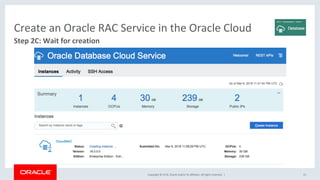


![Copyright © 2018, Oracle and/or its affiliates. All rights reserved. | 18
Step 3A: Connect to cloud instance and snoop around
Create an Oracle RAC Service in the Oracle Cloud
MM-mac:.ssh $ ssh opc@129.150.69.14 -i CloudRSAkey
[opc@cloudrac1 ~]$ sudo -s
[root@cloudrac1 opc]# su - grid
[grid@cloudrac1 ~]$ crsctl stat res -t
--------------------------------------------------------------------------------
Name Target State Server State details
--------------------------------------------------------------------------------
Local Resources
--------------------------------------------------------------------------------
ora.ASMNET1LSNR_ASM.lsnr
ONLINE ONLINE cloudrac1 STABLE
ONLINE ONLINE cloudrac2 STABLE
...
--------------------------------------------------------------------------------
Cluster Resources
--------------------------------------------------------------------------------
...
ora.mcrac.db
1 ONLINE ONLINE cloudrac1 Open,HOME=/u01/app/o
racle/product/18.0.0
.0/dbhome_1,STABLE
2 ONLINE ONLINE cloudrac2 Open,HOME=/u01/app/o
racle/product/18.0.0
.0/dbhome_1,STABLE](https://image.slidesharecdn.com/racinoraclecloud-180428153851/85/Oracle-RAC-in-the-Oracle-Cloud-18-320.jpg)
![Copyright © 2018, Oracle and/or its affiliates. All rights reserved. | 19
Step 3B: SCAN configuration
Create an Oracle RAC Service in the Oracle Cloud
[grid@cloudrac1 ~]$ srvctl config SCAN_Listener
SCAN Listener LISTENER_SCAN1 exists. Port: TCP:1521
Registration invited nodes:
Registration invited subnets:
SCAN Listener is enabled.
SCAN Listener is individually enabled on nodes:
SCAN Listener is individually disabled on nodes:
SCAN Listener LISTENER_SCAN2 exists. Port: TCP:1521
Registration invited nodes:
Registration invited subnets:
SCAN Listener is enabled.
SCAN Listener is individually enabled on nodes:
SCAN Listener is individually disabled on nodes:
Two SCAN IPs / Listeners
per cluster; 1 per node
[grid@cloudrac1 ~]$ srvctl config scan
SCAN name: cloudrac-scan-int, Network: 1
Subnet IPv4: 10.28.255.76/255.255.255.252/eth0,
static
Subnet IPv6:
SCAN 1 IPv4 VIP: 10.28.255.78
SCAN VIP is enabled.
SCAN VIP is individually enabled on nodes:
SCAN VIP is individually disabled on nodes:
SCAN 2 IPv4 VIP: 10.28.255.74
SCAN VIP is enabled.
SCAN VIP is individually enabled on nodes:
SCAN VIP is individually disabled on nodes:](https://image.slidesharecdn.com/racinoraclecloud-180428153851/85/Oracle-RAC-in-the-Oracle-Cloud-19-320.jpg)
![Copyright © 2018, Oracle and/or its affiliates. All rights reserved. | 20
Step 3C: Create a service
Create an Oracle RAC Service in the Oracle Cloud
[grid@cloudrac1 ~]$ srvctl status database -d mcrac
Instance mcrac1 is running on node cloudrac1
Instance mcrac2 is running on node cloudrac2
[grid@cloudrac1 ~]$ srvctl config service -d mcrac
[oracle@cloudrac1 ~]$ srvctl add service -d mcrac -s cloudytimes -pdb PDB1 -
preferred mcrac1,mcrac2
[oracle@cloudrac1 ~]$ srvctl status service -d mcrac -s cloudytimes
Service cloudytimes is not running.
[oracle@cloudrac1 ~]$ srvctl start service -d mcrac -s cloudytimes
[oracle@cloudrac1 ~]$ srvctl status service -d mcrac -s cloudytimes
Service cloudytimes is running on instance(s) mcrac1,mcrac2](https://image.slidesharecdn.com/racinoraclecloud-180428153851/85/Oracle-RAC-in-the-Oracle-Cloud-20-320.jpg)
![Copyright © 2018, Oracle and/or its affiliates. All rights reserved. | 21
Step 3D: Connect to the database from another cloud instance
Create an Oracle RAC Service in the Oracle Cloud
SCAN name pre-
configured and resolved
within the Oracle Cloud
[oracle@MyClient ~]$ sqlplus system/MyPassword@cloudrac-scan-int:1521/
cloudytimes.uspm044.oraclecloud.internal
SQL*Plus: Release 18.0.0.0.0 Production on Thu Mar 8 23:52:36 2018
Version 18.1.0.0.0
Copyright (c) 1982, 2017, Oracle. All rights reserved.
Connected to:
Oracle Database 18c EE Extreme Perf Release 18.0.0.0.0 - Production
Version 18.1.0.0.0](https://image.slidesharecdn.com/racinoraclecloud-180428153851/85/Oracle-RAC-in-the-Oracle-Cloud-21-320.jpg)
![Copyright © 2018, Oracle and/or its affiliates. All rights reserved. | 22
General management – raccli
Oracle RAC In the Cloud vs. On-Premises – Part 1
[opc@cloudrac1 ~]$ raccli
Available Commands
------------------
apply patch Apply bundle patch on either gi or db home
clean backup Clean backup
create backup Create backup
create recovery Create recovery
describe job Retrieve JSON formatted Response
describe system Describes the current configured system with their version info
list backup list backup
list backupconfig list backupconfig
list jobs Retrieve All jobs submitted
list recovery list recovery
update backupconfig update backupconfig
update netsec updates net security rules for encryption and integrity
update rdk Updates rdk kit
update server Update server
update tde update tde](https://image.slidesharecdn.com/racinoraclecloud-180428153851/85/Oracle-RAC-in-the-Oracle-Cloud-22-320.jpg)

![Copyright © 2018, Oracle and/or its affiliates. All rights reserved. | 24
Why a Simple VIP failover may not be sufficient – OCI-C only uses 1 IP address. Period.
Oracle RAC In the Cloud vs. On-Premises – Part 3
[grid@cloudrac1 ~]$ srvctl config vip -n cloudrac1
VIP exists: network number 1, hosting node
cloudrac1
VIP Name: cloudrac1.compute-
uspm044.oraclecloud.internal
VIP IPv4 Address: 10.28.255.78
VIP IPv6 Address:
VIP is enabled.
VIP is individually enabled on nodes:
VIP is individually disabled on nodes:
[grid@cloudrac1 ~]$ ifconfig -a
eth0 Link encap:Ethernet HWaddr C6:B0:8E:23:86:9A
inet addr:10.28.255.78 Bcast:10.28.255.79 Mask:255.255.255.252
UP BROADCAST RUNNING MULTICAST MTU:9000 Metric:1
RX packets:22771244 errors:0 dropped:0 overruns:0 frame:0
TX packets:22172318 errors:0 dropped:0 overruns:0 carrier:0
collisions:0 txqueuelen:1000
RX bytes:26933671234 (25.0 GiB) TX bytes:54646116976 (50.8 GiB)
[grid@cloudrac1 ~]$ srvctl config scan
SCAN name: cloudrac-scan-int, Network: 1
Subnet IPv4: 10.28.255.76/255.255.255.252/
eth0, static
Subnet IPv6:
SCAN 1 IPv4 VIP: 10.28.255.78
SCAN VIP is enabled.
SCAN VIP is individually enabled on nodes:
SCAN VIP is individually disabled on nodes:
=](https://image.slidesharecdn.com/racinoraclecloud-180428153851/85/Oracle-RAC-in-the-Oracle-Cloud-24-320.jpg)
![Copyright © 2018, Oracle and/or its affiliates. All rights reserved. | 25
Connect to the database from the internet – Use NAT address
Oracle RAC In the Cloud vs. On-Premises – Part 4
Connects to one node only.
Not using the SCAN name.
[MM-mac:$] $ORACLE_HOME/sqlplus system/MyCloudPswd@129.150.69.14:1521/
pdb1.uspm044.oraclecloud.internal
SQL*Plus: Release 18.0.0.0.0 Production on Thu Mar 8 23:52:36 2018
Version 18.1.0.0.0
Copyright (c) 1982, 2017, Oracle. All rights reserved.
Connected to:
Oracle Database 18c EE Extreme Perf Release 18.0.0.0.0 - Production
Version 18.1.0.0.0](https://image.slidesharecdn.com/racinoraclecloud-180428153851/85/Oracle-RAC-in-the-Oracle-Cloud-25-320.jpg)
![Copyright © 2018, Oracle and/or its affiliates. All rights reserved. | 26
SCAN is always pre-configured with Cloud-DNS for cloud-internal access
Oracle RAC In the Cloud vs. On-Premises – Part 5
[oracle@MyClient ~]$ sqlplus system/MyPassword@cloudrac-scan-int:1521/
cloudytimes.uspm044.oraclecloud.internal
• From an Oracle Cloud-internal client:
[opc@MyClient ~]$ nslookup cloudrac-scan-int
Server: 10.19.56.221
Address: 10.19.56.221#53
Name: cloudrac-scan-int.compute-uspm044.oraclecloud.internal
Address: 10.28.255.78
Name: cloudrac-scan-int.compute-uspm044.oraclecloud.internal
Address: 10.28.255.74](https://image.slidesharecdn.com/racinoraclecloud-180428153851/85/Oracle-RAC-in-the-Oracle-Cloud-26-320.jpg)


![Copyright © 2018, Oracle and/or its affiliates. All rights reserved. | 39
Step 3A: Connect to cloud instance and snoop around
Create an Oracle RAC Service in the Oracle Cloud
SS-mac:.ssh $ ssolbach$ ssh opc@129.213.54.99 -i CloudRSAkey
[opc@cloudrac1 ~]$ sudo su - grid
[grid@cloudrac1 ~]$ crsctl stat res -t
-----------------------------------------------------------------------------------------------------------------
Name Target State Server State details
-----------------------------------------------------------------------------------------------------------------
Local Resources
-----------------------------------------------------------------------------------------------------------------
ora.ASMNET1LSNR_ASM.lsnr
ONLINE ONLINE cloudrac1 STABLE
ONLINE ONLINE cloudrac2 STABLE
...
-----------------------------------------------------------------------------------------------------------------
Cluster Resources
-----------------------------------------------------------------------------------------------------------------
...
ora.myrac_iad18j.db
1 ONLINE ONLINE cloudrac1 Open,HOME=/u01/app/oracle/product/18.1/dbhome_1,STABLE
2 ONLINE ONLINE cloudrac2 Open,HOME=/u01/app/oracle/product/18.1/dbhome_1,STABLE](https://image.slidesharecdn.com/racinoraclecloud-180428153851/85/Oracle-RAC-in-the-Oracle-Cloud-39-320.jpg)
![Copyright © 2018, Oracle and/or its affiliates. All rights reserved. | 40
Step 3B: SCAN configuration
Create an Oracle RAC Service in the Oracle Cloud
[grid@cloudrac1 ~]$ srvctl config scan
SCAN name: cloudrac-scan.ad1.ssopub.oraclevcn.com,
Network: 1
Subnet IPv4: 10.168.61.0/255.255.255.0/eth0,
static
Subnet IPv6:SCAN 1 IPv4 VIP: 10.168.61.14
SCAN VIP is enabled.
SCAN VIP is individually enabled on nodes:
SCAN VIP is individually disabled on nodes:
SCAN 2 IPv4 VIP: 10.168.61.15
SCAN VIP is enabled.
SCAN VIP is individually enabled on nodes:
SCAN VIP is individually disabled on nodes:
SCAN 3 IPv4 VIP: 10.168.61.13
SCAN VIP is enabled.
SCAN VIP is individually enabled on nodes:
SCAN VIP is individually disabled on nodes:
[grid@cloudrac1 ~]$ srvctl config SCAN_Listener
SCAN Listener LISTENER_SCAN1 exists. Port: TCP:1521
Registration invited nodes:
Registration invited subnets:
SCAN Listener is enabled.
SCAN Listener is individually enabled on nodes:
SCAN Listener is individually disabled on nodes:
SCAN Listener LISTENER_SCAN2 exists. Port: TCP:1521
Registration invited nodes:
Registration invited subnets:
SCAN Listener is enabled.
SCAN Listener is individually enabled on nodes:
SCAN Listener is individually disabled on nodes:
SCAN Listener LISTENER_SCAN3 exists. Port: TCP:1521
Registration invited nodes:
Registration invited subnets:
SCAN Listener is enabled.
SCAN Listener is individually enabled on nodes:
SCAN Listener is individually disabled on nodes:](https://image.slidesharecdn.com/racinoraclecloud-180428153851/85/Oracle-RAC-in-the-Oracle-Cloud-40-320.jpg)
![Copyright © 2018, Oracle and/or its affiliates. All rights reserved. | 41
Step 3C: Create a service
Create an Oracle RAC Service in the Oracle Cloud
[grid@cloudrac1 ~]$ srvctl status database -d myrac_iad18j
Instance myrac1 is running on node cloudrac1
Instance myrac2 is running on node cloudrac2
[grid@cloudrac1 ~]$ srvctl config service -d myrac_iad18j
[oracle@cloudrac1 ~]$ . oraenv
ORACLE_SID = [oracle] ? myrac1
ORACLE_HOME = [/home/oracle] ? /u01/app/oracle/product/18.1/dbhome_1
The Oracle base has been set to /u01/app/oracle
[oracle@cloudrac1 ~]$ export ORACLE_UNQNAME=myrac_iad18j
[oracle@cloudrac1 ~]$ srvctl add service -d myrac_iad18j -s cloudytimes -pdb mypdb1 -
preferred myrac1,myrac2
[oracle@cloudrac1 ~]$ srvctl start service -d myrac_iad18j -s cloudytimes
[oracle@cloudrac1 ~]$ srvctl status service -d myrac_iad18j -s cloudytimes
Service cloudytimes is running on instance(s) myrac1,myrac2](https://image.slidesharecdn.com/racinoraclecloud-180428153851/85/Oracle-RAC-in-the-Oracle-Cloud-41-320.jpg)
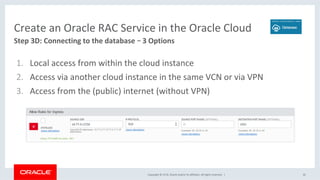
![Copyright © 2018, Oracle and/or its affiliates. All rights reserved. | 43
Option 1: Local access from within the cloud instance (DB host)
Step 3D: Connecting to the Database
[oracle@cloudrac1 ~]$ . oraenv
ORACLE_SID = [oracle] ? myrac1
ORACLE_HOME = [/home/oracle] ? /u01/app/oracle/product/18.1/dbhome_1
The Oracle base has been set to /u01/app/oracle
[oracle@cloudrac1 ~]$ export ORACLE_UNQNAME=myrac_iad18j
[oracle@cloudrac1 ~]$ sqlplus system/mypwd@cloudrac-
scan.ad1.ssopub.oraclevcn.com:1521/cloudytimes.ad1.ssopub.oraclevcn.com
SQL*Plus: Release 18.0.0.0.0 Production on Thu Mar 8 23:52:36 2018
Version 18.1.0.0.0
Copyright (c) 1982, 2017, Oracle. All rights reserved.
Connected to:
Oracle Database 18c EE Extreme Perf Release 18.0.0.0.0 - Production
Version 18.1.0.0.0](https://image.slidesharecdn.com/racinoraclecloud-180428153851/85/Oracle-RAC-in-the-Oracle-Cloud-43-320.jpg)
![Copyright © 2018, Oracle and/or its affiliates. All rights reserved. |
Step 3D: Connect to the database
• Internal SCAN IP Adresses or SCAN Name (10.168.61.13/14/15)
• Add 1521 to the Ingress Security List Rules of the subnet
• Connect
• Check firewall settings on hosts if you have problems (1521)
44
Option 2: Access via another cloud instance in the same VCN or via VPN
[oracle@myclient ~]$ sqlplus system/mypwd@cloudrac-scan.ad1.ssopub.oraclevcn.com:1521/
cloudytimes.ad1.ssopub.oraclevcn.com
SQL*Plus: Release 12.1.0.2.0 Production on Thu Apr 12 15:07:05 2018
…
Last Successful login time: Thu Apr 12 2018 14:58:12 +00:00
Connected to: Oracle Database 18c EE Extreme Perf Release 18.0.0.0.0 - Production](https://image.slidesharecdn.com/racinoraclecloud-180428153851/85/Oracle-RAC-in-the-Oracle-Cloud-44-320.jpg)


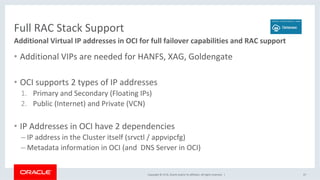
![Copyright © 2018, Oracle and/or its affiliates. All rights reserved. |
Get VNIC Metadata
48
curl -H "Content-Type: application/json" -X GET "http://169.254.169.254/opc/
v1/vnics/"
[ {
"vnicId" : "ocid1.vnic.oc1.eu-frankfurt-1.abtheljsxvhe6...",
"privateIp" : "10.170.3.2",
"vlanTag" : 0,
"macAddr" : "90:e2:ba:d6:f1:84",
"virtualRouterIp" : "10.170.3.1",
"subnetCidrBlock" : "10.170.3.0/24",
"nicIndex" : 0
} ]
• Every OCI Instance has a Metadata Service](https://image.slidesharecdn.com/racinoraclecloud-180428153851/85/Oracle-RAC-in-the-Oracle-Cloud-48-320.jpg)

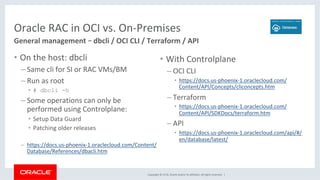
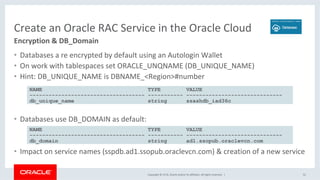


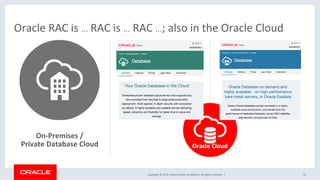


The document provides an overview of Oracle Real Application Cluster (RAC) in the Oracle Cloud, detailing its features, scalability, and setup process, while emphasizing its advantages compared to third-party clouds. It outlines the necessary steps to create an Oracle RAC service, including preparing SSH keys and configuring access. Key points include the exclusive support of Oracle RAC on Oracle's cloud infrastructure and the importance of properly configuring network settings for effective operation.


![Oracle Multitenant meets Oracle RAC 12c OOW13 [CON8706]](https://cdn.slidesharecdn.com/ss_thumbnails/oraclemultitenantmeetsoraclerac12coow13con8706-131001011943-phpapp02-thumbnail.jpg?width=640&height=640&fit=bounds)


