Galil Product Workshop
                                              January 2012


& Serviced By:


                 ELECTROMATE
          Toll Free Phone (877) SERVO98
           Toll Free Fax (877) SERV099
                www.electromate.com
               sales@electromate.com
About the Company


                               Established Reputation and Long History of Success
                               •          Founded in 1983 by Jacob Tal and Wayne Baron
                               •          Introduced 1st microprocessor-based servo controller
                               •          Profitable for over 100 consecutive quarters
                               •          Delivered over 500,000 controllers world-wide

                               Excellent Technical Support and Service
                               • World-wide network of factory-trained reps & distributors
                               • Technical support team with over 100 man-years of motion
                                 control experience
                               • On-line support tools at www.galilmc.com


& Serviced By:
                         2
                 ELECTROMATE
          Toll Free Phone (877) SERVO98
           Toll Free Fax (877) SERV099
                www.electromate.com
               sales@electromate.com
The Galil Support Team


                                  • Live, prompt technical
                                    support

                                  • Over 100 years of combined
                                    motion control experience

                                  • Degreed MEs and EEs


                         “The mission of Galil’s experienced Applications Department is to provide
                     prompt and accurate technical assistance to help OEMs successfully deliver
                                             their products to market ”


& Serviced By:
                         3
                 ELECTROMATE
          Toll Free Phone (877) SERVO98
           Toll Free Fax (877) SERV099
                www.electromate.com
               sales@electromate.com
We Are Here to Help!

                                    • LIVE Tech Support Provided at Galil headquarters:

                                    Address:          270 Technology Way, Rocklin, CA 95765
                                    Email:            support@galilmc.com
                                    Toll Free:        800-377-6329
                                    Phone:            916-626-0101
                                    Fax:              916-626-0102
                                    Hours:            8am to 5pm PST, Monday through Friday

                                    • Please provide:
                                            –   Name
                                            –   Company
                                            –   Address
                                            –   Phone/Email
                                            –   Galil Products and revisions
                                            –   Problem
                                            –   Error messages
& Serviced By:
                         4
                 ELECTROMATE
          Toll Free Phone (877) SERVO98
           Toll Free Fax (877) SERV099
                www.electromate.com
               sales@electromate.com
Many On-Line Tools at www.galilmc.com


                                    Galil’s free online support tools include:
                                    • White Papers & application notes
                                      http://www.galilmc.com/support/application-notes.php
                                    • On-Line tutorials on motion control
                                      http://www.galilmc.com/learning/tutorials.php
                                    • MotionCodetm Toolkit with downloadable programs and code
                                      http://www.galilmc.com/learning/motioncode.php
                                    • MotorSizertm Software for easy sizing of motion systems
                                      http://www.galilmc.com/learning/motorsizer.php
                                    • HelloGaliltm Quick start for PC programming languages
                                      http://www.galilmc.com/learning/hellogalil.php
                                    • Bulletin Board with subject search
                                      http://www.galilmc.com/forums/ubbthreads.php
                                    • ServoTrends Newsletter Archives
                                      http://www.galilmc.com/support/servotrends.php
                                    • Product catalog with specs and pricing
                                      http://www.galilmc.com/support/catalog.php
                                    • Customer applications and videos
                                      http://www.galilmc.com/support/smartmoves.php
& Serviced By:
                         5
                 ELECTROMATE
          Toll Free Phone (877) SERVO98
           Toll Free Fax (877) SERV099
                www.electromate.com
               sales@electromate.com
About the Products

                                  • Leading Edge
                                           – 32 bit microcomputer with high-speed processing
                                           – On-board program memory with multitasking
                                  • Easy to Use
                                           – 2 letter, English-like instructions
                                           – Software tools for servo tuning

                                  • Cost Effective
                                           – 100 qty price guarantee; as low as $100/axis
                                  • Flexible
                                           – Available in 1 through 8-axis configurations
                                           – Configurable for steppers and servos on any axis
                                           – Box-level or card-level; PCI, RS232, and Ethernet
                                  • Easy to Customize
                                           – Firmware & hardware customized to specifications

& Serviced By:
                         6
                 ELECTROMATE
          Toll Free Phone (877) SERVO98
           Toll Free Fax (877) SERV099
                www.electromate.com
               sales@electromate.com
Features- Handles any Mode of Motion


                                   • Point-to-Point Positioning
                                   • Position Tracking
                                   • Jogging
                                   • Linear and Circular Interpolation
                                   • Tangential Following
                                   • Helical
                                   • Electronic Gearing
                                   • Electronic Cam
                                   • PVT Mode
                                   • Teach and Playback
& Serviced By:
                         7
                 ELECTROMATE
          Toll Free Phone (877) SERVO98
           Toll Free Fax (877) SERV099
                www.electromate.com
               sales@electromate.com
Features – High Speed


                             • Encoder frequencies up to 22 MHz for servos


                             • Outputs pulses for steppers up to 6 MHz


                             • Servo loop updates as low as 31 µsec/axis


                             • 40 µsec command processing for application programs


& Serviced By:
                         8
                 ELECTROMATE
          Toll Free Phone (877) SERVO98
           Toll Free Fax (877) SERV099
                www.electromate.com
               sales@electromate.com
Features – Intelligent Programming


                                  • On-board, non-volatile memory for storing application
                                    programs, variables and arrays   frees host

                                  • Programmable event triggers including At time,
                                    At position, At input, At speed

                                  • Multitasking for simultaneous execution of up to eight
                                    application programs

                                  • Conditional JUMPS and IF/THEN/ELSE/Constructs

                                  • Arithmetic and trigonometric functions
& Serviced By:
                         9
                 ELECTROMATE
          Toll Free Phone (877) SERVO98
           Toll Free Fax (877) SERV099
                www.electromate.com
               sales@electromate.com
Features – Multiple Inputs/Outputs


                                • Accepts both main and auxiliary encoders for each axis
                                • SSI and sinusoidal encoder interface options
                                • Uncommitted digital inputs and outputs
                                • Uncommitted analog inputs on most controllers
                                • Expandable I/O
                                • Forward and reverse limits and home input for each axis
                                • High speed position capture
                                • High speed position compare


& Serviced By:
                        10
                 ELECTROMATE
          Toll Free Phone (877) SERVO98
           Toll Free Fax (877) SERV099
                www.electromate.com
               sales@electromate.com
Features – Variety of Formats


                             • Available in 1-through 8-axis formats
                             • Box-level or card-level; Bus-based or stand-alone
                             • Ethernet/RS232 or PCI cards
                             • “Mix-n-Match” motor types: User-configurable for
                               steppers, servos and piezo ceramic motors on any
                               combination of axes
                             • Variety of plug-in amplifier options
                             • Custom solutions available


& Serviced By:
                        11
                 ELECTROMATE
          Toll Free Phone (877) SERVO98
           Toll Free Fax (877) SERV099
                www.electromate.com
               sales@electromate.com
Latest Generation Galil Controllers

                  • Multi-axis Ethernet Motion Controllers
                    – DMC-40x0 Accelera
                    – DMC-41x3 Econo New!

                  • Single-Axis Ethernet Motion Controllers
                    – DMC-300xx Pocket Motion Controller New!

                  • Ethernet I/O Controllers
                    – RIO-47xxx Pocket PLC

                  • Software Tools
                    – GalilTools Servo Tuning
& Serviced By:
                    – Frequency Analysis Software – New!
                        12
                 ELECTROMATE
          Toll Free Phone (877) SERVO98
           Toll Free Fax (877) SERV099
                www.electromate.com
               sales@electromate.com
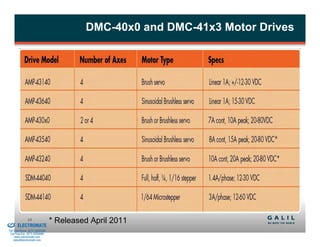
DMC-40x0 and DMC-41x3 Motor Drives


& Serviced By:
                        13                * Released April 2011
                 ELECTROMATE
          Toll Free Phone (877) SERVO98
           Toll Free Fax (877) SERV099
                www.electromate.com
               sales@electromate.com
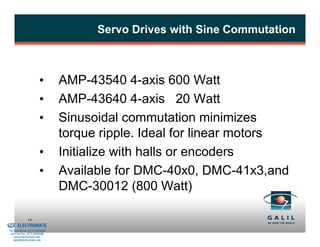
Servo Drives with Sine Commutation


                                  •       AMP-43540 4-axis 600 Watt
                                  •       AMP-43640 4-axis 20 Watt
                                  •       Sinusoidal commutation minimizes
                                          torque ripple. Ideal for linear motors
                                  •       Initialize with halls or encoders
                                  •       Available for DMC-40x0, DMC-41x3,and
                                          DMC-30012 (800 Watt)

& Serviced By:
                        14
                 ELECTROMATE
          Toll Free Phone (877) SERVO98
           Toll Free Fax (877) SERV099
                www.electromate.com
               sales@electromate.com
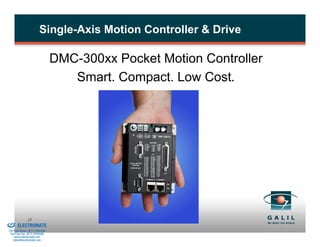
Single-Axis Motion Controller & Drive

                                          DMC-300xx Pocket Motion Controller
                                             Smart. Compact. Low Cost.


& Serviced By:
                        15
                 ELECTROMATE
          Toll Free Phone (877) SERVO98
           Toll Free Fax (877) SERV099
                www.electromate.com
               sales@electromate.com
Smart


                             •       Uses 32-bit RISC processor for faster processing
                             •       PVT, gearing, eCAM
                             •       125 microsecond servo update (2x faster)
                             •       15 MHz encoder, 3 MHz stepper (25% faster)
                             •       Controls servos or steppers
                             •       Daisy-chainable Ethernet


& Serviced By:
                        16
                 ELECTROMATE
          Toll Free Phone (877) SERVO98
           Toll Free Fax (877) SERV099
                www.electromate.com
               sales@electromate.com
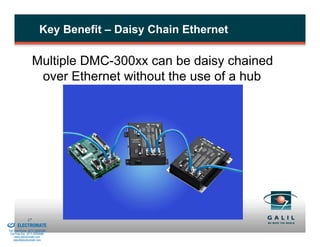
Key Benefit – Daisy Chain Ethernet

                             Multiple DMC-300xx can be daisy chained
                              over Ethernet without the use of a hub


& Serviced By:
                        17
                 ELECTROMATE
          Toll Free Phone (877) SERVO98
           Toll Free Fax (877) SERV099
                www.electromate.com
               sales@electromate.com
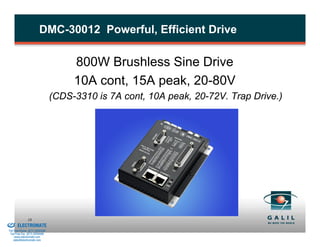
DMC-30012 Powerful, Efficient Drive

                                               800W Brushless Sine Drive
                                               10A cont, 15A peak, 20-80V
                                          (CDS-3310 is 7A cont, 10A peak, 20-72V. Trap Drive.)


& Serviced By:
                        18
                 ELECTROMATE
          Toll Free Phone (877) SERVO98
           Toll Free Fax (877) SERV099
                www.electromate.com
               sales@electromate.com
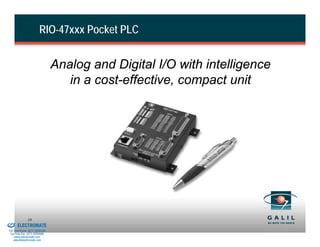
RIO-47xxx Pocket PLC


                                          Analog and Digital I/O with intelligence
                                             in a cost-effective, compact unit


& Serviced By:
                        19
                 ELECTROMATE
          Toll Free Phone (877) SERVO98
           Toll Free Fax (877) SERV099
                www.electromate.com
               sales@electromate.com
Smart. Compact. Low Cost. Lots of I/O.


                                  Smart – RISC processor, memory, counters, timers,
                                    PID process loops, web interface, data logging, email
                                    alerts, Ethernet, Power-over-Ethernet, Modbus
                                    Master/Slave, Ladder Interface Software
                                  Compact – 3.9” x 4.3” x 1.3”
                                  Low Cost – $295 in single quantity; $195 in 100 qty
                                  Lots of I/O – 32 digital I/O & 16 analog I/O


& Serviced By:
                        20
                 ELECTROMATE
          Toll Free Phone (877) SERVO98
           Toll Free Fax (877) SERV099
                www.electromate.com
               sales@electromate.com
System Operation


& Serviced By:
                        21
                 ELECTROMATE
          Toll Free Phone (877) SERVO98
           Toll Free Fax (877) SERV099
                www.electromate.com
               sales@electromate.com
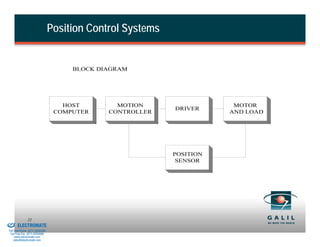
Position Control Systems


                                               BLOCK DIAGRAM


                                             HOST        MOTION                  MOTOR
                                                                     DRIVER
                                           COMPUTER    CONTROLLER               AND LOAD


                                                                     POSITION
                                                                      SENSOR


& Serviced By:
                        22
                 ELECTROMATE
          Toll Free Phone (877) SERVO98
           Toll Free Fax (877) SERV099
                www.electromate.com
               sales@electromate.com
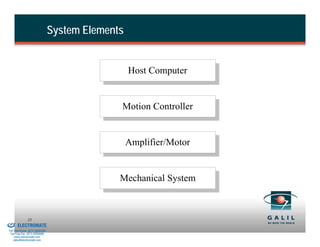
System Elements


                                                            Host Computer


                                                        Motion Controller


                                                            Amplifier/Motor


                                                        Mechanical System


& Serviced By:
                        23
                 ELECTROMATE
          Toll Free Phone (877) SERVO98
           Toll Free Fax (877) SERV099
                www.electromate.com
               sales@electromate.com
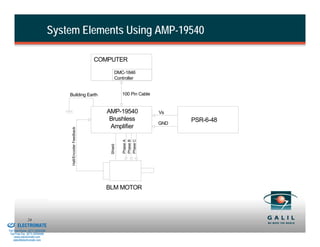
System Elements Using AMP-19540

                                                                       COMPUTER

                                                                               DMC-1846
                                                                               Controller


                                              Building Earth                        100 Pin Cable


                                                                          AMP-19540                 Vs
                                                                           Brushless                      PSR-6-48
                                                                                                    GND
                                                                           Amplifier
                                               Hall/Encoder Feedback


                                                                                    Phase C
                                                                                    Phase A
                                                                                    Phase B
                                                                           Shield


                                                                         BLM MOTOR


& Serviced By:
                        24
                 ELECTROMATE
          Toll Free Phone (877) SERVO98
           Toll Free Fax (877) SERV099
                www.electromate.com
               sales@electromate.com
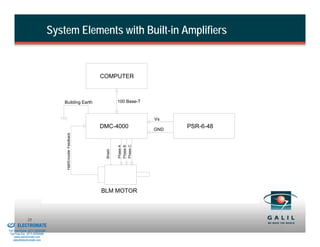
System Elements with Built-in Amplifiers


                                                                       COMPUTER


                                              Building Earth                     100 Base-T


                                                                                              Vs
                                                                       DMC-4000               GND
                                                                                                    PSR-6-48
                                               Hall/Encoder Feedback


                                                                                 Phase C
                                                                                 Phase A
                                                                                 Phase B
                                                                        Shield


                                                                       BLM MOTOR


& Serviced By:
                        25
                 ELECTROMATE
          Toll Free Phone (877) SERVO98
           Toll Free Fax (877) SERV099
                www.electromate.com
               sales@electromate.com
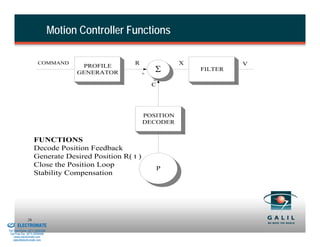
Motion Controller Functions

                                COMMAND                      R               X            V
                                                 PROFILE
                                                GENERATOR        +
                                                                     Σ           FILTER
                                                                     -
                                                                     C


                                                                 POSITION
                                                                 DECODER


                             FUNCTIONS
                             Decode Position Feedback
                             Generate Desired Position R( t )
                             Close the Position Loop
                                                                         P
                             Stability Compensation


& Serviced By:
                        26
                 ELECTROMATE
          Toll Free Phone (877) SERVO98
           Toll Free Fax (877) SERV099
                www.electromate.com
               sales@electromate.com
Filter Operation


                                             Proportional    P(k) = KP · X(k)
                                             Derivative      D(k) = KD · [X(k) - X(k-1)]
                                             Integral        I(k) = KI · X(k) + I(k-1)


                             Functions:
                                   Proportional              For speed of response
                                   Derivative                For stability and damping
                                   Integral                  For accuracy - slow response


& Serviced By:
                        27
                 ELECTROMATE
          Toll Free Phone (877) SERVO98
           Toll Free Fax (877) SERV099
                www.electromate.com
               sales@electromate.com
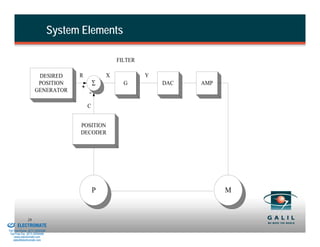
System Elements

                                                                FILTER

                               DESIRED          R           X            Y
                               POSITION
                                                +
                                                        Σ         G          DAC   AMP
                              GENERATOR             -

                                                    C


                                                POSITION
                                                DECODER


                                                        P                                M


& Serviced By:
                        28
                 ELECTROMATE
          Toll Free Phone (877) SERVO98
           Toll Free Fax (877) SERV099
                www.electromate.com
               sales@electromate.com
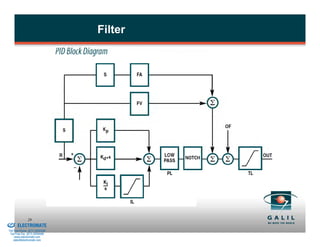
Filter


& Serviced By:
                        29
                 ELECTROMATE
          Toll Free Phone (877) SERVO98
           Toll Free Fax (877) SERV099
                www.electromate.com
               sales@electromate.com
System Connection and Compensation


                                Connecting the system elements is done in three steps:
                                  1.    Test each function separately.
                                  2.    Close the position loop with low gain.
                                  3.    Tune the controller for fast and accurate response.

                                Potential problems and their effects:
                                  1.      Ground loops -- instability and noise sensitivity.
                                  2.      Connection with wrong polarity (positive feedback) -
                                          - causes motor to run away.
                                  3.      Too high gain -- causes instability and oscillations.


& Serviced By:
                        30
                 ELECTROMATE
          Toll Free Phone (877) SERVO98
           Toll Free Fax (877) SERV099
                www.electromate.com
               sales@electromate.com
System Compensation

                                Set PID filter to
                                                     KI = 0
                                                     KP, KD low values
                                Step I -- KD
                                  Increase the derivative constant, KD, until system
                                  vibrates, then back off.
                                Step II - KP
                                  Increase the proportional constant, KP, until system
                                  vibrates, then back off.
                                Step III -- KI
                                  Increase the integral constant, KI, until system vibrates,
                                  then back off.


& Serviced By:
                        31
                 ELECTROMATE
          Toll Free Phone (877) SERVO98
           Toll Free Fax (877) SERV099
                www.electromate.com
               sales@electromate.com
Controller Features for High Precision Linear
                                  Motors

                                • Update Rates as low as 32.25us
                                • Sine / Cosine encoder
                                          – interpolation from x32 to x1024
                                • PID with Feed-forward Acceleration and Velocity.
                                • Dual PID and frictional bias
                                • Integration Limit
                                • Pole and Notch Filters to assist with mechanical
                                  vibrations
                                • Profile filter to eliminate high-frequency, or select low-
                                  frequency resonances
                                • New PVT mode provides motion profiles that don’t
                                  have velocity discontinuities.


& Serviced By:
                        32
                 ELECTROMATE
          Toll Free Phone (877) SERVO98
           Toll Free Fax (877) SERV099
                www.electromate.com
               sales@electromate.com
Amplifier Features for High Precision Linear
                                  Motors


                                  • New AMP-43540 600W Sinusoidal Amplifier
                                  • Current loop update of 33 kHz –
                                          – Capable of providing a closed loop current loop bandwidth
                                            greater than 3 kHz
                                  • 16 bits of current resolution
                                          – Critical for small adjustments and reducing settling times.
                                          – Linear Zero-Crossing, no dead-band or hysteresis around
                                            zero.
                                  • Settable current loop gains allows for support of a
                                    wide variety of motors using standard product
                                  • Enhanced PWM control to deliver space vector PWM
                                    with sine commutation

& Serviced By:
                        33
                 ELECTROMATE
          Toll Free Phone (877) SERVO98
           Toll Free Fax (877) SERV099
                www.electromate.com
               sales@electromate.com
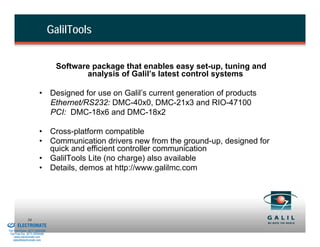
GalilTools


                                            Software package that enables easy set-up, tuning and
                                                   analysis of Galil’s latest control systems

                                  • Designed for use on Galil’s current generation of products
                                    Ethernet/RS232: DMC-40x0, DMC-21x3 and RIO-47100
                                    PCI: DMC-18x6 and DMC-18x2

                                  • Cross-platform compatible
                                  • Communication drivers new from the ground-up, designed for
                                    quick and efficient controller communication
                                  • GalilTools Lite (no charge) also available
                                  • Details, demos at http://www.galilmc.com


& Serviced By:
                        34
                 ELECTROMATE
          Toll Free Phone (877) SERVO98
           Toll Free Fax (877) SERV099
                www.electromate.com
               sales@electromate.com
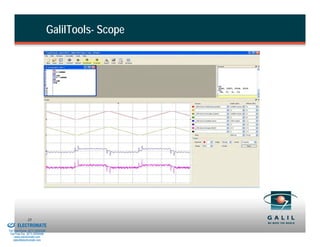
GalilTools- Scope


& Serviced By:
                        35
                 ELECTROMATE
          Toll Free Phone (877) SERVO98
           Toll Free Fax (877) SERV099
                www.electromate.com
               sales@electromate.com
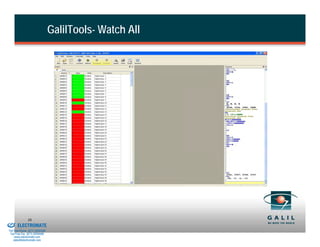
GalilTools- Watch All


& Serviced By:
                        36
                 ELECTROMATE
          Toll Free Phone (877) SERVO98
           Toll Free Fax (877) SERV099
                www.electromate.com
               sales@electromate.com
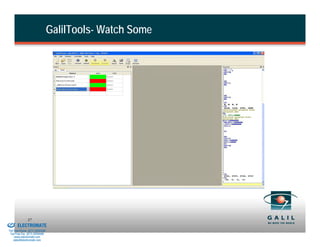
GalilTools- Watch Some


& Serviced By:
                        37
                 ELECTROMATE
          Toll Free Phone (877) SERVO98
           Toll Free Fax (877) SERV099
                www.electromate.com
               sales@electromate.com
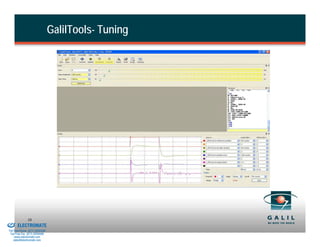
GalilTools- Tuning


& Serviced By:
                        38
                 ELECTROMATE
          Toll Free Phone (877) SERVO98
           Toll Free Fax (877) SERV099
                www.electromate.com
               sales@electromate.com
Programming


& Serviced By:
                        39
                 ELECTROMATE
          Toll Free Phone (877) SERVO98
           Toll Free Fax (877) SERV099
                www.electromate.com
               sales@electromate.com
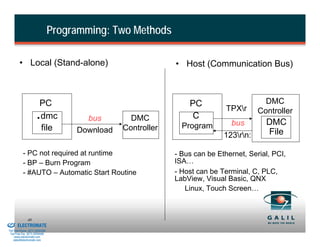
Programming: Two Methods

                  • Local (Stand-alone)                                • Host (Communication Bus)


                                  PC                                       PC                      DMC
                                                                                       TPXr
                               .  dmc            bus        DMC             C
                                                                                        bus
                                                                                                 Controller
                                                                                                   DMC
                                  file                    Controller     Program
                                               Download                                            File
                                                                                      123rn:

                     - PC not required at runtime                      - Bus can be Ethernet, Serial, PCI,
                     - BP – Burn Program                               ISA…
                     - #AUTO – Automatic Start Routine                 - Host can be Terminal, C, PLC,
                                                                       LabView, Visual Basic, QNX
                                                                          Linux, Touch Screen…


& Serviced By:
                        40
                 ELECTROMATE
          Toll Free Phone (877) SERVO98
           Toll Free Fax (877) SERV099
                www.electromate.com
               sales@electromate.com
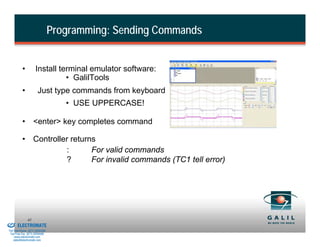
Programming: Sending Commands


                    •          Install terminal emulator software:
                                         • GalilTools
                    •           Just type commands from keyboard
                                             • USE UPPERCASE!

                    • <enter> key completes command

                    • Controller returns
                               :       For valid commands
                               ?       For invalid commands (TC1 tell error)


& Serviced By:
                        41
                 ELECTROMATE
          Toll Free Phone (877) SERVO98
           Toll Free Fax (877) SERV099
                www.electromate.com
               sales@electromate.com
Programming: Instructional Format

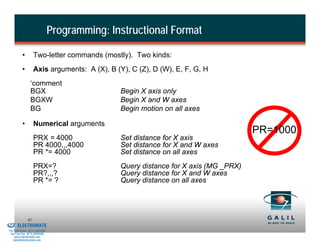
                    •        Two-letter commands (mostly). Two kinds:
                    •        Axis arguments: A (X), B (Y), C (Z), D (W), E, F, G, H
                           ‘comment
                           BGX                           Begin X axis only
                           BGXW                          Begin X and W axes
                           BG                            Begin motion on all axes

                    •        Numerical arguments
                                                                                               PR=1000
                             PRX = 4000                  Set distance for X axis
                             PR 4000,,,4000              Set distance for X and W axes
                             PR *= 4000                  Set distance on all axes
                             PRX=?                       Query distance for X axis (MG _PRX)
                             PR?,,,?                     Query distance for X and W axes
                             PR *= ?                     Query distance on all axes


& Serviced By:
                        42
                 ELECTROMATE
          Toll Free Phone (877) SERVO98
           Toll Free Fax (877) SERV099
                www.electromate.com
               sales@electromate.com
Programming: Interrogating Status

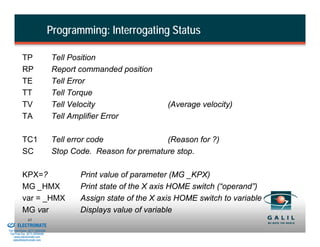
                    TP                    Tell Position
                    RP                    Report commanded position
                    TE                    Tell Error
                    TT                    Tell Torque
                    TV                    Tell Velocity                  (Average velocity)
                    TA                    Tell Amplifier Error

                    TC1                   Tell error code              (Reason for ?)
                    SC                    Stop Code. Reason for premature stop.

                    KPX=?                        Print value of parameter (MG _KPX)
                    MG _HMX                      Print state of the X axis HOME switch (“operand”)
                    var = _HMX                   Assign state of the X axis HOME switch to variable
                    MG var                       Displays value of variable
& Serviced By:
                        43
                 ELECTROMATE
          Toll Free Phone (877) SERVO98
           Toll Free Fax (877) SERV099
                www.electromate.com
               sales@electromate.com
Programming: Configuration Commands

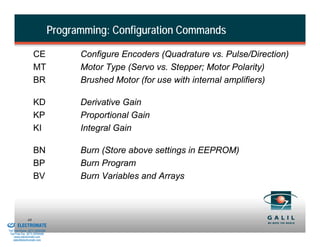
                             CE                 Configure Encoders (Quadrature vs. Pulse/Direction)
                             MT                 Motor Type (Servo vs. Stepper; Motor Polarity)
                             BR                 Brushed Motor (for use with internal amplifiers)

                             KD                 Derivative Gain
                             KP                 Proportional Gain
                             KI                 Integral Gain

                             BN                 Burn (Store above settings in EEPROM)
                             BP                 Burn Program
                             BV                 Burn Variables and Arrays


& Serviced By:
                        44
                 ELECTROMATE
          Toll Free Phone (877) SERVO98
           Toll Free Fax (877) SERV099
                www.electromate.com
               sales@electromate.com
Programming: Safety Commands

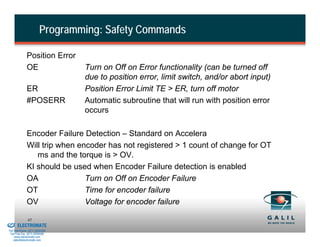
                        Position Error
                        OE                Turn on Off on Error functionality (can be turned off
                                          due to position error, limit switch, and/or abort input)
                        ER                Position Error Limit TE > ER, turn off motor
                        #POSERR           Automatic subroutine that will run with position error
                                          occurs

                        Encoder Failure Detection – Standard on Accelera
                        Will trip when encoder has not registered > 1 count of change for OT
                           ms and the torque is > OV.
                        KI should be used when Encoder Failure detection is enabled
                        OA               Turn on Off on Encoder Failure
                        OT               Time for encoder failure
                        OV               Voltage for encoder failure
& Serviced By:
                        45
                 ELECTROMATE
          Toll Free Phone (877) SERVO98
           Toll Free Fax (877) SERV099
                www.electromate.com
               sales@electromate.com
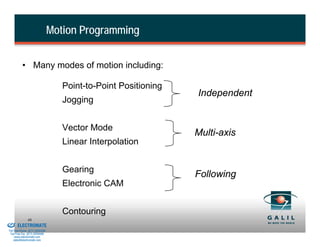
Motion Programming


                    • Many modes of motion including:

                                             Point-to-Point Positioning
                                                                          Independent
                                             Jogging


                                             Vector Mode
                                                                          Multi-axis
                                             Linear Interpolation


                                             Gearing
                                                                          Following
                                             Electronic CAM


                                             Contouring
& Serviced By:
                        46
                 ELECTROMATE
          Toll Free Phone (877) SERVO98
           Toll Free Fax (877) SERV099
                www.electromate.com
               sales@electromate.com
Point to Point Positioning


                    • Motion between specified axes is independent

                    • PR or PA                                 Relative or Absolute Position [counts]

                    • Can change SP and AC during motion

                    • Example:
                          PR 1000, 4000                        Specify relative position
                          SP 2500, 2500                        Specify slew speed
                          AC 100000, 100000                    Specify acceleration
                          DC 50000, 50000                      Specify deceleration
                          BG XY                                Begin motion
                          AM XY                                Wait until motion complete


& Serviced By:
                        47
                 ELECTROMATE
          Toll Free Phone (877) SERVO98
           Toll Free Fax (877) SERV099
                www.electromate.com
               sales@electromate.com
Jogging


                    • User specifies:
                         JG           Jog speed and direction [counts/sec]
                         ST           Stop motion
                    • Can change JG, AC, DC during motion
                    • Example:
                         JG -1000                   Specify jog speed
                         AC 200000                  Specify acceleration rate
                         DC 200000                  Specify deceleration rate
                         BG X                       Begin motion


& Serviced By:
                        48
                 ELECTROMATE
          Toll Free Phone (877) SERVO98
           Toll Free Fax (877) SERV099
                www.electromate.com
               sales@electromate.com
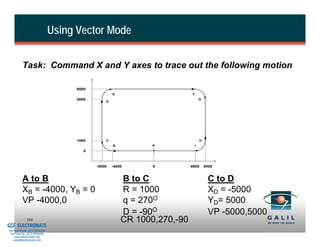
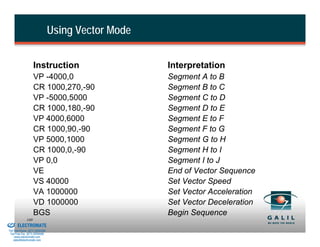
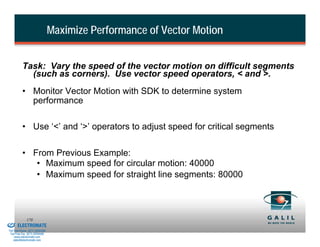
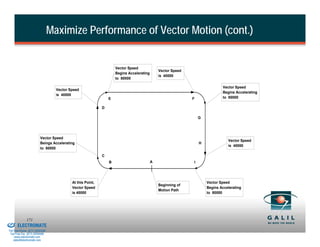
Vector Mode
                     • Linear and circular interpolation on two axes
                     •                     VM           Specify axes
                                           VP           Linear segment [counts]
                                           CR           Circle arc segment [counts]
                                           VS           Vector speed [counts/sec]
                                           VA           Vector acceleration [counts/sec2]
                                           VD           Vector deceleration [counts/sec2]
                                           VE           End sequence
                                           BGS          Begin sequence
                     • Up to 511 segments can be given prior to motion
                     • Can send additional segments during motion
                     • Can change VS and VA during motion
                     • Can specify start and end speed with each segment using
                        VP <n

& Serviced By:
                         49
                 ELECTROMATE
          Toll Free Phone (877) SERVO98
           Toll Free Fax (877) SERV099
                www.electromate.com
               sales@electromate.com
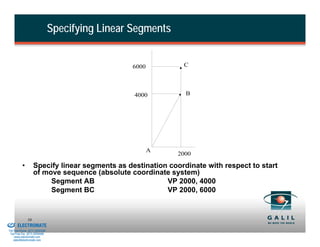
Specifying Linear Segments


                                                           6000         C


                                                            4000         B


                                                                  A
                                                                       2000

                    •        Specify linear segments as destination coordinate with respect to start
                             of move sequence (absolute coordinate system)
                                  Segment AB                       VP 2000, 4000
                                  Segment BC                       VP 2000, 6000


& Serviced By:
                        50
                 ELECTROMATE
          Toll Free Phone (877) SERVO98
           Toll Free Fax (877) SERV099
                www.electromate.com
               sales@electromate.com
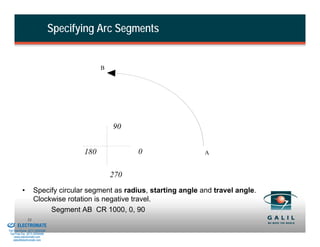
Specifying Arc Segments


                                                       B


                                                           90


                                                 180             0               A


                                                           270
                    •        Specify circular segment as radius, starting angle and travel angle.
                             Clockwise rotation is negative travel.
                                  Segment AB CR 1000, 0, 90
& Serviced By:
                        51
                 ELECTROMATE
          Toll Free Phone (877) SERVO98
           Toll Free Fax (877) SERV099
                www.electromate.com
               sales@electromate.com
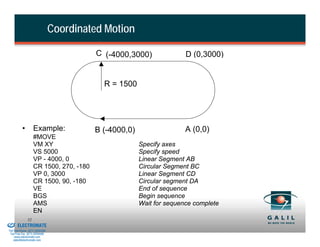
Coordinated Motion

                                                    C (-4000,3000)              D (0,3000)


                                                      R = 1500


                    •        Example:              B (-4000,0)                  A (0,0)
                             #MOVE
                             VM XY                               Specify axes
                             VS 5000                             Specify speed
                             VP - 4000, 0                        Linear Segment AB
                             CR 1500, 270, -180                  Circular Segment BC
                             VP 0, 3000                          Linear Segment CD
                             CR 1500, 90, -180                   Circular segment DA
                             VE                                  End of sequence
                             BGS                                 Begin sequence
                             AMS                                 Wait for sequence complete
                             EN
& Serviced By:
                        52
                 ELECTROMATE
          Toll Free Phone (877) SERVO98
           Toll Free Fax (877) SERV099
                www.electromate.com
               sales@electromate.com
Linear Interpolation Mode


                    • Coordinated motion of up to 8 axes
                    • VS, VA, VD also apply
                    • Incremental distances (unlike Vector Mode)

                    • Example:
                      #MOVE
                      LM XYZ                                  Linear Interpolation Mode-use XYZ axes
                      LI 5000, 2000, 0                        Specify incremental moves for each axis
                      LI 2000, 1000, 2000
                      LI 0, 1000, 2000
                      LE                                      End Linear Interpolation Mode
                      BGS                                     Begin Motion
                      AMS                                     Wait for profiled motion to complete
                      EN


& Serviced By:
                        53
                 ELECTROMATE
          Toll Free Phone (877) SERVO98
           Toll Free Fax (877) SERV099
                www.electromate.com
               sales@electromate.com
Gearing


                      • Up to 8 axes electronically geared to master
                      • Eliminates mechanical gears

                                             GA n n = X      main encoder as master
                                                  n = CX     command position as master
                                                    n = DX   auxiliary encoder as master
                                                    n=S      vector path as master

                              GR                    Gear Ratio     ( + 127.9999 range)
                      • Can change Gear Ratio during motion
                      • Optima and Accelera Series support multiple masters

& Serviced By:
                        54
                 ELECTROMATE
          Toll Free Phone (877) SERVO98
           Toll Free Fax (877) SERV099
                www.electromate.com
               sales@electromate.com
Gearing (cont.)


                    • Example:
                            GA Y,,Y                         Y is master of X and Z
                            GR 5,, -2.5                     X ratio = 5, Z ratio = -2.5

                                             PRY=1000       Master position
                                             BGY            Begin motion


& Serviced By:
                        55
                 ELECTROMATE
          Toll Free Phone (877) SERVO98
           Toll Free Fax (877) SERV099
                www.electromate.com
               sales@electromate.com
Electronic Cam


                    • Can be used to simulate the motion of a mechanical cam

                    • Non-linear, periodic motion

                    • Up to 7 axes can be synchronized with an independent master

                    • The master can be either a controlled axis or an outside encoder

                    • An ECAM table is used to specify the position(s) of the slave(s)
                      with respect to the master throughout the motion cycle


& Serviced By:
                        56
                 ELECTROMATE
          Toll Free Phone (877) SERVO98
           Toll Free Fax (877) SERV099
                www.electromate.com
               sales@electromate.com
ECam Example

                    EAY                                                    Y axis is master
                    EM 0, 4000                                             X (slave) change is 0 counts. Y (master) change is 4000
                    EP 2000                                                Master interval is 2000 counts between entries

                    ET[0] = 0                                              ECAM table defines positions of slaves
                    ET[1] = 1000                                           3 points, 2 intervals
                    ET[2] = 0

                    EB1                                                    Enable ECam mode
                    EG -1                                                  Engage slave immediately
                    JGY = 500                                              Jog master at 500 counts per second
                    BGY                                                    Begin master motion
                                            X Slave Position (counts)


                                                                                              Cam Table
                                                                        1000

                                                                         500


& Serviced By:
                                                                               0      1000         2000         3000   4000
                        57
                 ELECTROMATE                                                           Y Master Position (counts)
          Toll Free Phone (877) SERVO98
           Toll Free Fax (877) SERV099
                www.electromate.com
               sales@electromate.com
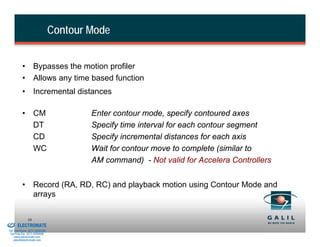
Contour Mode


                    • Bypasses the motion profiler
                    • Allows any time based function
                    • Incremental distances

                    • CM                          Enter contour mode, specify contoured axes
                      DT                          Specify time interval for each contour segment
                      CD                          Specify incremental distances for each axis
                      WC                          Wait for contour move to complete (similar to
                                                  AM command) - Not valid for Accelera Controllers


                    • Record (RA, RD, RC) and playback motion using Contour Mode and
                      arrays

& Serviced By:
                        58
                 ELECTROMATE
          Toll Free Phone (877) SERVO98
           Toll Free Fax (877) SERV099
                www.electromate.com
               sales@electromate.com
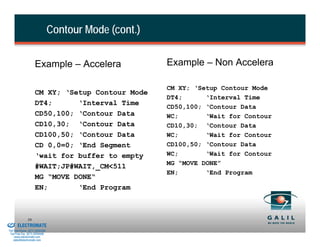
Contour Mode (cont.)

                              Example – Accelera                 Example – Non Accelera

                                                                 CM XY; ‘Setup Contour Mode
                              CM XY; ‘Setup Contour Mode
                                                                 DT4;      ‘Interval Time
                              DT4;      ‘Interval Time           CD50,100; ‘Contour Data
                              CD50,100; ‘Contour Data            WC;       ‘Wait for Contour
                              CD10,30; ‘Contour Data             CD10,30; ‘Contour Data
                              CD100,50; ‘Contour Data            WC;       ‘Wait for Contour
                              CD 0,0=0; ‘End Segment             CD100,50; ‘Contour Data
                              ‘wait for buffer to empty          WC;       ‘Wait for Contour
                                                                 MG “MOVE DONE”
                              #WAIT;JP#WAIT,_CM<511
                                                                 EN;       ‘End Program
                              MG “MOVE DONE“
                              EN;       ‘End Program


& Serviced By:
                        59
                 ELECTROMATE
          Toll Free Phone (877) SERVO98
           Toll Free Fax (877) SERV099
                www.electromate.com
               sales@electromate.com
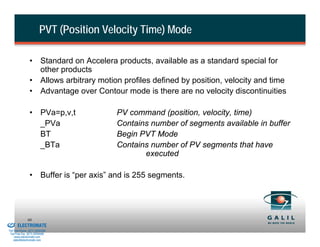
PVT (Position Velocity Time) Mode

                          • Standard on Accelera products, available as a standard special for
                            other products
                          • Allows arbitrary motion profiles defined by position, velocity and time
                          • Advantage over Contour mode is there are no velocity discontinuities

                          • PVa=p,v,t             PV command (position, velocity, time)
                            _PVa                  Contains number of segments available in buffer
                            BT                    Begin PVT Mode
                            _BTa                  Contains number of PV segments that have
                                                         executed

                          • Buffer is “per axis” and is 255 segments.


& Serviced By:
                        60
                 ELECTROMATE
          Toll Free Phone (877) SERVO98
           Toll Free Fax (877) SERV099
                www.electromate.com
               sales@electromate.com
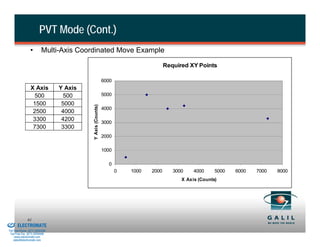
PVT Mode (Cont.)
                           •       Multi-Axis Coordinated Move Example

                                                                                              Required XY Points

                                                                     6000
                           X Axis         Y Axis
                            500            500                       5000
                            1500           5000
                                                   Y Axis (Counts)

                                                                     4000
                            2500           4000
                            3300           4200                      3000
                            7300           3300
                                                                     2000

                                                                     1000

                                                                       0
                                                                            0   1000   2000      3000    4000     5000   6000   7000   8000
                                                                                                    X Axis (Counts)


& Serviced By:
                        61
                 ELECTROMATE
          Toll Free Phone (877) SERVO98
           Toll Free Fax (877) SERV099
                www.electromate.com
               sales@electromate.com
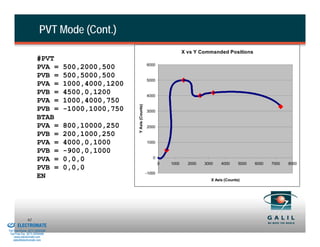
PVT Mode (Cont.)
                                                                                                X vs Y Commanded Positions
                                #PVT
                                                                             6000
                                PVA =     500,2000,500
                                PVB =     500,5000,500
                                                                             5000
                                PVA =     1000,4000,1200
                                PVB =     4500,0,1200                        4000
                                PVA =     1000,4000,750


                                                           Y Axis (Counts)
                                PVB =     -1000,1000,750                     3000
                                BTAB
                                PVA =     800,10000,250                      2000
                                PVB =     200,1000,250
                                PVA =     4000,0,1000                        1000

                                PVB =     -900,0,1000
                                                                                0
                                PVA =     0,0,0
                                                                                     0   1000     2000   3000    4000     5000   6000   7000   8000
                                PVB =     0,0,0
                                                                             -1000
                                EN                                                                          X Axis (Counts)


& Serviced By:
                        62
                 ELECTROMATE
          Toll Free Phone (877) SERVO98
           Toll Free Fax (877) SERV099
                www.electromate.com
               sales@electromate.com
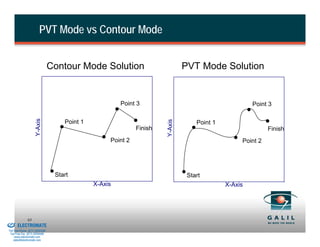
PVT Mode vs Contour Mode


                                          Contour Mode Solution                          PVT Mode Solution


                                                                 Point 3                                        Point 3
                               Y-Axis


                                                                                Y-Axis
                                              Point 1                                        Point 1
                                                                       Finish                                         Finish
                                                             Point 2                                        Point 2


                                           Start                                          Start
                                                        X-Axis                                         X-Axis


& Serviced By:
                        63
                 ELECTROMATE
          Toll Free Phone (877) SERVO98
           Toll Free Fax (877) SERV099
                www.electromate.com
               sales@electromate.com
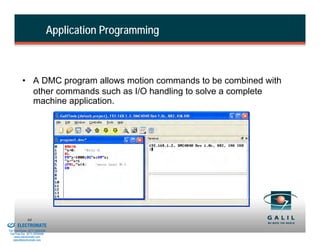
Application Programming


                    • A DMC program allows motion commands to be combined with
                      other commands such as I/O handling to solve a complete
                      machine application.


& Serviced By:
                        64
                 ELECTROMATE
          Toll Free Phone (877) SERVO98
           Toll Free Fax (877) SERV099
                www.electromate.com
               sales@electromate.com
Entering Programs


                    •Use Editor window for entering programs

                    •Use Upload and Download on GalilTools, Smart Term or WSDK to
                    modify existing programs and download changes to the controller

                    •SmartTerm: Turn on Syntax – Help for ease of programming and
                    press F1 to see more information

                    •GalilTools: double tap “Tab” in Terminal to get info on a command

                    •DMC Code Helper on line
                               • http://www.galilmc.com/support/code-helper/dmc-code-help.php

& Serviced By:
                        65
                 ELECTROMATE
          Toll Free Phone (877) SERVO98
           Toll Free Fax (877) SERV099
                www.electromate.com
               sales@electromate.com
Program Structure


                    • Programs begin with #Label and end with EN instruction
                    • Labels designated by # followed by up to 7 characters
                             First character must be a letter
                             Other characters can be numbers
                             Spaces are not permitted

                    •            Examples:
                                     #AUTO                    Automatically starts on power-up
                                     #BEGIN
                                     #Pos1


& Serviced By:
                        66
                 ELECTROMATE
          Toll Free Phone (877) SERVO98
           Toll Free Fax (877) SERV099
                www.electromate.com
               sales@electromate.com
Entering Commands


                               • Some commands return a value, some do not
                                  • TPX returns a value
                                  • STX does not

                               • Explicit Notation vs Implicit Notation
                                  • PAX=1000 or PA 1000              either method is okay
                                  • Don’t do: PA=1000 that will set a variable named PA

                               • XYZW or ABCD
                                  • PAA=1000 or PAX=1000           both formats will move axis 1


& Serviced By:
                        67
                 ELECTROMATE
          Toll Free Phone (877) SERVO98
           Toll Free Fax (877) SERV099
                www.electromate.com
               sales@electromate.com
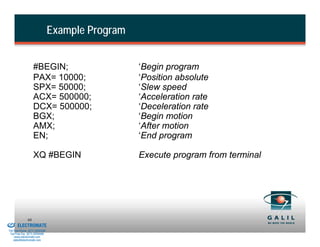
Example Program


                             #BEGIN;                        ‘Begin program
                             PAX= 10000;                    ‘Position absolute
                             SPX= 50000;                    ‘Slew speed
                             ACX= 500000;                   ‘Acceleration rate
                             DCX= 500000;                   ‘Deceleration rate
                             BGX;                           ‘Begin motion
                             AMX;                           ‘After motion
                             EN;                            ‘End program

                             XQ #BEGIN                      Execute program from terminal


& Serviced By:
                        68
                 ELECTROMATE
          Toll Free Phone (877) SERVO98
           Toll Free Fax (877) SERV099
                www.electromate.com
               sales@electromate.com
Program Flow


                    • Galil controllers offer many instructions to control program flow
                      such as halting until an event occurs, jumping to a location,
                      looping or executing a subroutine.


& Serviced By:
                        69
                 ELECTROMATE
          Toll Free Phone (877) SERVO98
           Toll Free Fax (877) SERV099
                www.electromate.com
               sales@electromate.com
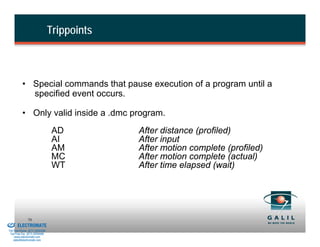
Trippoints


                    • Special commands that pause execution of a program until a
                      specified event occurs.

                    • Only valid inside a .dmc program.
                                          AD           After distance (profiled)
                                          AI           After input
                                          AM           After motion complete (profiled)
                                          MC           After motion complete (actual)
                                          WT           After time elapsed (wait)


& Serviced By:
                        70
                 ELECTROMATE
          Toll Free Phone (877) SERVO98
           Toll Free Fax (877) SERV099
                www.electromate.com
               sales@electromate.com
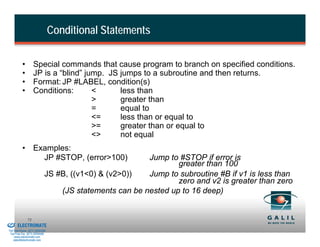
Conditional Statements

                    •        Special commands that cause program to branch on specified conditions.
                    •        JP is a “blind” jump. JS jumps to a subroutine and then returns.
                    •        Format: JP #LABEL, condition(s)
                    •        Conditions:       <      less than
                                               >      greater than
                                               =      equal to
                                               <=     less than or equal to
                                               >=     greater than or equal to
                                               <>     not equal
                    • Examples:
                        JP #STOP, (error>100)                    Jump to #STOP if error is
                                                                         greater than 100
                                      JS #B, ((v1<0) & (v2>0))   Jump to subroutine #B if v1 is less than
                                                                         zero and v2 is greater than zero
                                          (JS statements can be nested up to 16 deep)


& Serviced By:
                        71
                 ELECTROMATE
          Toll Free Phone (877) SERVO98
           Toll Free Fax (877) SERV099
                www.electromate.com
               sales@electromate.com
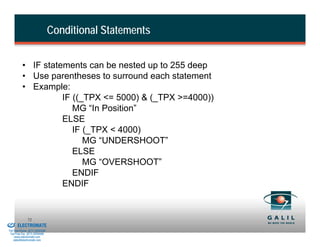
Conditional Statements


                    • IF statements can be nested up to 255 deep
                    • Use parentheses to surround each statement
                    • Example:
                              IF ((_TPX <= 5000) & (_TPX >=4000))
                                 MG “In Position”
                              ELSE
                                 IF (_TPX < 4000)
                                    MG “UNDERSHOOT”
                                 ELSE
                                    MG “OVERSHOOT”
                                 ENDIF
                              ENDIF


& Serviced By:
                        72
                 ELECTROMATE
          Toll Free Phone (877) SERVO98
           Toll Free Fax (877) SERV099
                www.electromate.com
               sales@electromate.com
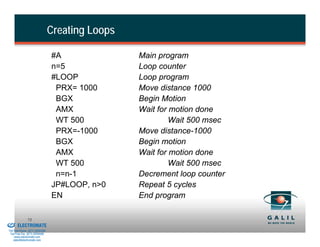
Creating Loops

                                          #A               Main program
                                          n=5              Loop counter
                                          #LOOP            Loop program
                                           PRX= 1000       Move distance 1000
                                           BGX             Begin Motion
                                           AMX             Wait for motion done
                                           WT 500                   Wait 500 msec
                                           PRX=-1000       Move distance-1000
                                           BGX             Begin motion
                                           AMX             Wait for motion done
                                           WT 500                   Wait 500 msec
                                           n=n-1           Decrement loop counter
                                          JP#LOOP, n>0     Repeat 5 cycles
                                          EN               End program

& Serviced By:
                        73
                 ELECTROMATE
          Toll Free Phone (877) SERVO98
           Toll Free Fax (877) SERV099
                www.electromate.com
               sales@electromate.com
Automatic Subroutines

                    • Controller can monitor certain conditions in the background
                       (“Event Driven” programming)
                    • Automatic monitoring is enabled by using the following
                      special labels:

                                             #LIMSWI   Limit switch active
                                             #ININT    Designated input changes state
                                             #POSERR   Position error exceeds ER limit
                                             #CMDERR   Bad command given
                                             #MCTIME   Timeout on motion complete trippoint
                                             #TCPERR   Communication error (Ethernet only)
                                             #COMINT   Communication interrupt subroutine
                                                               (RS-232 only)
                              #AMPERR                  Amplifier Error (Galil Amps)
                    • An application program must be running in Thread 0
                      for automatic monitoring for Optima/Econo controllers
& Serviced By:
                        74
                 ELECTROMATE
          Toll Free Phone (877) SERVO98
           Toll Free Fax (877) SERV099
                www.electromate.com
               sales@electromate.com
Multitasking


                    • Multiple independent programs called “threads” can run
                      simultaneously
                    • All threads have equal priority
                    • One thread can execute or halt another thread
                    • All trippoints are available in every thread
                    • Variables are global - common to all threads
                    • Useful for background PLC; truly independent motions
                    • Use semicolons to execute a group of commands together

                             Commands:
                             XQ #Label,n Execute Program in thread ‘n’, where n=0
                                               through 7 is thread number. 0 is main thread.
                             HXn               Halt Execution of Thread ‘n’


& Serviced By:
                        75
                 ELECTROMATE
          Toll Free Phone (877) SERVO98
           Toll Free Fax (877) SERV099
                www.electromate.com
               sales@electromate.com
Multitasking -- Example

                    •        Example to Download:
                                     #X                             X-Thread
                                     PR 1000;BGX;AMX                Move 1000
                                     PR-1000;BGX;AMX                Move-1000
                                     JP #X                          Repeat Motion
                                     #Y                             Y-Thread
                                     PR,500;BGY;AMY                 Move 500
                                     PR,-500;BGY;AMY                Move -500
                                     JP#Y                           Repeat Motion
                                     #TIME                          I/O Thread
                                     AT-50;SB1;AT-10;CB1            Every 50 msec Set Bit 1
                                     JP#TIME                        Repeat
                                     #MAIN                          Main Thread
                                     JP#EXIT,@IN[1]=0               If input 1 low, exit
                                     JP#MAIN                        Loop if input 1 high
                                     #EXIT
                                     AB                             Abort Motion and Program
                                     EN                             End Program
                    •        To execute from host/terminal:
                                     XQ#MAIN,0
                                     XQ#X,1
                                     XQ#Y,2
                                     XQ#TIME,3

& Serviced By:
                        76
                 ELECTROMATE
          Toll Free Phone (877) SERVO98
           Toll Free Fax (877) SERV099
                www.electromate.com
               sales@electromate.com
Special Features


                    • Galil controllers use comments, variables, arrays, and
                      mathematical functions to make programming easier
                      and free your host PC for other tasks.


& Serviced By:
                        77
                 ELECTROMATE
          Toll Free Phone (877) SERVO98
           Toll Free Fax (877) SERV099
                www.electromate.com
               sales@electromate.com
Commenting Programs


                    • Code with comments is far easier to understand
                    • Use NO or ‘ (single quote) to cause the processor to ignore
                      the following text. Not valid on Legacy controllers.
                    • Use “REM” to save space by having Galil software strip out
                      those lines before downloading to the controller
                    • Example:
                           REM – JOG motor 5000 cts/sec
                           JGX= 5000
                           ‘set accel
                           ACX=100000
                           NO set decel
                           DCX= 100000
                           BGX; ‘ Begin Motion

& Serviced By:
                        78
                 ELECTROMATE
          Toll Free Phone (877) SERVO98
           Toll Free Fax (877) SERV099
                www.electromate.com
               sales@electromate.com
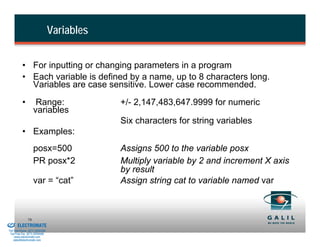
Variables


                    • For inputting or changing parameters in a program
                    • Each variable is defined by a name, up to 8 characters long.
                      Variables are case sensitive. Lower case recommended.
                    •         Range:                  +/- 2,147,483,647.9999 for numeric
                             variables
                                                      Six characters for string variables
                    • Examples:
                             posx=500                 Assigns 500 to the variable posx
                             PR posx*2                Multiply variable by 2 and increment X axis
                                                      by result
                             var = “cat”              Assign string cat to variable named var


& Serviced By:
                        79
                 ELECTROMATE
          Toll Free Phone (877) SERVO98
           Toll Free Fax (877) SERV099
                www.electromate.com
               sales@electromate.com
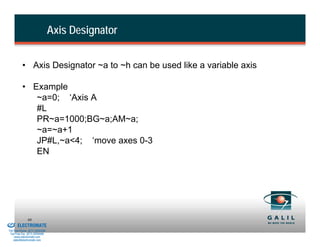
Axis Designator


                    • Axis Designator ~a to ~h can be used like a variable axis

                    • Example
                       ~a=0; ‘Axis A
                       #L
                       PR~a=1000;BG~a;AM~a;
                       ~a=~a+1
                       JP#L,~a<4; ‘move axes 0-3
                       EN


& Serviced By:
                        80
                 ELECTROMATE
          Toll Free Phone (877) SERVO98
           Toll Free Fax (877) SERV099
                www.electromate.com
               sales@electromate.com
Arrays


                    • For storing and collecting data (ideal for contour mode, teach,
                      and playback)
                    • One dimensional
                    • Each entry has same numerical range as variable
                    • Arrays defined by a name and number of entries

                                             DM posx[7]   Defines an array named posx with
                                                          seven entries

                    • Can automatically capture certain types of data, such as position,
                      error and commanded torque, into arrays over specified time
                      intervals


& Serviced By:
                        81
                 ELECTROMATE
          Toll Free Phone (877) SERVO98
           Toll Free Fax (877) SERV099
                www.electromate.com
               sales@electromate.com
Record Data Mode


                             Instruction                     Interpretation
                             #RECORD;                        ‘Label
                             DM yerr[100];                   ‘Dimension array
                             RA yerr[ ];                     ‘Specify record mode
                             RD _TEY;                        ‘Data type for record
                             RC 4, 100;                      ‘Actual recording
                             EN;                             ‘End program


& Serviced By:
                        82
                 ELECTROMATE
          Toll Free Phone (877) SERVO98
           Toll Free Fax (877) SERV099
                www.electromate.com
               sales@electromate.com
Mathematical and Functional Expressions


                    Mathematical Operators                                  Logical Operators
                                                                              &
                    +    -      *     /
                                                                              |
                    @SIN[n]     @COS[n]                                       @COM[n]
                    @ABS[n]     @FRAC[n]
                    @INT[n]     @RND[n]
                    @TAN[n]     @ATAN[n]
                    @ASIN[n]    @ACOS[n]
                    @SQR[n]

                                            Note: Math order of operations is left to right. Use
                                              ( ) parenthesis for correct order of operations

& Serviced By:
                        83
                 ELECTROMATE
          Toll Free Phone (877) SERVO98
           Toll Free Fax (877) SERV099
                www.electromate.com
               sales@electromate.com
Programming with Inputs/Outputs (I/O)


                    • Galil application programs handle hardware I/O, data
                      input, and messaging.


& Serviced By:
                        84
                 ELECTROMATE
          Toll Free Phone (877) SERVO98
           Toll Free Fax (877) SERV099
                www.electromate.com
               sales@electromate.com
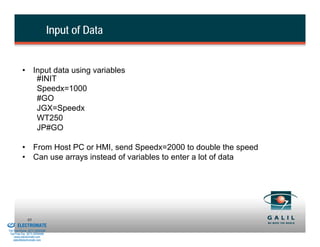
Input of Data


                    • Input data using variables
                       #INIT
                       Speedx=1000
                       #GO
                       JGX=Speedx
                       WT250
                       JP#GO

                    • From Host PC or HMI, send Speedx=2000 to double the speed
                    • Can use arrays instead of variables to enter a lot of data


& Serviced By:
                        85
                 ELECTROMATE
          Toll Free Phone (877) SERVO98
           Toll Free Fax (877) SERV099
                www.electromate.com
               sales@electromate.com
Output of Data


                    • MG command used to send a message or return a value
                    • MG _KPX to show the value of KPX
                    • MG posx to display the variable POSX
                    • Output to specific communication port:

                             MG "HELLO THERE"              Displays message out default port (CF command)

                             MG {P2} "HELLO THERE"          Displays message to auxiliary RS-232 port

                             LU0; MG {L1} “ERROR”           Displays message to Line1 of DMC-40x0 LCD
                             MG {EA}"POSITION=",_TPX         Displays message via Ethernet (Handle A)

                             MG "Variable=",v1{F6.1} Displays message and value of
                                                              variable v1 with format 6
                                                              integers and one decimal

& Serviced By:
                        86
                 ELECTROMATE
          Toll Free Phone (877) SERVO98
           Toll Free Fax (877) SERV099
                www.electromate.com
               sales@electromate.com
Uncommitted Inputs

                    • Available commands:
                             AI +/- n                          Wait for input n high/low
                             II n                              Interrupt if input n occurs
                             TI n                              Return state of all inputs in block n
                             MG@IN[1]                          Return state of input 1
                             TZ                                Returns all status of all i/o points

                    • After Input Example:
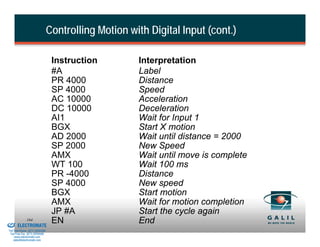
                              #JOG                             Jog program
                              JGX=1000                         Jog speed
                              AI 1                             After Input 1 high
                              BG X                             Begin motion
                              AI - 1                           After Input 1 low
                              ST X                             Stop motion


& Serviced By:
                        87
                 ELECTROMATE
          Toll Free Phone (877) SERVO98
           Toll Free Fax (877) SERV099
                www.electromate.com
               sales@electromate.com
Uncommitted Outputs

                    • Defined by:
                             SB n                               Set Bit n
                             CB n                               Clear Bit n
                             OP n                               Define all 8 bits

                    • Example:
                            #POS                                Label
                            PRX=1000                            Position
                            BG X                                Begin motion
                            AM X                                After motion
                            SB1                                 Set bit 1
                            WT 1000                             Wait
                            OP 0                                Clear all outputs
                            EN                                  End program

& Serviced By:
                        88
                 ELECTROMATE
          Toll Free Phone (877) SERVO98
           Toll Free Fax (877) SERV099
                www.electromate.com
               sales@electromate.com
Analog Inputs

                    • + 10 Volts with 12 bit resolution (16-bits optional)

                    • AQ to adjust input range 0-10V, 0-5V, +/-5, differential
                       (AQ not available on all controllers)

                    •            Available commands:
                                             a1 = @AN[n]    set variable a1 to analog input (in volts)

                    • Analog Input Example
                                             #JOYSTK        Joystick
                                             JG0            Jog mode
                                             BGX
                                             #LOOP          Loop
                                             a1 = @AN[1]    Read analog input
                                             JGX= a1*1000   Change jog speed
                                             JP #LOOP       Repeat
                                             EN             End program
& Serviced By:
                        89
                 ELECTROMATE
          Toll Free Phone (877) SERVO98
           Toll Free Fax (877) SERV099
                www.electromate.com
               sales@electromate.com
Homing

                    •          Special moves to initialize the system:

                               FE           Find Edge - Look for a transition on the home switch input

                               FI           Find index - Look for an index (Z channel) pulse

                               HM           Home - Includes:
                                                            High speed FE
                                                            Reverse and low speed FE
                                                            Low speed FI

                                 HV          Home Velocity – Velocity for 2nd stage for Accelera


& Serviced By:
                        90
                 ELECTROMATE
          Toll Free Phone (877) SERVO98
           Toll Free Fax (877) SERV099
                www.electromate.com
               sales@electromate.com
Homing Sequence
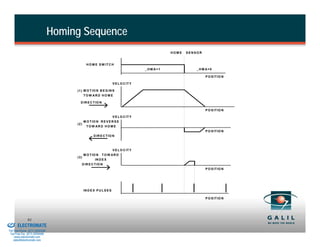
                                                                                                         HOME   SENSOR


                                                        H O M E S W IT C H
                                                                                              _H M A=1              _H M A=0

                                                                                                                         P O S IT IO N

                                                                             V E L O C IT Y

                                               (1 ) M O T IO N B E G IN S
                                                    TO W AR D H O M E

                                                 D IR E C T IO N

                                                                                                                         P O S IT IO N

                                                                       V E L O C IT Y
                                                    M O T IO N R E V E R S E
                                               (2 )
                                                     TO W AR D H O M E
                                                                                                                         P O S IT IO N
                                                             D IR E C T IO N


                                                                         V E L O C IT Y
                                                      M O T IO N   TO W AR D
                                               (3 )
                                                              IN D E X
                                                  D IR E C T IO N
                                                                                                                         P O S IT IO N


                                                      IN D E X P U L S E S

                                                                                                                         P O S IT IO N


& Serviced By:
                        91
                 ELECTROMATE
          Toll Free Phone (877) SERVO98
           Toll Free Fax (877) SERV099
                www.electromate.com
               sales@electromate.com
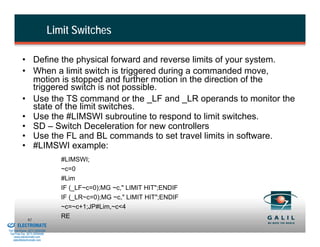
Limit Switches

                    • Define the physical forward and reverse limits of your system.
                    • When a limit switch is triggered during a commanded move,
                      motion is stopped and further motion in the direction of the
                      triggered switch is not possible.
                    • Use the TS command or the _LF and _LR operands to monitor the
                      state of the limit switches.
                    • Use the #LIMSWI subroutine to respond to limit switches.
                    • SD – Switch Deceleration for new controllers
                    • Use the FL and BL commands to set travel limits in software.
                    • #LIMSWI example:
                                             #LIMSWI;
                                             ~c=0
                                             #Lim
                                             IF (_LF~c=0);MG ~c," LIMIT HIT";ENDIF
                                             IF (_LR~c=0);MG ~c," LIMIT HIT";ENDIF
                                             ~c=~c+1;JP#Lim,~c<4
& Serviced By:
                        92
                                             RE
                 ELECTROMATE
          Toll Free Phone (877) SERVO98
           Toll Free Fax (877) SERV099
                www.electromate.com
               sales@electromate.com
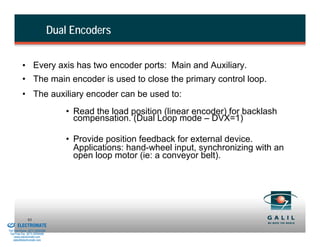
Dual Encoders


                    • Every axis has two encoder ports: Main and Auxiliary.
                    • The main encoder is used to close the primary control loop.
                    • The auxiliary encoder can be used to:
                                             • Read the load position (linear encoder) for backlash
                                               compensation. (Dual Loop mode – DVX=1)

                                             • Provide position feedback for external device.
                                               Applications: hand-wheel input, synchronizing with an
                                               open loop motor (ie: a conveyor belt).


& Serviced By:
                        93
                 ELECTROMATE
          Toll Free Phone (877) SERVO98
           Toll Free Fax (877) SERV099
                www.electromate.com
               sales@electromate.com
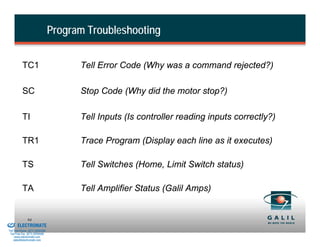
Program Troubleshooting


                    TC1                         Tell Error Code (Why was a command rejected?)

                    SC                          Stop Code (Why did the motor stop?)

                    TI                          Tell Inputs (Is controller reading inputs correctly?)

                    TR1                         Trace Program (Display each line as it executes)

                    TS                          Tell Switches (Home, Limit Switch status)

                    TA                          Tell Amplifier Status (Galil Amps)


& Serviced By:
                        94
                 ELECTROMATE
          Toll Free Phone (877) SERVO98
           Toll Free Fax (877) SERV099
                www.electromate.com
               sales@electromate.com
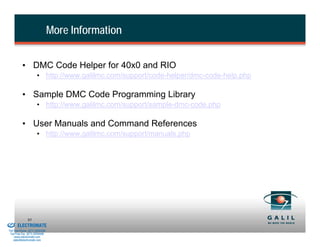
More Information


                    • DMC Code Helper for 40x0 and RIO
                                • http://www.galilmc.com/support/code-helper/dmc-code-help.php

                    • Sample DMC Code Programming Library
                                • http://www.galilmc.com/support/sample-dmc-code.php

                    • User Manuals and Command References
                                • http://www.galilmc.com/support/manuals.php


& Serviced By:
                        95
                 ELECTROMATE
          Toll Free Phone (877) SERVO98
           Toll Free Fax (877) SERV099
                www.electromate.com
               sales@electromate.com
I/O Hardware


& Serviced By:
                        96
                 ELECTROMATE
          Toll Free Phone (877) SERVO98
           Toll Free Fax (877) SERV099
                www.electromate.com
               sales@electromate.com
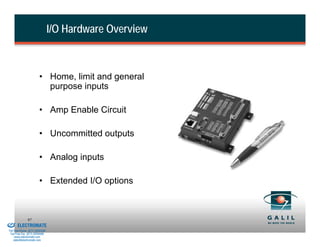
I/O Hardware Overview


                                  • Home, limit and general
                                    purpose inputs

                                  • Amp Enable Circuit

                                  • Uncommitted outputs

                                  • Analog inputs

                                  • Extended I/O options


& Serviced By:
                        97
                 ELECTROMATE
          Toll Free Phone (877) SERVO98
           Toll Free Fax (877) SERV099
                www.electromate.com
               sales@electromate.com
Optically Isolated Inputs


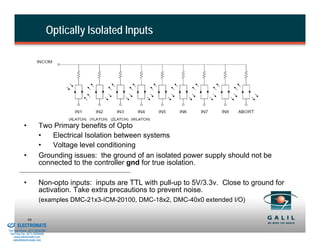
                      •          Two Primary benefits of Opto
                                 •   Electrical Isolation between systems
                                 •   Voltage level conditioning
                      •          Grounding issues: the ground of an isolated power supply should not be
                                 connected to the controller gnd for true isolation.

                      •          Non-opto inputs: inputs are TTL with pull-up to 5V/3.3v. Close to ground for
                                 activation. Take extra precautions to prevent noise.
                                 (examples DMC-21x3-ICM-20100, DMC-18x2, DMC-40x0 extended I/O)

& Serviced By:
                          98
                 ELECTROMATE
          Toll Free Phone (877) SERVO98
           Toll Free Fax (877) SERV099
                www.electromate.com
               sales@electromate.com
Optically Isolated Inputs (Cont)


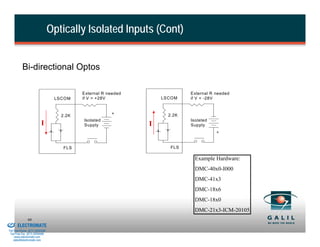
                    Bi-directional Optos

                                                    External R needed                External R needed
                                           LSCOM    if V > +28V             LSCOM    if V < -28V


                                                                +             2.2K
                                             2.2K
                                                    Isolated                         Isolated
                                   I                Supply              I            Supply
                                                                                                +


                                              FLS                              FLS

                                                                                       Example Hardware:
                                                                                       DMC-40x0-I000
                                                                                       DMC-41x3
                                                                                       DMC-18x6
                                                                                       DMC-18x0
                                                                                       DMC-21x3-ICM-20105
& Serviced By:
                        99
                 ELECTROMATE
          Toll Free Phone (877) SERVO98
           Toll Free Fax (877) SERV099
                www.electromate.com
               sales@electromate.com
Encoder Synchronization
                 •       High Speed Latch – Save encoder position when input occurs
                          • Use inputs 1-4 for latch inputs. IN[1] for X, IN[2] for Y, etc.
                          • ALx arms latch and _RLx stores the position once the position is captured.
                          • Captures position on state transition of specified input.
                          • Latch speed on TTL input is less than 1µs, low-going opto-isolated input is
                            12µs, 35 µs for high-going.

                 •       Output Compare – Pulse output at encoder position
                          • One-Shot and circular/modular compare possible
                          • OC command sets up all behavior
                          • Powerful for position based external hardware synch
                         (e.g. laser marking, raster scans)


& Serviced By:
                        100
                 ELECTROMATE
          Toll Free Phone (877) SERVO98
           Toll Free Fax (877) SERV099
                www.electromate.com
               sales@electromate.com
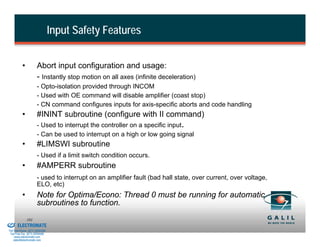
Input Safety Features


                    •           Abort input configuration and usage:
                                - Instantly stop motion on all axes (infinite deceleration)
                                - Opto-isolation provided through INCOM
                                - Used with OE command will disable amplifier (coast stop)
                                - CN command configures inputs for axis-specific aborts and code handling
                    •           #ININT subroutine (configure with II command)
                                - Used to interrupt the controller on a specific input.
                                - Can be used to interrupt on a high or low going signal
                    •           #LIMSWI subroutine
                                - Used if a limit switch condition occurs.
                    •           #AMPERR subroutine
                                - used to interrupt on an amplifier fault (bad hall state, over current, over voltage,
                                ELO, etc)
                    •           Note for Optima/Econo: Thread 0 must be running for automatic
                                subroutines to function.
& Serviced By:
                        101
                 ELECTROMATE
          Toll Free Phone (877) SERVO98
           Toll Free Fax (877) SERV099
                www.electromate.com
               sales@electromate.com
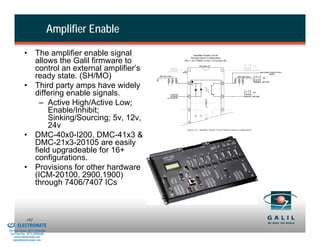
Amplifier Enable

                      • The amplifier enable signal
                        allows the Galil firmware to
                        control an external amplifier’s
                        ready state. (SH/MO)
                      • Third party amps have widely
                        differing enable signals.
                          – Active High/Active Low;
                             Enable/Inhibit;
                             Sinking/Sourcing; 5v, 12v,
                             24v
                      • DMC-40x0-I200, DMC-41x3 &
                        DMC-21x3-20105 are easily
                        field upgradeable for 16+
                        configurations.
                      • Provisions for other hardware
                        (ICM-20100, 2900,1900)
                        through 7406/7407 ICs


& Serviced By:
                        102
                 ELECTROMATE
          Toll Free Phone (877) SERVO98
           Toll Free Fax (877) SERV099
                www.electromate.com
               sales@electromate.com
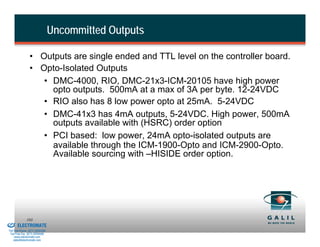
Uncommitted Outputs

                          • Outputs are single ended and TTL level on the controller board.
                          • Opto-Isolated Outputs
                             • DMC-4000, RIO, DMC-21x3-ICM-20105 have high power
                               opto outputs. 500mA at a max of 3A per byte. 12-24VDC
                             • RIO also has 8 low power opto at 25mA. 5-24VDC
                             • DMC-41x3 has 4mA outputs, 5-24VDC. High power, 500mA
                               outputs available with (HSRC) order option
                             • PCI based: low power, 24mA opto-isolated outputs are
                               available through the ICM-1900-Opto and ICM-2900-Opto.
                               Available sourcing with –HISIDE order option.


& Serviced By:
                        103
                 ELECTROMATE
          Toll Free Phone (877) SERVO98
           Toll Free Fax (877) SERV099
                www.electromate.com
               sales@electromate.com
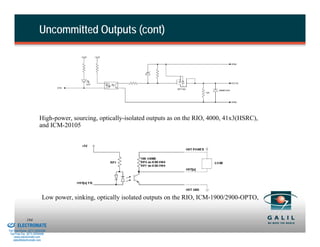
Uncommitted Outputs (cont)


                                  High-power, sourcing, optically-isolated outputs as on the RIO, 4000, 41x3(HSRC),
                                  and ICM-20105


                                    Low power, sinking, optically isolated outputs on the RIO, ICM-1900/2900-OPTO,


& Serviced By:
                        104
                 ELECTROMATE
          Toll Free Phone (877) SERVO98
           Toll Free Fax (877) SERV099
                www.electromate.com
               sales@electromate.com
Analog Inputs


                    • Single ended analog inputs can be used for feedback, joystick
                      control, pressure or force transducers, etc.
                    • Controllers equipped with “AQ” command provide +/- 10, 0-10, +/-
                      5, 0-5 v ranges, and allow differential inputs.

                    • Standard 12-bit resolution. Optional 16-bit resolution. Increased
                      resolution does not necessarily yield increased accuracy.

                    • Noise considerations should be taken into account when using
                      analog inputs, especially in PC environment.

                    • DMC-40x0, 41x3 and RIO controllers have a dedicated analog
                      ground.


& Serviced By:
                        105
                 ELECTROMATE
          Toll Free Phone (877) SERVO98
           Toll Free Fax (877) SERV099
                www.electromate.com
               sales@electromate.com
Extended I/O Options (local and remote)
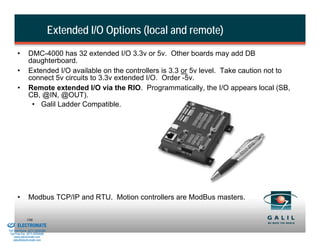
                 •       DMC-4000 has 32 extended I/O 3.3v or 5v. Other boards may add DB
                         daughterboard.
                 •       Extended I/O available on the controllers is 3.3 or 5v level. Take caution not to
                         connect 5v circuits to 3.3v extended I/O. Order -5v.
                 •       Remote extended I/O via the RIO. Programmatically, the I/O appears local (SB,
                         CB, @IN, @OUT).
                          • Galil Ladder Compatible.


                 •       Modbus TCP/IP and RTU. Motion controllers are ModBus masters.

& Serviced By:
                        106
                 ELECTROMATE
          Toll Free Phone (877) SERVO98
           Toll Free Fax (877) SERV099
                www.electromate.com
               sales@electromate.com
Troubleshooting


                                           "There are only 10 types of people in the world:
                                           Those who understand binary, and those who don't."


& Serviced By:
                        107
                 ELECTROMATE
          Toll Free Phone (877) SERVO98
           Toll Free Fax (877) SERV099
                www.electromate.com
               sales@electromate.com
Troubleshooting Overview


                    • Communication problems

                    • Feedback problems

                    • Motion problems

                    • The red LED

                    • Programming problems

                    • Noise problems


& Serviced By:
                        108
                 ELECTROMATE
          Toll Free Phone (877) SERVO98
           Toll Free Fax (877) SERV099
                www.electromate.com
               sales@electromate.com
Troubleshooting Bus Communication (PCI, ISA)

                        •           Install most current Galil communication drivers/software
                        •           PCI is Plug and Play
                        •           Check for Error LED
                        •           Check for communication conflicts in PC’s Device Manager
                                    - I/O Address conflicts – especially ISA
                                    - IRQ/DMA Conflicts
                                           Software                  OS            PCI Driver
                                                          Win7/Vista/XP x86 x64   GALILPCI.INF
                              GalilTools
                                                          Linux, Linux 64         GALILPCI.KO
                              WSDK, SmartTerm,            XP x86 x64, Win2000
                                                                                  GLWDMPCI.INF
                              Setup32, ActiveX            WinNT, Win98SE
                              DMCTerm, Talk2DMC           Win98, Win95, Win3.1
                                                                                       -
                              Legacy                      (16 bit), DOS

                                           Choose the right software for your application!
& Serviced By:
                        109
                 ELECTROMATE
          Toll Free Phone (877) SERVO98
           Toll Free Fax (877) SERV099
                www.electromate.com
               sales@electromate.com
Troubleshooting Serial Communication
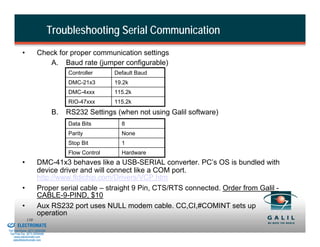
                    •           Check for proper communication settings
                                   A. Baud rate (jumper configurable)
                                                Controller     Default Baud
                                                DMC-21x3       19.2k
                                                DMC-4xxx       115.2k
                                                RIO-47xxx      115.2k
                                           B.   RS232 Settings (when not using Galil software)
                                                Data Bits        8
                                                Parity           None
                                                Stop Bit         1
                                                Flow Control     Hardware
                    •           DMC-41x3 behaves like a USB-SERIAL converter. PC’s OS is bundled with
                                device driver and will connect like a COM port.
                                http://www.ftdichip.com/Drivers/VCP.htm
                    •           Proper serial cable – straight 9 Pin, CTS/RTS connected. Order from Galil -
                                CABLE-9-PIND, $10
                    •           Aux RS232 port uses NULL modem cable. CC,CI,#COMINT sets up
                                operation
& Serviced By:
                        110
                 ELECTROMATE
          Toll Free Phone (877) SERVO98
           Toll Free Fax (877) SERV099
                www.electromate.com
               sales@electromate.com
Troubleshooting Unsolicited Messages (CW)

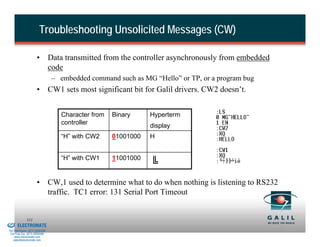
                                •         Data transmitted from the controller asynchronously from embedded
                                          code
                                           – embedded command such as MG “Hello” or TP, or a program bug
                                •         CW1 sets most significant bit for Galil drivers. CW2 doesn’t.


                                              Character from   Binary     Hyperterm
                                              controller                  display
                                              “H” with CW2     01001000   H


                                              “H” with CW1     11001000


                                •         CW,1 used to determine what to do when nothing is listening to RS232
                                          traffic. TC1 error: 131 Serial Port Timeout


& Serviced By:
                        111
                 ELECTROMATE
          Toll Free Phone (877) SERVO98
           Toll Free Fax (877) SERV099
                www.electromate.com
               sales@electromate.com
Troubleshooting Unsolicited Messages (CF)

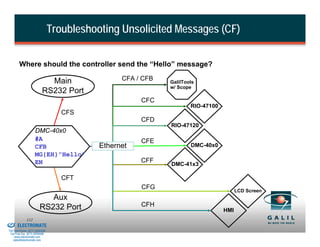
                  Where should the controller send the “Hello” message?

                                      Main                 CFA / CFB   GalilTools
                                                                       w/ Scope
                                    RS232 Port
                                                                CFC
                                                                               RIO-47100
                                             CFS
                                                                CFD
                                                                       RIO-47120
                              DMC-40x0
                              #A                                CFE
                              CFB                    Ethernet                  DMC-40x0
                              MG{EH}”Hello”
                              EN                                CFF
                                                                       DMC-41x3

                                             CFT
                                                                CFG                              LCD Screen
                                     Aux
                                  RS232 Port                    CFH
                                                                                           HMI
& Serviced By:
                        112
                 ELECTROMATE
          Toll Free Phone (877) SERVO98
           Toll Free Fax (877) SERV099
                www.electromate.com
               sales@electromate.com
GalilTools 3 Controller Data Streams

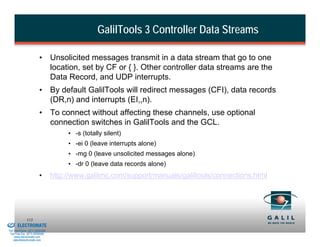
                                  •       Unsolicited messages transmit in a data stream that go to one
                                          location, set by CF or { }. Other controller data streams are the
                                          Data Record, and UDP interrupts.
                                  •       By default GalilTools will redirect messages (CFI), data records
                                          (DR,n) and interrupts (EI,,n).
                                  •       To connect without affecting these channels, use optional
                                          connection switches in GalilTools and the GCL.
                                               • -s (totally silent)
                                               • -ei 0 (leave interrupts alone)
                                               • -mg 0 (leave unsolicited messages alone)
                                               • -dr 0 (leave data records alone)
                                  •       http://www.galilmc.com/support/manuals/galiltools/connections.html


& Serviced By:
                        113
                 ELECTROMATE
          Toll Free Phone (877) SERVO98
           Toll Free Fax (877) SERV099
                www.electromate.com
               sales@electromate.com
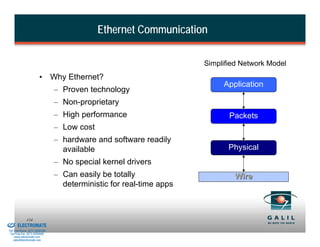
Ethernet Communication

                                                                               Simplified Network Model
                                  •       Why Ethernet?
                                                                                    Application
                                          – Proven technology
                                          – Non-proprietary
                                          – High performance                          Packets
                                          – Low cost
                                          – hardware and software readily
                                            available                                 Physical
                                          – No special kernel drivers
                                          – Can easily be totally                       Wire
                                            deterministic for real-time apps


& Serviced By:
                        114
                 ELECTROMATE
          Toll Free Phone (877) SERVO98
           Toll Free Fax (877) SERV099
                www.electromate.com
               sales@electromate.com
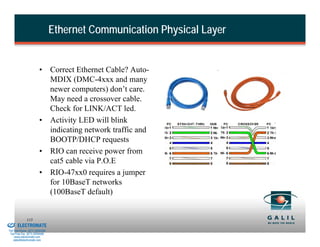
Ethernet Communication Physical Layer


                                  •       Correct Ethernet Cable? Auto-
                                          MDIX (DMC-4xxx and many
                                          newer computers) don’t care.
                                          May need a crossover cable.
                                          Check for LINK/ACT led.
                                  •       Activity LED will blink
                                          indicating network traffic and
                                          BOOTP/DHCP requests
                                  •       RIO can receive power from
                                          cat5 cable via P.O.E
                                  •       RIO-47xx0 requires a jumper
                                          for 10BaseT networks
                                          (100BaseT default)


& Serviced By:
                        115
                 ELECTROMATE
          Toll Free Phone (877) SERVO98
           Toll Free Fax (877) SERV099
                www.electromate.com
               sales@electromate.com
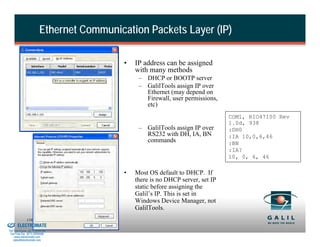
Ethernet Communication Packets Layer (IP)

                                                    •   IP address can be assigned
                                                        with many methods
                                                         – DHCP or BOOTP server
                                                         – GalilTools assign IP over
                                                           Ethernet (may depend on
                                                           Firewall, user permissions,
                                                           etc)
                                                                                          COM1, RIO47100 Rev
                                                                                          1.0d, 938
                                                         – GalilTools assign IP over      :DH0
                                                           RS232 with DH, IA, BN          :IA 10,0,6,46
                                                           commands                       :BN
                                                                                          :IA?
                                                                                          10, 0, 6, 46

                                                    •   Most OS default to DHCP. If
                                                        there is no DHCP server, set IP
                                                        static before assigning the
                                                        Galil’s IP. This is set in
                                                        Windows Device Manager, not
                                                        GalilTools.
& Serviced By:
                        116
                 ELECTROMATE
          Toll Free Phone (877) SERVO98
           Toll Free Fax (877) SERV099
                www.electromate.com
               sales@electromate.com
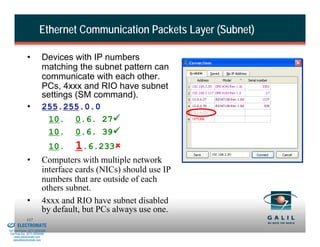
Ethernet Communication Packets Layer (Subnet)

                        •           Devices with IP numbers
                                    matching the subnet pattern can
                                    communicate with each other.
                                    PCs, 4xxx and RIO have subnet
                                    settings (SM command).
                        •           255.255.0.0
                                     10. 0.6. 27
                                     10. 0.6. 39
                                          10.   1.6.233
                        •           Computers with multiple network
                                    interface cards (NICs) should use IP
                                    numbers that are outside of each
                                    others subnet.
                        •           4xxx and RIO have subnet disabled
                                    by default, but PCs always use one.
& Serviced By:
                        117
                 ELECTROMATE
          Toll Free Phone (877) SERVO98
           Toll Free Fax (877) SERV099
                www.electromate.com
               sales@electromate.com
Ethernet Communication Applications Layer

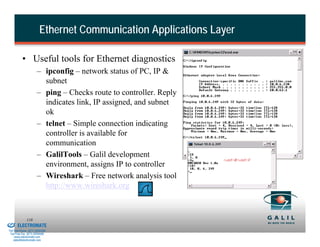
                    • Useful tools for Ethernet diagnostics
                                – ipconfig – network status of PC, IP &
                                  subnet
                                – ping – Checks route to controller. Reply
                                  indicates link, IP assigned, and subnet
                                  ok
                                – telnet – Simple connection indicating
                                  controller is available for
                                  communication
                                – GalilTools – Galil development
                                                                             <ctrl>R<ctrl>V
                                  environment, assigns IP to controller
                                – Wireshark – Free network analysis tool
                                  http://www.wireshark.org


& Serviced By:
                        118
                 ELECTROMATE
          Toll Free Phone (877) SERVO98
           Toll Free Fax (877) SERV099
                www.electromate.com
               sales@electromate.com
Encoder Problems


                    •            No encoder counts
                                           –   Check wiring
                                           –   For single ended encoder, CHA- and CHB- must be left unconnected
                                           –   Encoder configuration set with CE command
                                           –   If position increments by only one count, one channel is either missing or
                                               damaged.
                                           –   PCI - Auxiliary encoder requires separate cable attached to ICM-1900 or
                                               ICM-2908
                    •            Motor Position Drifts
                                           –   Compare TP to actual, independently observed motor position
                                           –   Check for loose connections or coupling
                                           –   Avoid noise:
                                                    » Use differential encoders
                                                    » Add termination resistors (-TRES)
                                                    » Shield encoder wires from motor wires
                                                    » Use 12V encoders
                                                    » Add ferrite
& Serviced By:
                        119
                 ELECTROMATE
          Toll Free Phone (877) SERVO98
           Toll Free Fax (877) SERV099
                www.electromate.com
               sales@electromate.com
Troubleshooting “Runaway” Motors

                    •           Positive Feedback
                                    A. Reverse motor or encoder wiring to reverse feedback
                                    B. Use MT or CE commands to reverse feedback (non-defaults lost
                                         after master reset)
                                    C. See Application Note #1418 – “Motor and Encoder Configuration”

                    •           Broken Encoder wire
                                    A. Motor movement without change in TP
                                    B. Accelera – Encoder Failure detection feature (OT,OV,OA)
                                    C. Application Program can monitor for broken wires
                                    D. See Application Note #1417 – “Encoder Failure Circuitry”

                    •           Motor Moves in opposite direction than desired
                                    A. Hardware or software swap of encoder AND motor leads
                                    B. Use MT & CE command to reverse direction

& Serviced By:
                        120
                 ELECTROMATE
          Toll Free Phone (877) SERVO98
           Toll Free Fax (877) SERV099
                www.electromate.com
               sales@electromate.com
Amplifier Fault LEDs

                    •           Over Current/ Short Circuit LED
                                    A. Check for short between phases or between phase and ground
                                    B. Fix problem before re-enabling
                                    C. Clear with MO/SH commands (latching)
                    •           Over/Under Voltage LED
                                    A. Unregulated power supply may overcharge during forced
                                        deceleration
                                    B. Use regulated power supply or add Galil shunt regulator
                                    C. LED turns off when voltage drops to acceptable level
                                    D. Ensure integrated amplifier is powered, even when unused
                    •           Over Temperature LED
                                    A. Turns on if heatsink temp rises above 80 c
                                    B. May require MO/SH

                    Use TA and #AMPERR to monitor the status of integrated Galil Amps.


& Serviced By:
                        121
                 ELECTROMATE
          Toll Free Phone (877) SERVO98
           Toll Free Fax (877) SERV099
                www.electromate.com
               sales@electromate.com
Motors Not Moving
                    •           3rd party Amplifiers
                                - Check amplifier docs for enable/disable requirements
                                - Check for MO due to Abort, _AB, _TS, _MO
                                - Is motor command output driving correct voltage?
                                          1.   Disconnect motor command signal from amplifier
                                          2.   Set KI,KP,KD to 0
                                          3.   Use OF command to set output, e.g. OFX=7
                                          4.   Check value of TT (If not correct, check TL)
                                          5.   Use voltmeter to measure MCMA
                                          6.   If output is 0, TT is not zero, may have blown analog switch on ICM unit
                    •           Integrated Amplifiers
                                - Check for MO condition BR1, TA, _AB, _TS, _MO
                                - TL or filter set to 0? If TT shows 0, no motion expected
                                - Proper commutation? QH, 6 combos

& Serviced By:
                        122
                 ELECTROMATE
          Toll Free Phone (877) SERVO98
           Toll Free Fax (877) SERV099
                www.electromate.com
               sales@electromate.com
Troubleshooting Poor Performance


                    •           Motion is uneven or oscillations occur
                                    A. Use GalilTools for tuning assistance
                                    B. Commutation of brushless motor. QH, 6 combos.
                                    C. Commutation track of motor
                                    D. Sine Amp configuration (BA,BM,BZ)

                    •           Motion stops before target position
                                    A. Use KI and IL to compensate for deadband
                                    B. Encoder failure detection misconfigured
                                    C. Stop Code, “SC”, command to check for unexpected stops
                                        A. Soft Limits
                                        B. Noise on limit switches or abort
                                        C. Error limit

& Serviced By:
                        123
                 ELECTROMATE
          Toll Free Phone (877) SERVO98
           Toll Free Fax (877) SERV099
                www.electromate.com
               sales@electromate.com
Stepper Motors

                    • Verify SM jumpers are installed. Issue MT2; if the controller returns
                      “Stepper motor jumpers must be installed”, check the physical jumper
                      placement. NO JUMPERS ON 4xxx,18x6.

                    • Check connections to ICM module; STEP, DIR, AEN

                    • Use correct motor type command (MT2, MT-2, MT2.5, MT-2.5)

                    • Verify commanded motion gives change to both RP and TD. In stepper
                      mode, TD is a “loop-back counter” of the commanded steps, RP.

                    • Motor Stalling?
                       • KS for stepper smoothing
                       • Reduce AC/DC & SP/JG
                       • Change gain AG on integrated amps
                       • Check TA for amp problems
& Serviced By:
                        124
                 ELECTROMATE
          Toll Free Phone (877) SERVO98
           Toll Free Fax (877) SERV099
                www.electromate.com
               sales@electromate.com
Command/Program Execution Problems
                            Command                          Description
                            TR1                              Trace. Prints each command as it's executed.
                                                             Print message strings, variables, and controller
                            MG                               parameters.
                                                             Print current line number that is executing in
                            MG _XQn                          thread n (or -1 if thread is not running)
                            LV                               List all declared user variables and their values
                            LS                               List the controller program
                            LS first line, last line         List a program section
                            LS_XQn,_XQn                      List current running line of code
                            QU array[]                       Print the contents of a given array

                            SC                               Stop code for axis

                                                             Tell error code and brief description (reason for
                            TC1                              controller returning a "?")
                            #CMDERR                          Automatic sub, runs on crashed thread
                            XQ                               Begin Program
                            ST                               Stop Program
                            BK line                          Set breakpoint at line
                            BK                               Resume from breakpoint
                            SL                               Single Step
& Serviced By:
                        125
                 ELECTROMATE
          Toll Free Phone (877) SERVO98
           Toll Free Fax (877) SERV099
                www.electromate.com
               sales@electromate.com
Troubleshooting Errors


                      Three Reasons for the Red LED

                      •           Position error exceeds error limit
                                      A. Check TE value vs. ER limit
                                           •    Use SH to clear error
                                           •    #POSERR subroutine can be used for error handling

                      •           Watchdog timer is activated due to microprocessor lock up
                                     A. Check the voltages on the power supply
                                         •    +5V supply must be at least 4.75V for proper operation
                                     B. Verify communication with controller
                                         •    A master reset may clear the watchdog error
                                         •    Re-installation of the firmware may clear error

                      •           Controller is in the reset state.
                                      A. Check for reset line shorted or pulled to ground
                                      B. Protect against noise on reset line and ground loops
& Serviced By:
                        126
                 ELECTROMATE
          Toll Free Phone (877) SERVO98
           Toll Free Fax (877) SERV099
                www.electromate.com
               sales@electromate.com
Software


& Serviced By:
                        127
                 ELECTROMATE
          Toll Free Phone (877) SERVO98
           Toll Free Fax (877) SERV099
                www.electromate.com
               sales@electromate.com
Galil CD-Rom


                                     Free Software             Password Required
                    •         GalilTools Lite (includes GCL)   •   GalilTools Full
                    •         DMC Smart Terminal               •   Ladder
                    •         DMC Setup                        •   Galil PVT
                    •         DMC .NET API                     •   CAD-to-DMC
                    •         DMC Win32                        •   ECAM Setup
                                                               •   WSDK
                    • User manuals and examples included       •   Active X Toolkit
                    • Latest versions of software and manuals are on
                       website
                    Items in grey are not recommended for new applications
& Serviced By:
                        128
                 ELECTROMATE
          Toll Free Phone (877) SERVO98
           Toll Free Fax (877) SERV099
                www.electromate.com
               sales@electromate.com
GalilTools Lite


                    Provides direct interface between controller and computer:

                    1.          Can send commands directly and see response
                    2.          Function to upgrade controller firmware
                    3.          Editor for creating, editing, uploading, downloading programs
                    4.          Watch Window for real-time controller status
                    5.          Function for download, upload arrays
                    6.          Dynamic syntax help
                    7.          Includes GalilTools Communication Library (GCL)


& Serviced By:
                        129
                 ELECTROMATE
          Toll Free Phone (877) SERVO98
           Toll Free Fax (877) SERV099
                www.electromate.com
               sales@electromate.com
GCL Introduction


                    • Use GCL to interface high level programs with the controller

                                • Abstract away communication protocols (Ethernet, RS-232,
                                  USB, PCI)

                    • Works with any development environment that supports COM
                      objects including Visual Basic, Visual C++, C#, Labview, and
                      Matlab

                    • Also includes Visual C++ DLL


& Serviced By:
                        130
                 ELECTROMATE
          Toll Free Phone (877) SERVO98
           Toll Free Fax (877) SERV099
                www.electromate.com
               sales@electromate.com
Visual Basic (VB)


                    • Majority of customers prefer VB because of ease of use and
                      ability to program quickly

                    • All versions of VB are supported from VB6 up to Visual Studio
                      2010

                    • Express version of VB is free

                    • Visual Basic is a simple programming tool created by Microsoft.
                      It uses the BASIC language and a graphical interface to allow a
                      developer to write powerful programs quickly and easily.

                    • Object oriented and event driven

& Serviced By:
                        131
                 ELECTROMATE
          Toll Free Phone (877) SERVO98
           Toll Free Fax (877) SERV099
                www.electromate.com
               sales@electromate.com
Visual Basic Overview

                    The VB environment has three basic parts:
                       • The tool bar on the left
                       • The program form in the middle
                       • The property list on the right


& Serviced By:
                        132
                 ELECTROMATE
          Toll Free Phone (877) SERVO98
           Toll Free Fax (877) SERV099
                www.electromate.com
               sales@electromate.com
VB Example


                    • This program will print “Hello” inside a textbox when the
                      command button is pressed.

                    • Step 1. Draw a command button on the form:
                             a. Click on the rectangle shaped tool called the
                                     Button. To locate this tool hold the mouse
                                     pointer over each tool until the help tag appears
                                     as “Button”
                             b. Click on the tool.
                             c. In the form area draw the button by holding down
                                     the mouse button and dragging within the form
                                     area. Release the mouse button.


& Serviced By:
                        133
                 ELECTROMATE
          Toll Free Phone (877) SERVO98
           Toll Free Fax (877) SERV099
                www.electromate.com
               sales@electromate.com
VB Example Create Command Button


& Serviced By:
                        134
                 ELECTROMATE
          Toll Free Phone (877) SERVO98
           Toll Free Fax (877) SERV099
                www.electromate.com
               sales@electromate.com
VB Example (cont.)

                    • Step 2. Draw a textbox on the form:
                                             a. Find the tool with the help tag ‘TextBox’ and draw it on
                                                       the form above the command button. The textbox tool is a
                                                       white rectangle with the letters ‘ab’ inside.
                    •         The form should now look like this:


& Serviced By:
                        135
                 ELECTROMATE
          Toll Free Phone (877) SERVO98
           Toll Free Fax (877) SERV099
                www.electromate.com
               sales@electromate.com
VB Example (cont.)


                    • VB is event driven and
                      VB code has to be
                      entered to make
                      something happen when
                      the button is pressed.
                    • Step 3. Double click on
                      the command button.
                      Enter the code:
                      TextBox1.Text = “Hello”
                    • The line of code tells VB
                      display “Hello” inside the
                      textbox control.

                    •       “TextBox1” is the default name of the textbox. “Text” is a property of the
                            textbox, in this case the text that will be shown inside the textbox control.
                            By making the text property equal to a string, VB is instructed to display
                        136 it in the textbox.
& Serviced By:


                 ELECTROMATE
          Toll Free Phone (877) SERVO98
           Toll Free Fax (877) SERV099
                www.electromate.com
               sales@electromate.com
VB Example – Changing Properties


                      •        Properties define how any object looks
                               or operates. To see a list of properties
                               select an object on the form and look
                               at the property list on the right of the
                               VB screen.

                      • Step 4. To change the caption of the
                               command button:


                        a. Select the Button1 button on the form
                        b. Scroll down the property list to the ‘Text’ property
                        c. Enter the text “Say hello” in the box directly to the right of the
                               property name.
                        d. The caption of the command button should now be changed
                        • Step 5. To run the program, hit F5.
                        •        The textbox should be blank by default.
                                 To change it press the command button.
& Serviced By:
                        137
                 ELECTROMATE
          Toll Free Phone (877) SERVO98
           Toll Free Fax (877) SERV099
                www.electromate.com
               sales@electromate.com
Example #1 – Query Position


                              Purpose: Allow the user to query the controller’s position by
                               pressing a button

                              Procedure
                    1.         Add a reference to the Galil Communications Library (GCL)
                    2.         Add a button and a text box
                    3.         Program the Form Load event to open a connection to the
                               controller
                    4.         Program the Button Click event to send the command and display
                               the response in the text box


& Serviced By:
                        138
                 ELECTROMATE
          Toll Free Phone (877) SERVO98
           Toll Free Fax (877) SERV099
                www.electromate.com
               sales@electromate.com
Using the GCL in VB


                    •         Using the COM object from GCL
                              allows us to communicate to the
                              controller


                    •         To add a reference click
                              Project->Add Reference->COM


                    •         Select the Galil COM object


& Serviced By:
                        139
                 ELECTROMATE
          Toll Free Phone (877) SERVO98
           Toll Free Fax (877) SERV099
                www.electromate.com
               sales@electromate.com
Opening Communication


                                  • Create a Galil object
                                    called g

                                  • Set the address
                                    property in the Form
                                    Load event
                                          – Setting address to
                                            double quotes opens
                                            connections dialog box

& Serviced By:
                        140
                 ELECTROMATE
          Toll Free Phone (877) SERVO98
           Toll Free Fax (877) SERV099
                www.electromate.com
               sales@electromate.com
Add Visual Objects


                                  •       Create a command button and a textbox
                                          control on the form


                                  •       Select the command button. Find the
                                          property list on the right and change the
                                          ‘Text’ property to “TPX”.


& Serviced By:
                        141
                 ELECTROMATE
          Toll Free Phone (877) SERVO98
           Toll Free Fax (877) SERV099
                www.electromate.com
               sales@electromate.com
Sending Command


                    • Double click the TPX button and add this code to the Button
                      Click event
                              • TextBox1.Text = g.command(“TPX”)


& Serviced By:
                        142
                 ELECTROMATE
          Toll Free Phone (877) SERVO98
           Toll Free Fax (877) SERV099
                www.electromate.com
               sales@electromate.com
Run The Program


                    • Run the program by pressing F5

                    • Notice the connections dialog box appears

                    • Select the controller then press the TPX button


& Serviced By:
                        143
                 ELECTROMATE
          Toll Free Phone (877) SERVO98
           Toll Free Fax (877) SERV099
                www.electromate.com
               sales@electromate.com
Example #2 – Continuous Update


                    Purpose: Learn to use the data record to automatically display X and Y
                    position data from the controller

                    Procedure
                       1. Establish Communication

                              2. Add textboxes and labels

                              3. Program the On_Record event to display positions


& Serviced By:
                        144
                 ELECTROMATE
          Toll Free Phone (877) SERVO98
           Toll Free Fax (877) SERV099
                www.electromate.com
               sales@electromate.com
Data Record


                                  • A packet that contains all the information on
                                    the controller

                                  • Accelera controller’s can automatically send
                                    DR packet every other servo sample
                                           – As fast as every 125us on the DMC-40x0!
                                           – No polling by host PC
                                           – Econo/Optima support DR but slower

                                  • Used by GalilTools for the scope

& Serviced By:
                        145
                 ELECTROMATE
          Toll Free Phone (877) SERVO98
           Toll Free Fax (877) SERV099
                www.electromate.com
               sales@electromate.com
Example #2 – Set Up


                                  • Add a reference to the
                                    GCL
                                  • Create a Galil object
                                  • Set address property
                                  • Add 2 textbox’s and 2
                                    labels
                                          – Change the Text
                                            property of the labels

& Serviced By:
                        146
                 ELECTROMATE
          Toll Free Phone (877) SERVO98
           Toll Free Fax (877) SERV099
                www.electromate.com
               sales@electromate.com
Example #2 – OnRecord


                            • Select the
                              object g and
                              choose the
                              event onRecord


& Serviced By:
                        147
                 ELECTROMATE
          Toll Free Phone (877) SERVO98
           Toll Free Fax (877) SERV099
                www.electromate.com
               sales@electromate.com
Example #2 – OnRecord (cont.)


                                  • Add g.recordsStart(-1) to the Form_Load
                                          – Tell the controller to send DR packets as fast as
                                            possible
                                  • Use g.sourceValue() to parse the datarecord
                                          – Record object contains DR information


& Serviced By:
                        148
                 ELECTROMATE
          Toll Free Phone (877) SERVO98
           Toll Free Fax (877) SERV099
                www.electromate.com
               sales@electromate.com
Example #3 – User Interface

                    Purpose: Create a project that allows the user to write a DMC program
                    and download it to the controller while also sending commands and
                    displaying user selectable data

                    Procedure
                    1. Add a GCL reference and establish communication
                    2. Add textboxes and labels for a program editor, terminal, and display areas
                    3. Add combo boxes for selecting data to be displayed
                    4. Write code to populate combo boxes
                    5. Write code to use datarecord
                    6. Write code to send commands and display response
                    7. Write code to download DMC programs


& Serviced By:
                        149
                 ELECTROMATE
          Toll Free Phone (877) SERVO98
           Toll Free Fax (877) SERV099
                www.electromate.com
               sales@electromate.com
Example #3 – Establishing Communication


                                  • Add a reference to Galil
                                  • Dimension Galil object
                                  • Include g.address
                                           – Add Try Catch statement


& Serviced By:
                        150
                 ELECTROMATE
          Toll Free Phone (877) SERVO98
           Toll Free Fax (877) SERV099
                www.electromate.com
               sales@electromate.com
Example #3 – Add Design Elements


                                  • Add Program Editor text
                                    box
                                     – Set multiline true and
                                       scrollbars to vertical
                                  • Add boxes for sending
                                    commands, receiving
                                    responses, and displaying
                                    values
                                  • Add 2 combo boxes
                                  • Add labels and buttons to
                                    describe all

& Serviced By:
                        151
                 ELECTROMATE
          Toll Free Phone (877) SERVO98
           Toll Free Fax (877) SERV099
                www.electromate.com
               sales@electromate.com
Example #3 – Add Code For Combo Boxes


                                  • Create source strings
                                  • Fill combo boxes with DR
                                    sources
                                  • Combo box event


& Serviced By:
                        152
                 ELECTROMATE
          Toll Free Phone (877) SERVO98
           Toll Free Fax (877) SERV099
                www.electromate.com
               sales@electromate.com
Example #3 – Add Code For Datarecord


                                  • Use source1 and source2 strings from combo box
                                  • User g.sourcevalue() to get the user selected data


& Serviced By:
                        153
                 ELECTROMATE
          Toll Free Phone (877) SERVO98
           Toll Free Fax (877) SERV099
                www.electromate.com
               sales@electromate.com
Example #3 – Commands and Program


                                  • Use g.command to send commands
                                  • Use g.programdownload() to download
                                    programs


& Serviced By:
                        154
                 ELECTROMATE
          Toll Free Phone (877) SERVO98
           Toll Free Fax (877) SERV099
                www.electromate.com
               sales@electromate.com
Example #3 – Complete Program


& Serviced By:
                        155
                 ELECTROMATE
          Toll Free Phone (877) SERVO98
           Toll Free Fax (877) SERV099
                www.electromate.com
               sales@electromate.com
Example #3 - Working


& Serviced By:
                        156
                 ELECTROMATE
          Toll Free Phone (877) SERVO98
           Toll Free Fax (877) SERV099
                www.electromate.com
               sales@electromate.com
Application Examples


& Serviced By:
                        157
                 ELECTROMATE
          Toll Free Phone (877) SERVO98
           Toll Free Fax (877) SERV099
                www.electromate.com
               sales@electromate.com
Drive X-Y with Velocity Proportional to Joystick Position


                    Task: Drive a motor at a speed proportional to the input
                      voltage of a joystick. Note; An X-Y joystick 2 signals in the
                      range between +/- 10V

                    • Assume that a full voltage of 10 Volts must produce a motor
                      speed of 3000 rpm with an encoder resolution of 1000 lines or
                      4000 count/rev. This speed equals:
                              3000 rpm = 50 rev/sec = 200,000 count/sec

                    • The program reads the input voltage periodically and assigns its
                      value to the variable VIN. To get a speed of 200,000 ct/sec for
                      10 volts, we select the speed as
                              Speed = 20,000 x VIN

& Serviced By:
                        158
                 ELECTROMATE
          Toll Free Phone (877) SERVO98
           Toll Free Fax (877) SERV099
                www.electromate.com
               sales@electromate.com
Drive X-Y with Velocity (cont.)


                              Instruction                      Interpretation
                              #JOYS                            Label
                              AC 100000                        Set Acceleration
                              DC 100000                        Set Deceleration
                              JG 0,0                           Set in Jog Mode
                              BG XY                            Start Motion
                              #LOOP                            Label
                              VX=@AN[1]*20000                  Read joystick & compute speed X
                              VY=@AN[2]*20000                  Read joystick and compute speed Y
                              JG VX, VY                        Change speeds
                              JP #LOOP                         Repeat
& Serviced By:
                        159
                              EN                               End program
                 ELECTROMATE
          Toll Free Phone (877) SERVO98
           Toll Free Fax (877) SERV099
                www.electromate.com
               sales@electromate.com
Point to Point Motion with 2 Velocity Levels


                    Task: Move a distance of 10,000 counts at a speed of 20,000.
                    Acceleration and deceleration should be 100,000. For last 100
                    msec of move, approach target at speed of 2000 cts / sec.


                          VELOCITY
                                                                          200


                                  20000


                                   2000


                                           0      2000           7800           10000
& Serviced By:
                                                                                        POSITION
                        160
                 ELECTROMATE
          Toll Free Phone (877) SERVO98
           Toll Free Fax (877) SERV099
                www.electromate.com
               sales@electromate.com
Point to Point Motion with 2 Velocity Levels (cont.)

                    Calculate distance to change speed
                          A = Distance moved during acceleration
                          A = V2 / (2*AC)
                          A = 20,000*20,000 / (2* 100,000)
                          A = 2000
                          B = Distance moved while approaching target at 2000
                          B = 2000 cts / sec * .100 sec
                          B = 200 cts
                          C = Total Distance for dec and approaching target
                          C=A+B
                          C = 2200
                          D = Distance at which speed must be changed to 2000
                          D = 10,000 - C
                          D = 7800
& Serviced By:
                        161
                 ELECTROMATE
          Toll Free Phone (877) SERVO98
           Toll Free Fax (877) SERV099
                www.electromate.com
               sales@electromate.com
Point to Point Motion with 2 Velocity Levels


                                           Instruction         Interpretation
                                           #A                  Label
                                           DP 0                Define Position of X axis 0
                                           PA 10000            Move to position 100000
                                           SP 20000            Set Speed to 50000
                                           AC 100000           Set Acceleration to 120000
                                           DC 100000           Set Deceleration to 120000
                                           BGX                 Begin Motion on X axis
                                           D = 7800            Define D (position of new speed)
                                           AD D
                                           SP 2000             Set new speed
& Serviced By:
                        162
                                           EN                  End of Program
                 ELECTROMATE
          Toll Free Phone (877) SERVO98
           Toll Free Fax (877) SERV099
                www.electromate.com
               sales@electromate.com
Controlling Motion with Digital Input


                    Task: After start pulse, move forward a distance of 4000
                    counts at an initial speed of 4000 ct/s. After a distance of 2000,
                    lower the speed to 2000. After the completion of the forward
                    motion, wait for 100 ms and move backwards at a speed of
                    4000 ct/s.
                                  INPUT 1


                                                    4000
                                  VELOCITY


                                                           2000


                                                                                     TIME


& Serviced By:
                        163
                 ELECTROMATE
                                                                        -4000
          Toll Free Phone (877) SERVO98
           Toll Free Fax (877) SERV099
                www.electromate.com
               sales@electromate.com
Controlling Motion with Digital Input (cont.)

                                           Instruction         Interpretation
                                           #A                  Label
                                           PR 4000             Distance
                                           SP 4000             Speed
                                           AC 10000            Acceleration
                                           DC 10000            Deceleration
                                           AI1                 Wait for Input 1
                                           BGX                 Start X motion
                                           AD 2000             Wait until distance = 2000
                                           SP 2000             New Speed
                                           AMX                 Wait until move is complete
                                           WT 100              Wait 100 ms
                                           PR -4000            Distance
                                           SP 4000             New speed
                                           BGX                 Start motion
                                           AMX                 Wait for motion completion
                                           JP #A               Start the cycle again
& Serviced By:
                        164
                 ELECTROMATE
                                           EN                  End
          Toll Free Phone (877) SERVO98
           Toll Free Fax (877) SERV099
                www.electromate.com
               sales@electromate.com
Stop Motion at N Counts After Input


                    Task: Jog Motor at 5000. Capture the encoder position of the
                      motor when the input is detected, using the Latch Function.
                      Stop the motor at 1000 counts after detecting input.
                    •         Define the following variables:
                              N = The target distance, 1000
                              D = The distance required for the motor to decelerate to a stop
                                = (1/2 * SP2 / DC)

                    •         The latch is armed with command, ALX. When latch occurs, _ALX changes
                              from 1 to 0 and _RLX = captured position.

                    •         Desired target position is _RLX+N

                    •         Initiate deceleration (ST command) at position _RLX+N-D


& Serviced By:
                        165
                 ELECTROMATE
          Toll Free Phone (877) SERVO98
           Toll Free Fax (877) SERV099
                www.electromate.com
               sales@electromate.com
VELOCITY      Stop Motion at N Counts After Input (cont.)


                                                         _RLX        N    D


                                                                                  TIME
                            INPUT 1
                         STATE OF
                          LATCH


                                                       _ALX=1            _ALX=0


& Serviced By:
                        166
                 ELECTROMATE
          Toll Free Phone (877) SERVO98
           Toll Free Fax (877) SERV099
                www.electromate.com
               sales@electromate.com
Stop Motion at N Counts After Input (cont.)

                              Instruction                            Interpretation
                              DP 0                                   Define X Position 0
                              N = 1000                               Stopping Distance
                              ALX                                    Arm X axis Latch
                              JGX = 10000                            Set Jog Speed
                              ACX = 50000                            Set Acceleration Rate
                              DCX = 50000                            Set Deceleration Rate
                              BGX                                    Begin Jog Motion
                              #WAIT                                  Wait for latch
                              JP#WAIT, _ALX=1
                              D= (.5*_JGX*_JGX)/_DCX                 Calculate Deceleration Distance
                              T = _RLX + N - D                       Calculate stopping point
                              AP T                                   Wait until distance achieved
                              STX                                    Decelerate to a stop
                              EN                                     End Program
& Serviced By:
                        167
                 ELECTROMATE
          Toll Free Phone (877) SERVO98
           Toll Free Fax (877) SERV099
                www.electromate.com
               sales@electromate.com
Using Vector Mode


                    Task: Command X and Y axes to trace out the following motion

                                               6000
                                                              E                      F
                                               5000                                      G
                                                          D


                                               1000       C                              H
                                                              B          A           I
                                                 0


                                                      -5000   -4000      0          4000     5000


                    A to B                                        B to C                      C to D
                    XB = -4000, YB = 0                            R = 1000                    XD = -5000
                    VP -4000,0                                    q = 270O                    YD= 5000
                                                                  D = -90O                    VP -5000,5000
& Serviced By:
                        168                                       CR 1000,270,-90
                 ELECTROMATE
          Toll Free Phone (877) SERVO98
           Toll Free Fax (877) SERV099
                www.electromate.com
               sales@electromate.com
Using Vector Mode


                              Instruction                     Interpretation
                              VP -4000,0                      Segment A to B
                              CR 1000,270,-90                 Segment B to C
                              VP -5000,5000                   Segment C to D
                              CR 1000,180,-90                 Segment D to E
                              VP 4000,6000                    Segment E to F
                              CR 1000,90,-90                  Segment F to G
                              VP 5000,1000                    Segment G to H
                              CR 1000,0,-90                   Segment H to I
                              VP 0,0                          Segment I to J
                              VE                              End of Vector Sequence
                              VS 40000                        Set Vector Speed
                              VA 1000000                      Set Vector Acceleration
                              VD 1000000                      Set Vector Deceleration
& Serviced By:
                              BGS                             Begin Sequence
                        169
                 ELECTROMATE
          Toll Free Phone (877) SERVO98
           Toll Free Fax (877) SERV099
                www.electromate.com
               sales@electromate.com
Maximize Performance of Vector Motion


                    Task: Vary the speed of the vector motion on difficult segments
                      (such as corners). Use vector speed operators, < and >.
                    • Monitor Vector Motion with SDK to determine system
                      performance

                    • Use ‘<’ and ‘>’ operators to adjust speed for critical segments

                    • From Previous Example:
                       • Maximum speed for circular motion: 40000
                       • Maximum speed for straight line segments: 80000


& Serviced By:
                        170
                 ELECTROMATE
          Toll Free Phone (877) SERVO98
           Toll Free Fax (877) SERV099
                www.electromate.com
               sales@electromate.com
Maximize Performance of Vector Motion (cont.)


                                                                             Vector Speed
                                                                                                       Vector Speed
                                                                             Begins Accelerating
                                                                                                       is 40000
                                                                             to 80000

                                                                                                                                      Vector Speed
                                            Vector Speed
                                                                                                                                      Begins Accelerating
                                            is 40000
                                                                         E                                            F               to 80000

                                                                     D

                                                                                                                          G


                                  Vector Speed
                                                                                                                                         Vector Speed
                                  Beings Accelerating                                                                     H
                                                                                                                                         is 40000
                                  to 80000

                                                                     C
                                                                         B                         A                  I


                                                    At this Point,                                                            Vector Speed
                                                                                                       Beginning of
                                                    Vector Speed                                                              Begins Accelerating
                                                                                                       Motion Path
                                                    is 40000                                                                  to 80000


& Serviced By:
                        171
                 ELECTROMATE
          Toll Free Phone (877) SERVO98
           Toll Free Fax (877) SERV099
                www.electromate.com
               sales@electromate.com
Maximize Performance of Vector Motion (cont.)

                    Instruction                              Interpretation
                    #A
                    VP -4000,0 <80000>40000                  Decrease speed at end of segment
                    CR 1000,270,-90
                    VP -5000,5000 < 80000>40000              Increase to 80000; End at 40000
                    CR 1000,180,-90
                    VP 4000,6000 < 80000>40000
                    CR 1000,90,-90
                    VP 5000,1000 < 80000>40000
                    CR 1000,0,-90
                    VP 0,0 < 80000                           Increase speed at beginning of segment
                    VE                                       End of Vector Sequence
                    VA 1000000                               Set Vector Acceleration
                    VD 1000000                               Set Vector Deceleration
                    BGS                                      Begin Sequence
                    AMS
& Serviced By:
                    JP#A
                     172
                 ELECTROMATE
          Toll Free Phone (877) SERVO98
           Toll Free Fax (877) SERV099
                www.electromate.com
               sales@electromate.com
Maximize Performance of Vector Motion (cont.)


                                        80000
                         VECTOR SPEED


                                        40000


                                                  A         B C   D   E        F   G   H   I                    A

                                                                                               VECTOR SEGMENT


& Serviced By:
                        173
                 ELECTROMATE
          Toll Free Phone (877) SERVO98
           Toll Free Fax (877) SERV099
                www.electromate.com
               sales@electromate.com
Maintain Knife Tangent to X-Y Motion


                    Task: Use Vector Motion on X-Y axes for vector and circular
                      motion. Use Z axis to control knife position.
                    • The Z axis has 4000 counts / rev
                      The resolution is 4000 counts / 360
                    • Determine the relationship between Knife position and angle
                      For example: At Position 1000, Z axis points in direction of 00
                    • Z axis resolution and starting position is specified by TN
                      command                             90


                                                                   Direction of knife at
                                                                   position 1000


                                                180                    0


                                                          270
& Serviced By:
                        174
                 ELECTROMATE
          Toll Free Phone (877) SERVO98
           Toll Free Fax (877) SERV099
                www.electromate.com
               sales@electromate.com
Maintain Knife Tangent to X-Y Motion(cont.)


                    • Use the value _TN to set the correct knife position before
                            executing the vector motion.
                                          -4000,3000                  0,3000


                                                                                Point Knife in
                                             -4000,0                   0,0      Starting Direction
                                                       Knife Path               PA ,,_TN


& Serviced By:
                        175
                 ELECTROMATE
          Toll Free Phone (877) SERVO98
           Toll Free Fax (877) SERV099
                www.electromate.com
               sales@electromate.com
Maintain Knife Tangent to X-Y Motion(cont.)

                    Instruction                               Interpretation
                    VMXYZ                                     Motion on XY plane and Z tangent
                    TN 4000/360,1000                          Specify resolution and offset of Z axis
                    VP -4000,0
                    CR 1500,270,-180                          Specify vector moves
                    VP 0,3000
                    CR 1500,90,-180
                    VE                                        End of vector move
                    PA 0,0,_TN                                Move X, Y & Z into starting position
                    BG XYZ                                    Start the move to get into position
                    AM XYZ                                    Wait for move completion
                    SB 1                                      Move Knife into material (with output bit)
                    WT 100                                    Wait for Knife to be in position
                    BGS                                       Begin vector motion
                    AMS                                       After the coordinated move is complete
                    CB 1                                      Remove Knife from material
                    EN                                        End program
& Serviced By:
                        176
                 ELECTROMATE
          Toll Free Phone (877) SERVO98
           Toll Free Fax (877) SERV099
                www.electromate.com
               sales@electromate.com
Glue Dispensing


                    Task: Move a dispensing head in the XY plane and dispense
                      glue at uniform rate per length

                    • Method - Drive XY in the vector mode, VM, generating linear and
                      circular segments.

                    • To achieve uniform glue flow per length, there are two choices:
                              1. Run VM at constant rate, VS. Turn dispenser on and off when
                              motors are at full speed. This requires that trajectory must
                              overlap.
                              2. Run VM at variable VS rate, allowing slowdown on corners.
                              Drive pump motor in proportion to vector speed. GAZ=S, GR,,1.


& Serviced By:
                        177
                 ELECTROMATE
          Toll Free Phone (877) SERVO98
           Toll Free Fax (877) SERV099
                www.electromate.com
               sales@electromate.com
Using a Gantry System


                    Task: Maintain equal load sharing between motors on a gantry


                                                     X-axis                                    Y-axis


                              Position Error (TEX)                                            Position Error (TEY)
                                                              Commanded Position (RPX, RPY)


                           Actual Position (TPX)


                                                                                              Actual Position (TPY)


& Serviced By:
                        178
                 ELECTROMATE
          Toll Free Phone (877) SERVO98
           Toll Free Fax (877) SERV099
                www.electromate.com
               sales@electromate.com
Using a Gantry System (cont.)


                    Task: Configure X and Y motors of a gantry to be geared
                      together. Maintain equal load sharing between the motors.

                    • To specify the master axis, use the command, GA
                      Example: GAX=Y        specifies Y as the master of X axis

                              Choices for master:
                              - Motor position or encoder             - XYZW or ABCDEFGH
                              - Commanded motor position              - CX,CY,CZ etc
                              - Auxiliary encoder                     - DX,DY,DZ etc
                              - Vector speed of S or T plane          - S,T
                              - Virtual axis                          -N
& Serviced By:
                        179
                 ELECTROMATE
          Toll Free Phone (877) SERVO98
           Toll Free Fax (877) SERV099
                www.electromate.com
               sales@electromate.com
Using a Gantry System (cont.)


                    • To specify gear ratio, use the command, GR
                      GRX=2         specifies X to follow master with a ratio 2:1
                    • To maintain gearing, use the Gantry mode, GM. With GM,
                      gearing will not be disabled by ST command, Limit Switches or
                      Abort Input.
                      GM 1 enables Gantry Mode for the X axis.
                    • For a gantry system:
                      - Set KI=0 for both master and slave. This eliminates excessive
                      torque on the system
                      - Use commanded position (CX) as the gearing master. This
                      avoids load coupling.
                      - Enable Gantry Mode for the slave axis
                    • Use a program to maintain load sharing;
                      - When positional error exceeds threshold, make a
& Serviced By:
                      correction on the slave axis (on top of gearing).
                        180
                 ELECTROMATE
          Toll Free Phone (877) SERVO98
           Toll Free Fax (877) SERV099
                www.electromate.com
               sales@electromate.com
Using a Gantry System (cont.)


                              Instruction                     Interpretation
                              #GANTRY                         Label
                              GA ,CX                          Define X axis as master, Y as slave
                              GR ,1                           Set Slave Gear Ratio
                              GM ,1                           Enable gantry mode for slave axis
                              #LOOP
                              E=_TEX-_TEY                     Torque difference of master and slave
                              JP#LOOP, E*E < 400              Do nothing if error is small
                              IPY=E                           Make Correction
                              AMY                             Wait for Motion to Complete
                              JP#LOOP                         Repeat
                              EN                              End of Program


& Serviced By:
                        181
                 ELECTROMATE
          Toll Free Phone (877) SERVO98
           Toll Free Fax (877) SERV099
                www.electromate.com
               sales@electromate.com
Web Cutting with Fixed Cut Length

                    Task: As web moves continuously, cut web with a rotary knife at constant
                      length segments.


                                                     Roller w/
                                                     Encoder
                    •        Synchronize knife to web in electronic gearing.
                    •        Similar Applications -Applying labels to bottles
                    •        Example
                             Circumference of knife: 20”
                             Encoder Resolution of knife axis: 4000 cts / rev
                             Circumference of Roller: 10”
                             Encoder Resolution of Roller Axis: 8000 cts
                         Need to set Web Speed = Knife Speed
                         Web Line Speed is 30” / sec
                                  Speed of Knife: 1.5 Revs / Sec = 6000 cts /sec
                                  Speed of Roller: 3 Revs / Sec = 24000 cts / sec
                         Ratio of Knife / Roller = 6000 / 24000
                         Instruction                Interpretation
& Serviced By:
                     182
                         GA ,X                      Define X axis as master for Y
                 ELECTROMATE 1/4
                         GR,                        Set Gear Ratio to be 1/4
          Toll Free Phone (877) SERVO98
           Toll Free Fax (877) SERV099
                www.electromate.com
               sales@electromate.com
Web Cutting With Variable Cut Length


                    Task: As web moves continuously, cut web with a rotary knife at
                    constant length segments.
                                                                Advancing Knife


                                                        Correction
                                           VELOCITY


& Serviced By:
                        183
                 ELECTROMATE                             KNIFE SPEED
                                                                                  TIME
          Toll Free Phone (877) SERVO98
           Toll Free Fax (877) SERV099
                www.electromate.com
               sales@electromate.com
Web Cutting with Fixed Cut Length

                    •         To cut at a given length, add PR command on top of gearing.
                              Knife circumference = 20”
                              Desired cut length = 16”
                              Knife encoder resolution = 4000 counts
                                         Knife must be advanced
                                                    4000/5 = 800 counts
                    •         Position of knife to clear contact: 2500 counts
                                             Instruction          Interpretation
                                             #A                  Label
                                             DP0,0               Define X and Y position 0
                                             GA,X                Define X axis as master*
                                             GR,.25              Set Slave Gear Ratio 1
                                             V=2500              Position of Knife to advance
                                             #LOOP
                                             MF,V                Wait for knife to reach pos.
                                             PR, 800             Advance knife position
                                             BGY                 Begin advancing movement
                                             AMY                 Wait for move to complete
                                             V=V+4000 Add 1 Rev to next position
                                             JP#LOOP Repeat
                                             EN

                    For DMC-1000, DMC-1500 the gear command should be: GAX
& Serviced By:
                        184
                 ELECTROMATE
          Toll Free Phone (877) SERVO98
           Toll Free Fax (877) SERV099
                www.electromate.com
               sales@electromate.com
Pause Motion

                                  Task: When input is triggered, decelerate vector motion to a stop,
                                     when input is de-activated, resume motion
                                  •       Create #ININT subroutine in Program
                                  •       Use General Use Input to generate interrupt
                                  •       Set Vector Speed, VS, to zero
                                  •       Pause while interrupt remains active

                                          Instruction                  Interpretation
                                          II1                          Set X axis only for vector motion
                                          #LOOP                        Vector motion path
                                          VP -4000,0
                                          CR 1500,270,-180
                                          VP 0,3000
                                          CR 1500,90,-180
                                          VE
                                          BGS;AMS
                                          JP#LOOP                      Repeat motion when done
                                          EN
                                          #ININT                       Input Interrupt routine
                                          N= _VS                       Save Current Vector Speed
                                          VS 0                         Set Speed to 0
                                          #PAUSE                       Wait while input is active
                                          JP#PAUSE,@IN[1]=0
& Serviced By:
                        185               VSN                          Resume
                 ELECTROMATE              RI1                          Return from interrupt
          Toll Free Phone (877) SERVO98
           Toll Free Fax (877) SERV099
                www.electromate.com
               sales@electromate.com
Backlash Compensation


                    Task: Eliminate servo instability and / or poor accuracy due to
                      mechanical backlash

                    • Install an encoder on the load with resolution <= motor
                      resolution


                    • Place motor encoder into auxiliary encoder input. Place load
                      encoder into main encoder input

                    • Issue DV1 command

                    • Tune System Using SDK

& Serviced By:
                        186
                 ELECTROMATE
          Toll Free Phone (877) SERVO98
           Toll Free Fax (877) SERV099
                www.electromate.com
               sales@electromate.com
Galil Customer Product Training is protected by copyright
                      and must not be reproduced or disseminated in any
                      form without prior written consent of Galil Motion
                      Control, Inc.


& Serviced By:
                        187
                 ELECTROMATE
          Toll Free Phone (877) SERVO98
           Toll Free Fax (877) SERV099
                www.electromate.com
               sales@electromate.com

Galil motion control product workshop january 2012 presentation eis ver

  • 1.
    Galil Product Workshop January 2012 & Serviced By: ELECTROMATE Toll Free Phone (877) SERVO98 Toll Free Fax (877) SERV099 www.electromate.com sales@electromate.com
  • 2.
    About the Company Established Reputation and Long History of Success • Founded in 1983 by Jacob Tal and Wayne Baron • Introduced 1st microprocessor-based servo controller • Profitable for over 100 consecutive quarters • Delivered over 500,000 controllers world-wide Excellent Technical Support and Service • World-wide network of factory-trained reps & distributors • Technical support team with over 100 man-years of motion control experience • On-line support tools at www.galilmc.com & Serviced By: 2 ELECTROMATE Toll Free Phone (877) SERVO98 Toll Free Fax (877) SERV099 www.electromate.com sales@electromate.com
  • 3.
    The Galil SupportTeam • Live, prompt technical support • Over 100 years of combined motion control experience • Degreed MEs and EEs “The mission of Galil’s experienced Applications Department is to provide prompt and accurate technical assistance to help OEMs successfully deliver their products to market ” & Serviced By: 3 ELECTROMATE Toll Free Phone (877) SERVO98 Toll Free Fax (877) SERV099 www.electromate.com sales@electromate.com
  • 4.
    We Are Hereto Help! • LIVE Tech Support Provided at Galil headquarters: Address: 270 Technology Way, Rocklin, CA 95765 Email: support@galilmc.com Toll Free: 800-377-6329 Phone: 916-626-0101 Fax: 916-626-0102 Hours: 8am to 5pm PST, Monday through Friday • Please provide: – Name – Company – Address – Phone/Email – Galil Products and revisions – Problem – Error messages & Serviced By: 4 ELECTROMATE Toll Free Phone (877) SERVO98 Toll Free Fax (877) SERV099 www.electromate.com sales@electromate.com
  • 5.
    Many On-Line Toolsat www.galilmc.com Galil’s free online support tools include: • White Papers & application notes http://www.galilmc.com/support/application-notes.php • On-Line tutorials on motion control http://www.galilmc.com/learning/tutorials.php • MotionCodetm Toolkit with downloadable programs and code http://www.galilmc.com/learning/motioncode.php • MotorSizertm Software for easy sizing of motion systems http://www.galilmc.com/learning/motorsizer.php • HelloGaliltm Quick start for PC programming languages http://www.galilmc.com/learning/hellogalil.php • Bulletin Board with subject search http://www.galilmc.com/forums/ubbthreads.php • ServoTrends Newsletter Archives http://www.galilmc.com/support/servotrends.php • Product catalog with specs and pricing http://www.galilmc.com/support/catalog.php • Customer applications and videos http://www.galilmc.com/support/smartmoves.php & Serviced By: 5 ELECTROMATE Toll Free Phone (877) SERVO98 Toll Free Fax (877) SERV099 www.electromate.com sales@electromate.com
  • 6.
    About the Products • Leading Edge – 32 bit microcomputer with high-speed processing – On-board program memory with multitasking • Easy to Use – 2 letter, English-like instructions – Software tools for servo tuning • Cost Effective – 100 qty price guarantee; as low as $100/axis • Flexible – Available in 1 through 8-axis configurations – Configurable for steppers and servos on any axis – Box-level or card-level; PCI, RS232, and Ethernet • Easy to Customize – Firmware & hardware customized to specifications & Serviced By: 6 ELECTROMATE Toll Free Phone (877) SERVO98 Toll Free Fax (877) SERV099 www.electromate.com sales@electromate.com
  • 7.
    Features- Handles anyMode of Motion • Point-to-Point Positioning • Position Tracking • Jogging • Linear and Circular Interpolation • Tangential Following • Helical • Electronic Gearing • Electronic Cam • PVT Mode • Teach and Playback & Serviced By: 7 ELECTROMATE Toll Free Phone (877) SERVO98 Toll Free Fax (877) SERV099 www.electromate.com sales@electromate.com
  • 8.
    Features – HighSpeed • Encoder frequencies up to 22 MHz for servos • Outputs pulses for steppers up to 6 MHz • Servo loop updates as low as 31 µsec/axis • 40 µsec command processing for application programs & Serviced By: 8 ELECTROMATE Toll Free Phone (877) SERVO98 Toll Free Fax (877) SERV099 www.electromate.com sales@electromate.com
  • 9.
    Features – IntelligentProgramming • On-board, non-volatile memory for storing application programs, variables and arrays frees host • Programmable event triggers including At time, At position, At input, At speed • Multitasking for simultaneous execution of up to eight application programs • Conditional JUMPS and IF/THEN/ELSE/Constructs • Arithmetic and trigonometric functions & Serviced By: 9 ELECTROMATE Toll Free Phone (877) SERVO98 Toll Free Fax (877) SERV099 www.electromate.com sales@electromate.com
  • 10.
    Features – MultipleInputs/Outputs • Accepts both main and auxiliary encoders for each axis • SSI and sinusoidal encoder interface options • Uncommitted digital inputs and outputs • Uncommitted analog inputs on most controllers • Expandable I/O • Forward and reverse limits and home input for each axis • High speed position capture • High speed position compare & Serviced By: 10 ELECTROMATE Toll Free Phone (877) SERVO98 Toll Free Fax (877) SERV099 www.electromate.com sales@electromate.com
  • 11.
    Features – Varietyof Formats • Available in 1-through 8-axis formats • Box-level or card-level; Bus-based or stand-alone • Ethernet/RS232 or PCI cards • “Mix-n-Match” motor types: User-configurable for steppers, servos and piezo ceramic motors on any combination of axes • Variety of plug-in amplifier options • Custom solutions available & Serviced By: 11 ELECTROMATE Toll Free Phone (877) SERVO98 Toll Free Fax (877) SERV099 www.electromate.com sales@electromate.com
  • 12.
    Latest Generation GalilControllers • Multi-axis Ethernet Motion Controllers – DMC-40x0 Accelera – DMC-41x3 Econo New! • Single-Axis Ethernet Motion Controllers – DMC-300xx Pocket Motion Controller New! • Ethernet I/O Controllers – RIO-47xxx Pocket PLC • Software Tools – GalilTools Servo Tuning & Serviced By: – Frequency Analysis Software – New! 12 ELECTROMATE Toll Free Phone (877) SERVO98 Toll Free Fax (877) SERV099 www.electromate.com sales@electromate.com
  • 13.
    DMC-40x0 and DMC-41x3Motor Drives & Serviced By: 13 * Released April 2011 ELECTROMATE Toll Free Phone (877) SERVO98 Toll Free Fax (877) SERV099 www.electromate.com sales@electromate.com
  • 14.
    Servo Drives withSine Commutation • AMP-43540 4-axis 600 Watt • AMP-43640 4-axis 20 Watt • Sinusoidal commutation minimizes torque ripple. Ideal for linear motors • Initialize with halls or encoders • Available for DMC-40x0, DMC-41x3,and DMC-30012 (800 Watt) & Serviced By: 14 ELECTROMATE Toll Free Phone (877) SERVO98 Toll Free Fax (877) SERV099 www.electromate.com sales@electromate.com
  • 15.
    Single-Axis Motion Controller& Drive DMC-300xx Pocket Motion Controller Smart. Compact. Low Cost. & Serviced By: 15 ELECTROMATE Toll Free Phone (877) SERVO98 Toll Free Fax (877) SERV099 www.electromate.com sales@electromate.com
  • 16.
    Smart • Uses 32-bit RISC processor for faster processing • PVT, gearing, eCAM • 125 microsecond servo update (2x faster) • 15 MHz encoder, 3 MHz stepper (25% faster) • Controls servos or steppers • Daisy-chainable Ethernet & Serviced By: 16 ELECTROMATE Toll Free Phone (877) SERVO98 Toll Free Fax (877) SERV099 www.electromate.com sales@electromate.com
  • 17.
    Key Benefit –Daisy Chain Ethernet Multiple DMC-300xx can be daisy chained over Ethernet without the use of a hub & Serviced By: 17 ELECTROMATE Toll Free Phone (877) SERVO98 Toll Free Fax (877) SERV099 www.electromate.com sales@electromate.com
  • 18.
    DMC-30012 Powerful, EfficientDrive 800W Brushless Sine Drive 10A cont, 15A peak, 20-80V (CDS-3310 is 7A cont, 10A peak, 20-72V. Trap Drive.) & Serviced By: 18 ELECTROMATE Toll Free Phone (877) SERVO98 Toll Free Fax (877) SERV099 www.electromate.com sales@electromate.com
  • 19.
    RIO-47xxx Pocket PLC Analog and Digital I/O with intelligence in a cost-effective, compact unit & Serviced By: 19 ELECTROMATE Toll Free Phone (877) SERVO98 Toll Free Fax (877) SERV099 www.electromate.com sales@electromate.com
  • 20.
    Smart. Compact. LowCost. Lots of I/O. Smart – RISC processor, memory, counters, timers, PID process loops, web interface, data logging, email alerts, Ethernet, Power-over-Ethernet, Modbus Master/Slave, Ladder Interface Software Compact – 3.9” x 4.3” x 1.3” Low Cost – $295 in single quantity; $195 in 100 qty Lots of I/O – 32 digital I/O & 16 analog I/O & Serviced By: 20 ELECTROMATE Toll Free Phone (877) SERVO98 Toll Free Fax (877) SERV099 www.electromate.com sales@electromate.com
  • 21.
    System Operation & ServicedBy: 21 ELECTROMATE Toll Free Phone (877) SERVO98 Toll Free Fax (877) SERV099 www.electromate.com sales@electromate.com
  • 22.
    Position Control Systems BLOCK DIAGRAM HOST MOTION MOTOR DRIVER COMPUTER CONTROLLER AND LOAD POSITION SENSOR & Serviced By: 22 ELECTROMATE Toll Free Phone (877) SERVO98 Toll Free Fax (877) SERV099 www.electromate.com sales@electromate.com
  • 23.
    System Elements Host Computer Motion Controller Amplifier/Motor Mechanical System & Serviced By: 23 ELECTROMATE Toll Free Phone (877) SERVO98 Toll Free Fax (877) SERV099 www.electromate.com sales@electromate.com
  • 24.
    System Elements UsingAMP-19540 COMPUTER DMC-1846 Controller Building Earth 100 Pin Cable AMP-19540 Vs Brushless PSR-6-48 GND Amplifier Hall/Encoder Feedback Phase C Phase A Phase B Shield BLM MOTOR & Serviced By: 24 ELECTROMATE Toll Free Phone (877) SERVO98 Toll Free Fax (877) SERV099 www.electromate.com sales@electromate.com
  • 25.
    System Elements withBuilt-in Amplifiers COMPUTER Building Earth 100 Base-T Vs DMC-4000 GND PSR-6-48 Hall/Encoder Feedback Phase C Phase A Phase B Shield BLM MOTOR & Serviced By: 25 ELECTROMATE Toll Free Phone (877) SERVO98 Toll Free Fax (877) SERV099 www.electromate.com sales@electromate.com
  • 26.
    Motion Controller Functions COMMAND R X V PROFILE GENERATOR + Σ FILTER - C POSITION DECODER FUNCTIONS Decode Position Feedback Generate Desired Position R( t ) Close the Position Loop P Stability Compensation & Serviced By: 26 ELECTROMATE Toll Free Phone (877) SERVO98 Toll Free Fax (877) SERV099 www.electromate.com sales@electromate.com
  • 27.
    Filter Operation Proportional P(k) = KP · X(k) Derivative D(k) = KD · [X(k) - X(k-1)] Integral I(k) = KI · X(k) + I(k-1) Functions: Proportional For speed of response Derivative For stability and damping Integral For accuracy - slow response & Serviced By: 27 ELECTROMATE Toll Free Phone (877) SERVO98 Toll Free Fax (877) SERV099 www.electromate.com sales@electromate.com
  • 28.
    System Elements FILTER DESIRED R X Y POSITION + Σ G DAC AMP GENERATOR - C POSITION DECODER P M & Serviced By: 28 ELECTROMATE Toll Free Phone (877) SERVO98 Toll Free Fax (877) SERV099 www.electromate.com sales@electromate.com
  • 29.
    Filter & Serviced By: 29 ELECTROMATE Toll Free Phone (877) SERVO98 Toll Free Fax (877) SERV099 www.electromate.com sales@electromate.com
  • 30.
    System Connection andCompensation Connecting the system elements is done in three steps: 1. Test each function separately. 2. Close the position loop with low gain. 3. Tune the controller for fast and accurate response. Potential problems and their effects: 1. Ground loops -- instability and noise sensitivity. 2. Connection with wrong polarity (positive feedback) - - causes motor to run away. 3. Too high gain -- causes instability and oscillations. & Serviced By: 30 ELECTROMATE Toll Free Phone (877) SERVO98 Toll Free Fax (877) SERV099 www.electromate.com sales@electromate.com
  • 31.
    System Compensation Set PID filter to KI = 0 KP, KD low values Step I -- KD Increase the derivative constant, KD, until system vibrates, then back off. Step II - KP Increase the proportional constant, KP, until system vibrates, then back off. Step III -- KI Increase the integral constant, KI, until system vibrates, then back off. & Serviced By: 31 ELECTROMATE Toll Free Phone (877) SERVO98 Toll Free Fax (877) SERV099 www.electromate.com sales@electromate.com
  • 32.
    Controller Features forHigh Precision Linear Motors • Update Rates as low as 32.25us • Sine / Cosine encoder – interpolation from x32 to x1024 • PID with Feed-forward Acceleration and Velocity. • Dual PID and frictional bias • Integration Limit • Pole and Notch Filters to assist with mechanical vibrations • Profile filter to eliminate high-frequency, or select low- frequency resonances • New PVT mode provides motion profiles that don’t have velocity discontinuities. & Serviced By: 32 ELECTROMATE Toll Free Phone (877) SERVO98 Toll Free Fax (877) SERV099 www.electromate.com sales@electromate.com
  • 33.
    Amplifier Features forHigh Precision Linear Motors • New AMP-43540 600W Sinusoidal Amplifier • Current loop update of 33 kHz – – Capable of providing a closed loop current loop bandwidth greater than 3 kHz • 16 bits of current resolution – Critical for small adjustments and reducing settling times. – Linear Zero-Crossing, no dead-band or hysteresis around zero. • Settable current loop gains allows for support of a wide variety of motors using standard product • Enhanced PWM control to deliver space vector PWM with sine commutation & Serviced By: 33 ELECTROMATE Toll Free Phone (877) SERVO98 Toll Free Fax (877) SERV099 www.electromate.com sales@electromate.com
  • 34.
    GalilTools Software package that enables easy set-up, tuning and analysis of Galil’s latest control systems • Designed for use on Galil’s current generation of products Ethernet/RS232: DMC-40x0, DMC-21x3 and RIO-47100 PCI: DMC-18x6 and DMC-18x2 • Cross-platform compatible • Communication drivers new from the ground-up, designed for quick and efficient controller communication • GalilTools Lite (no charge) also available • Details, demos at http://www.galilmc.com & Serviced By: 34 ELECTROMATE Toll Free Phone (877) SERVO98 Toll Free Fax (877) SERV099 www.electromate.com sales@electromate.com
  • 35.
    GalilTools- Scope & ServicedBy: 35 ELECTROMATE Toll Free Phone (877) SERVO98 Toll Free Fax (877) SERV099 www.electromate.com sales@electromate.com
  • 36.
    GalilTools- Watch All &Serviced By: 36 ELECTROMATE Toll Free Phone (877) SERVO98 Toll Free Fax (877) SERV099 www.electromate.com sales@electromate.com
  • 37.
    GalilTools- Watch Some &Serviced By: 37 ELECTROMATE Toll Free Phone (877) SERVO98 Toll Free Fax (877) SERV099 www.electromate.com sales@electromate.com
  • 38.
    GalilTools- Tuning & ServicedBy: 38 ELECTROMATE Toll Free Phone (877) SERVO98 Toll Free Fax (877) SERV099 www.electromate.com sales@electromate.com
  • 39.
    Programming & Serviced By: 39 ELECTROMATE Toll Free Phone (877) SERVO98 Toll Free Fax (877) SERV099 www.electromate.com sales@electromate.com
  • 40.
    Programming: Two Methods • Local (Stand-alone) • Host (Communication Bus) PC PC DMC TPXr . dmc bus DMC C bus Controller DMC file Controller Program Download File 123rn: - PC not required at runtime - Bus can be Ethernet, Serial, PCI, - BP – Burn Program ISA… - #AUTO – Automatic Start Routine - Host can be Terminal, C, PLC, LabView, Visual Basic, QNX Linux, Touch Screen… & Serviced By: 40 ELECTROMATE Toll Free Phone (877) SERVO98 Toll Free Fax (877) SERV099 www.electromate.com sales@electromate.com
  • 41.
    Programming: Sending Commands • Install terminal emulator software: • GalilTools • Just type commands from keyboard • USE UPPERCASE! • <enter> key completes command • Controller returns : For valid commands ? For invalid commands (TC1 tell error) & Serviced By: 41 ELECTROMATE Toll Free Phone (877) SERVO98 Toll Free Fax (877) SERV099 www.electromate.com sales@electromate.com
  • 42.
    Programming: Instructional Format • Two-letter commands (mostly). Two kinds: • Axis arguments: A (X), B (Y), C (Z), D (W), E, F, G, H ‘comment BGX Begin X axis only BGXW Begin X and W axes BG Begin motion on all axes • Numerical arguments PR=1000 PRX = 4000 Set distance for X axis PR 4000,,,4000 Set distance for X and W axes PR *= 4000 Set distance on all axes PRX=? Query distance for X axis (MG _PRX) PR?,,,? Query distance for X and W axes PR *= ? Query distance on all axes & Serviced By: 42 ELECTROMATE Toll Free Phone (877) SERVO98 Toll Free Fax (877) SERV099 www.electromate.com sales@electromate.com
  • 43.
    Programming: Interrogating Status TP Tell Position RP Report commanded position TE Tell Error TT Tell Torque TV Tell Velocity (Average velocity) TA Tell Amplifier Error TC1 Tell error code (Reason for ?) SC Stop Code. Reason for premature stop. KPX=? Print value of parameter (MG _KPX) MG _HMX Print state of the X axis HOME switch (“operand”) var = _HMX Assign state of the X axis HOME switch to variable MG var Displays value of variable & Serviced By: 43 ELECTROMATE Toll Free Phone (877) SERVO98 Toll Free Fax (877) SERV099 www.electromate.com sales@electromate.com
  • 44.
    Programming: Configuration Commands CE Configure Encoders (Quadrature vs. Pulse/Direction) MT Motor Type (Servo vs. Stepper; Motor Polarity) BR Brushed Motor (for use with internal amplifiers) KD Derivative Gain KP Proportional Gain KI Integral Gain BN Burn (Store above settings in EEPROM) BP Burn Program BV Burn Variables and Arrays & Serviced By: 44 ELECTROMATE Toll Free Phone (877) SERVO98 Toll Free Fax (877) SERV099 www.electromate.com sales@electromate.com
  • 45.
    Programming: Safety Commands Position Error OE Turn on Off on Error functionality (can be turned off due to position error, limit switch, and/or abort input) ER Position Error Limit TE > ER, turn off motor #POSERR Automatic subroutine that will run with position error occurs Encoder Failure Detection – Standard on Accelera Will trip when encoder has not registered > 1 count of change for OT ms and the torque is > OV. KI should be used when Encoder Failure detection is enabled OA Turn on Off on Encoder Failure OT Time for encoder failure OV Voltage for encoder failure & Serviced By: 45 ELECTROMATE Toll Free Phone (877) SERVO98 Toll Free Fax (877) SERV099 www.electromate.com sales@electromate.com
  • 46.
    Motion Programming • Many modes of motion including: Point-to-Point Positioning Independent Jogging Vector Mode Multi-axis Linear Interpolation Gearing Following Electronic CAM Contouring & Serviced By: 46 ELECTROMATE Toll Free Phone (877) SERVO98 Toll Free Fax (877) SERV099 www.electromate.com sales@electromate.com
  • 47.
    Point to PointPositioning • Motion between specified axes is independent • PR or PA Relative or Absolute Position [counts] • Can change SP and AC during motion • Example: PR 1000, 4000 Specify relative position SP 2500, 2500 Specify slew speed AC 100000, 100000 Specify acceleration DC 50000, 50000 Specify deceleration BG XY Begin motion AM XY Wait until motion complete & Serviced By: 47 ELECTROMATE Toll Free Phone (877) SERVO98 Toll Free Fax (877) SERV099 www.electromate.com sales@electromate.com
  • 48.
    Jogging • User specifies: JG Jog speed and direction [counts/sec] ST Stop motion • Can change JG, AC, DC during motion • Example: JG -1000 Specify jog speed AC 200000 Specify acceleration rate DC 200000 Specify deceleration rate BG X Begin motion & Serviced By: 48 ELECTROMATE Toll Free Phone (877) SERVO98 Toll Free Fax (877) SERV099 www.electromate.com sales@electromate.com
  • 49.
    Vector Mode • Linear and circular interpolation on two axes • VM Specify axes VP Linear segment [counts] CR Circle arc segment [counts] VS Vector speed [counts/sec] VA Vector acceleration [counts/sec2] VD Vector deceleration [counts/sec2] VE End sequence BGS Begin sequence • Up to 511 segments can be given prior to motion • Can send additional segments during motion • Can change VS and VA during motion • Can specify start and end speed with each segment using VP <n & Serviced By: 49 ELECTROMATE Toll Free Phone (877) SERVO98 Toll Free Fax (877) SERV099 www.electromate.com sales@electromate.com
  • 50.
    Specifying Linear Segments 6000 C 4000 B A 2000 • Specify linear segments as destination coordinate with respect to start of move sequence (absolute coordinate system) Segment AB VP 2000, 4000 Segment BC VP 2000, 6000 & Serviced By: 50 ELECTROMATE Toll Free Phone (877) SERVO98 Toll Free Fax (877) SERV099 www.electromate.com sales@electromate.com
  • 51.
    Specifying Arc Segments B 90 180 0 A 270 • Specify circular segment as radius, starting angle and travel angle. Clockwise rotation is negative travel. Segment AB CR 1000, 0, 90 & Serviced By: 51 ELECTROMATE Toll Free Phone (877) SERVO98 Toll Free Fax (877) SERV099 www.electromate.com sales@electromate.com
  • 52.
    Coordinated Motion C (-4000,3000) D (0,3000) R = 1500 • Example: B (-4000,0) A (0,0) #MOVE VM XY Specify axes VS 5000 Specify speed VP - 4000, 0 Linear Segment AB CR 1500, 270, -180 Circular Segment BC VP 0, 3000 Linear Segment CD CR 1500, 90, -180 Circular segment DA VE End of sequence BGS Begin sequence AMS Wait for sequence complete EN & Serviced By: 52 ELECTROMATE Toll Free Phone (877) SERVO98 Toll Free Fax (877) SERV099 www.electromate.com sales@electromate.com
  • 53.
    Linear Interpolation Mode • Coordinated motion of up to 8 axes • VS, VA, VD also apply • Incremental distances (unlike Vector Mode) • Example: #MOVE LM XYZ Linear Interpolation Mode-use XYZ axes LI 5000, 2000, 0 Specify incremental moves for each axis LI 2000, 1000, 2000 LI 0, 1000, 2000 LE End Linear Interpolation Mode BGS Begin Motion AMS Wait for profiled motion to complete EN & Serviced By: 53 ELECTROMATE Toll Free Phone (877) SERVO98 Toll Free Fax (877) SERV099 www.electromate.com sales@electromate.com
  • 54.
    Gearing • Up to 8 axes electronically geared to master • Eliminates mechanical gears GA n n = X main encoder as master n = CX command position as master n = DX auxiliary encoder as master n=S vector path as master GR Gear Ratio ( + 127.9999 range) • Can change Gear Ratio during motion • Optima and Accelera Series support multiple masters & Serviced By: 54 ELECTROMATE Toll Free Phone (877) SERVO98 Toll Free Fax (877) SERV099 www.electromate.com sales@electromate.com
  • 55.
    Gearing (cont.) • Example: GA Y,,Y Y is master of X and Z GR 5,, -2.5 X ratio = 5, Z ratio = -2.5 PRY=1000 Master position BGY Begin motion & Serviced By: 55 ELECTROMATE Toll Free Phone (877) SERVO98 Toll Free Fax (877) SERV099 www.electromate.com sales@electromate.com
  • 56.
    Electronic Cam • Can be used to simulate the motion of a mechanical cam • Non-linear, periodic motion • Up to 7 axes can be synchronized with an independent master • The master can be either a controlled axis or an outside encoder • An ECAM table is used to specify the position(s) of the slave(s) with respect to the master throughout the motion cycle & Serviced By: 56 ELECTROMATE Toll Free Phone (877) SERVO98 Toll Free Fax (877) SERV099 www.electromate.com sales@electromate.com
  • 57.
    ECam Example EAY Y axis is master EM 0, 4000 X (slave) change is 0 counts. Y (master) change is 4000 EP 2000 Master interval is 2000 counts between entries ET[0] = 0 ECAM table defines positions of slaves ET[1] = 1000 3 points, 2 intervals ET[2] = 0 EB1 Enable ECam mode EG -1 Engage slave immediately JGY = 500 Jog master at 500 counts per second BGY Begin master motion X Slave Position (counts) Cam Table 1000 500 & Serviced By: 0 1000 2000 3000 4000 57 ELECTROMATE Y Master Position (counts) Toll Free Phone (877) SERVO98 Toll Free Fax (877) SERV099 www.electromate.com sales@electromate.com
  • 58.
    Contour Mode • Bypasses the motion profiler • Allows any time based function • Incremental distances • CM Enter contour mode, specify contoured axes DT Specify time interval for each contour segment CD Specify incremental distances for each axis WC Wait for contour move to complete (similar to AM command) - Not valid for Accelera Controllers • Record (RA, RD, RC) and playback motion using Contour Mode and arrays & Serviced By: 58 ELECTROMATE Toll Free Phone (877) SERVO98 Toll Free Fax (877) SERV099 www.electromate.com sales@electromate.com
  • 59.
    Contour Mode (cont.) Example – Accelera Example – Non Accelera CM XY; ‘Setup Contour Mode CM XY; ‘Setup Contour Mode DT4; ‘Interval Time DT4; ‘Interval Time CD50,100; ‘Contour Data CD50,100; ‘Contour Data WC; ‘Wait for Contour CD10,30; ‘Contour Data CD10,30; ‘Contour Data CD100,50; ‘Contour Data WC; ‘Wait for Contour CD 0,0=0; ‘End Segment CD100,50; ‘Contour Data ‘wait for buffer to empty WC; ‘Wait for Contour MG “MOVE DONE” #WAIT;JP#WAIT,_CM<511 EN; ‘End Program MG “MOVE DONE“ EN; ‘End Program & Serviced By: 59 ELECTROMATE Toll Free Phone (877) SERVO98 Toll Free Fax (877) SERV099 www.electromate.com sales@electromate.com
  • 60.
    PVT (Position VelocityTime) Mode • Standard on Accelera products, available as a standard special for other products • Allows arbitrary motion profiles defined by position, velocity and time • Advantage over Contour mode is there are no velocity discontinuities • PVa=p,v,t PV command (position, velocity, time) _PVa Contains number of segments available in buffer BT Begin PVT Mode _BTa Contains number of PV segments that have executed • Buffer is “per axis” and is 255 segments. & Serviced By: 60 ELECTROMATE Toll Free Phone (877) SERVO98 Toll Free Fax (877) SERV099 www.electromate.com sales@electromate.com
  • 61.
    PVT Mode (Cont.) • Multi-Axis Coordinated Move Example Required XY Points 6000 X Axis Y Axis 500 500 5000 1500 5000 Y Axis (Counts) 4000 2500 4000 3300 4200 3000 7300 3300 2000 1000 0 0 1000 2000 3000 4000 5000 6000 7000 8000 X Axis (Counts) & Serviced By: 61 ELECTROMATE Toll Free Phone (877) SERVO98 Toll Free Fax (877) SERV099 www.electromate.com sales@electromate.com
  • 62.
    PVT Mode (Cont.) X vs Y Commanded Positions #PVT 6000 PVA = 500,2000,500 PVB = 500,5000,500 5000 PVA = 1000,4000,1200 PVB = 4500,0,1200 4000 PVA = 1000,4000,750 Y Axis (Counts) PVB = -1000,1000,750 3000 BTAB PVA = 800,10000,250 2000 PVB = 200,1000,250 PVA = 4000,0,1000 1000 PVB = -900,0,1000 0 PVA = 0,0,0 0 1000 2000 3000 4000 5000 6000 7000 8000 PVB = 0,0,0 -1000 EN X Axis (Counts) & Serviced By: 62 ELECTROMATE Toll Free Phone (877) SERVO98 Toll Free Fax (877) SERV099 www.electromate.com sales@electromate.com
  • 63.
    PVT Mode vsContour Mode Contour Mode Solution PVT Mode Solution Point 3 Point 3 Y-Axis Y-Axis Point 1 Point 1 Finish Finish Point 2 Point 2 Start Start X-Axis X-Axis & Serviced By: 63 ELECTROMATE Toll Free Phone (877) SERVO98 Toll Free Fax (877) SERV099 www.electromate.com sales@electromate.com
  • 64.
    Application Programming • A DMC program allows motion commands to be combined with other commands such as I/O handling to solve a complete machine application. & Serviced By: 64 ELECTROMATE Toll Free Phone (877) SERVO98 Toll Free Fax (877) SERV099 www.electromate.com sales@electromate.com
  • 65.
    Entering Programs •Use Editor window for entering programs •Use Upload and Download on GalilTools, Smart Term or WSDK to modify existing programs and download changes to the controller •SmartTerm: Turn on Syntax – Help for ease of programming and press F1 to see more information •GalilTools: double tap “Tab” in Terminal to get info on a command •DMC Code Helper on line • http://www.galilmc.com/support/code-helper/dmc-code-help.php & Serviced By: 65 ELECTROMATE Toll Free Phone (877) SERVO98 Toll Free Fax (877) SERV099 www.electromate.com sales@electromate.com
  • 66.
    Program Structure • Programs begin with #Label and end with EN instruction • Labels designated by # followed by up to 7 characters First character must be a letter Other characters can be numbers Spaces are not permitted • Examples: #AUTO Automatically starts on power-up #BEGIN #Pos1 & Serviced By: 66 ELECTROMATE Toll Free Phone (877) SERVO98 Toll Free Fax (877) SERV099 www.electromate.com sales@electromate.com
  • 67.
    Entering Commands • Some commands return a value, some do not • TPX returns a value • STX does not • Explicit Notation vs Implicit Notation • PAX=1000 or PA 1000 either method is okay • Don’t do: PA=1000 that will set a variable named PA • XYZW or ABCD • PAA=1000 or PAX=1000 both formats will move axis 1 & Serviced By: 67 ELECTROMATE Toll Free Phone (877) SERVO98 Toll Free Fax (877) SERV099 www.electromate.com sales@electromate.com
  • 68.
    Example Program #BEGIN; ‘Begin program PAX= 10000; ‘Position absolute SPX= 50000; ‘Slew speed ACX= 500000; ‘Acceleration rate DCX= 500000; ‘Deceleration rate BGX; ‘Begin motion AMX; ‘After motion EN; ‘End program XQ #BEGIN Execute program from terminal & Serviced By: 68 ELECTROMATE Toll Free Phone (877) SERVO98 Toll Free Fax (877) SERV099 www.electromate.com sales@electromate.com
  • 69.
    Program Flow • Galil controllers offer many instructions to control program flow such as halting until an event occurs, jumping to a location, looping or executing a subroutine. & Serviced By: 69 ELECTROMATE Toll Free Phone (877) SERVO98 Toll Free Fax (877) SERV099 www.electromate.com sales@electromate.com
  • 70.
    Trippoints • Special commands that pause execution of a program until a specified event occurs. • Only valid inside a .dmc program. AD After distance (profiled) AI After input AM After motion complete (profiled) MC After motion complete (actual) WT After time elapsed (wait) & Serviced By: 70 ELECTROMATE Toll Free Phone (877) SERVO98 Toll Free Fax (877) SERV099 www.electromate.com sales@electromate.com
  • 71.
    Conditional Statements • Special commands that cause program to branch on specified conditions. • JP is a “blind” jump. JS jumps to a subroutine and then returns. • Format: JP #LABEL, condition(s) • Conditions: < less than > greater than = equal to <= less than or equal to >= greater than or equal to <> not equal • Examples: JP #STOP, (error>100) Jump to #STOP if error is greater than 100 JS #B, ((v1<0) & (v2>0)) Jump to subroutine #B if v1 is less than zero and v2 is greater than zero (JS statements can be nested up to 16 deep) & Serviced By: 71 ELECTROMATE Toll Free Phone (877) SERVO98 Toll Free Fax (877) SERV099 www.electromate.com sales@electromate.com
  • 72.
    Conditional Statements • IF statements can be nested up to 255 deep • Use parentheses to surround each statement • Example: IF ((_TPX <= 5000) & (_TPX >=4000)) MG “In Position” ELSE IF (_TPX < 4000) MG “UNDERSHOOT” ELSE MG “OVERSHOOT” ENDIF ENDIF & Serviced By: 72 ELECTROMATE Toll Free Phone (877) SERVO98 Toll Free Fax (877) SERV099 www.electromate.com sales@electromate.com
  • 73.
    Creating Loops #A Main program n=5 Loop counter #LOOP Loop program PRX= 1000 Move distance 1000 BGX Begin Motion AMX Wait for motion done WT 500 Wait 500 msec PRX=-1000 Move distance-1000 BGX Begin motion AMX Wait for motion done WT 500 Wait 500 msec n=n-1 Decrement loop counter JP#LOOP, n>0 Repeat 5 cycles EN End program & Serviced By: 73 ELECTROMATE Toll Free Phone (877) SERVO98 Toll Free Fax (877) SERV099 www.electromate.com sales@electromate.com
  • 74.
    Automatic Subroutines • Controller can monitor certain conditions in the background (“Event Driven” programming) • Automatic monitoring is enabled by using the following special labels: #LIMSWI Limit switch active #ININT Designated input changes state #POSERR Position error exceeds ER limit #CMDERR Bad command given #MCTIME Timeout on motion complete trippoint #TCPERR Communication error (Ethernet only) #COMINT Communication interrupt subroutine (RS-232 only) #AMPERR Amplifier Error (Galil Amps) • An application program must be running in Thread 0 for automatic monitoring for Optima/Econo controllers & Serviced By: 74 ELECTROMATE Toll Free Phone (877) SERVO98 Toll Free Fax (877) SERV099 www.electromate.com sales@electromate.com
  • 75.
    Multitasking • Multiple independent programs called “threads” can run simultaneously • All threads have equal priority • One thread can execute or halt another thread • All trippoints are available in every thread • Variables are global - common to all threads • Useful for background PLC; truly independent motions • Use semicolons to execute a group of commands together Commands: XQ #Label,n Execute Program in thread ‘n’, where n=0 through 7 is thread number. 0 is main thread. HXn Halt Execution of Thread ‘n’ & Serviced By: 75 ELECTROMATE Toll Free Phone (877) SERVO98 Toll Free Fax (877) SERV099 www.electromate.com sales@electromate.com
  • 76.
    Multitasking -- Example • Example to Download: #X X-Thread PR 1000;BGX;AMX Move 1000 PR-1000;BGX;AMX Move-1000 JP #X Repeat Motion #Y Y-Thread PR,500;BGY;AMY Move 500 PR,-500;BGY;AMY Move -500 JP#Y Repeat Motion #TIME I/O Thread AT-50;SB1;AT-10;CB1 Every 50 msec Set Bit 1 JP#TIME Repeat #MAIN Main Thread JP#EXIT,@IN[1]=0 If input 1 low, exit JP#MAIN Loop if input 1 high #EXIT AB Abort Motion and Program EN End Program • To execute from host/terminal: XQ#MAIN,0 XQ#X,1 XQ#Y,2 XQ#TIME,3 & Serviced By: 76 ELECTROMATE Toll Free Phone (877) SERVO98 Toll Free Fax (877) SERV099 www.electromate.com sales@electromate.com
  • 77.
    Special Features • Galil controllers use comments, variables, arrays, and mathematical functions to make programming easier and free your host PC for other tasks. & Serviced By: 77 ELECTROMATE Toll Free Phone (877) SERVO98 Toll Free Fax (877) SERV099 www.electromate.com sales@electromate.com
  • 78.
    Commenting Programs • Code with comments is far easier to understand • Use NO or ‘ (single quote) to cause the processor to ignore the following text. Not valid on Legacy controllers. • Use “REM” to save space by having Galil software strip out those lines before downloading to the controller • Example: REM – JOG motor 5000 cts/sec JGX= 5000 ‘set accel ACX=100000 NO set decel DCX= 100000 BGX; ‘ Begin Motion & Serviced By: 78 ELECTROMATE Toll Free Phone (877) SERVO98 Toll Free Fax (877) SERV099 www.electromate.com sales@electromate.com
  • 79.
    Variables • For inputting or changing parameters in a program • Each variable is defined by a name, up to 8 characters long. Variables are case sensitive. Lower case recommended. • Range: +/- 2,147,483,647.9999 for numeric variables Six characters for string variables • Examples: posx=500 Assigns 500 to the variable posx PR posx*2 Multiply variable by 2 and increment X axis by result var = “cat” Assign string cat to variable named var & Serviced By: 79 ELECTROMATE Toll Free Phone (877) SERVO98 Toll Free Fax (877) SERV099 www.electromate.com sales@electromate.com
  • 80.
    Axis Designator • Axis Designator ~a to ~h can be used like a variable axis • Example ~a=0; ‘Axis A #L PR~a=1000;BG~a;AM~a; ~a=~a+1 JP#L,~a<4; ‘move axes 0-3 EN & Serviced By: 80 ELECTROMATE Toll Free Phone (877) SERVO98 Toll Free Fax (877) SERV099 www.electromate.com sales@electromate.com
  • 81.
    Arrays • For storing and collecting data (ideal for contour mode, teach, and playback) • One dimensional • Each entry has same numerical range as variable • Arrays defined by a name and number of entries DM posx[7] Defines an array named posx with seven entries • Can automatically capture certain types of data, such as position, error and commanded torque, into arrays over specified time intervals & Serviced By: 81 ELECTROMATE Toll Free Phone (877) SERVO98 Toll Free Fax (877) SERV099 www.electromate.com sales@electromate.com
  • 82.
    Record Data Mode Instruction Interpretation #RECORD; ‘Label DM yerr[100]; ‘Dimension array RA yerr[ ]; ‘Specify record mode RD _TEY; ‘Data type for record RC 4, 100; ‘Actual recording EN; ‘End program & Serviced By: 82 ELECTROMATE Toll Free Phone (877) SERVO98 Toll Free Fax (877) SERV099 www.electromate.com sales@electromate.com
  • 83.
    Mathematical and FunctionalExpressions Mathematical Operators Logical Operators & + - * / | @SIN[n] @COS[n] @COM[n] @ABS[n] @FRAC[n] @INT[n] @RND[n] @TAN[n] @ATAN[n] @ASIN[n] @ACOS[n] @SQR[n] Note: Math order of operations is left to right. Use ( ) parenthesis for correct order of operations & Serviced By: 83 ELECTROMATE Toll Free Phone (877) SERVO98 Toll Free Fax (877) SERV099 www.electromate.com sales@electromate.com
  • 84.
    Programming with Inputs/Outputs(I/O) • Galil application programs handle hardware I/O, data input, and messaging. & Serviced By: 84 ELECTROMATE Toll Free Phone (877) SERVO98 Toll Free Fax (877) SERV099 www.electromate.com sales@electromate.com
  • 85.
    Input of Data • Input data using variables #INIT Speedx=1000 #GO JGX=Speedx WT250 JP#GO • From Host PC or HMI, send Speedx=2000 to double the speed • Can use arrays instead of variables to enter a lot of data & Serviced By: 85 ELECTROMATE Toll Free Phone (877) SERVO98 Toll Free Fax (877) SERV099 www.electromate.com sales@electromate.com
  • 86.
    Output of Data • MG command used to send a message or return a value • MG _KPX to show the value of KPX • MG posx to display the variable POSX • Output to specific communication port: MG "HELLO THERE" Displays message out default port (CF command) MG {P2} "HELLO THERE" Displays message to auxiliary RS-232 port LU0; MG {L1} “ERROR” Displays message to Line1 of DMC-40x0 LCD MG {EA}"POSITION=",_TPX Displays message via Ethernet (Handle A) MG "Variable=",v1{F6.1} Displays message and value of variable v1 with format 6 integers and one decimal & Serviced By: 86 ELECTROMATE Toll Free Phone (877) SERVO98 Toll Free Fax (877) SERV099 www.electromate.com sales@electromate.com
  • 87.
    Uncommitted Inputs • Available commands: AI +/- n Wait for input n high/low II n Interrupt if input n occurs TI n Return state of all inputs in block n MG@IN[1] Return state of input 1 TZ Returns all status of all i/o points • After Input Example: #JOG Jog program JGX=1000 Jog speed AI 1 After Input 1 high BG X Begin motion AI - 1 After Input 1 low ST X Stop motion & Serviced By: 87 ELECTROMATE Toll Free Phone (877) SERVO98 Toll Free Fax (877) SERV099 www.electromate.com sales@electromate.com
  • 88.
    Uncommitted Outputs • Defined by: SB n Set Bit n CB n Clear Bit n OP n Define all 8 bits • Example: #POS Label PRX=1000 Position BG X Begin motion AM X After motion SB1 Set bit 1 WT 1000 Wait OP 0 Clear all outputs EN End program & Serviced By: 88 ELECTROMATE Toll Free Phone (877) SERVO98 Toll Free Fax (877) SERV099 www.electromate.com sales@electromate.com
  • 89.
    Analog Inputs • + 10 Volts with 12 bit resolution (16-bits optional) • AQ to adjust input range 0-10V, 0-5V, +/-5, differential (AQ not available on all controllers) • Available commands: a1 = @AN[n] set variable a1 to analog input (in volts) • Analog Input Example #JOYSTK Joystick JG0 Jog mode BGX #LOOP Loop a1 = @AN[1] Read analog input JGX= a1*1000 Change jog speed JP #LOOP Repeat EN End program & Serviced By: 89 ELECTROMATE Toll Free Phone (877) SERVO98 Toll Free Fax (877) SERV099 www.electromate.com sales@electromate.com
  • 90.
    Homing • Special moves to initialize the system: FE Find Edge - Look for a transition on the home switch input FI Find index - Look for an index (Z channel) pulse HM Home - Includes: High speed FE Reverse and low speed FE Low speed FI HV Home Velocity – Velocity for 2nd stage for Accelera & Serviced By: 90 ELECTROMATE Toll Free Phone (877) SERVO98 Toll Free Fax (877) SERV099 www.electromate.com sales@electromate.com
  • 91.
    Homing Sequence HOME SENSOR H O M E S W IT C H _H M A=1 _H M A=0 P O S IT IO N V E L O C IT Y (1 ) M O T IO N B E G IN S TO W AR D H O M E D IR E C T IO N P O S IT IO N V E L O C IT Y M O T IO N R E V E R S E (2 ) TO W AR D H O M E P O S IT IO N D IR E C T IO N V E L O C IT Y M O T IO N TO W AR D (3 ) IN D E X D IR E C T IO N P O S IT IO N IN D E X P U L S E S P O S IT IO N & Serviced By: 91 ELECTROMATE Toll Free Phone (877) SERVO98 Toll Free Fax (877) SERV099 www.electromate.com sales@electromate.com
  • 92.
    Limit Switches • Define the physical forward and reverse limits of your system. • When a limit switch is triggered during a commanded move, motion is stopped and further motion in the direction of the triggered switch is not possible. • Use the TS command or the _LF and _LR operands to monitor the state of the limit switches. • Use the #LIMSWI subroutine to respond to limit switches. • SD – Switch Deceleration for new controllers • Use the FL and BL commands to set travel limits in software. • #LIMSWI example: #LIMSWI; ~c=0 #Lim IF (_LF~c=0);MG ~c," LIMIT HIT";ENDIF IF (_LR~c=0);MG ~c," LIMIT HIT";ENDIF ~c=~c+1;JP#Lim,~c<4 & Serviced By: 92 RE ELECTROMATE Toll Free Phone (877) SERVO98 Toll Free Fax (877) SERV099 www.electromate.com sales@electromate.com
  • 93.
    Dual Encoders • Every axis has two encoder ports: Main and Auxiliary. • The main encoder is used to close the primary control loop. • The auxiliary encoder can be used to: • Read the load position (linear encoder) for backlash compensation. (Dual Loop mode – DVX=1) • Provide position feedback for external device. Applications: hand-wheel input, synchronizing with an open loop motor (ie: a conveyor belt). & Serviced By: 93 ELECTROMATE Toll Free Phone (877) SERVO98 Toll Free Fax (877) SERV099 www.electromate.com sales@electromate.com
  • 94.
    Program Troubleshooting TC1 Tell Error Code (Why was a command rejected?) SC Stop Code (Why did the motor stop?) TI Tell Inputs (Is controller reading inputs correctly?) TR1 Trace Program (Display each line as it executes) TS Tell Switches (Home, Limit Switch status) TA Tell Amplifier Status (Galil Amps) & Serviced By: 94 ELECTROMATE Toll Free Phone (877) SERVO98 Toll Free Fax (877) SERV099 www.electromate.com sales@electromate.com
  • 95.
    More Information • DMC Code Helper for 40x0 and RIO • http://www.galilmc.com/support/code-helper/dmc-code-help.php • Sample DMC Code Programming Library • http://www.galilmc.com/support/sample-dmc-code.php • User Manuals and Command References • http://www.galilmc.com/support/manuals.php & Serviced By: 95 ELECTROMATE Toll Free Phone (877) SERVO98 Toll Free Fax (877) SERV099 www.electromate.com sales@electromate.com
  • 96.
    I/O Hardware & ServicedBy: 96 ELECTROMATE Toll Free Phone (877) SERVO98 Toll Free Fax (877) SERV099 www.electromate.com sales@electromate.com
  • 97.
    I/O Hardware Overview • Home, limit and general purpose inputs • Amp Enable Circuit • Uncommitted outputs • Analog inputs • Extended I/O options & Serviced By: 97 ELECTROMATE Toll Free Phone (877) SERVO98 Toll Free Fax (877) SERV099 www.electromate.com sales@electromate.com
  • 98.
    Optically Isolated Inputs • Two Primary benefits of Opto • Electrical Isolation between systems • Voltage level conditioning • Grounding issues: the ground of an isolated power supply should not be connected to the controller gnd for true isolation. • Non-opto inputs: inputs are TTL with pull-up to 5V/3.3v. Close to ground for activation. Take extra precautions to prevent noise. (examples DMC-21x3-ICM-20100, DMC-18x2, DMC-40x0 extended I/O) & Serviced By: 98 ELECTROMATE Toll Free Phone (877) SERVO98 Toll Free Fax (877) SERV099 www.electromate.com sales@electromate.com
  • 99.
    Optically Isolated Inputs(Cont) Bi-directional Optos External R needed External R needed LSCOM if V > +28V LSCOM if V < -28V + 2.2K 2.2K Isolated Isolated I Supply I Supply + FLS FLS Example Hardware: DMC-40x0-I000 DMC-41x3 DMC-18x6 DMC-18x0 DMC-21x3-ICM-20105 & Serviced By: 99 ELECTROMATE Toll Free Phone (877) SERVO98 Toll Free Fax (877) SERV099 www.electromate.com sales@electromate.com
  • 100.
    Encoder Synchronization • High Speed Latch – Save encoder position when input occurs • Use inputs 1-4 for latch inputs. IN[1] for X, IN[2] for Y, etc. • ALx arms latch and _RLx stores the position once the position is captured. • Captures position on state transition of specified input. • Latch speed on TTL input is less than 1µs, low-going opto-isolated input is 12µs, 35 µs for high-going. • Output Compare – Pulse output at encoder position • One-Shot and circular/modular compare possible • OC command sets up all behavior • Powerful for position based external hardware synch (e.g. laser marking, raster scans) & Serviced By: 100 ELECTROMATE Toll Free Phone (877) SERVO98 Toll Free Fax (877) SERV099 www.electromate.com sales@electromate.com
  • 101.
    Input Safety Features • Abort input configuration and usage: - Instantly stop motion on all axes (infinite deceleration) - Opto-isolation provided through INCOM - Used with OE command will disable amplifier (coast stop) - CN command configures inputs for axis-specific aborts and code handling • #ININT subroutine (configure with II command) - Used to interrupt the controller on a specific input. - Can be used to interrupt on a high or low going signal • #LIMSWI subroutine - Used if a limit switch condition occurs. • #AMPERR subroutine - used to interrupt on an amplifier fault (bad hall state, over current, over voltage, ELO, etc) • Note for Optima/Econo: Thread 0 must be running for automatic subroutines to function. & Serviced By: 101 ELECTROMATE Toll Free Phone (877) SERVO98 Toll Free Fax (877) SERV099 www.electromate.com sales@electromate.com
  • 102.
    Amplifier Enable • The amplifier enable signal allows the Galil firmware to control an external amplifier’s ready state. (SH/MO) • Third party amps have widely differing enable signals. – Active High/Active Low; Enable/Inhibit; Sinking/Sourcing; 5v, 12v, 24v • DMC-40x0-I200, DMC-41x3 & DMC-21x3-20105 are easily field upgradeable for 16+ configurations. • Provisions for other hardware (ICM-20100, 2900,1900) through 7406/7407 ICs & Serviced By: 102 ELECTROMATE Toll Free Phone (877) SERVO98 Toll Free Fax (877) SERV099 www.electromate.com sales@electromate.com
  • 103.
    Uncommitted Outputs • Outputs are single ended and TTL level on the controller board. • Opto-Isolated Outputs • DMC-4000, RIO, DMC-21x3-ICM-20105 have high power opto outputs. 500mA at a max of 3A per byte. 12-24VDC • RIO also has 8 low power opto at 25mA. 5-24VDC • DMC-41x3 has 4mA outputs, 5-24VDC. High power, 500mA outputs available with (HSRC) order option • PCI based: low power, 24mA opto-isolated outputs are available through the ICM-1900-Opto and ICM-2900-Opto. Available sourcing with –HISIDE order option. & Serviced By: 103 ELECTROMATE Toll Free Phone (877) SERVO98 Toll Free Fax (877) SERV099 www.electromate.com sales@electromate.com
  • 104.
    Uncommitted Outputs (cont) High-power, sourcing, optically-isolated outputs as on the RIO, 4000, 41x3(HSRC), and ICM-20105 Low power, sinking, optically isolated outputs on the RIO, ICM-1900/2900-OPTO, & Serviced By: 104 ELECTROMATE Toll Free Phone (877) SERVO98 Toll Free Fax (877) SERV099 www.electromate.com sales@electromate.com
  • 105.
    Analog Inputs • Single ended analog inputs can be used for feedback, joystick control, pressure or force transducers, etc. • Controllers equipped with “AQ” command provide +/- 10, 0-10, +/- 5, 0-5 v ranges, and allow differential inputs. • Standard 12-bit resolution. Optional 16-bit resolution. Increased resolution does not necessarily yield increased accuracy. • Noise considerations should be taken into account when using analog inputs, especially in PC environment. • DMC-40x0, 41x3 and RIO controllers have a dedicated analog ground. & Serviced By: 105 ELECTROMATE Toll Free Phone (877) SERVO98 Toll Free Fax (877) SERV099 www.electromate.com sales@electromate.com
  • 106.
    Extended I/O Options(local and remote) • DMC-4000 has 32 extended I/O 3.3v or 5v. Other boards may add DB daughterboard. • Extended I/O available on the controllers is 3.3 or 5v level. Take caution not to connect 5v circuits to 3.3v extended I/O. Order -5v. • Remote extended I/O via the RIO. Programmatically, the I/O appears local (SB, CB, @IN, @OUT). • Galil Ladder Compatible. • Modbus TCP/IP and RTU. Motion controllers are ModBus masters. & Serviced By: 106 ELECTROMATE Toll Free Phone (877) SERVO98 Toll Free Fax (877) SERV099 www.electromate.com sales@electromate.com
  • 107.
    Troubleshooting "There are only 10 types of people in the world: Those who understand binary, and those who don't." & Serviced By: 107 ELECTROMATE Toll Free Phone (877) SERVO98 Toll Free Fax (877) SERV099 www.electromate.com sales@electromate.com
  • 108.
    Troubleshooting Overview • Communication problems • Feedback problems • Motion problems • The red LED • Programming problems • Noise problems & Serviced By: 108 ELECTROMATE Toll Free Phone (877) SERVO98 Toll Free Fax (877) SERV099 www.electromate.com sales@electromate.com
  • 109.
    Troubleshooting Bus Communication(PCI, ISA) • Install most current Galil communication drivers/software • PCI is Plug and Play • Check for Error LED • Check for communication conflicts in PC’s Device Manager - I/O Address conflicts – especially ISA - IRQ/DMA Conflicts Software OS PCI Driver Win7/Vista/XP x86 x64 GALILPCI.INF GalilTools Linux, Linux 64 GALILPCI.KO WSDK, SmartTerm, XP x86 x64, Win2000 GLWDMPCI.INF Setup32, ActiveX WinNT, Win98SE DMCTerm, Talk2DMC Win98, Win95, Win3.1 - Legacy (16 bit), DOS Choose the right software for your application! & Serviced By: 109 ELECTROMATE Toll Free Phone (877) SERVO98 Toll Free Fax (877) SERV099 www.electromate.com sales@electromate.com
  • 110.
    Troubleshooting Serial Communication • Check for proper communication settings A. Baud rate (jumper configurable) Controller Default Baud DMC-21x3 19.2k DMC-4xxx 115.2k RIO-47xxx 115.2k B. RS232 Settings (when not using Galil software) Data Bits 8 Parity None Stop Bit 1 Flow Control Hardware • DMC-41x3 behaves like a USB-SERIAL converter. PC’s OS is bundled with device driver and will connect like a COM port. http://www.ftdichip.com/Drivers/VCP.htm • Proper serial cable – straight 9 Pin, CTS/RTS connected. Order from Galil - CABLE-9-PIND, $10 • Aux RS232 port uses NULL modem cable. CC,CI,#COMINT sets up operation & Serviced By: 110 ELECTROMATE Toll Free Phone (877) SERVO98 Toll Free Fax (877) SERV099 www.electromate.com sales@electromate.com
  • 111.
    Troubleshooting Unsolicited Messages(CW) • Data transmitted from the controller asynchronously from embedded code – embedded command such as MG “Hello” or TP, or a program bug • CW1 sets most significant bit for Galil drivers. CW2 doesn’t. Character from Binary Hyperterm controller display “H” with CW2 01001000 H “H” with CW1 11001000 • CW,1 used to determine what to do when nothing is listening to RS232 traffic. TC1 error: 131 Serial Port Timeout & Serviced By: 111 ELECTROMATE Toll Free Phone (877) SERVO98 Toll Free Fax (877) SERV099 www.electromate.com sales@electromate.com
  • 112.
    Troubleshooting Unsolicited Messages(CF) Where should the controller send the “Hello” message? Main CFA / CFB GalilTools w/ Scope RS232 Port CFC RIO-47100 CFS CFD RIO-47120 DMC-40x0 #A CFE CFB Ethernet DMC-40x0 MG{EH}”Hello” EN CFF DMC-41x3 CFT CFG LCD Screen Aux RS232 Port CFH HMI & Serviced By: 112 ELECTROMATE Toll Free Phone (877) SERVO98 Toll Free Fax (877) SERV099 www.electromate.com sales@electromate.com
  • 113.
    GalilTools 3 ControllerData Streams • Unsolicited messages transmit in a data stream that go to one location, set by CF or { }. Other controller data streams are the Data Record, and UDP interrupts. • By default GalilTools will redirect messages (CFI), data records (DR,n) and interrupts (EI,,n). • To connect without affecting these channels, use optional connection switches in GalilTools and the GCL. • -s (totally silent) • -ei 0 (leave interrupts alone) • -mg 0 (leave unsolicited messages alone) • -dr 0 (leave data records alone) • http://www.galilmc.com/support/manuals/galiltools/connections.html & Serviced By: 113 ELECTROMATE Toll Free Phone (877) SERVO98 Toll Free Fax (877) SERV099 www.electromate.com sales@electromate.com
  • 114.
    Ethernet Communication Simplified Network Model • Why Ethernet? Application – Proven technology – Non-proprietary – High performance Packets – Low cost – hardware and software readily available Physical – No special kernel drivers – Can easily be totally Wire deterministic for real-time apps & Serviced By: 114 ELECTROMATE Toll Free Phone (877) SERVO98 Toll Free Fax (877) SERV099 www.electromate.com sales@electromate.com
  • 115.
    Ethernet Communication PhysicalLayer • Correct Ethernet Cable? Auto- MDIX (DMC-4xxx and many newer computers) don’t care. May need a crossover cable. Check for LINK/ACT led. • Activity LED will blink indicating network traffic and BOOTP/DHCP requests • RIO can receive power from cat5 cable via P.O.E • RIO-47xx0 requires a jumper for 10BaseT networks (100BaseT default) & Serviced By: 115 ELECTROMATE Toll Free Phone (877) SERVO98 Toll Free Fax (877) SERV099 www.electromate.com sales@electromate.com
  • 116.
    Ethernet Communication PacketsLayer (IP) • IP address can be assigned with many methods – DHCP or BOOTP server – GalilTools assign IP over Ethernet (may depend on Firewall, user permissions, etc) COM1, RIO47100 Rev 1.0d, 938 – GalilTools assign IP over :DH0 RS232 with DH, IA, BN :IA 10,0,6,46 commands :BN :IA? 10, 0, 6, 46 • Most OS default to DHCP. If there is no DHCP server, set IP static before assigning the Galil’s IP. This is set in Windows Device Manager, not GalilTools. & Serviced By: 116 ELECTROMATE Toll Free Phone (877) SERVO98 Toll Free Fax (877) SERV099 www.electromate.com sales@electromate.com
  • 117.
    Ethernet Communication PacketsLayer (Subnet) • Devices with IP numbers matching the subnet pattern can communicate with each other. PCs, 4xxx and RIO have subnet settings (SM command). • 255.255.0.0 10. 0.6. 27 10. 0.6. 39 10. 1.6.233 • Computers with multiple network interface cards (NICs) should use IP numbers that are outside of each others subnet. • 4xxx and RIO have subnet disabled by default, but PCs always use one. & Serviced By: 117 ELECTROMATE Toll Free Phone (877) SERVO98 Toll Free Fax (877) SERV099 www.electromate.com sales@electromate.com
  • 118.
    Ethernet Communication ApplicationsLayer • Useful tools for Ethernet diagnostics – ipconfig – network status of PC, IP & subnet – ping – Checks route to controller. Reply indicates link, IP assigned, and subnet ok – telnet – Simple connection indicating controller is available for communication – GalilTools – Galil development <ctrl>R<ctrl>V environment, assigns IP to controller – Wireshark – Free network analysis tool http://www.wireshark.org & Serviced By: 118 ELECTROMATE Toll Free Phone (877) SERVO98 Toll Free Fax (877) SERV099 www.electromate.com sales@electromate.com
  • 119.
    Encoder Problems • No encoder counts – Check wiring – For single ended encoder, CHA- and CHB- must be left unconnected – Encoder configuration set with CE command – If position increments by only one count, one channel is either missing or damaged. – PCI - Auxiliary encoder requires separate cable attached to ICM-1900 or ICM-2908 • Motor Position Drifts – Compare TP to actual, independently observed motor position – Check for loose connections or coupling – Avoid noise: » Use differential encoders » Add termination resistors (-TRES) » Shield encoder wires from motor wires » Use 12V encoders » Add ferrite & Serviced By: 119 ELECTROMATE Toll Free Phone (877) SERVO98 Toll Free Fax (877) SERV099 www.electromate.com sales@electromate.com
  • 120.
    Troubleshooting “Runaway” Motors • Positive Feedback A. Reverse motor or encoder wiring to reverse feedback B. Use MT or CE commands to reverse feedback (non-defaults lost after master reset) C. See Application Note #1418 – “Motor and Encoder Configuration” • Broken Encoder wire A. Motor movement without change in TP B. Accelera – Encoder Failure detection feature (OT,OV,OA) C. Application Program can monitor for broken wires D. See Application Note #1417 – “Encoder Failure Circuitry” • Motor Moves in opposite direction than desired A. Hardware or software swap of encoder AND motor leads B. Use MT & CE command to reverse direction & Serviced By: 120 ELECTROMATE Toll Free Phone (877) SERVO98 Toll Free Fax (877) SERV099 www.electromate.com sales@electromate.com
  • 121.
    Amplifier Fault LEDs • Over Current/ Short Circuit LED A. Check for short between phases or between phase and ground B. Fix problem before re-enabling C. Clear with MO/SH commands (latching) • Over/Under Voltage LED A. Unregulated power supply may overcharge during forced deceleration B. Use regulated power supply or add Galil shunt regulator C. LED turns off when voltage drops to acceptable level D. Ensure integrated amplifier is powered, even when unused • Over Temperature LED A. Turns on if heatsink temp rises above 80 c B. May require MO/SH Use TA and #AMPERR to monitor the status of integrated Galil Amps. & Serviced By: 121 ELECTROMATE Toll Free Phone (877) SERVO98 Toll Free Fax (877) SERV099 www.electromate.com sales@electromate.com
  • 122.
    Motors Not Moving • 3rd party Amplifiers - Check amplifier docs for enable/disable requirements - Check for MO due to Abort, _AB, _TS, _MO - Is motor command output driving correct voltage? 1. Disconnect motor command signal from amplifier 2. Set KI,KP,KD to 0 3. Use OF command to set output, e.g. OFX=7 4. Check value of TT (If not correct, check TL) 5. Use voltmeter to measure MCMA 6. If output is 0, TT is not zero, may have blown analog switch on ICM unit • Integrated Amplifiers - Check for MO condition BR1, TA, _AB, _TS, _MO - TL or filter set to 0? If TT shows 0, no motion expected - Proper commutation? QH, 6 combos & Serviced By: 122 ELECTROMATE Toll Free Phone (877) SERVO98 Toll Free Fax (877) SERV099 www.electromate.com sales@electromate.com
  • 123.
    Troubleshooting Poor Performance • Motion is uneven or oscillations occur A. Use GalilTools for tuning assistance B. Commutation of brushless motor. QH, 6 combos. C. Commutation track of motor D. Sine Amp configuration (BA,BM,BZ) • Motion stops before target position A. Use KI and IL to compensate for deadband B. Encoder failure detection misconfigured C. Stop Code, “SC”, command to check for unexpected stops A. Soft Limits B. Noise on limit switches or abort C. Error limit & Serviced By: 123 ELECTROMATE Toll Free Phone (877) SERVO98 Toll Free Fax (877) SERV099 www.electromate.com sales@electromate.com
  • 124.
    Stepper Motors • Verify SM jumpers are installed. Issue MT2; if the controller returns “Stepper motor jumpers must be installed”, check the physical jumper placement. NO JUMPERS ON 4xxx,18x6. • Check connections to ICM module; STEP, DIR, AEN • Use correct motor type command (MT2, MT-2, MT2.5, MT-2.5) • Verify commanded motion gives change to both RP and TD. In stepper mode, TD is a “loop-back counter” of the commanded steps, RP. • Motor Stalling? • KS for stepper smoothing • Reduce AC/DC & SP/JG • Change gain AG on integrated amps • Check TA for amp problems & Serviced By: 124 ELECTROMATE Toll Free Phone (877) SERVO98 Toll Free Fax (877) SERV099 www.electromate.com sales@electromate.com
  • 125.
    Command/Program Execution Problems Command Description TR1 Trace. Prints each command as it's executed. Print message strings, variables, and controller MG parameters. Print current line number that is executing in MG _XQn thread n (or -1 if thread is not running) LV List all declared user variables and their values LS List the controller program LS first line, last line List a program section LS_XQn,_XQn List current running line of code QU array[] Print the contents of a given array SC Stop code for axis Tell error code and brief description (reason for TC1 controller returning a "?") #CMDERR Automatic sub, runs on crashed thread XQ Begin Program ST Stop Program BK line Set breakpoint at line BK Resume from breakpoint SL Single Step & Serviced By: 125 ELECTROMATE Toll Free Phone (877) SERVO98 Toll Free Fax (877) SERV099 www.electromate.com sales@electromate.com
  • 126.
    Troubleshooting Errors Three Reasons for the Red LED • Position error exceeds error limit A. Check TE value vs. ER limit • Use SH to clear error • #POSERR subroutine can be used for error handling • Watchdog timer is activated due to microprocessor lock up A. Check the voltages on the power supply • +5V supply must be at least 4.75V for proper operation B. Verify communication with controller • A master reset may clear the watchdog error • Re-installation of the firmware may clear error • Controller is in the reset state. A. Check for reset line shorted or pulled to ground B. Protect against noise on reset line and ground loops & Serviced By: 126 ELECTROMATE Toll Free Phone (877) SERVO98 Toll Free Fax (877) SERV099 www.electromate.com sales@electromate.com
  • 127.
    Software & Serviced By: 127 ELECTROMATE Toll Free Phone (877) SERVO98 Toll Free Fax (877) SERV099 www.electromate.com sales@electromate.com
  • 128.
    Galil CD-Rom Free Software Password Required • GalilTools Lite (includes GCL) • GalilTools Full • DMC Smart Terminal • Ladder • DMC Setup • Galil PVT • DMC .NET API • CAD-to-DMC • DMC Win32 • ECAM Setup • WSDK • User manuals and examples included • Active X Toolkit • Latest versions of software and manuals are on website Items in grey are not recommended for new applications & Serviced By: 128 ELECTROMATE Toll Free Phone (877) SERVO98 Toll Free Fax (877) SERV099 www.electromate.com sales@electromate.com
  • 129.
    GalilTools Lite Provides direct interface between controller and computer: 1. Can send commands directly and see response 2. Function to upgrade controller firmware 3. Editor for creating, editing, uploading, downloading programs 4. Watch Window for real-time controller status 5. Function for download, upload arrays 6. Dynamic syntax help 7. Includes GalilTools Communication Library (GCL) & Serviced By: 129 ELECTROMATE Toll Free Phone (877) SERVO98 Toll Free Fax (877) SERV099 www.electromate.com sales@electromate.com
  • 130.
    GCL Introduction • Use GCL to interface high level programs with the controller • Abstract away communication protocols (Ethernet, RS-232, USB, PCI) • Works with any development environment that supports COM objects including Visual Basic, Visual C++, C#, Labview, and Matlab • Also includes Visual C++ DLL & Serviced By: 130 ELECTROMATE Toll Free Phone (877) SERVO98 Toll Free Fax (877) SERV099 www.electromate.com sales@electromate.com
  • 131.
    Visual Basic (VB) • Majority of customers prefer VB because of ease of use and ability to program quickly • All versions of VB are supported from VB6 up to Visual Studio 2010 • Express version of VB is free • Visual Basic is a simple programming tool created by Microsoft. It uses the BASIC language and a graphical interface to allow a developer to write powerful programs quickly and easily. • Object oriented and event driven & Serviced By: 131 ELECTROMATE Toll Free Phone (877) SERVO98 Toll Free Fax (877) SERV099 www.electromate.com sales@electromate.com
  • 132.
    Visual Basic Overview The VB environment has three basic parts: • The tool bar on the left • The program form in the middle • The property list on the right & Serviced By: 132 ELECTROMATE Toll Free Phone (877) SERVO98 Toll Free Fax (877) SERV099 www.electromate.com sales@electromate.com
  • 133.
    VB Example • This program will print “Hello” inside a textbox when the command button is pressed. • Step 1. Draw a command button on the form: a. Click on the rectangle shaped tool called the Button. To locate this tool hold the mouse pointer over each tool until the help tag appears as “Button” b. Click on the tool. c. In the form area draw the button by holding down the mouse button and dragging within the form area. Release the mouse button. & Serviced By: 133 ELECTROMATE Toll Free Phone (877) SERVO98 Toll Free Fax (877) SERV099 www.electromate.com sales@electromate.com
  • 134.
    VB Example CreateCommand Button & Serviced By: 134 ELECTROMATE Toll Free Phone (877) SERVO98 Toll Free Fax (877) SERV099 www.electromate.com sales@electromate.com
  • 135.
    VB Example (cont.) • Step 2. Draw a textbox on the form: a. Find the tool with the help tag ‘TextBox’ and draw it on the form above the command button. The textbox tool is a white rectangle with the letters ‘ab’ inside. • The form should now look like this: & Serviced By: 135 ELECTROMATE Toll Free Phone (877) SERVO98 Toll Free Fax (877) SERV099 www.electromate.com sales@electromate.com
  • 136.
    VB Example (cont.) • VB is event driven and VB code has to be entered to make something happen when the button is pressed. • Step 3. Double click on the command button. Enter the code: TextBox1.Text = “Hello” • The line of code tells VB display “Hello” inside the textbox control. • “TextBox1” is the default name of the textbox. “Text” is a property of the textbox, in this case the text that will be shown inside the textbox control. By making the text property equal to a string, VB is instructed to display 136 it in the textbox. & Serviced By: ELECTROMATE Toll Free Phone (877) SERVO98 Toll Free Fax (877) SERV099 www.electromate.com sales@electromate.com
  • 137.
    VB Example –Changing Properties • Properties define how any object looks or operates. To see a list of properties select an object on the form and look at the property list on the right of the VB screen. • Step 4. To change the caption of the command button: a. Select the Button1 button on the form b. Scroll down the property list to the ‘Text’ property c. Enter the text “Say hello” in the box directly to the right of the property name. d. The caption of the command button should now be changed • Step 5. To run the program, hit F5. • The textbox should be blank by default. To change it press the command button. & Serviced By: 137 ELECTROMATE Toll Free Phone (877) SERVO98 Toll Free Fax (877) SERV099 www.electromate.com sales@electromate.com
  • 138.
    Example #1 –Query Position Purpose: Allow the user to query the controller’s position by pressing a button Procedure 1. Add a reference to the Galil Communications Library (GCL) 2. Add a button and a text box 3. Program the Form Load event to open a connection to the controller 4. Program the Button Click event to send the command and display the response in the text box & Serviced By: 138 ELECTROMATE Toll Free Phone (877) SERVO98 Toll Free Fax (877) SERV099 www.electromate.com sales@electromate.com
  • 139.
    Using the GCLin VB • Using the COM object from GCL allows us to communicate to the controller • To add a reference click Project->Add Reference->COM • Select the Galil COM object & Serviced By: 139 ELECTROMATE Toll Free Phone (877) SERVO98 Toll Free Fax (877) SERV099 www.electromate.com sales@electromate.com
  • 140.
    Opening Communication • Create a Galil object called g • Set the address property in the Form Load event – Setting address to double quotes opens connections dialog box & Serviced By: 140 ELECTROMATE Toll Free Phone (877) SERVO98 Toll Free Fax (877) SERV099 www.electromate.com sales@electromate.com
  • 141.
    Add Visual Objects • Create a command button and a textbox control on the form • Select the command button. Find the property list on the right and change the ‘Text’ property to “TPX”. & Serviced By: 141 ELECTROMATE Toll Free Phone (877) SERVO98 Toll Free Fax (877) SERV099 www.electromate.com sales@electromate.com
  • 142.
    Sending Command • Double click the TPX button and add this code to the Button Click event • TextBox1.Text = g.command(“TPX”) & Serviced By: 142 ELECTROMATE Toll Free Phone (877) SERVO98 Toll Free Fax (877) SERV099 www.electromate.com sales@electromate.com
  • 143.
    Run The Program • Run the program by pressing F5 • Notice the connections dialog box appears • Select the controller then press the TPX button & Serviced By: 143 ELECTROMATE Toll Free Phone (877) SERVO98 Toll Free Fax (877) SERV099 www.electromate.com sales@electromate.com
  • 144.
    Example #2 –Continuous Update Purpose: Learn to use the data record to automatically display X and Y position data from the controller Procedure 1. Establish Communication 2. Add textboxes and labels 3. Program the On_Record event to display positions & Serviced By: 144 ELECTROMATE Toll Free Phone (877) SERVO98 Toll Free Fax (877) SERV099 www.electromate.com sales@electromate.com
  • 145.
    Data Record • A packet that contains all the information on the controller • Accelera controller’s can automatically send DR packet every other servo sample – As fast as every 125us on the DMC-40x0! – No polling by host PC – Econo/Optima support DR but slower • Used by GalilTools for the scope & Serviced By: 145 ELECTROMATE Toll Free Phone (877) SERVO98 Toll Free Fax (877) SERV099 www.electromate.com sales@electromate.com
  • 146.
    Example #2 –Set Up • Add a reference to the GCL • Create a Galil object • Set address property • Add 2 textbox’s and 2 labels – Change the Text property of the labels & Serviced By: 146 ELECTROMATE Toll Free Phone (877) SERVO98 Toll Free Fax (877) SERV099 www.electromate.com sales@electromate.com
  • 147.
    Example #2 –OnRecord • Select the object g and choose the event onRecord & Serviced By: 147 ELECTROMATE Toll Free Phone (877) SERVO98 Toll Free Fax (877) SERV099 www.electromate.com sales@electromate.com
  • 148.
    Example #2 –OnRecord (cont.) • Add g.recordsStart(-1) to the Form_Load – Tell the controller to send DR packets as fast as possible • Use g.sourceValue() to parse the datarecord – Record object contains DR information & Serviced By: 148 ELECTROMATE Toll Free Phone (877) SERVO98 Toll Free Fax (877) SERV099 www.electromate.com sales@electromate.com
  • 149.
    Example #3 –User Interface Purpose: Create a project that allows the user to write a DMC program and download it to the controller while also sending commands and displaying user selectable data Procedure 1. Add a GCL reference and establish communication 2. Add textboxes and labels for a program editor, terminal, and display areas 3. Add combo boxes for selecting data to be displayed 4. Write code to populate combo boxes 5. Write code to use datarecord 6. Write code to send commands and display response 7. Write code to download DMC programs & Serviced By: 149 ELECTROMATE Toll Free Phone (877) SERVO98 Toll Free Fax (877) SERV099 www.electromate.com sales@electromate.com
  • 150.
    Example #3 –Establishing Communication • Add a reference to Galil • Dimension Galil object • Include g.address – Add Try Catch statement & Serviced By: 150 ELECTROMATE Toll Free Phone (877) SERVO98 Toll Free Fax (877) SERV099 www.electromate.com sales@electromate.com
  • 151.
    Example #3 –Add Design Elements • Add Program Editor text box – Set multiline true and scrollbars to vertical • Add boxes for sending commands, receiving responses, and displaying values • Add 2 combo boxes • Add labels and buttons to describe all & Serviced By: 151 ELECTROMATE Toll Free Phone (877) SERVO98 Toll Free Fax (877) SERV099 www.electromate.com sales@electromate.com
  • 152.
    Example #3 –Add Code For Combo Boxes • Create source strings • Fill combo boxes with DR sources • Combo box event & Serviced By: 152 ELECTROMATE Toll Free Phone (877) SERVO98 Toll Free Fax (877) SERV099 www.electromate.com sales@electromate.com
  • 153.
    Example #3 –Add Code For Datarecord • Use source1 and source2 strings from combo box • User g.sourcevalue() to get the user selected data & Serviced By: 153 ELECTROMATE Toll Free Phone (877) SERVO98 Toll Free Fax (877) SERV099 www.electromate.com sales@electromate.com
  • 154.
    Example #3 –Commands and Program • Use g.command to send commands • Use g.programdownload() to download programs & Serviced By: 154 ELECTROMATE Toll Free Phone (877) SERVO98 Toll Free Fax (877) SERV099 www.electromate.com sales@electromate.com
  • 155.
    Example #3 –Complete Program & Serviced By: 155 ELECTROMATE Toll Free Phone (877) SERVO98 Toll Free Fax (877) SERV099 www.electromate.com sales@electromate.com
  • 156.
    Example #3 -Working & Serviced By: 156 ELECTROMATE Toll Free Phone (877) SERVO98 Toll Free Fax (877) SERV099 www.electromate.com sales@electromate.com
  • 157.
    Application Examples & ServicedBy: 157 ELECTROMATE Toll Free Phone (877) SERVO98 Toll Free Fax (877) SERV099 www.electromate.com sales@electromate.com
  • 158.
    Drive X-Y withVelocity Proportional to Joystick Position Task: Drive a motor at a speed proportional to the input voltage of a joystick. Note; An X-Y joystick 2 signals in the range between +/- 10V • Assume that a full voltage of 10 Volts must produce a motor speed of 3000 rpm with an encoder resolution of 1000 lines or 4000 count/rev. This speed equals: 3000 rpm = 50 rev/sec = 200,000 count/sec • The program reads the input voltage periodically and assigns its value to the variable VIN. To get a speed of 200,000 ct/sec for 10 volts, we select the speed as Speed = 20,000 x VIN & Serviced By: 158 ELECTROMATE Toll Free Phone (877) SERVO98 Toll Free Fax (877) SERV099 www.electromate.com sales@electromate.com
  • 159.
    Drive X-Y withVelocity (cont.) Instruction Interpretation #JOYS Label AC 100000 Set Acceleration DC 100000 Set Deceleration JG 0,0 Set in Jog Mode BG XY Start Motion #LOOP Label VX=@AN[1]*20000 Read joystick & compute speed X VY=@AN[2]*20000 Read joystick and compute speed Y JG VX, VY Change speeds JP #LOOP Repeat & Serviced By: 159 EN End program ELECTROMATE Toll Free Phone (877) SERVO98 Toll Free Fax (877) SERV099 www.electromate.com sales@electromate.com
  • 160.
    Point to PointMotion with 2 Velocity Levels Task: Move a distance of 10,000 counts at a speed of 20,000. Acceleration and deceleration should be 100,000. For last 100 msec of move, approach target at speed of 2000 cts / sec. VELOCITY 200 20000 2000 0 2000 7800 10000 & Serviced By: POSITION 160 ELECTROMATE Toll Free Phone (877) SERVO98 Toll Free Fax (877) SERV099 www.electromate.com sales@electromate.com
  • 161.
    Point to PointMotion with 2 Velocity Levels (cont.) Calculate distance to change speed A = Distance moved during acceleration A = V2 / (2*AC) A = 20,000*20,000 / (2* 100,000) A = 2000 B = Distance moved while approaching target at 2000 B = 2000 cts / sec * .100 sec B = 200 cts C = Total Distance for dec and approaching target C=A+B C = 2200 D = Distance at which speed must be changed to 2000 D = 10,000 - C D = 7800 & Serviced By: 161 ELECTROMATE Toll Free Phone (877) SERVO98 Toll Free Fax (877) SERV099 www.electromate.com sales@electromate.com
  • 162.
    Point to PointMotion with 2 Velocity Levels Instruction Interpretation #A Label DP 0 Define Position of X axis 0 PA 10000 Move to position 100000 SP 20000 Set Speed to 50000 AC 100000 Set Acceleration to 120000 DC 100000 Set Deceleration to 120000 BGX Begin Motion on X axis D = 7800 Define D (position of new speed) AD D SP 2000 Set new speed & Serviced By: 162 EN End of Program ELECTROMATE Toll Free Phone (877) SERVO98 Toll Free Fax (877) SERV099 www.electromate.com sales@electromate.com
  • 163.
    Controlling Motion withDigital Input Task: After start pulse, move forward a distance of 4000 counts at an initial speed of 4000 ct/s. After a distance of 2000, lower the speed to 2000. After the completion of the forward motion, wait for 100 ms and move backwards at a speed of 4000 ct/s. INPUT 1 4000 VELOCITY 2000 TIME & Serviced By: 163 ELECTROMATE -4000 Toll Free Phone (877) SERVO98 Toll Free Fax (877) SERV099 www.electromate.com sales@electromate.com
  • 164.
    Controlling Motion withDigital Input (cont.) Instruction Interpretation #A Label PR 4000 Distance SP 4000 Speed AC 10000 Acceleration DC 10000 Deceleration AI1 Wait for Input 1 BGX Start X motion AD 2000 Wait until distance = 2000 SP 2000 New Speed AMX Wait until move is complete WT 100 Wait 100 ms PR -4000 Distance SP 4000 New speed BGX Start motion AMX Wait for motion completion JP #A Start the cycle again & Serviced By: 164 ELECTROMATE EN End Toll Free Phone (877) SERVO98 Toll Free Fax (877) SERV099 www.electromate.com sales@electromate.com
  • 165.
    Stop Motion atN Counts After Input Task: Jog Motor at 5000. Capture the encoder position of the motor when the input is detected, using the Latch Function. Stop the motor at 1000 counts after detecting input. • Define the following variables: N = The target distance, 1000 D = The distance required for the motor to decelerate to a stop = (1/2 * SP2 / DC) • The latch is armed with command, ALX. When latch occurs, _ALX changes from 1 to 0 and _RLX = captured position. • Desired target position is _RLX+N • Initiate deceleration (ST command) at position _RLX+N-D & Serviced By: 165 ELECTROMATE Toll Free Phone (877) SERVO98 Toll Free Fax (877) SERV099 www.electromate.com sales@electromate.com
  • 166.
    VELOCITY Stop Motion at N Counts After Input (cont.) _RLX N D TIME INPUT 1 STATE OF LATCH _ALX=1 _ALX=0 & Serviced By: 166 ELECTROMATE Toll Free Phone (877) SERVO98 Toll Free Fax (877) SERV099 www.electromate.com sales@electromate.com
  • 167.
    Stop Motion atN Counts After Input (cont.) Instruction Interpretation DP 0 Define X Position 0 N = 1000 Stopping Distance ALX Arm X axis Latch JGX = 10000 Set Jog Speed ACX = 50000 Set Acceleration Rate DCX = 50000 Set Deceleration Rate BGX Begin Jog Motion #WAIT Wait for latch JP#WAIT, _ALX=1 D= (.5*_JGX*_JGX)/_DCX Calculate Deceleration Distance T = _RLX + N - D Calculate stopping point AP T Wait until distance achieved STX Decelerate to a stop EN End Program & Serviced By: 167 ELECTROMATE Toll Free Phone (877) SERVO98 Toll Free Fax (877) SERV099 www.electromate.com sales@electromate.com
  • 168.
    Using Vector Mode Task: Command X and Y axes to trace out the following motion 6000 E F 5000 G D 1000 C H B A I 0 -5000 -4000 0 4000 5000 A to B B to C C to D XB = -4000, YB = 0 R = 1000 XD = -5000 VP -4000,0 q = 270O YD= 5000 D = -90O VP -5000,5000 & Serviced By: 168 CR 1000,270,-90 ELECTROMATE Toll Free Phone (877) SERVO98 Toll Free Fax (877) SERV099 www.electromate.com sales@electromate.com
  • 169.
    Using Vector Mode Instruction Interpretation VP -4000,0 Segment A to B CR 1000,270,-90 Segment B to C VP -5000,5000 Segment C to D CR 1000,180,-90 Segment D to E VP 4000,6000 Segment E to F CR 1000,90,-90 Segment F to G VP 5000,1000 Segment G to H CR 1000,0,-90 Segment H to I VP 0,0 Segment I to J VE End of Vector Sequence VS 40000 Set Vector Speed VA 1000000 Set Vector Acceleration VD 1000000 Set Vector Deceleration & Serviced By: BGS Begin Sequence 169 ELECTROMATE Toll Free Phone (877) SERVO98 Toll Free Fax (877) SERV099 www.electromate.com sales@electromate.com
  • 170.
    Maximize Performance ofVector Motion Task: Vary the speed of the vector motion on difficult segments (such as corners). Use vector speed operators, < and >. • Monitor Vector Motion with SDK to determine system performance • Use ‘<’ and ‘>’ operators to adjust speed for critical segments • From Previous Example: • Maximum speed for circular motion: 40000 • Maximum speed for straight line segments: 80000 & Serviced By: 170 ELECTROMATE Toll Free Phone (877) SERVO98 Toll Free Fax (877) SERV099 www.electromate.com sales@electromate.com
  • 171.
    Maximize Performance ofVector Motion (cont.) Vector Speed Vector Speed Begins Accelerating is 40000 to 80000 Vector Speed Vector Speed Begins Accelerating is 40000 E F to 80000 D G Vector Speed Vector Speed Beings Accelerating H is 40000 to 80000 C B A I At this Point, Vector Speed Beginning of Vector Speed Begins Accelerating Motion Path is 40000 to 80000 & Serviced By: 171 ELECTROMATE Toll Free Phone (877) SERVO98 Toll Free Fax (877) SERV099 www.electromate.com sales@electromate.com
  • 172.
    Maximize Performance ofVector Motion (cont.) Instruction Interpretation #A VP -4000,0 <80000>40000 Decrease speed at end of segment CR 1000,270,-90 VP -5000,5000 < 80000>40000 Increase to 80000; End at 40000 CR 1000,180,-90 VP 4000,6000 < 80000>40000 CR 1000,90,-90 VP 5000,1000 < 80000>40000 CR 1000,0,-90 VP 0,0 < 80000 Increase speed at beginning of segment VE End of Vector Sequence VA 1000000 Set Vector Acceleration VD 1000000 Set Vector Deceleration BGS Begin Sequence AMS & Serviced By: JP#A 172 ELECTROMATE Toll Free Phone (877) SERVO98 Toll Free Fax (877) SERV099 www.electromate.com sales@electromate.com
  • 173.
    Maximize Performance ofVector Motion (cont.) 80000 VECTOR SPEED 40000 A B C D E F G H I A VECTOR SEGMENT & Serviced By: 173 ELECTROMATE Toll Free Phone (877) SERVO98 Toll Free Fax (877) SERV099 www.electromate.com sales@electromate.com
  • 174.
    Maintain Knife Tangentto X-Y Motion Task: Use Vector Motion on X-Y axes for vector and circular motion. Use Z axis to control knife position. • The Z axis has 4000 counts / rev The resolution is 4000 counts / 360 • Determine the relationship between Knife position and angle For example: At Position 1000, Z axis points in direction of 00 • Z axis resolution and starting position is specified by TN command 90 Direction of knife at position 1000 180 0 270 & Serviced By: 174 ELECTROMATE Toll Free Phone (877) SERVO98 Toll Free Fax (877) SERV099 www.electromate.com sales@electromate.com
  • 175.
    Maintain Knife Tangentto X-Y Motion(cont.) • Use the value _TN to set the correct knife position before executing the vector motion. -4000,3000 0,3000 Point Knife in -4000,0 0,0 Starting Direction Knife Path PA ,,_TN & Serviced By: 175 ELECTROMATE Toll Free Phone (877) SERVO98 Toll Free Fax (877) SERV099 www.electromate.com sales@electromate.com
  • 176.
    Maintain Knife Tangentto X-Y Motion(cont.) Instruction Interpretation VMXYZ Motion on XY plane and Z tangent TN 4000/360,1000 Specify resolution and offset of Z axis VP -4000,0 CR 1500,270,-180 Specify vector moves VP 0,3000 CR 1500,90,-180 VE End of vector move PA 0,0,_TN Move X, Y & Z into starting position BG XYZ Start the move to get into position AM XYZ Wait for move completion SB 1 Move Knife into material (with output bit) WT 100 Wait for Knife to be in position BGS Begin vector motion AMS After the coordinated move is complete CB 1 Remove Knife from material EN End program & Serviced By: 176 ELECTROMATE Toll Free Phone (877) SERVO98 Toll Free Fax (877) SERV099 www.electromate.com sales@electromate.com
  • 177.
    Glue Dispensing Task: Move a dispensing head in the XY plane and dispense glue at uniform rate per length • Method - Drive XY in the vector mode, VM, generating linear and circular segments. • To achieve uniform glue flow per length, there are two choices: 1. Run VM at constant rate, VS. Turn dispenser on and off when motors are at full speed. This requires that trajectory must overlap. 2. Run VM at variable VS rate, allowing slowdown on corners. Drive pump motor in proportion to vector speed. GAZ=S, GR,,1. & Serviced By: 177 ELECTROMATE Toll Free Phone (877) SERVO98 Toll Free Fax (877) SERV099 www.electromate.com sales@electromate.com
  • 178.
    Using a GantrySystem Task: Maintain equal load sharing between motors on a gantry X-axis Y-axis Position Error (TEX) Position Error (TEY) Commanded Position (RPX, RPY) Actual Position (TPX) Actual Position (TPY) & Serviced By: 178 ELECTROMATE Toll Free Phone (877) SERVO98 Toll Free Fax (877) SERV099 www.electromate.com sales@electromate.com
  • 179.
    Using a GantrySystem (cont.) Task: Configure X and Y motors of a gantry to be geared together. Maintain equal load sharing between the motors. • To specify the master axis, use the command, GA Example: GAX=Y specifies Y as the master of X axis Choices for master: - Motor position or encoder - XYZW or ABCDEFGH - Commanded motor position - CX,CY,CZ etc - Auxiliary encoder - DX,DY,DZ etc - Vector speed of S or T plane - S,T - Virtual axis -N & Serviced By: 179 ELECTROMATE Toll Free Phone (877) SERVO98 Toll Free Fax (877) SERV099 www.electromate.com sales@electromate.com
  • 180.
    Using a GantrySystem (cont.) • To specify gear ratio, use the command, GR GRX=2 specifies X to follow master with a ratio 2:1 • To maintain gearing, use the Gantry mode, GM. With GM, gearing will not be disabled by ST command, Limit Switches or Abort Input. GM 1 enables Gantry Mode for the X axis. • For a gantry system: - Set KI=0 for both master and slave. This eliminates excessive torque on the system - Use commanded position (CX) as the gearing master. This avoids load coupling. - Enable Gantry Mode for the slave axis • Use a program to maintain load sharing; - When positional error exceeds threshold, make a & Serviced By: correction on the slave axis (on top of gearing). 180 ELECTROMATE Toll Free Phone (877) SERVO98 Toll Free Fax (877) SERV099 www.electromate.com sales@electromate.com
  • 181.
    Using a GantrySystem (cont.) Instruction Interpretation #GANTRY Label GA ,CX Define X axis as master, Y as slave GR ,1 Set Slave Gear Ratio GM ,1 Enable gantry mode for slave axis #LOOP E=_TEX-_TEY Torque difference of master and slave JP#LOOP, E*E < 400 Do nothing if error is small IPY=E Make Correction AMY Wait for Motion to Complete JP#LOOP Repeat EN End of Program & Serviced By: 181 ELECTROMATE Toll Free Phone (877) SERVO98 Toll Free Fax (877) SERV099 www.electromate.com sales@electromate.com
  • 182.
    Web Cutting withFixed Cut Length Task: As web moves continuously, cut web with a rotary knife at constant length segments. Roller w/ Encoder • Synchronize knife to web in electronic gearing. • Similar Applications -Applying labels to bottles • Example Circumference of knife: 20” Encoder Resolution of knife axis: 4000 cts / rev Circumference of Roller: 10” Encoder Resolution of Roller Axis: 8000 cts Need to set Web Speed = Knife Speed Web Line Speed is 30” / sec Speed of Knife: 1.5 Revs / Sec = 6000 cts /sec Speed of Roller: 3 Revs / Sec = 24000 cts / sec Ratio of Knife / Roller = 6000 / 24000 Instruction Interpretation & Serviced By: 182 GA ,X Define X axis as master for Y ELECTROMATE 1/4 GR, Set Gear Ratio to be 1/4 Toll Free Phone (877) SERVO98 Toll Free Fax (877) SERV099 www.electromate.com sales@electromate.com
  • 183.
    Web Cutting WithVariable Cut Length Task: As web moves continuously, cut web with a rotary knife at constant length segments. Advancing Knife Correction VELOCITY & Serviced By: 183 ELECTROMATE KNIFE SPEED TIME Toll Free Phone (877) SERVO98 Toll Free Fax (877) SERV099 www.electromate.com sales@electromate.com
  • 184.
    Web Cutting withFixed Cut Length • To cut at a given length, add PR command on top of gearing. Knife circumference = 20” Desired cut length = 16” Knife encoder resolution = 4000 counts Knife must be advanced 4000/5 = 800 counts • Position of knife to clear contact: 2500 counts Instruction Interpretation #A Label DP0,0 Define X and Y position 0 GA,X Define X axis as master* GR,.25 Set Slave Gear Ratio 1 V=2500 Position of Knife to advance #LOOP MF,V Wait for knife to reach pos. PR, 800 Advance knife position BGY Begin advancing movement AMY Wait for move to complete V=V+4000 Add 1 Rev to next position JP#LOOP Repeat EN For DMC-1000, DMC-1500 the gear command should be: GAX & Serviced By: 184 ELECTROMATE Toll Free Phone (877) SERVO98 Toll Free Fax (877) SERV099 www.electromate.com sales@electromate.com
  • 185.
    Pause Motion Task: When input is triggered, decelerate vector motion to a stop, when input is de-activated, resume motion • Create #ININT subroutine in Program • Use General Use Input to generate interrupt • Set Vector Speed, VS, to zero • Pause while interrupt remains active Instruction Interpretation II1 Set X axis only for vector motion #LOOP Vector motion path VP -4000,0 CR 1500,270,-180 VP 0,3000 CR 1500,90,-180 VE BGS;AMS JP#LOOP Repeat motion when done EN #ININT Input Interrupt routine N= _VS Save Current Vector Speed VS 0 Set Speed to 0 #PAUSE Wait while input is active JP#PAUSE,@IN[1]=0 & Serviced By: 185 VSN Resume ELECTROMATE RI1 Return from interrupt Toll Free Phone (877) SERVO98 Toll Free Fax (877) SERV099 www.electromate.com sales@electromate.com
  • 186.
    Backlash Compensation Task: Eliminate servo instability and / or poor accuracy due to mechanical backlash • Install an encoder on the load with resolution <= motor resolution • Place motor encoder into auxiliary encoder input. Place load encoder into main encoder input • Issue DV1 command • Tune System Using SDK & Serviced By: 186 ELECTROMATE Toll Free Phone (877) SERVO98 Toll Free Fax (877) SERV099 www.electromate.com sales@electromate.com
  • 187.
    Galil Customer ProductTraining is protected by copyright and must not be reproduced or disseminated in any form without prior written consent of Galil Motion Control, Inc. & Serviced By: 187 ELECTROMATE Toll Free Phone (877) SERVO98 Toll Free Fax (877) SERV099 www.electromate.com sales@electromate.com