9 Step Lesson Plan based on Robert Gagne’s Conditions of Learning
The 9 Step lesson Plan is based on shows Robert Gagne's events of instruction.
Gagne believed that these events provide the necessary conditions for learning
and serve as the basis for designing instruction.
The table below shows Robert Gagne's events of instruction and an example
lesson that follows it.
Example Lesson: Be Inspired Using Kidspiration
Objective: Students will create a compare and contrast diagram using
Kidspiration software.
Grade: 2
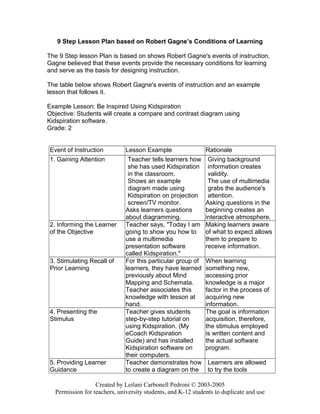
Event of Instruction Lesson Example Rationale
1. Gaining Attention Teacher tells learners how
she has used Kidspiration
in the classroom.
Shows an example
diagram made using
Kidspiration on projection
screen/TV monitor.
Asks learners questions
about diagramming.
Giving background
information creates
validity.
The use of multimedia
grabs the audience's
attention.
Asking questions in the
beginning creates an
interactive atmosphere.
2. Informing the Learner
of the Objective
Teacher says, "Today I am
going to show you how to
use a multimedia
presentation software
called Kidspiration."
Making learners aware
of what to expect allows
them to prepare to
receive information.
3. Stimulating Recall of
Prior Learning
For this particular group of
learners, they have learned
previously about Mind
Mapping and Schemata.
Teacher associates this
knowledge with lesson at
hand.
When learning
something new,
accessing prior
knowledge is a major
factor in the process of
acquiring new
information.
4. Presenting the
Stimulus
Teacher gives students
step-by-step tutorial on
using Kidspiration. (My
eCoach Kidspiration
Guide) and has installed
Kidspiration software on
their computers.
The goal is information
acquisition, therefore,
the stimulus employed
is written content and
the actual software
program.
5. Providing Learner
Guidance
Teacher demonstrates how
to create a diagram on the
Learners are allowed
to try the tools
Created by Leilani Carbonell Pedroni © 2003-2005
Permission for teachers, university students, and K-12 students to duplicate and use
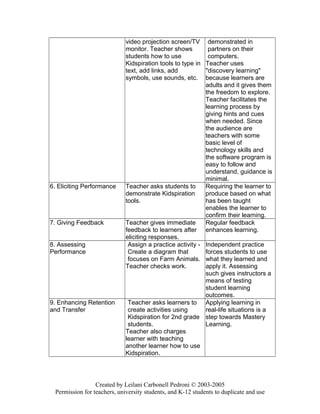
video projection screen/TV
monitor. Teacher shows
students how to use
Kidspiration tools to type in
text, add links, add
symbols, use sounds, etc.
demonstrated in
partners on their
computers.
Teacher uses
"discovery learning"
because learners are
adults and it gives them
the freedom to explore.
Teacher facilitates the
learning process by
giving hints and cues
when needed. Since
the audience are
teachers with some
basic level of
technology skills and
the software program is
easy to follow and
understand, guidance is
minimal.
6. Eliciting Performance Teacher asks students to
demonstrate Kidspiration
tools.
Requiring the learner to
produce based on what
has been taught
enables the learner to
confirm their learning.
7. Giving Feedback Teacher gives immediate
feedback to learners after
eliciting responses.
Regular feedback
enhances learning.
8. Assessing
Performance
Assign a practice activity -
Create a diagram that
focuses on Farm Animals.
Teacher checks work.
Independent practice
forces students to use
what they learned and
apply it. Assessing
such gives instructors a
means of testing
student learning
outcomes.
9. Enhancing Retention
and Transfer
Teacher asks learners to
create activities using
Kidspiration for 2nd grade
students.
Teacher also charges
learner with teaching
another learner how to use
Kidspiration.
Applying learning in
real-life situations is a
step towards Mastery
Learning.
Created by Leilani Carbonell Pedroni © 2003-2005
Permission for teachers, university students, and K-12 students to duplicate and use
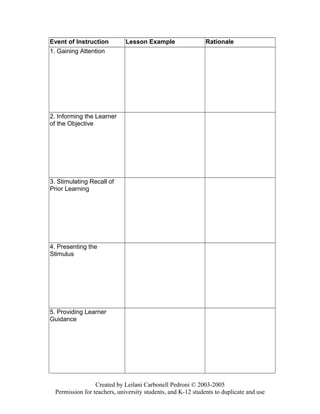
Event of Instruction Lesson Example Rationale
1. Gaining Attention
2. Informing the Learner
of the Objective
3. Stimulating Recall of
Prior Learning
4. Presenting the
Stimulus
5. Providing Learner
Guidance
Created by Leilani Carbonell Pedroni © 2003-2005
Permission for teachers, university students, and K-12 students to duplicate and use
6. Eliciting Performance
7. Giving Feedback
8. Assessing
Performance
9. Enhancing Retention
and Transfer
Created by Leilani Carbonell Pedroni © 2003-2005
Permission for teachers, university students, and K-12 students to duplicate and use

Gagne's 9 example and template[1]

  • 1.
    9 Step LessonPlan based on Robert Gagne’s Conditions of Learning The 9 Step lesson Plan is based on shows Robert Gagne's events of instruction. Gagne believed that these events provide the necessary conditions for learning and serve as the basis for designing instruction. The table below shows Robert Gagne's events of instruction and an example lesson that follows it. Example Lesson: Be Inspired Using Kidspiration Objective: Students will create a compare and contrast diagram using Kidspiration software. Grade: 2 Event of Instruction Lesson Example Rationale 1. Gaining Attention Teacher tells learners how she has used Kidspiration in the classroom. Shows an example diagram made using Kidspiration on projection screen/TV monitor. Asks learners questions about diagramming. Giving background information creates validity. The use of multimedia grabs the audience's attention. Asking questions in the beginning creates an interactive atmosphere. 2. Informing the Learner of the Objective Teacher says, "Today I am going to show you how to use a multimedia presentation software called Kidspiration." Making learners aware of what to expect allows them to prepare to receive information. 3. Stimulating Recall of Prior Learning For this particular group of learners, they have learned previously about Mind Mapping and Schemata. Teacher associates this knowledge with lesson at hand. When learning something new, accessing prior knowledge is a major factor in the process of acquiring new information. 4. Presenting the Stimulus Teacher gives students step-by-step tutorial on using Kidspiration. (My eCoach Kidspiration Guide) and has installed Kidspiration software on their computers. The goal is information acquisition, therefore, the stimulus employed is written content and the actual software program. 5. Providing Learner Guidance Teacher demonstrates how to create a diagram on the Learners are allowed to try the tools Created by Leilani Carbonell Pedroni © 2003-2005 Permission for teachers, university students, and K-12 students to duplicate and use
  • 2.
    video projection screen/TV monitor.Teacher shows students how to use Kidspiration tools to type in text, add links, add symbols, use sounds, etc. demonstrated in partners on their computers. Teacher uses "discovery learning" because learners are adults and it gives them the freedom to explore. Teacher facilitates the learning process by giving hints and cues when needed. Since the audience are teachers with some basic level of technology skills and the software program is easy to follow and understand, guidance is minimal. 6. Eliciting Performance Teacher asks students to demonstrate Kidspiration tools. Requiring the learner to produce based on what has been taught enables the learner to confirm their learning. 7. Giving Feedback Teacher gives immediate feedback to learners after eliciting responses. Regular feedback enhances learning. 8. Assessing Performance Assign a practice activity - Create a diagram that focuses on Farm Animals. Teacher checks work. Independent practice forces students to use what they learned and apply it. Assessing such gives instructors a means of testing student learning outcomes. 9. Enhancing Retention and Transfer Teacher asks learners to create activities using Kidspiration for 2nd grade students. Teacher also charges learner with teaching another learner how to use Kidspiration. Applying learning in real-life situations is a step towards Mastery Learning. Created by Leilani Carbonell Pedroni © 2003-2005 Permission for teachers, university students, and K-12 students to duplicate and use
  • 3.
    Event of InstructionLesson Example Rationale 1. Gaining Attention 2. Informing the Learner of the Objective 3. Stimulating Recall of Prior Learning 4. Presenting the Stimulus 5. Providing Learner Guidance Created by Leilani Carbonell Pedroni © 2003-2005 Permission for teachers, university students, and K-12 students to duplicate and use
  • 4.
    6. Eliciting Performance 7.Giving Feedback 8. Assessing Performance 9. Enhancing Retention and Transfer Created by Leilani Carbonell Pedroni © 2003-2005 Permission for teachers, university students, and K-12 students to duplicate and use