(.Net Framework 4.0)

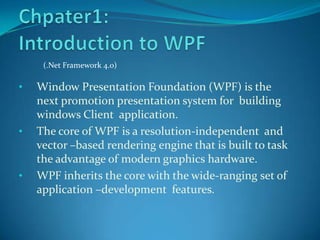
•   Window Presentation Foundation (WPF) is the
    next promotion presentation system for building
    windows Client application.
•   The core of WPF is a resolution-independent and
    vector –based rendering engine that is built to task
    the advantage of modern graphics hardware.
•   WPF inherits the core with the wide-ranging set of
    application –development features.
1.1 Programming with WPF
 Located in System.Windows name space, WPF is
  presented as subset of .Net Framwork types.
 It is familiar if you have experiences building
  application with .Net Framework: instantiate classes
  set properties ,call methods, and handle events in your
  favorite language such as C# or VB.Net
 WPF incorporates additional programming construct
  that improve properties and events : dependency
  properties and routed events for supporting WPF
  abilities and simplifying programming experiences
1.2 Markup and Code Behind
One of additional enhancements for Window Client
 application development is facility in development
 using both markup and code-behind. You generally use
 Extensible Application Markup Language (XAML)
 markup to implement the appearance of an
 application while using programming language (Code-
 behind) to implement its actions.
The advantages of separating appearance and behavior :

 Reducing the cost of development and maintenance

 Making more efficient in development

 Capability of using multiple design tools to implement
 and share XAML markup and target the requirements
 of application development contributor

 Simplification of globalization and localization for
 WPF application
Markup
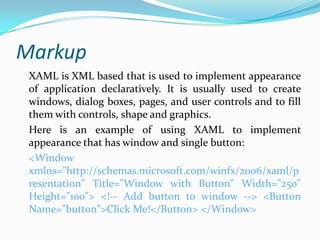
 XAML is XML based that is used to implement appearance
 of application declaratively. It is usually used to create
 windows, dialog boxes, pages, and user controls and to fill
 them with controls, shape and graphics.
 Here is an example of using XAML to implement
 appearance that has window and single button:
 <Window
 xmlns="http://schemas.microsoft.com/winfx/2006/xaml/p
 resentation" Title="Window with Button" Width="250"
 Height="100"> <!-- Add button to window --> <Button
 Name="button">Click Me!</Button> </Window>
Code-Behind
The main performance of an application is to realize the
 functionality that respond to user interactions
 incorporate handling events (for example clinking
 menu) and calling business logic and data access logic
 in response. In WPF, this behavior is generally
 implemented in code that is associated with markup.
 XAML
<Window
      xmlns=“http://schemas.microsoft.com/winfx/
           2006/xaml/presentation”
 xmlns:x=“ http://schemas.microsoft.com/winfx/2006/
           xaml”
 x:Class=“SDKSample.AWindow”
 Title=“Window with Button”
 Width=“250” Height=“100” >
 <!– Add button to window-->
 <Button Name=“button” Click=“button_Click”>
 Click Me!</Button>
 </Window>
using System.Windows;
namespace SDKSample
{
  public partial class Awindow:Window
  {
       public AWindow()
       {
       InitializeComponent();
       }
       void button_Click(object sender, RoutedEventArgs e)
       {
                MessageBox.Show(“Hello, WPF”);
       }
  }
}
Application
Beside the foundation of the WPF application
 development, WPF has broad features for generating
 user experiences with rich content. In order to reach
 this WPF provide types and services           that are
 collectively known as the application model. It support
 both standalone and browser-hosted applications.
 Standalone Application: you can use window class to
  create windows and dialog box that are access from
  menu bar and access bar.
 Browser-Hosted Application: or XAML browser
  applications (XBAPs), you can create page(s) and page
  function( Pagefunction-T) that you can navigate
  between using hyperlinks(Hyperlink classes).
 WPF offers the two following option for alternative
  navigation hosts: Frame (Hosting island of navigable
  content     in    either    pages     or    windows)
  NavigationWindow ( Hosting navigable content in an
  entire window)
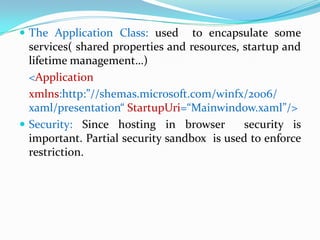
 The Application Class: used      to encapsulate some
  services( shared properties and resources, startup and
  lifetime management…)
  <Application
  xmlns:http:”//shemas.microsoft.com/winfx/2006/
  xaml/presentation“ StartupUri=“Mainwindow.xaml”/>
 Security: Since hosting in browser         security is
  important. Partial security sandbox is used to enforce
  restriction.
Controls
 Controls was built by user experience delivered by
  application model. In WPF control is a wide-ranging
  term applied to category of WPF classes hosted in
  both pages and window, have UI and implement some
  behavior.
 Some built-in WPF controls are: Button ( Button &
  RepeatButton) DataDisplay ( Datagrid, ListView and
  TreeView) etc.
Input and Commanding
To isolate user input actions from the code responding to
  those actions WPF provides a command system.
 Layout: Key requirement of any layout is to manage to
  change in window size and display settings. Instead of
  using your code , you can use WPF first
  class, extensible layout system.
 In addition to basis of relative positioning , layout
  system manages the negotiation between control to
  determine the layout.
Layout system is exposed to child control through base
  WPF classes. For common layout such as grids,
  stacking, and docking.
 <Window
 xmlns=“http://schemas.microsoft.com/winfx/2006/
      xaml/presentation”
 xmlns:x=“http://schemas.microsoft.com/winfx/2006/
      xaml”
 x:Class=“SDKSample.LayoutWindow”
 Title=“Layout with the DockPanel”          Height=“143”
 Width=“319”>
<DockPanel>
  <Textbox DockPanel.Dock=“Top”> Dock=“Top” </Textbox>
  <Textbox DockPanel.Dock=“Bottom”>Dock=“Bottom”
             </Textbox>
  <Textbox DockPanel.Dock=“Left”> Dock=“Left”</Textbox>
  <Textbox Background=“White”> This Textbox “fills” the
  remaining space .</Textbox>
</DockPanel>
Data Binding
 Because viewing and editing data are the feature of
  most applications, WPF already provided for by many
  technologies such as Microsoft SQL Server, ADO.Net.
 Two things that WPF involve are :
    1. Copying the data from managed object into control
    2.Ensuring changes related to using control are
    copied back to the managed object.
 The core unit of data binding engine is the Binding
    class
Graphics
The following benefits which introduced by WPF
  extensively, scalablely and flexibly :
 Resolution-independent and device-independent
  graphics
 Improved Precision
 Advanced Graphics and Animation Support
 Hardware accelaration
<Window
  xmlns="http://schemas.microsoft.com/winfx/2006/xaml/p
  resentation"
  xmlns:x="http://schemas.microsoft.com/winfx/2006/xaml"
  x:Class="SDKSample.EllipseEventHandlingWindow"
  Title="Click the Ellipse"> <Ellipse Name="clickableEllipse"
  Fill="Blue" MouseUp="clickableEllipse_MouseUp" />
  </Window>
C# Code
using System.Windows; // Window, MessageBox
using System.Windows.Input; // MouseButtonEventHandler
namespace SDKSample
{
public partial class EllipseEventHandlingWindow : Window {
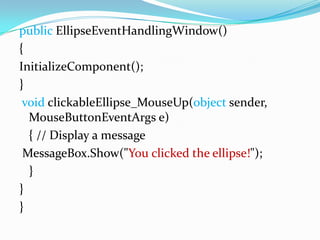
public EllipseEventHandlingWindow()
{
InitializeComponent();
}
 void clickableEllipse_MouseUp(object sender,
  MouseButtonEventArgs e)
  { // Display a message
 MessageBox.Show("You clicked the ellipse!");
  }
}
}
Animation
Animation support allow developers to make controls
 grow, shake , spin, and fade. You can animate most
 WPF classes even custom classes.
Media
Audiovisual media is the way of demonstrating rich
  content. WPF presents special support for images
  video and audio.
 Images popular for most application and WPF
  provides several methods to use them
 Video and Audio: by using the MediaElement which is
  capable of playing both audio and video flexibly.
XAML
<MediaElement
 Name=“myMediaElement”
 Source=“media/wpf.wmv”
 LoadedBehavior=“Manual”
 Width=“350” Height=“250”/>
Text and Typography
WPF offers the following feature in order to assist high
     quality text rendering:
   OpenType font support
   ClearType enhancement
   High performance that take advantages of hardware
             speeding up
   Integration of text with media, graphics, and animation
   International font support and fallback mechanisms.
Document
WPF has native support for working with three types of
 documents, fixed documents and XML Paper
 Specification (XPS) documents.
   Flow documents are designed to optimize viewing and
    readability by dynamically adjusting and reflowing
    content when window size and display setting change.
   Fixed Documents are intended for application that
    require a precise “what you see is what you get”
    presentation respecting to the printing.
   XPS Documents are open, cross-platform document
    format     that   is   designed     to facilitate   the
    creation, sharing, printing, and archiving of paginated
    document
Document
 WPF has native support for three types documents:
  flow documents, fixed documents and XML paper
  specification(XPS) documents. WPF also provides
  another services.
 Flow documents design to optimize viewing and
  readability by dynamically adjusting and reflowing
  content when window size and display setting change.
 Fixed document : “What You See is What You Get”
  , maintain the precise agreement of their content in
  device-independent manner.
 XPL docs built on WPF’s fixed document and
  described with an XML based schema.
 Annotations in WPF , an annotation system provided
  to support sticky note and highlights. They can be
  applied to document hosted in document viewer .
 Packaging : System.IO.Packaging APIs allow
  application to organize data content and resource into
  single portable, easy to distribute and easy to access
  ZIP documents.
 Printing : WPF support many enhanced print system
  control such as real-time installation, Dynamic
  discovery…etc
Customizing WPF application
 Content Model: the type and number of items can
  constitute the content of a control is referred to as the
  control ‘s content model.
 Trigger : XAML use it to implement application
  behavior
 Control Template : You can use it to change the
  appearance of the Control’s UI without affecting it
  content and behavior.
 Data Template: let you specify appearance of control’s
  content
 Style: enable developer and designer to standardize on
  particular appearance on their application. Style
  element is foundation of WPF’s strong type model.
 Resources: WPF support for UI resources to
  encapsulate these resources in a single location for
  reuse.
 Themes and Skin: WPF does not integrate directly
  with Window themes. Because WPF’s appearance
  defined by template it include one template for each of
  the well-known Window-Themes.
       Both themes and skin in WPF are defined using
  resource dictionary.
 Custom Controls: because the existing WPF control
 do not meet the requirement you can three WPF’s
 model to create a new control.
  1.   User Control Model: derived from UserControl
  2.   Control Model: derived from Control
  3.   Framework     Element     Model:    derived    from
       FrameworkElement
WPF Best Practices
With any development platform, WPF can be used in a
 variety ways to achieve the desired outcome. It also
 required user’s experience and meet the demand of
 the audience in general.

Chpater1

  • 1.
    (.Net Framework 4.0) • Window Presentation Foundation (WPF) is the next promotion presentation system for building windows Client application. • The core of WPF is a resolution-independent and vector –based rendering engine that is built to task the advantage of modern graphics hardware. • WPF inherits the core with the wide-ranging set of application –development features.
  • 2.
    1.1 Programming withWPF  Located in System.Windows name space, WPF is presented as subset of .Net Framwork types.  It is familiar if you have experiences building application with .Net Framework: instantiate classes set properties ,call methods, and handle events in your favorite language such as C# or VB.Net  WPF incorporates additional programming construct that improve properties and events : dependency properties and routed events for supporting WPF abilities and simplifying programming experiences
  • 3.
    1.2 Markup andCode Behind One of additional enhancements for Window Client application development is facility in development using both markup and code-behind. You generally use Extensible Application Markup Language (XAML) markup to implement the appearance of an application while using programming language (Code- behind) to implement its actions.
  • 4.
    The advantages ofseparating appearance and behavior :  Reducing the cost of development and maintenance  Making more efficient in development  Capability of using multiple design tools to implement and share XAML markup and target the requirements of application development contributor  Simplification of globalization and localization for WPF application
  • 5.
    Markup XAML isXML based that is used to implement appearance of application declaratively. It is usually used to create windows, dialog boxes, pages, and user controls and to fill them with controls, shape and graphics. Here is an example of using XAML to implement appearance that has window and single button: <Window xmlns="http://schemas.microsoft.com/winfx/2006/xaml/p resentation" Title="Window with Button" Width="250" Height="100"> <!-- Add button to window --> <Button Name="button">Click Me!</Button> </Window>
  • 6.
    Code-Behind The main performanceof an application is to realize the functionality that respond to user interactions incorporate handling events (for example clinking menu) and calling business logic and data access logic in response. In WPF, this behavior is generally implemented in code that is associated with markup. XAML
  • 7.
    <Window xmlns=“http://schemas.microsoft.com/winfx/ 2006/xaml/presentation” xmlns:x=“ http://schemas.microsoft.com/winfx/2006/ xaml” x:Class=“SDKSample.AWindow” Title=“Window with Button” Width=“250” Height=“100” > <!– Add button to window--> <Button Name=“button” Click=“button_Click”> Click Me!</Button> </Window>
  • 8.
    using System.Windows; namespace SDKSample { public partial class Awindow:Window { public AWindow() { InitializeComponent(); } void button_Click(object sender, RoutedEventArgs e) { MessageBox.Show(“Hello, WPF”); } } }
  • 9.
    Application Beside the foundationof the WPF application development, WPF has broad features for generating user experiences with rich content. In order to reach this WPF provide types and services that are collectively known as the application model. It support both standalone and browser-hosted applications.
  • 10.
     Standalone Application:you can use window class to create windows and dialog box that are access from menu bar and access bar.  Browser-Hosted Application: or XAML browser applications (XBAPs), you can create page(s) and page function( Pagefunction-T) that you can navigate between using hyperlinks(Hyperlink classes).  WPF offers the two following option for alternative navigation hosts: Frame (Hosting island of navigable content in either pages or windows) NavigationWindow ( Hosting navigable content in an entire window)
  • 11.
     The ApplicationClass: used to encapsulate some services( shared properties and resources, startup and lifetime management…) <Application xmlns:http:”//shemas.microsoft.com/winfx/2006/ xaml/presentation“ StartupUri=“Mainwindow.xaml”/>  Security: Since hosting in browser security is important. Partial security sandbox is used to enforce restriction.
  • 12.
    Controls  Controls wasbuilt by user experience delivered by application model. In WPF control is a wide-ranging term applied to category of WPF classes hosted in both pages and window, have UI and implement some behavior.  Some built-in WPF controls are: Button ( Button & RepeatButton) DataDisplay ( Datagrid, ListView and TreeView) etc.
  • 13.
    Input and Commanding Toisolate user input actions from the code responding to those actions WPF provides a command system.  Layout: Key requirement of any layout is to manage to change in window size and display settings. Instead of using your code , you can use WPF first class, extensible layout system.  In addition to basis of relative positioning , layout system manages the negotiation between control to determine the layout.
  • 14.
    Layout system isexposed to child control through base WPF classes. For common layout such as grids, stacking, and docking. <Window xmlns=“http://schemas.microsoft.com/winfx/2006/ xaml/presentation” xmlns:x=“http://schemas.microsoft.com/winfx/2006/ xaml” x:Class=“SDKSample.LayoutWindow” Title=“Layout with the DockPanel” Height=“143” Width=“319”>
  • 15.
    <DockPanel> <TextboxDockPanel.Dock=“Top”> Dock=“Top” </Textbox> <Textbox DockPanel.Dock=“Bottom”>Dock=“Bottom” </Textbox> <Textbox DockPanel.Dock=“Left”> Dock=“Left”</Textbox> <Textbox Background=“White”> This Textbox “fills” the remaining space .</Textbox> </DockPanel>
  • 16.
    Data Binding  Becauseviewing and editing data are the feature of most applications, WPF already provided for by many technologies such as Microsoft SQL Server, ADO.Net.  Two things that WPF involve are : 1. Copying the data from managed object into control 2.Ensuring changes related to using control are copied back to the managed object.  The core unit of data binding engine is the Binding class
  • 17.
    Graphics The following benefitswhich introduced by WPF extensively, scalablely and flexibly :  Resolution-independent and device-independent graphics  Improved Precision  Advanced Graphics and Animation Support  Hardware accelaration
  • 18.
    <Window xmlns="http://schemas.microsoft.com/winfx/2006/xaml/p resentation" xmlns:x="http://schemas.microsoft.com/winfx/2006/xaml" x:Class="SDKSample.EllipseEventHandlingWindow" Title="Click the Ellipse"> <Ellipse Name="clickableEllipse" Fill="Blue" MouseUp="clickableEllipse_MouseUp" /> </Window> C# Code using System.Windows; // Window, MessageBox using System.Windows.Input; // MouseButtonEventHandler namespace SDKSample { public partial class EllipseEventHandlingWindow : Window {
  • 19.
    public EllipseEventHandlingWindow() { InitializeComponent(); } voidclickableEllipse_MouseUp(object sender, MouseButtonEventArgs e) { // Display a message MessageBox.Show("You clicked the ellipse!"); } } }
  • 20.
    Animation Animation support allowdevelopers to make controls grow, shake , spin, and fade. You can animate most WPF classes even custom classes.
  • 21.
    Media Audiovisual media isthe way of demonstrating rich content. WPF presents special support for images video and audio.  Images popular for most application and WPF provides several methods to use them  Video and Audio: by using the MediaElement which is capable of playing both audio and video flexibly.
  • 22.
    XAML <MediaElement Name=“myMediaElement” Source=“media/wpf.wmv” LoadedBehavior=“Manual” Width=“350” Height=“250”/>
  • 23.
    Text and Typography WPFoffers the following feature in order to assist high quality text rendering:  OpenType font support  ClearType enhancement  High performance that take advantages of hardware speeding up  Integration of text with media, graphics, and animation  International font support and fallback mechanisms.
  • 24.
    Document WPF has nativesupport for working with three types of documents, fixed documents and XML Paper Specification (XPS) documents.  Flow documents are designed to optimize viewing and readability by dynamically adjusting and reflowing content when window size and display setting change.  Fixed Documents are intended for application that require a precise “what you see is what you get” presentation respecting to the printing.  XPS Documents are open, cross-platform document format that is designed to facilitate the creation, sharing, printing, and archiving of paginated document
  • 25.
    Document  WPF hasnative support for three types documents: flow documents, fixed documents and XML paper specification(XPS) documents. WPF also provides another services.  Flow documents design to optimize viewing and readability by dynamically adjusting and reflowing content when window size and display setting change.  Fixed document : “What You See is What You Get” , maintain the precise agreement of their content in device-independent manner.
  • 26.
     XPL docsbuilt on WPF’s fixed document and described with an XML based schema.  Annotations in WPF , an annotation system provided to support sticky note and highlights. They can be applied to document hosted in document viewer .  Packaging : System.IO.Packaging APIs allow application to organize data content and resource into single portable, easy to distribute and easy to access ZIP documents.  Printing : WPF support many enhanced print system control such as real-time installation, Dynamic discovery…etc
  • 27.
    Customizing WPF application Content Model: the type and number of items can constitute the content of a control is referred to as the control ‘s content model.  Trigger : XAML use it to implement application behavior  Control Template : You can use it to change the appearance of the Control’s UI without affecting it content and behavior.  Data Template: let you specify appearance of control’s content
  • 28.
     Style: enabledeveloper and designer to standardize on particular appearance on their application. Style element is foundation of WPF’s strong type model.  Resources: WPF support for UI resources to encapsulate these resources in a single location for reuse.  Themes and Skin: WPF does not integrate directly with Window themes. Because WPF’s appearance defined by template it include one template for each of the well-known Window-Themes. Both themes and skin in WPF are defined using resource dictionary.
  • 29.
     Custom Controls:because the existing WPF control do not meet the requirement you can three WPF’s model to create a new control. 1. User Control Model: derived from UserControl 2. Control Model: derived from Control 3. Framework Element Model: derived from FrameworkElement
  • 30.
    WPF Best Practices Withany development platform, WPF can be used in a variety ways to achieve the desired outcome. It also required user’s experience and meet the demand of the audience in general.