Dave Bost Developer Evangelist http://davebost.com/blog
http://thirstydeveloper.com “ Looking at someone’s code, but with audio”
Essential concepts of Windows Presentation Foundation How to create a data-bound, service based WPF application
User Interface development .NET language VB C# Familiar with XML Visual Studio 2008 Level 100
Discover the top WPF benefits  Creating a WPF application XAML Layout Styles Using services and databases Data Templates User Controls Control Templates
Composable Elements Flexible layout engine Powerful data-binding architecture Impressive print, font and document capabilities
Lookless controls Styles and Templates Full integration of all UI disciplines
 
Manhattan Associates: Integrated Logistics Solutions (ILS) Supply Chain Optimization Status: Shipping  Info: http://www.manh.com/ils_net/
SilverWare SilverWare  Avrio is a powerful hospitality industry solution with a highly intuitive GUI that makes it one of the most accessible P.O.S. solutions that restaurateurs and staff can use. Status: Shipping
Eikos Partners: OpenTick  Opentick is an open-source data provider that delivers free real-time  and historical market data for trading systems and trading platforms. Status: Shipping
Asahiyama Zoo  Portal for the virtual exploration of one of Japan’s largest zoos. Status: Shipping  Live Site: http://www.asahiyamazoo-aict.jp/asahiyamazoo.xbap
Yahoo Next-generation instant messaging client Status: Public Beta
Scripps Healthcare Allowing cancer researchers to collaborate in the search for a cure Status: Late Beta (Shown at Windows Vista BV Launch) PR:  .NET Developer’s Journal
Electric Rain STANDOUT High-end tool for delivering visually stunning presentations Status: Beta
Discover the top WPF benefits  Creating a WPF application XAML Layout Styles Using services and databases Data Templates User Controls Control Templates
Create WPF application with Visual Studio 2008 Expression Blend A WPF application is managed code It runs on the .NET 2.0 runtime Some classes similar to the WinForms model Application class  Has Window class instead of Form class Use .Show() or .ShowDialog to display  Page class for forward/back navigation Host WinForms controls on WPF window Host WPF controls on Winform forms
 
Discover the top WPF benefits  Creating a WPF application XAML Layout Styles Using services and databases Data Templates User Controls Control Templates
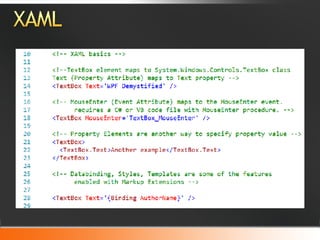
XAML is a declarative programming language Tool friendly: Easy to persist UI structure in XAML Expression Blend, ZAM 3D, Visual Studio XAML is parsed by dedicated parser Parser converts the tree of XML into a instances of  objects Most .NET types can be stored in XAML tree Most likely that these will be Visual items WPF, Silverlight, XPS & Silverlight use XAML Silverlight is a sub-set of WPF XAML
 
 
Discover the top WPF benefits  Creating a WPF application XAML Layout Styles Using services and databases Data Templates User Controls Control Templates
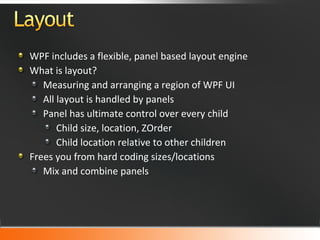
WPF includes a flexible, panel based layout engine What is layout? Measuring and arranging a region of WPF UI All layout is handled by panels Panel has ultimate control over every child Child size, location, ZOrder Child location relative to other children Frees you from hard coding sizes/locations Mix and combine panels
Child communicates with host panel via Attached properties Inform their containing panel of desired layout Example:  Grid.Column = "3" Each panel handles one type of layout Grid: Create rows/columns for children Canvas:  Absolute positioning StackPanel:  Children stacked horizontal/vertical DockPanel: Attach child to side of panel WrapPanel:  Stacked, with multi children per line Panel model is extensible with your own panels
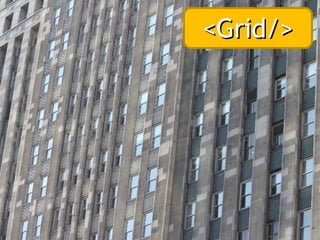
<Grid/>
<Canvas/>
<StackPanel/>
<StackPanel/>
<DockPanel/> by lee.mccain.photorama http://flickr.com/photos/mccain007/2218878568/
<WrapPanel/>
 
Discover the top WPF benefits  Creating a WPF application XAML Layout Styles Using services and databases Data Templates User Controls Control Templates
Styles provide a convenient way to itemize a set of property values for an element type Example: Set font attributes for all textboxes To define a Style Styles are defined in a Resource element Any element in XAML can have a resource section Usual locations are Page, Window and Application level Every Style in resource must have a x:Key value Use TargetType to limit style to one element type
To apply a Style to an Element Reference the Style by setting the Style attribute Use the Markup Extension syntax '{}'
 
Discover the top WPF benefits  Creating a WPF application XAML Layout Styles Using services and databases Data Templates User Controls Control Templates
Accessing data from WPF XML Databases Ado.NET Linq to SQL Linq to Entities Entity Framework Invoking Services from WPF WCF Soap, REST, WS*
ADO.NET Data Service Code name Astoria Data Services Exposes SQL data over HTTP via REST endpoints Examples: http://localhost/CohoDS.svc/Wines … Northwind.svc/Customers?$filter=contains(City,'Kent') Authoring the Data Service Website ADO.NET EntityData model ADO.NET Data Service Consuming the DataService Generate proxy with DataSvcUtil.exe Add proxy code to WPF application
 
Discover the top WPF benefits  Creating a WPF application XAML Layout Styles Using services and databases Data Templates User Controls Control Templates
Binding overview WPF synchronizes a data source and data target Add binding to target element with {Binding ***} Change notification WPF dependency system updates target upon source changes provided: Source must implement change notification Via IPropertyNotifyChanged and other mechanisms Single binding Bind a target to a single property on source Example:  TextBlock.Text to Customer.Age List binding Bind a target to a array, collection etc. Example:  Treeview. ItemsSource to XML source
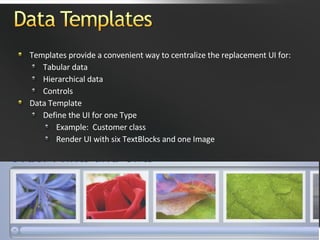
Templates provide a convenient way to centralize the replacement UI for: Tabular data Hierarchical data Controls Data Template Define the UI for one Type Example:  Customer class Render UI with six TextBlocks and one Image
 
Discover the top WPF benefits  Creating a WPF application XAML Layout Styles Using services and databases Data Templates User Controls Control Templates
Custom elements Less need for custom elements in WPF First consider getting custom look via Composed UI Styles Templates If you must create custom element choose base: Existing control Control UserControl
User control benefits Simple Easy to compose sub-elements into new class Easily add custom element to UI tree Control library author Create custom User Control Compiled into assembly Control consumer Add reference to assembly Bring your namespace into scope with xmlns attribute
 
Discover the top WPF benefits  Creating a WPF application XAML Layout Styles Using services and databases Data Templates User Controls Control Templates
All controls in WPF are lookless Each has a default UI template We can replace default template with our own control template Any valid UI element can be part of template Templates also support binding Templates do not change behavior of element
 
WPF is a rich UI programming framework Since WPF is managed code, working with .NET APIs is easy and familiar Core concept is the composable UI model Create UI out of any valid WPF element Mix and merge elements  Formalize these replacement parts with Styles and Templates
Visit MSDN at   msdn.microsoft.com Visit the URL below for additional  information http://windowsclient.net/   Virtual Labs http://msdn.microsoft.com/virtuallabs MIX University http://visitmix.com/university
For the latest titles, visit www.microsoft.com/learning/books/devtools
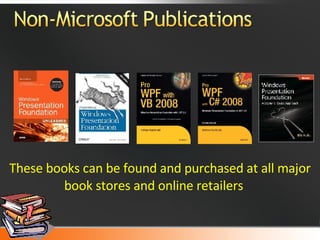
These books can be found and purchased at all major book stores and online retailers
For training information and availability www.microsoft.com/learning Course ID Title 6460A Windows Presentation Foundation
Are you ready to take your career as a developer to the next level? Looking for a learning experience that is designed for you? Join MSDN Ramp Up and Summit Your Career! MSDN  Ramp Up  is your online source that provides free training and technical resources to help take your development skills to the next level. Step-by-Step training plans to build your development skills. Premium technical content created by expert developers for developers. Access to valuable online e-learning, e-references, and virtual labs.  50% discount on select certification exams and 30% discount on  Microsoft Press training kits. Join Ramp Up for free today! Go to:   http://msdn.microsoft.com/rampup
Dave Bost [email_address] thank you! http://davebost.com http://twitter.com/davebost
© 2007 Microsoft Corporation. All rights reserved. Microsoft, Windows, Windows Vista and other product names are or may be registered trademarks and/or trademarks in the U.S. and/or other countries. The information herein is for informational purposes only and represents the current view of Microsoft Corporation as of the date of this presentation.  Because Microsoft must respond to changing market conditions, it should not be interpreted to be a commitment on the part of Microsoft, and Microsoft cannot guarantee the accuracy of any information provided after the date of this presentation.  MICROSOFT MAKES NO WARRANTIES, EXPRESS, IMPLIED OR STATUTORY, AS TO THE INFORMATION IN THIS PRESENTATION.

MSDN Unleashed: WPF Demystified

  • 1.
    Dave Bost DeveloperEvangelist http://davebost.com/blog
  • 2.
    http://thirstydeveloper.com “ Lookingat someone’s code, but with audio”
  • 3.
    Essential concepts ofWindows Presentation Foundation How to create a data-bound, service based WPF application
  • 4.
    User Interface development.NET language VB C# Familiar with XML Visual Studio 2008 Level 100
  • 5.
    Discover the topWPF benefits Creating a WPF application XAML Layout Styles Using services and databases Data Templates User Controls Control Templates
  • 6.
    Composable Elements Flexiblelayout engine Powerful data-binding architecture Impressive print, font and document capabilities
  • 7.
    Lookless controls Stylesand Templates Full integration of all UI disciplines
  • 8.
  • 9.
    Manhattan Associates: IntegratedLogistics Solutions (ILS) Supply Chain Optimization Status: Shipping Info: http://www.manh.com/ils_net/
  • 10.
    SilverWare SilverWare Avrio is a powerful hospitality industry solution with a highly intuitive GUI that makes it one of the most accessible P.O.S. solutions that restaurateurs and staff can use. Status: Shipping
  • 11.
    Eikos Partners: OpenTick Opentick is an open-source data provider that delivers free real-time and historical market data for trading systems and trading platforms. Status: Shipping
  • 12.
    Asahiyama Zoo Portal for the virtual exploration of one of Japan’s largest zoos. Status: Shipping Live Site: http://www.asahiyamazoo-aict.jp/asahiyamazoo.xbap
  • 13.
    Yahoo Next-generation instantmessaging client Status: Public Beta
  • 14.
    Scripps Healthcare Allowingcancer researchers to collaborate in the search for a cure Status: Late Beta (Shown at Windows Vista BV Launch) PR: .NET Developer’s Journal
  • 15.
    Electric Rain STANDOUTHigh-end tool for delivering visually stunning presentations Status: Beta
  • 16.
    Discover the topWPF benefits Creating a WPF application XAML Layout Styles Using services and databases Data Templates User Controls Control Templates
  • 17.
    Create WPF applicationwith Visual Studio 2008 Expression Blend A WPF application is managed code It runs on the .NET 2.0 runtime Some classes similar to the WinForms model Application class Has Window class instead of Form class Use .Show() or .ShowDialog to display Page class for forward/back navigation Host WinForms controls on WPF window Host WPF controls on Winform forms
  • 18.
  • 19.
    Discover the topWPF benefits Creating a WPF application XAML Layout Styles Using services and databases Data Templates User Controls Control Templates
  • 20.
    XAML is adeclarative programming language Tool friendly: Easy to persist UI structure in XAML Expression Blend, ZAM 3D, Visual Studio XAML is parsed by dedicated parser Parser converts the tree of XML into a instances of objects Most .NET types can be stored in XAML tree Most likely that these will be Visual items WPF, Silverlight, XPS & Silverlight use XAML Silverlight is a sub-set of WPF XAML
  • 21.
  • 22.
  • 23.
    Discover the topWPF benefits Creating a WPF application XAML Layout Styles Using services and databases Data Templates User Controls Control Templates
  • 24.
    WPF includes aflexible, panel based layout engine What is layout? Measuring and arranging a region of WPF UI All layout is handled by panels Panel has ultimate control over every child Child size, location, ZOrder Child location relative to other children Frees you from hard coding sizes/locations Mix and combine panels
  • 25.
    Child communicates withhost panel via Attached properties Inform their containing panel of desired layout Example: Grid.Column = &quot;3&quot; Each panel handles one type of layout Grid: Create rows/columns for children Canvas: Absolute positioning StackPanel: Children stacked horizontal/vertical DockPanel: Attach child to side of panel WrapPanel: Stacked, with multi children per line Panel model is extensible with your own panels
  • 26.
  • 27.
  • 28.
  • 29.
  • 30.
    <DockPanel/> by lee.mccain.photoramahttp://flickr.com/photos/mccain007/2218878568/
  • 31.
  • 32.
  • 33.
    Discover the topWPF benefits Creating a WPF application XAML Layout Styles Using services and databases Data Templates User Controls Control Templates
  • 34.
    Styles provide aconvenient way to itemize a set of property values for an element type Example: Set font attributes for all textboxes To define a Style Styles are defined in a Resource element Any element in XAML can have a resource section Usual locations are Page, Window and Application level Every Style in resource must have a x:Key value Use TargetType to limit style to one element type
  • 35.
    To apply aStyle to an Element Reference the Style by setting the Style attribute Use the Markup Extension syntax '{}'
  • 36.
  • 37.
    Discover the topWPF benefits Creating a WPF application XAML Layout Styles Using services and databases Data Templates User Controls Control Templates
  • 38.
    Accessing data fromWPF XML Databases Ado.NET Linq to SQL Linq to Entities Entity Framework Invoking Services from WPF WCF Soap, REST, WS*
  • 39.
    ADO.NET Data ServiceCode name Astoria Data Services Exposes SQL data over HTTP via REST endpoints Examples: http://localhost/CohoDS.svc/Wines … Northwind.svc/Customers?$filter=contains(City,'Kent') Authoring the Data Service Website ADO.NET EntityData model ADO.NET Data Service Consuming the DataService Generate proxy with DataSvcUtil.exe Add proxy code to WPF application
  • 40.
  • 41.
    Discover the topWPF benefits Creating a WPF application XAML Layout Styles Using services and databases Data Templates User Controls Control Templates
  • 42.
    Binding overview WPFsynchronizes a data source and data target Add binding to target element with {Binding ***} Change notification WPF dependency system updates target upon source changes provided: Source must implement change notification Via IPropertyNotifyChanged and other mechanisms Single binding Bind a target to a single property on source Example: TextBlock.Text to Customer.Age List binding Bind a target to a array, collection etc. Example: Treeview. ItemsSource to XML source
  • 43.
    Templates provide aconvenient way to centralize the replacement UI for: Tabular data Hierarchical data Controls Data Template Define the UI for one Type Example: Customer class Render UI with six TextBlocks and one Image
  • 44.
  • 45.
    Discover the topWPF benefits Creating a WPF application XAML Layout Styles Using services and databases Data Templates User Controls Control Templates
  • 46.
    Custom elements Lessneed for custom elements in WPF First consider getting custom look via Composed UI Styles Templates If you must create custom element choose base: Existing control Control UserControl
  • 47.
    User control benefitsSimple Easy to compose sub-elements into new class Easily add custom element to UI tree Control library author Create custom User Control Compiled into assembly Control consumer Add reference to assembly Bring your namespace into scope with xmlns attribute
  • 48.
  • 49.
    Discover the topWPF benefits Creating a WPF application XAML Layout Styles Using services and databases Data Templates User Controls Control Templates
  • 50.
    All controls inWPF are lookless Each has a default UI template We can replace default template with our own control template Any valid UI element can be part of template Templates also support binding Templates do not change behavior of element
  • 51.
  • 52.
    WPF is arich UI programming framework Since WPF is managed code, working with .NET APIs is easy and familiar Core concept is the composable UI model Create UI out of any valid WPF element Mix and merge elements Formalize these replacement parts with Styles and Templates
  • 53.
    Visit MSDN at msdn.microsoft.com Visit the URL below for additional information http://windowsclient.net/ Virtual Labs http://msdn.microsoft.com/virtuallabs MIX University http://visitmix.com/university
  • 54.
    For the latesttitles, visit www.microsoft.com/learning/books/devtools
  • 55.
    These books canbe found and purchased at all major book stores and online retailers
  • 56.
    For training informationand availability www.microsoft.com/learning Course ID Title 6460A Windows Presentation Foundation
  • 57.
    Are you readyto take your career as a developer to the next level? Looking for a learning experience that is designed for you? Join MSDN Ramp Up and Summit Your Career! MSDN Ramp Up is your online source that provides free training and technical resources to help take your development skills to the next level. Step-by-Step training plans to build your development skills. Premium technical content created by expert developers for developers. Access to valuable online e-learning, e-references, and virtual labs. 50% discount on select certification exams and 30% discount on Microsoft Press training kits. Join Ramp Up for free today! Go to: http://msdn.microsoft.com/rampup
  • 58.
    Dave Bost [email_address]thank you! http://davebost.com http://twitter.com/davebost
  • 59.
    © 2007 MicrosoftCorporation. All rights reserved. Microsoft, Windows, Windows Vista and other product names are or may be registered trademarks and/or trademarks in the U.S. and/or other countries. The information herein is for informational purposes only and represents the current view of Microsoft Corporation as of the date of this presentation. Because Microsoft must respond to changing market conditions, it should not be interpreted to be a commitment on the part of Microsoft, and Microsoft cannot guarantee the accuracy of any information provided after the date of this presentation. MICROSOFT MAKES NO WARRANTIES, EXPRESS, IMPLIED OR STATUTORY, AS TO THE INFORMATION IN THIS PRESENTATION.

Editor's Notes

  • #2 06/05/09 10:46 © 2007 Microsoft Corporation. All rights reserved. Microsoft, Windows, Windows Vista and other product names are or may be registered trademarks and/or trademarks in the U.S. and/or other countries. The information herein is for informational purposes only and represents the current view of Microsoft Corporation as of the date of this presentation. Because Microsoft must respond to changing market conditions, it should not be interpreted to be a commitment on the part of Microsoft, and Microsoft cannot guarantee the accuracy of any information provided after the date of this presentation. MICROSOFT MAKES NO WARRANTIES, EXPRESS, IMPLIED OR STATUTORY, AS TO THE INFORMATION IN THIS PRESENTATION.