
© 2022 Neo4j, Inc. All rights reserved.
Full-Stack Visualization:
Build a React App with a Sankey
Diagram
Eric Monk,
Principal Solutions Engineer
© 2022 Neo4j, Inc. All rights reserved.
2
Full Stack Viz
w/Sankey?
© 2022 Neo4j, Inc. All rights reserved.
3
© 2022 Neo4j, Inc. All rights reserved.
4
We're going to build this
© 2022 Neo4j, Inc. All rights reserved.
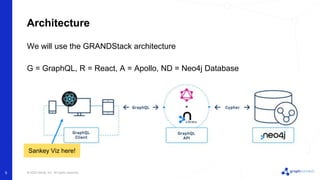
We will use the GRANDStack architecture
G = GraphQL, R = React, A = Apollo, ND = Neo4j Database
Architecture
5
Sankey Viz here!
© 2022 Neo4j, Inc. All rights reserved.
Agenda
• React (15 min)
• Sankey (15 min)
• Neo4j + Data (15 min)
• GraphQL (10 min)
• Putting it all together (20 min)
• Help/Wrap-up
6
© 2022 Neo4j, Inc. All rights reserved.
7
React
© 2022 Neo4j, Inc. All rights reserved.
Architecture Focus Area
8
We are here
© 2022 Neo4j, Inc. All rights reserved.
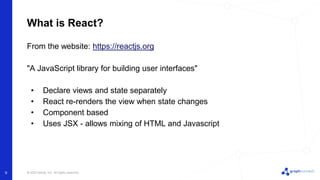
What is React?
From the website: https://reactjs.org
"A JavaScript library for building user interfaces"
• Declare views and state separately
• React re-renders the view when state changes
• Component based
• Uses JSX - allows mixing of HTML and Javascript
9
© 2022 Neo4j, Inc. All rights reserved.
React Popularity
10
https://www.npmtrends.com/angular-vs-react-vs-vue
Most popular Javascript
UI Framework
© 2022 Neo4j, Inc. All rights reserved.
Getting Started with React
Use Create React App
• https://reactjs.org/docs/create-a-new-react-app.html#create-react-app
• Prerequisites
◦ Node >= 14.0.0 and npm >= 5.6
◦ https://nodejs.org/en/download/
• Run this command:
11
npx create-react-app sankey-demo
© 2022 Neo4j, Inc. All rights reserved.
Create React App Install Success
12
Success! Created sankey-demo at
/Users/ericmonk/neo/projects/solutions/graph_connect_2022/build_a_sankey/react
/sankey-demo
Inside that directory, you can run several commands:
npm start
Starts the development server.
We suggest that you begin by typing:
cd sankey-demo
npm start
Happy hacking!
© 2022 Neo4j, Inc. All rights reserved.
13
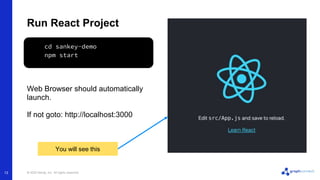
Run React Project
Web Browser should automatically
launch.
If not goto: http://localhost:3000
cd sankey-demo
npm start
You will see this
© 2022 Neo4j, Inc. All rights reserved.
Examine code
14
In code editor look at:
• package.json
◦ dependencies
◦ scripts
• public/index.html
• src
◦ index.js
◦ App.js
© 2022 Neo4j, Inc. All rights reserved.
Exercise 1: Getting Started with React
Prerequisites
• Node >= 14.0.0 and npm >= 5.6
• https://nodejs.org/en/download/
Instructions
• Open a Terminal window
• Pick a directory to work in
• Run commands:
15
npx create-react-app sankey-demo
cd sankey-demo
npm start
Exercise
© 2022 Neo4j, Inc. All rights reserved.
Exercise 2: Hello World
Instructions
• Create a folder under /src called /components
• Create a file called Hello.js under /components
Hello.js
16
import React, { useState } from "react";
export function Hello (props) {
const [name, setName] = useState('Eric');
return (
<h1>Hello, {name}</h1>
)
}
Exercise
Use your own name
© 2022 Neo4j, Inc. All rights reserved.
Exercise 2: Hello World (continued)
Modify App.js
• Add the import statement below
• Replace the <header> content with the <Hello/> tag
17
import { Hello } from './components/Hello';
function App() {
...
<header className="App-header">
<Hello/>
</header>
Exercise
Here and here
© 2022 Neo4j, Inc. All rights reserved.
18
Sankey
© 2022 Neo4j, Inc. All rights reserved.
Architecture Focus Area
19
We are still here
© 2022 Neo4j, Inc. All rights reserved.
What is a Sankey diagram?
20
Sankey diagrams are a type of flow
diagram in which the width of the arrows
is proportional to the flow rate.
Useful in graph visualizations to show the
volume of flow between a set of nodes
(money, traffic, amounts, …)
Fun fact: Named after Irish Captain
Matthew Henry Phineas Riall Sankey
showing the energy efficiency of a steam
engine
(source: https://en.wikipedia.org/wiki/Sankey_diagram)
© 2022 Neo4j, Inc. All rights reserved.
Charting Library
21
We will use React Google Charts
Google Charts provides a comprehensive charting library including a Sankey
diagram
• https://developers.google.com/chart/interactive/docs/reference
React Google Charts puts a React wrapper around Google charts
• Easier to use in React
• https://www.react-google-charts.com/
© 2022 Neo4j, Inc. All rights reserved.
Exercise 3: Integrate Sankey
22
Instructions
• Stop the app and Install:
npm install --save react-google-charts
Exercise
• Create a file called Sankey.js under /components
Sankey.js
import React from "react";
import { Chart } from "react-google-charts";
// ...continued on next page...
© 2022 Neo4j, Inc. All rights reserved.
Exercise 3: Integrate Sankey (continued)
23
Exercise
export const data = [
["From", "To", "Weight"],
["A", "X", 5],
["A", "Y", 7],
["A", "Z", 6],
["B", "X", 2],
["B", "Y", 9],
["B", "Z", 4],
["X", "W", 5],
["X", "W", 7],
["W", "Y", 1],
["W", "Z", 9],
];
// ...continued on next page...
© 2022 Neo4j, Inc. All rights reserved.
Exercise 3: Integrate Sankey (continued)
24
Exercise
export const options = {};
export function Sankey(props) {
return (
<Chart
chartType="Sankey"
width="98%"
height="300px"
data={data}
options={options}
/>
);
}
© 2022 Neo4j, Inc. All rights reserved.
Exercise 3: Integrate Sankey (continued)
Modify App.js
• Add the import statement below
• Replace the <header> content with the <Hello/> tag
25
import { Sankey } from './components/Sankey;
function App() {
...
<header className="App-header">
<Sankey/>
</header>
Exercise
Here and here
npm start
Relaunch the app
© 2022 Neo4j, Inc. All rights reserved.
Exercise 3: Integrate Sankey (continued)
Your app should now look like:
26
Exercise
© 2022 Neo4j, Inc. All rights reserved.
Next Steps
27
We passed hard-coded data into the Sankey
We want to make this dynamic and stateful with useState
const [sankeyData, setSankeyData] = useState(data);
<Chart
...
data={sankeyData}
options={options}
/>
We need to update Chart to use sankeyData
Change from data to
sankeyData
© 2022 Neo4j, Inc. All rights reserved.
Next Steps (continued)
28
We will define another sample data set called data2
We will add a button
<button onClick={() => updateSankeyData()}>Update Sankey</button>
const updateSankeyData = () => {
setSankeyData(data2);
}
When clicked, it will call setSankeyData to update the state
Updates sankeyData
to data2
© 2022 Neo4j, Inc. All rights reserved.
Exercise 4: Stateful Sankey
29
Exercise
Follow steps in exercise4/exercise4.md
Clicking Update
Sankey will refresh the
display
© 2022 Neo4j, Inc. All rights reserved.
30
Neo4j + Data
© 2022 Neo4j, Inc. All rights reserved.
Architecture Focus Area
31
We are here
© 2022 Neo4j, Inc. All rights reserved.
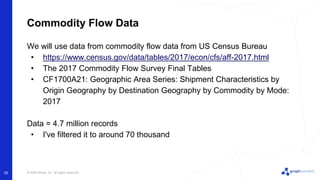
Commodity Flow Data
32
We will use data from commodity flow data from US Census Bureau
• https://www.census.gov/data/tables/2017/econ/cfs/aff-2017.html
• The 2017 Commodity Flow Survey Final Tables
• CF1700A21: Geographic Area Series: Shipment Characteristics by
Origin Geography by Destination Geography by Commodity by Mode:
2017
Data = 4.7 million records
• I've filtered it to around 70 thousand
© 2022 Neo4j, Inc. All rights reserved.
Commodity Flow Data - Example Data
33
Commodity
Type
Source Destination
Mode of
Transport
Tons
(thousands)
© 2022 Neo4j, Inc. All rights reserved.
Data Model
34
Will hold stats
values like Dollar
Value, Tons
© 2022 Neo4j, Inc. All rights reserved.
Sample Graph
35
MATCH p1=(cs:CommodityStat)-[:COMMODITY]->(c), p2=(cs)-[:BY]->(mode),
p3=(senderType:GeoType)<-[:TYPE]-(sender:Geo)-[:SENT]->(cs)-[:TO]->
(dest:Geo)-[:TYPE]->(destType:GeoType)
RETURN p1, p2, p3 LIMIT 3
© 2022 Neo4j, Inc. All rights reserved.
Need to Query data in format Sankey needs
36
Sankey needs data in form of
[
["A", "X", 5],
["A", "Y", 7],
...
]
An array of 3-element arrays. Where each 3 element array is:
• First element: start node/item
• Second element: destination node/item
• Third element: quantity value between start/destination
© 2022 Neo4j, Inc. All rights reserved.
Query to return sender, dest, value
37
WITH {
geotype: 'Division',
commodityType: '02'
} as params
MATCH (stat:CommodityStat)-[:COMMODITY]->(c:Commodity {id: params.commodityType}), (geoType:GeoType
{name:params.geotype})
MATCH (geoType)<-[:TYPE]-(sender:Geo)-[:SENT]->(stat:CommodityStat)-[:TO]->(dest:Geo)-[:TYPE]-
>(geoType)
WITH sender.name as sender, sum(stat.tonsInThousands) as tons1000, dest.name as dest
WHERE tons1000 > 0
RETURN sender, tons1000, dest
© 2022 Neo4j, Inc. All rights reserved.
Exercise 5: Create Database and Load Data
38
Exercise
Follow steps in exercise5/exercise5.md
© 2022 Neo4j, Inc. All rights reserved.
39
GraphQL
© 2022 Neo4j, Inc. All rights reserved.
Architecture Focus Area
40
We are here
…and here
© 2022 Neo4j, Inc. All rights reserved.
What is GraphQL?
GraphQL is a query language for APIs and a runtime for fulfilling those queries
with your existing data (from https://graphql.org/)
• Describe your data
• Ask for what you want
• Get exactly what you ask for
Describe data using a schema and operations using resolvers.
• Schema - describes the data
• Resolvers - indicates how to fetch the data
41
© 2022 Neo4j, Inc. All rights reserved.
Example Schema
type Movie {
title: String!
year: Int
plot: String
actors: [Person]
}
type Person {
name: String!
movies: [Movie]
}
type Query {
searchMovieByTitle(title: String!): [Movie!]
}
42
Specific types like Movie and Person describe your data
Type Query is special and defines a resolver function signature
© 2022 Neo4j, Inc. All rights reserved.
Neo4j GraphQL
43
Neo4j GraphQL works with Apollo Server to implement GraphQL
• https://www.apollographql.com/docs/apollo-server/
Apollo Server
• Parses the schema
• Listens for and processes GraphQL requests
Neo4j GraphQL
• Annotations to implement resolvers with no-code
• Provides mechanism to write custom resolvers
• More info: https://neo4j.com/developer/graphql/
© 2022 Neo4j, Inc. All rights reserved.
Neo4j Schema annotations
type Movie {
title: String!
year: Int
plot: String
actors: [Person] @relationship(type: "ACTED_IN", direction: IN)
}
type Person {
name: String!
movies: [Movie] @relationship(type: "ACTED_IN", direction: OUT)
}
type Query {
searchMovieByTitle(title: String!): [Movie!] @cypher(statement: """
MATCH (m:Movie) WHERE toLower(m.title) CONTAINS toLower($title) RETURN m
""")
}
44
@cypher used to provide
an in-line resolver
@relationship annotation
used to auto-generate code
© 2022 Neo4j, Inc. All rights reserved.
Exercise 6: Setup GraphQL API
45
Make a directory called graphql_api and create your graphql project.
mkdir graphql_api
cd graphql_api
npm init -y
npm install @neo4j/graphql neo4j-driver graphql apollo-
server dotenv
NOTE: do not call your directory graphql or you will get an error on npm install
Exercise
© 2022 Neo4j, Inc. All rights reserved.
46
Exercise 6: Add .env file
NEO4J_USER=neo4j
NEO4J_PASSWORD=password
NEO4J_URI=bolt://localhost:7687
NEO4J_DATABASE=sankey
GRAPHQL_LISTEN_PORT=4001
.env settings let you configure the application without hardcoding
Create file .env in your graphql_api folder
Exercise
© 2022 Neo4j, Inc. All rights reserved.
47
Exercise 6: Add index.js
const { gql, ApolloServer } = require("apollo-server");
const { Neo4jGraphQL } = require("@neo4j/graphql");
const neo4j = require("neo4j-driver");
require("dotenv").config();
const typeDefs = gql`
type Geo {
id: String!
name: String
}
`;
const driver = neo4j.driver(
process.env.NEO4J_URI,
neo4j.auth.basic(process.env.NEO4J_USER,
process.env.NEO4J_PASSWORD)
);
connect to Neo4j
Geo type, we'll add
more later
import necessary
packages
Exercise
© 2022 Neo4j, Inc. All rights reserved.
48
Exercise 6: Add index.js (continued)
const neoSchema = new Neo4jGraphQL({ typeDefs, driver });
neoSchema.getSchema().then((schema) => {
const server = new ApolloServer({
schema: schema,
context: { driverConfig: { database:
process.env.NEO4J_DATABASE } }
});
server.listen({ port: process.env.GRAPHQL_LISTEN_PORT
}).then(({ url }) => {
console.log(`GraphQL server ready on ${url}`);
});
});
https://neo4j.com/docs/graphql-manual/current/driver-
configuration/
https://neo4j.com/docs/graphql-manual/current/driver-configuration/
context driverConfig
used to specify Neo4j
Database
start listening
use ApolloServer to
serve our schema
create schema
Exercise
© 2022 Neo4j, Inc. All rights reserved.
49
Exercise 6: Run GraphQL Server
In Web Browser, goto
• http://localhost:4001/graphql
node index.js
GraphQL server ready on
http://localhost:4001/
You will see this
Exercise
© 2022 Neo4j, Inc. All rights reserved.
50
Exercise 6: Call GraphQL Endpoint
Then click
query Geos {
geos {
id
name
}
}
Enter this in Apollo under Operation:
Exercise
© 2022 Neo4j, Inc. All rights reserved.
51
Putting it all together
© 2022 Neo4j, Inc. All rights reserved.
Architecture Focus Area
52
We are everywhere
© 2022 Neo4j, Inc. All rights reserved.
Putting it all together
We now have:
• React app with Sankey diagram
• Neo4j database with data
• GraphQL server that talks to Neo4j
We need to:
• Enhance our GraphQL to return Sankey data
• Have the UI call the GraphQL server to get the data
• Render the returned data in the Sankey diagram
53
© 2022 Neo4j, Inc. All rights reserved.
Architecture Data Flow
54
getSankeyData()
MATCH (...) RETURN (...)
[start, end, value]
[start, end, value]
updateSankey()
© 2022 Neo4j, Inc. All rights reserved.
Enhance GraphQL to return Sankey data
type SankeyRelationship {
start: String
end: String
value: Int
}
type Query {
sankeyByGeoTypeAllCommoditiesByTransportMode(geoType: String!):
[SankeyRelationship] @cypher(statement: """
MATCH (stat:CommodityStat)-[:COMMODITY]->(c:Commodity)
...more cypher...
RETURN {
start: sender,
value: tons1000,
end: dest
}
""")
55
create SankeyRelationship to hold
start, end, value data
pull Cypher statement from previous
section and add with cypher directive
modify RETURN to return a map of
start, value, end
(we'll convert to an array in UI)
© 2022 Neo4j, Inc. All rights reserved.
Exercise 7: Enhance GraphQL API
56
Exercise
Follow steps in exercise7/exercise7.md
Things to note:
• We use UNION to return 2 lists of [start, end, value] in
the same response.
• An input parameter called geoType: String! is used
• Parameter $geoType is used in the @cypher directive
© 2022 Neo4j, Inc. All rights reserved.
Back to React
• We will use Apollo Client to make GraphQL calls from React
• We need to specify our specific GraphQL call in the UI
◦ SankeyByGeoTypeAllCommoditiesByTransportMode
• Once the data is returned, we will convert the response to an array
• Once we have the data in the correct format, we will update the Sankey
57
© 2022 Neo4j, Inc. All rights reserved.
Exercise 8: React GraphQL Integration
58
Exercise
Follow steps in exercise8/exercise8.md
Things to note:
• We install ApolloClient and add it to index.js
• We copy our existing SankeyState.js file to SankeyApollo.js
• We call the GraphQL API with useLazyQuery
• We transform the data into the expected Sankey format
• We update React state to re-render the Sankey chart
© 2022 Neo4j, Inc. All rights reserved.
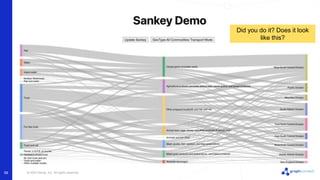
59
Did you do it? Does it look
like this?
© 2022 Neo4j, Inc. All rights reserved.
Summary
• Used create-react-app to set up React
• Used React Google Charts to provide a Sankey
diagram
• Setup a Neo4j Database
• Loaded Neo4j Database with data
• Setup a GraphQL API server using Apollo Server
• Added a GraphQL schema
• Used @cypher to pull data from Neo4j via
GraphQL
• Used Apollo Client to connect to GraphQL API
• Passed a specific GraphQL query to be processed
• Processed the return data to update the Sankey
chart!
60
Congratulations!
© 2022 Neo4j, Inc. All rights reserved.
61
Thank you!
Contact us at
sales@neo4j.com

Full Stack Visualization: Build A React App With A Sankey Diagram

  • 1.
    © 2022 Neo4j,Inc. All rights reserved. © 2022 Neo4j, Inc. All rights reserved. Full-Stack Visualization: Build a React App with a Sankey Diagram Eric Monk, Principal Solutions Engineer
  • 2.
    © 2022 Neo4j,Inc. All rights reserved. 2 Full Stack Viz w/Sankey?
  • 3.
    © 2022 Neo4j,Inc. All rights reserved. 3
  • 4.
    © 2022 Neo4j,Inc. All rights reserved. 4 We're going to build this
  • 5.
    © 2022 Neo4j,Inc. All rights reserved. We will use the GRANDStack architecture G = GraphQL, R = React, A = Apollo, ND = Neo4j Database Architecture 5 Sankey Viz here!
  • 6.
    © 2022 Neo4j,Inc. All rights reserved. Agenda • React (15 min) • Sankey (15 min) • Neo4j + Data (15 min) • GraphQL (10 min) • Putting it all together (20 min) • Help/Wrap-up 6
  • 7.
    © 2022 Neo4j,Inc. All rights reserved. 7 React
  • 8.
    © 2022 Neo4j,Inc. All rights reserved. Architecture Focus Area 8 We are here
  • 9.
    © 2022 Neo4j,Inc. All rights reserved. What is React? From the website: https://reactjs.org "A JavaScript library for building user interfaces" • Declare views and state separately • React re-renders the view when state changes • Component based • Uses JSX - allows mixing of HTML and Javascript 9
  • 10.
    © 2022 Neo4j,Inc. All rights reserved. React Popularity 10 https://www.npmtrends.com/angular-vs-react-vs-vue Most popular Javascript UI Framework
  • 11.
    © 2022 Neo4j,Inc. All rights reserved. Getting Started with React Use Create React App • https://reactjs.org/docs/create-a-new-react-app.html#create-react-app • Prerequisites ◦ Node >= 14.0.0 and npm >= 5.6 ◦ https://nodejs.org/en/download/ • Run this command: 11 npx create-react-app sankey-demo
  • 12.
    © 2022 Neo4j,Inc. All rights reserved. Create React App Install Success 12 Success! Created sankey-demo at /Users/ericmonk/neo/projects/solutions/graph_connect_2022/build_a_sankey/react /sankey-demo Inside that directory, you can run several commands: npm start Starts the development server. We suggest that you begin by typing: cd sankey-demo npm start Happy hacking!
  • 13.
    © 2022 Neo4j,Inc. All rights reserved. 13 Run React Project Web Browser should automatically launch. If not goto: http://localhost:3000 cd sankey-demo npm start You will see this
  • 14.
    © 2022 Neo4j,Inc. All rights reserved. Examine code 14 In code editor look at: • package.json ◦ dependencies ◦ scripts • public/index.html • src ◦ index.js ◦ App.js
  • 15.
    © 2022 Neo4j,Inc. All rights reserved. Exercise 1: Getting Started with React Prerequisites • Node >= 14.0.0 and npm >= 5.6 • https://nodejs.org/en/download/ Instructions • Open a Terminal window • Pick a directory to work in • Run commands: 15 npx create-react-app sankey-demo cd sankey-demo npm start Exercise
  • 16.
    © 2022 Neo4j,Inc. All rights reserved. Exercise 2: Hello World Instructions • Create a folder under /src called /components • Create a file called Hello.js under /components Hello.js 16 import React, { useState } from "react"; export function Hello (props) { const [name, setName] = useState('Eric'); return ( <h1>Hello, {name}</h1> ) } Exercise Use your own name
  • 17.
    © 2022 Neo4j,Inc. All rights reserved. Exercise 2: Hello World (continued) Modify App.js • Add the import statement below • Replace the <header> content with the <Hello/> tag 17 import { Hello } from './components/Hello'; function App() { ... <header className="App-header"> <Hello/> </header> Exercise Here and here
  • 18.
    © 2022 Neo4j,Inc. All rights reserved. 18 Sankey
  • 19.
    © 2022 Neo4j,Inc. All rights reserved. Architecture Focus Area 19 We are still here
  • 20.
    © 2022 Neo4j,Inc. All rights reserved. What is a Sankey diagram? 20 Sankey diagrams are a type of flow diagram in which the width of the arrows is proportional to the flow rate. Useful in graph visualizations to show the volume of flow between a set of nodes (money, traffic, amounts, …) Fun fact: Named after Irish Captain Matthew Henry Phineas Riall Sankey showing the energy efficiency of a steam engine (source: https://en.wikipedia.org/wiki/Sankey_diagram)
  • 21.
    © 2022 Neo4j,Inc. All rights reserved. Charting Library 21 We will use React Google Charts Google Charts provides a comprehensive charting library including a Sankey diagram • https://developers.google.com/chart/interactive/docs/reference React Google Charts puts a React wrapper around Google charts • Easier to use in React • https://www.react-google-charts.com/
  • 22.
    © 2022 Neo4j,Inc. All rights reserved. Exercise 3: Integrate Sankey 22 Instructions • Stop the app and Install: npm install --save react-google-charts Exercise • Create a file called Sankey.js under /components Sankey.js import React from "react"; import { Chart } from "react-google-charts"; // ...continued on next page...
  • 23.
    © 2022 Neo4j,Inc. All rights reserved. Exercise 3: Integrate Sankey (continued) 23 Exercise export const data = [ ["From", "To", "Weight"], ["A", "X", 5], ["A", "Y", 7], ["A", "Z", 6], ["B", "X", 2], ["B", "Y", 9], ["B", "Z", 4], ["X", "W", 5], ["X", "W", 7], ["W", "Y", 1], ["W", "Z", 9], ]; // ...continued on next page...
  • 24.
    © 2022 Neo4j,Inc. All rights reserved. Exercise 3: Integrate Sankey (continued) 24 Exercise export const options = {}; export function Sankey(props) { return ( <Chart chartType="Sankey" width="98%" height="300px" data={data} options={options} /> ); }
  • 25.
    © 2022 Neo4j,Inc. All rights reserved. Exercise 3: Integrate Sankey (continued) Modify App.js • Add the import statement below • Replace the <header> content with the <Hello/> tag 25 import { Sankey } from './components/Sankey; function App() { ... <header className="App-header"> <Sankey/> </header> Exercise Here and here npm start Relaunch the app
  • 26.
    © 2022 Neo4j,Inc. All rights reserved. Exercise 3: Integrate Sankey (continued) Your app should now look like: 26 Exercise
  • 27.
    © 2022 Neo4j,Inc. All rights reserved. Next Steps 27 We passed hard-coded data into the Sankey We want to make this dynamic and stateful with useState const [sankeyData, setSankeyData] = useState(data); <Chart ... data={sankeyData} options={options} /> We need to update Chart to use sankeyData Change from data to sankeyData
  • 28.
    © 2022 Neo4j,Inc. All rights reserved. Next Steps (continued) 28 We will define another sample data set called data2 We will add a button <button onClick={() => updateSankeyData()}>Update Sankey</button> const updateSankeyData = () => { setSankeyData(data2); } When clicked, it will call setSankeyData to update the state Updates sankeyData to data2
  • 29.
    © 2022 Neo4j,Inc. All rights reserved. Exercise 4: Stateful Sankey 29 Exercise Follow steps in exercise4/exercise4.md Clicking Update Sankey will refresh the display
  • 30.
    © 2022 Neo4j,Inc. All rights reserved. 30 Neo4j + Data
  • 31.
    © 2022 Neo4j,Inc. All rights reserved. Architecture Focus Area 31 We are here
  • 32.
    © 2022 Neo4j,Inc. All rights reserved. Commodity Flow Data 32 We will use data from commodity flow data from US Census Bureau • https://www.census.gov/data/tables/2017/econ/cfs/aff-2017.html • The 2017 Commodity Flow Survey Final Tables • CF1700A21: Geographic Area Series: Shipment Characteristics by Origin Geography by Destination Geography by Commodity by Mode: 2017 Data = 4.7 million records • I've filtered it to around 70 thousand
  • 33.
    © 2022 Neo4j,Inc. All rights reserved. Commodity Flow Data - Example Data 33 Commodity Type Source Destination Mode of Transport Tons (thousands)
  • 34.
    © 2022 Neo4j,Inc. All rights reserved. Data Model 34 Will hold stats values like Dollar Value, Tons
  • 35.
    © 2022 Neo4j,Inc. All rights reserved. Sample Graph 35 MATCH p1=(cs:CommodityStat)-[:COMMODITY]->(c), p2=(cs)-[:BY]->(mode), p3=(senderType:GeoType)<-[:TYPE]-(sender:Geo)-[:SENT]->(cs)-[:TO]-> (dest:Geo)-[:TYPE]->(destType:GeoType) RETURN p1, p2, p3 LIMIT 3
  • 36.
    © 2022 Neo4j,Inc. All rights reserved. Need to Query data in format Sankey needs 36 Sankey needs data in form of [ ["A", "X", 5], ["A", "Y", 7], ... ] An array of 3-element arrays. Where each 3 element array is: • First element: start node/item • Second element: destination node/item • Third element: quantity value between start/destination
  • 37.
    © 2022 Neo4j,Inc. All rights reserved. Query to return sender, dest, value 37 WITH { geotype: 'Division', commodityType: '02' } as params MATCH (stat:CommodityStat)-[:COMMODITY]->(c:Commodity {id: params.commodityType}), (geoType:GeoType {name:params.geotype}) MATCH (geoType)<-[:TYPE]-(sender:Geo)-[:SENT]->(stat:CommodityStat)-[:TO]->(dest:Geo)-[:TYPE]- >(geoType) WITH sender.name as sender, sum(stat.tonsInThousands) as tons1000, dest.name as dest WHERE tons1000 > 0 RETURN sender, tons1000, dest
  • 38.
    © 2022 Neo4j,Inc. All rights reserved. Exercise 5: Create Database and Load Data 38 Exercise Follow steps in exercise5/exercise5.md
  • 39.
    © 2022 Neo4j,Inc. All rights reserved. 39 GraphQL
  • 40.
    © 2022 Neo4j,Inc. All rights reserved. Architecture Focus Area 40 We are here …and here
  • 41.
    © 2022 Neo4j,Inc. All rights reserved. What is GraphQL? GraphQL is a query language for APIs and a runtime for fulfilling those queries with your existing data (from https://graphql.org/) • Describe your data • Ask for what you want • Get exactly what you ask for Describe data using a schema and operations using resolvers. • Schema - describes the data • Resolvers - indicates how to fetch the data 41
  • 42.
    © 2022 Neo4j,Inc. All rights reserved. Example Schema type Movie { title: String! year: Int plot: String actors: [Person] } type Person { name: String! movies: [Movie] } type Query { searchMovieByTitle(title: String!): [Movie!] } 42 Specific types like Movie and Person describe your data Type Query is special and defines a resolver function signature
  • 43.
    © 2022 Neo4j,Inc. All rights reserved. Neo4j GraphQL 43 Neo4j GraphQL works with Apollo Server to implement GraphQL • https://www.apollographql.com/docs/apollo-server/ Apollo Server • Parses the schema • Listens for and processes GraphQL requests Neo4j GraphQL • Annotations to implement resolvers with no-code • Provides mechanism to write custom resolvers • More info: https://neo4j.com/developer/graphql/
  • 44.
    © 2022 Neo4j,Inc. All rights reserved. Neo4j Schema annotations type Movie { title: String! year: Int plot: String actors: [Person] @relationship(type: "ACTED_IN", direction: IN) } type Person { name: String! movies: [Movie] @relationship(type: "ACTED_IN", direction: OUT) } type Query { searchMovieByTitle(title: String!): [Movie!] @cypher(statement: """ MATCH (m:Movie) WHERE toLower(m.title) CONTAINS toLower($title) RETURN m """) } 44 @cypher used to provide an in-line resolver @relationship annotation used to auto-generate code
  • 45.
    © 2022 Neo4j,Inc. All rights reserved. Exercise 6: Setup GraphQL API 45 Make a directory called graphql_api and create your graphql project. mkdir graphql_api cd graphql_api npm init -y npm install @neo4j/graphql neo4j-driver graphql apollo- server dotenv NOTE: do not call your directory graphql or you will get an error on npm install Exercise
  • 46.
    © 2022 Neo4j,Inc. All rights reserved. 46 Exercise 6: Add .env file NEO4J_USER=neo4j NEO4J_PASSWORD=password NEO4J_URI=bolt://localhost:7687 NEO4J_DATABASE=sankey GRAPHQL_LISTEN_PORT=4001 .env settings let you configure the application without hardcoding Create file .env in your graphql_api folder Exercise
  • 47.
    © 2022 Neo4j,Inc. All rights reserved. 47 Exercise 6: Add index.js const { gql, ApolloServer } = require("apollo-server"); const { Neo4jGraphQL } = require("@neo4j/graphql"); const neo4j = require("neo4j-driver"); require("dotenv").config(); const typeDefs = gql` type Geo { id: String! name: String } `; const driver = neo4j.driver( process.env.NEO4J_URI, neo4j.auth.basic(process.env.NEO4J_USER, process.env.NEO4J_PASSWORD) ); connect to Neo4j Geo type, we'll add more later import necessary packages Exercise
  • 48.
    © 2022 Neo4j,Inc. All rights reserved. 48 Exercise 6: Add index.js (continued) const neoSchema = new Neo4jGraphQL({ typeDefs, driver }); neoSchema.getSchema().then((schema) => { const server = new ApolloServer({ schema: schema, context: { driverConfig: { database: process.env.NEO4J_DATABASE } } }); server.listen({ port: process.env.GRAPHQL_LISTEN_PORT }).then(({ url }) => { console.log(`GraphQL server ready on ${url}`); }); }); https://neo4j.com/docs/graphql-manual/current/driver- configuration/ https://neo4j.com/docs/graphql-manual/current/driver-configuration/ context driverConfig used to specify Neo4j Database start listening use ApolloServer to serve our schema create schema Exercise
  • 49.
    © 2022 Neo4j,Inc. All rights reserved. 49 Exercise 6: Run GraphQL Server In Web Browser, goto • http://localhost:4001/graphql node index.js GraphQL server ready on http://localhost:4001/ You will see this Exercise
  • 50.
    © 2022 Neo4j,Inc. All rights reserved. 50 Exercise 6: Call GraphQL Endpoint Then click query Geos { geos { id name } } Enter this in Apollo under Operation: Exercise
  • 51.
    © 2022 Neo4j,Inc. All rights reserved. 51 Putting it all together
  • 52.
    © 2022 Neo4j,Inc. All rights reserved. Architecture Focus Area 52 We are everywhere
  • 53.
    © 2022 Neo4j,Inc. All rights reserved. Putting it all together We now have: • React app with Sankey diagram • Neo4j database with data • GraphQL server that talks to Neo4j We need to: • Enhance our GraphQL to return Sankey data • Have the UI call the GraphQL server to get the data • Render the returned data in the Sankey diagram 53
  • 54.
    © 2022 Neo4j,Inc. All rights reserved. Architecture Data Flow 54 getSankeyData() MATCH (...) RETURN (...) [start, end, value] [start, end, value] updateSankey()
  • 55.
    © 2022 Neo4j,Inc. All rights reserved. Enhance GraphQL to return Sankey data type SankeyRelationship { start: String end: String value: Int } type Query { sankeyByGeoTypeAllCommoditiesByTransportMode(geoType: String!): [SankeyRelationship] @cypher(statement: """ MATCH (stat:CommodityStat)-[:COMMODITY]->(c:Commodity) ...more cypher... RETURN { start: sender, value: tons1000, end: dest } """) 55 create SankeyRelationship to hold start, end, value data pull Cypher statement from previous section and add with cypher directive modify RETURN to return a map of start, value, end (we'll convert to an array in UI)
  • 56.
    © 2022 Neo4j,Inc. All rights reserved. Exercise 7: Enhance GraphQL API 56 Exercise Follow steps in exercise7/exercise7.md Things to note: • We use UNION to return 2 lists of [start, end, value] in the same response. • An input parameter called geoType: String! is used • Parameter $geoType is used in the @cypher directive
  • 57.
    © 2022 Neo4j,Inc. All rights reserved. Back to React • We will use Apollo Client to make GraphQL calls from React • We need to specify our specific GraphQL call in the UI ◦ SankeyByGeoTypeAllCommoditiesByTransportMode • Once the data is returned, we will convert the response to an array • Once we have the data in the correct format, we will update the Sankey 57
  • 58.
    © 2022 Neo4j,Inc. All rights reserved. Exercise 8: React GraphQL Integration 58 Exercise Follow steps in exercise8/exercise8.md Things to note: • We install ApolloClient and add it to index.js • We copy our existing SankeyState.js file to SankeyApollo.js • We call the GraphQL API with useLazyQuery • We transform the data into the expected Sankey format • We update React state to re-render the Sankey chart
  • 59.
    © 2022 Neo4j,Inc. All rights reserved. 59 Did you do it? Does it look like this?
  • 60.
    © 2022 Neo4j,Inc. All rights reserved. Summary • Used create-react-app to set up React • Used React Google Charts to provide a Sankey diagram • Setup a Neo4j Database • Loaded Neo4j Database with data • Setup a GraphQL API server using Apollo Server • Added a GraphQL schema • Used @cypher to pull data from Neo4j via GraphQL • Used Apollo Client to connect to GraphQL API • Passed a specific GraphQL query to be processed • Processed the return data to update the Sankey chart! 60 Congratulations!
  • 61.
    © 2022 Neo4j,Inc. All rights reserved. © 2022 Neo4j, Inc. All rights reserved. 61 Thank you! Contact us at sales@neo4j.com