Full Stack GraphQL In The Cloud
With Neo4j AuraDB, Next.js, & Vercel
dev.neo4j.com/fullstack-graphql-workshop
About Me
William Lyon
Developer Relations Engineer, Neo4j
@lyonwj
lyonwj.com
Full Stack GraphQL In The Cloud
With Neo4j AuraDB, Next.js, & Vercel
Agenda
Modules:
● Intro To Neo4j AuraDB
● Building GraphQL APIs
● Intro To Next.js
● Deploying With Vercel
Hands-On exercises using:
● Neo4j AuraDB Free Tier
● GitHub (free tier)
● Vercel (free tier)
Hands-On
Exercise
4
Introduction To Neo4j AuraDB
Importing & Querying Data With Cypher In The Cloud
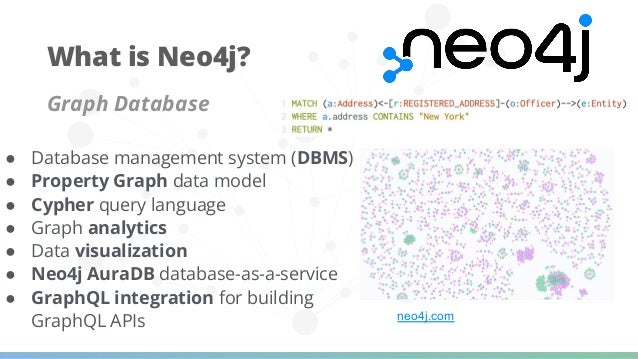
Graph Database
● Database management system (DBMS)
● Property Graph data model
● Cypher query language
● Graph analytics
● Data visualization
● Neo4j AuraDB database-as-a-service
● GraphQL integration for building
GraphQL APIs
What is Neo4j?
neo4j.com
6
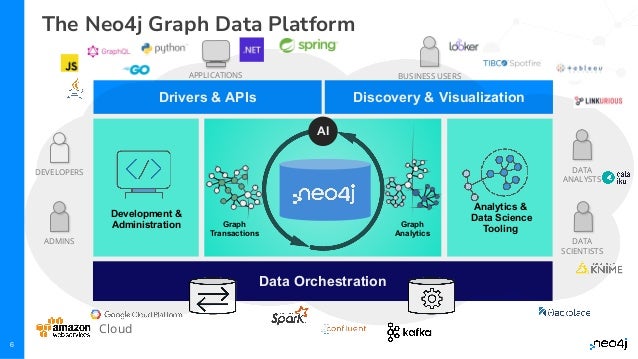
The Neo4j Graph Data Platform
Analytics &
Data Science
Tooling
Graph
Transactions
Data Orchestration
Development &
Administration
Drivers & APIs Discovery & Visualization
Graph
Analytics
AI
BUSINESS USERS
DEVELOPERS
ADMINS
DATA
ANALYSTS
DATA
SCIENTISTS
APPLICATIONS
Cloud
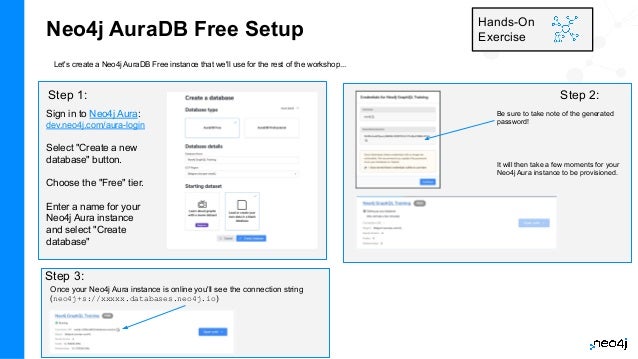
Neo4j AuraDB Free Setup
Let's create a Neo4j AuraDB Free instance that we'll use for the rest of the workshop...
Hands-On
Exercise
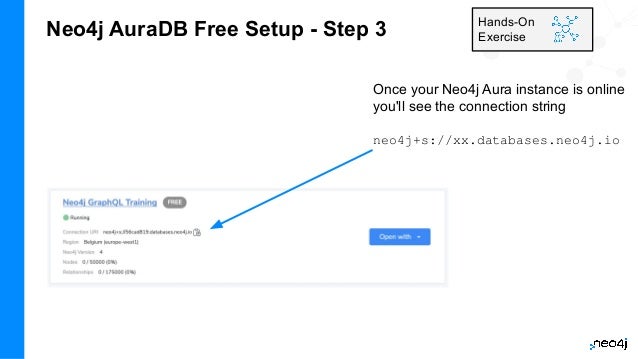
Once your Neo4j Aura instance is online you'll see the connection string
(neo4j+s://xxxxx.databases.neo4j.io)
Be sure to take note of the generated
password!
It will then take a few moments for your
Neo4j Aura instance to be provisioned.
Sign in to Neo4j Aura:
dev.neo4j.com/aura-login
Select "Create a new
database" button.
Choose the "Free" tier.
Enter a name for your
Neo4j Aura instance
and select "Create
database"
Step 1: Step 2:
Step 3:
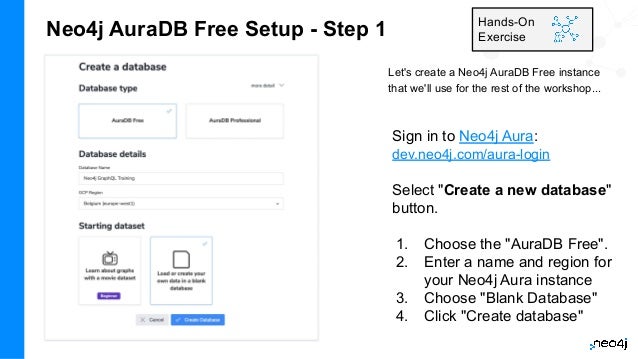
Neo4j AuraDB Free Setup - Step 1
Let's create a Neo4j AuraDB Free instance
that we'll use for the rest of the workshop...
Hands-On
Exercise
Sign in to Neo4j Aura:
dev.neo4j.com/aura-login
Select "Create a new database"
button.
1. Choose the "AuraDB Free".
2. Enter a name and region for
your Neo4j Aura instance
3. Choose "Blank Database"
4. Click "Create database"
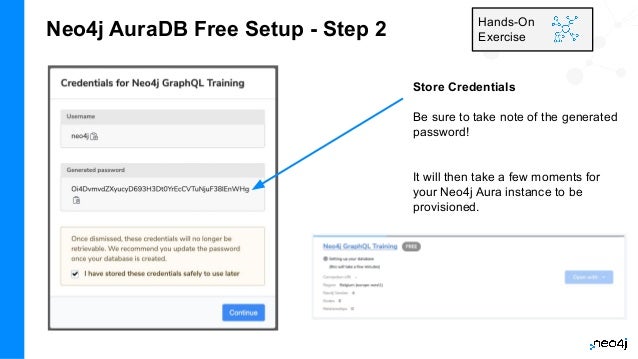
Neo4j AuraDB Free Setup - Step 2 Hands-On
Exercise
Store Credentials
Be sure to take note of the generated
password!
It will then take a few moments for
your Neo4j Aura instance to be
provisioned.
Neo4j AuraDB Free Setup - Step 3 Hands-On
Exercise
Once your Neo4j Aura instance is online
you'll see the connection string
neo4j+s://xx.databases.neo4j.io
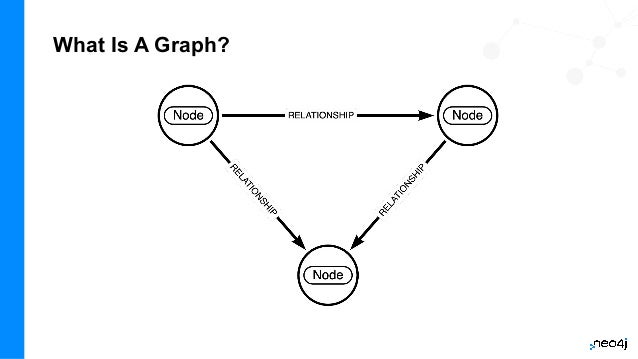
What Is A Graph?
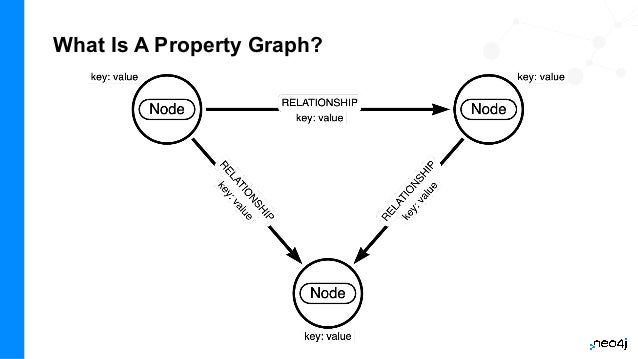
What Is A Property Graph?
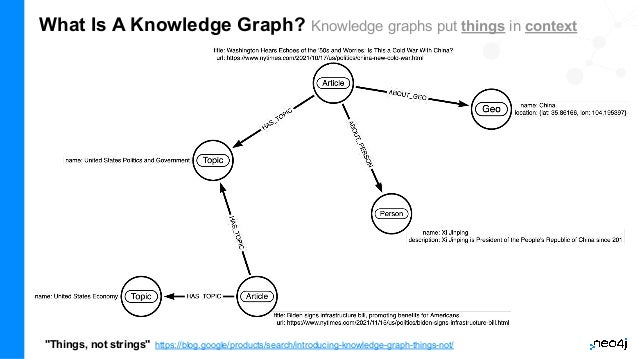
What Is A Knowledge Graph? Knowledge graphs put things in context
"Things, not strings" https://blog.google/products/search/introducing-knowledge-graph-things-not/
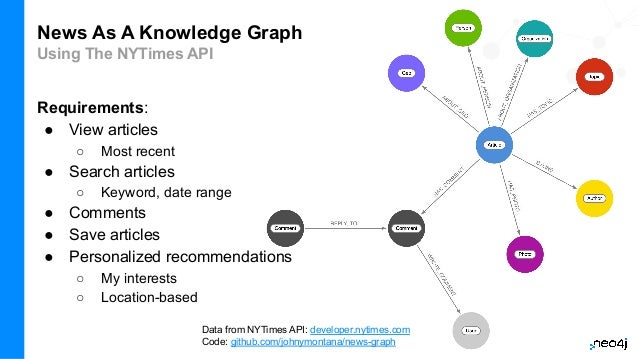
News As A Knowledge Graph
Using The NYTimes API
Requirements:
● View articles
○ Most recent
● Search articles
○ Keyword, date range
● Comments
● Save articles
● Personalized recommendations
○ My interests
○ Location-based
Data from NYTimes API: developer.nytimes.com
Code: github.com/johnymontana/news-graph
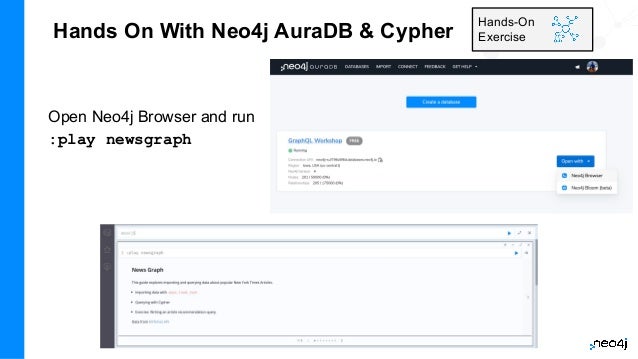
Hands On With Neo4j AuraDB & Cypher
Open Neo4j Browser and run
:play newsgraph
Hands-On
Exercise
16
Building GraphQL APIs
With The Neo4j GraphQL Library
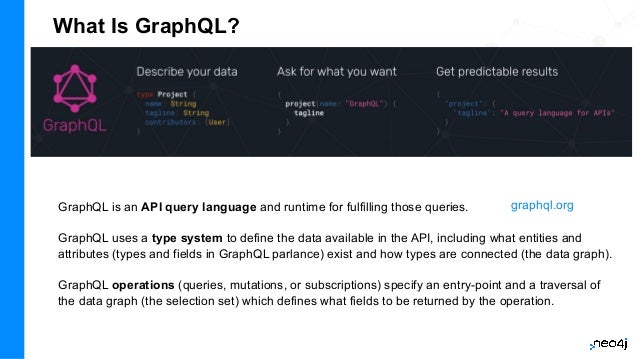
What Is GraphQL?
GraphQL is an API query language and runtime for fulfilling those queries.
GraphQL uses a type system to define the data available in the API, including what entities and
attributes (types and fields in GraphQL parlance) exist and how types are connected (the data graph).
GraphQL operations (queries, mutations, or subscriptions) specify an entry-point and a traversal of
the data graph (the selection set) which defines what fields to be returned by the operation.
graphql.org
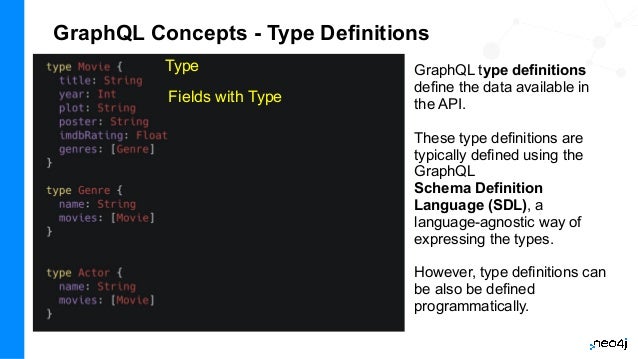
GraphQL Concepts - Type Definitions
GraphQL type definitions
define the data available in
the API.
These type definitions are
typically defined using the
GraphQL
Schema Definition
Language (SDL), a
language-agnostic way of
expressing the types.
However, type definitions can
be also be defined
programmatically.
Type
Fields with Type
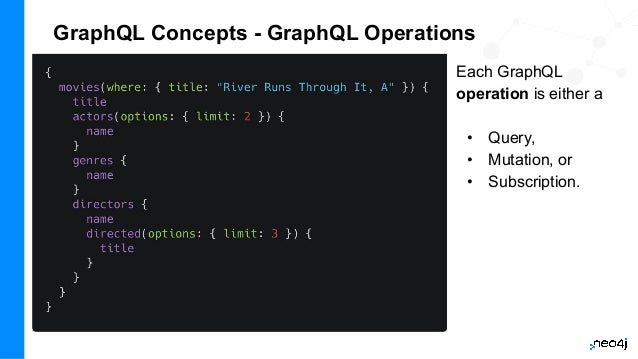
GraphQL Concepts - GraphQL Operations
Each GraphQL
operation is either a
• Query,
• Mutation, or
• Subscription.
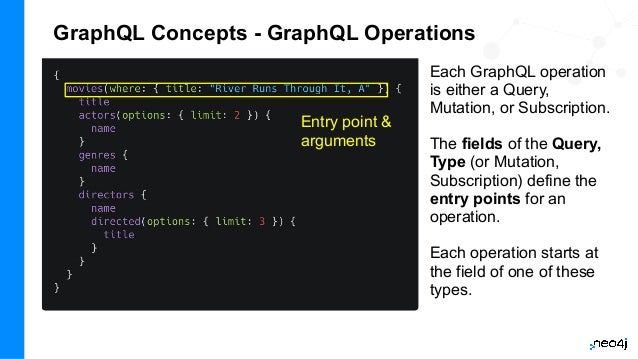
GraphQL Concepts - GraphQL Operations
Each GraphQL operation
is either a Query,
Mutation, or Subscription.
The fields of the Query,
Type (or Mutation,
Subscription) define the
entry points for an
operation.
Each operation starts at
the field of one of these
types.
Entry point &
arguments
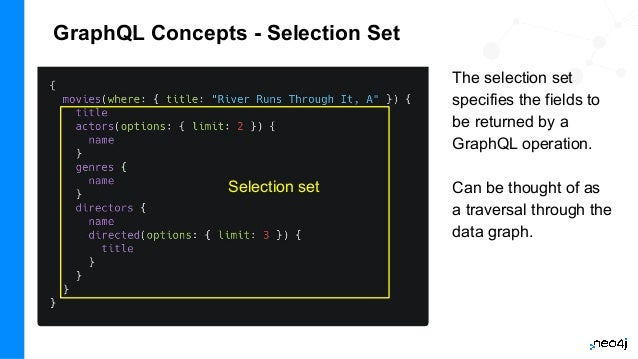
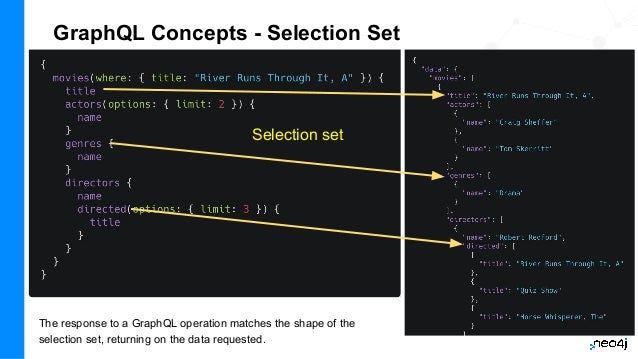
GraphQL Concepts - Selection Set
The selection set
specifies the fields to
be returned by a
GraphQL operation.
Can be thought of as
a traversal through the
data graph.
Selection set
GraphQL Concepts - Selection Set
The response to a GraphQL operation matches the shape of the
selection set, returning on the data requested.
Selection set
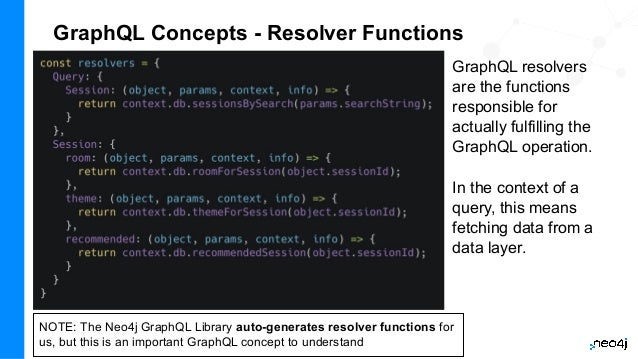
GraphQL Concepts - Resolver Functions
GraphQL resolvers
are the functions
responsible for
actually fulfilling the
GraphQL operation.
In the context of a
query, this means
fetching data from a
data layer.
NOTE: The Neo4j GraphQL Library auto-generates resolver functions for
us, but this is an important GraphQL concept to understand
Benefits Of GraphQL
● Overfetching - sending less data over the wire
● Underfetching - everything the client needs in a single request
● The GraphQL specification defines exactly what GraphQL is
● Simplify data fetching with component-based data interactions
● "Graphs all the way down" - GraphQL can help unify disparate systems and
focus API interactions on relationships instead of resources.
● Developer productivity - By reasoning about application data as a graph with
a strict type system, developers can focus on building applications.
GraphQL Challenges
● Some well understood practices from REST don’t apply
○ HTTP status codes
○ Error handling
○ Caching
● Exposing arbitrary complexity to the client and performance considerations
● The n+1 query problem - the nested nature of GraphQL operations can lead to
multiple requests to the data layer(s) to resolve a request
● Query costing and rate limiting
Best practices and tooling have emerged to address all of the above, however it’s important
to be aware of these challenges.
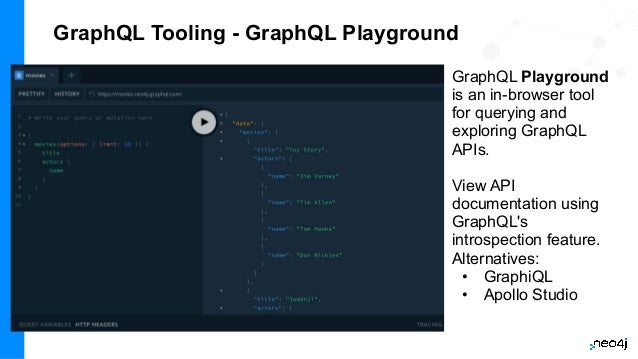
GraphQL Tooling - GraphQL Playground
GraphQL Playground
is an in-browser tool
for querying and
exploring GraphQL
APIs.
View API
documentation using
GraphQL's
introspection feature.
Alternatives:
• GraphiQL
• Apollo Studio
GraphQL Tooling - GraphQL Playground
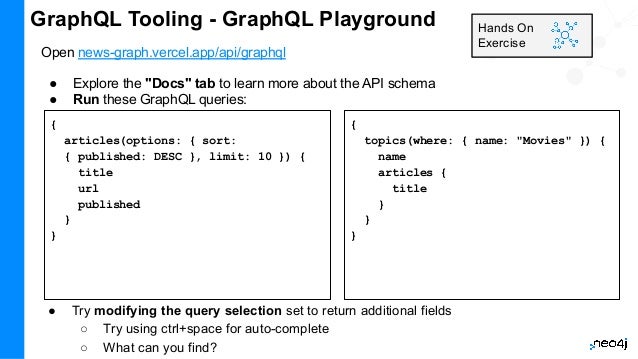
Open news-graph.vercel.app/api/graphql
● Explore the "Docs" tab to learn more about the API schema
● Run these GraphQL queries:
Hands On
Exercise
{
articles(options: { sort:
{ published: DESC }, limit: 10 }) {
title
url
published
}
}
{
topics(where: { name: "Movies" }) {
name
articles {
title
}
}
}
● Try modifying the query selection set to return additional fields
○ Try using ctrl+space for auto-complete
○ What can you find?
28
Let's Build Our Own GraphQL API!
29
The Neo4j GraphQL Library
Overview
The Neo4j GraphQL Library
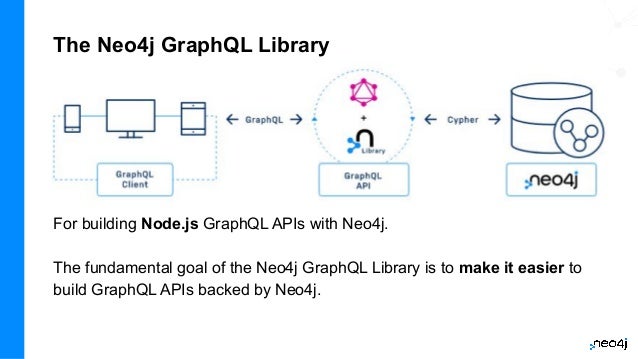
For building Node.js GraphQL APIs with Neo4j.
The fundamental goal of the Neo4j GraphQL Library is to make it easier to
build GraphQL APIs backed by Neo4j.
Goals Of The Neo4j GraphQL Library
GraphQL First Development
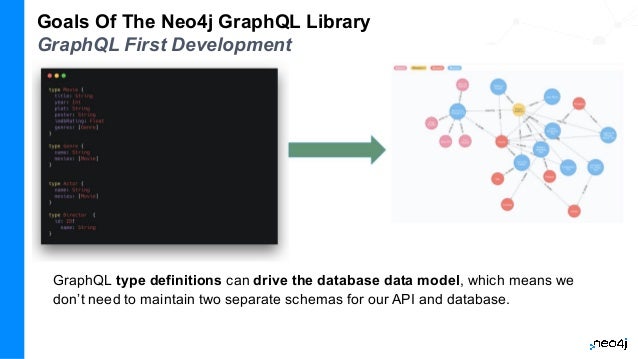
GraphQL type definitions can drive the database data model, which means we
don’t need to maintain two separate schemas for our API and database.
Goals Of The Neo4j GraphQL Library
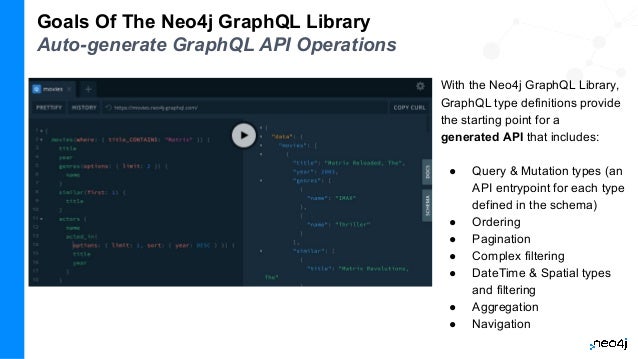
Auto-generate GraphQL API Operations
With the Neo4j GraphQL Library,
GraphQL type definitions provide
the starting point for a
generated API that includes:
● Query & Mutation types (an
API entrypoint for each type
defined in the schema)
● Ordering
● Pagination
● Complex filtering
● DateTime & Spatial types
and filtering
● Aggregation
● Navigation
Goals Of The Neo4j GraphQL Library
Generate Cypher From GraphQL Operations
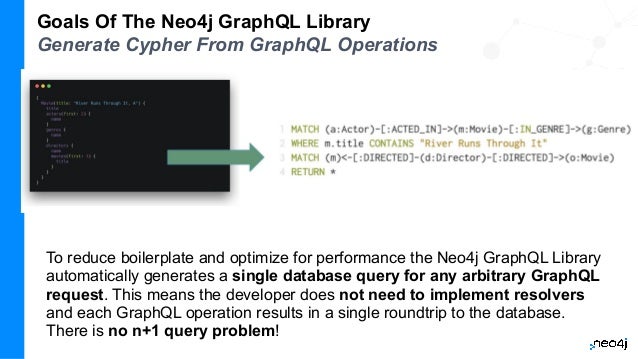
To reduce boilerplate and optimize for performance the Neo4j GraphQL Library
automatically generates a single database query for any arbitrary GraphQL
request. This means the developer does not need to implement resolvers
and each GraphQL operation results in a single roundtrip to the database.
There is no n+1 query problem!
Goals Of The Neo4j GraphQL Library
Extend GraphQL With Cypher
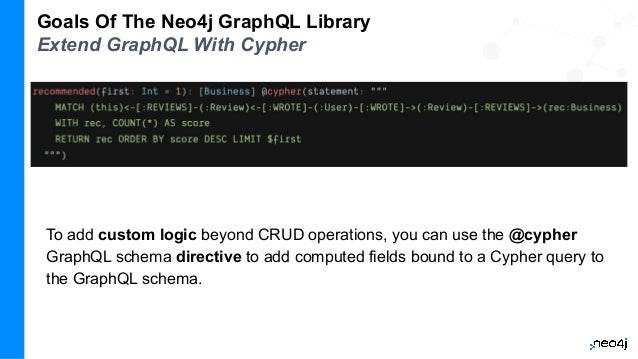
To add custom logic beyond CRUD operations, you can use the @cypher
GraphQL schema directive to add computed fields bound to a Cypher query to
the GraphQL schema.
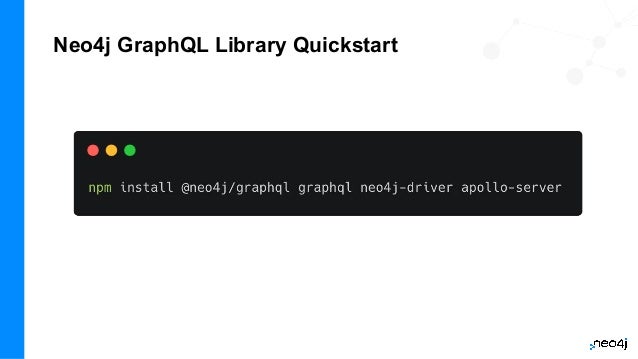
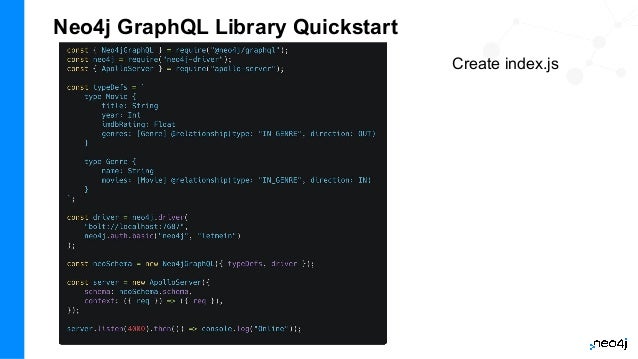
Neo4j GraphQL Library Quickstart
Create index.js
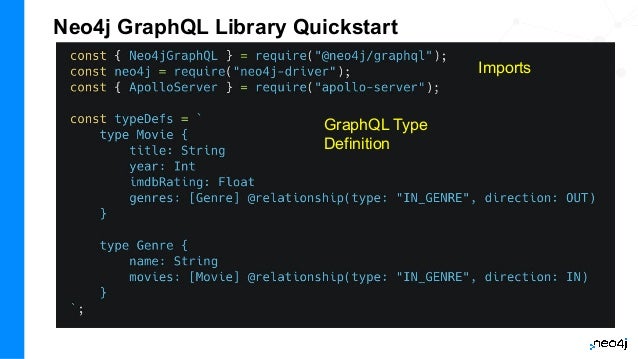
Neo4j GraphQL Library Quickstart
GraphQL Type
Definition
Imports
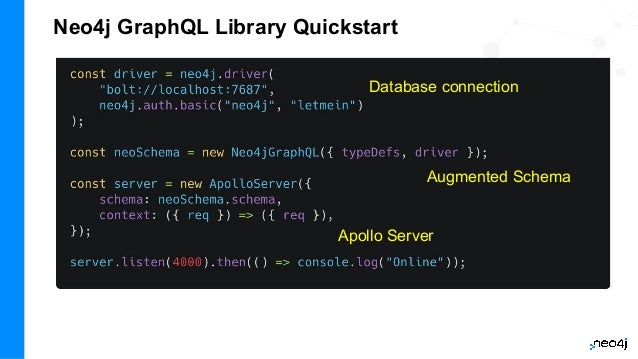
Neo4j GraphQL Library Quickstart
Database connection
Augmented Schema
Apollo Server
Neo4j GraphQL Library Quickstart
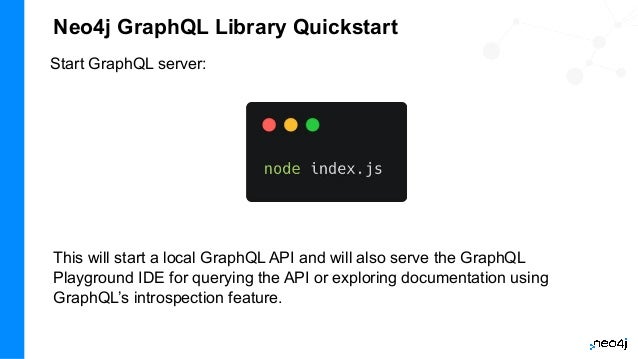
Start GraphQL server:
This will start a local GraphQL API and will also serve the GraphQL
Playground IDE for querying the API or exploring documentation using
GraphQL’s introspection feature.
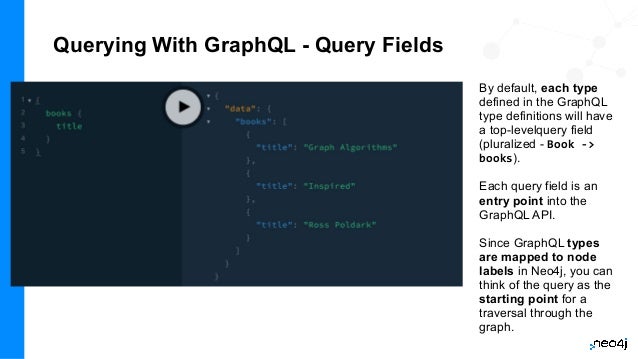
Querying With GraphQL - Query Fields
By default, each type
defined in the GraphQL
type definitions will have
a top-levelquery field
(pluralized - Book ->
books).
Each query field is an
entry point into the
GraphQL API.
Since GraphQL types
are mapped to node
labels in Neo4j, you can
think of the query as the
starting point for a
traversal through the
graph.
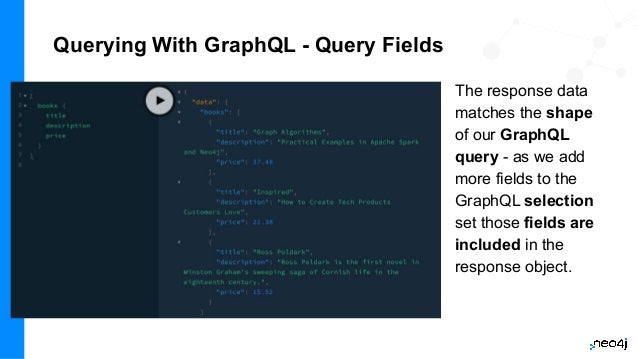
Querying With GraphQL - Query Fields
The response data
matches the shape
of our GraphQL
query - as we add
more fields to the
GraphQL selection
set those fields are
included in the
response object.
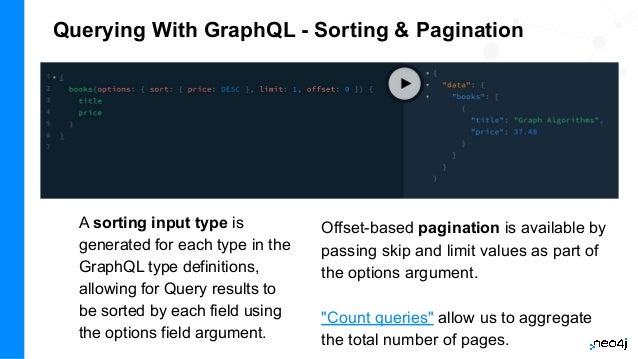
A sorting input type is
generated for each type in the
GraphQL type definitions,
allowing for Query results to
be sorted by each field using
the options field argument.
Querying With GraphQL - Sorting & Pagination
Offset-based pagination is available by
passing skip and limit values as part of
the options argument.
"Count queries" allow us to aggregate
the total number of pages.
Querying With GraphQL - Sorting & Pagination
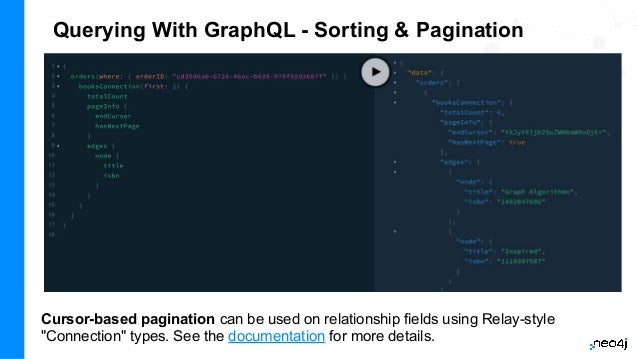
Cursor-based pagination can be used on relationship fields using Relay-style
"Connection" types. See the documentation for more details.
Querying With GraphQL - Filtering
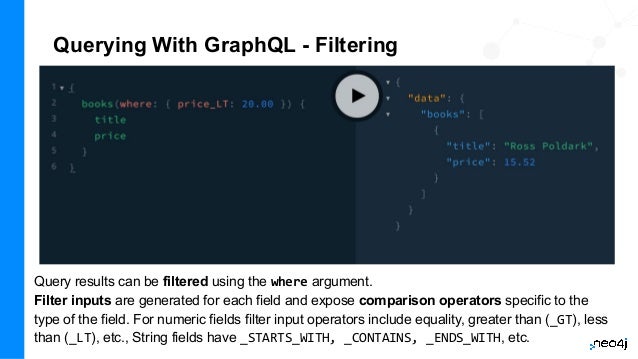
Query results can be filtered using the where argument.
Filter inputs are generated for each field and expose comparison operators specific to the
type of the field. For numeric fields filter input operators include equality, greater than (_GT), less
than (_LT), etc., String fields have _STARTS_WITH, _CONTAINS, _ENDS_WITH, etc.
Querying With GraphQL - Filtering (Nested)
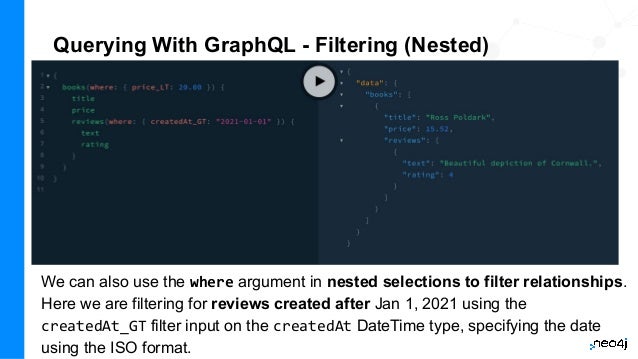
We can also use the where argument in nested selections to filter relationships.
Here we are filtering for reviews created after Jan 1, 2021 using the
createdAt_GT filter input on the createdAt DateTime type, specifying the date
using the ISO format.
Querying With GraphQL - Geo Distance
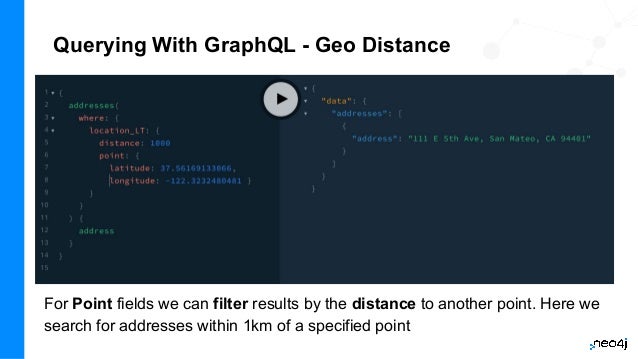
For Point fields we can filter results by the distance to another point. Here we
search for addresses within 1km of a specified point
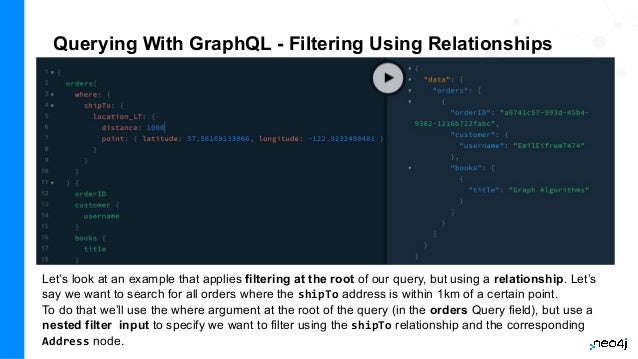
Querying With GraphQL - Filtering Using Relationships
Let’s look at an example that applies filtering at the root of our query, but using a relationship. Let’s
say we want to search for all orders where the shipTo address is within 1km of a certain point.
To do that we’ll use the where argument at the root of the query (in the orders Query field), but use a
nested filter input to specify we want to filter using the shipTo relationship and the corresponding
Address node.
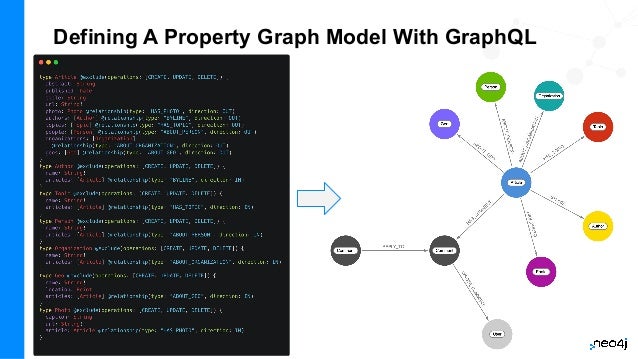
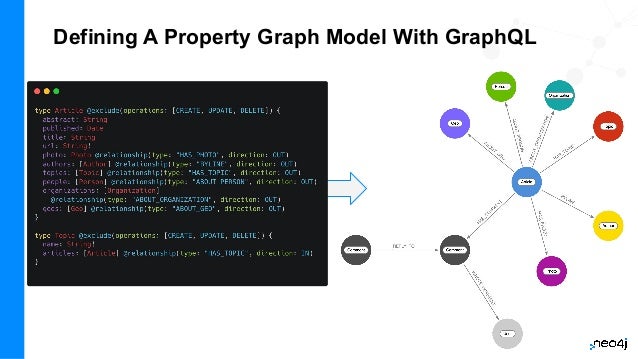
Defining A Property Graph Model With GraphQL
Data Model in arrows.app
interactive modeling tool
meta-model or
instance-model
also allows generation of
GraphQL type definition
51
Introduction To Next.js
Working With GraphQL In Next.js
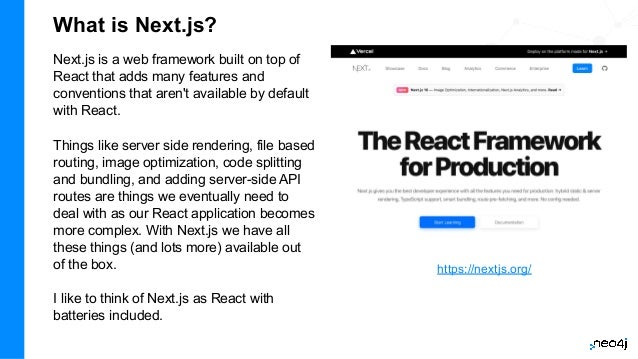
What is Next.js?
Next.js is a web framework built on top of
React that adds many features and
conventions that aren't available by default
with React.
Things like server side rendering, file based
routing, image optimization, code splitting
and bundling, and adding server-side API
routes are things we eventually need to
deal with as our React application becomes
more complex. With Next.js we have all
these things (and lots more) available out
of the box.
I like to think of Next.js as React with
batteries included.
https://nextjs.org/
Working With GraphQL In Next.js Hands-On
Exercise
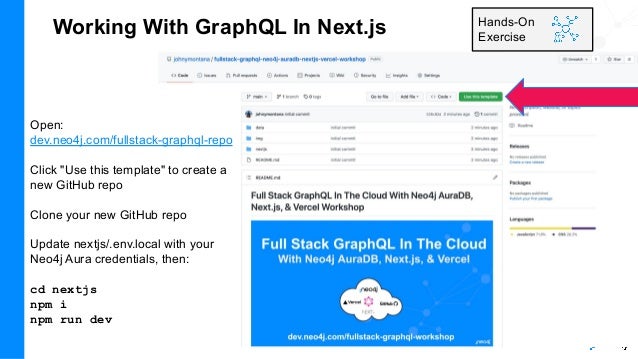
Open:
dev.neo4j.com/fullstack-graphql-repo
Click "Use this template" to create a
new GitHub repo
Clone your new GitHub repo
Update nextjs/.env.local with your
Neo4j Aura credentials, then:
cd nextjs
npm i
npm run dev
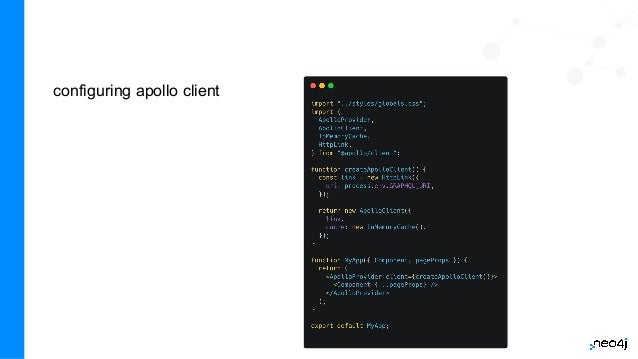
configuring apollo client
55
Introduction To Vercel
Deploying Our Full Stack GraphQL Application
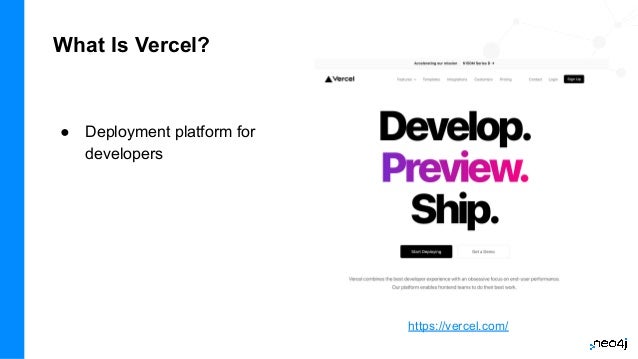
What Is Vercel?
● Deployment platform for
developers
https://vercel.com/
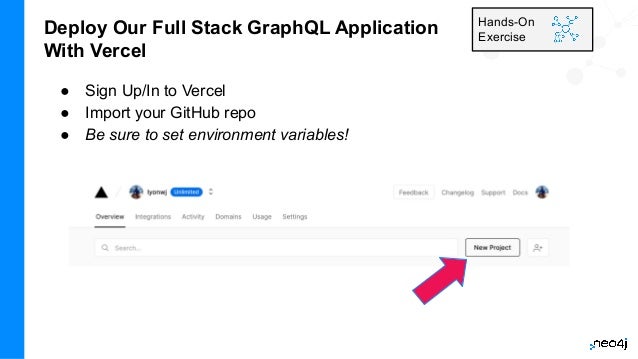
Deploy Our Full Stack GraphQL Application
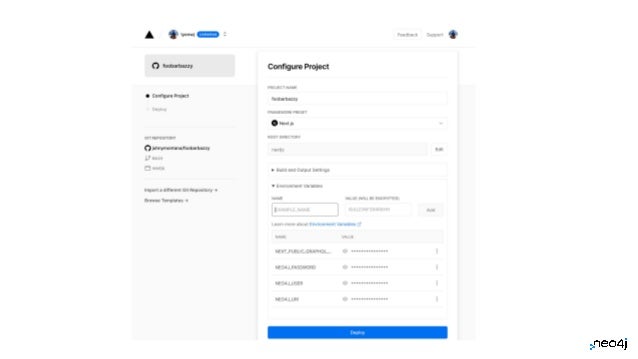
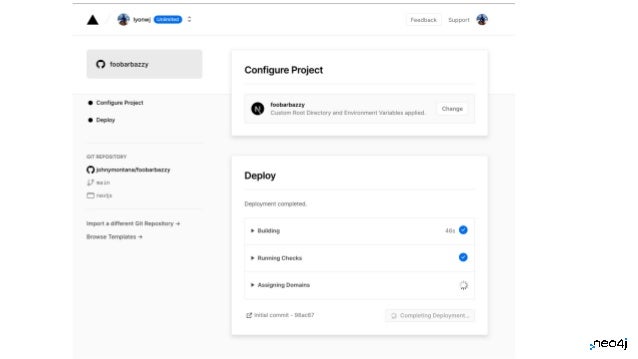
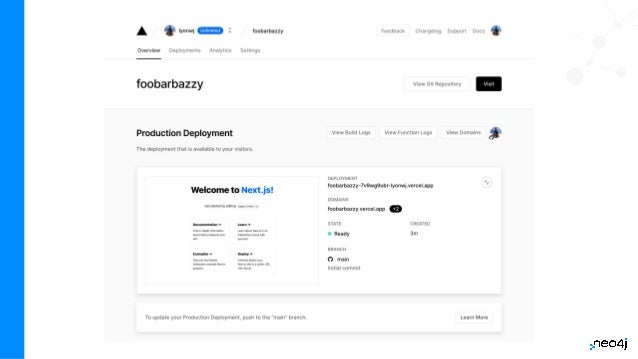
With Vercel
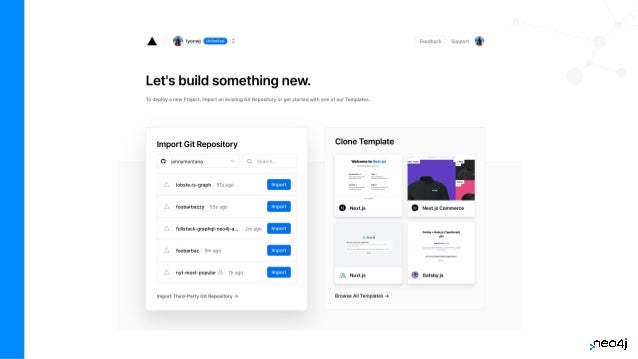
● Sign Up/In to Vercel
● Import your GitHub repo
● Be sure to set environment variables!
Hands-On
Exercise
59
60
62
Adding Custom Logic To Our
GraphQL API
Cypher Schema Directive & Custom Resolvers
63
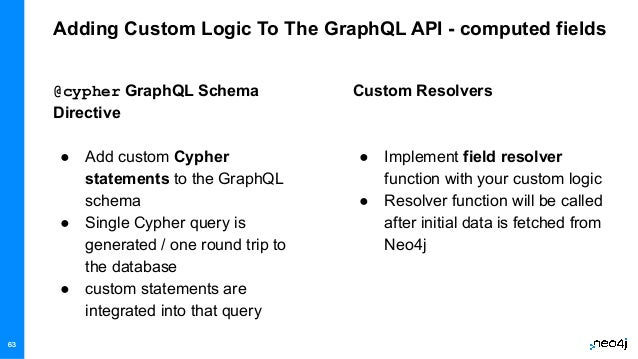
Adding Custom Logic To The GraphQL API - computed fields
Custom Resolvers
● Implement field resolver
function with your custom logic
● Resolver function will be called
after initial data is fetched from
Neo4j
@cypher GraphQL Schema
Directive
● Add custom Cypher
statements to the GraphQL
schema
● Single Cypher query is
generated / one round trip to
the database
● custom statements are
integrated into that query
63
Cypher GraphQL Schema Directive
Computed Scalar Field
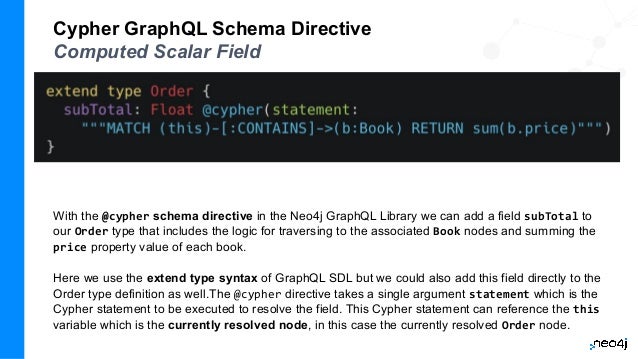
With the @cypher schema directive in the Neo4j GraphQL Library we can add a field subTotal to
our Order type that includes the logic for traversing to the associated Book nodes and summing the
price property value of each book.
Here we use the extend type syntax of GraphQL SDL but we could also add this field directly to the
Order type definition as well.The @cypher directive takes a single argument statement which is the
Cypher statement to be executed to resolve the field. This Cypher statement can reference the this
variable which is the currently resolved node, in this case the currently resolved Order node.
Cypher GraphQL Schema Directive
Computed Scalar Field
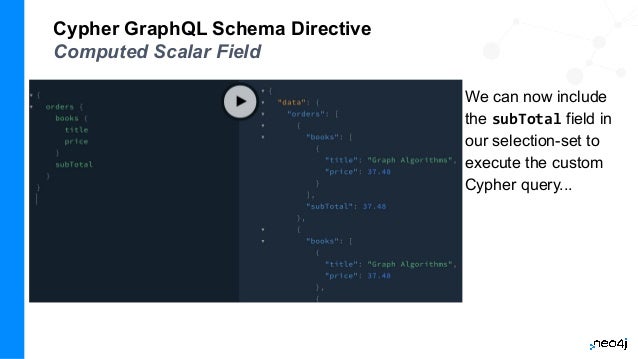
We can now include
the subTotal field in
our selection-set to
execute the custom
Cypher query...
Cypher GraphQL Schema Directive
Node & Object Fields
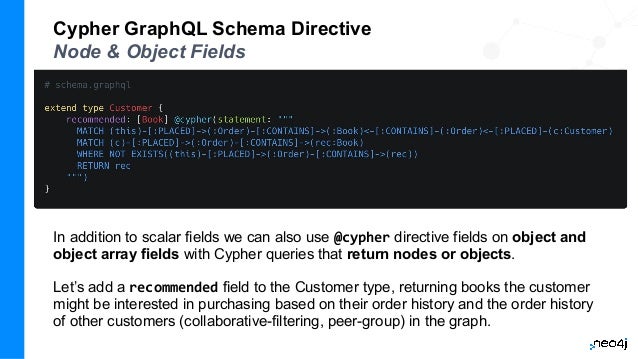
In addition to scalar fields we can also use @cypher directive fields on object and
object array fields with Cypher queries that return nodes or objects.
Let’s add a recommended field to the Customer type, returning books the customer
might be interested in purchasing based on their order history and the order history
of other customers (collaborative-filtering, peer-group) in the graph.
Cypher GraphQL Schema Directive
Node & Object Fields
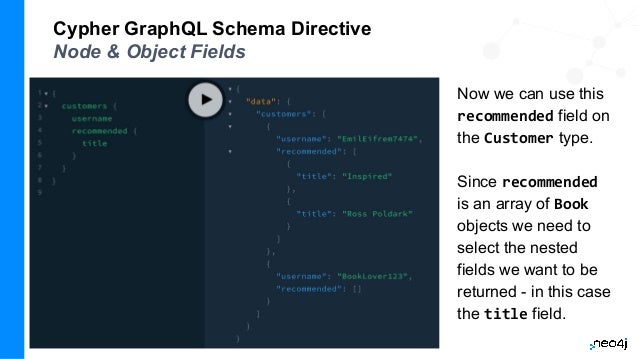
Now we can use this
recommended field on
the Customer type.
Since recommended
is an array of Book
objects we need to
select the nested
fields we want to be
returned - in this case
the title field.
Custom statements can also be
added as top-level queries and
mutations
68
But we don't have time to go into that!
Cypher GraphQL Schema Directive
Field Arguments → Cypher Parameters
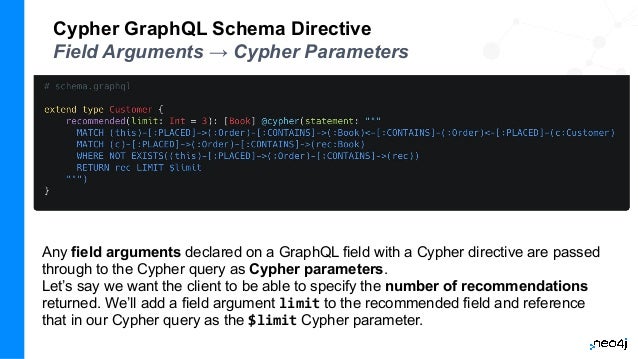
Any field arguments declared on a GraphQL field with a Cypher directive are passed
through to the Cypher query as Cypher parameters.
Let’s say we want the client to be able to specify the number of recommendations
returned. We’ll add a field argument limit to the recommended field and reference
that in our Cypher query as the $limit Cypher parameter.
Cypher GraphQL Schema Directive
Field Arguments → Cypher Parameters
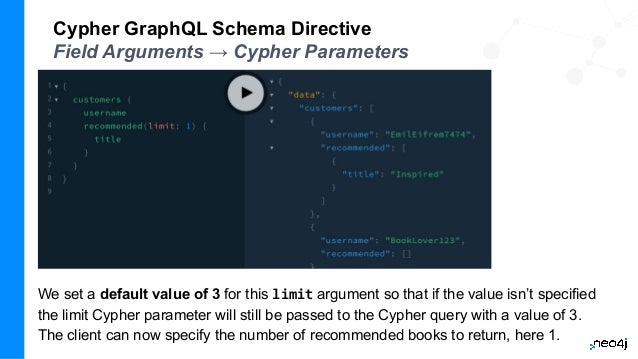
We set a default value of 3 for this limit argument so that if the value isn’t specified
the limit Cypher parameter will still be passed to the Cypher query with a value of 3.
The client can now specify the number of recommended books to return, here 1.
Cypher GraphQL Schema Directive
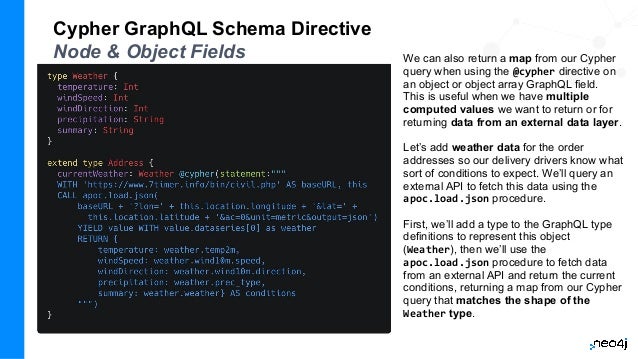
Node & Object Fields We can also return a map from our Cypher
query when using the @cypher directive on
an object or object array GraphQL field.
This is useful when we have multiple
computed values we want to return or for
returning data from an external data layer.
Let’s add weather data for the order
addresses so our delivery drivers know what
sort of conditions to expect. We’ll query an
external API to fetch this data using the
apoc.load.json procedure.
First, we’ll add a type to the GraphQL type
definitions to represent this object
(Weather), then we’ll use the
apoc.load.json procedure to fetch data
from an external API and return the current
conditions, returning a map from our Cypher
query that matches the shape of the
Weather type.
Cypher GraphQL Schema Directive
Node & Object Fields
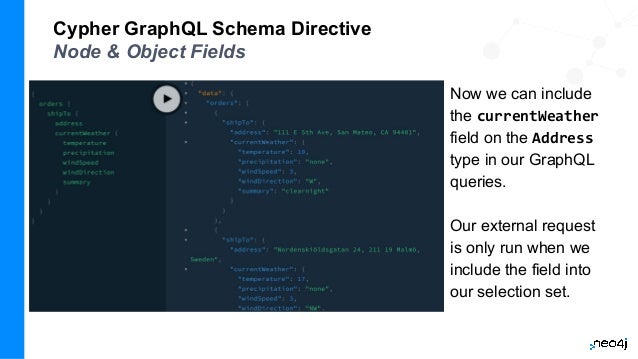
Now we can include
the currentWeather
field on the Address
type in our GraphQL
queries.
Our external request
is only run when we
include the field into
our selection set.
We can use the @cypher directive on Query fields to compliment the
auto-generated Query fields provided by the Neo4j GraphQL Library. Perhaps we
want to leverage a full-text index for fuzzy matching for book searches?
First, in Neo4j Browser, create the full-text index:
CALL db.index.fulltext.createNodeIndex(
"bookIndex", ["Book"],["title", "description"])
Cypher GraphQL Schema Directive
Custom Query Fields
In Cypher we would search using the index like this (allowing fuzzy search):
CALL db.index.fulltext.queryNodes("bookIndex", "garph~")
Hands-On
Exercise
Cypher GraphQL Schema Directive
Custom Query Fields
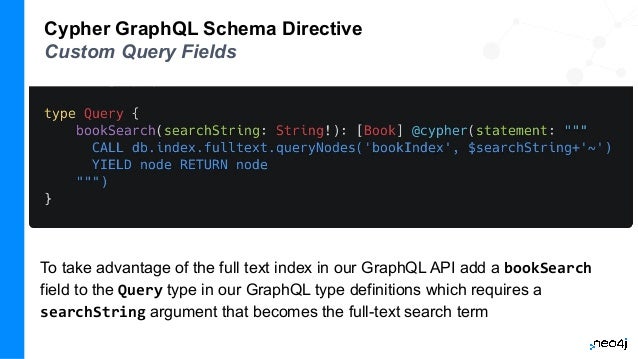
To take advantage of the full text index in our GraphQL API add a bookSearch
field to the Query type in our GraphQL type definitions which requires a
searchString argument that becomes the full-text search term
Cypher GraphQL Schema Directive
Custom Query Fields
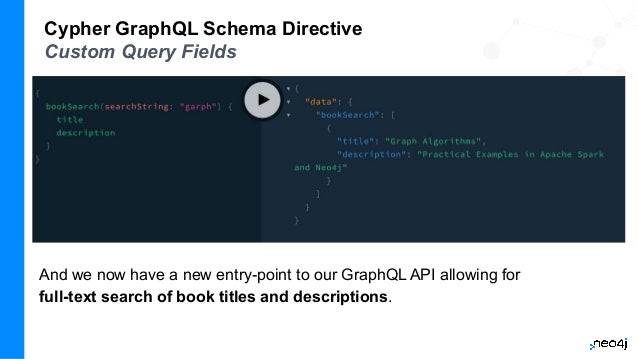
And we now have a new entry-point to our GraphQL API allowing for
full-text search of book titles and descriptions.
Cypher GraphQL Schema Directive
Custom Mutation Fields
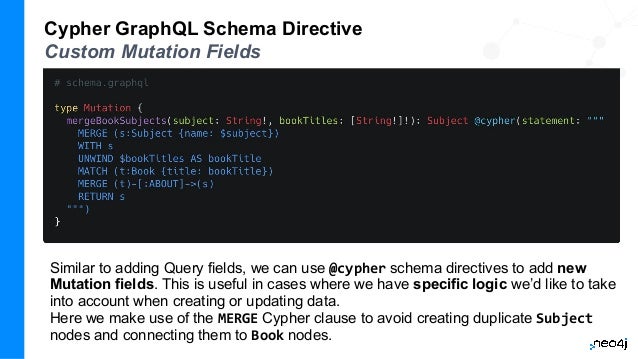
Similar to adding Query fields, we can use @cypher schema directives to add new
Mutation fields. This is useful in cases where we have specific logic we’d like to take
into account when creating or updating data.
Here we make use of the MERGE Cypher clause to avoid creating duplicate Subject
nodes and connecting them to Book nodes.
Cypher GraphQL Schema Directive
Custom Mutation Fields
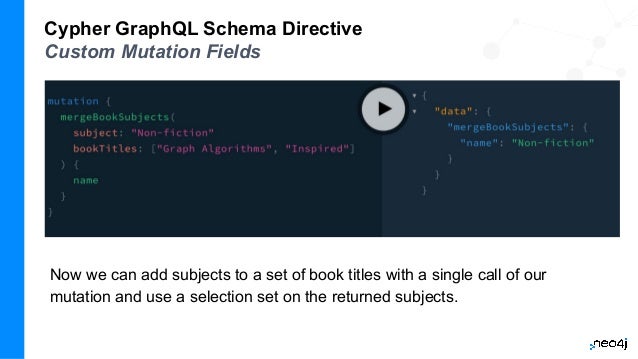
Now we can add subjects to a set of book titles with a single call of our
mutation and use a selection set on the returned subjects.
Cypher GraphQL Schema Directive
Custom Resolvers
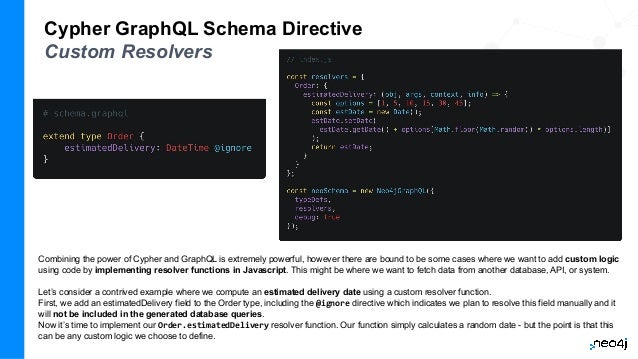
Combining the power of Cypher and GraphQL is extremely powerful, however there are bound to be some cases where we want to add custom logic
using code by implementing resolver functions in Javascript. This might be where we want to fetch data from another database, API, or system.
Let’s consider a contrived example where we compute an estimated delivery date using a custom resolver function.
First, we add an estimatedDelivery field to the Order type, including the @ignore directive which indicates we plan to resolve this field manually and it
will not be included in the generated database queries.
Now it’s time to implement our Order.estimatedDelivery resolver function. Our function simply calculates a random date - but the point is that this
can be any custom logic we choose to define.
Cypher GraphQL Schema Directive
Custom Resolvers
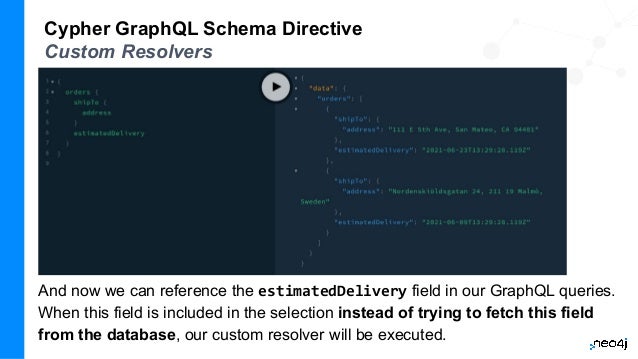
And now we can reference the estimatedDelivery field in our GraphQL queries.
When this field is included in the selection instead of trying to fetch this field
from the database, our custom resolver will be executed.
Exercise: Article Recommendation
1. Use the article recommendation query from the first exercise to add a
similar field on the Article type to your GraphQL schema using the
@cypher GraphQL schema directive.
2. Now use this new Article.similar field in the Articles React
component to show a list of similar articles for each article in the list.
Hands-On
Exercise
Resources
● Slides:
○ dev.neo4j.com/fullstack-graphql-workshop
● Code
○ dev.neo4j.com/fullstack-graphql-repo
● Neo4j GraphQL Library Docs
○ neo4j.com/docs/graphql-manual/current/
● Neo4j GraphQL Library Overview Page
○ neo4j.com/product/graphql-library/
● Graph Academy Training
○ neo4j.com/graphacademy/training-graphql-apis/enrollment/
82
Authorization
Adding Authorization Rules To Your API Using The @auth Directive
The @auth Directive
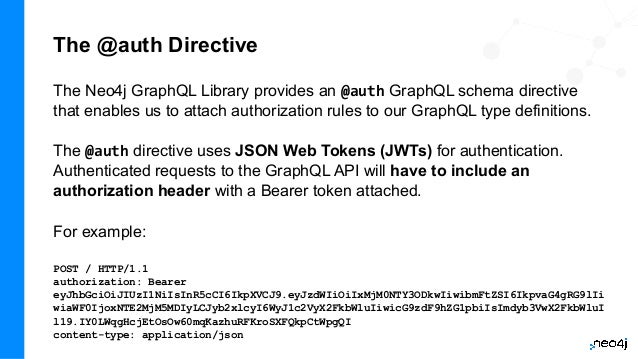
The Neo4j GraphQL Library provides an @auth GraphQL schema directive
that enables us to attach authorization rules to our GraphQL type definitions.
The @auth directive uses JSON Web Tokens (JWTs) for authentication.
Authenticated requests to the GraphQL API will have to include an
authorization header with a Bearer token attached.
For example:
POST / HTTP/1.1
authorization: Bearer
eyJhbGciOiJIUzI1NiIsInR5cCI6IkpXVCJ9.eyJzdWIiOiIxMjM0NTY3ODkwIiwibmFtZSI6IkpvaG4gRG9lIi
wiaWF0IjoxNTE2MjM5MDIyLCJyb2xlcyI6WyJ1c2VyX2FkbWluIiwicG9zdF9hZG1pbiIsImdyb3VwX2FkbWluI
l19.IY0LWqgHcjEtOsOw60mqKazhuRFKroSXFQkpCtWpgQI
content-type: application/json
JSON Web Token (JWT) - jwt.io
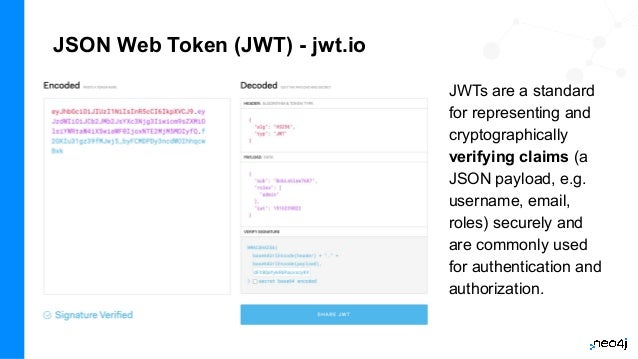
JWTs are a standard
for representing and
cryptographically
verifying claims (a
JSON payload, e.g.
username, email,
roles) securely and
are commonly used
for authentication and
authorization.
The @auth Directive
isAuthenticated
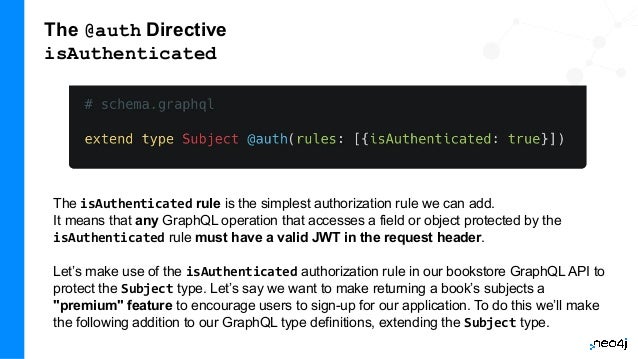
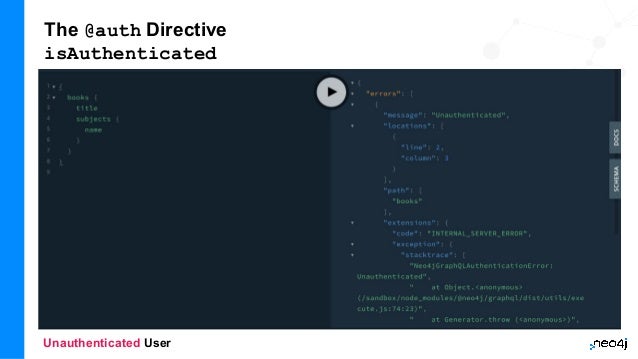
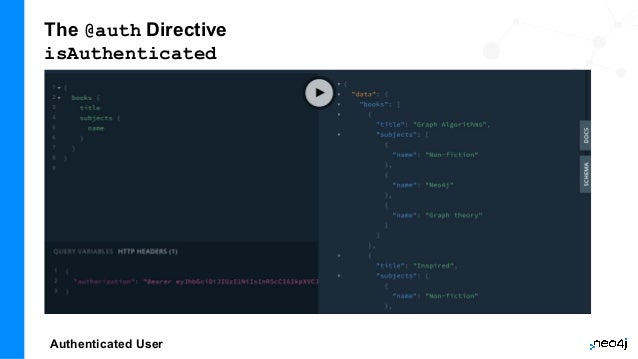
The isAuthenticated rule is the simplest authorization rule we can add.
It means that any GraphQL operation that accesses a field or object protected by the
isAuthenticated rule must have a valid JWT in the request header.
Let’s make use of the isAuthenticated authorization rule in our bookstore GraphQL API to
protect the Subject type. Let’s say we want to make returning a book’s subjects a
"premium" feature to encourage users to sign-up for our application. To do this we’ll make
the following addition to our GraphQL type definitions, extending the Subject type.
The @auth Directive
isAuthenticated
Unauthenticated User
The @auth Directive
isAuthenticated
Authenticated User
The @auth Directive
Roles
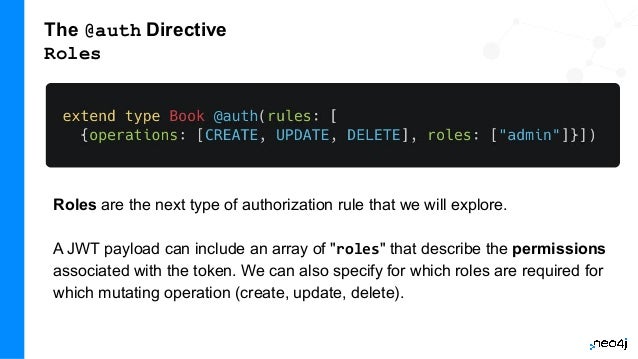
Roles are the next type of authorization rule that we will explore.
A JWT payload can include an array of "roles" that describe the permissions
associated with the token. We can also specify for which roles are required for
which mutating operation (create, update, delete).
The @auth Directive
Allow
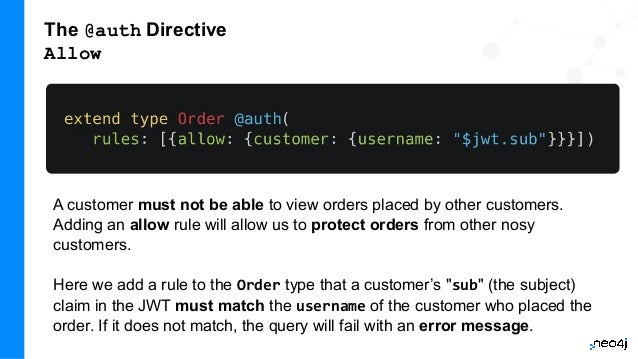
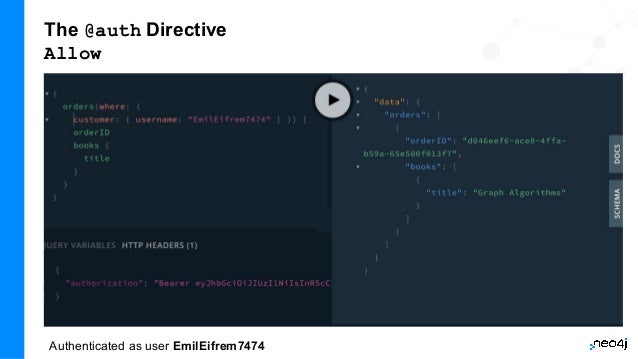
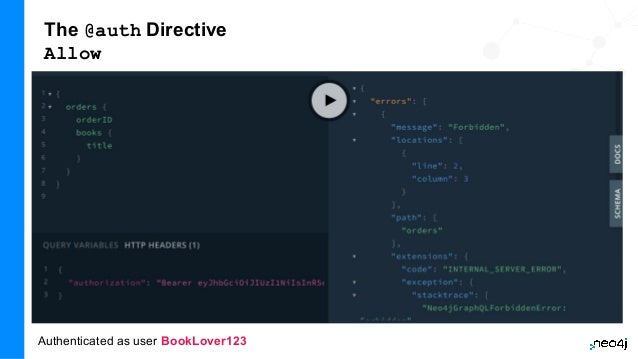
A customer must not be able to view orders placed by other customers.
Adding an allow rule will allow us to protect orders from other nosy
customers.
Here we add a rule to the Order type that a customer’s "sub" (the subject)
claim in the JWT must match the username of the customer who placed the
order. If it does not match, the query will fail with an error message.
The @auth Directive
Allow
Authenticated as user EmilEifrem7474
The @auth Directive
Allow
Authenticated as user BookLover123
The @auth Directive
Allow
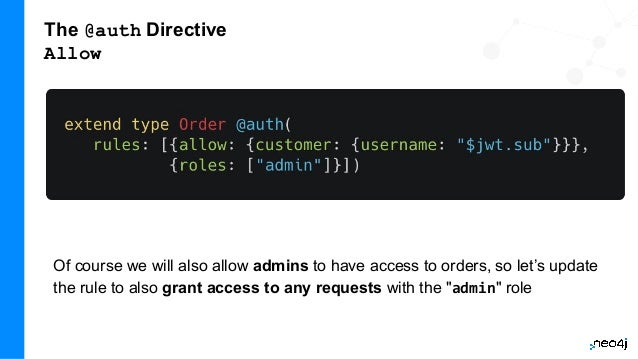
Of course we will also allow admins to have access to orders, so let’s update
the rule to also grant access to any requests with the "admin" role
The @auth Directive
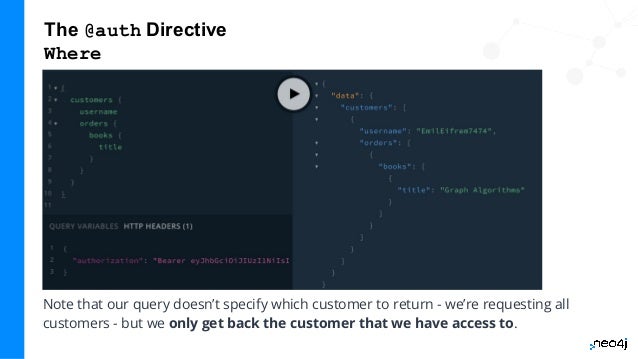
Where
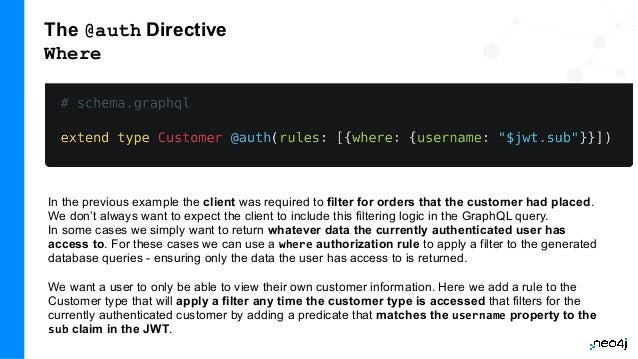
In the previous example the client was required to filter for orders that the customer had placed.
We don’t always want to expect the client to include this filtering logic in the GraphQL query.
In some cases we simply want to return whatever data the currently authenticated user has
access to. For these cases we can use a where authorization rule to apply a filter to the generated
database queries - ensuring only the data the user has access to is returned.
We want a user to only be able to view their own customer information. Here we add a rule to the
Customer type that will apply a filter any time the customer type is accessed that filters for the
currently authenticated customer by adding a predicate that matches the username property to the
sub claim in the JWT.
The @auth Directive
Where
Note that our query doesn’t specify which customer to return - we’re requesting all
customers - but we only get back the customer that we have access to.
The @auth Directive
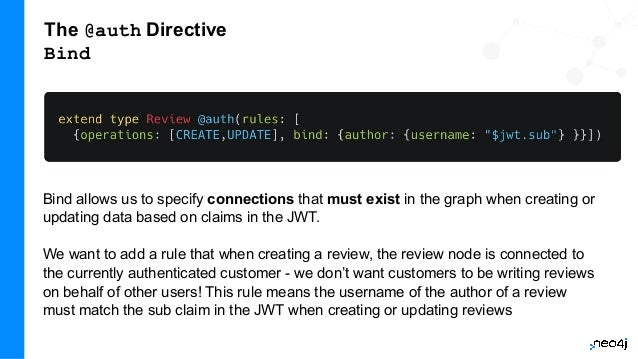
Bind
Bind allows us to specify connections that must exist in the graph when creating or
updating data based on claims in the JWT.
We want to add a rule that when creating a review, the review node is connected to
the currently authenticated customer - we don’t want customers to be writing reviews
on behalf of other users! This rule means the username of the author of a review
must match the sub claim in the JWT when creating or updating reviews
The @auth Directive
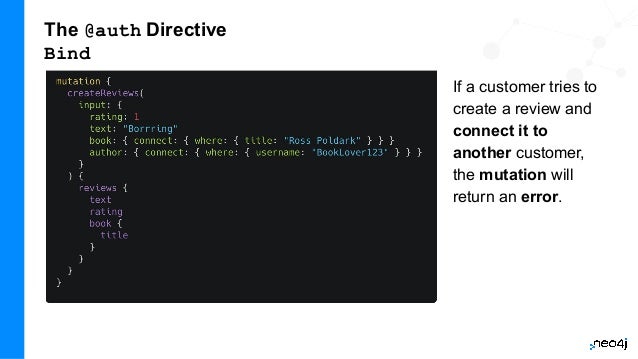
Bind
If a customer tries to
create a review and
connect it to
another customer,
the mutation will
return an error.
The @auth Directive
@cypher Directive Fields
There are two ways to make use of authorization features when using the
@cypher schema directive:
1) Apply the authorization rules isAuthenticated and roles using the
@auth directive.
2) Reference the JWT payload values in the Cypher query attached to a
@cypher schema directive.
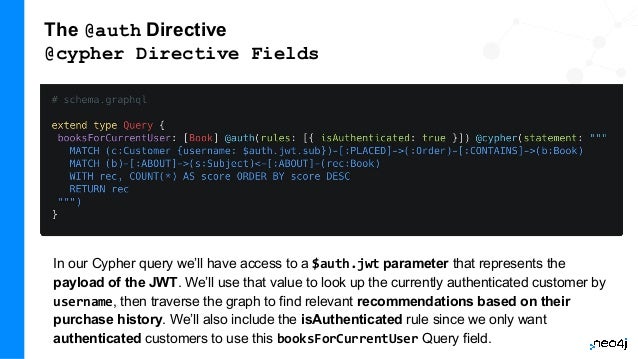
Let’s make use of both of those aspects by adding a Query field that returns
personalized recommendations for a logged in customer!
The @auth Directive
@cypher Directive Fields
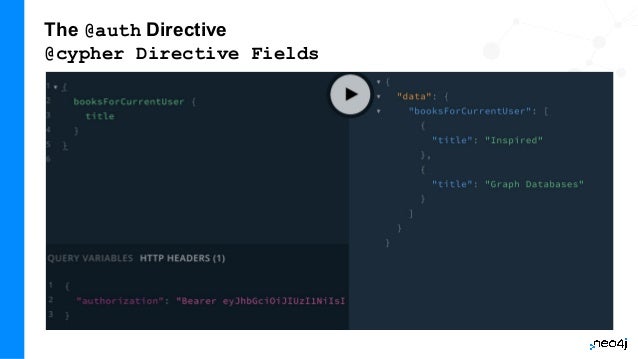
In our Cypher query we’ll have access to a $auth.jwt parameter that represents the
payload of the JWT. We’ll use that value to look up the currently authenticated customer by
username, then traverse the graph to find relevant recommendations based on their
purchase history. We’ll also include the isAuthenticated rule since we only want
authenticated customers to use this booksForCurrentUser Query field.
The @auth Directive
@cypher Directive Fields
Other Topics
● Working with unions & interfaces
● The Neo4j GraphQL OGM
● Working with relationship properties via relay connections
● Aggregations
● Other directives

Training Week: GraphQL 2022

  • 1.
    Full Stack GraphQLIn The Cloud With Neo4j AuraDB, Next.js, & Vercel dev.neo4j.com/fullstack-graphql-workshop
  • 2.
    About Me William Lyon DeveloperRelations Engineer, Neo4j @lyonwj lyonwj.com
  • 3.
    Full Stack GraphQLIn The Cloud With Neo4j AuraDB, Next.js, & Vercel Agenda Modules: ● Intro To Neo4j AuraDB ● Building GraphQL APIs ● Intro To Next.js ● Deploying With Vercel Hands-On exercises using: ● Neo4j AuraDB Free Tier ● GitHub (free tier) ● Vercel (free tier) Hands-On Exercise
  • 4.
    4 Introduction To Neo4jAuraDB Importing & Querying Data With Cypher In The Cloud
  • 5.
    Graph Database ● Databasemanagement system (DBMS) ● Property Graph data model ● Cypher query language ● Graph analytics ● Data visualization ● Neo4j AuraDB database-as-a-service ● GraphQL integration for building GraphQL APIs What is Neo4j? neo4j.com
  • 6.
    6 The Neo4j GraphData Platform Analytics & Data Science Tooling Graph Transactions Data Orchestration Development & Administration Drivers & APIs Discovery & Visualization Graph Analytics AI BUSINESS USERS DEVELOPERS ADMINS DATA ANALYSTS DATA SCIENTISTS APPLICATIONS Cloud
  • 7.
    Neo4j AuraDB FreeSetup Let's create a Neo4j AuraDB Free instance that we'll use for the rest of the workshop... Hands-On Exercise Once your Neo4j Aura instance is online you'll see the connection string (neo4j+s://xxxxx.databases.neo4j.io) Be sure to take note of the generated password! It will then take a few moments for your Neo4j Aura instance to be provisioned. Sign in to Neo4j Aura: dev.neo4j.com/aura-login Select "Create a new database" button. Choose the "Free" tier. Enter a name for your Neo4j Aura instance and select "Create database" Step 1: Step 2: Step 3:
  • 8.
    Neo4j AuraDB FreeSetup - Step 1 Let's create a Neo4j AuraDB Free instance that we'll use for the rest of the workshop... Hands-On Exercise Sign in to Neo4j Aura: dev.neo4j.com/aura-login Select "Create a new database" button. 1. Choose the "AuraDB Free". 2. Enter a name and region for your Neo4j Aura instance 3. Choose "Blank Database" 4. Click "Create database"
  • 9.
    Neo4j AuraDB FreeSetup - Step 2 Hands-On Exercise Store Credentials Be sure to take note of the generated password! It will then take a few moments for your Neo4j Aura instance to be provisioned.
  • 10.
    Neo4j AuraDB FreeSetup - Step 3 Hands-On Exercise Once your Neo4j Aura instance is online you'll see the connection string neo4j+s://xx.databases.neo4j.io
  • 11.
    What Is AGraph?
  • 12.
    What Is AProperty Graph?
  • 13.
    What Is AKnowledge Graph? Knowledge graphs put things in context "Things, not strings" https://blog.google/products/search/introducing-knowledge-graph-things-not/
  • 14.
    News As AKnowledge Graph Using The NYTimes API Requirements: ● View articles ○ Most recent ● Search articles ○ Keyword, date range ● Comments ● Save articles ● Personalized recommendations ○ My interests ○ Location-based Data from NYTimes API: developer.nytimes.com Code: github.com/johnymontana/news-graph
  • 15.
    Hands On WithNeo4j AuraDB & Cypher Open Neo4j Browser and run :play newsgraph Hands-On Exercise
  • 16.
    16 Building GraphQL APIs WithThe Neo4j GraphQL Library
  • 17.
    What Is GraphQL? GraphQLis an API query language and runtime for fulfilling those queries. GraphQL uses a type system to define the data available in the API, including what entities and attributes (types and fields in GraphQL parlance) exist and how types are connected (the data graph). GraphQL operations (queries, mutations, or subscriptions) specify an entry-point and a traversal of the data graph (the selection set) which defines what fields to be returned by the operation. graphql.org
  • 18.
    GraphQL Concepts -Type Definitions GraphQL type definitions define the data available in the API. These type definitions are typically defined using the GraphQL Schema Definition Language (SDL), a language-agnostic way of expressing the types. However, type definitions can be also be defined programmatically. Type Fields with Type
  • 19.
    GraphQL Concepts -GraphQL Operations Each GraphQL operation is either a • Query, • Mutation, or • Subscription.
  • 20.
    GraphQL Concepts -GraphQL Operations Each GraphQL operation is either a Query, Mutation, or Subscription. The fields of the Query, Type (or Mutation, Subscription) define the entry points for an operation. Each operation starts at the field of one of these types. Entry point & arguments
  • 21.
    GraphQL Concepts -Selection Set The selection set specifies the fields to be returned by a GraphQL operation. Can be thought of as a traversal through the data graph. Selection set
  • 22.
    GraphQL Concepts -Selection Set The response to a GraphQL operation matches the shape of the selection set, returning on the data requested. Selection set
  • 23.
    GraphQL Concepts -Resolver Functions GraphQL resolvers are the functions responsible for actually fulfilling the GraphQL operation. In the context of a query, this means fetching data from a data layer. NOTE: The Neo4j GraphQL Library auto-generates resolver functions for us, but this is an important GraphQL concept to understand
  • 24.
    Benefits Of GraphQL ●Overfetching - sending less data over the wire ● Underfetching - everything the client needs in a single request ● The GraphQL specification defines exactly what GraphQL is ● Simplify data fetching with component-based data interactions ● "Graphs all the way down" - GraphQL can help unify disparate systems and focus API interactions on relationships instead of resources. ● Developer productivity - By reasoning about application data as a graph with a strict type system, developers can focus on building applications.
  • 25.
    GraphQL Challenges ● Somewell understood practices from REST don’t apply ○ HTTP status codes ○ Error handling ○ Caching ● Exposing arbitrary complexity to the client and performance considerations ● The n+1 query problem - the nested nature of GraphQL operations can lead to multiple requests to the data layer(s) to resolve a request ● Query costing and rate limiting Best practices and tooling have emerged to address all of the above, however it’s important to be aware of these challenges.
  • 26.
    GraphQL Tooling -GraphQL Playground GraphQL Playground is an in-browser tool for querying and exploring GraphQL APIs. View API documentation using GraphQL's introspection feature. Alternatives: • GraphiQL • Apollo Studio
  • 27.
    GraphQL Tooling -GraphQL Playground Open news-graph.vercel.app/api/graphql ● Explore the "Docs" tab to learn more about the API schema ● Run these GraphQL queries: Hands On Exercise { articles(options: { sort: { published: DESC }, limit: 10 }) { title url published } } { topics(where: { name: "Movies" }) { name articles { title } } } ● Try modifying the query selection set to return additional fields ○ Try using ctrl+space for auto-complete ○ What can you find?
  • 28.
    28 Let's Build OurOwn GraphQL API!
  • 29.
    29 The Neo4j GraphQLLibrary Overview
  • 30.
    The Neo4j GraphQLLibrary For building Node.js GraphQL APIs with Neo4j. The fundamental goal of the Neo4j GraphQL Library is to make it easier to build GraphQL APIs backed by Neo4j.
  • 31.
    Goals Of TheNeo4j GraphQL Library GraphQL First Development GraphQL type definitions can drive the database data model, which means we don’t need to maintain two separate schemas for our API and database.
  • 32.
    Goals Of TheNeo4j GraphQL Library Auto-generate GraphQL API Operations With the Neo4j GraphQL Library, GraphQL type definitions provide the starting point for a generated API that includes: ● Query & Mutation types (an API entrypoint for each type defined in the schema) ● Ordering ● Pagination ● Complex filtering ● DateTime & Spatial types and filtering ● Aggregation ● Navigation
  • 33.
    Goals Of TheNeo4j GraphQL Library Generate Cypher From GraphQL Operations To reduce boilerplate and optimize for performance the Neo4j GraphQL Library automatically generates a single database query for any arbitrary GraphQL request. This means the developer does not need to implement resolvers and each GraphQL operation results in a single roundtrip to the database. There is no n+1 query problem!
  • 34.
    Goals Of TheNeo4j GraphQL Library Extend GraphQL With Cypher To add custom logic beyond CRUD operations, you can use the @cypher GraphQL schema directive to add computed fields bound to a Cypher query to the GraphQL schema.
  • 35.
  • 36.
    Neo4j GraphQL LibraryQuickstart Create index.js
  • 37.
    Neo4j GraphQL LibraryQuickstart GraphQL Type Definition Imports
  • 38.
    Neo4j GraphQL LibraryQuickstart Database connection Augmented Schema Apollo Server
  • 39.
    Neo4j GraphQL LibraryQuickstart Start GraphQL server: This will start a local GraphQL API and will also serve the GraphQL Playground IDE for querying the API or exploring documentation using GraphQL’s introspection feature.
  • 40.
    Querying With GraphQL- Query Fields By default, each type defined in the GraphQL type definitions will have a top-levelquery field (pluralized - Book -> books). Each query field is an entry point into the GraphQL API. Since GraphQL types are mapped to node labels in Neo4j, you can think of the query as the starting point for a traversal through the graph.
  • 41.
    Querying With GraphQL- Query Fields The response data matches the shape of our GraphQL query - as we add more fields to the GraphQL selection set those fields are included in the response object.
  • 42.
    A sorting inputtype is generated for each type in the GraphQL type definitions, allowing for Query results to be sorted by each field using the options field argument. Querying With GraphQL - Sorting & Pagination Offset-based pagination is available by passing skip and limit values as part of the options argument. "Count queries" allow us to aggregate the total number of pages.
  • 43.
    Querying With GraphQL- Sorting & Pagination Cursor-based pagination can be used on relationship fields using Relay-style "Connection" types. See the documentation for more details.
  • 44.
    Querying With GraphQL- Filtering Query results can be filtered using the where argument. Filter inputs are generated for each field and expose comparison operators specific to the type of the field. For numeric fields filter input operators include equality, greater than (_GT), less than (_LT), etc., String fields have _STARTS_WITH, _CONTAINS, _ENDS_WITH, etc.
  • 45.
    Querying With GraphQL- Filtering (Nested) We can also use the where argument in nested selections to filter relationships. Here we are filtering for reviews created after Jan 1, 2021 using the createdAt_GT filter input on the createdAt DateTime type, specifying the date using the ISO format.
  • 46.
    Querying With GraphQL- Geo Distance For Point fields we can filter results by the distance to another point. Here we search for addresses within 1km of a specified point
  • 47.
    Querying With GraphQL- Filtering Using Relationships Let’s look at an example that applies filtering at the root of our query, but using a relationship. Let’s say we want to search for all orders where the shipTo address is within 1km of a certain point. To do that we’ll use the where argument at the root of the query (in the orders Query field), but use a nested filter input to specify we want to filter using the shipTo relationship and the corresponding Address node.
  • 48.
    Defining A PropertyGraph Model With GraphQL
  • 49.
    Defining A PropertyGraph Model With GraphQL
  • 50.
    Data Model inarrows.app interactive modeling tool meta-model or instance-model also allows generation of GraphQL type definition
  • 51.
    51 Introduction To Next.js WorkingWith GraphQL In Next.js
  • 52.
    What is Next.js? Next.jsis a web framework built on top of React that adds many features and conventions that aren't available by default with React. Things like server side rendering, file based routing, image optimization, code splitting and bundling, and adding server-side API routes are things we eventually need to deal with as our React application becomes more complex. With Next.js we have all these things (and lots more) available out of the box. I like to think of Next.js as React with batteries included. https://nextjs.org/
  • 53.
    Working With GraphQLIn Next.js Hands-On Exercise Open: dev.neo4j.com/fullstack-graphql-repo Click "Use this template" to create a new GitHub repo Clone your new GitHub repo Update nextjs/.env.local with your Neo4j Aura credentials, then: cd nextjs npm i npm run dev
  • 54.
  • 55.
    55 Introduction To Vercel DeployingOur Full Stack GraphQL Application
  • 56.
    What Is Vercel? ●Deployment platform for developers https://vercel.com/
  • 57.
    Deploy Our FullStack GraphQL Application With Vercel ● Sign Up/In to Vercel ● Import your GitHub repo ● Be sure to set environment variables! Hands-On Exercise
  • 59.
  • 60.
  • 62.
    62 Adding Custom LogicTo Our GraphQL API Cypher Schema Directive & Custom Resolvers
  • 63.
    63 Adding Custom LogicTo The GraphQL API - computed fields Custom Resolvers ● Implement field resolver function with your custom logic ● Resolver function will be called after initial data is fetched from Neo4j @cypher GraphQL Schema Directive ● Add custom Cypher statements to the GraphQL schema ● Single Cypher query is generated / one round trip to the database ● custom statements are integrated into that query 63
  • 64.
    Cypher GraphQL SchemaDirective Computed Scalar Field With the @cypher schema directive in the Neo4j GraphQL Library we can add a field subTotal to our Order type that includes the logic for traversing to the associated Book nodes and summing the price property value of each book. Here we use the extend type syntax of GraphQL SDL but we could also add this field directly to the Order type definition as well.The @cypher directive takes a single argument statement which is the Cypher statement to be executed to resolve the field. This Cypher statement can reference the this variable which is the currently resolved node, in this case the currently resolved Order node.
  • 65.
    Cypher GraphQL SchemaDirective Computed Scalar Field We can now include the subTotal field in our selection-set to execute the custom Cypher query...
  • 66.
    Cypher GraphQL SchemaDirective Node & Object Fields In addition to scalar fields we can also use @cypher directive fields on object and object array fields with Cypher queries that return nodes or objects. Let’s add a recommended field to the Customer type, returning books the customer might be interested in purchasing based on their order history and the order history of other customers (collaborative-filtering, peer-group) in the graph.
  • 67.
    Cypher GraphQL SchemaDirective Node & Object Fields Now we can use this recommended field on the Customer type. Since recommended is an array of Book objects we need to select the nested fields we want to be returned - in this case the title field.
  • 68.
    Custom statements canalso be added as top-level queries and mutations 68 But we don't have time to go into that!
  • 69.
    Cypher GraphQL SchemaDirective Field Arguments → Cypher Parameters Any field arguments declared on a GraphQL field with a Cypher directive are passed through to the Cypher query as Cypher parameters. Let’s say we want the client to be able to specify the number of recommendations returned. We’ll add a field argument limit to the recommended field and reference that in our Cypher query as the $limit Cypher parameter.
  • 70.
    Cypher GraphQL SchemaDirective Field Arguments → Cypher Parameters We set a default value of 3 for this limit argument so that if the value isn’t specified the limit Cypher parameter will still be passed to the Cypher query with a value of 3. The client can now specify the number of recommended books to return, here 1.
  • 71.
    Cypher GraphQL SchemaDirective Node & Object Fields We can also return a map from our Cypher query when using the @cypher directive on an object or object array GraphQL field. This is useful when we have multiple computed values we want to return or for returning data from an external data layer. Let’s add weather data for the order addresses so our delivery drivers know what sort of conditions to expect. We’ll query an external API to fetch this data using the apoc.load.json procedure. First, we’ll add a type to the GraphQL type definitions to represent this object (Weather), then we’ll use the apoc.load.json procedure to fetch data from an external API and return the current conditions, returning a map from our Cypher query that matches the shape of the Weather type.
  • 72.
    Cypher GraphQL SchemaDirective Node & Object Fields Now we can include the currentWeather field on the Address type in our GraphQL queries. Our external request is only run when we include the field into our selection set.
  • 73.
    We can usethe @cypher directive on Query fields to compliment the auto-generated Query fields provided by the Neo4j GraphQL Library. Perhaps we want to leverage a full-text index for fuzzy matching for book searches? First, in Neo4j Browser, create the full-text index: CALL db.index.fulltext.createNodeIndex( "bookIndex", ["Book"],["title", "description"]) Cypher GraphQL Schema Directive Custom Query Fields In Cypher we would search using the index like this (allowing fuzzy search): CALL db.index.fulltext.queryNodes("bookIndex", "garph~") Hands-On Exercise
  • 74.
    Cypher GraphQL SchemaDirective Custom Query Fields To take advantage of the full text index in our GraphQL API add a bookSearch field to the Query type in our GraphQL type definitions which requires a searchString argument that becomes the full-text search term
  • 75.
    Cypher GraphQL SchemaDirective Custom Query Fields And we now have a new entry-point to our GraphQL API allowing for full-text search of book titles and descriptions.
  • 76.
    Cypher GraphQL SchemaDirective Custom Mutation Fields Similar to adding Query fields, we can use @cypher schema directives to add new Mutation fields. This is useful in cases where we have specific logic we’d like to take into account when creating or updating data. Here we make use of the MERGE Cypher clause to avoid creating duplicate Subject nodes and connecting them to Book nodes.
  • 77.
    Cypher GraphQL SchemaDirective Custom Mutation Fields Now we can add subjects to a set of book titles with a single call of our mutation and use a selection set on the returned subjects.
  • 78.
    Cypher GraphQL SchemaDirective Custom Resolvers Combining the power of Cypher and GraphQL is extremely powerful, however there are bound to be some cases where we want to add custom logic using code by implementing resolver functions in Javascript. This might be where we want to fetch data from another database, API, or system. Let’s consider a contrived example where we compute an estimated delivery date using a custom resolver function. First, we add an estimatedDelivery field to the Order type, including the @ignore directive which indicates we plan to resolve this field manually and it will not be included in the generated database queries. Now it’s time to implement our Order.estimatedDelivery resolver function. Our function simply calculates a random date - but the point is that this can be any custom logic we choose to define.
  • 79.
    Cypher GraphQL SchemaDirective Custom Resolvers And now we can reference the estimatedDelivery field in our GraphQL queries. When this field is included in the selection instead of trying to fetch this field from the database, our custom resolver will be executed.
  • 80.
    Exercise: Article Recommendation 1.Use the article recommendation query from the first exercise to add a similar field on the Article type to your GraphQL schema using the @cypher GraphQL schema directive. 2. Now use this new Article.similar field in the Articles React component to show a list of similar articles for each article in the list. Hands-On Exercise
  • 81.
    Resources ● Slides: ○ dev.neo4j.com/fullstack-graphql-workshop ●Code ○ dev.neo4j.com/fullstack-graphql-repo ● Neo4j GraphQL Library Docs ○ neo4j.com/docs/graphql-manual/current/ ● Neo4j GraphQL Library Overview Page ○ neo4j.com/product/graphql-library/ ● Graph Academy Training ○ neo4j.com/graphacademy/training-graphql-apis/enrollment/
  • 82.
    82 Authorization Adding Authorization RulesTo Your API Using The @auth Directive
  • 83.
    The @auth Directive TheNeo4j GraphQL Library provides an @auth GraphQL schema directive that enables us to attach authorization rules to our GraphQL type definitions. The @auth directive uses JSON Web Tokens (JWTs) for authentication. Authenticated requests to the GraphQL API will have to include an authorization header with a Bearer token attached. For example: POST / HTTP/1.1 authorization: Bearer eyJhbGciOiJIUzI1NiIsInR5cCI6IkpXVCJ9.eyJzdWIiOiIxMjM0NTY3ODkwIiwibmFtZSI6IkpvaG4gRG9lIi wiaWF0IjoxNTE2MjM5MDIyLCJyb2xlcyI6WyJ1c2VyX2FkbWluIiwicG9zdF9hZG1pbiIsImdyb3VwX2FkbWluI l19.IY0LWqgHcjEtOsOw60mqKazhuRFKroSXFQkpCtWpgQI content-type: application/json
  • 84.
    JSON Web Token(JWT) - jwt.io JWTs are a standard for representing and cryptographically verifying claims (a JSON payload, e.g. username, email, roles) securely and are commonly used for authentication and authorization.
  • 85.
    The @auth Directive isAuthenticated TheisAuthenticated rule is the simplest authorization rule we can add. It means that any GraphQL operation that accesses a field or object protected by the isAuthenticated rule must have a valid JWT in the request header. Let’s make use of the isAuthenticated authorization rule in our bookstore GraphQL API to protect the Subject type. Let’s say we want to make returning a book’s subjects a "premium" feature to encourage users to sign-up for our application. To do this we’ll make the following addition to our GraphQL type definitions, extending the Subject type.
  • 86.
  • 87.
  • 88.
    The @auth Directive Roles Rolesare the next type of authorization rule that we will explore. A JWT payload can include an array of "roles" that describe the permissions associated with the token. We can also specify for which roles are required for which mutating operation (create, update, delete).
  • 89.
    The @auth Directive Allow Acustomer must not be able to view orders placed by other customers. Adding an allow rule will allow us to protect orders from other nosy customers. Here we add a rule to the Order type that a customer’s "sub" (the subject) claim in the JWT must match the username of the customer who placed the order. If it does not match, the query will fail with an error message.
  • 90.
  • 91.
  • 92.
    The @auth Directive Allow Ofcourse we will also allow admins to have access to orders, so let’s update the rule to also grant access to any requests with the "admin" role
  • 93.
    The @auth Directive Where Inthe previous example the client was required to filter for orders that the customer had placed. We don’t always want to expect the client to include this filtering logic in the GraphQL query. In some cases we simply want to return whatever data the currently authenticated user has access to. For these cases we can use a where authorization rule to apply a filter to the generated database queries - ensuring only the data the user has access to is returned. We want a user to only be able to view their own customer information. Here we add a rule to the Customer type that will apply a filter any time the customer type is accessed that filters for the currently authenticated customer by adding a predicate that matches the username property to the sub claim in the JWT.
  • 94.
    The @auth Directive Where Notethat our query doesn’t specify which customer to return - we’re requesting all customers - but we only get back the customer that we have access to.
  • 95.
    The @auth Directive Bind Bindallows us to specify connections that must exist in the graph when creating or updating data based on claims in the JWT. We want to add a rule that when creating a review, the review node is connected to the currently authenticated customer - we don’t want customers to be writing reviews on behalf of other users! This rule means the username of the author of a review must match the sub claim in the JWT when creating or updating reviews
  • 96.
    The @auth Directive Bind Ifa customer tries to create a review and connect it to another customer, the mutation will return an error.
  • 97.
    The @auth Directive @cypherDirective Fields There are two ways to make use of authorization features when using the @cypher schema directive: 1) Apply the authorization rules isAuthenticated and roles using the @auth directive. 2) Reference the JWT payload values in the Cypher query attached to a @cypher schema directive. Let’s make use of both of those aspects by adding a Query field that returns personalized recommendations for a logged in customer!
  • 98.
    The @auth Directive @cypherDirective Fields In our Cypher query we’ll have access to a $auth.jwt parameter that represents the payload of the JWT. We’ll use that value to look up the currently authenticated customer by username, then traverse the graph to find relevant recommendations based on their purchase history. We’ll also include the isAuthenticated rule since we only want authenticated customers to use this booksForCurrentUser Query field.
  • 99.
  • 100.
    Other Topics ● Workingwith unions & interfaces ● The Neo4j GraphQL OGM ● Working with relationship properties via relay connections ● Aggregations ● Other directives