HOW TOMAKEYOURDAILYWORKAPIECEOFCAKE
FRONTENDDEVTOOLS
.mat.czajka@gmail.com /czajkovsky
MateuszCzajkafromNetguru
Intro
Intro
Intro
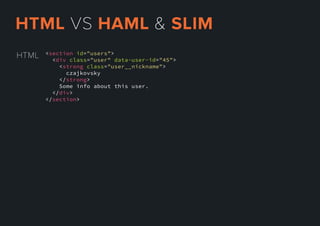
<section id="users">
<div class="user" data-user-id="45">
<strong class="user__nickname">
czajkovsky
</strong>
Some info about this user.
</</div>
</section>
HTML
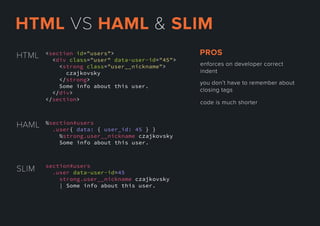
HTMLVSHAML&SLIM
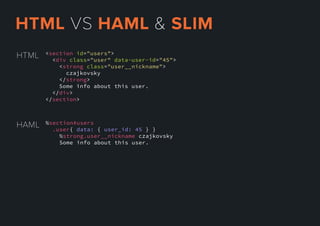
<section id="users">
<div class="user" data-user-id="45">
<strong class="user__nickname">
czajkovsky
</strong>
Some info about this user.
</</div>
</section>
HTML
HAML %section#users
.user{ data: { user_id: 45 } }
%strong.user__nickname czajkovsky
Some info about this user.
HTMLVSHAML&SLIM
<section id="users">
<div class="user" data-user-id="45">
<strong class="user__nickname">
czajkovsky
</strong>
Some info about this user.
</</div>
</section>
HTML
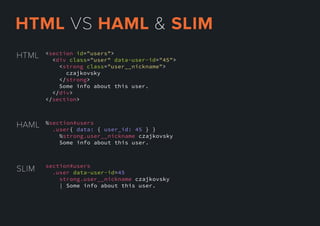
SLIM section#users
.user data-user-id=45
strong.user__nickname czajkovsky
| Some info about this user.
HAML %section#users
.user{ data: { user_id: 45 } }
%strong.user__nickname czajkovsky
Some info about this user.
HTMLVSHAML&SLIM
<section id="users">
<div class="user" data-user-id="45">
<strong class="user__nickname">
czajkovsky
</strong>
Some info about this user.
</</div>
</section>
HTML
SLIM section#users
.user data-user-id=45
strong.user__nickname czajkovsky
| Some info about this user.
HAML %section#users
.user{ data: { user_id: 45 } }
%strong.user__nickname czajkovsky
Some info about this user.
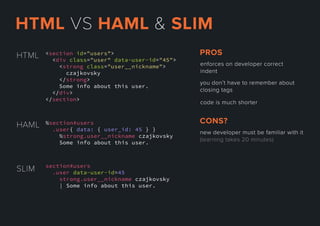
enforcesondevelopercorrect
indent
youdon’thavetorememberabout
closingtags
codeismuchshorter
PROS
HTMLVSHAML&SLIM
<section id="users">
<div class="user" data-user-id="45">
<strong class="user__nickname">
czajkovsky
</strong>
Some info about this user.
</</div>
</section>
HTML
SLIM section#users
.user data-user-id=45
strong.user__nickname czajkovsky
| Some info about this user.
HAML %section#users
.user{ data: { user_id: 45 } }
%strong.user__nickname czajkovsky
Some info about this user.
enforcesondevelopercorrect
indent
youdon’thavetorememberabout
closingtags
codeismuchshorter
PROS
newdevelopermustbefamiliarwithit
(learningtakes20minutes)
CONS?
HTMLVSHAML&SLIM
<section id="users">
<div class="user" data-user-id="45">
<strong class="user__nickname">
czajkovsky
</strong>
Some info about this user.
</</div>
</section>
HTML
SLIM section#users
.user data-user-id=45
strong.user__nickname czajkovsky
| Some info about this user.
HAML %section#users
.user{ data: { user_id: 45 } }
%strong.user__nickname czajkovsky
Some info about this user.
enforcesondevelopercorrect
indent
youdon’thavetorememberabout
closingtags
codeismuchshorter
PROS
newdevelopermustbefamiliarwithit
(learningtakes20minutes)
CONS?
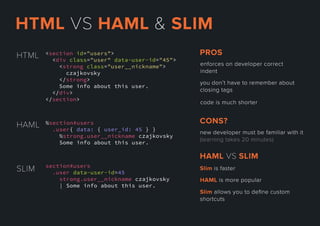
Slim isfaster
Slim allowsyoutodefinecustom
shortcuts
HAMLismorepopular
HAMLVSSLIM
HTMLVSHAML&SLIM
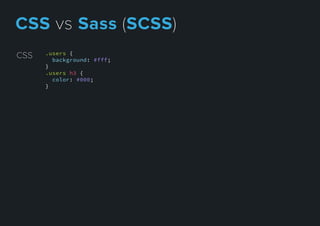
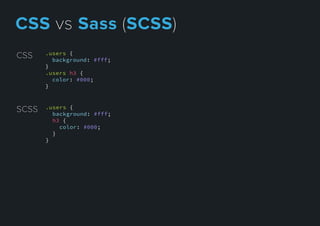
.users {
background: #fff;
}
.users h3 {
color: #000;
}
CSS
CSSvsSass(SCSS)
.users {
background: #fff;
}
.users h3 {
color: #000;
}
CSS
SCSS .users {
background: #fff;
h3 {
color: #000;
}
}
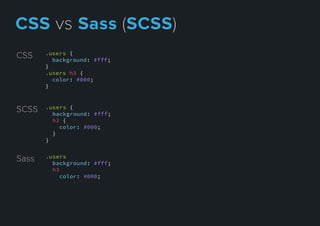
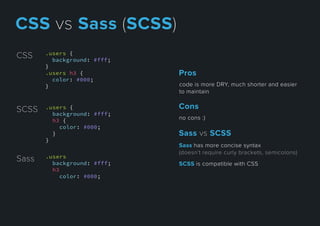
CSSvsSass(SCSS)
.users {
background: #fff;
}
.users h3 {
color: #000;
}
CSS
Sass .users
background: #fff;
h3
color: #000;
SCSS .users {
background: #fff;
h3 {
color: #000;
}
}
CSSvsSass(SCSS)
.users {
background: #fff;
}
.users h3 {
color: #000;
}
CSS
Sass .users
background: #fff;
h3
color: #000;
SCSS .users {
background: #fff;
h3 {
color: #000;
}
}
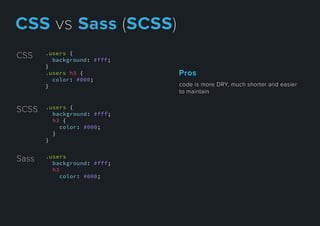
codeismoreDRY,muchshorterandeasier
tomaintain
Pros
CSSvsSass(SCSS)
.users {
background: #fff;
}
.users h3 {
color: #000;
}
CSS
Sass .users
background: #fff;
h3
color: #000;
SCSS .users {
background: #fff;
h3 {
color: #000;
}
}
codeismoreDRY,muchshorterandeasier
tomaintain
Pros
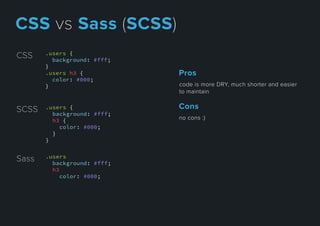
nocons:)
Cons
CSSvsSass(SCSS)
.users {
background: #fff;
}
.users h3 {
color: #000;
}
CSS
Sass .users
background: #fff;
h3
color: #000;
SCSS .users {
background: #fff;
h3 {
color: #000;
}
}
codeismoreDRY,muchshorterandeasier
tomaintain
Pros
nocons:)
Cons
Sasshasmoreconcisesyntax
(doesn’trequirecurlybrackets,semicolons)
SCSSiscompatiblewithCSS
SassvsSCSS
CSSvsSass(SCSS)
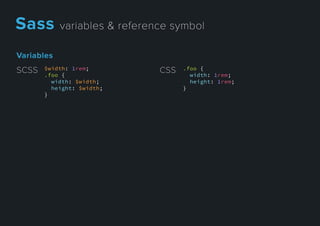
Variables
$width: 1rem;
.foo {
width: $width;
height: $width;
}
SCSS .foo {
width: 1rem;
height: 1rem;
}
CSS
Sassvariables&referencesymbol
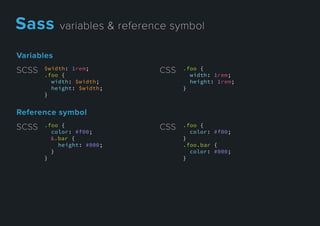
Variables
$width: 1rem;
.foo {
width: $width;
height: $width;
}
SCSS .foo {
width: 1rem;
height: 1rem;
}
CSS
Referencesymbol
.foo {
color: #f00;
&.bar {
height: #000;
}
}
SCSS .foo {
color: #f00;
}
.foo.bar {
color: #000;
}
CSS
Sassvariables&referencesymbol
Variables
$width: 1rem;
.foo {
width: $width;
height: $width;
}
SCSS .foo {
width: 1rem;
height: 1rem;
}
CSS
Referencesymbol
.foo {
color: #f00;
&.bar {
height: #000;
}
}
SCSS .foo {
color: #f00;
}
.foo.bar {
color: #000;
}
CSS
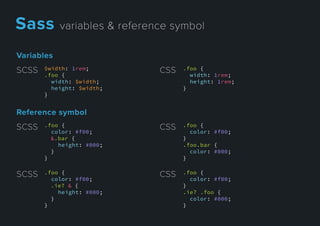
.foo {
color: #f00;
.ie7 & {
height: #000;
}
}
SCSS .foo {
color: #f00;
}
.ie7 .foo {
color: #000;
}
CSS
Sassvariables&referencesymbol
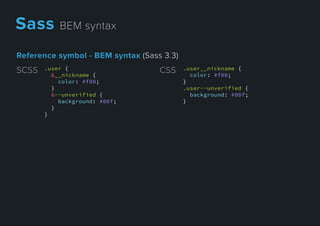
Referencesymbol-BEM syntax(Sass3.3)
.user {
&__nickname {
color: #f00;
}
&--unverified {
background: #00f;
}}
}
SCSS .user__nickname {
color: #f00;
}
.user--unverified {
background: #00f;
}
CSS
SassBEMsyntax
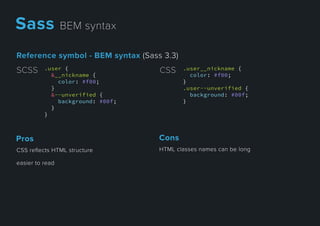
Referencesymbol-BEM syntax(Sass3.3)
.user {
&__nickname {
color: #f00;
}
&--unverified {
background: #00f;
}}
}
SCSS .user__nickname {
color: #f00;
}
.user--unverified {
background: #00f;
}
CSS
CSSreflectsHTMLstructure
easiertoread
Pros
HTMLclassesnamescanbelong
Cons
SassBEMsyntax
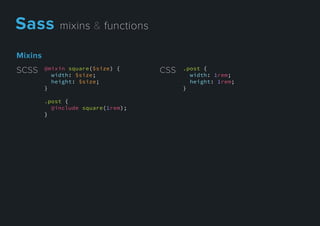
Mixins
@mixin square($size) {
width: $size;
height: $size;
}
.post {
@include square(1rem);
}}
SCSS .post {
width: 1rem;
height: 1rem;
}
CSS
Sassmixins&functions
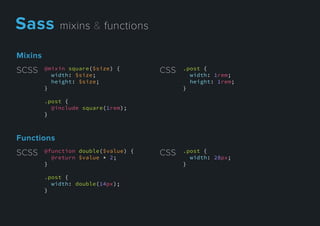
Mixins
@mixin square($size) {
width: $size;
height: $size;
}
.post {
@include square(1rem);
}}
SCSS .post {
width: 1rem;
height: 1rem;
}
CSS
Functions
@function double($value) {
@return $value * 2;
}
.post {
width: double(14px);
}
SCSS .post {
width: 28px;
}
CSS
Sassmixins&functions
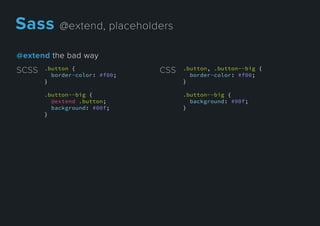
@extendthebadway
.button {
border-color: #f00;
}
.button--big {
@extend .button;
background: #00f;
}}
SCSS .button, .button--big {
border-color: #f00;
}
.button--big {
background: #00f;
}
CSS
Sass@extend,placeholders
@extendthebadway
.button {
border-color: #f00;
}
.button--big {
@extend .button;
background: #00f;
}}
SCSS .button, .button--big {
border-color: #f00;
}
.button--big {
background: #00f;
}
CSS
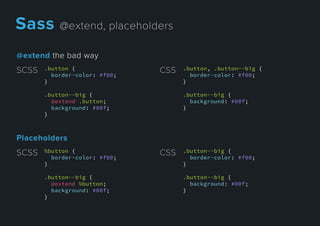
Placeholders
%button {
border-color: #f00;
}
.button--big {
@extend %button;
background: #00f;
}}
SCSS .button--big {
border-color: #f00;
}
.button--big {
background: #00f;
}
CSS
Sass@extend,placeholders
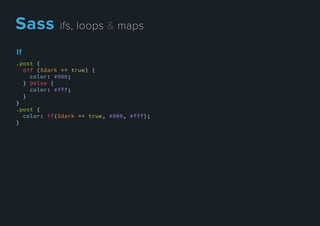
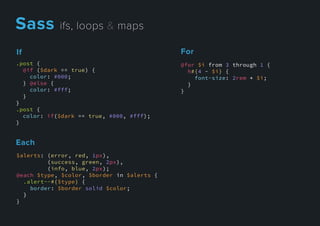
If
.post {
@if ($dark == true) {
color: #000;
} @else {
color: #fff;
}
}}
.post {
color: if($dark == true, #000, #fff);
}
Sassifs,loops&maps
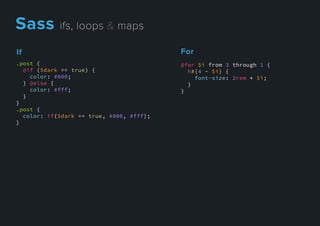
For
@for $i from 3 through 1 {
h#{4 - $i} {
font-size: 2rem * $i;
}
}
If
.post {
@if ($dark == true) {
color: #000;
} @else {
color: #fff;
}
}}
.post {
color: if($dark == true, #000, #fff);
}
Sassifs,loops&maps
Each
$alerts: (error, red, 1px),
(success, green, 2px),
(info, blue, 2px);
@each $type, $color, $border in $alerts {
.alert--#{$type} {
border: $border solid $color;
}}
}
For
@for $i from 3 through 1 {
h#{4 - $i} {
font-size: 2rem * $i;
}
}
If
.post {
@if ($dark == true) {
color: #000;
} @else {
color: #fff;
}
}}
.post {
color: if($dark == true, #000, #fff);
}
Sassifs,loops&maps
Each
$alerts: (error, red, 1px),
(success, green, 2px),
(info, blue, 2px);
@each $type, $color, $border in $alerts {
.alert--#{$type} {
border: $border solid $color;
}}
}
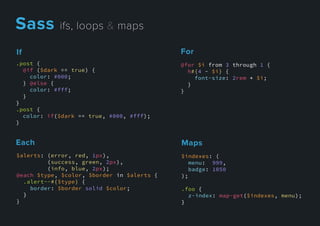
Maps
$indexes: (
menu: 999,
badge: 1050
);
.foo {
z-index: map-get($indexes, menu);
}}
For
@for $i from 3 through 1 {
h#{4 - $i} {
font-size: 2rem * $i;
}
}
If
.post {
@if ($dark == true) {
color: #000;
} @else {
color: #fff;
}
}}
.post {
color: if($dark == true, #000, #fff);
}
Sassifs,loops&maps
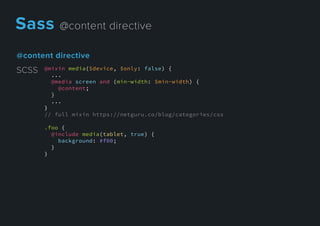
@contentdirective
@mixin media($device, $only: false) {
...
@media screen and (min-width: $min-width) {
@content;
}
...
}}
// full mixin https://netguru.co/blog/categories/css
.foo {
@include media(tablet, true) {
background: #f00;
}
}
SCSS
Sass@contentdirective
@contentdirective
@mixin media($device, $only: false) {
...
@media screen and (min-width: $min-width) {
@content;
}
...
}}
// full mixin https://netguru.co/blog/categories/css
.foo {
@include media(tablet, true) {
background: #f00;
}
}
SCSS
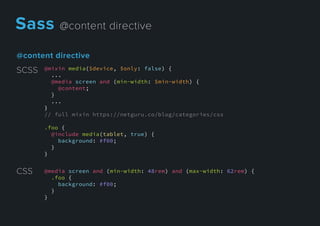
@media screen and (min-width: 48rem) and (max-width: 62rem) {
.foo {
background: #f00;
}
}
CSS
Sass@contentdirective
class Lecture
constructor: (@title, @author) ->
@slides = []
display_date: ->
if @date? then @date else "Sorry, no info about date for #{@title}"
add_slide: (name, duration) ->
slide =
name: name
duration: duration
@slides.push slide
long_slides: ->
s.name for s in @slides when s.duration > 3
CoffeeScript
class Lecture
constructor: (@title, @author) ->
@slides = []
display_date: ->
if @date? then @date else "Sorry, no info about date for #{@title}"
add_slide: (name, duration) ->
slide =
name: name
duration: duration
@slides.push slide
long_slides: ->
s.name for s in @slides when s.duration > 3
CoffeeScript
codeisshorterby1/3withoutany
incluenceonexecutiontime
(iscompiledtoJS)
syntax(defaultinRoRfromversion3.1)
Pros
class Lecture
constructor: (@title, @author) ->
@slides = []
display_date: ->
if @date? then @date else "Sorry, no info about date for #{@title}"
add_slide: (name, duration) ->
slide =
name: name
duration: duration
@slides.push slide
long_slides: ->
s.name for s in @slides when s.duration > 3
CoffeeScript
codeisshorterby1/3withoutany
incluenceonexecutiontime
(iscompiledtoJS)
syntax(defaultinRoRfromversion3.1)
Pros
syntax
Cons
CoffeeScript
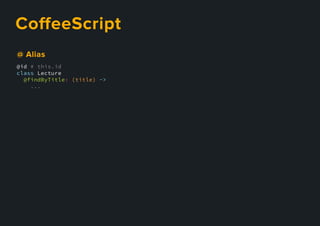
@id # this.id
class Lecture
@findByTitle: (title) ->
...
@Alias
CoffeeScript
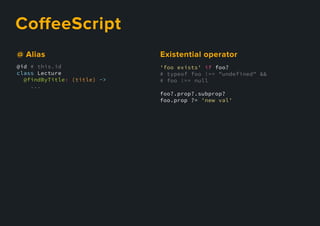
'foo exists' if foo?
# typeof foo !== "undefined" &&
# foo !== null
foo?.prop?.subprop?
foo.prop ?= 'new val'
Existentialoperator
@id # this.id
class Lecture
@findByTitle: (title) ->
...
@Alias
CoffeeScript
'foo exists' if foo?
# typeof foo !== "undefined" &&
# foo !== null
foo?.prop?.subprop?
foo.prop ?= 'new val'
Existentialoperator
@id # this.id
class Lecture
@findByTitle: (title) ->
...
@Alias
# foo = { bar: 1, baz: 2 }
foo =
bar: 1
baz: 2
# range = [2, 3, 4, 5]
range = [2..5]
Objects,arrays
CoffeeScript
'foo exists' if foo?
# typeof foo !== "undefined" &&
# foo !== null
foo?.prop?.subprop?
foo.prop ?= 'new val'
Existentialoperator
@id # this.id
class Lecture
@findByTitle: (title) ->
...
@Alias
# foo = { bar: 1, baz: 2 }
foo =
bar: 1
baz: 2
# range = [2, 3, 4, 5]
range = [2..5]
Objects,arrays
for name, i in ['HAML', 'CSS', 'JS']
alert "#{i}: #{name}"
# a = [{ name: 'HAML', duration: 5 }, ...]
s.name for s in a when s.duration > 3
Loops&comprehensions
CoffeeScript
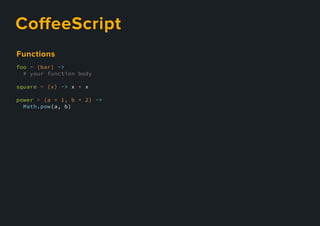
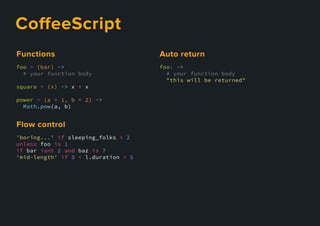
foo = (bar) ->
# your function body
square = (x) -> x * x
power = (a = 1, b = 2) ->
Math.pow(a, b)
Functions
CoffeeScript
foo = (bar) ->
# your function body
square = (x) -> x * x
power = (a = 1, b = 2) ->
Math.pow(a, b)
Functions
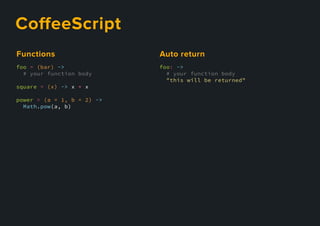
foo: ->
# your function body
"this will be returned"
Autoreturn
CoffeeScript
foo = (bar) ->
# your function body
square = (x) -> x * x
power = (a = 1, b = 2) ->
Math.pow(a, b)
Functions
'boring...' if sleeping_folks > 2
unless foo is 1
if bar isnt 2 and baz is 7
'mid-length' if 3 < l.duration < 5
Flowcontrol
foo: ->
# your function body
"this will be returned"
Autoreturn
CoffeeScript
foo = (bar) ->
# your function body
square = (x) -> x * x
power = (a = 1, b = 2) ->
Math.pow(a, b)
Functions
'boring...' if sleeping_folks > 2
unless foo is 1
if bar isnt 2 and baz is 7
'mid-length' if 3 < l.duration < 5
Flowcontrol
foo: ->
# your function body
"this will be returned"
Autoreturn
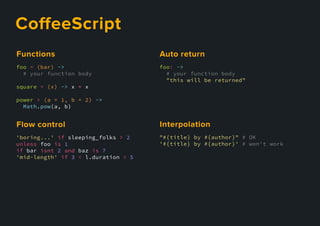
"#{title} by #{author}" # OK
'#{title} by #{author}' # won't work
Interpolation
CoffeeScript
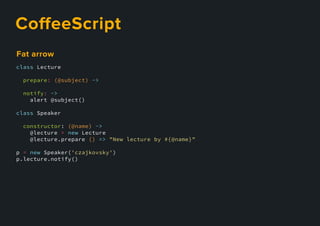
class Lecture
prepare: (@subject) ->
notify: ->
alert @subject()
class Speaker
constructor: (@name) ->
@lecture = new Lecture
@lecture.prepare () => "New lecture by #{@name}"
p = new Speaker('czajkovsky')
p.lecture.notify()
Fatarrow
CoffeeScript
class Lecture
prepare: (@subject) ->
notify: ->
alert @subject()
class Speaker
constructor: (@name) ->
@lecture = new Lecture
@lecture.prepare () => "New lecture by #{@name}"
p = new Speaker('czajkovsky')
p.lecture.notify()
Fatarrow
[month, day, year] = 'June 2 14'.split ' '
Multipleassignment
class Lecture
constructor: (@title, @author) ->
@slides = []
display_date: ->
if @date? then @date else "Sorry, no info about date for #{@title}"
long_slides: ->
s.name for s in @slides when s.duration > 3
add_slide: (name, duration) ->
slide =
name: name
duration: duration
@slides.@slides.push slide
CoffeeScript
class Lecture
constructor: (@title, @author) ->
@slides = []
display_date: ->
if @date? then @date else "Sorry, no info about date for #{@title}"
long_slides: ->
s.name for s in @slides when s.duration > 3
add_slide: (name, duration) ->
slide =
name: name
duration: duration
@slides.@slides.push slide
l = new Lecture('Front-end tools', 'czajkovsky')
l.display_date()
# Sorry, no info about date for Front-end tools
CoffeeScript
class Lecture
constructor: (@title, @author) ->
@slides = []
display_date: ->
if @date? then @date else "Sorry, no info about date for #{@title}"
long_slides: ->
s.name for s in @slides when s.duration > 3
add_slide: (name, duration) ->
slide =
name: name
duration: duration
@slides.@slides.push slide
l = new Lecture('Front-end tools', 'czajkovsky')
l.display_date()
# Sorry, no info about date for Front-end tools
l.date = '02/06/2014 18:30'
l.display_date()
# 02/06/2014 18:30
CoffeeScript
class Lecture
constructor: (@title, @author) ->
@slides = []
display_date: ->
if @date? then @date else "Sorry, no info about date for #{@title}"
long_slides: ->
s.name for s in @slides when s.duration > 3
add_slide: (name, duration) ->
slide =
name: name
duration: duration
@slides.@slides.push slide
l = new Lecture('Front-end tools', 'czajkovsky')
l.display_date()
# Sorry, no info about date for Front-end tools
l.date = '02/06/2014 18:30'
l.display_date()
# 02/06/2014 18:30
l.add_slide(l.add_slide('HAML', 2)
l.add_slide('Sass', 5)
l.add_slide('CoffeeScript', 4)
l.long_slides()
# ["Sass", "CoffeeScript"]
CoffeeScript
netguru.co/career
Thankyou!
sassmeister.com
thesassway.com
html2slim.herokuapp.com
html2haml.heroku.com js2coffee.org

Front-End Dev Tools

  • 1.
  • 2.
  • 3.
  • 4.
  • 5.
    <section id="users"> <div class="user"data-user-id="45"> <strong class="user__nickname"> czajkovsky </strong> Some info about this user. </</div> </section> HTML HTMLVSHAML&SLIM
  • 6.
    <section id="users"> <div class="user"data-user-id="45"> <strong class="user__nickname"> czajkovsky </strong> Some info about this user. </</div> </section> HTML HAML %section#users .user{ data: { user_id: 45 } } %strong.user__nickname czajkovsky Some info about this user. HTMLVSHAML&SLIM
  • 7.
    <section id="users"> <div class="user"data-user-id="45"> <strong class="user__nickname"> czajkovsky </strong> Some info about this user. </</div> </section> HTML SLIM section#users .user data-user-id=45 strong.user__nickname czajkovsky | Some info about this user. HAML %section#users .user{ data: { user_id: 45 } } %strong.user__nickname czajkovsky Some info about this user. HTMLVSHAML&SLIM
  • 8.
    <section id="users"> <div class="user"data-user-id="45"> <strong class="user__nickname"> czajkovsky </strong> Some info about this user. </</div> </section> HTML SLIM section#users .user data-user-id=45 strong.user__nickname czajkovsky | Some info about this user. HAML %section#users .user{ data: { user_id: 45 } } %strong.user__nickname czajkovsky Some info about this user. enforcesondevelopercorrect indent youdon’thavetorememberabout closingtags codeismuchshorter PROS HTMLVSHAML&SLIM
  • 9.
    <section id="users"> <div class="user"data-user-id="45"> <strong class="user__nickname"> czajkovsky </strong> Some info about this user. </</div> </section> HTML SLIM section#users .user data-user-id=45 strong.user__nickname czajkovsky | Some info about this user. HAML %section#users .user{ data: { user_id: 45 } } %strong.user__nickname czajkovsky Some info about this user. enforcesondevelopercorrect indent youdon’thavetorememberabout closingtags codeismuchshorter PROS newdevelopermustbefamiliarwithit (learningtakes20minutes) CONS? HTMLVSHAML&SLIM
  • 10.
    <section id="users"> <div class="user"data-user-id="45"> <strong class="user__nickname"> czajkovsky </strong> Some info about this user. </</div> </section> HTML SLIM section#users .user data-user-id=45 strong.user__nickname czajkovsky | Some info about this user. HAML %section#users .user{ data: { user_id: 45 } } %strong.user__nickname czajkovsky Some info about this user. enforcesondevelopercorrect indent youdon’thavetorememberabout closingtags codeismuchshorter PROS newdevelopermustbefamiliarwithit (learningtakes20minutes) CONS? Slim isfaster Slim allowsyoutodefinecustom shortcuts HAMLismorepopular HAMLVSSLIM HTMLVSHAML&SLIM
  • 11.
    .users { background: #fff; } .usersh3 { color: #000; } CSS CSSvsSass(SCSS)
  • 12.
    .users { background: #fff; } .usersh3 { color: #000; } CSS SCSS .users { background: #fff; h3 { color: #000; } } CSSvsSass(SCSS)
  • 13.
    .users { background: #fff; } .usersh3 { color: #000; } CSS Sass .users background: #fff; h3 color: #000; SCSS .users { background: #fff; h3 { color: #000; } } CSSvsSass(SCSS)
  • 14.
    .users { background: #fff; } .usersh3 { color: #000; } CSS Sass .users background: #fff; h3 color: #000; SCSS .users { background: #fff; h3 { color: #000; } } codeismoreDRY,muchshorterandeasier tomaintain Pros CSSvsSass(SCSS)
  • 15.
    .users { background: #fff; } .usersh3 { color: #000; } CSS Sass .users background: #fff; h3 color: #000; SCSS .users { background: #fff; h3 { color: #000; } } codeismoreDRY,muchshorterandeasier tomaintain Pros nocons:) Cons CSSvsSass(SCSS)
  • 16.
    .users { background: #fff; } .usersh3 { color: #000; } CSS Sass .users background: #fff; h3 color: #000; SCSS .users { background: #fff; h3 { color: #000; } } codeismoreDRY,muchshorterandeasier tomaintain Pros nocons:) Cons Sasshasmoreconcisesyntax (doesn’trequirecurlybrackets,semicolons) SCSSiscompatiblewithCSS SassvsSCSS CSSvsSass(SCSS)
  • 17.
    Variables $width: 1rem; .foo { width:$width; height: $width; } SCSS .foo { width: 1rem; height: 1rem; } CSS Sassvariables&referencesymbol
  • 18.
    Variables $width: 1rem; .foo { width:$width; height: $width; } SCSS .foo { width: 1rem; height: 1rem; } CSS Referencesymbol .foo { color: #f00; &.bar { height: #000; } } SCSS .foo { color: #f00; } .foo.bar { color: #000; } CSS Sassvariables&referencesymbol
  • 19.
    Variables $width: 1rem; .foo { width:$width; height: $width; } SCSS .foo { width: 1rem; height: 1rem; } CSS Referencesymbol .foo { color: #f00; &.bar { height: #000; } } SCSS .foo { color: #f00; } .foo.bar { color: #000; } CSS .foo { color: #f00; .ie7 & { height: #000; } } SCSS .foo { color: #f00; } .ie7 .foo { color: #000; } CSS Sassvariables&referencesymbol
  • 20.
    Referencesymbol-BEM syntax(Sass3.3) .user { &__nickname{ color: #f00; } &--unverified { background: #00f; }} } SCSS .user__nickname { color: #f00; } .user--unverified { background: #00f; } CSS SassBEMsyntax
  • 21.
    Referencesymbol-BEM syntax(Sass3.3) .user { &__nickname{ color: #f00; } &--unverified { background: #00f; }} } SCSS .user__nickname { color: #f00; } .user--unverified { background: #00f; } CSS CSSreflectsHTMLstructure easiertoread Pros HTMLclassesnamescanbelong Cons SassBEMsyntax
  • 22.
    Mixins @mixin square($size) { width:$size; height: $size; } .post { @include square(1rem); }} SCSS .post { width: 1rem; height: 1rem; } CSS Sassmixins&functions
  • 23.
    Mixins @mixin square($size) { width:$size; height: $size; } .post { @include square(1rem); }} SCSS .post { width: 1rem; height: 1rem; } CSS Functions @function double($value) { @return $value * 2; } .post { width: double(14px); } SCSS .post { width: 28px; } CSS Sassmixins&functions
  • 24.
    @extendthebadway .button { border-color: #f00; } .button--big{ @extend .button; background: #00f; }} SCSS .button, .button--big { border-color: #f00; } .button--big { background: #00f; } CSS Sass@extend,placeholders
  • 25.
    @extendthebadway .button { border-color: #f00; } .button--big{ @extend .button; background: #00f; }} SCSS .button, .button--big { border-color: #f00; } .button--big { background: #00f; } CSS Placeholders %button { border-color: #f00; } .button--big { @extend %button; background: #00f; }} SCSS .button--big { border-color: #f00; } .button--big { background: #00f; } CSS Sass@extend,placeholders
  • 26.
    If .post { @if ($dark== true) { color: #000; } @else { color: #fff; } }} .post { color: if($dark == true, #000, #fff); } Sassifs,loops&maps
  • 27.
    For @for $i from3 through 1 { h#{4 - $i} { font-size: 2rem * $i; } } If .post { @if ($dark == true) { color: #000; } @else { color: #fff; } }} .post { color: if($dark == true, #000, #fff); } Sassifs,loops&maps
  • 28.
    Each $alerts: (error, red,1px), (success, green, 2px), (info, blue, 2px); @each $type, $color, $border in $alerts { .alert--#{$type} { border: $border solid $color; }} } For @for $i from 3 through 1 { h#{4 - $i} { font-size: 2rem * $i; } } If .post { @if ($dark == true) { color: #000; } @else { color: #fff; } }} .post { color: if($dark == true, #000, #fff); } Sassifs,loops&maps
  • 29.
    Each $alerts: (error, red,1px), (success, green, 2px), (info, blue, 2px); @each $type, $color, $border in $alerts { .alert--#{$type} { border: $border solid $color; }} } Maps $indexes: ( menu: 999, badge: 1050 ); .foo { z-index: map-get($indexes, menu); }} For @for $i from 3 through 1 { h#{4 - $i} { font-size: 2rem * $i; } } If .post { @if ($dark == true) { color: #000; } @else { color: #fff; } }} .post { color: if($dark == true, #000, #fff); } Sassifs,loops&maps
  • 30.
    @contentdirective @mixin media($device, $only:false) { ... @media screen and (min-width: $min-width) { @content; } ... }} // full mixin https://netguru.co/blog/categories/css .foo { @include media(tablet, true) { background: #f00; } } SCSS Sass@contentdirective
  • 31.
    @contentdirective @mixin media($device, $only:false) { ... @media screen and (min-width: $min-width) { @content; } ... }} // full mixin https://netguru.co/blog/categories/css .foo { @include media(tablet, true) { background: #f00; } } SCSS @media screen and (min-width: 48rem) and (max-width: 62rem) { .foo { background: #f00; } } CSS Sass@contentdirective
  • 32.
    class Lecture constructor: (@title,@author) -> @slides = [] display_date: -> if @date? then @date else "Sorry, no info about date for #{@title}" add_slide: (name, duration) -> slide = name: name duration: duration @slides.push slide long_slides: -> s.name for s in @slides when s.duration > 3 CoffeeScript
  • 33.
    class Lecture constructor: (@title,@author) -> @slides = [] display_date: -> if @date? then @date else "Sorry, no info about date for #{@title}" add_slide: (name, duration) -> slide = name: name duration: duration @slides.push slide long_slides: -> s.name for s in @slides when s.duration > 3 CoffeeScript codeisshorterby1/3withoutany incluenceonexecutiontime (iscompiledtoJS) syntax(defaultinRoRfromversion3.1) Pros
  • 34.
    class Lecture constructor: (@title,@author) -> @slides = [] display_date: -> if @date? then @date else "Sorry, no info about date for #{@title}" add_slide: (name, duration) -> slide = name: name duration: duration @slides.push slide long_slides: -> s.name for s in @slides when s.duration > 3 CoffeeScript codeisshorterby1/3withoutany incluenceonexecutiontime (iscompiledtoJS) syntax(defaultinRoRfromversion3.1) Pros syntax Cons
  • 35.
    CoffeeScript @id # this.id classLecture @findByTitle: (title) -> ... @Alias
  • 36.
    CoffeeScript 'foo exists' iffoo? # typeof foo !== "undefined" && # foo !== null foo?.prop?.subprop? foo.prop ?= 'new val' Existentialoperator @id # this.id class Lecture @findByTitle: (title) -> ... @Alias
  • 37.
    CoffeeScript 'foo exists' iffoo? # typeof foo !== "undefined" && # foo !== null foo?.prop?.subprop? foo.prop ?= 'new val' Existentialoperator @id # this.id class Lecture @findByTitle: (title) -> ... @Alias # foo = { bar: 1, baz: 2 } foo = bar: 1 baz: 2 # range = [2, 3, 4, 5] range = [2..5] Objects,arrays
  • 38.
    CoffeeScript 'foo exists' iffoo? # typeof foo !== "undefined" && # foo !== null foo?.prop?.subprop? foo.prop ?= 'new val' Existentialoperator @id # this.id class Lecture @findByTitle: (title) -> ... @Alias # foo = { bar: 1, baz: 2 } foo = bar: 1 baz: 2 # range = [2, 3, 4, 5] range = [2..5] Objects,arrays for name, i in ['HAML', 'CSS', 'JS'] alert "#{i}: #{name}" # a = [{ name: 'HAML', duration: 5 }, ...] s.name for s in a when s.duration > 3 Loops&comprehensions
  • 39.
    CoffeeScript foo = (bar)-> # your function body square = (x) -> x * x power = (a = 1, b = 2) -> Math.pow(a, b) Functions
  • 40.
    CoffeeScript foo = (bar)-> # your function body square = (x) -> x * x power = (a = 1, b = 2) -> Math.pow(a, b) Functions foo: -> # your function body "this will be returned" Autoreturn
  • 41.
    CoffeeScript foo = (bar)-> # your function body square = (x) -> x * x power = (a = 1, b = 2) -> Math.pow(a, b) Functions 'boring...' if sleeping_folks > 2 unless foo is 1 if bar isnt 2 and baz is 7 'mid-length' if 3 < l.duration < 5 Flowcontrol foo: -> # your function body "this will be returned" Autoreturn
  • 42.
    CoffeeScript foo = (bar)-> # your function body square = (x) -> x * x power = (a = 1, b = 2) -> Math.pow(a, b) Functions 'boring...' if sleeping_folks > 2 unless foo is 1 if bar isnt 2 and baz is 7 'mid-length' if 3 < l.duration < 5 Flowcontrol foo: -> # your function body "this will be returned" Autoreturn "#{title} by #{author}" # OK '#{title} by #{author}' # won't work Interpolation
  • 43.
    CoffeeScript class Lecture prepare: (@subject)-> notify: -> alert @subject() class Speaker constructor: (@name) -> @lecture = new Lecture @lecture.prepare () => "New lecture by #{@name}" p = new Speaker('czajkovsky') p.lecture.notify() Fatarrow
  • 44.
    CoffeeScript class Lecture prepare: (@subject)-> notify: -> alert @subject() class Speaker constructor: (@name) -> @lecture = new Lecture @lecture.prepare () => "New lecture by #{@name}" p = new Speaker('czajkovsky') p.lecture.notify() Fatarrow [month, day, year] = 'June 2 14'.split ' ' Multipleassignment
  • 45.
    class Lecture constructor: (@title,@author) -> @slides = [] display_date: -> if @date? then @date else "Sorry, no info about date for #{@title}" long_slides: -> s.name for s in @slides when s.duration > 3 add_slide: (name, duration) -> slide = name: name duration: duration @slides.@slides.push slide CoffeeScript
  • 46.
    class Lecture constructor: (@title,@author) -> @slides = [] display_date: -> if @date? then @date else "Sorry, no info about date for #{@title}" long_slides: -> s.name for s in @slides when s.duration > 3 add_slide: (name, duration) -> slide = name: name duration: duration @slides.@slides.push slide l = new Lecture('Front-end tools', 'czajkovsky') l.display_date() # Sorry, no info about date for Front-end tools CoffeeScript
  • 47.
    class Lecture constructor: (@title,@author) -> @slides = [] display_date: -> if @date? then @date else "Sorry, no info about date for #{@title}" long_slides: -> s.name for s in @slides when s.duration > 3 add_slide: (name, duration) -> slide = name: name duration: duration @slides.@slides.push slide l = new Lecture('Front-end tools', 'czajkovsky') l.display_date() # Sorry, no info about date for Front-end tools l.date = '02/06/2014 18:30' l.display_date() # 02/06/2014 18:30 CoffeeScript
  • 48.
    class Lecture constructor: (@title,@author) -> @slides = [] display_date: -> if @date? then @date else "Sorry, no info about date for #{@title}" long_slides: -> s.name for s in @slides when s.duration > 3 add_slide: (name, duration) -> slide = name: name duration: duration @slides.@slides.push slide l = new Lecture('Front-end tools', 'czajkovsky') l.display_date() # Sorry, no info about date for Front-end tools l.date = '02/06/2014 18:30' l.display_date() # 02/06/2014 18:30 l.add_slide(l.add_slide('HAML', 2) l.add_slide('Sass', 5) l.add_slide('CoffeeScript', 4) l.long_slides() # ["Sass", "CoffeeScript"] CoffeeScript
  • 49.