GAME CONCEPT
DISCOVERY
STYLE GUIDE
Project: DeadSpace
Group: Dead Enders
By: Douglas Freed
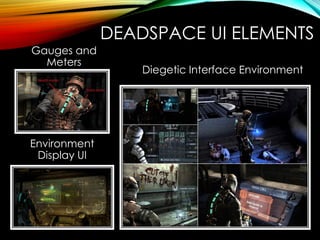
DEADSPACE UI ELEMENTS
Gauges and
Meters
Environment
Display UI
Diegetic Interface Environment
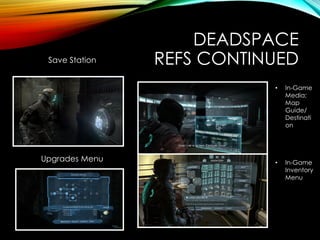
DEADSPACE
REFS CONTINUEDSave Station
Upgrades Menu
• In-Game
Media;
Map
Guide/
Destinati
on
• In-Game
Inventory
Menu
NOTES~
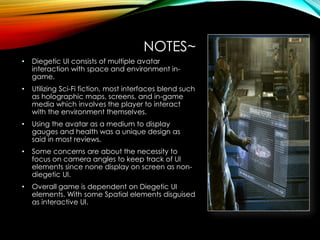
• Diegetic UI consists of multiple avatar
interaction with space and environment in-
game.
• Utilizing Sci-Fi fiction, most interfaces blend such
as holographic maps, screens, and in-game
media which involves the player to interact
with the environment themselves.
• Using the avatar as a medium to display
gauges and health was a unique design as
said in most reviews.
• Some concerns are about the necessity to
focus on camera angles to keep track of UI
elements since none display on screen as non-
diegetic UI.
• Overall game is dependent on Diegetic UI
elements. With some Spatial elements disguised
as interactive UI.
OTHER
INTERFACES AND NOTES
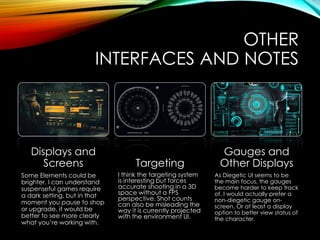
Displays and
Screens
Some Elements could be
brighter. I can understand
suspenseful games require
a dark setting, but in that
moment you pause to shop
or upgrade, it would be
better to see more clearly
what you’re working with.
Targeting
I think the targeting system
is interesting but forces
accurate shooting in a 3D
space without a FPS
perspective. Shot counts
can also be misleading the
way it is currently projected
with the environment UI.
Gauges and
Other Displays
As Diegetic UI seems to be
the main focus, the gauges
become harder to keep track
of. I would actually prefer a
non-diegetic gauge on-
screen. Or at least a display
option to better view status of
the character.
IDEAL INTERFACE - NOTES
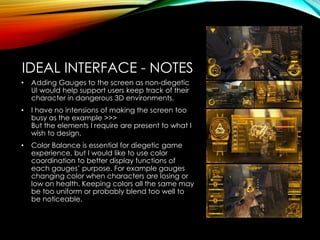
• Adding Gauges to the screen as non-diegetic
UI would help support users keep track of their
character in dangerous 3D environments.
• I have no intensions of making the screen too
busy as the example >>>
But the elements I require are present to what I
wish to design.
• Color Balance is essential for diegetic game
experience, but I would like to use color
coordination to better display functions of
each gauges’ purpose. For example gauges
changing color when characters are losing or
low on health. Keeping colors all the same may
be too uniform or probably blend too well to
be noticeable.
FIRST STEP
20 ICONS
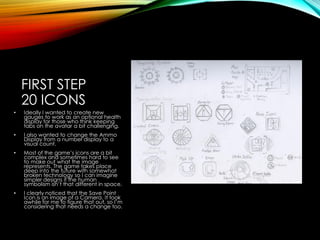
• Ideally I wanted to create new
gauges to work as an optional health
display for those who think keeping
tabs on the avatar a bit challenging.
• I also wanted to change the Ammo
Display from a number display to a
visual count.
• Most of the game’s icons are a bit
complex and sometimes hard to see
to make out what the image
represents. The game takes place
deep into the future with somewhat
broken technology so I can imagine
simpler designs if the human
symbolism isn’t that different in space.
• I clearly noticed that the Save Point
Icon is an image of a Camera. It took
awhile for me to figure that out, so I’m
considering that needs a change too.
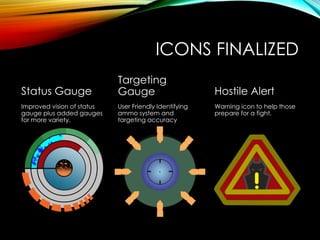
ICONS FINALIZED
Status Gauge
Improved vision of status
gauge plus added gauges
for more variety.
Targeting
Gauge
User Friendly Identifying
ammo system and
targeting accuracy
Hostile Alert
Warning icon to help those
prepare for a fight.
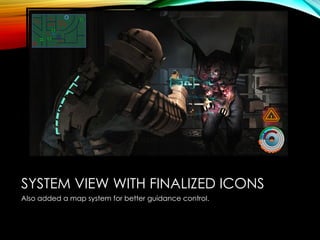
SYSTEM VIEW WITH FINALIZED ICONS
Also added a map system for better guidance control.
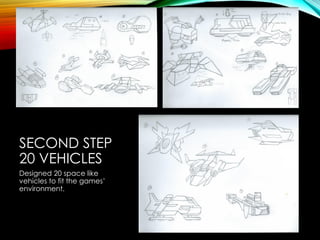
SECOND STEP
20 VEHICLES
Designed 20 space like
vehicles to fit the games’
environment.
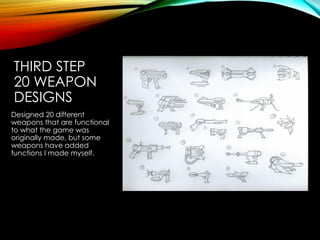
THIRD STEP
20 WEAPON
DESIGNS
Designed 20 different
weapons that are functional
to what the game was
originally made, but some
weapons have added
functions I made myself.
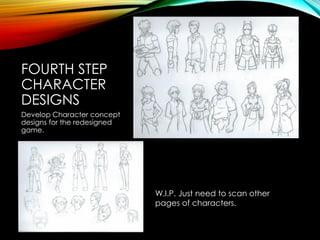
FOURTH STEP
CHARACTER
DESIGNS
Develop Character concept
designs for the redesigned
game.
W.I.P. Just need to scan other
pages of characters.
FIFTH STEP
CHARACTER
TURN-AROUND
Selected one character of
my liking and detailed him
out and made a four view
turnaround of the developed
character.
[Currently under Finalization steps]
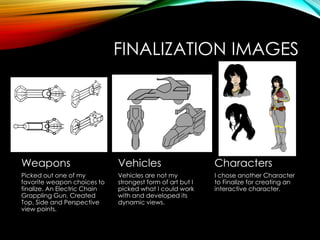
FINALIZATION IMAGES
Weapons
Picked out one of my
favorite weapon choices to
finalize. An Electric Chain
Grappling Gun. Created
Top, Side and Perspective
view points.
Vehicles
Vehicles are not my
strongest form of art but I
picked what I could work
with and developed its
dynamic views.
Characters
I chose another Character
to Finalize for creating an
interactive character.
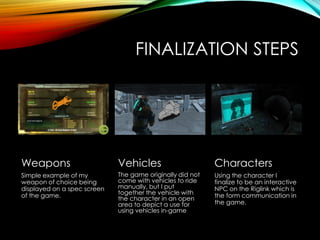
FINALIZATION STEPS
Weapons
Simple example of my
weapon of choice being
displayed on a spec screen
of the game.
Vehicles
The game originally did not
come with vehicles to ride
manually, but I put
together the vehicle with
the character in an open
area to depict a use for
using vehicles in-game
Characters
Using the character I
finalize to be an interactive
NPC on the Riglink which is
the form communication in
the game.

Freed d week_11 style guide_v5

  • 1.
    GAME CONCEPT DISCOVERY STYLE GUIDE Project:DeadSpace Group: Dead Enders By: Douglas Freed
  • 2.
    DEADSPACE UI ELEMENTS Gaugesand Meters Environment Display UI Diegetic Interface Environment
  • 3.
    DEADSPACE REFS CONTINUEDSave Station UpgradesMenu • In-Game Media; Map Guide/ Destinati on • In-Game Inventory Menu
  • 4.
    NOTES~ • Diegetic UIconsists of multiple avatar interaction with space and environment in- game. • Utilizing Sci-Fi fiction, most interfaces blend such as holographic maps, screens, and in-game media which involves the player to interact with the environment themselves. • Using the avatar as a medium to display gauges and health was a unique design as said in most reviews. • Some concerns are about the necessity to focus on camera angles to keep track of UI elements since none display on screen as non- diegetic UI. • Overall game is dependent on Diegetic UI elements. With some Spatial elements disguised as interactive UI.
  • 5.
    OTHER INTERFACES AND NOTES Displaysand Screens Some Elements could be brighter. I can understand suspenseful games require a dark setting, but in that moment you pause to shop or upgrade, it would be better to see more clearly what you’re working with. Targeting I think the targeting system is interesting but forces accurate shooting in a 3D space without a FPS perspective. Shot counts can also be misleading the way it is currently projected with the environment UI. Gauges and Other Displays As Diegetic UI seems to be the main focus, the gauges become harder to keep track of. I would actually prefer a non-diegetic gauge on- screen. Or at least a display option to better view status of the character.
  • 6.
    IDEAL INTERFACE -NOTES • Adding Gauges to the screen as non-diegetic UI would help support users keep track of their character in dangerous 3D environments. • I have no intensions of making the screen too busy as the example >>> But the elements I require are present to what I wish to design. • Color Balance is essential for diegetic game experience, but I would like to use color coordination to better display functions of each gauges’ purpose. For example gauges changing color when characters are losing or low on health. Keeping colors all the same may be too uniform or probably blend too well to be noticeable.
  • 7.
    FIRST STEP 20 ICONS •Ideally I wanted to create new gauges to work as an optional health display for those who think keeping tabs on the avatar a bit challenging. • I also wanted to change the Ammo Display from a number display to a visual count. • Most of the game’s icons are a bit complex and sometimes hard to see to make out what the image represents. The game takes place deep into the future with somewhat broken technology so I can imagine simpler designs if the human symbolism isn’t that different in space. • I clearly noticed that the Save Point Icon is an image of a Camera. It took awhile for me to figure that out, so I’m considering that needs a change too.
  • 8.
    ICONS FINALIZED Status Gauge Improvedvision of status gauge plus added gauges for more variety. Targeting Gauge User Friendly Identifying ammo system and targeting accuracy Hostile Alert Warning icon to help those prepare for a fight.
  • 9.
    SYSTEM VIEW WITHFINALIZED ICONS Also added a map system for better guidance control.
  • 10.
    SECOND STEP 20 VEHICLES Designed20 space like vehicles to fit the games’ environment.
  • 11.
    THIRD STEP 20 WEAPON DESIGNS Designed20 different weapons that are functional to what the game was originally made, but some weapons have added functions I made myself.
  • 12.
    FOURTH STEP CHARACTER DESIGNS Develop Characterconcept designs for the redesigned game. W.I.P. Just need to scan other pages of characters.
  • 13.
    FIFTH STEP CHARACTER TURN-AROUND Selected onecharacter of my liking and detailed him out and made a four view turnaround of the developed character. [Currently under Finalization steps]
  • 14.
    FINALIZATION IMAGES Weapons Picked outone of my favorite weapon choices to finalize. An Electric Chain Grappling Gun. Created Top, Side and Perspective view points. Vehicles Vehicles are not my strongest form of art but I picked what I could work with and developed its dynamic views. Characters I chose another Character to Finalize for creating an interactive character.
  • 15.
    FINALIZATION STEPS Weapons Simple exampleof my weapon of choice being displayed on a spec screen of the game. Vehicles The game originally did not come with vehicles to ride manually, but I put together the vehicle with the character in an open area to depict a use for using vehicles in-game Characters Using the character I finalize to be an interactive NPC on the Riglink which is the form communication in the game.