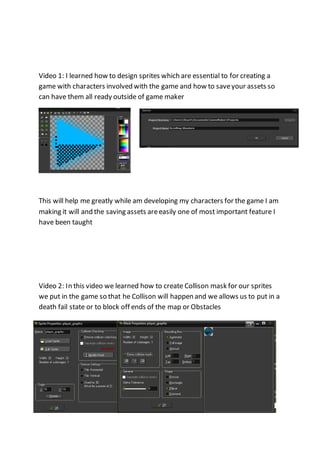
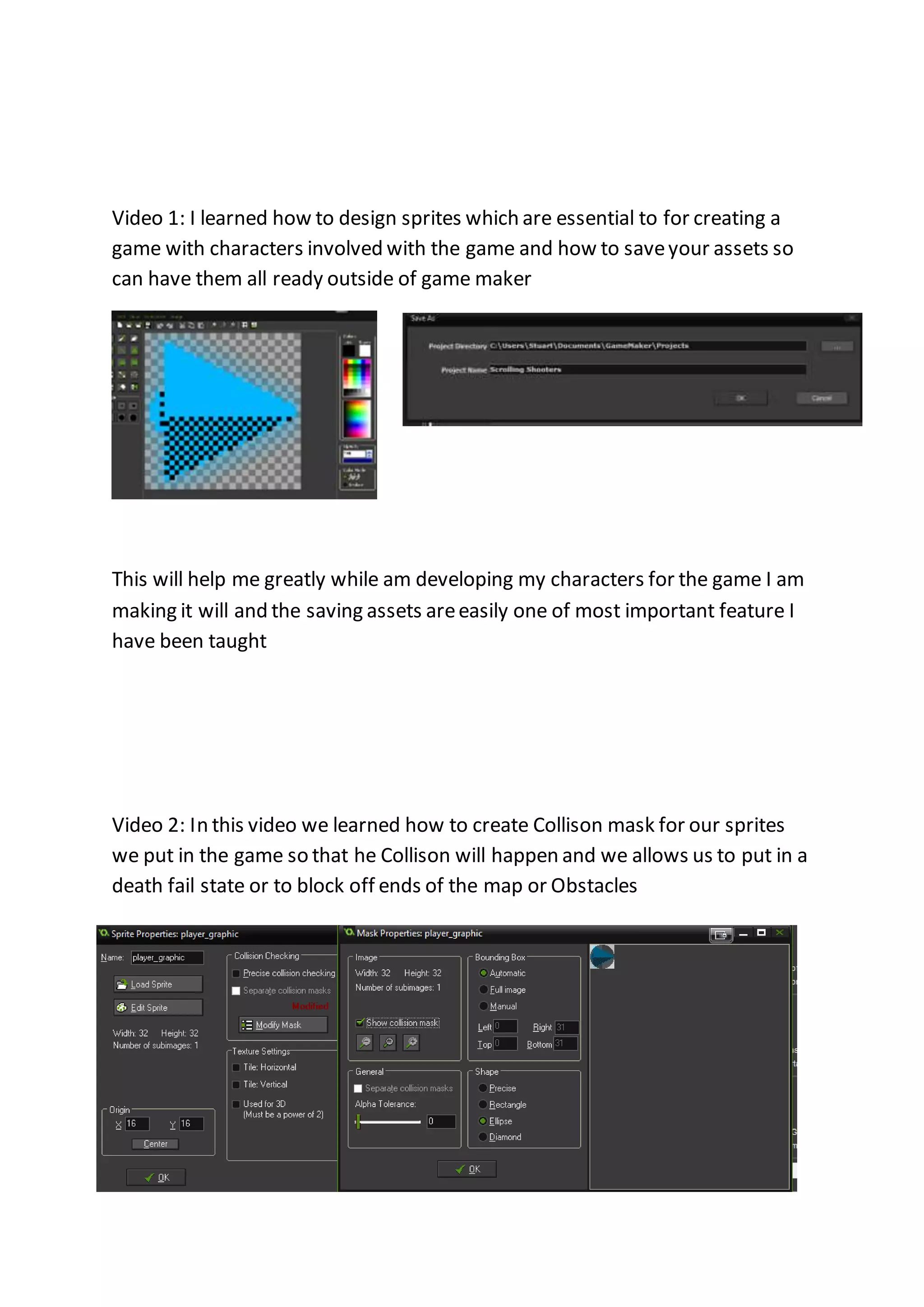
Video 1: I learned how to design sprites which are essential to for creating a 
game with characters involved with the game and how to save your assets so 
can have them all ready outside of game maker 
This will help me greatly while am developing my characters for the game I am 
making it will and the saving assets are easily one of most important feature I 
have been taught 
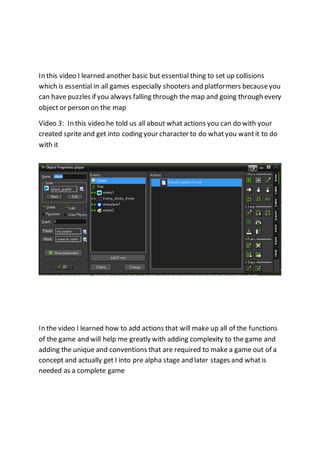
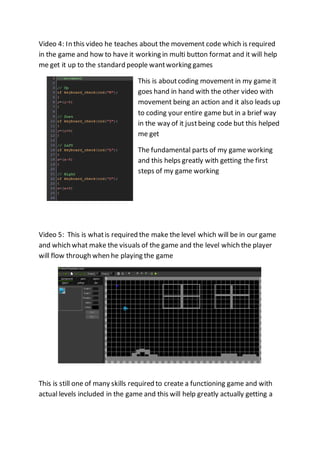
Video 2: In this video we learned how to create Collison mask for our sprites 
we put in the game so that he Collison will happen and we allows us to put in a 
death fail state or to block off ends of the map or Obstacles
In this video I learned another basic but essential thing to set up collisions 
which is essential in all games especially shooters and platformers because you 
can have puzzles if you always falling through the map and going through every 
object or person on the map 
Video 3: In this video he told us all about what actions you can do with your 
created sprite and get into coding your character to do what you want it to do 
with it 
In the video I learned how to add actions that will make up all of the functions 
of the game and will help me greatly with adding complexity to the game and 
adding the unique and conventions that are required to make a game out of a 
concept and actually get I into pre alpha stage and later stages and what is 
needed as a complete game
Video 4: In this video he teaches about the movement code which is required 
in the game and how to have it working in multi button format and it will help 
me get it up to the standard people want working games 
This is about coding movement in my game it 
goes hand in hand with the other video with 
movement being an action and it also leads up 
to coding your entire game but in a brief way 
in the way of it just being code but this helped 
me get 
The fundamental parts of my game working 
and this helps greatly with getting the first 
steps of my game working 
Video 5: This is what is required the make the level which will be in our game 
and which what make the visuals of the game and the level which the player 
will flow through when he playing the game 
This is still one of many skills required to create a functioning game and with 
actual levels included in the game and this will help greatly actually getting a
game functioning in a proper manner and also with getting all digital concepts 
of games you have in a showable manner 
Video: 6 
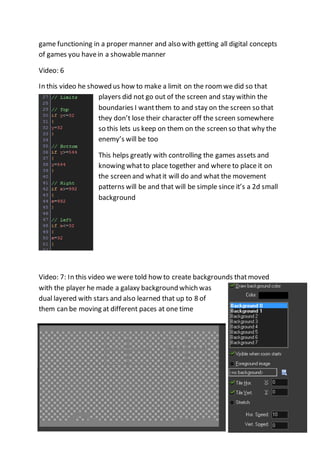
In this video he showed us how to make a limit on the room we did so that 
players did not go out of the screen and stay within the 
boundaries I want them to and stay on the screen so that 
they don’t lose their character off the screen somewhere 
so this lets us keep on them on the screen so that why the 
enemy’s will be too 
This helps greatly with controlling the games assets and 
knowing what to place together and where to place it on 
the screen and what it will do and what the movement 
patterns will be and that will be simple since it’s a 2d small 
background 
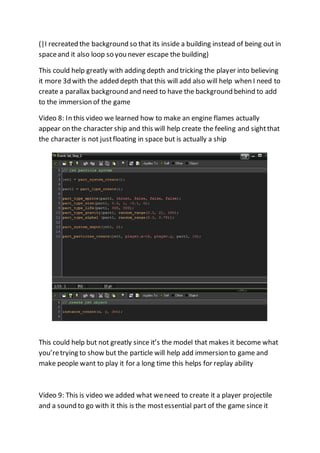
Video: 7: In this video we were told how to create backgrounds that moved 
with the player he made a galaxy background which was 
dual layered with stars and also learned that up to 8 of 
them can be moving at different paces at one time
(|I recreated the background so that its inside a building instead of being out in 
space and it also loop so you never escape the building) 
This could help greatly with adding depth and tricking the player into believing 
it more 3d with the added depth that this will add also will help when I need to 
create a parallax background and need to have the background behind to add 
to the immersion of the game 
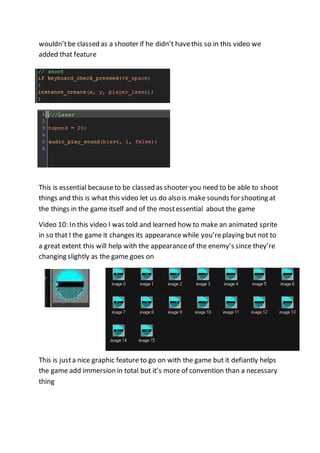
Video 8: In this video we learned how to make an engine flames actually 
appear on the character ship and this will help create the feeling and sight that 
the character is not just floating in space but is actually a ship 
This could help but not greatly since it’s the model that makes it become what 
you’re trying to show but the particle will help add immersion to game and 
make people want to play it for a long time this helps for replay ability 
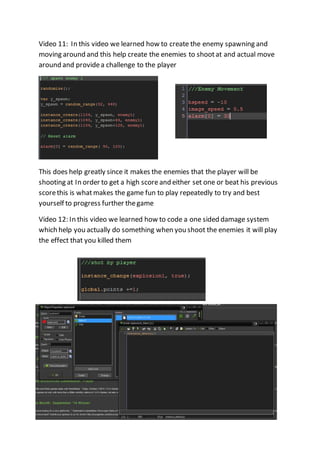
Video 9: This is video we added what we need to create it a player projectile 
and a sound to go with it this is the most essential part of the game since it
wouldn’t be classed as a shooter if he didn’t have this so in this video we 
added that feature 
This is essential because to be classed as shooter you need to be able to shoot 
things and this is what this video let us do also is make sounds for shooting at 
the things in the game itself and of the most essential about the game 
Video 10: In this video I was told and learned how to make an animated sprite 
in so that I the game it changes its appearance while you’re playing but not to 
a great extent this will help with the appearance of the enemy’s since they’re 
changing slightly as the game goes on 
This is just a nice graphic feature to go on with the game but it defiantly helps 
the game add immersion in total but it’s more of convention than a necessary 
thing
Video 11: In this video we learned how to create the enemy spawning and 
moving around and this help create the enemies to shoot at and actual move 
around and provide a challenge to the player 
This does help greatly since it makes the enemies that the player will be 
shooting at In order to get a high score and either set one or beat his previous 
score this is what makes the game fun to play repeatedly to try and best 
yourself to progress further the game 
Video 12: In this video we learned how to code a one sided damage system 
which help you actually do something when you shoot the enemies it will play 
the effect that you killed them
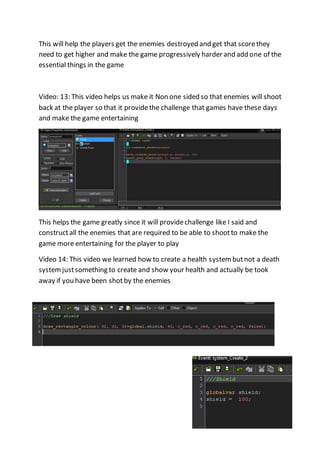
This will help the players get the enemies destroyed and get that score they 
need to get higher and make the game progressively harder and add one of the 
essential things in the game 
Video: 13: This video helps us make it Non one sided so that enemies will shoot 
back at the player so that it provide the challenge that games have these days 
and make the game entertaining 
This helps the game greatly since it will provide challenge like I said and 
construct all the enemies that are required to be able to shoot to make the 
game more entertaining for the player to play 
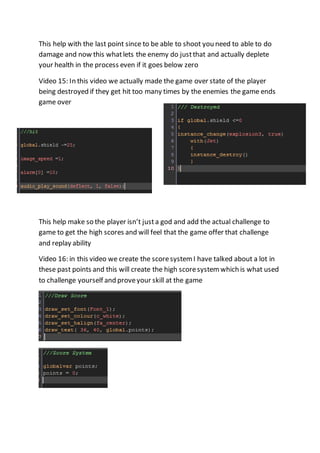
Video 14: This video we learned how to create a health system but not a death 
system just something to create and show your health and actually be took 
away if you have been shot by the enemies
This help with the last point since to be able to shoot you need to able to do 
damage and now this what lets the enemy do just that and actually deplete 
your health in the process even if it goes below zero 
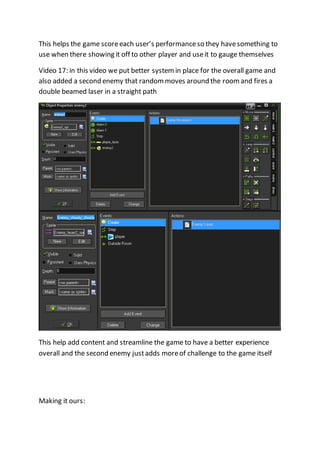
Video 15: In this video we actually made the game over state of the player 
being destroyed if they get hit too many times by the enemies the game ends 
game over 
This help make so the player isn’t just a god and add the actual challenge to 
game to get the high scores and will feel that the game offer that challenge 
and replay ability 
Video 16: in this video we create the score system I have talked about a lot in 
these past points and this will create the high score system which is what used 
to challenge yourself and prove your skill at the game
This helps the game score each user’s performance so they have something to 
use when there showing it off to other player and use it to gauge themselves 
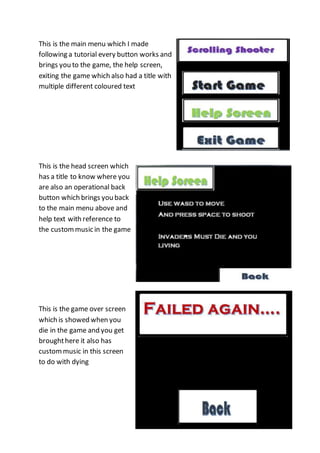
Video 17: in this video we put better system in place for the overall game and 
also added a second enemy that random moves around the room and fires a 
double beamed laser in a straight path 
This help add content and streamline the game to have a better experience 
overall and the second enemy just adds more of challenge to the game itself 
Making it ours:
This is the main menu which I made 
following a tutorial every button works and 
brings you to the game, the help screen, 
exiting the game which also had a title with 
multiple different coloured text 
This is the head screen which 
has a title to know where you 
are also an operational back 
button which brings you back 
to the main menu above and 
help text with reference to 
the custom music in the game 
This is the game over screen 
which is showed when you 
die in the game and you get 
brought here it also has 
custom music in this screen 
to do with dying
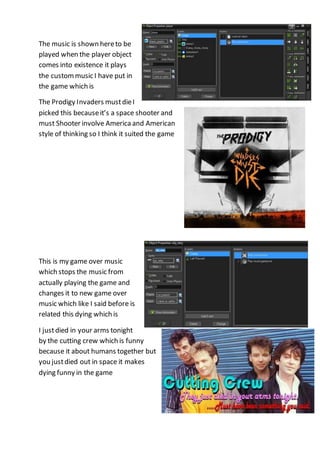
The music is shown here to be 
played when the player object 
comes into existence it plays 
the custom music I have put in 
the game which is 
The Prodigy Invaders must die I 
picked this because it’s a space shooter and 
must Shooter involve America and American 
style of thinking so I think it suited the game 
This is my game over music 
which stops the music from 
actually playing the game and 
changes it to new game over 
music which like I said before is 
related this dying which is 
I just died in your arms tonight 
by the cutting crew which is funny 
because it about humans together but 
you just died out in space it makes 
dying funny in the game
http://i113.photobucket.com/albums/n207/digs344/cuttingcrewsig.jpg 
http://www.amazon.co.uk/Invaders-Must-Die-The-Prodigy/dp/B001KH68GM

Level workflow

  • 1.
    Video 1: Ilearned how to design sprites which are essential to for creating a game with characters involved with the game and how to save your assets so can have them all ready outside of game maker This will help me greatly while am developing my characters for the game I am making it will and the saving assets are easily one of most important feature I have been taught Video 2: In this video we learned how to create Collison mask for our sprites we put in the game so that he Collison will happen and we allows us to put in a death fail state or to block off ends of the map or Obstacles
  • 2.
    In this videoI learned another basic but essential thing to set up collisions which is essential in all games especially shooters and platformers because you can have puzzles if you always falling through the map and going through every object or person on the map Video 3: In this video he told us all about what actions you can do with your created sprite and get into coding your character to do what you want it to do with it In the video I learned how to add actions that will make up all of the functions of the game and will help me greatly with adding complexity to the game and adding the unique and conventions that are required to make a game out of a concept and actually get I into pre alpha stage and later stages and what is needed as a complete game
  • 3.
    Video 4: Inthis video he teaches about the movement code which is required in the game and how to have it working in multi button format and it will help me get it up to the standard people want working games This is about coding movement in my game it goes hand in hand with the other video with movement being an action and it also leads up to coding your entire game but in a brief way in the way of it just being code but this helped me get The fundamental parts of my game working and this helps greatly with getting the first steps of my game working Video 5: This is what is required the make the level which will be in our game and which what make the visuals of the game and the level which the player will flow through when he playing the game This is still one of many skills required to create a functioning game and with actual levels included in the game and this will help greatly actually getting a
  • 4.
    game functioning ina proper manner and also with getting all digital concepts of games you have in a showable manner Video: 6 In this video he showed us how to make a limit on the room we did so that players did not go out of the screen and stay within the boundaries I want them to and stay on the screen so that they don’t lose their character off the screen somewhere so this lets us keep on them on the screen so that why the enemy’s will be too This helps greatly with controlling the games assets and knowing what to place together and where to place it on the screen and what it will do and what the movement patterns will be and that will be simple since it’s a 2d small background Video: 7: In this video we were told how to create backgrounds that moved with the player he made a galaxy background which was dual layered with stars and also learned that up to 8 of them can be moving at different paces at one time
  • 5.
    (|I recreated thebackground so that its inside a building instead of being out in space and it also loop so you never escape the building) This could help greatly with adding depth and tricking the player into believing it more 3d with the added depth that this will add also will help when I need to create a parallax background and need to have the background behind to add to the immersion of the game Video 8: In this video we learned how to make an engine flames actually appear on the character ship and this will help create the feeling and sight that the character is not just floating in space but is actually a ship This could help but not greatly since it’s the model that makes it become what you’re trying to show but the particle will help add immersion to game and make people want to play it for a long time this helps for replay ability Video 9: This is video we added what we need to create it a player projectile and a sound to go with it this is the most essential part of the game since it
  • 6.
    wouldn’t be classedas a shooter if he didn’t have this so in this video we added that feature This is essential because to be classed as shooter you need to be able to shoot things and this is what this video let us do also is make sounds for shooting at the things in the game itself and of the most essential about the game Video 10: In this video I was told and learned how to make an animated sprite in so that I the game it changes its appearance while you’re playing but not to a great extent this will help with the appearance of the enemy’s since they’re changing slightly as the game goes on This is just a nice graphic feature to go on with the game but it defiantly helps the game add immersion in total but it’s more of convention than a necessary thing
  • 7.
    Video 11: Inthis video we learned how to create the enemy spawning and moving around and this help create the enemies to shoot at and actual move around and provide a challenge to the player This does help greatly since it makes the enemies that the player will be shooting at In order to get a high score and either set one or beat his previous score this is what makes the game fun to play repeatedly to try and best yourself to progress further the game Video 12: In this video we learned how to code a one sided damage system which help you actually do something when you shoot the enemies it will play the effect that you killed them
  • 8.
    This will helpthe players get the enemies destroyed and get that score they need to get higher and make the game progressively harder and add one of the essential things in the game Video: 13: This video helps us make it Non one sided so that enemies will shoot back at the player so that it provide the challenge that games have these days and make the game entertaining This helps the game greatly since it will provide challenge like I said and construct all the enemies that are required to be able to shoot to make the game more entertaining for the player to play Video 14: This video we learned how to create a health system but not a death system just something to create and show your health and actually be took away if you have been shot by the enemies
  • 9.
    This help withthe last point since to be able to shoot you need to able to do damage and now this what lets the enemy do just that and actually deplete your health in the process even if it goes below zero Video 15: In this video we actually made the game over state of the player being destroyed if they get hit too many times by the enemies the game ends game over This help make so the player isn’t just a god and add the actual challenge to game to get the high scores and will feel that the game offer that challenge and replay ability Video 16: in this video we create the score system I have talked about a lot in these past points and this will create the high score system which is what used to challenge yourself and prove your skill at the game
  • 10.
    This helps thegame score each user’s performance so they have something to use when there showing it off to other player and use it to gauge themselves Video 17: in this video we put better system in place for the overall game and also added a second enemy that random moves around the room and fires a double beamed laser in a straight path This help add content and streamline the game to have a better experience overall and the second enemy just adds more of challenge to the game itself Making it ours:
  • 11.
    This is themain menu which I made following a tutorial every button works and brings you to the game, the help screen, exiting the game which also had a title with multiple different coloured text This is the head screen which has a title to know where you are also an operational back button which brings you back to the main menu above and help text with reference to the custom music in the game This is the game over screen which is showed when you die in the game and you get brought here it also has custom music in this screen to do with dying
  • 12.
    The music isshown here to be played when the player object comes into existence it plays the custom music I have put in the game which is The Prodigy Invaders must die I picked this because it’s a space shooter and must Shooter involve America and American style of thinking so I think it suited the game This is my game over music which stops the music from actually playing the game and changes it to new game over music which like I said before is related this dying which is I just died in your arms tonight by the cutting crew which is funny because it about humans together but you just died out in space it makes dying funny in the game
  • 13.