●
●
●
●
●
●
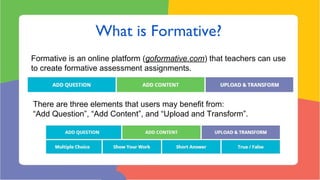
Formative is an online platform (goformative.com) that teachers can use
to create formative assessment assignments.
There are three elements that users may benefit from:
“Add Question”, “Add Content”, and “Upload and Transform”.
Observations Questioning Discussion
Exit tickets
Response Logs Whiteboards Quizzes
Think-Pair-Share Games
Examples of Formative Assessment. West Virginia Department of Education.
Source: https://wvde.state.wv.us/teach21/ExamplesofFormativeAssessment.html
There are 4 types of questions you can add to a quiz on Formative.
Show your work: This
is a question feature
that shows students an
image or questions and
students need to draw
the answer or interact
with the image.
There are 4 types of contents you can add to a quiz on Formative.
Contents are multimedia files that students will see, listen to, or interact
with in order to answer the questions.
Upload and Transform is a tool that allows users to use documents that they
already have and upload them to Formative in order to turn them into interactive
quizzes.
Users can add youtube
videos to documents
they already had.
Users can add
Formative questions to
these documents.
1. Click out of the welcome message from Craig and
click on “New Assignment”
2. Write a title for your formative!
1. Select “ADD QUESTION” by clicking one of the blue boxes.
2. Choose a question type by clicking on one of the blue boxes.
Example of adding a question: Short Answer
Example of adding content: Textblock
1. Using your phone/tablet/laptop, go to https://goformative.com/
2. Enter the code DQJA946.
3. Answer the questions.
1. Using your phone/tablet/laptop, go to https://goformative.com/
2. Enter the code AGEZ632
3. Answer the questions.
Try uploading a document and transform it!
Original document
Try uploading a document and transform it!
Share it on your VLE
Share it and let your class interact
AGEZ632
Enter this code
athttps://goformative.com/join
Thank You!
http://bit.ly/formativetesol17
Luis Jordan
ljordan.uc@gmail.com
@jordanquero
Diego Navarro
etdanp89@gmail.com
@danp89
Miguel Pérez
miguelperez.uc@gmail.com
@maperezramos

Formative for engaging and interactive assignments