FME 2020.0: Authoring
Part 1 of the Unleashing FME 2020.0 webinar series
Welcome to the Webinar!
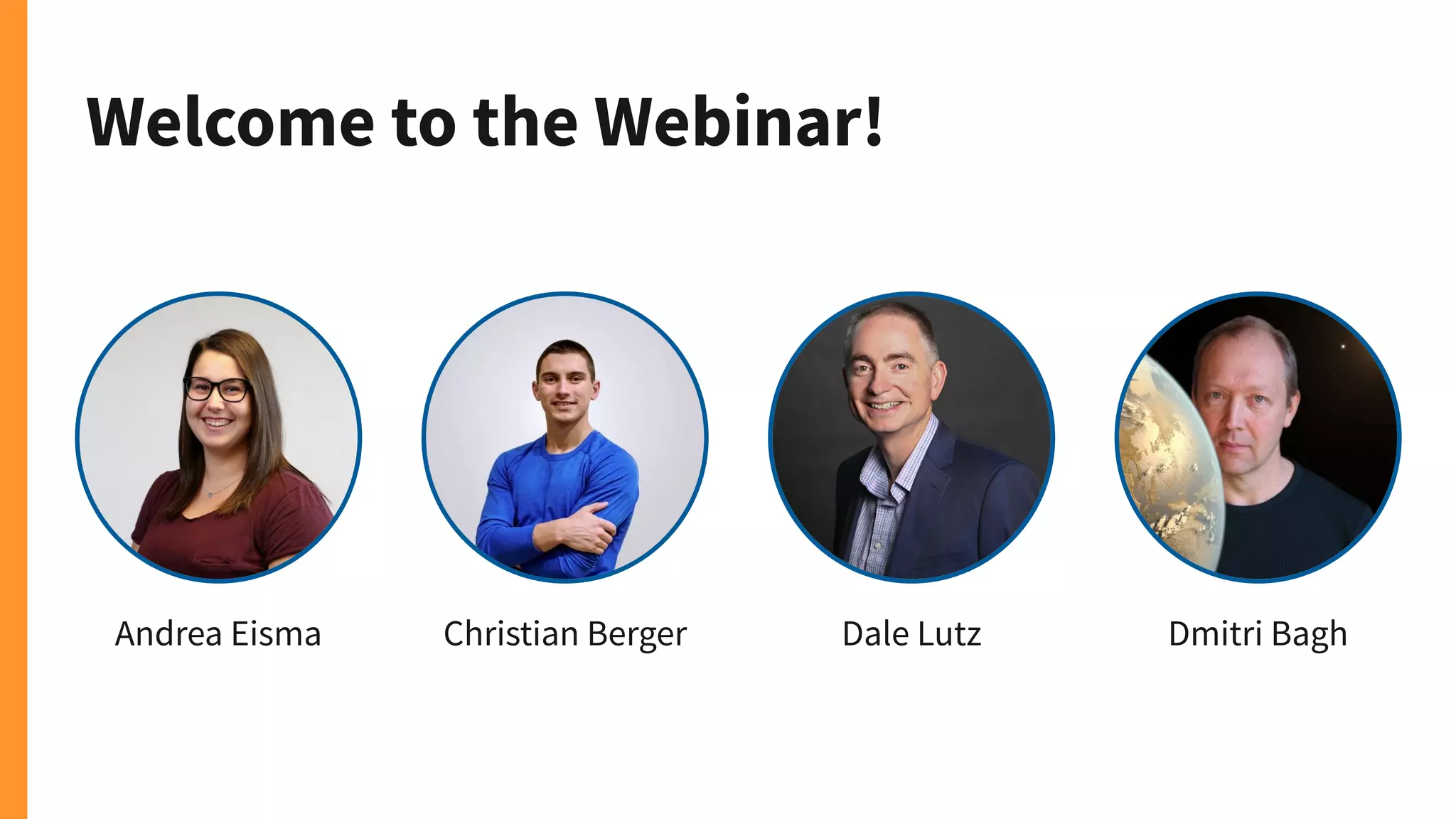
Andrea Eisma Christian Berger Dale Lutz Dmitri Bagh
Resources for
COVID-19
safe.com/covid-19
We don’t want software
licensing to prevent
solutions from being found
or communities from being
protected.
That’s why we’re offering
FME for free and we’re
prioritizing support cases
for those trying to
investigate COVID-19.
Agenda
● Workbench Improvements
● New Connectors and Formats
● Revit Support Enhancements
● Automations Writer
● CV and PicterraConnector
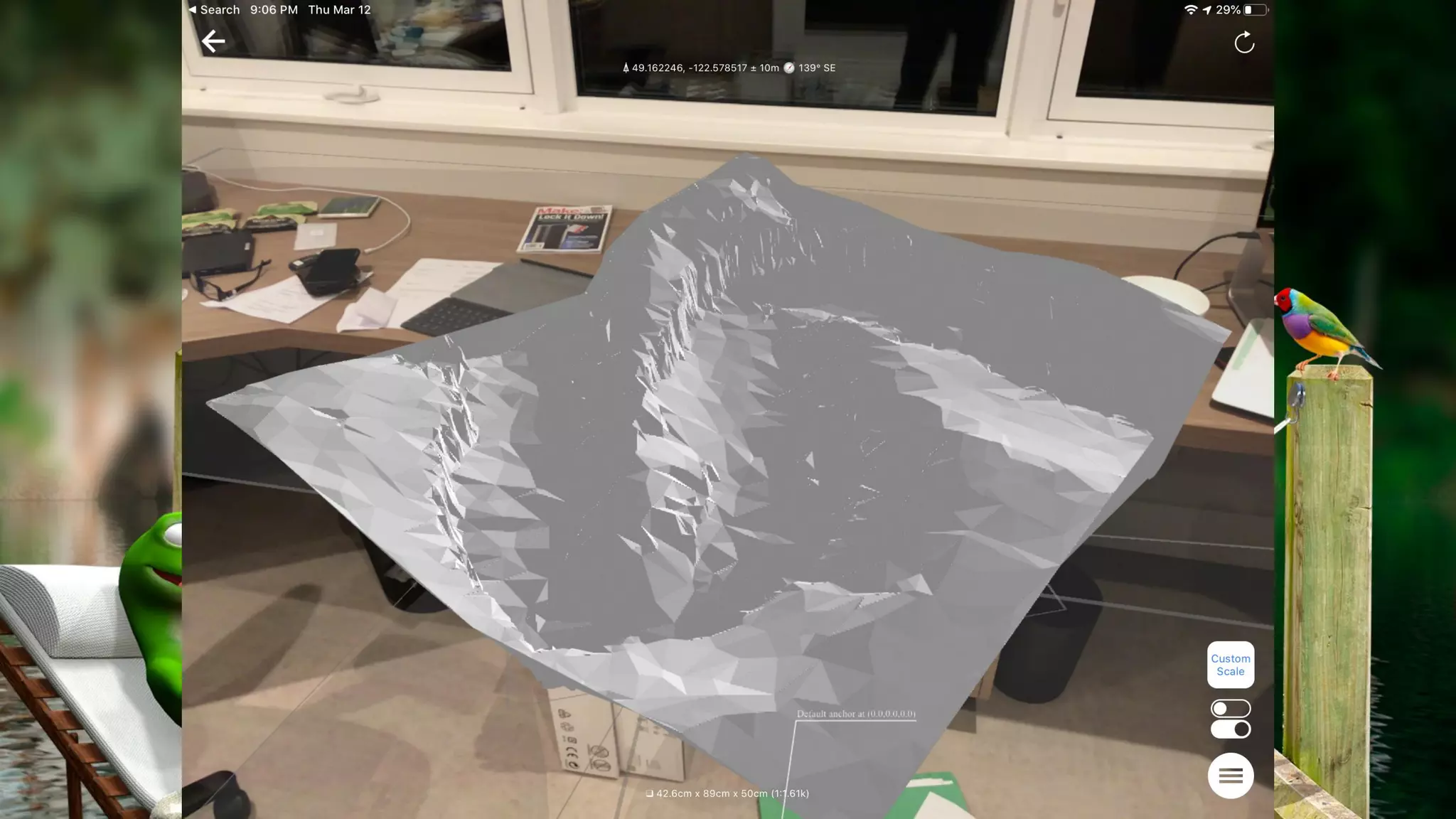
● FME AR
Data serenity is just a webinar away...
FME 2020.0 is for the Enterprise
Improved
Performance Secure
Scalable
No-Code
Enterprise
Integration
Flexible
Unrivaled
Spatial Support
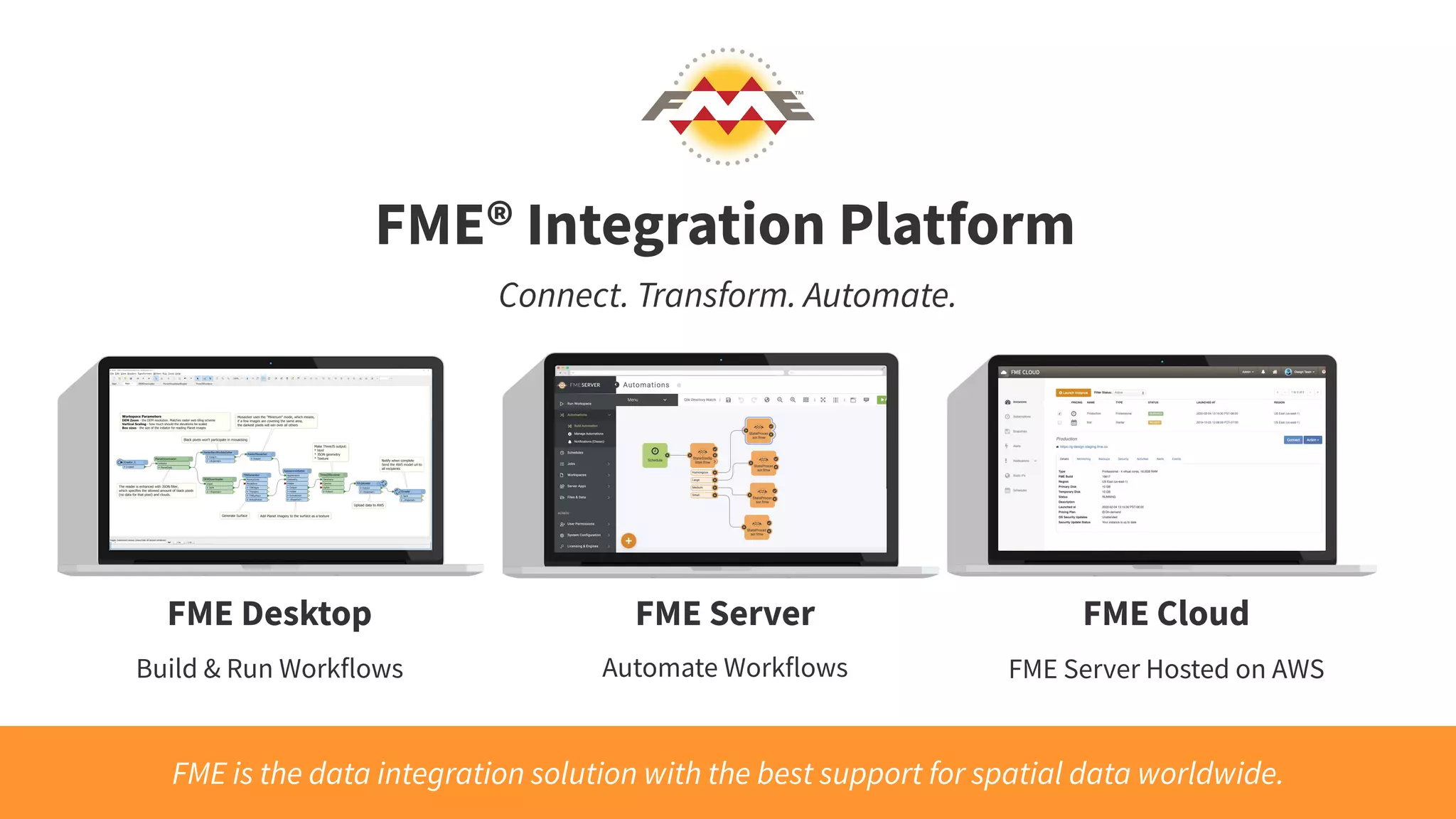
FME® Integration Platform
FME Desktop FME Server FME Cloud
Connect. Transform. Automate.
FME is the data integration solution with the best support for spatial data worldwide.
Build & Run Workflows Automate Workflows FME Server Hosted on AWS
Join us on Thursday for
the next webinar in the
series, Automating
with FME 2020.0
Data integration
doesn’t have to make
you anxious, FME
Desktop is relaxing.
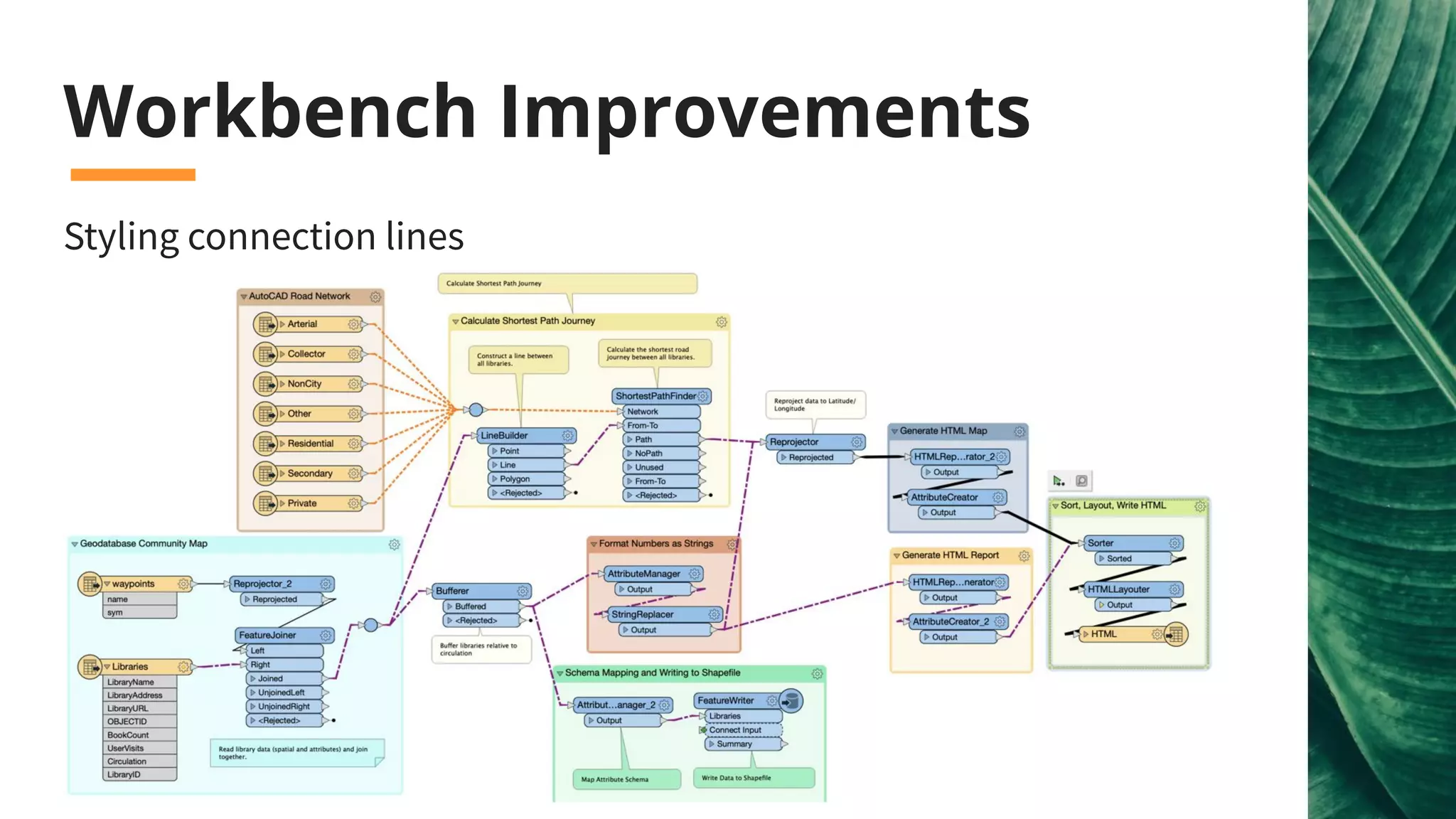
Workbench Improvements
Styling connection lines
New Formats
New Connectors
● Cityworks
● Esri ArcGIS Utility Network
● Google Cloud Services
● IBM Maximo, TRIRIGA
● Microsoft Dynamics, PowerBI
...and many more!
Unrivaled Spatial Support
Connect to Enterprise Cloud Data
Google
● Google BigQuery/BigQuery GIS
Connector
● Google Cloud Storage Connector
● Google Pub/Sub Connector
Apache
● Apache Kafka Connector
Amazon
● Athena Connector
Snowflake Data Warehouse
● Snowflake Reader/Writer
MongoDB
● Version 3 support
Demo: Google BigQuery
And
Automations Writer
New Readers & Writers
● CityJSON - Reader/Writer (Tech Preview)
● ECW V3 - Reader/Writer
● Entwine Point Tile (EPT) - Reader
● Geopackage - added elevation support (Reader/Writer)
● Mapbox Vector Tiles (MVT) - Reader/ Writer
● Microsoft DirectDraw Surface (DDS) - Raster Writer (for Esri i3s)
Plus leverage a better connection to ArcGIS Pro, including annotations
and Esri Utility Network
Note: A new Google Sheets connector is coming soon!
Demo: Entwine Point Cloud Reading
● XSD Driven XML - Reader/Writer
● New UK MasterMap Variants - Reader/Writer
○ Water Network
○ Highways Network
○ Sites Layer
○ Topography Layer
● OGC S-121 GML - Reader/Writer
● TopoJSON - Reader/Writer
Connect to XML/JSON Based
Formats
Connect to AEC Formats
● Revit - Unrivaled Reader
○ Includes support for Revit 2020 files
● IFC - Enhanced Reader/Writer
● 12D Model - Reader (Writer coming soon)
Recharge with Revit
Support Enhancements
Do more with Revit
● Family attributes
● Wall simplification
● Project and view metadata
● Project or Georeferenced Coordinate System
● Extract floor plans
Demo: Revit
Machine Learning
and
Cognitive Services
Let’s do a poll. Do
you use, or would
like to use, computer
vision in your
organization?
“Yes, we’d like to
use it!” Or
“Not at this time”
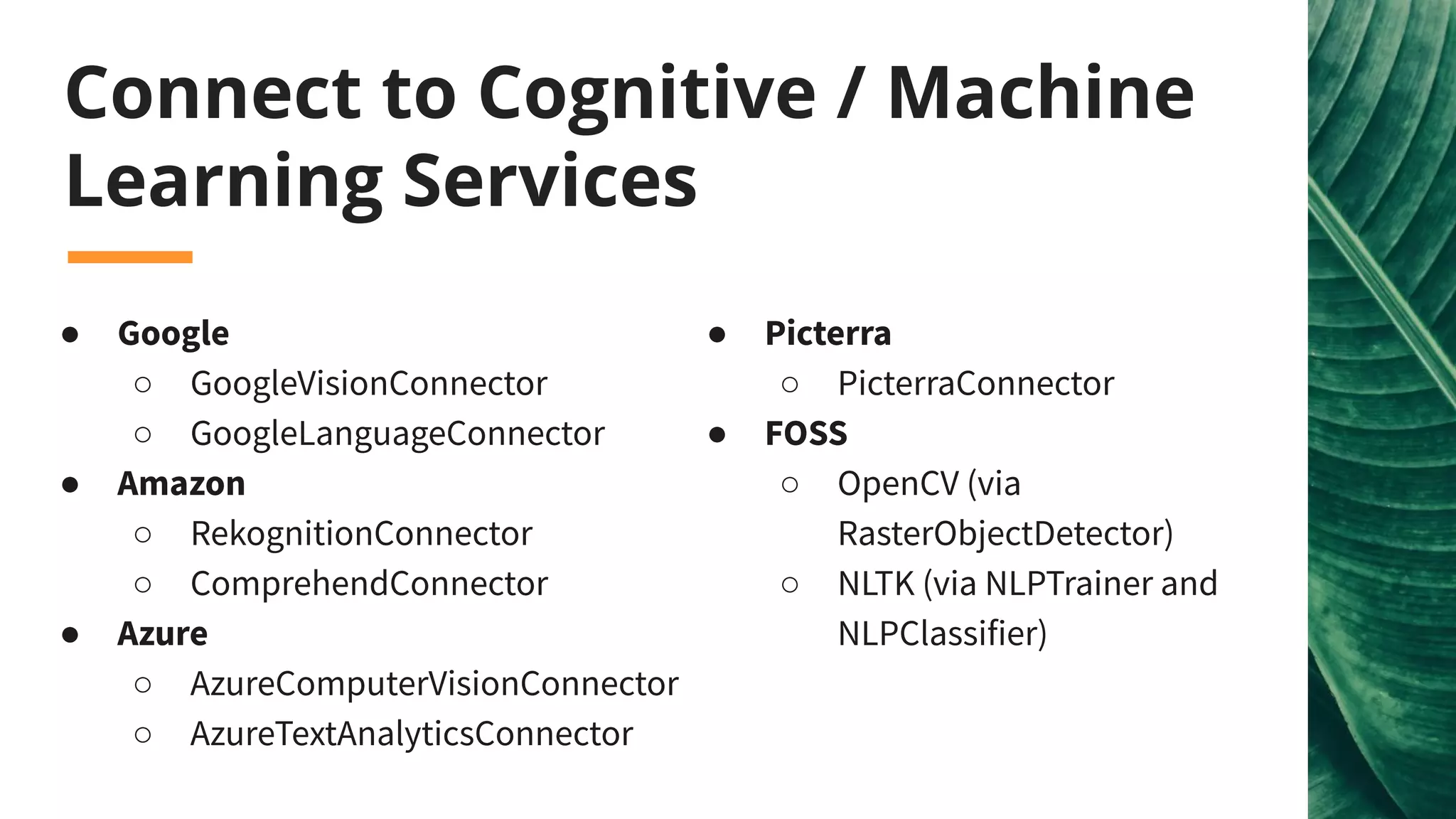
Connect to Cognitive / Machine
Learning Services
● Google
○ GoogleVisionConnector
○ GoogleLanguageConnector
● Amazon
○ RekognitionConnector
○ ComprehendConnector
● Azure
○ AzureComputerVisionConnector
○ AzureTextAnalyticsConnector
● Picterra
○ PicterraConnector
● FOSS
○ OpenCV (via
RasterObjectDetector)
○ NLTK (via NLPTrainer and
NLPClassifier)
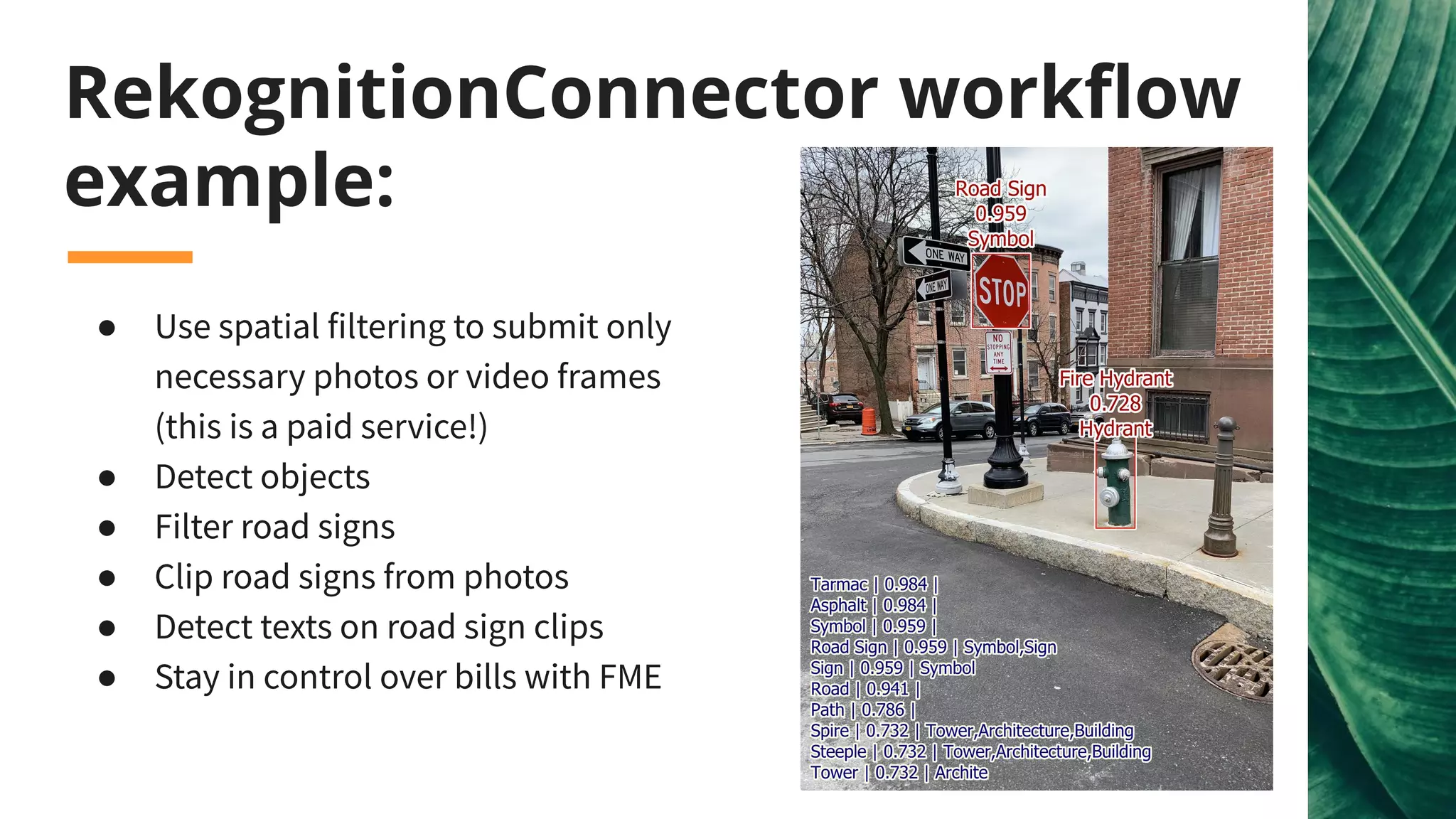
RekognitionConnector workflow
example:
● Use spatial filtering to submit only
necessary photos or video frames
(this is a paid service!)
● Detect objects
● Filter road signs
● Clip road signs from photos
● Detect texts on road sign clips
● Stay in control over bills with FME
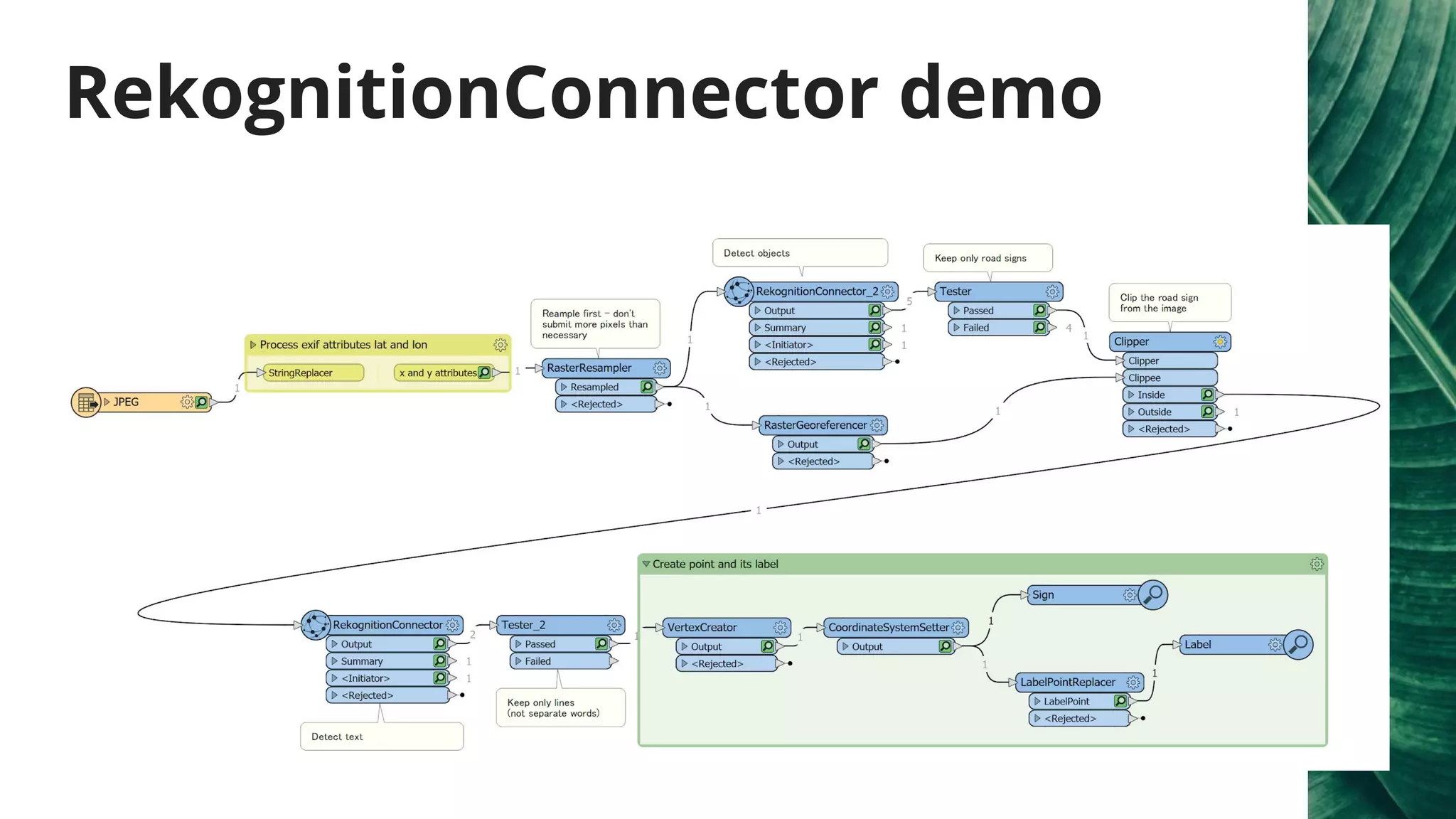
RekognitionConnector demo
What is Picterra
Picterra - cloud-based computer vision platform for geospatial data
Examples:
● Ongoing building construction
● Road cracks: results
● Pinnipeds counting: blog, results
● Cownter project
● Weed detection: blog, results
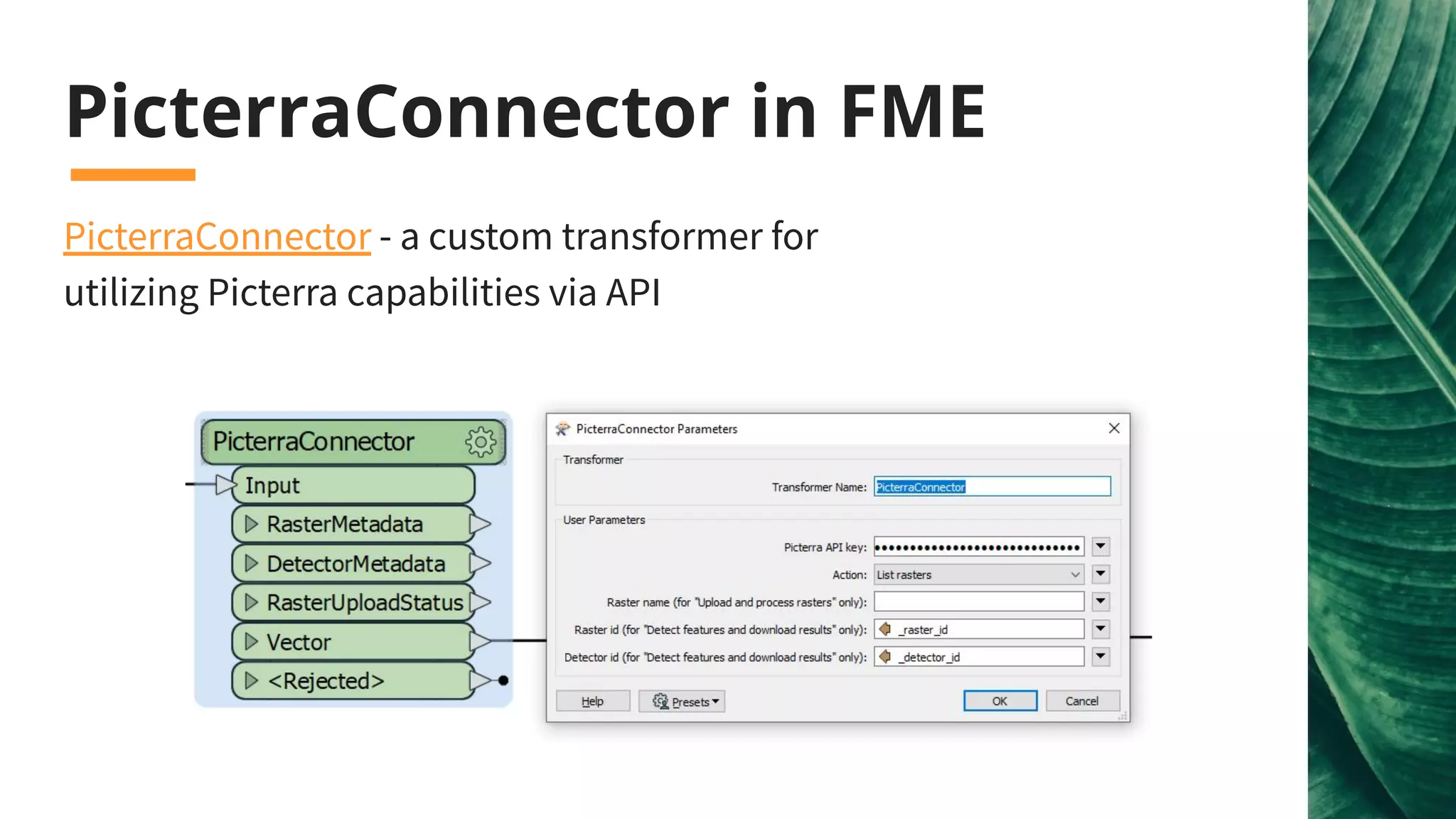
PicterraConnector in FME
PicterraConnector - a custom transformer for
utilizing Picterra capabilities via API
Demo: PicterraConnector
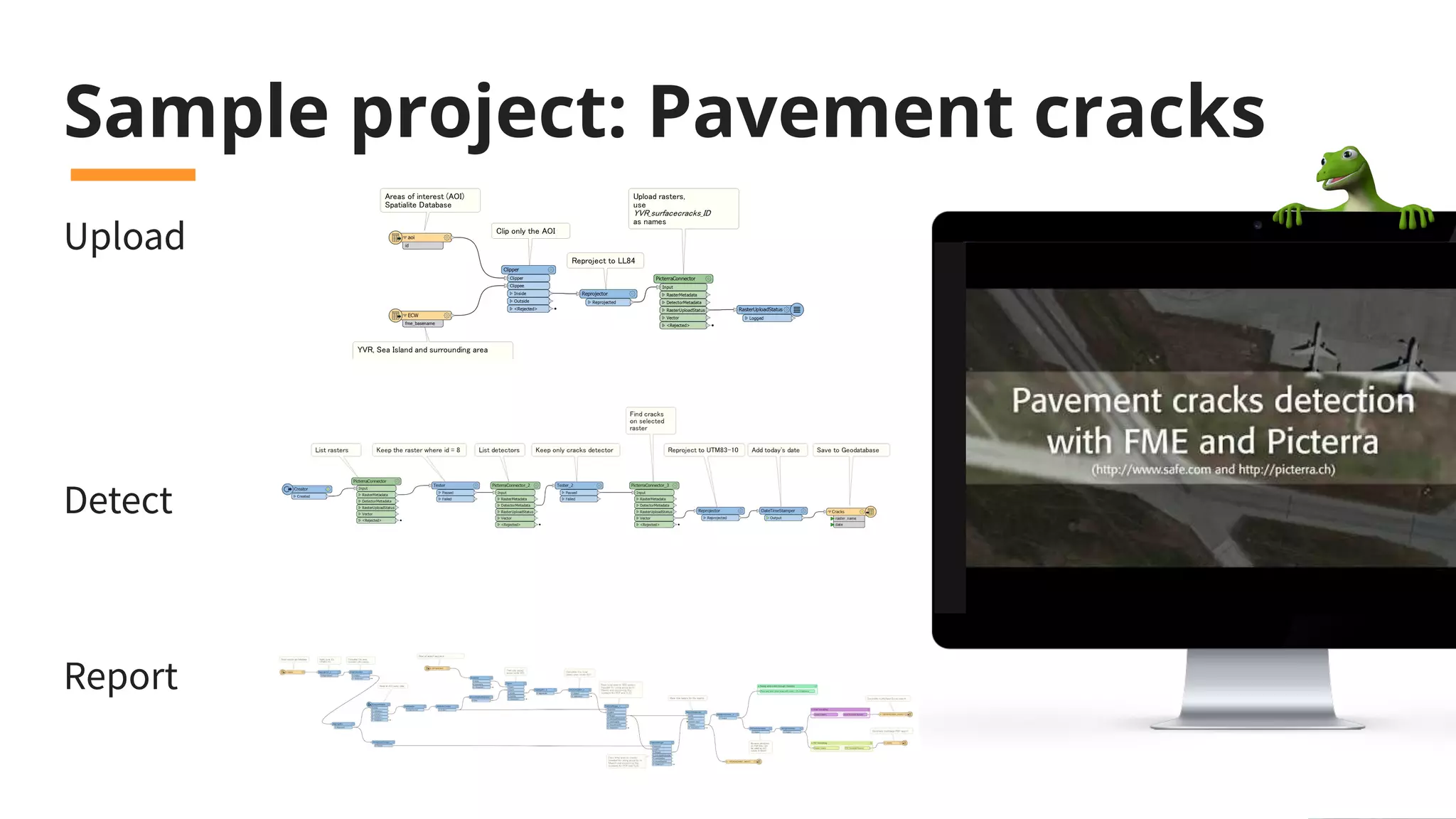
Sample project: Pavement cracks
Upload
Detect
Report
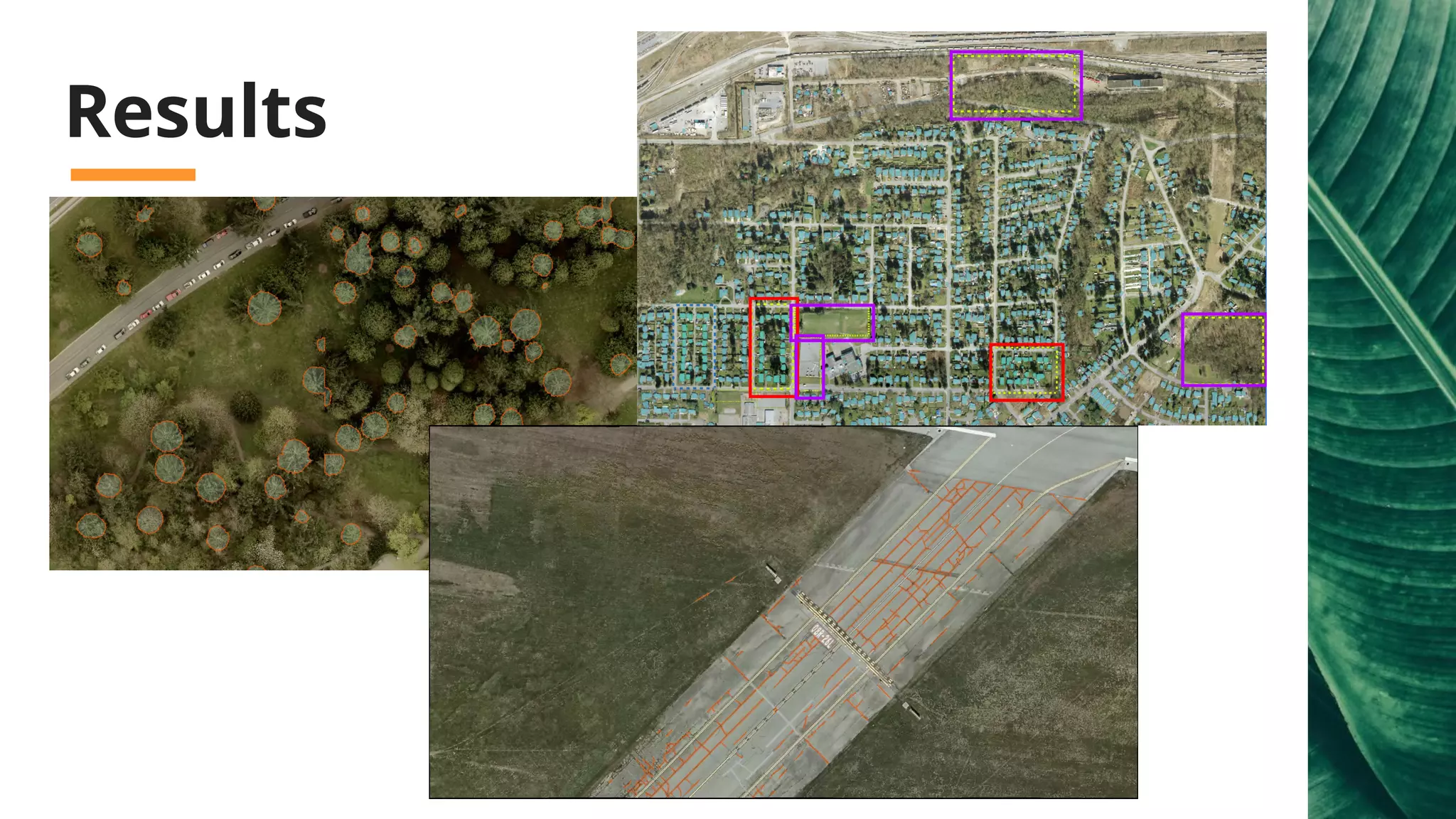
Results
TransformFME AR
FME Data Spa
What’s this theme all about?
Use Cases for FME AR
● See all infrastructure (including
underground, behind walls) .
● See locations and paths of wildfires or other
natural disasters.
● See landmark locations and labels.
● Visualize CAD designs with parts and labels.
● Education – add labels and explanations.
● “Where is My Team?” app.
● See proposed buildings or past ones.
● See 3D landscapes for mining, civil
engineering, or earth sciences.
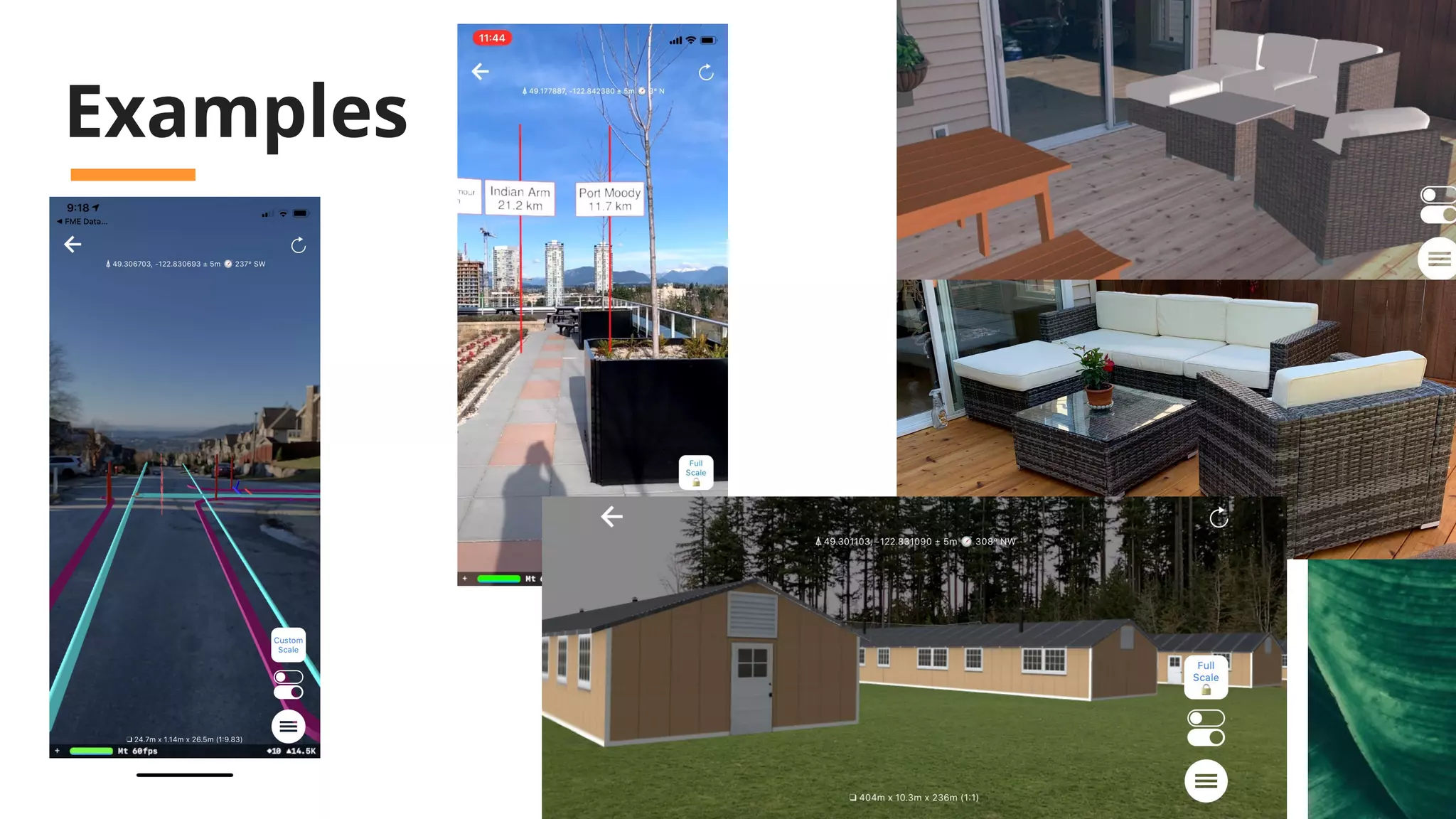
Examples
Demo: FME AR
Let’s do a poll. Where
would you or your
users like to be
running FME AR?
iOS, Android,
or Both?
FME Desktop is
Relaxing!
Improved user experience in
workbench.
The FME platform is integrated
into a complete workflow!
Data integration doesn’t have to make you
anxious because...
Join us at the same
time this Thursday for
the next webinar in the
series, Automating
with FME 2020.0
safe.com/webinars
Stay tuned for a
virtual roadshow
For a statement and more info:
safe.com/worldtour/#covid-19
Thank you!
Download FME 2020.0 at
safe.com/downloads

FME 2020 Unleashed: Authoring

  • 1.
    FME 2020.0: Authoring Part1 of the Unleashing FME 2020.0 webinar series
  • 2.
    Welcome to theWebinar! Andrea Eisma Christian Berger Dale Lutz Dmitri Bagh
  • 3.
    Resources for COVID-19 safe.com/covid-19 We don’twant software licensing to prevent solutions from being found or communities from being protected. That’s why we’re offering FME for free and we’re prioritizing support cases for those trying to investigate COVID-19.
  • 4.
    Agenda ● Workbench Improvements ●New Connectors and Formats ● Revit Support Enhancements ● Automations Writer ● CV and PicterraConnector ● FME AR Data serenity is just a webinar away...
  • 5.
    FME 2020.0 isfor the Enterprise Improved Performance Secure Scalable No-Code Enterprise Integration Flexible Unrivaled Spatial Support
  • 6.
    FME® Integration Platform FMEDesktop FME Server FME Cloud Connect. Transform. Automate. FME is the data integration solution with the best support for spatial data worldwide. Build & Run Workflows Automate Workflows FME Server Hosted on AWS
  • 7.
    Join us onThursday for the next webinar in the series, Automating with FME 2020.0
  • 8.
    Data integration doesn’t haveto make you anxious, FME Desktop is relaxing.
  • 9.
  • 10.
  • 11.
    New Connectors ● Cityworks ●Esri ArcGIS Utility Network ● Google Cloud Services ● IBM Maximo, TRIRIGA ● Microsoft Dynamics, PowerBI ...and many more!
  • 12.
    Unrivaled Spatial Support Connectto Enterprise Cloud Data Google ● Google BigQuery/BigQuery GIS Connector ● Google Cloud Storage Connector ● Google Pub/Sub Connector Apache ● Apache Kafka Connector Amazon ● Athena Connector Snowflake Data Warehouse ● Snowflake Reader/Writer MongoDB ● Version 3 support
  • 13.
  • 14.
    New Readers &Writers ● CityJSON - Reader/Writer (Tech Preview) ● ECW V3 - Reader/Writer ● Entwine Point Tile (EPT) - Reader ● Geopackage - added elevation support (Reader/Writer) ● Mapbox Vector Tiles (MVT) - Reader/ Writer ● Microsoft DirectDraw Surface (DDS) - Raster Writer (for Esri i3s) Plus leverage a better connection to ArcGIS Pro, including annotations and Esri Utility Network Note: A new Google Sheets connector is coming soon!
  • 15.
    Demo: Entwine PointCloud Reading
  • 17.
    ● XSD DrivenXML - Reader/Writer ● New UK MasterMap Variants - Reader/Writer ○ Water Network ○ Highways Network ○ Sites Layer ○ Topography Layer ● OGC S-121 GML - Reader/Writer ● TopoJSON - Reader/Writer Connect to XML/JSON Based Formats
  • 18.
    Connect to AECFormats ● Revit - Unrivaled Reader ○ Includes support for Revit 2020 files ● IFC - Enhanced Reader/Writer ● 12D Model - Reader (Writer coming soon)
  • 19.
  • 20.
    Do more withRevit ● Family attributes ● Wall simplification ● Project and view metadata ● Project or Georeferenced Coordinate System ● Extract floor plans
  • 21.
  • 22.
  • 23.
    Let’s do apoll. Do you use, or would like to use, computer vision in your organization? “Yes, we’d like to use it!” Or “Not at this time”
  • 24.
    Connect to Cognitive/ Machine Learning Services ● Google ○ GoogleVisionConnector ○ GoogleLanguageConnector ● Amazon ○ RekognitionConnector ○ ComprehendConnector ● Azure ○ AzureComputerVisionConnector ○ AzureTextAnalyticsConnector ● Picterra ○ PicterraConnector ● FOSS ○ OpenCV (via RasterObjectDetector) ○ NLTK (via NLPTrainer and NLPClassifier)
  • 25.
    RekognitionConnector workflow example: ● Usespatial filtering to submit only necessary photos or video frames (this is a paid service!) ● Detect objects ● Filter road signs ● Clip road signs from photos ● Detect texts on road sign clips ● Stay in control over bills with FME
  • 26.
  • 27.
    What is Picterra Picterra- cloud-based computer vision platform for geospatial data Examples: ● Ongoing building construction ● Road cracks: results ● Pinnipeds counting: blog, results ● Cownter project ● Weed detection: blog, results
  • 28.
    PicterraConnector in FME PicterraConnector- a custom transformer for utilizing Picterra capabilities via API
  • 29.
  • 30.
    Sample project: Pavementcracks Upload Detect Report
  • 31.
  • 32.
  • 33.
    FME Data Spa What’sthis theme all about? Use Cases for FME AR ● See all infrastructure (including underground, behind walls) . ● See locations and paths of wildfires or other natural disasters. ● See landmark locations and labels. ● Visualize CAD designs with parts and labels. ● Education – add labels and explanations. ● “Where is My Team?” app. ● See proposed buildings or past ones. ● See 3D landscapes for mining, civil engineering, or earth sciences.
  • 34.
  • 35.
  • 36.
    Let’s do apoll. Where would you or your users like to be running FME AR? iOS, Android, or Both?
  • 37.
    FME Desktop is Relaxing! Improveduser experience in workbench. The FME platform is integrated into a complete workflow! Data integration doesn’t have to make you anxious because...
  • 38.
    Join us atthe same time this Thursday for the next webinar in the series, Automating with FME 2020.0 safe.com/webinars
  • 39.
    Stay tuned fora virtual roadshow For a statement and more info: safe.com/worldtour/#covid-19
  • 40.
    Thank you! Download FME2020.0 at safe.com/downloads