Solving problems
with flowcharts
Control Systems with
Flowol
Programming and Control with Flowol
L1 Solving problems with flowcharts
Starter
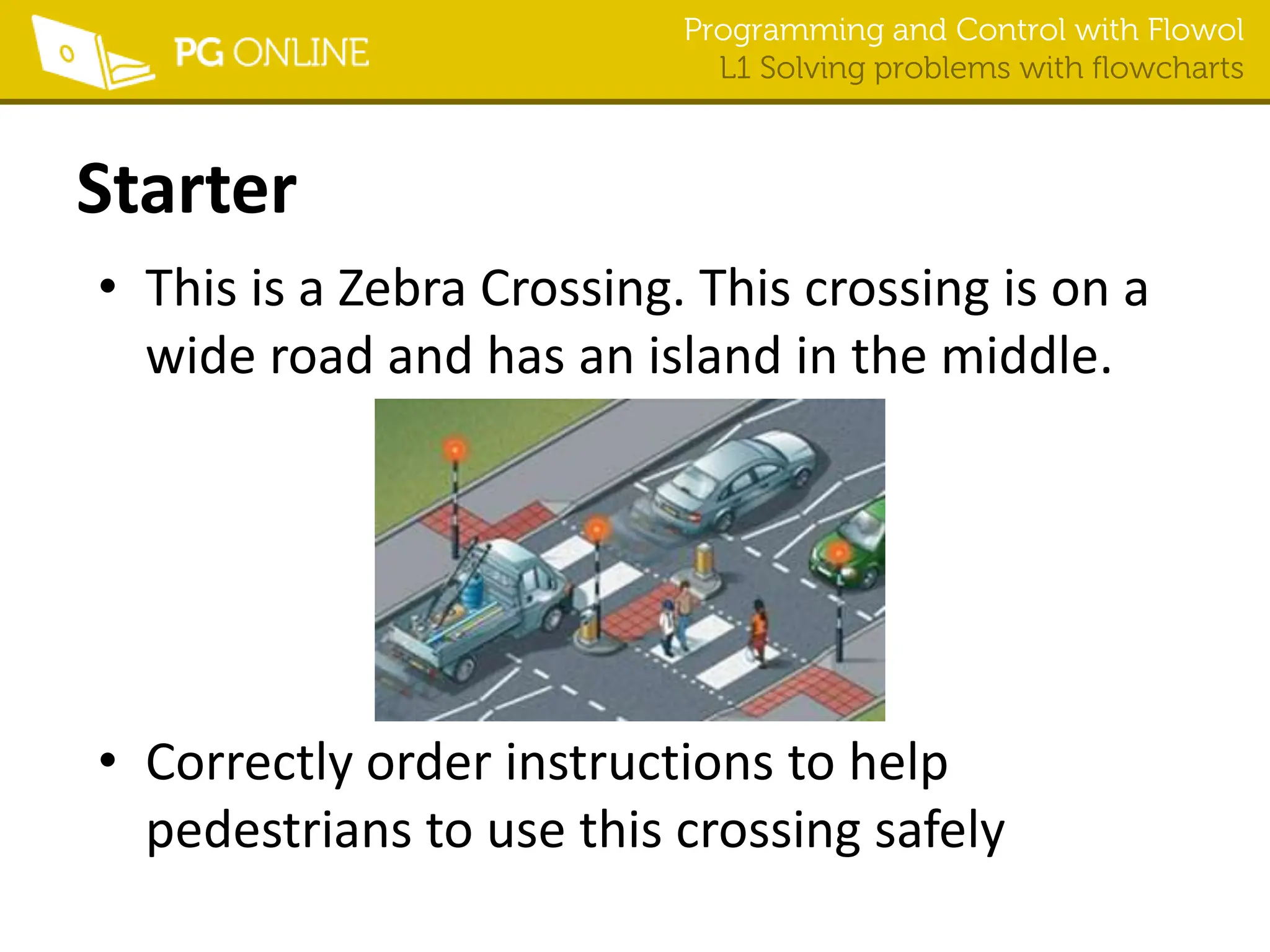
• This is a Zebra Crossing. This crossing is on a
wide road and has an island in the middle.
• Correctly order instructions to help
pedestrians to use this crossing safely
Programming and Control with Flowol
L1 Solving problems with flowcharts
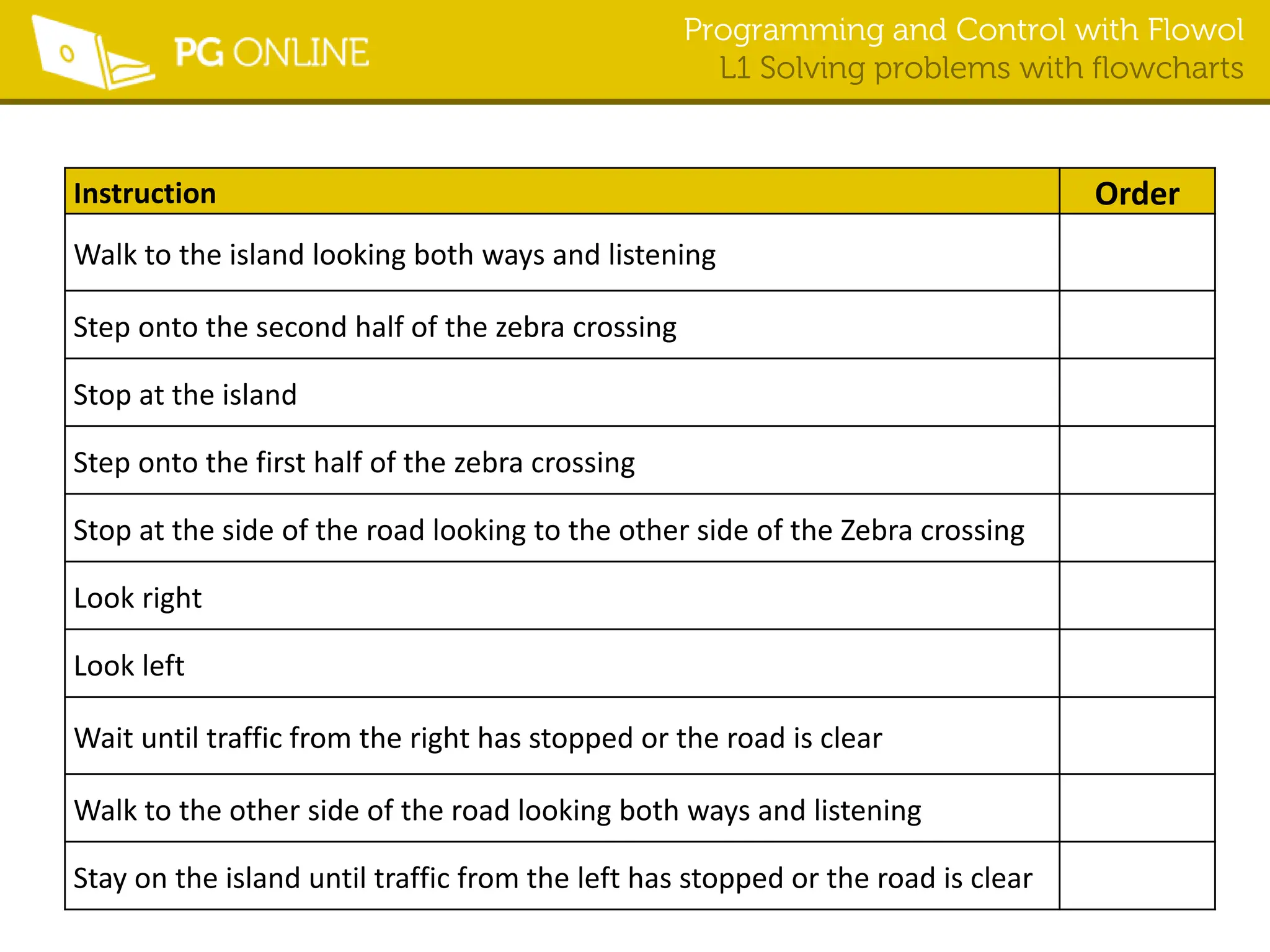
Instruction Order
Walk to the island looking both ways and listening
Step onto the second half of the zebra crossing
Stop at the island
Step onto the first half of the zebra crossing
Stop at the side of the road looking to the other side of the Zebra crossing
Look right
Look left
Wait until traffic from the right has stopped or the road is clear
Walk to the other side of the road looking both ways and listening
Stay on the island until traffic from the left has stopped or the road is clear
Programming and Control with Flowol
L1 Solving problems with flowcharts
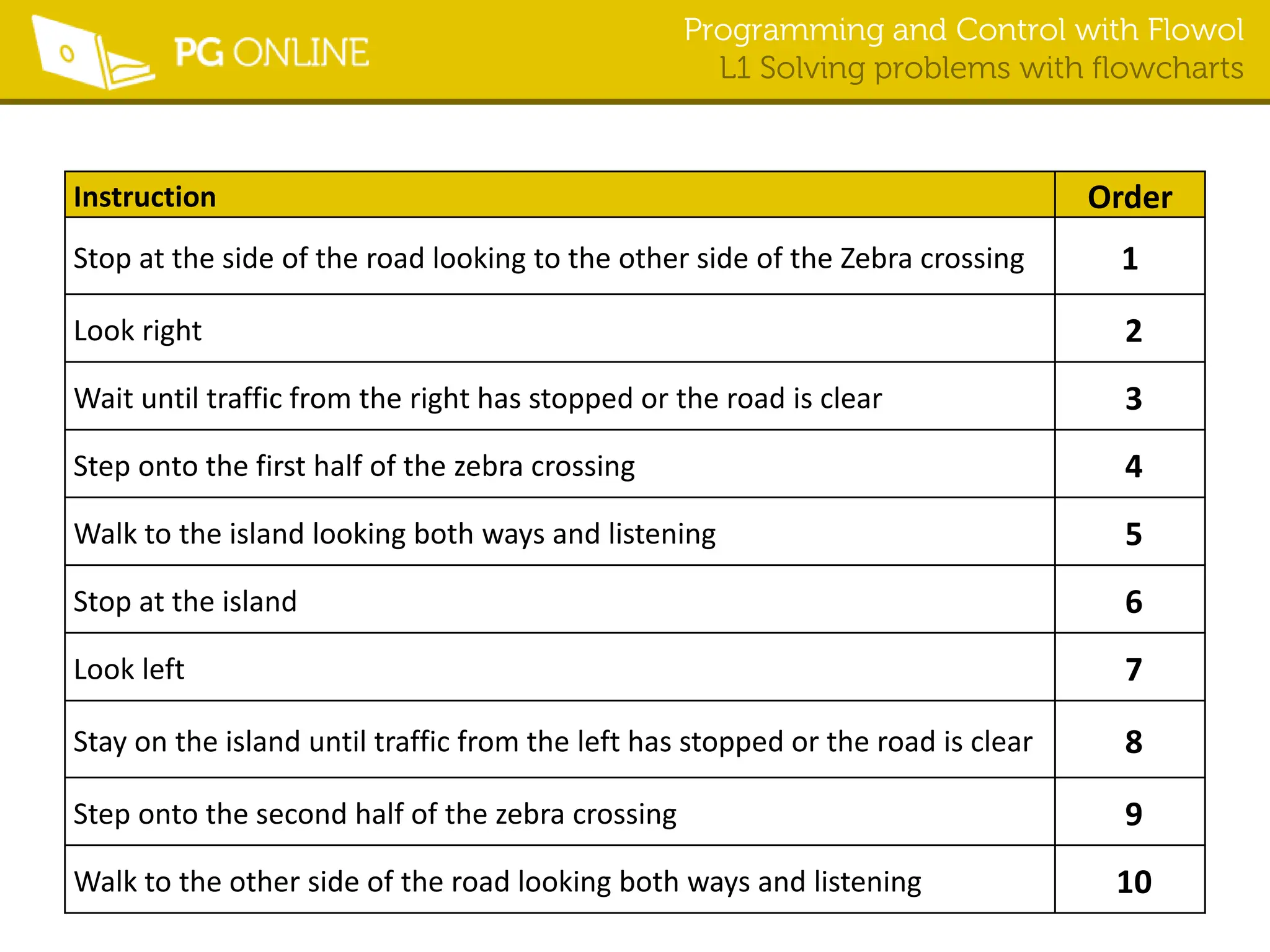
Instruction Order
Stop at the side of the road looking to the other side of the Zebra crossing 1
Look right 2
Wait until traffic from the right has stopped or the road is clear 3
Step onto the first half of the zebra crossing 4
Walk to the island looking both ways and listening 5
Stop at the island 6
Look left 7
Stay on the island until traffic from the left has stopped or the road is clear 8
Step onto the second half of the zebra crossing 9
Walk to the other side of the road looking both ways and listening 10
Programming and Control with Flowol
L1 Solving problems with flowcharts
Learning Objectives
• Identify control flowchart symbols and
understand how they are used to describe
systems
• Develop a control flowchart solution for a
simple problem
Programming and Control with Flowol
L1 Solving problems with flowcharts
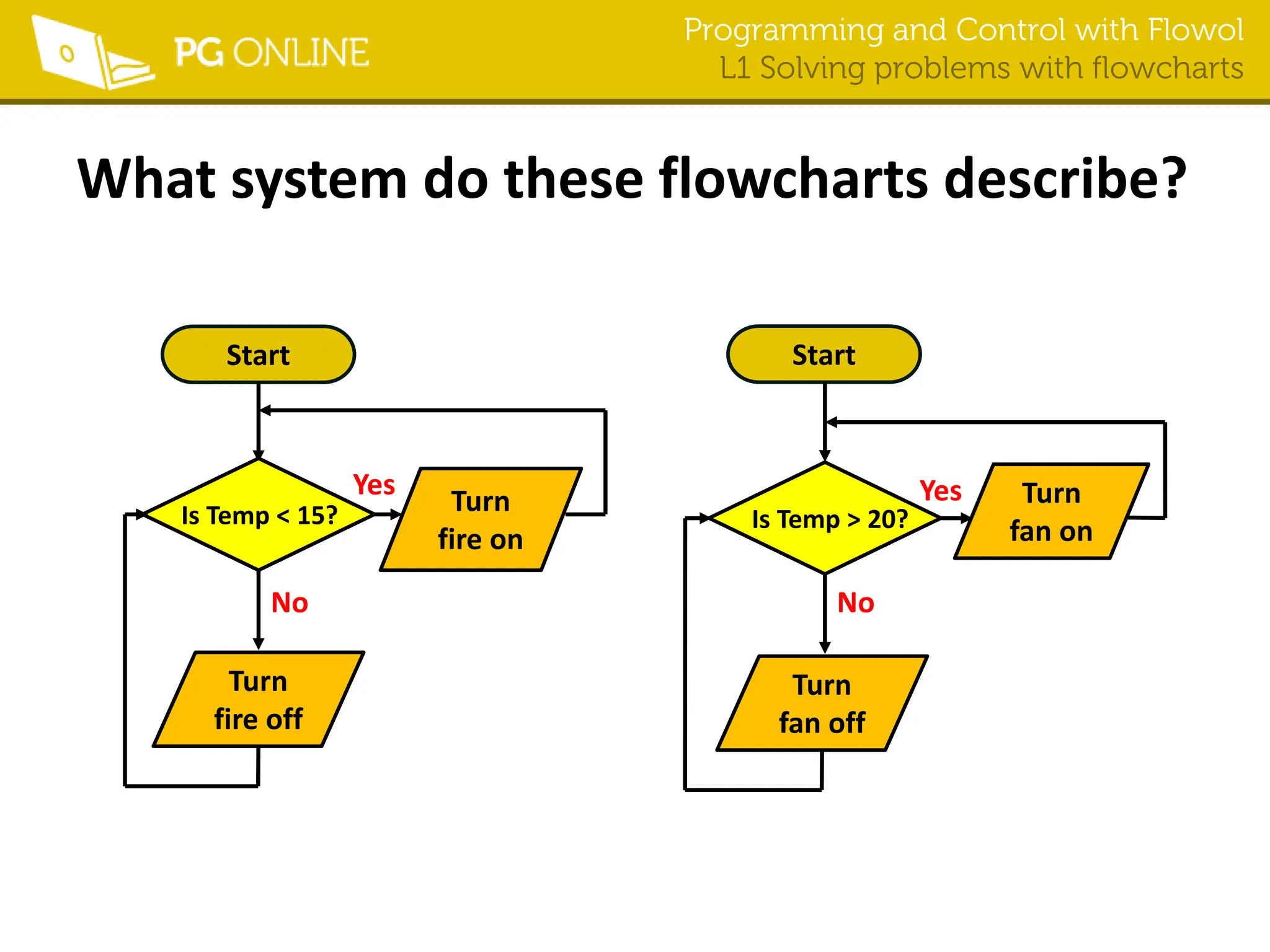
What system do these flowcharts describe?
Start
Turn
fan on
Turn
fan off
Is Temp > 20?
Start
Turn
fire off
Turn
fire on
Is Temp < 15?
Yes
No
Yes
No
Programming and Control with Flowol
L1 Solving problems with flowcharts
Flowchart symbols
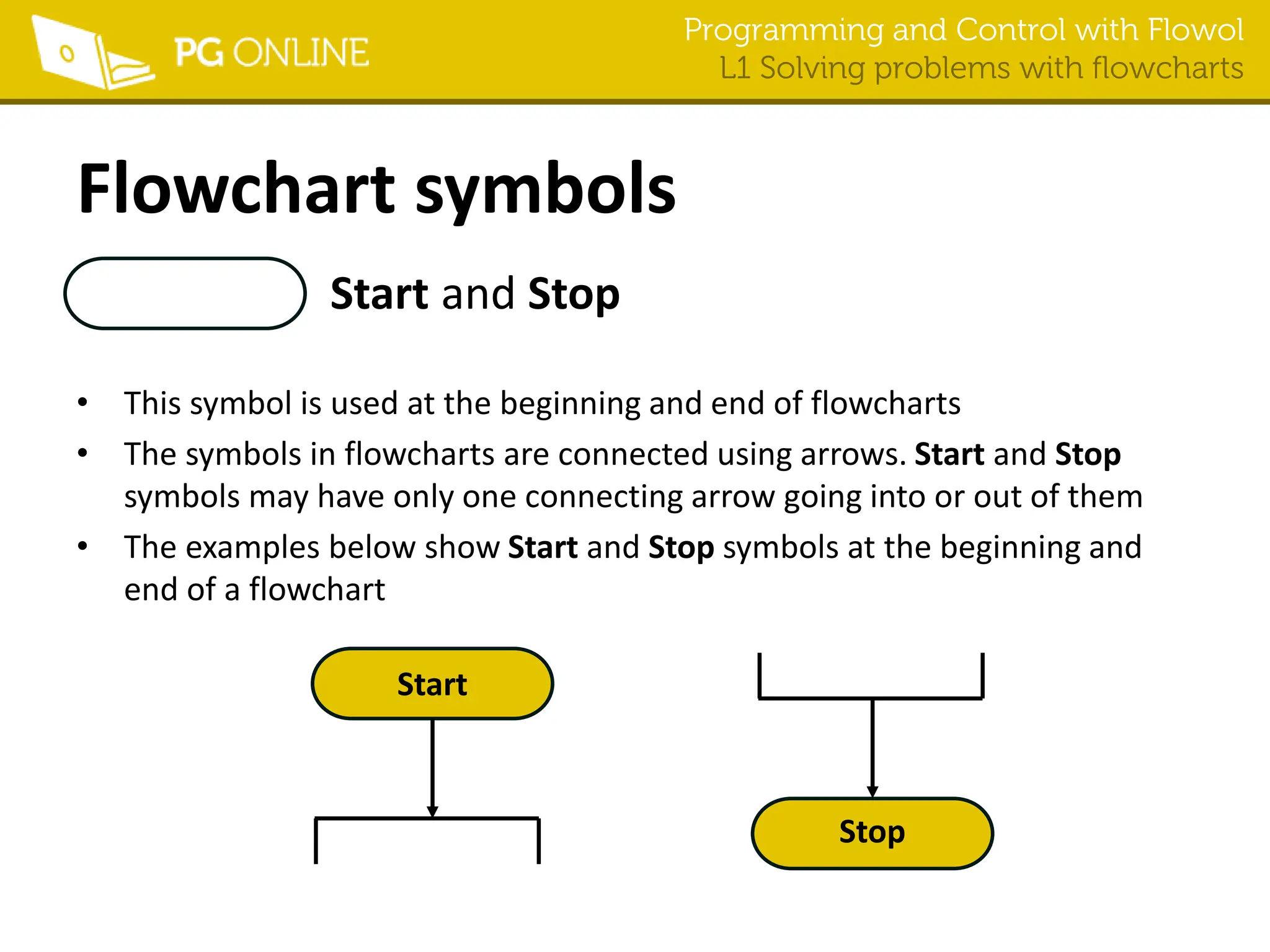
Start and Stop
• This symbol is used at the beginning and end of flowcharts
• The symbols in flowcharts are connected using arrows. Start and Stop
symbols may have only one connecting arrow going into or out of them
• The examples below show Start and Stop symbols at the beginning and
end of a flowchart
Start
Stop
Programming and Control with Flowol
L1 Solving problems with flowcharts
Flowchart symbols
Process
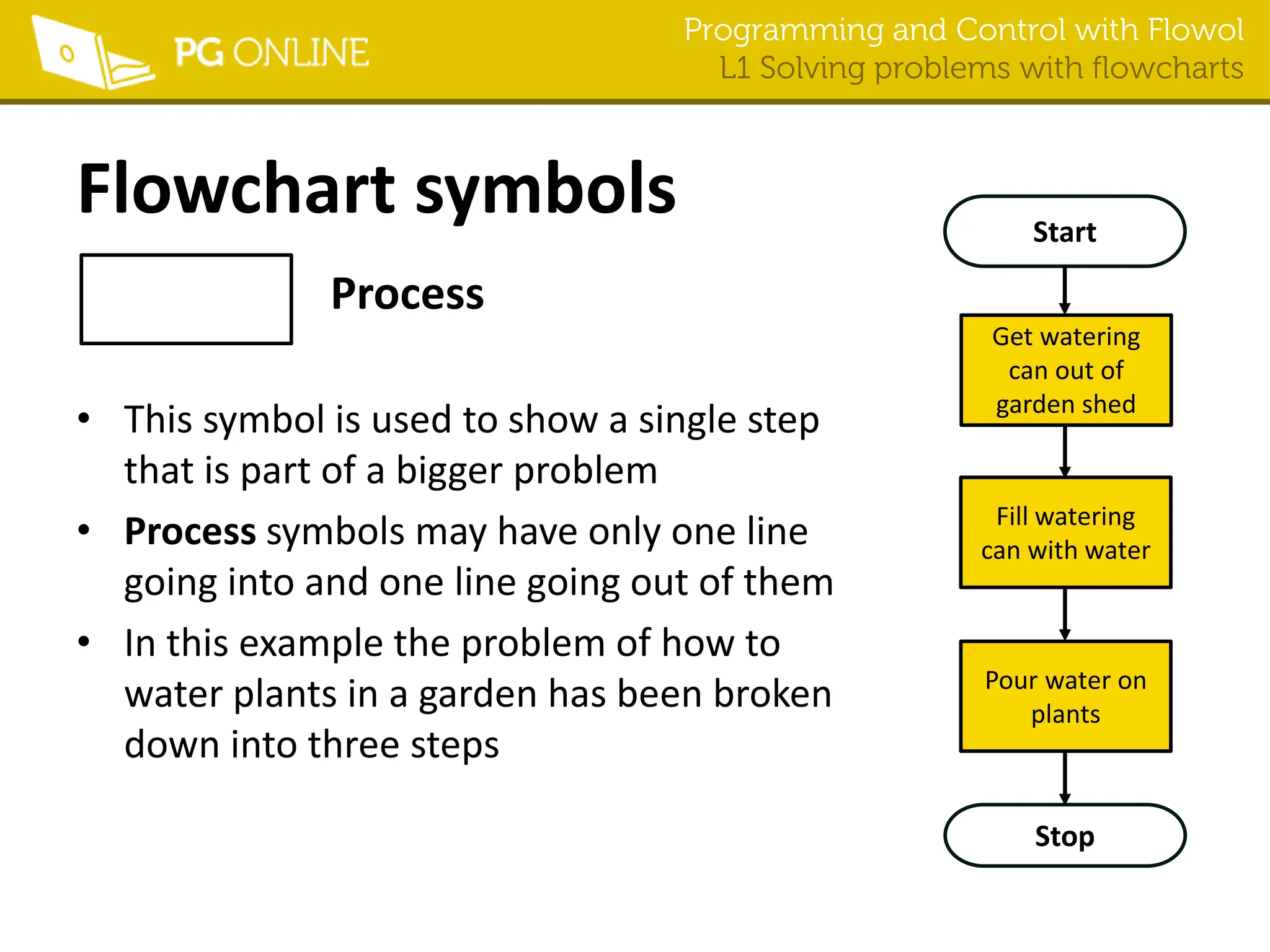
• This symbol is used to show a single step
that is part of a bigger problem
• Process symbols may have only one line
going into and one line going out of them
• In this example the problem of how to
water plants in a garden has been broken
down into three steps
Start
Stop
Get watering
can out of
garden shed
Fill watering
can with water
Pour water on
plants
Programming and Control with Flowol
L1 Solving problems with flowcharts
Flowchart symbols
Decision
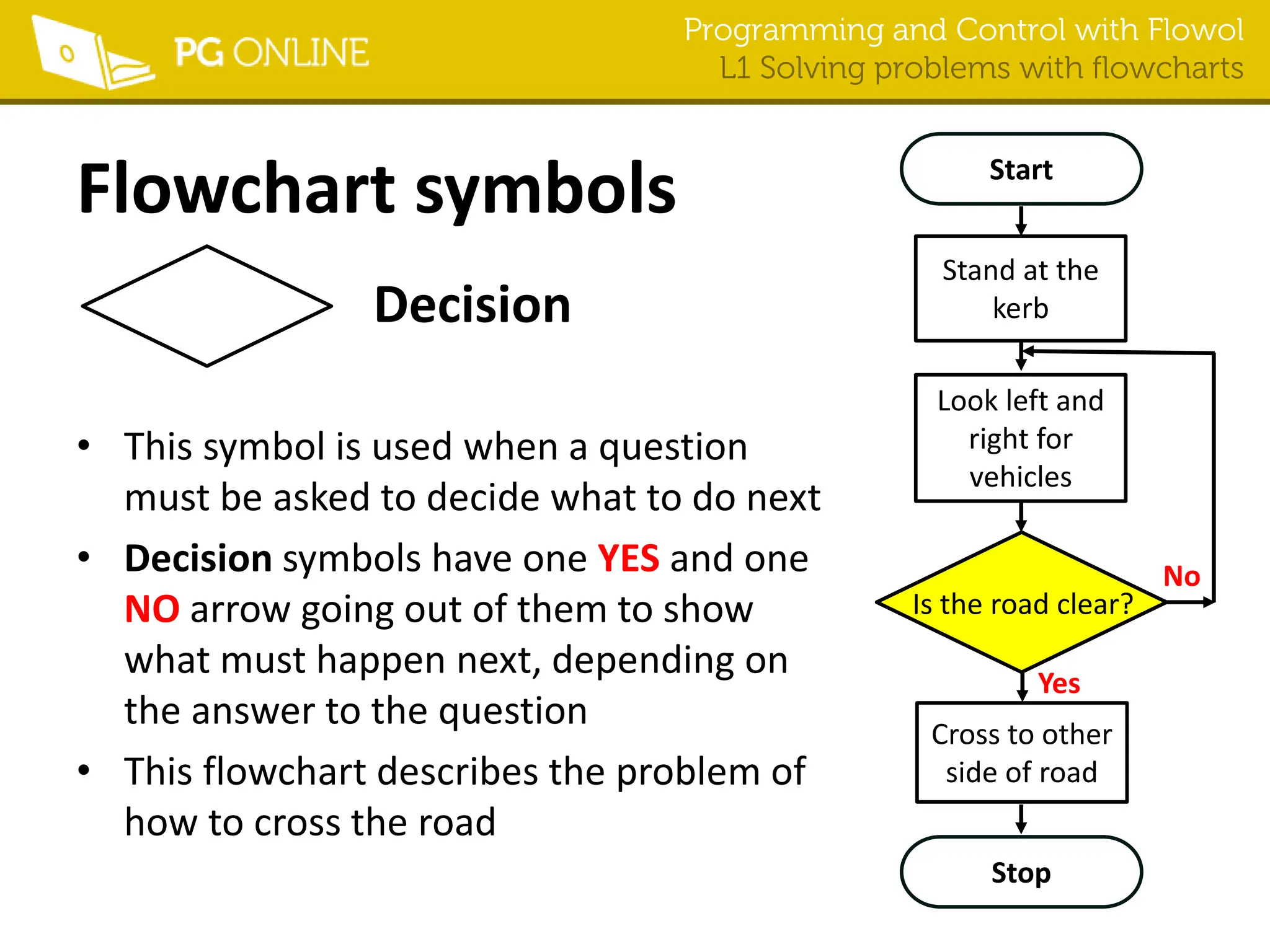
• This symbol is used when a question
must be asked to decide what to do next
• Decision symbols have one YES and one
NO arrow going out of them to show
what must happen next, depending on
the answer to the question
• This flowchart describes the problem of
how to cross the road
Stop
Is the road clear?
Start
Stand at the
kerb
Cross to other
side of road
Look left and
right for
vehicles
Yes
No
Programming and Control with Flowol
L1 Solving problems with flowcharts
Flowchart symbols
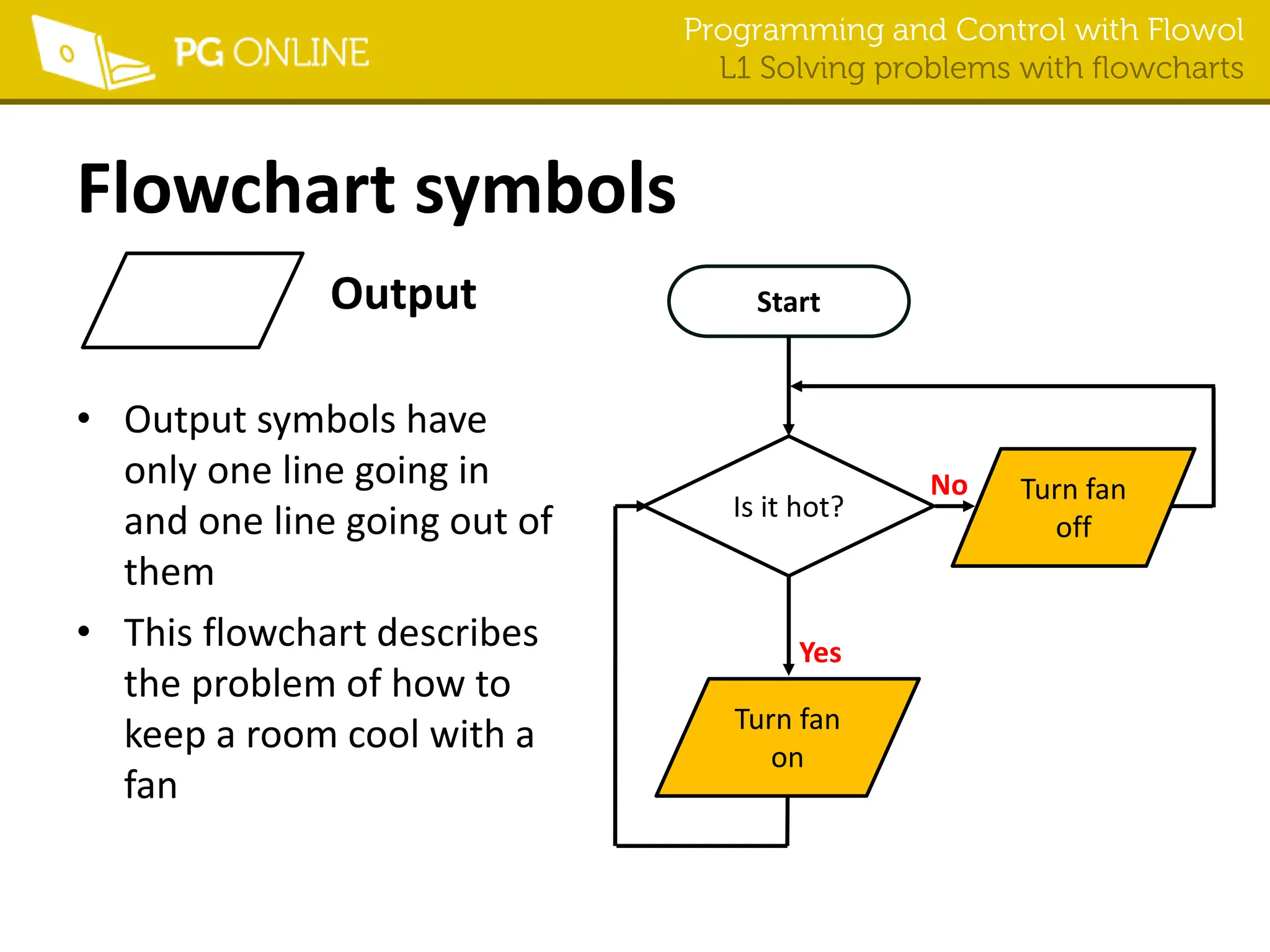
Output
• Output symbols have
only one line going in
and one line going out of
them
• This flowchart describes
the problem of how to
keep a room cool with a
fan
Start
Is it hot?
Turn fan
off
Turn fan
on
Yes
No
Programming and Control with Flowol
L1 Solving problems with flowcharts
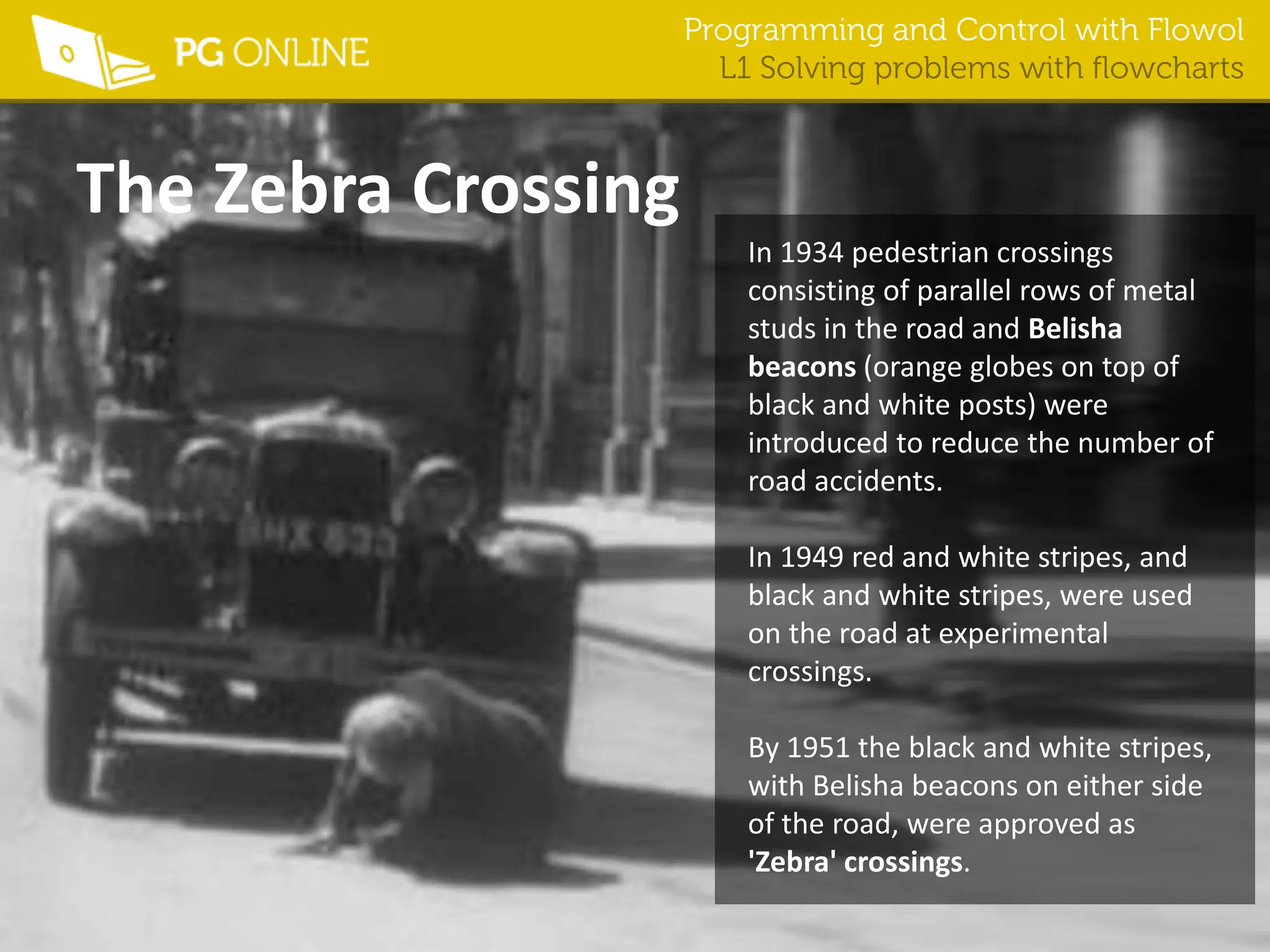
The Zebra Crossing
In 1934 pedestrian crossings
consisting of parallel rows of metal
studs in the road and Belisha
beacons (orange globes on top of
black and white posts) were
introduced to reduce the number of
road accidents.
In 1949 red and white stripes, and
black and white stripes, were used
on the road at experimental
crossings.
By 1951 the black and white stripes,
with Belisha beacons on either side
of the road, were approved as
'Zebra' crossings.
Programming and Control with Flowol
L1 Solving problems with flowcharts
Flowol: Zebra crossing mimic
Programming and Control with Flowol
L1 Solving problems with flowcharts
Flowol: School crossing patrol mimic

Flowol L1 Flowcharts.pptx this is a leson a

  • 1.
  • 2.
    Programming and Controlwith Flowol L1 Solving problems with flowcharts Starter • This is a Zebra Crossing. This crossing is on a wide road and has an island in the middle. • Correctly order instructions to help pedestrians to use this crossing safely
  • 3.
    Programming and Controlwith Flowol L1 Solving problems with flowcharts Instruction Order Walk to the island looking both ways and listening Step onto the second half of the zebra crossing Stop at the island Step onto the first half of the zebra crossing Stop at the side of the road looking to the other side of the Zebra crossing Look right Look left Wait until traffic from the right has stopped or the road is clear Walk to the other side of the road looking both ways and listening Stay on the island until traffic from the left has stopped or the road is clear
  • 4.
    Programming and Controlwith Flowol L1 Solving problems with flowcharts Instruction Order Stop at the side of the road looking to the other side of the Zebra crossing 1 Look right 2 Wait until traffic from the right has stopped or the road is clear 3 Step onto the first half of the zebra crossing 4 Walk to the island looking both ways and listening 5 Stop at the island 6 Look left 7 Stay on the island until traffic from the left has stopped or the road is clear 8 Step onto the second half of the zebra crossing 9 Walk to the other side of the road looking both ways and listening 10
  • 5.
    Programming and Controlwith Flowol L1 Solving problems with flowcharts Learning Objectives • Identify control flowchart symbols and understand how they are used to describe systems • Develop a control flowchart solution for a simple problem
  • 6.
    Programming and Controlwith Flowol L1 Solving problems with flowcharts What system do these flowcharts describe? Start Turn fan on Turn fan off Is Temp > 20? Start Turn fire off Turn fire on Is Temp < 15? Yes No Yes No
  • 7.
    Programming and Controlwith Flowol L1 Solving problems with flowcharts Flowchart symbols Start and Stop • This symbol is used at the beginning and end of flowcharts • The symbols in flowcharts are connected using arrows. Start and Stop symbols may have only one connecting arrow going into or out of them • The examples below show Start and Stop symbols at the beginning and end of a flowchart Start Stop
  • 8.
    Programming and Controlwith Flowol L1 Solving problems with flowcharts Flowchart symbols Process • This symbol is used to show a single step that is part of a bigger problem • Process symbols may have only one line going into and one line going out of them • In this example the problem of how to water plants in a garden has been broken down into three steps Start Stop Get watering can out of garden shed Fill watering can with water Pour water on plants
  • 9.
    Programming and Controlwith Flowol L1 Solving problems with flowcharts Flowchart symbols Decision • This symbol is used when a question must be asked to decide what to do next • Decision symbols have one YES and one NO arrow going out of them to show what must happen next, depending on the answer to the question • This flowchart describes the problem of how to cross the road Stop Is the road clear? Start Stand at the kerb Cross to other side of road Look left and right for vehicles Yes No
  • 10.
    Programming and Controlwith Flowol L1 Solving problems with flowcharts Flowchart symbols Output • Output symbols have only one line going in and one line going out of them • This flowchart describes the problem of how to keep a room cool with a fan Start Is it hot? Turn fan off Turn fan on Yes No
  • 11.
    Programming and Controlwith Flowol L1 Solving problems with flowcharts The Zebra Crossing In 1934 pedestrian crossings consisting of parallel rows of metal studs in the road and Belisha beacons (orange globes on top of black and white posts) were introduced to reduce the number of road accidents. In 1949 red and white stripes, and black and white stripes, were used on the road at experimental crossings. By 1951 the black and white stripes, with Belisha beacons on either side of the road, were approved as 'Zebra' crossings.
  • 12.
    Programming and Controlwith Flowol L1 Solving problems with flowcharts Flowol: Zebra crossing mimic
  • 13.
    Programming and Controlwith Flowol L1 Solving problems with flowcharts Flowol: School crossing patrol mimic