© 2004 Pearson Addison-Wesley. All rights reserved
September 25, 2006
Comparing Data &
the ‘switch’ Statement
ComS 207: Programming I (in Java)
Iowa State University, FALL 2006
Instructor: Alexander Stoytchev
© 2004 Pearson Addison-Wesley. All rights reserved
Quick review of last lecture
© 2004 Pearson Addison-Wesley. All rights reserved
The if Statement
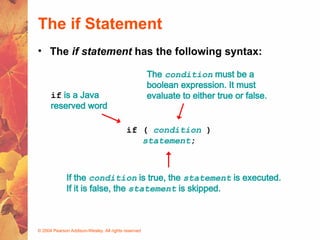
• The if statement has the following syntax:
if ( condition )
statement;
if is a Java
reserved word
The condition must be a
boolean expression. It must
evaluate to either true or false.
If the condition is true, the statement is executed.
If it is false, the statement is skipped.
© 2004 Pearson Addison-Wesley. All rights reserved
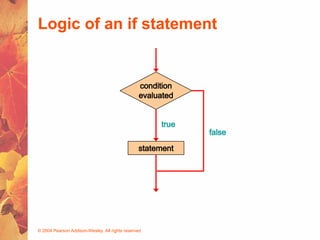
Logic of an if statement
condition
evaluated
statement
true
false
© 2004 Pearson Addison-Wesley. All rights reserved
The if-else Statement
• An else clause can be added to an if statement to
make an if-else statement
if ( condition )
statement1;
else
statement2;
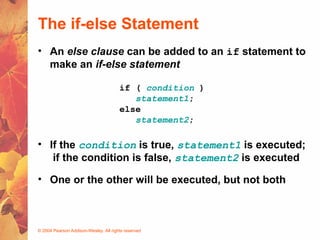
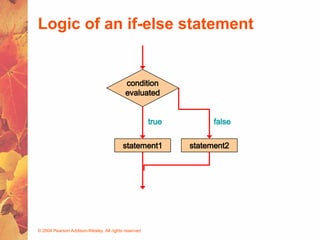
• If the condition is true, statement1 is executed;
if the condition is false, statement2 is executed
• One or the other will be executed, but not both
© 2004 Pearson Addison-Wesley. All rights reserved
Logic of an if-else statement
condition
evaluated
statement1
true false
statement2
© 2004 Pearson Addison-Wesley. All rights reserved
Logical NOT
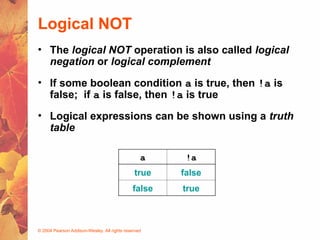
• The logical NOT operation is also called logical
negation or logical complement
• If some boolean condition a is true, then !a is
false; if a is false, then !a is true
• Logical expressions can be shown using a truth
table
a !a
true false
false true
© 2004 Pearson Addison-Wesley. All rights reserved
Logical Operators
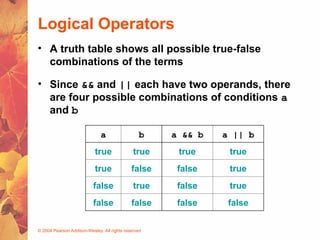
• A truth table shows all possible true-false
combinations of the terms
• Since && and || each have two operands, there
are four possible combinations of conditions a
and b
a b a && b a || b
true true true true
true false false true
false true false true
false false false false
© 2004 Pearson Addison-Wesley. All rights reserved
Boolean Expressions
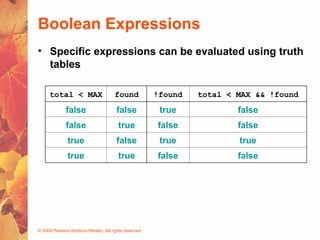
• Specific expressions can be evaluated using truth
tables
total < MAX found !found total < MAX && !found
false false true false
false true false false
true false true true
true true false false
© 2004 Pearson Addison-Wesley. All rights reserved
Other Stuff from Section 5.2
© 2004 Pearson Addison-Wesley. All rights reserved
Indentation Revisited
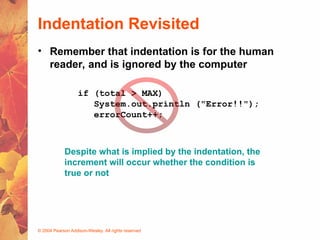
• Remember that indentation is for the human
reader, and is ignored by the computer
if (total > MAX)
System.out.println ("Error!!");
errorCount++;
Despite what is implied by the indentation, the
increment will occur whether the condition is
true or not
© 2004 Pearson Addison-Wesley. All rights reserved
Block Statements
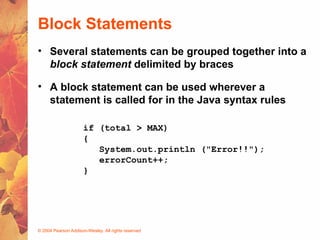
• Several statements can be grouped together into a
block statement delimited by braces
• A block statement can be used wherever a
statement is called for in the Java syntax rules
if (total > MAX)
{
System.out.println ("Error!!");
errorCount++;
}
© 2004 Pearson Addison-Wesley. All rights reserved
Block Statements
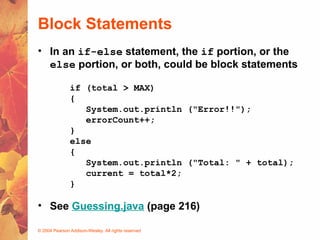
• In an if-else statement, the if portion, or the
else portion, or both, could be block statements
if (total > MAX)
{
System.out.println ("Error!!");
errorCount++;
}
else
{
System.out.println ("Total: " + total);
current = total*2;
}
• See Guessing.java (page 216)
© 2004 Pearson Addison-Wesley. All rights reserved
The Conditional Operator
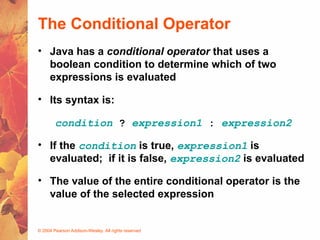
• Java has a conditional operator that uses a
boolean condition to determine which of two
expressions is evaluated
• Its syntax is:
condition ? expression1 : expression2
• If the condition is true, expression1 is
evaluated; if it is false, expression2 is evaluated
• The value of the entire conditional operator is the
value of the selected expression
© 2004 Pearson Addison-Wesley. All rights reserved
The Conditional Operator
• The conditional operator is similar to an if-else
statement, except that it is an expression that
returns a value
• For example:
larger = ((num1 > num2) ? num1 : num2);
• If num1 is greater than num2, then num1 is assigned
to larger; otherwise, num2 is assigned to larger
• The conditional operator is ternary because it
requires three operands
© 2004 Pearson Addison-Wesley. All rights reserved
The Conditional Operator
• Another example:
System.out.println ("Your change is " + count +
((count == 1) ? "Dime" : "Dimes"));
• If count equals 1, then "Dime" is printed
• If count is anything other than 1, then "Dimes" is
printed
© 2004 Pearson Addison-Wesley. All rights reserved
Nested if Statements
• The statement executed as a result of an if
statement or else clause could be another if
statement
• These are called nested if statements
• See MinOfThree.java (page 219)
• An else clause is matched to the last unmatched
if (no matter what the indentation implies)
• Braces can be used to specify the if statement to
which an else clause belongs
© 2004 Pearson Addison-Wesley. All rights reserved
The Coin Class
• Let's examine a class that represents a coin that
can be flipped
• Instance data is used to indicate which face
(heads or tails) is currently showing
• See CoinFlip.java (page 213)
• See Coin.java (page 214)
© 2004 Pearson Addison-Wesley. All rights reserved
Example: Guessing.java (page 216)
Chapter 5
Sections 5.3 – 5.4
© 2004 Pearson Addison-Wesley. All rights reserved
The switch Statement
• The switch statement provides another way to
decide which statement to execute next
• The switch statement evaluates an expression,
then attempts to match the result to one of several
possible cases
• Each case contains a value and a list of
statements
• The flow of control transfers to statement
associated with the first case value that matches
© 2004 Pearson Addison-Wesley. All rights reserved
The switch Statement
• Often a break statement is used as the last
statement in each case's statement list
• A break statement causes control to transfer to the
end of the switch statement
• If a break statement is not used, the flow of control
will continue into the next case
• Sometimes this may be appropriate, but often we
want to execute only the statements associated
with one case
© 2004 Pearson Addison-Wesley. All rights reserved
The switch Statement
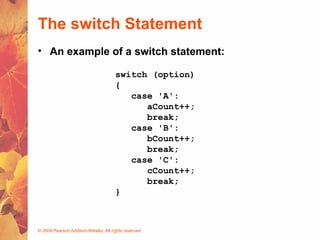
switch (option)
{
case 'A':
aCount++;
break;
case 'B':
bCount++;
break;
case 'C':
cCount++;
break;
}
• An example of a switch statement:
© 2004 Pearson Addison-Wesley. All rights reserved
The switch Statement
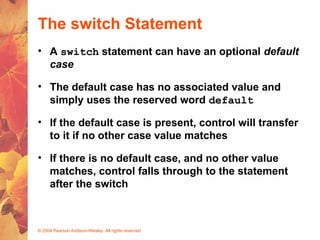
• A switch statement can have an optional default
case
• The default case has no associated value and
simply uses the reserved word default
• If the default case is present, control will transfer
to it if no other case value matches
• If there is no default case, and no other value
matches, control falls through to the statement
after the switch
© 2004 Pearson Addison-Wesley. All rights reserved
The switch Statement
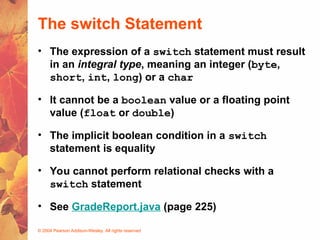
• The expression of a switch statement must result
in an integral type, meaning an integer (byte,
short, int, long) or a char
• It cannot be a boolean value or a floating point
value (float or double)
• The implicit boolean condition in a switch
statement is equality
• You cannot perform relational checks with a
switch statement
• See GradeReport.java (page 225)
© 2004 Pearson Addison-Wesley. All rights reserved
The switch Statement
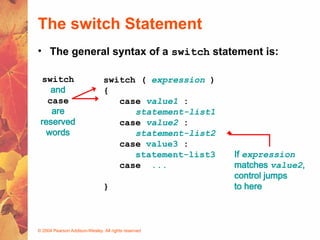
• The general syntax of a switch statement is:
switch ( expression )
{
case value1 :
statement-list1
case value2 :
statement-list2
case value3 :
statement-list3
case ...
}
switch
and
case
are
reserved
words
If expression
matches value2,
control jumps
to here
© 2004 Pearson Addison-Wesley. All rights reserved
Example: GradeReport.java (page 225)
© 2004 Pearson Addison-Wesley. All rights reserved
THE END

Switch and looping statement for c language

  • 1.
    © 2004 PearsonAddison-Wesley. All rights reserved September 25, 2006 Comparing Data & the ‘switch’ Statement ComS 207: Programming I (in Java) Iowa State University, FALL 2006 Instructor: Alexander Stoytchev
  • 2.
    © 2004 PearsonAddison-Wesley. All rights reserved Quick review of last lecture
  • 3.
    © 2004 PearsonAddison-Wesley. All rights reserved The if Statement • The if statement has the following syntax: if ( condition ) statement; if is a Java reserved word The condition must be a boolean expression. It must evaluate to either true or false. If the condition is true, the statement is executed. If it is false, the statement is skipped.
  • 4.
    © 2004 PearsonAddison-Wesley. All rights reserved Logic of an if statement condition evaluated statement true false
  • 5.
    © 2004 PearsonAddison-Wesley. All rights reserved The if-else Statement • An else clause can be added to an if statement to make an if-else statement if ( condition ) statement1; else statement2; • If the condition is true, statement1 is executed; if the condition is false, statement2 is executed • One or the other will be executed, but not both
  • 6.
    © 2004 PearsonAddison-Wesley. All rights reserved Logic of an if-else statement condition evaluated statement1 true false statement2
  • 7.
    © 2004 PearsonAddison-Wesley. All rights reserved Logical NOT • The logical NOT operation is also called logical negation or logical complement • If some boolean condition a is true, then !a is false; if a is false, then !a is true • Logical expressions can be shown using a truth table a !a true false false true
  • 8.
    © 2004 PearsonAddison-Wesley. All rights reserved Logical Operators • A truth table shows all possible true-false combinations of the terms • Since && and || each have two operands, there are four possible combinations of conditions a and b a b a && b a || b true true true true true false false true false true false true false false false false
  • 9.
    © 2004 PearsonAddison-Wesley. All rights reserved Boolean Expressions • Specific expressions can be evaluated using truth tables total < MAX found !found total < MAX && !found false false true false false true false false true false true true true true false false
  • 10.
    © 2004 PearsonAddison-Wesley. All rights reserved Other Stuff from Section 5.2
  • 11.
    © 2004 PearsonAddison-Wesley. All rights reserved Indentation Revisited • Remember that indentation is for the human reader, and is ignored by the computer if (total > MAX) System.out.println ("Error!!"); errorCount++; Despite what is implied by the indentation, the increment will occur whether the condition is true or not
  • 12.
    © 2004 PearsonAddison-Wesley. All rights reserved Block Statements • Several statements can be grouped together into a block statement delimited by braces • A block statement can be used wherever a statement is called for in the Java syntax rules if (total > MAX) { System.out.println ("Error!!"); errorCount++; }
  • 13.
    © 2004 PearsonAddison-Wesley. All rights reserved Block Statements • In an if-else statement, the if portion, or the else portion, or both, could be block statements if (total > MAX) { System.out.println ("Error!!"); errorCount++; } else { System.out.println ("Total: " + total); current = total*2; } • See Guessing.java (page 216)
  • 14.
    © 2004 PearsonAddison-Wesley. All rights reserved The Conditional Operator • Java has a conditional operator that uses a boolean condition to determine which of two expressions is evaluated • Its syntax is: condition ? expression1 : expression2 • If the condition is true, expression1 is evaluated; if it is false, expression2 is evaluated • The value of the entire conditional operator is the value of the selected expression
  • 15.
    © 2004 PearsonAddison-Wesley. All rights reserved The Conditional Operator • The conditional operator is similar to an if-else statement, except that it is an expression that returns a value • For example: larger = ((num1 > num2) ? num1 : num2); • If num1 is greater than num2, then num1 is assigned to larger; otherwise, num2 is assigned to larger • The conditional operator is ternary because it requires three operands
  • 16.
    © 2004 PearsonAddison-Wesley. All rights reserved The Conditional Operator • Another example: System.out.println ("Your change is " + count + ((count == 1) ? "Dime" : "Dimes")); • If count equals 1, then "Dime" is printed • If count is anything other than 1, then "Dimes" is printed
  • 17.
    © 2004 PearsonAddison-Wesley. All rights reserved Nested if Statements • The statement executed as a result of an if statement or else clause could be another if statement • These are called nested if statements • See MinOfThree.java (page 219) • An else clause is matched to the last unmatched if (no matter what the indentation implies) • Braces can be used to specify the if statement to which an else clause belongs
  • 18.
    © 2004 PearsonAddison-Wesley. All rights reserved The Coin Class • Let's examine a class that represents a coin that can be flipped • Instance data is used to indicate which face (heads or tails) is currently showing • See CoinFlip.java (page 213) • See Coin.java (page 214)
  • 19.
    © 2004 PearsonAddison-Wesley. All rights reserved Example: Guessing.java (page 216)
  • 20.
  • 21.
    © 2004 PearsonAddison-Wesley. All rights reserved The switch Statement • The switch statement provides another way to decide which statement to execute next • The switch statement evaluates an expression, then attempts to match the result to one of several possible cases • Each case contains a value and a list of statements • The flow of control transfers to statement associated with the first case value that matches
  • 22.
    © 2004 PearsonAddison-Wesley. All rights reserved The switch Statement • Often a break statement is used as the last statement in each case's statement list • A break statement causes control to transfer to the end of the switch statement • If a break statement is not used, the flow of control will continue into the next case • Sometimes this may be appropriate, but often we want to execute only the statements associated with one case
  • 23.
    © 2004 PearsonAddison-Wesley. All rights reserved The switch Statement switch (option) { case 'A': aCount++; break; case 'B': bCount++; break; case 'C': cCount++; break; } • An example of a switch statement:
  • 24.
    © 2004 PearsonAddison-Wesley. All rights reserved The switch Statement • A switch statement can have an optional default case • The default case has no associated value and simply uses the reserved word default • If the default case is present, control will transfer to it if no other case value matches • If there is no default case, and no other value matches, control falls through to the statement after the switch
  • 25.
    © 2004 PearsonAddison-Wesley. All rights reserved The switch Statement • The expression of a switch statement must result in an integral type, meaning an integer (byte, short, int, long) or a char • It cannot be a boolean value or a floating point value (float or double) • The implicit boolean condition in a switch statement is equality • You cannot perform relational checks with a switch statement • See GradeReport.java (page 225)
  • 26.
    © 2004 PearsonAddison-Wesley. All rights reserved The switch Statement • The general syntax of a switch statement is: switch ( expression ) { case value1 : statement-list1 case value2 : statement-list2 case value3 : statement-list3 case ... } switch and case are reserved words If expression matches value2, control jumps to here
  • 27.
    © 2004 PearsonAddison-Wesley. All rights reserved Example: GradeReport.java (page 225)
  • 28.
    © 2004 PearsonAddison-Wesley. All rights reserved THE END