The ZFS filesystem
One day workshop — APRICOT 2019
Philip Paeps
26 February 2019
Daejeon, Korea — 대전
• 2001: Development started at Sun (now Oracle)
• 2005: ZFS source code released
• 2008: ZFS released in FreeBSD 7.0
• (2019: ZFS still doesn’t work reliably on Linux)
History of ZFS
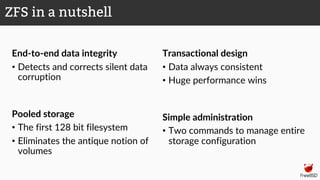
End-to-end data integrity
• Detects and corrects silent data
corruption
Pooled storage
• The first 128 bit filesystem
• Eliminates the antique notion of
volumes
Transactional design
• Data always consistent
• Huge performance wins
Simple administration
• Two commands to manage entire
storage configuration
ZFS in a nutshell
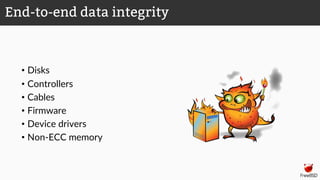
• Disks
• Controllers
• Cables
• Firmware
• Device drivers
• Non-ECC memory
End-to-end data integrity
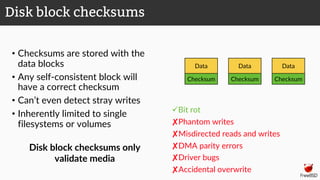
• Checksums are stored with the
data blocks
• Any self-consistent block will
have a correct checksum
• Can’t even detect stray writes
• Inherently limited to single
filesystems or volumes
üBit rot
✘Phantom writes
✘Misdirected reads and writes
✘DMA parity errors
✘Driver bugs
✘Accidental overwrite
Disk block checksums
Data
Checksum
Data
Checksum
Data
Checksum
Disk block checksums only
validate media
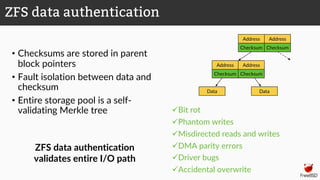
• Checksums are stored in parent
block pointers
• Fault isolation between data and
checksum
• Entire storage pool is a self-
validating Merkle tree üBit rot
üPhantom writes
üMisdirected reads and writes
üDMA parity errors
üDriver bugs
üAccidental overwrite
ZFS data authentication
Address Address
Checksum Checksum
Address Address
Checksum Checksum
Data Data
ZFS data authentication
validates entire I/O path
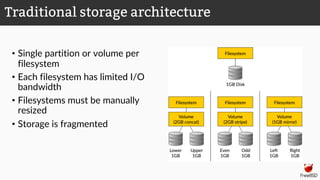
• Single partition or volume per
filesystem
• Each filesystem has limited I/O
bandwidth
• Filesystems must be manually
resized
• Storage is fragmented
Traditional storage architecture
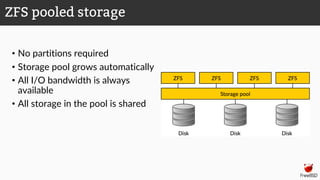
• No partitions required
• Storage pool grows automatically
• All I/O bandwidth is always
available
• All storage in the pool is shared
ZFS pooled storage
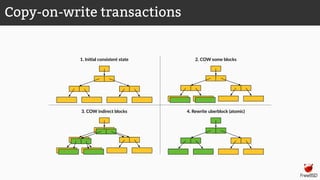
4. Rewrite uberblock (atomic)3. COW indirect blocks
2. COW some blocks1. Ini>al consistent state
Copy-on-write transactions
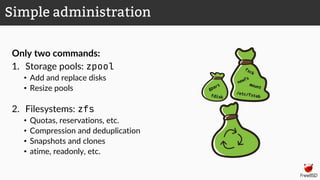
Only two commands:
1. Storage pools: zpool
• Add and replace disks
• Resize pools
2. Filesystems: zfs
• Quotas, reservations, etc.
• Compression and deduplication
• Snapshots and clones
• atime, readonly, etc.
Simple administration
Storage pools
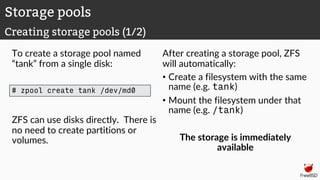
To create a storage pool named
“tank” from a single disk:
After creating a storage pool, ZFS
will automatically:
• Create a filesystem with the same
name (e.g. tank)
• Mount the filesystem under that
name (e.g. /tank)
The storage is immediately
available
Storage pools
Creating storage pools (1/2)
# zpool create tank /dev/md0
ZFS can use disks directly. There is
no need to create partitions or
volumes.
All configuration is stored
with the storage pool and
persists across reboots.
No need to edit
/etc/fstab.
# mount | grep tank
# ls -al /tank
ls: /tank: No such file or directory
# zpool create tank /dev/md0
# mount | grep tank
tank on /tank (zfs, local, nfsv4acls)
# ls -al /tank
total 9
drwxr-xr-x 2 root wheel 2 Oct 12 12:17 .
drwxr-xr-x 23 root wheel 28 Oct 12 12:17 ..
# reboot
[...]
# mount | grep tank
tank on /tank (zfs, local, nfsv4acls)
Storage pools
Creating storage pools (2/2)
Storage pools
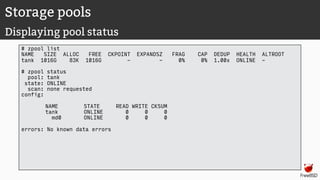
Displaying pool status
# zpool list
NAME SIZE ALLOC FREE CKPOINT EXPANDSZ FRAG CAP DEDUP HEALTH ALTROOT
tank 1016G 83K 1016G - - 0% 0% 1.00x ONLINE -
# zpool status
pool: tank
state: ONLINE
scan: none requested
config:
NAME STATE READ WRITE CKSUM
tank ONLINE 0 0 0
md0 ONLINE 0 0 0
errors: No known data errors
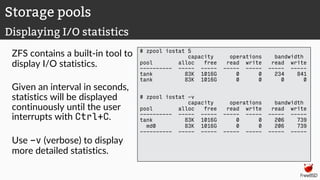
ZFS contains a built-in tool to
display I/O statistics.
Given an interval in seconds,
statistics will be displayed
continuously until the user
interrupts with Ctrl+C.
Use -v (verbose) to display
more detailed statistics.
# zpool iostat 5
capacity operations bandwidth
pool alloc free read write read write
---------- ----- ----- ----- ----- ----- -----
tank 83K 1016G 0 0 234 841
tank 83K 1016G 0 0 0 0
# zpool iostat -v
capacity operations bandwidth
pool alloc free read write read write
---------- ----- ----- ----- ----- ----- -----
tank 83K 1016G 0 0 206 739
md0 83K 1016G 0 0 206 739
---------- ----- ----- ----- ----- ----- -----
Storage pools
Displaying I/O statistics
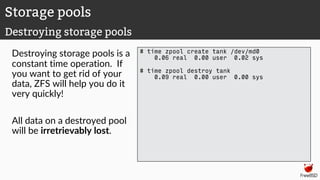
Destroying storage pools is a
constant time operation. If
you want to get rid of your
data, ZFS will help you do it
very quickly!
All data on a destroyed pool
will be irretrievably lost.
# time zpool create tank /dev/md0
0.06 real 0.00 user 0.02 sys
# time zpool destroy tank
0.09 real 0.00 user 0.00 sys
Storage pools
Destroying storage pools
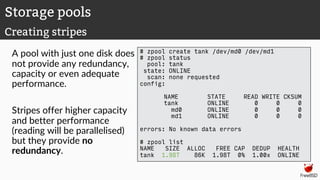
A pool with just one disk does
not provide any redundancy,
capacity or even adequate
performance.
Stripes offer higher capacity
and better performance
(reading will be parallelised)
but they provide no
redundancy.
# zpool create tank /dev/md0 /dev/md1
# zpool status
pool: tank
state: ONLINE
scan: none requested
config:
NAME STATE READ WRITE CKSUM
tank ONLINE 0 0 0
md0 ONLINE 0 0 0
md1 ONLINE 0 0 0
errors: No known data errors
# zpool list
NAME SIZE ALLOC FREE CAP DEDUP HEALTH
tank 1.98T 86K 1.98T 0% 1.00x ONLINE
Storage pools
Creating stripes
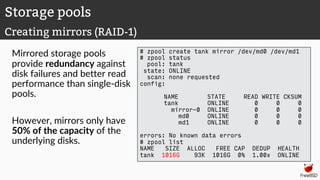
Mirrored storage pools
provide redundancy against
disk failures and better read
performance than single-disk
pools.
However, mirrors only have
50% of the capacity of the
underlying disks.
# zpool create tank mirror /dev/md0 /dev/md1
# zpool status
pool: tank
state: ONLINE
scan: none requested
config:
NAME STATE READ WRITE CKSUM
tank ONLINE 0 0 0
mirror-0 ONLINE 0 0 0
md0 ONLINE 0 0 0
md1 ONLINE 0 0 0
errors: No known data errors
# zpool list
NAME SIZE ALLOC FREE CAP DEDUP HEALTH
tank 1016G 93K 1016G 0% 1.00x ONLINE
Storage pools
Creating mirrors (RAID-1)
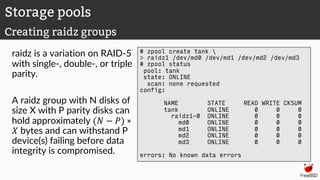
raidz is a variation on RAID-5
with single-, double-, or triple
parity.
A raidz group with N disks of
size X with P parity disks can
hold approximately (" − $) ∗
' bytes and can withstand P
device(s) failing before data
integrity is compromised.
# zpool create tank 
> raidz1 /dev/md0 /dev/md1 /dev/md2 /dev/md3
# zpool status
pool: tank
state: ONLINE
scan: none requested
config:
NAME STATE READ WRITE CKSUM
tank ONLINE 0 0 0
raidz1-0 ONLINE 0 0 0
md0 ONLINE 0 0 0
md1 ONLINE 0 0 0
md2 ONLINE 0 0 0
md3 ONLINE 0 0 0
errors: No known data errors
Storage pools
Creating raidz groups
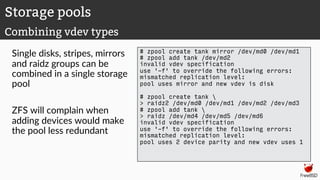
Single disks, stripes, mirrors
and raidz groups can be
combined in a single storage
pool
ZFS will complain when
adding devices would make
the pool less redundant
# zpool create tank mirror /dev/md0 /dev/md1
# zpool add tank /dev/md2
invalid vdev specification
use '-f' to override the following errors:
mismatched replication level:
pool uses mirror and new vdev is disk
# zpool create tank 
> raidz2 /dev/md0 /dev/md1 /dev/md2 /dev/md3
# zpool add tank 
> raidz /dev/md4 /dev/md5 /dev/md6
invalid vdev specification
use '-f' to override the following errors:
mismatched replication level:
pool uses 2 device parity and new vdev uses 1
Storage pools
Combining vdev types
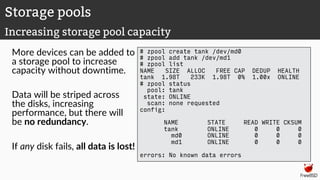
More devices can be added to
a storage pool to increase
capacity without downtime.
Data will be striped across
the disks, increasing
performance, but there will
be no redundancy.
If any disk fails, all data is lost!
# zpool create tank /dev/md0
# zpool add tank /dev/md1
# zpool list
NAME SIZE ALLOC FREE CAP DEDUP HEALTH
tank 1.98T 233K 1.98T 0% 1.00x ONLINE
# zpool status
pool: tank
state: ONLINE
scan: none requested
config:
NAME STATE READ WRITE CKSUM
tank ONLINE 0 0 0
md0 ONLINE 0 0 0
md1 ONLINE 0 0 0
errors: No known data errors
Storage pools
Increasing storage pool capacity
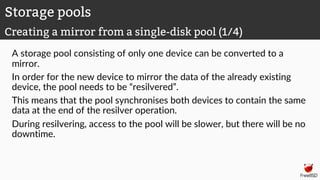
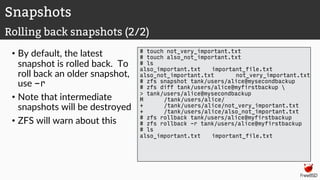
A storage pool consisting of only one device can be converted to a
mirror.
In order for the new device to mirror the data of the already existing
device, the pool needs to be “resilvered”.
This means that the pool synchronises both devices to contain the same
data at the end of the resilver operation.
During resilvering, access to the pool will be slower, but there will be no
downtime.
Storage pools
Creating a mirror from a single-disk pool (1/4)
Storage pools
Creating a mirror from a single-disk pool (2/4)
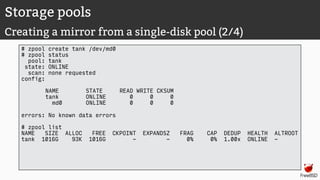
# zpool create tank /dev/md0
# zpool status
pool: tank
state: ONLINE
scan: none requested
config:
NAME STATE READ WRITE CKSUM
tank ONLINE 0 0 0
md0 ONLINE 0 0 0
errors: No known data errors
# zpool list
NAME SIZE ALLOC FREE CKPOINT EXPANDSZ FRAG CAP DEDUP HEALTH ALTROOT
tank 1016G 93K 1016G - - 0% 0% 1.00x ONLINE -
Storage pools
Creating a mirror from a single-disk pool (3/4)
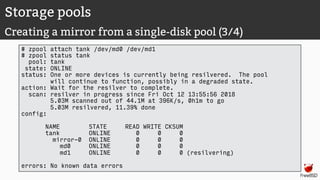
# zpool attach tank /dev/md0 /dev/md1
# zpool status tank
pool: tank
state: ONLINE
status: One or more devices is currently being resilvered. The pool
will continue to function, possibly in a degraded state.
action: Wait for the resilver to complete.
scan: resilver in progress since Fri Oct 12 13:55:56 2018
5.03M scanned out of 44.1M at 396K/s, 0h1m to go
5.03M resilvered, 11.39% done
config:
NAME STATE READ WRITE CKSUM
tank ONLINE 0 0 0
mirror-0 ONLINE 0 0 0
md0 ONLINE 0 0 0
md1 ONLINE 0 0 0 (resilvering)
errors: No known data errors
Storage pools
Creating a mirror from a single-disk pool (4/4)
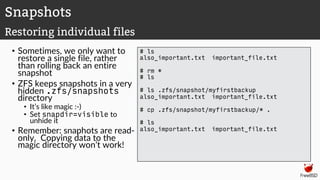
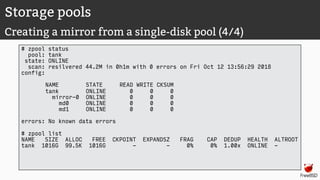
# zpool status
pool: tank
state: ONLINE
scan: resilvered 44.2M in 0h1m with 0 errors on Fri Oct 12 13:56:29 2018
config:
NAME STATE READ WRITE CKSUM
tank ONLINE 0 0 0
mirror-0 ONLINE 0 0 0
md0 ONLINE 0 0 0
md1 ONLINE 0 0 0
errors: No known data errors
# zpool list
NAME SIZE ALLOC FREE CKPOINT EXPANDSZ FRAG CAP DEDUP HEALTH ALTROOT
tank 1016G 99.5K 1016G - - 0% 0% 1.00x ONLINE -
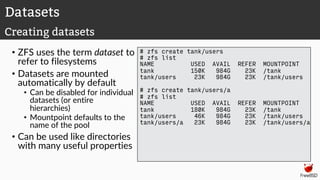
Datasets
• ZFS uses the term dataset to
refer to filesystems
• Datasets are mounted
automatically by default
• Can be disabled for individual
datasets (or entire
hierarchies)
• Mountpoint defaults to the
name of the pool
• Can be used like directories
with many useful properties
# zfs create tank/users
# zfs list
NAME USED AVAIL REFER MOUNTPOINT
tank 150K 984G 23K /tank
tank/users 23K 984G 23K /tank/users
# zfs create tank/users/a
# zfs list
NAME USED AVAIL REFER MOUNTPOINT
tank 180K 984G 23K /tank
tank/users 46K 984G 23K /tank/users
tank/users/a 23K 984G 23K /tank/users/a
Datasets
Creating datasets
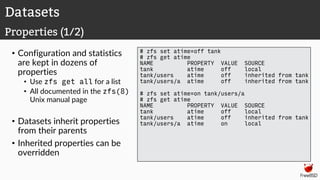
• Configuration and statistics
are kept in dozens of
properties
• Use zfs get all for a list
• All documented in the zfs(8)
Unix manual page
• Datasets inherit properties
from their parents
• Inherited properties can be
overridden
# zfs set atime=off tank
# zfs get atime
NAME PROPERTY VALUE SOURCE
tank atime off local
tank/users atime off inherited from tank
tank/users/a atime off inherited from tank
# zfs set atime=on tank/users/a
# zfs get atime
NAME PROPERTY VALUE SOURCE
tank atime off local
tank/users atime off inherited from tank
tank/users/a atime on local
Datasets
Properties (1/2)
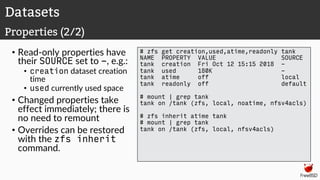
• Read-only properties have
their SOURCE set to -, e.g.:
• creation dataset creation
time
• used currently used space
• Changed properties take
effect immediately; there is
no need to remount
• Overrides can be restored
with the zfs inherit
command.
# zfs get creation,used,atime,readonly tank
NAME PROPERTY VALUE SOURCE
tank creation Fri Oct 12 15:15 2018 -
tank used 180K -
tank atime off local
tank readonly off default
# mount | grep tank
tank on /tank (zfs, local, noatime, nfsv4acls)
# zfs inherit atime tank
# mount | grep tank
tank on /tank (zfs, local, nfsv4acls)
Datasets
Properties (2/2)
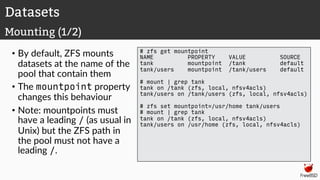
• By default, ZFS mounts
datasets at the name of the
pool that contain them
• The mountpoint property
changes this behaviour
• Note: mountpoints must
have a leading / (as usual in
Unix) but the ZFS path in
the pool must not have a
leading /.
# zfs get mountpoint
NAME PROPERTY VALUE SOURCE
tank mountpoint /tank default
tank/users mountpoint /tank/users default
# mount | grep tank
tank on /tank (zfs, local, nfsv4acls)
tank/users on /tank/users (zfs, local, nfsv4acls)
# zfs set mountpoint=/usr/home tank/users
# mount | grep tank
tank on /tank (zfs, local, nfsv4acls)
tank/users on /usr/home (zfs, local, nfsv4acls)
Datasets
Mounting (1/2)
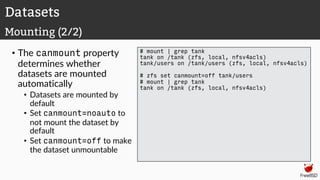
• The canmount property
determines whether
datasets are mounted
automatically
• Datasets are mounted by
default
• Set canmount=noauto to
not mount the dataset by
default
• Set canmount=off to make
the dataset unmountable
# mount | grep tank
tank on /tank (zfs, local, nfsv4acls)
tank/users on /tank/users (zfs, local, nfsv4acls)
# zfs set canmount=off tank/users
# mount | grep tank
tank on /tank (zfs, local, nfsv4acls)
Datasets
Mounting (2/2)
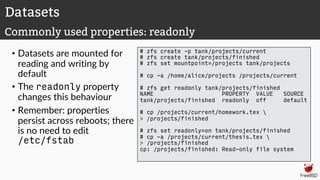
• Datasets are mounted for
reading and writing by
default
• The readonly property
changes this behaviour
• Remember: properties
persist across reboots; there
is no need to edit
/etc/fstab
# zfs create -p tank/projects/current
# zfs create tank/projects/finished
# zfs set mountpoint=/projects tank/projects
# cp -a /home/alice/projects /projects/current
# zfs get readonly tank/projects/finished
NAME PROPERTY VALUE SOURCE
tank/projects/finished readonly off default
# cp /projects/current/homework.tex 
> /projects/finished
# zfs set readonly=on tank/projects/finished
# cp -a /projects/current/thesis.tex 
> /projects/finished
cp: /projects/finished: Read-only file system
Datasets
Commonly used properties: readonly
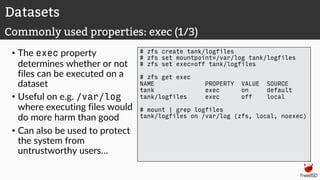
• The exec property
determines whether or not
files can be executed on a
dataset
• Useful on e.g. /var/log
where executing files would
do more harm than good
• Can also be used to protect
the system from
untrustworthy users…
# zfs create tank/logfiles
# zfs set mountpoint=/var/log tank/logfiles
# zfs set exec=off tank/logfiles
# zfs get exec
NAME PROPERTY VALUE SOURCE
tank exec on default
tank/logfiles exec off local
# mount | grep logfiles
tank/logfiles on /var/log (zfs, local, noexec)
Datasets
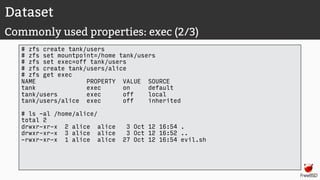
Commonly used properties: exec (1/3)
Dataset
Commonly used properties: exec (2/3)
# zfs create tank/users
# zfs set mountpoint=/home tank/users
# zfs set exec=off tank/users
# zfs create tank/users/alice
# zfs get exec
NAME PROPERTY VALUE SOURCE
tank exec on default
tank/users exec off local
tank/users/alice exec off inherited
# ls -al /home/alice/
total 2
drwxr-xr-x 2 alice alice 3 Oct 12 16:54 .
drwxr-xr-x 3 alice alice 3 Oct 12 16:52 ..
-rwxr-xr-x 1 alice alice 27 Oct 12 16:54 evil.sh
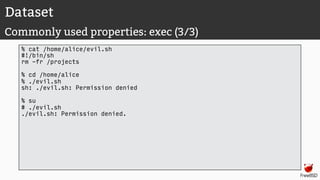
Dataset
Commonly used properties: exec (3/3)
% cat /home/alice/evil.sh
#!/bin/sh
rm -fr /projects
% cd /home/alice
% ./evil.sh
sh: ./evil.sh: Permission denied
% su
# ./evil.sh
./evil.sh: Permission denied.
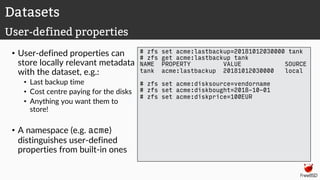
• User-defined properties can
store locally relevant metadata
with the dataset, e.g.:
• Last backup time
• Cost centre paying for the disks
• Anything you want them to
store!
• A namespace (e.g. acme)
distinguishes user-defined
properties from built-in ones
# zfs set acme:lastbackup=20181012030000 tank
# zfs get acme:lastbackup tank
NAME PROPERTY VALUE SOURCE
tank acme:lastbackup 20181012030000 local
# zfs set acme:disksource=vendorname
# zfs set acme:diskbought=2018-10-01
# zfs set acme:diskprice=100EUR
Datasets
User-defined properties
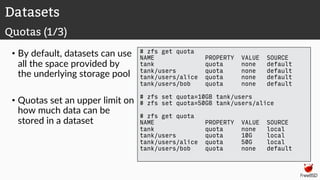
• By default, datasets can use
all the space provided by
the underlying storage pool
• Quotas set an upper limit on
how much data can be
stored in a dataset
# zfs get quota
NAME PROPERTY VALUE SOURCE
tank quota none default
tank/users quota none default
tank/users/alice quota none default
tank/users/bob quota none default
# zfs set quota=10GB tank/users
# zfs set quota=50GB tank/users/alice
# zfs get quota
NAME PROPERTY VALUE SOURCE
tank quota none local
tank/users quota 10G local
tank/users/alice quota 50G local
tank/users/bob quota none default
Datasets
Quotas (1/3)
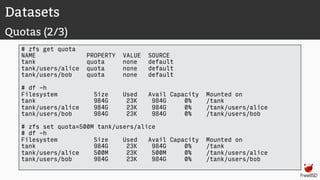
Datasets
Quotas (2/3)
# zfs get quota
NAME PROPERTY VALUE SOURCE
tank quota none default
tank/users/alice quota none default
tank/users/bob quota none default
# df -h
Filesystem Size Used Avail Capacity Mounted on
tank 984G 23K 984G 0% /tank
tank/users/alice 984G 23K 984G 0% /tank/users/alice
tank/users/bob 984G 23K 984G 0% /tank/users/bob
# zfs set quota=500M tank/users/alice
# df -h
Filesystem Size Used Avail Capacity Mounted on
tank 984G 23K 984G 0% /tank
tank/users/alice 500M 23K 500M 0% /tank/users/alice
tank/users/bob 984G 23K 984G 0% /tank/users/bob
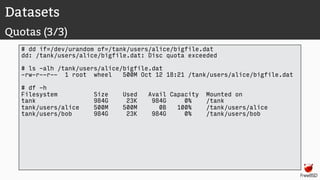
Datasets
Quotas (3/3)
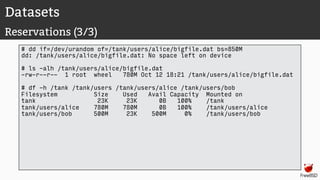
# dd if=/dev/urandom of=/tank/users/alice/bigfile.dat
dd: /tank/users/alice/bigfile.dat: Disc quota exceeded
# ls -alh /tank/users/alice/bigfile.dat
-rw-r--r-- 1 root wheel 500M Oct 12 18:21 /tank/users/alice/bigfile.dat
# df -h
Filesystem Size Used Avail Capacity Mounted on
tank 984G 23K 984G 0% /tank
tank/users/alice 500M 500M 0B 100% /tank/users/alice
tank/users/bob 984G 23K 984G 0% /tank/users/bob
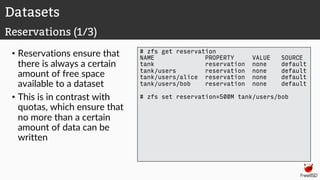
• Reservations ensure that
there is always a certain
amount of free space
available to a dataset
• This is in contrast with
quotas, which ensure that
no more than a certain
amount of data can be
written
# zfs get reservation
NAME PROPERTY VALUE SOURCE
tank reservation none default
tank/users reservation none default
tank/users/alice reservation none default
tank/users/bob reservation none default
# zfs set reservation=500M tank/users/bob
Datasets
Reservations (1/3)
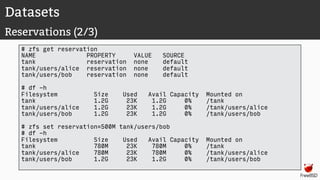
Datasets
Reservations (2/3)
# zfs get reservation
NAME PROPERTY VALUE SOURCE
tank reservation none default
tank/users/alice reservation none default
tank/users/bob reservation none default
# df -h
Filesystem Size Used Avail Capacity Mounted on
tank 1.2G 23K 1.2G 0% /tank
tank/users/alice 1.2G 23K 1.2G 0% /tank/users/alice
tank/users/bob 1.2G 23K 1.2G 0% /tank/users/bob
# zfs set reservation=500M tank/users/bob
# df -h
Filesystem Size Used Avail Capacity Mounted on
tank 780M 23K 780M 0% /tank
tank/users/alice 780M 23K 780M 0% /tank/users/alice
tank/users/bob 1.2G 23K 1.2G 0% /tank/users/bob
Datasets
Reservations (3/3)
# dd if=/dev/urandom of=/tank/users/alice/bigfile.dat bs=850M
dd: /tank/users/alice/bigfile.dat: No space left on device
# ls -alh /tank/users/alice/bigfile.dat
-rw-r--r-- 1 root wheel 780M Oct 12 18:21 /tank/users/alice/bigfile.dat
# df -h /tank /tank/users /tank/users/alice /tank/users/bob
Filesystem Size Used Avail Capacity Mounted on
tank 23K 23K 0B 100% /tank
tank/users/alice 780M 780M 0B 100% /tank/users/alice
tank/users/bob 500M 23K 500M 0% /tank/users/bob
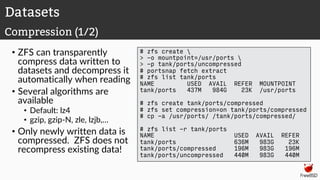
• ZFS can transparently
compress data written to
datasets and decompress it
automatically when reading
• Several algorithms are
available
• Default: lz4
• gzip, gzip-N, zle, lzjb,…
• Only newly written data is
compressed. ZFS does not
recompress existing data!
# zfs create 
> -o mountpoint=/usr/ports 
> -p tank/ports/uncompressed
# portsnap fetch extract
# zfs list tank/ports
NAME USED AVAIL REFER MOUNTPOINT
tank/ports 437M 984G 23K /usr/ports
# zfs create tank/ports/compressed
# zfs set compression=on tank/ports/compressed
# cp -a /usr/ports/ /tank/ports/compressed/
# zfs list -r tank/ports
NAME USED AVAIL REFER
tank/ports 636M 983G 23K
tank/ports/compressed 196M 983G 196M
tank/ports/uncompressed 440M 983G 440M
Datasets
Compression (1/2)
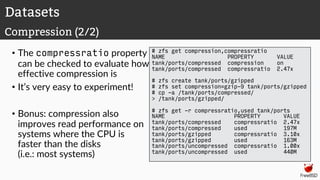
• The compressratio property
can be checked to evaluate how
effective compression is
• It’s very easy to experiment!
• Bonus: compression also
improves read performance on
systems where the CPU is
faster than the disks
(i.e.: most systems)
# zfs get compression,compressratio
NAME PROPERTY VALUE
tank/ports/compressed compression on
tank/ports/compressed compressratio 2.47x
# zfs create tank/ports/gzipped
# zfs set compression=gzip-9 tank/ports/gzipped
# cp -a /tank/ports/compressed/
> /tank/ports/gzipped/
# zfs get -r compressratio,used tank/ports
NAME PROPERTY VALUE
tank/ports/compressed compressratio 2.47x
tank/ports/compressed used 197M
tank/ports/gzipped compressratio 3.10x
tank/ports/gzipped used 163M
tank/ports/uncompressed compressratio 1.00x
tank/ports/uncompressed used 440M
Datasets
Compression (2/2)
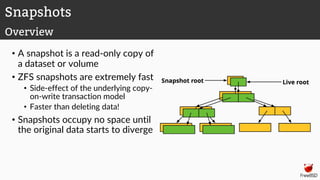
Snapshots
• A snapshot is a read-only copy of
a dataset or volume
• ZFS snapshots are extremely fast
• Side-effect of the underlying copy-
on-write transaction model
• Faster than deleting data!
• Snapshots occupy no space until
the original data starts to diverge
Snapshots
Overview
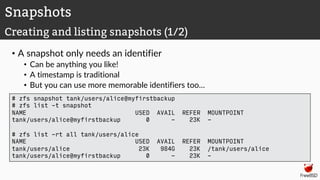
• A snapshot only needs an identifier
• Can be anything you like!
• A timestamp is traditional
• But you can use more memorable identifiers too…
Snapshots
Creating and listing snapshots (1/2)
# zfs snapshot tank/users/alice@myfirstbackup
# zfs list -t snapshot
NAME USED AVAIL REFER MOUNTPOINT
tank/users/alice@myfirstbackup 0 - 23K -
# zfs list -rt all tank/users/alice
NAME USED AVAIL REFER MOUNTPOINT
tank/users/alice 23K 984G 23K /tank/users/alice
tank/users/alice@myfirstbackup 0 - 23K -
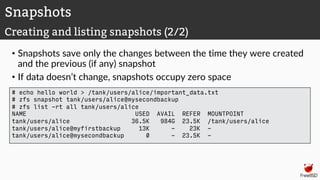
• Snapshots save only the changes between the time they were created
and the previous (if any) snapshot
• If data doesn’t change, snapshots occupy zero space
Snapshots
Creating and listing snapshots (2/2)
# echo hello world > /tank/users/alice/important_data.txt
# zfs snapshot tank/users/alice@mysecondbackup
# zfs list -rt all tank/users/alice
NAME USED AVAIL REFER MOUNTPOINT
tank/users/alice 36.5K 984G 23.5K /tank/users/alice
tank/users/alice@myfirstbackup 13K - 23K -
tank/users/alice@mysecondbackup 0 - 23.5K -
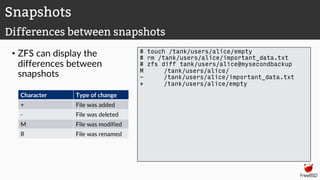
• ZFS can display the
differences between
snapshots
# touch /tank/users/alice/empty
# rm /tank/users/alice/important_data.txt
# zfs diff tank/users/alice@mysecondbackup
M /tank/users/alice/
- /tank/users/alice/important_data.txt
+ /tank/users/alice/empty
Snapshots
Differences between snapshots
Character Type of change
+ File was added
- File was deleted
M File was modified
R File was renamed
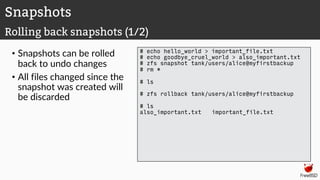
• Snapshots can be rolled
back to undo changes
• All files changed since the
snapshot was created will
be discarded
# echo hello_world > important_file.txt
# echo goodbye_cruel_world > also_important.txt
# zfs snapshot tank/users/alice@myfirstbackup
# rm *
# ls
# zfs rollback tank/users/alice@myfirstbackup
# ls
also_important.txt important_file.txt
Snapshots
Rolling back snapshots (1/2)
• By default, the latest
snapshot is rolled back. To
roll back an older snapshot,
use -r
• Note that intermediate
snapshots will be destroyed
• ZFS will warn about this
# touch not_very_important.txt
# touch also_not_important.txt
# ls
also_important.txt important_file.txt
also_not_important.txt not_very_important.txt
# zfs snapshot tank/users/alice@mysecondbackup
# zfs diff tank/users/alice@myfirstbackup 
> tank/users/alice@mysecondbackup
M /tank/users/alice/
+ /tank/users/alice/not_very_important.txt
+ /tank/users/alice/also_not_important.txt
# zfs rollback tank/users/alice@myfirstbackup
# zfs rollback -r tank/users/alice@myfirstbackup
# ls
also_important.txt important_file.txt
Snapshots
Rolling back snapshots (2/2)
• Sometimes, we only want to
restore a single file, rather
than rolling back an entire
snapshot
• ZFS keeps snapshots in a very
hidden .zfs/snapshots
directory
• It’s like magic :-)
• Set snapdir=visible to
unhide it
• Remember: snaphots are read-
only. Copying data to the
magic directory won’t work!
# ls
also_important.txt important_file.txt
# rm *
# ls
# ls .zfs/snapshot/myfirstbackup
also_important.txt important_file.txt
# cp .zfs/snapshot/myfirstbackup/* .
# ls
also_important.txt important_file.txt
Snapshots
Restoring individual files
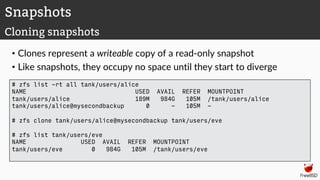
• Clones represent a writeable copy of a read-only snapshot
• Like snapshots, they occupy no space until they start to diverge
Snapshots
Cloning snapshots
# zfs list -rt all tank/users/alice
NAME USED AVAIL REFER MOUNTPOINT
tank/users/alice 189M 984G 105M /tank/users/alice
tank/users/alice@mysecondbackup 0 - 105M -
# zfs clone tank/users/alice@mysecondbackup tank/users/eve
# zfs list tank/users/eve
NAME USED AVAIL REFER MOUNTPOINT
tank/users/eve 0 984G 105M /tank/users/eve
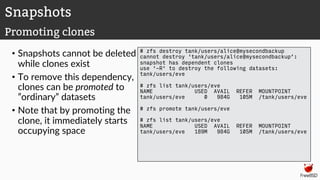
• Snapshots cannot be deleted
while clones exist
• To remove this dependency,
clones can be promoted to
”ordinary” datasets
• Note that by promoting the
clone, it immediately starts
occupying space
# zfs destroy tank/users/alice@mysecondbackup
cannot destroy 'tank/users/alice@mysecondbackup’:
snapshot has dependent clones
use '-R' to destroy the following datasets:
tank/users/eve
# zfs list tank/users/eve
NAME USED AVAIL REFER MOUNTPOINT
tank/users/eve 0 984G 105M /tank/users/eve
# zfs promote tank/users/eve
# zfs list tank/users/eve
NAME USED AVAIL REFER MOUNTPOINT
tank/users/eve 189M 984G 105M /tank/users/eve
Snapshots
Promoting clones
Self-healing data
Demo
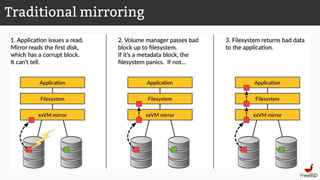
Traditional mirroring
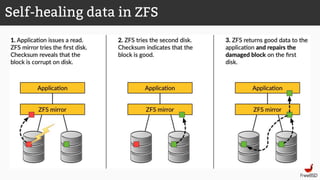
Self-healing data in ZFS
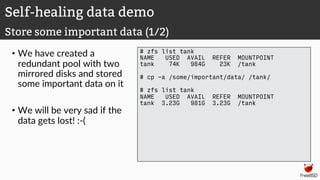
• We have created a
redundant pool with two
mirrored disks and stored
some important data on it
• We will be very sad if the
data gets lost! :-(
# zfs list tank
NAME USED AVAIL REFER MOUNTPOINT
tank 74K 984G 23K /tank
# cp -a /some/important/data/ /tank/
# zfs list tank
NAME USED AVAIL REFER MOUNTPOINT
tank 3.23G 981G 3.23G /tank
Self-healing data demo
Store some important data (1/2)
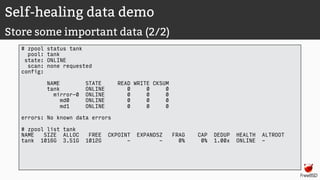
Self-healing data demo
Store some important data (2/2)
# zpool status tank
pool: tank
state: ONLINE
scan: none requested
config:
NAME STATE READ WRITE CKSUM
tank ONLINE 0 0 0
mirror-0 ONLINE 0 0 0
md0 ONLINE 0 0 0
md1 ONLINE 0 0 0
errors: No known data errors
# zpool list tank
NAME SIZE ALLOC FREE CKPOINT EXPANDSZ FRAG CAP DEDUP HEALTH ALTROOT
tank 1016G 3.51G 1012G - - 0% 0% 1.00x ONLINE -
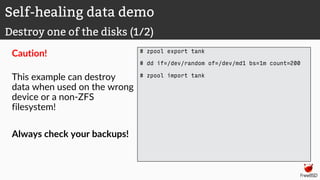
Caution!
This example can destroy
data when used on the wrong
device or a non-ZFS
filesystem!
Always check your backups!
# zpool export tank
# dd if=/dev/random of=/dev/md1 bs=1m count=200
# zpool import tank
Self-healing data demo
Destroy one of the disks (1/2)
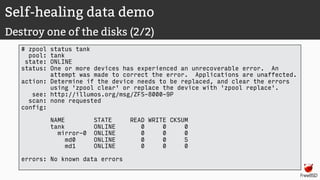
Self-healing data demo
Destroy one of the disks (2/2)
# zpool status tank
pool: tank
state: ONLINE
status: One or more devices has experienced an unrecoverable error. An
attempt was made to correct the error. Applications are unaffected.
action: Determine if the device needs to be replaced, and clear the errors
using 'zpool clear' or replace the device with 'zpool replace'.
see: http://illumos.org/msg/ZFS-8000-9P
scan: none requested
config:
NAME STATE READ WRITE CKSUM
tank ONLINE 0 0 0
mirror-0 ONLINE 0 0 0
md0 ONLINE 0 0 5
md1 ONLINE 0 0 0
errors: No known data errors
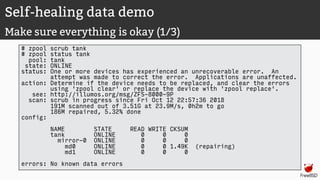
Self-healing data demo
Make sure everything is okay (1/3)
# zpool scrub tank
# zpool status tank
pool: tank
state: ONLINE
status: One or more devices has experienced an unrecoverable error. An
attempt was made to correct the error. Applications are unaffected.
action: Determine if the device needs to be replaced, and clear the errors
using 'zpool clear' or replace the device with 'zpool replace'.
see: http://illumos.org/msg/ZFS-8000-9P
scan: scrub in progress since Fri Oct 12 22:57:36 2018
191M scanned out of 3.51G at 23.9M/s, 0h2m to go
186M repaired, 5.32% done
config:
NAME STATE READ WRITE CKSUM
tank ONLINE 0 0 0
mirror-0 ONLINE 0 0 0
md0 ONLINE 0 0 1.49K (repairing)
md1 ONLINE 0 0 0
errors: No known data errors
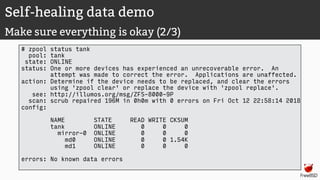
Self-healing data demo
Make sure everything is okay (2/3)
# zpool status tank
pool: tank
state: ONLINE
status: One or more devices has experienced an unrecoverable error. An
attempt was made to correct the error. Applications are unaffected.
action: Determine if the device needs to be replaced, and clear the errors
using 'zpool clear' or replace the device with 'zpool replace'.
see: http://illumos.org/msg/ZFS-8000-9P
scan: scrub repaired 196M in 0h0m with 0 errors on Fri Oct 12 22:58:14 2018
config:
NAME STATE READ WRITE CKSUM
tank ONLINE 0 0 0
mirror-0 ONLINE 0 0 0
md0 ONLINE 0 0 1.54K
md1 ONLINE 0 0 0
errors: No known data errors
Self-healing data demo
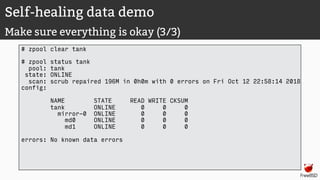
Make sure everything is okay (3/3)
# zpool clear tank
# zpool status tank
pool: tank
state: ONLINE
scan: scrub repaired 196M in 0h0m with 0 errors on Fri Oct 12 22:58:14 2018
config:
NAME STATE READ WRITE CKSUM
tank ONLINE 0 0 0
mirror-0 ONLINE 0 0 0
md0 ONLINE 0 0 0
md1 ONLINE 0 0 0
errors: No known data errors
Self-healing data demo
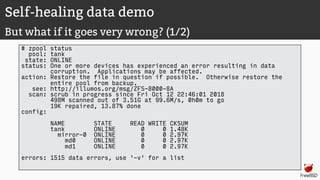
But what if it goes very wrong? (1/2)
# zpool status
pool: tank
state: ONLINE
status: One or more devices has experienced an error resulting in data
corruption. Applications may be affected.
action: Restore the file in question if possible. Otherwise restore the
entire pool from backup.
see: http://illumos.org/msg/ZFS-8000-8A
scan: scrub in progress since Fri Oct 12 22:46:01 2018
498M scanned out of 3.51G at 99.6M/s, 0h0m to go
19K repaired, 13.87% done
config:
NAME STATE READ WRITE CKSUM
tank ONLINE 0 0 1.48K
mirror-0 ONLINE 0 0 2.97K
md0 ONLINE 0 0 2.97K
md1 ONLINE 0 0 2.97K
errors: 1515 data errors, use '-v' for a list
Self-healing data demo
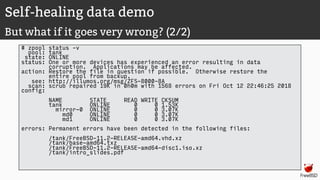
But what if it goes very wrong? (2/2)
# zpool status –v
pool: tank
state: ONLINE
status: One or more devices has experienced an error resulting in data
corruption. Applications may be affected.
action: Restore the file in question if possible. Otherwise restore the
entire pool from backup.
see: http://illumos.org/msg/ZFS-8000-8A
scan: scrub repaired 19K in 0h0m with 1568 errors on Fri Oct 12 22:46:25 2018
config:
NAME STATE READ WRITE CKSUM
tank ONLINE 0 0 1.53K
mirror-0 ONLINE 0 0 3.07K
md0 ONLINE 0 0 3.07K
md1 ONLINE 0 0 3.07K
errors: Permanent errors have been detected in the following files:
/tank/FreeBSD-11.2-RELEASE-amd64.vhd.xz
/tank/base-amd64.txz
/tank/FreeBSD-11.2-RELEASE-amd64-disc1.iso.xz
/tank/intro_slides.pdf
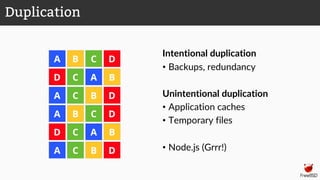
Deduplication
Intentional duplication
• Backups, redundancy
Unintentional duplication
• Application caches
• Temporary files
• Node.js (Grrr!)
Duplication
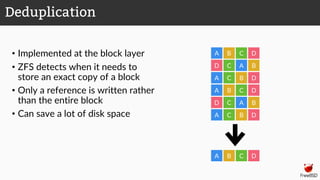
• Implemented at the block layer
• ZFS detects when it needs to
store an exact copy of a block
• Only a reference is written rather
than the entire block
• Can save a lot of disk space
BA C D
D A B
A
A
A
D
D
D
D
C
C
C
C
C
B
B
B
B
A
BA C D
Deduplication
• ZFS must keep a table of the checksums of every block it stores
• Depending on the blocksize, this table can grow very quickly
• Deduplication table must be fast to access or writes slow down
• Ideally, the deduplication table should fit in RAM
• Keeping a L2ARC on fast SSDs can reduce the cost somewhat
Rule of thumb:
5GB of RAM for each TB of data stored
Deduplication
Memory cost
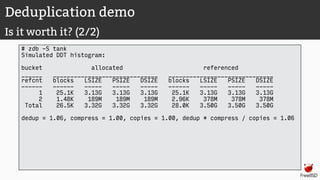
• The ZFS debugger (zdb) can be used to evaluate if turning on
deduplication will save space in a pool
• In most workloads, compression will provide much more significant
savings than deduplication
• Consider whether the cost of RAM is worth it
• Also keep in mind that it is a lot easier and cheaper to add disks to a
system than it is to add memory
Deduplication
Is it worth it? (1/2)
Deduplication demo
Is it worth it? (2/2)
# zdb -S tank
Simulated DDT histogram:
bucket allocated referenced
______ ______________________________ ______________________________
refcnt blocks LSIZE PSIZE DSIZE blocks LSIZE PSIZE DSIZE
------ ------ ----- ----- ----- ------ ----- ----- -----
1 25.1K 3.13G 3.13G 3.13G 25.1K 3.13G 3.13G 3.13G
2 1.48K 189M 189M 189M 2.96K 378M 378M 378M
Total 26.5K 3.32G 3.32G 3.32G 28.0K 3.50G 3.50G 3.50G
dedup = 1.06, compress = 1.00, copies = 1.00, dedup * compress / copies = 1.06
Deduplication demo
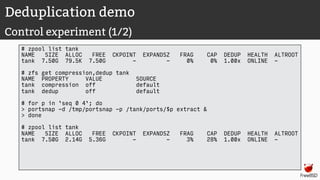
Control experiment (1/2)
# zpool list tank
NAME SIZE ALLOC FREE CKPOINT EXPANDSZ FRAG CAP DEDUP HEALTH ALTROOT
tank 7.50G 79.5K 7.50G - - 0% 0% 1.00x ONLINE -
# zfs get compression,dedup tank
NAME PROPERTY VALUE SOURCE
tank compression off default
tank dedup off default
# for p in `seq 0 4`; do
> portsnap -d /tmp/portsnap -p /tank/ports/$p extract &
> done
# zpool list tank
NAME SIZE ALLOC FREE CKPOINT EXPANDSZ FRAG CAP DEDUP HEALTH ALTROOT
tank 7.50G 2.14G 5.36G - - 3% 28% 1.00x ONLINE -
Deduplication demo
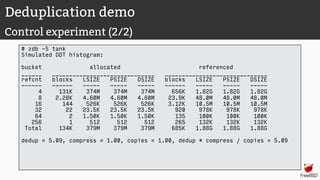
Control experiment (2/2)
# zdb -S tank
Simulated DDT histogram:
bucket allocated referenced
______ ______________________________ ______________________________
refcnt blocks LSIZE PSIZE DSIZE blocks LSIZE PSIZE DSIZE
------ ------ ----- ----- ----- ------ ----- ----- -----
4 131K 374M 374M 374M 656K 1.82G 1.82G 1.82G
8 2.28K 4.60M 4.60M 4.60M 23.9K 48.0M 48.0M 48.0M
16 144 526K 526K 526K 3.12K 10.5M 10.5M 10.5M
32 22 23.5K 23.5K 23.5K 920 978K 978K 978K
64 2 1.50K 1.50K 1.50K 135 100K 100K 100K
256 1 512 512 512 265 132K 132K 132K
Total 134K 379M 379M 379M 685K 1.88G 1.88G 1.88G
dedup = 5.09, compress = 1.00, copies = 1.00, dedup * compress / copies = 5.09
Deduplication demo
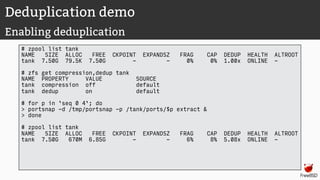
Enabling deduplication
# zpool list tank
NAME SIZE ALLOC FREE CKPOINT EXPANDSZ FRAG CAP DEDUP HEALTH ALTROOT
tank 7.50G 79.5K 7.50G - - 0% 0% 1.00x ONLINE -
# zfs get compression,dedup tank
NAME PROPERTY VALUE SOURCE
tank compression off default
tank dedup on default
# for p in `seq 0 4`; do
> portsnap -d /tmp/portsnap -p /tank/ports/$p extract &
> done
# zpool list tank
NAME SIZE ALLOC FREE CKPOINT EXPANDSZ FRAG CAP DEDUP HEALTH ALTROOT
tank 7.50G 670M 6.85G - - 6% 8% 5.08x ONLINE -
Deduplication demo
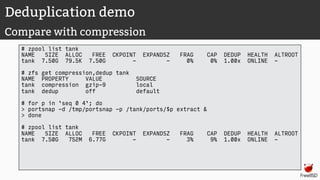
Compare with compression
# zpool list tank
NAME SIZE ALLOC FREE CKPOINT EXPANDSZ FRAG CAP DEDUP HEALTH ALTROOT
tank 7.50G 79.5K 7.50G - - 0% 0% 1.00x ONLINE -
# zfs get compression,dedup tank
NAME PROPERTY VALUE SOURCE
tank compression gzip-9 local
tank dedup off default
# for p in `seq 0 4`; do
> portsnap -d /tmp/portsnap -p /tank/ports/$p extract &
> done
# zpool list tank
NAME SIZE ALLOC FREE CKPOINT EXPANDSZ FRAG CAP DEDUP HEALTH ALTROOT
tank 7.50G 752M 6.77G - - 3% 9% 1.00x ONLINE -
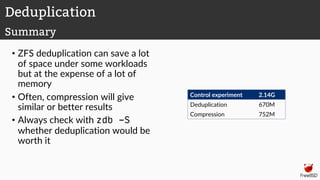
• ZFS deduplication can save a lot
of space under some workloads
but at the expense of a lot of
memory
• Often, compression will give
similar or better results
• Always check with zdb -S
whether deduplication would be
worth it
Control experiment 2.14G
Deduplication 670M
Compression 752M
Deduplication
Summary
Serialisation
Encrypted backups over the network
Excercises
• Take a snapshot of your virtual machine before you start the exercises.
• Download an appropriate FreeBSD VM image from my laptop on the
APRICOT wireless network:
http://220.247.144.29/
• Or from https://freebsd.org/
Lab preliminaries
Exercises
Storage pools
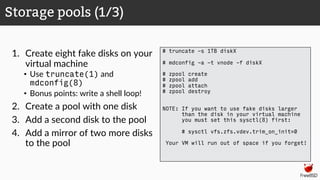
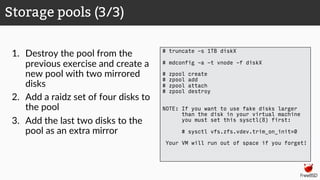
1. Create eight fake disks on your
virtual machine
• Use truncate(1) and
mdconfig(8)
• Bonus points: write a shell loop!
2. Create a pool with one disk
3. Add a second disk to the pool
4. Add a mirror of two more disks
to the pool
Storage pools (1/3)
# truncate -s 1TB diskX
# mdconfig -a -t vnode -f diskX
# zpool create
# zpool add
# zpool attach
# zpool destroy
NOTE: If you want to use fake disks larger
than the disk in your virtual machine
you must set this sysctl(8) first:
# sysctl vfs.zfs.vdev.trim_on_init=0
Your VM will run out of space if you forget!
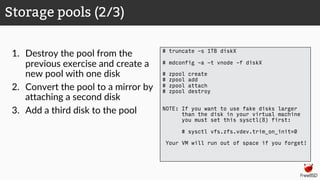
1. Destroy the pool from the
previous exercise and create a
new pool with one disk
2. Convert the pool to a mirror by
attaching a second disk
3. Add a third disk to the pool
Storage pools (2/3)
# truncate -s 1TB diskX
# mdconfig -a -t vnode -f diskX
# zpool create
# zpool add
# zpool attach
# zpool destroy
NOTE: If you want to use fake disks larger
than the disk in your virtual machine
you must set this sysctl(8) first:
# sysctl vfs.zfs.vdev.trim_on_init=0
Your VM will run out of space if you forget!
1. Destroy the pool from the
previous exercise and create a
new pool with two mirrored
disks
2. Add a raidz set of four disks to
the pool
3. Add the last two disks to the
pool as an extra mirror
Storage pools (3/3)
# truncate -s 1TB diskX
# mdconfig -a -t vnode -f diskX
# zpool create
# zpool add
# zpool attach
# zpool destroy
NOTE: If you want to use fake disks larger
than the disk in your virtual machine
you must set this sysctl(8) first:
# sysctl vfs.zfs.vdev.trim_on_init=0
Your VM will run out of space if you forget!
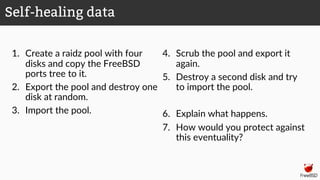
1. Create a raidz pool with four
disks and copy the FreeBSD
ports tree to it.
2. Export the pool and destroy one
disk at random.
3. Import the pool.
4. Scrub the pool and export it
again.
5. Destroy a second disk and try
to import the pool.
6. Explain what happens.
7. How would you protect against
this eventuality?
Self-healing data
Exercises
Datasets
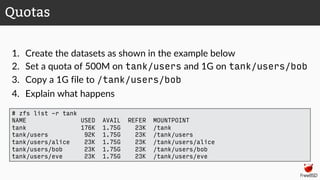
1. Create the datasets as shown in the example below
2. Set a quota of 500M on tank/users and 1G on tank/users/bob
3. Copy a 1G file to /tank/users/bob
4. Explain what happens
Quotas
# zfs list -r tank
NAME USED AVAIL REFER MOUNTPOINT
tank 176K 1.75G 23K /tank
tank/users 92K 1.75G 23K /tank/users
tank/users/alice 23K 1.75G 23K /tank/users/alice
tank/users/bob 23K 1.75G 23K /tank/users/bob
tank/users/eve 23K 1.75G 23K /tank/users/eve
1. Repeat the previous exercise, but set a reservation of 500M on
tank/users instead of a quota.
2. Now what happens?
Reservations
Exercises
Snapshots
• ZFS: The last word in filesystems
Jeff Bonwick and Bill Moore
URL:
https://wiki.illumos.org/download/attachments/1146951/zfs_last.pdf
• Introduction to the ZFS filesystem
Benedict Reuschling
URL: [offline]
Credits

ZFS Workshop

  • 1.
    The ZFS filesystem Oneday workshop — APRICOT 2019 Philip Paeps 26 February 2019 Daejeon, Korea — 대전
  • 2.
    • 2001: Developmentstarted at Sun (now Oracle) • 2005: ZFS source code released • 2008: ZFS released in FreeBSD 7.0 • (2019: ZFS still doesn’t work reliably on Linux) History of ZFS
  • 3.
    End-to-end data integrity •Detects and corrects silent data corruption Pooled storage • The first 128 bit filesystem • Eliminates the antique notion of volumes Transactional design • Data always consistent • Huge performance wins Simple administration • Two commands to manage entire storage configuration ZFS in a nutshell
  • 4.
    • Disks • Controllers •Cables • Firmware • Device drivers • Non-ECC memory End-to-end data integrity
  • 5.
    • Checksums arestored with the data blocks • Any self-consistent block will have a correct checksum • Can’t even detect stray writes • Inherently limited to single filesystems or volumes üBit rot ✘Phantom writes ✘Misdirected reads and writes ✘DMA parity errors ✘Driver bugs ✘Accidental overwrite Disk block checksums Data Checksum Data Checksum Data Checksum Disk block checksums only validate media
  • 6.
    • Checksums arestored in parent block pointers • Fault isolation between data and checksum • Entire storage pool is a self- validating Merkle tree üBit rot üPhantom writes üMisdirected reads and writes üDMA parity errors üDriver bugs üAccidental overwrite ZFS data authentication Address Address Checksum Checksum Address Address Checksum Checksum Data Data ZFS data authentication validates entire I/O path
  • 7.
    • Single partitionor volume per filesystem • Each filesystem has limited I/O bandwidth • Filesystems must be manually resized • Storage is fragmented Traditional storage architecture
  • 8.
    • No partitionsrequired • Storage pool grows automatically • All I/O bandwidth is always available • All storage in the pool is shared ZFS pooled storage
  • 9.
    4. Rewrite uberblock(atomic)3. COW indirect blocks 2. COW some blocks1. Ini>al consistent state Copy-on-write transactions
  • 10.
    Only two commands: 1.Storage pools: zpool • Add and replace disks • Resize pools 2. Filesystems: zfs • Quotas, reservations, etc. • Compression and deduplication • Snapshots and clones • atime, readonly, etc. Simple administration
  • 11.
  • 12.
    To create astorage pool named “tank” from a single disk: After creating a storage pool, ZFS will automatically: • Create a filesystem with the same name (e.g. tank) • Mount the filesystem under that name (e.g. /tank) The storage is immediately available Storage pools Creating storage pools (1/2) # zpool create tank /dev/md0 ZFS can use disks directly. There is no need to create partitions or volumes.
  • 13.
    All configuration isstored with the storage pool and persists across reboots. No need to edit /etc/fstab. # mount | grep tank # ls -al /tank ls: /tank: No such file or directory # zpool create tank /dev/md0 # mount | grep tank tank on /tank (zfs, local, nfsv4acls) # ls -al /tank total 9 drwxr-xr-x 2 root wheel 2 Oct 12 12:17 . drwxr-xr-x 23 root wheel 28 Oct 12 12:17 .. # reboot [...] # mount | grep tank tank on /tank (zfs, local, nfsv4acls) Storage pools Creating storage pools (2/2)
  • 14.
    Storage pools Displaying poolstatus # zpool list NAME SIZE ALLOC FREE CKPOINT EXPANDSZ FRAG CAP DEDUP HEALTH ALTROOT tank 1016G 83K 1016G - - 0% 0% 1.00x ONLINE - # zpool status pool: tank state: ONLINE scan: none requested config: NAME STATE READ WRITE CKSUM tank ONLINE 0 0 0 md0 ONLINE 0 0 0 errors: No known data errors
  • 15.
    ZFS contains abuilt-in tool to display I/O statistics. Given an interval in seconds, statistics will be displayed continuously until the user interrupts with Ctrl+C. Use -v (verbose) to display more detailed statistics. # zpool iostat 5 capacity operations bandwidth pool alloc free read write read write ---------- ----- ----- ----- ----- ----- ----- tank 83K 1016G 0 0 234 841 tank 83K 1016G 0 0 0 0 # zpool iostat -v capacity operations bandwidth pool alloc free read write read write ---------- ----- ----- ----- ----- ----- ----- tank 83K 1016G 0 0 206 739 md0 83K 1016G 0 0 206 739 ---------- ----- ----- ----- ----- ----- ----- Storage pools Displaying I/O statistics
  • 16.
    Destroying storage poolsis a constant time operation. If you want to get rid of your data, ZFS will help you do it very quickly! All data on a destroyed pool will be irretrievably lost. # time zpool create tank /dev/md0 0.06 real 0.00 user 0.02 sys # time zpool destroy tank 0.09 real 0.00 user 0.00 sys Storage pools Destroying storage pools
  • 17.
    A pool withjust one disk does not provide any redundancy, capacity or even adequate performance. Stripes offer higher capacity and better performance (reading will be parallelised) but they provide no redundancy. # zpool create tank /dev/md0 /dev/md1 # zpool status pool: tank state: ONLINE scan: none requested config: NAME STATE READ WRITE CKSUM tank ONLINE 0 0 0 md0 ONLINE 0 0 0 md1 ONLINE 0 0 0 errors: No known data errors # zpool list NAME SIZE ALLOC FREE CAP DEDUP HEALTH tank 1.98T 86K 1.98T 0% 1.00x ONLINE Storage pools Creating stripes
  • 18.
    Mirrored storage pools provideredundancy against disk failures and better read performance than single-disk pools. However, mirrors only have 50% of the capacity of the underlying disks. # zpool create tank mirror /dev/md0 /dev/md1 # zpool status pool: tank state: ONLINE scan: none requested config: NAME STATE READ WRITE CKSUM tank ONLINE 0 0 0 mirror-0 ONLINE 0 0 0 md0 ONLINE 0 0 0 md1 ONLINE 0 0 0 errors: No known data errors # zpool list NAME SIZE ALLOC FREE CAP DEDUP HEALTH tank 1016G 93K 1016G 0% 1.00x ONLINE Storage pools Creating mirrors (RAID-1)
  • 19.
    raidz is avariation on RAID-5 with single-, double-, or triple parity. A raidz group with N disks of size X with P parity disks can hold approximately (" − $) ∗ ' bytes and can withstand P device(s) failing before data integrity is compromised. # zpool create tank > raidz1 /dev/md0 /dev/md1 /dev/md2 /dev/md3 # zpool status pool: tank state: ONLINE scan: none requested config: NAME STATE READ WRITE CKSUM tank ONLINE 0 0 0 raidz1-0 ONLINE 0 0 0 md0 ONLINE 0 0 0 md1 ONLINE 0 0 0 md2 ONLINE 0 0 0 md3 ONLINE 0 0 0 errors: No known data errors Storage pools Creating raidz groups
  • 20.
    Single disks, stripes,mirrors and raidz groups can be combined in a single storage pool ZFS will complain when adding devices would make the pool less redundant # zpool create tank mirror /dev/md0 /dev/md1 # zpool add tank /dev/md2 invalid vdev specification use '-f' to override the following errors: mismatched replication level: pool uses mirror and new vdev is disk # zpool create tank > raidz2 /dev/md0 /dev/md1 /dev/md2 /dev/md3 # zpool add tank > raidz /dev/md4 /dev/md5 /dev/md6 invalid vdev specification use '-f' to override the following errors: mismatched replication level: pool uses 2 device parity and new vdev uses 1 Storage pools Combining vdev types
  • 21.
    More devices canbe added to a storage pool to increase capacity without downtime. Data will be striped across the disks, increasing performance, but there will be no redundancy. If any disk fails, all data is lost! # zpool create tank /dev/md0 # zpool add tank /dev/md1 # zpool list NAME SIZE ALLOC FREE CAP DEDUP HEALTH tank 1.98T 233K 1.98T 0% 1.00x ONLINE # zpool status pool: tank state: ONLINE scan: none requested config: NAME STATE READ WRITE CKSUM tank ONLINE 0 0 0 md0 ONLINE 0 0 0 md1 ONLINE 0 0 0 errors: No known data errors Storage pools Increasing storage pool capacity
  • 22.
    A storage poolconsisting of only one device can be converted to a mirror. In order for the new device to mirror the data of the already existing device, the pool needs to be “resilvered”. This means that the pool synchronises both devices to contain the same data at the end of the resilver operation. During resilvering, access to the pool will be slower, but there will be no downtime. Storage pools Creating a mirror from a single-disk pool (1/4)
  • 23.
    Storage pools Creating amirror from a single-disk pool (2/4) # zpool create tank /dev/md0 # zpool status pool: tank state: ONLINE scan: none requested config: NAME STATE READ WRITE CKSUM tank ONLINE 0 0 0 md0 ONLINE 0 0 0 errors: No known data errors # zpool list NAME SIZE ALLOC FREE CKPOINT EXPANDSZ FRAG CAP DEDUP HEALTH ALTROOT tank 1016G 93K 1016G - - 0% 0% 1.00x ONLINE -
  • 24.
    Storage pools Creating amirror from a single-disk pool (3/4) # zpool attach tank /dev/md0 /dev/md1 # zpool status tank pool: tank state: ONLINE status: One or more devices is currently being resilvered. The pool will continue to function, possibly in a degraded state. action: Wait for the resilver to complete. scan: resilver in progress since Fri Oct 12 13:55:56 2018 5.03M scanned out of 44.1M at 396K/s, 0h1m to go 5.03M resilvered, 11.39% done config: NAME STATE READ WRITE CKSUM tank ONLINE 0 0 0 mirror-0 ONLINE 0 0 0 md0 ONLINE 0 0 0 md1 ONLINE 0 0 0 (resilvering) errors: No known data errors
  • 25.
    Storage pools Creating amirror from a single-disk pool (4/4) # zpool status pool: tank state: ONLINE scan: resilvered 44.2M in 0h1m with 0 errors on Fri Oct 12 13:56:29 2018 config: NAME STATE READ WRITE CKSUM tank ONLINE 0 0 0 mirror-0 ONLINE 0 0 0 md0 ONLINE 0 0 0 md1 ONLINE 0 0 0 errors: No known data errors # zpool list NAME SIZE ALLOC FREE CKPOINT EXPANDSZ FRAG CAP DEDUP HEALTH ALTROOT tank 1016G 99.5K 1016G - - 0% 0% 1.00x ONLINE -
  • 26.
  • 27.
    • ZFS usesthe term dataset to refer to filesystems • Datasets are mounted automatically by default • Can be disabled for individual datasets (or entire hierarchies) • Mountpoint defaults to the name of the pool • Can be used like directories with many useful properties # zfs create tank/users # zfs list NAME USED AVAIL REFER MOUNTPOINT tank 150K 984G 23K /tank tank/users 23K 984G 23K /tank/users # zfs create tank/users/a # zfs list NAME USED AVAIL REFER MOUNTPOINT tank 180K 984G 23K /tank tank/users 46K 984G 23K /tank/users tank/users/a 23K 984G 23K /tank/users/a Datasets Creating datasets
  • 28.
    • Configuration andstatistics are kept in dozens of properties • Use zfs get all for a list • All documented in the zfs(8) Unix manual page • Datasets inherit properties from their parents • Inherited properties can be overridden # zfs set atime=off tank # zfs get atime NAME PROPERTY VALUE SOURCE tank atime off local tank/users atime off inherited from tank tank/users/a atime off inherited from tank # zfs set atime=on tank/users/a # zfs get atime NAME PROPERTY VALUE SOURCE tank atime off local tank/users atime off inherited from tank tank/users/a atime on local Datasets Properties (1/2)
  • 29.
    • Read-only propertieshave their SOURCE set to -, e.g.: • creation dataset creation time • used currently used space • Changed properties take effect immediately; there is no need to remount • Overrides can be restored with the zfs inherit command. # zfs get creation,used,atime,readonly tank NAME PROPERTY VALUE SOURCE tank creation Fri Oct 12 15:15 2018 - tank used 180K - tank atime off local tank readonly off default # mount | grep tank tank on /tank (zfs, local, noatime, nfsv4acls) # zfs inherit atime tank # mount | grep tank tank on /tank (zfs, local, nfsv4acls) Datasets Properties (2/2)
  • 30.
    • By default,ZFS mounts datasets at the name of the pool that contain them • The mountpoint property changes this behaviour • Note: mountpoints must have a leading / (as usual in Unix) but the ZFS path in the pool must not have a leading /. # zfs get mountpoint NAME PROPERTY VALUE SOURCE tank mountpoint /tank default tank/users mountpoint /tank/users default # mount | grep tank tank on /tank (zfs, local, nfsv4acls) tank/users on /tank/users (zfs, local, nfsv4acls) # zfs set mountpoint=/usr/home tank/users # mount | grep tank tank on /tank (zfs, local, nfsv4acls) tank/users on /usr/home (zfs, local, nfsv4acls) Datasets Mounting (1/2)
  • 31.
    • The canmountproperty determines whether datasets are mounted automatically • Datasets are mounted by default • Set canmount=noauto to not mount the dataset by default • Set canmount=off to make the dataset unmountable # mount | grep tank tank on /tank (zfs, local, nfsv4acls) tank/users on /tank/users (zfs, local, nfsv4acls) # zfs set canmount=off tank/users # mount | grep tank tank on /tank (zfs, local, nfsv4acls) Datasets Mounting (2/2)
  • 32.
    • Datasets aremounted for reading and writing by default • The readonly property changes this behaviour • Remember: properties persist across reboots; there is no need to edit /etc/fstab # zfs create -p tank/projects/current # zfs create tank/projects/finished # zfs set mountpoint=/projects tank/projects # cp -a /home/alice/projects /projects/current # zfs get readonly tank/projects/finished NAME PROPERTY VALUE SOURCE tank/projects/finished readonly off default # cp /projects/current/homework.tex > /projects/finished # zfs set readonly=on tank/projects/finished # cp -a /projects/current/thesis.tex > /projects/finished cp: /projects/finished: Read-only file system Datasets Commonly used properties: readonly
  • 33.
    • The execproperty determines whether or not files can be executed on a dataset • Useful on e.g. /var/log where executing files would do more harm than good • Can also be used to protect the system from untrustworthy users… # zfs create tank/logfiles # zfs set mountpoint=/var/log tank/logfiles # zfs set exec=off tank/logfiles # zfs get exec NAME PROPERTY VALUE SOURCE tank exec on default tank/logfiles exec off local # mount | grep logfiles tank/logfiles on /var/log (zfs, local, noexec) Datasets Commonly used properties: exec (1/3)
  • 34.
    Dataset Commonly used properties:exec (2/3) # zfs create tank/users # zfs set mountpoint=/home tank/users # zfs set exec=off tank/users # zfs create tank/users/alice # zfs get exec NAME PROPERTY VALUE SOURCE tank exec on default tank/users exec off local tank/users/alice exec off inherited # ls -al /home/alice/ total 2 drwxr-xr-x 2 alice alice 3 Oct 12 16:54 . drwxr-xr-x 3 alice alice 3 Oct 12 16:52 .. -rwxr-xr-x 1 alice alice 27 Oct 12 16:54 evil.sh
  • 35.
    Dataset Commonly used properties:exec (3/3) % cat /home/alice/evil.sh #!/bin/sh rm -fr /projects % cd /home/alice % ./evil.sh sh: ./evil.sh: Permission denied % su # ./evil.sh ./evil.sh: Permission denied.
  • 36.
    • User-defined propertiescan store locally relevant metadata with the dataset, e.g.: • Last backup time • Cost centre paying for the disks • Anything you want them to store! • A namespace (e.g. acme) distinguishes user-defined properties from built-in ones # zfs set acme:lastbackup=20181012030000 tank # zfs get acme:lastbackup tank NAME PROPERTY VALUE SOURCE tank acme:lastbackup 20181012030000 local # zfs set acme:disksource=vendorname # zfs set acme:diskbought=2018-10-01 # zfs set acme:diskprice=100EUR Datasets User-defined properties
  • 37.
    • By default,datasets can use all the space provided by the underlying storage pool • Quotas set an upper limit on how much data can be stored in a dataset # zfs get quota NAME PROPERTY VALUE SOURCE tank quota none default tank/users quota none default tank/users/alice quota none default tank/users/bob quota none default # zfs set quota=10GB tank/users # zfs set quota=50GB tank/users/alice # zfs get quota NAME PROPERTY VALUE SOURCE tank quota none local tank/users quota 10G local tank/users/alice quota 50G local tank/users/bob quota none default Datasets Quotas (1/3)
  • 38.
    Datasets Quotas (2/3) # zfsget quota NAME PROPERTY VALUE SOURCE tank quota none default tank/users/alice quota none default tank/users/bob quota none default # df -h Filesystem Size Used Avail Capacity Mounted on tank 984G 23K 984G 0% /tank tank/users/alice 984G 23K 984G 0% /tank/users/alice tank/users/bob 984G 23K 984G 0% /tank/users/bob # zfs set quota=500M tank/users/alice # df -h Filesystem Size Used Avail Capacity Mounted on tank 984G 23K 984G 0% /tank tank/users/alice 500M 23K 500M 0% /tank/users/alice tank/users/bob 984G 23K 984G 0% /tank/users/bob
  • 39.
    Datasets Quotas (3/3) # ddif=/dev/urandom of=/tank/users/alice/bigfile.dat dd: /tank/users/alice/bigfile.dat: Disc quota exceeded # ls -alh /tank/users/alice/bigfile.dat -rw-r--r-- 1 root wheel 500M Oct 12 18:21 /tank/users/alice/bigfile.dat # df -h Filesystem Size Used Avail Capacity Mounted on tank 984G 23K 984G 0% /tank tank/users/alice 500M 500M 0B 100% /tank/users/alice tank/users/bob 984G 23K 984G 0% /tank/users/bob
  • 40.
    • Reservations ensurethat there is always a certain amount of free space available to a dataset • This is in contrast with quotas, which ensure that no more than a certain amount of data can be written # zfs get reservation NAME PROPERTY VALUE SOURCE tank reservation none default tank/users reservation none default tank/users/alice reservation none default tank/users/bob reservation none default # zfs set reservation=500M tank/users/bob Datasets Reservations (1/3)
  • 41.
    Datasets Reservations (2/3) # zfsget reservation NAME PROPERTY VALUE SOURCE tank reservation none default tank/users/alice reservation none default tank/users/bob reservation none default # df -h Filesystem Size Used Avail Capacity Mounted on tank 1.2G 23K 1.2G 0% /tank tank/users/alice 1.2G 23K 1.2G 0% /tank/users/alice tank/users/bob 1.2G 23K 1.2G 0% /tank/users/bob # zfs set reservation=500M tank/users/bob # df -h Filesystem Size Used Avail Capacity Mounted on tank 780M 23K 780M 0% /tank tank/users/alice 780M 23K 780M 0% /tank/users/alice tank/users/bob 1.2G 23K 1.2G 0% /tank/users/bob
  • 42.
    Datasets Reservations (3/3) # ddif=/dev/urandom of=/tank/users/alice/bigfile.dat bs=850M dd: /tank/users/alice/bigfile.dat: No space left on device # ls -alh /tank/users/alice/bigfile.dat -rw-r--r-- 1 root wheel 780M Oct 12 18:21 /tank/users/alice/bigfile.dat # df -h /tank /tank/users /tank/users/alice /tank/users/bob Filesystem Size Used Avail Capacity Mounted on tank 23K 23K 0B 100% /tank tank/users/alice 780M 780M 0B 100% /tank/users/alice tank/users/bob 500M 23K 500M 0% /tank/users/bob
  • 43.
    • ZFS cantransparently compress data written to datasets and decompress it automatically when reading • Several algorithms are available • Default: lz4 • gzip, gzip-N, zle, lzjb,… • Only newly written data is compressed. ZFS does not recompress existing data! # zfs create > -o mountpoint=/usr/ports > -p tank/ports/uncompressed # portsnap fetch extract # zfs list tank/ports NAME USED AVAIL REFER MOUNTPOINT tank/ports 437M 984G 23K /usr/ports # zfs create tank/ports/compressed # zfs set compression=on tank/ports/compressed # cp -a /usr/ports/ /tank/ports/compressed/ # zfs list -r tank/ports NAME USED AVAIL REFER tank/ports 636M 983G 23K tank/ports/compressed 196M 983G 196M tank/ports/uncompressed 440M 983G 440M Datasets Compression (1/2)
  • 44.
    • The compressratioproperty can be checked to evaluate how effective compression is • It’s very easy to experiment! • Bonus: compression also improves read performance on systems where the CPU is faster than the disks (i.e.: most systems) # zfs get compression,compressratio NAME PROPERTY VALUE tank/ports/compressed compression on tank/ports/compressed compressratio 2.47x # zfs create tank/ports/gzipped # zfs set compression=gzip-9 tank/ports/gzipped # cp -a /tank/ports/compressed/ > /tank/ports/gzipped/ # zfs get -r compressratio,used tank/ports NAME PROPERTY VALUE tank/ports/compressed compressratio 2.47x tank/ports/compressed used 197M tank/ports/gzipped compressratio 3.10x tank/ports/gzipped used 163M tank/ports/uncompressed compressratio 1.00x tank/ports/uncompressed used 440M Datasets Compression (2/2)
  • 45.
  • 46.
    • A snapshotis a read-only copy of a dataset or volume • ZFS snapshots are extremely fast • Side-effect of the underlying copy- on-write transaction model • Faster than deleting data! • Snapshots occupy no space until the original data starts to diverge Snapshots Overview
  • 47.
    • A snapshotonly needs an identifier • Can be anything you like! • A timestamp is traditional • But you can use more memorable identifiers too… Snapshots Creating and listing snapshots (1/2) # zfs snapshot tank/users/alice@myfirstbackup # zfs list -t snapshot NAME USED AVAIL REFER MOUNTPOINT tank/users/alice@myfirstbackup 0 - 23K - # zfs list -rt all tank/users/alice NAME USED AVAIL REFER MOUNTPOINT tank/users/alice 23K 984G 23K /tank/users/alice tank/users/alice@myfirstbackup 0 - 23K -
  • 48.
    • Snapshots saveonly the changes between the time they were created and the previous (if any) snapshot • If data doesn’t change, snapshots occupy zero space Snapshots Creating and listing snapshots (2/2) # echo hello world > /tank/users/alice/important_data.txt # zfs snapshot tank/users/alice@mysecondbackup # zfs list -rt all tank/users/alice NAME USED AVAIL REFER MOUNTPOINT tank/users/alice 36.5K 984G 23.5K /tank/users/alice tank/users/alice@myfirstbackup 13K - 23K - tank/users/alice@mysecondbackup 0 - 23.5K -
  • 49.
    • ZFS candisplay the differences between snapshots # touch /tank/users/alice/empty # rm /tank/users/alice/important_data.txt # zfs diff tank/users/alice@mysecondbackup M /tank/users/alice/ - /tank/users/alice/important_data.txt + /tank/users/alice/empty Snapshots Differences between snapshots Character Type of change + File was added - File was deleted M File was modified R File was renamed
  • 50.
    • Snapshots canbe rolled back to undo changes • All files changed since the snapshot was created will be discarded # echo hello_world > important_file.txt # echo goodbye_cruel_world > also_important.txt # zfs snapshot tank/users/alice@myfirstbackup # rm * # ls # zfs rollback tank/users/alice@myfirstbackup # ls also_important.txt important_file.txt Snapshots Rolling back snapshots (1/2)
  • 51.
    • By default,the latest snapshot is rolled back. To roll back an older snapshot, use -r • Note that intermediate snapshots will be destroyed • ZFS will warn about this # touch not_very_important.txt # touch also_not_important.txt # ls also_important.txt important_file.txt also_not_important.txt not_very_important.txt # zfs snapshot tank/users/alice@mysecondbackup # zfs diff tank/users/alice@myfirstbackup > tank/users/alice@mysecondbackup M /tank/users/alice/ + /tank/users/alice/not_very_important.txt + /tank/users/alice/also_not_important.txt # zfs rollback tank/users/alice@myfirstbackup # zfs rollback -r tank/users/alice@myfirstbackup # ls also_important.txt important_file.txt Snapshots Rolling back snapshots (2/2)
  • 52.
    • Sometimes, weonly want to restore a single file, rather than rolling back an entire snapshot • ZFS keeps snapshots in a very hidden .zfs/snapshots directory • It’s like magic :-) • Set snapdir=visible to unhide it • Remember: snaphots are read- only. Copying data to the magic directory won’t work! # ls also_important.txt important_file.txt # rm * # ls # ls .zfs/snapshot/myfirstbackup also_important.txt important_file.txt # cp .zfs/snapshot/myfirstbackup/* . # ls also_important.txt important_file.txt Snapshots Restoring individual files
  • 53.
    • Clones representa writeable copy of a read-only snapshot • Like snapshots, they occupy no space until they start to diverge Snapshots Cloning snapshots # zfs list -rt all tank/users/alice NAME USED AVAIL REFER MOUNTPOINT tank/users/alice 189M 984G 105M /tank/users/alice tank/users/alice@mysecondbackup 0 - 105M - # zfs clone tank/users/alice@mysecondbackup tank/users/eve # zfs list tank/users/eve NAME USED AVAIL REFER MOUNTPOINT tank/users/eve 0 984G 105M /tank/users/eve
  • 54.
    • Snapshots cannotbe deleted while clones exist • To remove this dependency, clones can be promoted to ”ordinary” datasets • Note that by promoting the clone, it immediately starts occupying space # zfs destroy tank/users/alice@mysecondbackup cannot destroy 'tank/users/alice@mysecondbackup’: snapshot has dependent clones use '-R' to destroy the following datasets: tank/users/eve # zfs list tank/users/eve NAME USED AVAIL REFER MOUNTPOINT tank/users/eve 0 984G 105M /tank/users/eve # zfs promote tank/users/eve # zfs list tank/users/eve NAME USED AVAIL REFER MOUNTPOINT tank/users/eve 189M 984G 105M /tank/users/eve Snapshots Promoting clones
  • 55.
  • 56.
  • 57.
  • 58.
    • We havecreated a redundant pool with two mirrored disks and stored some important data on it • We will be very sad if the data gets lost! :-( # zfs list tank NAME USED AVAIL REFER MOUNTPOINT tank 74K 984G 23K /tank # cp -a /some/important/data/ /tank/ # zfs list tank NAME USED AVAIL REFER MOUNTPOINT tank 3.23G 981G 3.23G /tank Self-healing data demo Store some important data (1/2)
  • 59.
    Self-healing data demo Storesome important data (2/2) # zpool status tank pool: tank state: ONLINE scan: none requested config: NAME STATE READ WRITE CKSUM tank ONLINE 0 0 0 mirror-0 ONLINE 0 0 0 md0 ONLINE 0 0 0 md1 ONLINE 0 0 0 errors: No known data errors # zpool list tank NAME SIZE ALLOC FREE CKPOINT EXPANDSZ FRAG CAP DEDUP HEALTH ALTROOT tank 1016G 3.51G 1012G - - 0% 0% 1.00x ONLINE -
  • 60.
    Caution! This example candestroy data when used on the wrong device or a non-ZFS filesystem! Always check your backups! # zpool export tank # dd if=/dev/random of=/dev/md1 bs=1m count=200 # zpool import tank Self-healing data demo Destroy one of the disks (1/2)
  • 61.
    Self-healing data demo Destroyone of the disks (2/2) # zpool status tank pool: tank state: ONLINE status: One or more devices has experienced an unrecoverable error. An attempt was made to correct the error. Applications are unaffected. action: Determine if the device needs to be replaced, and clear the errors using 'zpool clear' or replace the device with 'zpool replace'. see: http://illumos.org/msg/ZFS-8000-9P scan: none requested config: NAME STATE READ WRITE CKSUM tank ONLINE 0 0 0 mirror-0 ONLINE 0 0 0 md0 ONLINE 0 0 5 md1 ONLINE 0 0 0 errors: No known data errors
  • 62.
    Self-healing data demo Makesure everything is okay (1/3) # zpool scrub tank # zpool status tank pool: tank state: ONLINE status: One or more devices has experienced an unrecoverable error. An attempt was made to correct the error. Applications are unaffected. action: Determine if the device needs to be replaced, and clear the errors using 'zpool clear' or replace the device with 'zpool replace'. see: http://illumos.org/msg/ZFS-8000-9P scan: scrub in progress since Fri Oct 12 22:57:36 2018 191M scanned out of 3.51G at 23.9M/s, 0h2m to go 186M repaired, 5.32% done config: NAME STATE READ WRITE CKSUM tank ONLINE 0 0 0 mirror-0 ONLINE 0 0 0 md0 ONLINE 0 0 1.49K (repairing) md1 ONLINE 0 0 0 errors: No known data errors
  • 63.
    Self-healing data demo Makesure everything is okay (2/3) # zpool status tank pool: tank state: ONLINE status: One or more devices has experienced an unrecoverable error. An attempt was made to correct the error. Applications are unaffected. action: Determine if the device needs to be replaced, and clear the errors using 'zpool clear' or replace the device with 'zpool replace'. see: http://illumos.org/msg/ZFS-8000-9P scan: scrub repaired 196M in 0h0m with 0 errors on Fri Oct 12 22:58:14 2018 config: NAME STATE READ WRITE CKSUM tank ONLINE 0 0 0 mirror-0 ONLINE 0 0 0 md0 ONLINE 0 0 1.54K md1 ONLINE 0 0 0 errors: No known data errors
  • 64.
    Self-healing data demo Makesure everything is okay (3/3) # zpool clear tank # zpool status tank pool: tank state: ONLINE scan: scrub repaired 196M in 0h0m with 0 errors on Fri Oct 12 22:58:14 2018 config: NAME STATE READ WRITE CKSUM tank ONLINE 0 0 0 mirror-0 ONLINE 0 0 0 md0 ONLINE 0 0 0 md1 ONLINE 0 0 0 errors: No known data errors
  • 65.
    Self-healing data demo Butwhat if it goes very wrong? (1/2) # zpool status pool: tank state: ONLINE status: One or more devices has experienced an error resulting in data corruption. Applications may be affected. action: Restore the file in question if possible. Otherwise restore the entire pool from backup. see: http://illumos.org/msg/ZFS-8000-8A scan: scrub in progress since Fri Oct 12 22:46:01 2018 498M scanned out of 3.51G at 99.6M/s, 0h0m to go 19K repaired, 13.87% done config: NAME STATE READ WRITE CKSUM tank ONLINE 0 0 1.48K mirror-0 ONLINE 0 0 2.97K md0 ONLINE 0 0 2.97K md1 ONLINE 0 0 2.97K errors: 1515 data errors, use '-v' for a list
  • 66.
    Self-healing data demo Butwhat if it goes very wrong? (2/2) # zpool status –v pool: tank state: ONLINE status: One or more devices has experienced an error resulting in data corruption. Applications may be affected. action: Restore the file in question if possible. Otherwise restore the entire pool from backup. see: http://illumos.org/msg/ZFS-8000-8A scan: scrub repaired 19K in 0h0m with 1568 errors on Fri Oct 12 22:46:25 2018 config: NAME STATE READ WRITE CKSUM tank ONLINE 0 0 1.53K mirror-0 ONLINE 0 0 3.07K md0 ONLINE 0 0 3.07K md1 ONLINE 0 0 3.07K errors: Permanent errors have been detected in the following files: /tank/FreeBSD-11.2-RELEASE-amd64.vhd.xz /tank/base-amd64.txz /tank/FreeBSD-11.2-RELEASE-amd64-disc1.iso.xz /tank/intro_slides.pdf
  • 67.
  • 68.
    Intentional duplication • Backups,redundancy Unintentional duplication • Application caches • Temporary files • Node.js (Grrr!) Duplication
  • 69.
    • Implemented atthe block layer • ZFS detects when it needs to store an exact copy of a block • Only a reference is written rather than the entire block • Can save a lot of disk space BA C D D A B A A A D D D D C C C C C B B B B A BA C D Deduplication
  • 70.
    • ZFS mustkeep a table of the checksums of every block it stores • Depending on the blocksize, this table can grow very quickly • Deduplication table must be fast to access or writes slow down • Ideally, the deduplication table should fit in RAM • Keeping a L2ARC on fast SSDs can reduce the cost somewhat Rule of thumb: 5GB of RAM for each TB of data stored Deduplication Memory cost
  • 71.
    • The ZFSdebugger (zdb) can be used to evaluate if turning on deduplication will save space in a pool • In most workloads, compression will provide much more significant savings than deduplication • Consider whether the cost of RAM is worth it • Also keep in mind that it is a lot easier and cheaper to add disks to a system than it is to add memory Deduplication Is it worth it? (1/2)
  • 72.
    Deduplication demo Is itworth it? (2/2) # zdb -S tank Simulated DDT histogram: bucket allocated referenced ______ ______________________________ ______________________________ refcnt blocks LSIZE PSIZE DSIZE blocks LSIZE PSIZE DSIZE ------ ------ ----- ----- ----- ------ ----- ----- ----- 1 25.1K 3.13G 3.13G 3.13G 25.1K 3.13G 3.13G 3.13G 2 1.48K 189M 189M 189M 2.96K 378M 378M 378M Total 26.5K 3.32G 3.32G 3.32G 28.0K 3.50G 3.50G 3.50G dedup = 1.06, compress = 1.00, copies = 1.00, dedup * compress / copies = 1.06
  • 73.
    Deduplication demo Control experiment(1/2) # zpool list tank NAME SIZE ALLOC FREE CKPOINT EXPANDSZ FRAG CAP DEDUP HEALTH ALTROOT tank 7.50G 79.5K 7.50G - - 0% 0% 1.00x ONLINE - # zfs get compression,dedup tank NAME PROPERTY VALUE SOURCE tank compression off default tank dedup off default # for p in `seq 0 4`; do > portsnap -d /tmp/portsnap -p /tank/ports/$p extract & > done # zpool list tank NAME SIZE ALLOC FREE CKPOINT EXPANDSZ FRAG CAP DEDUP HEALTH ALTROOT tank 7.50G 2.14G 5.36G - - 3% 28% 1.00x ONLINE -
  • 74.
    Deduplication demo Control experiment(2/2) # zdb -S tank Simulated DDT histogram: bucket allocated referenced ______ ______________________________ ______________________________ refcnt blocks LSIZE PSIZE DSIZE blocks LSIZE PSIZE DSIZE ------ ------ ----- ----- ----- ------ ----- ----- ----- 4 131K 374M 374M 374M 656K 1.82G 1.82G 1.82G 8 2.28K 4.60M 4.60M 4.60M 23.9K 48.0M 48.0M 48.0M 16 144 526K 526K 526K 3.12K 10.5M 10.5M 10.5M 32 22 23.5K 23.5K 23.5K 920 978K 978K 978K 64 2 1.50K 1.50K 1.50K 135 100K 100K 100K 256 1 512 512 512 265 132K 132K 132K Total 134K 379M 379M 379M 685K 1.88G 1.88G 1.88G dedup = 5.09, compress = 1.00, copies = 1.00, dedup * compress / copies = 5.09
  • 75.
    Deduplication demo Enabling deduplication #zpool list tank NAME SIZE ALLOC FREE CKPOINT EXPANDSZ FRAG CAP DEDUP HEALTH ALTROOT tank 7.50G 79.5K 7.50G - - 0% 0% 1.00x ONLINE - # zfs get compression,dedup tank NAME PROPERTY VALUE SOURCE tank compression off default tank dedup on default # for p in `seq 0 4`; do > portsnap -d /tmp/portsnap -p /tank/ports/$p extract & > done # zpool list tank NAME SIZE ALLOC FREE CKPOINT EXPANDSZ FRAG CAP DEDUP HEALTH ALTROOT tank 7.50G 670M 6.85G - - 6% 8% 5.08x ONLINE -
  • 76.
    Deduplication demo Compare withcompression # zpool list tank NAME SIZE ALLOC FREE CKPOINT EXPANDSZ FRAG CAP DEDUP HEALTH ALTROOT tank 7.50G 79.5K 7.50G - - 0% 0% 1.00x ONLINE - # zfs get compression,dedup tank NAME PROPERTY VALUE SOURCE tank compression gzip-9 local tank dedup off default # for p in `seq 0 4`; do > portsnap -d /tmp/portsnap -p /tank/ports/$p extract & > done # zpool list tank NAME SIZE ALLOC FREE CKPOINT EXPANDSZ FRAG CAP DEDUP HEALTH ALTROOT tank 7.50G 752M 6.77G - - 3% 9% 1.00x ONLINE -
  • 77.
    • ZFS deduplicationcan save a lot of space under some workloads but at the expense of a lot of memory • Often, compression will give similar or better results • Always check with zdb -S whether deduplication would be worth it Control experiment 2.14G Deduplication 670M Compression 752M Deduplication Summary
  • 78.
  • 79.
  • 80.
    • Take asnapshot of your virtual machine before you start the exercises. • Download an appropriate FreeBSD VM image from my laptop on the APRICOT wireless network: http://220.247.144.29/ • Or from https://freebsd.org/ Lab preliminaries
  • 81.
  • 82.
    1. Create eightfake disks on your virtual machine • Use truncate(1) and mdconfig(8) • Bonus points: write a shell loop! 2. Create a pool with one disk 3. Add a second disk to the pool 4. Add a mirror of two more disks to the pool Storage pools (1/3) # truncate -s 1TB diskX # mdconfig -a -t vnode -f diskX # zpool create # zpool add # zpool attach # zpool destroy NOTE: If you want to use fake disks larger than the disk in your virtual machine you must set this sysctl(8) first: # sysctl vfs.zfs.vdev.trim_on_init=0 Your VM will run out of space if you forget!
  • 83.
    1. Destroy thepool from the previous exercise and create a new pool with one disk 2. Convert the pool to a mirror by attaching a second disk 3. Add a third disk to the pool Storage pools (2/3) # truncate -s 1TB diskX # mdconfig -a -t vnode -f diskX # zpool create # zpool add # zpool attach # zpool destroy NOTE: If you want to use fake disks larger than the disk in your virtual machine you must set this sysctl(8) first: # sysctl vfs.zfs.vdev.trim_on_init=0 Your VM will run out of space if you forget!
  • 84.
    1. Destroy thepool from the previous exercise and create a new pool with two mirrored disks 2. Add a raidz set of four disks to the pool 3. Add the last two disks to the pool as an extra mirror Storage pools (3/3) # truncate -s 1TB diskX # mdconfig -a -t vnode -f diskX # zpool create # zpool add # zpool attach # zpool destroy NOTE: If you want to use fake disks larger than the disk in your virtual machine you must set this sysctl(8) first: # sysctl vfs.zfs.vdev.trim_on_init=0 Your VM will run out of space if you forget!
  • 85.
    1. Create araidz pool with four disks and copy the FreeBSD ports tree to it. 2. Export the pool and destroy one disk at random. 3. Import the pool. 4. Scrub the pool and export it again. 5. Destroy a second disk and try to import the pool. 6. Explain what happens. 7. How would you protect against this eventuality? Self-healing data
  • 86.
  • 87.
    1. Create thedatasets as shown in the example below 2. Set a quota of 500M on tank/users and 1G on tank/users/bob 3. Copy a 1G file to /tank/users/bob 4. Explain what happens Quotas # zfs list -r tank NAME USED AVAIL REFER MOUNTPOINT tank 176K 1.75G 23K /tank tank/users 92K 1.75G 23K /tank/users tank/users/alice 23K 1.75G 23K /tank/users/alice tank/users/bob 23K 1.75G 23K /tank/users/bob tank/users/eve 23K 1.75G 23K /tank/users/eve
  • 88.
    1. Repeat theprevious exercise, but set a reservation of 500M on tank/users instead of a quota. 2. Now what happens? Reservations
  • 89.
  • 90.
    • ZFS: Thelast word in filesystems Jeff Bonwick and Bill Moore URL: https://wiki.illumos.org/download/attachments/1146951/zfs_last.pdf • Introduction to the ZFS filesystem Benedict Reuschling URL: [offline] Credits