Introduction to FreeNAS 8.3


Dru Lavigne
Director of Community Development, iXsystems
TLF, August 4, 2012
Outline

Introduction to FreeNAS 8.3

Features and ZFS Overview

What's New in 8.3

Configuration Workflow

Extending Functionality with Plugins

Additional Resources
Introduction

Open source NAS (network attached storage)
based on an embedded version of FreeBSD
(nanoBSD) and released under 2-clause BSD
license

Modular design: core NAS features can be
extended using a plugin architecture

Designed to be installed on flash device and
administered from a web browser
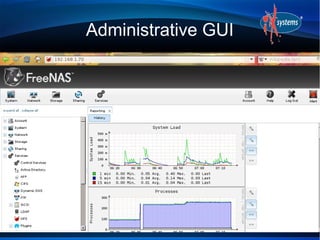
Administrative GUI
Introduction


8.2-RELEASE-p1 is the current release version; it
introduced the plugin architecture

8.3, currently in beta, is due for release in August,
2012; includes ZFSv28 support which adds
deduplication, RAIDZ3, and removable log device

7.x series has been EOL'd and rebranded as
NAS4Free
Features
Create UFS or ZFS volumes (ZFS recommended)

Import existing UFS/ZFS RAID/z volumes

Import existing UFS, DOS, NTFS, EXT2/3
volumes

Create data shares using Appletalk, NFS, and
SMB protocols

Can also configure data access through
FTP/SFTP, SSH, and iSCSI
Features

Integration with OpenLDAP, Active Directory

Automated, secure replication via rsync/ssh

Automated ZFS snapshots and scrubs

Front-ends to cron, sysctls, loader.conf

Reporting graphs, scheduled S.M.A.R.T. tests,
automated alerts, UPS
Features
Link aggregation and failover

IEEE 802.1q VLAN support

DDNS, SNMP, and TFTP support

Control panel to stop/start and view the status of
services

Supports OSX Time Machine

Supports Windows Shadow Copies
Features

Upgrades keep a backup of the old OS, allowing
for rollback

Administrative GUI accessed through a web
browser; 8.2 added a web shell for command line
operations

Users Guide published with each version and
available in wiki, HTML, PDF, epub, and Kindle
formats
ZFS

128-bit filesystem designed to be “self-healing”
and to address hardware RAID issues with data
integrity

Snapshots (point in time) only store what has
changed since the last snapshot

Snapshots (ro) can be cloned (rw)

Can rollback to any snapshot
ZFS


RAIDZ1: equivalent to RAID5

RAIDZ2: double-parity solution similar to RAID6

RAIDZ3: triple-parity solution

Caveats: resilvering takes time and can stress
disks
ZFS


Versions:

15: FreeNAS 8.0.x and 8.2

28: FreeNAS 8.3

30: Oracle has not open sourced (will they?)
- adds encryption
What's New in 8.2

Plug-in architecture for non-core functionality,
uses the PBI format

Installed plugins can be configured from the GUI

Documented API so users can create and
contribute their own plugins (currently WIP)

Web shell

Automatic configuration of multi-path hardware
What's New in 8.3


Deduplication, RAIDZ3, removable log device

Front-end to /etc/hosts

Navigable reporting graphs

Improved hardware driver support
Configuration Workflow

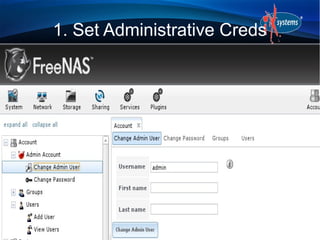
1. Set the administrative username and password

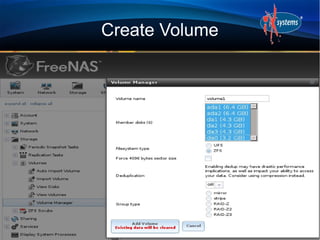
2. Create volumes/datasets

3. Create users/groups or integrate with LDAP/AD

4. Configure share

5. Start applicable service(s)

6. Test the configuration
1. Set Administrative Creds
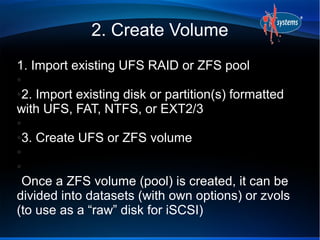
2. Create Volume
1. Import existing UFS RAID or ZFS pool
●

2. Import existing disk or partition(s) formatted
●

with UFS, FAT, NTFS, or EXT2/3
●

3. Create UFS or ZFS volume
●

●

●

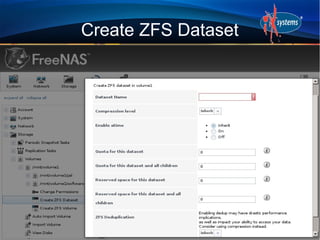
 Once a ZFS volume (pool) is created, it can be
divided into datasets (with own options) or zvols
(to use as a “raw” disk for iSCSI)
Create Volume
Create ZFS Dataset
3. Users/Groups


Choices:

1. Manually create

2. Import existing Active Directory users

3. Import existing LDAP users
4. Configure Share
AFP: for Mac OS X

CIFS: for Windows, also supports any other OS

NFS: faster than CIFS, supports any OS

SSH: CLI and GUI clients available for any OS

FTP: CLI and GUI clients available for any OS

iSCSI target: for access to “raw” disks
Configure Share

When configuring:

Recommended to only have one type of share to
prevent filesystem/client conflicts

Users needing access to that share must have
permission to the volume being shared, or the
share access must be set to anon/guest

Permissions can be set on a per volume or per
dataset basis
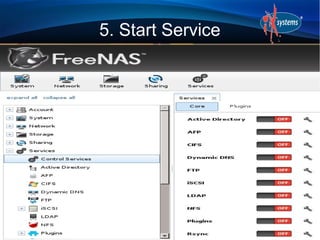
5. Start Service
6. Test Configuration


From a client, confirm that access is permitted to
allowed users

Can enable console logging at bottom of browser
to troubleshoot a service that won't start

Can use web shell to read logs when
troubleshooting
Plugin Architecture

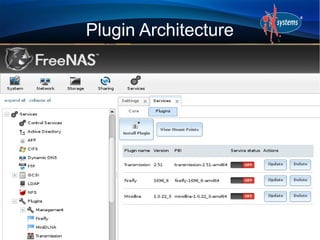
Once the Plugins Jail is installed and the Plugins
service started, you can install additional software
packaged in the PBI format

The associated service for each installed PBI can
be started/stopped in Control Services

Plugins Jail itself and installed PBIs can be
updated from the GUI as new versions become
available
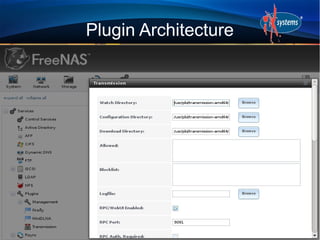
Plugin Architecture


Uses FreeBSD jail, vimage, and PBIs

PBI format extended to add a config file which
defines the configuration values displayed in the
FreeNAS GUI

PBIs currently exist for Firefly, MiniDLNA, and
Transmission
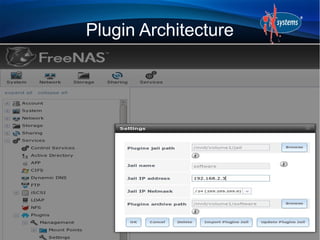
Plugin Architecture
Plugin Architecture
Plugin Architecture
Plugin Architecture

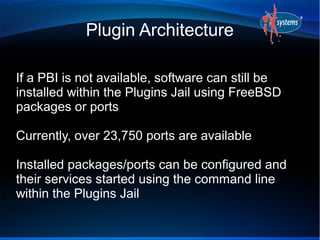
If a PBI is not available, software can still be
installed within the Plugins Jail using FreeBSD
packages or ports

Currently, over 23,750 ports are available

Installed packages/ports can be configured and
their services started using the command line
within the Plugins Jail
Resources


Website:     http://www.freenas.org

Forums:      http://forums.freenas.org

Bug tracker: http://support.freenas.org

Localization: http://pootle.freenas.org
Resources


Documentation: http://doc.freenas.org

IRC: #freenas on Freenode

Links to forums, mailing lists, instructional videos,
trac database, and professional support:

http://doc.freenas.org/index.php/
FreeNAS_Support_Resources
Questions?


              Contact:

          dru@freebsd.org

           URL to Slides:

http://slideshare.net/dlavigne/tlf2012

Tlf2012

  • 1.
    Introduction to FreeNAS8.3 Dru Lavigne Director of Community Development, iXsystems TLF, August 4, 2012
  • 2.
    Outline Introduction to FreeNAS8.3 Features and ZFS Overview What's New in 8.3 Configuration Workflow Extending Functionality with Plugins Additional Resources
  • 3.
    Introduction Open source NAS(network attached storage) based on an embedded version of FreeBSD (nanoBSD) and released under 2-clause BSD license Modular design: core NAS features can be extended using a plugin architecture Designed to be installed on flash device and administered from a web browser
  • 4.
  • 5.
    Introduction 8.2-RELEASE-p1 is thecurrent release version; it introduced the plugin architecture 8.3, currently in beta, is due for release in August, 2012; includes ZFSv28 support which adds deduplication, RAIDZ3, and removable log device 7.x series has been EOL'd and rebranded as NAS4Free
  • 6.
    Features Create UFS orZFS volumes (ZFS recommended) Import existing UFS/ZFS RAID/z volumes Import existing UFS, DOS, NTFS, EXT2/3 volumes Create data shares using Appletalk, NFS, and SMB protocols Can also configure data access through FTP/SFTP, SSH, and iSCSI
  • 7.
    Features Integration with OpenLDAP,Active Directory Automated, secure replication via rsync/ssh Automated ZFS snapshots and scrubs Front-ends to cron, sysctls, loader.conf Reporting graphs, scheduled S.M.A.R.T. tests, automated alerts, UPS
  • 8.
    Features Link aggregation andfailover IEEE 802.1q VLAN support DDNS, SNMP, and TFTP support Control panel to stop/start and view the status of services Supports OSX Time Machine Supports Windows Shadow Copies
  • 9.
    Features Upgrades keep abackup of the old OS, allowing for rollback Administrative GUI accessed through a web browser; 8.2 added a web shell for command line operations Users Guide published with each version and available in wiki, HTML, PDF, epub, and Kindle formats
  • 10.
    ZFS 128-bit filesystem designedto be “self-healing” and to address hardware RAID issues with data integrity Snapshots (point in time) only store what has changed since the last snapshot Snapshots (ro) can be cloned (rw) Can rollback to any snapshot
  • 11.
    ZFS RAIDZ1: equivalent toRAID5 RAIDZ2: double-parity solution similar to RAID6 RAIDZ3: triple-parity solution Caveats: resilvering takes time and can stress disks
  • 12.
    ZFS Versions: 15: FreeNAS 8.0.xand 8.2 28: FreeNAS 8.3 30: Oracle has not open sourced (will they?) - adds encryption
  • 13.
    What's New in8.2 Plug-in architecture for non-core functionality, uses the PBI format Installed plugins can be configured from the GUI Documented API so users can create and contribute their own plugins (currently WIP) Web shell Automatic configuration of multi-path hardware
  • 14.
    What's New in8.3 Deduplication, RAIDZ3, removable log device Front-end to /etc/hosts Navigable reporting graphs Improved hardware driver support
  • 15.
    Configuration Workflow 1. Setthe administrative username and password 2. Create volumes/datasets 3. Create users/groups or integrate with LDAP/AD 4. Configure share 5. Start applicable service(s) 6. Test the configuration
  • 16.
  • 17.
    2. Create Volume 1.Import existing UFS RAID or ZFS pool ● 2. Import existing disk or partition(s) formatted ● with UFS, FAT, NTFS, or EXT2/3 ● 3. Create UFS or ZFS volume ● ● ● Once a ZFS volume (pool) is created, it can be divided into datasets (with own options) or zvols (to use as a “raw” disk for iSCSI)
  • 18.
  • 19.
  • 20.
    3. Users/Groups Choices: 1. Manuallycreate 2. Import existing Active Directory users 3. Import existing LDAP users
  • 21.
    4. Configure Share AFP:for Mac OS X CIFS: for Windows, also supports any other OS NFS: faster than CIFS, supports any OS SSH: CLI and GUI clients available for any OS FTP: CLI and GUI clients available for any OS iSCSI target: for access to “raw” disks
  • 22.
    Configure Share When configuring: Recommendedto only have one type of share to prevent filesystem/client conflicts Users needing access to that share must have permission to the volume being shared, or the share access must be set to anon/guest Permissions can be set on a per volume or per dataset basis
  • 23.
  • 24.
    6. Test Configuration Froma client, confirm that access is permitted to allowed users Can enable console logging at bottom of browser to troubleshoot a service that won't start Can use web shell to read logs when troubleshooting
  • 25.
    Plugin Architecture Once thePlugins Jail is installed and the Plugins service started, you can install additional software packaged in the PBI format The associated service for each installed PBI can be started/stopped in Control Services Plugins Jail itself and installed PBIs can be updated from the GUI as new versions become available
  • 26.
    Plugin Architecture Uses FreeBSDjail, vimage, and PBIs PBI format extended to add a config file which defines the configuration values displayed in the FreeNAS GUI PBIs currently exist for Firefly, MiniDLNA, and Transmission
  • 27.
  • 28.
  • 29.
  • 30.
    Plugin Architecture If aPBI is not available, software can still be installed within the Plugins Jail using FreeBSD packages or ports Currently, over 23,750 ports are available Installed packages/ports can be configured and their services started using the command line within the Plugins Jail
  • 31.
    Resources Website: http://www.freenas.org Forums: http://forums.freenas.org Bug tracker: http://support.freenas.org Localization: http://pootle.freenas.org
  • 32.
    Resources Documentation: http://doc.freenas.org IRC: #freenason Freenode Links to forums, mailing lists, instructional videos, trac database, and professional support: http://doc.freenas.org/index.php/ FreeNAS_Support_Resources
  • 33.
    Questions? Contact: dru@freebsd.org URL to Slides: http://slideshare.net/dlavigne/tlf2012