Flexible Learning for Open Education
       Inclusive Design Research Centre / OCAD University / Toronto


                            http://floeproject.org


                                                          A project funded by
                                               The William and Flora Hewlett Foundation
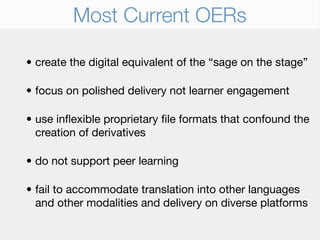
Most Current OERs

• create the digital equivalent of the “sage on the stage”

• focus on polished delivery not learner engagement

• use inflexible proprietary file formats that confound the
  creation of derivatives

• do not support peer learning

• fail to accommodate translation into other languages
  and other modalities and delivery on diverse platforms
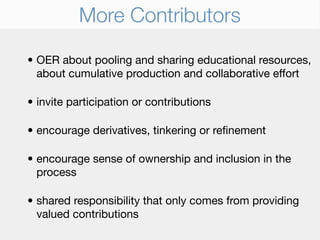
More Contributors

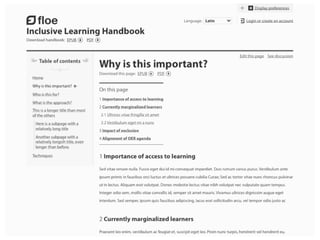
• OER about pooling and sharing educational resources,
  about cumulative production and collaborative effort

• invite participation or contributions

• encourage derivatives, tinkering or refinement

• encourage sense of ownership and inclusion in the
  process

• shared responsibility that only comes from providing
  valued contributions
Why not in OER now

• Accessibility seen to constrain creativity and innovation
  in both technological and pedagogical approaches

• counter to interactivity or more engaging learning
  experiences

• “there aren’t any learners with disabilities using my
  resources”

• guidelines for complying too complex and confusing or
  impossible to achieve
The problem with One-Size-Fits-All

  • excludes learners that do not fit the categories --
    treated as a homogeneous group

  • ignores the multiplicity of needs and skills that affect
    learning

  • compromises the learning experience for many of the
    learners the services are intended to serve

  • ghettoizes education for students with disabilities - less
    sustainable, more costly
A New Definition of Disability


Mismatch between the needs and preferences
  of the user and the system or environment
Individual Needs & Preferences Matter

                  reasons for mismatch

• sensory, motor, cognitive, emotional and social constraints
• individual learning styles and approaches
• linguistic or cultural preferences
• technical, financial or environmental constraints
We All Experience Mismatch

• Cultural (don’t speak the language)
• Contextual (hard to concentrate in noisy class)
• Environmental (hard to learn without materials)
• Temporary (an iPod and no earbuds)
• Persistent (vision impairment)
We All Experience Mismatch

• Some examples of sensory contexts and states:
  • Can see well. Susan wears corrective lenses so she can
    see near 20/20
  • Can’t see at all. Casey is blind; Haylee doesn’t have
    power at home
  • Can’t see colors well. Gilbert is wearing sunglasses;
    Jami is color blind
  • Can’t hear well. Galen is studying at a loud coffee shop;
    Marty has a hearing impairment
A New Definition of Accessibility


   Ability of the system or environment to
accommodate the needs and preferences of
              each individual user
Solution: One-Size-Fits-One

• User experiences that adjust to specific needs,
  preferences, contexts, environment, and
  culture
• Transform content to accommodate needs and
  preferences
  • UI: layout, color, size, contrast, complexity
  • Device: mobile, tablet, desktop Web
  • Alternatives: audio, video, images, transcript
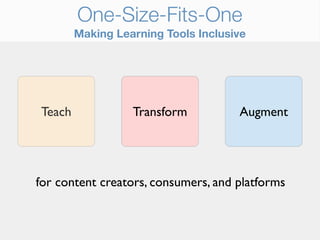
One-Size-Fits-One
        Making Learning Tools Inclusive


Teach             Transform          Augment


for content creators, consumers, and platforms
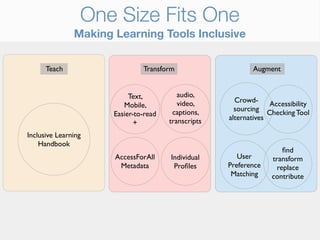
One Size Fits One
               Making Learning Tools Inclusive


      Teach                    Transform                    Augment


                           Text,          audio,
                                          video,       Crowd-
                         Mobile,                                  Accessibility
                                        captions,      sourcing Checking Tool
                      Easier-to-read
                                       transcripts   alternatives
                             +
Inclusive Learning
    Handbook
                                                                      find
                      AccessForAll     Individual       User      transform
                       Metadata         Profiles      Preference     replace
                                                      Matching    contribute
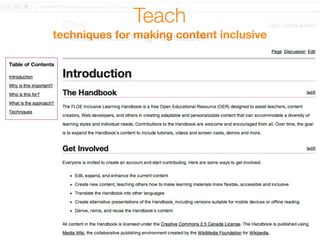
Teach
techniques for making content inclusive
Simplification/reduction
                                                                               Teach
   content alternatives, transformations, and customizations
           [Skimming/skipping]
                                                 Font style             Notation narration
                                                                                                    Smartphone 'net browser


                                      Mobile
                             Larger text            Structured text content
                                                                                                    SMS
                                                             Black-and-white
        Word spacing
                                    Text                       White-on-black
                                                                                                       Telephone audio
                                                                                                                                                          Slower/faster motion/an

         Text spacing
                                Character spacing             Higher contrast
                                                                                                      Phone service
                                                                                                                                    Interaction                        Switch frien
                                                                                                  Automated telephone system
              Line spacing                                                                                                               Larger (input) targets
                                      Table of contents           Yellow-on-black
                                                                                                                                                                           Keyboard

                       Simplified/single column                 Layout                                                                    Self-voicing           Underlined/highlig


                       Single/multiple pages
                                                                                          OER content
                                                                                                                                        Language

                 Closed caption audio

                                                              ePub
                                                                                                                                       Regionality
me adjustment          Audio                       Export                                                                                Slowdown
                                                                                                          Closed captioned video
                             Audio transcript                                       Description
bient noise filtering
                                                     Print           PDF

                                     Transcript                                   Image                        Size
                                                                                                                                   Video           Structured transcript
    Structured transcript
                                                                                                            Audio descriptions
                                                                           Contrast          Size
                                                                                                                                         Transcript               Video transcript
          Slowdown              Interactive transcript
                                                                                                                 [Skimming/skipping]
                [Skimming/skipping]
                                                                                                                                       Interactive transcript
                                                                                                                       Contrast
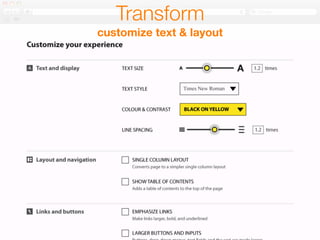
Transform
customize text & layout
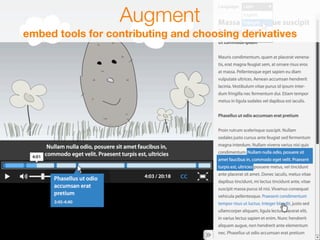
Augment
embed tools for contributing and choosing derivatives
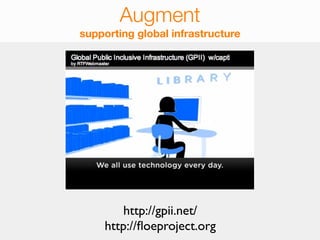
Augment
supporting global infrastructure


        http://gpii.net/
    http://floeproject.org

Floe Project

  • 1.
    Flexible Learning forOpen Education Inclusive Design Research Centre / OCAD University / Toronto http://floeproject.org A project funded by The William and Flora Hewlett Foundation
  • 2.
    Most Current OERs •create the digital equivalent of the “sage on the stage” • focus on polished delivery not learner engagement • use inflexible proprietary file formats that confound the creation of derivatives • do not support peer learning • fail to accommodate translation into other languages and other modalities and delivery on diverse platforms
  • 3.
    More Contributors • OERabout pooling and sharing educational resources, about cumulative production and collaborative effort • invite participation or contributions • encourage derivatives, tinkering or refinement • encourage sense of ownership and inclusion in the process • shared responsibility that only comes from providing valued contributions
  • 4.
    Why not inOER now • Accessibility seen to constrain creativity and innovation in both technological and pedagogical approaches • counter to interactivity or more engaging learning experiences • “there aren’t any learners with disabilities using my resources” • guidelines for complying too complex and confusing or impossible to achieve
  • 5.
    The problem withOne-Size-Fits-All • excludes learners that do not fit the categories -- treated as a homogeneous group • ignores the multiplicity of needs and skills that affect learning • compromises the learning experience for many of the learners the services are intended to serve • ghettoizes education for students with disabilities - less sustainable, more costly
  • 6.
    A New Definitionof Disability Mismatch between the needs and preferences of the user and the system or environment
  • 7.
    Individual Needs &Preferences Matter reasons for mismatch • sensory, motor, cognitive, emotional and social constraints • individual learning styles and approaches • linguistic or cultural preferences • technical, financial or environmental constraints
  • 8.
    We All ExperienceMismatch • Cultural (don’t speak the language) • Contextual (hard to concentrate in noisy class) • Environmental (hard to learn without materials) • Temporary (an iPod and no earbuds) • Persistent (vision impairment)
  • 9.
    We All ExperienceMismatch • Some examples of sensory contexts and states: • Can see well. Susan wears corrective lenses so she can see near 20/20 • Can’t see at all. Casey is blind; Haylee doesn’t have power at home • Can’t see colors well. Gilbert is wearing sunglasses; Jami is color blind • Can’t hear well. Galen is studying at a loud coffee shop; Marty has a hearing impairment
  • 10.
    A New Definitionof Accessibility Ability of the system or environment to accommodate the needs and preferences of each individual user
  • 11.
    Solution: One-Size-Fits-One • Userexperiences that adjust to specific needs, preferences, contexts, environment, and culture • Transform content to accommodate needs and preferences • UI: layout, color, size, contrast, complexity • Device: mobile, tablet, desktop Web • Alternatives: audio, video, images, transcript
  • 12.
    One-Size-Fits-One Making Learning Tools Inclusive Teach Transform Augment for content creators, consumers, and platforms
  • 13.
    One Size FitsOne Making Learning Tools Inclusive Teach Transform Augment Text, audio, video, Crowd- Mobile, Accessibility captions, sourcing Checking Tool Easier-to-read transcripts alternatives + Inclusive Learning Handbook find AccessForAll Individual User transform Metadata Profiles Preference replace Matching contribute
  • 14.
    Teach techniques for makingcontent inclusive
  • 15.
    Simplification/reduction Teach content alternatives, transformations, and customizations [Skimming/skipping] Font style Notation narration Smartphone 'net browser Mobile Larger text Structured text content SMS Black-and-white Word spacing Text White-on-black Telephone audio Slower/faster motion/an Text spacing Character spacing Higher contrast Phone service Interaction Switch frien Automated telephone system Line spacing Larger (input) targets Table of contents Yellow-on-black Keyboard Simplified/single column Layout Self-voicing Underlined/highlig Single/multiple pages OER content Language Closed caption audio ePub Regionality me adjustment Audio Export Slowdown Closed captioned video Audio transcript Description bient noise filtering Print PDF Transcript Image Size Video Structured transcript Structured transcript Audio descriptions Contrast Size Transcript Video transcript Slowdown Interactive transcript [Skimming/skipping] [Skimming/skipping] Interactive transcript Contrast
  • 16.
  • 18.
    Augment embed tools forcontributing and choosing derivatives
  • 19.
    Augment supporting global infrastructure http://gpii.net/ http://floeproject.org

Editor's Notes