























Flipping the Script
Becoming your attackers boogeyman
HI…I’m Chris
I’m Chris
AKA
@indi303
cnickerson@laresconsulting
.com
https://vimeo.com/laresconsulting
http://www.scribd.com/Lares_
Exoticliability.com
www.lares.com
Custom
Services
OSINT
SIGINT
TSCM/ Bug Sweeping
Exploit Development
Tool Creation
Attack Planning
Offensive Consultation
Adversarial Intelligence
Competitive Intelligence
Attack Modeling
Business Chain Vuln Assessments
Custom Physical Bypass Tool Design
Reverse Engineering
Other stuff I can’t write down…
http://www.verizonenterprise.com/resources/reports/rp_dat
a-breach-investigation-report-2015_en_xg.pdf
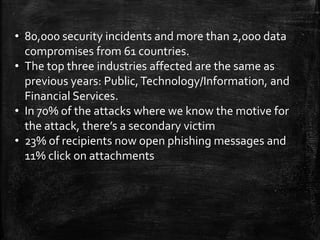
• 80,000 security incidents and more than 2,000 data
compromises from 61 countries.
• The top three industries affected are the same as
previous years: Public,Technology/Information, and
Financial Services.
• In 70% of the attacks where we know the motive for
the attack, there’s a secondary victim
• 23% of recipients now open phishing messages and
11% click on attachments
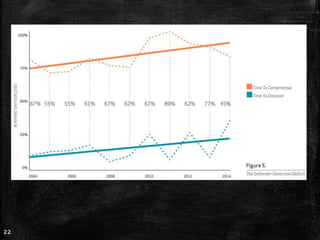
22
23
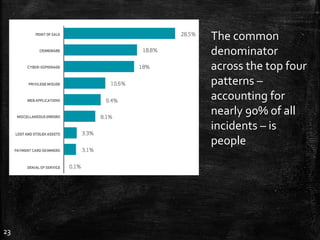
The common
denominator
across the top four
patterns –
accounting for
nearly 90% of all
incidents – is
people
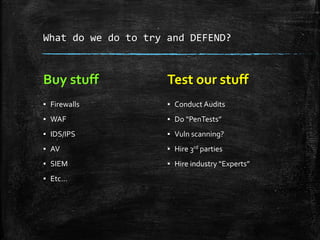
What do we do to try and DEFEND?
Buy stuff
▪ Firewalls
▪ WAF
▪ IDS/IPS
▪ AV
▪ SIEM
▪ Etc…
Test our stuff
▪ Conduct Audits
▪ Do “PenTests”
▪ Vuln scanning?
▪ Hire 3rd parties
▪ Hire industry “Experts”
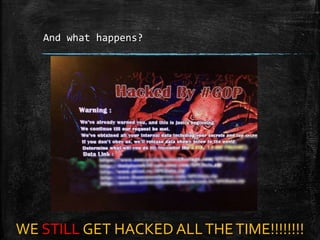
And what happens?
WE STILL GET HACKED ALLTHETIME!!!!!!!!
Stories from the OTHER
SIDE
When attackers DON’T WIN! Because your infosec is FORCE is
STRONG
The following things are a brief view of how customers have
DEFENDED their networks and made it HURT for us.
GOOD
SECURITY
PROGRAMS ARE
BUILT IN AND
NOT BOLT ON
External Defenses
Sounds cool if you buy them and actually use them.
Rule #1 DON’T TALK TO STRANGERS
▪ Implemented blocks from all emerging threats lists
▪ Honeypots that if SCANNED or traffic was sent to, that IP was blocked.
FORGOOD.
▪ External SIEM integration that correlated logins. *Magic* the same
address tries more than 3 usernames in an APP or SMPT it is banned for
a certain time, if it happens after timeout, its banned for good
▪ Constant monitoring and baseline analysis of open ports. If it changed, a
SEV1 ticket was created.
▪ Port scanning bans.
▪ Injection Bans
▪ Rejection of specific user agent strings ( most tools out there have
specific UA strings.
▪ Test it all until BLOCK modeWORKS! Monitor mode will just make you
feel bad when u go back to your logs and seeWHEN you got owned
▪ Big data like a boss. DOTHREAT INTEL IN HOUSE!!!!
▪ Protect yourOSINT ( anonymize info like DNS records)
Quick fixes
Tons of free stuff out there to get you started.
▪ External honeypot Network http://threatstream.github.io/mhn/
▪ Drupal honeypot: https://www.drupal.org/project/honeypot
▪ External honeypot starter https://www.binarydefense.com/project-
artillery/
▪ Tools to monitor open ports https://github.com/subinacls/Filibuster
▪ Wordpress honeypots http://leadin.com/plugins/wordpress-
honeypot
▪ Use the Emerging threats lists and other threat intel feeds
http://rules.emergingthreats.net/
▪ Check your osint / attack surface and threat landscape
http://www.spiderfoot.net/
Phishing is for kids
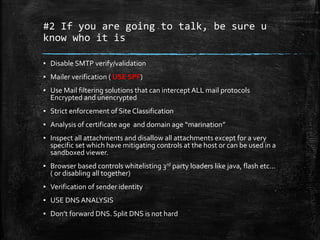
#2 If you are going to talk, be sure u
know who it is
▪ Disable SMTP verify/validation
▪ Mailer verification ( USE SPF)
▪ Use Mail filtering solutions that can intercept ALL mail protocols
Encrypted and unencrypted
▪ Strict enforcement of Site Classification
▪ Analysis of certificate age and domain age “marination”
▪ Inspect all attachments and disallow all attachments except for a very
specific set which have mitigating controls at the host or can be used in a
sandboxed viewer.
▪ Browser based controls whitelisting 3rd party loaders like java, flash etc…
( or disabling all together)
▪ Verification of sender identity
▪ USE DNS ANALYSIS
▪ Don’t forward DNS. Split DNS is not hard
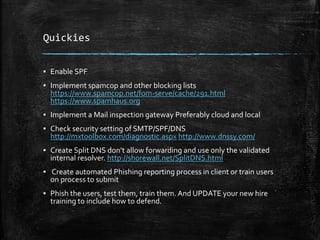
Quickies
▪ Enable SPF
▪ Implement spamcop and other blocking lists
https://www.spamcop.net/fom-serve/cache/291.html
https://www.spamhaus.org
▪ Implement a Mail inspection gateway Preferably cloud and local
▪ Check security setting of SMTP/SPF/DNS
http://mxtoolbox.com/diagnostic.aspx http://www.dnssy.com/
▪ Create Split DNS don’t allow forwarding and use only the validated
internal resolver. http://shorewall.net/SplitDNS.html
▪ Create automated Phishing reporting process in client or train users
on process to submit
▪ Phish the users, test them, train them. And UPDATE your new hire
training to include how to defend.
Internal Defenses
They ARE gonna get in, so knowing that
WHAT U GONNA DO ABOUT IT?
#3 Your internal network is a HOSTILE
environment. Treat it as such
▪ Monitor inside MORE than outside.
▪ Portscan inside = Block and SEV1 IR response
▪ Segmentation of all servers from users.
▪ Create Classified zones,These will require 2 factor auth to a Jump
box. Only jump box will be allowed to get into secured zone. Or
CreateVPN from user desktop directly into the Environment
▪ NEVER useVPN Pools.Always tie a user to a specific ip address and
firewall rule limitALL users to resources needed.
▪ Alert on ALL network device configuration change IMMEDIATELY.
▪ Use Netflows or other traffic analysis to identify top talkers and tune
to find future anomalies
▪ Set up “HoneyNets”
▪ LOCK DOWNYOUR CONFIGS!!!!!!!
▪ Remove your default route and intercept all HTTP/S
Quick hits
▪ Set up your AV to disallow/ban anything port scanning
▪ Segment and firewall protect ALL servers from user segments
▪ Tune internal IDS to look for port scans and inappropriate user to
server traffic. Also to identify protocols that shouldn’t be used (ex.
DNS traffic to things other than the registered internal DNS)
▪ Enable config monitoring on ALL network Devices
http://www.rconfig.com/
▪ Restrict network device management to only validated addresses of
network engineers OR setup mgmt. network that Engineers MUST
vpn into.
▪ Monitor all ports open and look for changes.
http://sourceforge.net/p/dnmap/wiki/Home/ distributed nmap
▪ Audit your configs https://github.com/pello/routerdefense
https://www.titania.com/nipperstudio
Workstations are for WORK
#4 Users have the ability to use the
companies resources.
▪ Only ad user accounts through secured methods. DO NOT USE
GPO’s that have cPassword or add accounts with cleartext values.
▪ Users should only be allowed to go to categorized sites.Any/all other
traffic must be denied.
▪ Whitelist approved and managed software.
▪ Disallow Local admin privs
▪ Do NOT let local admins to log on remotely
▪ Randomize ALL local admin passwords
▪ Maintain internal software reports for updates
▪ Manage all the things
▪ Host based firewalls, IDS, and behavioral analysis
▪ SCANALL HOSTS for vulnerabilities on a regular basis
Quickies
▪ Manage local admin passwords with a commercial solution or some
of the open sources. Microsoft LAPS
https://technet.microsoft.com/en-us/library/security/3062591.aspx
▪ Create GPO’s to whitelist or blackist services
▪ Remove admin rights
▪ Deploy anti exploitation defenses EMET
https://support.microsoft.com/en-us/kb/2458544
▪ Harden your devices. Linux, AIX, BSD, Etc.. hardening
https://cisofy.com/lynis/ Windows: Microsoft Baseline Security
Analyzer
▪ Enable hardening locally with detection and protection
http://www.fail2ban.org/ and windows firewall + AV
▪ Use Authenticated Scans to inventory software , find non compliant
software and define hardening.
▪ Harden default images
It’s a SERVER...
Make it serve you.
#5 Servers have a specific purpose
▪ Do not install workstation software on a SERVER. Office,Adobe
Acrobat….etc.
▪ Most of them do NOT need to connect to the internet. Not only does
this mean NO access with firewall it means, unless the product
would require an exception… NO BROWSER!
▪ Manage updates centrally and in house
▪ Segment, Segment, Segment….. SEGMENTTHE DAMNED
SERVERS!!!!!!!
▪ Standard image should have NO additional services installed and
build guidelines should be followed before release.
Quickies
▪ Remove all non essential services from servers RIGHT AWAY.They
will run faster and more secure.
▪ Disallow install of any readers,office type programs or all
workstation software in server hardening policy.
▪ Run FullAV on EVERY server.
▪ If you can’t get ids.ips for your servers try opensource like OSSEC
http://www.ossec.net/
▪ Use DLP https://code.google.com/p/opendlp/
▪ Disallow all non authenticated services.
▪ Do not allow the use of local accounts to log in remotely ( that
includes you SQL!!! No local sql accounts.. Integrate it)
▪ Make sure all report to the SIEM for security and login events.
#6 Awareness > Knowledge
▪ Create Securiy Event Management Environments
▪ Implement logging on ALL servers and eventually specific
workstation events.
▪ Consolidate logging
▪ Have packet capture capabilities on the fly in ALL areas
Quick hits
▪ Set up IDS/IPS and have it report to a consolidated platform
http://blog.securityonion.net/p/securityonion.html
https://www.bro.org/
▪ Set up logging and have it report to a consolidated platform
http://www.splunk.com/en_us/products/splunk-light.html
http://blog.qbox.io/welcome-to-the-elk-stack-elasticsearch-
logstash-kibana
▪ Make it easy for yourself. Help correlate from multiple sources.
https://bammv.github.io/sguil/
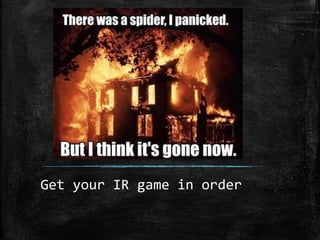
Get your IR game in order
#7 In order to say you have an information
security program you need to have an
Incident response plan.
▪ Humans must be assigned to this plan and the tasks in it
▪ Security response center must have defined plans, SOP’s, and most
of all a fully capable SLA to the business on risk
response/identification
▪ Active defenses to stop attack in progress
▪ Forensic/ malware analysis on the fly and manual
▪ Coordination with all teams to have real time response.
▪ Defined skillsets of all team members to be sure the right skill for
project.
Quick ways?
▪ Build a proper IR team. Define skills and roles to be played
▪ Setup an IR action group ( from all of IT and the business)
▪ Create defined IR plans that can be run as part of DR plans
▪ Build an IRTeam Sandbox toolkit / lab
https://zeltser.com/build-malware-analysis-toolkit/
▪ Build an Incident response platform
http://blog.crowdstrike.com/new-community-tool-crowdresponse/
https://github.com/google/grr
http://techblog.netflix.com/2015/05/introducing-fido-automated-
security.html
We don’t just say it
WE PROVE IT
Yep..That’s right…. We will prove it for FREE.Throw a card in the
basket in the back and we will set up a few hours to show you what its
like to have a REAL attacker in your network.
Want to talk more….. Challah =)
Darren Davis ddavis@lares.com
Chris Nickerson cnickerson@lares.com

Flipping the script

  • 1.
    Flipping the Script Becomingyour attackers boogeyman
  • 4.
  • 5.
  • 7.
  • 17.
    Custom Services OSINT SIGINT TSCM/ Bug Sweeping ExploitDevelopment Tool Creation Attack Planning Offensive Consultation Adversarial Intelligence Competitive Intelligence Attack Modeling Business Chain Vuln Assessments Custom Physical Bypass Tool Design Reverse Engineering Other stuff I can’t write down…
  • 20.
  • 21.
    • 80,000 securityincidents and more than 2,000 data compromises from 61 countries. • The top three industries affected are the same as previous years: Public,Technology/Information, and Financial Services. • In 70% of the attacks where we know the motive for the attack, there’s a secondary victim • 23% of recipients now open phishing messages and 11% click on attachments
  • 22.
  • 23.
    23 The common denominator across thetop four patterns – accounting for nearly 90% of all incidents – is people
  • 25.
    What do wedo to try and DEFEND? Buy stuff ▪ Firewalls ▪ WAF ▪ IDS/IPS ▪ AV ▪ SIEM ▪ Etc… Test our stuff ▪ Conduct Audits ▪ Do “PenTests” ▪ Vuln scanning? ▪ Hire 3rd parties ▪ Hire industry “Experts”
  • 26.
    And what happens? WESTILL GET HACKED ALLTHETIME!!!!!!!!
  • 28.
    Stories from theOTHER SIDE When attackers DON’T WIN! Because your infosec is FORCE is STRONG
  • 29.
    The following thingsare a brief view of how customers have DEFENDED their networks and made it HURT for us.
  • 30.
  • 31.
    External Defenses Sounds coolif you buy them and actually use them.
  • 32.
    Rule #1 DON’TTALK TO STRANGERS ▪ Implemented blocks from all emerging threats lists ▪ Honeypots that if SCANNED or traffic was sent to, that IP was blocked. FORGOOD. ▪ External SIEM integration that correlated logins. *Magic* the same address tries more than 3 usernames in an APP or SMPT it is banned for a certain time, if it happens after timeout, its banned for good ▪ Constant monitoring and baseline analysis of open ports. If it changed, a SEV1 ticket was created. ▪ Port scanning bans. ▪ Injection Bans ▪ Rejection of specific user agent strings ( most tools out there have specific UA strings. ▪ Test it all until BLOCK modeWORKS! Monitor mode will just make you feel bad when u go back to your logs and seeWHEN you got owned ▪ Big data like a boss. DOTHREAT INTEL IN HOUSE!!!! ▪ Protect yourOSINT ( anonymize info like DNS records)
  • 33.
    Quick fixes Tons offree stuff out there to get you started. ▪ External honeypot Network http://threatstream.github.io/mhn/ ▪ Drupal honeypot: https://www.drupal.org/project/honeypot ▪ External honeypot starter https://www.binarydefense.com/project- artillery/ ▪ Tools to monitor open ports https://github.com/subinacls/Filibuster ▪ Wordpress honeypots http://leadin.com/plugins/wordpress- honeypot ▪ Use the Emerging threats lists and other threat intel feeds http://rules.emergingthreats.net/ ▪ Check your osint / attack surface and threat landscape http://www.spiderfoot.net/
  • 34.
  • 35.
    #2 If youare going to talk, be sure u know who it is ▪ Disable SMTP verify/validation ▪ Mailer verification ( USE SPF) ▪ Use Mail filtering solutions that can intercept ALL mail protocols Encrypted and unencrypted ▪ Strict enforcement of Site Classification ▪ Analysis of certificate age and domain age “marination” ▪ Inspect all attachments and disallow all attachments except for a very specific set which have mitigating controls at the host or can be used in a sandboxed viewer. ▪ Browser based controls whitelisting 3rd party loaders like java, flash etc… ( or disabling all together) ▪ Verification of sender identity ▪ USE DNS ANALYSIS ▪ Don’t forward DNS. Split DNS is not hard
  • 36.
    Quickies ▪ Enable SPF ▪Implement spamcop and other blocking lists https://www.spamcop.net/fom-serve/cache/291.html https://www.spamhaus.org ▪ Implement a Mail inspection gateway Preferably cloud and local ▪ Check security setting of SMTP/SPF/DNS http://mxtoolbox.com/diagnostic.aspx http://www.dnssy.com/ ▪ Create Split DNS don’t allow forwarding and use only the validated internal resolver. http://shorewall.net/SplitDNS.html ▪ Create automated Phishing reporting process in client or train users on process to submit ▪ Phish the users, test them, train them. And UPDATE your new hire training to include how to defend.
  • 37.
    Internal Defenses They AREgonna get in, so knowing that WHAT U GONNA DO ABOUT IT?
  • 38.
    #3 Your internalnetwork is a HOSTILE environment. Treat it as such ▪ Monitor inside MORE than outside. ▪ Portscan inside = Block and SEV1 IR response ▪ Segmentation of all servers from users. ▪ Create Classified zones,These will require 2 factor auth to a Jump box. Only jump box will be allowed to get into secured zone. Or CreateVPN from user desktop directly into the Environment ▪ NEVER useVPN Pools.Always tie a user to a specific ip address and firewall rule limitALL users to resources needed. ▪ Alert on ALL network device configuration change IMMEDIATELY. ▪ Use Netflows or other traffic analysis to identify top talkers and tune to find future anomalies ▪ Set up “HoneyNets” ▪ LOCK DOWNYOUR CONFIGS!!!!!!! ▪ Remove your default route and intercept all HTTP/S
  • 39.
    Quick hits ▪ Setup your AV to disallow/ban anything port scanning ▪ Segment and firewall protect ALL servers from user segments ▪ Tune internal IDS to look for port scans and inappropriate user to server traffic. Also to identify protocols that shouldn’t be used (ex. DNS traffic to things other than the registered internal DNS) ▪ Enable config monitoring on ALL network Devices http://www.rconfig.com/ ▪ Restrict network device management to only validated addresses of network engineers OR setup mgmt. network that Engineers MUST vpn into. ▪ Monitor all ports open and look for changes. http://sourceforge.net/p/dnmap/wiki/Home/ distributed nmap ▪ Audit your configs https://github.com/pello/routerdefense https://www.titania.com/nipperstudio
  • 40.
  • 41.
    #4 Users havethe ability to use the companies resources. ▪ Only ad user accounts through secured methods. DO NOT USE GPO’s that have cPassword or add accounts with cleartext values. ▪ Users should only be allowed to go to categorized sites.Any/all other traffic must be denied. ▪ Whitelist approved and managed software. ▪ Disallow Local admin privs ▪ Do NOT let local admins to log on remotely ▪ Randomize ALL local admin passwords ▪ Maintain internal software reports for updates ▪ Manage all the things ▪ Host based firewalls, IDS, and behavioral analysis ▪ SCANALL HOSTS for vulnerabilities on a regular basis
  • 42.
    Quickies ▪ Manage localadmin passwords with a commercial solution or some of the open sources. Microsoft LAPS https://technet.microsoft.com/en-us/library/security/3062591.aspx ▪ Create GPO’s to whitelist or blackist services ▪ Remove admin rights ▪ Deploy anti exploitation defenses EMET https://support.microsoft.com/en-us/kb/2458544 ▪ Harden your devices. Linux, AIX, BSD, Etc.. hardening https://cisofy.com/lynis/ Windows: Microsoft Baseline Security Analyzer ▪ Enable hardening locally with detection and protection http://www.fail2ban.org/ and windows firewall + AV ▪ Use Authenticated Scans to inventory software , find non compliant software and define hardening. ▪ Harden default images
  • 43.
  • 44.
    #5 Servers havea specific purpose ▪ Do not install workstation software on a SERVER. Office,Adobe Acrobat….etc. ▪ Most of them do NOT need to connect to the internet. Not only does this mean NO access with firewall it means, unless the product would require an exception… NO BROWSER! ▪ Manage updates centrally and in house ▪ Segment, Segment, Segment….. SEGMENTTHE DAMNED SERVERS!!!!!!! ▪ Standard image should have NO additional services installed and build guidelines should be followed before release.
  • 45.
    Quickies ▪ Remove allnon essential services from servers RIGHT AWAY.They will run faster and more secure. ▪ Disallow install of any readers,office type programs or all workstation software in server hardening policy. ▪ Run FullAV on EVERY server. ▪ If you can’t get ids.ips for your servers try opensource like OSSEC http://www.ossec.net/ ▪ Use DLP https://code.google.com/p/opendlp/ ▪ Disallow all non authenticated services. ▪ Do not allow the use of local accounts to log in remotely ( that includes you SQL!!! No local sql accounts.. Integrate it) ▪ Make sure all report to the SIEM for security and login events.
  • 47.
    #6 Awareness >Knowledge ▪ Create Securiy Event Management Environments ▪ Implement logging on ALL servers and eventually specific workstation events. ▪ Consolidate logging ▪ Have packet capture capabilities on the fly in ALL areas
  • 48.
    Quick hits ▪ Setup IDS/IPS and have it report to a consolidated platform http://blog.securityonion.net/p/securityonion.html https://www.bro.org/ ▪ Set up logging and have it report to a consolidated platform http://www.splunk.com/en_us/products/splunk-light.html http://blog.qbox.io/welcome-to-the-elk-stack-elasticsearch- logstash-kibana ▪ Make it easy for yourself. Help correlate from multiple sources. https://bammv.github.io/sguil/
  • 49.
    Get your IRgame in order
  • 50.
    #7 In orderto say you have an information security program you need to have an Incident response plan. ▪ Humans must be assigned to this plan and the tasks in it ▪ Security response center must have defined plans, SOP’s, and most of all a fully capable SLA to the business on risk response/identification ▪ Active defenses to stop attack in progress ▪ Forensic/ malware analysis on the fly and manual ▪ Coordination with all teams to have real time response. ▪ Defined skillsets of all team members to be sure the right skill for project.
  • 51.
    Quick ways? ▪ Builda proper IR team. Define skills and roles to be played ▪ Setup an IR action group ( from all of IT and the business) ▪ Create defined IR plans that can be run as part of DR plans ▪ Build an IRTeam Sandbox toolkit / lab https://zeltser.com/build-malware-analysis-toolkit/ ▪ Build an Incident response platform http://blog.crowdstrike.com/new-community-tool-crowdresponse/ https://github.com/google/grr http://techblog.netflix.com/2015/05/introducing-fido-automated- security.html
  • 53.
    We don’t justsay it WE PROVE IT Yep..That’s right…. We will prove it for FREE.Throw a card in the basket in the back and we will set up a few hours to show you what its like to have a REAL attacker in your network.
  • 54.
    Want to talkmore….. Challah =) Darren Davis ddavis@lares.com Chris Nickerson cnickerson@lares.com

Editor's Notes