Debugging with
                   Zend Studio for Eclipse


                               Hosted by:
                         Peter B. MacIntyre, ZCE
                         Senior Solutions Consultant,
                            Center of Excellence

http://php.osscube.com
About Us
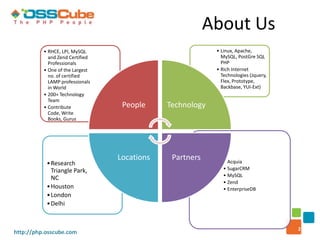
          • RHCE, LPI, MySQL                              • Linux, Apache,
            and Zend Certified                              MySQL, PostGre SQL
            Professionals                                   PHP
          • One of the Largest                            • Rich Internet
            no. of certified                                Technologies (Jquery,
            LAMP professionals                              Flex, Prototype,
            in World                                        Backbase, YUI-Ext)
          • 200+ Technology
            Team
          • Contribute            People     Technology
            Code, Write
            Books, Gurus


                                 Locations    Partners       • Acquia
           • Research
             Triangle Park,                                  • SugarCRM
                                                             • MySQL
             NC
                                                             • Zend
           • Houston                                         • EnterpriseDB
           • London
           • Delhi


                                                                                    2
http://php.osscube.com
Our Services

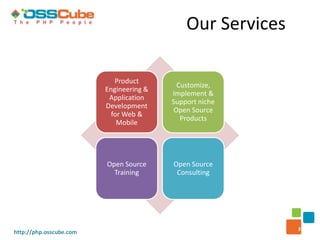
                            Product
                                           Customize,
                         Engineering &
                                         Implement &
                          Application
                                         Support niche
                         Development
                                          Open Source
                           for Web &
                                            Products
                             Mobile


                         Open Source     Open Source
                           Training       Consulting


                                                            3
http://php.osscube.com
About Me
  Over 20 years in the IT Industry

  Wrote “PHP: The Good Parts” - O’Reilly Press

  Co-authored:
   • “Programming PHP 2nd Ed.” - O’Reilly Press
   • “Zend Studio for Eclipse Developer’s Guide” – Addison-Wesley

  Tech Edited 10+ IT Books

  Wrote Whitepaper for Zend on Team Development within Zend Studio

  Working on a PHP Book for APress

  Live in PEI, Canada

                                                                     4
http://php.osscube.com
Zend Studio Overview
 • Installation Options
       – Browser Toolbar
 •    Integration with Zend Server (CE)
 •    Views
 •    Perspectives
 •    The Debugging Perspective
       – Debug as… PHP Script


                                           5
http://php.osscube.com
Debugging Perspective
 • Multiple Views available
       –   Debug (start / stop / restart)
       –   Code editor
       –   Breakpoints
       –   Variables
       –   Expressions (watches)
       –   Browser Output (rendered HTML)
       – Debug Output (raw HTML)


                                            6
http://php.osscube.com
Moving through the code
 •    F5 – Step Into
 •    F6 – Step Over
 •    F7 - Step Return
 •    F8 – Run (to next breakpoint or to end of script)
 •    Ctrl + F2 – Terminate Debug Session
 •    Ctrl + R – Run to Line (cursor)


                                                          7
http://php.osscube.com
Preparing the Session
 • Setting Breakpoints
       –   Double-click on line of code in the Marker Bar
       –   Little blue dot appears indicating a breakpoint
       –   Line number reference appears in the breakpoint view
       –   Can be turned off / on in the breakpoint view
 • Conditional Breakpoints
       – Can be set to trigger when a certain condition becomes true
       – Iteration # 7 of a for-next loop for example


                                                                       8
http://php.osscube.com
Looking at Debug Preferences
 • General Debug options
       – Preferences -> Run/Debug
             • Launching
             • Perspective switching

 • PHP Debug options
       – Preferences -> PHP -> Debug
             •   Debugger to use
             •   Server to use – Zend Server CE in our case
             •   Break at first line
             •   Debug broadcast port: 20080


                                                              9
http://php.osscube.com
Debugging Demo File
 • Walk through a debug session
       –   Look at the views
       –   Set a watch value
       –   Change a Variable value on the fly
       –   Change code, save, and re-start debug session in the debug view


                                                                             10
http://php.osscube.com
Zend Browser Toolbar
 • Looking at the Firefox version
       – Not ready for Version 5 of Firefox yet
       – Will recognize that Studio is running or try to launch it
       – Extra Stuff -> Settings
             •   Lots of options here
             •   Path to Studio exe
             •   Break at first line
             •   Zend Debugger broadcast port: 20080
       – Debug Menu Options
             •   Current Page
             •   Next Page
             •   All forms
             •   All Pages


                                                                     11
http://php.osscube.com
Zend Browser Toolbar Contd..
       – Debug (launches debugger from the browser)
       – Search tool for on-line information
       – Profile – discussed next


                                                      12
http://php.osscube.com
Profiling
 • A way to check on code efficiencies
       – Bottlenecks, time wasting code
 • Can be launched from browser or from within Studio
 • Has its own Perspective
 • Look at Profile results for demo code


                                                        13
http://php.osscube.com
Thank you for your
                         Time and Attention!

    For more information visit http://php.osscube.com

    Or drop-in an email to sales@osscube.com

     my Contact: peter@osscube.com

http://php.osscube.com                     14           14

Debugging with Zend Studio for Eclipse

  • 1.
    Debugging with Zend Studio for Eclipse Hosted by: Peter B. MacIntyre, ZCE Senior Solutions Consultant, Center of Excellence http://php.osscube.com
  • 2.
    About Us • RHCE, LPI, MySQL • Linux, Apache, and Zend Certified MySQL, PostGre SQL Professionals PHP • One of the Largest • Rich Internet no. of certified Technologies (Jquery, LAMP professionals Flex, Prototype, in World Backbase, YUI-Ext) • 200+ Technology Team • Contribute People Technology Code, Write Books, Gurus Locations Partners • Acquia • Research Triangle Park, • SugarCRM • MySQL NC • Zend • Houston • EnterpriseDB • London • Delhi 2 http://php.osscube.com
  • 3.
    Our Services Product Customize, Engineering & Implement & Application Support niche Development Open Source for Web & Products Mobile Open Source Open Source Training Consulting 3 http://php.osscube.com
  • 4.
    About Me Over 20 years in the IT Industry Wrote “PHP: The Good Parts” - O’Reilly Press Co-authored: • “Programming PHP 2nd Ed.” - O’Reilly Press • “Zend Studio for Eclipse Developer’s Guide” – Addison-Wesley Tech Edited 10+ IT Books Wrote Whitepaper for Zend on Team Development within Zend Studio Working on a PHP Book for APress Live in PEI, Canada 4 http://php.osscube.com
  • 5.
    Zend Studio Overview • Installation Options – Browser Toolbar • Integration with Zend Server (CE) • Views • Perspectives • The Debugging Perspective – Debug as… PHP Script 5 http://php.osscube.com
  • 6.
    Debugging Perspective •Multiple Views available – Debug (start / stop / restart) – Code editor – Breakpoints – Variables – Expressions (watches) – Browser Output (rendered HTML) – Debug Output (raw HTML) 6 http://php.osscube.com
  • 7.
    Moving through thecode • F5 – Step Into • F6 – Step Over • F7 - Step Return • F8 – Run (to next breakpoint or to end of script) • Ctrl + F2 – Terminate Debug Session • Ctrl + R – Run to Line (cursor) 7 http://php.osscube.com
  • 8.
    Preparing the Session • Setting Breakpoints – Double-click on line of code in the Marker Bar – Little blue dot appears indicating a breakpoint – Line number reference appears in the breakpoint view – Can be turned off / on in the breakpoint view • Conditional Breakpoints – Can be set to trigger when a certain condition becomes true – Iteration # 7 of a for-next loop for example 8 http://php.osscube.com
  • 9.
    Looking at DebugPreferences • General Debug options – Preferences -> Run/Debug • Launching • Perspective switching • PHP Debug options – Preferences -> PHP -> Debug • Debugger to use • Server to use – Zend Server CE in our case • Break at first line • Debug broadcast port: 20080 9 http://php.osscube.com
  • 10.
    Debugging Demo File • Walk through a debug session – Look at the views – Set a watch value – Change a Variable value on the fly – Change code, save, and re-start debug session in the debug view 10 http://php.osscube.com
  • 11.
    Zend Browser Toolbar • Looking at the Firefox version – Not ready for Version 5 of Firefox yet – Will recognize that Studio is running or try to launch it – Extra Stuff -> Settings • Lots of options here • Path to Studio exe • Break at first line • Zend Debugger broadcast port: 20080 – Debug Menu Options • Current Page • Next Page • All forms • All Pages 11 http://php.osscube.com
  • 12.
    Zend Browser ToolbarContd.. – Debug (launches debugger from the browser) – Search tool for on-line information – Profile – discussed next 12 http://php.osscube.com
  • 13.
    Profiling • Away to check on code efficiencies – Bottlenecks, time wasting code • Can be launched from browser or from within Studio • Has its own Perspective • Look at Profile results for demo code 13 http://php.osscube.com
  • 14.
    Thank you foryour Time and Attention! For more information visit http://php.osscube.com Or drop-in an email to sales@osscube.com my Contact: peter@osscube.com http://php.osscube.com 14 14

Editor's Notes

  • #2 Welcome attendees House Keeping topics: recorded for later viewing  Questions at the end Turn off IM's so you are not distracted.
  • #5 Zend Studio for Eclipse Developer's guidehttp://www.informit.com/store/product.aspx?isbn=0672329409