Got Problems !
Let's do a Health Check
         Luis Guirigay
         Engagement Manager
         LGuirigay@PSCListens.com
         Twitter: @lguiriga
         www.LuisGuirigay.net
         http://www.linkedin.com/in/lguiriga
         PSC Group, LLC
About me
•   Engagement Manager at PSC Group, LLC – Based in Schaumburg, IL but supporting customers everywhere.. Even
    Africa
•   12+ Years of Experience working with IBM Software performing Health Checks, Upgrades, Security Audits,
    Deployments, Web and Client Development, etc…
•   Published Author - IBM Redbooks
     •   Implementing IBM Lotus Domino 7 for i5/OS
     •   Preparing for and Tuning the SQL Query Engine on DB2 for i5/OS
     •   Deploying IBM Workplace Collaboration Services on the IBM System i5 Platform
•   IBM Certified Developer
     •   Lotus Notes and Domino 5, 6, 7, 8, 8.5
     •   Lotus Workflow 3
•   IBM Certified Administrator
     •   IBM Lotus Quickr 8.5 (Domino)
     •   IBM Sametime 7.5, 8 and 8.5
     •   IBM Connections 2.0 and 2.5
     •   IBM WebSphere Portal 6.0, 6.1 and 7.0
     •   IBM Lotus Notes and Domino 5, 6, 7, 8 and 8.5
Quick Poll !
 • Who’s using…
   • Lotus Notes and Domino
   • Lotus Traveler
   • Sametime
   • Lotus Quickr
   • Connections
   • WebSphere Portal
Agenda
 • Why a Health Check is important ?
 • When to perform a Health Check ?
 • Tools to perform a Health Check
 • Things you should take a look at
   • Messaging
   • Clusters
   • DAOS
   • TXN
   • And more….
Why a Health Check is important ?
• Do you get a physical every year or wait until something
     hurts ?
 •   In IT…. a health check will save your servers, and
     sometimes even your job
 •   A Health Check will help you to…
     •   prevent issues
     •   resolve issues
     •   improve performance
     •   enhance security
     •   make your work & life easier
When to Perform a Health Check?
• Started a new job
• You think your servers could perform better
• You think you have problems
• You don't understand your Domino infrastructure
• After a crash or hung (just check what's related to the
     issue)
 •   On a regular basis
     •   Some items can be reviewed weekly, some others
         every month. You decide !
Tools you can use
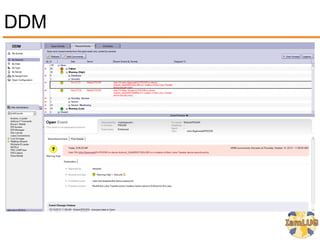
Domino Domain Monitoring - DDM
•   Means to quickly monitor and determine health of an entire
    domain
    •   From a single UI location
    •   Reduces TCO
•   Available since Domino release 7
    •   Enabled in Monitoring Configuration database (events4.nsf)
    •   Feature-oriented view of domain status in DDM.nsf
•   Provides for quick problem resolution
DDM
Quick DDM Demo
Domino Configuration Tuner - DCT
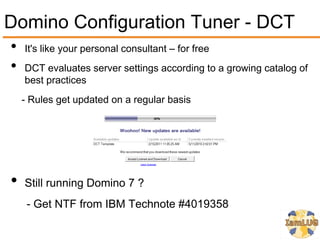
•   It's like your personal consultant – for free
•   DCT evaluates server settings according to a growing catalog of
    best practices
    - Rules get updated on a regular basis


•   Still running Domino 7 ?
     - Get NTF from IBM Technote #4019358
DCT
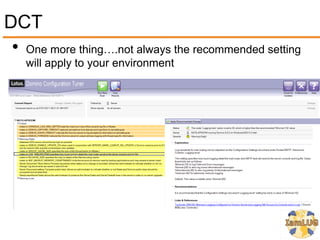
 • One more thing….not always the recommended setting
   will apply to your environment
Quick DCT Demo
Health Monitor
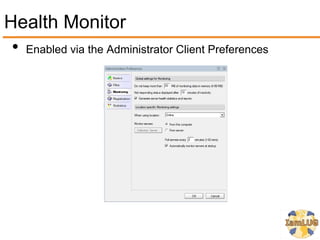
 • Enabled via the Administrator Client Preferences
Health Monitor
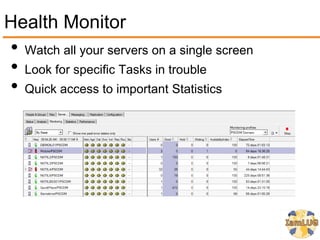
•   Watch all your servers on a single screen
•   Look for specific Tasks in trouble
•   Quick access to important Statistics
Health Monitor Database
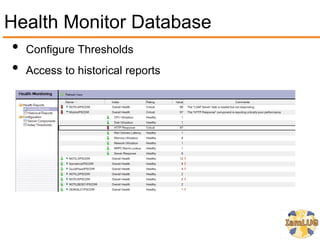
 • Configure Thresholds
 • Access to historical reports
Quick Health Monitor Demo
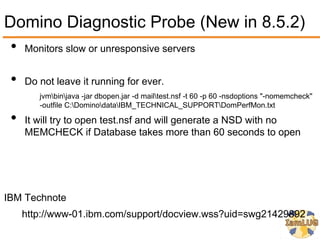
Domino Diagnostic Probe (New in 8.5.2)
 • Monitors slow or unresponsive servers
 •   Do not leave it running for ever.
        jvmbinjava -jar dbopen.jar -d mailtest.nsf -t 60 -p 60 -nsdoptions "-nomemcheck"
        -outfile C:DominodataIBM_TECHNICAL_SUPPORTDomPerfMon.txt

 •   It will try to open test.nsf and will generate a NSD with no
     MEMCHECK if Database takes more than 60 seconds to open


IBM Technote
     http://www-01.ibm.com/support/docview.wss?uid=swg21429892
Things you should take a look at
Messaging
• User 3 Party Tools for SPAM and AV
          rd


  • Postini, MX Logic, Message Labs, etc…
  • Hardware appliances also do a pretty good job
• SmartHosts
  • DNS Lookups need resources
• Message Tracking can save the day
Messaging
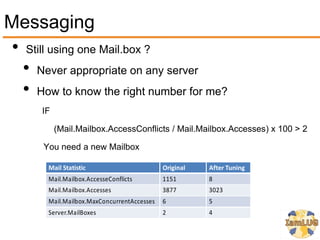
• Still using one Mail.box ?
  • Never appropriate on any server
  • How to know the right number for me?
      IF

           (Mail.Mailbox.AccessConflicts / Mail.Mailbox.Accesses) x 100 > 2

       You need a new Mailbox

        Mail Statistic                       Original   After Tuning
        Mail.Mailbox.AccesseConflicts        1151       8
        Mail.Mailbox.Accesses                3877       3023
        Mail.Mailbox.MaxConcurrentAccesses   6          5
        Server.MailBoxes                     2          4
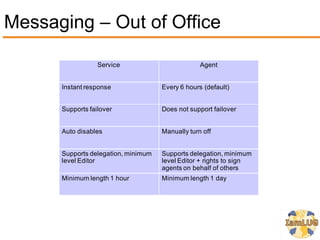
Messaging – Out of Office

                  Service                         Agent


      Instant response               Every 6 hours (default)


      Supports failover              Does not support failover


      Auto disables                  Manually turn off


      Supports delegation, minimum   Supports delegation, minimum
      level Editor                   level Editor + rights to sign
                                     agents on behalf of others
      Minimum length 1 hour          Minimum length 1 day
DAOS
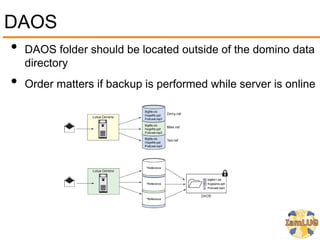
• DAOS folder should be located outside of the domino data
     directory
 •   Order matters if backup is performed while server is online
DAOS
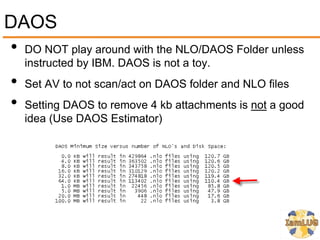
• DO NOT play around with the NLO/DAOS Folder unless
     instructed by IBM. DAOS is not a toy.
 •   Set AV to not scan/act on DAOS folder and NLO files
 •   Setting DAOS to remove 4 kb attachments is not a good
     idea (Use DAOS Estimator)
Transaction Logging
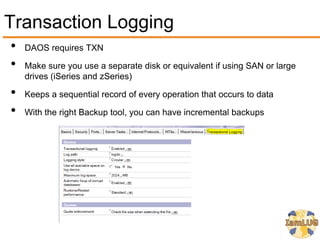
•   DAOS requires TXN

•   Make sure you use a separate disk or equivalent if using SAN or large
    drives (iSeries and zSeries)

•   Keeps a sequential record of every operation that occurs to data

•   With the right Backup tool, you can have incremental backups
ODS
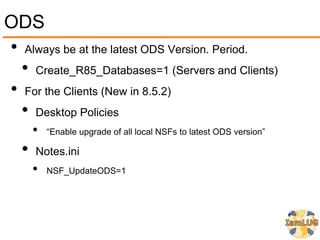
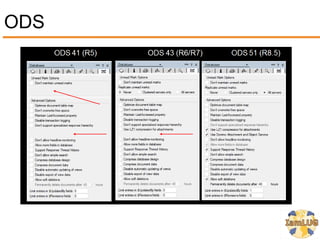
• Always be at the latest ODS Version. Period.
  • Create_R85_Databases=1 (Servers and Clients)
• For the Clients (New in 8.5.2)
  • Desktop Policies
       •   “Enable upgrade of all local NSFs to latest ODS version”

   •   Notes.ini
       •   NSF_UpdateODS=1
ODS
Compression
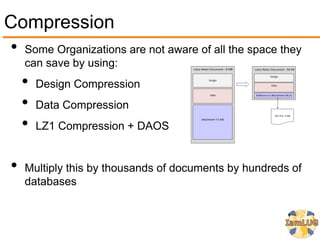
• Some Organizations are not aware of all the space they
     can save by using:
     •   Design Compression
     •   Data Compression
     •   LZ1 Compression + DAOS


 •   Multiply this by thousands of documents by hundreds of
     databases
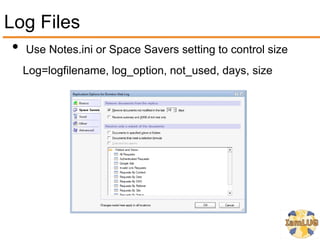
Log Files
 • Use Notes.ini or Space Savers setting to control size
   Log=logfilename, log_option, not_used, days, size
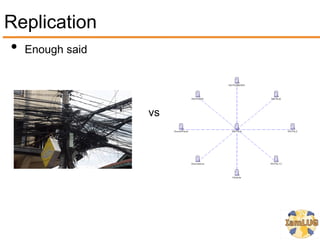
Replication
• Enough said


                vs
Notes.ini
• Keep it clean
  • Specially Debugging Variables
• IBM Recommends keeping these
   •   CONSOLE_LOG_ENABLED=1
         Captures server console data and logs to console.log file

   •   DEBUG_THREADID=1
         Stamps server threads and logs to console.log file

   •   CONSOLE_LOG_MAX_KBYTES=204800
         Restricts the console Log size to 200MB and then overwrites oldest entries

   •   DEBUG_CAPTURE_TIMEOUT=1
         Captures semaphore time stamp and logs to the semdebug.txt

   •   DEBUG_SHOW_TIMEOUT=1
         Captures semaphore information and logs to the semdebug.txt
Server Settings
 • Server Tasks
   • Do you need them all ?
 • Ports
 • Default settings
   •   Security
   •   AdminP Threads (Too many requests? Default is 60 mins & 3 threads)
   •   HTTP (Timeouts, Caching, Logging, Bind to Host Name)
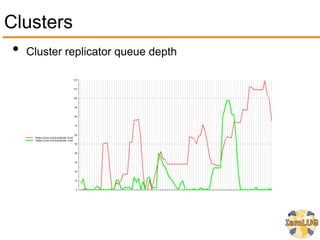
Clusters
 • Cluster replicator queue depth
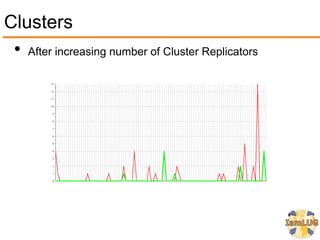
Clusters
 • After increasing number of Cluster Replicators
Clusters - Server Availaibilty Index (SAI)
•   Equal to the percentage of the total server capacity that is still available

•   Use SERVER_TRANSINFO_RANGE to improve your SAI

    •   Use SH AI to determine the right value

    •   Use sh ai when servers are experiencing a heavy load

    •   It is like you need to tell Domino how fast your server/hardware is.

•   Very useful when looking to control Load Balancing in Clustered
    environments

    •   Server_Availability_Threshold will indicate when to send the request to
        the other server in the cluster

•   It can also be used on non-clustered servers to understand health of the
    server
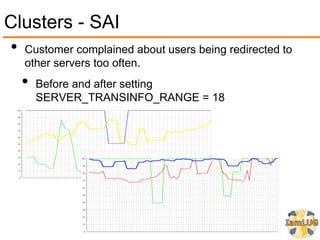
Clusters - SAI
• Customer complained about users being redirected to
   other servers too often.
   •   Before and after setting
       SERVER_TRANSINFO_RANGE = 18
Maintenance Tips
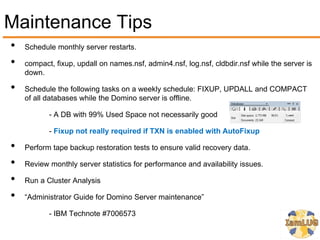
•   Schedule monthly server restarts.

•   compact, fixup, updall on names.nsf, admin4.nsf, log.nsf, cldbdir.nsf while the server is
    down.

•   Schedule the following tasks on a weekly schedule: FIXUP, UPDALL and COMPACT
    of all databases while the Domino server is offline.

           - A DB with 99% Used Space not necessarily good

           - Fixup not really required if TXN is enabled with AutoFixup

•   Perform tape backup restoration tests to ensure valid recovery data.

•   Review monthly server statistics for performance and availability issues.

•   Run a Cluster Analysis

•   “Administrator Guide for Domino Server maintenance”

           - IBM Technote #7006573
Local and Managed Replicas
•    Considering Server Consolidation ? Go Local !
•    Will reduce Server and Bandwidth/Network Utilization
•    Improved load time.
•    Offline access
•    The real 24/7 !
•    Read: “IBM Lotus Notes and Domino 8.x local mail replicas:
     Advantages, considerations, and best practices”
    http://www-
    10.lotus.com/ldd/dominowiki.nsf/dx/IBM_Lotus_Notes_and_Domino_8.x_local_mail_replicas_Advantages
    _considerations_and_best_practices
Features you should be using
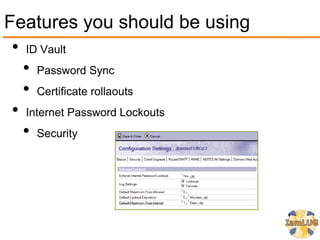
 • ID Vault
   • Password Sync
   • Certificate rollaouts
 • Internet Password Lockouts
   • Security
Features you should be using
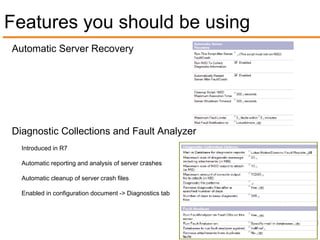
Automatic Server Recovery


Diagnostic Collections and Fault Analyzer
  Introduced in R7

  Automatic reporting and analysis of server crashes

  Automatic cleanup of server crash files

  Enabled in configuration document -> Diagnostics tab
Features you should be using
 • Policies
   • Desktop, Security, Mail, etc….
 • Session Authentication
   • Use LTPA Token (Cookie)
 • Network Compression
   • Useful when bandwidth is limited
 • Run Web agents concurrently
   • Agents don't need to wait in line. Domino is not the
      DMV
Some additional tips for….
Quickr
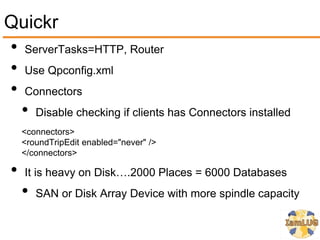
• ServerTasks=HTTP, Router
• Use Qpconfig.xml
• Connectors
  • Disable checking if clients has Connectors installed
     <connectors>
     <roundTripEdit enabled="never" />
     </connectors>

 •   It is heavy on Disk….2000 Places = 6000 Databases
     •   SAN or Disk Array Device with more spindle capacity
Quickr
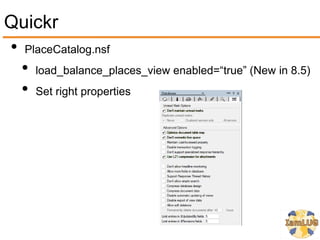
• PlaceCatalog.nsf
  • load_balance_places_view enabled=“true” (New in 8.5)
  • Set right properties
Thank You to our Sponsors!

Got Problems? Let's Do a Health Check

  • 1.
    Got Problems ! Let'sdo a Health Check Luis Guirigay Engagement Manager LGuirigay@PSCListens.com Twitter: @lguiriga www.LuisGuirigay.net http://www.linkedin.com/in/lguiriga PSC Group, LLC
  • 2.
    About me • Engagement Manager at PSC Group, LLC – Based in Schaumburg, IL but supporting customers everywhere.. Even Africa • 12+ Years of Experience working with IBM Software performing Health Checks, Upgrades, Security Audits, Deployments, Web and Client Development, etc… • Published Author - IBM Redbooks • Implementing IBM Lotus Domino 7 for i5/OS • Preparing for and Tuning the SQL Query Engine on DB2 for i5/OS • Deploying IBM Workplace Collaboration Services on the IBM System i5 Platform • IBM Certified Developer • Lotus Notes and Domino 5, 6, 7, 8, 8.5 • Lotus Workflow 3 • IBM Certified Administrator • IBM Lotus Quickr 8.5 (Domino) • IBM Sametime 7.5, 8 and 8.5 • IBM Connections 2.0 and 2.5 • IBM WebSphere Portal 6.0, 6.1 and 7.0 • IBM Lotus Notes and Domino 5, 6, 7, 8 and 8.5
  • 3.
    Quick Poll ! • Who’s using… • Lotus Notes and Domino • Lotus Traveler • Sametime • Lotus Quickr • Connections • WebSphere Portal
  • 4.
    Agenda • Whya Health Check is important ? • When to perform a Health Check ? • Tools to perform a Health Check • Things you should take a look at • Messaging • Clusters • DAOS • TXN • And more….
  • 5.
    Why a HealthCheck is important ? • Do you get a physical every year or wait until something hurts ? • In IT…. a health check will save your servers, and sometimes even your job • A Health Check will help you to… • prevent issues • resolve issues • improve performance • enhance security • make your work & life easier
  • 6.
    When to Performa Health Check? • Started a new job • You think your servers could perform better • You think you have problems • You don't understand your Domino infrastructure • After a crash or hung (just check what's related to the issue) • On a regular basis • Some items can be reviewed weekly, some others every month. You decide !
  • 7.
  • 8.
    Domino Domain Monitoring- DDM • Means to quickly monitor and determine health of an entire domain • From a single UI location • Reduces TCO • Available since Domino release 7 • Enabled in Monitoring Configuration database (events4.nsf) • Feature-oriented view of domain status in DDM.nsf • Provides for quick problem resolution
  • 9.
  • 10.
  • 11.
    Domino Configuration Tuner- DCT • It's like your personal consultant – for free • DCT evaluates server settings according to a growing catalog of best practices - Rules get updated on a regular basis • Still running Domino 7 ? - Get NTF from IBM Technote #4019358
  • 12.
    DCT • Onemore thing….not always the recommended setting will apply to your environment
  • 13.
  • 14.
    Health Monitor •Enabled via the Administrator Client Preferences
  • 15.
    Health Monitor • Watch all your servers on a single screen • Look for specific Tasks in trouble • Quick access to important Statistics
  • 16.
    Health Monitor Database • Configure Thresholds • Access to historical reports
  • 17.
  • 18.
    Domino Diagnostic Probe(New in 8.5.2) • Monitors slow or unresponsive servers • Do not leave it running for ever. jvmbinjava -jar dbopen.jar -d mailtest.nsf -t 60 -p 60 -nsdoptions "-nomemcheck" -outfile C:DominodataIBM_TECHNICAL_SUPPORTDomPerfMon.txt • It will try to open test.nsf and will generate a NSD with no MEMCHECK if Database takes more than 60 seconds to open IBM Technote http://www-01.ibm.com/support/docview.wss?uid=swg21429892
  • 19.
    Things you shouldtake a look at
  • 20.
    Messaging • User 3Party Tools for SPAM and AV rd • Postini, MX Logic, Message Labs, etc… • Hardware appliances also do a pretty good job • SmartHosts • DNS Lookups need resources • Message Tracking can save the day
  • 21.
    Messaging • Still usingone Mail.box ? • Never appropriate on any server • How to know the right number for me? IF (Mail.Mailbox.AccessConflicts / Mail.Mailbox.Accesses) x 100 > 2 You need a new Mailbox Mail Statistic Original After Tuning Mail.Mailbox.AccesseConflicts 1151 8 Mail.Mailbox.Accesses 3877 3023 Mail.Mailbox.MaxConcurrentAccesses 6 5 Server.MailBoxes 2 4
  • 22.
    Messaging – Outof Office Service Agent Instant response Every 6 hours (default) Supports failover Does not support failover Auto disables Manually turn off Supports delegation, minimum Supports delegation, minimum level Editor level Editor + rights to sign agents on behalf of others Minimum length 1 hour Minimum length 1 day
  • 23.
    DAOS • DAOS foldershould be located outside of the domino data directory • Order matters if backup is performed while server is online
  • 24.
    DAOS • DO NOTplay around with the NLO/DAOS Folder unless instructed by IBM. DAOS is not a toy. • Set AV to not scan/act on DAOS folder and NLO files • Setting DAOS to remove 4 kb attachments is not a good idea (Use DAOS Estimator)
  • 25.
    Transaction Logging • DAOS requires TXN • Make sure you use a separate disk or equivalent if using SAN or large drives (iSeries and zSeries) • Keeps a sequential record of every operation that occurs to data • With the right Backup tool, you can have incremental backups
  • 26.
    ODS • Always beat the latest ODS Version. Period. • Create_R85_Databases=1 (Servers and Clients) • For the Clients (New in 8.5.2) • Desktop Policies • “Enable upgrade of all local NSFs to latest ODS version” • Notes.ini • NSF_UpdateODS=1
  • 27.
  • 28.
    Compression • Some Organizationsare not aware of all the space they can save by using: • Design Compression • Data Compression • LZ1 Compression + DAOS • Multiply this by thousands of documents by hundreds of databases
  • 29.
    Log Files •Use Notes.ini or Space Savers setting to control size Log=logfilename, log_option, not_used, days, size
  • 30.
  • 31.
    Notes.ini • Keep itclean • Specially Debugging Variables • IBM Recommends keeping these • CONSOLE_LOG_ENABLED=1 Captures server console data and logs to console.log file • DEBUG_THREADID=1 Stamps server threads and logs to console.log file • CONSOLE_LOG_MAX_KBYTES=204800 Restricts the console Log size to 200MB and then overwrites oldest entries • DEBUG_CAPTURE_TIMEOUT=1 Captures semaphore time stamp and logs to the semdebug.txt • DEBUG_SHOW_TIMEOUT=1 Captures semaphore information and logs to the semdebug.txt
  • 32.
    Server Settings •Server Tasks • Do you need them all ? • Ports • Default settings • Security • AdminP Threads (Too many requests? Default is 60 mins & 3 threads) • HTTP (Timeouts, Caching, Logging, Bind to Host Name)
  • 33.
    Clusters • Clusterreplicator queue depth
  • 34.
    Clusters • Afterincreasing number of Cluster Replicators
  • 35.
    Clusters - ServerAvailaibilty Index (SAI) • Equal to the percentage of the total server capacity that is still available • Use SERVER_TRANSINFO_RANGE to improve your SAI • Use SH AI to determine the right value • Use sh ai when servers are experiencing a heavy load • It is like you need to tell Domino how fast your server/hardware is. • Very useful when looking to control Load Balancing in Clustered environments • Server_Availability_Threshold will indicate when to send the request to the other server in the cluster • It can also be used on non-clustered servers to understand health of the server
  • 36.
    Clusters - SAI •Customer complained about users being redirected to other servers too often. • Before and after setting SERVER_TRANSINFO_RANGE = 18
  • 37.
    Maintenance Tips • Schedule monthly server restarts. • compact, fixup, updall on names.nsf, admin4.nsf, log.nsf, cldbdir.nsf while the server is down. • Schedule the following tasks on a weekly schedule: FIXUP, UPDALL and COMPACT of all databases while the Domino server is offline. - A DB with 99% Used Space not necessarily good - Fixup not really required if TXN is enabled with AutoFixup • Perform tape backup restoration tests to ensure valid recovery data. • Review monthly server statistics for performance and availability issues. • Run a Cluster Analysis • “Administrator Guide for Domino Server maintenance” - IBM Technote #7006573
  • 38.
    Local and ManagedReplicas • Considering Server Consolidation ? Go Local ! • Will reduce Server and Bandwidth/Network Utilization • Improved load time. • Offline access • The real 24/7 ! • Read: “IBM Lotus Notes and Domino 8.x local mail replicas: Advantages, considerations, and best practices” http://www- 10.lotus.com/ldd/dominowiki.nsf/dx/IBM_Lotus_Notes_and_Domino_8.x_local_mail_replicas_Advantages _considerations_and_best_practices
  • 39.
    Features you shouldbe using • ID Vault • Password Sync • Certificate rollaouts • Internet Password Lockouts • Security
  • 40.
    Features you shouldbe using Automatic Server Recovery Diagnostic Collections and Fault Analyzer Introduced in R7 Automatic reporting and analysis of server crashes Automatic cleanup of server crash files Enabled in configuration document -> Diagnostics tab
  • 41.
    Features you shouldbe using • Policies • Desktop, Security, Mail, etc…. • Session Authentication • Use LTPA Token (Cookie) • Network Compression • Useful when bandwidth is limited • Run Web agents concurrently • Agents don't need to wait in line. Domino is not the DMV
  • 42.
  • 43.
    Quickr • ServerTasks=HTTP, Router •Use Qpconfig.xml • Connectors • Disable checking if clients has Connectors installed <connectors> <roundTripEdit enabled="never" /> </connectors> • It is heavy on Disk….2000 Places = 6000 Databases • SAN or Disk Array Device with more spindle capacity
  • 44.
    Quickr • PlaceCatalog.nsf • load_balance_places_view enabled=“true” (New in 8.5) • Set right properties
  • 45.
    Thank You toour Sponsors!