CREATE FISHNET
CREATE FISHNET
XTools
MAY 29, 2015
ATIQA IJAZ KHAN
atiqa-k13@hotmail.com
CREATE FISHNET
Page | 1
XTools Operation: Create Fishnet
Create Fishnet Using XTools:
1. Create a map layout/template of requirement with A4 page size or any other required.1
2. Add data, if in GCS, perform the Step 3, otherwise go to Step
4.
3. Set Coordinate system of Data Frame, to PCS for better
handling. For this:
a. Go to Layer Properties > Coordinate System >
Projected > UTM (as required).
b. Export the added data with Data frame coordinate
system.
c. Add it again and remove the previous.
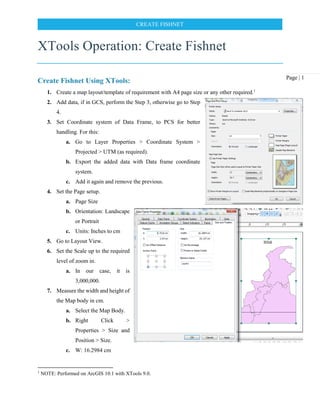
4. Set the Page setup.
a. Page Size
b. Orientation: Landscape
or Portrait
c. Units: Inches to cm
5. Go to Layout View.
6. Set the Scale up to the required
level of zoom in.
a. In our case, it is
3,000,000.
7. Measure the width and height of
the Map body in cm.
a. Select the Map Body.
b. Right Click >
Properties > Size and
Position > Size.
c. W: 16.2984 cm
1
NOTE: Performed on ArcGIS 10.1 with XTools 9.0.
CREATE FISHNET
Page | 2
d. H: 25.157 cm
8. Convert centimeters to meters as:
a. W: 16.2984 / 100 = 0.162984 m
b. H: 25.157 / 100 = 0.25157 m
9. Equivalent to Ground scale as:
a. W: 0.162984 * 3,000,000 = 488,952
b. H: 0.25157 * 3,000,000 = 754,710
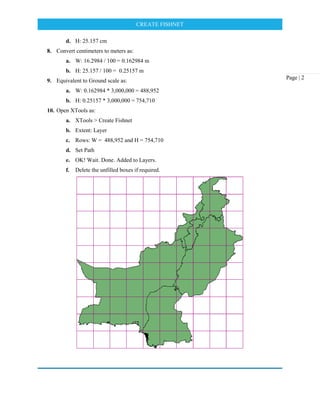
10. Open XTools as:
a. XTools > Create Fishnet
b. Extent: Layer
c. Rows: W = 488,952 and H = 754,710
d. Set Path
e. OK! Wait. Done. Added to Layers.
f. Delete the unfilled boxes if required.

Create Fishnet_XTools

  • 1.
    CREATE FISHNET CREATE FISHNET XTools MAY29, 2015 ATIQA IJAZ KHAN atiqa-k13@hotmail.com
  • 2.
    CREATE FISHNET Page |1 XTools Operation: Create Fishnet Create Fishnet Using XTools: 1. Create a map layout/template of requirement with A4 page size or any other required.1 2. Add data, if in GCS, perform the Step 3, otherwise go to Step 4. 3. Set Coordinate system of Data Frame, to PCS for better handling. For this: a. Go to Layer Properties > Coordinate System > Projected > UTM (as required). b. Export the added data with Data frame coordinate system. c. Add it again and remove the previous. 4. Set the Page setup. a. Page Size b. Orientation: Landscape or Portrait c. Units: Inches to cm 5. Go to Layout View. 6. Set the Scale up to the required level of zoom in. a. In our case, it is 3,000,000. 7. Measure the width and height of the Map body in cm. a. Select the Map Body. b. Right Click > Properties > Size and Position > Size. c. W: 16.2984 cm 1 NOTE: Performed on ArcGIS 10.1 with XTools 9.0.
  • 3.
    CREATE FISHNET Page |2 d. H: 25.157 cm 8. Convert centimeters to meters as: a. W: 16.2984 / 100 = 0.162984 m b. H: 25.157 / 100 = 0.25157 m 9. Equivalent to Ground scale as: a. W: 0.162984 * 3,000,000 = 488,952 b. H: 0.25157 * 3,000,000 = 754,710 10. Open XTools as: a. XTools > Create Fishnet b. Extent: Layer c. Rows: W = 488,952 and H = 754,710 d. Set Path e. OK! Wait. Done. Added to Layers. f. Delete the unfilled boxes if required.