Firebase Remote Config
tips & tricks
28.05.2018
by Peter Tuszynski
Agenda for today
1. About me :)
2. Introduction to Firebase Remote Config
3. Interesting features
4. Clever use cases
5. Gotchas!
6. Wrap up
2
Who am I & why should you care?
• Hi, my name is Peter Tuszynski
• CTO at inFullMobile a digital product design &
development studio
• Ex-founder at a venture backed startup
• Ex-Entrepreneur-In-Residence at a leading venture
fund in Poland
• Working with mobile technologies for over 10 years
• Huge fan of Firebase ;)
@dusker on most of social networks
piotr.tuszynski@infullmobile.com
3
Introduction to Remote Config
4
01
Basics
• Essentially a server-side stored JSON file
• On steroids (provided by the SDK)
• Supports the following data types:
• String
• Number
• Bool
• Firebase doesn’t support nested structures natively
in Remote Config
5
Supported platforms
• iOS
• Android
• REST API
• Not available on the web :(
6
Defining params
7
Defining params
8
Defining params
9
Retrieving params
10
Default values?
11
Retrieving params
12
Retrieving params
13
Interesting Remote Config features
14
02
Conditionals
• You can have different remote config values based
on many different conditions
• OS type
• App version
• Region
• Remote Config + Analytics = <3
• Target based on user properties
• Target based on the audience
• Remote Config + Prediction = <3
• Target based on likelihood to do something in
the next 7 days
15
REST API
16
REST API
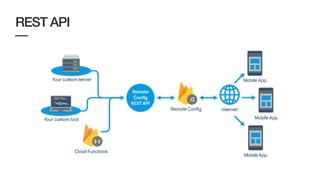
• Support for both read & write
• You can create your own unofficial Remote Config
for the web
• Supports conditions
• Make sure you create a backup!!! There’s no undo!
• You can validate your JSON by appending
validate_only=true to the request URL
17
Staged roll out
• Rather than rolling out a specific version in stages
(like Google Play will let you) you may want to roll
out certain features
• Create a flag for a feature, implement the proper
feature visibility in the app
• Gauge the percentile as you see seamless adoption
• Get rid of the conditional once you’re happy with the
rollout
18
A/B testing
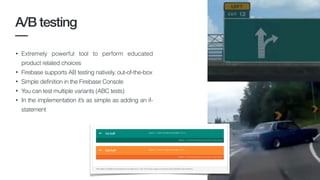
• Extremely powerful tool to perform educated
product related choices
• Firebase supports AB testing natively, out-of-the-box
• Simple definition in the Firebase Console
• You can test multiple variants (ABC tests)
• In the implementation it’s as simple as adding an if-
statement
19
Clever use cases
20
03
Switch for a crisis time
•As we all know crisis break out at the least expected
moment
•Your personal kill-switch or at least an off switch that’ll
let you catch a breath :)
•All the giant companies do it (they learned eventually)
•Works especially well with conditioning ie. turn the
app off for a specific region
21
RACI
•Clients are great, when they pay the bills
•We had situations where clients kept using the app we’ve shared
with them despite not having paid the invoices
•This happened before Firebase was out there, took about 60
man-days to be built
•Now you’re getting it for free! Use it :)
22
Easy roll-back of a buggy feature
•Often times bugs surface once feature is already in
production, that applies to critical bugs as well
•Every time you launch a new feature have a Remote Config
switch that accompanies it
•If things go south just toggle the switch and the feature gets
hidden until you’re ready with a fix
23
A few gotchas!
24
04
Caching
25
• Remote Config values get internally cached after a
first successful load
• By default cache expires after 12 hours
• Y o u m a y o v e r r i d e t h i s w i t h
fetchWithExpirationDuration:completionHandler:
Throttling
26
• Done internally in the SDK
• Threshold is at 5 reads per 60 minutes - anything
after that will get throttled
• To go around this during development time you can
enable developer mode
• F I R R e m o t e C o n f i g S e t t i n g s - >
isDeveloperModeEnabled -> true
Limits
27
• Up to 2k parameters
• Up to 100 conditions
Thank you
@dusker
piotr.tuszynski@infullmobile.com
28

Firebase remote config tips & tricks

  • 1.
    Firebase Remote Config tips& tricks 28.05.2018 by Peter Tuszynski
  • 2.
    Agenda for today 1.About me :) 2. Introduction to Firebase Remote Config 3. Interesting features 4. Clever use cases 5. Gotchas! 6. Wrap up 2
  • 3.
    Who am I& why should you care? • Hi, my name is Peter Tuszynski • CTO at inFullMobile a digital product design & development studio • Ex-founder at a venture backed startup • Ex-Entrepreneur-In-Residence at a leading venture fund in Poland • Working with mobile technologies for over 10 years • Huge fan of Firebase ;) @dusker on most of social networks piotr.tuszynski@infullmobile.com 3
  • 4.
  • 5.
    Basics • Essentially aserver-side stored JSON file • On steroids (provided by the SDK) • Supports the following data types: • String • Number • Bool • Firebase doesn’t support nested structures natively in Remote Config 5
  • 6.
    Supported platforms • iOS •Android • REST API • Not available on the web :( 6
  • 7.
  • 8.
  • 9.
  • 10.
  • 11.
  • 12.
  • 13.
  • 14.
  • 15.
    Conditionals • You canhave different remote config values based on many different conditions • OS type • App version • Region • Remote Config + Analytics = <3 • Target based on user properties • Target based on the audience • Remote Config + Prediction = <3 • Target based on likelihood to do something in the next 7 days 15
  • 16.
  • 17.
    REST API • Supportfor both read & write • You can create your own unofficial Remote Config for the web • Supports conditions • Make sure you create a backup!!! There’s no undo! • You can validate your JSON by appending validate_only=true to the request URL 17
  • 18.
    Staged roll out •Rather than rolling out a specific version in stages (like Google Play will let you) you may want to roll out certain features • Create a flag for a feature, implement the proper feature visibility in the app • Gauge the percentile as you see seamless adoption • Get rid of the conditional once you’re happy with the rollout 18
  • 19.
    A/B testing • Extremelypowerful tool to perform educated product related choices • Firebase supports AB testing natively, out-of-the-box • Simple definition in the Firebase Console • You can test multiple variants (ABC tests) • In the implementation it’s as simple as adding an if- statement 19
  • 20.
  • 21.
    Switch for acrisis time •As we all know crisis break out at the least expected moment •Your personal kill-switch or at least an off switch that’ll let you catch a breath :) •All the giant companies do it (they learned eventually) •Works especially well with conditioning ie. turn the app off for a specific region 21
  • 22.
    RACI •Clients are great,when they pay the bills •We had situations where clients kept using the app we’ve shared with them despite not having paid the invoices •This happened before Firebase was out there, took about 60 man-days to be built •Now you’re getting it for free! Use it :) 22
  • 23.
    Easy roll-back ofa buggy feature •Often times bugs surface once feature is already in production, that applies to critical bugs as well •Every time you launch a new feature have a Remote Config switch that accompanies it •If things go south just toggle the switch and the feature gets hidden until you’re ready with a fix 23
  • 24.
  • 25.
    Caching 25 • Remote Configvalues get internally cached after a first successful load • By default cache expires after 12 hours • Y o u m a y o v e r r i d e t h i s w i t h fetchWithExpirationDuration:completionHandler:
  • 26.
    Throttling 26 • Done internallyin the SDK • Threshold is at 5 reads per 60 minutes - anything after that will get throttled • To go around this during development time you can enable developer mode • F I R R e m o t e C o n f i g S e t t i n g s - > isDeveloperModeEnabled -> true
  • 27.
    Limits 27 • Up to2k parameters • Up to 100 conditions
  • 28.