+


    Setting Up Zotero to Find Full Text at Hunter
    Libraries
                              John Pell
                              Assistant Professor
                              Hunter College Libraries
+
    Overview of what’s in this Tutorial:


     Link
         Resolvers: The concept and technology
     behind linking to full text from a database
     record.
     ModifyingZotero’s Settings to use Hunter
     College’s Link Resolver.
+
    Link Resolvers
    Connecting to the full text of articles
+
    Link Resolvers:


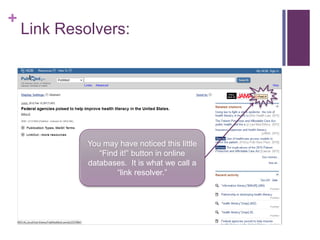
             You may have noticed this little
                “Find it!” button in online
             databases. It is what we call a
                     “link resolver.”
+
    Link Resolvers:


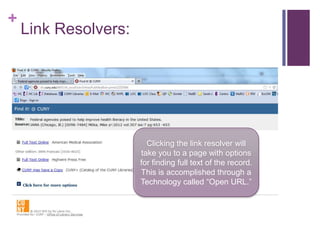
                        Clicking the link resolver will
                      take you to a page with options
                      for finding full text of the record.
                      This is accomplished through a
                      Technology called “Open URL.”
+
    Hunter’s Link Resolver


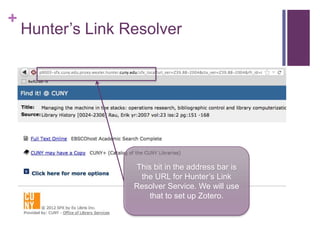
                   This bit in the address bar is
                    the URL for Hunter’s Link
                   Resolver Service. We will use
                      that to set up Zotero.
+
    Modifying Zotero’s Settings
    Customize your experience for efficiency!
+
    Setting Up Zotero:


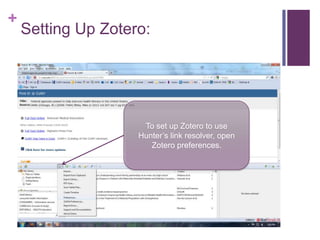
                     To set up Zotero to use
                    Hunter’s link resolver, open
                       Zotero preferences.
+
    Setting Up Zotero:


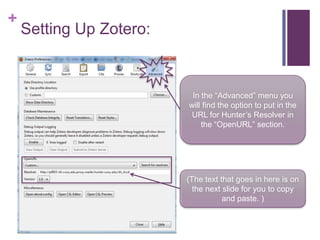
                          In the “Advanced” menu you
                         will find the option to put in the
                          URL for Hunter’s Resolver in
                             the “OpenURL” section.


                         (The text that goes in here is on
                           the next slide for you to copy
                                    and paste. )
+
    Setting Up Zotero:

     Here   is the text to put in the “Resolver” field:

http://p9003-sfx.cuny.edu.proxy.wexler.hunter.cuny.edu/sfx_local
+
    Setting Up Zotero:


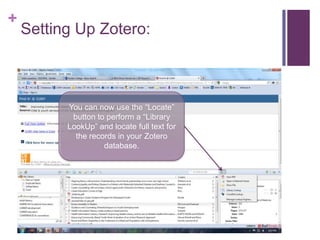
          You can now use the “Locate”
           button to perform a “Library
          LookUp” and locate full text for
            the records in your Zotero
                    database.
+


    That’s it! I hope this has helped.

Find Full Text with Zotero

  • 1.
    + Setting Up Zotero to Find Full Text at Hunter Libraries John Pell Assistant Professor Hunter College Libraries
  • 2.
    + Overview of what’s in this Tutorial:  Link Resolvers: The concept and technology behind linking to full text from a database record.  ModifyingZotero’s Settings to use Hunter College’s Link Resolver.
  • 3.
    + Link Resolvers Connecting to the full text of articles
  • 4.
    + Link Resolvers: You may have noticed this little “Find it!” button in online databases. It is what we call a “link resolver.”
  • 5.
    + Link Resolvers: Clicking the link resolver will take you to a page with options for finding full text of the record. This is accomplished through a Technology called “Open URL.”
  • 6.
    + Hunter’s Link Resolver This bit in the address bar is the URL for Hunter’s Link Resolver Service. We will use that to set up Zotero.
  • 7.
    + Modifying Zotero’s Settings Customize your experience for efficiency!
  • 8.
    + Setting Up Zotero: To set up Zotero to use Hunter’s link resolver, open Zotero preferences.
  • 9.
    + Setting Up Zotero: In the “Advanced” menu you will find the option to put in the URL for Hunter’s Resolver in the “OpenURL” section. (The text that goes in here is on the next slide for you to copy and paste. )
  • 10.
    + Setting Up Zotero:  Here is the text to put in the “Resolver” field: http://p9003-sfx.cuny.edu.proxy.wexler.hunter.cuny.edu/sfx_local
  • 11.
    + Setting Up Zotero: You can now use the “Locate” button to perform a “Library LookUp” and locate full text for the records in your Zotero database.
  • 12.
    + That’s it! I hope this has helped.