Financial Reporting Tools for Dynamics GP
Shootout
Presented by:
Charles Allen
BKD Technologies
Managing Consultant
Introduction – Charles Allen


                  o   Managing consultant
                  o   More than 20 years experience
                  o   Microsoft MVP
What You Will Learn
  What you will learn in this webinar
  • What three sets of tools offer you for financial reporting
  • How to write financial reports using each tool
  • How to distribute reports using each tool
Management Reporter/Forecaster
 • What it offers
    o   The ability to create financial reports based on General
        Ledger data
            Trial Balance
            Balance Sheet
            Income Statement
            Cash Flow
    o   Forecasting and budgeting with audit trails, collaboration,
        and approvals
Management Reporter/Forecaster
 • Advantages
   o   Ships with Microsoft Dynamics GP (Forecaster is available
       for Advanced Management only)
   o   Part of your GP license
   o   Report creation is very much like FRx – easy transition
   o   Does not require any version of Excel to run
Management Reporter/Forecaster
 • Advantages
   o   Exports to XBRL
   o   Security can be defined by tree unit, report and version
       level
   o   Building blocks are stored in a SQL database
Management Reporter/Forecaster
 • Disadvantages
   o   Does not provide e-mail distribution – yet
   o   Cannot produce graphs or charts
   o   Requires Active Directory and IIS to deploy
Management Reporter/Forecaster
 • Components
   o   Report Designer – Used to create and generate reports
   o   Report Viewer – Used to view reports
Management Reporter/Forecaster


             Demo
BI 360
  • What it offers
     o   Excel-based report creation
     o   Ad-hoc report creation
     o   Budgeting
     o   Dashboards
     o   Data warehouse
BI 360
  • Advantages
    o   Uses the familiar Excel application for creating reports
    o   Reports can be created that involves data from multiple
        series (GL, PM, RM, etc.)
    o   Report scheduling and distribution in different formats
        and methods
BI 360
  • Disadvantages
    o   Requires a separate purchase
    o   Requires Excel 2007/2010 for report creation
BI 360 Components
 •   Report Designer – Used to create reports
 •   Report Player – Used to view reports
 •   Report Publisher – Schedule and distribute reports
 •   Report Composer – Ad-hoc reporting
 •   Budgeting – Create budgets
BI 360 Components
 • Data Warehouse – Store data for multiple companies
   and from multiple data sources
 • Dashboards – Tool for creating dashboards
BI 360


         Demo
BizNet
  • What it offers
     o   Report creation among various modules
     o   Report publication using different methods and in
         different formats
BizNet
  • Advantages
    o   Uses Excel to create reports
    o   Reports can be published using different methods and in
        different formats
    o   Reports can be scheduled
BizNet
  • Disadvantages
    o   Requires Excel 2007/2010 to create reports
    o   Requires a separate purchase
    o   Does not work with Analytical Accounting
BizNet Components
 • BizInsight – report creation
 • BizContent – pre-built connections, content and
   analysis
 • BizBroadcast – generation of reports in different
   formats
BizNet


         Demo
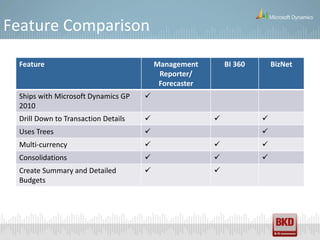
Feature Comparison

 Feature                                 Management        BI 360       BizNet
                                          Reporter/
                                          Forecaster
 Ships with Microsoft Dynamics GP    
 2010
 Drill Down to Transaction Details                                
 Uses Trees                                                        
 Multi-currency                                                   
 Consolidations                                                   
 Create Summary and Detailed                          
 Budgets
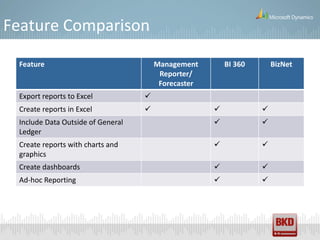
Feature Comparison

 Feature                               Management        BI 360       BizNet
                                        Reporter/
                                        Forecaster
 Export reports to Excel           
 Create reports in Excel                                        
 Include Data Outside of General                                 
 Ledger
 Create reports with charts and                                  
 graphics
 Create dashboards                                               
 Ad-hoc Reporting                                                
Feature Comparison

 Feature                         Management        BI 360       BizNet
                                  Reporter/
                                  Forecaster
 Distribute reports via e-mail                             
 Schedule reports to generate                              
 Send reports as PDF                                       
 Publish reports to SharePoint                             
 Use data in Data Warehouse                    
Microsoft Promotions

  • Holiday Season ERP Offer
     o   Purchase additional user licenses for 20% off
     o   Through December 22, 2011
  • License Model Transition Offer
     o   Transition to Business Ready Licensing for $500/user
     o   Through December 22, 2011
  • Business Ready Licensing Module Offer
     o   Purchase a la carte modules for up to 15% off the standard list price
     o   Through December 22, 2011
BKD Technologies Support Center

  • Monday - Friday, 8 a.m. - 5 p.m., call our Support Center
    toll free at:

  • Dynamics GP - 877.253.7778
    GPsupport@bkd.com
Stay Connected


  dynamicsGPinsights.com   Follow
                            us on
                           Twitter


                            Join us
                              on
                           LinkedIn

    At Dynamics GP
    Insights you can
   read articles, watch      View
   webinars & join the     videos at
      conversation!        YouTube
Upcoming Webinars


    December 15, 2011
    • Topic: Year-End Closing

    Register at: www.bkdtechnologies.com/attend
Charles Allen | Managing Consultant | 713.499.4629 | callen@bkd.com

Financial Reporting Tools for Dynamics GP Shootout

  • 1.
    Financial Reporting Toolsfor Dynamics GP Shootout Presented by: Charles Allen BKD Technologies Managing Consultant
  • 2.
    Introduction – CharlesAllen o Managing consultant o More than 20 years experience o Microsoft MVP
  • 3.
    What You WillLearn What you will learn in this webinar • What three sets of tools offer you for financial reporting • How to write financial reports using each tool • How to distribute reports using each tool
  • 4.
    Management Reporter/Forecaster •What it offers o The ability to create financial reports based on General Ledger data  Trial Balance  Balance Sheet  Income Statement  Cash Flow o Forecasting and budgeting with audit trails, collaboration, and approvals
  • 5.
    Management Reporter/Forecaster •Advantages o Ships with Microsoft Dynamics GP (Forecaster is available for Advanced Management only) o Part of your GP license o Report creation is very much like FRx – easy transition o Does not require any version of Excel to run
  • 6.
    Management Reporter/Forecaster •Advantages o Exports to XBRL o Security can be defined by tree unit, report and version level o Building blocks are stored in a SQL database
  • 7.
    Management Reporter/Forecaster •Disadvantages o Does not provide e-mail distribution – yet o Cannot produce graphs or charts o Requires Active Directory and IIS to deploy
  • 8.
    Management Reporter/Forecaster •Components o Report Designer – Used to create and generate reports o Report Viewer – Used to view reports
  • 9.
  • 10.
    BI 360 • What it offers o Excel-based report creation o Ad-hoc report creation o Budgeting o Dashboards o Data warehouse
  • 11.
    BI 360 • Advantages o Uses the familiar Excel application for creating reports o Reports can be created that involves data from multiple series (GL, PM, RM, etc.) o Report scheduling and distribution in different formats and methods
  • 12.
    BI 360 • Disadvantages o Requires a separate purchase o Requires Excel 2007/2010 for report creation
  • 13.
    BI 360 Components • Report Designer – Used to create reports • Report Player – Used to view reports • Report Publisher – Schedule and distribute reports • Report Composer – Ad-hoc reporting • Budgeting – Create budgets
  • 14.
    BI 360 Components • Data Warehouse – Store data for multiple companies and from multiple data sources • Dashboards – Tool for creating dashboards
  • 15.
    BI 360 Demo
  • 16.
    BizNet •What it offers o Report creation among various modules o Report publication using different methods and in different formats
  • 17.
    BizNet •Advantages o Uses Excel to create reports o Reports can be published using different methods and in different formats o Reports can be scheduled
  • 18.
    BizNet •Disadvantages o Requires Excel 2007/2010 to create reports o Requires a separate purchase o Does not work with Analytical Accounting
  • 19.
    BizNet Components •BizInsight – report creation • BizContent – pre-built connections, content and analysis • BizBroadcast – generation of reports in different formats
  • 20.
    BizNet Demo
  • 21.
    Feature Comparison Feature Management BI 360 BizNet Reporter/ Forecaster Ships with Microsoft Dynamics GP  2010 Drill Down to Transaction Details    Uses Trees   Multi-currency    Consolidations    Create Summary and Detailed   Budgets
  • 22.
    Feature Comparison Feature Management BI 360 BizNet Reporter/ Forecaster Export reports to Excel  Create reports in Excel    Include Data Outside of General   Ledger Create reports with charts and   graphics Create dashboards   Ad-hoc Reporting  
  • 23.
    Feature Comparison Feature Management BI 360 BizNet Reporter/ Forecaster Distribute reports via e-mail   Schedule reports to generate   Send reports as PDF   Publish reports to SharePoint   Use data in Data Warehouse 
  • 24.
    Microsoft Promotions • Holiday Season ERP Offer o Purchase additional user licenses for 20% off o Through December 22, 2011 • License Model Transition Offer o Transition to Business Ready Licensing for $500/user o Through December 22, 2011 • Business Ready Licensing Module Offer o Purchase a la carte modules for up to 15% off the standard list price o Through December 22, 2011
  • 25.
    BKD Technologies SupportCenter • Monday - Friday, 8 a.m. - 5 p.m., call our Support Center toll free at: • Dynamics GP - 877.253.7778 GPsupport@bkd.com
  • 26.
    Stay Connected dynamicsGPinsights.com Follow us on Twitter Join us on LinkedIn At Dynamics GP Insights you can read articles, watch View webinars & join the videos at conversation! YouTube
  • 27.
    Upcoming Webinars December 15, 2011 • Topic: Year-End Closing Register at: www.bkdtechnologies.com/attend
  • 28.
    Charles Allen |Managing Consultant | 713.499.4629 | callen@bkd.com