Purpose of this document   Created date: 4 August 2012
                           Last updated: 8 August 2012
                                  Create by Traitet Th.
PURPOSE OF THIS DOCUMENT

• To present the final prototype of e-menu

• To present main features of e-menu
 application on iPad before demonstration
 & interviews


                                             2
1) MENU CATEGORIES

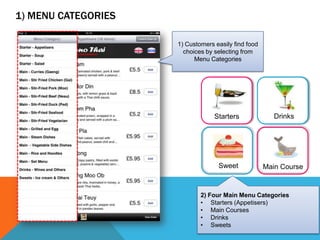
                     1) Customers easily find food
                       choices by selecting from
                           Menu Categories


                                  Starters              Drinks


                                   Sweet             Main Course


                             2) Four Main Menu Categories
                             • Starters (Appetisers)
                             • Main Courses
                             • Drinks
                             • Sweets                            3
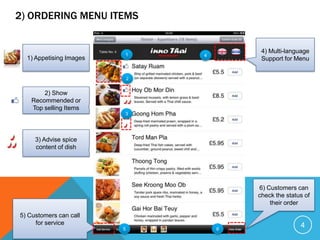
2) ORDERING MENU ITEMS


                                          4) Multi-language
                         1       4
  1) Appetising Images                    Support for Menu


                             2


        2) Show
    Recommended or
    Top selling Items
                         3


     3) Advise spice
     content of dish


                                         6) Customers can
                                         check the status of
                                             their order

5) Customers can call
     for service                                        4
                         5           6
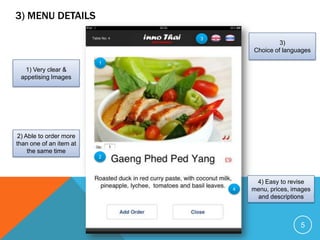
3) MENU DETAILS
                             3
                                              3)
                                     Choice of languages
                         1
  1) Very clear &
 appetising Images


2) Able to order more
than one of an item at
    the same time
                         2


                                      4) Easy to revise
                                 4   menu, prices, images
                                      and descriptions


                                                     5
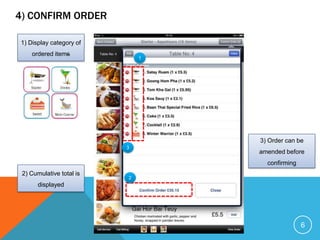
4) CONFIRM ORDER

1) Display category of
    ordered items
                              1


                                  3) Order can be
                          3
                                  amended before
                                    confirming
 2) Cumulative total is
                          2
       displayed


                                                 6
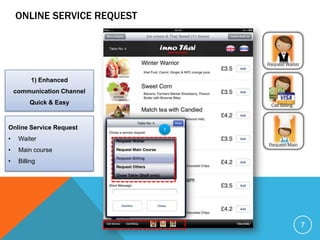
ONLINE SERVICE REQUEST


          1) Enhanced
    communication Channel
         Quick & Easy


Online Service Request       1

•    Waiter
•    Main course
•    Billing


                                 7
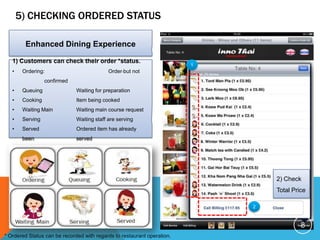
5) CHECKING ORDERED STATUS

         Enhanced Dining Experience

   1) Customers can check their order *status.
                                                                         1
   •    Ordering:                           Order but not
                  confirmed
   •    Queuing               Waiting for preparation
   •    Cooking               Item being cooked
   •    Waiting Main          Waiting main course request
   •    Serving               Waiting staff are serving
   •    Served                Ordered item has already
        been                  served


                                                                                 2) Check
                                                                                 Total Price

                                                                             2


                                                                                          8
* Ordered Status can be recorded with regards to restaurant operation.
BENEFITS
1.   Enhances dining experience

2.   Increases restaurant revenue

3.   Reduces waiting time e.g. making order and payment

4.   Increases turnover rate in peak times

5.   Improves customer services

6.   Customers receive their orders faster

7.   Encourages and enables diners to order extra food or drinks at any time during their
     meal.


                                                                                            9
BENEFITS (CONT.)
8.   Avoids having a language barrier and encourages other language speakers to visit the
     restaurant.
9.   Real-time Order to Kitchen and Bar
10. Enhances communication to improve services
11. Easy to check best selling items
12. Easy to modify menu on Web Application
       Register new menu

       Register new promotions e.g. discounts

       Change prices

       Change descriptions

       Change images


                                                                                            10

Final_A21 functions on_ipad

  • 1.
    Purpose of thisdocument Created date: 4 August 2012 Last updated: 8 August 2012 Create by Traitet Th.
  • 2.
    PURPOSE OF THISDOCUMENT • To present the final prototype of e-menu • To present main features of e-menu application on iPad before demonstration & interviews 2
  • 3.
    1) MENU CATEGORIES 1) Customers easily find food choices by selecting from Menu Categories Starters Drinks Sweet Main Course 2) Four Main Menu Categories • Starters (Appetisers) • Main Courses • Drinks • Sweets 3
  • 4.
    2) ORDERING MENUITEMS 4) Multi-language 1 4 1) Appetising Images Support for Menu 2 2) Show Recommended or Top selling Items 3 3) Advise spice content of dish 6) Customers can check the status of their order 5) Customers can call for service 4 5 6
  • 5.
    3) MENU DETAILS 3 3) Choice of languages 1 1) Very clear & appetising Images 2) Able to order more than one of an item at the same time 2 4) Easy to revise 4 menu, prices, images and descriptions 5
  • 6.
    4) CONFIRM ORDER 1)Display category of ordered items 1 3) Order can be 3 amended before confirming 2) Cumulative total is 2 displayed 6
  • 7.
    ONLINE SERVICE REQUEST 1) Enhanced communication Channel Quick & Easy Online Service Request 1 • Waiter • Main course • Billing 7
  • 8.
    5) CHECKING ORDEREDSTATUS Enhanced Dining Experience 1) Customers can check their order *status. 1 • Ordering: Order but not confirmed • Queuing Waiting for preparation • Cooking Item being cooked • Waiting Main Waiting main course request • Serving Waiting staff are serving • Served Ordered item has already been served 2) Check Total Price 2 8 * Ordered Status can be recorded with regards to restaurant operation.
  • 9.
    BENEFITS 1. Enhances dining experience 2. Increases restaurant revenue 3. Reduces waiting time e.g. making order and payment 4. Increases turnover rate in peak times 5. Improves customer services 6. Customers receive their orders faster 7. Encourages and enables diners to order extra food or drinks at any time during their meal. 9
  • 10.
    BENEFITS (CONT.) 8. Avoids having a language barrier and encourages other language speakers to visit the restaurant. 9. Real-time Order to Kitchen and Bar 10. Enhances communication to improve services 11. Easy to check best selling items 12. Easy to modify menu on Web Application  Register new menu  Register new promotions e.g. discounts  Change prices  Change descriptions  Change images 10

Editor's Notes

  • #10 Put this page on another slide