UNIT 5: FINAL PROJECT.
Project name:
MATHS is REAL LIFE
Student's age:14-16 years old.
Language: English
Subject involved: English,technology,Natural Science and Social Science and Art.
ABSTRACT
Mathematics is a subject that provides opportunities to learn about the relevance of
mathematics to every day life.Mathematics is all around us.
In this project, each country could choose one part of Mathematics and students could look for
skills for use and apply mathematical ideas in real life situacions.
Mathematics may be seen as the science of magnitude, number, shape, space,
and their relationships and also as a universal language based on symbols and diagrams.
This mathematics curriculum provides opportunities for the child to explore the nature of
mathematics and to acquire the knowledge, concepts and skills required for everyday living
and to use in other subject areas.
Once students experience the value of math in everyday life, learning becomes relevant,
real and rewarding.
Through curiosity, exploration and determination to succeed,learners grasp
critical concepts, build confidence and gain valuable 21st century skills.
GOALS
MATHS IN REAL LIFE allows students to develop an understanding of
how mathematics is relevant to everyday life. The project aims to:
For students:
-Use and apply mathematical ideas in real-life situations of diferents
countries in English.
- Develop ICT skills and mathematical tools.
-Use different technological resources so involving an aid in learning and
instrumental applications of mathematics.
-Work co-operatively with students other countries.
For teacher:
-Engage in PBL.
-Improve our methodologies.
-Collaborative work.
ICT activity.
The online activities can easily be used to replace a standard worksheet or a
pencil-and-paper driven assignment.
There is a lot of software available to enhance the teaching of mathematics.
This project focuses on creating resources for use in the classroom that will be
flexible and interactive.
WORK PROCESS
A constructivist approach to mathematics learning involves the child as an active participant in the
learning process and do activities with students another countries.
New ideas or concepts may then be constructed. The importance of providing the child with
structured opportunities to engage in exploratory activity in the context of mathematics cannot be
overemphasised. The teacher has a crucial role to play in guiding the child to construct meaning,to
develop mathematical strategies for solving problems, and to develop selfmotivation in
mathematical activities.Learning by discovery.
For children to really understand mathematics they must see it in context, and this can be done
through drawing attention to the various ways in which we use mathematics within other subjects in
the curriculum.
Steps of the activity
Step 1: Introduction of the students-city,country,school.
In the first place ,each country introduces itself to another country through some software that
teachers offer them.
* Creating a facebook group for a better communication and collaboration.
* Registering students in TwinSpace.
Poster, Logo, windows movie maker, audacity, YouTube
Step 2: Organize the project.
The mathematics curriculum comprises six strands;Arithmetics,Algebra, Geometry,Analysis,
Probability and Statistics.
There will be 6 teams and each team will be with a pupil of one country.
Six different countries are not necessary but six teams are needed to look for activities for each of the strands.
Pupils in each school that participates in the project can choose in which parts of Maths
they prefer to participate.
Every team has to do a blog and look for activities to show us and each team will work collaboratively on line
Step 3: We will use, basically,
Google tools because a majority of students know them and allow for cooperative work. This
project focuses on creating resources to use in the classroom that will be flexible and interactive.
GEOGEBRA very important tool and very useful.
Microsoft Excel is the basis for all of the resources.
There are a number of advantages to using Excel. Firstly almost all schools already have Excel running on all of
their computers, so no extra cost is needed. Excel is ideal for looking at number and data handling work, it is also
possible to produce workbooks to investigate certain aspects of algebra and shape and space.
Visual Literacy in Maths to use highly effective images to enable students to more readily interpret and make meaning from
presented mathematical material.it is important that teachers attempt to teach Mathematics using the most visual and
practical approaches possible.
Step 4 : Every team is going to do its part of the project and teachers review the work .
They must look for where they use maths in life.Maths everywhere and for everything.
They will meet online to decide which activities to include in the final project.
Step 5: The results will be published in our e-twinning platform, organised
chronologically by periods.
1.Arithmetic
Types of
Numbers:
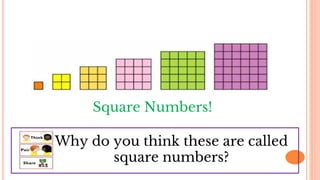
Square Numbers
Square Numbers!
Why do you think these are called
square numbers?
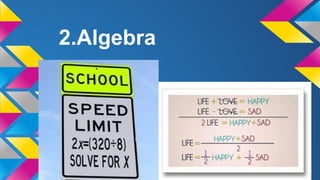
2.Algebra
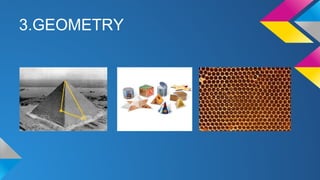
3.GEOMETRY
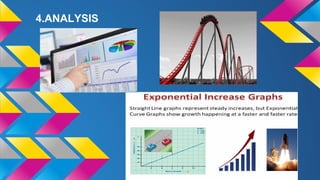
4.ANALYSIS
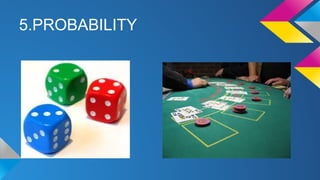
5.PROBABILITY
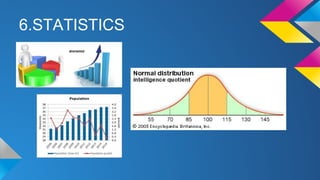
6.STATISTICS
EXPECTED RESULTS
Results include work and education documents,products made by students,impact in the
school and comunity.
Assessment will be formative (single projects and quizzes) and summative (e-portfolio).
At the end of the whole project, students, teachers and parents will be asked to answer a few
questions (Google Forms) in order to have a general feedback.
Dissemination will be implemented through:
- Creation of a website and links to the students' e-portfolios.
- Repository containing the resources created during the e-twinning project.
-Project blog.
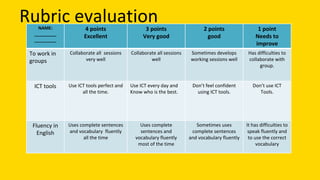
This is a rubric to evaluate objectives of each group.
Rubric evaluationNAME:
_________
_________
4 points
Excellent
3 points
Very good
2 points
good
1 point
Needs to
improve
To work in
groups
Collaborate all sessions
very well
Collaborate all sessions
well
Sometimes develops
working sessions well
Has difficulties to
collaborate with
group.
ICT tools Use ICT tools perfect and
all the time.
Use ICT every day and
Know who is the best.
Don’t feel confident
using ICT tools.
Don’t use ICT
Tools.
Fluency in
English
Uses complete sentences
and vocabulary fluently
all the time
Uses complete
sentences and
vocabulary fluently
most of the time
Sometimes uses
complete sentences
and vocabulary fluently
It has difficulties to
speak fluently and
to use the correct
vocabulary

Final project

  • 1.
    UNIT 5: FINALPROJECT. Project name: MATHS is REAL LIFE
  • 2.
    Student's age:14-16 yearsold. Language: English Subject involved: English,technology,Natural Science and Social Science and Art. ABSTRACT Mathematics is a subject that provides opportunities to learn about the relevance of mathematics to every day life.Mathematics is all around us. In this project, each country could choose one part of Mathematics and students could look for skills for use and apply mathematical ideas in real life situacions. Mathematics may be seen as the science of magnitude, number, shape, space, and their relationships and also as a universal language based on symbols and diagrams. This mathematics curriculum provides opportunities for the child to explore the nature of mathematics and to acquire the knowledge, concepts and skills required for everyday living and to use in other subject areas. Once students experience the value of math in everyday life, learning becomes relevant, real and rewarding. Through curiosity, exploration and determination to succeed,learners grasp critical concepts, build confidence and gain valuable 21st century skills.
  • 3.
    GOALS MATHS IN REALLIFE allows students to develop an understanding of how mathematics is relevant to everyday life. The project aims to: For students: -Use and apply mathematical ideas in real-life situations of diferents countries in English. - Develop ICT skills and mathematical tools. -Use different technological resources so involving an aid in learning and instrumental applications of mathematics. -Work co-operatively with students other countries. For teacher: -Engage in PBL. -Improve our methodologies. -Collaborative work.
  • 4.
    ICT activity. The onlineactivities can easily be used to replace a standard worksheet or a pencil-and-paper driven assignment. There is a lot of software available to enhance the teaching of mathematics. This project focuses on creating resources for use in the classroom that will be flexible and interactive. WORK PROCESS A constructivist approach to mathematics learning involves the child as an active participant in the learning process and do activities with students another countries. New ideas or concepts may then be constructed. The importance of providing the child with structured opportunities to engage in exploratory activity in the context of mathematics cannot be overemphasised. The teacher has a crucial role to play in guiding the child to construct meaning,to develop mathematical strategies for solving problems, and to develop selfmotivation in mathematical activities.Learning by discovery. For children to really understand mathematics they must see it in context, and this can be done through drawing attention to the various ways in which we use mathematics within other subjects in the curriculum.
  • 5.
    Steps of theactivity Step 1: Introduction of the students-city,country,school. In the first place ,each country introduces itself to another country through some software that teachers offer them. * Creating a facebook group for a better communication and collaboration. * Registering students in TwinSpace. Poster, Logo, windows movie maker, audacity, YouTube Step 2: Organize the project. The mathematics curriculum comprises six strands;Arithmetics,Algebra, Geometry,Analysis, Probability and Statistics. There will be 6 teams and each team will be with a pupil of one country. Six different countries are not necessary but six teams are needed to look for activities for each of the strands. Pupils in each school that participates in the project can choose in which parts of Maths they prefer to participate. Every team has to do a blog and look for activities to show us and each team will work collaboratively on line
  • 6.
    Step 3: Wewill use, basically, Google tools because a majority of students know them and allow for cooperative work. This project focuses on creating resources to use in the classroom that will be flexible and interactive. GEOGEBRA very important tool and very useful. Microsoft Excel is the basis for all of the resources. There are a number of advantages to using Excel. Firstly almost all schools already have Excel running on all of their computers, so no extra cost is needed. Excel is ideal for looking at number and data handling work, it is also possible to produce workbooks to investigate certain aspects of algebra and shape and space. Visual Literacy in Maths to use highly effective images to enable students to more readily interpret and make meaning from presented mathematical material.it is important that teachers attempt to teach Mathematics using the most visual and practical approaches possible. Step 4 : Every team is going to do its part of the project and teachers review the work . They must look for where they use maths in life.Maths everywhere and for everything. They will meet online to decide which activities to include in the final project. Step 5: The results will be published in our e-twinning platform, organised chronologically by periods.
  • 7.
  • 8.
    Types of Numbers: Square Numbers SquareNumbers! Why do you think these are called square numbers?
  • 9.
  • 10.
  • 11.
  • 12.
  • 13.
  • 14.
    EXPECTED RESULTS Results includework and education documents,products made by students,impact in the school and comunity. Assessment will be formative (single projects and quizzes) and summative (e-portfolio). At the end of the whole project, students, teachers and parents will be asked to answer a few questions (Google Forms) in order to have a general feedback. Dissemination will be implemented through: - Creation of a website and links to the students' e-portfolios. - Repository containing the resources created during the e-twinning project. -Project blog. This is a rubric to evaluate objectives of each group.
  • 15.
    Rubric evaluationNAME: _________ _________ 4 points Excellent 3points Very good 2 points good 1 point Needs to improve To work in groups Collaborate all sessions very well Collaborate all sessions well Sometimes develops working sessions well Has difficulties to collaborate with group. ICT tools Use ICT tools perfect and all the time. Use ICT every day and Know who is the best. Don’t feel confident using ICT tools. Don’t use ICT Tools. Fluency in English Uses complete sentences and vocabulary fluently all the time Uses complete sentences and vocabulary fluently most of the time Sometimes uses complete sentences and vocabulary fluently It has difficulties to speak fluently and to use the correct vocabulary