Linking Performance to Insight: Designing a Computer Aided
Testing System to Re ect Students' Reasoning Patterns
Joan Mazur
Dep. of Curriculum and Instructional Design
University of Kentucky, U.S.A.
E-Mail: jmazur@pop.uky.edu
BorChyi Lin
Dep. of Educational and Counseling Psychology
University of Kentucky, U.S.A.
E-Mail: bclin@pop.uky.edu
Abstract: Computer Aided Instruction (CAI) o ers students the advantage to conduct a self-
paced, self-directed study of topic(s). When CAI includes computer testing, this feature serves as an
additional tool to assess the students' performance. This article discusses the potential of computer
testing not just as an assessment of the student's performance but also as an enhancement that
increases the e ectiveness of CAI by prompting re ection. Data from the preliminary initial eld
test is presented. Issues regarding the e ects of such an approach are also discussed.
Computer Tracking and Assessment Tools
In recent years the utility of computer tracking tools has been well documented in research
and development Williams & Dodge, 1993 Gay & Mazur, 1993]. Computer tracking such as the one
designed for the system under discussion in this paper was mentioned as early as 1968 in a computer-
based instructional system paper by Grubb (i.e. audit trails). In fact, audit trails have been used for a
broad range of research activities integral to the design of interactive programs Misanchuk & Schwier,
1992]. It has also been used for data collection in formative evaluation in instructional design Flagg,
1990] for basic research in instructional design e.g.see Ross et al., 1990] for market e ectiveness studies
in public information environments such as museum or retail store kiosks Misanchuk & Schwier, 1992]
for human-computer interaction research Bodker et al., 1988 Ehn, 1988 Greenbaum & Kyng, 1991]
and, nally, relating to the study this paper is addressing, for providing on-line guidance and feedback
based on a real-time log of users' actions within an instructional program Gay & Mazur, 1993].
Tracking utilities are powerful tools for understanding users' actions in environments with high
learner control or where the informationis structured non-sequentially such as hypermedia or the World-
Wide Web (WWW). However, audit trail information is crucial in assessing students' interactions in
linear structures as well. When audit trail feedback is made visible to the user it can provide a basis for
re ection on learning and thinking Gay & Mazur, 1993].
Background
In 1994, the University of Kentucky College of Medicine restructured its medical education cur-
riculum ACME, 1994]. The changes in the curriculum aspired to promote three aspects in teaching
and learning: (a) student's self-paced learning, (b) build a greater association between the basic science
knowledge base and clinical practice, and (c) introduce new methodologies in teaching. Lecture ma-
terial was converted to interactive multimedia format in an attempt to address many of the changes in
curriculum focus.
This interactive multimedia format displays innovation on two ways. First, it provides students
with material not normally available outside the classroom, e.g., a digitized version of lecture slides
and faculty lectures notes using advanced computer technology. Secondly, the interactive multimedia
formatwas designed fromthe vary beginning to provide a pathway for faculty to convert their traditional
teaching materials to digital format. This streamlined process has calmed faculty members fears about
the time thy would have to devote to the conversion process. An instructional bene t of this conversion
has been the implementation of advantages to interactive multimedia, such as self-paced learning and
periodic quizzes.
CATS (Computer Aided Testing System) has been developed for use with on-line instructional
materials at the College of Medicine at the University of Kentucky. This dynamic system is unique
because its structure, functions, and resources make it a useful tool for self-re ection for both students
and teachers. The design enables students to perform strategic re ection and error correction actions
associated with e ective metacognitive approaches to individual learning. Features of the interface
emulate and extend several useful characteristics of a e cient test taker's associated formerlywith paper-
and-pencil test environment. For example, the user has the option of crossing out wrong multiple choice
answers, a form of self-monitoring. This option is complimented with an on-line tracking utility that
provides feedback regarding correct answers and supports on-line tutorial guidance. The tracking utility
reports data to the user in a form that traces the student's pattern of thinking. Thus, students can see
more clearly the reason for their errors and understand justi cations for correct answers. Moreover, the
information can also support re ective teaching practices. Teachers who access these tracking reports
can, like the students, begin to link pupils' reasoning patterns to performance. Instruction can be
evaluated and pedagogical strategies and interventions devised. In addition, the system can also detect
poorly written test items, which can be used to strengthen the content validity or reliability of the test
items. Using the CATS resources students and teachers can begin to link performance to insight in
support of meaningful learning and e ective teaching.
Description of the Prototype
Basically, CATS contains three major components (1) A test item selection scheme, (2) An multi-
faceted user interface and, (3) A test data analysis scheme. Each component is described in detail in
the following sections:
The Test Item Selection Scheme
The test item selection scheme is based on Item Response Theory (IRT) to maximize the random-
ness for test items selection and fairness for the student user in terms of a proper sample of items with
appropriate content and di culty. The test item pool consists of a fairly large number of test items.
Each item has a di culty level associated with it. The di culty level is de ned as a range of 0 through
10. A di culty level of 0 means that 0 percent of the students will fail on this particular test item. A
di culty level of 5 means that 50 percent of the students are likely to fail on that particular test item.
CATS will then pick up equal amount of test items in each di culty level currently CATS selects a
total of 20 items for one test set, and includes two items for each di culty level.
The User Interface
The user interface in CATS augments the familiar test taking strategies available in paper-and-
pencil tests with enhancements that evaluate the students' performance on the particular area in which
they are tested. Most of the traditional computer programs do not allow the same meta-learning strate-
gies used with traditional paper-and-pencil tests nor do they provide feedback to the user. In most
computer administered testing programs students are forced to make a decision before they can do the
next question. In CATS, students can have a exible testing environment. If students are not sure about
answers to a test item, then they can place a question mark on that particular answer and come back
to the test item after they have nished other items. Or they can answer a test item by eliminating
answers that have the least possibilities of being correct, again by making a notation of marking on the
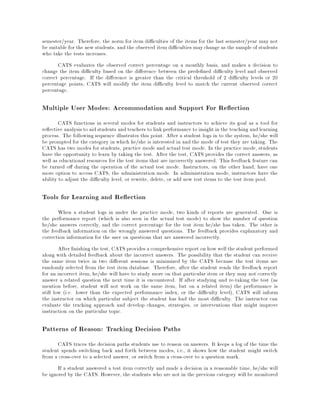
computer screen next to particular answers. Figs. 1-3] show the interface features.
Figure 1: Initial CATS Test Screen
Figure 2: Normal CATS operation with accompanying a media for test
Strategic Logging System
A strategic logging system provides a record of the response latency for the user's answers as well
as facilitating useful strategies available in a familiar test taking situation such as browsing through the
test items, markingon a doubtful answer or question, or eliminatinganswers that don't seem reasonable.
Technically, any computer simulated test program can provide more information than the hard-copy
version. However, most standard computerized test programs do not allow the user to browse through
Figure 3: CATS Features for Annotating Test Items
the exam, or mark the answers that are not clear, or cross out the answers that are least possible to be
corrected.
The CATS user interface provides three di erent kinds of options. The response option is used
for selecting a correct answer from a test item by clicking on the answer. As the user selects an answers,
the response latency is recorded and the answer is stored. The cross-out option enables the student to
mark-out an answer. Hence he/she can eliminate answers that are not thought plausible. On the other
hand, even if the student is familiarwith the content but all the answers seems possible, then he/she will
have to eliminateanswers that are least likely to be corrected and come out with the correct answer from
a smaller answer pool for this test item. The question mark option, posts a question mark on answers
that the student judges as possible but doubtful. A student can proceed to the next test item without
answering the current one. Before the user logs out of the system, CATS will prompt the student that
there are questions left unanswered. Then the student has the option of going back and answering the
unanswered item(s).
Data Analysis Scheme
The last component of the program is data analysis. After the student completes all the test
items, and log out of CATS, the program then collects all the answers and the time the student devoted
to each item. The program then calculates the percent of correctly answered items (number of students
who passed each test item/totalnumber of students taking the test), as well as the average time required
to complete each test item. The program prepares a report for each student: How they performed on
each item, their overall performance, as well as the overall time required to complete the test.
Determining Test Item Di culty
An arti cial intelligent engine (a sub-program) is embedded in CATS to monitor and modify the
norm (the di culty level) for test items. Initially the norm is set by the instructor. The instructor,
estimates item di culty based on his/her teaching experience and di culty of the material involved
in the test item. However, students' performance varies because new students keep coming in every
semester/year. Therefore, the norm for item di culties of the items for the last semester/year may not
be suitable for the new students, and the observed item di culties maychange as the sample of students
who take the tests increases.
CATS evaluates the observed correct percentage on a monthly basis, and makes a decision to
change the item di culty based on the di erence between the prede ned di culty level and observed
correct percentage. If the di erence is greater than the critical threshold of 2 di culty levels or 20
percentage points, CATS will modify the item di culty level to match the current observed correct
percentage.
Multiple User Modes: Accommodation and Support For Re ection
CATS functions in several modes for students and instructors to achieve its goal as a tool for
re ective analysis to aid students and teachers to link performance to insight in the teaching and learning
process. The following sequence illustrates this point. After a student logs in to the system, he/she will
be prompted for the category in which he/she is interested in and the mode of test they are taking. The
CATS has two modes for students, practice mode and actual test mode. In the practice mode, students
have the opportunity to learn by taking the test. After the test, CATS provides the correct answers, as
well as educational resources for the test items that are incorrectly answered. This feedback feature can
be turned o during the operation of the actual test mode. Instructors, on the other hand, have one
more option to access CATS, the administration mode. In administration mode, instructors have the
ability to adjust the di culty level, or rewrite, delete, or add new test items to the test item pool.
Tools for Learning and Re ection
When a student logs in under the practice mode, two kinds of reports are generated. One is
the performance report (which is also seen in the actual test mode) to show the number of question
he/she answers correctly, and the correct percentage for the test item he/she has taken. The other is
the feedback information on the wrongly answered questions. The feedback provides explanatory and
correction information for the user on questions that are answered incorrectly.
After nishing the test, CATS provides a comprehensive report on how wellthe student performed
along with detailed feedback about the incorrect answers. The possibility that the student can receive
the same item twice in two di erent sessions is minimized by the CATS because the test items are
randomly selected from the test item database. Therefore, after the student reads the feedback report
for an incorrect item, he/she will have to study more on that particular item or they may not correctly
answer a related question the next time it is encountered. If after studying and re-taking the test (as
mention before, student will not work on the same item, but on a related item) the performance is
still low (i.e. lower than the expected performance index, or the di culty level), CATS will inform
the instructor on which particular subject the student has had the most di culty. The instructor can
evaluate the tracking approach and develop changes, strategies, or interventions that might improve
instruction on the particular topic.
Patterns of Reason: Tracking Decision Paths
CATS traces the decision paths students use to reason on answers. It keeps a log of the time the
student spends switching back and forth between modes, i.e., it shows how the student might switch
from a cross-over to a selected answer, or switch from a cross-over to a question mark.
If a student answered a test item correctly and made a decision in a reasonable time, he/she will
be ignored by the CATS. However, the students who are not in the previous category will be monitored
next time they log on to the CATS. The hypothesis is that if a student can answer correctly and within a
short period of time,then the student must know the content of this test item well. That is to say, CATS
does not consider the issue of guessing.1 For students who are not able to answer correctly, take longer
times to answer, answer correctly but out of the time limit, answer with a long decision path (select ->
mark question -> cross-out), CATS will send a message to instructor so that the instructor can focus
on these students, assess the situation and if a problem exists, addresses it and hopefully correct the
problem.
Linking Performance to Insight
Two types of students' responses monitored by CATS, the cross-out and question marking, are
hypothesized be particularly useful to begin to gain insight into students' thinking and as a basis for
re ection. The chief reason for tracking these two behaviors is, that we are trying to understand more
about the relationship between these behaviors, the underlying thought processes, and performance. If
a student answers correctly, but exceeds the time allocated for this test item, and alters his/her decision
path several times (from cross-out to question mark, then correctly select the answer) then this pattern
may provide both the student and the instructor an indicator of students' thinking about content of the
question. Perhaps the student is unfamiliar with the subject. Or perhaps the student is unfamiliar with
the test delivery system. If the student is a rst-time user or a novice computer user more practice on
CATS may be needed. If response time is critical to answering the test item (e.g. the item requires an
quick response), then even though the student selects correctly and the response will be considered a
failure because it was not completed in the requisite time frame.
In any case, the instructor should also examine the validity of the test item itself. If the average
time to complete a test item is longer than the pre-de ned time then this might be an indication that
the test item is poorly written or ine ective pedagogy has led to misconceptions.
Supporting Re ection on Response
As previously described, each student's activities before making a decision (selecting an answer)
are logged. Therefore, if a student answers incorrectly, the path of reasoning, meticulously traced by
the tracking utility is available for inspection. The instructor can infer problem areas and can discuss
the decision path with the students. Similarly students can use the log to self-assess di culty. Online
guidance, provided by the feedback system, provides information to correct the inaccuracy or student's
misconception. The feedback system functions in a similar manner to an interactive trial and error
system. For example, after a sequence of operations (crossing out, marking question mark) a student
may nally select an answer, but it's wrong. CATS has all the answers that have been selected either
for the cross-out or question mark mode. Then the feedback system will explain why these are not the
correct answers and also provide guidance to the student telling how to approach the correct answer.
Students can truly learn by making mistakes because the feedback system provides not only correct
information but su cient information to correct the wrong perception as well.
The Initial Field Test
The CATS was used in conjunction with a multimedia program containing information on oral
radiology. Twenty intraoral radiography were displayed on PowerMac 7100s. Two examination groups
consisting of 26 students were identi ed. Two examinations were administered consisting of ten multiple
1Guessing is a factor that, if taken into account, eliminates the response latency as an indicator of accessible
understanding.
choice questions each. Questions ascertained information regarding radiographic landmarks and inter-
pretation The computerized exam followed by the written exam was administered to group 1. Group 2
received the exams in opposite order. The written exam for Group 1 contained the same questions as on
group 2's computer exam and vice versa. Both exams were designed to be equivalent in assessment of
aptitude. Students in Group I were matched by grade point average with those in Group 2. Questions
were derived from a bank of questions used at the University of Kentucky College of Dentistry. The
examination was evaluated in a cross-over study. After completion of the exam, students were surveyed
to determine their experience with computers and the platform of computer they routinely used.
After logging in, a series of ten questions were presented. All students received the same ten
questions but in random sequence. Each question was accompanied by an icon of a radiographic image.
When the icon was activated, the size of the image increased to a nal format of 520x310 pixels. A mul-
tiple choice question was viewed simultaneously with the image as seen in Fig. 2]. Students responded
to the question by selecting the correct choice using the mouse button. If uncertain, they could place
a question mark by the response. If the responses were believed to be incorrect, they could mark it
with an x" which would delete that response. After answering each question, the student advanced to
the next question using the forward arrow icon. At the end of the exam, the computer would prompt
the student to return to any unanswered questions that they had left a question mark. The written
exam was similar in format to the computer exam except radio graphs were projected and the questions
answered.
All test responses were graded by computer. The amount of time students spent on the com-
puterized exam was recorded by the computer and tabulated. The computerized test score, the written
test score, the level of computer expertise, and the student's grade point average entering the exam
were recorded. To evaluate the question of whether students can perform equally on a computerized
test as the normal written test scenario, comparisons of performance were made of students in Group 1
(computer exam rst, written exam second) with Group 2 (written exam rst, computer exam second)
using Pearson's Correlation Coe cient, Chi-square, and paired t-test.
Findings
The results showed no correlation between the students' performance and the students' familiarity
with the use of a computer nor the computer platform they were using. Also a review of the tracking
logs, revealed that features provided to students for self assessment and re ection were largely ignored.
There are several possible explanations for these results. For one, while the CATS program
provides the familiarities as seen in traditional exams, there are the additional features build into the
program to encourage re ective thinking. Perhaps the students viewed CATS as a basic/normalmultiple
choices exam. and were not skilled in the use of the on-line enhancements. Also because of the structure
of the instructional settings, students are forced to concentrate on the products instead of the processes.
As a result, CATS did not have desired result of stimulating re ective thinking in the given student
population.
Current Status and Future Direction
The Implementation of CATS is an ongoing project at the University of Kentucky College of
Dentistry. The project is integral to the computer based curriculum development activities. It is clear
from the preliminary data, students need training in the use of an assessment" tool for augmenting
instruction. Also, instructors need assistance focusing onprocess outcomesrather thanproduct outcomes
instruction. Currently, the educational culture in medical school does not emphasize there orientations.
Future eld testing after these approaches have been implemented will give a clearer picture of the
e ectiveness of the CATS tool.
A hybrid version of this test system will also be implemented using web browser technology. The
use of this multimedianetwork browser will increase the functionality of the current CATS design. Most
notably, the use of web browser technology will signi cantly enhance the capability to exchange the
information on line. Instructors and students at diverse locations can use the system and discuss the
tracking informationon-line. The presence ofComputerAided Testing System mayprovide opportunities
to assess the impact of the internet in higher education, to link performance to insight, and to distribute
that knowledge Perkins, 1993] to a variety of applicable contexts.
References
ACME, 1994] Academic Computing in Medical Education (1994). Ischemic Heart Disease: Digital
Lecture Series. Brochure]. College of Medicine, University of Kentucky: Rubeck, R. & Tieman, J.
Bodker et al., 1988] Bodker, S., Knudsen, J., Kyng, M., Ehn, P., & Madsen, K. (1988). Computer
support for cooperative design. In CSCW 88: Proceedings of the Conference on Computer Supported
Cooperative Work, pp. 377 | 394 Portland, OR.
Ehn, 1988] Ehn, P. (1988). Work-oriented design of computer artifacts. Falkoping: Almqvist and
Wiksell International.
Flagg, 1990] Flagg, B. (1990). Formative evaluation for educational technologies. Harvard U., Cam-
bridge, MA.
Gay & Mazur, 1993] Gay, G., & Mazur, J. (1993). The utility of computer tracking tools for user-
centered design. Educational technology, 4, 45 | 59.
Greenbaum & Kyng, 1991] Greenbaum, J., & Kyng, M. (1991). Design at work. Cooperative design of
computer systems. Hillsdale, NJ: Lawrence Erlbaum Associates.
Misanchuk & Schwier, 1992] Misanchuk, E., & Schwier, R. (1992). Representing interactive multimedia
and hypermedia audit trails. Journal of Educational Multimedia and Hypermedia, 1(3), 55 | 72.
Perkins, 1993] Perkins, D. (1993). Distributed cognitions: Psychological and educational considerations.
In Salomon, G. (Ed.), Person-plus: A distributed view of thinking and learning. New York, NY:
Cambridge University Press.
Ross et al., 1990] Ross, S., Morrison, G., & O'Dell, J. (1990). Uses and e ects of learner control of
context and instructional support in computer-based instruction. In Annual Meeting of the Association
of Educational Communications and Technology Anaheim, CA.
Williams & Dodge, 1993] Williams, M., & Dodge, B. (1993). Tracking and analyzing learner-computer
interaction. In Selected research and development presentations at the convention of the association for
educational communications and technology, pp. 13 |17 New Orleans, LA.
Acknowledgments
This project was funded under the title Preparing Physician for the Future: A Program in Medical
Education" sponsored by the Robert Wood Johnson Foundation number 019643. This project was a
product of Academic Computing in Medical Education (ACME) under the directorship of Dr. Robert
F. Rubeck at the University of Kentucky, College of Medicine. Special thanks to John R. Fuller, III and
Kathryn Wong Rutledge of the MCFACTS Center, Chandler Medical Center, University of Kentucky.

final

  • 1.
    Linking Performance toInsight: Designing a Computer Aided Testing System to Re ect Students' Reasoning Patterns Joan Mazur Dep. of Curriculum and Instructional Design University of Kentucky, U.S.A. E-Mail: jmazur@pop.uky.edu BorChyi Lin Dep. of Educational and Counseling Psychology University of Kentucky, U.S.A. E-Mail: bclin@pop.uky.edu Abstract: Computer Aided Instruction (CAI) o ers students the advantage to conduct a self- paced, self-directed study of topic(s). When CAI includes computer testing, this feature serves as an additional tool to assess the students' performance. This article discusses the potential of computer testing not just as an assessment of the student's performance but also as an enhancement that increases the e ectiveness of CAI by prompting re ection. Data from the preliminary initial eld test is presented. Issues regarding the e ects of such an approach are also discussed. Computer Tracking and Assessment Tools In recent years the utility of computer tracking tools has been well documented in research and development Williams & Dodge, 1993 Gay & Mazur, 1993]. Computer tracking such as the one designed for the system under discussion in this paper was mentioned as early as 1968 in a computer- based instructional system paper by Grubb (i.e. audit trails). In fact, audit trails have been used for a broad range of research activities integral to the design of interactive programs Misanchuk & Schwier, 1992]. It has also been used for data collection in formative evaluation in instructional design Flagg, 1990] for basic research in instructional design e.g.see Ross et al., 1990] for market e ectiveness studies in public information environments such as museum or retail store kiosks Misanchuk & Schwier, 1992] for human-computer interaction research Bodker et al., 1988 Ehn, 1988 Greenbaum & Kyng, 1991] and, nally, relating to the study this paper is addressing, for providing on-line guidance and feedback based on a real-time log of users' actions within an instructional program Gay & Mazur, 1993]. Tracking utilities are powerful tools for understanding users' actions in environments with high learner control or where the informationis structured non-sequentially such as hypermedia or the World- Wide Web (WWW). However, audit trail information is crucial in assessing students' interactions in linear structures as well. When audit trail feedback is made visible to the user it can provide a basis for re ection on learning and thinking Gay & Mazur, 1993]. Background In 1994, the University of Kentucky College of Medicine restructured its medical education cur- riculum ACME, 1994]. The changes in the curriculum aspired to promote three aspects in teaching and learning: (a) student's self-paced learning, (b) build a greater association between the basic science knowledge base and clinical practice, and (c) introduce new methodologies in teaching. Lecture ma- terial was converted to interactive multimedia format in an attempt to address many of the changes in curriculum focus. This interactive multimedia format displays innovation on two ways. First, it provides students with material not normally available outside the classroom, e.g., a digitized version of lecture slides
  • 2.
    and faculty lecturesnotes using advanced computer technology. Secondly, the interactive multimedia formatwas designed fromthe vary beginning to provide a pathway for faculty to convert their traditional teaching materials to digital format. This streamlined process has calmed faculty members fears about the time thy would have to devote to the conversion process. An instructional bene t of this conversion has been the implementation of advantages to interactive multimedia, such as self-paced learning and periodic quizzes. CATS (Computer Aided Testing System) has been developed for use with on-line instructional materials at the College of Medicine at the University of Kentucky. This dynamic system is unique because its structure, functions, and resources make it a useful tool for self-re ection for both students and teachers. The design enables students to perform strategic re ection and error correction actions associated with e ective metacognitive approaches to individual learning. Features of the interface emulate and extend several useful characteristics of a e cient test taker's associated formerlywith paper- and-pencil test environment. For example, the user has the option of crossing out wrong multiple choice answers, a form of self-monitoring. This option is complimented with an on-line tracking utility that provides feedback regarding correct answers and supports on-line tutorial guidance. The tracking utility reports data to the user in a form that traces the student's pattern of thinking. Thus, students can see more clearly the reason for their errors and understand justi cations for correct answers. Moreover, the information can also support re ective teaching practices. Teachers who access these tracking reports can, like the students, begin to link pupils' reasoning patterns to performance. Instruction can be evaluated and pedagogical strategies and interventions devised. In addition, the system can also detect poorly written test items, which can be used to strengthen the content validity or reliability of the test items. Using the CATS resources students and teachers can begin to link performance to insight in support of meaningful learning and e ective teaching. Description of the Prototype Basically, CATS contains three major components (1) A test item selection scheme, (2) An multi- faceted user interface and, (3) A test data analysis scheme. Each component is described in detail in the following sections: The Test Item Selection Scheme The test item selection scheme is based on Item Response Theory (IRT) to maximize the random- ness for test items selection and fairness for the student user in terms of a proper sample of items with appropriate content and di culty. The test item pool consists of a fairly large number of test items. Each item has a di culty level associated with it. The di culty level is de ned as a range of 0 through 10. A di culty level of 0 means that 0 percent of the students will fail on this particular test item. A di culty level of 5 means that 50 percent of the students are likely to fail on that particular test item. CATS will then pick up equal amount of test items in each di culty level currently CATS selects a total of 20 items for one test set, and includes two items for each di culty level. The User Interface The user interface in CATS augments the familiar test taking strategies available in paper-and- pencil tests with enhancements that evaluate the students' performance on the particular area in which they are tested. Most of the traditional computer programs do not allow the same meta-learning strate- gies used with traditional paper-and-pencil tests nor do they provide feedback to the user. In most computer administered testing programs students are forced to make a decision before they can do the next question. In CATS, students can have a exible testing environment. If students are not sure about answers to a test item, then they can place a question mark on that particular answer and come back
  • 3.
    to the testitem after they have nished other items. Or they can answer a test item by eliminating answers that have the least possibilities of being correct, again by making a notation of marking on the computer screen next to particular answers. Figs. 1-3] show the interface features. Figure 1: Initial CATS Test Screen Figure 2: Normal CATS operation with accompanying a media for test Strategic Logging System A strategic logging system provides a record of the response latency for the user's answers as well as facilitating useful strategies available in a familiar test taking situation such as browsing through the test items, markingon a doubtful answer or question, or eliminatinganswers that don't seem reasonable. Technically, any computer simulated test program can provide more information than the hard-copy version. However, most standard computerized test programs do not allow the user to browse through
  • 4.
    Figure 3: CATSFeatures for Annotating Test Items the exam, or mark the answers that are not clear, or cross out the answers that are least possible to be corrected. The CATS user interface provides three di erent kinds of options. The response option is used for selecting a correct answer from a test item by clicking on the answer. As the user selects an answers, the response latency is recorded and the answer is stored. The cross-out option enables the student to mark-out an answer. Hence he/she can eliminate answers that are not thought plausible. On the other hand, even if the student is familiarwith the content but all the answers seems possible, then he/she will have to eliminateanswers that are least likely to be corrected and come out with the correct answer from a smaller answer pool for this test item. The question mark option, posts a question mark on answers that the student judges as possible but doubtful. A student can proceed to the next test item without answering the current one. Before the user logs out of the system, CATS will prompt the student that there are questions left unanswered. Then the student has the option of going back and answering the unanswered item(s). Data Analysis Scheme The last component of the program is data analysis. After the student completes all the test items, and log out of CATS, the program then collects all the answers and the time the student devoted to each item. The program then calculates the percent of correctly answered items (number of students who passed each test item/totalnumber of students taking the test), as well as the average time required to complete each test item. The program prepares a report for each student: How they performed on each item, their overall performance, as well as the overall time required to complete the test. Determining Test Item Di culty An arti cial intelligent engine (a sub-program) is embedded in CATS to monitor and modify the norm (the di culty level) for test items. Initially the norm is set by the instructor. The instructor, estimates item di culty based on his/her teaching experience and di culty of the material involved in the test item. However, students' performance varies because new students keep coming in every
  • 5.
    semester/year. Therefore, thenorm for item di culties of the items for the last semester/year may not be suitable for the new students, and the observed item di culties maychange as the sample of students who take the tests increases. CATS evaluates the observed correct percentage on a monthly basis, and makes a decision to change the item di culty based on the di erence between the prede ned di culty level and observed correct percentage. If the di erence is greater than the critical threshold of 2 di culty levels or 20 percentage points, CATS will modify the item di culty level to match the current observed correct percentage. Multiple User Modes: Accommodation and Support For Re ection CATS functions in several modes for students and instructors to achieve its goal as a tool for re ective analysis to aid students and teachers to link performance to insight in the teaching and learning process. The following sequence illustrates this point. After a student logs in to the system, he/she will be prompted for the category in which he/she is interested in and the mode of test they are taking. The CATS has two modes for students, practice mode and actual test mode. In the practice mode, students have the opportunity to learn by taking the test. After the test, CATS provides the correct answers, as well as educational resources for the test items that are incorrectly answered. This feedback feature can be turned o during the operation of the actual test mode. Instructors, on the other hand, have one more option to access CATS, the administration mode. In administration mode, instructors have the ability to adjust the di culty level, or rewrite, delete, or add new test items to the test item pool. Tools for Learning and Re ection When a student logs in under the practice mode, two kinds of reports are generated. One is the performance report (which is also seen in the actual test mode) to show the number of question he/she answers correctly, and the correct percentage for the test item he/she has taken. The other is the feedback information on the wrongly answered questions. The feedback provides explanatory and correction information for the user on questions that are answered incorrectly. After nishing the test, CATS provides a comprehensive report on how wellthe student performed along with detailed feedback about the incorrect answers. The possibility that the student can receive the same item twice in two di erent sessions is minimized by the CATS because the test items are randomly selected from the test item database. Therefore, after the student reads the feedback report for an incorrect item, he/she will have to study more on that particular item or they may not correctly answer a related question the next time it is encountered. If after studying and re-taking the test (as mention before, student will not work on the same item, but on a related item) the performance is still low (i.e. lower than the expected performance index, or the di culty level), CATS will inform the instructor on which particular subject the student has had the most di culty. The instructor can evaluate the tracking approach and develop changes, strategies, or interventions that might improve instruction on the particular topic. Patterns of Reason: Tracking Decision Paths CATS traces the decision paths students use to reason on answers. It keeps a log of the time the student spends switching back and forth between modes, i.e., it shows how the student might switch from a cross-over to a selected answer, or switch from a cross-over to a question mark. If a student answered a test item correctly and made a decision in a reasonable time, he/she will be ignored by the CATS. However, the students who are not in the previous category will be monitored
  • 6.
    next time theylog on to the CATS. The hypothesis is that if a student can answer correctly and within a short period of time,then the student must know the content of this test item well. That is to say, CATS does not consider the issue of guessing.1 For students who are not able to answer correctly, take longer times to answer, answer correctly but out of the time limit, answer with a long decision path (select -> mark question -> cross-out), CATS will send a message to instructor so that the instructor can focus on these students, assess the situation and if a problem exists, addresses it and hopefully correct the problem. Linking Performance to Insight Two types of students' responses monitored by CATS, the cross-out and question marking, are hypothesized be particularly useful to begin to gain insight into students' thinking and as a basis for re ection. The chief reason for tracking these two behaviors is, that we are trying to understand more about the relationship between these behaviors, the underlying thought processes, and performance. If a student answers correctly, but exceeds the time allocated for this test item, and alters his/her decision path several times (from cross-out to question mark, then correctly select the answer) then this pattern may provide both the student and the instructor an indicator of students' thinking about content of the question. Perhaps the student is unfamiliar with the subject. Or perhaps the student is unfamiliar with the test delivery system. If the student is a rst-time user or a novice computer user more practice on CATS may be needed. If response time is critical to answering the test item (e.g. the item requires an quick response), then even though the student selects correctly and the response will be considered a failure because it was not completed in the requisite time frame. In any case, the instructor should also examine the validity of the test item itself. If the average time to complete a test item is longer than the pre-de ned time then this might be an indication that the test item is poorly written or ine ective pedagogy has led to misconceptions. Supporting Re ection on Response As previously described, each student's activities before making a decision (selecting an answer) are logged. Therefore, if a student answers incorrectly, the path of reasoning, meticulously traced by the tracking utility is available for inspection. The instructor can infer problem areas and can discuss the decision path with the students. Similarly students can use the log to self-assess di culty. Online guidance, provided by the feedback system, provides information to correct the inaccuracy or student's misconception. The feedback system functions in a similar manner to an interactive trial and error system. For example, after a sequence of operations (crossing out, marking question mark) a student may nally select an answer, but it's wrong. CATS has all the answers that have been selected either for the cross-out or question mark mode. Then the feedback system will explain why these are not the correct answers and also provide guidance to the student telling how to approach the correct answer. Students can truly learn by making mistakes because the feedback system provides not only correct information but su cient information to correct the wrong perception as well. The Initial Field Test The CATS was used in conjunction with a multimedia program containing information on oral radiology. Twenty intraoral radiography were displayed on PowerMac 7100s. Two examination groups consisting of 26 students were identi ed. Two examinations were administered consisting of ten multiple 1Guessing is a factor that, if taken into account, eliminates the response latency as an indicator of accessible understanding.
  • 7.
    choice questions each.Questions ascertained information regarding radiographic landmarks and inter- pretation The computerized exam followed by the written exam was administered to group 1. Group 2 received the exams in opposite order. The written exam for Group 1 contained the same questions as on group 2's computer exam and vice versa. Both exams were designed to be equivalent in assessment of aptitude. Students in Group I were matched by grade point average with those in Group 2. Questions were derived from a bank of questions used at the University of Kentucky College of Dentistry. The examination was evaluated in a cross-over study. After completion of the exam, students were surveyed to determine their experience with computers and the platform of computer they routinely used. After logging in, a series of ten questions were presented. All students received the same ten questions but in random sequence. Each question was accompanied by an icon of a radiographic image. When the icon was activated, the size of the image increased to a nal format of 520x310 pixels. A mul- tiple choice question was viewed simultaneously with the image as seen in Fig. 2]. Students responded to the question by selecting the correct choice using the mouse button. If uncertain, they could place a question mark by the response. If the responses were believed to be incorrect, they could mark it with an x" which would delete that response. After answering each question, the student advanced to the next question using the forward arrow icon. At the end of the exam, the computer would prompt the student to return to any unanswered questions that they had left a question mark. The written exam was similar in format to the computer exam except radio graphs were projected and the questions answered. All test responses were graded by computer. The amount of time students spent on the com- puterized exam was recorded by the computer and tabulated. The computerized test score, the written test score, the level of computer expertise, and the student's grade point average entering the exam were recorded. To evaluate the question of whether students can perform equally on a computerized test as the normal written test scenario, comparisons of performance were made of students in Group 1 (computer exam rst, written exam second) with Group 2 (written exam rst, computer exam second) using Pearson's Correlation Coe cient, Chi-square, and paired t-test. Findings The results showed no correlation between the students' performance and the students' familiarity with the use of a computer nor the computer platform they were using. Also a review of the tracking logs, revealed that features provided to students for self assessment and re ection were largely ignored. There are several possible explanations for these results. For one, while the CATS program provides the familiarities as seen in traditional exams, there are the additional features build into the program to encourage re ective thinking. Perhaps the students viewed CATS as a basic/normalmultiple choices exam. and were not skilled in the use of the on-line enhancements. Also because of the structure of the instructional settings, students are forced to concentrate on the products instead of the processes. As a result, CATS did not have desired result of stimulating re ective thinking in the given student population. Current Status and Future Direction The Implementation of CATS is an ongoing project at the University of Kentucky College of Dentistry. The project is integral to the computer based curriculum development activities. It is clear from the preliminary data, students need training in the use of an assessment" tool for augmenting instruction. Also, instructors need assistance focusing onprocess outcomesrather thanproduct outcomes instruction. Currently, the educational culture in medical school does not emphasize there orientations. Future eld testing after these approaches have been implemented will give a clearer picture of the e ectiveness of the CATS tool.
  • 8.
    A hybrid versionof this test system will also be implemented using web browser technology. The use of this multimedianetwork browser will increase the functionality of the current CATS design. Most notably, the use of web browser technology will signi cantly enhance the capability to exchange the information on line. Instructors and students at diverse locations can use the system and discuss the tracking informationon-line. The presence ofComputerAided Testing System mayprovide opportunities to assess the impact of the internet in higher education, to link performance to insight, and to distribute that knowledge Perkins, 1993] to a variety of applicable contexts. References ACME, 1994] Academic Computing in Medical Education (1994). Ischemic Heart Disease: Digital Lecture Series. Brochure]. College of Medicine, University of Kentucky: Rubeck, R. & Tieman, J. Bodker et al., 1988] Bodker, S., Knudsen, J., Kyng, M., Ehn, P., & Madsen, K. (1988). Computer support for cooperative design. In CSCW 88: Proceedings of the Conference on Computer Supported Cooperative Work, pp. 377 | 394 Portland, OR. Ehn, 1988] Ehn, P. (1988). Work-oriented design of computer artifacts. Falkoping: Almqvist and Wiksell International. Flagg, 1990] Flagg, B. (1990). Formative evaluation for educational technologies. Harvard U., Cam- bridge, MA. Gay & Mazur, 1993] Gay, G., & Mazur, J. (1993). The utility of computer tracking tools for user- centered design. Educational technology, 4, 45 | 59. Greenbaum & Kyng, 1991] Greenbaum, J., & Kyng, M. (1991). Design at work. Cooperative design of computer systems. Hillsdale, NJ: Lawrence Erlbaum Associates. Misanchuk & Schwier, 1992] Misanchuk, E., & Schwier, R. (1992). Representing interactive multimedia and hypermedia audit trails. Journal of Educational Multimedia and Hypermedia, 1(3), 55 | 72. Perkins, 1993] Perkins, D. (1993). Distributed cognitions: Psychological and educational considerations. In Salomon, G. (Ed.), Person-plus: A distributed view of thinking and learning. New York, NY: Cambridge University Press. Ross et al., 1990] Ross, S., Morrison, G., & O'Dell, J. (1990). Uses and e ects of learner control of context and instructional support in computer-based instruction. In Annual Meeting of the Association of Educational Communications and Technology Anaheim, CA. Williams & Dodge, 1993] Williams, M., & Dodge, B. (1993). Tracking and analyzing learner-computer interaction. In Selected research and development presentations at the convention of the association for educational communications and technology, pp. 13 |17 New Orleans, LA. Acknowledgments This project was funded under the title Preparing Physician for the Future: A Program in Medical Education" sponsored by the Robert Wood Johnson Foundation number 019643. This project was a product of Academic Computing in Medical Education (ACME) under the directorship of Dr. Robert F. Rubeck at the University of Kentucky, College of Medicine. Special thanks to John R. Fuller, III and Kathryn Wong Rutledge of the MCFACTS Center, Chandler Medical Center, University of Kentucky.