File splitter and joiner
Rajesh 09JK1A0514
Introduction
• File splitter basically used to split the large
files which are not possible to upload or
download.
• Split the files types such as audio, video, text,
rar, we can easily uploaded or downloaded .
• The main aim of the project is to design a
software for splitting of any type of files into
segments and reassembling them.
• Splitting the larger files into smaller splitted
files, which can easily be uploaded or
downloaded.
• The application is more user friendly.
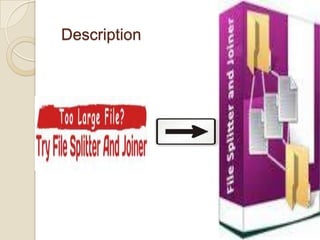
Description
Modules
 Segmentation: module basically deals with
segmenting the original file into the number of
segments based on the size specified for each
segment.
 File Splitter Module: It is mainly used to split the
given files into number of segments.
 They are two ways of splitting.
 Based on the size and the number of parts file
should split.
 While splitting the file we should use the option
deleting the source file.
 File Joining Module: It is used to join the files
which are splitted into the segments in the above
module.
SDLC model
 We use water fall model and prototype model.
 Waterfall model states that the phases (analysis,
design, and coding, testing, support) are
systematized in a linear order and one phase
output given to the next phase input.
 In the model some advantages and disadvantages
are there.
 This model is very easy to use and implement.
 Each phase is completed at a time and processed.
 This model has high risks.
 If the requirements are gathered are inaccurate
then the final product is inaccurate and the error is
known in the final phase of the model. Any sort of
errors that cannot be detected in any previous
phase.
Technical Requirements
 Software Requirements
 Operating Systems : Windows 2003 Server /
Windows XP.
 MS- VS – 2005.
 C#.NET 2.0.
 Hardware Requirements:
 Pentium 4 with 3GHz.
 RAM: 2 GB.
 Hard Disk: 20 GB.
SOFTWARE DESIGN
 The design phase begins with the requirements
specification for the software to be developed.
 The design process for software system has two
levels.
 System Design: In the system design the
focus on the deciding which modules are needed
for the system, the specification of these modules
and how these modules should be interconnected.
 Detailed Design: In the detailed design the
interconnection of the modules or how the
specifications of the modules can be satisfied is
decided.
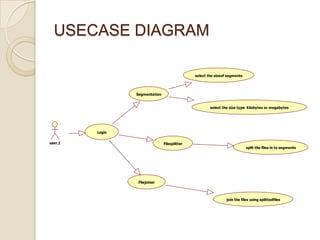
USECASE DIAGRAM
user,1
Login
Segmentation
Filesplitter
Filejoiner
select the sizeof segments
select the size type kilobytes or megabytes
split the files in to segments
join the files using splittedfiles
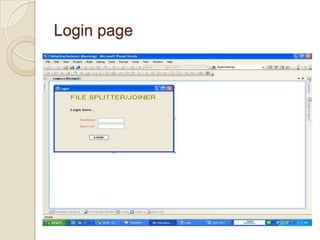
Login page
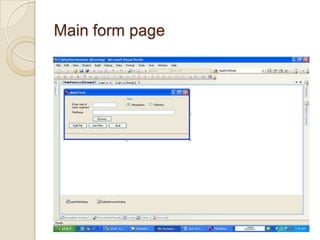
Main form page
Testing
 Testing is the process of executing a program with
the intent of finding an error.
 There of basically two types of testing approaches.
 Black-Box testing – The specified function that a
product has been designed to perform, tests
can be conducted that demonstrate each
function is fully operated.
 White-Box testing – knowing the internal
workings of the product ,tests can be
conducted to ensure that the internal operation
of the product performs according to
specifications and all internal components have
been adequately exercised.
 They are two test cases.
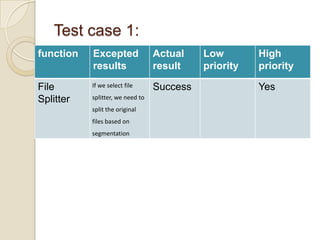
Test case 1:
function Excepted
results
Actual
result
Low
priority
High
priority
File
Splitter
If we select file
splitter, we need to
split the original
files based on
segmentation
Success Yes
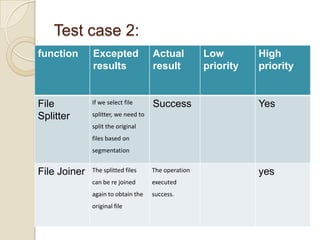
Test case 2:
function Excepted
results
Actual
result
Low
priority
High
priority
File
Splitter
If we select file
splitter, we need to
split the original
files based on
segmentation
Success Yes
File Joiner The splitted files
can be re joined
again to obtain the
original file
The operation
executed
success.
yes
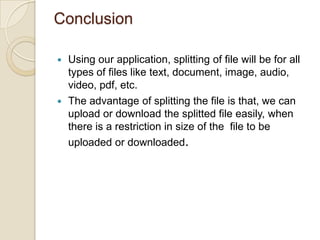
Conclusion
 Using our application, splitting of file will be for all
types of files like text, document, image, audio,
video, pdf, etc.
 The advantage of splitting the file is that, we can
upload or download the splitted file easily, when
there is a restriction in size of the file to be
uploaded or downloaded.
your query’s please…….
File splitter and joiner

File splitter and joiner

  • 1.
    File splitter andjoiner Rajesh 09JK1A0514
  • 2.
    Introduction • File splitterbasically used to split the large files which are not possible to upload or download. • Split the files types such as audio, video, text, rar, we can easily uploaded or downloaded . • The main aim of the project is to design a software for splitting of any type of files into segments and reassembling them. • Splitting the larger files into smaller splitted files, which can easily be uploaded or downloaded. • The application is more user friendly.
  • 3.
  • 4.
    Modules  Segmentation: modulebasically deals with segmenting the original file into the number of segments based on the size specified for each segment.  File Splitter Module: It is mainly used to split the given files into number of segments.  They are two ways of splitting.  Based on the size and the number of parts file should split.  While splitting the file we should use the option deleting the source file.  File Joining Module: It is used to join the files which are splitted into the segments in the above module.
  • 5.
    SDLC model  Weuse water fall model and prototype model.  Waterfall model states that the phases (analysis, design, and coding, testing, support) are systematized in a linear order and one phase output given to the next phase input.  In the model some advantages and disadvantages are there.  This model is very easy to use and implement.  Each phase is completed at a time and processed.  This model has high risks.  If the requirements are gathered are inaccurate then the final product is inaccurate and the error is known in the final phase of the model. Any sort of errors that cannot be detected in any previous phase.
  • 6.
    Technical Requirements  SoftwareRequirements  Operating Systems : Windows 2003 Server / Windows XP.  MS- VS – 2005.  C#.NET 2.0.  Hardware Requirements:  Pentium 4 with 3GHz.  RAM: 2 GB.  Hard Disk: 20 GB.
  • 7.
    SOFTWARE DESIGN  Thedesign phase begins with the requirements specification for the software to be developed.  The design process for software system has two levels.  System Design: In the system design the focus on the deciding which modules are needed for the system, the specification of these modules and how these modules should be interconnected.  Detailed Design: In the detailed design the interconnection of the modules or how the specifications of the modules can be satisfied is decided.
  • 8.
    USECASE DIAGRAM user,1 Login Segmentation Filesplitter Filejoiner select thesizeof segments select the size type kilobytes or megabytes split the files in to segments join the files using splittedfiles
  • 9.
  • 10.
  • 11.
    Testing  Testing isthe process of executing a program with the intent of finding an error.  There of basically two types of testing approaches.  Black-Box testing – The specified function that a product has been designed to perform, tests can be conducted that demonstrate each function is fully operated.  White-Box testing – knowing the internal workings of the product ,tests can be conducted to ensure that the internal operation of the product performs according to specifications and all internal components have been adequately exercised.  They are two test cases.
  • 12.
    Test case 1: functionExcepted results Actual result Low priority High priority File Splitter If we select file splitter, we need to split the original files based on segmentation Success Yes
  • 13.
    Test case 2: functionExcepted results Actual result Low priority High priority File Splitter If we select file splitter, we need to split the original files based on segmentation Success Yes File Joiner The splitted files can be re joined again to obtain the original file The operation executed success. yes
  • 14.
    Conclusion  Using ourapplication, splitting of file will be for all types of files like text, document, image, audio, video, pdf, etc.  The advantage of splitting the file is that, we can upload or download the splitted file easily, when there is a restriction in size of the file to be uploaded or downloaded.
  • 15.