PVR WEB APPLICATION
A PROJECT REPORT
in Partial Fulfillment of Requirements for the Degree
of
Bachelor of Technology
in
COMPUTER SCIENCE & ENGINEERING
Submitted by
NAME OF THE CANDIDATE(S)
Isha Ahuja (1313210038)
GREATER NOIDA INSTITUTE OF TECHNOLOGY,GR. NOIDA
Dr. A.P.J. Abdul Kalam TechnicalUniversity, Uttar Pradesh, Lucknow (2013-
2017)
INDEX
 Projectintroduction.
 Objective.
 Problem statement.
 Problem definition.
 System Analysis.
 Identification of Need.
 System Analysis phase.
 Preliminary Evaluation.
 Summary of finding recommendation.
 Feasibility Consideration.
 ProjectPlanning.
 ProjectScheduling.
 SRS.
 Software ProcessModel.
 ProjectModule.
 Data Structure.
 Testing.
 Bibliography.
 Future scope and further enhancement of the project.
ABOUT THE PROJECT
Project title: PVR WEB APPLICATION
Statement of project:
 This project is aimed to provide the customers facility to book
tickets for cinema halls online,through which they can booktickets
anytime,anywhere.
 E-ticket system is basically made for providing the customer an
anytime and anywhere service for booking the seat in the cinema
hall and to gather information about the movies online. The user
can easily be able to know about the movies released and then
make the choice.
 In this project, we will illustrate our system by providing
DFD(Data FLOW Diagrams) on some functions. And we will also
provide some process description and data dictionary.
 Admin can use the system to insert and delete data (e.g. film
description, time table) which will update the webpage (webpage
are dynamic page, changing according to the data in database).
Also, admin can check the statistic information from the system.
OBJECTIVE OF THE PROJECT
 The main purpose of our online ticket booking system is to provide
another way for the customer to buy cinema ticket. It is an automatic
system.
 After inserting the data to database, staff need not todue with the
order receive through the system. In fact, there is similar system on
the internet, but there is no refund method found in the existing
system.
 This system is basically aimed to provide the customer the
complete information of the movie, according to which the
customer can book the tickets and the refund facility provides more
flexibility to the system.
 The goals of our system are:
1 To provide a anytime anyplace service for the customer
2 To minimize the number of staff at the ticket box
3 To promote the film on the internet
4 To increase the profit
To obtain statistic information from the booking record
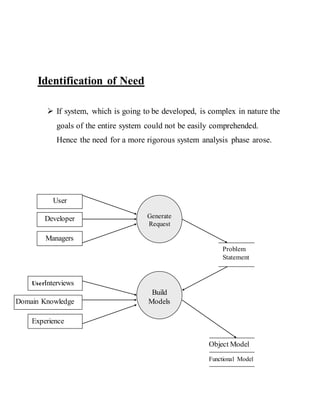
Identification of Need
 If system, which is going to be developed, is complex in nature the
goals of the entire system could not be easily comprehended.
Hence the need for a more rigorous system analysis phase arose.
Generate
Request
Build
Models
Developer
Managers
Problem
Statement
UserInterviews
Experience
User
Functional Model
Object Model
Dom Domain Knowledge
Figure 1 :System Analysis Phase
Problem Analysis
 The basic aim of problem analysis is to obtain clear understanding
of the needs of the clients and the users, what exactly is desired
from the software, and what the constraints on the solution are.
Analysis leads to the actual specification.
Problem Analysis Approaches
 There are three basic approaches to problem analysis.
1. Informal Approach.
2. Conceptual modeling-based Approach
3. Prototyping Approach.
 In this project we use Conceptual modeling-based Approach to
understand the exact requirement of the organization
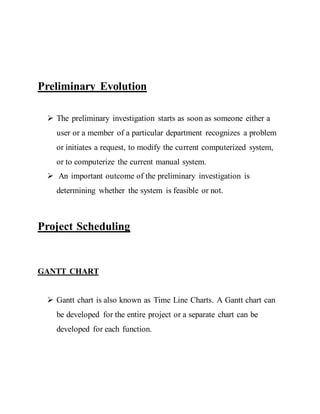
Preliminary Evolution
 The preliminary investigation starts as soon as someone either a
user or a member of a particular department recognizes a problem
or initiates a request, to modify the current computerized system,
or to computerize the current manual system.
 An important outcome of the preliminary investigation is
determining whether the system is feasible or not.
Project Scheduling
GANTT CHART
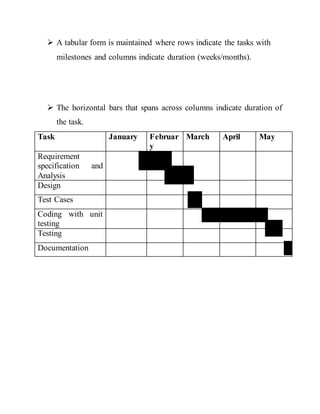
 Gantt chart is also known as Time Line Charts. A Gantt chart can
be developed for the entire project or a separate chart can be
developed for each function.
 A tabular form is maintained where rows indicate the tasks with
milestones and columns indicate duration (weeks/months).
 The horizontal bars that spans across columns indicate duration of
the task.
Task January Februar
y
March April May
Requirement
specification and
Analysis
Design
Test Cases
Coding with unit
testing
Testing
Documentation
Administrator section:
 This section can be accessed by providing administrator password.
In this section the administrator can save the information related to
movie,seats,booking,payment etc.
 In this section the administrator can edit the information related to
movie,seats,booking,payment etc.
Customer section:
 Customer can view the movie rating which will help them to
choose the movie.
 Customer can book the movie tickets by selecting the seats of
his/her choice.
 Customer can pay for tickets online by credit card.
Non Functional Requirements :
 It consists of following parameters :-
Reliability: The system will consistently perform its intended
function.
For eg. The important information must be validated.
Efficiency: Unnecessary data will not be transmitted on the network
and database server will be properly connected.
Reusability:The system can be reused in any organization or site of
the same group, by defining the organization master definition under
software license agreement.
Integrity : Only System Administrator has rights to access the
database, not every user can access all the information. Each user will be
having rights to access the modules.
Used Tools AndPlateform
Software Specification:
Front-end Tool: - Microsoft ASP.NET 2.0
 User friendly
 Low Cost Solution
 GUI feature
 Better designing aspects
Back-end Tool: - Microsoft SQL Server 2005
 Security
 Portability
 Quality
Platform
Windows platform like: 2000 professional, XP & Vista
Hardware Specification:
 Intel Pentium and Celeron class processor
 Processor Speed – 1.2 GHz or above
 RAM - 512 MB
 HDD - 40 GB
 Monitor-14”SVGA
 Printer –Laser Printer
 Mouse- Normal
Keyboard- Normal
SOFTWARE PROCESS MODEL
Prototyping:
 In this model we develop a working prototype with the available
requirement details and get feedback of the customer for the actual
requirement of the product to develop the product.
 Prototype is the trimmed version of the actual product with limited
features and functionality and with low level of reliability.
 This was model followed while developing Production and
Planning.
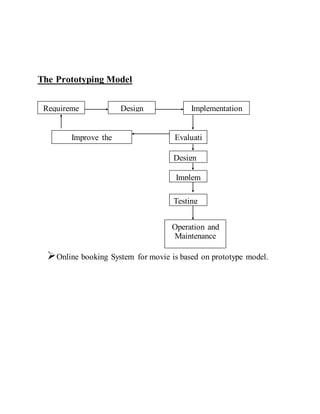
The Prototyping Model
Online booking System for movie is based on prototype model.
Requireme
nt
Design Implementation
Evaluati
on
Improve the
Specification
Design
Implem
ent
Testing
Operation and
Maintenance
Project Modules
Login Module
This module is for both type of users(customers and admin).In this
module according to the type of user(customer or admin) the further
links and operations will be provided.
Customer Module
 As soon as a visitor registers himself as a customer,the customer
can now book the movie tickets and pay for them online.
Hall Module
 This module deals with the information about the hall. There are
several multiplexes and each of them has 4 halls and according
to the vacancy of seats in the hall the booking takes place.
Booking Module
 In this module movie ticket is booked for a customer. This
module contains all the information related to booking. As soon
as the customer request is complete, all the booking details are
displayed to him.
Payment Module
 This is the most important module because it deals with the
payment of the tickets booked in the booking module. The
customer can pay for the tickets before the show by cash
payment and if he wants to pay online, he can pay for the tickets
by credit card.
System Design
 The design of the system is the most critical factor affecting the
quality of the software; it has major impact on the later phases,
particularly testing and maintenance. The output of this phase is
the design document. This document is similar to blueprint or
plan for the solution.
 The design activity is often divided into two phases: -
System design:
 Aims to identify the modules that should be in the system, the
specifications of these modules and how they interact with each
other to produce the desired results.
 At the end of system design all the major data structures, file
formats and the major modules in the system and their
specifications are decided.
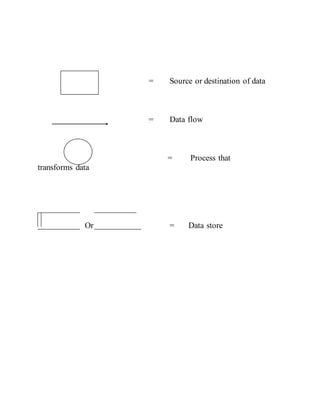
= Source or destination of data
= Data flow
= Process that
transforms data
Or = Data store
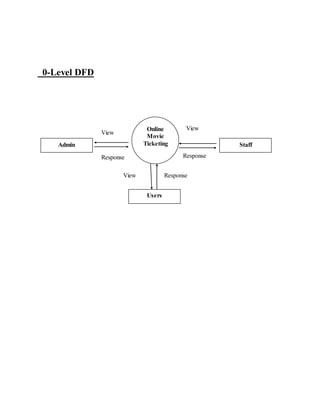
0-Level DFD
Admin Staff
Users
Online
Movie
Ticketing
View
Response
View
View Response
Response
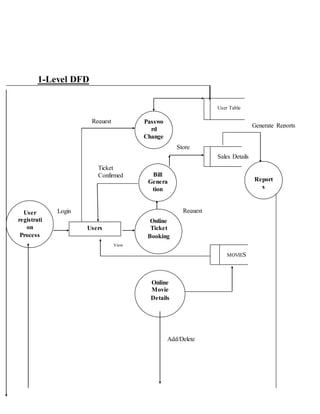
1-Level DFD
View
Report
s
Bill
Genera
tion
Online
Movie
Details
User
registrati
on
Process
Passwo
rd
Change
Users
Online
Ticket
Booking
MOVIES
Sales Details
User Table
Add/Delete
Request
Request
View
Login
Ticket
Confirmed
Generate Reports
Store
FLOW CHART:
START
Input details
of all users
If user
is
rating
visitor
booking
customer
staff
Input
movie
details
Process
detail
Input
paymen
t detail
If
payment
mode is
cash
Cash detail
Payment info
paypal
Credit card info
Credit
card
Booking
completed
STOP
Admin
ViewView
View
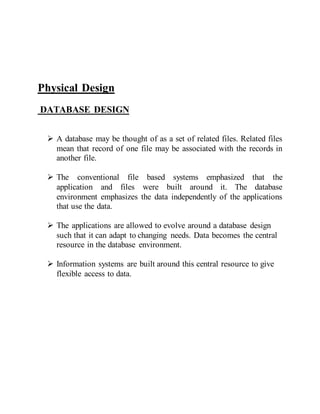
Physical Design
DATABASE DESIGN
 A database may be thought of as a set of related files. Related files
mean that record of one file may be associated with the records in
another file.
 The conventional file based systems emphasized that the
application and files were built around it. The database
environment emphasizes the data independently of the applications
that use the data.
 The applications are allowed to evolve around a database design
such that it can adapt to changing needs. Data becomes the central
resource in the database environment.
 Information systems are built around this central resource to give
flexible access to data.
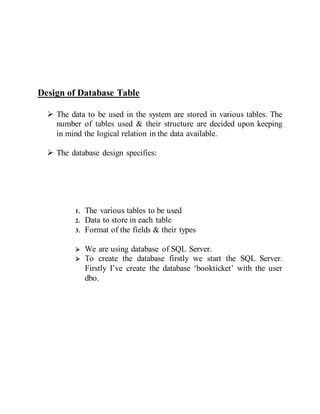
Design of Database Table
 The data to be used in the system are stored in various tables. The
number of tables used & their structure are decided upon keeping
in mind the logical relation in the data available.
 The database design specifies:
1. The various tables to be used
2. Data to store in each table
3. Format of the fields & their types
 We are using database of SQL Server.
 To create the database firstly we start the SQL Server.
Firstly I’ve create the database ‘bookticket’ with the user
dbo.
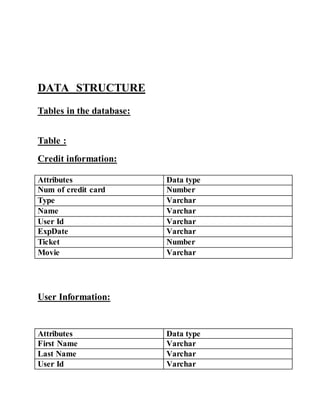
DATA STRUCTURE
Tables in the database:
Table :
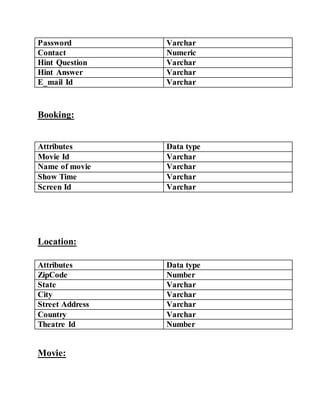
Credit information:
Attributes Data type
Num of credit card Number
Type Varchar
Name Varchar
User Id Varchar
ExpDate Varchar
Ticket Number
Movie Varchar
User Information:
Attributes Data type
First Name Varchar
Last Name Varchar
User Id Varchar
Password Varchar
Contact Numeric
Hint Question Varchar
Hint Answer Varchar
E_mail Id Varchar
Booking:
Attributes Data type
Movie Id Varchar
Name of movie Varchar
Show Time Varchar
Screen Id Varchar
Location:
Attributes Data type
ZipCode Number
State Varchar
City Varchar
Street Address Varchar
Country Varchar
Theatre Id Number
Movie:
Attributes Data type
Movie Id Varchar
Name of movie Varchar
Detail Varchar
Screen:
Attributes Data type
Movie Id Varchar
Screen Id Varchar
Theatre Id Varchar
Theatre:
Attributes Data type
Theatre Id Varchar
Number of screen Number
Name of theatre Varchar
Show time:
Attributes Data type
Movie Id Varchar
Screen Id Varchar
Theatre Id Varchar
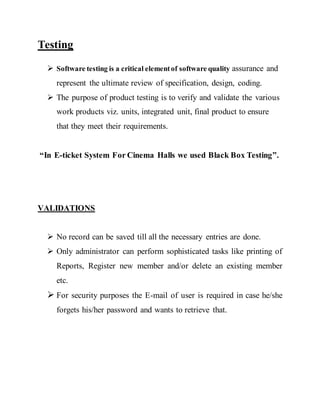
Testing
 Software testing is a critical elementof software quality assurance and
represent the ultimate review of specification, design, coding.
 The purpose of product testing is to verify and validate the various
work products viz. units, integrated unit, final product to ensure
that they meet their requirements.
“In E-ticket System For Cinema Halls we used Black Box Testing”.
VALIDATIONS
 No record can be saved till all the necessary entries are done.
 Only administrator can perform sophisticated tasks like printing of
Reports, Register new member and/or delete an existing member
etc.
 For security purposes the E-mail of user is required in case he/she
forgets his/her password and wants to retrieve that.
System Security Measures
 Security prompting the user for a userid and password in our
application is a potential security threat. So credential
information is transferred from the browser to server are
encrypted.
 Cookies are an easy and useful way to keep user-specific
information available. However, because cookies are sent to the
browser's computer, they are vulnerable to spoofing or other
malicious use. So we follow these guidelines:
 Do not store any critical information in cookies. For example,
do not store a user's password in a cookie, even temporarily.
 Avoid permanent cookies if possible. Consider encrypting
information in cookies. Set expiration dates on cookies to the
shortest practical time we can.
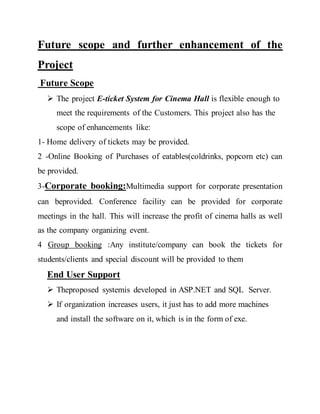
Future scope and further enhancement of the
Project
Future Scope
 The project E-ticket System for Cinema Hall is flexible enough to
meet the requirements of the Customers. This project also has the
scope of enhancements like:
1- Home delivery of tickets may be provided.
2 -Online Booking of Purchases of eatables(coldrinks, popcorn etc) can
be provided.
3-Corporate booking:Multimedia support for corporate presentation
can beprovided. Conference facility can be provided for corporate
meetings in the hall. This will increase the profit of cinema halls as well
as the company organizing event.
4 Group booking :Any institute/company can book the tickets for
students/clients and special discount will be provided to them
End User Support
 Theproposed systemis developed in ASP.NET and SQL Server.
 If organization increases users, it just has to add more machines
and install the software on it, which is in the form of exe.
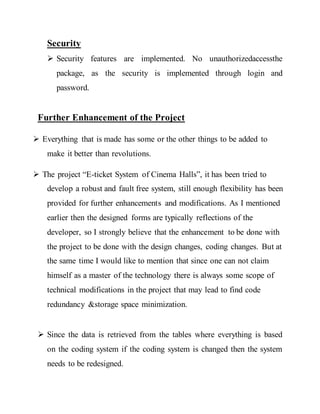
Security
 Security features are implemented. No unauthorizedaccessthe
package, as the security is implemented through login and
password.
Further Enhancement of the Project
 Everything that is made has some or the other things to be added to
make it better than revolutions.
 The project “E-ticket System of Cinema Halls”, it has been tried to
develop a robust and fault free system, still enough flexibility has been
provided for further enhancements and modifications. As I mentioned
earlier then the designed forms are typically reflections of the
developer, so I strongly believe that the enhancement to be done with
the project to be done with the design changes, coding changes. But at
the same time I would like to mention that since one can not claim
himself as a master of the technology there is always some scope of
technical modifications in the project that may lead to find code
redundancy &storage space minimization.
 Since the data is retrieved from the tables where everything is based
on the coding system if the coding system is changed then the system
needs to be redesigned.
BIBLIOGRAPHY
 WWW.WIKIPEDIA.COM
 WWW.BCCRESEARCH.COM
 WWW.FLIPCROP.COM
Books
 Programming in C#,byE.Balagurusamy.
 Database System Concepts, by Korth.
 ASP.Net 2.0 by Blackbook
 Software Engineering by Yogesh Singh and K.K Agarwal
Onlinemovieticketbooking 120215060739-phpapp02

Onlinemovieticketbooking 120215060739-phpapp02

  • 1.
    PVR WEB APPLICATION APROJECT REPORT in Partial Fulfillment of Requirements for the Degree of Bachelor of Technology in COMPUTER SCIENCE & ENGINEERING Submitted by NAME OF THE CANDIDATE(S) Isha Ahuja (1313210038) GREATER NOIDA INSTITUTE OF TECHNOLOGY,GR. NOIDA Dr. A.P.J. Abdul Kalam TechnicalUniversity, Uttar Pradesh, Lucknow (2013- 2017)
  • 2.
    INDEX  Projectintroduction.  Objective. Problem statement.  Problem definition.  System Analysis.  Identification of Need.  System Analysis phase.  Preliminary Evaluation.  Summary of finding recommendation.  Feasibility Consideration.  ProjectPlanning.  ProjectScheduling.  SRS.  Software ProcessModel.  ProjectModule.  Data Structure.  Testing.  Bibliography.  Future scope and further enhancement of the project.
  • 3.
    ABOUT THE PROJECT Projecttitle: PVR WEB APPLICATION Statement of project:  This project is aimed to provide the customers facility to book tickets for cinema halls online,through which they can booktickets anytime,anywhere.  E-ticket system is basically made for providing the customer an anytime and anywhere service for booking the seat in the cinema hall and to gather information about the movies online. The user can easily be able to know about the movies released and then make the choice.  In this project, we will illustrate our system by providing DFD(Data FLOW Diagrams) on some functions. And we will also provide some process description and data dictionary.  Admin can use the system to insert and delete data (e.g. film description, time table) which will update the webpage (webpage are dynamic page, changing according to the data in database). Also, admin can check the statistic information from the system.
  • 4.
    OBJECTIVE OF THEPROJECT  The main purpose of our online ticket booking system is to provide another way for the customer to buy cinema ticket. It is an automatic system.  After inserting the data to database, staff need not todue with the order receive through the system. In fact, there is similar system on the internet, but there is no refund method found in the existing system.  This system is basically aimed to provide the customer the complete information of the movie, according to which the customer can book the tickets and the refund facility provides more flexibility to the system.  The goals of our system are: 1 To provide a anytime anyplace service for the customer 2 To minimize the number of staff at the ticket box 3 To promote the film on the internet 4 To increase the profit To obtain statistic information from the booking record
  • 5.
    Identification of Need If system, which is going to be developed, is complex in nature the goals of the entire system could not be easily comprehended. Hence the need for a more rigorous system analysis phase arose. Generate Request Build Models Developer Managers Problem Statement UserInterviews Experience User Functional Model Object Model Dom Domain Knowledge
  • 6.
    Figure 1 :SystemAnalysis Phase Problem Analysis  The basic aim of problem analysis is to obtain clear understanding of the needs of the clients and the users, what exactly is desired from the software, and what the constraints on the solution are. Analysis leads to the actual specification. Problem Analysis Approaches  There are three basic approaches to problem analysis. 1. Informal Approach. 2. Conceptual modeling-based Approach 3. Prototyping Approach.  In this project we use Conceptual modeling-based Approach to understand the exact requirement of the organization
  • 7.
    Preliminary Evolution  Thepreliminary investigation starts as soon as someone either a user or a member of a particular department recognizes a problem or initiates a request, to modify the current computerized system, or to computerize the current manual system.  An important outcome of the preliminary investigation is determining whether the system is feasible or not. Project Scheduling GANTT CHART  Gantt chart is also known as Time Line Charts. A Gantt chart can be developed for the entire project or a separate chart can be developed for each function.
  • 8.
     A tabularform is maintained where rows indicate the tasks with milestones and columns indicate duration (weeks/months).  The horizontal bars that spans across columns indicate duration of the task. Task January Februar y March April May Requirement specification and Analysis Design Test Cases Coding with unit testing Testing Documentation
  • 9.
    Administrator section:  Thissection can be accessed by providing administrator password. In this section the administrator can save the information related to movie,seats,booking,payment etc.  In this section the administrator can edit the information related to movie,seats,booking,payment etc. Customer section:  Customer can view the movie rating which will help them to choose the movie.  Customer can book the movie tickets by selecting the seats of his/her choice.  Customer can pay for tickets online by credit card.
  • 10.
    Non Functional Requirements:  It consists of following parameters :- Reliability: The system will consistently perform its intended function. For eg. The important information must be validated. Efficiency: Unnecessary data will not be transmitted on the network and database server will be properly connected. Reusability:The system can be reused in any organization or site of the same group, by defining the organization master definition under software license agreement. Integrity : Only System Administrator has rights to access the database, not every user can access all the information. Each user will be having rights to access the modules.
  • 11.
    Used Tools AndPlateform SoftwareSpecification: Front-end Tool: - Microsoft ASP.NET 2.0  User friendly  Low Cost Solution  GUI feature  Better designing aspects Back-end Tool: - Microsoft SQL Server 2005  Security  Portability  Quality Platform Windows platform like: 2000 professional, XP & Vista Hardware Specification:  Intel Pentium and Celeron class processor  Processor Speed – 1.2 GHz or above  RAM - 512 MB  HDD - 40 GB  Monitor-14”SVGA  Printer –Laser Printer
  • 12.
     Mouse- Normal Keyboard-Normal SOFTWARE PROCESS MODEL Prototyping:  In this model we develop a working prototype with the available requirement details and get feedback of the customer for the actual requirement of the product to develop the product.  Prototype is the trimmed version of the actual product with limited features and functionality and with low level of reliability.  This was model followed while developing Production and Planning.
  • 13.
    The Prototyping Model Onlinebooking System for movie is based on prototype model. Requireme nt Design Implementation Evaluati on Improve the Specification Design Implem ent Testing Operation and Maintenance
  • 14.
    Project Modules Login Module Thismodule is for both type of users(customers and admin).In this module according to the type of user(customer or admin) the further links and operations will be provided. Customer Module  As soon as a visitor registers himself as a customer,the customer can now book the movie tickets and pay for them online. Hall Module  This module deals with the information about the hall. There are several multiplexes and each of them has 4 halls and according to the vacancy of seats in the hall the booking takes place. Booking Module  In this module movie ticket is booked for a customer. This module contains all the information related to booking. As soon as the customer request is complete, all the booking details are displayed to him. Payment Module  This is the most important module because it deals with the payment of the tickets booked in the booking module. The customer can pay for the tickets before the show by cash
  • 15.
    payment and ifhe wants to pay online, he can pay for the tickets by credit card. System Design  The design of the system is the most critical factor affecting the quality of the software; it has major impact on the later phases, particularly testing and maintenance. The output of this phase is the design document. This document is similar to blueprint or plan for the solution.  The design activity is often divided into two phases: - System design:  Aims to identify the modules that should be in the system, the specifications of these modules and how they interact with each other to produce the desired results.  At the end of system design all the major data structures, file formats and the major modules in the system and their specifications are decided.
  • 16.
    = Source ordestination of data = Data flow = Process that transforms data Or = Data store
  • 17.
  • 18.
  • 19.
    FLOW CHART: START Input details ofall users If user is rating visitor booking customer staff Input movie details Process detail Input paymen t detail If payment mode is cash Cash detail Payment info paypal Credit card info Credit card Booking completed STOP Admin ViewView View
  • 20.
    Physical Design DATABASE DESIGN A database may be thought of as a set of related files. Related files mean that record of one file may be associated with the records in another file.  The conventional file based systems emphasized that the application and files were built around it. The database environment emphasizes the data independently of the applications that use the data.  The applications are allowed to evolve around a database design such that it can adapt to changing needs. Data becomes the central resource in the database environment.  Information systems are built around this central resource to give flexible access to data.
  • 21.
    Design of DatabaseTable  The data to be used in the system are stored in various tables. The number of tables used & their structure are decided upon keeping in mind the logical relation in the data available.  The database design specifies: 1. The various tables to be used 2. Data to store in each table 3. Format of the fields & their types  We are using database of SQL Server.  To create the database firstly we start the SQL Server. Firstly I’ve create the database ‘bookticket’ with the user dbo.
  • 22.
    DATA STRUCTURE Tables inthe database: Table : Credit information: Attributes Data type Num of credit card Number Type Varchar Name Varchar User Id Varchar ExpDate Varchar Ticket Number Movie Varchar User Information: Attributes Data type First Name Varchar Last Name Varchar User Id Varchar
  • 23.
    Password Varchar Contact Numeric HintQuestion Varchar Hint Answer Varchar E_mail Id Varchar Booking: Attributes Data type Movie Id Varchar Name of movie Varchar Show Time Varchar Screen Id Varchar Location: Attributes Data type ZipCode Number State Varchar City Varchar Street Address Varchar Country Varchar Theatre Id Number Movie:
  • 24.
    Attributes Data type MovieId Varchar Name of movie Varchar Detail Varchar Screen: Attributes Data type Movie Id Varchar Screen Id Varchar Theatre Id Varchar Theatre: Attributes Data type Theatre Id Varchar Number of screen Number Name of theatre Varchar Show time: Attributes Data type Movie Id Varchar Screen Id Varchar Theatre Id Varchar
  • 25.
    Testing  Software testingis a critical elementof software quality assurance and represent the ultimate review of specification, design, coding.  The purpose of product testing is to verify and validate the various work products viz. units, integrated unit, final product to ensure that they meet their requirements. “In E-ticket System For Cinema Halls we used Black Box Testing”. VALIDATIONS  No record can be saved till all the necessary entries are done.  Only administrator can perform sophisticated tasks like printing of Reports, Register new member and/or delete an existing member etc.  For security purposes the E-mail of user is required in case he/she forgets his/her password and wants to retrieve that.
  • 26.
    System Security Measures Security prompting the user for a userid and password in our application is a potential security threat. So credential information is transferred from the browser to server are encrypted.  Cookies are an easy and useful way to keep user-specific information available. However, because cookies are sent to the browser's computer, they are vulnerable to spoofing or other malicious use. So we follow these guidelines:  Do not store any critical information in cookies. For example, do not store a user's password in a cookie, even temporarily.  Avoid permanent cookies if possible. Consider encrypting information in cookies. Set expiration dates on cookies to the shortest practical time we can.
  • 27.
    Future scope andfurther enhancement of the Project Future Scope  The project E-ticket System for Cinema Hall is flexible enough to meet the requirements of the Customers. This project also has the scope of enhancements like: 1- Home delivery of tickets may be provided. 2 -Online Booking of Purchases of eatables(coldrinks, popcorn etc) can be provided. 3-Corporate booking:Multimedia support for corporate presentation can beprovided. Conference facility can be provided for corporate meetings in the hall. This will increase the profit of cinema halls as well as the company organizing event. 4 Group booking :Any institute/company can book the tickets for students/clients and special discount will be provided to them End User Support  Theproposed systemis developed in ASP.NET and SQL Server.  If organization increases users, it just has to add more machines and install the software on it, which is in the form of exe.
  • 28.
    Security  Security featuresare implemented. No unauthorizedaccessthe package, as the security is implemented through login and password. Further Enhancement of the Project  Everything that is made has some or the other things to be added to make it better than revolutions.  The project “E-ticket System of Cinema Halls”, it has been tried to develop a robust and fault free system, still enough flexibility has been provided for further enhancements and modifications. As I mentioned earlier then the designed forms are typically reflections of the developer, so I strongly believe that the enhancement to be done with the project to be done with the design changes, coding changes. But at the same time I would like to mention that since one can not claim himself as a master of the technology there is always some scope of technical modifications in the project that may lead to find code redundancy &storage space minimization.  Since the data is retrieved from the tables where everything is based on the coding system if the coding system is changed then the system needs to be redesigned.
  • 29.
    BIBLIOGRAPHY  WWW.WIKIPEDIA.COM  WWW.BCCRESEARCH.COM WWW.FLIPCROP.COM Books  Programming in C#,byE.Balagurusamy.  Database System Concepts, by Korth.  ASP.Net 2.0 by Blackbook  Software Engineering by Yogesh Singh and K.K Agarwal