LEARNING
WITH
TECHNOLOGY

Presented by
Mia Passerelli, Jarret Baker, Danielle Tronzo
INTRODUCTION
So many advanced and innovative ways of
reading, learning, and exploring have been
incorporated in today’s classrooms as a
result of the development in technology. In
our presentation, we will explore a variety
technologies and how they are used to
enhance education and learning.
CLASSROOM PC’S
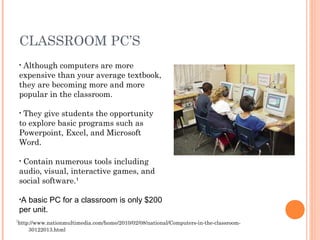
Although computers are more
expensive than your average textbook,
they are becoming more and more
popular in the classroom.
•

They give students the opportunity
to explore basic programs such as
Powerpoint, Excel, and Microsoft
Word.
•

Contain numerous tools including
audio, visual, interactive games, and
social software.1
•

•A

basic PC for a classroom is only $200
per unit.
1

http://www.nationmultimedia.com/home/2010/02/08/national/Computers-in-the-classroom30122013.html
THE INTERNET
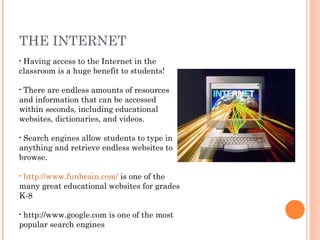
Having access to the Internet in the
classroom is a huge benefit to students!
•

There are endless amounts of resources
and information that can be accessed
within seconds, including educational
websites, dictionaries, and videos.
•

Search engines allow students to type in
anything and retrieve endless websites to
browse.
•

http://www.funbrain.com/ is one of the
many great educational websites for grades
K-8
•

http://www.google.com is one of the most
popular search engines
•
IPADS & TABLETS
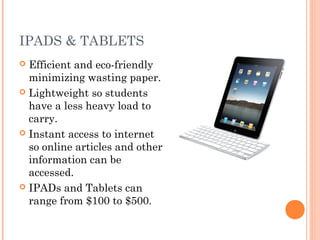
Efficient and eco-friendly
minimizing wasting paper.
 Lightweight so students
have a less heavy load to
carry.
 Instant access to internet
so online articles and other
information can be
accessed.
 IPADs and Tablets can
range from $100 to $500.

Educational Video Games


In the past video games were just a from of entertainment that provided no
educational value. Today they are engineered to not only provide entertainment,
but to hide the process of learning under the fun.



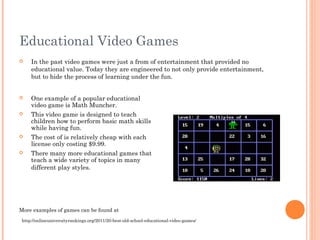
One example of a popular educational
video game is Math Muncher.
This video game is designed to teach
children how to perform basic math skills
while having fun.
The cost of is relatively cheap with each
license only costing $9.99.







There many more educational games that
teach a wide variety of topics in many
different play styles.

More examples of games can be found at
http://onlineuniversityrankings.org/2011/20-best-old-school-educational-video-games/
Simulation Software
Learning in the classroom has always provided information for students, but has
lacked giving students a hands on approach.
Simulation software allows students to experience what they are learning and
relate it to the real world.1






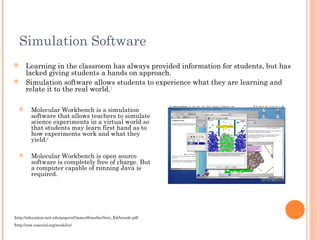
Molecular Workbench is a simulation
software that allows teachers to simulate
science experiments in a virtual world so
that students may learn first hand as to
how experiments work and what they
yield.2



Molecular Workbench is open source
software is completely free of charge. But
a computer capable of running Java is
required.

1

http://education.mit.edu/papers/GamesSimsSocNets_EdArcade.pdf

2

http://mw.concord.org/modeler/
Television







1

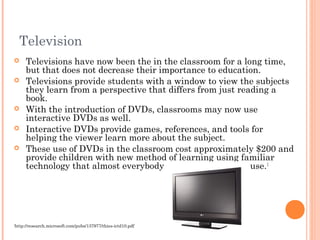
Televisions have now been the in the classroom for a long time,
but that does not decrease their importance to education.
Televisions provide students with a window to view the subjects
they learn from a perspective that differs from just reading a
book.
With the introduction of DVDs, classrooms may now use
interactive DVDs as well.
Interactive DVDs provide games, references, and tools for
helping the viewer learn more about the subject.
These use of DVDs in the classroom cost approximately $200 and
provide children with new method of learning using familiar
technology that almost everybody today knows how to use. 1

http://research.microsoft.com/pubs/137977/thies-ictd10.pdf
Google Plus
Helps the teacher remind students of homework,
tests, and projects.
 Allows the posting of documents online ofr
sutdents to download.
 The program Hangout, a chat room service,
allows the students to interact with other
students and the teacher at home.
 The teachers can post hints and news updates to
help their students with assignments.

Google Plus
Helps the teacher remind students of homework,
tests, and projects.
 Allows the posting of documents online ofr
sutdents to download.
 The program Hangout, a chat room service,
allows the students to interact with other
students and the teacher at home.
 The teachers can post hints and news updates to
help their students with assignments.


Grouppowerpoint

  • 1.
  • 2.
    INTRODUCTION So many advancedand innovative ways of reading, learning, and exploring have been incorporated in today’s classrooms as a result of the development in technology. In our presentation, we will explore a variety technologies and how they are used to enhance education and learning.
  • 3.
    CLASSROOM PC’S Although computersare more expensive than your average textbook, they are becoming more and more popular in the classroom. • They give students the opportunity to explore basic programs such as Powerpoint, Excel, and Microsoft Word. • Contain numerous tools including audio, visual, interactive games, and social software.1 • •A basic PC for a classroom is only $200 per unit. 1 http://www.nationmultimedia.com/home/2010/02/08/national/Computers-in-the-classroom30122013.html
  • 4.
    THE INTERNET Having accessto the Internet in the classroom is a huge benefit to students! • There are endless amounts of resources and information that can be accessed within seconds, including educational websites, dictionaries, and videos. • Search engines allow students to type in anything and retrieve endless websites to browse. • http://www.funbrain.com/ is one of the many great educational websites for grades K-8 • http://www.google.com is one of the most popular search engines •
  • 5.
    IPADS & TABLETS Efficientand eco-friendly minimizing wasting paper.  Lightweight so students have a less heavy load to carry.  Instant access to internet so online articles and other information can be accessed.  IPADs and Tablets can range from $100 to $500. 
  • 6.
    Educational Video Games  Inthe past video games were just a from of entertainment that provided no educational value. Today they are engineered to not only provide entertainment, but to hide the process of learning under the fun.  One example of a popular educational video game is Math Muncher. This video game is designed to teach children how to perform basic math skills while having fun. The cost of is relatively cheap with each license only costing $9.99.    There many more educational games that teach a wide variety of topics in many different play styles. More examples of games can be found at http://onlineuniversityrankings.org/2011/20-best-old-school-educational-video-games/
  • 7.
    Simulation Software Learning inthe classroom has always provided information for students, but has lacked giving students a hands on approach. Simulation software allows students to experience what they are learning and relate it to the real world.1    Molecular Workbench is a simulation software that allows teachers to simulate science experiments in a virtual world so that students may learn first hand as to how experiments work and what they yield.2  Molecular Workbench is open source software is completely free of charge. But a computer capable of running Java is required. 1 http://education.mit.edu/papers/GamesSimsSocNets_EdArcade.pdf 2 http://mw.concord.org/modeler/
  • 8.
    Television      1 Televisions have nowbeen the in the classroom for a long time, but that does not decrease their importance to education. Televisions provide students with a window to view the subjects they learn from a perspective that differs from just reading a book. With the introduction of DVDs, classrooms may now use interactive DVDs as well. Interactive DVDs provide games, references, and tools for helping the viewer learn more about the subject. These use of DVDs in the classroom cost approximately $200 and provide children with new method of learning using familiar technology that almost everybody today knows how to use. 1 http://research.microsoft.com/pubs/137977/thies-ictd10.pdf
  • 9.
    Google Plus Helps theteacher remind students of homework, tests, and projects.  Allows the posting of documents online ofr sutdents to download.  The program Hangout, a chat room service, allows the students to interact with other students and the teacher at home.  The teachers can post hints and news updates to help their students with assignments. 
  • 10.
    Google Plus Helps theteacher remind students of homework, tests, and projects.  Allows the posting of documents online ofr sutdents to download.  The program Hangout, a chat room service, allows the students to interact with other students and the teacher at home.  The teachers can post hints and news updates to help their students with assignments. 