FEASIBILITY ANALYSIS
The feasibility analysis is designed to determine whether or not, given
the project environment, a project will be successful (in virtually any
interpretation of that word). A feasibility analysis may be conducted for
a project with an emphasis on financial viability, environmental
integrity, cultural acceptability, or political practicability. It is a
determination as to the likelihood of success and a description of how
that determination was achieved. The mainly three types of feasibility
analysis like:
▪ Technical feasibility
▪ Operational feasibility
▪ Economic feasibility
• TECHNICAL FEASIILITY: Technical feasibility is about whether the technology
required is available or not and do we need a technical expertise for running it or not.
For developing this project we require,
Operating system: windows XP, windows 2011
Language: C#.NET
Database: MICROSOFT SQL SERVER 2005 EXPRESS EDITION
To run and develop any C#.NET program you need .NET runtime Environment installed on
your system. SQL SERVER EXPRESS EDITION is also easily available on the internet to
download, so the technology used in developing the project are easily available.
• OPERATIONAL FEASIBILITY: This feasibility checks whether the operations are
being performed properly by the software or not, whether the users problems are solved by
the software or not.
To achieve operational feasibility we have databases of the employees with their personal
and general details, their payroll records, their leave records, their probation records and
• ECONOMIC FEASIBILITY: To find this we ask weather finances are available for
implementing the proposed solution. In our website project cost is more as we have used a
licensed version of Microsoft Visual Studio 2008 & SQL SERVER.
•COST ANALYSIS
It is a study of the costs spent on the personnel, products, equipment, etc. associated with
implementing a project, program, service, or other activities. Mainly there are two types of
costs:
•Direct costs
•Indirect costs
• DIRECT COSTS: Those costs that are directly associated with, or attributable to, a specific
activity or department (such as training or tuition fees for a training program, seminar, or conference;
contraceptive product costs; staff salaries and wages; costs of purchased services, etc.). Such budgeted
costs should be clearly identifiable in an activity plan.
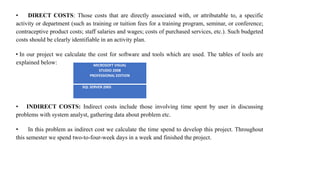
• In our project we calculate the cost for software and tools which are used. The tables of tools are
explained below:
• INDIRECT COSTS: Indirect costs include those involving time spent by user in discussing
problems with system analyst, gathering data about problem etc.
• In this problem as indirect cost we calculate the time spend to develop this project. Throughout
this semester we spend two-to-four-week days in a week and finished the project.
MICROSOFT VISUAL
STUDIO 2008
PROFESSIONAL EDITION
SQL SERVER 2005
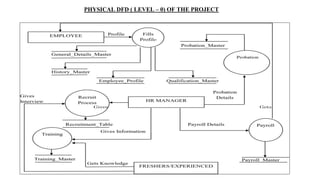
PHYSICAL DFD ( LEVEL – 0) OF THE PROJECT
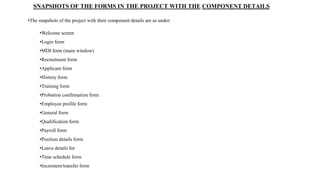
SNAPSHOTS OF THE FORMS IN THE PROJECT WITH THE COMPONENT DETAILS
•The snapshots of the project with their component details are as under:
•Welcome screen
•Login form
•MDI form (main window)
•Recruitment form
•Applicant form
•History form
•Training form
•Probation confirmation form
•Employee profile form
•General form
•Qualification form
•Payroll form
•Position details form
•Leave details for
•Time schedule form
•Increment/transfer form
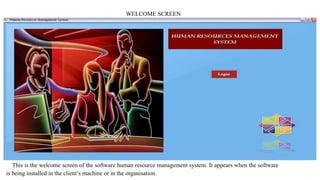
WELCOME SCREEN
This is the welcome screen of the software human resource management system. It appears when the software
is being installed in the client’s machine or in the organisation.
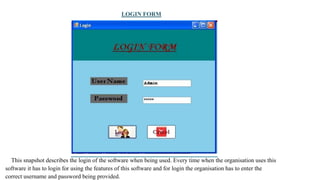
LOGIN FORM
This snapshot describes the login of the software when being used. Every time when the organisation uses this
software it has to login for using the features of this software and for login the organisation has to enter the
correct username and password being provided.
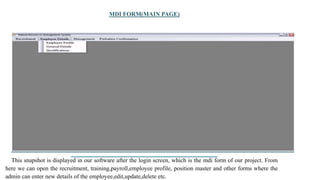
MDI FORM(MAIN PAGE)
This snapshot is displayed in our software after the login screen, which is the mdi form of our project. From
here we can open the recruitment, training,payroll,employee profile, position master and other forms where the
admin can enter new details of the employee,edit,update,delete etc.
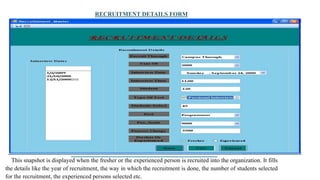
RECRUITMENT DETAILS FORM
This snapshot is displayed when the fresher or the experienced person is recruited into the organization. It fills
the details like the year of recruitment, the way in which the recruitment is done, the number of students selected
for the recruitment, the experienced persons selected etc.
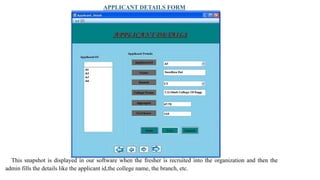
APPLICANT DETAILS FORM
This snapshot is displayed in our software when the fresher is recruited into the organization and then the
admin fills the details like the applicant id,the college name, the branch, etc.
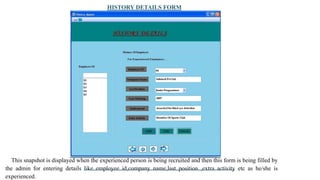
HISTORY DETAILS FORM
This snapshot is displayed when the experienced person is being recruited and then this form is being filled by
the admin for entering details like employee id,company name,last position ,extra activity etc as he/she is
experienced.
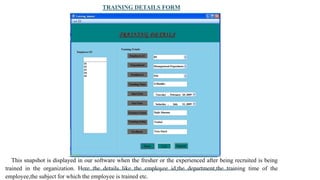
TRAINING DETAILS FORM
This snapshot is displayed in our software when the fresher or the experienced after being recruited is being
trained in the organization. Here the details like the employee id,the department,the training time of the
employee,the subject for which the employee is trained etc.
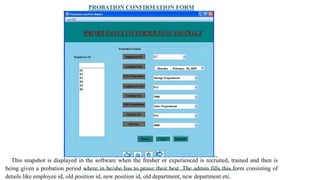
PROBATION CONFIRMATION FORM
This snapshot is displayed in the software when the fresher or experienced is recruited, trained and then is
being given a probation period where in he/she has to prove their best. The admin fills this form consisting of
details like employee id, old position id, new position id, old department, new department etc.
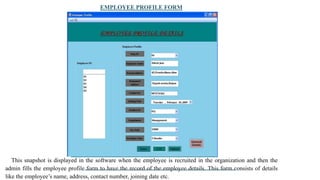
EMPLOYEE PROFILE FORM
This snapshot is displayed in the software when the employee is recruited in the organization and then the
admin fills the employee profile form to have the record of the employee details. This form consists of details
like the employee’s name, address, contact number, joining date etc.
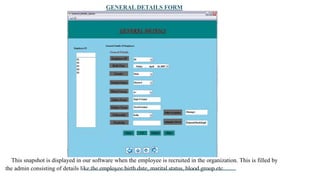
GENERAL DETAILS FORM
This snapshot is displayed in our software when the employee is recruited in the organization. This is filled by
the admin consisting of details like the employee birth date, marital status, blood group etc.
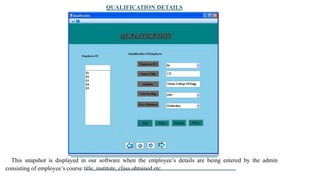
QUALIFICATION DETAILS
This snapshot is displayed in our software when the employee’s details are being entered by the admin
consisting of employee’s course title, institute, class obtained etc.
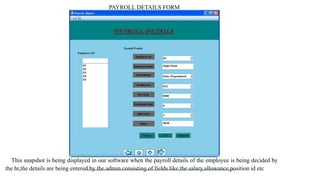
PAYROLL DETAILS FORM
This snapshot is being displayed in our software when the payroll details of the employee is being decided by
the hr,the details are being entered by the admin consisting of fields like the salary,allowance,position id etc
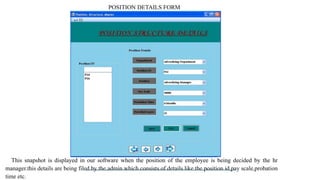
POSITION DETAILS FORM
This snapshot is displayed in our software when the position of the employee is being decided by the hr
manager.this details are being filed by the admin which consists of details like the position id,pay scale,probation
time etc.
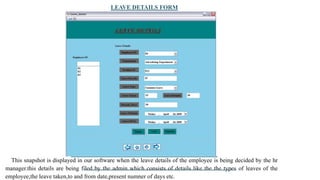
LEAVE DETAILS FORM
This snapshot is displayed in our software when the leave details of the employee is being decided by the hr
manager.this details are being filed by the admin which consists of details like the the types of leaves of the
employee,the leave taken,to and from date,present numner of days etc.
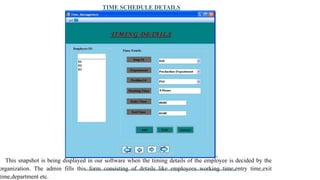
TIME SCHEDULE DETAILS
This snapshot is being displayed in our software when the timing details of the employee is decided by the
organization. The admin fills this form consisting of details like employees working time,entry time,exit
time,department etc.
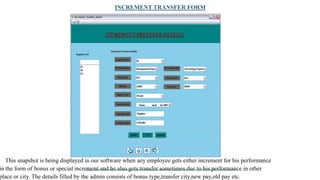
INCREMENT TRANSFER FORM
This snapshot is being displayed in our software when any employee gets either increment for his performance
in the form of bonus or special increment and he also gets transfer sometimes due to his performance in other
place or city. The details filled by the admin consists of bonus type,transfer city,new pay,old pay etc.
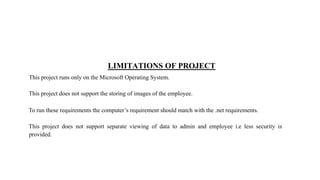
LIMITATIONS OF PROJECT
This project runs only on the Microsoft Operating System.
This project does not support the storing of images of the employee.
To run these requirements the computer’s requirement should match with the .net requirements.
This project does not support separate viewing of data to admin and employee i.e less security is
provided.
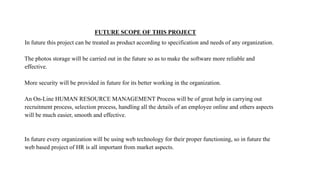
FUTURE SCOPE OF THIS PROJECT
In future this project can be treated as product according to specification and needs of any organization.
The photos storage will be carried out in the future so as to make the software more reliable and
effective.
More security will be provided in future for its better working in the organization.
An On-Line HUMAN RESOURCE MANAGEMENT Process will be of great help in carrying out
recruitment process, selection process, handling all the details of an employee online and others aspects
will be much easier, smooth and effective.
In future every organization will be using web technology for their proper functioning, so in future the
web based project of HR is all important from market aspects.
BIBLIOGRAPHY
www.wikipedia.org
www.webopedia.com
www.silvertouch.com www.baldrige21.com

FEASIBILITY ANALYSIS.pptx

  • 1.
  • 2.
    The feasibility analysisis designed to determine whether or not, given the project environment, a project will be successful (in virtually any interpretation of that word). A feasibility analysis may be conducted for a project with an emphasis on financial viability, environmental integrity, cultural acceptability, or political practicability. It is a determination as to the likelihood of success and a description of how that determination was achieved. The mainly three types of feasibility analysis like:
  • 3.
    ▪ Technical feasibility ▪Operational feasibility ▪ Economic feasibility
  • 4.
    • TECHNICAL FEASIILITY:Technical feasibility is about whether the technology required is available or not and do we need a technical expertise for running it or not. For developing this project we require, Operating system: windows XP, windows 2011 Language: C#.NET Database: MICROSOFT SQL SERVER 2005 EXPRESS EDITION To run and develop any C#.NET program you need .NET runtime Environment installed on your system. SQL SERVER EXPRESS EDITION is also easily available on the internet to download, so the technology used in developing the project are easily available. • OPERATIONAL FEASIBILITY: This feasibility checks whether the operations are being performed properly by the software or not, whether the users problems are solved by the software or not. To achieve operational feasibility we have databases of the employees with their personal and general details, their payroll records, their leave records, their probation records and
  • 5.
    • ECONOMIC FEASIBILITY:To find this we ask weather finances are available for implementing the proposed solution. In our website project cost is more as we have used a licensed version of Microsoft Visual Studio 2008 & SQL SERVER. •COST ANALYSIS It is a study of the costs spent on the personnel, products, equipment, etc. associated with implementing a project, program, service, or other activities. Mainly there are two types of costs: •Direct costs •Indirect costs
  • 6.
    • DIRECT COSTS:Those costs that are directly associated with, or attributable to, a specific activity or department (such as training or tuition fees for a training program, seminar, or conference; contraceptive product costs; staff salaries and wages; costs of purchased services, etc.). Such budgeted costs should be clearly identifiable in an activity plan. • In our project we calculate the cost for software and tools which are used. The tables of tools are explained below: • INDIRECT COSTS: Indirect costs include those involving time spent by user in discussing problems with system analyst, gathering data about problem etc. • In this problem as indirect cost we calculate the time spend to develop this project. Throughout this semester we spend two-to-four-week days in a week and finished the project. MICROSOFT VISUAL STUDIO 2008 PROFESSIONAL EDITION SQL SERVER 2005
  • 7.
    PHYSICAL DFD (LEVEL – 0) OF THE PROJECT
  • 8.
    SNAPSHOTS OF THEFORMS IN THE PROJECT WITH THE COMPONENT DETAILS •The snapshots of the project with their component details are as under: •Welcome screen •Login form •MDI form (main window) •Recruitment form •Applicant form •History form •Training form •Probation confirmation form •Employee profile form •General form •Qualification form •Payroll form •Position details form •Leave details for •Time schedule form •Increment/transfer form
  • 9.
    WELCOME SCREEN This isthe welcome screen of the software human resource management system. It appears when the software is being installed in the client’s machine or in the organisation.
  • 10.
    LOGIN FORM This snapshotdescribes the login of the software when being used. Every time when the organisation uses this software it has to login for using the features of this software and for login the organisation has to enter the correct username and password being provided.
  • 11.
    MDI FORM(MAIN PAGE) Thissnapshot is displayed in our software after the login screen, which is the mdi form of our project. From here we can open the recruitment, training,payroll,employee profile, position master and other forms where the admin can enter new details of the employee,edit,update,delete etc.
  • 12.
    RECRUITMENT DETAILS FORM Thissnapshot is displayed when the fresher or the experienced person is recruited into the organization. It fills the details like the year of recruitment, the way in which the recruitment is done, the number of students selected for the recruitment, the experienced persons selected etc.
  • 13.
    APPLICANT DETAILS FORM Thissnapshot is displayed in our software when the fresher is recruited into the organization and then the admin fills the details like the applicant id,the college name, the branch, etc.
  • 14.
    HISTORY DETAILS FORM Thissnapshot is displayed when the experienced person is being recruited and then this form is being filled by the admin for entering details like employee id,company name,last position ,extra activity etc as he/she is experienced.
  • 15.
    TRAINING DETAILS FORM Thissnapshot is displayed in our software when the fresher or the experienced after being recruited is being trained in the organization. Here the details like the employee id,the department,the training time of the employee,the subject for which the employee is trained etc.
  • 16.
    PROBATION CONFIRMATION FORM Thissnapshot is displayed in the software when the fresher or experienced is recruited, trained and then is being given a probation period where in he/she has to prove their best. The admin fills this form consisting of details like employee id, old position id, new position id, old department, new department etc.
  • 17.
    EMPLOYEE PROFILE FORM Thissnapshot is displayed in the software when the employee is recruited in the organization and then the admin fills the employee profile form to have the record of the employee details. This form consists of details like the employee’s name, address, contact number, joining date etc.
  • 18.
    GENERAL DETAILS FORM Thissnapshot is displayed in our software when the employee is recruited in the organization. This is filled by the admin consisting of details like the employee birth date, marital status, blood group etc.
  • 19.
    QUALIFICATION DETAILS This snapshotis displayed in our software when the employee’s details are being entered by the admin consisting of employee’s course title, institute, class obtained etc.
  • 20.
    PAYROLL DETAILS FORM Thissnapshot is being displayed in our software when the payroll details of the employee is being decided by the hr,the details are being entered by the admin consisting of fields like the salary,allowance,position id etc
  • 21.
    POSITION DETAILS FORM Thissnapshot is displayed in our software when the position of the employee is being decided by the hr manager.this details are being filed by the admin which consists of details like the position id,pay scale,probation time etc.
  • 22.
    LEAVE DETAILS FORM Thissnapshot is displayed in our software when the leave details of the employee is being decided by the hr manager.this details are being filed by the admin which consists of details like the the types of leaves of the employee,the leave taken,to and from date,present numner of days etc.
  • 23.
    TIME SCHEDULE DETAILS Thissnapshot is being displayed in our software when the timing details of the employee is decided by the organization. The admin fills this form consisting of details like employees working time,entry time,exit time,department etc.
  • 24.
    INCREMENT TRANSFER FORM Thissnapshot is being displayed in our software when any employee gets either increment for his performance in the form of bonus or special increment and he also gets transfer sometimes due to his performance in other place or city. The details filled by the admin consists of bonus type,transfer city,new pay,old pay etc.
  • 25.
    LIMITATIONS OF PROJECT Thisproject runs only on the Microsoft Operating System. This project does not support the storing of images of the employee. To run these requirements the computer’s requirement should match with the .net requirements. This project does not support separate viewing of data to admin and employee i.e less security is provided.
  • 26.
    FUTURE SCOPE OFTHIS PROJECT In future this project can be treated as product according to specification and needs of any organization. The photos storage will be carried out in the future so as to make the software more reliable and effective. More security will be provided in future for its better working in the organization. An On-Line HUMAN RESOURCE MANAGEMENT Process will be of great help in carrying out recruitment process, selection process, handling all the details of an employee online and others aspects will be much easier, smooth and effective. In future every organization will be using web technology for their proper functioning, so in future the web based project of HR is all important from market aspects.
  • 27.